 Amber
Amber
- AmberW
- amberw
- Europe/Stockholm
- Yes
- No
 MC-129855
![[Mojang] Agnes Larsson](../../../data/avatars/users/10122.svg)
![[Mojang] Nathan Adams](../../../data/assets/gravatar/dinnerbone.png)
 Normal
![[Mojang] elvendorke](../../../data/avatars/users/81677.png)
![[Mojang] slicedlime](../../../data/assets/gravatar/slicedlime.jpeg)
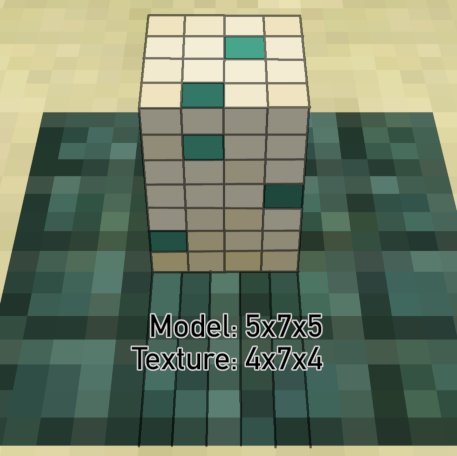
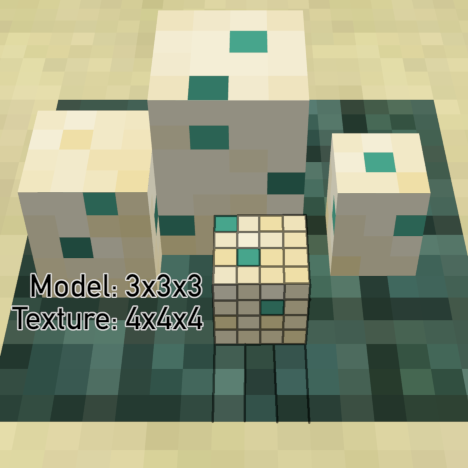

The block model for minecraft:turtle_egg is textured in a way not consistent with other blocks, with the pixels not aligning to the 16x16 grid despite not having any rotation.
The main egg (largest and placed first) is a 5x7x5 "pixel" box but is textured as if it was 4x7x4. This causes the top to be stretched in both directions and the sides to be stretched sideways . The dot markings on the side of the egg are not square!
The 4th egg (shortest) is a4x4x4box but is textured as if it was3x3x3. This causes all sides to be stretched in both directions.
The other two eggs look ok.The block model for minecraft:turtle_egg is textured in a way not consistent with other blocks, with the pixels not aligning to the 16x16 grid despite not having any rotation.
The main egg (largest and placed first) is a 5x7x5 "pixel" box but is textured as if it was 4x7x4. This causes the top to be stretched in both directions and the sides to be stretched sideways . The dot markings on the side of the egg are not square!
The 4th egg (shortest) is a 3x3x3 box but is textured as if it was 4x4x4. This causes all sides to be squished in both directions.
The other two eggs look ok.
Custom dimensions have no way for the player to sleep or set their spawn point. Both beds and respawn anchors explode when you try, no matter the world settings.
Phantoms can spawn in custom dimensions as long as they have skylight, yet beds still explode, meaning there would be no way for a player to stop them from spawning.The only way to make either beds or respawn anchors work is to set the dimension type to the hardcoded presets minecraft:overworld (for beds) or minecraft:the_nether (for anchors). However, only one dimension is allowed to have these (see
MC-184653), so custom dimensions cannot use them. Even if you otherwise replicate the overworld or nether it's impossible to get the expected behavior.Steps to replicate:
1. Download the attached data pack
2. Add it while creating a new world with creative mode3. `/execute in custom:overworld_test run teleport @s ~ ~ ~`
4. Try to use beds/respawn anchors and wait a couple of days to see phantoms spawnCustom dimensions have no way for the player to sleep or set their spawn point. Both beds and respawn anchors explode when you try, no matter the world settings.
Phantoms can spawn in custom dimensions as long as they have skylight, yet beds still explode, meaning there would be no way for a player to stop them from spawning.The only way to make either beds or respawn anchors work is to set the dimension type to the hardcoded presets minecraft:overworld (for beds) or minecraft:the_nether (for anchors). However, only one dimension is allowed to have these (see
MC-184653), so custom dimensions cannot use them. Even if you otherwise replicate the overworld or nether it's impossible to get the expected behavior.Steps to replicate:
1. Download the attached data pack
2. Add it while creating a new world with creative mode
3. /execute in custom:overworld_test run teleport @s ~ ~ ~
4. Try to use beds/respawn anchors and wait a couple of days to see phantoms spawn
In 22w46a and earlier, this command just displays Hello:
/tellraw @a {"translate":"%s%s%4363$s","with":["Hello"]}In 1.19.3-pre1 and later (including rc1) it displays the raw string %s%s%4363$s instead. This is a breaking change that was not announced or mentioned anywhere.
The previous behavior was to treat slots with missing corresponding elements inside "with" as if they have an empty string. Instead, nothing is slotted in at all, not even the "Hello", and it just displays the raw string instead.
Only translations where there are corresponding elements inside "with" for all slots are unaffected, like this one:
/tellraw @a {"translate":"%s%1$s","with":["Hello"]}(Displays HelloHello)
How to reproduce
- Run the following command
/tellraw @a {"translate":"%s%s%4363$s","with":["Hello"]}- Notice that %s%s%4363$s is printed to chat. Expected is that it would print Hello.
Code Analysis
This is caused by a change in the TranslatableContents class in 1.19.3-pre1. The decomposeTemplate method now throws when it finds a replacement index that exceeds the length of "with".
In 22w46a and earlier, this command just displays Hello:
/tellraw @a {"translate":"%s%s%4363$s","with":["Hello"]}In 1.19.3-pre1 and later (including rc1) it displays the raw string %s%s%4363$s instead. This is a breaking change that was not announced or mentioned anywhere.
The previous behavior was to treat slots with missing corresponding elements inside "with" as if they have an empty string. Instead, nothing is slotted in at all, not even the "Hello", and it just displays the raw string instead.
Only translations where there are corresponding elements inside "with" for all slots are unaffected, like this one:
/tellraw @a {"translate":"%s%1$s","with":["Hello"]}(Displays HelloHello)
How to reproduce
- Run the following command
/tellraw @a {"translate":"%s%s%4363$s","with":["Hello"]}- Notice that %s%s%4363$s is printed to chat. Expected is that it would print Hello.
Code Analysis
This is caused by a change in the TranslatableContents class in 1.19.3-pre1. The decomposeTemplate method previously checked the replacement index against the length of "with" before calling getArgument and accepting the return value into the result.
Now getArgument is always called and throws an exception instead when it finds a replacement index that exceeds the length of "with".The decomposeTemplate method now throws
In previous versions this check
In 22w46a and earlier, this command just displays Hello:
/tellraw @a {"translate":"%s%s%4363$s","with":["Hello"]}In 1.19.3-pre1 and later (including rc1) it displays the raw string %s%s%4363$s instead. This is a breaking change that was not announced or mentioned anywhere.
The previous behavior was to treat slots with missing corresponding elements inside "with" as if they have an empty string. Instead, nothing is slotted in at all, not even the "Hello", and it just displays the raw string instead.
Only translations where there are corresponding elements inside "with" for all slots are unaffected, like this one:
/tellraw @a {"translate":"%s%1$s","with":["Hello"]}(Displays HelloHello)
How to reproduce
- Run the following command
/tellraw @a {"translate":"%s%s%4363$s","with":["Hello"]}- Notice that %s%s%4363$s is printed to chat. Expected is that it would print Hello.
Code Analysis
This is caused by a change in the TranslatableContents class in 1.19.3-pre1. The decomposeTemplate method previously checked the replacement index against the length of "with" before calling getArgument and accepting the return value into the result.
Now getArgument is always called and throws an exception instead when it finds a replacement index that exceeds the length of "with".The decompose
Templatemethod now throwsInprevious versions this checkIn 22w46a and earlier, this command just displays Hello:
/tellraw @a {"translate":"%s%s%4363$s","with":["Hello"]}In 1.19.3-pre1 and later (including rc1) it displays the raw string %s%s%4363$s instead. This is a breaking change that was not announced or mentioned anywhere.
The previous behavior was to treat slots with missing corresponding elements inside "with" as if they have an empty string. Instead, nothing is slotted in at all, not even the "Hello", and it just displays the raw string instead.
Only translations where there are corresponding elements inside "with" for all slots are unaffected, like this one:
/tellraw @a {"translate":"%s%1$s","with":["Hello"]}(Displays HelloHello)
How to reproduce
- Run the following command
/tellraw @a {"translate":"%s%s%4363$s","with":["Hello"]}- Notice that %s%s%4363$s is printed to chat. Expected is that it would print Hello.
Code Analysis
This is caused by a change in the TranslatableContents class in 1.19.3-pre1. The decomposeTemplate method previously checked the replacement index against the length of "with" before calling getArgument and accepting the return value into the result.
Now getArgument is always called and throws an exception instead when it performs the same check. The exception gets caught within decompose, which then returns the raw translation string instead of the decomposed one.
When placing a sign with or editing a sign to have JSON text components, advanced text components that require resolving to retrieve and display data do not resolve. This includes selector, score and nbt.
How to reproduce:
/setblock ~ ~ ~ minecraft:birch_sign{front_text:{messages:['{"selector":"@a"}','""','""','""']}}Observed behavior:
The sign shows @a
Expected behavior:
The sign shows names of players in the world
When a command with a macro runs, the resulting command gets cached. If the macro is ran again with the same parameter values it will use the cached command to increase performance. However, it also ignores the required operator permission level when doing so. This could allow someone to run a command that they should not have access to.
For example, a level 4 command (like /jfr, /op or /save-off) can run in a context that should only have operator permission level 2 (like command blocks, functions and lower level operators), as long as it was previously cached.
How to reproduce:
- Create a new creative mode world with the attached data pack activated.
- Copy the following into a command block and activate it:
/function test:jfr {action:"start"}Result: Function fails to run (Correct behavior, the jfr command is too high level)
- Run the exact same command in chat (should succeed).
- Activate the command block again.
Result: Function successfully runs from command block (Incorrect behavior, the permission level of the jfr command is now ignored after being cached)Function contents:
$jfr $(action)
say JFR function ran
How to reproduce (server):
- Create a new creative mode server, op yourself and activate the attached data pack.
- Copy the following into a command block and activate it:
Result: Function fails to run (Correct behavior, the opcommand is too high level)
3. Run the exact same command in chat.
4. Activate the command block again.
Result: Function successfully runs from command block (Incorrect behavior, the permission level of the op command is ignored)When a command with a macro runs, the resulting command gets cached. If the macro is ran again with the same parameter values it will use the cached command to increase performance. However, it also ignores the required operator permission level when doing so. This could allow someone to run a command that they should not have access to.
For example, a level 4 command (like /jfr, /op or /save-off) can run in a context that should only have operator permission level 2 (like command blocks, functions and lower level operators), as long as it was previously cached.
How to reproduce:
- Create a new creative mode world with the attached data pack activated.
- Copy the following into a command block and activate it:
/function test:jfr {action:"start"}Result: Function fails to run (Correct behavior, the jfr command is too high level)
- Run the exact same command in chat (should succeed).
- Activate the command block again.
Result: Function successfully runs from command block (Incorrect behavior, the permission level of the jfr command is now ignored after being cached)Function contents:
$jfr $(action)
say JFR function ran
How to reproduce (server):
- Create a new creative mode server, op yourself and activate the attached data pack.
- Copy the following into a command block and activate it:
/function test:op {name:"Steve"}Result: Function fails to run (Correct behavior, the op command is too high level)
- Run the exact same command in chat (should succeed).
- Activate the command block again.
Result: Function successfully runs from command block (Incorrect behavior, the permission level of the op command is now ignored after being cached)
When a command with a macro runs, the resulting command gets cached. If the macro is ran again with the same parameter values it will use the cached command to increase performance. However, it also ignores the required operator permission level when doing so. This could allow someone to run a command that they should not have access to.
For example, a level 4 command (like /jfr, /op or /save-off) can run in a context that should only have operator permission level 2 (like command blocks, functions and lower level operators), as long as it was previously cached.
How to reproduce:
- Create a new creative mode world with the attached data pack activated.
- Copy the following into a command block and activate it:
/function test:jfr {action:"start"}Result: Function fails to run (Correct behavior, the jfr command is too high level)
- Run the exact same command in chat (should succeed).
- Activate the command block again.
Result: Function successfully runs from command block (Incorrect behavior, the permission level of the jfr command is now ignored after being cached)Function contents:
$jfr $(action)
say JFR function ran
How to reproduce (server):
- Create a new creative mode server, op yourself and activate the attached data pack.
- Copy the following into a command block and activate it:
/function test:op {name:"Steve"}Result: Function fails to run (Correct behavior, the op command is too high level)
- Run the exact same command in chat (should succeed).
- Activate the command block again.
Result: Function successfully runs from command block (Incorrect behavior, the permission level of the op command is now ignored after being cached)When a command with a macro runs, the resulting command gets cached. If the macro is ran again with the same parameter values it will use the cached command to increase performance. However, it also ignores the required operator permission level when doing so. This could allow someone to run a command that they should not have access to.
For example, a level 4 command (like /jfr, /op or /save-off) can run in a context that should only have operator permission level 2 (like command blocks, functions and lower level operators), as long as it was previously cached.
How to reproduce:
1. Create a new creative mode world with the attached data pack activated.
2. Copy the following into a command block and activate it:
/function test:jfr {action:"start"}Result: Function fails to run (Correct behavior, the jfr command is too high level)
3. Run the exact same command in chat (should succeed).
4. Activate the command block again.
Result: Function successfully runs from command block (Incorrect behavior, the permission level of the jfr command is now ignored after being cached)Function contents:
$jfr $(action)
say JFR function ran
How to reproduce (server):
1. Create a new creative mode server, op yourself and activate the attached data pack.
2. Copy the following into a command block and activate it:
/function test:op {name:"Steve"}Result: Function fails to run (Correct behavior, the op command is too high level)
3. Run the exact same command in chat (should succeed).
4. Activate the command block again.
Result: Function successfully runs from command block (Incorrect behavior, the permission level of the op command is now ignored after being cached)Function contents:
$op $(name)
say OP function ran
When a command with a macro runs, the resulting command gets cached. If the macro is ran again with the same parameter values it will use the cached command to increase performance. However, it also ignores the required operator permission level when doing so. This could allow someone to run a command that they should not have access to.
For example, a level 3 or 4 command (like /jfr, /op or /save-off) can run in a context that should only have operator permission level 2 (like command blocks, functions and lower level operators), as long as it was previously cached.
How to reproduce:
1. Create a new creative mode world with the attached data pack activated.
2. Copy the following into a command block and activate it:
/function test:jfr {action:"start"}Result: Function fails to run (Correct behavior, the jfr command is too high level)
3. Run the exact same command in chat (should succeed).
4. Activate the command block again.
Result: Function successfully runs from command block (Incorrect behavior, the permission level of the jfr command is now ignored after being cached)Function contents:
$jfr $(action)
say JFR function ran
How to reproduce (server):
1. Create a new creative mode server, op yourself and activate the attached data pack.
2. Copy the following into a command block and activate it:
/function test:op {name:"Steve"}Result: Function fails to run (Correct behavior, the op command is too high level)
3. Run the exact same command in chat (should succeed).
4. Activate the command block again.
Result: Function successfully runs from command block (Incorrect behavior, the permission level of the op command is now ignored after being cached)Function contents:
$op $(name)
say OP function ran
Steps to reproduce:
- Add a title to a book & quill and sign it
- Rename the resulting written book in an anvil
Observed result:
The name of the item doesn't change. The minecraft:custom_name component is set but ignored.
Expected result:
The name of the item is updated to the one set by the anvil.
Confirming for 18w47b.
Also, it seems to happen when the villager is not part of a village. Could be because it's checking for a raid but assumes a village exists.
Place a villager in a superflat world and it won't open. Build a simple house nearby and it will open. Remove the doors of the house and it won't open.
When the trade window doesn't open this error also appears in the log:
Confirming for 18w48a.
1.13.2 is unaffected and the first 1.14 snapshot, 18w43a, is affected. Probably due to the book editing changes that were introduced.
How to reproduce:
Create a simple book:
/give @p minecraft:written_book{pages:["{\"text\":\"Link to PAGE 2\",\"color\":\"blue\",\"clickEvent\":{\"action\":\"change_page\",\"value\":\"2\"},\"hoverEvent\":{\"action\":\"show_text\",\"value\":{\"text\":\"Hover text\"}}}]","[\"\",{\"text\":\"This is PAGE 2\"}]"],title:"Test Book",author:"?"}Open the book and notice that the hover text does not appear and clicking has no effect for the top 1/3 of the line.
This impacts signs with click events or advanced formatting the most. Editing takes priority over click events and advanced formatting probably means the author did not intend the sign to be player editable.
One possibility might be to add a check for this when upgrading signs to the new data format. It could compare the lines of text against the format produced when players place signs without cheats or external tools. The game could set the sign to be waxed if there's more than just a basic text component with no formatting or events ({"text":"whatever"}). This should work since a sign's dye colour and glow are stored in separate values from the text.
I have tested both waxed and unwaxed signs. I have also tested different types of sign and different ways of placing or editing the sign. It all exhibits the same behavior.