 ANBO Motohiko
- amotohiko
- amotohiko
- Asia/Tokyo
- Yes
- No
 MC-1810
 MCL-587
![[Mojang] Nathan Adams](../../../data/assets/gravatar/dinnerbone.png)


Cannot launch demo modewith non-premium accountFull game can be played with non-premium account
Login error when switched to another profilewith different account
Did Jeb say about this issue?
https://twitter.com/jeb_/status/351653909464481793
Mob's name is not translated in death messages (fixed only on LAN)
is cloned by
MC-820is fixed during 1.6 development stage, but mob's message is still not translated.
According to https://gist.github.com/Dinnerbone/5631634, only base messages are translatable. Mobs and items are still only in English.On the screenshot, base message is written in Japanese, but '
Player'(name for a non-premium account) and 'Zombie' is in English.
MC-820is fixed during 1.6 development stage, but mob's message is still not translated.
According to https://gist.github.com/Dinnerbone/5631634, only base messages are translatable. Mobs and items are still only in English.On the screenshot, base message is written in Japanese, but 'Skeleton' is in English.
MC-is fixed during 1.6 development stage, but mob's message is still not translated.820
According to https://gist.github.com/Dinnerbone/5631634,only base messages are translatable. Mobs and items are still only in English.On the screenshot, base message is written in Japanese, but 'Skeleton' is in English.
This issue is similar to
MC-21965, but on the standalone server.On the screenshot, base message is written in Japanese, but 'Skeleton' is in English.
clones
I have same issue in MC 1.4.3 pre.
I threw wool blocks, blue and gray wools bounce again and again,
and light gray one runs over 15 blocks away. All of blocks are thrown (by Q key)
from same point,.
Maybe regression caused by
MC-15.Dupe of
MC-1745This is not feature request. This issue points out a feature change between 1.4.2 and 1.4.3pre. Before 1.4.2, water only reduces some of falling damages, not 'all'.
Works for me in Japanese letters, Windows 7 in Japanese, Minecraft 1.4.2 in Japanese.
Different problem.
MC-178andMC-1641are issues about displaying. This is about inputing.I'm Japanese, and I can use Japanese letters by copy-pasting in Minecraft.
Typing in Japanese don't work. In some languages, such as Chinese and Japanese
(and so on), we cannot input words directly. We require Input Method to input,
and Minecraft 1.4.2 don't support Input Method natively.
http://en.wikipedia.org/wiki/Input_method
Many systems, include Java, have Input Method API and/or libraries.
http://docs.oracle.com/javase/7/docs/technotes/guides/imf/index.html
Dupe of
MC-749.@Tails, thanks, and thanks again!
I agree. Friendly Mobs' AI is poor. They don't avoid danger thing like lava, cactus.
Sometimes I see chickens going into lava, and villagers touching (and not leaving) cactus.
IMO, these are same problem.
This issue reports 2 problems.
One is that player cannot place redstone torch on 8-layered snow.
Another is dupe of
MC-8797.This should be marked as 'Work as intended', not 'invalid'.
Can confirm on 13w05a.
These are also affected (has same issue):
7-layered snow: 0.750
Enchantment Table:0.750
End portal frame: 0.813
8-layered snow:0.875 (same height as chests)
cacti: 0.938 (tested with 9-layered snow, 1.000 height)
And it seems that lilypad has similar problem.
On lilypad, player can place a block 2m above their head, so the player can stand in 1.984m gap.
But once goes out, he cannot enter there.
Isn't this fixed in 1.5.2?
Just for note: Optimus L3 has QVGA (320×240) screen.
This issue should be marked as 'Invalid'.
The [Resource Pack] button refers key 'options.texture.pack',
and in en-GB, it's 'Texture Packs'.
http://crowdin.net/translate/minecraft/9380/enus-engb#5152981
This belongs to localization project, not Mojang.
see
MCL-125. new launcher doesn't support demo mode.Confirmed in 13w25c.
And Japanese text '日本ハロー!', I can't understand what it means. '日本の皆さん、こんにちは!' is better, but word 'こんにちは' is used only in daytime.
The field 'Affected Version/s' is 1.0.1. I cannot enter this value.
Can confirm with 1.0.2.
Switch profile, press 'LogOut' and then re-enter password, I can login successfully.
I tested in new environment (delete launcher_profiles.json and create new),
login error is occurred to another profile with same account.
In launcher_profiles.json, 'username' and 'uuid' are same values respectively, but both 'accessToken's are different.
Also confirmed on 1.0.3. Thanks for fixing!
Still occurs in 1.6.1pre.
I modified 'accessToken' field of the current profile in the launcher_profile.json file,
and when I run the launcher, 'Play Offline' button is shown.
Instead of this, login form should be there.
Offtopic: laucher_profile.json uses system default character encoding.
For good internationalization, IMHO UTF-8 is better.
On windows 7 64bit, dialog has enough size.
Same error in 1.0.5.
You want to say: Language pack is not updated. Right?
In my environment, old ja_JP.lang is downloaded.
File ja_JP.lang is outdated, and maybe newer one is pushed to us.
But binaries and other resources such as language packs should be synced.
言語パックが更新されていない、でしたら言語パックファイル ja_JP.lang は
適宜更新されますのでお待ちください。
> In 1.6 zombies no longer have this behaviour.
If so, please mark this issue as 'Work as Intended', not 'Fixed'.
description (generic resources), name and region (language packs) will contain non-ASCII letters.
Example screenshot: my own language pack for 1.6.1 with Japanese description on Windows 7 64bit/Japanese.
Same resource pack on Mac OS 10.6 with English locale setting.
Shows garbage characters.
Still occurs in 1.6.1 release.
Some of the strings shown in screenshots are for debugging.
Messages for normal gameplay must be translated, but debug informations are not needed.
Still happens in 1.6.1.
Thank you for closing. Users can refer this ticket as 'specification' of .mcmeta.
This maybe belongs to the 'request for enchancement', so please keep this issue closed.
According to RFC 4627:
> JSON text SHALL be encoded in Unicode. The default encoding is UTF-8.
And .lang files are written in UTF-8. Translated end.txt also uses UTF-8 (same as with credits.txt).
Some files are written in UTF-8, and some files are not... this makes us very confusing.
To avoid confusing, Unicode based character encoding should be used in (pseudo) JSON files.
Maybe this is a limitation of Minecraft launcher for windows.
Minecraft.exe is not an actual launcher, it only runs .minecraft/launcher.jar.
These are separate program, so 2 icons are shown on the taskbar.
'Player' is not an actual username. It is default name for guest account.
All of these strings are not translatable in 1.6.2pre.
Are there any guidelines about differences between bugs and feature requests?
I can undetstand it's a feature (or a limitation) because regular guest users will not play multiplayer.
But some messages are bug and others are not... what is the difference between them?
There will be custom named mob. Servers should send mobs' name in both unnamed (translatable)
and named (untranslatable). I think same as for the players.
(I am very sorry about funny English.)
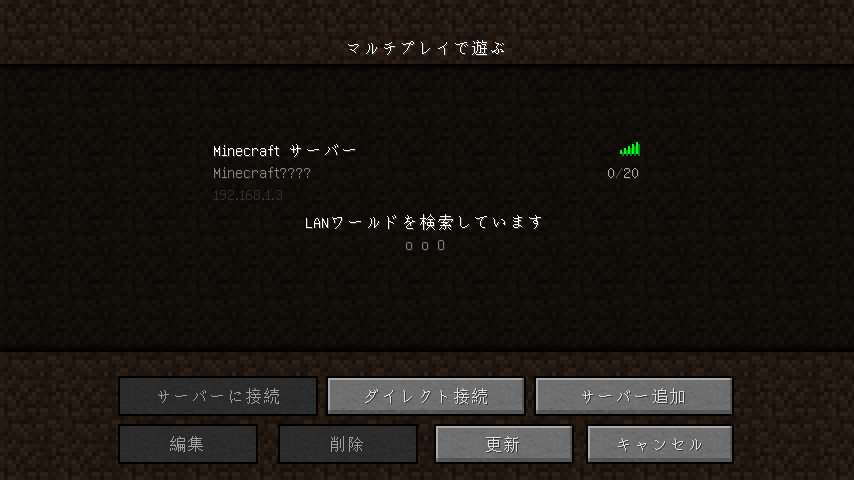
As of 1.6.1, "Scanning for games on your local network" is translated.
As of 1.6.2pre, "Polling..." ,"Can't reach server" and maybe "Communication error" are not translated.
(en_US.lang doesn't have these entries.)
related?:
MC-12427Ok. Fixed in 1.6.2.
EDIT:
I confirmed this issue only on LAN multiplayer.
I've heard of that this still occurs on the Internet multiplayer servers,
but I cannot test. Sorry about that.
Screenshot. Using minecraft_server.1.6.2.exe on Windows 7.
I've opened server issue:
MC-25187.Another screenshots (confirmed on 1.6.2 release server/client). Also untranslatable:
@Ezekiel What can I do for it? I don't have any rights to update info, so may I clone this issue?
What is the definition of 'bugs'?
Grammatical issues like
MC-2453andMC-16554are tracked and resolved on this tracker.Not fixed in 1.0.10.
I can still reproduce this issue on 1.6.2 server/client.
And when I set Japanese characters on server.properties file like this:
the client don't show them properly.
Still I can reproduce this problem on 1.6.2.