Mobs temporarily glitch out of fenced areas / into blocks
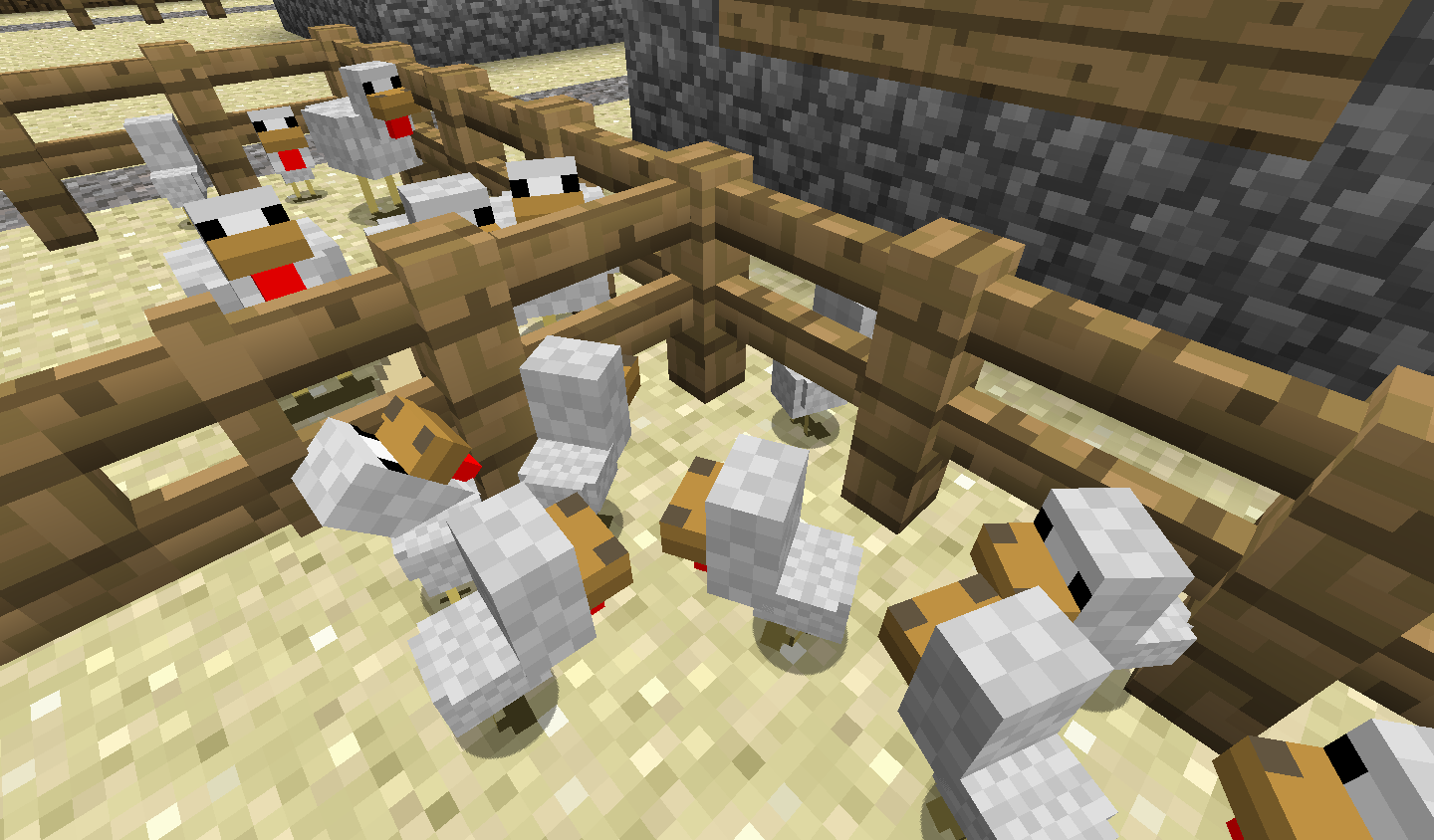
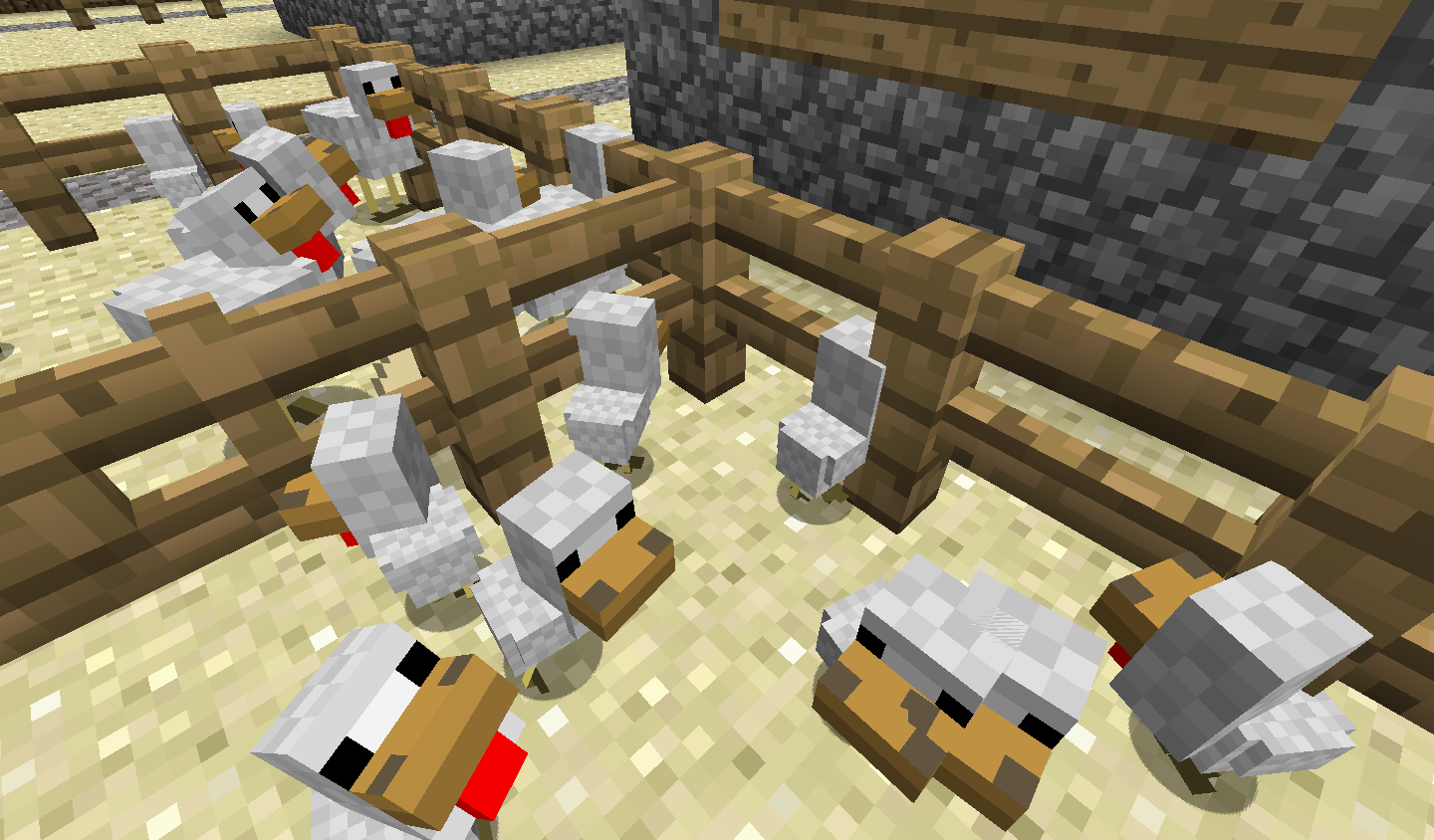
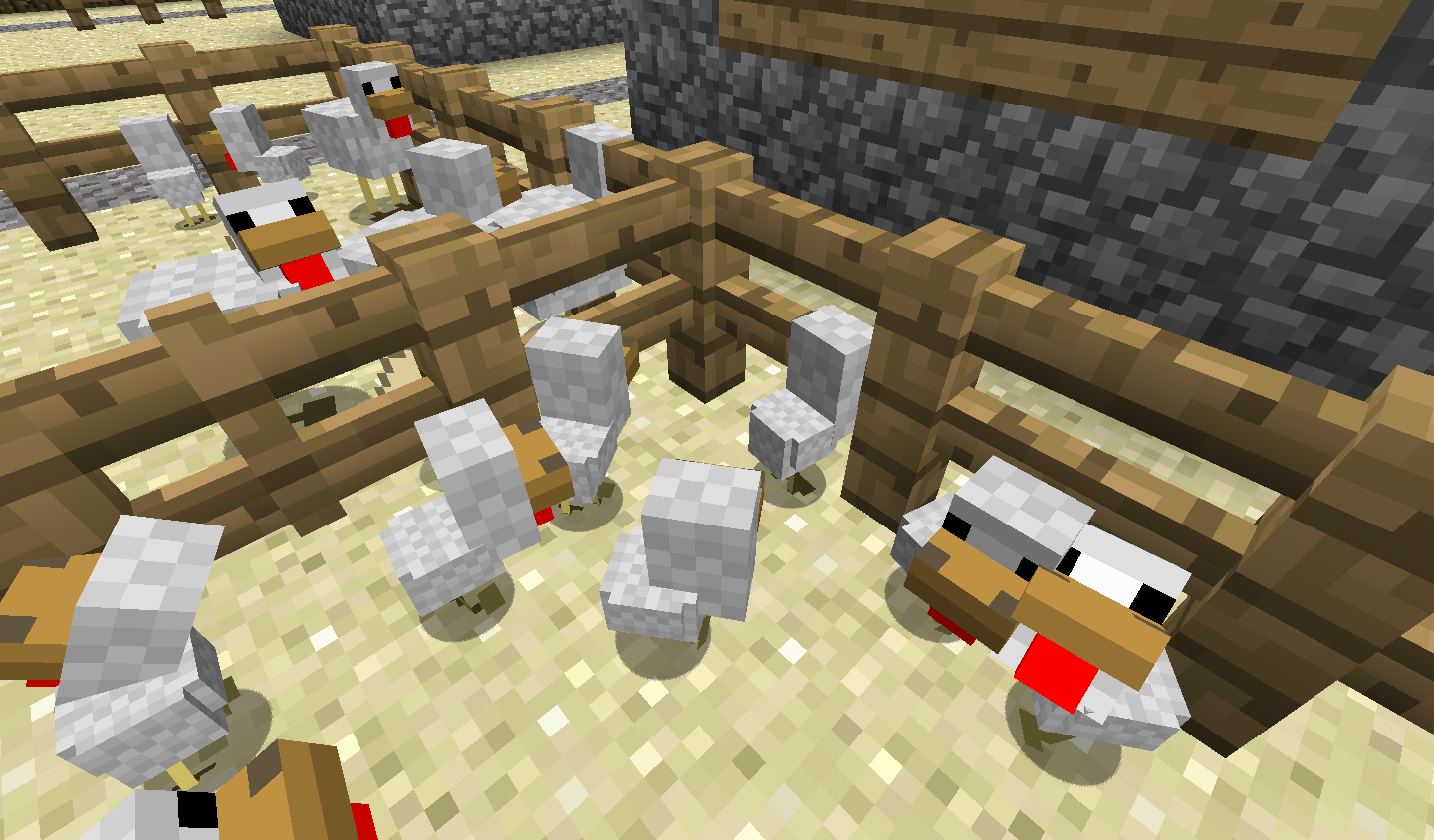
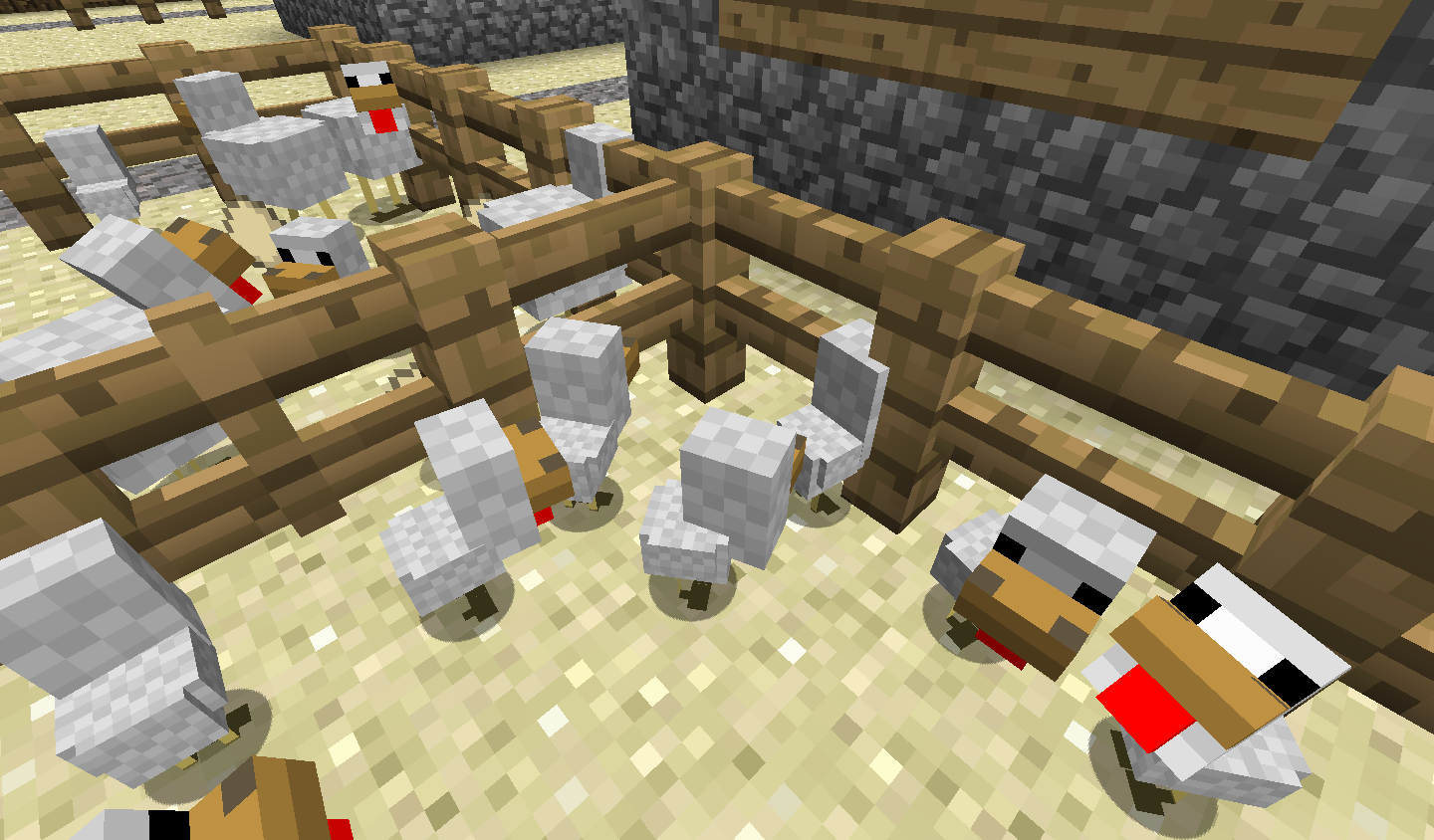
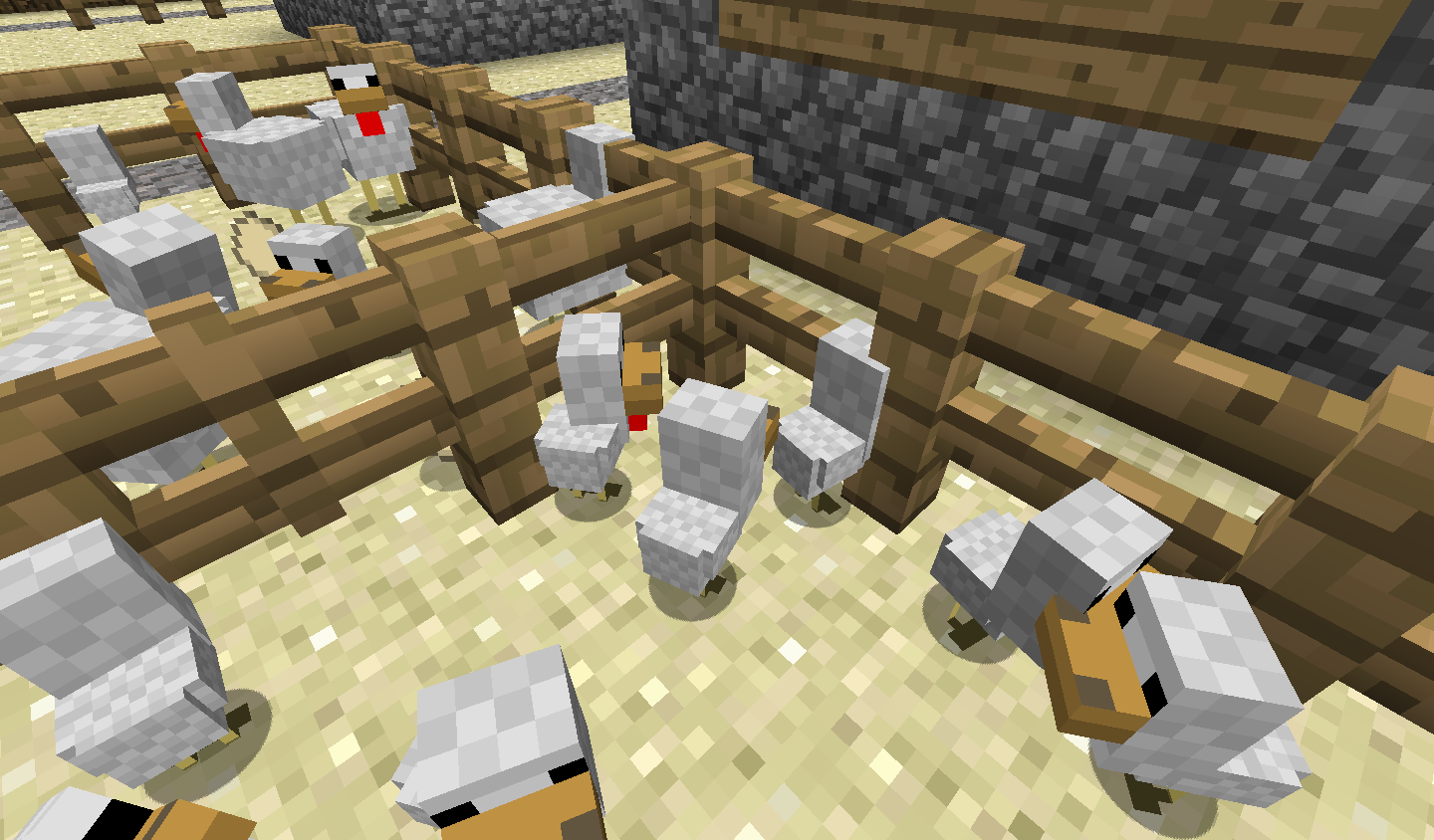
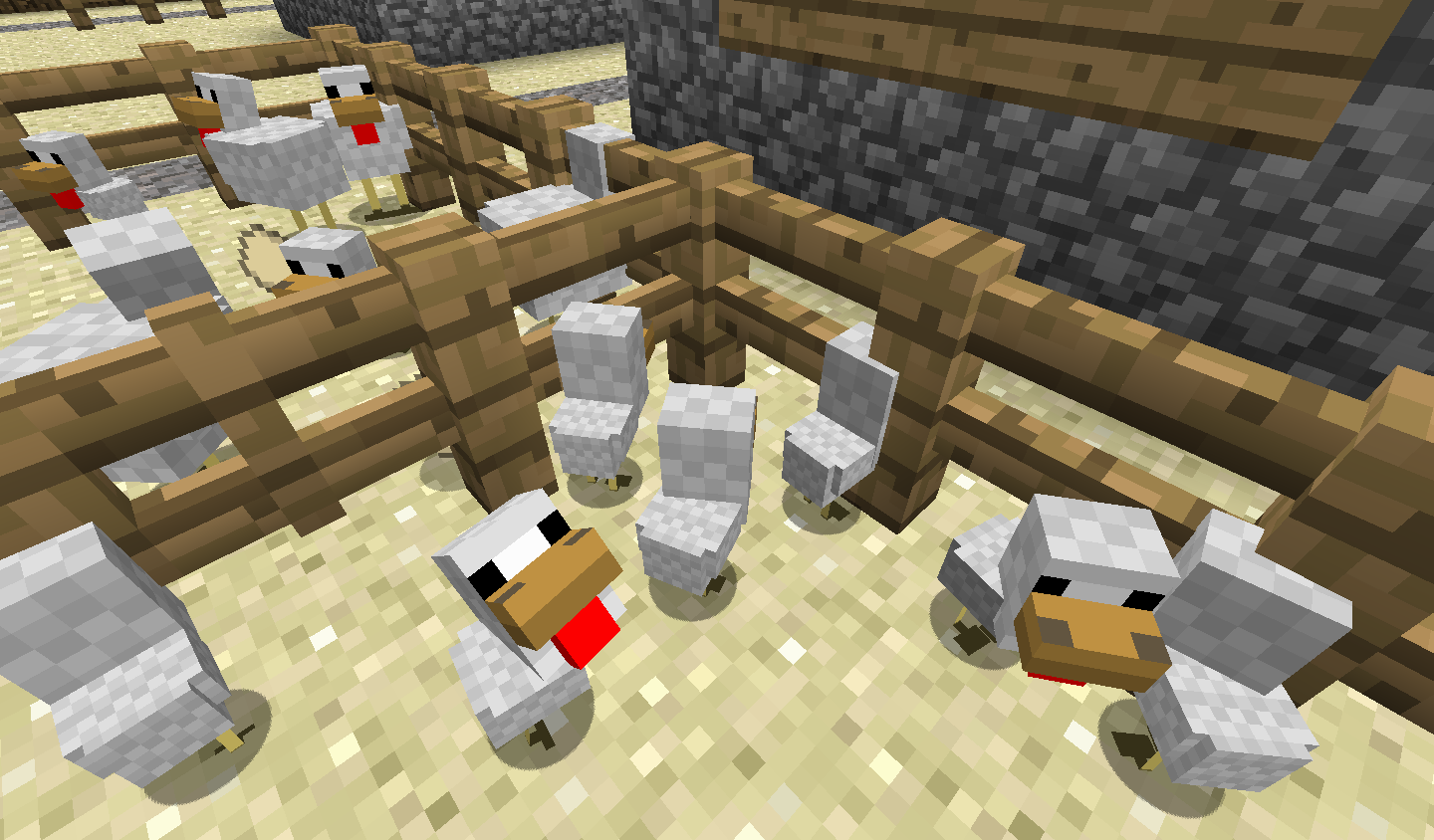
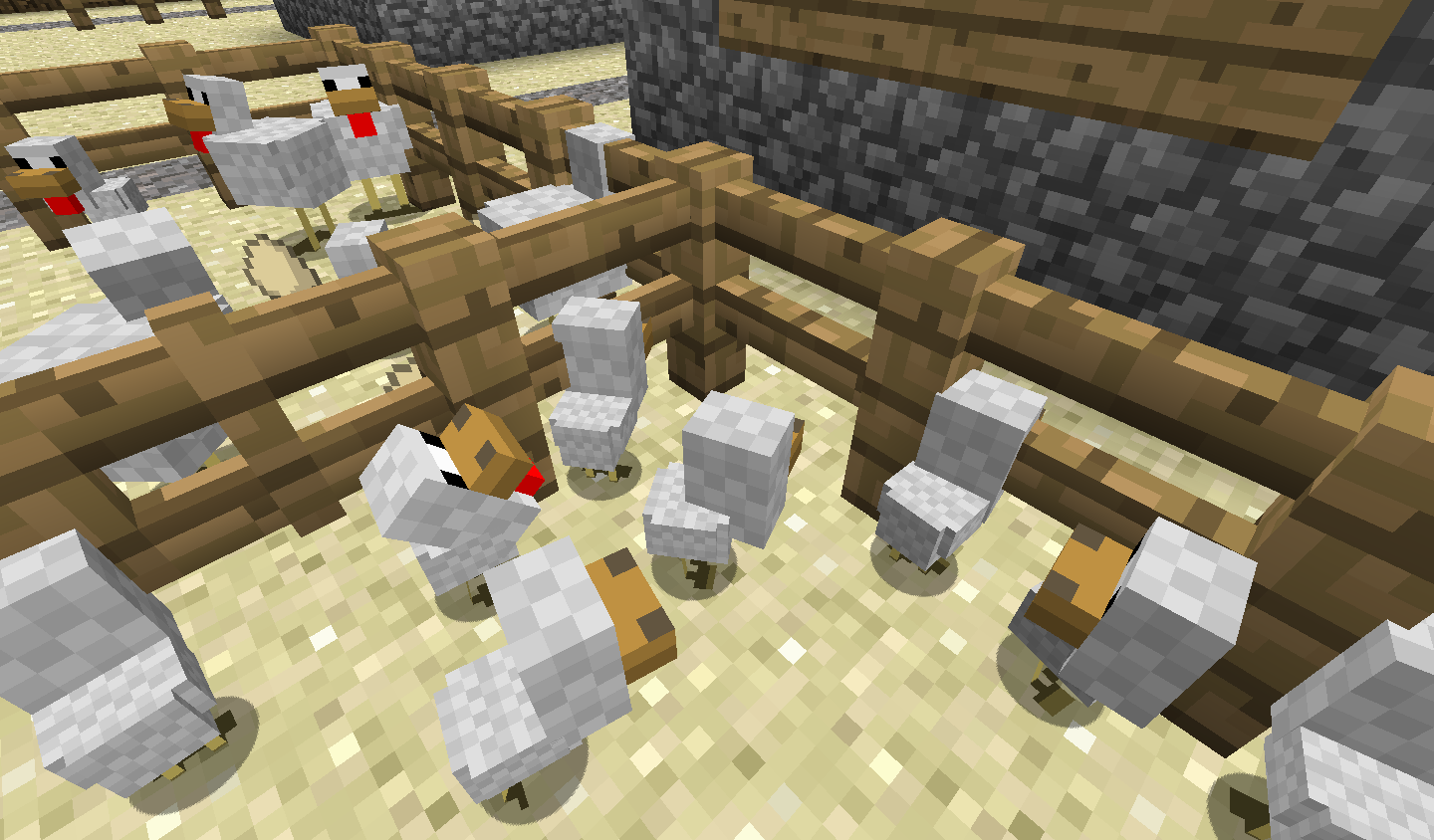
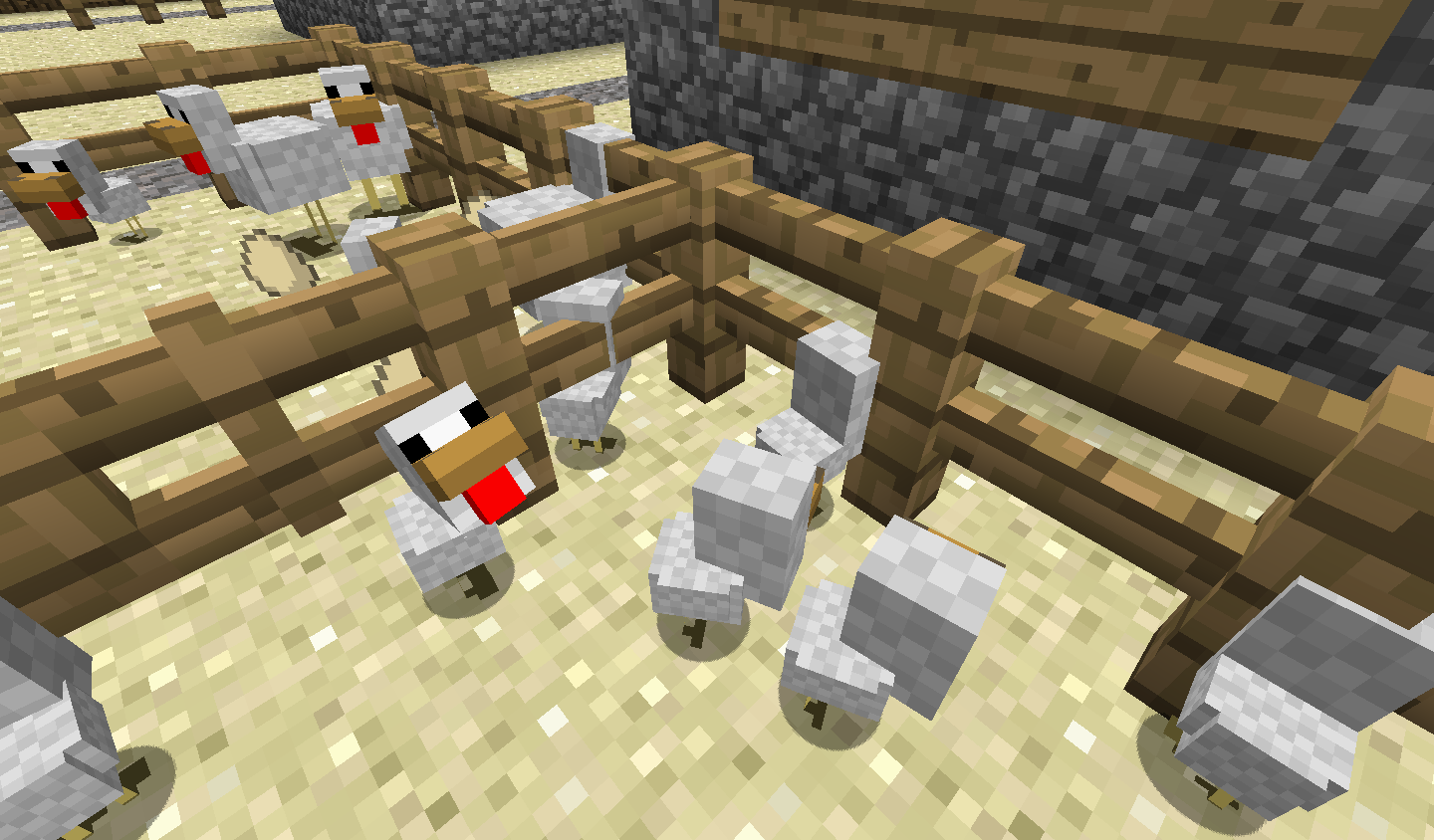
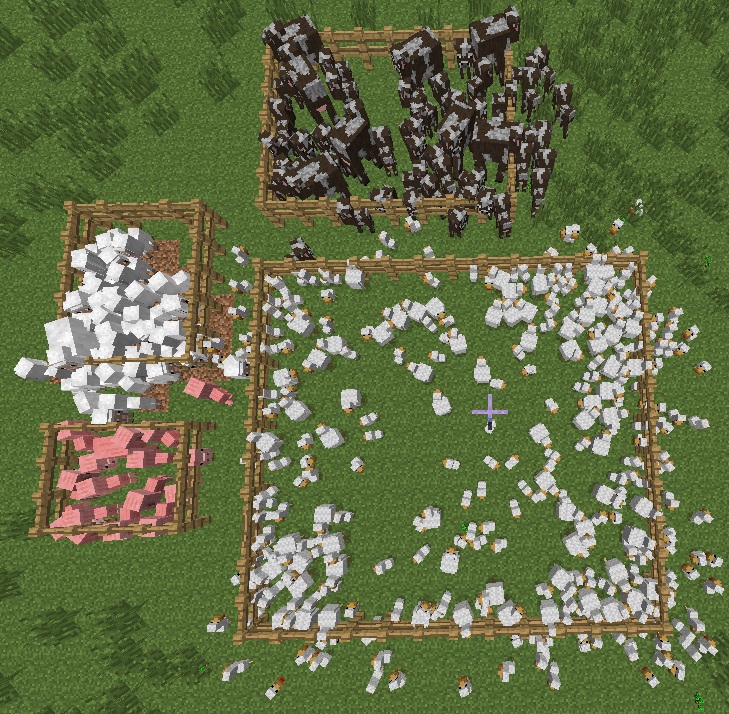
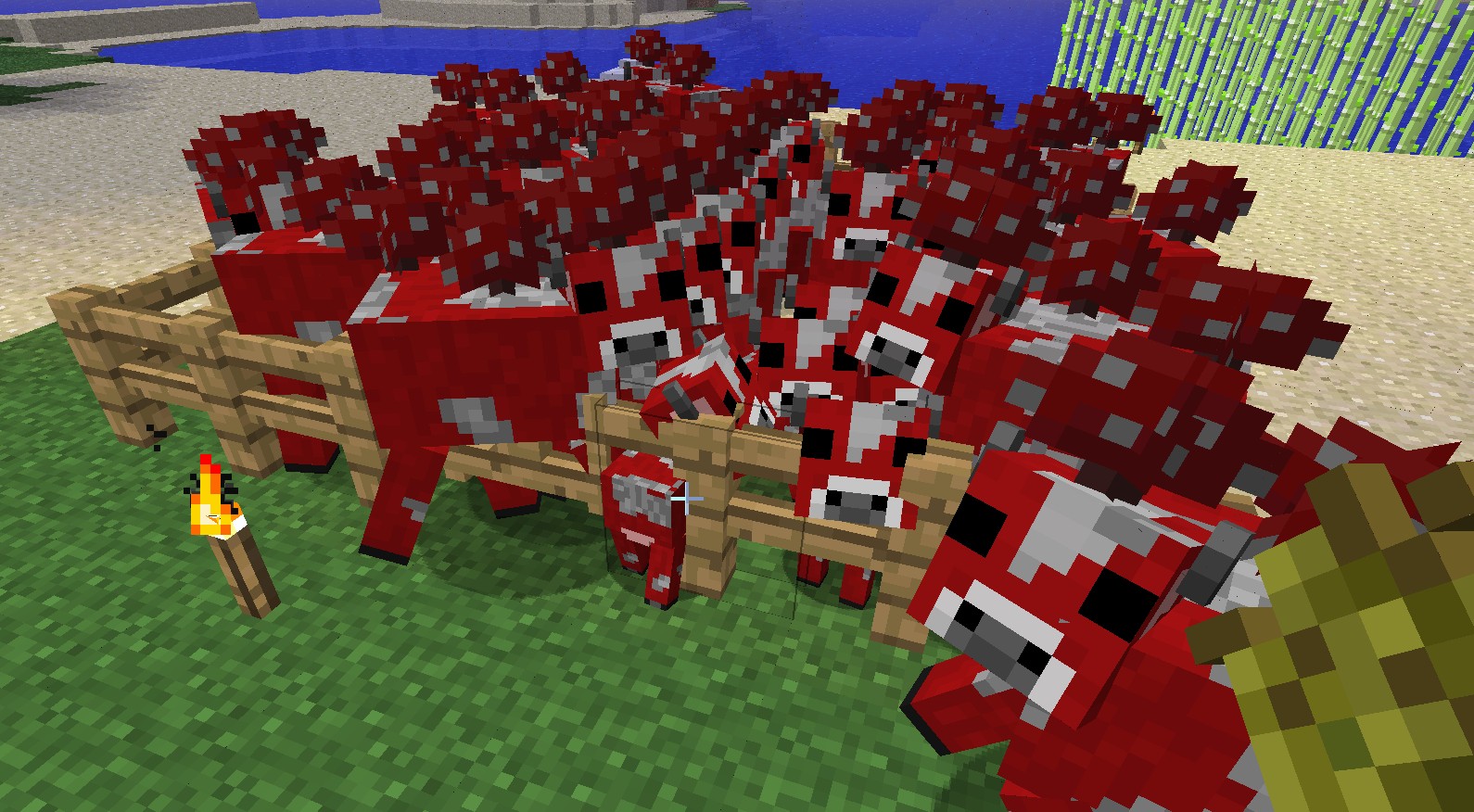
this seems to happen when you have a lot of them in the same fenced of area. this applies to both fences and stone walls
To reproduce:
1. Create an enclosed area
2. Fill it with a lot of mobs, up until the point they keep pushing each other
optional. hold an item that makes mobs follow you and it will be more visible
3. mobs should float outside fence/block, then teleport back in when you get close.
Environment
Windows 7, Windows Vista, Windows 8, all Java 7 and 8 versions
Linked Issues
is duplicated by39
 MC-6707Mobs walk through fence hitboxDuplicateMC-7462Animals Glitch though Cobblestone wallDuplicateMC-8390Mob going through fenceDuplicateMC-9039mobs can glitch through wallsDuplicateMC-10116animal hit box DuplicateMC-11398Cobblestone Wall Bug With ZombiesDuplicateMC-13248Animals walking or falling through blocksDuplicateMC-21424Mobs glitching through fences and other solid blocksDuplicateMC-40403Ghost mobs appearing when 2 spawners/EXP farms (zombie and skeleton) are close to each otherDuplicateMC-48416Mobs displacing in trapDuplicateMC-48444Mobs phase out of holding areas, then snap back inside themDuplicateMC-48504Mobs glitching through blocksDuplicateMC-48655AnimalsDuplicateMC-51723zombie mobs lag floating through walls in single playerDuplicateMC-55539Animals Glitching through enclosed area and roaming freeDuplicateMC-55850Chickens disobey the laws of physicsDuplicateMC-64375Mobs escape pensDuplicateMC-67495Mobs walk/pass through fencesDuplicateMC-67738When I put animals in pens (fences) they sometimes glitch through themDuplicateMC-69509Get out out of the fence keeps chickDuplicateMC-70012Cows and sheep moving through fences in 1.8-pre2DuplicateMC-70299Sometimes animals escape fences.DuplicateMC-74678Animals Escaping from fenced enclosuresDuplicateMC-74875mobs will sometimes glitch through walls and fencesDuplicateMC-81998Animals glitch though the corner of fenceDuplicateMC-84966Mobs "trespassing" fences and blocks.DuplicateMC-98660MC-10 Not FixedDuplicateMC-18Livestock jumping through 1-high fencesDuplicateMC-210Animals Are glitching through doors!DuplicateMC-959Baby Sheep sneak through fencesDuplicateMC-976Animals teleporting out of a fenced areaDuplicateMC-1029Animals going into blocksDuplicateMC-1197Cows push themselves out of cobblestone walls.DuplicateMC-1470zombies are getting through wallsDuplicateMC-2173Animal glitching through cobblestone walls.DuplicateMC-2291animals walking through cobblestone wallDuplicateMC-2554Mobs Pass hrough Cobblestone WallDuplicateMC-2977the chickens can go through iron fencesDuplicateMC-3873Passive mob glitchDuplicate
Attachments12


Created Issue:
In singleplayer cows will apear to walk through fences.
this seems to happen when you have alot of them in the same fenced of area
Environment
Windows 7, current Java version
Linked Issues
is cloned by1
TRASH-563
This isn't just limited to single player, nor to cows, as I've seen the same behavior in SMP with cows, sheep, and pigs.
is duplicated by
is duplicated by


is duplicated by

is duplicated by
relates to
is duplicated by
this seems to happen when you have alot of them in the same fenced of area.
To reproduce:
1. Create fenced off area
2. Fill it with a lot of farm animals, up until the point they keep pushing each other to make stand
3. farm animals should float outside fence, then teleport back in when you get close.
In singleplayer cows, pigs, sheep and chickens will apear to walk through fences.
this seems to happen when you have a lot of them in the same fenced of area. this applies to both fences and stone walls
To reproduce:
1. Create fenced off area
2. Fill it with a lot of farm animals, up until the point they keep pushing each other to make stand
3. farm animals should float outside fence, then teleport back in when you get close.

is duplicated by
Can you replicate this issue in latest version of the minecraft? If so, can you please update the ticket?
![[Mojang] Jeb (Jens Bergensten)](../../../data/assets/gravatar/jeb.jpeg)

is duplicated by
relates to
is duplicated by
is duplicated by
is duplicated by
is duplicated by
is duplicated by
is duplicated by

is duplicated by
is duplicated by
In singleplayer cows, pigs, sheep and chickens willapear to walk through fences.Mobs temporarily glitch out of fenced areas / into blocks
is duplicated by
is cloned by
relates to
is duplicated by
relates to
this seems to happen when you have a lot of them in the same fenced of area. this applies to both fences and stone walls
To reproduce:
1. Create fenced off area
2. Fill it with a lot offarm animals, up until the point they keep pushing each other to make stand
3.farm animals should float outside fence, then teleport back in when you get close.this seems to happen when you have a lot of them in the same fenced of area. this applies to both fences and stone walls
To reproduce:
1. Create fenced off area
2. Fill it with a lot of mobs, up until the point they keep pushing each other to make stand
3. mobs should float outside fence, then teleport back in when you get close.
this seems to happen when you have a lot of them in the same fenced of area. this applies to both fences and stone walls
To reproduce:
1. Createfenced offarea
2. Fill it with a lot of mobs, up until the point they keep pushing each otherto make stand
3. mobs shouldfloat outside fence, then teleport back in when you get close.this seems to happen when you have a lot of them in the same fenced of area. this applies to both fences and stone walls
To reproduce:
1. Create an enclosed area
2. Fill it with a lot of mobs, up until the point they keep pushing each other
optional. hold an item that makes mobs follow you and it will be more visible
3. mobs should float outside fence/block, then teleport back in when you get close.
Windows 7, Windows Vista, current Java version
is duplicated by
Did Jeb say about this issue?
https://twitter.com/jeb_/status/351653909464481793
is duplicated by
![[Mod] Ezekiel (ezfe)](../../../data/assets/gravatar/ezekielelin.jpeg)
is duplicated by


relates to
is duplicated by
is duplicated by
is duplicated by
is duplicated by
is duplicated by
is duplicated by
is duplicated by
is duplicated by

is duplicated by
is duplicated by
is duplicated by
is duplicated by
is duplicated by
![[Mod] CubeTheThird](../../../data/assets/gravatar/cubethethird.jpeg)
is duplicated by
is duplicated by
is duplicated by
relates to
is duplicated by
is duplicated by
is duplicated by
Windows 7, Windows Vista,
current JavaversionWindows 7, Windows Vista, all Java 7 and 8 versions
Windows 7, Windows Vista, Windows 8, all Java 7 and 8 versions
is duplicated by
is duplicated by

is duplicated by
![[Mod] Neko](../../../data/avatars/users/92901.png)
is duplicated by
is duplicated by
![[Mojang] Bartosz Bok](../../../data/avatars/users/10122.svg) [Mojang] Bartosz Bok[Mojang] Bartosz Bok
[Mojang] Bartosz Bok[Mojang] Bartosz BokGareth Coker - Soothing Voyage-3.mp3
![[Bot] Arisa](../../../data/avatars/users/43007.png)
![[Bot] Piston](../../../data/avatars/users/31202.png)
Today, we gather to commemorate the remarkable 9th anniversary of the release of Minecraft PlayStation Vita Edition, a truly special occasion that deserves our celebration and admiration! 🎉🤩
Minecraft PlayStation Vita Edition holds a distinct place in the hearts of players worldwide. What makes this edition stand out is its unique ability to run on a portable console, allowing you to dive into the immersive world of Minecraft from virtually anywhere. In this version, you'll find a treasure trove of features and improvements that set it apart from its counterparts.
One of the standout features of this edition is the inclusion of a tutorial world from TU69 and all the aquatic update features found in the Legacy Console edition. This means you can explore a carefully crafted tutorial world to hone your skills and dive into the underwater wonders of the aquatic update, all from the comfort of your handheld device.
A peculiar detail that sets this edition apart is the presence of an emerald icon when trading with villagers. It's a feature that adds a unique touch to the game and offers a different trading experience compared to the Bedrock edition. Additionally, you'll notice the satisfying sound when items are dropped and an overall improvement in the behavior of drowneds, enhancing your gameplay experience.
Diving deeper into the mechanics, you'll find that redstone dust hitboxes have been updated, providing a smoother experience when working with redstone contraptions. Vexes, those vexing creatures, are now distinguishable from allay clones, a distinction not found in the Bedrock edition, adding a new layer of strategy to your encounters.
Perhaps one of the most appreciated changes is the behavior of phantoms. In this edition, phantoms are less bothersome, with only half the health compared to the Java and Bedrock editions. This means you can enjoy peaceful nights without being constantly hassled by these aerial creatures.
But that's not all. Empty buckets take on a greater purpose here, allowing you to collect fish and enhance your underwater adventures. Drowneds, the aquatic zombies, are finely tuned, offering a gameplay experience similar to their Java Edition counterparts.
When you venture into the nether, you'll find it more enjoyable thanks to the addition of the secret biome known as the "Nether valley." This unique discovery allows you to find netherwarts outside fortresses, making potion brewing more accessible and exciting. Additionally, the ability to reset the nether, just like the end, offers a refreshing take on nether exploration.
Wither skeletons, those elusive creatures, are now able to spawn outside fortresses, making the task of collecting wither skeleton skulls a more engaging and less daunting challenge. For creative mode enthusiasts, shrubs have been added to the creative inventory with a unique texture, and blazes have a chance to drop valuable items, adding a new dimension to your creative endeavors.
This edition doesn't just focus on gameplay enhancements. It also offers three unique minigames to add variety and excitement to your gaming experience. Spiders, on hard difficulty, spawn with buff effects, reminiscent of the Java Edition, setting a higher level of challenge for skilled players.
As you delve further into the gameplay, you'll notice the ability to exit without saving, a feature that can be a lifesaver when experimenting or facing challenging situations. The XP level-up sound is designed to be more enjoyable than what you find in the Java and Bedrock editions, immersing you deeper into the game.
The user-friendly GUI for furnaces is an added convenience, making crafting and smelting a breeze for players, especially those new to the game. And if you're a fan of the popular cat music disc by C418, you'll be pleased to know that it plays for a longer duration in this edition, providing a more relaxing atmosphere in your virtual world.
Renamed items are also more obvious in this edition, as the name turns yellow, making it easier to spot and manage your precious inventory. For added convenience, a custom superflat GUI is included, providing a straightforward way to customize your world settings.
For a comprehensive overview of all the exciting features this edition offers, check out the official trailer here: https://youtu.be/QFZoDbgncJA. 🤔🎉
In summary, Minecraft PlayStation Vita Edition has not only withstood the test of time but has also continuously improved and evolved, offering players a unique and enjoyable experience that can be enjoyed on the go. Its distinctive features and improvements make it a standout choice for fans of the game, and we celebrate its 9th birthday with gratitude and excitement! 🎉🥳🕹️

I can reproduce in 24w33a
Duplicate of MC-10
Duplicate of MC-10?
Duplicate of MC-10 , please use the search function to see if your bug has already been submitted. Currently over 30% of tickets are being closed as duplicate.
Yeah, this is exactly the issue, animals are REALLY outside. When they just seem to be outside whereas they don't is another issue (MC-10 I assume).
Hope also it will be solved ... So keep on voting for this issue in order to make it popular  !
!
Duplicate of MC-10, please use the search function to see if your bug has already been submitted. Currently over 54% of tickets are being closed as duplicate.
Duplicate of MC-10, please use the search function to see if your bug has already been submitted. Currently over 54% of tickets are being closed as duplicate.
This is related to my post of,,, MC-11349
https://mojang.atlassian.net/browse/MC-11349
which is aparently a duplicate of this according to mods.
https://mojang.atlassian.net/browse/MC-2025
These are also related to it MC-10, MC-18, MC-119, MC-1029, MC-1524, MC-2025, MC-2037, MC-3140, MC-3753, MC-4707, MC-5187, MC-5230, MC-5369, MC-5401, MC-6115, MC-6393, MC-6396, MC-6398, MC-6465, MC-6653, MC-6707, MC-7392, MC-7462, MC-8390, MC-8707, MC-9039, MC-9393, MC-9476, MC-9483, MC-9503, MC-9525, MC-9540, MC-9568, MC-9626 , MC-9635, MC-9742, MC-9753, MC-9772, MC-9777, MC-9805, MC-9838, MC-9894, MC-9926, MC-9976, MC-9988, MC-10012 , MC-10116, MC-10157, MC-10181, MC-10229, MC-10231, MC-10268, MC-10311, MC-10370, MC-10422, MC-10552, MC-10725, MC-10797, MC-10894, MC-11009, MC-11022, MC-11052, MC-11086, MC-11203, MC-11252 ....
This is related to my post of,,, MC-11349
https://mojang.atlassian.net/browse/MC-11349
which is aparently a duplicate of this according to mods.
https://mojang.atlassian.net/browse/MC-2025
These are also related to it MC-10, MC-18, MC-119, MC-1029, MC-1524, MC-2025, MC-2037, MC-3140, MC-3753, MC-4707, MC-5187, MC-5230, MC-5369, MC-5401, MC-6115, MC-6393, MC-6396, MC-6398, MC-6465, MC-6653, MC-6707, MC-7392, MC-7462, MC-8390, MC-8707, MC-9039, MC-9393, MC-9476, MC-9483, MC-9503, MC-9525, MC-9540, MC-9568, MC-9626 , MC-9635, MC-9742, MC-9753, MC-9772, MC-9777, MC-9805, MC-9838, MC-9894, MC-9926, MC-9976, MC-9988, MC-10012 , MC-10116, MC-10157, MC-10181, MC-10229, MC-10231, MC-10268, MC-10311, MC-10370, MC-10422, MC-10552, MC-10725, MC-10797, MC-10894, MC-11009, MC-11022, MC-11052, MC-11086, MC-11203, MC-11252 ....
This is related to my post of,,, MC-11349
https://mojang.atlassian.net/browse/MC-11349
which is aparently a duplicate of this according to mods.
https://mojang.atlassian.net/browse/MC-2025
These are also related to it MC-10, MC-18, MC-119, MC-1029, MC-1524, MC-2025, MC-2037, MC-3140, MC-3753, MC-4707, MC-5187, MC-5230, MC-5369, MC-5401, MC-6115, MC-6393, MC-6396, MC-6398, MC-6465, MC-6653, MC-6707, MC-7392, MC-7462, MC-8390, MC-8707, MC-9039, MC-9393, MC-9476, MC-9483, MC-9503, MC-9525, MC-9540, MC-9568, MC-9626 , MC-9635, MC-9742, MC-9753, MC-9772, MC-9777, MC-9805, MC-9838, MC-9894, MC-9926, MC-9976, MC-9988, MC-10012 , MC-10116, MC-10157, MC-10181, MC-10229, MC-10231, MC-10268, MC-10311, MC-10370, MC-10422, MC-10552, MC-10725, MC-10797, MC-10894, MC-11009, MC-11022, MC-11052, MC-11086, MC-11203, MC-11252 ....
This is related to my post of,,, MC-11349
https://mojang.atlassian.net/browse/MC-11349
which is aparently a duplicate of this according to mods.
https://mojang.atlassian.net/browse/MC-2025
These are also related to it MC-10, MC-18, MC-119, MC-1029, MC-1524, MC-2025, MC-2037, MC-3140, MC-3753, MC-4707, MC-5187, MC-5230, MC-5369, MC-5401, MC-6115, MC-6393, MC-6396, MC-6398, MC-6465, MC-6653, MC-6707, MC-7392, MC-7462, MC-8390, MC-8707, MC-9039, MC-9393, MC-9476, MC-9483, MC-9503, MC-9525, MC-9540, MC-9568, MC-9626 , MC-9635, MC-9742, MC-9753, MC-9772, MC-9777, MC-9805, MC-9838, MC-9894, MC-9926, MC-9976, MC-9988, MC-10012 , MC-10116, MC-10157, MC-10181, MC-10229, MC-10231, MC-10268, MC-10311, MC-10370, MC-10422, MC-10552, MC-10725, MC-10797, MC-10894, MC-11009, MC-11022, MC-11052, MC-11086, MC-11203, MC-11252 ....
For starts my apologies on all the edit. I was not aware it worked that way and will be more careful. Thank you Glenn Tottman someone that understands! I'm just trying to consolidate this into one issue. That way it can be voted up and corrected. If spamming the chat is the only way to get MOD to do there job so be it. MC-10 was the first post of this issue, of which they all relate. They put it as a duplicate of a higher post. That make no scene. If it keep getting put up to a higher number with multiple post it will never be corrected. This issue has been neglected. We are half way to 2.0. This is not a NEW issue. It has been around well before beta. So I feel if spam is the only way to get attention so be it. Fix the problem and you will not have to deal with it. I'm seeing fixes to new problems that are created because of new feature. What about the core gameplay!!! This is a major issue not a minor one. It effects everyone and it im sick of it. I see people breeding more animals than they need causing server lag because they know that they are going to lose a few. Now unless Mojang is going to start paying people to run server, I'm going to keep creating new account and spaming as you say the crap out of these forums. If that what it takes to get an issue fixed as it seems it does then so be it. Every time I post it gets put to the top. So hopefully if its seen enough as active someone will see it and fix it... So if it takes spam so be it.
Duplicate of MC-10, please use the search function to see if your bug has already been submitted. Currently over 55% of tickets are being closed as duplicate.
Bugfix - Please read this post before commenting
This bug report has, unofficially, come to encapsulate both mob escapes during gameplay and on load. The reporter of the bug had been inactive for a long time, but much discussion about the bug and its causes has been occurring in the comments. I will say the symptoms you have experienced sound a little extreme, but I would encourage you to try this unofficial bugfix (link at the bottom) which has the following features:
- Animals do not escape during gameplay or on load
- Item behavior when being pushed out of blocks is greatly improved
- Animals are actually pushed out of blocks
- Visual errors (
MC-10) are mostly if not entirely resolved
I do not wish to appear like a conceded jerk who believes himself the only one with a right to post here, but the comments which confirm the occurrence of this bug are unnecessary. I would appreciate it if the download link can remain visible to everyone who finds themselves on this page. That way, Mojang can clearly see what needs to be fixed when the time comes to fix it, and, in the mean time, everyone else can play Minecraft without stressing about animal escapes. If this bug is not being worked on in the next snapshot I will probably post the link on the forums to bring attention to the issue.
Any questions, comments, or concerns about the bugfix should be posted in the comments section of the download link. If it is not working or has weird side effects, let me know, and I will fix it. Thank you for reading.

Bugfix - Please read this post before commenting
I did some more investigating, and discovered some more (easy to fix) bugs, mostly related to client-server synchronization of entity positions. Also, I revamped my epsilon fix to rely directly on integers, which should make it much more efficient (though still slower than a simple comparison of course). I also had to increase the tolerance a bit, because I found some setups which caused higher errors. Most noticeably, when entities are being pushed upwards (eg by water) at certain y-coordinates.
I also decided to do redo the server position adjustment algorithm (responsible for mitigating temporary client-side glitches). I already attempted to do so in the past, but I wasn't satisfied with the results. However, now that all the other bugs are out of the way, things are looking much better. I don't wanna say visual glitches are fixed 100% by the mod (they're not), but I think it's pretty close now, and certainly a major improvement to the current situation.
Here are the links:
Repo: https://github.com/taurose/Unglitch (thorough explanation, test worlds, source snippets)
Direct Mod DL (Client): https://github.com/taurose/Unglitch/raw/master/Mod_1.6.2-v2.zip
What it does in a nutshell:
- fixes server-side permanent, entity glitches on load (
MC-2025) and during gameplay, hopefully 100% - mostly fixes temporary, client-side entity glitches (
MC-10) - fixes client-server synchronization issues (cause for
MC-19331, probably more) - in contrast to Daniel's Mod, this mod does fewer changes to server-side game physics by not relying on an universal pushoutofblocks method. It doesn't fix the glitchy behavior of items or xp orbs, and presumably breaks fewer contraptions than Daniel's. On the other hand, Daniel's fix might be able to account for some rare or future glitches.
Duplicate of MC-10
Duplicate of MC-10
Possible duplicate of MC-10
Dupe of MC-10
Dupe of MC-10
Dupe of MC-10
![[Mojang] Panda](../../../data/avatars/users/41658.png)
Note: This bug is NOT related to MC-119 or MC-10 as far as I can tell.
When the following conditions are given entities will fall though the floor:
- The entity needs to be able to walk up a slab
- It needs to stand on the ground (NBTTag OnGround:true)
- It needs to move upwards and to the side
- It needs to hit a block which it wouldn't hit if it was only moving up or only moving to the side
How to reproduce:
1. Put down a mob and a block on offset on top of it (Screenshot)
2. Punch the mob (easiest way to get a sideways upwards motion) against the block.
3. The mob will fall through the floor now.
The source of the bug is in the method which moves an entity in Entity.java.
In MCP: public void moveEntity(double x, double y, double z). Sure you will find it
This shows what needs to be changed to fix it (with some context): https://gist.github.com/Panda4994/9d83d261f5edffc3037e/revisions
I will also describe the problem and fix here:
https://www.youtube.com/watch?v=3aUqTmhn-50
And here:
So the problem is the part of the code which calculates the moving up slabs.
When a entity hits a block while moving sideways it will be called.
Then the game will make a list of all bounding boxes it could collide with when moving up by the step height of the entity (0.6 for normal mobs, 1.0 for enderman and horses) and the given amount in x and z direction.
This will not get the floor below the entity.
Now in this part of code a bounding box (BB from here on) will get moved to the position where it could go if no blocks were in the way.
Then the BB will get moved up till it hits something but at max the step height.
In the case described further up it will not move up the full step height.
Some other calculations follow.
Then the entity gets moved down till it hits a block but at max the step height.
It uses the list it created earlier for this check. So if the entity wasn't moved up by the step height it will get moved below the floor because the floor is not in the list.
An easy fix would be to just set the maximum it would get moved down to how far it got moved up.
@Sonic He said "This bug is NOT related to MC-119 or MC-10". Watch his video here: https://www.youtube.com/watch?v=3aUqTmhn-50 Read, or watch, before making a 'Dupe of mc-#' report. MC-119 is nowhere related to this, as mobs sink by them self, by walking in the bug MC-119, while he states thats mobs try to move by amount of their step height, if near a block, down, and the bound-hitbox can't see the block below the creeper, so the creeper moves into the block, and if chicken, or other 1-high face mobs, suffocate in land, and try to escape, if passive-type. So, any mobs that have a step height of 0.6 or higher, they get stuck in slabs, of on the lower side. Does that explain more to you?
Also, MC-71921, MC-70898, MC-69440, MC-69080, MC-68454, MC-68231, and MC-68081 is reporting a bug that is the same as this, and has been mistaken as bug dupe of MC-119, and should be possibly reopened, or changed.
@Panda MC-69067 looks like it is really a MC-119 dupe report, though very hard to be sure of.
Also, NOT a dupe of MC-119. Look carefully! Hopefully, this bug can be fixed, because who wants creepers in their floor, after hitting it? Want a little bit more on what happens on the 1.8 side of things, and what mobs can have the effect in a way? Look here: http://youtu.be/RXsK9MmAxMc (Note, Video may contain wild lightning, and Nether Mobs w/ Lightning Damage bug)
The mobs really get out of the pan right?
In this case it's not a duplicate of MC-10.
This post is about not correctly updated collision boxes of certain blocks.
It describes more than one issue but they are caused by the same problematic part of code and should be seen as one in order to decide on a good solution for them.
When it comes to explanation close to the code I will use MCP names. They should mostly speak for themselves.
As Searge just recently tweeted about it: I will try to keep the posted code to a minimum and give just the needed context for my fix (It's pretty much just the added code). I obviously don't intent to make any of the (especially with MCP) decompiled code public.
I will try to have a look on here in case there are any questions.
1. Overview of bugs and exploits caused by this issue
2. Description of the cause
3. Attempt to fix it (not complete)
4. Ways to reproduce
5. Other posts on the bug tracker referring to it
6. Item elevator bug reimplementation!
7. Affected blocks
8. TLDR
1. Overview of bugs and exploits caused by this issue
It causes the following wrong behaviors:
- Entities glitching into certain blocks randomly (e.g. into slabs)
- Pistons not pushing entities correctly (e.g. in elevators)
- Rendering issues (e.g. normal slab renders as upside down for a split second)
- Items/XPOrbs jumping up when on certain blocks (e.g. cauldron, stairs)
Fixing it will probably also break the following by the community used glitches:
- The most common wireless redstone
- test137e29's simple item elevator (This thing: Item elevator)
The item elevator is a default design used a lot by the technical community so it might be worth it to make it still work by design when the fix breaks it. I'll add a section about that at the very end of the post. Please consider it.
2. Description of the cause
I will try to explain it on the example of into blocks glitching entities.
In Block.java we got 6 integer fields (minX, minY, minZ, maxX, maxY, maxZ).
The following method sets these values. It is overridden by all blocks that can have changeable collision boxes (e.g. slabs).
public void setBlockBoundsBasedOnState(IBlockAccess access, BlockPos pos)
The usual way this is use is like that (let's imagine some method in Block.java):
public class Block {
	void doSomethingWithBlocks(World worldObj, BlockPos pos) {
		setBlockBoundsBasedOnState(worldObj, pos);
		// work with  minX, minY, minZ, maxX, maxY and/or maxZ
		if (this.minY < 10) {
			// do something
		} else {
			// do something else
		}
	}
}
Here we can already see the first risk this holds. It's not directly a bug but calls for creating bugs: What if you forget to call setBlockBoundsBasedOnState() before working with the values?
This case commonly happed. For example for chest, anvils and moving blocks. (These are just from experience, I didn't look it up. So forgive me if I'm mistaken )
See the ways to reproduce section for more detailed examples.
This is also what's used to create wireless redstone.
While this is not really a bug I guess it's still not what you want. Especially when it comes to the plugin API. The system works for blocks with simple AABBs. But by now Minecraft is not limited to that.
The second issue is less visible but you might guess it when I bring up that by now in Minecraft SSP two threads run. One acting as a client and one as a local server.
Both of these threads have access to Block.java. Both work with it.
A common case is that the client thread uses setBlockBoundsBasedOnState() to set the block bounds for the renderer.
An other common case is that the server thread uses it in order to calculate entity collisions.
If both of these happen at the same time the values are changed by the other thread and therefor can cause entities to glitch into blocks or the renderer to show wrong things.
3. Attempt to fix it (not completely)
In the long run it should be completely gotten rid of the setBlockBoundsBasedOnState() and the 6 integer values in Block.java. This design just doesn't work well with multi threading and making all code that uses the on top described pattern synchronized is not really an option.
This needs a lot of refactoring and therefor takes a lot of time though.
I limited myself to explain my idea how to fix the collision issues with entities glitching into blocks.
First up I added a few methods for convenience here and there:
public class Block {
	// BoundingBox for a full block
	protected static final AxisAlignedBB AABB_FULL = new AxisAlignedBB(0.0F, 0.0F, 0.0F, 1.0F, 1.0F, 1.0F);

	/**
	 * Adds the bounding box (toAdd) to the list if it intersects with mask.
	 *
	 * @param list	List it might get added to.
	 * @param toAdd	BoundingBox that should get added. null won't be added.
	 * @param mask	BoundingBox that should intersect with it
	 * @return		true if added, false else (it's not needed atm but it's always usefull to get some feedback)
	 */
	protected static boolean addAABBToList(List list, AxisAlignedBB toAdd, AxisAlignedBB mask) {
		if (toAdd != null && mask.intersectsWith(toAdd)) {
			list.add(toAdd);
			return true;
		}
		return false;
	}
public class AxisAlignedBB {
	/**
	 * Returns a new AABB moved by offset
	 *
	 * @param offset	The offset it should get moved by.
	 * @return		A new AABB moved by offset
	 */
	public AxisAlignedBB offset(BlockPos offset) {
		return new AxisAlignedBB(this.minX + offset.getX(), this.minY + offset.getY(), this.minZ + offset.getZ(), this.maxX + offset.getX(), this.maxY + offset.getY(), this.maxZ + offset.getZ());
	}
}
Now the following method should be overridden for all affected blocks that have a simple AABB (with that I mean that they don't need several AABBs).
public AxisAlignedBB getCollisionBoundingBox(World worldIn, BlockPos pos, IBlockState state)
For example that would be slabs, chests and anvils.
It should be overridden to work independent from setBlockBoundsBasedOnState() and the 6 integer values in Block.java.
For slabs you can nicely add the possible AABBs to the property enum.
public abstract class BlockSlab extends Block {
	@Override
	public AxisAlignedBB getCollisionBoundingBox(World worldIn, BlockPos pos, IBlockState state) {
		if(this.isDouble()) {
			// The AABB we defined in Block.java
			return AABB_FULL.offset(pos);
		} else {
			return ((BlockSlab.EnumBlockHalf)state.getValue(HALF_PROP)).getAABB().offset(pos);
		}
	}

	public static enum EnumBlockHalf implements IStringSerializable {
		TOP("top", new AxisAlignedBB(0.0F, 0.5F, 0.0F, 1.0F, 1.0F, 1.0F)),
		BOTTOM("bottom", new AxisAlignedBB(0.0F, 0.0F, 0.0F, 1.0F, 0.5F, 1.0F));
		private final String halfName;
		private final AxisAlignedBB AABBForState;

		private EnumBlockHalf(String name, AxisAlignedBB AABBForState) {
			this.halfName = name;
			this.AABBForState = AABBForState;
		}

		public AxisAlignedBB getAABB() {
			return this.AABBForState;
		}

		public String toString() {
			return this.halfName;
		}

		public String getName() {
			return this.halfName;
		}
	}
}
For blocks which can need more than one AABB we want to override this method:
Block.java
public void addCollisionBoxesToList(World worldIn, BlockPos pos, IBlockState state, AxisAlignedBB mask, List list, Entity collidingEntity)
It's for example called when the collision check of an entity is done to build a list of blocks which might collide with it.
The implementation in Block.java just calls getCollisionBoundingBox() and adds this AABB to the list. That's why we can override getCollisionBoundingBox() for simple blocks.
But I want to show the example of a fence too. For fences I added a few static fields which contain all possibly needed AABBs.
public class Block {
	protected static final AxisAlignedBB AABB_POST = new AxisAlignedBB(0.375, 0.0, 0.375, 0.625, 1.5, 0.625);
	protected static final AxisAlignedBB AABB_NORTH = new AxisAlignedBB(0.375, 0.0, 0.0, 0.625, 1.5, 0.625);
	protected static final AxisAlignedBB AABB_EAST = new AxisAlignedBB(0.375, 0.0, 0.375, 1.0, 1.5, 0.625);
	protected static final AxisAlignedBB AABB_SOUTH = new AxisAlignedBB(0.375, 0.0, 0.375, 0.625, 1.5, 1.0);
	protected static final AxisAlignedBB AABB_WEST = new AxisAlignedBB(0.0, 0.0, 0.375, 0.625, 1.5, 0.625);
	protected static final AxisAlignedBB AABB_NORTHSOUTH = AABB_NORTH.union(AABB_SOUTH);
	protected static final AxisAlignedBB AABB_EASTWEST = AABB_EAST.union(AABB_WEST);

	@Override
	public void addCollisionBoxesToList(World worldIn, BlockPos pos, IBlockState state, AxisAlignedBB mask, List list, Entity collidingEntity) {
		// func_176524_e() tells if it should connect to the other block
		boolean connectedNorth = this.func_176524_e(worldIn, pos.offsetNorth());
		boolean connectedSouth = this.func_176524_e(worldIn, pos.offsetSouth());
		boolean connectedWest = this.func_176524_e(worldIn, pos.offsetWest());
		boolean connectedEast = this.func_176524_e(worldIn, pos.offsetEast());

		// Not connected at all? Add AABB_POST and return
		if (!connectedNorth && !connectedSouth && !connectedEast && !connectedWest) {
			Block.addAABBToList(list, AABB_POST.offset(pos), mask);
			return;
		}

		if (connectedNorth && connectedSouth) {
			Block.addAABBToList(list, AABB_NORTHSOUTH.offset(pos), mask);
		} else {
			if (connectedNorth) {
				Block.addAABBToList(list, AABB_NORTH.offset(pos), mask);
			} else if (connectedSouth) {
				Block.addAABBToList(list, AABB_SOUTH.offset(pos), mask);
			}
		}

		if (connectedEast && connectedWest) {
			Block.addAABBToList(list, AABB_EASTWEST.offset(pos), mask);
		} else {
			if (connectedEast) {
				Block.addAABBToList(list, AABB_EAST.offset(pos), mask);
			} else if (connectedWest) {
				Block.addAABBToList(list, AABB_WEST.offset(pos), mask);
			}
		}
	}
}
For other blocks like stairs or moving blocks it might get more complicated but as the functionality is already in there, it just needs to be refactored a bit.
In order to fix all issues with it (for example bouncing items would still happen in some cases) and to completely get rid of the setBlockBoundsBasedOnState() obviously more work is required.
4. Ways to reproduce
Video showing examples of the main issues
Reproducing the first issue is quite easy:
1. Place a double chest.
2. Walk against it from the smaller side. Keep walking against it in the next steps.
3. Look first at the chest closer to you and then at the one further away (by looking at it you update the values in Block.java).
4. You should notice that you move forward and get set back all the time.
Same works even better with anvils:
1. Place two anvils in a row. One facing north-south, the other one east-west.
2. Walk against one of them. And keep walking in the next steps.
3. Look at one then at the other and then at the first anvil again.
4. You should walk through it now.
A good way to reproduce the entities glitching into blocks (threading issue) is the following:
1. Create a new superflat world with the following string: “3;minecraft:bedrock,20*minecraft:stone_slab;1;” (You can use other affected blocks than slabs.)
2. Place a upside down slab somewhere in the world.
3. Place a armor stand (or an other entity) on top of it. (For fences you want to have a water stream pushing a mob against it.)
4. Now set the render distance to a low and then to a high value again (This is to make it more likely by as it causes updates on the blocks).
5. You should be able to see two things. First up if you look at the upside down slab it's hitbox will constantly change to a normal slab and back. Secondly the armor stand falls through the slab.
Pistons not pushing entities:
1. Build up whats shown in this screenshot.
2. Stand where I stand in the screenshot and look at the sideways piston.
3. Place a torch where I look at in the screenshot.
4. You will find that you don't the pushed up. If you make the sideways facing piston look up you will get pushed up.
The rendering issues rarely happen. You can force them by having a lot of the affected blocks around. But as they are a less important issue and somewhat hard to reproduce I will just leave it at that.
Items jumping up is easy to reproduce again:
1. Place a stair
2. Throw an item into the cut out part.
3. It jumps away.
Same with cauldrons and other affected blocks. The item elevator linked earlier is also powered by this issue / a way to reproduce it.
5. Other posts on the bug tracker referring to it
MC-69007, MC-67127, MC-67896, MC-68578, MC-69797 and MC-57152 describe the same issue as far as I can tell.
A part of MC-1836 describes this issue.
It's likely that MC-2025 and/or some duplicates of it describe mobs glitching through fences. It's not unlikely that it is due to this bug.
Also in the duplicates of MC-10 are a few posts were mobs really glitch through fences (which is likely this issue).
There is probably more issues connected to it but I spent enough time browsing the bugtracker for now.
If one of the bad-cop-mods feels like linking the issues to this one that would be great
6. Item elevator bug reimplementation!
If the partial fix I showed is used (or something similar) then the simple item elevator can be fixed by adding setBlockBoundsBasedOnState() to the method which makes items fly out of blocks in the right spot.
public abstract class Entity implements ICommandSender {
	protected boolean pushOutOfBlocks(double x, double y, double z) {
		BlockPos var7 = new BlockPos(x, y, z);
		double var8 = x - (double)var7.getX();
		double var10 = y - (double)var7.getY();
		double var12 = z - (double)var7.getZ();
		List var14 = this.worldObj.func_147461_a(this.getEntityBoundingBox());

		// added to keep the item elevator for now
		this.worldObj.getBlockState(var7).getBlock().setBlockBoundsBasedOnState(this.worldObj, var7);

		if(var14.isEmpty() && !this.worldObj.func_175665_u(var7)) {
			return false;
		} else {
			...
		}
	}
}
In case you completely get rid of the old system now or some time in future please still consider to leave the fence item elevators working by adding a few lines in this method.
I would be killed by the technical community if I didn't at least try to make you keep the item elevators
7. Affected blocks
This issue pretty much affects all blocks which have a changeable collision box or a collision box which consists out of more than one bounding box.
This list is probably not complete but I'll give my best. Also the effect of this issue might not show the same for all of them.
The following blocks are probably affected by this glitch in some way:
Snow layers, cobble wall, mossy cobble wall, ladders, iron bars, glass panes, heads, stairs, slabs, hopper, wooden trapdoors, iron trapdoors, all doors, cactus, anvils, chests, trapped chests, brewing stand, all fences, all fence gates, extended pistons, extending pistons, end portal frames, cake and cauldrons.
8. TLDR
Wow, that got long.
In short: For each block just one global Bounding Box is saved in 6 integer values. They have to be set dependent on the state of a block in a certain position before anything is done with them.
This calls for coding bugs and causes threading issues.
I will also make a video explaining the basics. It might take a week till I find time for it though. <Link will follow>
Thanks for reading. Forgive me all the typos, it's late

Yay Kumasasa is here \ö/
If I may ask the "nicest bad cop" };] of Mojira for this:
5. Other posts on the bug tracker referring to it
MC-69007,MC-67127,MC-67896,MC-68578,MC-69797andMC-57152describe the same issue as far as I can tell.
A part ofMC-1836describes this issue.
It's likely thatMC-2025and/or some duplicates of it describe mobs glitching through fences. It's not unlikely that it is due to this bug.
Also in the duplicates ofMC-10are a few posts were mobs really glitch through fences (which is likely this issue).
There is probably more issues connected to it but I spent enough time browsing the bugtracker for now.
If one of the bad-cop-mods feels like linking the issues to this one that would be great
}=)
Kind regards,
Meri
![[Mod] Sonicwave](../../../data/avatars/users/94627.png)
Seems like MC-10
Dupe of MC-10
maybe the remaining bug reports that are describing behaviour caused by this issue should be closed as well (all bugs in section 5, for example MC-10)
Ok, so it says that MC-10 is fixed, but it's not.To Reprodouse:Put 765 chickens in a pen with 1 block too move around. They Will glitch and go back in.

I can confirm this.
To reproduce:
1. Create fenced off area
2. Fill it with a lot of cows, up until the point they keep pushing eachother to make stand
3. Cows should float outside fence, then rubberband back in.
This behavior is because the client tries to guess the action of the mob. For some reason it guesses incorrectly.
This is also true for sheep, and perhaps for pigs too. I had noticed this bugs initially with fence gates just after the first official release of Minecraft and reported it on getsatisfaction, but I never knew if the report was ever reported to the Mojang team.
New stuff : this bug also concerns cobblestone walls.
Is this still a concern on Minecraft 1.4.4 Pre-Release? If so, please update the version affected.
im not shure if it is or not, i havent had a chance to play the new prerelease
Yes, this bug still exists in Minecraft 1.4.4 pre-release. Please fix it, it's ruining animal breeding...
Not only cows, chicks too.
I can't confirm this with cows. But chickens and pigs escape all the time from my fenced areas. Makes me really sad
Why does this say resolved when it is not?
It think it says "resolved" because they fixed it in a development snapshot version. But that really doesn't count if you ask me.
It is not resolved, still happens in 13w10a =(
My chickens still stucks in fence and teleports over it...
i have cloned this so it shows that it is unresolved MC-11086
I think this is a crowding glitch because you normally cant spawn 2 mobs on 1 block and so the mobs look like there going throught the fence and then get drawedback to the barn (i thinks its a game logic clash)
Reopened.
13w11a, still happens...
Yep, this is very annoying. Happened to me with glass panes, they glitched so far out of the fenced area through my window and chilled in my house until they 'teleport' back.
Glitching out and teleporting backe is not the issue. That's a purely client-side problem.
The issue is that mobs can actually escape fences permanently. I've never seen it happen while all of fenced area chunks are loaded and nearby. I think the issue of mobs escaping only happens when chunks containing portions of the fence are unloaded and then reloaded. Most likely animals pushed up against the fence when the chunk is unloaded will either load on the other side of the fence when the chunk is reloaded or, perhaps breaks in the fence due to unloaded chunks allow animals to walk out.
brandon the second part of what you said is true, however that is a different bug then what i reported. whether it is a client side problem or not doesn't change the fact that it is a bug.
Ryan, yes, I see this bug is specifically about the mobs appearing to come out of the fence only to zip back in later. Mobs escaping permanently is a different issue. Any idea what the bug ID for that one is?
no, i dont know what the id is.
https://mojang.atlassian.net/browse/MC-2025
Just had exactly this issue in 13w24b. Would someone be so kind and update the "Affects Versions" tag?
Thx.
Just so everyone know, this bug is mostly or entirely fixed as an unintentional side effect of my
MC-2025bugfix.Any questions, comments or concerns about the fix should be posted in the comments section of the link:
MC-2025 Bugfix+ 1.6.2 v23
This bug should definitely be marked as "related to
MC-2025" ...congrats on the name
Bug is worse in 14w07a.
They also glitch trough transparent block (don't know about solid blocks) for me.
Example: I have a chicken farm where Ihave about 40 chicken locked up in a 1x1x2 area in my world and when I opened the world in one of the latest snapshots they were all spread around the farm.
This glitch is back in a big way in release 1.7.8 and 1.7.9. It is annoying for animals, but deadly and game-breaking when it happens to hostile mobs!!
I have a Skyblock world with several animal pens and a mob farm. Every time I log in using 1.7.8 or 1.7.9, I have animals out of their fences and hostile mobs running all over the place, when they were safely contained upon logout.
Please fix! Especially for hostile mobs!
Also in 1.7.10
Confirmed for 1.8
confirmed for 1.8.1
Confirmed for 1.8.1 using Windows 8.1 OS with the latest version of Java. This is a persisting issue.
Does this still happpen in the 1.9 snapshots?
Fixed for me. Probably due to
MC-2025being fixed. (15w45a)Probably fixed somewhere between 1.8.1 and 15w45a.
Occurs frequently on Xbox 360 regarding keeping large amounts of zombies enclosed in a brick enclosure in a village.
I updated my server's version to 1.9 from 1.8.9. Immediately after I log on two zombies are attacking me: they came from the hundred zombies that were still in my xp farm collection thing when I stopped the server to update it, so they escaped their cell somehow. I still have a save of the 1.8.9 world if you need it (500mo though), but this seems quite random and not easy to reproduce.
Here is what their 'cell' looks like: http://puu.sh/nq6wD/325b690631.png
They stand on a slab and there is a 1.5 blocks gap (no baby zombies can reach this point).
Sadly I don't feel like this is fixed, or it's a different issue. I didn't notice anything weird in logs (3 entities, not zombies, seemed to have duplicated UUIDs).
LOL Not fixed in 1.9
Confirmed in 1.9 release, I found a sheep stuck in a cobblestone wall.
It was one of the red sheeps that was stuck in the wall i'm looking at in this screenshot http://puu.sh/ns0NT/975ba2cd06.png (i'm facing negative x y and z). It happened on a 1.9 vanilla server which "java -version" is:
java version "1.7.0_95"
OpenJDK Runtime Environment (IcedTea 2.6.4) (7u95-2.6.4-1~deb7u1)
OpenJDK 64-Bit Server VM (build 24.95-b01, mixed mode)
I don't know if this happens because of chunk unloading and loading or just if the world stays loaded quite some time.
Definitely confirmed for 1.9. I got similar issues to previous ones multiple times.
@Dragorn421: You're looking for
MC-2025.Still in 1.9
Video, please.
Yeah, this glitch has been fixed. Now, instead of teleporting back, they just get pushed through completely. Also, it still happens with doors.
I can confirm that my animals are glitching out of the or fenced area, I'm guessing on chunk reload.