 Ariosos
- ariosos
- ariosos
- America/New_York
- Yes
- No
 MC-64636
 Normal




Steps to Reproduce:
1. Create a superflat world.
Observed Result:
1 - Random chunks were generated with regular world terrain, not flat.
This seems to be a very rare bug. (These kind, I hate, since it can be a number of combinations). I had the render distance set to 32 chunks, but future superflat maps with 32 chunks loaded (same and different seed) didn't produce the bug. I also tried recreating the world with the same name (I've seen this happen before), and creating a custom generation world prior to the superflat world, but also didn't reproduce the glitch.
Iron Blocks - The range in which the lava flows correctly.
Clay Blocks - The range in which lava flows as a narrow (1 or 2 wide) column.
Cobblestone Blocks - The range in which lava flow behaves in sort of a hybrid fashion. The lava flow works on almost all sides of the source block.The waterflow is for comparision.
I can confirm. I'm using Pre-release 3, and water will not flow over signs. However, they do flow over fence gates.
Testing some blocks where water doesn't flow over it -
Slabs - bottom half only. Top half slabs work.
Signs - Placed on the ground and against another block.
Trapdoors - Open and closed.
Chests - Trapped Chests, normal chests and enderchest.
Ladders
Sea Pickle - Up to the max number of sea pickles.
Fences
Iron Bars-------
From the above, I am seeing a pattern - any block that can be waterlogged - has the waterlogged tag (but, water will not flow over it. If the block can not be waterlogged, then water flows over it as expected. Water will flow if the below waterlogged block has the waterlogged tag set to true.

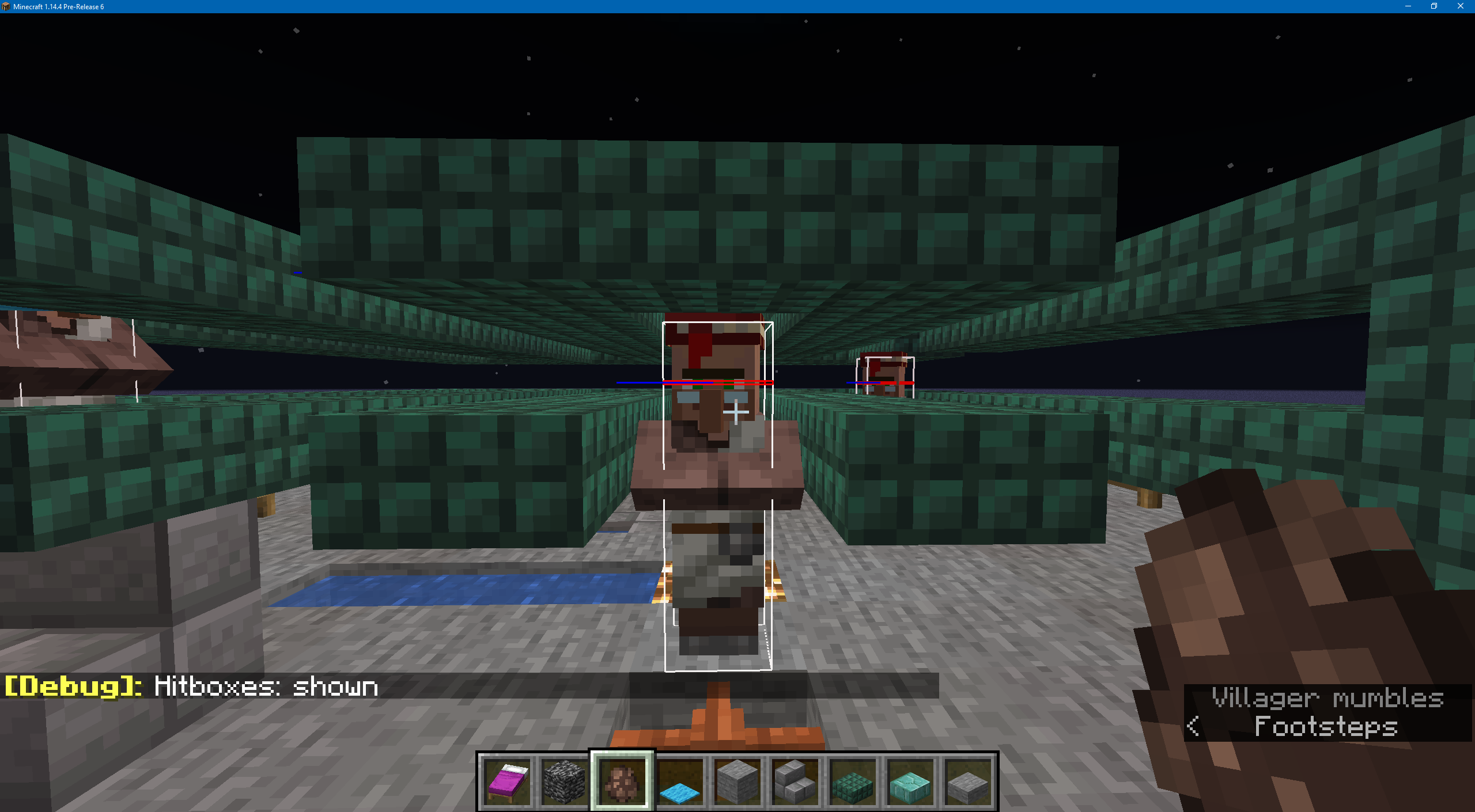
When a villager is attempting to path-find to a bed (or any path-finding), they can get stuck on various carpet/trapdoor/slab configurations.
1st test - carpet on slab: The village path-finds to the end of the makeshift corridor, but continues to jump on the bottom slab to try and get to the upper slab (ignoring the carpet). The villager continues to jump even during the daytime.
2nd test - The villager walks up to the trapdoor and stops (same happens with a double carpet). Either the villager should jump over it if there is space (and no carpet), or open/close the trapdoor. Although, the later may have unintended results with any redstone builds or farms (like certain iron golem farms...).
3rd test - Villagers can also get stuck on double-trap doors (similar to test 1).
When a villager is attempting to path-find to a bed (or any path-finding), they can get stuck on various carpet/trapdoor/slab configurations.
1st test - carpet on slab: The village path-finds to the end of the makeshift corridor, but continues to jump on the bottom slab to try and get to the upper slab (ignoring the carpet). The villager continues to jump even during the daytime.
2nd test - The villager walks up to the trapdoor and stops (same happens with a double carpet). Either the villager should jump over it if there is space (and no carpet), or open/close the trapdoor. Although, the later may have unintended results with any redstone builds or farms (like certain iron golem farms...).
3rd test - Villagers can also get stuck on double-trap doors (similar to test 1).
When a villager is attempting to path-find to a bed (or any path-finding), they can get stuck on various carpet/trapdoor/slab configurations.
1st test - carpet on slab: The village path-finds to the end of the makeshift corridor, but continues to jump on the bottom slab to try and get to the upper slab (ignoring the carpet). The villager continues to jump even during the daytime.
2nd test - The villager walks up to the trapdoor and stops (same happens with a double carpet). Either the villager should jump over it if there is space (and no carpet), or open/close the trapdoor. Although, the later may have unintended results with any redstone builds or farms (like certain iron golem farms...).
3rd test - Villagers can also get stuck on double-trap doors (similar to test 1). If the trap doors are aligned to the outside wall, the villager will continue to jump. If the trap doors are aligned to the inside wall, the villager will go to the trap door, face them and stop.
Seed, coord, specs included in screenshot.
Seed for easy copy/paste: 186769178758236173
Flying around in spectator mode, I noticed some ravines clearly cut off by lava lakes and mineshafts. Initially, I was looking at the generation rate of ravines (most times, I can count 6-8 ravines in any given viewable area). I think it issue may be ravines also generate so frequently, they're running into other underground structures.
Seed, coord, specs included in screenshot.
Seed for easy copy/paste: 186769178758236173
Flying around in spectator mode, I noticed some ravines clearly cut off by lava lakes and mineshafts. Initially, I was looking at the generation rate of ravines (most times, I can count 6-8 ravines in any given viewable area). I think it issue may be ravines also generate so frequently, they're running into other underground structures.

Seed, coord, specs included in screenshot.
Seed for easy copy/paste: 186769178758236173
Flying around in spectator mode, I noticed some ravines clearly cut off by lava lakes and mineshafts. Initially, I was looking at the generation rate of ravines (most times, I can count 6-8 ravines in any given viewable area). I think it issue may be ravines also generate so frequently, they're running into other underground structures.
Seed, coord, specs included in screenshot.
Seed for easy copy/paste: 186769178758236173
Flying around in spectator mode, I noticed some ravines clearly cut off by lava lakes and mineshafts. Initially, I was looking at the generation rate of ravines (most times, I can count 6-8 ravines in any given viewable area ). I think it issue may be ravines also generate so frequently, they're running into other underground structures.
Can confirm for the lastest (30c) snapshot. It is a little intermittent, though, since you can see caves if you're just below the surface. I attached 4 screenshots above (first time using JIRA - don't think I added it quite right) which shows two "bottom shots" (looking up from the bottom of the 50x50 area I'm playing in). The 2nd is from the top, looking down. (when I didn't have that 3x3 shaft in the middle, I couldn't see anything).
To reproduce -
1. Type /gamemode 3
2. Fly around under the ground.
Observed Result - Not all caves are visible (unless you're right next to them).
One reason I liked gamemode 3 was so I could start a challenge map right over top of, say, a skeleton spawner, or to view someone's underground base from a game save.
(Hmm, thought my Minecraft username would show. oh well)
I've noticed this too, but I think that's how it should work. Would you want a PvP server where every spectator is setting off every spawner even remotely close to you?
Can confirm it's still happening in the 1.8 pre1 version.
It's like a Golden Rule of Programming - You give the user a red button that says, "Don't press", and they'll press it. A player could be a spectator in some custom void world and decide to fly under a large structure (not knowing they're at Y1), or a map maker wants to look at they're build from below for some reason.
Can confirm in 1.8.1. I added a screenshot describing the effects of the lava. It's almost as if it thinks it's in the Nether.
Speaking of the Nether, lava will spread out in an even radius even when there's a hole 7 or 8 blocks away that it can reach. Within 6 blocks or less, it works normally.
Here's info on the image -
Iron Blocks - The range in which lava flows as expected.
Clay Blocks - The range in which lava flows as a single, or double line.
Cobblestone Blocks - The range in which lava flow behaves a little strangely.
The waterflow is for comparison.
I don't notice any issues now (if anything, it seems to be increased FPS as it's not rendering blocks - save for a few chunks where the bedrock texture doesn't render, but the rest of the chunk does). I thought it was fixed awhile ago.
It's /data get entity (and look at the entity you want to get data for when you type it. It'll appear in a list). If the entity is moving around a lot, you may have to trap it (I think there's a command somewhere to turn off AI for all entities, though).
Fixed, but seems to break current pigman farms. Maybe make them de-aggro if any of the following conditions are met if the player that they are aggro against:
1 - Dies to any of the pigmen (would require some AggroAgainst flag).
2 - Leaves the dimension (to which they should despawn...).
3 - Unloads the chunks (don't know if this would be laggy on chunk unloading code events.).
Didn't find that one from 3 years ago when I searched, but I'll add the blocks affected there (going to work now, so it'll be 9 hours from now)
Was directed here from my other bug report here -
MC-156334Villager pathfinding can cause them to be stuck in various configurations when an obstacle is in the way of their 'escape' -
1 - Trap doors in an open position (single trapdoor where they stop instead of hopping over if there's enough space above), or double trapdoors - they will walk up to the double trap door and just stand there instead of path-finding around)
2- Top-side slab (1/2 block above the ground level where the villager is) with a double carpet over it. The villager will approach it and constantly jump.
3 - A double carpet at ground level - The villager will approach the carpet and just stand there.
4 - Water-logged stairs. Villagers will spin for about 10 seconds before attempting to cross. Water-logged slabs are ok.
5 - Fence block in the ground with an obstruction 3 blocks up. The villager will attempt to cross the fence, but can't, even if there is an opening.
(Interestingly enough, when I tried this with a fence gate, the villager did not choose a profession until the fence gate was opened. In all of the other tests, they chose a profession, so they saw a path as valid).
I just had this happen. I have 2 villagers in stalls in the same chunk with their workstations (composter) in front of them. I have a villager opposite of them that had a lectern as a workstation. However, the villager was stationed just outside of the chunk, but the worksite location was 1 block in front of the villager, on the inside border of the chunk (so, 3 workstations in 1 chunk). When I broke the lectern and went to place it again, I saw the villager became a farmer (composter was 11 blocks away). Note - the other 2 villagers were already farmers and traded with. The former librarian has not been traded with. As a result, I seem to have to wait up to 3 Minecraft days before the villager loses its' profession.
Also, I've noticed the villagers wandering to the edge of the village problem. The first village I tried to "secure" by removing beds and work-stations, the villagers moved to the opposite side of the village from where I had put all of the beds and workstations in.
To comment on an above quote - I think it may have something to do with locked trading villagers not having priority, so the game loops through a collection of loaded villagers that is sorted by un-traded villagers, then villagers that are trade-locked. A bit more testing, and it seems to happen when the intended villager (the librarian in this case) looks at their lectern for a long time (not the nodding). A short time after that, breaking/placing the lectern back will cause the villager to select the wrong workstation.
A few work-arounds -
1 - Seal off the offending villager and place a work-station in front of another unaffected villager. It seems to reset the occupation of the job thief. (Work fraud and wage theft seems rampant in these villages... I mean, it's been 10 years before their economy changed. )
)
2 - Completely wall in the villager you're trying to assign a job to. That way, they shouldn't path-find to a new workstation.
Also in 1.16.3 (I just made a bug report after not initially finding any - what I get for testing at 1am. heh). Kinda of annoying, though, but at least you can enter another seed as a work-around.
I have also seen this when the downscaled player is in water with a block directly above their head. In F3+B mode, the red line (head indicator?) is above the waterline.