 Justmer Rivera
- Atom4191
- atom4191
- Europe/Stockholm
- Yes
- No
 MCPE-22639


What I expected to happen was:
When placed in the world the birch, spruce,
birchand acacia fence connections to be the right textureWhat actually happened was:
When placed in the world the birch, spruce, dark oak and acacia fence connections use the oak connection textures
Steps to Reproduce:
1. Place birch, spruce, dark oak, and acacia fences so that they connect
2. Notice the connections are not the correct textureDevice NVIDIA Shield Tablet K1
Edit by [~576874]: to provide a better description of the issue
What I expected to happen was:
When placed in the world the birch, spruce, dark oak and acacia fence connections to be the right texture
What actually happened was:
When placed in the world the birch, spruce, dark oak and acacia fence connections use the oak connection textures
Steps to Reproduce:
1. Place birch, spruce, dark oak, and acacia fences so that they connect
2. Notice the connections are not the correct textureDevice NVIDIA Shield Tablet K1
Edit by [~576874]: to provide a better description of the issue
What was I expecting
-When I use command using target selector that have Arguments, it should execute properly either on chat or command block.
For example:/effect @p[r=10] poisonWhat happened was
-It says that the command is not correct syntax, even though the command executed on the last version which is v1.0.5
-It will execute properly if I put an "!" mark before the Argument value:
Example:/effect @p[r=!10] poisonI hope this would be fixed
What was I expecting
-When I use command using target selector that have Arguments, it should execute properly either on chat or command block.
For example:/effect @p[r=10] poisonWhat happened was
-It says that the command is not correct in syntax, even though the command executed on the last version which is v1.0.5
-It will execute properly if I put an "!" mark before the Argument value:
Example:/effect @p[r=!10] poisonExample of Arguments that didn't work properly without using "!"
- r-radius
- m-gamemode
I hope this would be fixed
What was I expecting
-When I use command using target selector that have Arguments, it should execute properly either on chat or command block.
For example:/effect @p[r=10] poisonWhat happened was
-It says that the command is not correct in syntax, even though the command executed on the last version which is v1.0.5
-It will execute properly if I put an "!" mark before the Argument value:
Example:/effect @p[r=!10] poisonExample of Arguments that didn't work properly without using "!"
- r-radius
- m-gamemode
I hope this would be fixed
What was I expecting
-When I use command using target selector that have Arguments, it should execute properly either on chat or command block.
For example:/effect @p[r=10] poisonWhat happened was
-It says that the command is not correct in syntax, even though the command executed on the last version which is v1.0.5
-It will execute properly if I put an "!" mark before the Argument value:
Example:/effect @p[r=!10] poisonExample of Arguments that didn't work properly without using "!"
- r-radius
- m-gamemode
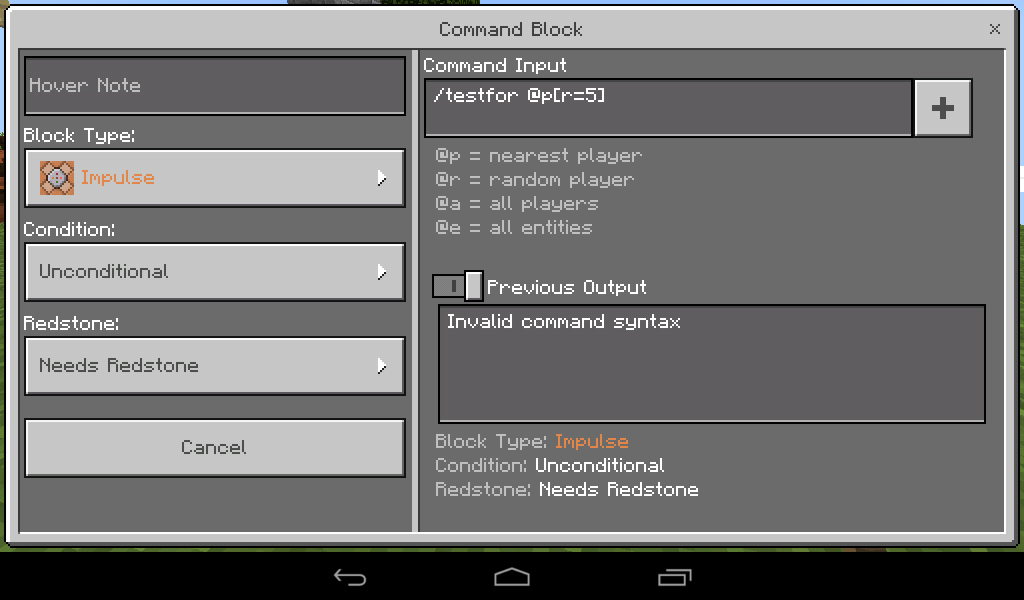
Another Example- /testfor @p[r=5] - This would result to invalid syntax message instead of execute.
- /testfor @p[r=!5] - This would result to what would expected for the above command, though it should not.
I hope this would be fixed
What was I expecting
-When I use command using target selector that have Arguments, it should execute properly either on chat or command block.
For example:/effect @p[r=10] poisonWhat happened was
-It says that the command is not correct in syntax, even though the command executed on the last version which is v1.0.5
-It will execute properly if I put an "!" mark before the Argument value:
Example:/effect @p[r=!10] poisonExample of Arguments that didn't work properly without using "!"
- r-radius
- m-gamemode
Another Example- /testfor @p[r=5] - This would result to invalid syntax message instead of execut
e.- /testfor @p[r=!5] - This would result to what would expected for the above command, though it should not.
I hope this would be fixedWhat was I expecting
-When I use command using target selector that have Arguments, it should execute properly either on chat or command block.
For example:/effect @p[r=10] poisonWhat happened was
-It says that the command is not correct in syntax, even though the command executed on the last version which is v1.0.5
-It will execute properly if I put an "!" mark before the Argument value:
Example:/effect @p[r=!10] poisonExample of Arguments that didn't work properly without using "!"
- r-radius
- m-gamemode
Another Example- /testfor @p[r=5] - This would result to invalid syntax message instead of executing.
- /testfor @p[r=!5] - This would result to what would expected for the above command, though it should not.
I hope this would be fixed
What was I expecting
-When I use command using target selector that have Arguments, it should execute properly either on chat or command block.
For example:/effect @p[r=10] poisonWhat happened was
-It says that the command is not correct in syntax, even though the command executed on the last version which is v1.0.5
-It will execute properly if I put an "!" mark before the Argument value:
Example:/effect @p[r=!10] poisonExample of Arguments that didn't work properly without using "!"
- r-radius
- m-gamemode
Another Example- /testfor @p[r=5] - This would result to invalid syntax message instead of executing.
- /testfor @p[r=!5] - This would result to what w
ouldexpected for the above command, though it should not.
I hope this would be fixedWhat was I expecting
-When I use command using target selector that have Arguments, it should execute properly either on chat or command block.
For example:/effect @p[r=10] poisonWhat happened was
-It says that the command is not correct in syntax, even though the command executed on the last version which is v1.0.5
-It will execute properly if I put an "!" mark before the Argument value:
Example:/effect @p[r=!10] poisonExample of Arguments that didn't work properly without using "!"
- r-radius
- m-gamemode
#Another Example
- /testfor @p[r=5] - This would result to invalid syntax message instead of executing.
- /testfor @p[r=!5] - This would result to what were expected for the above command, though it should not.
I hope this would be fixed
What was I expecting
-When I use command using target selector that have Arguments, it should execute properly either on chat or command block.
For example:/effect @p[r=10] poisonWhat happened was
-It says that the command is not correct in syntax, even though the command executed on the last version which is v1.0.5
-It will execute properly if I put an "!" mark before the Argument value:
Example:/effect @p[r=!10] poisonExample of Arguments that didn't work properly without using "!"
- r-radius
- m-gamemode
#Another Example
- /testfor @p[r=5] - This would result to invalid syntax message instead of executing.
- /testfor @p[r=!5] - This would result to what were expected for the above command, though it should not.
I hope this would be fixed
What was I expecting
-When I use command using target selector that have Arguments, it should execute properly either on chat or command block.For example:/effect @p[r=10] poisonWhat happened was
-It says that the command is not correct in syntax, even though the command executed on the last version which is v1.0.5
-It will execute properly if I put an "!" mark before the Argument value:
Example:/effect @p[r=!10] poisonExample of Arguments that didn't work properly without using "!"
- r-radius
- m-gamemode
Another Example
- /testfor @p[r=5] - This would result to invalid syntax message instead of executing.
- /testfor @p[r=!5] - This would result to what were expected for the above command, though it should not.
I hope this would be fixedWhat was I expecting-When I use command using target selector that have Arguments, it should execute properly either on chat or command block.For example:/effect @p[r=10] poison*What happened was*-It says that the command is not correct in syntax, even though the command executed on the last version which is v1.0.5-It will execute properly if I put an "Unable to render embedded object: File (*Example*:/effect @p[r=!10] poison*Example of Arguments that didn't work properly without using ") not found."** r-radius* m-gamemod*Another Example** /testfor @p[r=5] - This would result to invalid syntax message instead of executing. * /testfor @p[r=!5] - This would result to what were expected for the above command, though it should not. I hope this would be fi
What is it?
Output player names are incorrect when used with /tell or /say commands.
Instead of displaying the name of the target player, it outputs a weird kind of mixed words and numbers like:/say hi @p
Instead for: Atom (Name of the player)
It then outputs:as3dc-cs9dy-aa..... so on.
What Is this all about
The game doesn't show
newly exported worlds on the world selection menu.
But older imported worlds works fine.
Instead, it would show a world without a name,without thumbnail, and in survival mode. And if opened would end up corrupted.What Is this all about
The game doesn't show worlds with "." point on it's world folder in the world selection menu.
But older imported worlds works fine.
Instead, it would show a world without a name,without thumbnail, and in survival mode. And if opened would end up corrupted.
The game won't shownewly imported worlds/mapsThe game won't show worlds with "." at the world folder
**What is it?
- The game interactions would go freeze for a moment specially if there are many entities in that area, the game doesn't lag but the block/entity interactions would not respond.
Example:
Mobs would be static at its position, but wouldshow its animation like fishes swiming- Spawning mobs wont work after a few moment
- blocks would not be placed, destroyed or interacted
- Commands can't be executed while this bug happens
- Blocks and entities
would notwont be updating**What is it?
- The game interactions would go freeze for a moment specially if there are many entities in that area, the game doesn't lag but the block/entity interactions would not respond.
Example:
- Mobs would be static at its position, but will show its animation like fishes swiming
- Spawning mobs wont work after a few moment
- blocks would not be placed, destroyed or interacted
- Commands can't be executed while this bug happens
- Blocks and entities wont be updating
**What is it?
- The game interactions would go freeze for a moment specially if there are many entities in that area, the game doesn't lag but the block/entity interactions would not respond.
Example:
- Mobs would be static at its position, but will show its animation like fishes swiming
- Spawning mobs wont work after a few moment
- blocks would not be placed, destroyed or interacted
- Commands can't be executed while this bug happens
- Blocks and entities wont be updating
Justmer Rivera: No, that was a different issue, MCPE-101202, which was fixed at about the same time you took that screenshot.
Thanks.. That helps a lot
The same with MyPhone Agua Rio Fun Android 4.4
Confirmed on devices:
My|phone Agua Rio v4.4 Kitkat with v1.1.0.4
Other device with 4.2 android
The file:"option.txt" doesn't have a line with the option:uselocalserver:0
That are present on older version, that might be(or not) the cause of the bug.
It shouldn't been changed.
me too, I can't select my skin or costum skin, it appears to be blank.
Really same with mine
I was wrong when I think that nobody reported this issue, that makes me create an issue report like this and ended up being duplicated, By the way, thanks for it.
Same here,it doesn't mine continuously but you need to Tap again to mine block next to the other. Whether with tools nor hand.
Also me has the same thing, though really MCPE can work offline, you just need to be connected to a Network so that it can open (Or WiFi).
It is stocked on the Welcome "Minecraft" Screen.
May solution was, turn on mobile data and allow it first to be connected(without balance or load).Then it works. But this is not great anyway.
Same with using it on kelp, sea grass or when used underwater on sand. Even on Creative this thing happen.
What is happening?
*When ever a certain amount of Pistons/Sticky Pistons (Let's say 10 or more) are activated and pushes blocks at the same time, the game will freeze and Crashes to the Home screen.
*Redstone clocks that uses Pistons are really having problems with this.
It appears that it was fixed on v1.5.0.7, now the game can handle much pistons the way it should be.
Yeah, the text just stay still, like it was just an ordinary text.
But not color code, its Formatting codes.
But the game wont crash if obtained from survival or commands.
Can't go up when below y level 3
But can with /tp, /effect and Bubble columns
Same here
It also affect version v1.11.0.10
This lag issue can also cause villagers to be outside of bed or lying far away from the bed on which they actually on to, for which they seen to be normal for an amount of time later on.
My devices:
Android :