 Cameron Johnson
- Coolcam6578
- coolcam6578
- America/Indiana/Indianapolis
- Yes
- No
 MCPE-4791
 MC-92441










Hostile mobs Al needs to be updated
Device: Samsung Galaxy S 3 Mini (KitKat AT&T version)
(Also persists in 0.11.1)
How to recreate the bug:
Step 1: Create a superflat world, and dig a 3x3 minimum hole to bedrock.
Step 2: Replace bedrock with gravity-affected blocks like sand or gavel in its place. If it floats, place more around it by repeating this step.
Step 3: It floats!
can't place screenshot at the moment... Will try to upload later.Device: Samsung Galaxy S 3 Mini (KitKat AT&T version)
(Also persists in 0.11.1)How to recreate the bug:
Step 1: Create a superflat world, and dig a 3x3 minimum hole to bedrock.
Step 2: Replace bedrock with gravity-affected blocks like sand or gavel in its place. If it floats, place more around it by repeating this step.
Step 3: It floats!Please look at screenshot
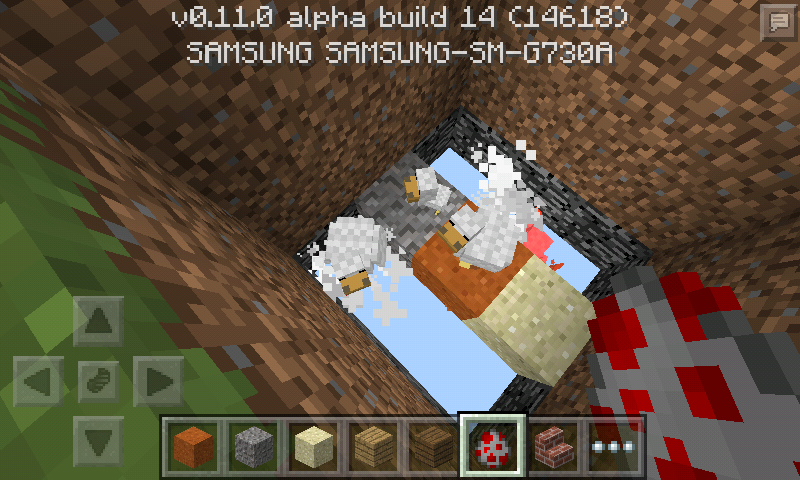
The screenshot of the bug (ignore the chickens)
THIS NEEDS AN ASSIGNEE!
please fix...
Device: Samsung Galaxy S 3 Mini (KitKat AT&T version)
(Also persists in 0.11.1)How to recreate the bug:
Step 1:Create a superflat world, and dig a 3x3 minimum hole to bedrock.Step 2:Replacebedrockwith gravity-affected blockslike sand or gavel in its place. If it floats, place more around it by repeating this step.Step 3:It floats!Please look at screenshot
Device: Samsung Galaxy S 3 Mini (KitKat AT&T version)
(Also persists in 0.11.1)How to recreate the bug:
Step 1: Create a superflat world, and dig a 3x3 minimum hole to bedrock.
Step 2: Replace the last layer of bedrock (At Y:1) with a gravity-affected block(s) like sand or gavel in its place. If it floats, place more around it by repeating this step if it doesn't satisfy you.
Step 3: It floats!Please look at screenshot
Device: Samsung Galaxy S 3 Mini (KitKat AT&T version)
(Also persists in 0.11.1)How to recreate the bug:
Step 1: Create a superflat world, and dig a 3x3 minimum hole to bedrock.
Step 2: Replace the last layer of bedrock (At Y:1) with a gravity-affected block(s) like sand or gavel in its place. If it floats, place more around it by repeating this step if it doesn't satisfy you.
Step 3: It floats!Please look at screenshot
Device: Samsung Galaxy S 3 Mini (KitKat AT&T version)
(Also persists in previous versions down to 0.10.0; which is where the bug was first noticed.)How to recreate the bug:
Step 1: Create a superflat world, and dig a 3x3 minimum hole to bedrock.
Step 2: Replace the last layer of bedrock (At Y:1) with a gravity-affected block(s) like sand or gavel in its place. If it floats, place more around it by repeating this step if it doesn't satisfy you.
Step 3: It floats!Please look at screenshot
Device: Samsung Galaxy S 3 Mini (KitKat AT&T version)
(Also persists in previous versions down to 0.10.0; which is where the bug was firstnoticed.)How to recreate the bug:
Step 1: Create a superflat world, and dig a 3x3 minimum hole to bedrock.
Step 2: Replace the last layer of bedrock (At Y:1) with a gravity-affected block(s) like sand or gavel in its place. If it floats, place more around it by repeating this step if it doesn't satisfy you.
Step 3: It floats!Please look at screenshot
Device: Samsung Galaxy S 3 Mini (KitKat AT&T version)
(Also bug persists in previous versions down to 0.10.0; which is where the bug was first reported..by me.)The following steps to recreate the bug is the simplest way. Type of mode or type of world does not matter, but to reproduce easily, follow these simple steps:
Step 1: Create a superflat world. Find an area in the world, and dig a 3x3 hole(Bigger or smaller, whatever you are OK with) until you breakthrough the last layer of bedrock.
Step 2: Replace the last block placing layer (Which ist Y:1) with gravity-affected block(s) like sand or gavel in its place. Then, place more around it by repeating this step if it doesn't satisfy you.
Step 2.1: Do note that if you place sand-like blocks at Y:2 or higher with no blocks below it (so that it falls), it does NOT suddenly stop and make a block at Y:1. It continues falling into the void. The bug is that sand should fall even when placed at Y:1.
Step 3: It should float!
Please look at screenshot below for more.
When Sand/Gravel is placed at Y:1, it Floats!Gravity-affected blocks placed at Y:1 do not fall into void!
Device: Samsung Galaxy S 3 Mini (Kit-Kat AT&T version)
(Also bug persists in previous versions down to 0.10.0; which is where the bug was first reported...by me.)The following steps to recreate the bug is the simplest way. Type of mode or type of world does not matter, but to reproduce easily, follow these simple steps:
Step 1: Create a superflat world. Find an area in the world, and dig a 3x3 hole(Bigger or smaller, whatever you are OK with) until you breakthrough the last layer of bedrock.
Step 2: Replace the last block placing layer (Which ist Y:1) with gravity-affected block(s) like sand or gavel in its place. Then, place more around it by repeating this step if it doesn't satisfy you.
Step 2.1: Do note that if you place sand-like blocks at Y:2 or higher with no blocks below it (so that it falls), it does NOT suddenly stop and make a block at Y:1. It continues falling into the void. The bug is that sand should fall even when placed at Y:1.
Step 3: It should float!
Please look at screenshot below for more.
Device: Samsung Galaxy S 3 Mini (Kit-Kat AT&T version)
(Also bug persists in previous versions down to 0.10.0; which is where the bug was first reported...by me.)The following steps to recreate the bug is the simplest way. Type of mode or type of world does not matter, but to reproduce easily, follow these simple steps:
Step 1: Create a superflat world. Find an area in the world, and dig a 3x3 hole (Bigger or smaller, whatever you are OK with) until you breakthrough the last layer of bedrock.
Step 2: Replace the last block placing layer (Which ist Y:1) with gravity-affected block(s) like sand or gavel in its place. Then, place more around it by repeating this step if it doesn't satisfy you.
Step 2.1: Do note that if you place sand-like blocks at Y:2 or higher with no blocks below it (so that it falls), it does NOT suddenly stop and make a block at Y:1. It continues falling into the void. The bug is that sand should fall even when placed at Y:1.
Step 3: It should float!
Please look at screenshot below for more.
Device: Samsung Galaxy S 3 Mini (AT&T newer version)
How to reproduce:
Step 1: Make a world. Dig a ledge or find one.
Step 2: Somehow make/spawn a boat on the higher ledge.
Step 3: row your boat until its on the very edge of the blocks. It may or may not "drift/rotate" by its self even when not moving the boat manually.
If Step 3 dosnst work: Try this against a wall
.SCREENSHOTS COMMING SOONDevice: Samsung Galaxy S 3 Mini (AT&T newer version)
How to reproduce:
Step 1: Make a world. Dig a ledge or find one.
Step 2: Somehow make/spawn a boat on the higher ledge.
Step 3: row your boat until its on the very edge of the blocks. It may or may not "drift/rotate" by its self even when not moving the boat manually.
If Step 3 doesn't work: Try this against a wall.
SCREENSHOTS COMING SOON
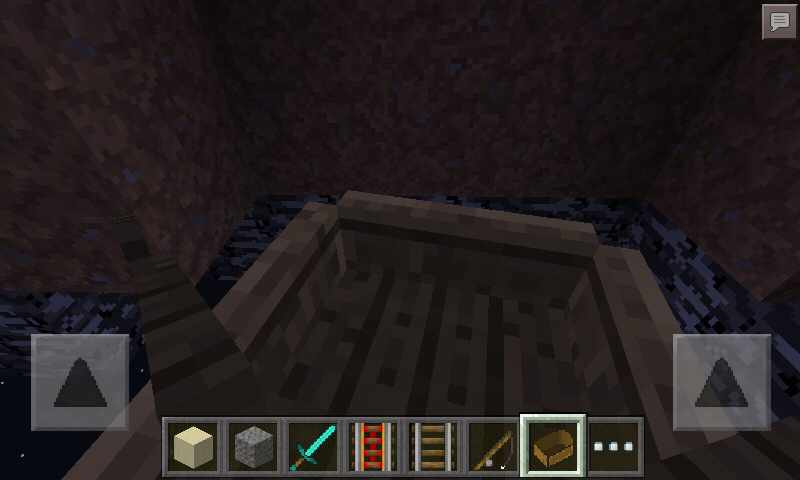
Drifying boatDrifting boat
Device: Samsung Galaxy S 3 Mini (AT&T newer version)
How to reproduce:
Step 1: Make a world. Dig a ledge or find one.
Step 2: Somehow make/spawn a boat on the higher ledge.
Step 3: row your boat until its on the very edge of the blocks. It may or may not "drift/rotate" by its self even when not moving the boat manually.
If Step 3 doesn't work: Try this against a wall.
SCREENSHOTS COMING SOONDevice: Samsung Galaxy S 3 Mini (AT&T newer version)
How to reproduce:
Step 1: Make a world. Dig a ledge or find one.
Step 2: Somehow make/spawn a boat on the higher ledge.
Step 3: row your boat until its on the very edge of the blocks. It may or may not "drift/rotate" by its self even when not moving the boat manually.
If Step 3 doesn't work: Try this against a wall.
(NOTE: The rotation continues for a LONG time after you use the buttons to move the boat. Not a short one, but a CONTINUOUS ONE.)
Sometimes, when I move/fly, the screen buttons disappear for a consecutive, split second disappearing of the gui, including the buttons. Probably has to do with the lag;Automatic movement/areas of the screen become untouchable after holding it there for a while (e.x. moving forward).
Automatic movement/areas of the screen become untouchable after holding it there for a while (e.x. moving forward).
Automatic movement/areas of the screen become untouchable after holding it there for a while (e.x. moving forward).
Samsung Galaxy S3 Mini & sometimes Motorola DROID RAZR (MAXX, maybe?)
Screen is glitching its self out...
Automatic movement/areas of the screen become untouchable after holding it there for a while (e.x. moving forward).
Samsung Galaxy S3 Mini & sometimes Motorola DROID RAZR (MAXX, maybe?)
Automatic movement/areas of the screen become untouchable after holding it there for a while (e.x. moving forward).
Samsung Galaxy S3 Mini & sometimes Motorola DROID RAZR (MAXX, maybe?)Watch the video to spot these things:
- Jittery, shakey touch movement despite not really having a shakey hand,
- The game stopping touch input suddenly when mining,
- Unlike previously, this does NOT affect movement, player rotation, or any other button.
Screen is glitching its self out... Again!

Cameron Johnson is that on MCPE 0.13.0?
Ok
Is there any rare drops in Minecraft PE?
Yea, when I spawn animals in the water, they act like if there were "Bobbing" on that level of water. Anyone get what I'm saying?
Wait, is it androids that have the wrong sound? Or is it the iOS?
In the past versions, they fixed TNT from igniting by fire, so this is the reason. To Make this work is to install BlockLauncher and the TNT bug mod so fire primes it.
Now you can close or whatever you want to do. But it is solved, so somebody who can, close the topic.
I meat the circle that shows the progress of mining said block! That's what I mean. Not the crosshairs!
The 3rd picture is in creative mode.
What About the 3rd picture ? Is that supposed to happen?
Vise virsa happens to me, except the signs AND the text were hidden;place a block next to one,(because u can still tell it is there by hovering your finger over the "hidden sign")the sign comes unhidden and the result is a blank sign.
Oh really? Huh... So, if there was, for example, a spider when you create a new world. Would it be possible? ; So it's NOT a bug?
Show the screenshot of it, please.
Getting killed:That's supposed to happen. (Somebody, update the 'keep inventory' mod!)
Quitting: Like, instantly shutting it off? Or, exiting out of the app? Is he resuming the same world? Describe it to me.
Show a screenshot of it.
It happens in PURE ANDROID DEVICES ONLY, because on Kindle Fire HD, the abdomen is present on spiders.
Yes, if you died in real life and if you came back somewhere else, you wouldn't have your money, would you?
EXCEPTION!!! :
After he dies and respawns, he has 5, only 5, MINUTES TO GET HIS ITEMS BACK WHEREVER HE DIED. If he dies while on Fire(in Fire)/In lava, poof! His items burn up/despawn(just simply disappearing) and disappear, forever. (At least, those items. He may be able to get some more via searching for the source of the item(s).)
I've played since last year's Christmas, (Pocket Edition, and later on, Computer.) so I know enough to probably "beat the game" on the PC. (Xbox, which I don't have, and PE/PI editions are way behind in game updates, especially PE/PI editions!) Now, if Hardcore mode was added onto PE, he wouldn't be able to do all that. Hardcore mode is a YOLO deal; die and you get your world deleted! I hope I helped you. (and your son a little.) FYI: I'm only 12!(one month now)
Milk is drinkable when you have a status effect [affect?] (Like u get poisoned by a cave spider, and u drink the milk to cure the side a/e;effect.), which is NOT IN PE! Currently, it's only used for crafting cake.
If it isn't in the Xbox or , it probably won't ever be in the Pocket Edition either, just so u know. Besides, it his isn't a bug. Go ask Tommaso about that. Sorry! Just can't do anything about it.
I posted this bug first,FYI! But, they didn't get the right idea of what I was trying to say! Look at
MCPE-4791, and you'll see. If by any chance one of the "admins" come across this one, please look at the one I posted and reopen it. Thanks!How do you have alpha build 5 already?
Did you read that last part?!
It won't work! Only on 0.8.1! The 0.7.5 won't go away when I edit it!
Added screenshot of the bug (ignore the chickens)
confirmed (still) on 0.11.1
Animals CAN swim through lava indefinitely until they die.
Player, however, can't...
confirmed also in 0.11.0 and 0.11.1
I think this is a duplicate...
Screenshots; can't really show the actual motion, but when they are on the edge of block(s) they rotate without player input.
this issue might be related to this bug I reported: https://bugs.mojang.com/browse/MCPE-8758
and the very bottom of the void IS solid... idk why but currently u cant die at all on creative!
I thought this was intentional...
this issue is a duplicate of another issue. Look here: https://bugs.mojang.com/browse/MCPE-8822
I think this can be fixed by having a Compass in your inventory.
THERE PROBLEM SOLVED. sigh
Is the server you are playing on allow users to mine? If not, then you might not be able to mine because the host controls it.
@[MCPE Mod] AMAN4700
Still not fixed yet as of 0.12.1 Alpha Build 3. Please fix!
This is now fixed in the 0.12.1 alpha builds. Try it yourself!
Confirmed in 0.12.1 alpha builds, albeit when exiting the app and not the world.
Confirmed in other versions up to 0.12.0 alpha builds. It still persists.
Confirmed in 0.12.1 alpha builds, as Splash Potion of Harming II kills regular spiders in one hit when thrown directly to it, but on cave spiders it takes 2. :/
Confirmed in 0.12.1 alpha build 3.
Confirmed in 0.12.1 alpha build 3. Killing hits play dying sound AND hurt sound instead of just the dying sound, if the mob has one.
Confirmed on 0.12.1 alpha build 3.
I don't know why, but along with this bug, many old ones reappear in 0.12.1 alpha build 3...I had no problem with this in 0.11.x, but now I do! WHY?!!!?!??
Sorry for responding late...
Yes, this still bug still exists for my Galaxy S3 Mini, and on my Droid RAZR MAXX
Oh wait, this isn't my report! XD sorry lol
Haven't got to test this yet, but is this bug still present on the 0.13.0 Alpha Build testing versions?
Uh, let me check.
I bet it has something to do with the new way you move items (which I don't like how you HAVE to drag-and-drop, instead of the old and new combined. -
_- )I wasn't able to reproduce the bug, BUT, I found another bug (2, actually)... do I need to make another issue, or is it fine if I include it here?
OH. That is what it does? lol. Oops. Might be that... still there are bugs for that.
Confirmed in the 0.13.0 builds.
Reoccurring on 0.13.0; on a Kindle Fire HD (1st gen).
Actually, this is just the fog making it impossible to read except when less than one block away from the sign.
You can do /kill @e even if you are in survival...but you need cheats to be enabled.
You better not be lying, cause Herobrine is just an inside MC joke. Smh.
Same... to the previous and previous-previous comments.
This issue NEEDS to be reopened...
I am not the only one with this issue.
Confirmed on KFHD 1st gen.
Yes!
(If it means that there is still 'fog' around the sign/ blank until one block distance from a low angle viewing the text)
Confirmed in 0.13.0 .
Well, is this the same issue?
I see some trees generated when creating a new world have been 'cut off,' or seem to cut off at chunk boundaries.
To this bug specifically, no. So this bug is resolved...
I am referring to another issue, but I am uncertain if this has been reported separately.
I would have to find my Kindle then...
It is on my KF HD (1st Gen)
So is this still open? If not; you can close this. I don't mind.
I can confirm on my Kindle Fire HD.
I doubt it is fixed yet, but I haven't played it on my Kindle in forever. Also I screwed up and deleted the actual keyboard on my device
Updated for 2019's version (rather than making a new issue; sorry if this is redundant to do)
Tested in 1.16.5 and this seemed to happen to my entire farm of about 50 bees
Some other things I have noticed in the latest Java release of this behaviour is the aggravated trader llama stops spitting when joining a leashed caravan, see the newly added video for more details.
I want to further add that in my instance, blocking off their source of pollination and roaming partially (only one sided very tall dirt wall), even while still keeping some flowers nearby, caused nearly all of my bees to dislocate themselves
I had more than enough hives for even 120 bees but at that moment the dirt wall invalidated all the hives it seemed