 MCPE-8758
Gravity-affected blocks placed at Y=0 do not fall into void!
Device: Samsung Galaxy S 3 Mini (Kit-Kat AT&T version)
(Also bug persists in previous versions down to 0.10.0; which is where the bug was first reported...by me.)
The following steps to recreate the bug is the simplest way. Type of mode or type of world does not matter, but to reproduce easily, follow these simple steps:
Step 1: Create a superflat world. Find an area in the world, and dig a 3x3 hole (Bigger or smaller, whatever you are OK with) until you breakthrough the last layer of bedrock.
Step 2: Replace the last block placing layer (Which ist Y:1) with gravity-affected block(s) like sand or gavel in its place. Then, place more around it by repeating this step if it doesn't satisfy you.
Step 2.1: Do note that if you place sand-like blocks at Y:2 or higher with no blocks below it (so that it falls), it does NOT suddenly stop and make a block at Y:1. It continues falling into the void. The bug is that sand should fall even when placed at Y:1.
Step 3: It should float!
Please look at screenshot below for more.
Linked Issues
is duplicated by3
 BDS-16716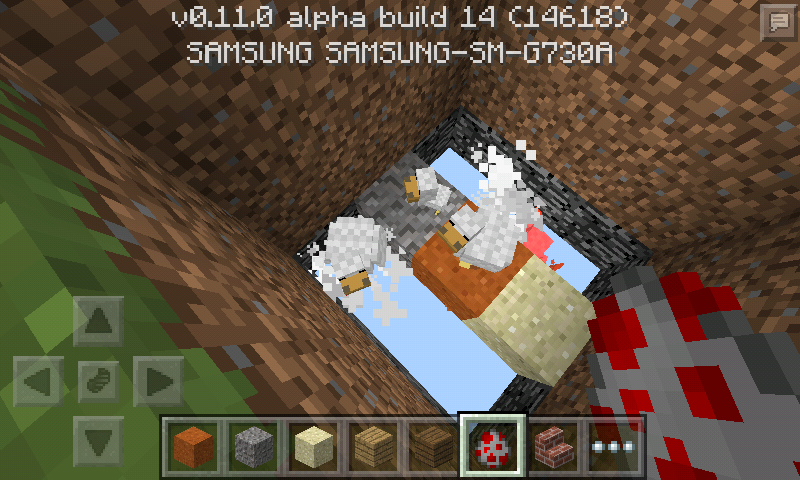

- Won't Fix
 Cameron Johnson
- 6
- 9
- Confirmed
- 17523
- Creative
- Phone - Android - Samsung Other (Specify in description)
- Android KitKat with "Samsung modifyed" interface or whatever
- anvil block concrete_powder dragon_egg falling_block gravel red_sand sand void
0.10.4 - 1.7.0
0.10.4 0.10.5 0.11.0 0.11.0 Pre-Beta 0.11.0 Beta 1 0.11.0 Beta 2 0.11.0 Beta 3 0.11.0 Beta 4 0.11.0 Beta 5 0.11.0 Beta 6 0.11.0 Beta 7 0.11.0 Beta 8 0.11.0 Beta 9 0.11.0 Beta 10 0.11.0 Beta 11 0.11.0 Beta 12 0.11.0 Beta 13 0.11.0 Beta 14 0.11.1 0.11.2 0.12.1 Pre-release 0.12.1 Beta 1 0.12.1 Beta 2 0.12.1 Beta 3 0.12.1 Beta 4 0.12.1 Beta 5 0.12.1 Beta 6 0.12.1 Beta 7 0.12.1 Beta 8 0.12.1 Beta 9 0.12.1 Beta 10 0.12.1 Beta 11 0.12.1 Beta 12 0.12.1 0.13.0 Beta 1 0.13.0 Beta 2 0.13.0 Beta 3 0.13.0 Beta 4 0.13.0 Beta 5 0.13.0 0.14.0 Beta 4 0.14.0 0.14.3 0.15.1 Beta 1 0.15.1 0.15.2 0.15.3 0.15.7 0.15.90.2 0.15.8 0.16.0 1.0.0.0 1.0.0 1.0.3 1.0.4.0 1.0.4.1 1.0.4.11 1.0.5.0 1.1.0.9 1.0.8.1 1.1.0.55 1.1.1.1 1.2.3.6 1.2.13.60 1.2.16.3 1.5.0.1 1.8.0.11 Beta 1.7.0
Created Issue:
Floating Gravity Blocks when placed at Y:0
Device: Samsung Galaxy S 3 Mini (KitKat AT&T version)
(Also persists in 0.11.1)
How to recreate the bug:
Step 1: Create a superflat world, and dig a 3x3 minimum hole to bedrock.
Step 2: Replace bedrock with gravity-affected blocks like sand or gavel in its place. If it floats, place more around it by repeating this step.
Step 3: It floats!
can't place screenshot at the moment... Will try to upload later.
Device: Samsung Galaxy S 3 Mini (KitKat AT&T version)
(Also persists in 0.11.1)
How to recreate the bug:
Step 1: Create a superflat world, and dig a 3x3 minimum hole to bedrock.
Step 2: Replace bedrock with gravity-affected blocks like sand or gavel in its place. If it floats, place more around it by repeating this step.
Step 3: It floats!
can't place screenshot at the moment... Will try to upload later.Device: Samsung Galaxy S 3 Mini (KitKat AT&T version)
(Also persists in 0.11.1)How to recreate the bug:
Step 1: Create a superflat world, and dig a 3x3 minimum hole to bedrock.
Step 2: Replace bedrock with gravity-affected blocks like sand or gavel in its place. If it floats, place more around it by repeating this step.
Step 3: It floats!Please look at screenshot
The screenshot of the bug (ignore the chickens)
tommoTHIS NEEDS AN ASSIGNEE!
please fix...

When Sand/Gravel is placed at Y:0, it Floats!When Sand/Gravel is placed at Y:1, it Floats!
Device: Samsung Galaxy S 3 Mini (KitKat AT&T version)
(Also persists in 0.11.1)How to recreate the bug:
Step 1:Create a superflat world, and dig a 3x3 minimum hole to bedrock.Step 2:Replacebedrockwith gravity-affected blockslike sand or gavel in its place. If it floats, place more around it by repeating this step.Step 3:It floats!Please look at screenshot
Device: Samsung Galaxy S 3 Mini (KitKat AT&T version)
(Also persists in 0.11.1)How to recreate the bug:
Step 1: Create a superflat world, and dig a 3x3 minimum hole to bedrock.
Step 2: Replace the last layer of bedrock (At Y:1) with a gravity-affected block(s) like sand or gavel in its place. If it floats, place more around it by repeating this step if it doesn't satisfy you.
Step 3: It floats!Please look at screenshot
Device: Samsung Galaxy S 3 Mini (KitKat AT&T version)
(Also persists in 0.11.1)How to recreate the bug:
Step 1: Create a superflat world, and dig a 3x3 minimum hole to bedrock.
Step 2: Replace the last layer of bedrock (At Y:1) with a gravity-affected block(s) like sand or gavel in its place. If it floats, place more around it by repeating this step if it doesn't satisfy you.
Step 3: It floats!Please look at screenshot
Device: Samsung Galaxy S 3 Mini (KitKat AT&T version)
(Also persists in previous versions down to 0.10.0; which is where the bug was first noticed.)How to recreate the bug:
Step 1: Create a superflat world, and dig a 3x3 minimum hole to bedrock.
Step 2: Replace the last layer of bedrock (At Y:1) with a gravity-affected block(s) like sand or gavel in its place. If it floats, place more around it by repeating this step if it doesn't satisfy you.
Step 3: It floats!Please look at screenshot
Device: Samsung Galaxy S 3 Mini (KitKat AT&T version)
(Also persists in previous versions down to 0.10.0; which is where the bug was firstnoticed.)How to recreate the bug:
Step 1: Create a superflat world, and dig a 3x3 minimum hole to bedrock.
Step 2: Replace the last layer of bedrock (At Y:1) with a gravity-affected block(s) like sand or gavel in its place. If it floats, place more around it by repeating this step if it doesn't satisfy you.
Step 3: It floats!Please look at screenshot
Device: Samsung Galaxy S 3 Mini (KitKat AT&T version)
(Also bug persists in previous versions down to 0.10.0; which is where the bug was first reported..by me.)The following steps to recreate the bug is the simplest way. Type of mode or type of world does not matter, but to reproduce easily, follow these simple steps:
Step 1: Create a superflat world. Find an area in the world, and dig a 3x3 hole(Bigger or smaller, whatever you are OK with) until you breakthrough the last layer of bedrock.
Step 2: Replace the last block placing layer (Which ist Y:1) with gravity-affected block(s) like sand or gavel in its place. Then, place more around it by repeating this step if it doesn't satisfy you.
Step 2.1: Do note that if you place sand-like blocks at Y:2 or higher with no blocks below it (so that it falls), it does NOT suddenly stop and make a block at Y:1. It continues falling into the void. The bug is that sand should fall even when placed at Y:1.
Step 3: It should float!
Please look at screenshot below for more.
When Sand/Gravel is placed at Y:1, it Floats!Gravity-affected blocks placed at Y:1 do not fall into void!
Device: Samsung Galaxy S 3 Mini (Kit-Kat AT&T version)
(Also bug persists in previous versions down to 0.10.0; which is where the bug was first reported...by me.)The following steps to recreate the bug is the simplest way. Type of mode or type of world does not matter, but to reproduce easily, follow these simple steps:
Step 1: Create a superflat world. Find an area in the world, and dig a 3x3 hole(Bigger or smaller, whatever you are OK with) until you breakthrough the last layer of bedrock.
Step 2: Replace the last block placing layer (Which ist Y:1) with gravity-affected block(s) like sand or gavel in its place. Then, place more around it by repeating this step if it doesn't satisfy you.
Step 2.1: Do note that if you place sand-like blocks at Y:2 or higher with no blocks below it (so that it falls), it does NOT suddenly stop and make a block at Y:1. It continues falling into the void. The bug is that sand should fall even when placed at Y:1.
Step 3: It should float!
Please look at screenshot below for more.

Device: Samsung Galaxy S 3 Mini (Kit-Kat AT&T version)
(Also bug persists in previous versions down to 0.10.0; which is where the bug was first reported...by me.)The following steps to recreate the bug is the simplest way. Type of mode or type of world does not matter, but to reproduce easily, follow these simple steps:
Step 1: Create a superflat world. Find an area in the world, and dig a 3x3 hole (Bigger or smaller, whatever you are OK with) until you breakthrough the last layer of bedrock.
Step 2: Replace the last block placing layer (Which ist Y:1) with gravity-affected block(s) like sand or gavel in its place. Then, place more around it by repeating this step if it doesn't satisfy you.
Step 2.1: Do note that if you place sand-like blocks at Y:2 or higher with no blocks below it (so that it falls), it does NOT suddenly stop and make a block at Y:1. It continues falling into the void. The bug is that sand should fall even when placed at Y:1.
Step 3: It should float!
Please look at screenshot below for more.


![[Mojang] Mega_Spud (Jay Wells)](../../../data/avatars/users/92696.png)
![[MCPE Mod] Dr.Awesome4333](../../../data/assets/gravatar/drawesome4333.png)


![[Mojang] Adrian Östergård](../../../data/assets/gravatar/nighter.jpeg)
Gravity-affected blocks placed at Y:1do not fall into void!Gravity-affected blocks placed at Y=0 do not fall into void!
relates to
![[MCPE Mod] Celesian](../../../data/avatars/users/81635.png)
Affects 1.2.10.2

![[Mod] OcelotOnesie](../../../data/avatars/users/43220.png)
is duplicated by
![[Mod] EVGENSYPERPRO](../../../data/avatars/users/92853.png)
Summary:
At 0 altitude and -64 altitude, scaffolding has no gravity whatsoever.
At these heights, you cannot make the scaffolding fall or break on its own.
At -64 altitude, no blocks have gravity MCPE-8758 (Won't Fix? 😕). But at 0 height, only the scaffolding has no gravity.
Steps to reproduce:
- Take scaffolding.
- Place the scaffolding at 0 height.
- Break any support blocks near them.
Observed results:
Scaffolding will fly without any blocks (and you can't make them fall / break).
Expected results:
Scaffolding will break / fall at any height.
Image:


Maybe it's related to MCPE-8758.
HM. Really. At -64 heights the blocks have no gravity, but at 0 heights the blocks have gravity (except for scaffolding).
Perhaps the situation has changed since version 1.7.0 and the developers will still fix MCPE-8758 (only with -64 height).
Thank you for your report!
We're tracking this issue as MCPE-8758, so this ticket is being resolved and linked as a duplicate.
That ticket has already been resolved as Won't Fix, which means this is considered a bug but won't be fixed. Please do not leave a comment on the linked ticket.
If you haven't already, you might like to make use of the search feature to see if the issue has already been mentioned.
Quick Links:
📓 Bug Tracker Guidelines – 💬 Community Support – 📧 Mojang Support
📓 Project Summary – ✍️ Feedback and Suggestions – 📖 BDS Wiki – 📖 FAQs
Confirmed on iPad Mini running 0.11.1
Added screenshot of the bug (ignore the chickens)
(It is actually at y:1) You can not place blocks at y:0
@[MCPE Mod] AMAN4700
Still not fixed yet as of 0.12.1 Alpha Build 3. Please fix!
Confirmed on an iPad Mini 1 running MCPE v0.12.1
Haven't got to test this yet, but is this bug still present on the 0.13.0 Alpha Build testing versions?
Confirmed in the 0.13.0 builds.
Confirmed in 0.13.0 .
Affects 0.14.0 beta versions, and the final release.
effects 0.15 build 2
Affects 0.14.3
Affects 1.0.4.0.
All the gravity blocks (sand, red sand, gravel, dragon egg, anvil) are affected.
Affects 1.0.4.1.
Affects 1.0.5.0.
That's y=0, not 1
Thank you for your report!
However, this issue has been closed as Won't Fix.
If you'd like to post a suggestion or give further feedback, please visit the Minecraft Feedback Site or choose a link below.
Quick Links:
📓 Issue Guidelines – 💬 Community Support – 📧 Feedback – 📖 Game Wiki