 DJDiamondSword
- DJDiamondSword
- JIRAUSER792326
- Europe/Stockholm
- Yes
- No
 BDS-19692
 MC-276281
 MCPE-186821




When I try to upload one .png image, it works fine. If I try to upload different .png skin though, (on a separate character), both of them chang
eto be that skin I just uploaded?When I try to upload one .png image, it works fine. If I try to upload different .png skin though, (on a separate character), both of them are changing to be that skin I just uploaded?
Custom skins (that is to say, ones from a .png image), aren't working properly
Sort of, apart from the fact that my capes are disappearing when I launch the game, not just if I go to edit that character. It happens less as I open and close the game since turning on my computer; I'm guessing it's to do with the RAM?
When I launch Minecraft for the first since turning on my computer, my capes keep on unequipping themselves from my custom character. What's weird about this is that in the Character Creator it says a cape is equipped, but it's not showing up on my character. Happening across custom characters, custom skins (ones I uploaded from .png files), and skins from the Marketplace.
How I normally fix this: I have two capes (Pan and MCC 15th Anniversary), so what I do instead is equip the other one, then put the other one I wanted originorally back on.
Interesting thing is that sometimes (maybe like the forth-ish time I've launched Minecraft in that "session", it will show a cape equipped on my character, but when I go into the Wardrobe, it doesn't show on my character, yet it still says it's equipped. It's really confusing.
Like another bug I have reported, this one happens more frequently when I load the game for the first time since turning on my computer, then happens less after that. My guess is that it's something to do with
the RAM?Thanks <3
When I launch Minecraft for the first since turning on my computer, my capes keep on unequipping themselves from my custom character. What's weird about this is that in the Character Creator it says a cape is equipped, but it's not showing up on my character. Happening across custom characters, custom skins (ones I uploaded from .png files), and skins from the Marketplace.
How I normally fix this: I have two capes (Pan and MCC 15th Anniversary), so what I do instead is equip the other one, then put the other one I wanted originorally back on.
Interesting thing is that sometimes (maybe like the forth-ish time I've launched Minecraft in that "session", it will show a cape equipped on my character, but when I go into the Wardrobe, it doesn't show on my character, yet it still says it's equipped. It's really confusing.
Like another bug I have reported, this one happens more frequently when I load the game for the first time since turning on my computer, then happens less after that. My guess is that it's something to do with how Minecraft uses the RAM on my computer?
Thanks <3
When I launch Minecraft for the first since turning on my computer, my capes keep on unequipping themselves from my custom character. What's weird about this is that in the Character Creator it says a cape is equipped, but it's not showing up on my character. Happening across custom characters, custom skins (ones I uploaded from .png files), and skins from the Marketplace.
How I normally fix this: I have two capes (Pan and MCC 15th Anniversary), so what I do instead is equip the other one, then put the other one I wanted originorally back on.
Interesting thing is that sometimes (maybe like the forth-ish time I've launched Minecraft in that "session"), it will show a cape equipped on my character, but when I go into the Wardrobe, it doesn't show on my character, yet it still says it's equipped. It's really confusing.
Like another bug I have reported, this one happens more frequently when I load the game for the first time since turning on my computer, then happens less after that. My guess is that it's something to do with how Minecraft uses the RAM on my computer?
Thanks <3
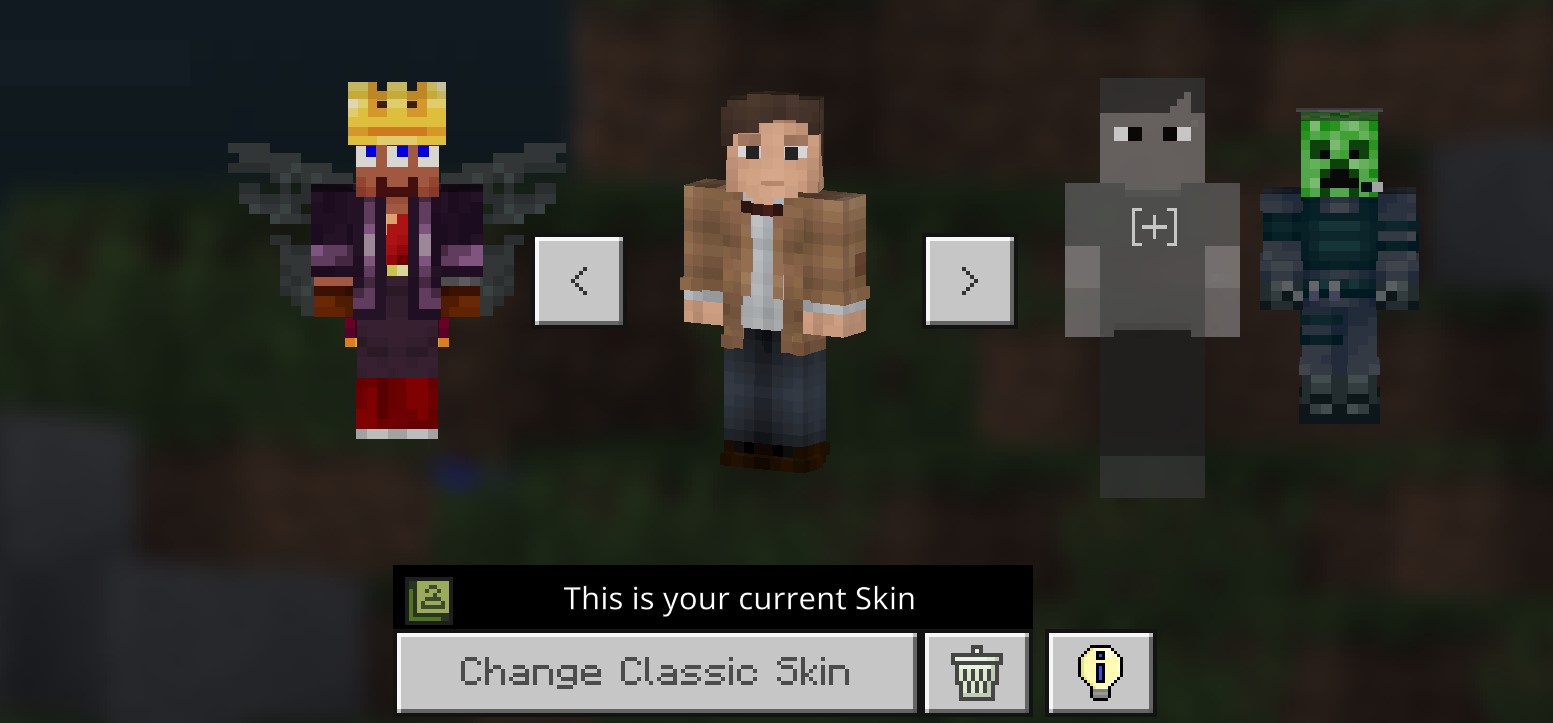
Whenever I change skins in Minecraft Bedrock, all my emotes for some reason keep unequipping themselves, and I have to reassign them all over again. When I press B for the emote wheel, that still comes up, but I get all these cross symbols on the spots where the emotes go, as shown in the first image.
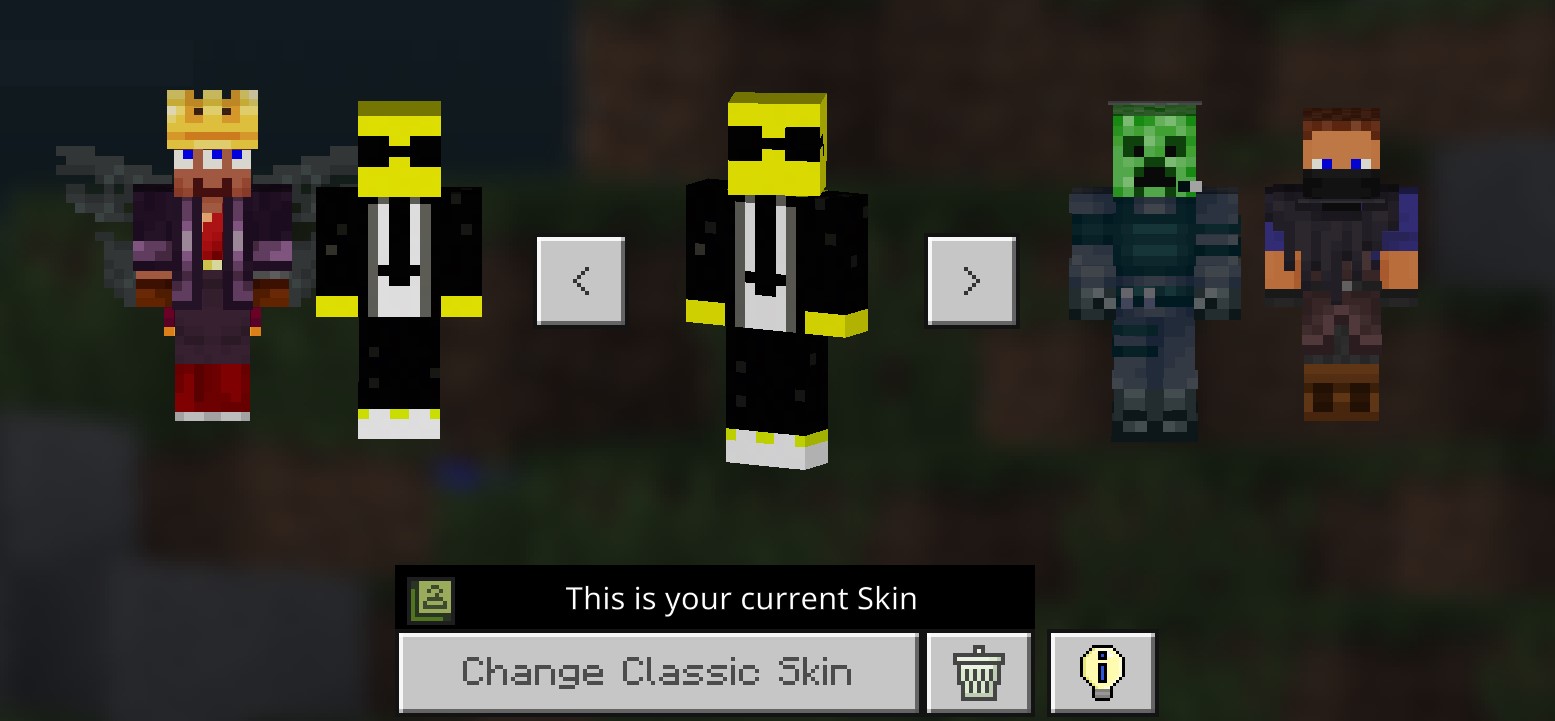
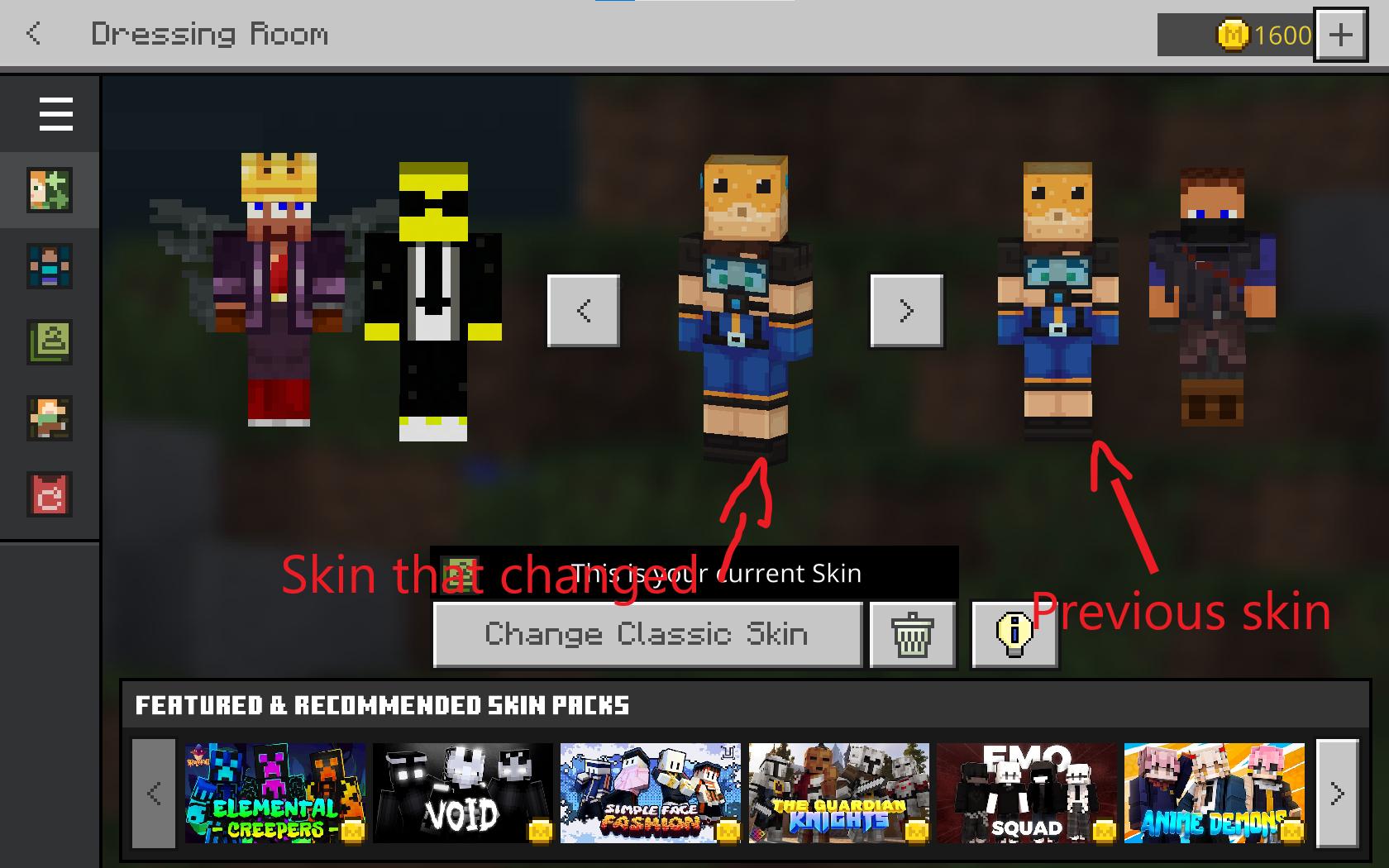
Interesting thing is once when I pressed Change Emotes, my skin actually switched back to a skin I had been using previously before that. Even more interesting is when I went to change my skin back to what I wanted to be (and what it was before the weird skin change), I found that the skin I had been using before and my current skin were actually separate, meaning that when the weird skin change happened, it changed my current skin to be duplicate of the skin I had been using before.
Weird explanation, sorry. Second image below will help.
How to reproduce this bug (emotes vanishing):
- Ensure that you have two different skins
- Change from one skin to the other
- Enter a world
- Press your key to emote
- All the emotes should have vanished
Don't know how to reproduce the weird skin thing, as far as I know this could just be a once-off, but it does mean that if a player had a create a character skin equipped previously, then experienced this bug, they could lose their character (noooo!).
Please fix this soon as emoting is one of my favorite parts of Bedrock!
Thanks <3
Whenever I change skins in Minecraft Bedrock, all my emotes for some reason keep unequipping themselves, and I have to reassign them all over again. When I press B for the emote wheel, that still comes up, but I get all these cross symbols on the s
pots where the emotes go, as shown in the first image.Interesting thing is once when I pressed Change Emotes, my skin actually switched back to a skin I had been using previously before that. Even more interesting is when I went to change my skin back to what I wanted to be (and what it was before the weird skin change), I found that the skin I had been using before and my current skin were actually separate, meaning that when the weird skin change happened, it changed my current skin to be duplicate of the skin I had been using before.
Weird explanation, sorry. Second image below will help.
How to reproduce this bug (emotes vanishing):
- Ensure that you have two different skins
- Change from one skin to the other
- Enter a world
- Press your key to emote
- All the emotes should have vanished
Don't know how to reproduce the weird skin thing, as far as I know this could just be a once-off, but it does mean that if a player had a create a character skin equipped previously, then experienced this bug, they could lose their character (noooo!).
Please fix this soon as emoting is one of my favorite parts of Bedrock!
Thanks <3
Whenever I change skins in Minecraft Bedrock, all my emotes for some reason keep unequipping themselves, and I have to reassign them all over again. When I press B for the emote wheel, that still comes up, but I get all these cross symbols on the slots where the emotes go, as shown in the first image.
Interesting thing is once when I pressed Change Emotes, my skin actually switched back to a skin I had been using previously before that. Even more interesting is when I went to change my skin back to what I wanted to be (and what it was before the weird skin change), I found that the skin I had been using before and my current skin were actually separate, meaning that when the weird skin change happened, it changed my current skin to be duplicate of the skin I had been using before.
Weird explanation, sorry. Second image below will help.
How to reproduce this bug (emotes vanishing):
- Ensure that you have two different skins
- Change from one skin to the other
- Enter a world
- Press your key to emote
- All the emotes should have vanished
Expected result: The emotes are still assigned to the slots
Actual result: The emotes have disappeared
Don't know how to reproduce the weird skin thing, as far as I know this could just be a once-off, but it does mean that if a player had a create a character skin equipped previously, then experienced this bug, they could lose their character (noooo!).
Please fix this soon as emoting is one of my favorite parts of Bedrock!
Thanks <3
Whenever I change skins in Minecraft Bedrock, all my emotes for some reason keep unequipping themselves, and I have to reassign them all over again. When I press B for the emote wheel, that still comes up, but I get all these cross symbols on the slots where the emotes go, as shown in the first image.
Interesting thing is once when I pressed Change Emotes, my skin actually switched back to a skin I had been using previously before that. Even more interesting is when I went to change my skin back to what I wanted to be (and what it was before the weird skin change), I found that the skin I had been using before and my current skin were actually separate, meaning that when the weird skin change happened, it changed my current skin to be duplicate of the skin I had been using before.
Weird explanation, sorry. Second image below will help.
How to reproduce this bug (emotes vanishing):
- Ensure that
you have two different skins- Change from one skin to the other
- Enter a world
- Press your key to emote
- All the emotes should have vanished
Expected result: The emotes are still assigned to the slots
Actual result: The emotes have disappeared
Don't know how to reproduce the weird skin thing, as far as I know this could just be a once-off, but it does mean that if a player had a create a character skin equipped previously, then experienced this bug, they could lose their character (noooo!).
Please fix this soon as emoting is one of my favorite parts of Bedrock!
Thanks <3
Whenever I change skins in Minecraft Bedrock, all my emotes for some reason keep unequipping themselves, and I have to reassign them all over again. When I press B for the emote wheel, that still comes up, but I get all these cross symbols on the slots where the emotes go, as shown in the first image.
Interesting thing is once when I pressed Change Emotes, my skin actually switched back to a skin I had been using previously before that. Even more interesting is when I went to change my skin back to what I wanted to be (and what it was before the weird skin change), I found that the skin I had been using before and my current skin were actually separate, meaning that when the weird skin change happened, it changed my current skin to be duplicate of the skin I had been using before.
Weird explanation, sorry. Second image below will help.
How to reproduce this bug (emotes vanishing):
- Ensure that in the Dressing Room, you have at least two different skins, with emotes assigned to both of them.
- Change from one skin to the other
- Enter any world
- Press your assigned key to emote
Expected result: The emotes are still assigned to the slots
Actual result: The emotes have disappeared
Don't know how to reproduce the weird skin thing, as far as I know this could just be a once-off, but it does mean that if a player had a create a character skin equipped previously, then experienced this bug, they could lose their character (noooo!).
Please fix this soon as emoting is one of my favorite parts of Bedrock!
Thanks <3
Whenever I change skins in Minecraft Bedrock, all my emotes for some reason keep unequipping themselves, and I have to reassign them all over again. When I press B for the emote wheel, that still comes up, but I get all these cross symbols on the slots where the emotes go, as shown in the first image.
Interesting thing is once when I pressed Change Emotes, my skin actually switched back to a skin I had been using previously before that. Even more interesting is when I went to change my skin back to what I wanted to be (and what it was before the weird skin change), I found that the skin I had been using before and my current skin were actually separate, meaning that when the weird skin change happened, it changed my current skin to be duplicate of the skin I had been using before.
Weird explanation, sorry. Second image below will help.
How to reproduce this bug (emotes vanishing):
- Ensure that in the Dressing Room, you have at least two different skins, with emotes assigned to both of them.
- Change from one skin to the other
- Enter any world
- Press your assigned key to emote
Expected result: The emotes are still assigned to the slots
Actual result: The emotes have disappeared
Don't know how to reproduce the weird skin thing, as far as I know this could just be a once-off, but it does mean that if a player had a create a character skin equipped previously, then experienced this bug, they could lose their character (noooo!).
Please fix this soon as emoting is one of my favorite parts of Bedrock!
Thanks <3
Whenever I change skins in Minecraft Bedrock, all my emotes for some reason keep unequipping themselves, and I have to reassign them all over again. When I press B for the emote wheel, that still comes up, but I get all these cross symbols on the slots where the emotes go, as shown in the first image.
Interesting thing is once when I pressed Change Emotes, my skin actually switched back to a skin I had been using previously before that. Even more interesting is when I went to change my skin back to what I wanted to be (and what it was before the weird skin change), I found that the skin I had been using before and my current skin were actually separate, meaning that when the weird skin change happened, it changed my current skin to be duplicate of the skin I had been using before.
Weird explanation, sorry. Second image below will help.
How to reproduce this bug (emotes vanishing):
- Ensure that in the Dressing Room, you have at least two different skins, with emotes assigned to both of them.
- Change from one skin to the other
- Enter any world
- Press your assigned key to emote
Expected result: The emotes are still assigned to the slots
Actual result: The emotes have disappeared
Don't know how to reproduce the weird skin thing, as far as I knowthis could just be a once-off, butitdoes mean that if a player had a create a character skin equipped previously, then experienced this bug, they could lose their character (noooo!).Please fix this soon as emoting is one of my favorite parts of Bedrock!
Thanks <3
Whenever I change skins in Minecraft Bedrock, all my emotes for some reason keep unequipping themselves, and I have to reassign them all over again. When I press B for the emote wheel, that still comes up, but I get all these cross symbols on the slots where the emotes go, as shown in the first image.
Interesting thing is once when I pressed Change Emotes, my skin actually switched back to a skin I had been using previously before that. Even more interesting is when I went to change my skin back to what I wanted to be (and what it was before the weird skin change), I found that the skin I had been using before and my current skin were actually separate, meaning that when the weird skin change happened, it changed my current skin to be duplicate of the skin I had been using before.
Weird explanation, sorry. Second image below will help.
My skin was a skin from a skin pack from the Marketplace, but I can now confirm that this bug also applies to create-a-character skins too.
How to reproduce this bug (emotes vanishing):
- Ensure that in the Dressing Room, you have at least two different skins, with emotes assigned to both of them.
- Change from one skin to the other
- Enter any world
- Press your assigned key to emote
Expected result: The emotes are still assigned to the slots
Actual result: The emotes have disappeared
I don't know how to reproduce the weird skin thing. Previously I stated that this could just be a once-off, but I have just had it happen again, so that doesn't seem to be the case anymore. This unexpected change of skins does mean that if a player had a create a character skin equipped previously, then experienced this bug, they could lose their character (noooo!).
Please fix this soon as emoting is one of my favorite parts of Bedrock!
Thanks <3
Whenever I change skins in Minecraft Bedrock, all my emotes for some reason keep unequipping themselves, and I have to reassign them all over again. When I press B for the emote wheel, that still comes up, but I get all these cross symbols on the slots where the emotes go, as shown in the first image.
Interesting thing is once when I pressed Change Emotes, my skin actually switched back to a skin I had been using previously before that. Even more interesting is when I went to change my skin back to what I wanted to be (and what it was before the weird skin change), I found that the skin I had been using before and my current skin were actually separate, meaning that when the weird skin change happened, it changed my current skin to be duplicate of the skin I had been using before.Weird explanation, sorry. Second image below will help.
My skin was a skin from a skin pack from the Marketplace, but I can now confirm that this bug also applies to create-a-character skins too.
How to reproduce this bug (emotes vanishing):
- Ensure that in the Dressing Room, you have at least two different skins, with emotes assigned to both of them.
- Change from one skin to the other
- Enter any world
- Press your assigned key to emote
Expected result: The emotes are still assigned to the slots
Actual result: The emotes have disappeared
I don't know how to reproduce the weird skin thing. Previously I stated that this could just be a once-off, but I have just had it happen again, so that doesn't seem to be the case anymore. This unexpected change of skins does mean that if a player had a create a character skin equipped previously, then experienced this bug, they could lose their character (noooo!).
Please fix this soon as emoting is one of my favorite parts of Bedrock!
Thanks <3
Whenever I change skins in Minecraft Bedrock, all my emotes for some reason keep unequipping themselves, and I have to reassign them all over again. When I press B for the emote wheel, that still comes up, but I get all these cross symbols on the slots where the emotes go, as shown in the first image.
Additionally, sometimes when I go to equip my emotes, the default four emotes everyone gets (Follow Me, Over There, Clapping and Wave), all show up twice on my "Owned Emotes" page, even though it is meant to be impossible to obtain more than one of an emote.
Interesting thing is once when I pressed Change Emotes after experiencing the first bug, my skin actually switched back to a skin I had been using previously before that. Even more interesting is when I went to change my skin back to what I wanted to be (and what it was before the weird skin change), I found that the skin I had been using before and my current skin were actually separate, meaning that when the weird skin change happened, it changed my current skin to be duplicate of the skin I had been using before.
Weird explanation, sorry. Second image below will help.
My skin was a skin from a skin pack from the Marketplace, but I can now confirm that this bug also applies to create-a-character skins too.
How to reproduce this bug (emotes vanishing):
- Ensure that in the Dressing Room, you have at least two different skins, with emotes assigned to both of them.
- Change from one skin to the other
- Enter any world
- Press your assigned key to emote
Expected result: The emotes are still assigned to the slots
Actual result: The emotes have disappeared
I don't know how to reproduce the weird skin thing. Previously I stated that this could just be a once-off, but I have just had it happen again, so that doesn't seem to be the case anymore. This unexpected change of skins does mean that if a player had a create a character skin equipped previously, then experienced this bug, they could lose their character (noooo!).
Please fix this soon as emoting is one of my favorite parts of Bedrock!
Thanks <3
Emotes keep unequipping themselves whenever I change my skin, and emotes in Dressing Room are showing up twice

Whenever I change skins in Minecraft Bedrock, all my emotes for some reason keep unequipping themselves, and I have to reassign them all over again. When I press B for the emote wheel, that still comes up, but I get all these cross symbols on the slots where the emotes go, as shown in the first image.
Additionally, sometimes when I go to equip my emotes, the default four emotes everyone gets (Follow Me, Over There, Clapping and Wave), all show up twice on my "Owned Emotes" page, even though it is meant to be impossible to obtain more than one of an emote.Interesting thing is once when I pressed Change Emotes after experiencing the first bug, my skin actually switched back to a skin I had been using previously before that. Even more interesting is when I went to change my skin back to what I wanted to be (and what it was before the weird skin change), I found that the skin I had been using before and my current skin were actually separate, meaning that when the weird skin change happened, it changed my current skin to be duplicate of the skin I had been using before.
Weird explanation, sorry. Second image below will help.
My skin was a skin from a skin pack from the Marketplace, but I can now confirm that this bug also applies to create-a-character skins too.
How to reproduce this bug (emotes vanishing):
- Ensure that in the Dressing Room, you have at least two different skins, with emotes assigned to both of them.
- Change from one skin to the other
- Enter any world
- Press your assigned key to emote
Expected result: The emotes are still assigned to the slots
Actual result: The emotes have disappeared
I don't know how to reproduce the weird skin thing. Previously I stated that this could just be a once-off, but I have just had it happen again, so that doesn't seem to be the case anymore. This unexpected change of skins does mean that if a player had a create a character skin equipped previously, then experienced this bug, they could lose their character (noooo!).
Please fix this soon as emoting is one of my favorite parts of Bedrock!
Thanks <3
Whenever I change skins in Minecraft Bedrock, all my emotes for some reason keep unequipping themselves, and I have to reassign them all over again. When I press B for the emote wheel, that still comes up, but I get all these cross symbols on the slots where the emotes go, as shown in the first image.
Interesting thing is once when I pressed Change Emotes after experiencing the first bug, my skin actually switched back to a skin I had been using previously before that. Even more interesting is when I went to change my skin back to what I wanted to be (and what it was before the weird skin change), I found that the skin I had been using before and my current skin were actually separate, meaning that when the weird skin change happened, it changed my current skin to be duplicate of the skin I had been using before.
Weird explanation, sorry. Second image below will help.
My skin was a skin from a skin pack from the Marketplace, but I can now confirm that this bug also applies to create-a-character skins too.
How to reproduce this bug (emotes vanishing):
- Ensure that in the Dressing Room, you have at least two different skins, with emotes assigned to both of them.
- Change from one skin to the other
- Enter any world
- Press your assigned key to emote
Expected result: The emotes are still assigned to the slots
Actual result: The emotes have disappeared
I don't know how to reproduce the weird skin thing. Previously I stated that this could just be a once-off, but I have just had it happen again, so that doesn't seem to be the case anymore. This unexpected change of skins does mean that if a player had a create a character skin equipped previously, then experienced this bug, they could lose their character (noooo!).
Please fix this soon as emoting is one of my favorite parts of Bedrock!
Thanks <3
Emotes keep unequipping themselves whenever I change my skin, and emotes in Dressing Room are showing up twice
The animation(s) on the Marketplace button in the Menu, and the button to access my Reams altogether have disappeared. I think the animation should be showing either a Sonic or Transformers animation, but the last one I had was one portraying Add-Ons, and I haven't had any come up since.
I would also like to add that I am disappointed with the magnitude of just how many bugs I have found with Minecraft Bedrock, when Java is almost flawless. They are really annoying me, which is why I have reported a lot of them!

The animation(s) on the Marketplace button in the Menu, and the button to access my Reams altogether have disappeared. I think the animation should be showing either a Sonic or Transformers animation, but the last one I had was one portraying Add-Ons, and I haven't had any come up since.
I would also like to add that I am disappointed with the magnitude of just
how many bugs I have found with Minecraft Bedrock, when Java is almost flawless. They are really annoying me, which is why I have reported a lot of them!The animation(s) on the Marketplace button in the Menu, and the button to access my Reams altogether have disappeared. I think the animation should be showing either a Sonic or Transformers animation, but the last one I had was one portraying Add-Ons, and I haven't had any come up since.
I would also like to add that I am disappointed with the magnitude of just how many bugs I have found with Minecraft Bedrock, when Java is almost flawless. They are really annoying me, which is why I have reported a lot of them!
The animation(s) on the Marketplace button in the Menu, and the button to access my Reams altogether have disappeared. I think the animation should be showing either a Sonic or Transformers animation, but the last one I had was one portraying Add-Ons, and I haven't had any come up since.
I would also like to add that I am disappointed with the magnitude of just how many bugs I have found with Minecraft Bedrock, when Java is almost flawless. They are really annoying me, which is why I have reported a lot of them!
The animation(s) on the Marketplace button in the Menu, and the button to access my Reams altogether have disappeared. I think the animation should be showing either a Sonic or Transformers animation, but the last one I had was one portraying Add-Ons, and I haven't had any come up since.
I would also like to add that I am disappointed with the magnitude of just how many bugs I have found with Minecraft Bedrock, when Java is almost flawless. They are really annoying me, which is why I have reported a lot of them! Sorry if I seem like a troll or something because of this though.
The animation(s) on the Marketplace button in the Menu, and the button to access my Reams altogether have disappeared. I think the animation should be showing either a Sonic or Transformers animation, but the last one I had was one portraying Add-Ons, and I haven't had any come up since.
I would also like to add that I am disappointed with the magnitude of just how many bugs I have found with Minecraft Bedrock, when Java is almost flawless. They are really annoying me, which is why I have reported a lot of them! Sorry if I seem like a troll or something because of this though. :/
The animation(s) on the Marketplace button in the Menu, and the button to access my Reams altogether have disappeared. I think the animation should be showing either a Sonic or Transformers animation, but the last one I had was one portraying Add-Ons, and I haven't had any come up since.
This means that I can not access my Realms.
I would also like to add that I am disappointed with the magnitude of just how many bugs I have found with Minecraft Bedrock, when Java is almost flawless. They are really annoying me, which is why I have reported a lot of them! Sorry if I seem like a troll or something because of this though. :/
The animation(s) on the Marketplace button in the Menu, and the button to access my Reams altogether have disappeared. I think the animation should be showing either a Sonic or Transformers animation, but the last one I had was one portraying Add-Ons, and I haven't had any come up since.
This means that I can not access
my Realms.
I would also like to add that I am disappointed with the magnitude of just how many bugs I have found with Minecraft Bedrock, when Java is almost flawless. They are really annoying me, which is why I have reported a lot of them! Sorry if I seem like a troll or something because of this though. :/
The animation(s) on the Marketplace button in the Menu, and the button to access my Reams altogether have disappeared. I think the animation should be showing either a Sonic or Transformers animation, but the last one I had was one portraying Add-Ons, and I haven't had any come up since.
This means that I can not access any Realms that I may have paid for, or join my friends'.
I would also like to add that I am disappointed with the magnitude of just how many bugs I have found with Minecraft Bedrock, when Java is almost flawless. They are really annoying me, which is why I have reported a lot of them! Sorry if I seem like a troll or something because of this though. :/
The animation(s) on the Marketplace button in the Menu, and the button to access my Reams altogether have disappeared. I think the animation should be showing either a Sonic or Transformers animation, but the last one I had was one portraying Add-Ons, and I haven't had any come up since.
This means that I can not access any Realms that I may have paid for, or join my friends' Realms.
I would also like to add that I am disappointed with the magnitude of just how many bugs I have found with Minecraft Bedrock, when Java is almost flawless. They are really annoying me, which is why I have reported a lot of them! Sorry if I seem like a troll or something because of this though. :/
The animation(s) on the Marketplace button in the Menu, and the button to access my Reams altogether have disappeared. I think the animation should be showing either a Sonic or Transformers animation, but the last one I had was one portraying Add-Ons, and I haven't had any come up since.
This means that I can not access any Realms that I may have paid for, or join my friends' Realms.
I would also like to add that I am disappointed with the magnitude of just how many bugs I have found with Minecraft Bedrock, when Java is almost flawless. They are really annoying me, which is why I have reported a lot of them! Sorry if I seem like a troll or something because of this though. :/
Alright, this is SO weird. My button to access my Realms was gone, but I went into the Dressing Room, and when I came out, the button is now showing?!?!? This is now happening every single time I open Minecraft.....
The animation(s) on the Marketplace button in the Menu, and the button to access my Reams altogether have disappeared. I think the animation should be showing either a Sonic or Transformers animation, but the last one I had was one portraying Add-Ons, and I haven't had any come up since.
This means that I can not access any Realms that I may have paid for, or join my friends' Realms.
As a recent update to this bug, my button to access my Realms is still gone, but I when I go into the Dressing Room, then go out, the button is now showing?!?!? This is now happening every single time I open Minecraft.....see attached video.
I would also like to add that I am disappointed with the magnitude of just how many bugs I have found with Minecraft Bedrock, when Java is almost flawless. They are really annoying me, which is why I have reported a lot of them! Sorry if I seem like a troll or something because of this though. :/
Marketplace animation and Realms buttonsare missing from menu screen
The animation(s) on the Marketplace button in the Menu, and the button to access my Reams altogether have disappeared. I think the animation should be showing either a Sonic or Transformers animation, but the last one I had was one portraying Add-Ons, and I haven't had any come up since.
This means that I can not access any Realms that I may have paid for, or join my friends' Realms.
As a recent update to this bug report, my button to access my Realms is still gone, but I when I go into the Dressing Room, then go out, the button is now showing?!?!? This is now happening every single time I open Minecraft.....see attached video.
I would also like to add that I am disappointed with the magnitude of just how many bugs I have found with Minecraft Bedrock, when Java is almost flawless. They are really annoying me, which is why I have reported a lot of them! Sorry if I seem like a troll or something because of this though. :/
I have reported this under Minecraft Bedrock because the Dungeons tracker was closed but this really is A CRITICAL BUG ALERT. Sorry for inconvenience.
If you stand directly in front of a mob, and attack it, it will actually act as if the player isn't there, using its idle animation, not attacking back to the player. This just ends up allowing the player to take endless free hits until the mob dies. This may not seem like a big deal, but because in Dungeons you kind of just throw yourself everywhere to kill mobs, you actually can find yourself in front of a mob pretty often. Additionally, because when you use an (meele) attack, you move forward a little amount, this can quickly escalate from standing in front to standing DIRECTLY in front, which is when the bug occurs, allowing you to taking endless free hits until the mob dies.
I found a reported instance of this bug by person on the actual Dungeons bug tracker. person reported it as only applying to Redstone Golems, but after some testing, I found it actually seems to apply to all mobs, including bosses.*
I know that Mojang isn't sending out bug fixes for Dungeons anymore, but please can you guys consider sending out a fix anyway? I've been experiencing this bug too much to make it ignorable, and I imagine others have been too. It totally undermines the system and the Minecraft Dungeons experience!
*On some parts this is an assumption as I can't get close enough to some mobs (such as Creepers or high-level bosses) for obvious reasons.
I have reported this under Minecraft Bedrock because the Dungeons tracker was closed but this really is A CRITICAL BUG ALERT. Sorry for inconvenience.
If you stand directly in front of a mob, and attack it, it will actually act as if the player isn't there, using its idle animation, not attacking back to the player. This just ends up allowing the player to take endless free hits until the mob dies. This may not seem like a big deal, but because in Dungeons you kind of just throw yourself everywhere to kill mobs, you actually can find yourself in front of a mob pretty often. Additionally, because when you use an (meele) attack, you move forward a little amount, this can quickly escalate from standing in front to standing DIRECTLY in front, which is when the bug occurs, allowing you to taking endless free hits until the mob dies.
I found a reported instance of this bug by Losyash1K on the actual Dungeons bug tracker. Losyash1K reported it as only applying to Redstone Golems, but after some testing, I found it actually seems to apply to all mobs, including bosses.*
I know that Mojang isn't sending out bug fixes for Dungeons anymore, but please can you guys consider sending out a fix anyway? I've been experiencing this bug too much to make it ignorable, and I imagine others have been too. It totally undermines the system and the Minecraft Dungeons experience!
*On some parts this is an assumption as I can't get close enough to some mobs (such as Creepers or high-level bosses) for obvious reasons.

DJDiamondSword Were you referring to those pointed with red arrows? As the two I were pointing were the character with a crown (hence the first one) and the one with mask (hence the last one) (not those which are pointed with a red arrows) on "weird skin change.png", unless you intended to change those.
If eyes and hair colors of the character with a crown (hence the first one) and the one with a mask (hence the last one) does not seem to be reset and was undid to those you chose, could you still be able to reproduce the issue? If so, would the video evidence (step-by-step to reproduce) be uploaded?
Also, for the ticket number that would I would be entered wrong, it is correct for me, as if I discovered the outcome of this bug (emotes for skins being unassigned / un-equipped), then my characters are affected by MCPE-183453 at the same time.
After some tries, I can reproduce the issue you are having through exact step-by-step you've provided, but at the same time, MCPE-183453 affected my characters that I did not select.
DJDiamondSword Yes. I think MCPE-183453 relates to emotes un-equipping on its own.
Also duplicate emotes are being tracked in MCPE-151719. And please avoid adding another issue to this so this issue was invalidated.
Sort of, apart from the fact that my capes are disappearing when I launch the game, not just if I go to edit that character. It happens less as I open and close the game since turning on my computer; I'm guessing it's to do with the RAM?
[Mojang] Mega_Spud (Jay Wells) So can you confirm; this is not a bug, but a feature of Minecraft Bedrock: you can't have more than one .png image skin at a time?
I'm not sure what MCPE-183453 has to do with my issue. My character's eyes are completely fine, and not experiencing any bugs (so far!).
Hello @Frankie pang. I'm still not sure why you keep referencing MCPE-183453. This bug is causing skins to "always have red hair, brown mouth and blue eyes". My character is not experiencing any of these issues, but two of my characters do have blue eyes. as shown in weird skin change.png, purely because I wanted them to, they are not being affected by a bug. The reporter of this bug does not describe any issues with their emotes either. Could you possibly be typing the wrong ticket number?
Update: My Marketplace animation button has just now popped up, but my Realms button is still missing.
Frankie pang Are you saying that MCPE-183453 (Characters always have red hair, brown mouth and blue eyes) relates in some way or another to my issue? I am having trouble understanding your wording.
@Coolbep Hmm...interesting! A friend of mine has the button though, and they haven't paid for Realms........
Concerning my Marketplace animation, I now have a Transformers one on my button. I know it was meant to be a Sonic the Hedgehog one previously (aka when I was experiencing a missing animation in the first place), but now I have the Transformers animation, I wonder if it was just an issue with the Sonic one, but now that they aren't using it anymore, it doesn't matter.....
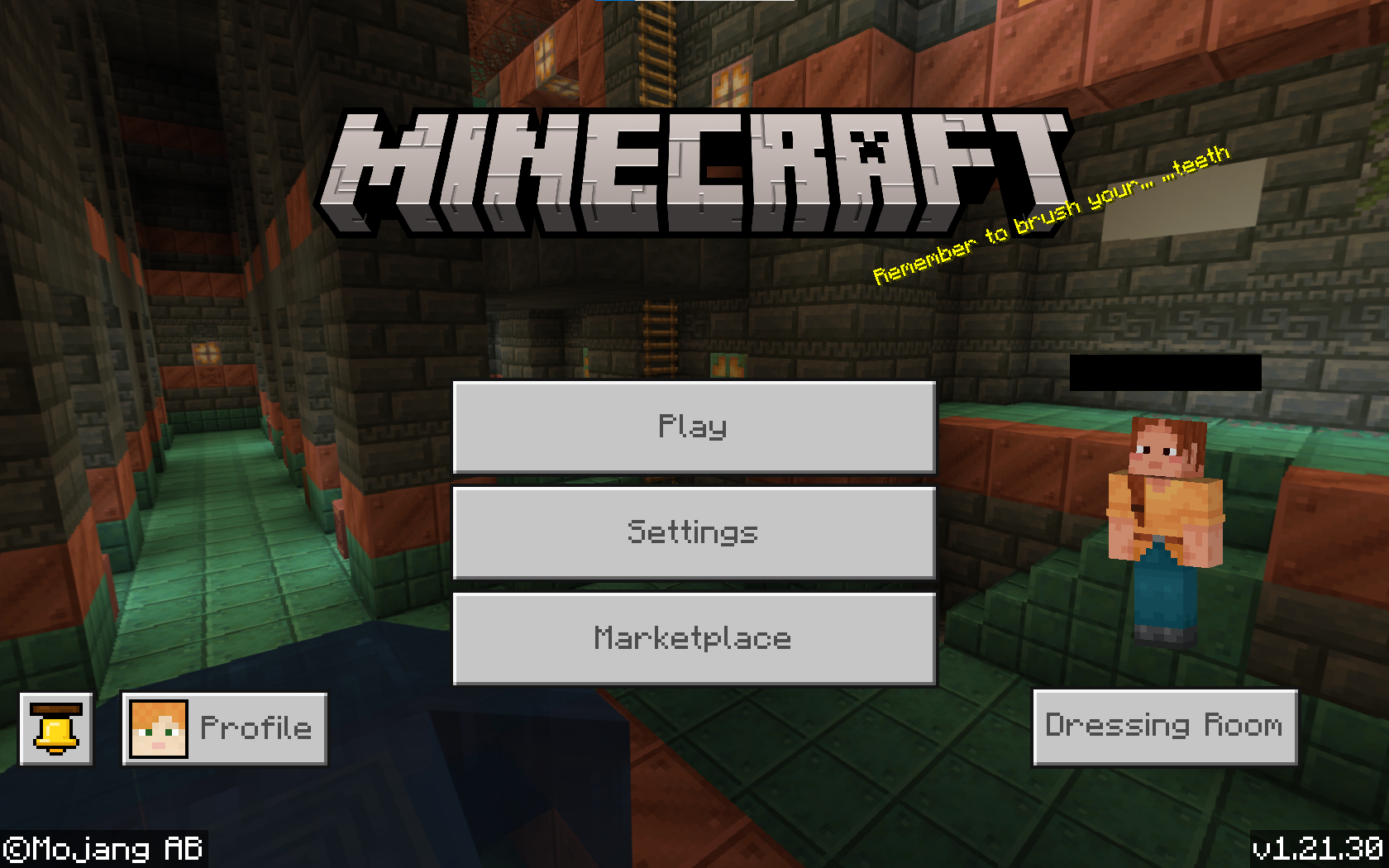
Good point, [Mod] Jarl-Penguin. Also, can you confirm that this Add-On works on Bedrock, outside of Realms? Otherwise you just might have downloaded a bad mod there Other thing is that if you are playing with multiple mods, two (or more) may be conflicting with each other (multiple mods may be trying to change the texture of the same block), as the black-purple texture you see there usually means a texture is missing from that object.
I did once recently find a Pillager Outpost with a cage, and an Iron Golem in it. I got killed, and when I went back, the golem was completely gone, and there were a bunch of Pillagers in the cage instead. I don't think I was far away enough for the Iron Golem to have despawned, and Pillagers shouldn't have been in the cage, and more kept spawning after I killed the initial lot in the cage. Also, are Pillagers meant to be spawned repeatedly at the top of the watchtower, after I kill the first lot that spawn initially?
[Mod] j_p_smith Oh my god that fixed it thanks mate. Nice profile picture btw!
Update 2.0: Nope, my Transformers animation is gone now .
.
Coolbep Even if the button's only purpose is to promote Realms (which I don't think it is), it is still not functioning as intended. Furthermore, I did not write any sentences such as "And the marketplace button thing seems like its loading a costum ressourcepack from the servers.". Costum, is a typo, as is ressourcepack.
Experiencing this in the Character Creator, with the default cosmetic items too. For example, sometimes Kai's Jacket will show up twice.
Neo Sounds like what I was experiencing too, except it always went away if I went into the Dressing Room. Then one day it just fixed itself?
And suddenly the animation is back. What?
Update: The animation was there, and then it flashed purple and black, and now it is gone again. In Minecraft, the black and purple thing usually means that there is a texture missing......?
[Mod] Jarl-Penguin I really don't understand what the reporter of MCPE-186515 is saying; but this does appear to still be an issue. Furthermore, I can't both equip back items and a cape now at the same time. It may relate to MCPE-183453 (not reported by me), and MCPE-186820, as I just re-equipped my emotes, upon which:
[Mod] Umija5895M are you a Mojang employee or do you just work on the website? If not, can I request this report be passed onto a real employee/developer of Mojang?
Unfortunately yes, still is an issue.
Interesting......yes, appears to still be an issue, though sometimes it behaves in really unexpected ways I don't even know how to describe.