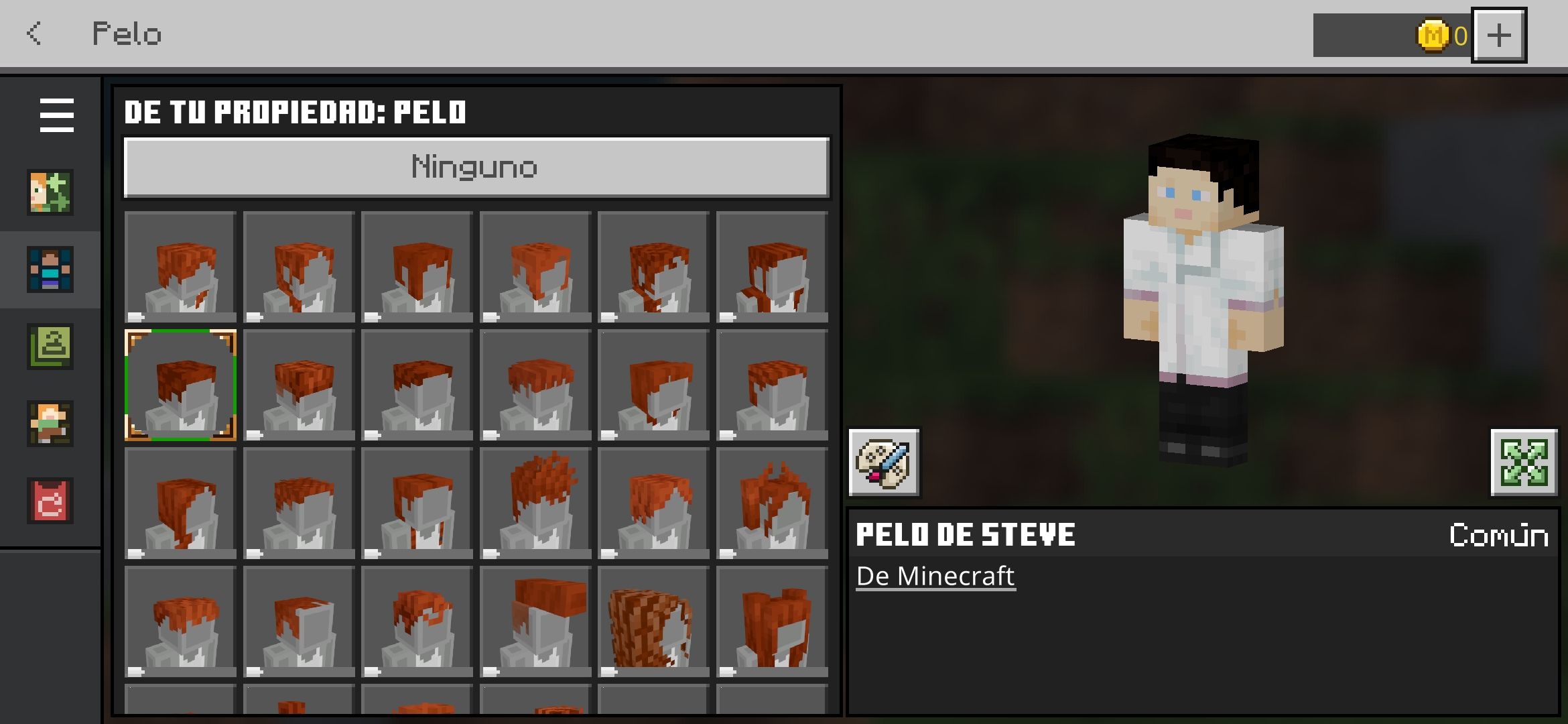
Characters always have red hair, brown mouth and blue eyes
When the player enters the dressing room, all characters have red hair, brown mouth and blue eyes.
Steps to reproduce:
- Create a character
- Go to main screen and exit the game
- Re-open the game
Note: These are not consistent steps to reproduce, but doing this many times seems to trigger the issue.
Observed result:
All characters have blue eyes, red hair and brown mouth without having been configured that way.
Expected result:
The characters have the same colors that the player originally saved.
Linked Issues
is duplicated by30
 BDS-19651Characters have a glitch in synchronization between platformsDuplicateBDS-19893Dressing room bugDuplicate
 MCPE-184849Custom Characters are getting red-haired after closing the gameDuplicateMCPE-184939Skins on Preview changing and not workingDuplicateMCPE-185501My avatars changed colors ?DuplicateMCPE-186207The color of the character's hair and eyes changes inexplicablyDuplicateMCPE-186311Character Creator characters changing they hair, eyes, eyebrows color, lips colorDuplicateMCPE-186528Avatar errorsDuplicateMCPE-186646Tired-Brows item in the store appears higher than normal after closing the game with the item equippedDuplicateMCPE-186703Hair and eye color reseting when reopening game after a whileDuplicateMCPE-186899Character creator hair presets changingDuplicateMCPE-186918Color glitch in Dressing RoomDuplicateMCPE-186954Character Creator Skins' Eyes and Hair are BrokenDuplicateMCPE-186988the character creator keeps forgetting the hair, eyes, and mouth color. and my emotes.DuplicateMCPE-186992My skins eyes and hair were changed and the character editor only lets me edit 1 at a time so I have to relaunch the game to edit anotherDuplicateMCPE-187020Custom skins are glitchedDuplicateMCPE-187055Certain eyes for skin customization don't pop up and otherDuplicateMCPE-187084Annoying Dressing Room BugDuplicateMCPE-187186MarketplaceDuplicateMCPE-187219Minecraft Markeplace avatar issuesDuplicateMCPE-187222SkinsDuplicateMCPE-187486The custom character keeps resetting to default settings, the hair colour, eye colour, skin colour and lip colour changes about every 3 days.DuplicateMCPE-187773Alex-model skin changes to Steve-model upon restart.DuplicateMCPE-187792Character Creator skin's hair turns orange, and eyes change to blueDuplicateMCPE-188037Player Custom Skin Size was always be set to Normal when launchDuplicateMCPE-188154Minecraft skin is randomly changing colorsDuplicateMCPE-188269My Marketplace characters have been changing in appearance without my permissionDuplicateMCPE-188708The color of the hair and eyes change the creator of the charactersDuplicateMCPE-188966Can't change eyebrows colorDuplicateMCPE-189125so the default eyes in character crater are missingDuplicate



Created Issue:
There are several errors in the skins
- Skins has red hair and mouth when the player load it.
- The original style parts don't appear.
Expected results:
The skins will have the same aspect than the player has saved, and all style parts (hair, eyes, etc) appear like earlier versions.
Obtained results:
Skins has changed the mouth and hair color to red, and the original style parts don't appear.
Attachments2
![[Mod] Jarl-Penguin](../../../data/avatars/users/92849.png)
- Skins has red hair and mouth when the player load it.
- The original style parts don't appear.
Expected results:The skins will have the same aspect than the player has saved, and all style parts (hair, eyes, etc) appear like earlier versions.
Obtained results:Skins has changed the mouth and hair color to red, and the original style parts don't appear.
The skins has a color and style mistakes
Color: When the player enter to dressing room, all skins has red hair, brown mouth and blue eyes
Steps to reproduce:
- Enter to dressing room.
- Look all skins that you have
![[Bot] Arisa](../../../data/avatars/users/43007.png)
The skins has a color and style mistakes:
Color: When the player enter to dressing room, all skins has red hair, brown mouth and blue eyes
Steps to reproduce:
- Enter to dressing room.
- Look all skins that you have.
Expected results:
Skins has the same body color that the player has saved.
Obtained results:
All skins has blue eyes, red hair and brown mouth without having configured.
Style: The default skins style (Steve hair, Alex hair, default eyes, etc) don't appear.
The skins has a color and style mistakes:
Color: When the player enter to dressing room, all skins has red hair, brown mouth and blue eyes
Steps to reproduce:
- Enter to dressing room.
- Look all skins that you have.
Expected results:
Skins has the same body color that the player has saved.
Obtained results:
All skins has blue eyes, red hair and brown mouth without having configured.
Style: The default skins style (Steve hair, Alex hair, default eyes, etc) don't appear.
The skins has a color and style mistakes:
Color: When the player enter to dressing room, all skins has red hair, brown mouth and blue eyes
Steps to reproduce:
- Enter to dressing room.
- Look all skins that you have.
Expected results:
Skins has the same body color that the player has saved.
Obtained results:
All skins has blue eyes, red hair and brown mouth without having configured.
Style: The default skins style (Steve hair, Alex hair, default eyes, etc) don't appear.
Steps to reproduce:
- Enter to dressing room.
- Select a skin to edit.
- Enter in a style category (Like hair).
- Look the options.
Expected results:
The hair of each one of the 9 default skins will appear.
Obtained results:
The hair options previously mentioned don't appear.
I have already updated the bug report.
There are several errors in the skinsCharacters always have red hair, brown mouth and blue eyes
The skins has a color and style mistakes:
Color: When the player enter to dressing room, all skins has red hair, brown mouth and blue eyes
Steps to reproduce
:
- Enter to dressing room.
- Look all skins that you have.
Expected results:
Skins has the same body color that the player has saved.
Obtained results:All skins has blue eyes, red hair and brown mouth without having configured.
Style: The default skins style (Steve hair, Alex hair, default eyes, etc) don't appear.
Steps to reproduce:
- Enter to dressing room.
- Select a skin to edit.
- Enter in a style category (Like hair).
- Look the options.
Expected results:The hair of each one of the 9 default skins will appear.
Obtained results:
The hair options previously mentioned don't appear.
When the player enters the dressing room, all characters have red hair, brown mouth and blue eyes.
Steps to reproduce:
- Enter to dressing room.
- Look all skins that you have.
Observed result:
All characters have blue eyes, red hair and brown mouth without having been configured that way.Expected result:
The characters have the same colors that the player originally saved.
is duplicated by
relates to
When the player enters the dressing room, all characters have red hair, brown mouth and blue eyes.
Steps to reproduce:
Enter to dressing room.Look all skins that you have.Observed result:
All characters have blue eyes, red hair and brown mouth without having been configured that way.Expected result:
The characters have the same colors that the player originally saved.When the player enters the dressing room, all characters have red hair, brown mouth and blue eyes.
Steps to reproduce:
- Create a character
- Go to main screen and exit the game
- Re-open the game
Note: These are not consistent steps to reproduce, but doing this many times seems to trigger the issue.Observed result:
All characters have blue eyes, red hair and brown mouth without having been configured that way.Expected result:
The characters have the same colors that the player originally saved.
relates to
is duplicated by
is duplicated by
![[MCQA] Bartłomiej Słodkowski](../../../data/avatars/users/18941.svg)
is duplicated by
is duplicated by
![[MCQA] v-krbaj](../../../data/avatars/users/10122.svg)
is duplicated by
is duplicated by
![[Mod] ManosSef](../../../data/avatars/users/61702.png)
![[Mod] OcelotOnesie](../../../data/avatars/users/43220.png)
is duplicated by
is duplicated by
is duplicated by
is duplicated by
is duplicated by
is duplicated by
is duplicated by
![[Mod] EVGENSYPERPRO](../../../data/avatars/users/92853.png)
is duplicated by
is duplicated by
is duplicated by
is duplicated by
is duplicated by
is duplicated by
is duplicated by

One workaround that I've discovered is to create a custom skin pack with the skins you want to use.
is duplicated by
is duplicated by
The only workaround I've found is if the character / emote configuration was deemed important or couldn't be restored exactly, but you are tolerant using the classic skin, switch to classic skin (and equip one), and use it on the slot you deemed important, and if so, the slot you're using to play as could be protected against this bug (plus emotes un-equipping / unassigning) but it can't protect the ones you didn't select to play as.
Update: The workaround seems defeated as of 1.21.44
is duplicated by
is duplicated by
is duplicated by
is duplicated by
is duplicated by
Thank you for your report!
We're tracking this issue in MCPE-183453, so this ticket is being resolved and linked as a duplicate.
If you would like to add a vote and any extra information to the main ticket it would be appreciated.
If you haven't already, you might like to make use of the search feature to see if the issue has already been mentioned.
Quick Links:
📓 Bug Tracker Guidelines – 💬 Community Support – 📧 Mojang Support (Technical Issues) – 📧 Microsoft Support (Account Issues)
📓 Project Summary – ✍️ Feedback and Suggestions – 📖 Game Wiki
Thank you for your report!
We're tracking this issue in MCPE-183453, so this ticket is being resolved and linked as a duplicate.
If you would like to add a vote and any extra information to the main ticket it would be appreciated.
If you haven't already, you might like to make use of the search feature to see if the issue has already been mentioned.
Quick Links:
📓 Bug Tracker Guidelines – 💬 Community Support – 📧 Mojang Support (Technical Issues) – 📧 Microsoft Support (Account Issues)
📓 Project Summary – ✍️ Feedback and Suggestions – 📖 Game Wiki
Thank you for your report!
We're tracking this issue in MCPE-183453, so this ticket is being resolved and linked as a duplicate.
If you would like to add a vote and any extra information to the main ticket it would be appreciated.
If you haven't already, you might like to make use of the search feature to see if the issue has already been mentioned.
Quick Links:
📓 Bug Tracker Guidelines – 💬 Community Support – 📧 Mojang Support (Technical Issues) – 📧 Microsoft Support (Account Issues)
📓 Project Summary – ✍️ Feedback and Suggestions – 📖 Game Wiki
Thank you for your report!
We're tracking this issue in MCPE-183453, so this ticket is being resolved and linked as a duplicate.
If you would like to add a vote and any extra information to the main ticket it would be appreciated.
If you haven't already, you might like to make use of the search feature to see if the issue has already been mentioned.
Quick Links:
📓 Bug Tracker Guidelines – 💬 Community Support – 📧 Mojang Support (Technical Issues) – 📧 Microsoft Support (Account Issues)
📓 Project Summary – ✍️ Feedback and Suggestions – 📖 BDS Wiki – 📖 FAQs
Thank you for your report!
We're tracking this issue in MCPE-183453, so this ticket is being resolved and linked as a duplicate.
If you would like to add a vote and any extra information to the main ticket it would be appreciated.
If you haven't already, you might like to make use of the search feature to see if the issue has already been mentioned.
Quick Links:
📓 Bug Tracker Guidelines – 💬 Community Support – 📧 Mojang Support (Technical Issues) – 📧 Microsoft Support (Account Issues)
📓 Project Summary – ✍️ Feedback and Suggestions – 📖 Game Wiki
Thank you for your report!
We're tracking this issue in MCPE-183453, so this ticket is being resolved and linked as a duplicate.
If you would like to add a vote and any extra information to the main ticket it would be appreciated.
If you haven't already, you might like to make use of the search feature to see if the issue has already been mentioned.
Quick Links:
📓 Bug Tracker Guidelines – 💬 Community Support – 📧 Mojang Support (Technical Issues) – 📧 Microsoft Support (Account Issues)
📓 Project Summary – ✍️ Feedback and Suggestions – 📖 Game Wiki
Thank you for your report!
We're tracking this issue in MCPE-183453, so this ticket is being resolved and linked as a duplicate.
If you would like to add a vote and any extra information to the main ticket it would be appreciated.
If you haven't already, you might like to make use of the search feature to see if the issue has already been mentioned.
Quick Links:
📓 Bug Tracker Guidelines – 💬 Community Support – 📧 Mojang Support (Technical Issues) – 📧 Microsoft Support (Account Issues)
📓 Project Summary – ✍️ Feedback and Suggestions – 📖 Game Wiki
Thank you for your report!
We're tracking this issue in MCPE-183453, so this ticket is being resolved and linked as a duplicate.
If you would like to add a vote and any extra information to the main ticket it would be appreciated.
If you haven't already, you might like to make use of the search feature to see if the issue has already been mentioned.
Quick Links:
📓 Bug Tracker Guidelines – 💬 Community Support – 📧 Mojang Support (Technical Issues) – 📧 Microsoft Support (Account Issues)
📓 Project Summary – ✍️ Feedback and Suggestions – 📖 Game Wiki
– I am a bot. This action was performed automatically! The ticket was resolved by one of our moderators, and I left this message to give more information to you.
Thank you for your report!
We're tracking this issue in MCPE-183453, so this ticket is being resolved and linked as a duplicate.
If you would like to add a vote and any extra information to the main ticket it would be appreciated.
If you haven't already, you might like to make use of the search feature to see if the issue has already been mentioned.
Quick Links:
📓 Bug Tracker Guidelines – 💬 Community Support – 📧 Mojang Support (Technical Issues) – 📧 Microsoft Support (Account Issues)
📓 Project Summary – ✍️ Feedback and Suggestions – 📖 Game Wiki
Can reproduce, but not through your reproduction steps, as I cannot reproduce through those, see below for mine. However what you were facing on "weird skin change.png" should be MCPE-186515, and considering the first and last character being affected by MCPE-183453, this should only relate to MCPE-183453.
Steps to reproduce for emotes vanishing:
- With Minecraft open, go to Dressing Room
- Create a character (so MCPE-183453 would be more obvious)
- On a newly created character, observe that there are emotes preset by clicking the Emotes button
- Return to menu
- Close and restart Minecraft to reproduce MCPE-183453 (For more obvious checking as it's not consistent but may guarantee in next step)
- With the game's restarted and MCPE-183453 reproduced, go to Dressing Room
- Click the Emotes button
Expected result: The emotes are still assigned
Actual result: The emotes are unassigned if MCPE-183453 is reproduced, requiring players to re-equip those.
Note: If MCPE-183453 could not be reproduced, the emotes are still assigned. Creating skins can also result in emotes mirroring from first edited skin (profile) because of MCPE-186515 and working around it solves the issue
Edit: I forgot that since you mentioned that you changed your skin for the bug to be reproduced, my way to reproduce the similar issue may be unrelated.

I'm not sure what MCPE-183453 has to do with my issue. My character's eyes are completely fine, and not experiencing any bugs (so far!).
Hello @Frankie pang. I'm still not sure why you keep referencing MCPE-183453. This bug is causing skins to "always have red hair, brown mouth and blue eyes". My character is not experiencing any of these issues, but two of my characters do have blue eyes. as shown in weird skin change.png, purely because I wanted them to, they are not being affected by a bug. The reporter of this bug does not describe any issues with their emotes either. Could you possibly be typing the wrong ticket number?
DJDiamondSword Were you referring to those pointed with red arrows? As the two I were pointing were the character with a crown (hence the first one) and the one with mask (hence the last one) (not those which are pointed with a red arrows) on "weird skin change.png", unless you intended to change those.
If eyes and hair colors of the character with a crown (hence the first one) and the one with a mask (hence the last one) does not seem to be reset and was undid to those you chose, could you still be able to reproduce the issue? If so, would the video evidence (step-by-step to reproduce) be uploaded?
Also, for the ticket number that would I would be entered wrong, it is correct for me, as if I discovered the outcome of this bug (emotes for skins being unassigned / un-equipped), then my characters are affected by MCPE-183453 at the same time.
After some tries, I can reproduce the issue you are having through exact step-by-step you've provided, but at the same time, MCPE-183453 affected my characters that I did not select.
Can confirm, but needs procedure before step 1 from the reporter:
- If you've attempted to edit character or skins before the next step, restart Minecraft, as otherwise these steps would be affected / altered by MCPE-186515.
- With Minecraft open, go to Dressing Room
- Have 2 skins prepared and emotes on each of them equipped / assigned (can be by creating those by through Create New Character button)
- (Optional) Create a Custom Character
- Scroll back to the profile that is a skin and not a custom character
- Return to menu
- Close and restart Minecraft
- With Minecraft open, go to Dressing Room
- Scroll to another skin
- Return to menu
- Click Play
- Enter a world
- Click the emote button / key
- If emotes weren't vanished, repeat steps 7 to 13, as this bug isn't guaranteed to be reproduced.
Expected result: The emotes were still assigned
Observed results: Sometimes the emotes on the current skin are unassigned / un-equipped.
Note: If step 4 is performed, or you viewed the skin that had it's emote unassigned / un-equipped from this from Custom Character tab (switching from classic skin to Custom Character on the slot / profile) and you did not make any edits to the skin / character after step 7 was performed, you should see that the character is affected by MCPE-183453, meaning that this bug relates to MCPE-183453 in some way.
Thank you for your report!
We're tracking this issue in MCPE-183453 and MCPE-186515, so this ticket is being resolved and linked as a duplicate.
If you would like to add a vote and any extra information to the main ticket it would be appreciated.
If you haven't already, you might like to make use of the search feature to see if the issue has already been mentioned.
Quick Links:
📓 Bug Tracker Guidelines – 💬 Community Support – 📧 Mojang Support (Technical Issues) – 📧 Microsoft Support (Account Issues)
📓 Project Summary – ✍️ Feedback and Suggestions – 📖 Game Wiki
Thank you for your report!
We're tracking this issue in MCPE-183453, so this ticket is being resolved and linked as a duplicate.
If you would like to add a vote and any extra information to the main ticket it would be appreciated.
If you haven't already, you might like to make use of the search feature to see if the issue has already been mentioned.
Quick Links:
📓 Bug Tracker Guidelines – 💬 Community Support – 📧 Mojang Support (Technical Issues) – 📧 Microsoft Support (Account Issues)
📓 Project Summary – ✍️ Feedback and Suggestions – 📖 Game Wiki
– I am a bot. This action was performed automatically! The ticket was resolved by one of our moderators, and I left this message to give more information to you.
Thank you for your report!
We're tracking this issue in MCPE-183453, so this ticket is being resolved and linked as a duplicate.
If you would like to add a vote and any extra information to the main ticket it would be appreciated.
If you haven't already, you might like to make use of the search feature to see if the issue has already been mentioned.
Quick Links:
📓 Bug Tracker Guidelines – 💬 Community Support – 📧 Mojang Support (Technical Issues) – 📧 Microsoft Support (Account Issues)
📓 Project Summary – ✍️ Feedback and Suggestions – 📖 Game Wiki
– I am a bot. This action was performed automatically! The ticket was resolved by one of our moderators, and I left this message to give more information to you.
Thank you for your report!
We're tracking this issue in MCPE-183453, so this ticket is being resolved and linked as a duplicate.
If you would like to add a vote and any extra information to the main ticket it would be appreciated.
If you haven't already, you might like to make use of the search feature to see if the issue has already been mentioned.
Quick Links:
📓 Bug Tracker Guidelines – 💬 Community Support – 📧 Mojang Support (Technical Issues) – 📧 Microsoft Support (Account Issues)
📓 Project Summary – ✍️ Feedback and Suggestions – 📖 Game Wiki
Thank you for your report!
We're tracking this issue in MCPE-183453, so this ticket is being resolved and linked as a duplicate.
If you would like to add a vote and any extra information to the main ticket it would be appreciated.
If you haven't already, you might like to make use of the search feature to see if the issue has already been mentioned.
Quick Links:
📓 Bug Tracker Guidelines – 💬 Community Support – 📧 Mojang Support (Technical Issues) – 📧 Microsoft Support (Account Issues)
📓 Project Summary – ✍️ Feedback and Suggestions – 📖 Game Wiki

Duplicate of MCPE-183453
Thank you for your report!
We're tracking this issue in MCPE-183453, so this ticket is being resolved and linked as a duplicate.
If you would like to add a vote and any extra information to the main ticket it would be appreciated.
If you haven't already, you might like to make use of the search feature to see if the issue has already been mentioned.
Quick Links:
📓 Bug Tracker Guidelines – 💬 Community Support – 📧 Mojang Support (Technical Issues) – 📧 Microsoft Support (Account Issues)
📓 Project Summary – ✍️ Feedback and Suggestions – 📖 Game Wiki
– I am a bot. This action was performed automatically! The ticket was resolved by one of our moderators, and I left this message to give more information to you.
Thank you for your report!
We're tracking this issue in MCPE-183453, so this ticket is being resolved and linked as a duplicate.
If you would like to add a vote and any extra information to the main ticket it would be appreciated.
If you haven't already, you might like to make use of the search feature to see if the issue has already been mentioned.
Quick Links:
📓 Bug Tracker Guidelines – 💬 Community Support – 📧 Mojang Support (Technical Issues) – 📧 Microsoft Support (Account Issues)
📓 Project Summary – ✍️ Feedback and Suggestions – 📖 Game Wiki
For the smaller issue where eye, facial and hair colo(u)rs changing, it's being tracked on MCPE-183453.
For the bigger issue, if it was default characters (Ari, Alex, Steve, Zuri, etc), it's being tracked on MCPE-185386
Thank you for your report!
We're tracking this issue in MCPE-183453, so this ticket is being resolved and linked as a duplicate.
If you would like to add a vote and any extra information to the main ticket it would be appreciated.
If you haven't already, you might like to make use of the search feature to see if the issue has already been mentioned.
Quick Links:
📓 Bug Tracker Guidelines – 💬 Community Support – 📧 Mojang Support (Technical Issues) – 📧 Microsoft Support (Account Issues)
📓 Project Summary – ✍️ Feedback and Suggestions – 📖 Game Wiki
– I am a bot. This action was performed automatically! The ticket was resolved by one of our moderators, and I left this message to give more information to you.
Frankie pang Are you saying that MCPE-183453 (Characters always have red hair, brown mouth and blue eyes) relates in some way or another to my issue? I am having trouble understanding your wording.
DJDiamondSword Yes. I think MCPE-183453 relates to emotes un-equipping on its own.
Also duplicate emotes are being tracked in MCPE-151719. And please avoid adding another issue to this so this issue was invalidated.
Thank you for your report!
We're tracking this issue in MCPE-161564 and MCPE-183453, so this ticket is being resolved and linked as a duplicate.
If you would like to add a vote and any extra information to the main tickets it would be appreciated.
If you haven't already, you might like to make use of the search feature to see if the issue has already been mentioned.
Quick Links:
📓 Bug Tracker Guidelines – 💬 Community Support – 📧 Mojang Support (Technical Issues) – 📧 Microsoft Support (Account Issues)
📓 Project Summary – ✍️ Feedback and Suggestions – 📖 Game Wiki
Thank you for your report!
We're tracking this issue in MCPE-161564 and MCPE-183453, so this ticket is being resolved and linked as a duplicate.
If you would like to add a vote and any extra information to the main tickets it would be appreciated.
If you haven't already, you might like to make use of the search feature to see if the issue has already been mentioned.
Quick Links:
📓 Bug Tracker Guidelines – 💬 Community Support – 📧 Mojang Support (Technical Issues) – 📧 Microsoft Support (Account Issues)
📓 Project Summary – ✍️ Feedback and Suggestions – 📖 Game Wiki
Duplicate of MCPE-183453
Thank you for your report!
We're tracking this issue in MCPE-183453, so this ticket is being resolved and linked as a duplicate.
If you would like to add a vote and any extra information to the main ticket it would be appreciated.
If you haven't already, you might like to make use of the search feature to see if the issue has already been mentioned.
Quick Links:
📓 Bug Tracker Guidelines – 💬 Community Support – 📧 Mojang Support (Technical Issues) – 📧 Microsoft Support (Account Issues)
📓 Project Summary – ✍️ Feedback and Suggestions – 📖 Game Wiki
– I am a bot. This action was performed automatically! The ticket was resolved by one of our moderators, and I left this message to give more information to you.
Duplicate of MCPE-186591 & MCPE-183453
Thank you for your report!
We're tracking this issue in MCPE-183453 and MCPE-186591, so this ticket is being resolved and linked as a duplicate.
If you would like to add a vote and any extra information to the main ticket it would be appreciated.
If you haven't already, you might like to make use of the search feature to see if the issue has already been mentioned.
Quick Links:
📓 Bug Tracker Guidelines – 💬 Community Support – 📧 Mojang Support (Technical Issues) – 📧 Microsoft Support (Account Issues)
📓 Project Summary – ✍️ Feedback and Suggestions – 📖 Game Wiki
– I am a bot. This action was performed automatically! The ticket was resolved by one of our moderators, and I left this message to give more information to you.
Duplicate of MCPE-183453
[Mod] Jarl-Penguin I really don't understand what the reporter of MCPE-186515 is saying; but this does appear to still be an issue. Furthermore, I can't both equip back items and a cape now at the same time. It may relate to MCPE-183453 (not reported by me), and MCPE-186820, as I just re-equipped my emotes, upon which:
- My cape un-eqipped
- My character's eyes turned blue.
Duplicates MCPE-186591 and MCPE-183453
Duplicates MCPE-183453
Thank you for your report!
We're tracking this issue in MCPE-183453, so this ticket is being resolved and linked as a duplicate.
If you would like to add a vote and any extra information to the main ticket it would be appreciated.
If you haven't already, you might like to make use of the search feature to see if the issue has already been mentioned.
Quick Links:
📓 Bug Tracker Guidelines – 💬 Community Support – 📧 Mojang Support (Technical Issues) – 📧 Microsoft Support (Account Issues)
📓 Project Summary – ✍️ Feedback and Suggestions – 📖 Game Wiki

Duplicates MCPE-183453
Thank you for your report!
We're tracking this issue in MCPE-183453, so this ticket is being resolved and linked as a duplicate.
If you would like to add a vote and any extra information to the main ticket it would be appreciated.
If you haven't already, you might like to make use of the search feature to see if the issue has already been mentioned.
Quick Links:
📓 Bug Tracker Guidelines – 💬 Community Support – 📧 Mojang Support (Technical Issues) – 📧 Microsoft Support (Account Issues)
📓 Project Summary – ✍️ Feedback and Suggestions – 📖 Game Wiki
– I am a bot. This action was performed automatically! The ticket was resolved by one of our moderators, and I left this message to give more information to you.
Thank you for your report!
We're tracking this issue in MCPE-183453, so this ticket is being resolved and linked as a duplicate.
If you would like to add a vote and any extra information to the main ticket it would be appreciated.
If you haven't already, you might like to make use of the search feature to see if the issue has already been mentioned.
Quick Links:
📓 Bug Tracker Guidelines – 💬 Community Support – 📧 Mojang Support (Technical Issues) – 📧 Microsoft Support (Account Issues)
📓 Project Summary – ✍️ Feedback and Suggestions – 📖 BDS Wiki – 📖 FAQs
– I am a bot. This action was performed automatically! The ticket was resolved by one of our moderators, and I left this message to give more information to you.
Would MCPE-183453 describe your issue?
Steve has violet eyes and dark brown hair, so he can also be altered by MCPE-183453.
Thank you for your report!
We're tracking this issue in MCPE-183453, so this ticket is being resolved and linked as a duplicate.
If you would like to add a vote and any extra information to the main ticket it would be appreciated.
If you haven't already, you might like to make use of the search feature to see if the issue has already been mentioned.
Quick Links:
📓 Bug Tracker Guidelines – 💬 Community Support – 📧 Mojang Support (Technical Issues) – 📧 Microsoft Support (Account Issues)
📓 Project Summary – ✍️ Feedback and Suggestions – 📖 Game Wiki
– I am a bot. This action was performed automatically! The ticket was resolved by one of our moderators, and I left this message to give more information to you.
Affected article: https://feedback.minecraft.net/hc/en-us/articles/32344904160397-Minecraft-Bedrock-Edition-1-21-50-The-Garden-Awakens and https://www.minecraft.net/article/minecraft-1-21-50-bedrock-changelog
The Super Mario Mash-up Pack is updated in 1.21.50, but it obviously can only be updated through game update instead of in Marketplace. However there is no note mentioning the Super Mario Mash-up Pack being updated. This could lead to confusion as people would continue attempting to update the pack through the Marketplace not thinking updating the game should also update the mash-up pack.
Steps to reproduce:
- Click here from Minecraft Feedback or one from the official Minecraft site
- Search for “Super Mario”
Expected result: It should appear on the result
Actual result: Searching for it yields no result on both sites, yet, on the supported platform, the mash-up pack can only be updated through the game update, and cannot be done through the Marketplace.
Proofs of the issue:
The Super Mario Mash-up Pack is updated in 1.21.50, but the mash-up pack itself cannot be updated without the game itself being also updated. Check images for further proofs:
- On “Tricky Trials content with Super Mario Mash-up activated - 1.21.44 Hotfix Dont mind MCPE-183453 on the top left.jpg”, various mobs (
MCPE-185721) and blocks added from Tricky Trials update aren’t retextured when the Super Mario Mash-up Pack was activated in 1.21.44. - Players (and I) cannot search for the mash-up pack and had it updated in Marketplace catalog.
- On “Tricky Trials content with Super Mario Mash-up Pack in 1.21.50.JPG”, mobs and blocks added from Tricky Trials update are retextured when the Super Mario Mash-up Pack was activated in 1.21.50.
The solution is, as the mash-up pack is updated when I updated the game, it makes sense that the updates about the mash-up pack was also put to the release note. (i.e. "On 'Nintendo Switch', the Super Mario Mash-up Pack is updated for the latest update")
Note: "Supported platform" currently only means Nintendo Switch.
Thank you for your report!
We're tracking this issue in MCPE-183453, so this ticket is being resolved and linked as a duplicate.
If you would like to add a vote and any extra information to the main ticket it would be appreciated.
If you haven't already, you might like to make use of the search feature to see if the issue has already been mentioned.
Quick Links:
📓 Bug Tracker Guidelines – 💬 Community Support – 📧 Mojang Support (Technical Issues) – 📧 Microsoft Support (Account Issues)
📓 Project Summary – ✍️ Feedback and Suggestions – 📖 Game Wiki
– I am a bot. This action was performed automatically! The ticket was resolved by one of our moderators, and I left this message to give more information to you.
Thank you for your report!
We're tracking this issue in MCPE-183453, so this ticket is being resolved and linked as a duplicate.
If you would like to add a vote and any extra information to the main ticket it would be appreciated.
If you haven't already, you might like to make use of the search feature to see if the issue has already been mentioned.
Quick Links:
📓 Bug Tracker Guidelines – 💬 Community Support – 📧 Mojang Support (Technical Issues) – 📧 Microsoft Support (Account Issues)
📓 Project Summary – ✍️ Feedback and Suggestions – 📖 Game Wiki
– I am a bot. This action was performed automatically! The ticket was resolved by one of our moderators, and I left this message to give more information to you.
We do not have enough information to find the cause of this issue.
To make your bug report as effective as possible, please try and include the following steps to reproduce the problem:
If your ticket does not look like the example given here, then it's likely to be closed as incomplete.
This issue is being temporarily resolved as Awaiting Response. Once the requested information has been delivered, the report will be reopened automatically.
Quick Links:
📓 Bug Tracker Guidelines – 💬 Community Support – 📧 Mojang Support (Technical Issues) – 📧 Microsoft Support (Account Issues)
📓 Project Summary – ✍️ Feedback and Suggestions – 📖 Game Wiki
I have already updated the bug report.
Off-topic but this bug may also un-equip / unassign emotes if reproduced, requiring players to re-equip those. This was done while testing MCPE-186820 outside that reporter's procedure.
I have the same bug since 1.21.20 was released... Does anyone know how to fix it?
Furthermore, on my end, when I try to edit a character creator skin, it turns into Sunny.
A potential workaround would be to use a third-party program and make a custom skin pack with the skins you want to use.
Can Confirm; I have no idea why this has been happening for so long. Until this bug is fixed, I'll be using .png files for my skins.
Edit: I just got tired of switching the skin slot every time I used a different device and decided to accept the skins as they are. Until this is over, i'll try my best to ignore it.
Another Edit: I realized the default eye and hair colors are orange and blue, so for some reason, the skin colors are switching to the default avatar colors.
If a Mojang developer is seeing this, they should know that this is an actual issue that a handful of people are having.
Edit #3: Another update; this seems to take effect on Android and Nintendo Switch, but not Windows from what I can tell.
Edit #4: This DOES seem to affect multiple devices. Multiple reports show this same issue on iOS, Android, Windows, Nintendo Switch, PlayStation, and Xbox. For me, this issue occurred on Android but not Windows, so the consistency of this issue may vary from device to device. Because different devices are reported to have this bug, I think it may be a deeper-rooted issue that isn't directly related to the devices themselves. Some other possibilities worth checking are if it happens on specific types of hardware or operating system versions.
Happened to me on Xbox too. Can be confirmed on Xbox.
I’m actually unable to color anything at all in character creator
it happened to me to