 DNS Crypt
- dnscrypt
- dnscrypt
- America/Toronto
- No
- No
 BDS-2574
 MCPE-75064MCPE-173439







Issue with CPU maxing out to 100% usage when having a single client connected to dedicated bedrock server on Linux/Windows server. Testing environment including Ubuntu 18.04 LTS with 1 physical box (Celeron CPU 1007U @ 1.50 GHz
) and 2 VM's, self hosted Hyper-V on Win10 Enterprise, i7 5930k 32 GB Ram and virutalized Azure Standard D2s v3 hosted VM.).When server is idle with no connections, CPU is perfectly fine.
Issue with CPU maxing out to 100% usage when having a single client connected to dedicated bedrock server on Linux/Windows server. Testing environment including Ubuntu 18.04 LTS with 1 physical box (Celeron CPU 1007U @ 1.50 GHz 2 core ) and Azure Standard D2s v3 hosted VM.).
When server is idle with no connections, CPU is perfectly fine.
Bedrock dedicated server running on test environments with Ubuntu 18.04 LTS, Asus VivoPC - VM40B - 12GB - Celeron CPU 1007U @ 1.50 GHz
, Hyper-V Service via Win10 Enterprise, i7 5930k 32 GB Ram, &Azure Standard D2s v3 hosted VM.Bedrock dedicated server running on test environments with Ubuntu 18.04 LTS, Asus VivoPC - VM40B - 12GB - Celeron CPU 1007U @ 1.50 GHz (2 core), Azure Standard D2s v3 hosted VM.
Issue with CPU maxing out to 100% usage when having a single client connected to dedicated bedrock server on Linux/Windows server. Testing environment including Ubuntu 18.04 LTS with 1 physical box (Celeron CPU 1007U @ 1.50 GHz 2 core ) and Azure Standard D2s v3 hosted VM.).
When server is idle with no connections, CPU is perfectly fine.
Java server has no adverse affect on connections and performance is much better. Is this typical?
High CPU when active client connections to BDS 1.14.0.9High CPU when active client connections to BDS 1.14.1.4
I'm going to use this one as a master for the performance degradation experienced in BDS on a Linux install post 1.14. I've done my best to summarise the info provided in this ticket and others but please feel free to comment below if you have further info.
What is happening?
It appears that post 1.14, CPU usage on linux is far higher than the 1.13 releases. Testing against identical kit using Windows vs Linux yields far better performance on Windows than on LinuxHow to reproduce
- Build Linux box on Ubuntu 18.04 LTS (per last published Sys Reqs).
- Create new server using default properties file.
- Load into the world and note significantly higher CPU utilization than a Windows equivalent. Even with only 1 active player.
Notes from community members
- World (chunk) generation appears to contribute to the slowness. Logging into a new box the CPU pinning seems to occur while chunks are generating and falls off over time.
- Chunk generation appears slow to the player. (the view distance expands slowly)
- While under load, server time is obviously affected causing numerous issues for players,
- Was not present in the 1.13 releases.
- Does not appear to have improved with the subsequent 1.14 releases.
Issue with CPU maxing out to 100% usage when having a single client connected to dedicated bedrock server on Linux/Windows server. Testing environment including Ubuntu 18.04 LTS with 1 physical box (Celeron CPU 1007U @ 1.50 GHz 2 core ) and Azure Standard D2s v3 hosted VM.).When server is idle with no connections, CPU is perfectly fine.
Java server has no adverse affect on connections and performance is much better. Is this typical?
edit
I was told awhile ago after submitting this report that a single/dual core cpu would get hammered on player log ins and chunk loads. I’ve recently moved the environment over to a 6 core 12 thread CPU and it performs much better. I feel like java was optimized a little better at the time of posting but haven’t had a chance to compare the newer versions.
Moving local world (1.14.60) to Windows MCServer shows descrepencies of save data/game items[Win10] Moving local world (1.14.60) to Windows Minecraft Server shows descrepencies of save data
If you take the following world download file (see link below):
https://1drv.ms/u/s!Aivrh6gXIbxkgWyxIhGy67dmJzvn?e=pqtntk
...and import it locally and play, you'll notice that the world loads fine. Items including the enchanted sword are perfectly in tact.
Within Win10, Take this exact world data, copy the World save data from C:\Users\<username>\AppData\Local\Packages\Microsoft.MinecraftUWP_8wekyb3d8bbwe\LocalState\games\com.mojang\minecraftWorlds\Meadowview and place it into the Windows based Server folder, bedrock-server-1.14.60.5\worlds directory and launch the server, the world loads but is lacking specific data, items are different - and visually the enchanted sword no longer has all of the enchants.
Something doesn't load right.
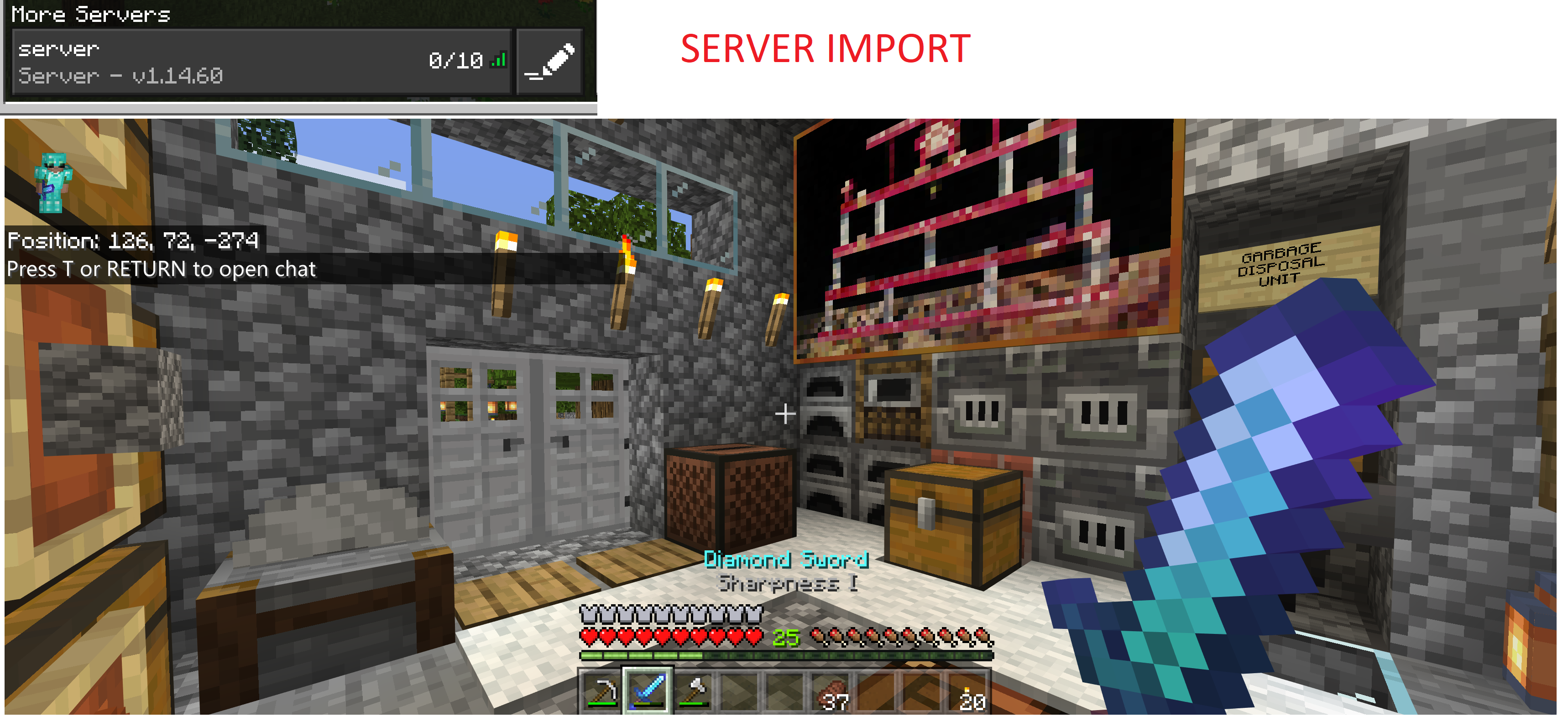
I've attached 2 screenshots, one with the local world loaded, and one with the world loaded into the Windows based server.
If you take the following world download file (see link below):
https://1drv.ms/u/s!Aivrh6gXIbxkgWyxIhGy67dmJzvn?e=pqtntk
...and import it locally and play, you'll notice that the world loads fine. Items including the enchanted sword are perfectly in tact.
Within Win10, Take this exact world data, copy the World save data from C:\Users\<username>\AppData\Local\Packages\Microsoft.MinecraftUWP_8wekyb3d8bbwe\LocalState\games\com.mojang\minecraftWorlds\Meadowview and place it into the Windows based Server folder, bedrock-server-1.14.60.5\worlds directory and launch the server, the world loads but is lacking specific data, items are different - and visually the enchanted sword no longer has all of the enchants.
Server download link used: https://minecraft.azureedge.net/bin-win/bedrock-server-1.14.60.5.zip
I've attached 2 screenshots, one with the local world loaded, and one with the world loaded into the Windows based 1.14.60.5 server.
[Win10] Moving local world (1.14.60) to Windows Minecraft Server (1.14.60.5) shows descrepencies of save data
If you take the following world download file (see link below):
https://1drv.ms/u/s!Aivrh6gXIbxkgWyxIhGy67dmJzvn?e=pqtntk
...and import it locally and play, you'll notice that the world loads fine. Items including the enchanted sword are perfectly in tact.
Within Win10, Take this exact world data, copy the World save data from C:\Users\<username>\AppData\Local\Packages\Microsoft.MinecraftUWP_8wekyb3d8bbwe\LocalState\games\com.mojang\minecraftWorlds\Meadowview and place it into the Windows based Server folder, bedrock-server-1.14.60.5\worlds directory and launch the server, the world loads but is l
ackingspecific data, items are different - and visually the enchanted swordno longer has all of the enchants.Server download link used: https://minecraft.azureedge.net/bin-win/bedrock-server-1.14.60.5.zip
I've attached 2 screenshots, one with the local world loaded, and one with the world loaded into the Windows based 1.14.60.5 server.
If you take the following world download file (see link below):
https://1drv.ms/u/s!Aivrh6gXIbxkgWyxIhGy67dmJzvn?e=pqtntk
...and import it locally and play, you'll notice that the world loads fine. Items including the enchanted sword are perfectly in tact.
Within Win10, Take this exact world data, copy the World save data from C:\Users\<username>\AppData\Local\Packages\Microsoft.MinecraftUWP_8wekyb3d8bbwe\LocalState\games\com.mojang\minecraftWorlds\Meadowview and place it into the Windows based Server folder, bedrock-server-1.14.60.5\worlds directory, configure to use "Meadowview" as the world name, and launch the server, the world loads but is loading an older state of the world with missing items.
Server download link used: https://minecraft.azureedge.net/bin-win/bedrock-server-1.14.60.5.zip
I've attached 2 screenshots, one with the local world loaded, and one with the world loaded into the Windows based 1.14.60.5 server.
If you take the following world download file (see link below):
https://1drv.ms/u/s!Aivrh6gXIbxkgWyxIhGy67dmJzvn?e=pqtntk
...and import it locally and play, you'll notice that the world loads fine. Items including the enchanted sword are perfectly in tact.
Within Win10, Take this exact world data, copy the World save data from C:\Users\<username>\AppData\Local\Packages\Microsoft.MinecraftUWP_8wekyb3d8bbwe\LocalState\games\com.mojang\minecraftWorlds\Meadowview and place it into the Windows based Server folder, bedrock-server-1.14.60.5\worlds directory, configure to use "Meadowview" as the world name, and launch the server, the world loads but is loading an older state of the world with missing i
tems.Server download link used: https://minecraft.azureedge.net/bin-win/bedrock-server-1.14.60.5.zip
I've attached 2 screenshots, one with the local world loaded, and one with the world loaded into the Windows based 1.14.60.5 server.
If you take the following world download file (see link below):
https://1drv.ms/u/s!Aivrh6gXIbxkgWyxIhGy67dmJzvn?e=pqtntk
...and import it locally and play, you'll notice that the world loads fine. Items including the enchanted sword are perfectly in tact.
Within Win10, Take this exact world data, copy the World save data from C:\Users\<username>\AppData\Local\Packages\Microsoft.MinecraftUWP_8wekyb3d8bbwe\LocalState\games\com.mojang\minecraftWorlds\Meadowview and place it into the Windows based Server folder, bedrock-server-1.14.60.5\worlds directory, configure to use "Meadowview" as the world name, and launch the server, the world loads but is loading an older state of the world with missing in game items, items, different logged out location, etc.
Server download link used: https://minecraft.azureedge.net/bin-win/bedrock-server-1.14.60.5.zip
I've attached 2 screenshots, one with the local world loaded, and one with the world loaded into the Windows based 1.14.60.5 server.
If you take the following world download file (see link below):
https://1drv.ms/u/s!Aivrh6gXIbxkgWyxIhGy67dmJzvn?e=pqtntk
...and import it locally and play, you'll notice that the world loads fine. Items including the enchanted sword are perfectly in tact.
Within Win10, Take this exact world data, copy the World save data from C:\Users\<username>\AppData\Local\Packages\Microsoft.MinecraftUWP_8wekyb3d8bbwe\LocalState\games\com.mojang\minecraftWorlds\Meadowview and place it into the Windows based Server folder, bedrock-server-1.14.60.5\worlds directory, configure server.properties to use "Meadowview" as the world name, and launch the server, the world loads but is loading an older state of the world with missing in game items, items, different logged out location, etc.
Server download link used: https://minecraft.azureedge.net/bin-win/bedrock-server-1.14.60.5.zip
I've attached 2 screenshots, one with the local world loaded, and one with the world loaded into the Windows based 1.14.60.5 server.
If you take the following world download file (see link below):
https://1drv.ms/u/s!Aivrh6gXIbxkgWyxIhGy67dmJzvn?e=pqtntk
...and import it locally and play, you'll notice that the world loads fine. Items including the enchanted sword are perfectly in tact.
Within Win10,
Take this exactworlddata, copy the World save data fromC:\Users\<username>\AppData\Local\Packages\Microsoft.MinecraftUWP_8wekyb3d8bbwe\LocalState\games\com.mojang\minecraftWorlds\Meadowview and place it intotheWindows based Server folder, bedrock-server-1.14.60.5\worlds directory, configure server.properties to use "Meadowview" as the world name, and launch the server, the world loads but is loading an older state of the world with missing in game items, items, different logged out location, etc.Server download link used: https://minecraft.azureedge.net/bin-win/bedrock-server-1.14.60.5.zip
I've attached 2 screenshots, one with the local world loaded, and one with the world loaded into the Windows based 1.14.60.5 server.
If you take the following world download file (see link below):
https://1drv.ms/u/s!Aivrh6gXIbxkgWyxIhGy67dmJzvn?e=pqtntk
...and import it locally and play, you'll notice that the world loads fine. Items including the enchanted sword are perfectly in tact.
Within Win10, after importing the world, copy the World save data from %LOCALAPPDATA%\Packages\Microsoft.MinecraftUWP_8wekyb3d8bbwe\LocalState\games\com.mojang\minecraftWorlds\Meadowview and place it into your Windows based Server folder, bedrock-server-1.14.60.5\worlds directory, configure server.properties to use "Meadowview" as the world name, and launch the server, the world loads but is loading an older state of the world with missing in game items, items, different logged out location, etc.
Server download link used: https://minecraft.azureedge.net/bin-win/bedrock-server-1.14.60.5.zip
I've attached 2 screenshots, one with the local world loaded, and one with the world loaded into the Windows based 1.14.60.5 server.
If you take the following world download file (see link below):
https://1drv.ms/u/s!Aivrh6gXIbxkgWyxIhGy67dmJzvn?e=pqtntk
...and import it locally and play, you'll notice that the world loads fine. Items including the enchanted sword are perfectly in tact.
Within Win10, after importing the world, copy the
World save data from %LOCALAPPDATA%\Packages\Microsoft.MinecraftUWP_8wekyb3d8bbwe\LocalState\games\com.mojang\minecraftWorlds\Meadowviewand place it into your Windows based Server folder, bedrock-server-1.14.60.5\worlds directory, configure server.properties to use "Meadowview" as the world name, and launch the server, the world loads but is loading an older state of the world with missing in game items, items, different logged out location, etc.Server download link used: https://minecraft.azureedge.net/bin-win/bedrock-server-1.14.60.5.zip
I've attached 2 screenshots, one with the local world loaded, and one with the world loaded into the Windows based 1.14.60.5 server.
If you take the following world download file (see link below):
https://1drv.ms/u/s!Aivrh6gXIbxkgWyxIhGy67dmJzvn?e=pqtntk
...and import it locally and play, you'll notice that the world loads fine. Items including the enchanted sword are perfectly in tact.
Within Win10, after importing the world, copy the "Meadowview" directory world save data from %LOCALAPPDATA%\Packages\Microsoft.MinecraftUWP_8wekyb3d8bbwe\LocalState\games\com.mojang\minecraftWorlds and place it into your Windows based Server folder, bedrock-server-1.14.60.5\worlds directory, configure server.properties to use "Meadowview" as the world name, and launch the server, the world loads but is loading an older state of the world with missing in game items, items, different logged out location, etc.
Server download link used: https://minecraft.azureedge.net/bin-win/bedrock-server-1.14.60.5.zip
I've attached 2 screenshots, one with the local world loaded, and one with the world loaded into the Windows based 1.14.60.5 server.
*EDIT*
I've created a video DEMO to show the issues that are recreatable in a brand new world. DEMO VIDEO HERE: https://1drv.ms/u/s!Aivrh6gXIbxkgW_-7fMDv_fXBMm4?e=4C422M
If you take the following world download file (see link below):
https://1drv.ms/u/s!Aivrh6gXIbxkgWyxIhGy67dmJzvn?e=pqtntk
...and import it locally and play, you'll notice that the world loads fine. Items including the enchanted sword are perfectly in tact.
Within Win10, after importing the world, copy the "Meadowview" directory world save data from %LOCALAPPDATA%\Packages\Microsoft.MinecraftUWP_8wekyb3d8bbwe\LocalState\games\com.mojang\minecraftWorlds and place it into your Windows based Server folder, bedrock-server-1.14.60.5\worlds directory, configure server.properties to use "Meadowview" as the world name, and launch the server, the world loads but is loading an older state of the world with missing in game items, items, different logged out location, etc.
Server download link used: https://minecraft.azureedge.net/bin-win/bedrock-server-1.14.60.5.zip
I've attached 2 screenshots, one with the local world loaded, and one with the world loaded into the Windows based 1.14.60.5 server.
*EDIT*
I've created a video DEMO to show the issues that are recreatable in a brand new world. DEMO VIDEO HERE: https://
1drv.ms/u/s!Aivrh6gXIbxkgW_-7fMDv_fXBMm4?e=4C422M
If you take the following world download file (see link below):
https://1drv.ms/u/s!Aivrh6gXIbxkgWyxIhGy67dmJzvn?e=pqtntk
...and import it locally and play, you'll notice that the world loads fine. Items including the enchanted sword are perfectly in tact.
Within Win10, after importing the world, copy the "Meadowview" directory world save data from %LOCALAPPDATA%\Packages\Microsoft.MinecraftUWP_8wekyb3d8bbwe\LocalState\games\com.mojang\minecraftWorlds and place it into your Windows based Server folder, bedrock-server-1.14.60.5\worlds directory, configure server.properties to use "Meadowview" as the world name, and launch the server, the world loads but is loading an older state of the world with missing in game items, items, different logged out location, etc.
Server download link used: https://minecraft.azureedge.net/bin-win/bedrock-server-1.14.60.5.zip
I've attached 2 screenshots, one with the local world loaded, and one with the world loaded into the Windows based 1.14.60.5 server.
*EDIT*
I've created a video DEMO to show the issues that are recreatable in a brand new world. DEMO VIDEO HERE: https://www.youtube.com/watch?v=_5KtQ46hp_0
If you take the following world download file (see link below):
https://1drv.ms/u/s!Aivrh6gXIbxkgWyxIhGy67dmJzvn?e=pqtntk
...and import it locally and play, you'll notice that the world loads fine. Items including the enchanted sword are perfectly in tact.
Within Win10, after importing the world, copy the "Meadowview" directory world save data from %LOCALAPPDATA%\Packages\Microsoft.MinecraftUWP_8wekyb3d8bbwe\LocalState\games\com.mojang\minecraftWorlds and place it into your Windows based Server folder, bedrock-server-1.14.60.5\worlds directory, configure server.properties to use "Meadowview" as the world name, and launch the server, the world loads but is loading an older state of the world with missing in game items, items, different logged out location, etc.
Server download link used: https://minecraft.azureedge.net/bin-win/bedrock-server-1.14.60.5.zip
I've attached 2 screenshots, one with the local world loaded, and one with the world loaded into the Windows based 1.14.60.5 server.
[Win10] Moving local world (1.14.60) to Windows Minecraft Server (1.14.60.5) shows descrepencies ofsave data[Win10] Moving local world (1.14.60) to Windows Minecraft Server (1.14.60.5) shows descrepencies of inventory items
*EDIT*
I've created a video DEMO to show the issues that are recreatable in a brand new world. DEMO VIDEO HERE: https://www.youtube.com/watch?v=_5KtQ46hp_0
If you take the following world download file (see link below):
https://1drv.ms/u/s!Aivrh6gXIbxkgWyxIhGy67dmJzvn?e=pqtntk
...and import it locally and play, you'll notice that the world loads fine. Items including the enchanted sword are perfectly in tact.
Within Win10, after importing the world, copy the "Meadowview" directory world save data from %LOCALAPPDATA%\Packages\Microsoft.MinecraftUWP_8wekyb3d8bbwe\LocalState\games\com.mojang\minecraftWorlds and place it into your Windows based Server folder, bedrock-server-1.14.60.5\worlds directory, configure server.properties to use "Meadowview" as the world name, and launch the server, the world loads but is loading an older state of the world with missing in game items, items, different logged out location, etc.
Server download link used: https://minecraft.azureedge.net/bin-win/bedrock-server-1.14.60.5.zip
I've attached 2 screenshots, one with the local world loaded, and one with the world loaded into the Windows based 1.14.60.5 server.
edit
VIDEO DEMO to demonstrate recreating the issue in brand new test world: https://www.youtube.com/watch?v=_5KtQ46hp_0
Did a new test with a brand new World. - Download link: https://1drv.ms/u/s!Aivrh6gXIbxkgW6osdX-m-xS_YxM?e=0vTjOK
1) Created offline world, called it Test
2) Logged in, created enchanted items and armour and placed in inventory and on character
3) Recorded coordinates and snapshot of inventory and a chest

4) Transferred world over to Windows Server and re-configured server.properties to utilize imported world "Test".
5) Logged in, and noticed was re-spawnned at different coordinates:
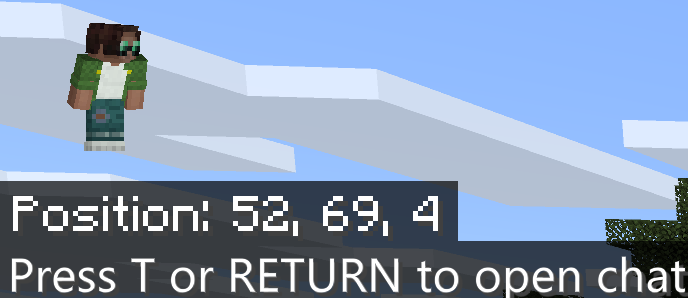
6) Inventory items are gone, completely. Items remain in chest.
I've done some more testing. I played a bit more in the world file, and built some more areas, saved it and migrated to the Windows Server, and the blocks seem to be there in the overworld, but the armour and inventory items are different (not the same) - so the dependencies are in the inventory items.
The items in the offline world are fully stacked/enchanted (head, chest, legs and feet) plus some weapons.
I ran a second test, and put all my gear/inventory into a chest and transferred the world and it seems that everything transferred over properly. It looks like when you move the world over to a server, it doesn't seem to carry over the inventory correctly, but the items in the chest that I put there prior to logging out and saving/transfering, show up - so it essentially duplicated some items.
World Download: https://1drv.ms/u/s!Aivrh6gXIbxkgW1d92ogNmiM9qng?e=mHrTay
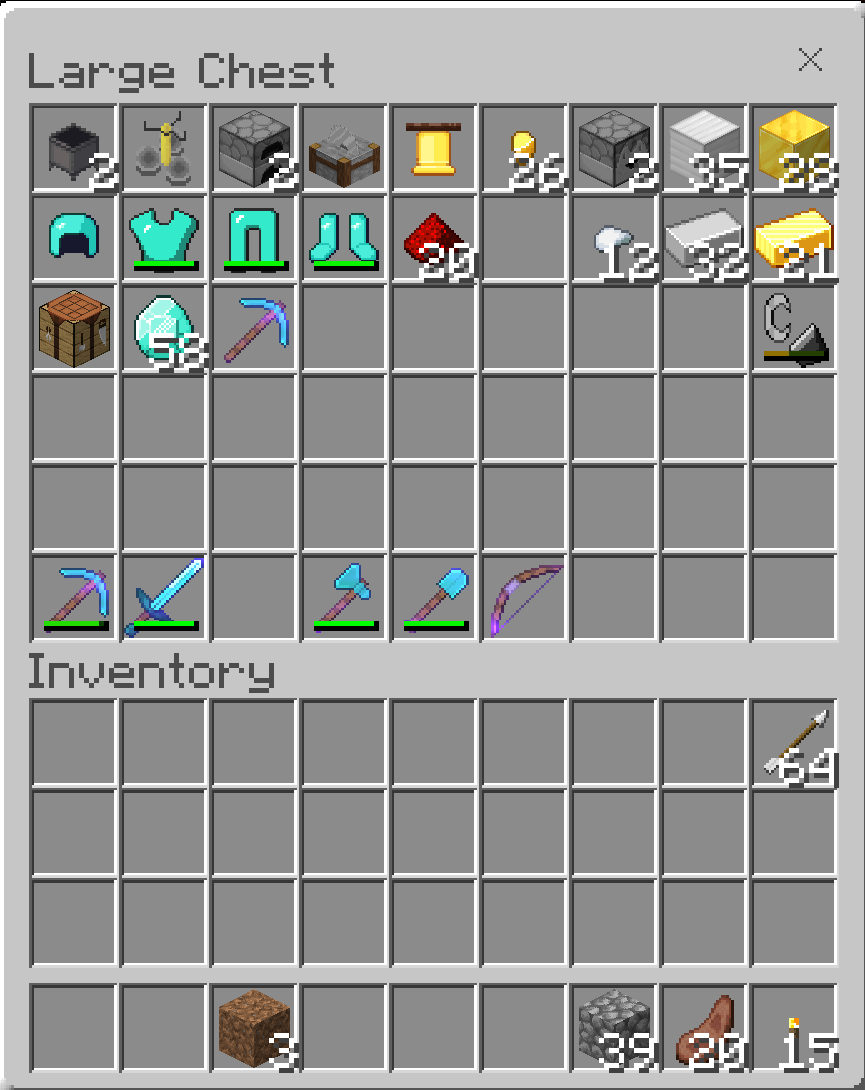
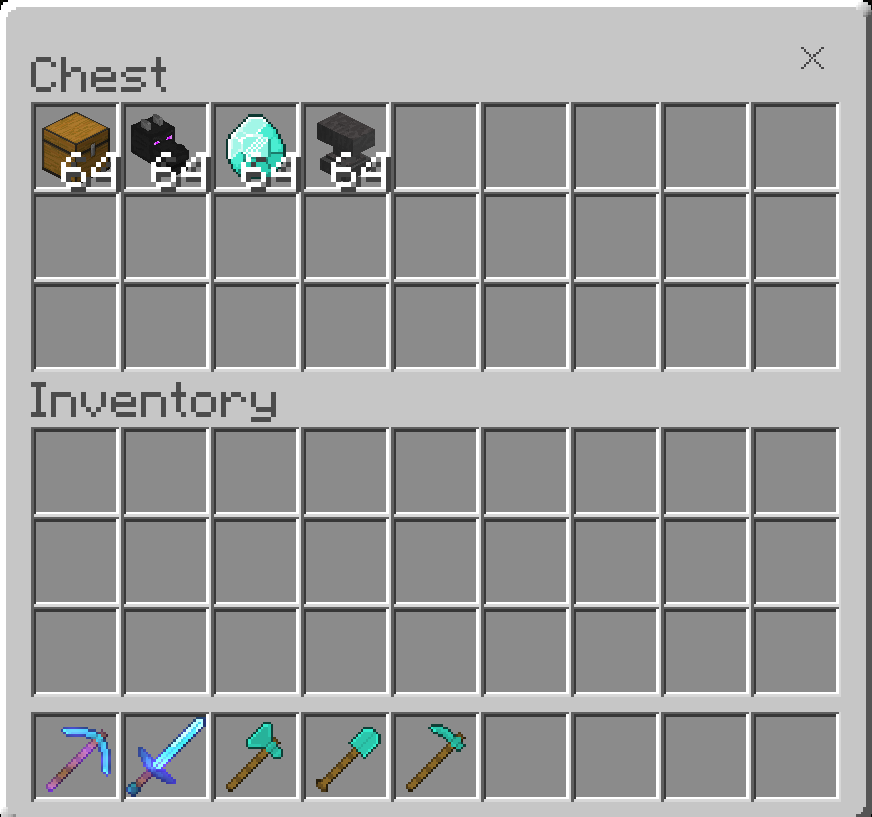
Inventory of Chest on Offline World
Logged out location on Offline World
Inventory and Chest in Windows Server after World Import
Log in Location in Windows Server after World Import
[Win10] Moving local world (1.14.60) to WindowsMinecraftServer (1.14.60.5) shows descrepencies of inventory items[Win10] Moving local world (1.14.60) to Windows Bedrock Dedicated Server (1.14.60.5) shows descrepencies of inventory items
I've created a video demonstration to show the issues that are recreatable in a brand new world via Windows 10 Edition.
DEMO VIDEO HERE: https://www.youtube.com/watch?v=_5KtQ46hp_0
Steps to re-create
1) Create an offline world (doesn't matter which mode). Name the world.
2) Log into world
3) Place items in inventory (Weapons, and attach armour to character).
4) Exit and save
5) Copy world save data located here:
Save data located at %LOCALAPPDATA%\Packages\Microsoft.MinecraftUWP_8wekyb3d8bbwe\LocalState\games\com.mojang\minecraftWorlds
6) Paste data to Windows
based Server v1.14.60.5 worlds directory6) Modify server.properties to reflect test world name
7) Launch game and enter in world under Servers tab
8) Notice discrepancies of items worn as well as inventory do not reflect those in offline world.
I've got a bit more detail with screenshots to this issue, but opened the bug in wrong Project, should have been opened here under BDS not Bedrock Codebase (unless it is related I suppose).
In reference to this report:
MCPE-75064I've created a video demonstration to show the issues that are recreatable in a brand new world via Windows 10 Edition.
DEMO VIDEO HERE: https://www.youtube.com/watch?v=_5KtQ46hp_0
Steps to re-create
1) Create an offline world (doesn't matter which mode). Name the world.
2) Log into world
3) Place items in inventory (Weapons, and attach armour to character).
4) Exit and save
5) Copy world save data located here:
Save data located at %LOCALAPPDATA%\Packages\Microsoft.MinecraftUWP_8wekyb3d8bbwe\LocalState\games\com.mojang\minecraftWorlds
6) Paste data to Windows Bedrock Dedicated Server v1.14.60.5 worlds directory
6) Modify server.properties to reflect test world name
7) Launch game and enter in world under Servers tab
8) Notice discrepancies of items worn as well as inventory do not reflect those in offline world.
I've got a bit more detail with screenshots to this issue, but opened the bug in wrong Project, should have been opened here under BDS not Bedrock Codebase (unless it is related I suppose).
In reference to this report: https://bugs.mojang.com/browse/MCPE-75064
I've created a video demonstration to show the issues that are recreatable in a brand new world via Windows 10 Edition.
DEMO VIDEO HERE: https://www.youtube.com/watch?v=_5KtQ46hp_0
Steps to re-create
1) Create an offline world (doesn't matter which mode). Name the world.
2) Log into world
3) Place items in inventory (Weapons, and attach armour to character).
4) Exit and save
5) Copy world save data located here:
Save data located at %LOCALAPPDATA%\Packages\Microsoft.MinecraftUWP_8wekyb3d8bbwe\LocalState\games\com.mojang\minecraftWorlds
6) Paste data to Windows Bedrock Dedicated Server v1.14.60.5 worlds directory, and rename directory to match world name
6) Modify server.properties to reflect test world name
7) Launch game and enter in world under Servers tab
8) Notice discrepancies of items worn as well as inventory do not reflect those in offline world.
I've got a bit more detail with screenshots to this issue, but opened the bug in wrong Project, should have been opened here under BDS not Bedrock Codebase (unless it is related I suppose).
In reference to this report:
MCPE-75064
[Win10] Moving local world (1.14.60) to Windows Bedrock Dedicated Server (1.14.60.5)shows descrepencies of inventory items[Win10] Inventory Loss Moving local world (1.14.60) to Windows Bedrock Dedicated Server (1.14.60.5)
I've created a video demonstration to show the issues that are recreatable in a brand new world via Windows 10 Edition.
DEMO VIDEO HERE: https://www.youtube.com/watch?v=_5KtQ46hp_0
Steps to re-create
1) Create an offline world (doesn't matter which mode). Name the world.
2) Log into world
3) Place items in inventory (Weapons, and attach armour to character).
4) Exit and save
5) Copy world save data located here:
Save data located at %LOCALAPPDATA%\Packages\Microsoft.MinecraftUWP_8wekyb3d8bbwe\LocalState\games\com.mojang\minecraftWorlds
6) Paste data to Windows Bedrock Dedicated Server v1.14.60.5 worlds directory, and rename directory to match world name
6) Modify server.properties to reflect test world name
7) Launch game and enter in world under Servers tab
8) Notice discrepancies of items worn as well as inventory do not reflect those in
offlineworld.
I've got a bit more detail with screenshots to this issue, but opened the bug in wrong Project, should have been opened here under BDS not Bedrock Codebase (unless it is related I suppose).
In reference to this report:
MCPE-75064I've created a video demonstration to show the issues that are recreatable in a brand new world via Windows 10 Edition.
DEMO VIDEO HERE: https://www.youtube.com/watch?v=_5KtQ46hp_0
Steps to re-create
1) Create an offline world (doesn't matter which mode). Name the world.
2) Log into world
3) Place items in inventory (Weapons, and attach armour to character).
4) Exit and save
5) Copy world save data located here:
Save data located at %LOCALAPPDATA%\Packages\Microsoft.MinecraftUWP_8wekyb3d8bbwe\LocalState\games\com.mojang\minecraftWorlds
6) Paste data to Windows Bedrock Dedicated Server v1.14.60.5 worlds directory, and rename directory to match world name
6) Modify server.properties to reflect test world name
7) Launch game and enter in world under Servers tab
8) Notice discrepancies of items worn as well as inventory do not reflect those in local world.
I've got a bit more detail with screenshots to this issue, but opened the bug in wrong Project, should have been opened here under BDS not Bedrock Codebase (unless it is related I suppose).
In reference to this report:
MCPE-75064
I've created a video demonstration to show the issues that are recreatable in a brand new world via Windows 10 Edition.
DEMO VIDEO HERE: https://www.youtube.com/watch?v=_5KtQ46hp_0
Steps to re-create
1) Create an offline world (doesn't matter which mode). Name the world.
2) Log into world
3) Place items in inventory (Weapons, and attach armour to character).
4) Exit and save
5) Copy world save data located here:
Save data located at %LOCALAPPDATA%\Packages\Microsoft.MinecraftUWP_8wekyb3d8bbwe\LocalState\games\com.mojang\minecraftWorlds
6) Paste data to Windows Bedrock Dedicated Server v1.14.60.5 worlds directory, and rename directory to match world name
6) Modify server.properties to reflect test world name
7) Launch game and enter in world under Servers tab
8) Notice discrepancies of items worn as well as inventory do not reflect those in local world.
I've got a bit more detail with screenshots to this issue, but opened the bug in wrong Project, should have been opened here under BDS not Bedrock Codebase (unless it is related I suppose).
In reference to this report:
MCPE-75064
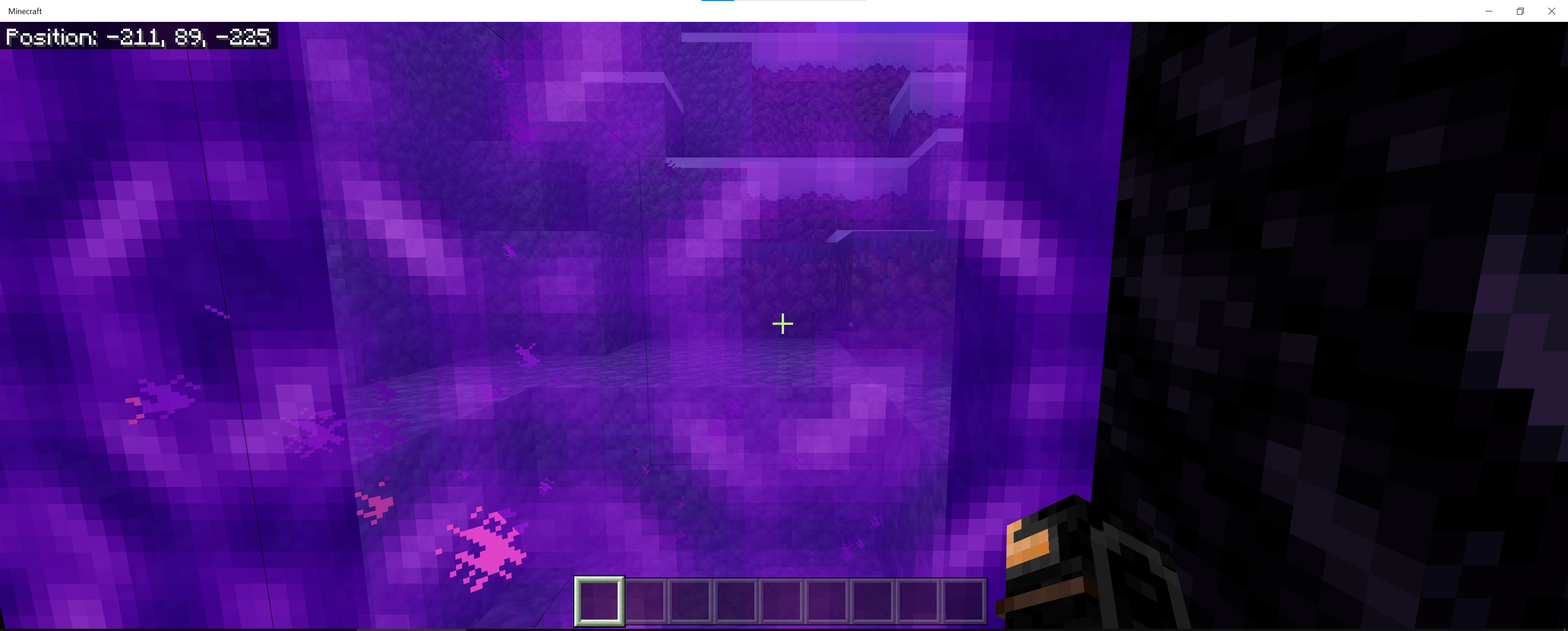
When building a nether portal in the overworld, and going through the portal, player is put in correct location inside nether, but going back through the portal, puts the player at the incorrect location (generating a portal outside of the correct coordinates).
For testing:
Download Test World: https://1drv.ms/u/s!ArY94VX-LZYIj3G3sDvpVeuGATOW?e=gDZWOn
Instructions:
- Teleport yourself to portal entrance overworld: 216, 81, 564 (portal_enterance_overworld.png)
- Go Into Nether Portal
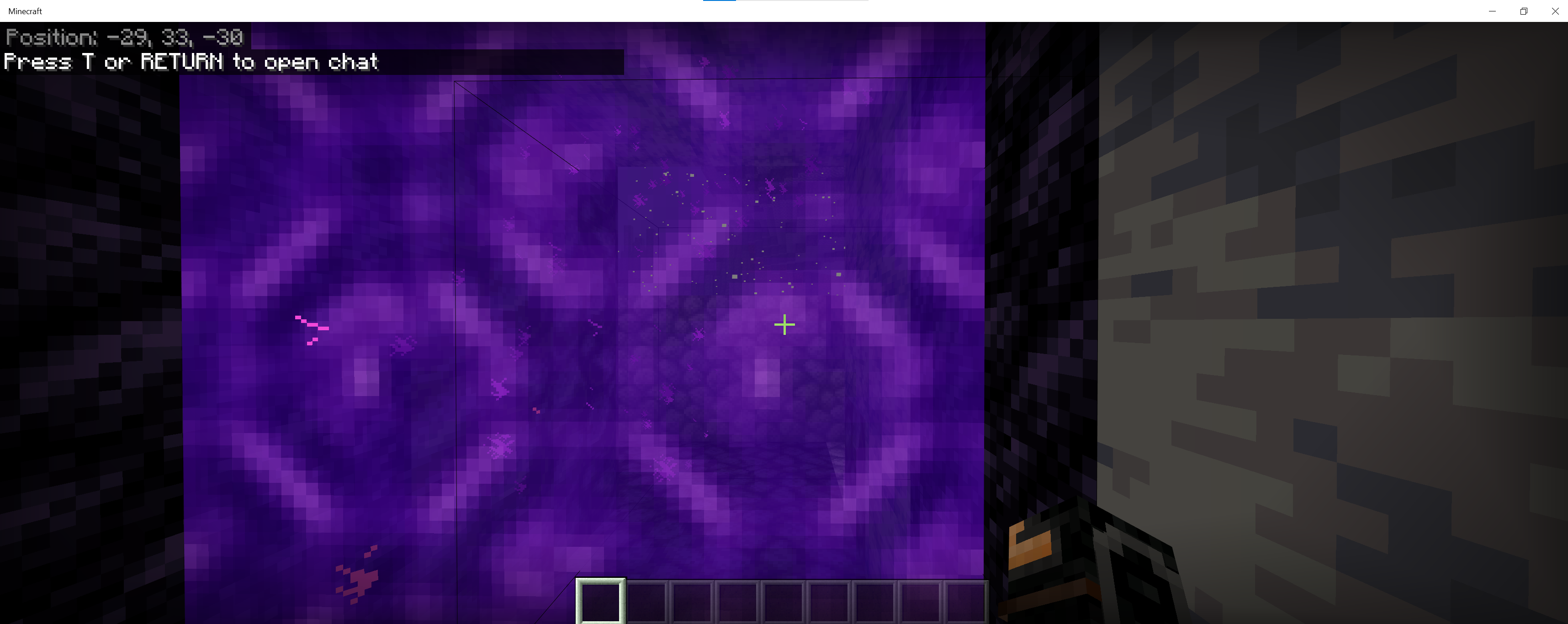
- Emerge into nether at estimated coordinates -29, 33, -30 (portal_nether.png)
- Exit the nether, and emerge at estimated coordinates
211, 89, -225 (exiting_nether.png)-
This bug happens on BDS as well as when imported into local game on Win10.
When building a nether portal in the overworld, and going through the portal, player is put in correct location inside nether, but going back through the portal, puts the player at the incorrect location (generating a portal outside of the correct coordinates).
For testing:
Download Test World: https://1drv.ms/u/s!ArY94VX-LZYIj3G3sDvpVeuGATOW?e=gDZWOn
Instructions:
- Teleport yourself to portal entrance overworld: 216, 81, 564 (portal_enterance_overworld.png)
- Go Into Nether Portal
- Emerge into nether at estimated coordinates -29, 33, -30 (portal_nether.png)
- Exit the nether, and emerge at estimated coordinates 211, 89, -225 (exiting_nether.png)
This bug happens on BDS as well as when imported into local game on Win10.
When attempting to place
a lower slab(in my example) copper slab, below an exposed cut copper slab, the block is not allowed to be placed, unless the exposed cut copper slab isstripped / revertedto copper slab.
Video Example: https://1drv.ms/v/s!ArY94VX-LZYIj3MGcVcIF2levkBL?e=s6Zr7O
When attempting to place (in my example) copper slab, below an exposed cut copper slab, the block is not allowed to be placed, unless the ( upper slab block) exposed cut copper slab is made into copper slab.
Video Example: https://1drv.ms/v/s!ArY94VX-LZYIj3MGcVcIF2levkBL?e=s6Zr7O
Cannot place lowerslabblocksbelowplaced exposed copper slabsCannot place lower copper blocks slab below (upper) placed exposed copper slabs
When attempting to place (in my example) copper slab, below an exposed cut copper slab, the block is not allowed to be placed, unless the ( upper slab block) exposed cut copper slab is made into copper slab.
VideoExample: https://1drv.ms/v/s!ArY94VX-LZYIj3MGcVcIF2levkBL?e=s6Zr7OWhen attempting to place (in my example) copper slab, below an exposed cut copper slab, the block is not allowed to be placed, unless the ( upper slab block) exposed cut copper slab is made into copper slab.
Survival World Example: https://1drv.ms/v/s!ArY94VX-LZYIj3MGcVcIF2levkBL?e=s6Zr7O
Creative World Example: https://1drv.ms/v/s!ArY94VX-LZYIj3TQhYFw5y3ATIgK?e=AHF38k
W
hen attempting to place (in my example) copper slab, below an exposed cut copper slab, the block is not allowed to be placed, unless the ( upper slab block) exposed cut copper slab is made into copper slab.
Survival World Example: https://1drv.ms/v/s!ArY94VX-LZYIj3MGcVcIF2levkBL?e=s6Zr7O
Creative World Example: https://1drv.ms/v/s!ArY94VX-LZYIj3TQhYFw5y3ATIgK?e=AHF38k
**EDIT**
Working as intended, cannot place slab of different type in same block space.
When attempting to place (in my example) copper slab, below an exposed cut copper slab, the block is not allowed to be placed, unless the ( upper slab block) exposed cut copper slab is made into copper slab.--
Survival World Example: https://1drv.ms/v/s!ArY94VX-LZYIj3MGcVcIF2levkBL?e=s6Zr7O
Creative World Example: https://1drv.ms/v/s!ArY94VX-LZYIj3TQhYFw5y3ATIgK?e=AHF38k
**EDIT**
Working as intended, cannot place slab of different type in same block space.
When attempting to place (in my example) copper slab, below an exposed cut copper slab, the block is not allowed to be placed, unless the ( upper slab block) exposed cut copper slab is made into copper slab.--
Survival World Example: https://1drv.ms/v/s!ArY94VX-LZYIj3MGcVcIF2levkBL?e=s6Zr7O
Creative World Example: https://1drv.ms/v/s!ArY94VX-LZYIj3TQhYFw5y3ATIgK?e=AHF38kedit
While crouching, when trying to place an Eye of Ender onto a End Portal block, it does not work.
Video Capture Example: https://1drv.ms/v/s!ArY94VX-LZYIj3XOtmKjF2lqZ41J?e=lKQrQS
I always would crouch and place them so I wouldn’t fall into the Lava near the end portal. I could have sworn it used to work before.
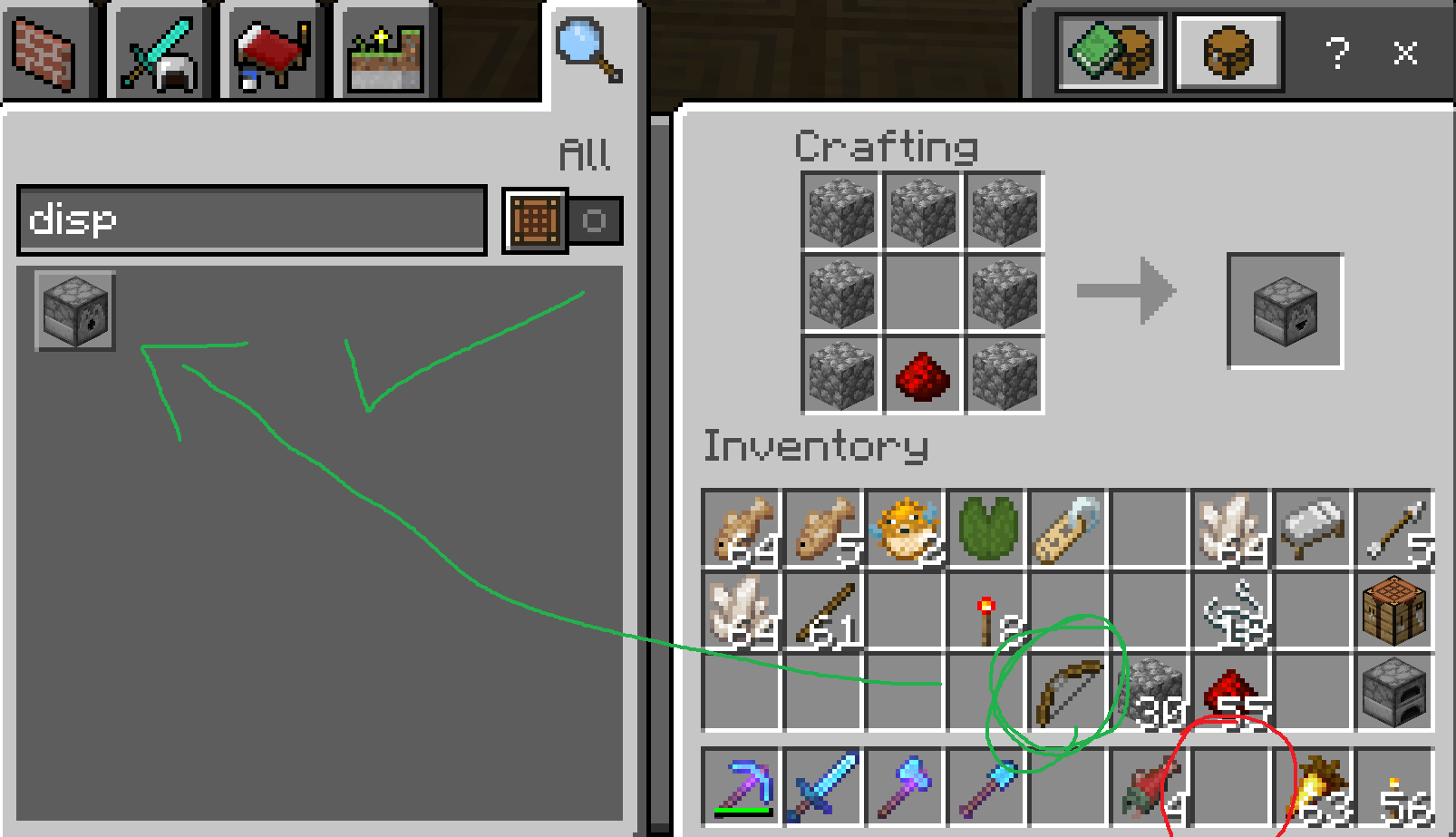
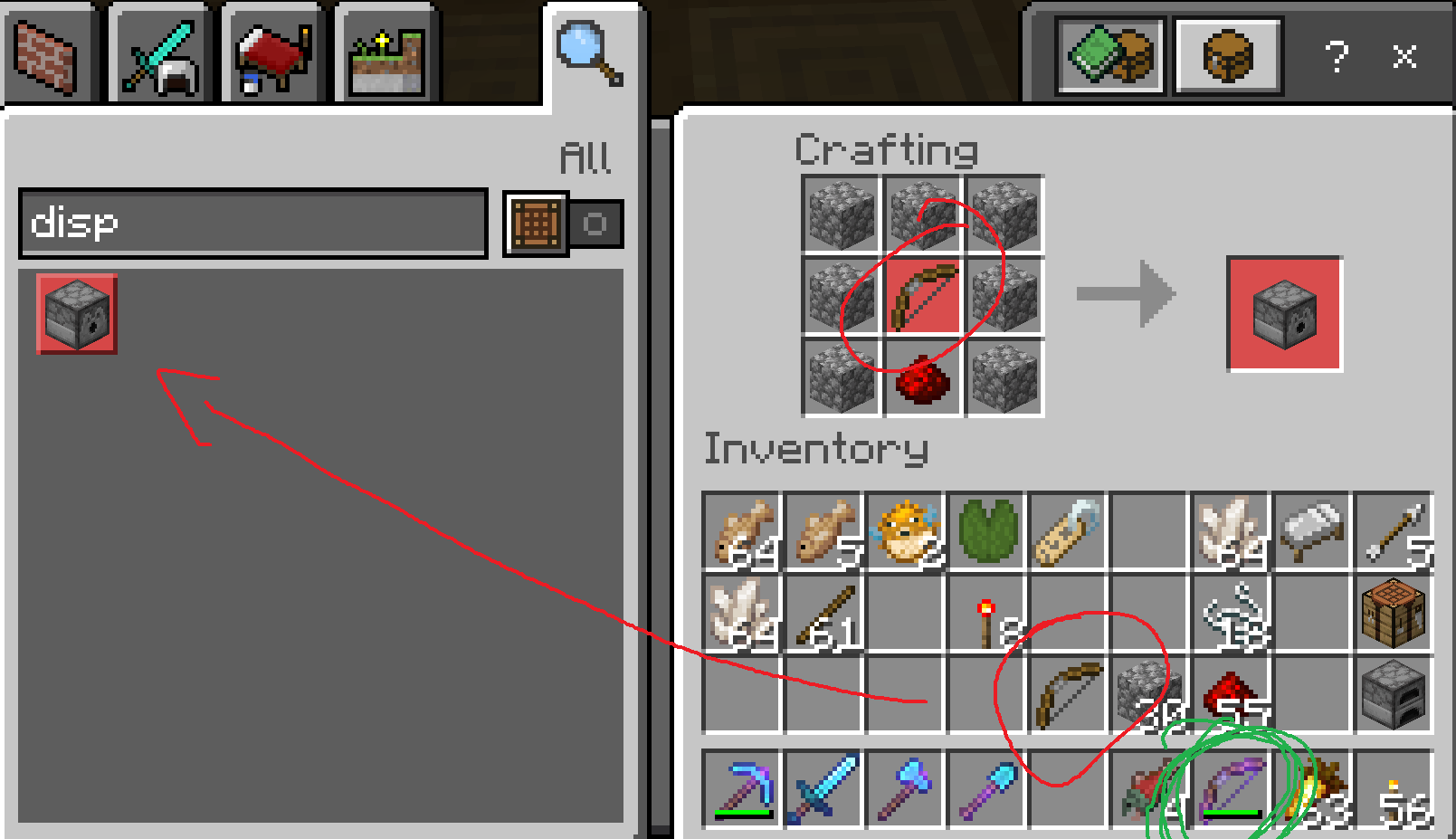
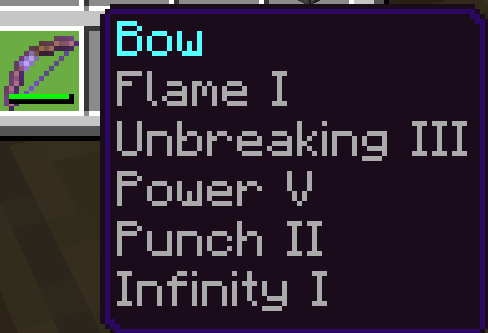
When having an enchanted bow inside the inventory
, as well as a newly crafted plain bow, recipe will not allow the ability to craft dispensers.When having an enchanted bow inside the inventory on the main item bar, player cannot craft a dispenser even with necessary items available required in recipe within inventory.
When having an enchanted bow inside the inventory
on the main itembar, player cannot craft a dispenser even with necessary items available required in recipe within inventory.When having an enchanted bow inside the inventory hotbar, player cannot craft a dispenser using the recipe book even with necessary items available required in recipe within inventory.
Crafting a dispenser manually seems to work fine by placing blocks into crafting table space without using recipe book.
If you walk into a horizontal endrod in third person view, the collision does not display camera correctly. This
works in all third person views, whether crouching or not, forwards, backwards and sideways.
It functionscorrectly when infirst person view.Here is a video example
Here is the world downloadIf you walk into a horizontal endrod in third person view, the collision does not display camera correctly. This glitch happens in all third person views, whether crouching or not, forwards, backwards and sideways.
The camera responds properly first person view.
Here is a video example
Here is the world download
Collision withHorizontalEnd Rod in third person causes camera glitchCollision with End Rods in third person causes camera glitch
If you walk into a horizontal or vertical endrod in third person view, the collision does not display camera correctly. This glitch happens in all third person views, whether crouching or not, forwards, backwards and sideways.
The camera responds properly first person view.
Here is a video example
Here is the world download
Collision with End Rods (head height) in third person causes camera glitch
If you walk into a horizontal or vertical endrod in third person view (when its at eye level to the player), the collision does not display camera correctly. This glitch happens in all third person views, whether crouching or not, forwards, backwards and sideways.
The camera responds properly first person view.
Here is a video example
Here is the world download
Did some more testing, it happens when the block is the same height as the players head (top half). If you place a single end rod on the ground, the camera responds properly.
If you walk into a horizontal or vertical endrod in third person view (when its at eye level to the player), the collision does not display camera correctly. This glitch happens in all third person views, whether crouching or not, forwards, backwards and sideways.
The camera responds properly first person view.
Here is a video example
Here is the world downloadedit
When opening inventory, mouse is automatically hovering over helmet(which sometimes causes loss of item(being dropped) if inadvertently clicked and inventory is full)When opening inventory using "E", mouse cursor is automatically hovering over helmet which sometimes causes loss of item
I have been playing my own Minecraft Bedrock Dedicated Server since 1.20 release and just noticed that when opening the character inventory screen with "E" on the keyboard in Windows Minecraft Bedrock, each time it is as if the mouse is hovering/selected over the Helmet item regardless of where the pointer is placed (even in an open area not above the UI).
I've noticed that my helmets have been disappearing or being dropped inadvertently. I figure that if the inventory of the character is full, this bug is causing the item to be dropped without the player realizing as the mouse is being clicked and item selected and thrown.
I don't know when this issue started to happen, but it's easy to reproduce. Simply just open the inventory screen by pressing E and notice the tooltip for the helmet show up. If you immediately click after opening the inventory screen, the helm is picked up. If you end up clicking the helm and exiting out when your inventory is full, the helm is dropped.
Here is a video to demonstrate.
I have been playing my own Minecraft Bedrock Dedicated Server since 1.20 release and just noticed that when opening the character inventory screen with "E" on the keyboard in Windows Minecraft Bedrock, each time it is as if the mouse is hovering/selected over the Helmet item regardless of where the pointer is placed (even in an open area not above the UI).
I've noticed that my helmets have been disappearing or being dropped inadvertently. I figure that if the inventory of the character is full, this bug is causing the item to be dropped without the player realizing as the mouse is being clicked and item selected and thrown.
I don't know when this issue started to happen, but it's easy to reproduce. Simply just open the inventory screen by pressing E and notice the tooltip for the helmet show up. If you immediately click after opening the inventory screen, the helm is picked up. If you end up clicking the helm and exiting out when your inventory is full, the helm is dropped.
Here is a video to demonstrate.
https://1drv.ms/u/s!ArY94VX-LZYIkGHrQCv9EctgqH-g?e=GjFQPd
I think just by fixing the auto hover of the helm during opening of inventory would fix this problem so that players are not tossing their helmets or selecting them during a fast clicking motion, during mob fights, block selection etc.
I have been playing my own Minecraft Bedrock Dedicated Server since 1.20 release and just noticed that when opening the character inventory screen with "E" on the keyboard in Windows Minecraft Bedrock, each time it is as if the mouse is hovering/selected over the Helmet item regardless of where the pointer is placed (even in an open area not above the UI).
I've noticed that my helmets have been disappearing or being dropped inadvertently. I figure that if the inventory of the character is full, this bug is causing the item to be dropped without the player realizing as the mouse is being clicked and item selected and thrown.
I don't know when this issue started to happen, but it's easy to reproduce. Simply just open the inventory screen by pressing E and notice the tooltip for the helmet show up. If you immediately click after opening the inventory screen, the helm is picked up. If you end up clicking the helm and exiting out when your inventory is full, the helm is dropped.
Here is a video to demonstrate.
https://1drv.ms/u/s!ArY94VX-LZYIkGHrQCv9EctgqH-g?e=GjFQPd
I think just by fixing the auto hover of the helm during opening of inventory would fix this problem so that players are not tossing their helmets or selecting them during a fast clicking motion, during mob fights, block selection etc.
edit
I don't even know how to enable this with the Windows BDS either, nothing seems to work. I wonder if it's not supported yet. Can we get an official response from a dev?
Interesting, I notice this as well on creative (just tested it with latest version) 1.18.12 Hotfix
It seems to be only items that have full durability. Items that have durability damage (switching to survival, using the item so durability goes down), and switching back to creative to enchant item and use, the item works as expected.
I have the same issue. Entering nether works, exiting stuck on Building Terrain.
Minecraft Bedrock (Win10) v 1.14.60. World is not on realm, just offline.
Render distance has been set to the lowest configuration possible in bedrock, with no mods or texture packs enabled (plain vanilla MC Bedrock) on Windows 10.
World Download: https://1drv.ms/u/s!Aivrh6gXIbxkgWv7XKf_diEUwenj?e=Wa5ZE1
Annoyingly I've actually lost 2 villagers trying to port them from overworld, to nether and back out of the nether on a boat or minecart because of having to forcefully closing the game during the "Building Terrain" screen. After re-joining the world, I am immediately re-located somewhere random within my home base area near the nether portal in the overworld and no sign of the villagers.
![[Mod] EVGENSYPERPRO](../../../data/avatars/users/92853.png)
DNS Crypt: This works in both survival and creative. But thanks for the extra info on full durability. This is a great addition to the report.
Can confirm, it sounds like a phasing effect when opening chests. Doesn't happen all the time, but more so than not. Happens on MC Bedrock Win10 v1.16.2003.0
This issue is resolved in the beta.
MCPE-71243Fix for this issue has been applied to the 1.16.200.57 Beta release
Well, you saved me a bunch of headaches. I've been troubleshooting for 30+ minutes trying different settings, firewall configurations, re-creating the level under diff names, deleting files, but the only files I didn't remove were the level.dat and level.dat old files, and that got me back into the server. Thank you.
Wonder what happened with the update that broke that?
The switch doesn't support third party BDS connectivity. You have to trick the "featured" realms by redirecting the DNS of your Switch, to a hostname of a featured server, to the IP address of your BDS.
I understand the issue now, thanks.
It most likely your internet connection and the switch having an underpowered processor. There's a reason why Microsoft doesn't allow custom servers to be added to console, it's just too underpowered and will play really poorly. I'm surprised the Hive would be that bad, it is a sponsored server - but I suppose depending on the population of the realm to begin with, or maybe your SD card is slow/poor performance could be all indicators.
What you reported isn't a bug.
I figured out the issue, if the enchanted bow is on the bottom bar, it doesn't allow crafting from the recipe book, but if you move it into the main inventory, or move it out of inventory completely, the dispenser item is craft-able again using the recipe book.
Crafting a dispenser manually seems to work fine by placing blocks into crafting table space without using recipe book.
I've noticed performance take a huge hit recently on latest updates in 1.19.5 series, chunks slow to load when flying with elytra, game locks up sometimes (server side freezing), portals in and out are way slower to load (world gen). I'm assuming memory usage is higher than normal (checked mine and it's 4.8 GB) with just myself connected, but something is definitely not right. Running BDS on Windows, 1-3 players typically.
@Filipland504 You cant craft with an enchanted item, the requirement is a plain undamaged bow.
As @gergomeister mentioned, it forces the game into creative mode when modifying the gamemode as “hardcore”