 Katherine Abramova
- fullfungo
- JIRAUSER479071
- Europe/Stockholm
- Yes
- No
 MC-182313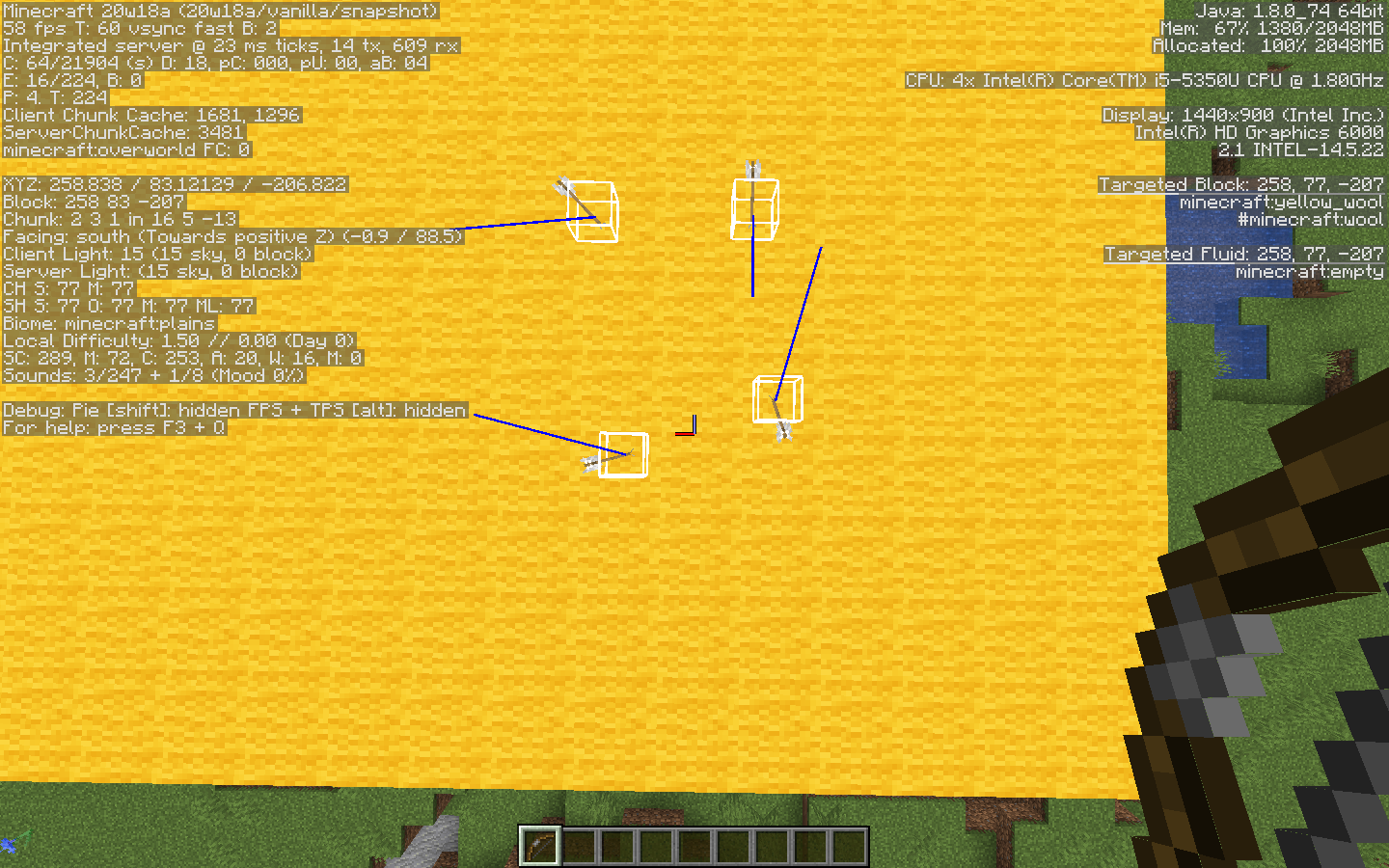
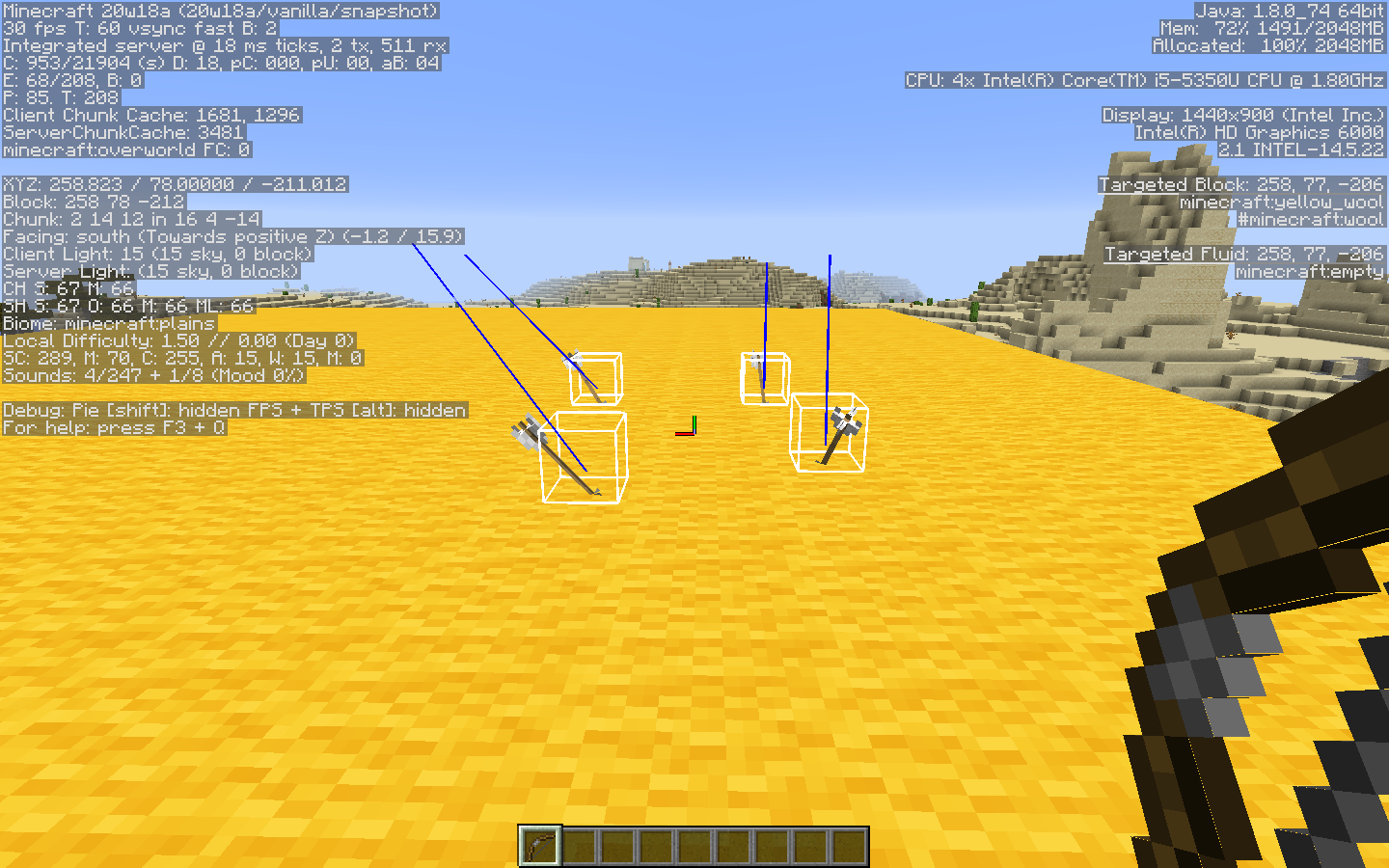
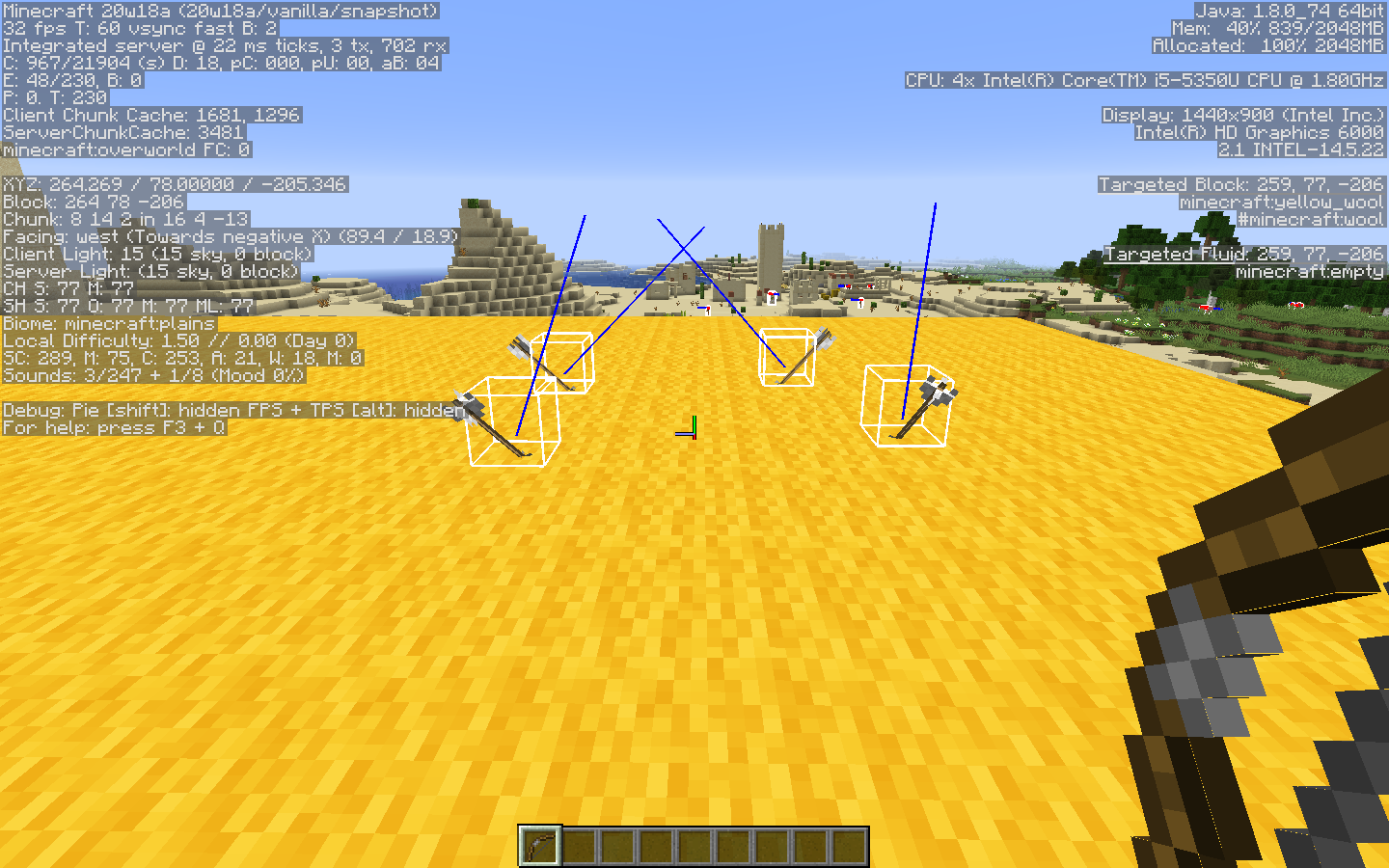
The direction arrows are facing does not, in general, align with their visual appearance and their "Motion" nbt tag. The x- and the y-direction components point from tip to tail, while the z-direction component points from the tail to the tip. This affects tp ^ ^ ^1 execution, resulting in an illogical arrow movement, as well as other dependent actions.
The same applies to tipped arrows and spectral arrows.
General description:
The direction arrows are facing does not, in general, align with their visual appearance and their "Motion" nbt tag. The x- and the y-direction components point from tip to tail, while the z-direction component points from the tail to the tip. This affects tp ^ ^ ^1 execution, resulting in an illogical arrow movement, as well as other dependent actions.
The same applies to tipped arrows and spectral arrows.
What I expected to happen was:
Either the arrow entity faces the direction it is/was moving (preferably) or the complete opposite direction.
What actually happened was:
Components x and y point in the direction the arrow came from, while the z component points in the direction of the movement.
Steps to reproduce:
- Take a bow and arrows
- Shoot in any direction
- Observe the direction the arrow is facing
MacOS Catalina version 10.15.4
java version "1.8.0_251"
Java(TM) SE Runtime Environment (build 1.8.0_251-b08)
Java HotSpot(TM) 64-Bit Server VM (build 25.251-b08, mixed mode)
General description:
The direction arrows are facing does not, in general, align with their visual appearance and their "Motion" nbt tag. The x- and the y-direction components point from tip to tail, while the z-direction component points from the tail to the tip. This affects tp ^ ^ ^1 execution, resulting in an illogical arrow movement, as well as other dependent actions.
The same applies to tipped arrows and spectral arrows.
What I expected to happen was:
Either the arrow entity faces the direction it is/was moving (preferably) or the complete opposite direction.
What actually happened was:
Components x and y point in the direction the arrow came from, while the z component points in the direction of the movement.
Steps to reproduce:
- Take a bow and arrows
- Shoot in any direction
- Observe the direction the arrow is facing
General description:
The direction arrows are facing does not, in general, align with their visual appearance and their "Motion" nbt tag. The x- and the y-direction components point from tip to tail, while the z-direction component points from the tail to the tip. This affects tp ^ ^ ^1 execution, resulting in an illogical arrow movement, as well as other dependent actions.
What I expected to happen was:
Either the arrow entity faces the direction it is/was moving (preferably) or the complete opposite direction.
What actually happened was:
Components x and y point in the direction the arrow came from, while the z component points in the direction of the movement.
Steps to reproduce:
- Take a bow and arrows
- Shoot in any direction
- Observe the direction the arrow is facing
Additional information:
Seems to be present in versions all the way from 1.8 (F3 + B introduced) up to the latest snapshot (20w18a).
Everything said applies to tipped arrows and spectral arrows.
General description:
The direction arrows are facing does not, in general, align with their visual appearance and their "Motion" nbt tag. The x- and the y-direction components point from tip to tail, while the z-direction component points from the tail to the tip. This affects tp ^ ^ ^1 execution, resulting in an illogical arrow movement, as well as other dependent actions.
What I expected to happen was:
Either the arrow entity faces the direction it is/was moving (preferably) or the complete opposite direction.
What actually happened was:
Components x and y point in the direction the arrow came from, while the z component points in the direction of the movement.
Steps to reproduce:
- Take a bow and arrows
- Shoot in any direction
- Observe the direction the arrow is facing
Additional information:Seems to be present in versions all the way from 1.8 (F3 + B introduced) up to the latest snapshot (20w18a).
Everything said applies to tipped arrows and spectral arrows.
General description:
The direction arrows are facing does not, in general, align with their visual appearance and their "Motion" nbt tag. The x- and the y-direction components point from tip to tail, while the z-direction component points from the tail to the tip. This affects tp ^ ^ ^1 execution, resulting in an illogical arrow movement, as well as other dependent actions.
What I expected to happen was:
Either the arrow entity faces the direction it is/was moving (preferably) or the complete opposite direction.
What actually happened was:
Components x and y point in the direction the arrow came from, while the z component points in the direction of the movement.
Steps to reproduce:
- Take a bow and arrows
- Shoot in any direction
- Observe the direction the arrow is facing
Additional information:
Seems to be present in versions all the way from 1.8 (F3 + B introduced) up to the latest snapshot
(20w18a).Everything said applies to tipped arrows and spectral arrows.
General description:
The direction arrows are facing does not, in general, align with their visual appearance and their "Motion" nbt tag. The x- and the y-direction components point from tip to tail, while the z-direction component points from the tail to the tip. This affects tp ^ ^ ^1 execution, resulting in an illogical arrow movement, as well as other dependent actions.
What I expected to happen was:
Either the arrow entity faces the direction it is/was moving (preferably) or the complete opposite direction.
What actually happened was:
Components x and y point in the direction the arrow came from, while the z component points in the direction of the movement.
Steps to reproduce:
- Take a bow and arrows
- Shoot in any direction
- Observe the direction the arrow is facing
Additional information:
Seems to be present in versions all the way from 1.8 even 14w29a (F3 + B introduced several snapshots prior, could not load them) up to the latest snapshot 20w18a.
Everything said applies to tipped arrows and spectral arrows.
I was unable to reproduce the issue in 20w18a (MacOS). You might want to include the circumstances under which you encountered the bug such as gamemode, single- or multiplayer. It would also be helpful to know if the problem is constant or reoccurring.
![[Mod] markderickson](../../../data/avatars/users/18946.svg)
I agree with Katherine Abramova – this issue is not present in 1.18.2 or in 22w15a. This is evident when using a larger area of fire in testing this.
How do I add "1.12.2" to Affected versions?
This problem has already been reported.
MC-157827MC-5726This bug has already been reported: MC-114111
This looks like a duplicate of
MC-168735MC-163575Video evidence may be needed to confirm, that this is a bug.
I am not a moderator, so I am not going to accept any email. I am also sure, that the moderators will not accept it either. I suggest trying the following things:
I was unable to recreate your bug. It looks like mods will probably ask you to provide additional information like your operating system and/or java version. You can also try providing debug info by using the corresponding in-game command.
This problem has already been reported here:
MC-182319MC-168735MC-163575It does not look like your fps changes significantly. How does this bug affect you?
Did you try to load the world originally created in a different version? If not, you might want to provide additional information such as steps to recreate the issue or world seed and coordinates.
It looks like the steps to reproduce the issue are missing or incorrect.
This problem is caused by the pistons taking time to propagate the positive signal , but taking no time to propagate the negative
  , which results in the bug, that was previously reported here:
MC-157827MC-5726MC-182314Why do you think it is a bug? I could only find, that the natural minimum population is equal to the number of valid beds, nothing about the maximum. (source: https://minecraft.gamepedia.com/Village)
It does not seem to be an in-game issue. You should try contacting Customer Support .
It does not seem to be an in-game issue. You should try contacting Customer Support.
Seems to be a duplicate of
MC-182318. Also, may be related toMC-181424.You should probably include the translation for the error you get and maybe additional information such as your operating system.
They do however work for me in 20w18a. This means you should provide additional information such as a video showing you throwing a potion. You may also want to add information about your operating system and Java version, whether you were playing in sigle- or multiplayer.
The eggs do indeed hatch in 20w18a as usual, which I have just checked in-game. You might want to provide a video of turtle eggs disappearing or try playing on peaceful and enclosing the eggs in a room, which other mobs cannot enter. If the issue remains the same, your assumption might be true.
Your question is a duplicate of
MC-181424.The bug is also present in 20w18a and is indeed unintentional (source). You might want to include a video demonstrating the issue, though it is not obligatory.
Present in 20w18a.
I can confirm the bug is indeed present in the game (20w18a, MacOS).
I was unable to recreate the bug. You might want to include additional information such as operating system and Java version. You can also try describing the circumstances under which you found this bug, e.g. gamemode, single- or multiplayer.
I was unable to replicate the described bug. You might want to include additional information such as operating system and circumstances, e.g. gamemode, single- or multiplayer.
Can confirm. Nevertheless, the issue disappears after a block update, which makes me think it is a lighting issue because the area corresponds to chunk borders and not to the structure itself.
This issue report is invalid. This forum is dedicated to in-game bugs and errors. You can try contacting customer support.
You might want to add information about it happening/ not happening during other server connections. You should probably write why you think it is an in-game bug, rather than a network connection problem.
I was not able to replicate the described problem. If what you are saying is true, it is indeed a bug (source). You might want to include some additional information such as your operating system and circumstances, e.g. gamemode, difficulty and single- or multiplayer.
[Mod] violine1101, I was able to recreate the described bug on 20w18a with gamerule mobGriefing set to true. The problem only occurs if the piglin starts going towards the gold from the upper level of the stairs.
Can confirm (mostly in regards to the river biome) in 20w18a in Large Biomes world. Nevertheless, it may be possible, that the average size of a village makes it almost certain to cross biome borders when generating.
Can confirm for 20w18a (macOS). It seems to be an actual bug (source) as the F3 screen displays it as snowy: true and the clone command creates a snowy grass aswell. Reloading the textures, chunks and/or the world does not fix the issue.
Updating the block by placing other blocks does not work, except for placing them directly on the block. The block can be fixed by moving it with a piston, however.
May be indirectly related to
MC-160797.This sounds like an intended game mechanics. I have confirmed it works with other sound sources too. Also, it only occurs in the F5 "face" mode and not in the "back" mode.
Looks like a duplicate of
MC-182423.Can confirm for 20w18a (macOS). It seems to be an actual bug (source) as the F3 screen displays it as snowy: true and the clone command creates a snowy grass as well. Reloading the textures, chunks and/or the world does not fix the issue. Updating the block by placing other blocks does not work, except for placing them directly on the block. The block can be fixed by moving it with a piston, however.
May be indirectly related to
MC-160797.Can confirm for 20w18a (macOS). Continual attack with a sword in creative makes the game look shaky and laggy. Can be replicated with a checkerboard contrast floor and any type of sword while under speed effect or while sprinting.
Can confirm for 20w18a (macOS, singleplayer), I have made a small loop, which a minecart cannot complete, but with a player, it does so without a problem. It seems to be an actual bug as it is not listed on Minecraft wiki (source).
It seems to be the case for almost every other mob in the nether. You can leave your suggestions for the game here.
It looks like what you are experiencing is not a bug, but a technical difficulty. In case your game crashes, you can attach the bug report. You can get technical support here.
This report is a duplicate of
MC-181499.The issue is being tracked in
MC-181424.You have provided insufficient information. You can improve it by adding screenshots, videos or more detailed mechanics of your redstone contraptions.
It may be helpful to search your issue prior to reporting it. This bug is being tracked in
MC-181424.It may be helpful to search your issue prior to reporting it. This bug is being tracked in
MC-181424.It may be helpful to search your issue prior to reporting it. This bug is being tracked in
MC-181424.This forum does not promise to review issue reported in a language different from English. You can use an online translator for this. Additionally, you should include the crash report in attachments.
This report looks pretty similar to the recent
MC-182311. The issue is tracked inMC-179858.I finally found the head report: MC-112474. Therefore, this question is a duplicate.
Can confirm for 1.15.2 and 20w18a.
The issue is duplicated by
MC-182313.Confirmed (1.18.1)
Can confirm for 1.18.1
Could not replicate in 1.18.1
Could not replicate in 1.18.2 Pre-release 2
Could not replicate in 1.18.1
Everything is working as intended. This report should be closed.
Could not replicate in 1.18.1. Please remove "confirmed" status.
Testing with two 10x10 platforms with one covered by a 10x10 roof, I can conclude that fire without a roof goes out faster in the rain.
You might not see the difference with 9 blocks as the rate is rather similar, but it is still noticeable given a larger area.
Developers will not be changing older versions of the game. All reported bugs will be fixed only in future versions.
If developers fixed bugs in every version of the game going back to Alpha, they would never have time to actually work on the game.