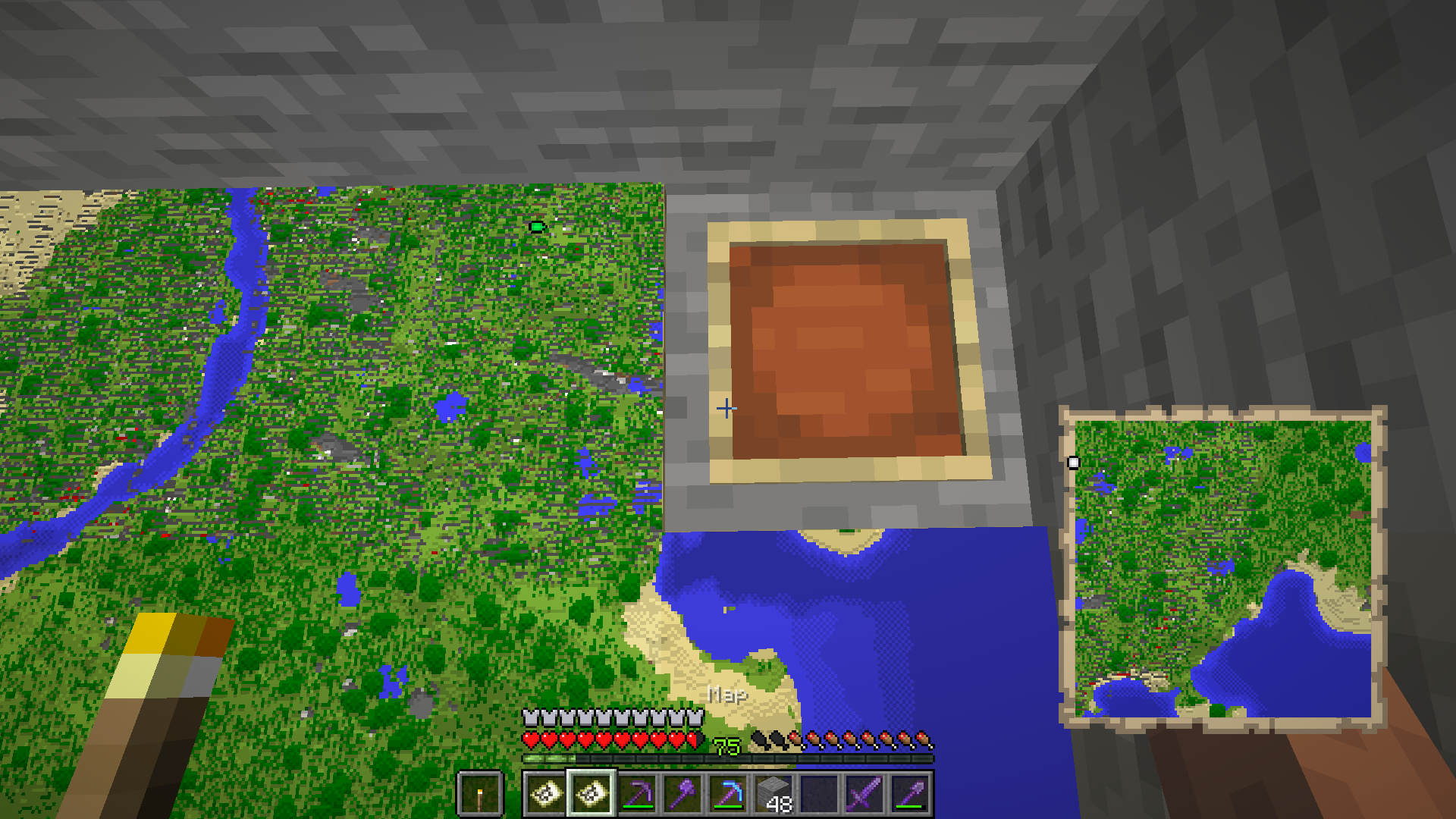
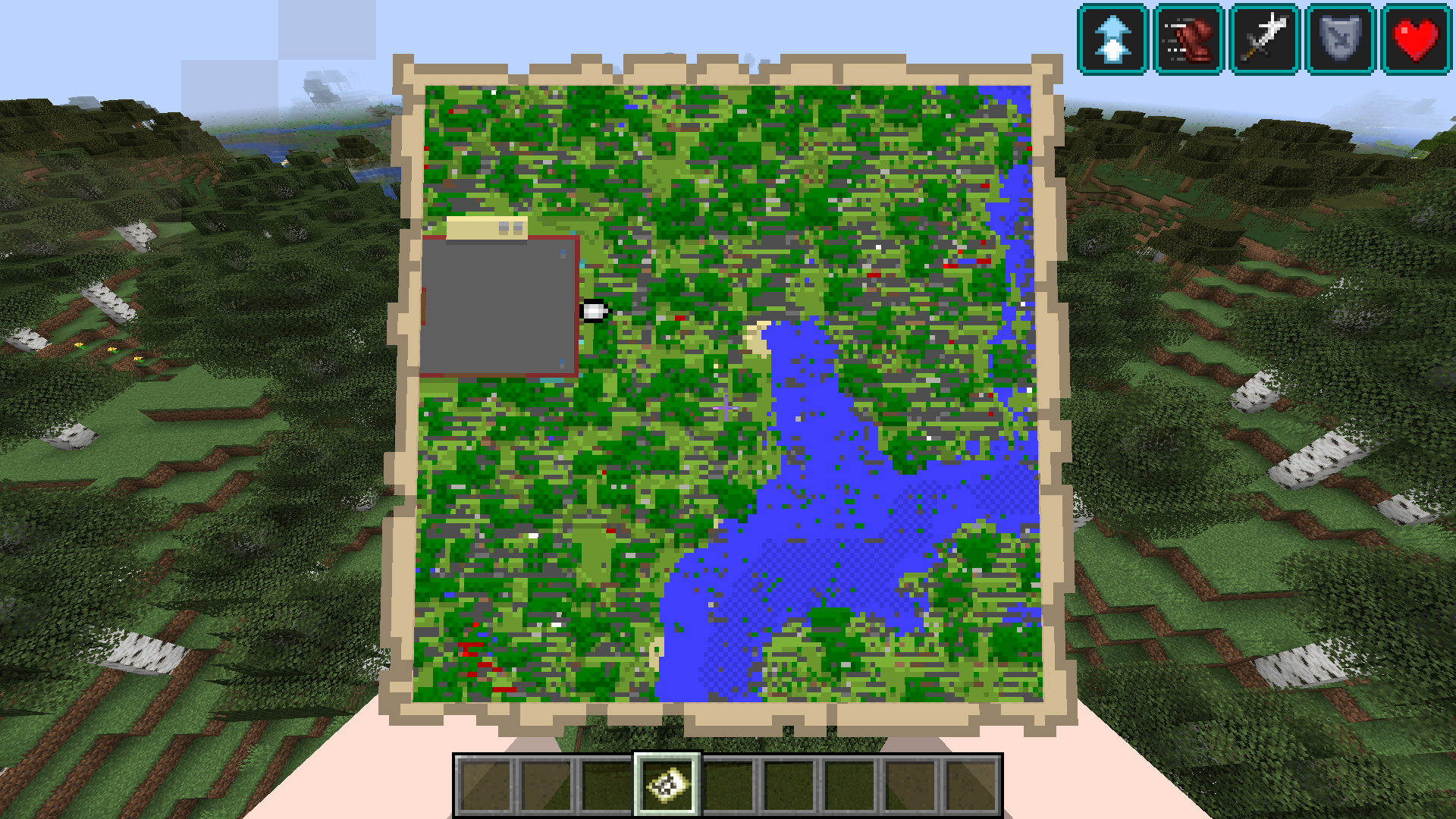
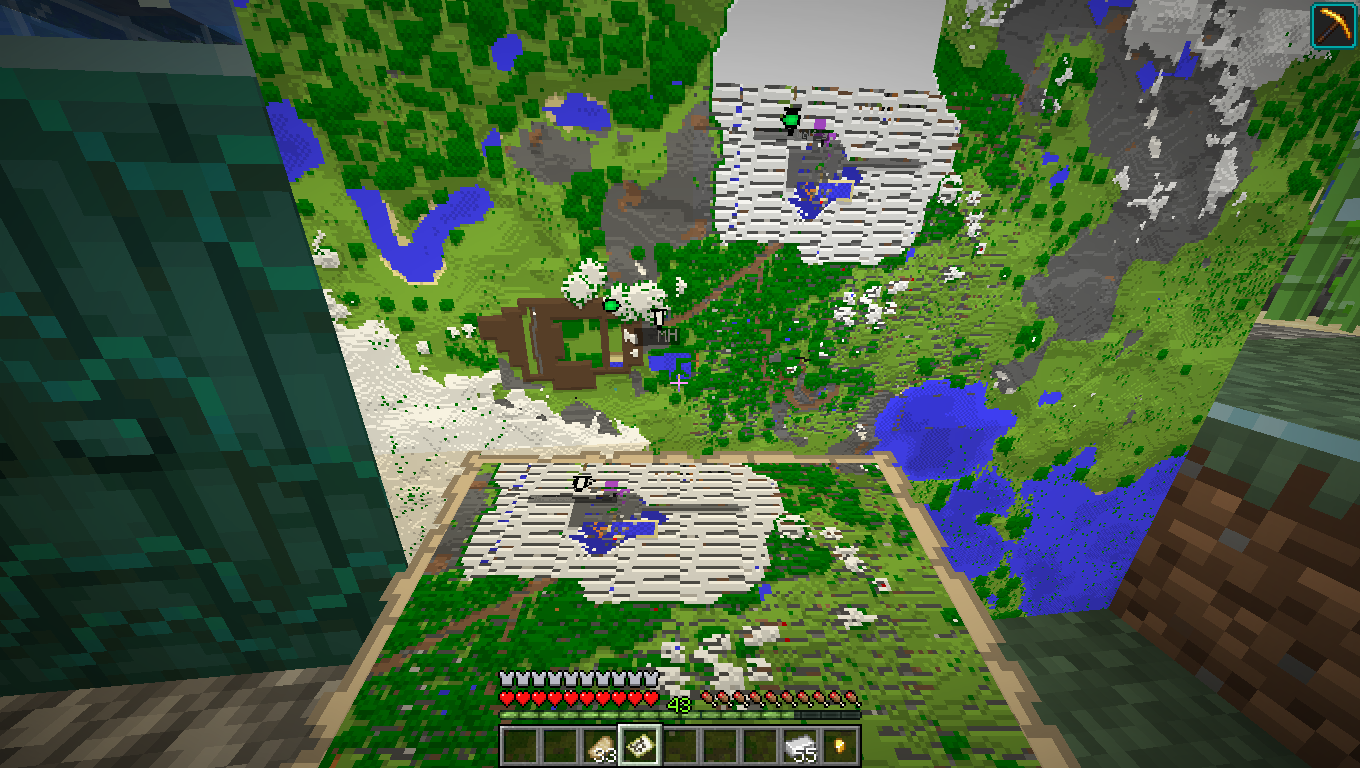
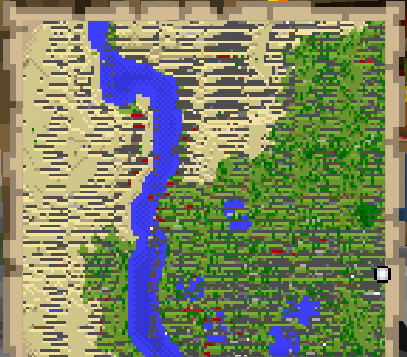
Maps show stone-like pattern despite it not being there
For anyone who opened their world in 20w17a and is still experiencing this issue in versions after 20w17a:
Try optimizing the world:
Important: Depending on the world size this may take a while.
- Client:
- Select the world on the world selection screen
- Press the "Edit" button
- Select "Optimize World"
- Check "Erase cached data"
- Press "Create backup and load"
- Revisit the area located on the map to update it
- Server:
- Create a backup by copying the world folder
- Start with --forceUpgrade --eraseCache
If you are still experiencing this issue after trying the steps above, please comment and attach the world (in the version before you opened it in the latest version of the game) as zip file.
I started up the new version and when I looked at my maps it showed them as seen in the screenshot
Linked Issues
is duplicated by174
 MC-179844Empty maps get corrupted when usedDuplicateMC-179859Maps have grey lines which aren't supposed to be there on themDuplicateMC-179875[Dupe of MC-17858] Map does not take info of surface blockDuplicateMC-179885Maps get destroyed by strange stripesDuplicateMC-179894Maps glitchedDuplicateMC-179901maps add lines when we use themDuplicateMC-179923Maps are ruinedDuplicateMC-179925Maps don't create accurate imageDuplicateMC-17992720w16a - 20w17a world corruptionDuplicateMC-179942When usuing maps, weird, grey lines appear.DuplicateMC-179956Map item picture all screwed up when I try to update itDuplicateMC-179957Map bugDuplicateMC-179987Map rendering brokenDuplicateMC-179988When updating maps, grey streaks appearDuplicateMC-180006Lines created in maps in new snapshotDuplicateMC-180011Improper Map depictionsDuplicateMC-180012Old maps get corrupted when opened in 20W17ADuplicateMC-180019Updating worlds from 20w16a Creates chunk glitchesDuplicateMC-180026Map Distortion 20w17aDuplicateMC-180027Maps generate incorrectlyDuplicateMC-180048Map render looks corrupted.DuplicateMC-180072Map update messed up textureDuplicateMC-180133Item - map appear corruptDuplicateMC-180139maps look corruptedDuplicateMC-180154Corrupt mapsDuplicateMC-180180Snapshot 20w17a Map bugDuplicateMC-180194Maps are showing blocks that are not thereDuplicateMC-180195Maps are messed up and covered in blotches and missing terrainDuplicateMC-180202Maps not generating correctlyDuplicateMC-180212Empty maps generate with lines on them.DuplicateMC-180241Maps are generated a strange wayDuplicateMC-180245Maps have gray lines randomly across themDuplicateMC-180258Map Line issueDuplicateMC-180305Maps no longer work.., Properly at leastDuplicateMC-180335A bug in snapshot 20w17a - Corrupted mapDuplicateMC-180357Snapshot 20wa17a maps not workingDuplicateMC-180371Map is broken.DuplicateMC-180382Map bugDuplicateMC-180393Map generation is glitchedDuplicateMC-180422Map doesn't work DuplicateMC-180450Maps show extremely corrupted terrainDuplicateMC-180460Spoiled mapDuplicateMC-180554Maps not rendereing properlyDuplicateMC-180568Maps Broken in older worldsDuplicateMC-180612Local maps with excessive gray linesDuplicateMC-180646Map is brokenDuplicateMC-18067020W17a Map and rain bugs or converting issues DuplicateMC-180688Map generation bugDuplicateMC-180697Maps are brokenDuplicateMC-180767Maps when created or updated are glitched in most recent versionDuplicateMC-180781the map is loading wrongDuplicateMC-180787Map (Item) not generating correctly.DuplicateMC-180796map loading with lines in it.DuplicateMC-180811Maps Overtaken by Horizontal Lines of Grey:DuplicateMC-180826The map doesn't work on Minecraft snapshotDuplicateMC-180837Maps show stone pattern despite it not being there and rain under solid blocksDuplicateMC-180849map visual glitchDuplicateMC-180857Map distorted after updateDuplicateMC-180894Maps looks badDuplicateMC-180930Maps corruptedDuplicateMC-180960Map bug 20w17aDuplicateMC-180963Maps have gray lines.DuplicateMC-180970Maps are corruptedDuplicateMC-180983Map quirkynessDuplicateMC-181014Map Visuals appear shatteredDuplicateMC-181054Maps have grey lines through themDuplicateMC-181059Updating maps causes them to render incorrectlyDuplicateMC-181069Map corrupted with gray linesDuplicateMC-181073Maps showing gray dashesDuplicateMC-181100The map does not rander correctlyDuplicateMC-181193Newly generated map has erroneous gray stripesDuplicateMC-181201map pixels malfunction, no texture pack usedDuplicateMC-181215Maps Filling in the Wrong BlocksDuplicateMC-181234Map, odd behaviourDuplicateMC-181239Maps showing corrupted when usedDuplicateMC-181293In-games maps have large grey blotches all over themDuplicateMC-181328Maps BUG...DuplicateMC-181342Maps not rendereding properlyDuplicateMC-181385maps have gray lines all over instead of the terrainDuplicateMC-181399Maps appear buggedDuplicateMC-181408Maps in the newest snapshot (20w17a) don't work rightDuplicateMC-181421problem on the mapsDuplicateMC-181426MC-179858 is still not fixed.DuplicateMC-181429Stone-like things on mapsDuplicateMC-181436Maps still displaying "stone" patternDuplicateMC-181450Maps are still not fixed and worseDuplicateMC-181468Map with Gray lines onDuplicateMC-181478Map Rendering IssueDuplicateMC-181481Grey Glitches on mapsDuplicateMC-181509Map bug from 20w17a still not fixedDuplicateMC-181545Random grey and and red pixels on mapsDuplicateMC-181551Map Issue in 20w18a DuplicateMC-181619Map with gray patchesDuplicateMC-181626Gray spots on the map, picture attatched :DDuplicateMC-181635map bugDuplicateMC-181663Minecraft map displaying grey and some red blocks randomly over the map instead of terrainDuplicateMC-181688Map Block Rendering ErrorDuplicateMC-181698Maps are not functioning.DuplicateMC-181712Creating or Updating maps makes them have stripes (On worlds made before 1.16 snapshots)DuplicateMC-181751Bug not FixedDuplicateMC-181772Maps bugDuplicateMC-18179020w18a Maps & Rain BugDuplicateMC-181800Map creates weird patterns when loading in a new snapshot in a old worldDuplicateMC-181957Map renders random horizontal linesDuplicateMC-182004Maps (item, not worldsave) look corruptedDuplicateMC-182010Lines Thru MapDuplicateMC-182020Lines through mapsDuplicateMC-182027Maps rendering strangelyDuplicateMC-182202Maps will load as if the world was glitched when updated from older version.DuplicateMC-182264En la 20w18a se corrompen los mapas.DuplicateMC-182286hello . every time i create a new map this happens and i dont knw why .it started when i played on the 1.16 snapshots DuplicateMC-182311 Maps are brokenDuplicateMC-182485Gray streaks across mapsDuplicateMC-182508When I open my old world map (the paper map) It seems to be glithed or destorted as if im looking at a map in a nether.DuplicateMC-182695The map is showing blocks that did never exist there, and still aren't.DuplicateMC-182774Die maps sind verbugt.DuplicateMC-182793Map glitch DuplicateMC-182851Maps of area look destroyedDuplicateMC-182871Broken MapsDuplicateMC-182939Rain patches and Distorted Maps (on 3rd Party Servers)DuplicateMC-182946Broken MapsDuplicateMC-182971Maps are showing slices of undergroundDuplicateMC-182991Maps render wrongDuplicateMC-183000PIXEL MESS ON MAPSDuplicateMC-183023maps not loading correctlyDuplicateMC-183034Maps are buggyDuplicateMC-183035Maps generation gray bar issuesDuplicateMC-183044Maps are glitchedDuplicateMC-183082Maps don't create properly...DuplicateMC-183170Maps not rendering correctly DuplicateMC-183178map voidsDuplicateMC-183200Snapshot Map RenderingDuplicateMC-183288Maps in latest snapshotDuplicateMC-183289Maps not rendering properlyDuplicateMC-183322Map bugDuplicateMC-183515maps don't generate properlyDuplicateMC-183701Maps are generating with some missing blocksDuplicateMC-183763Map Glitches when attempting to updateDuplicateMC-183781Bug visual en mapaDuplicateMC-183795Maps are showing things that aren't there.DuplicateMC-183887Map CorruptedDuplicateMC-183976Map BugDuplicateMC-184032maps glitched terrainDuplicateMC-184115Stone pattern Chunk Bug on Empty MapDuplicateMC-184119Maps are messed upDuplicateMC-184697Map glitchDuplicateMC-184717Blocks in the world seem to be transparentDuplicateMC-185271When you generate a map, it makes a strange patternDuplicateMC-185565Map render brokenDuplicateMC-185972old maps that are updated to 1.16 snapshot are not outdated correctlyDuplicateMC-186460error in mapDuplicateMC-186474Minecraft mapsDuplicateMC-187179Maps in game have spiky graphsDuplicateMC-187487The map creates odd lines on any maps created in this versionDuplicateMC-187856Map having issuesDuplicateMC-188988Map display in hand and item frameDuplicateMC-189010Maps are corruptedDuplicateMC-190156Funky lookin mapsDuplicateMC-190838Maps not rendering CorrectlyDuplicateMC-191085Maps are brokeDuplicateMC-191092Maps GlitchedDuplicateMC-191303grey lines in mapsDuplicateMC-191351Maps Have Weird Blocks On ThemDuplicateMC-191493funky maps in EndDuplicateMC-191979Maps with gray stripes since the previous snapshotsDuplicateMC-192234Old maps are corrupted after Nether update (they have grey lines on them).DuplicateMC-192367Looking at maps yields corrupted-looking textureDuplicateMC-192396Maps will not load correctlyDuplicateMC-192461mincraft map errorDuplicateMC-193812Map Item has corurpted recently.DuplicateMC-196215Strange green bars appear on Filled MapsDuplicateMC-201075Map bugDuplicateMC-212204maps get corrupted in chunks that were generated in previous snapshotsDuplicate
 MCL-13842Maps show stone pattern despite it not being there and rain under solid blocksDuplicate
Attachments11





![[Mod] tryashtar](../../../data/avatars/users/41963.png)
Created Issue:
Maps show stone-like pattern despite it not being there
I started up the new version and when I looked at my maps it showed them as seen in the screenshot
Attachments1
![[Mod] Greymagic27](../../../data/avatars/users/92875.png)
is duplicated by
![[Mod] violine1101](../../../data/avatars/users/92858.png)
is duplicated by

relates to
is duplicated by
is duplicated by
is duplicated by
is duplicated by
is duplicated by
is duplicated by
is duplicated by
is duplicated by
is duplicated by
is duplicated by
is duplicated by
![[Mojang] Bartosz Bok](../../../data/avatars/users/10122.svg) [Mojang] Bartosz Bok
[Mojang] Bartosz Bok![[Mojang] Adrian Östergård](../../../data/assets/gravatar/nighter.jpeg)
 Very Important
![[Bot] Piston](../../../data/avatars/users/31202.png)
is duplicated by
![[Mod] Asteraoth](../../../data/avatars/users/92886.png)
is duplicated by

is duplicated by
is duplicated by
is duplicated by
![[Mod] Neko](../../../data/avatars/users/92901.png)
is duplicated by
is duplicated by
is duplicated by
is duplicated by
is duplicated by
is duplicated by
is duplicated by
is duplicated by
is duplicated by
is duplicated by
is duplicated by
is duplicated by
is duplicated by
is duplicated by
is duplicated by
is duplicated by
is duplicated by
is duplicated by
is duplicated by
is duplicated by
is duplicated by
is duplicated by
![[Mod] NeunEinser](../../../data/avatars/users/39263.png)
is duplicated by
is duplicated by
is duplicated by
is duplicated by
is duplicated by
is duplicated by
is duplicated by
is duplicated by
is duplicated by
![[Mod] Michael Wobst](../../../data/avatars/users/37868.png)
is duplicated by
is duplicated by
is duplicated by
is duplicated by
is duplicated by
is duplicated by

Guys I have a 2gb world very old, if I try to optimize it the game crash, what can I do?
is duplicated by
is duplicated by
is duplicated by
2020-04-29_16.55.26-1.png
Moderator noteFor anyone who opened their world in 20w17a and is still experiencing this issue in versions after 20w17a:
Try optimizing the world:
- Client:
- Select the world on the world selection screen
- Press the "Edit" button
- Select "Optimize World"
- Check "Erase cached data"
- Press "Create backup and load"
- Server: Start with --forceUpgrade --eraseCache
If you are still experiencing this issue after trying the steps above, please comment and attach the world (in the version before you opened it in the latest version of the game) as zip file.
I started up the new version and when I looked at my maps it showed them as seen in the screenshot
Moderator noteFor anyone who opened their world in 20w17a and is still experiencing this issue in versions after 20w17a:
Try optimizing the world:
- Client:
- Select the world on the world selection screen
- Press the "Edit" button
- Select "Optimize World"
- Check "Erase cached data"
- Press "Create backup and load"
- Server:
Start with--forceUpgrade --eraseCacheIf you are still experiencing this issue after trying the steps above, please comment and attach the world (in the version before you opened it in the latest version of the game) as zip file.
I started up the new version and when I looked at my maps it showed them as seen in the screenshot
Moderator noteFor anyone who opened their world in 20w17a and is still experiencing this issue in versions after 20w17a:
Try optimizing the world:
- Client:
- Select the world on the world selection screen
- Press the "Edit" button
- Select "Optimize World"
- Check "Erase cached data"
- Press "Create backup and load"
- Server:
- Create a backup by copying the world folder
- Start with --forceUpgrade --eraseCache
If you are still experiencing this issue after trying the steps above, please comment and attach the world (in the version before you opened it in the latest version of the game) as zip file.
I started up the new version and when I looked at my maps it showed them as seen in the screenshot
Moderator noteFor anyone who opened their world in 20w17a and is still experiencing this issue in versions after 20w17a:
Try optimizing the world:
Important: Depending on the world size this may take a while.
- Client:
- Select the world on the world selection screen
- Press the "Edit" button
- Select "Optimize World"
- Check "Erase cached data"
- Press "Create backup and load"
- Server:
- Create a backup by copying the world folder
- Start with --forceUpgrade --eraseCache
If you are still experiencing this issue after trying the steps above, please comment and attach the world (in the version before you opened it in the latest version of the game) as zip file.
I started up the new version and when I looked at my maps it showed them as seen in the screenshot
is duplicated by
is duplicated by
is duplicated by
is duplicated by
is duplicated by
is duplicated by
is duplicated by
is duplicated by
is duplicated by
is duplicated by
is duplicated by
is duplicated by
is duplicated by
is duplicated by
is duplicated by
is duplicated by
is duplicated by
is duplicated by
is duplicated by
is duplicated by
Moderator noteFor anyone who opened their world in 20w17a and is still experiencing this issue in versions after 20w17a:
Try optimizing the world:
Important: Depending on the world size this may take a while.
- Client:
- Select the world on the world selection screen
- Press the "Edit" button
- Select "Optimize World"
- Check "Erase cached data"
- Press "Create backup and load"
- Revisit the area located on the map to update it
- Server:
- Create a backup by copying the world folder
- Start with --forceUpgrade --eraseCache
If you are still experiencing this issue after trying the steps above, please comment and attach the world (in the version before you opened it in the latest version of the game) as zip file.
I started up the new version and when I looked at my maps it showed them as seen in the screenshot
is duplicated by
is duplicated by
is duplicated by
is duplicated by
is duplicated by
is duplicated by
is duplicated by
is duplicated by
is duplicated by
is duplicated by
is duplicated by
is duplicated by
is duplicated by
is duplicated by
is duplicated by
is duplicated by
is duplicated by
is duplicated by
is duplicated by
is duplicated by

is duplicated by
is duplicated by
is duplicated by
is duplicated by
is duplicated by
is duplicated by
is duplicated by
MC-186245
is duplicated by
is duplicated by
is duplicated by
is duplicated by
is duplicated by
is duplicated by
is duplicated by

This bug still occurs in 1.16 Prerelease 2
is duplicated by
is duplicated by
is duplicated by
is duplicated by
is duplicated by
is duplicated by
is duplicated by
is duplicated by
is duplicated by
is duplicated by
is duplicated by
is duplicated by
is duplicated by
is duplicated by
is duplicated by
is duplicated by
relates to
Thank you for your report!
We're actually already tracking this issue in MC-179858, so I've resolved and linked this ticket as a duplicate.
If you would like to add a vote and any extra information to the main ticket it would be appreciated.
If you haven't already, you might like to make use of the search feature to see if the issue has already been mentioned.
Quick Links:
📓 Issue Guidelines – 💬 Community Support – 📧 Customer Support – 📖 Game Wiki

Resolving to MC-179858

Thank you for your report!
We're actually already tracking this issue in MC-179858, so I've resolved and linked this ticket as a duplicate.
That ticket has already been resolved as Fixed. The fix will arrive in the next version or is already included in the latest development version of the game, you can check the Fix Version/s field in that ticket to learn more.
If you haven't already, you might like to make use of the search feature to see if the issue has already been mentioned.
Quick Links:
📓 Issue Guidelines – 💬 Community Support – 📧 Customer Support – ✍️ Feedback and Suggestions – 📖 Game Wiki
Thank you for your report!
We're actually already tracking this issue in MC-179858, so I've resolved and linked this ticket as a duplicate.
That ticket has already been resolved as Fixed. The fix will arrive in the next version or is already included in the latest development version of the game, you can check the Fix Version/s field in that ticket to learn more.
If you haven't already, you might like to make use of the search feature to see if the issue has already been mentioned.
Quick Links:
📓 Issue Guidelines – 💬 Community Support – 📧 Customer Support – ✍️ Feedback and Suggestions – 📖 Game Wiki
Thank you for your report!
We're actually already tracking this issue in MC-179858, so I've resolved and linked this ticket as a duplicate.
That ticket has already been resolved as Fixed. The fix will arrive in the next version or is already included in the latest development version of the game, you can check the Fix Version/s field in that ticket to learn more.
If you haven't already, you might like to make use of the search feature to see if the issue has already been mentioned.
Quick Links:
📓 Issue Guidelines – 💬 Community Support – 📧 Customer Support – ✍️ Feedback and Suggestions – 📖 Game Wiki
Thank you for your report!
We're actually already tracking this issue in MC-179858, so I've resolved and linked this ticket as a duplicate.
That ticket has already been resolved as Fixed. The fix will arrive in the next version or is already included in the latest development version of the game, you can check the Fix Version/s field in that ticket to learn more.
If you haven't already, you might like to make use of the search feature to see if the issue has already been mentioned.
Quick Links:
📓 Issue Guidelines – 💬 Community Support – 📧 Customer Support – ✍️ Feedback and Suggestions – 📖 Game Wiki
Thank you for your report!
We're actually already tracking this issue in MC-179858, so I've resolved and linked this ticket as a duplicate.
That ticket has already been resolved as Fixed. The fix will arrive in the next version or is already included in the latest development version of the game, you can check the Fix Version/s field in that ticket to learn more.
If you haven't already, you might like to make use of the search feature to see if the issue has already been mentioned.
Quick Links:
📓 Issue Guidelines – 💬 Community Support – 📧 Customer Support – ✍️ Feedback and Suggestions – 📖 Game Wiki
Thank you for your report!
We're actually already tracking this issue in MC-179858, so I've resolved and linked this ticket as a duplicate.
That ticket has already been resolved as Fixed. The fix will arrive in the next version or is already included in the latest development version of the game, you can check the Fix Version/s field in that ticket to learn more.
If you haven't already, you might like to make use of the search feature to see if the issue has already been mentioned.
Quick Links:
📓 Issue Guidelines – 💬 Community Support – 📧 Customer Support – ✍️ Feedback and Suggestions – 📖 Game Wiki
Thank you for your report!
However, this issue is a Duplicate of MC-179858.
It has been linked to this report. If you have additional information, please add it to that report.
Please search before reporting, as it's likely that one exists already.
Quick Links:
📓 Issue Guidelines – 💬 Community Support – 📧 Customer Support – 📖 Game Wiki
Thank you for your report!
We're actually already tracking this issue in MC-179858, so I've resolved and linked this ticket as a duplicate.
That ticket has already been resolved as Fixed. The fix will arrive in the next version or is already included in the latest development version of the game, you can check the Fix Version/s field in that ticket to learn more.
If you haven't already, you might like to make use of the search feature to see if the issue has already been mentioned.
Quick Links:
📓 Issue Guidelines – 💬 Community Support – 📧 Customer Support – ✍️ Feedback and Suggestions – 📖 Game Wiki
Thank you for your report!
We're actually already tracking this issue in MC-179858, so I've resolved and linked this ticket as a duplicate.
That ticket has already been resolved as Fixed. The fix will arrive in the next version or is already included in the latest development version of the game, you can check the Fix Version/s field in that ticket to learn more.
If you haven't already, you might like to make use of the search feature to see if the issue has already been mentioned.
Quick Links:
📓 Issue Guidelines – 💬 Community Support – 📧 Customer Support – ✍️ Feedback and Suggestions – 📖 Game Wiki
Thank you for your report!
We're actually already tracking this issue in MC-179858, so I've resolved and linked this ticket as a duplicate.
That ticket has already been resolved as Fixed. The fix will arrive in the next version or is already included in the latest development version of the game, you can check the Fix Version/s field in that ticket to learn more.
If you haven't already, you might like to make use of the search feature to see if the issue has already been mentioned.
Quick Links:
📓 Issue Guidelines – 💬 Community Support – 📧 Customer Support – ✍️ Feedback and Suggestions – 📖 Game Wiki
Duplicate of MC-179858
This issue is fixed for future snapshots of 1.16
Thank you for your report!
We're actually already tracking this issue in MC-179858, so I've resolved and linked this ticket as a duplicate.
That ticket has already been resolved as Fixed. The fix will arrive in the next version or is already included in the latest development version of the game, you can check the Fix Version/s field in that ticket to learn more.
If you haven't already, you might like to make use of the search feature to see if the issue has already been mentioned.
Quick Links:
📓 Issue Guidelines – 💬 Community Support – 📧 Customer Support – ✍️ Feedback and Suggestions – 📖 Game Wiki
Thank you for your report!
We're actually already tracking this issue in MC-179858, so I've resolved and linked this ticket as a duplicate.
That ticket has already been resolved as Fixed. The fix will arrive in the next version or is already included in the latest development version of the game, you can check the Fix Version/s field in that ticket to learn more.
If you haven't already, you might like to make use of the search feature to see if the issue has already been mentioned.
Quick Links:
📓 Issue Guidelines – 💬 Community Support – 📧 Customer Support – ✍️ Feedback and Suggestions – 📖 Game Wiki
Thank you for your report!
We're actually already tracking this issue in MC-179858, so I've resolved and linked this ticket as a duplicate.
That ticket has already been resolved as Fixed. The fix will arrive in the next version or is already included in the latest development version of the game, you can check the Fix Version/s field in that ticket to learn more.
If you haven't already, you might like to make use of the search feature to see if the issue has already been mentioned.
Quick Links:
📓 Issue Guidelines – 💬 Community Support – 📧 Customer Support – ✍️ Feedback and Suggestions – 📖 Game Wiki
Duplicate of MC-179858
This issue is fixed for future snapshots of 1.16
Thank you for your report!
We're actually already tracking this issue in MC-179858, so I resolved and linked this ticket as a duplicate.
However, that ticket has already been resolved as Fixed. The fix will arrive in the next version or is already included in the latest development version of the game.
If you haven't already, you might like to make use of the search feature in the future to see if the issue has already been reported.
Quick Links:
📓 Issue Guidelines – 💬 Community Support – 📧 Customer Support – ✍️ Feedback and Suggestions – 📖 Game Wiki
Thank you for your report!
We're actually already tracking this issue in MC-179858, so I resolved and linked this ticket as a duplicate.
However, that ticket has already been resolved as Fixed. The fix will arrive in the next version or is already included in the latest development version of the game.
If you haven't already, you might like to make use of the search feature in the future to see if the issue has already been reported.
Quick Links:
📓 Issue Guidelines – 💬 Community Support – 📧 Customer Support – ✍️ Feedback and Suggestions – 📖 Game Wiki
Thank you for your report!
We're actually already tracking this issue in MC-179858, so I resolved and linked this ticket as a duplicate.
However, that ticket has already been resolved as Fixed. The fix will arrive in the next version or is already included in the latest development version of the game.
If you haven't already, you might like to make use of the search feature in the future to see if the issue has already been reported.
Quick Links:
📓 Issue Guidelines – 💬 Community Support – 📧 Customer Support – ✍️ Feedback and Suggestions – 📖 Game Wiki

Thank you for your report!
We're already tracking this issue at MC-179858, so we will resolve and link this ticket as a duplicate.
If you would like to add a vote and any extra information to the main ticket it would be appreciated.
If you haven't already, you might like to make use of the search feature to see if the issue has already been mentioned.
Quick Links:
📓 Issue Guidelines – 💬 Community Support – 📧 Customer Support – 📖 Game Wiki
Thank you for your report!
We're already tracking this issue at MC-179858, so we will resolve and link this ticket as a duplicate.
If you would like to add a vote and any extra information to the main ticket it would be appreciated.
If you haven't already, you might like to make use of the search feature to see if the issue has already been mentioned.
Quick Links:
📓 Issue Guidelines – 💬 Community Support – 📧 Customer Support – 📖 Game Wiki
Thank you for your report!
We're actually already tracking this issue in MC-179858, so I resolved and linked this ticket as a duplicate.
If you would like to add a vote and any extra information to the main ticket it would be appreciated.
If you haven't already, you might like to make use of the search feature in the future to see if the issue has already been reported.
Quick Links:
📓 Issue Guidelines – 💬 Community Support – 📧 Customer Support – ✍️ Feedback and Suggestions – 📖 Game Wiki
Thank you for your report!
We're actually already tracking this issue in MC-179858, so I resolved and linked this ticket as a duplicate.
However, that ticket has already been resolved as Fixed. The fix will arrive in the next version or is already included in the latest development version of the game.
If you haven't already, you might like to make use of the search feature in the future to see if the issue has already been reported.
Quick Links:
📓 Issue Guidelines – 💬 Community Support – 📧 Customer Support – ✍️ Feedback and Suggestions – 📖 Game Wiki
Thank you for your report!
We're actually already tracking this issue in MC-179858, so I've resolved and linked this ticket as a duplicate.
That ticket has already been resolved as Fixed. The fix will arrive in the next version or is already included in the latest development version of the game, you can check the Fix Version/s field in that ticket to learn more.
If you haven't already, you might like to make use of the search feature to see if the issue has already been mentioned.
Quick Links:
📓 Issue Guidelines – 💬 Community Support – 📧 Customer Support – ✍️ Feedback and Suggestions – 📖 Game Wiki
Thank you for your report!
We're actually already tracking this issue in MC-179858, so I resolved and linked this ticket as a duplicate.
However, that ticket has already been resolved as Fixed. The fix will arrive in the next version or is already included in the latest development version of the game.
If you haven't already, you might like to make use of the search feature in the future to see if the issue has already been reported.
Quick Links:
📓 Issue Guidelines – 💬 Community Support – 📧 Customer Support – ✍️ Feedback and Suggestions – 📖 Game Wiki
Thank you for your report!
We're actually already tracking this issue in MC-179858, so I resolved and linked this ticket as a duplicate.
However, that ticket has already been resolved as Fixed. The fix will arrive in the next version or is already included in the latest development version of the game.
If you haven't already, you might like to make use of the search feature in the future to see if the issue has already been reported.
Quick Links:
📓 Issue Guidelines – 💬 Community Support – 📧 Customer Support – ✍️ Feedback and Suggestions – 📖 Game Wiki
Thank you for your report!
We're actually already tracking this issue in MC-179858, so I resolved and linked this ticket as a duplicate.
However, that ticket has already been resolved as Fixed. The fix will arrive in the next version or is already included in the latest development version of the game.
If you haven't already, you might like to make use of the search feature in the future to see if the issue has already been reported.
Quick Links:
📓 Issue Guidelines – 💬 Community Support – 📧 Customer Support – ✍️ Feedback and Suggestions – 📖 Game Wiki
Thank you for your report!
We're actually already tracking this issue in MC-179858, so I resolved and linked this ticket as a duplicate.
If you would like to add a vote and any extra information to the main ticket it would be appreciated.
If you haven't already, you might like to make use of the search feature in the future to see if the issue has already been reported.
Quick Links:
📓 Issue Guidelines – 💬 Community Support – 📧 Customer Support – ✍️ Feedback and Suggestions – 📖 Game Wiki
Thank you for your report!
We're actually already tracking this issue in MC-179858, so I resolved and linked this ticket as a duplicate.
If you would like to add a vote and any extra information to the main ticket it would be appreciated.
If you haven't already, you might like to make use of the search feature in the future to see if the issue has already been reported.
Quick Links:
📓 Issue Guidelines – 💬 Community Support – 📧 Customer Support – ✍️ Feedback and Suggestions – 📖 Game Wiki
![[Mod] Chandler](../../../data/assets/gravatar/triwonder81.png)
Duplicate of MC-179858
Thank you for your report!
We're actually already tracking this issue in MC-179858, so I resolved and linked this ticket as a duplicate.
However, that ticket has already been resolved as Fixed. The fix will arrive in the next version or is already included in the latest development version of the game.
If you haven't already, you might like to make use of the search feature in the future to see if the issue has already been reported.
Quick Links:
📓 Issue Guidelines – 💬 Community Support – 📧 Customer Support – ✍️ Feedback and Suggestions – 📖 Game Wiki
Thank you for your report!
We're tracking this issue as MC-179858, so this ticket is being resolved and linked as a duplicate.
That ticket has already been resolved as Fixed. The fix will arrive in the next version or is already included in an available version of the game, you can check the Fix Version/s field in that ticket to learn more.
If you haven't already, you might like to make use of the search feature to see if the issue has already been reported.
Quick Links:
📓 Issue Guidelines – 💬 Community Support – 📧 Customer Support – ✍️ Feedback and Suggestions – 📖 Game Wiki
![[Mod] SPGoding](../../../data/avatars/users/44622.png)
Thank you for your report!
We're tracking this issue as MC-179858, so this ticket is being resolved and linked as a duplicate.
That ticket has already been resolved as Fixed. The fix will arrive in the next version or is already included in an available version of the game, you can check the Fix Version/s field in that ticket to learn more.
If you haven't already, you might like to make use of the search feature to see if the issue has already been reported.
Quick Links:
📓 Issue Guidelines – 💬 Community Support – 📧 Customer Support – ✍️ Feedback and Suggestions – 📖 Game Wiki
MC-179858 is still not fixed. I just tried making a new map, and it still showed those horrid grey static corruption lines. Please, don't list an issue as resolved unless it is actually fixed.
Thank you for your report!
We're actually already tracking this issue in MC-179858, so I resolved and linked this ticket as a duplicate.
If you would like to add a vote and any extra information to the main ticket it would be appreciated.
If you haven't already, you might like to make use of the search feature in the future to see if the issue has already been reported.
Quick Links:
📓 Issue Guidelines – 💬 Community Support – 📧 Customer Support – ✍️ Feedback and Suggestions – 📖 Game Wiki
See MC-179858 and my latest comment on it.
See MC-179858.
See MC-179858.
Read the comments in MC-179858.
See comments on MC-179858.
See MC-179858.
This comment is from report# MC-179858
Dear, Bartosz Bok (Assignee),
[Mod] violine1101 (Last dev who responded), and whom else it may concern,
This is still a major Bug in Snapshot 20w18a, as shown in the pictures I just added to this report.
When player walks/ flies around to update their map(s), this Bug occurs.
My system/version is MC Java Snapshot 20w18a Windows 10 version 1909.
Please Have this Bug Re-Opened and maybe check it more thoroughly during that time. I'm not trying to be rude when I say that, its just that in my 3.5 years (and counting) of playing Minecraft, I've seen Bugs get fixed and thought to be long gone, resurface after a long time, or they somehow get added to new updates. I am not at all saying that you moderators and developers are bad, y'all are excellent at what you do. That's the truth. The fact is: No One Is Perfect (Except our Lord God Almighty ( If you believe in Him. No Offense if you don't.)) and it's just our nature for things like this to creep in sometimes.
Thank y'all for all that you do,
JAG
Does MC-179858 describe your issue?
![[Bot] Arisa](../../../data/avatars/users/43007.png)
MC-179858 Duplicate issue.

Duplicate of MC-179858
Duplicate of MC-179858
Duplicate of MC-179858
Duplicate of MC-179858
Please follow the instructions from MC-179858.
Please read the instructions in MC-179858.
Please read the instructions from MC-179858.
Please check out the instructions from MC-179858.
See MC-179858, worlds opened in 20w17a are broken. See that ticket for further info.
Please check out MC-179858 for instructions on how to fix this.
You can take a look at MC-179858 if you want to fix this issue.
Thank you for your report!
We're tracking this issue as MC-179858, so this ticket is being resolved and linked as a duplicate.
That ticket has already been resolved as Fixed. The fix will arrive in the next version or is already included in an available version of the game, you can check the Fix Version/s field in that ticket to learn more.
If you haven't already, you might like to make use of the search feature to see if the issue has already been reported.
Quick Links:
📓 Issue Guidelines – 💬 Community Support – 📧 Customer Support – ✍️ Feedback and Suggestions – 📖 Game Wiki
Check the description of MC-179858.
See MC-179858.
See MC-179858 for a fix.
See MC-179858 for a fix.
Worlds opened in 20w17a will remain broken until you fix them yourself. See MC-179858 for instructions.
See MC-179858.
Worlds opened in 20w17a are broken. See MC-179858 for a fix.
Worlds opened in 20w17a are broken. For a fix, see MC-179858.
For the map issue, see MC-179858.
Worlds opened in 20w17a are broken, see MC-179858 for how to fix it.
Please try the fix from MC-179858 nevertheless and report back if the issue continues to happen.
The issue in worlds opened in 20w17a is MC-179858, please refer to that ticket. The issue described there (and shown in your screenshots) (stripes across the map) is different from the one described in this ticket (large grey squares).
Worlds opened in 20w17a are broken and need to be fixed manually, see MC-179858.
Worlds opened in 20w17a are broken, see MC-179858 for instructions on how to fix it.
Please note that we only accept tickets in English.
Worlds opened in 20w17a are broken and need to be fixed manually, see MC-179858 for further instructions.

Worlds opened in 20w17a are broken and need to be fixed, see MC-179858 for instructions.
They rendered properly in the previous version. However, the last snapshot brought this issue.
Related to terrain rendering on a map, I experienced this issue: MC-179858 when the markers rendered properly in the previous version; but since this issue is fixed in the current snapshot the markers stop rendering properly.
Worlds opened in 20w17a are broken and need to be fixed manually, see MC-179858.
Thank you for your report!
We're tracking this issue as MC-179858, so this ticket is being resolved and linked as a duplicate.
That ticket has already been resolved as Fixed.
For a world that was opened in the affected snapshot (20w17a), please follow the steps provided in the linked ticket (MC-179858)
If you need additional help to fix this problem, please contact the Community Support
If you haven't already, you might like to make use of the search feature to see if the issue has already been reported.
Quick Links:
📓 Issue Guidelines – 💬 Community Support – 📧 Customer Support – ✍️ Feedback and Suggestions – 📖 Game Wiki
Worlds opened in 20w17a are broken and need to be repaired manually. See MC-179858 for details.
Worlds opened in 20w17a are broken and need to be fixed, see MC-179858 for details.
Worlds opened in 20w17a are broken and need to be repaired manually, see MC-179858 for more details.
Worlds opened in 20w17a are broken and need to be repaired, see MC-179858 for more details.
See MC-179858 for instructions on how to repair your world.
Worlds opened in 20w17a are broken and need to be repaired manually, see MC-179858 for details.
Duplicate of MC-179858
See MC-179858
Duplicate of MC-179858
Please refer to this ticket: MC-179858
Worlds opened in 20w17a are broken and need to be repaired. See MC-179858 for more information.
See MC-179858 for more information
See MC-179858
![[Helper] pine1needle](../../../data/avatars/users/41329.png)
This is a duplicate of MC-179858.
See MC-179858
Worlds opened in 20w17a are broken and need to be repaired. See MC-179858 for more information.
Duplicate of MC-179858, please read the moderator note on that report.
Duplicate of MC-179858, please read the moderator note on that report.
Quick Links:
📓 Issue Guidelines – 💬 Community Support – 📧 Customer Support – 📖 Game Wiki

Does MC-179858 describe this issue?
![[Helper] Lord_Quadrato](../../../data/avatars/users/26105.png)
yonatan tart You must have opened your world in 20w17a.
Please refer to the moderation note in MC-179858 for solving it in your world.
Quick Links:
📓 Issue Guidelines – 💬 Community Support – 📧 Customer Support – ✍️ Feedback and Suggestions – 📖 Game Wiki
Use the solution here MC-179858
Worlds opened in 20w17a are broken and need to be repaired, see MC-179858 for details.
Did you open your world in 20w17a in the past? If so please try the steps described in MC-179858.
Worlds opened in 20w17a are corrupted and need to be repaired manually, see MC-179858 for more information.
Worlds opened in 20w17a are broken and need to be repaired manually, see MC-179858 for details.
Quick Links:
📓 Issue Guidelines – 💬 Community Support – 📧 Customer Support – ✍️ Feedback and Suggestions – 📖 Game Wiki
Please follow the instructions in the moderator note on MC-179858.
Quick Links:
📓 Issue Guidelines – 💬 Community Support – 📧 Customer Support – ✍️ Feedback and Suggestions – 📖 Game Wiki
Please follow the instructions in the moderator note on MC-179858.
Quick Links:
📓 Issue Guidelines – 💬 Community Support – 📧 Customer Support – ✍️ Feedback and Suggestions – 📖 Game Wiki
Please follow the instructions in the moderator note on MC-179858.
Thank you for your report!
However, we are already tracking this issue, and this report is a Duplicate of MC-179858, which has been marked as Fixed, please follow the instructions on the moderator note on that report.
Please use the search function in the future to prevent duplicate reports.
Quick Links:
📓 Issue Guidelines – 🛠 Community Support – 📧 Customer Support – ✍️ Feedback and Suggestions – 📖 Game Wiki
💬 Mojira Subreddit – 💬 Mojira Discord
Thank you for your report!
However, we are already tracking this issue, and this report is a Duplicate of MC-179858, which has been marked as Fixed, please follow the instructions in the moderator note on that report.
Please use the search function in the future to prevent duplicate reports.
Quick Links:
📓 Issue Guidelines – 🛠 Community Support – 📧 Customer Support – ✍️ Feedback and Suggestions – 📖 Game Wiki
💬 Mojira Subreddit – 💬 Mojira Discord

Your world is corrupted and needs to be repaired manually, see MC-179858 for details.
Thank you for your report!
We're tracking this issue in MC-179858, so this ticket is being resolved and linked as a duplicate.
If you would like to add a vote and any extra information to the main ticket it would be appreciated.
If you haven't already, you might like to make use of the search feature to see if the issue has already been mentioned.
Quick Links:
📓 Issue Guidelines – 💬 Community Support – 📧 Customer Support – ✍️ Feedback and Suggestions – 📖 Game Wiki
Thank you for your report!
However, we are already tracking this issue, and this report is a Duplicate of MC-179858, which has been marked as Fixed, please follow the instructions in the moderator note on that report.
Please use the search function in the future to prevent duplicate reports.
Quick Links:
📓 Issue Guidelines – 🛠 Community Support – 📧 Customer Support – ✍️ Feedback and Suggestions – 📖 Game Wiki
💬 Mojira Subreddit – 💬 Mojira Discord
Please follow the instructions in the moderator note on MC-179858.
Please follow the instructions in the moderator note on MC-179858.
Please follow the instructions in the moderator note on MC-179858.
See MC-179858
![[Mod] markderickson](../../../data/avatars/users/18946.svg)
Hi there!
Do you think this is a duplicate of MC-179858? This is exclusive to worlds opened in snapshot 20w17a. Have you opened your world in this version?
Thanks 
Follow the instructions in the moderator note on MC-179858, and in the future, please be more vigilant when using snapshots as they can cause things to break.
Thank you for your report!
However, we are already tracking this issue, and this report is a Duplicate of MC-179858, please follow the instructions in the moderator note on that report, and in the future, please be more vigilant in the future when using snapshots as things can always break.
Please also use the search function in the future to prevent duplicate reports.
Quick Links:
📓 Issue Guidelines – 🛠 Community Support – 📧 Customer Support – ✍️ Feedback and Suggestions – 📖 Game Wiki
💬 Mojira Subreddit – 💬 Mojira Discord
Thank you for your report!
However, we are already tracking this issue, and this report is a Duplicate of MC-179858, which has been marked as Fixed, please follow the instructions in the moderator note on that report, and in the future, please be more vigilant when using snapshots.
Please use the search function in the future to prevent duplicate reports, this bug in particular has now been reported 171 times.
Quick Links:
📓 Issue Guidelines – 🛠 Community Support – 📧 Customer Support – ✍️ Feedback and Suggestions – 📖 Game Wiki
💬 Mojira Subreddit – 💬 Mojira Discord
Thank you for your report!
We're tracking this issue in MC-179858, so this ticket is being resolved and linked as a duplicate.
If you would like to add a vote and any extra information to the main ticket it would be appreciated.
If you haven't already, you might like to make use of the search feature to see if the issue has already been mentioned.
Quick Links:
📓 Issue Guidelines – 💬 Community Support – 📧 Customer Support – ✍️ Feedback and Suggestions – 📖 Game Wiki
Please follow the instructions in the moderator note on MC-179858, and in the future, please use the search engine to prevent duplicates, and also be more vigilant when using very early developer builds of the game.
Please check if following the moderator note instructions on MC-179858 fixes your issue.
Duplicate of MC-179858, please follow the instructions in the moderator note on that report, and in the future, please be aware that using early development versions can corrupt your world.

Have you tried solutions in this thread? MC-179858
Do these steps solve your issue? MC-179858 ...or
If you have optifine, that is probably the issue. Its currently really buggy.

This is a very old map that had the MC-179858 glitch, which I fixed. But now I'm working on a lighting system, and some redstone lamps won't turn off or on. Is it possible to fix this glitch?
Steps to Reproduce:
1. I placed the lamp normally.
2. Connected it to redstone dust and a daylight sensor.
3. The lamp did not turn on.
4. Placed a redstone clock underneath, and the lamp turned on.
5. Removed the redstone clock, and the lamp did not turn off.
Observed Results:
The redstone lamp does not turn on or off properly.
Expected Results:
The redstone lamp should turn on and off as expected when powered or unpowered.
This is just a theory but maybe it ties in with the "underground rain" bug? It seems like some parts of the map simply ignore the surface blocks and might look for the next one right under some air blocks, in this case it could show caves - rain could behave similarly, bypassing the actual ground and only falling down in the caves
Had the same problem. This affects not only maps but block behaviors themselves. If you see rain in this world you should be able to see it going through some solid blocks. When those blocks are removed and placed back - they behave normally again. This must be due to the new block storage tweaks in the snapshot.
I do as well after updating and I am on java edition and this is super annoying and needs to be fixed. It also does this with new maps in the world.
this is indeed the same bug as "underground rain" as seen at https://bugs.mojang.com/browse/MC-180090 and probably others
worlds from before 20w17a have their heightmaps messed up when loaded in 20w17a. Can see with f3: the S and M values (for WORLD_SURFACE and MOTION_BLOCKING) are just completely random values. A world newly created with the new snapshot does not show this issue for me.
also beacons can pass through these blocks
I hope this is also the only issue with what's causing my ice farm to grow oddly in lines. screenshot
This is still not fixed as of 20w18a, still happening to me.
It is fixed if you reload the world from before 20w17a. Now it would be nice to be able to "reset" the heightmap from a world corrupted by 20w17a (commands or external editor) but I don't know how to do that, sorry.
As far as I'm aware, worlds opened in 20w17a will continue to be affected by this issue. Optimizing the world will probably fix that for worlds opened in that version.
I confirm that optimizing the world, with "erase cache" checked, fixes the world, thanks
How do you "optimize" the world on a server ?
Start the server with the command arguments --forceUpgrade --eraseCache.
Im having this issue and I never used 20w17a. Iv'e only used 20w18a
Dear, Bartosz Bok (Assignee),
[Mod] violine1101 (Last dev who responded), and whom else it may concern,
This is still a major Bug in Snapshot 20w18a, as shown in the pictures I just added to this report.
When player walks/ flies around to update their map(s), this Bug occurs.
My system/version is MC Java Snapshot 20w18a Windows 10 version 1909.
Please Have this Bug Re-Opened and maybe check it more thoroughly during that time. I'm not trying to be rude when I say that, its just that in my 3.5 years (and counting) of playing Minecraft, I've seen Bugs get fixed and thought to be long gone, resurface after a long time, or they somehow get added to new updates. I am not at all saying that you moderators and developers are bad, y'all are excellent at what you do. That's the truth. The fact is: No One Is Perfect (Except our Lord God Almighty ( If you believe in Him. No Offense if you don't.)) and it's just our nature for things like this to creep in sometimes.
Thank y'all for all that you do,
JAG
so how do i fix this yes i read your messages i dont know what you mean by Start with --forceUpgrade --eraseCache how do i do that where do i do that{{ is it a button somewhere do i type it somewhere. i use aternos to host my server do i type it in console or the game. do i use the .minecraft files that came with the game. what do i do help.}}
Can confirm that starting server with --forceUpgrade and --eraseCache fix the maps. I didn't update the entire map, but you can see that the area within my range is fixed.
With @Josiah Abram Guthrie on this one, still appears to be an issue with 20w18a. Maps created with an empty map or attempting to regenerate existing broken maps is not fixing them (running server).
Please read the large yellow/red box in this ticket's description. Worlds you have opened in 20w17a will remain broken until you fix them. Additionally, in order to get the maps to render properly, you need to explore the affected areas again.
yeah i read the yellow box but where do i do that for server
Just want to confirm that the given solution worked successfully and my maps are back to normal.
Thanks for the help
JAG
J Hi, it says in the yellow box:
ty for the info but need the step to do if you upgrade the server version from snapshot 20w16 a to 20w17a then to 20w18 a?
Whenever you load a world in 20w17a, it will be broken and needs to be repaired.
If you skip 20w17a, the error will not occur.
I have a server started /w 20w07a on VPS /w Ubuntu. A few days ago, I started in 20w17a (the maps were normal) and then now I'm playing in 20w18a (today, playing the last snapshot, I saw that maps were corrupted., I did as you say (Start with: --forceUpgrade --eraseCache), but the maps are still bugged, can someone help me?
After running --forceUpgrade --eraseCache, you have to hold the maps and revisit the area. They will update without the grainy texture.
i have done all and the map in my hand is the new one the map ind the frame is the old one that whas ufter updating it to show changes i made the map in my hands whas just created and have the same textur banner props what have i make wrong ? playing on a multiplayer server 20w18a and the server owner have dowloadet the map the stoped the server make the edit over singelplayer and reuplodet the map to the server so i think the map issue sholld not more exist after all steps are done. the other maps parts still ok then i have never update them.
I fixed the issue following the steps above. However, I had to (re)explore the area carrying my maps to (re)paint them.
I don't understand how to start with --forceUpgrade --eraseCache on my server. Is that a command? Can someone explain?
Yes, append these command line arguments to the command you usually start the server with. After you have started the server with these arguments once, you can remove them again. Note that it might take quite a while for the server to optimize the world.
This bug still hasn't been fixed and now it's 20w21a. I've reported yesterday and I hope someone fix this immediately.
i optimised this world a while ago but im still having trouble with the lines
download for my world:
http://www.mediafire.com/file/09fdrmnlbwn1l2g/world_upgrade_fixed.zip/file
You need to check "Erase cached data" on upgrade screen, otherwise problem will persist
I followed the steps to fix the bug, but my game keeps crashing when I try doing that. My world is 2.72 GB.
I'm confused by the lack of explanation of a fix for servers what do I have to do?
It's clearly explained in the description.
all it says is make a backup --forceupgrade --erasecache I don't know what that means, are they commands? where do I put them?
it seems what the problem is is that in random areas it shows the second highest block that has air above it. IDK if this with helps anything.