 Wyatt Boyle
- hokage3211
- hokage3211
- America/Los_Angeles
- Yes
- No
 MC-80448
 Low
Low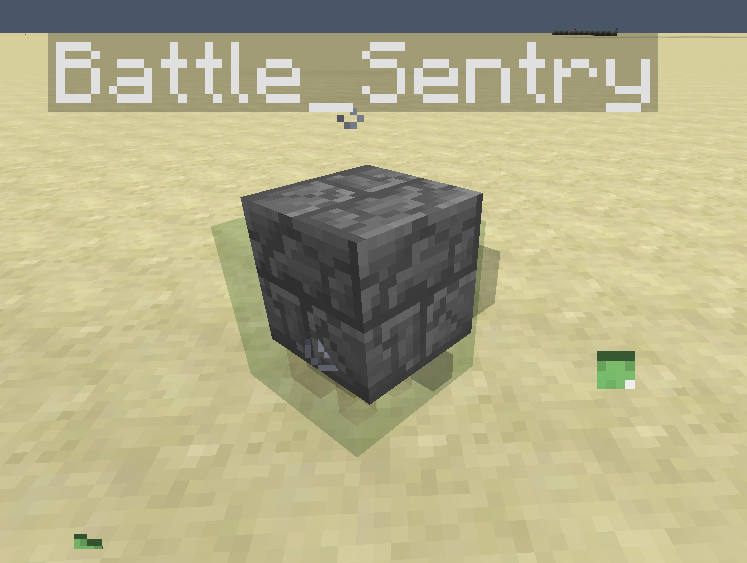


So some background information is I am trying to create a slime that has a custom block texture with it, and the best way I am attempting to do that is to teleport an armor stand to the slime, then one below it very rapidly. I first summon them by using a custom named endermite:
{Name:generic.knockbackResistance,Base:2}
/execute @e[type=Endermite,name=Spawn_Battle_Sentry] ~ ~ ~ /summon Slime ~ ~ ~ {CustomName:"Battle_Sentry",CustomNameVisible:1,Size:1,Attributes:[],PersistenceRequired:1,ActiveEffects:[
{Id:14,Amplifier:0,Duration:20000000}]}
/execute @e[type=Endermite,name=Spawn_Battle_Sentry] ~ ~ ~ /summon ArmorStand ~ ~-1 ~ {CustomName:"Battle_Sentry",CustomNameVisible:1,Invisible:1,Invulnerable:1,NoGravity:1,Equipment:[{},{},{},{},{id:stonebrick,Damage:2,Count:1,tag:{display:
{Name:Sentry Stone}}}],DisabledSlots:2039583}
The commands shown here all run on a fill clock (20 times per second), and the endermite is killed directly after summoning those two entities. The following commands are then run after in the fill clock order:
/execute @e[type=Slime,name=Battle_Sentry] ~ ~-1 ~ /tp @e[type=ArmorStand,name=Battle_Sentry,c=1,r=2] @e[type=Slime,name=Battle_Sentry,c=1]/tp @e[type=ArmorStand,name=Battle_Sentry] ~ ~-1 ~
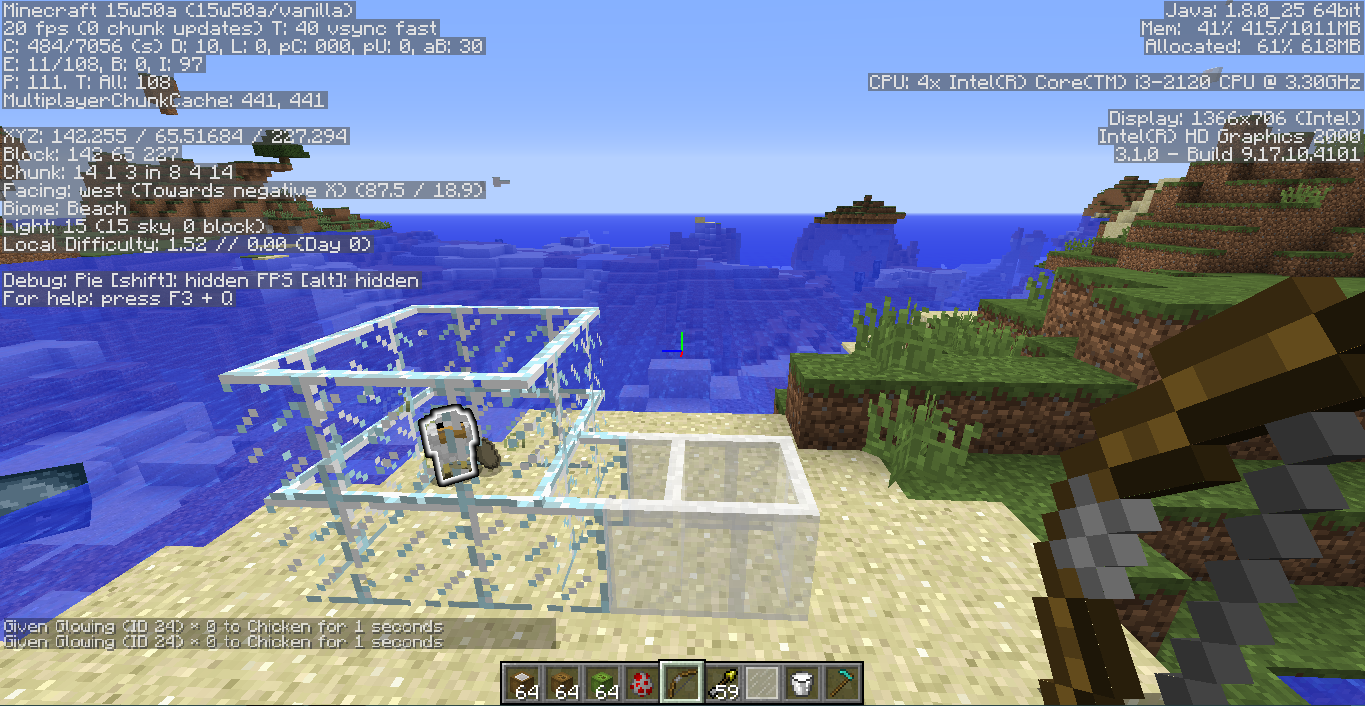
They are made that way to support multiple slimes summoned to be custom-looking ones to exist. When finished on the loop they look like the
firstimage (I was in gamemode 3 to show the positioning).
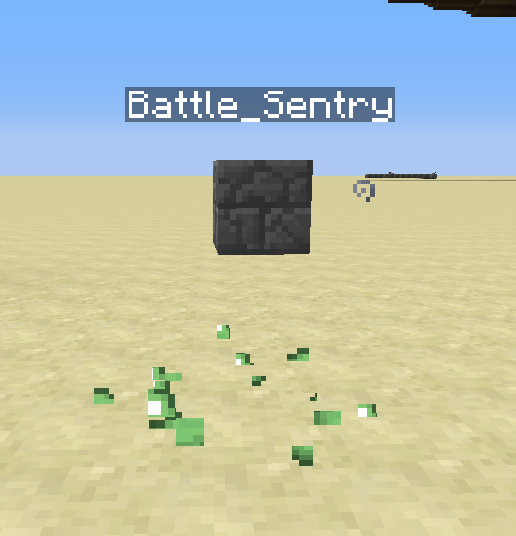
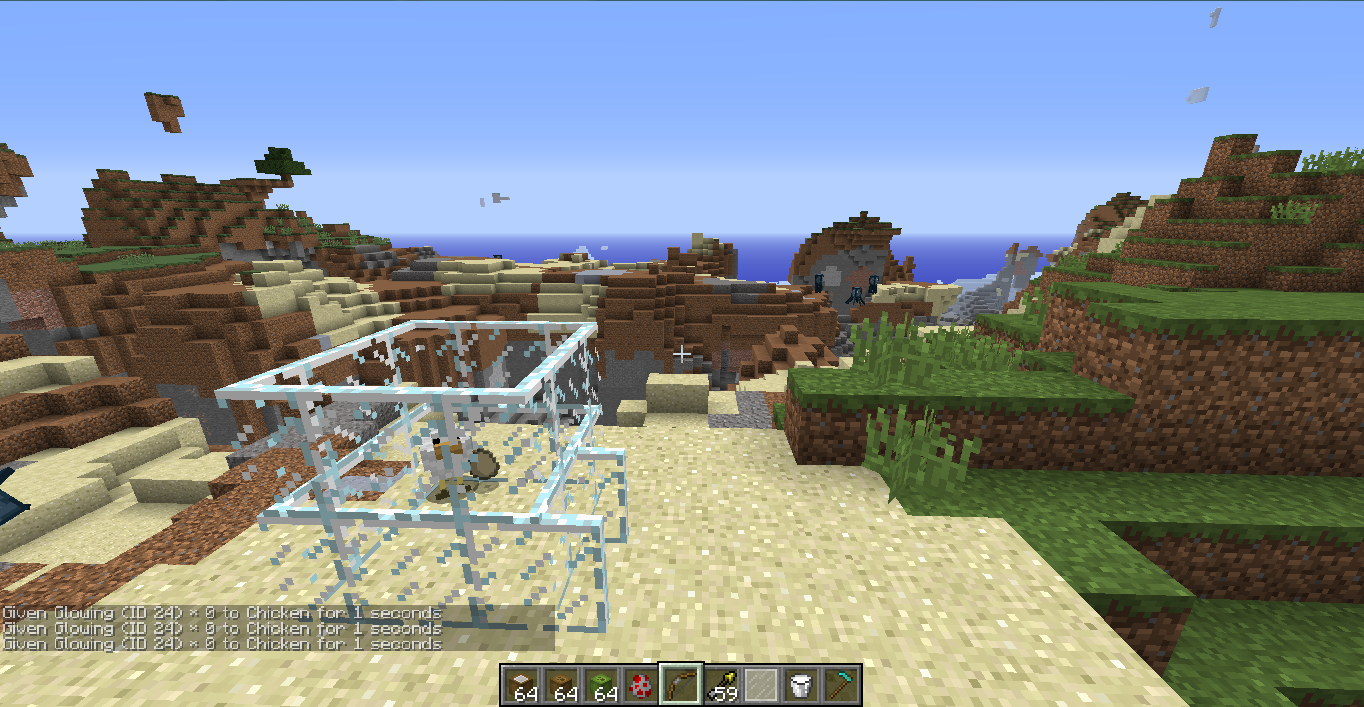
The first problem is that when the second command's y coordinate is changed to any number, before summoning the endermite, to something like -3, the armor stand will still render like it is only one below the slime. The issue then is when I change it back to -1, the armor stand will move upwards and render like it's being teleported to one above the slime. Exiting from the singleplayer world and coming back can either fix the issue, or make it look like image 2.The second issue is when trying to make sure a set of two of these entities don't have their armor stand teleport to another slime that it's not supposed to, (It really does seem impossible to make them not when they get too close, but that's not the problem, that's more of a lack of ability to do so), I change the first teleport command to the following:
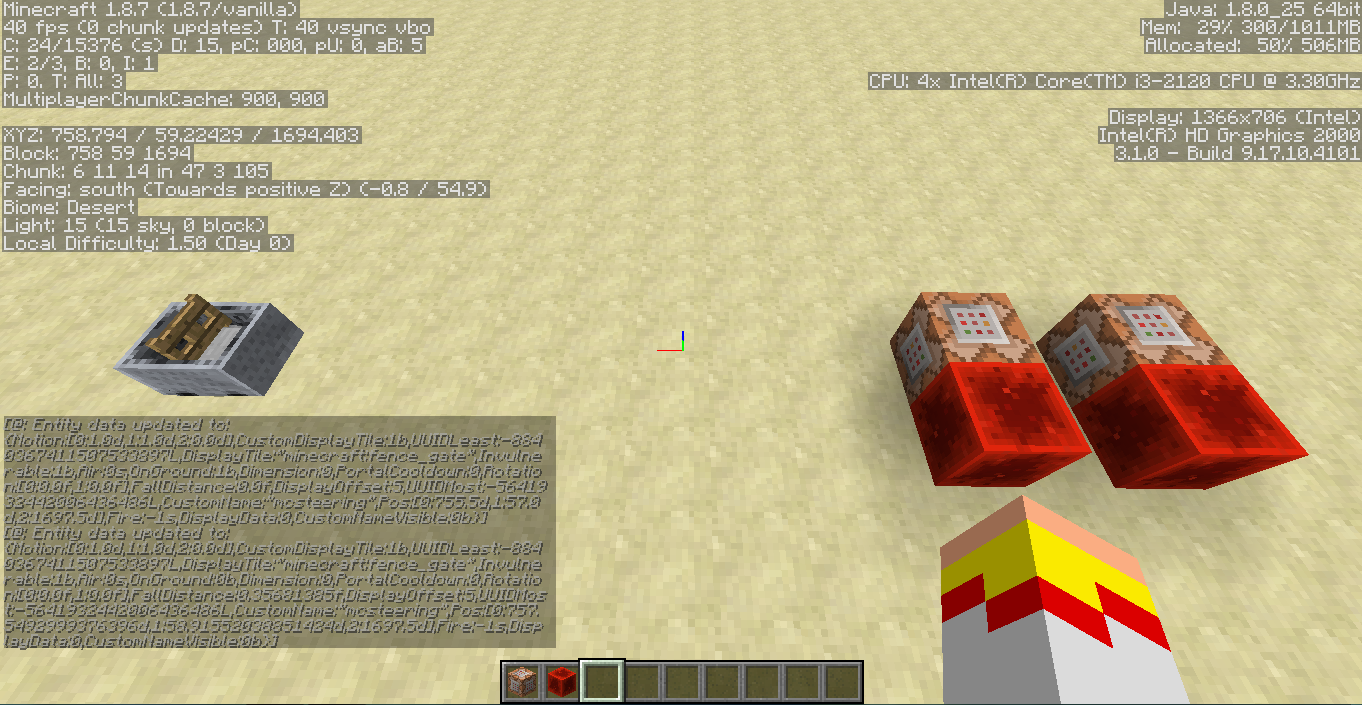
/execute @e[type=Slime,name=Battle_Sentry] ~ ~-1 ~ /tp @e[type=ArmorStand,name=Battle_Sentry,c=1,r=2] @e[type=Slime,name=Battle_Sentry,c=1]And this can sometimes create another rendering glitch that makes it look like the
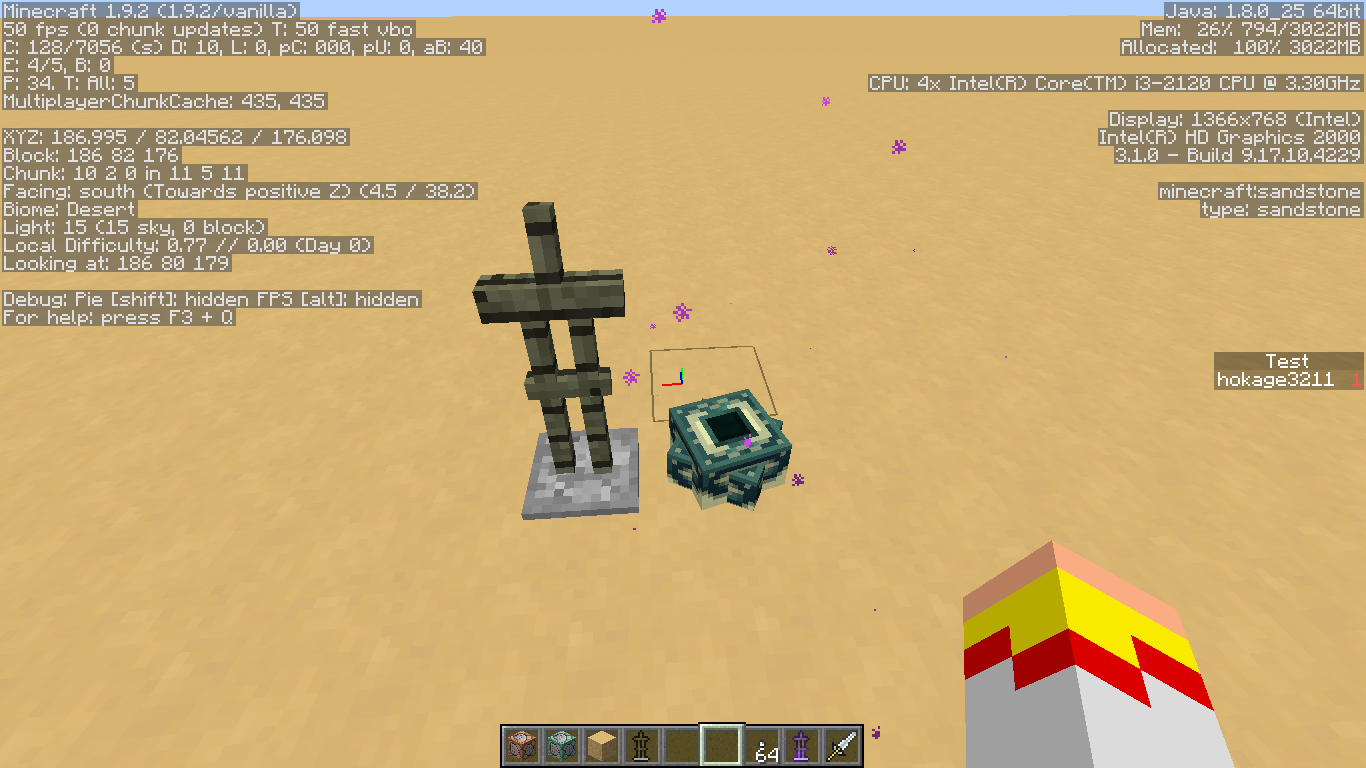
thirdimage, where one armor stand is on the slime, and another is where the previous slime was, but it moves like it's a match of the first armor stand in a different place, and exiting and coming back to the world makes it so the armor stands stop looking like that and look like they are both being teleported to one below the slime.So some background information is I am trying to create a slime that has a custom block texture with it, and the best way I am attempting to do that is to teleport an armor stand to the slime, then one below it very rapidly. I first summon them by using a custom named endermite:
{Name:generic.knockbackResistance,Base:2}
/execute @e[type=Endermite,name=Spawn_Battle_Sentry] ~ ~ ~ /summon Slime ~ ~ ~ {CustomName:"Battle_Sentry",CustomNameVisible:1,Size:1,Attributes:[],PersistenceRequired:1,ActiveEffects:[
{Id:14,Amplifier:0,Duration:20000000}]}
/execute @e[type=Endermite,name=Spawn_Battle_Sentry] ~ ~ ~ /summon ArmorStand ~ ~-1 ~ {CustomName:"Battle_Sentry",CustomNameVisible:1,Invisible:1,Invulnerable:1,NoGravity:1,Equipment:[{},{},{},{},{id:stonebrick,Damage:2,Count:1,tag:{display:
{Name:Sentry Stone}}}],DisabledSlots:2039583}
The commands shown here all run on a fill clock (20 times per second), and the endermite is killed directly after summoning those two entities. The following commands are then run after in the fill clock order:
/execute @e[type=Slime,name=Battle_Sentry] ~ ~-1 ~ /tp @e[type=ArmorStand,name=Battle_Sentry,c=1,r=2] @e[type=Slime,name=Battle_Sentry,c=1]/tp @e[type=ArmorStand,name=Battle_Sentry] ~ ~-1 ~
They are made that way to support multiple slimes summoned to be custom-looking ones to exist. When finished on the loop they look like the third image (I was in gamemode 3 to show the positioning).
The first problem is that when the second command's y coordinate is changed to any number, before summoning the endermite, to something like -3, the armor stand will still render like it is only one below the slime. The issue then is when I change it back to -1, the armor stand will move upwards and render like it's being teleported to one above the slime. Exiting from the singleplayer world and coming back can either fix the issue, or make it look like image 2.The second issue is when trying to make sure a set of two of these entities don't have their armor stand teleport to another slime that it's not supposed to, (It really does seem impossible to make them not when they get too close, but that's not the problem, that's more of a lack of ability to do so), I change the first teleport command to the following:
/execute @e[type=Slime,name=Battle_Sentry] ~ ~-1 ~ /tp @e[type=ArmorStand,name=Battle_Sentry,c=1,r=2] @e[type=Slime,name=Battle_Sentry,c=1]And this can sometimes create another rendering glitch that makes it look like the first image, where one armor stand is on the slime, and another is where the previous slime was, but it moves like it's a match of the first armor stand in a different place, and exiting and coming back to the world makes it so the armor stands stop looking like that and look like they are both being teleported to one below the slime.
When summoning an array of armor stands half-way into the ground in my creative world, they first look like this: http://prntscr.com/74me3i (There is an invisible skeleton in there too, but it doesn't disapear), but when moving to the left slightly while still looking at them, and moving into a seperate chunk, the armor stands seem to disapear like this: http://prntscr.com/74me6r and I am unsure why that happens.
When summoning an array of armor stands half-way into the ground in my creative world, they first look like this: http://prntscr.com/74me3i (There is an invisible skeleton in there too, but it doesn't disapear), but when moving to the left slightly while still looking at them, and moving into a seperate chunk, the armor stands seem to disapear like this: http://prntscr.com/74me6r and I am unsure why that happens. When moving back to the original position, however, the armor stands reappear.
This issue is still not resolved in 1.8.5 as seen here: http://prntscr.com/78tycw
I'm unsure if I am supposed to open a new bug report or leave this comment, so for now I will encourage this issue to be reopened rather than make another duplicate issue.
Minecarts riding minecartsbecome unrideablewhen motion entitydata used.Minecarts riding minecarts are unrideable
I have encountered some kind of problem with minecarts that is affecting a project I am doing. So i am trying to make a thing made out of two minecarts, which is easy but the problem is making it move and then when the players try to interact with it.
/summon MinecartRideable ~ ~1 ~ {CustomName:"FlyingMachine",CustomDisplayTile:1,DisplayTile:stone_slab,Riding:{id:"MinecartRideable",CustomName:"mcsteering",CustomDisplayTile:1,DisplayTile:fence_gate,Invulnerable:1,DisplayOffset:5}}is the entity I am using currently. (The bottom one is invulnerable because I need them to only break the top one)
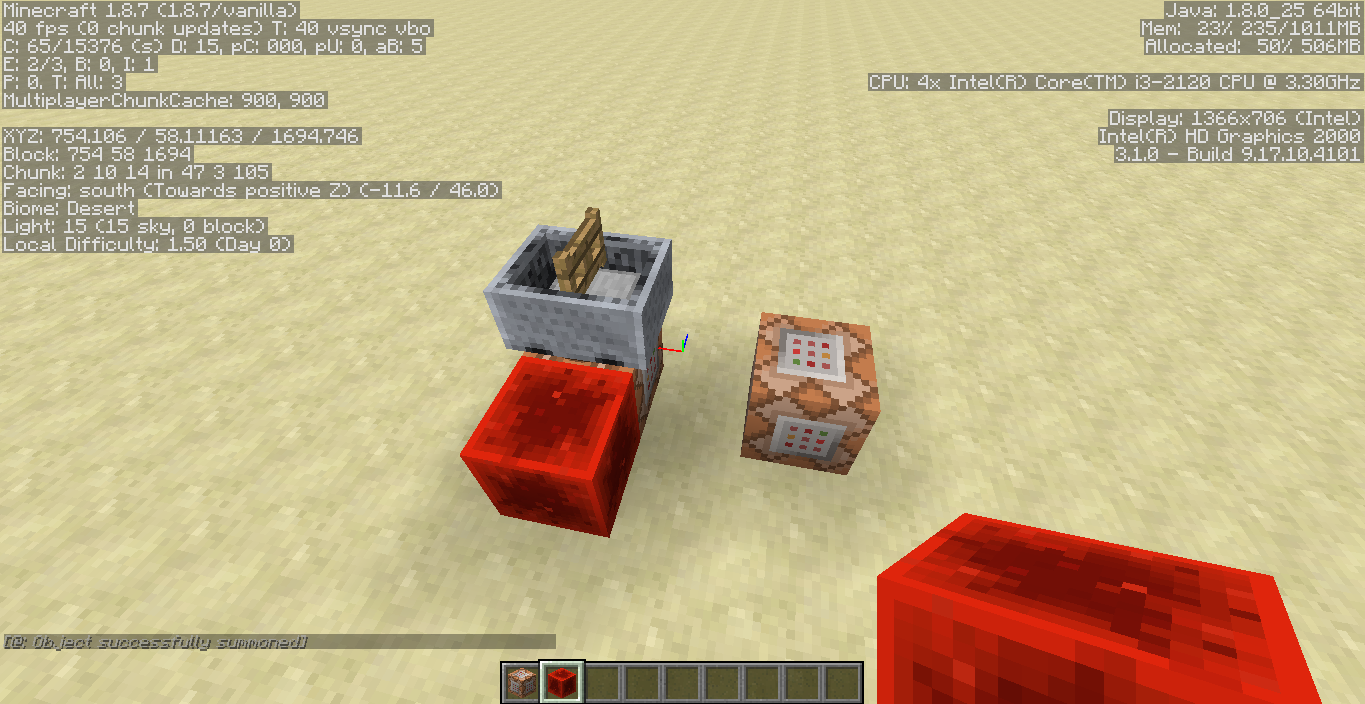
As for where the glitch happens, when using this command:/entitydata @e[type=MinecartRideable,c=-1,r=10] {Motion:[1.0,1.0,0.0]}It then makes the minecarts unclickable in that it makes the bottom minecart's hitbox completely seem to encapsulate the bottom minecart's hitbox. In 1.8.3 it also seems that to make this happen, you need to use the command twice, the second time while it is in the air, for it to create this glitch.
The first image is the minecart before, which is possible to get into, but the second image is after executing the second command twice, the second time while the minecart was in the air. the minecart looks the same, but seems to not be rideable anymore, and cannot be right-clicked.
EDIT: the comments below contain more info as to the current problem, but the new main problem is that using the command:
/summon minecraft:minecart ~ ~1 ~ {Invulnerable:1,CustomDisplayTile:1,DisplayTile:fence_gate,DisplayOffset:5,Passengers:[{id:"minecart",CustomDisplayTile:1,DisplayTile:stone_slab}]}produces an unrideable minecart.
In the latest snapshot, 16w42a, the glitch APPEARS to be fixed, but I would suggest going to the approved comment that instructs how to reproduce the glitch (the one I just editted), and verifying it for yourself. Please make sure that the "<your name> testing" command actually outputs when you get close to the first armorstand, otherwise that means your command was input wrong.
![[Mod] Skylinerw](../../../data/assets/gravatar/skylinerw.png)
I can confirm Wyatt Boyle's analysis. The particular line using 1.9 MCP is in class CommandExecuteAt that seems to be causing it:
IBlockState iblockstate = world.getBlockState(blockpos1);
I can't currently look further into it though.

Wyatt Boyle, "it shoots a large amount of hearts out" because it updates its health to be equal to its (small) maxHealth. This confirms the bug.
I apologize if this is a duplicate, I tried searching but I suppose I was being too general. And thank you, that last part does make sense I suppose.
Still affecting 1.8.5 : http://prntscr.com/78hpcl
Confirmed for 1.8.5
Oh, okay, I apologize, I don't see where that is said but alright, thank you.
I actually wanted to preserve the particles in case they glitch and lose their armor stands when a player is fighting them, but yeah it does seem to relate slightly to the problems you listed, thank you
Confirmed for 1.8
Droppers/Dispensers click, I beleive, when they have no items in them and they are facing something they can put items into, and they are activated. But feel free to prove me wrong, this is just a theory as for your sound problem.
Would the sounds of mobs/events in general restarting/stacking-and-being-louder when exiting out of the inventory, pause menu, and command block menus count as the same glitch? I'd rather ask here than make a duplicate and waste moderator's time. What I mean is that if a lot of sounds are playing, and you go into any of those menus, then exit out, they all stack on each other and can be pretty loud sometimes, and can restart long sounds like the cave warning and such.
Sorry for the duplicate, I tried searching but I didn't see anything. And did you change the title of the other bug report to match mine? Or did it actually match mine?
And is that a site I should update my graphics card at? I'm just making sure I would be using the right site.
Yes this is still a bug in 1.9 and the latest 1.9.1 pre-releases.
Yes it is still an issue in 1.9.2 and 1.9 as well, I apologize for the extremely slow reply I guess I didn't notice the reply unil now.
Yes this is still an issue with with the latest 1.9.2 release as well as 1.9
In the latest release of minecraft 1.9.2 it appears to be more of a problem, in such that when summoning a similar entity with
/summon minecraft:minecart ~ ~1 ~ {Invulnerable:1,CustomDisplayTile:1,DisplayTile:fence_gate,DisplayOffset:5,Passengers:[{id:"minecart",CustomDisplayTile:1,DisplayTile:stone_slab}]}it is unridable, meaning the bottom minecart's hitbox is still engulfing the whole hitbox, no matter the rotation as well.
Still a problem in 1.9.2
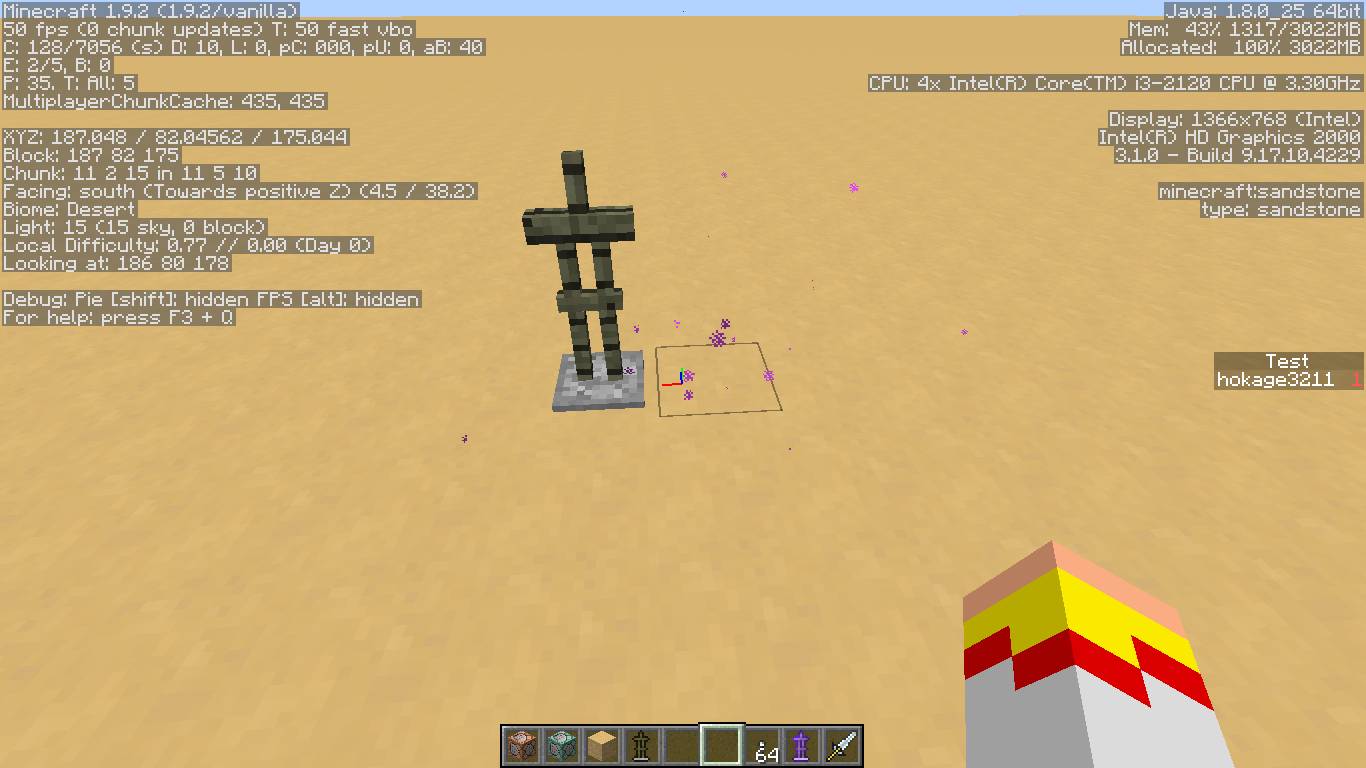
Two images showing when an armorstand (there are two armorstands that have end portal frame blocks on their heads) disapears
I did so, and the graphics and such details on the right of the screen haven't changed, what does that mean, then?
still an issue in 1.9.4
Still an issue in 1.9.4
still an issue in 1.9.4, I add a score to an entity, (I've tried different score types like dummy and item.stick.use), display it to the sidebar, then leave the area and when the chunk becomes unloaded the score resets on any entity inside. This glitch happens in my worlds even when the amount of command blocks is low, and in singleplayer.
still in 1.9.4
Still an issue in 1.9.4
confirmed in 1.9.2 and 1.9.4
Okay, after like 5 hours of testing I have a new suggested title "/execute detect command causing entities within a chunk to be scoreboard reset" and i will explain why.
What I have found is the steps to re-produce in any world, no matter the tick rate, (I have only tested in singleplayer but I assume multiplayer does this too since you all have said you have opened to lan and reproduced it)
1) Spawn in a world, just do superflat to make it easier (also make the world creative mode )
2) use /setworldspawn, and mark the spawn with anything you choose, just so you know where your spawn was
3) give yourself a command block, and place it down anywhere as long as it should be in a spawn chunk, so near where you marked.
4) enter this into the command block:
(sometimes the command block may not register it should be always active, so you may need to toggle that again)
{MY RENDER DISTANCE: 10 chunks}5) make it a repeat command block along with always active
6) teleport 500 blocks away in any direction (although 300 seems to fine as well
, as long as the chunk un-loads from view)
7) mark out the chunk you are in, and use this command inside of that chunk:
/summon minecraft:armor_stand ~ ~ ~ {CustomName:Test}(you should see the command block begin to make it say "(your_name) testing", just step away from it a bit)
8) now place another armorstand OUTSIDE that chunk, just place it down using any method using the default item even
9) Now use these commands with both armorstands in view
(that should make both appear on the scoreboard)
10) Now go back to spawn using any method you choose, teleport or flying/walking back
11) The one with the score of 1 should disapear off the scoreboard, and the other one should stay on the scoreboard, if not, then place a block or something else to update chunks in the world.
There, that should succesfully re-produce the bug.
Some interesting facts:
-If you put MORE armorstands (with scoreboard values set) into the chunk that the "Test" armorstand is in, they ALSO will have their scores reset, yet the armorstand outside of the chunk will keep it's scoreboard value.
-If you make the command in the command block into:
and then go back over (making sure both armorstands have their scores set to 1 and 2) and then come back, it will not reset their scores.
--If you remove the name parameter from the command block to make it:
and then go back over (making sure both armorstands have their scores set to 1 and 2) and then come back, BOTH should have their scores reset when the chunk becomes unloaded
-If a score is not unloaded when I said it would be, again try placing blocks, moving around, or re-loading the world possibly, to cause the chunk to properly unload from the world, sometimes teleporting can leave a chunk loaded for a moment or two. (Sometimes clicking the command block then clicking out of it can cause chunk updates as well.) Or check if the command block is always active, as in making it "needs redstone", clicking done, then clicking back in and making it "always active".
EDIT: made it so the commands still work in the latest snapshot, but god knows why mojang decided to make it armor_stand, but the commands should work now
The original title was inaccurate as to the cause of the bug, before it said that simply unloading a chunk would cause the entity to have it's scoreboard value reset, when in reality that is not exactly true, it is that when an entity has a /execute command with a detect part attached to it, for example "/execute @e[type=Pig] ~ ~ ~ detect ~ ~ ~ minecraft:air 0", when it's chunk becomes unloaded, it causes all scoreboard values for the entity and all other entities within the chunk to be reset.
A workaround for the current update of 1.9: use "/execute @a ~ ~ ~ " and add an appropriate range to the second "/execute", I am not entirely sure if adding something over a certain amount causes the bug to re-occur, but this should work, just use a large radius and it should work just as well. Just make sure to do testing while making any command block things to make sure it if it works.
It does appear to be fixed in the latest snapshot 16w42a
The message still happens in the latest snapshot 16w42a
In the latest snapshot, 16w42a, the damage is still the same when following the instructions posted. Yet when using the command
summon MOB_TYPE_HERE ~ ~1 ~ {Attributes:[{Name:"generic.attackDamage",Base:10D}]}they do not attack any harder than normal, YET when I attack them, they produce what looks to be 5 full hearts or so of damage, and no matter the size, they will not die on the first hit (I hit a tiny slime and it produced the large amount of hearts, and did not die when I hit it), upon hitting them again they will go back to normal behavior, of course still not dealing any extra damage to me (yes I tested it on a slime that could deal damage to me as well)
In the latest snapshot 16w42a, when spawning the lava slime and hitting it, it shoots a large amount of hearts out, that I can only guess would equal it's full health, like it produces mass amounts of the heart particle and does not die on the first hit, but then dies when I hit it two more times with my fist. I am not sure if this confirms or changes the glitch, but that is what I found.
The comment just above me, describing that boats can only be teleported on the x and z axis are still true in the latest snapshot 16w42a. Although I found it would not tolerate any amount of up or down teleportation at all.
still an issue in the latest snapshot, 16w42a.
This bug was actually caused by minecraft 1.9 boats, this was not an issue with boats before then, I don't remember why this wasn't a duplicate for the one you listed, but it's usually been treated separate.
Well I just tested it in 1.8.9 and boats can be teleported upwards while players are still riding in them, I do not know why they listed 1.8 as an affected version, but to the "only boats are affected" I'm not sure, I didn't submit the glitch I only am saying what I know, if you think that if the other glitch is solved it will solve this then sure, mark this as a duplicate, it's not my area of knowledge.
However in imported dimensions (using datapacks) for minecraft 1.16 pre-release 3, the seed for biomes and terrain is fixed to what the file sets as the seed, and you can't leave the seed field out of the .json without it throwing an error. I feel that the world file seed should specify what generates in the imported dimension, otherwise all imported dimensions will be exactly the same and have no variety, ruining the exploration factor of imported extra dimensions.
Hello, I would argue that this isn't necessarily a duplicate, as you can actually sleep in the bed which prevents phantoms from spawning, and you can indeed have two dimensions with the "type":"minecraft:overworld" type, or simply use the bed_works boolean. The bug part is that it doesn't actually advance the night on successful sleep, which wasn't mentioned in the original post whatsoever, but I guess I could be persuaded to say this is somehow a feature request, for sleeping to fully work in custom dimensions, but that's all I wanted to add.
Confirmed in 1.19.4 still