![[Mod] Skylinerw](../../../data/assets/gravatar/skylinerw.png) [Mod] Skylinerw
[Mod] Skylinerw
- skylinerw
- skylinerw
- America/New_York
- Yes
- No
![[Mojang] Searge (Michael Stoyke)](../../../data/assets/gravatar/searge.png)
 MC-63391MC-80025
![[Mojang] Grum (Erik Broes)](../../../data/assets/gravatar/grum.png) MC-87456
MC-87456 Low
Low![[Mojang] Agnes Larsson](../../../data/avatars/users/10122.svg)
![[Mojang] Nathan Adams](../../../data/assets/gravatar/dinnerbone.png)










 REALMS-153

 MCPE-137881
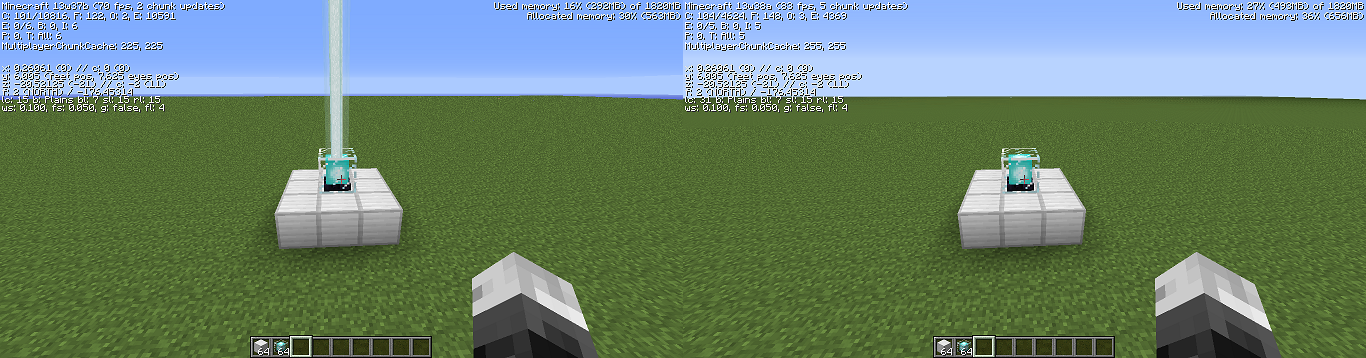
The beacon light (not light level) does not show up in the 13w38a. Changing the Post Processing option does nothing, Super Secret Settings should be on default, though I really can't tell for sure. I closed the game entirely just in case before checking the beacon again. This occurs in both singleplayer and multiplayer.
The beacon light (not light level) does not show up in the 13w38a. Changing the Post Processing option does nothing, Super Secret Settings should be on default, though I really can't tell for sure. I closed the game entirely just in case before checking the beacon again. This occurs in both singleplayer and multiplayer.
EDIT:
I should also mention that this occurs whether or not the beacon has been "activated".
Giving an item a 'knockbackResistance' attribute (set to 100%) will properly protect against forms of knockback such as melee/ranged damage, the Knockback/Punch enchantments and fall damage.
However, when faced against explosions caused by TNT, creepers, beds, or Ghast fireballs, the player is still knocked back as if they have no resistance.
EDIT:
An example command to obtain an item with the proper knockback resistance:
/give @a bedrock 1 0 {
{ AttributeName:generic.knockbackResistance, Name:generic.knockbackResistance, Amount:1, Operation:0, UUIDMost:10, UUIDLeast:10 }
AttributeModifiers:[]
}
Giving an item a 'knockbackResistance' attribute (set to 100%) will properly protect against forms of knockback such as melee/ranged damage, the Knockback/Punch enchantments and fall damage.
However, when faced against explosions caused by TNT, creepers, beds, or Ghast fireballs, the player is still knocked back as if they have no resistance.
EDIT:
An example command to obtain an item with the proper knockback resistance:
/give @a bedrock 1 0 {
AttributeModifiers:[{AttributeName:generic.knockbackResistance,Name:generic.knockbackResistance,Amount:1,Operation:0,UUIDMost:10,UUIDLeast:10}]
}Giving an item a 'knockbackResistance' attribute (set to 100%) will properly protect against forms of knockback such as melee/ranged damage, the Knockback/Punch enchantments and fall damage.
However, when faced against explosions caused by TNT, creepers, beds, or Ghast fireballs, the player is still knocked back as if they have no resistance.
EDIT:
An example command to obtain an item with the proper knockback resistance:
/give @a bedrock 1 0 {AttributeModifiers:[
{AttributeName:generic.knockbackResistance,Name:generic.knockbackResistance,Amount:1,Operation:0,UUIDMost:10,UUIDLeast:10}]}
Giving an item a 'knockbackResistance' attribute (set to 100%) will properly protect against forms of knockback such as melee/ranged damage, the Knockback/Punch enchantments and fall damage.
However, when faced against explosions caused by TNT, creepers, beds, or Ghast fireballs, the player is still knocked back as if they have no resistance.
EDIT:
An example command to obtain an item with the proper knockback resistance:
/give @a bedrock 1 0 {AttributeModifiers:[
{AttributeName:generic.knockbackResistance,Name:generic.knockbackResistance,Amount:1,Operation:0,UUIDMost:10,UUIDLeast:10}]}
Giving an item a 'knockbackResistance' attribute (set to 100%) will properly protect against forms of knockback such as melee/ranged damage, the Knockback/Punch enchantments and fall damage.
However, when faced against explosions caused by TNT, creepers, beds, or Ghast fireballs, the player is still knocked back as if they have no resistance.
EDIT:
An example command to obtain an item with the proper knockback resistance:
/give @a bedrock 1 0 { AttributeModifiers:[ { AttributeName:generic.knockbackResistance, Name:generic.knockbackResistance, Amount:1, Operation:0, UUIDMost:10, UUIDLeast:10 } ] }
The attribute "followRange" works for only a portion of mobs. When set to 0, mobs should be expected to not target the player (unless the player happens to be standing in the same spot as the mob). When set to a high number, such as 100
0, mobs are expected to follow the player even when they are out of the mobs default followRange. This is only true for certain mobs.The attribute works as intended with:
1. Creepers
2. Zombies
3. Skeletons
4. Witches
5. Iron golemsThe attribute does not work with:
1. Spiders
2. Cave spiders
3. Silverfish
4. Endermen
5. Slimes
6. Magma cubes
7. Zombie pigmen
8. Blaze
9. GhastsI am unsure about:
1. WolvesThe Wither has an interesting effect. The main boss' head won't target or chase you, but the two extra heads will continuously fire at you.
There is no effect on the Enderdragon, but I assume that's working as intended.
An example, summoning a Creeper with a 'followRange' of 0 (working as expected):
summon Creeper ~ ~1 ~ { Attributes:[ { Name:generic.followRange, Base:0 } ] }(Note you do not need to include the Modifiers tag if you aren't going to modify the Base; regardless, adding them makes no difference)
And an example with a Spider, which does not work:
summon Spider ~ ~1 ~ { Attributes:[ { Name:generic.followRange, Base:0 } ] }
The attribute "followRange" works for only a portion of mobs. When set to 0, mobs should be expected to not target the player (unless the player happens to be standing in the same spot as the mob). When set to a high number, such as 100, mobs are expected to follow the player even when they are out of the mobs default followRange. This is only true for certain mobs.
The attribute works as intended with:
1. Creepers
2. Zombies
3. Skeletons
4. Witches
5. Iron golems
6. Snow golemsThe attribute does not work with:
1. Spiders
2. Cave spiders
3. Silverfish
4. Endermen
5. Slimes
6. Magma cubes
7. Zombie pigmen
8. Blaze
9. GhastsI am unsure about:
1. WolvesThe Wither has an interesting effect. The main boss' head won't target or chase you, but the two extra heads will continuously fire at you.
There is no effect on the Enderdragon, but I assume that's working as intended.
An example, summoning a Creeper with a 'followRange' of 0 (working as expected):
summon Creeper ~ ~1 ~ { Attributes:[ { Name:generic.followRange, Base:0 } ] }(Note you do not need to include the Modifiers tag if you aren't going to modify the Base; regardless, adding them makes no difference)
And an example with a Spider, which does not work:
summon Spider ~ ~1 ~ { Attributes:[ { Name:generic.followRange, Base:0 } ] }
commandBlockOutput is true for the first, false for the other 2.
The "CustomPotionEffects" tag contains the following:
byte | Id
byte | Amplifier
int | Duration
byte | AmbientVia: http://minecraft.gamepedia.com/Player.dat_format#Potion_Effects
However, when using the /give, /summon, or /setblock commands that includes a potion using the "CustomPotionEffects" tag, all of the above [byte] tags are incorrectly set to 'integer' on the item or entity. This can cause complications when attempting to apply the effect to a mob or player, notably the Amplifier.
This can be observed using the following command and checking its NBT data:
/give @p potion 1 16450 {CustomPotionEffects:[{Id:1,Amplifier:0,Duration:20,Ambient:1}]}or
/summon ThrownPotion ~ ~20 ~ {Potion:{id:373,Damage:16450,tag:{CustomPotionEffects:[{Id:1,Amplifier:0,Duration:20,Ambient:1}]}}}or
/setblock ~ ~1 ~ chest 0 replace {Items:[{id:373,Damage:16450,Count:1,Slot:0,tag:{CustomPotionEffects:[{Id:1,Amplifier:0,Duration:20,Ambient:1}]}}]}To confirm that the tag-types should be byte where listed, the /effect command can be used, which does apply the correct tag-types (save for Ambient, which it cannot apply):
/effect @p 1 100 0For beacons, all tags are applied correctly, including the Ambient tag. Quick command to construct a minimal beacon pyramid for observation (in the north direction):
/summon FallingSand ~ ~1 ~-3 {TileID:138,TileEntityData:{Primary:1},Time:1,Motion:[0.0,0.25,0.0],Riding:{id:FallingSand,Riding:{id:FallingSand,TileID:42,Time:1,Motion:[0.15,0.0,0.0],Riding:{id:FallingSand,Riding:{id:FallingSand,TileID:42,Time:1,Motion:[0.0,0.0,0.15],Riding:{id:FallingSand,Riding:{id:FallingSand,TileID:42,Time:1,Motion:[-0.15,0.0,0.0],Riding:{id:FallingSand,Riding:{id:FallingSand,TileID:42,Time:1,Motion:[0.0,0.0,-0.15],Riding:{id:FallingSand,Riding:{id:FallingSand,TileID:42,Time:1,Motion:[0.15,0.0,0.15],Riding:{id:FallingSand,Riding:{id:FallingSand,TileID:42,Time:1,Motion:[-0.15,0.0,0.15],Riding:{id:FallingSand,Riding:{id:FallingSand,TileID:42,Time:1,Motion:[-0.15,0.0,-0.15],Riding:{id:FallingSand,Riding:{id:FallingSand,TileID:42,Time:1,Motion:[0.15,0.0,-0.15],Riding:{id:FallingSand,Riding:{id:FallingSand,TileID:42,Time:1,Motion:[0.0,0.0,0.0]}}}}}}}}}}}}}}}}}}}Relates slightly to https://mojang.atlassian.net/browse/MC-35127 except that one involves an always incorrect tag-type (not necessarily through commands), while the CustomPotionEffects tag-types are incorrectly applied through dataTags.
The "CustomPotionEffects" tag contains the following:
byte | Id
byte | Amplifier
int | Duration
byte | AmbientVia: http://minecraft.gamepedia.com/Player.dat_format#Potion_Effects
However, when using the /give, /summon, or /setblock commands that includes a potion using the "CustomPotionEffects" tag, all of the above 'byte' tags are incorrectly set to 'integer' on the item or entity. This can cause complications when attempting to apply the effect to a mob or player, notably the Amplifier.
This can be observed using the following command and checking its NBT data:
/give @p potion 1 16450 {CustomPotionEffects:[{Id:1,Amplifier:0,Duration:20,Ambient:1}]}or
/summon ThrownPotion ~ ~20 ~ {Potion:{id:373,Damage:16450,tag:{CustomPotionEffects:[{Id:1,Amplifier:0,Duration:20,Ambient:1}]}}}or
/setblock ~ ~1 ~ chest 0 replace {Items:[{id:373,Damage:16450,Count:1,Slot:0,tag:{CustomPotionEffects:[{Id:1,Amplifier:0,Duration:20,Ambient:1}]}}]}To confirm that the tag-types should be byte where listed, the /effect command can be used, which does apply the correct tag-types (save for Ambient, which it cannot apply):
/effect @p 1 100 0For beacons, all tags are applied correctly, including the Ambient tag. Quick command to construct a minimal beacon pyramid for observation (in the north direction):
/summon FallingSand ~ ~1 ~-3 {TileID:138,TileEntityData:{Primary:1},Time:1,Motion:[0.0,0.25,0.0],Riding:{id:FallingSand,Riding:{id:FallingSand,TileID:42,Time:1,Motion:[0.15,0.0,0.0],Riding:{id:FallingSand,Riding:{id:FallingSand,TileID:42,Time:1,Motion:[0.0,0.0,0.15],Riding:{id:FallingSand,Riding:{id:FallingSand,TileID:42,Time:1,Motion:[-0.15,0.0,0.0],Riding:{id:FallingSand,Riding:{id:FallingSand,TileID:42,Time:1,Motion:[0.0,0.0,-0.15],Riding:{id:FallingSand,Riding:{id:FallingSand,TileID:42,Time:1,Motion:[0.15,0.0,0.15],Riding:{id:FallingSand,Riding:{id:FallingSand,TileID:42,Time:1,Motion:[-0.15,0.0,0.15],Riding:{id:FallingSand,Riding:{id:FallingSand,TileID:42,Time:1,Motion:[-0.15,0.0,-0.15],Riding:{id:FallingSand,Riding:{id:FallingSand,TileID:42,Time:1,Motion:[0.15,0.0,-0.15],Riding:{id:FallingSand,Riding:{id:FallingSand,TileID:42,Time:1,Motion:[0.0,0.0,0.0]}}}}}}}}}}}}}}}}}}}Relates slightly to https://mojang.atlassian.net/browse/MC-35127 except that one involves an always incorrect tag-type (not necessarily through commands), while the CustomPotionEffects tag-types are incorrectly applied through dataTags.
Mobs to summon:
1.
/summon Villager ~ ~1 ~2.
/summon Villager ~ ~1 ~ {CustomName:"Test"}Then type the following into the chat:
/say @e[type=Villager]Hovering over an entity in the chat will display basic information concerning the entity. Tool-tips need to be enabled with <F3 + H>. However, if the villager is named, no tooltip shows up.
See the attached image (v1). The tooltip will show up when hovering over the villager you have not provided a name for, but will not show up if you didn't name it.
This does not occur with other entities. For example:
/summon Creeper ~ ~1 ~ {Customname:"Creep"}The next attached image (v2) displays the named creeper having the proper tooltip.
Unsure if this occurs with other entities besides villagers.
Mobs to summon:
1.
/summon Villager ~ ~1 ~2.
/summon Villager ~ ~1 ~ {CustomName:"Test"}Then type the following into the chat:
/say @e[type=Villager]Hovering over an entity in the chat will display basic information concerning the entity. Tool-tips need to be enabled with <F3 + H>. However, if the villager is named, no tooltip shows up.
See the attached image (v1). The tooltip will show up when hovering over the villager you have not provided a name for, but will not show up if you didn't name it.
This does not occur with other entities. For example:
/summon Creeper ~ ~1 ~ {Customname:"Creep"}The next attached image (v2) displays the named creeper having the proper tooltip.
Unsure if this occurs with other entities besides villagers.
Mobs to summon:
1.
/summon Villager ~ ~1 ~2.
/summon Villager ~ ~1 ~ {CustomName:"Test"}Then type the following into the chat:
/say @e[type=Villager]Hovering over an entity in the chat will display basic information concerning the entity. Tool-tips need to be enabled with <F3 + H>. However, if the villager is named, no tooltip shows up.
See the attached image (v1). The tooltip will show up when hovering over the villager you have not provided a name for, but will not show up if you didn't name it.
This does not occur with other entities. For example:
/summon Creeper ~ ~1 ~ {CustomName:"Creep"}The next attached image (v2) displays the named creeper having the proper tooltip.
Unsure if this occurs with other entities besides villagers.
Mobs to summon:
1.
/summon Villager ~ ~1 ~2.
/summon Villager ~ ~1 ~ {CustomName:"Test"}Then type the following into the chat:
/say @e[type=Villager]Hovering over an entity in the chat will display basic information concerning the entity. Tool-tips need to be enabled with <F3 + H>. However, if the villager is named, no tooltip shows up.
See the attached image (v1). The tooltip will show up when hovering over the villager you have not provided a name for, but will not show up if you didn't name it.
This does not occur with other entities. For example:
/summon Creeper ~ ~1 ~ {CustomName:"Creep"}/say @e[type=Creeper]The next attached image (v2) displays the named creeper having the proper tooltip.
Unsure if this occurs with other entities besides villagers.
Mobs to summon:
1.
/summon Villager ~ ~1 ~2.
/summon Villager ~ ~1 ~ {CustomName:"Test"}Then type the following into the chat:
/say @e[type=Villager]Hovering over an entity in the chat will display basic information concerning the entity. Tool-tips need to be enabled with <F3 + H>. However, if the villager is named, no tooltip shows up.
See the attached image (v1). The tooltip will show up when hovering over the villager you have not provided a name for, but will not show up if you
didn't name it.This does not occur with other entities. For example:
/summon Creeper ~ ~1 ~ {CustomName:"Creep"}/say @e[type=Creeper]The next attached image (v2) displays the named creeper having the proper tooltip.
Unsure if this occurs with other entities besides villagers.
Mobs to summon:
1.
/summon Villager ~ ~1 ~2.
/summon Villager ~ ~1 ~ {CustomName:"Test"}Then type the following into the chat:
/say @e[type=Villager]Hovering over an entity in the chat will display basic information concerning the entity. Tool-tips need to be enabled with <F3 + H>. However, if the villager is named, no tooltip shows up.
See the attached image (v1). The tooltip will show up when hovering over the villager you have not provided a name for, but will not show up if you named it using the 'CustomName' tag.
This does not occur with other entities. For example:
/summon Creeper ~ ~1 ~ {CustomName:"Creep"}/say @e[type=Creeper]The next attached image (v2) displays the named creeper having the proper tooltip.
Unsure if this occurs with other entities besides villagers.
Mobs to summon:
1.
/summon Villager ~ ~1 ~2.
/summon Villager ~ ~1 ~ {CustomName:"Test"}Then type the following into the chat:
/say @e[type=Villager]Hovering over an entity in the chat will display basic information concerning the entity.
Tool-tips need to be enabled with <F3 + H>.However, if the villager is named, no tooltip shows up.See the attached image (v1). The tooltip will show up when hovering over the villager you have not provided a name for, but will not show up if you named it using the 'CustomName' tag.
This does not occur with other entities. For example:
/summon Creeper ~ ~1 ~ {CustomName:"Creep"}/say @e[type=Creeper]The next attached image (v2) displays the named creeper having the proper tooltip.
Unsure if this occurs with other entities besides villagers.
Tool-tips need to be enabled with <F3 + H>
Mobs to summon:
/summon Villager ~ ~1 ~/summon Villager ~ ~1 ~ {CustomName:"Test"}Then type the following into the chat:
/say @e[type=Villager]Hovering over an entity in the chat will display basic information concerning the entity. However, if the villager is named, no tooltip shows up.
See the attached image (v1). The tooltip will show up when hovering over the villager you have not provided a name for, but will not show up if you named it using the 'CustomName' tag.
This does not occur with other entities. For example:
/summon Creeper ~ ~1 ~ {CustomName:"Creep"}/say @e[type=Creeper]The next attached image (v2) displays the named creeper having the proper tooltip.
Unsure if this occurs with other entities besides villagers.
Ensure you are using a newly created world or have no other players tracked on the scoreboard.
''Objective:''
/scoreboard objectives add TEST dummy''Increment:''
/scoreboard players add @p TEST 1The next step is to reset all players using the
''*''iterator. The following works just fine because at this step, no offline players are being tracked at the same time as online players:/scoreboard players reset *If you add a player that isn't online (whether it's a fake or real player):
/scoreboard players add #FAKE TEST 1And then reset all players while ''only'' the fake player is being tracked:
/scoreboard players reset *This also works just fine. However, if you add another player into the mix:
/scoreboard players add #FAKE TEST 1/scoreboard players add @p TEST 1And then reset scores:
/scoreboard players reset *You will receive the error: "An unknown error occurred while attempting to perform this command" and only one of the tracked players will be reset.
It might be the fact that multiple players are found, rather than specifically offline players. Unfortunately I don't have the means to test this, as I'd need two online players to know for sure. Confirmation from somebody who has access to that is greatly appreciated!
Error details presented in the server log:
[16:12:28 ERROR]: Couldn't process command: 'scoreboard players reset *'
java.util.ConcurrentModificationException
at java.util.HashMap$HashIterator.nextEntry(Unknown Source) ~[?:1.7.0_21]
at java.util.HashMap$KeyIterator.next(Unknown Source) ~[?:1.7.0_21]
at cc.c(SourceFile:207) ~[minecraft_server.14w08a.jar:?]
at cc.b(SourceFile:42) ~[minecraft_server.14w08a.jar:?]
at z.a(SourceFile:65) [minecraft_server.14w08a.jar:?]
at op.d(SourceFile:531) [minecraft_server.14w08a.jar:?]
at op.a(SourceFile:518) [minecraft_server.14w08a.jar:?]
at js.a(SourceFile:37) [minecraft_server.14w08a.jar:?]
at js.a(SourceFile:9) [minecraft_server.14w08a.jar:?]
at fm.a(SourceFile:163) [minecraft_server.14w08a.jar:?]
at ok.c(SourceFile:134) [minecraft_server.14w08a.jar:?]
at net.minecraft.server.MinecraftServer.w(SourceFile:555) [minecraft_server.14w08a.jar:?]
at nb.w(SourceFile:264) [minecraft_server.14w08a.jar:?]
at net.minecraft.server.MinecraftServer.v(SourceFile:471) [minecraft_server.14w08a.jar:?]
at net.minecraft.server.MinecraftServer.run(SourceFile:387) [minecraft_server.14w08a.jar:?]
at mr.run(SourceFile:657) [minecraft_server.14w08a.jar:?]Ensure you are using a newly created world or have no other players tracked on the scoreboard.
Objective:
/scoreboard objectives add TEST dummyIncrement:
/scoreboard players add @p TEST 1The next step is to reset all players using the *** iterator. The following works just fine because at this step, no offline players are being tracked at the same time as online players:
/scoreboard players reset *If you add a player that isn't online (whether it's a fake or real player):
/scoreboard players add #FAKE TEST 1And then reset all players while only the fake player is being tracked:
/scoreboard players reset *This also works just fine. However, if you add another player into the mix:
/scoreboard players add #FAKE TEST 1/scoreboard players add @p TEST 1And then reset scores:
/scoreboard players reset *You will receive the error: "An unknown error occurred while attempting to perform this command" and only one of the tracked players will be reset.
It might be the fact that multiple players are found, rather than specifically offline players. Unfortunately I don't have the means to test this, as I'd need two online players to know for sure. Confirmation from somebody who has access to that is greatly appreciated!
Error details presented in the server log:
[16:12:28 ERROR]: Couldn't process command: 'scoreboard players reset *'
java.util.ConcurrentModificationException
at java.util.HashMap$HashIterator.nextEntry(Unknown Source) ~[?:1.7.0_21]
at java.util.HashMap$KeyIterator.next(Unknown Source) ~[?:1.7.0_21]
at cc.c(SourceFile:207) ~[minecraft_server.14w08a.jar:?]
at cc.b(SourceFile:42) ~[minecraft_server.14w08a.jar:?]
at z.a(SourceFile:65) [minecraft_server.14w08a.jar:?]
at op.d(SourceFile:531) [minecraft_server.14w08a.jar:?]
at op.a(SourceFile:518) [minecraft_server.14w08a.jar:?]
at js.a(SourceFile:37) [minecraft_server.14w08a.jar:?]
at js.a(SourceFile:9) [minecraft_server.14w08a.jar:?]
at fm.a(SourceFile:163) [minecraft_server.14w08a.jar:?]
at ok.c(SourceFile:134) [minecraft_server.14w08a.jar:?]
at net.minecraft.server.MinecraftServer.w(SourceFile:555) [minecraft_server.14w08a.jar:?]
at nb.w(SourceFile:264) [minecraft_server.14w08a.jar:?]
at net.minecraft.server.MinecraftServer.v(SourceFile:471) [minecraft_server.14w08a.jar:?]
at net.minecraft.server.MinecraftServer.run(SourceFile:387) [minecraft_server.14w08a.jar:?]
at mr.run(SourceFile:657) [minecraft_server.14w08a.jar:?]
"/scoreboard players reset *" Produces Error If TrackingOffline/Multiple Players
Ensure you are using a newly created world or have no other players tracked on the scoreboard.
Objective:
/scoreboard objectives add TEST dummyIncrement:
/scoreboard players add @p TEST 1The next step is to reset all players using the *** iterator. The following works just fine because at this step,
no offline players arebeing trackedat the same time as online players:/scoreboard players reset *If
you add a player that isn't online (whether it's a fake or real player):/scoreboard players add #FAKE TEST 1And then reset all players while only the fake player is being tracked:
/scoreboard players reset *This also works just fine. However, if you add another player into the mix:
/scoreboard players add #FAKE TEST 1/scoreboard players add @p TEST 1And then reset scores:
/scoreboard players reset *You will receive the error: "An unknown error occurred while attempting to perform this command" and only one of the tracked players will be reset.
It might be the fact that multiple players are found, rather than specifically offline players. Unfortunately I don't have the means to test this, as I'd need two online players to know for sure. Confirmation from somebody who has access to that is greatly appreciated!
Error details presented in the server log:
[16:12:28 ERROR]: Couldn't process command: 'scoreboard players reset *'
java.util.ConcurrentModificationException
at java.util.HashMap$HashIterator.nextEntry(Unknown Source) ~[?:1.7.0_21]
at java.util.HashMap$KeyIterator.next(Unknown Source) ~[?:1.7.0_21]
at cc.c(SourceFile:207) ~[minecraft_server.14w08a.jar:?]
at cc.b(SourceFile:42) ~[minecraft_server.14w08a.jar:?]
at z.a(SourceFile:65) [minecraft_server.14w08a.jar:?]
at op.d(SourceFile:531) [minecraft_server.14w08a.jar:?]
at op.a(SourceFile:518) [minecraft_server.14w08a.jar:?]
at js.a(SourceFile:37) [minecraft_server.14w08a.jar:?]
at js.a(SourceFile:9) [minecraft_server.14w08a.jar:?]
at fm.a(SourceFile:163) [minecraft_server.14w08a.jar:?]
at ok.c(SourceFile:134) [minecraft_server.14w08a.jar:?]
at net.minecraft.server.MinecraftServer.w(SourceFile:555) [minecraft_server.14w08a.jar:?]
at nb.w(SourceFile:264) [minecraft_server.14w08a.jar:?]
at net.minecraft.server.MinecraftServer.v(SourceFile:471) [minecraft_server.14w08a.jar:?]
at net.minecraft.server.MinecraftServer.run(SourceFile:387) [minecraft_server.14w08a.jar:?]
at mr.run(SourceFile:657) [minecraft_server.14w08a.jar:?]Ensure you are using a newly created world or have no other players tracked on the scoreboard.
Objective:
/scoreboard objectives add TEST dummyIncrement:
/scoreboard players add @p TEST 1The next step is to reset all players using the *** iterator. The following works just fine because at this step, only one player is being tracked:
/scoreboard players reset *If there are two players being tracked, whether or not they are online:
/scoreboard players add #FAKE TEST 1/scoreboard players add @p TEST 1And then reset scores:
/scoreboard players reset *You will receive the error: "An unknown error occurred while attempting to perform this command" and only one of the tracked players will be reset.
It might be the fact that multiple players are found, rather than specifically offline players. Unfortunately I don't have the means to test this, as I'd need two online players to know for sure. Confirmation from somebody who has access to that is greatly appreciated!It is confirmed caused by multiple players being tracked.
Error details presented in the server log:
[16:12:28 ERROR]: Couldn't process command: 'scoreboard players reset *'
java.util.ConcurrentModificationException
at java.util.HashMap$HashIterator.nextEntry(Unknown Source) ~[?:1.7.0_21]
at java.util.HashMap$KeyIterator.next(Unknown Source) ~[?:1.7.0_21]
at cc.c(SourceFile:207) ~[minecraft_server.14w08a.jar:?]
at cc.b(SourceFile:42) ~[minecraft_server.14w08a.jar:?]
at z.a(SourceFile:65) [minecraft_server.14w08a.jar:?]
at op.d(SourceFile:531) [minecraft_server.14w08a.jar:?]
at op.a(SourceFile:518) [minecraft_server.14w08a.jar:?]
at js.a(SourceFile:37) [minecraft_server.14w08a.jar:?]
at js.a(SourceFile:9) [minecraft_server.14w08a.jar:?]
at fm.a(SourceFile:163) [minecraft_server.14w08a.jar:?]
at ok.c(SourceFile:134) [minecraft_server.14w08a.jar:?]
at net.minecraft.server.MinecraftServer.w(SourceFile:555) [minecraft_server.14w08a.jar:?]
at nb.w(SourceFile:264) [minecraft_server.14w08a.jar:?]
at net.minecraft.server.MinecraftServer.v(SourceFile:471) [minecraft_server.14w08a.jar:?]
at net.minecraft.server.MinecraftServer.run(SourceFile:387) [minecraft_server.14w08a.jar:?]
at mr.run(SourceFile:657) [minecraft_server.14w08a.jar:?]
Using Entity UUID in CommandsYields ErrorCustom UUIDLeast/UUIDMost Pair Yields Error
First, the entity to summon with a custom UUID pair:
/summon Villager ~ ~1 ~ {UUIDLeast:1l,UUIDMost:1l}The resulting UUID is: 00000000-0000-0001-0000-000000000001
In 14w08a, you can use the following successfully:
/execute 00000000-0000-0001-0000-000000000001 ~ ~ ~ setblock ~ ~2 ~ minecraft:bedrockOR
/kill @e[type=Villager]However, in 14w10b, the command fails with the following error: That entity cannot be found
The following translatable text will be used:
achievement.openInventory.desc = Press '%1$s' to open your inventory.To insert text in place of the argument (%1$s), the "with" list-tag must be used. For example, a working command:
/tellraw @a { translate:"achievement.openInventory.desc", with:[ { text:"TEST", color:gold } ] }Result: "Press 'TEST' to open your inventory."
However, using the new "selector" tag will not provide the player's name, and instead displays the selector itself:
/tellraw @a { translate:"achievement.openInventory.desc", with:[ { selector:"@p", color:gold } ] }Result: "Press '@p' to open your inventory."
Changing the "with" to "
Extra" will properly display the player's name at the end of the text, showing that the selector works properly elsewhere:/tellraw @a { translate:"achievement.openInventory.desc", extra:[ { selector:"@p", color:gold } ] }Result: "Press '' to open your inventory.Skylinerw"
The following translatable text will be used:
achievement.openInventory.desc = Press '%1$s' to open your inventory.To insert text in place of the argument (%1$s), the "with" list-tag must be used. For example, a working command:
/tellraw @a { translate:"achievement.openInventory.desc", with:[ { text:"TEST", color:gold } ] }Result: "Press 'TEST' to open your inventory."
However, using the new "selector" tag will not provide the player's name, and instead displays the selector itself:
/tellraw @a { translate:"achievement.openInventory.desc", with:[ { selector:"@p", color:gold } ] }Result: "Press '@p' to open your inventory."
Changing the "with" to "extra" will properly display the player's name at the end of the text, showing that the selector works properly elsewhere:
/tellraw @a { translate:"achievement.openInventory.desc", extra:[ { selector:"@p", color:gold } ] }Result: "Press '' to open your inventory.Skylinerw"
The following translatable text will be used:
achievement.openInventory.desc = Press '%1$s' to open your inventory.To insert text in place of the argument (%1$s), the "with" list-tag must be used. For example, a working command:
/tellraw @a { translate:"achievement.openInventory.desc", with:[ { text:"TEST", color:gold } ] }Result: "Press 'TEST' to open your inventory."
However, using the new "selector" tag will not provide the player's name, and instead displays the selector itself:
/tellraw @a { translate:"achievement.openInventory.desc", with:[ { selector:"@p", color:gold } ] }Result: "Press '@p' to open your inventory."
Changing the "with" to "extra" will properly display the player's name at the end of the text, showing that the selector works
properly elsewhere:/tellraw @a { translate:"achievement.openInventory.desc", extra:[ { selector:"@p", color:gold } ] }Result: "Press '' to open your inventory.Skylinerw"
The following translatable text will be used:
achievement.openInventory.desc = Press '%1$s' to open your inventory.To insert text in place of the argument (%1$s), the "with" list-tag must be used. For example, a working command:
/tellraw @a { translate:"achievement.openInventory.desc", with:[ { text:"TEST", color:gold } ] }Result: "Press 'TEST' to open your inventory."
However, using the new "selector" tag will not provide the player's name, and instead displays the selector itself:
/tellraw @a { translate:"achievement.openInventory.desc", with:[ { selector:"@p", color:gold } ] }Result: "Press '@p' to open your inventory."
Changing the "with" to "extra" will properly display the player's name at the end of the text, showing that the selector works correctly elsewhere:
/tellraw @a { translate:"achievement.openInventory.desc", extra:[ { selector:"@p", color:gold } ] }Result: "Press '' to open your inventory.Skylinerw"
"selector" Tag Not Usable in "translate" Arguments for /tellraw and /title
BookJSON Inheritance in Books Differs from /tellraw, /title, and Signs
book inherit.png
NOTE: This is
unrelated toMC-55373, which outlines specifics to inheritance. This report is exclusive to books, in which the outlined specifics to inheritance in the other report are not followed as they should be expected to.When using the following:
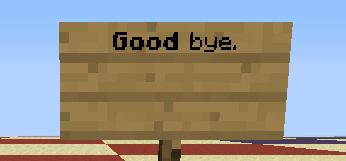
/give @a minecraft:written_book 1 0 {title:"Test",author:"Test",pages:["['',{text:'Good',bold:true},' bye.']"]}Picture "book inherit" displays the result, in which both "Good" and "bye." are bold, while only "Good" is supposed be bold. Picture "sign inherit" shows the exact same JSON being used, which displays how inheritance should be expected.
This is displayed correctly for signs, /tellraw, and /title, but not for books. If the newline character (\n) is inserted before "bye.", the inheritance occurs as it should be expected to, shown in picture "book inherit 2":
/give @a minecraft:written_book 1 0 {title:"Test",author:"Test",pages:["['',{text:'Good',bold:true},'\nbye.']"]}NOTE: This is not a duplicate of
MC-55373, which outlines specifics to inheritance. This report is exclusive to books, in which the outlined specifics to inheritance in the other report are not followed as they should be expected to.When using the following:
/give @a minecraft:written_book 1 0 {title:"Test",author:"Test",pages:["['',{text:'Good',bold:true},' bye.']"]}Picture "book inherit" displays the result, in which both "Good" and "bye." are bold, while only "Good" is supposed be bold. Picture "sign inherit" shows the exact same JSON being used, which displays how inheritance should be expected.
This is displayed correctly for signs, /tellraw, and /title, but not for books. If the newline character (\n) is inserted before "bye.", the inheritance occurs as it should be expected to, shown in picture "book inherit 2":
/give @a minecraft:written_book 1 0 {title:"Test",author:"Test",pages:["['',{text:'Good',bold:true},'\nbye.']"]}This only occurs with formatting options, including: color, bold, italic, underlined, obfuscated,
NOTE: This is not a duplicate of
MC-55373, which outlines specifics to inheritance. This report is exclusive to books, in which the outlined specifics to inheritance in the other report are not followed as they should be expected to.When using the following:
/give @a minecraft:written_book 1 0 {title:"Test",author:"Test",pages:["['',{text:'Good',bold:true},' bye.']"]}Picture "book inherit" displays the result, in which both "Good" and "bye." are bold, while only "Good" is supposed be bold. Picture "sign inherit" shows the exact same JSON being used, which displays how inheritance should be expected.
This is displayed correctly for signs, /tellraw, and /title, but not for books. If the newline character (\n) is inserted before "bye.", the inheritance occurs as it should be expected to, shown in picture "book inherit 2":
/give @a minecraft:written_book 1 0 {title:"Test",author:"Test",pages:["['',{text:'Good',bold:true},'\nbye.']"]}This only occurs with formatting options, including: color, bold, italic, underlined, obfuscated
,NOTE: This is not a duplicate of
MC-55373, which outlines specifics to inheritance. This report is exclusive to books, in which the outlined specifics to inheritance in the other report are not followed as they should be expected to.When using the following:
/give @a minecraft:written_book 1 0 {title:"Test",author:"Test",pages:["['',{text:'Good',bold:true},' bye.']"]}Picture "book inherit" displays the result, in which both "Good" and "bye." are bold, while only "Good" is supposed be bold. Picture "sign inherit" shows the exact same JSON being used, which displays how inheritance should be expected.
This is displayed correctly for signs, /tellraw, and /title, but not for books. If the newline character (\n) is inserted before "bye.", the inheritance occurs as it should be expected to, shown in picture "book inherit 2":
/give @a minecraft:written_book 1 0 {title:"Test",author:"Test",pages:["['',{text:'Good',bold:true},'\nbye.']"]}This only occurs with formatting options, including: color, bold, italic, strikethrough, underlined, and obfuscated.
NOTE: This is not a duplicate of
MC-55373, which outlines specifics to inheritance. This report is exclusive to books, in which the outlined specifics to inheritance in the other report are not followed as they should be expected to.When using the following:
/give @a minecraft:written_book 1 0 {title:"Test",author:"Test",pages:["['',{text:'Good',bold:true},'bye.']"]}Picture "book inherit" displays the result, in which both "Good" and "bye." are bold, while only "Good" is supposed be bold. Picture "sign inherit" shows the exact same JSON being used, which displays how inheritance should be expected.
This is displayed correctly for signs, /tellraw, and /title, but not for books. If the newline character (\n) is inserted before "bye.", the inheritance occurs as it should be expected to, shown in picture "book inherit 2":
/give @a minecraft:written_book 1 0 {title:"Test",author:"Test",pages:["['',{text:'Good',bold:true},'\nbye.']"]}This only occurs with formatting options, including: color, bold, italic, strikethrough, underlined, and obfuscated.
NOTE: This is not a duplicate of
MC-55373, which outlines specifics to inheritance. This report is exclusive to books, in which the outlined specifics to inheritance in the other report are not followed as they should be expected to.When using the following:
/give @a minecraft:written_book 1 0 {title:"Test",author:"Test",pages:["[\"\",{\"text\":\"Good\",\"bold\":true},\" bye.\"]"]}Picture "book inherit" displays the result, in which both "Good" and "bye." are bold, while only "Good" is supposed be bold. Picture "sign inherit" shows the exact same JSON being used, which displays how inheritance should be expected.
This is displayed correctly for signs, /tellraw, and /title, but not for books. If the newline character (\n) is inserted before "bye.", the inheritance occurs as it should be expected to, shown in picture "book inherit 2":
/give @a minecraft:written_book 1 0 {title:"Test",author:"Test",pages:["[\"\",{\"text\":\"Good\",\"bold\":true},\"\nbye.\"]"]}This only occurs with formatting options, including: color, bold, italic, strikethrough, underlined, and obfuscated.
NOTE: This is not a duplicate of
MC-55373, which outlines specifics to inheritance. This report is exclusive to books, in which the outlined specifics to inheritance in the other report are not followed as they should be expected to.
I have confirmed that the following fix does work using 1.8 MCP:
The reason why this happens is because the public void drawScreen(int mouseX, int mouseY, float partialTicks) method of the net.minecraft.client.gui.GuiScreenBook class calls the method String getUnformattedText() of the net.minecraft.util.IChatComponent interface which results in "§lGood bye.". However instead it should call the String getFormattedText() method which would results in "§r§r§l§lGood§r bye.§r" (the correct text).
When using the following:
/give @a minecraft:written_book 1 0 {title:"Test",author:"Test",pages:["[\"\",{\"text\":\"Good\",\"bold\":true},\" bye.\"]"]}Picture "book inherit" displays the result, in which both "Good" and "bye." are bold, while only "Good" is supposed be bold. Picture "sign inherit" shows the exact same JSON being used, which displays how inheritance should be expected.
This is displayed correctly for signs, /tellraw, and /title, but not for books. If the newline character (\n) is inserted before "bye.", the inheritance occurs as it should be expected to, shown in picture "book inherit 2":
/give @a minecraft:written_book 1 0 {title:"Test",author:"Test",pages:["[\"\",{\"text\":\"Good\",\"bold\":true},\"\nbye.\"]"]}This only occurs with formatting options, including: color, bold, italic, strikethrough, underlined, and obfuscated.
When running the following:
/scoreboard teams join TEAM1 @e[type=Item]The item entity is entered into the team as expected. However, inserting a "team" parameter like so:
/scoreboard teams join TEAM2 @e[type=Item,team=TEAM1]Will not work, and the entity remains in TEAM1. The same occurs when setting the parameter to "blank", "not blank", and "not on team" (given that they could match to begin with, of course):
/scoreboard teams join TEAM2 @e[type=Item,team=] /scoreboard teams join TEAM2 @e[type=Item,team=!] /scoreboard teams join TEAM2 @e[type=Item,team=!TEAM1]It will work correctly on player targets.
When running the following:
/scoreboard teams join TEAM1 @e[type=Item]The item entity is entered into the team as expected. However, inserting a "team" parameter like so:
/scoreboard teams join TEAM2 @e[type=Item,team=TEAM1]Will not work, and the entity remains in TEAM1. The same occurs when setting the parameter to "blank", "not blank", and "not on team" (given that they could match to begin with, of course):
/scoreboard teams join TEAM2 @e[type=Item,team=] /scoreboard teams join TEAM2 @e[type=Item,team=!] /scoreboard teams join TEAM2 @e[type=Item,team=!TEAM1]It will work correctly on player targets. Note that this is not restricted to joining teams:
/say @e[type=Item,team=TEAM1]
When running the following:
/scoreboard teams join TEAM1 @e[type=Item]The item entity is entered into the team as expected. However, inserting a "team" parameter like so:
/scoreboard teams join TEAM2 @e[type=Item,team=TEAM1]Will not work, and the entity remains in TEAM1. The same occurs when setting the parameter to "blank", "not blank", and "not on team" (given that they could match to begin with, of course):
/scoreboard teams join TEAM2 @e[type=Item,team=] /scoreboard teams join TEAM2 @e[type=Item,team=!] /scoreboard teams join TEAM2 @e[type=Item,team=!TEAM1]It will work correctly on player targets. Note that this is not restricted to joining teams (in which the following will not work):
/say @e[type=Item,team=TEAM1]
When running the following:
/scoreboard teams join TEAM1 @e[type=Item]The item entity is entered into the team as expected. However, inserting a "team" parameter like so:
/scoreboard teams join TEAM2 @e[type=Item,team=TEAM1]Will not work, and the entity remains in TEAM1. The same occurs when setting the parameter to "blank", "not blank", and "not on team" (given that they could match to begin with, of course):
/scoreboard teams join TEAM2 @e[type=Item,team=] /scoreboard teams join TEAM2 @e[type=Item,team=!] /scoreboard teams join TEAM2 @e[type=Item,team=!TEAM1]It will work correctly on player targets and regular mobs. Note that this is not restricted to joining teams (in which the following will not work):
/say @e[type=Item,team=TEAM1]
When successfully trading with a villager that has the "NoAI" tag set to 1, their "uses" tag is updated based on how much you've traded with them. It should be expected that this value does not change (as their "maxUses" tag does not).
/summon Villager ~ ~ ~ {NoAI:1}
Squid with NoAI affected bygravity and knockbackSquid and Ghasts with NoAI affected by knockback (& gravity for Squid)
When summoning other mobs with the "NoAI" tag set to 1, they will not fall due to gravity, nor will they be knocked back by damage taken. Squid, on the other hand, are affected by gravity and knockback.
/summon Squid ~ ~ ~ {NoAI:1}The tag does work correctly for other features, such as swimming. Ghasts will also be affected by knockback, though the tag does prevent them from flying around normally.
/summon Ghast ~ ~ ~ {NoAI:1}
Endermen with NoAI still teleport viadamage andprojectiles
Endermen with the "NoAI" tag set to 1 will still teleport depending on the action taken against them.
They will not teleport under sunlight, as expected.
They will teleport away if struck by a direct physical attack, but will reappear where they were originally struck.
They will teleport away if a projectile is aimed for them, but will not reappear where they teleported away from.
/summon Enderman ~ ~ ~ {NoAI:1}Endermen with the "NoAI" tag set to 1 will still teleport depending on the action taken against them.
They will not teleport under sunlight, as expected.
They will teleport away if struck by a direct physical attack, but will reappear where they were originally struck.They will teleport away if a projectile is aimed for them, but will not reappear where they teleported away from.
/summon Enderman ~ ~ ~ {NoAI:1}EDIT: They no appear to teleport from physical damage (please let me know if this isn't the case for 14w32d+), but still does so from projectiles.
Endermen with the "NoAI" tag set to 1 will still teleport depending on the action taken against them.
They will not teleport under sunlight, as expected.
They will teleport away if struck by a direct physical attack, but will reappear where they were originally struck.They will teleport away if a projectile is aimed for them, but will not reappear where they teleported away from.
/summon Enderman ~ ~ ~ {NoAI:1}EDIT: They no longer appear to teleport from physical damage (please let me know if this isn't the case for 14w32d+), but still does so from projectiles.
The Fireball classes (including "Fireball", "SmallFireball", "DragonFireball", and "WitherSkull") are meant to kill themselves if they're inside the ground after 600 ticks. However, this does not happen automatically because the necessary requirements cannot be achieved without the aid of commands or third-party editors.
Info:
1. The "xTile", "yTile", and "zTile" values are meant to store its current location but do not, all defaulting to either -1 if created normally (ghast firing) or 0 if using the /summon command (and not specifying them manually). Those values are never updated automatically, staying at what they default to/are manually defined as.
2. The "inTile" tag is supposed to store the current block the fireball is within, defaulting to "minecraft:air". However, it also never updates, requiring the use of commands to change its value.
3. The "inGround" tag is supposed to state whether or not the fireball is inside the ground. This also never gets updated even if the fireball is in the ground, so requires the use of commands to set it to 1.
4. The "life" tag, new to 1.9, stores how long the fireball has been underground. Once this value reaches 600 after requirements are met, then the fireball is deleted.
Requirements:
1. "inGround" must be 1 (only achievable through commands).
2. "xTile", "yTile", and "zTile" must point to a block that has the same ID as the one defined in "inTile" (only changed by commands).
3. "life" must be 600 (works correctly, but only if the above functions).
4. Once all of the above are met, the fireball is killed.
Example (working, with aid):
Ensure that at (0,0,0) in your world, there is bedrock. Summon the following fireball, defaulting "xTile", "yTile", and "zTile" to 0:
/summonFireball 0.0 15.0 0.0 {direction:[0.0,0.0,0.0],inGround:1b,inTile:"minecraft:bedrock",life:540}After 3 seconds, the fireball will be deleted. Note that the xTile/yTile/zTile are pointing to (0,0,0) and yet the Fireball itself is at (0,15,0), showing that the tags do not update. Since there was bedrock where the tile tags were pointing to, and because the "inGround" tag is set to 1, the fireball is able to be deleted.
Example (not working, no aid):
Ensure that at (5,0,5) in your world, there is any non-air block, preferably bedrock for testing consistency. Summon the following fireball:
/summonFireball 5.0 0.0 5.0 {direction:[0.0,0.0,0.0],life:540}It will be summoned into the ground at the position of the bedrock. "inGround" will never become 1, "xTile", "yTile", and "zTile" will never change from (0,0,0), "inTile" will always be "minecraft:air", and "life" will remain at the defined 540.
Example 2 (not working, no aid, no /summon):
Summon a Ghast:
/summonGhast ~ ~1 ~Go into survival mode, allow it to shoot a fireball at you, and then run the following command while the fireball still exists (or use a third-party NBT editor):
/entitydata @e[type=Fireball,c=1] {}You will obtain the data of the entity, in that "xTile", "yTile", and "zTile" are always -1.
Conclusion:
The fix, as implied already, is to correctly track xTile/yTile/zTile, inGround, and inTile. Projectile classes (arrows) do this same thing correctly, although they are tracking a maximum of 1200 ticks instead of 600. Note that fireball classes are not extending projectile classes; they are completely separate. The addition of the "life" tag in 1.9 for fireballs implies that this is an intentional feature (this problem occurs in 1.8 as well), but is not capable of running without the aid described above.
The Fireball classes (including "Fireball", "SmallFireball", "DragonFireball", and "WitherSkull") are meant to kill themselves if they're inside the ground after 600 ticks. However, this does not happen automatically because the necessary requirements cannot be achieved without the aid of commands or third-party editors.
Info:
1. The "xTile", "yTile", and "zTile" values are meant to store its current location but do not, all defaulting to either -1 if created normally (ghast firing) or 0 if using the /summon command (and not specifying them manually). Those values are never updated automatically, staying at what they default to/are manually defined as.
2. The "inTile" tag is supposed to store the current block the fireball is within, defaulting to "minecraft:air". However, it also never updates, requiring the use of commands to change its value.
3. The "inGround" tag is supposed to state whether or not the fireball is inside the ground. This also never gets updated even if the fireball is in the ground, so requires the use of commands to set it to 1.
4. The "life" tag, new to 1.9, stores how long the fireball has been underground. Once this value reaches 600 after requirements are met, then the fireball is deleted.
Requirements:
1. "inGround" must be 1 (only achievable through commands).
2. "xTile", "yTile", and "zTile" must point to a block that has the same ID as the one defined in "inTile" (only changed by commands).
3. "life" must be 600 (works correctly, but only if the above functions).
4. Once all of the above are met, the fireball is killed.
Example (working, with aid):
Ensure that at (0,0,0) in your world, there is bedrock. Summon the following fireball, defaulting "xTile", "yTile", and "zTile" to 0:
/summon minecraft:fireball 0.0 15.0 0.0 {direction:[0.0,0.0,0.0],inGround:1b,inTile:"minecraft:bedrock",life:540}After 3 seconds, the fireball will be deleted. Note that the xTile/yTile/zTile are pointing to (0,0,0) and yet the Fireball itself is at (0,15,0), showing that the tags do not update. Since there was bedrock where the tile tags were pointing to, and because the "inGround" tag is set to 1, the fireball is able to be deleted.
Example (not working, no aid):
Ensure that at (5,0,5) in your world, there is any non-air block, preferably bedrock for testing consistency. Summon the following fireball:
/summon minecraft:fireball 5.0 0.0 5.0 {direction:[0.0,0.0,0.0],life:540}It will be summoned into the ground at the position of the bedrock. "inGround" will never become 1, "xTile", "yTile", and "zTile" will never change from (0,0,0), "inTile" will always be "minecraft:air", and "life" will remain at the defined 540.
Example 2 (not working, no aid, no /summon):
Summon a Ghast:
/summon minecraft:ghast ~ ~1 ~Go into survival mode, allow it to shoot a fireball at you, and then run the following command while the fireball still exists (or use a third-party NBT editor):
/entitydata @e[type=minecraft:fireball,c=1] {}You will obtain the data of the entity, in that "xTile", "yTile", and "zTile" are always -1.
Conclusion:
The fix, as implied already, is to correctly track xTile/yTile/zTile, inGround, and inTile. Projectile classes (arrows) do this same thing correctly, although they are tracking a maximum of 1200 ticks instead of 600. Note that fireball classes are not extending projectile classes; they are completely separate. The addition of the "life" tag in 1.9 for fireballs implies that this is an intentional feature (this problem occurs in 1.8 as well), but is not capable of running without the aid described above.
Not a duplicate, they splash potion texture is a result of the item not being saved (the item being saved is the bug, not the texture used).
Default modifiers refers to attributes on default items. These modifiers can be detected based on their modifier data, such as name, value, or UUID.
In 1.8.8, the following can be used and will correctly detect a player holding any of the default tools (pickaxes, axes, etc). Default tools have a hidden modifier with the name "Tool modifier", which is then applied to the player's attributes:
/testfor @a {Attributes:[{Modifiers:[{Name:"Tool modifier"}]}]}However, in 15w47a, attempting to use the same command on a clock will not properly detect the modifier. The modifier is only detected for a single tick, which is when the player deselects the tool, and not when the player is ever holding it.
The same occurs for any custom modifiers as well:
/give @p minecraft:stone 1 0 {AttributeModifiers:[{AttributeName:"generic.health",Name:"Detect me",Amount:1.0,Operation:0,UUIDLeast:1,UUIDMost:1}]}In 1.8.8, it will be detected at all times when the stone is held:
/testfor @a {Attributes:[{Modifiers:[{Name:"Detect me"}]}]}But in 15w47a, it is only detected/applied for a single tick, after the player deselects the item (effectively only when the modifier is removed).
Reproduction
Default modifiers refers to attributes on default items. These modifiers can be detected based on their modifier data, such as name, value, or UUID.
In 1.8.8, the following can be used and will correctly detect a player holding any of the default tools (pickaxes, axes, etc). Default tools have a hidden modifier with the name "Tool modifier", which is then applied to the player's attributes:
/testfor @a {Attributes:[{Modifiers:[{Name:"Tool modifier"}]}]}However, in 15w47a, attempting to use the same command on a clock will not properly detect the modifier. The modifier is only detected for a single tick, which is when the player deselects the tool, and not when the player is ever holding it. The same occurs for any custom modifiers as well.
Cause
Using MCP for 1.10, in method net.minecraft.entity.EntityLivingBase.writeEntityToNBT(), the attribute modifiers from the entity's equipment are being removed before writing to the Attributes NBT list, essentially meaning that modifiers are never saved to NBT. I am not sure why this is done. Fixing this report involves removing the impeding lines:
... //for (EntityEquipmentSlot entityequipmentslot : EntityEquipmentSlot.values()) //{ // ItemStack itemstack = this.getItemStackFromSlot(entityequipmentslot); // // if (itemstack != null) // { // this.getAttributeMap().removeAttributeModifiers(itemstack.getAttributeModifiers(entityequipmentslot)); // } //} compound.setTag("Attributes", SharedMonsterAttributes.writeBaseAttributeMapToNBT(this.getAttributeMap())); //for (EntityEquipmentSlot entityequipmentslot1 : EntityEquipmentSlot.values()) //{ // ItemStack itemstack1 = this.getItemStackFromSlot(entityequipmentslot1); // // if (itemstack1 != null) // { // this.getAttributeMap().applyAttributeModifiers(itemstack1.getAttributeModifiers(entityequipmentslot1)); // } //} ...However, if the lines were added to fix a different bug, that bug may re-appear if it wasn't fixed elsewhere. Unfortunately I don't know if it was a fix for another bug, nor what bug that would be if so.

When using /setblock to create a spawner with only "SpawnData" supplied, that data is automatically copied into "SpawnPotentials" such that the same entity will always spawn.
For example, the following /setblock command shows the intended behavior:
/setblock ~ ~1 ~ minecraft:mob_spawner 0 replace {SpawnData:{id:"Zombie"}}A rough example of what the spawner's data becomes, indicating that the list of entities to spawn is only that which was defined in SpawnData:
{SpawnData:{id:"Zombie"},SpawnPotentials:[{Weight:1,Entity:{id:"Zombie"}}]}However, the BlockEntityTag tag does not cause this copy to happen. Instead, given the following /give command (which is expected to have the exact same result as /setblock when placed):
/give @p minecraft:mob_spawner 1 0 {BlockEntityTag:{SpawnData:{id:"Zombie"}}}The data becomes:
{SpawnData:{id:"Zombie"},SpawnPotentials:[{Weight:1,Entity:{id:"Pig"}}]}The difference being that the SpawnPotentials did not copy the zombie over like it does with /setblock, and instead defaulted to a pig.
When using /setblock to create a spawner with only "SpawnData" supplied, that data is automatically copied into "SpawnPotentials" such that the same entity will always spawn.
For example, the following /setblock command shows the intended behavior:
/setblock ~ ~1 ~ minecraft:mob_spawner 0 replace {SpawnData:{id:"minecraft:zombie"}}A rough example of what the spawner's data becomes, indicating that the list of entities to spawn is only that which was defined in SpawnData:
{SpawnData:{id:"minecraft:zombie"},SpawnPotentials:[{Weight:1,Entity:{id:"minecraft:zombie"}}]}However, the BlockEntityTag tag does not cause this copy to happen. Instead, given the following /give command (which is expected to have the exact same result as /setblock when placed):
/give @p minecraft:mob_spawner 1 0 {BlockEntityTag:{SpawnData:{id:"minecraft:zombie"}}}The data becomes:
{SpawnData:{id:"minecraft:zombie"},SpawnPotentials:[{Weight:1,Entity:{id:"minecraft:pig"}}]}The difference being that the SpawnPotentials did not copy the zombie over like it does with /setblock, and instead defaulted to a pig.
is duplicated by
Previously, the following would allow the use of Damage values for iconcrack particles:
/particle iconcrack_1_3 ~ ~1 ~ 0 0 0 0 1However, the new /particle syntax does not allow for anything other than an integer, so the original format is unusable. Only regular stone can be created:
/particle iconcrack ~ ~1 ~ 0 0 0 0 1 @a 1The format for blockdust and blockcrack (blockId | (metaData << 12) via
MC-61033) also cannot work with iconcrack.Checking the 15w50a source (class bks) shows that it's still expecting two input values, but the second always defaults to 0. The /particle command class (au) no longer provides a second value. Possible fix is a secondary parameter after the first in the syntax, though may be short-lived via this comment.
Duplicate of
MC-46459
Tiny, minor error that doesn't really affect anybody. The NBT parser uses the following regex (Double specifically but applies to most of the other regex used):
[-+]?[0-9]*\\.?[0-9]+[d|D]The | (pipebar) is used as a literal value check rather than as an OR operator, so the following creates a Double when it should be a String instead:
tagname:1|The other datatype
regexusesthe pipebar as a value, including IntArrays (resulting in a String due to non-parseable Integer rather than an expected List with the record tossed).\\[[-+\\d|,\\s]+\\] tagname:[1,2,|,4]The fix is to simply remove the pipebar:
[-+]?[0-9]*\\.?[0-9]+[dD] \\[[-+\\d,\\s]+\\]Tiny, minor error that doesn't really affect anybody. The NBT parser uses the following regex (Double specifically but applies to most of the other regex used):
[-+]?[0-9]*\\.?[0-9]+[d|D]The | (pipebar) is used as a literal value check rather than as an OR operator, so the following creates a Double when it should be a String instead:
tagname:1|The other datatypes use the pipebar as a value, including IntArrays (resulting in a String due to non-parseable Integer rather than an expected List with the record tossed).
\\[[-+\\d|,\\s]+\\] tagname:[1,2,|,4]The fix is to simply remove the pipebar:
[-+]?[0-9]*\\.?[0-9]+[dD] \\[[-+\\d,\\s]+\\]
Could not confirm for pre-3, command example works perfectly fine. @Vankka, if you're using a different command, please paste it here.
You have a random whitespace in the middle of the command, after the last ~5. Fixed:
/execute @e[type=Player,name=clapynick] ~ ~ ~ /fill ~5 ~-1 ~5 ~1 ~-1 ~1 stone
If you want to prevent your future commands from not working due to whitespaces, avoid your up and down keys!
When I use this command:
/execute @e[type=Player,name=clapynick] ~ ~ ~ /fill ~5 ~-1 ~5 ~1 ~-1 ~1 stone
in the chat it works, but when I put the exact same command into the command block it doesn't work, I have attached a video to this so you can see clearly whats going on. (That's only if it lets me submit it)
The ender pearl doesn't just disappear visually, the player doesn't get teleported either.
This did not happen in 14w33c, but in all 1.8 dev versions after.
Note: This only happens on multiplayer servers. In singleplayer, the ender pearl stays in the world and the player gets teleported after relogging.
Additional info and code analysis by [Mod] Skylinerw can be found in this comment.
![[Mod] Torabi](../../../data/assets/gravatar/torabi.png)
I have double-checked [Mod] Skylinerw's list for the current snapshot. Red mushrooms are fixed, double slabs now produce an error, standing_banner and wall_banner produce an error. I have not checked blocks that were not mentioned in the comments, so there may be others.
[Mod] Skylinerw, this was tested in a vanilla environment. The logs show a kick, but that's not what happens on the client. The client just freezes as soon as you click on the text, and there is no way to recover it without forcefully ending the task. Also, the only reason this freeze happens is because the unicode characters are being decoded, so it's definitely part of this bug.
Your statement about unicode being decoded at all outside of text: being intended may be valid, the freezing is definitely not intended.
MC-79818 has been created to account for the freezing issue, which is a valid bug. This issue may however be intended, as [Mod] Skylinerw suggested.

Confirmed for
- 1.8.4 but might be intended
[Mod] Skylinerw seems to be pretty right, even
["",{text:1,color:green},{text:2}]
inherits from the empty text (the only exception seems to be the written book, see MC-78925)
[Mod] Skylinerw I think you had some typos, it is 484 4 9 not MC-48499
The problem:
The argument "c" in selectors (e.g. "@e[c=1]") is supposed to limit the amount of entities targeted by the selector to the x closest (for c=x) or x furthest (for c=-x) entities, sorted by their distance. However, when used inside a scoreboard command (e.g. "scoreboard players set @e[c=1,r=10] something 0") the selector will first "fill" the available slots with all players that match the remaining criteria, regardless of their distance (compared to other matching entities). When the limit was not reached with player entities alone, other entities will be processed like expected (based on their distance that is).
How to reproduce:
Start by creating an objective
/scoreboard objectives add demo dummy
and set up the sidebar so you can see it
/scoreboard objectives setdisplay sidebar demo
Now just place a command block down and put in a command like
/scoreboard players add @e[c=1,r=3] demo 1
Finally, place down an entity (i recommend an Armor stand) next to the command block.
When you activate the cmd block outside the range (in my example 3), the entity will get a new score. As soon as you are near enough (again, 3 blocks in my example), you will be targeted instead, even if the entity you use is standing between you and the cmd block (which makes it clearly the closer one).
Affects:
- Most /scoreboard commands (excluding /scoreboard teams <join|leave> and /scoreboard players tag <target> <add|remove>).
- The name shown in green from the results of /scoreboard players tag <target> <list> (though the list of tags shown in white is from the correct target).
- The stored selector for CommandStats.
Also note [Mod] Skylinerw's comment and code analysis.
[Mod] Skylinerw is indeed correct. I'm not sure if I was mistaken, or if that's something that's changed, but I just tested it, and Minecraft does accept true and false for binary values in commands. I don't use typically use commands while playing – basically, I only use them when testing bugs – so I'm not intricately familiar with the format, and often have to look things up.
Regardless, this issue is still invalid, because setting the NoAI tag at any time other than entity creation can have unpredictable results – it's not intended to have any particular effect. The tag does one very specific thing, and affects each entity differently.
I tested other types of damage as [Mod] Skylinerw mentioned and added them to the description. Also, as it turns out, explosions actually destroy the item/xporb even if it's invulnerable, instead of turning it invisible. Not sure if this is intended, my guess is that it isn't.

ok, thanks [Mod] Torabi that clears it up completely for me, that was the only thing I was still confused about
[Mod] Skylinerw it might be, but that doesn't mean it won't get updated
[Mod] Skylinerw wait, you have [Mojang] Searge (Michael Stoyke) on skype?
Relates to:
Introduction
This report is about the fact that (very likely) entities spawning with the same UUID is not well handled by the game. Chances that this happens are very low, but when you search on the internet for "lottery twice" you get enough results that show that rare events can happen.
The problem
I am mostly concerned about boss fights, as for example when you try to summon a WitherBoss and it just won't spawn because by accident it got the same UUID as an already existing entity. The same goes for the /summon command, what is when suddenly an entity does not spawn and the player just can not figure out why.
Evidence (maybe)
When placing for example an ArmorStand with a specific UUID twice, it will only place it once and ignore any other tries:
/give @p armor_stand 1 0 {EntityTag:{CustomName:UUID,CustomNameVisible:1,UUIDLeast:0,UUIDMost:0}}
From [Mod] Skylinerw:
For example, in the in-game test I ran, I created an Enderman with a custom UUID in the End and then respawned the dragon. I exited the world and set the dragon's UUID (both its entity and within DimensionData) equal to the Enderman's using NBTExplorer. When I re-entered the world, the dragon was gone.
Even reloading the world did not cause it to come back, although its health bar remained. However, after I killed the Enderman and reloaded the world, the dragon reappeared with the same UUID it was meant to have.
So there is a failsafe for the dragon specifically.
Possible solutions for the problem
A possible solution would be to have a force parameter for the spawning method that says:
"If there is already an entity with that UUID, the UUID is not preset and forced is true, then continue trying to generate a UUID".
Command feedback
As of MC-82945 the feedback for duplicate UUIDs was removed completely. This makes debugging a lot more complicated. I would suggest at least having a feedback when an entity with a preset UUID can not be spawned.

When summoning an AreaEffectCloud, the following particles do not display:
- blockcrack
- blockdust
- blockicon
Particle/particle iconcrack_89 ~ ~1 ~ 1 1 1 0 50
Summon AreaEffectCloud/summon AreaEffectCloud ~ ~1 {Radius:2.0f,Duration:2147483647,Particle:iconcrack_89}
Further explanation by [Mod] Skylinerw:
What's happening is that the possible particle IDs (found in class 'cy') are checked exactly. "blockcrack_", "iconcrack_", and "blockdust_" are the exact IDs, meaning "blockcrack_1" is seen as an invalid ID since it doesn't match; it's not interpreting what the "1" means up to this point, thus the correct format for those types of particles is essentially irrelevant.
From the AreaEffectCloud entity class (ra.java), where it attempts to read NBT data (accessed via /summon):
if (compound.hasKey("Particle", 8)) { ParticleInput = compound.getString("Particle"); for (ParticleTypes ParticleTypes : ParticleTypes.values()) { if (!ParticleTypes.getID().equals(ParticleInput)) continue; this.a(ParticleTypes); break; } }In summary: for each particle ID there is, check if the input from the "Particle" tag matches it exactly. If so, that will be the particle used. A small section from the list in ParticleTypes (cy.java):
A("barrier", 35, false), B("iconcrack_", 36, false, 2), C("blockcrack_", 37, false, 1), D("blockdust_", 38, false, 1)If the input was "barrier", then it matches perfectly. However, if the input is "blockcrack_1", then it doesn't since there's no corresponding particle ID. If the input is "blockcrack_", then it matches the ID from the list and is the chosen particle. The game will crash when doing so though, as mrpingouin1 pointed out.
So the problem comes from the AreaEffectCloud class matching particle IDs with the "Particle" tag, since the particle ID is checked as literally typed (it can't determine that "blockcrack_1" is the intended "blockcrack_" ID).
The /particle command differs from this because it checks on its own if the intended ID is one of the underscored IDs, which is why it can work there (as well as preventing the use of just "blockcrack_").
Resolving as invalid, thanks [Mod] Skylinerw!
When I tried to throw a splash potion of harming it didnt hurt mobs/me. Also tried with splash potion of leaping
Comment by [Mod] Skylinerw on MC-92554:
Happens with all default and custom potions; the item data from the inventory potion is not stored on the ThrownPotion (defaulting to splash_potion with no effects, as well as a "ThrownPotion entity # has no item?!" error in log).
Comment by [Mod] Skylinerw on MC-92554:
Happens with all default and custom potions; the item data from the inventory potion is not stored on the ThrownPotion (defaulting to splash_potion with no effects, as well as a "ThrownPotion entity # has no item?!" error in log).
[Mod] Skylinerw, UUIDLeast and UUIDMost store both long variable types. However like you said this is very likely invalid and also fixed with the 1.9 snapshots
Duplicates MC-44904
Didn't read the story, assuming it meant "I relinquish ownership of this report". Reporter changed to [Mod] Skylinerw.

Invalid with [Mod] Skylinerw's first comment.
@[Mod] Skylinerw: So you're saying this should be reopened? Or is this a different issue? In that case please make sure a ticket exists.
Thank you very much [Mod] Skylinerw and Marcono1234 for looking into it and clearing this up, I was worried it wouldn't be really fixable, but now it seems it is }=)
I'll update my bugpost later (after work) and add a link to the comment with the code sniplets, so the Devs can see it, as soon one of them will take care of this bug.
Happy, also on behalf of all the mapmakers I heard complaining about it, so thank you again for your help };]
Thanks, [Mod] Skylinerw.
As [Mod] Skylinerw already said, in NBT the data is typed whereas JSON is typeless (because JavaScript is typeless...)
Thanks [Mod] Skylinerw!
I'll look into the other bugpost and add my comment there then 😸
[Mod] Torabi Always a delight to read your comments, thanks a lot for the effort, the time you put in.
It makes it so much easier for me to explain such things to upset people (me, being not a native nor really eloquent English speaker and too awkward to begin with).
I already did understand the general WaI-issue from your first post I was referring to, but it can't be stressed enough.
The more people know about it, the less mean comments or "bad vibrations" will arise in the future.
Developer comments explaining exactly what is intended and what is not would be nice, but are not always a reasonable expenditure of their time.
I don't expect any of the developers to waste their time on a reply, I rather have them more bugs fixed - but I hoped that any of the mods or very experienced people would reply and explain, and that hope wasn't in vain, thank you };] <3
Marcono1234's "workaround" doesn't work for bats by the way (I'm sure I tested it correctly), but thanks to what he and even more so [Mod] Skylinerw said I completely understand the problem with effects versus attributes, and why it can be considered as "works as intended".
I hope fixing attributes for flying + swimming mobs will be possible, but if not I'll keep in mind what you wrote (and I already knew thanks to you) about the current code situation.
If it's sure that it will be fixed someday when all the code is rewritten then it's just a matter of time.
I play Minecraft since 2010, I don't mind waiting as long as I know it's not futile };]
So, again a huge thank you to you all also on behalf of others for taking your time and explaining it.
Take care!
Command blocks are executed in "lazy chunks" but those are not necessarily the same as the spawn region chunks.
Edit: That's nonsense, see [Mod] Skylinerw's excellent explanation.
Anyway, not a bug.
It means if I try to kill an entity, e.g. an ArmorStand or myself, with
kill @e[r=0]
, it doesn't succeed (which it should imo, it'd make many things easier).
Execution at the entity's postion.
The way r=0 and r=1 look like in the latest snapshot is not ideal imo, the shape r=1 got can cause interference in some cases (it would in some of my aesthetical machines/generators).
Ideally (from my perspective, please correct me if you think differently, I'm by far not the most experienced CBer), r should equal the actual radius (not making a weird shape), but instead of using a block's postiion using the position of the entity.
That would result in r=0 targetting only entities at the exact coords, if I understand that correctly, so that r=0 would be useful.
Setting it to a radius of 0.25 is not a good solution imo, but understandable from how the current system is set up.
Can there be any performance issues by executing at the entity's postion, is it doable at all?
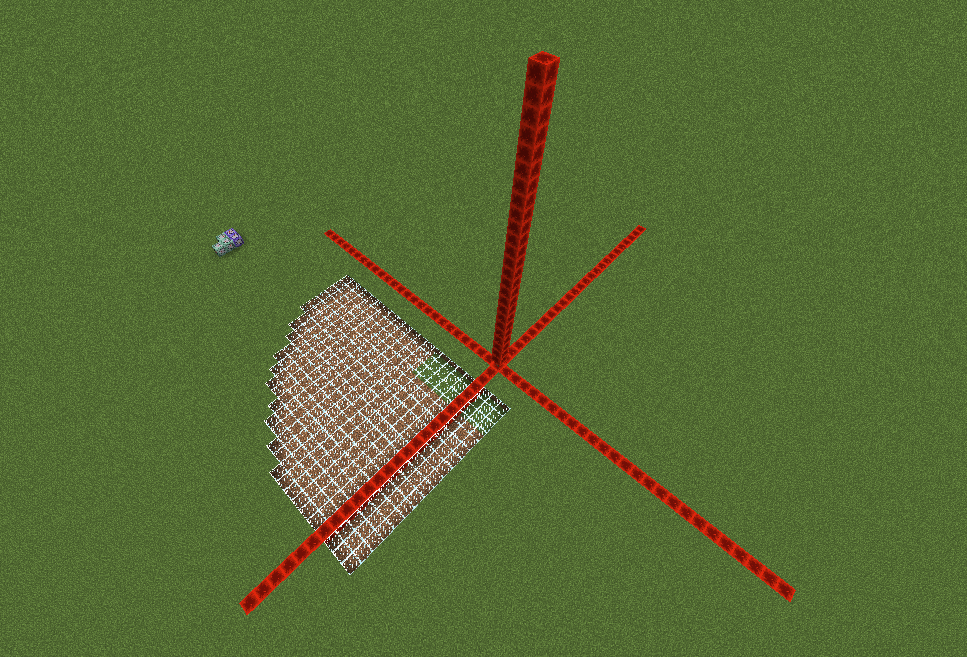
Uploading a graphics made by [Mod] Skylinerw showing the current r=0 and r=1 shape.
Directional bias of c visualized in an image by [Mod] Skylinerw.
CB outputs the closest entity. As you can see, it outputs the AS whereas it should output the player, because it starts to measure from its edge/corner, not from its middle.
If the player in this image were to move a little bit more to the right, the CB would finally detect him as the closest entity.
@[Mod] Skylinerw yeah ok using the fact that a minecraft world is only 60000000 * 255 * 60000000 blocks big it can be done.
You got me there, I didn't think about that.
If my suggestion creates performance problems it might be better to leave it as it is, but if there is an implementation that does not create performance issues it could be a better alternative to Skylinerw's command.
1. this most likely always has been this way, as stated by [Mod] Skylinerw before
this works the same way in 1.8.8These are the following tile entities that have an update function called (1.8.8)
2. watch your language!
[Mod] Skylinerw right, I'm just blind 
[Mod] Skylinerw I actually see no reason why they are, as far as I know, only gamerules have capitalization in them, I'll leave it open for another mod/mojang to decide.
[Mod] Skylinerw true, resolving
run_command is run_command, if it's in tellraw, a book or a sign doesn't matter at all, the book is not corrupt, never has been, the tags are still the same as what you provided, the command is simply too long to be player executed, the current message is intended, and any change to this would be a feature request and not a bug, go to reddit with this, because how the run_command in all of these objects function as of now, is the intended way.
also, I never mentioned MC-70317, and that one is still open, and unsure if intended, mojang will decide on that one.
If you still don't understand what I'm trying to say, read [Mod] Skylinerw's comment before replying again
[Mod] Skylinerw I'm leaving this open as it's kind of odd that they don have it, considering they do have the ArmorItems and HandItems tags
Indeed [Mod] Skylinerw.
Duplicate of MC-11571 for that exact reason.
Edit: Reason previously described in this comment is not the reason for this bug as [Mod] Skylinerw pointed it out. The reason is now contained in the description of MC-80893 and removed from this comment to prevent any confusion.
@[Mod] Skylinerw what about having a local variable which stores the new item in the main hand. Then after the for loop finishes the attributes of this item are applied. Like you said for switching to the offhand this should not be a problem.
Please do not use the comments to discuss, take discussion to the discussions page on reddit.
As weighted pressure plates have to be changed now that the decision about this gamerule seems final, please participate in a discussion in this Reddit-thread here what your ideas for a change for weighted pressure plates would be so they'd be of use again for the technical community.
1.11 will introduce the new gamerule "maxentityCramming" which will be "ON" by default and set to "24".
With this default-ON-gamerule not more than 24 entities at one time will be able to be in one spot, more than 24 will suffocate and die.
"maxentityCramming" is a pure performance gamerule.
While it is very useful for the Creative community and also for servers which suffer from entity lag, it should be set to "0" by default = OFF.
Reasons
As it's only a performance gamerule, servers and singleplayers who use commands should set the amount of wanted entities in one spot on their own account, if they want to do so.
As there are also players and servers though which are "dedicated decidedly Vanilla Survival" and do not make use of any commands including gamerules as this would go against "Vanilla Survival", this will force them to play with that gamerule and its 24 default entities in one spot.
Those Vanilla players and servers will not be able anymore to e.g. make proper Elytra boosters, Elytra Launcher stations across their world (mainly Overworld+The End dimension), which will be a negative change for those Vanilla players and servers and their infrastructure by losing this awesome feature.
Elytra is very much loved, but only with Elytra Launcher stations they can be really enjoyed and can be practically used on Vanilla Survival servers and Singleplayer worlds.
As 24 entities will basically never be in one spot without a player being responsible for it, "maxentityCramming" gamerule should be OFF by default, as it's only really useful for non-Vanilla-servers and the Creative Tech community. If a player is willingly responsible for the accumulation of mobs in one spot, it's up to their decision how to deal with possible lag and, dependent on the quality of their hardware, set maxentityCramming accordingly. If a player willingly accumulates mobs in one spot and does not want to use that gamerule, it is, including possible lag, also their very own decision. This highly individual adjustment and decision should not be pre-made for them.
Again: The gamerule can absolutely help servers regarding their performance if they want to.
Servers that use plugins and/or commandblocks do have admins who also know commands well enough and can set "maxentityCramming" themself if they see the need for it.
Also, what are *iron pressure plates then still for?*
An iron/heavyweighted pressure plate changes the signal strength it gives off depending on the number of entities on it.
Signal strength of 15 is reached with 141+ entities.
The default of 24 entities with the "maxentityCramming" gamerule renders them pretty much useless, even more so as golden/lightweighted pressure plates detect only up to 15 entities.
There was the argument that at least those pressure plates would work as intended for those people who use commands to turn off that gamerule.
As the technical community is the main target group to use these pressure plates, and as those who really can make use of those pressure plates are nearly all "decidedly Vanilla" players who would never use commands for their Vanilla worlds, it makes no sense to deprive them from making use of those pressure plates, as they are nearly the only ones using them in the first place, as highly technical players with "many entities being crammed in one spot intentionally".
I'm not a native English speaker so I cannot word it so well like [Mod] Skylinerw can, whose comment over on Mojira-Reddit I will thus mostly quote, as he mentioned many things I and some of my technical-player-friends I showed it agree to:
Regardless of if the gamerule's primary objective is to boost performance or affect gameplay, it's not taking into consideration that it's blocking another feature that already existed.
Why have weighted iron plates in the game if, by default, 12 of its 15 states cannot be used without cheating?
Not to mention that gold plates already encompass some of the remaining available states for iron, even further reducing the usefulness.
A singleplayer-playing, cheats-off player taking notice of the useless weighted plate feature has no way of fixing it without using a third-party tool, which does not mean that that player knows that such tools exist and how to use them. Nor does that necessarily mean they are even aware that there is a way of fixing it.
Driving the player to using a third-party tool to fix a feature (that was previously fully available and could otherwise have been defaulted to fully available) is not something that should happen.
That also does not mean that players should "learn" to enable cheats on world creation.
Enabling cheats is optional, not a requirement for being able to fully access all survival features.
Weighted pressure plates were not cheating, after all.
The primary issue I have with it is that a cheat, by default and with no recourse for some, blocks a survival feature that was previously accessible, and requires cheating or (for some) requires third-party tools to access it again.
Keep in mind that weighted plates are not restricted to the technical community.
Everybody has access to this feature, not just a single sub-community, so it does impact everybody (including non-technical players following a tutorial that makes use of weighted iron plates).
An existing and intended feature (weighted iron pressure plates) is being hindered by default for everybody and requires cheats to access them fully again.
Possible solutions to this issue are to change the default value of the gamerule up to the highest value that iron plates can detect.
The popular solution is to change the default of the gamerule to 0 and let players/server admins decide when to use it, while iron plates become fully accessible again.
However, none of those solutions work when the gamerule is changed.
What would probably be an unpopular solution is to remove iron plates entirely, since in their current state, they are near-useless.
I'd like to add to SkylinerW's last sentence here that a removal of weighted pressure plates in favour of the "maxentityCramming" as default-on-gamerule would not only make all technical contraptions which make use of them void, but I'm sure that the reaction of the community would be even more negative than it already is, and they'd oppose that gamerule in the way it is planned of being implemented even more.
Furthermore, as we can see in MC-107171 this gamerule is bugged, entities also take too much damage etc., so it needs to be changed anyway already.
Possible Compromise
As suggested by [Mod] Torabi:
| I think a good case can be made for defaulting to 0 for existing worlds, to avoid damaging contraptions that players have already made. |
I personally could live with that, but I'm not going to have the arrogance to want to decide this for everyone, I only try to mediate between the community and Mojang/Microsoft.
Thus:
Addition to the compromise
Upon creating a world in 1.11+, one could have an option to chose whether maxentityCramming should be OFF/0, or default/24, or, if also possible, inserting an individual value.
In order to figure whether or not the community would be fine with Torabi's idea, I created a poll.
Poll for "worlds created prior to 1.11 should have "maxentityCramming" default-off"
https://twitter.com/LapisDemon/status/784755247596134401
If there is an important reason which I don't see, why "maxentityCramming" was introduced as default-on with the value of 24, and not as an option, please do tell.
On which grounds has it to be "on" and set to "24"?
I know many not only Vanilla Survival players would like Mojang to reconsider adding this gamerule in 1.11 as default "on".
If possible code-wise and if the community would be fine with it, please consider adding some sort of gamerule-selection for this for worlds being created in 1.11+.
Thank you in advance for considering it.
[Mod] Skylinerw #DidNotRealise Thanks for telling me!
[Mod] Skylinerw Thanks!
[Mod] Skylinerw Thanks for the correction.
In 17w06a it acts like described in the report. But like [Mod] Skylinerw said this is very likely intended.

@[Mod] Skylinerw Maybe what Aaron Atkins was referring to is the fact that the change of time on a clock in an item frame cannot be detected currently, the event (questionable) not causing a block update. Which detecting the change of time event with a clock would be a nice feature I think.
The bug
Villagers are not breeding in test where houses are at same level as villagers. Created 20 houses around two villagers, made them willing by trading and stacks of bread, but they do not breed any villagers after a long test period. Villagers do not seem to be recognizing houses in generated villages at night as well. They do trade food. Observed a villager running away from a village with doors at night being chased by two zombies.
Workaround
For the time being, a possible (but probably annoying) work-around would be to ensure the villagers are 4 blocks below and 16 blocks in the negative X and Z directions from a door in order to create a village at the proper location.
Code analysis
Villages are created successfully, but are immediately destroyed because the center of the village is much further than the valid door. Using MCP 1.12 for names, and having modded a decompiled 18w05a to ensure it works, this appears to be a one line fix.
In 1.12.2, net.minecraft.village.VillageCollection.addDoorsAround(BlockPos central) creates immutable BlockPos objects for the positions around the villager's location where it should search for doors.
Now in 1.13, it uses net.minecraft.util.math.BlockPos.getAllInBoxMutable(int, int, int, int, int, int), which for all intents and purposes does the same thing except that it uses a single mutable BlockPos whose coordinates are changed when the next item is requested from the iterator. The loop finds the door correctly, but stores the mutable position in a list of doors to be added later to the village (call to VillageCollection.addToNewDoorsList(BlockPos)). Instead an immutable copy of the position should be passed to addToNewDoorsList since otherwise the found door positions change once the next positions are requested from the iterator resulting in all doors "found" at the last search position and therefore being removed from the village since there is (most of the times) no door.
Mappings
| MCP name | 18w06a name | 18w06a MCP equivalent name |
|---|---|---|
VillageCollection.addDoorsAround(BlockPos) |
afr.b(ec) |
see MCP name |
VillageCollection.addToNewDoorsList(BlockPos) |
afr.a(bfj, ec) |
VillageCollection.addToNewDoorsList(IBlockState, BlockPos) |

[Mod] Skylinerw Oh, sorry my bad! It's indeed still in 1.13.1.
I used /execute if entity @e[type=minecraft:villager,tag=testVillager] to test it rn it and failed.
See MC-105595.
You must use the interface to cause a file to be created. Saving via redstone only saves to memory for security purposes. - [Mod] Skylinerw
Can confirm in 24w06a.
@[Mod] Skylinerw Eight-year-old comment, but it seems to me that the "correct" solution would be to do attribute application in two passes. First, go over all the slots as you described, but only process item removals. Then go over all the slots a second time and process all the item additions.
Items confirmed that can be broken with fists in adventure mode (1.4.4/1.4.5):
Glass
Glowstone
Ice
Saplings
Tall Grass (and related)
Flowers
Mushrooms
Ladders
Lilypads
Glass Panes
Mob Heads
Levers
Buttons (stone and wooden)
Redstone torches
Torches
Vines
Tripwires
Repeaters
Redstone
Redstone Lamps
All rails
Beacons
Snow (ground, not block)
Paintings/Item Frames
Flower Pots
String
Comparators
Carpets
Seems a bit odd being able to break some of these with bare fists. Not sure if it's intended; personally, in the case of glowstone/lamps/redstone, I hope not!
Agreed with Gerrard. Perhaps a method to add blocks to a whitelist via an NBT editor. The blocks added would be those that can be broken; so by default, if nothing is added to the whitelist, no blocks can be broken whatsoever (though this may clash with the "right tool for the right block" bit; perhaps that could be a gamerule instead?).
@Gerrad Mm, I included the item frames and paintings due to a biased opinion that they shouldn't be broken with fists . Wasn't aware about making them invulnerable though, thanks for that!
Confirmed. If redstone is placed first, followed by the detector rail, the redstone stays off until updated as well, in which it will turn on incorrectly.
It should be noted that these new items can be broken with bare fists in 1.6.1:
Wool Carpets
Comparators
Still not seeing why.
Confirmed, occurs within singleplayer and mutliplayer, and all player selectors (@a, @r, @p). Adding parameters makes no difference.
Confirmed as well. It's likely because what's being issued through the 'run_command' action is being run through the player themselves. Having a shorter /tellraw command within the run_command value allows it to work. The command blocks don't have a character limit, but players do.
Confirmed as well, with hoppers and chests. Assuming this happens with all other container blocks. Trying out other blocks with other NBT tags, such as a command block with a CustomName tag, works just fine.
I haven't heard anything about invisible NBT tags. There's a nifty third-party program called NBT Explorer which lets you view all of the tags a block has. I've matched the /testforblock tag for tag with a chest and it made no difference.
Confirmed Jacomere's skull issue. The "ExtraType" will produce a signal correctly if it matches the skull owner of the placed head (didn't even need to input a SkullType, but doing so gives the error of course). I went further and checked the rotation (Rot) tag. I matched the rotation of the tile entity with the /testforblock with no success; gives the "did not have the required NBT keys" error.
It appears that noteblocks have issues as well. Not sure if I should open a new bug report since it's related. I'll edit this comment if I find more blocks that have these issues.
-Noteblocks with the 'note' tag (determines the pitch of the note). Created a block with a note of 5, and tested for a note of 5 with a failure. The 'id' of 'Music' alone works, adding the 'note' fails.
Confirmed to still be present in 13w39a.
Confirmed.
I wasn't able to reproduce it. I changed the weather to rain/thunder and was able to change it back to clear using all 3 methods above. Could you describe how to reproduce it?
As of 13w41a this has been confirmed fixed.
Still present in 13w41a.
Confirmed for 13w41a
Confirming Paul's comment. Very ambiguous way of doing it, but it actually works. One would hope that it'd be easier than doing it that way, so I say the report should still be open unless there's a specific reason it has to be done that way. You can /setblock the same exact command while removing the 'b' and 's' successfully.
EDIT:
Checked noteblocks as well using Paul's method, and it worked.
Still doesn't work as of the pre-release.
Paul Fulham posted a comment concerning an oddity with tag types here: https://mojang.atlassian.net/browse/MC-30976?focusedCommentId=113593&page=com.atlassian.jira.plugin.system.issuetabpanels:comment-tabpanel#comment-113593
Sadly this has no affect on the DropChances.
@Dustin
The damage value may vary depending on its facing.
It seems I made my own typo testing Paul's comment; the DropChances works adding the 'f', as Dinnerbone has clarified. My apologies!
You're missing the Damage tag:
/testforblock ~ ~1 ~ furnace 4 {Items:[0:{Slot:1b,id:263s,Count:1b,Damage:0s}]}This isn't a duplicate, this is a separate issue. When the player clicks on a tellraw run_command clickEvent in the chat, there will be a confirmation output that the PLAYER has run this command (same as when a player manually types a command on a server). commandBlockOutput affects command blocks only. This might be working as intended as far as technicalities go, but one would expect the ability to remove that output, similar to command blocks.
I've included a quick image describing this. The first one shows commandBlockOutput being true, while the rest is when it is false.
Confirmed for snapshots 13w47a/b/c.
Confirmed for snapshots 13w47a/b/c.
Confirmed for snapshots 13w47a/b/c.
Confirmed for snapshots 13w47a/b/c.
Confirmed for 1.7 and snapshots 13w47a/b/c, although it behaves differently now. Instead of being kicked off the server, your text output will either be trimmed, resulting in the loss of text, or you will receive the error "Invalid json: End on input".
There is already a report that contains this particular bug:
MC-31047Confirmed for 1.7/1.7.1/1.7.2 and all current 1.7.3 snapshots (up to 13w48b). Setting health through any of the tags, be it Health (doesn't work for any mob because HealF is set automatically in /summon commands, which overrides Health), HealF (this is current health, so setting it higher than the maxHealth attribute won't work; setting it to 1 works for other mobs, but not slimes), nor the maxHealth attribute (should raise maximum health but does not).
Other attributes don't work either. Likely related to this, the attackDamage attribute doesn't apply the bonus strength.
I don't know for certain, but I'm assuming this is because slime health and damage are calculated via the Size tag AFTER the application of attributes and HealF, thus overriding the attributes and HealF. That or these tags are just completely ignored with slimes.
The movementSpeed does not work either, but this is probably because slimes jump rather than walk, which the attribute doesn't affect to begin with. followRange is also bugged, but it's wide-spread with other mobs as well (see: https://mojang.atlassian.net/browse/MC-32579 )
knockbackResistance seems to be the only attribute that works with slimes.
Confirmed for 1.7.2 and 13w48b, both in launcher version 1.3.4.
Confirmed. Red mushrooms also present this issue, while brown mushrooms do not. I will update this comment for other blocks I find that can't be tracked.
EDIT: Confirmed for 1.7.4. Now present up to 14w06b. The exception is "flower", which has changed to "yellow_flower" and also works. The rest still do not.
Blocks you mine should be mined with the proper tool in order for it to count towards the score.
Blocks that are available to track but do not increment score:
1. minecraft:grass (2) - Not even with silk touch
3. minecraft:red_mushroom (39) - Brown mushrooms work, these do not.
4. minecraft:lit_furnace (62) - Counts as a furnace instead (61)
5. minecraft:farmland (60) - Counts as dirt (3)
6. minecraft:double_stone/wooden_slab (43/125) - The doubles count as a single slab (44/126)
Blocks that are listed as "Invalid objective criteria type":
1. minecraft:bed (26)
2. minecraft:mob_spawner (52)
3. minecraft:redstone_wire (55)
4. minecraft:wheat (59)
5. minecraft:standing_sign (63)
6. minecraft:wooden_door (64)
7. minecraft:wall_sign (68)
8. minecraft:iron_door (71)
9. minecraft:reeds (83)
10. minecraft:unpowered_repeater (93)
11. minecraft:powered_repeater (94)
12. minecraft:trapdoor (96)
13. minecraft:pumpkin_stem (104)
14. minecraft:melon_stem (105)
15. minecraft:nether_wart (115)
16. minecraft:brewing_stand (117)
17. minecraft:cauldron (118)
18. minecraft:flower_pot (140)
19. minecraft:carrots (141)
20. minecraft:potatoes (142)
21. minecraft:unpowered_comparator (149)
22. minecraft:powered_comparator (150)
Note: the above lists are not necessarily complete and will continue to be modified if more blocks are found
Confirmed for 1.7.4
EDIT:
List of mobs the movementSpeed works with and doesn't work with:
Command used for all of the mobs listed below:
/summon Creeper ~ ~1 ~ { Attributes:[ { Name:generic.movementSpeed, Base:5 } ] }movementSpeed DOES work with:
1. Creeper
2. Skeleton
3. Zombie
4. Witch
5. Pig
6. Sheep
7. Cow
8. Chicken
9. Wolf
10. MushroomCow (Mooshroom)
11. Ozelot (Ocelot)
12. EntityHorse (Horse)
13. Villager
14. VillagerGolem (Iron Golem, also contrary to the report, this does work)
15. SnowMan (Snow Golem)
16. WitherBoss (Wither)
movementSpeed does NOT work with:
1. Spider2. PigZombie (Zombie Pigman)3. CaveSpider4. Silverfish5. Giant (seemingly not a supported mob anyway)
6. Slime (intended: it jumps to move)
7. Ghast (intended: it flies to move)
8. LavaSlime (Magma Cube, intended: it jumps to move)
9. Bat (intended: it flies to move)
10. Squid (intended: it swims to move)
11. EnderDragon (intended: it flies to move)
movementSpeed behaves strangely with:
1. Enderman (its speed is increased but seems to hit a max, moving much slower than other tested mobs but still faster than normal)2. Blaze (same result as Enderman)List of mobs the "Speed" potion effect works with and doesn't work with:
Command used for all of the mobs listed below:
/summon Creeper ~ ~1 ~ { ActiveEffects:[ { Id:1, Amplifier:50, Duration:1000000 } ] }The "Speed" effect DOES work with:
None
The "Speed" effect does NOT work with:
All
Confirmed for 1.7.4 and 14w02c
Present in 1.7.4. Now present in 14w02c. Now present in 14w06b/14w07a.
Confirmed for 1.7.4.
Still present in 1.7.4. Now present in 14w02c.
Still present in 1.7.4. As well, another bug report exists but also includes information regarding the movementSpeed attribute: https://mojang.atlassian.net/browse/MC-33110
Confirmed for 1.7.4. Now present in 14w02c and 14w03a.
Confirmed for 1.7.4
Present in 1.7.4
That sort of fix is lazy patching that should not be promoted.
Dropped items have a "Thrower" NBT tag, which exists only when a player drops an item themselves, storing the name of the player that dropped the item. A better fix would be to only apply the "PersistenceRequired" tag to mobs picking up items if the item was dropped by a player. That, or prevent them from picking up items that weren't dropped by the player at all. That information is already stored on the item, so it could be a viable fix.
@Carl Nathans Since you're using player heads, just need to be sure: have you specifically renamed the item manually? Or is it owned by a specific player? If it's owned by a specific player, you need to use the "SkullOwner" tag, the "Name" is for custom displays.
Can confirm this for 1.7.4.
Since 1.7.4's small crashing via long messages fix, the character limit within the "value" tag has been 100 characters, which I've confirmed on numerous occasions when both creating my own commands and helping others with theirs. This can also be observed by copying a 101-character long string of text and pasting it into the chat box; the last character will be trimmed off.
Good idea. Tried it, and unfortunately the tag-type turns into a string.
I can confirm the /effect and /gamerule commands are still affected in 1.7.4, but don't have the resources to test the /scoreboard one.
A hopeful heads-up: https://twitter.com/jeb_/status/420942646950260736
With this addition, it sounds very plausible that the method of destroying blocks is being changed, which may bring a close to this bug. With this, map-makers can manually assign tools to break specific blocks for that individual tool. This would also mean you could have two pickaxes that can mine different blocks, but not the same blocks. Won't know if this is merely an addition or a widespread change to how adventure mode works, until the first snapshot arrives.
Fixed as of 14w02a! Players in adventure modes cannot place OR break any blocks, unless a tool with specified NBT tags have been provided by the map maker. Source: https://mojang.com/2014/01/minecraft-snapshot-14w02a/
Can confirm.
Confirmed.
This is a bug, @e was introduced in 14w02a as a method to select entities. Using the command provided will spam the chat for every entity existing in the world that isn't a player.
Confirmed. As stated by Dinnerbone, a value of -1 would select unlimited blocks, so this certainly isn't working as intended: https://twitter.com/Dinnerbone/status/421323155941392384
Present in 13w02a/b/c, but with a slight twist: mobs summoned with the speed and slowness effect using NBT tags will not gain the speed, but if they are given the effect through the /effect command using the new @e selector, the speed does work:
@Ezekiel I can confirm that the Damage tag in this is fixed, but can also confirm that dataTags are still ignored.
Confirmed for 1.7.4
Confirmed for 14w02c
Confirmed for 14w02c
Confirmed for 14w02c
Confirmed for 14w02c/14w08a
Confirmed for 14w02c
It did. Water decreases the light level, and during the night, it becomes just dark enough to turn the grass into dirt. This has been used a lot in the past for day/night detectors. Thus this works as intended.
Confirmed. Slimes that have a negative Size value will instead have their Size tag defaulted to 0, even when labeling the tag-type as integer.
Confirmed.
This is unrelated to the "Motion" report. This is more of a rendering issue; as of 14w02c the SmallFireball and WitherSkull are summoned and exist, but will not be visible (even when relogging). They do take on their correct velocity, you just can't see where they are.
This is intentional. DropChances at 1.0 or lower will randomize the durability. If the DropChances value is greater than 1.0, the durability will be what it has been set to. This is used for when mobs pick up player items, so the players aren't getting random durability damage to their items when they reobtain their stuff.
So changing the value to 1.1f will work.
The command syntax is incorrect. The 'ench' tag was not closed correctly, and the items that were intended to be armor ended up being different and invalid enchantments on the first piece. The 'base' tag should also be capitalized to 'Base'.
The fixed command which works properly:
/summon Zombie ~ ~ ~ {Equipment:[{id:276,tag:{ench:[{id:16,lvl:2}]}},{id:306},{id:307},{id:308},{id:309} ],CustomName:"Guard",CustomNameVisible:1,Attributes:[{Name:generic.followRange,Base:1}]}When the enchantment 'id' tag reaches 256 or higher, the game will crash upon the entity being hit.
It's not the fact that the brackets were misplaced (even though they were), it's because the command is then trying to assign an enchantment with a ID higher than 255. Any enchantment IDs higher than 255 will initiate the crash.
Confirmed for 1.7.4 and 14w02c.
What specifically causes this crash is the missing "Name" tag. All other tags can be withdrawn, even the "AttributeName" tag. You can even include a completely blank modifier and it will crash:
/give @p cake 1 1 {AttributeModifiers:[{}]}And the following will not crash, as the "Name" tag is present:
/give @p cake 1 1 {AttributeModifiers:[{Name:"InsertName"}]}Confirmed but occurs strangely in 14w02c. You can teleport dead players if you use exact names:
But if you use any selectors (@a, @p, @r, @e), the command block does nothing, and no error is produced:
An error does occur when you attempt to teleport any entity to a dead player using the following:
Error:
However, same as above, this one will work, teleporting the entity successfully to the dead player:
Using the following doesn't work either:
So I'm unsure if it's a different bug or if it's an incomplete fix.
Redstone torches are also affected in a way related to this. If the redstone torch is facing north or west, it will not be cloned at all. Doesn't occur with normal torches, unsure what other blocks are completely ignored based on their directional facing.
You need to label the modpack, in which case is "minecraft":
/testfor @e[type=ItemFrame,r=4] {Item:{id:minecraft:writable_book,Count:1b,Damage:0s}}You also are not required to include the Count or Damage but I have left them in there in case they were intended.
Essentially a duplicate of/related to: https://mojang.atlassian.net/browse/MC-30976
You have not labeled the tag-types, which are required in this case. For your command (prior to 14w03a):
/testfor @e[type=Item,r=200] {Item:{id:351s,Damage:5s,Count1b}}14w03a+:
/testfor @e[type=Item,r=200] {Item:{id:minecraft:dye,Damage:5s,Count1b}}That is for the root syntax for commands such as /give; it is required when accessing pre-existing NBT tags in dataTags. The game saves the items with "minecraft:" as the suffix to all items, while the /give command will apply it as the default if you don't.
Confirmed for 14w03b. The new spawn chunks correct themselves when you save and exit and return in singleplayer, and when you shut the server off and back on for multiplayer.
Confirmed, also occurs with projectiles such as arrows.
Confirmed. They also do not spin in fancy graphics, but you can still see the item itself when facing any direction.
Can confirm. Occurs with all tile entities, such as chests and beacons, so the title should be updated to adhere to that.
@Andrew
You do not need to include the / for command blocks. You are using the latest snapshot, 14w04a? Are you using the "replace" method or "destroy"? It only occurs with "replace".
14w03 has switched over to the new item format. You have to label the correct item ID, complete with "minecraft:":
/testforblock ~ ~+1 ~ chest 0 {Items:[0:{Slot:0b,id:minecraft:stone,Damage:0s,Count:1b}]}Confirmed Zakery's statement. Items will still not rotate in fancy graphics, and are now completely invisible in fast.
Doesn't seem to have been fixed in 14w04b, issue still occurs with all tile entities. Any further confirmations?
The bug has been marked fixed for a future version, so we don't need to confirm anything further for 14w04b unless it's information not already provided; though I can confirm that uniquely-shaped items are only visible when facing north and directly downwards. And a quick correction which concerns the attached image: XP orbs are not items, they are separate entities.
Yes this is intended, items provided through /give are instead summoned as entities at the players feet. Players in spectator mode are not allowed to pick up item entities.
Disregard this, duplicate of: https://bugs.mojang.com/browse/MC-46430
Confirmed.
The correct syntax is:
/summon <entity> X Y Z {dataTags}For your example:
/summon Item ~ ~1 ~ {Item:{id:magma_cream,Count:1}}Can confirm, also occurs in multiplayer. Keep in mind that blocks are not entities, but you are able to interact with the world as you normally would after you've reconnected, meaning able to pick up items and push entities.
Players in spectator mode can look into tile entities that other players can interact with. The crafting table is client-side, so it would be pointless to be able to view it. Essentially this is intended, so players in spectator mode can see how other players are interacting with the world.
The syntax is incorrect; you're creating an item that has a defaulted Count of 0, meaning the item doesn't actually exist. The fix:
/blockdata ~ ~-1 ~ {Items:[ {id:"nether_wart",Count:1}Fixed for 14w05a.
This is intended, you aren't meant to stop flying. See: https://twitter.com/Dinnerbone/status/427935623987859456
Confirmed for 14w05b and now 14w06a/b. Present in 14w07a/14w08a.
This issue appears to still be preset in 14w06b. Can anybody confirm? The only thing I'm using is:
When I kill myself and watch the comparator for output, it turns off.
Confirmed for 14w06b.
Confirmed fixed for 14w06a.
Still present in 14w06b.
Fixed in 14w05a.
Confirmed for 14w06b as well.
The "movementSpeed" attribute has been fixed for all applicable mobs. The Speed and Slowness potion effects still do not work but only when applied through dataTags in the /summon command. The /effect command will work, though. No idea what that's about.
A bug report specifically concerning the Speed and Slowness effects can be found here:
MC-32575This has been fixed in 14w06a.
Present in 14w06b.
Present in 14w06b/14w07a.
Present in 14w07a.
And this has now been fixed in 14w07a. A new argument to the /scoreboard syntax called "test" has been added:
You can prefix fake players with a # symbol so they don't show up on any scoreboard displays, but is not required for testing. An example command:
PrimtedTnt does not have an "ExplosionRadius" tag. As well, the proper syntax is:
/summon <entity> X Y Z {dataTags}That's because it doesn't necessarily exist. The "Count" tag, if not defined, defaults to 0, meaning you have 0 of that item in your inventory. You need to apply the "Count" tag of 1 or higher:
/blockdata ~ ~4 ~3 {Items:[{id:diamond_axe,Count:1}]}The /kill syntax is:
So no, you cannot insert dataTags into the /kill command.
You need to specify a radius if you're going to specify coordinates. For exact coordinates, you use a radius of 0:
A large number of tags require you to label their tag-types, which are listed on the wiki next to the corresponding tag:
Health: testfor @e {Health:20s} HealF: testfor @e {HealF:20.0f} Fire (non-players): testfor @e {Fire:-1s} Fire (players): testfor @e {Fire:-20s} Air: testfor @e {Air:300s} HurtTime: testfor @e {HurtTime:0s} DeathTime: testfor @e {DeathTime:0s} ActiveEffects: testfor @e {ActiveEffects:[{Id:10b}]} inData: testfor @e {inData:1b}AttackTime no longer appears to exist.
Your "Age" and "PickupDelay" tags are in the wrong location; you've set them within the "Item" tag, when they should belong at the root.
/summon Item ~ ~-2 ~ {Item:{id:diamond_sword,Count:1},Age:-32768,PickupDelay:32767}You can use the /execute command as a workaround:
Nope, looks to be fixed!
I can't confirm that it still occurs in 14w08a, there's no crash. Seems to have been fixed.
This is not caused by the "CareerLevel" tag, but rather, your "Career" and "Profession" combo. You've provided an invalid combo, where villagers with a profession of 4 only have careers of 0 or 1, while you've inserted 4. When you trade with the villager and exit the GUI, it attempts to update its trades based on its career. Since you're using an invalid career, the game will crash. Use a value of 0 or 1 for "Career" and you won't have issues, and can find the proper values on the wiki: http://minecraft.gamepedia.com/Villager#Professions_and_Careers
I can confirm in 14w08a.
@pecker: There is a work-around by applying a blank "LastOutput" tag, or by disabling output tracking:
/blockdata ~ ~ ~ {SuccessCount:1,LastOutput:" "}/blockdata ~ ~ ~ {SuccessCount:1,TrackOutput:0b}The /setblock command does not support replacing a specific block type. You will want to use /fill for that:
Otherwise, suggestions should go on the reddit or forums.
Talven is correct; the "Lore" tag is automatically applied when you pick-block a tile entity. You will have to manually give the item the "display" and then "Lore" tags. This is likely working as intended, as all other flag types are applied outside of the "Lore" tag and is not accessible without the use of the "HideFlags" tag, while you do have the capability of changing the item's "Lore" with /summon.
Otherwise, it would be the same as attempting to give a mob the "CustomName" tag and expect "PersistenceRequired" to be applied against the commands will, which would mimic the function of nametags.
This is how parameters work; the latest-existing parameter will always be the priority if there are multiple of it, so you cannot have more than one of the same parameter at a time. As such, feature requests should be made on the forums or on reddit.
Can confirm. A work-around is to manually apply the "Air" tag (defaulted to 300):
/summon Creeper ~ ~ ~ {Air:300}Could not reproduce. If you're using a clock to activate the command block, the command is going to continue to try to place the air block. The block will fail to be placed because there's already air at the specified location.
Could not reproduce. What are the exact commands you're using?
The tag must have the tag-type of byte labeled:
/summon Zombie ~ ~1 ~ {CanPickUpLoot:1b}You must also ensure the gamerule "mobGriefing" is set to true.
Still couldn't reproduce. I get a large lag spike due to the explosion power, but no errors occur with the /kill command before, during, or after the explosion.
The proper value for hiding "CanPlaceOn" text is 16:
give @p wooden_hoe 1 54 {HideFlags:16,CanPlaceOn:[dirt,grass],display:{ Name:"Dull Hoe",Lore:["Hoe Grass into Farmland"]}}You can find the correct values for the bit field here: http://minecraft.gamepedia.com/Player.dat_format#Display_Properties
Could not reproduce, the command seems to be correct apart from a missing Slot tag (which will default to 0 anyway).
Can confirm. Work-around would be to replace the water with an arbitrary block first, and then replace that block with lava.
You have a random whitespace in the middle of the command, after the last ~5. Fixed:
Duplicate of
MC-36191As Warren said, mobs are entities. The pick-block function is gathering tile data and placing it within the "BlockEntityTag". Entities are not blocks, nor are they tile entities. There is no support for specific mob data stored in spawn eggs, thus feature requests should be made on the reddit or forums.
I assume this is working as intended; the @e selector will now select the nearest entities and outwards. The "c" limits the number of entities to select, so "c=1" would select the closest entity, while "c=-1" would select the farthest.
You will need to paste the entire command you're using here.
This is very likely working as intended to make the @e selector work more like the @p selector.
You will need to use the new "Facing" tag which has replaced the "Direction" tag to be able to modify the item rotation correctly.
This is the intended behavior with the new villager AI. You can suppress new trades by applying a "Career" tag (which, if set to 0, will force new trades to be created), as well as applying some unknown value to the "CareerLevel" tag (100 seems to work just fine):
/summon Villager ~ ~1 ~ {Profession:0,Career:1,CareerLevel:100,CustomName:HORSE,CustomNameVisible:1,Offers:{Recipes:[{maxUses:1000,buy:{id:264,Count:1},sell:{id:329,Count:1,Damage:0}},{maxUses:1000,buy:{id:266,Count:7},sell:{id:418,Count:1,Damage:0}},{maxUses:1000,buy:{id:265,Count:7},sell:{id:417,Count:1,Damage:0}},{maxUses:1000,buy:{id:264,Count:7},sell:{id:419,Count:1,Damage:0}},{maxUses:1000,buy:{id:266,Count:1},sell:{id:420,Count:1,Damage:0}},{maxUses:1000,buy:{id:266,Count:13},sell:{id:421,Count:1,Damage:0}},{maxUses:0,buy:{id:7,Count:1},sell:{id:7,Count:1}}]}}The "Direction" tag has been replaced by the "Facing" tag in 1.8. You will have to switch your tag out before having access to the new rotations:
/summon ItemFrame ~ ~1 ~ {TileX:499,TileY:57,TileZ:-922,Facing:0,Item:{id:lever},ItemRotation:0}Can confirm. Likely an unforeseen issue where player head items being used on the ground takes the "SkullOwner" tag and translates it into the
"ExtraType"appropriate tags for the tile entity. Since pick-blocking the tile entity provides the"ExtraType"tile data instead of "SkullOwner", there is no tag to cross-over when the head is placed.EDIT:
There's been an overhaul concerning NBT data for the skull tile entity. I've updated the wiki page with new tags ("ExtraType" is no longer present), though I don't know what all of them do (hopefully somebody with more knowledge can fill in the holes): http://minecraft.gamepedia.com/Chunk_format#Tile_Entity_Format
Makes no difference in the outcome, though.
Can't reproduce in 14w08a.
You cannot use relative coordinates in selector parameters; you can only use numerical values, excluding decimals, or characters with no spaces for strings. Feature suggestions should go on the reddit or the forums.
In survival gameplay, when the "DropChances" tag is at or below 1, this indicates the item being held was 'naturally spawned' along with the mob (for example, zombies wearing armor). Durability values on tools will be randomized when the item is dropped.
When the tag is set to any value above 1, this indicates the mob picked up items off the ground, and thus should be dropped no matter what upon their death, and their durability values should not be randomized.
So your command instead will need to have a DropChances value greater than 1 (defaults to 2.0 when a mob manually picks up an item). You should also be using the alphabetical IDs for items/blocks, as numerical is no longer supported:
/summon Sheep ~ ~1 ~ {Equipment:[{Count:1,id:minecraft:iron_axe},{},{Count:1,id:minecraft:chainmail_leggings},{},{}],Attributes:[{Name:generic.maxHealth,Base:1}],DropChances:[2.0f,0f,2.0f,0f,0f]}As well, the "doTileDrops" is unrelated, and refers to blocks being broken, not mobs being killed. "doMobLoot" will need to be set to true, of course.
Your tags are invalid; they need to follow proper capitalization. The "count" tag should instead read "Count". As well, numerical IDs are no longer supported, so you should be using the alphabetical IDs instead. Fixed command:
/summon Villager ~1 ~5 ~ {Profession:5,CustomName:Shop 3,CustomNameVisible:1,Offers:{Recipes:[{maxUses:1,buy:{id:minecraft:stone_sword,Count:1,tag:{ench:[{id:16,lvl:3}],display:{Name:"Shank",Lore:["Sharp Enough"]}}},sell:{id:minecraft:iron_sword,Count:1,tag:{ench:[{id:16,lvl:3},{id:19,lvl:2}],display:{Name:Knife,Lore:["Sharp"]}}}},{maxUsers:1,buy:{id:minecraft:bow,Count:1,tag:{ench:[{id:49,lvl:3},{id:51,lvl:1},{id:34,lvl:5}],display:{Name:"MP15",Lore:["Specialized For Only Top Of The Line"]}}},sell:{id:minecraft:bow,Count:1,tag:{ench:[{id:49,lvl:5},{id:51,lvl:1},{id:34,lvl:5},{id:49,lvl:2}],display:{Name:"FAMAS",Lore:["MIA Level. Do You Have That Type Of Skill?"]}}}}]}}That is not what the bug report is concerning, and states in the report that the tag does apply the skin correctly. The issue is the wolf not becoming hostile, even though the skin is applied.
The correct tag name is "PersistenceRequired", but is still not involved in keeping the Endermite from despawning. Instead, the "CustomName" tag, when not empty, will prevent the "Lifetime" tag from incrementing. Though I agree that "PersistenceRequired" should be the deciding factor for this.
Your command syntax is incorrect:
/setblock X Y Z <BlockID> [Damage] [Replacement Method] {dataTags}You are missing the replacement method:
/setblock ~ ~1 ~ standing_sign 2 replace {Text1:"LoL"}This is an old, intended feature; zombies are meant to be displayed as brainless, thus won't seek shelter.
Could not reproduce the issue with your first command; it does work. Ensure you have the "Facing" score of exactly 1 while you are testing. Command blocks cannot know when they have been activated by a player or not.
The /blockdata command is invalid, as it is only used for tile entities. TNT blocks are not tile entities, and PrimedTnt is a regular entity.
You should be using the valid Damage values of 0-15 for wool. Cyan wool has a valid Damage value of 9:
Turns out there's a tag for Enderman called "EndermiteCount". When the value is 15 or higher, Endermites will no longer spawn. There's a separate bug where ghost endermites will appear, but they don't actually exist. Example:
/summon Enderman ~ ~1 ~ {EndermiteCount:15}However, there is seemingly no way to prevent endermites from spawning via enderpearl usage. For adventure maps, we can fake this spawning since enderpearl usage can now be tracked, so linking the default endermite/enderpearl spawning to the "doMobSpawning" gamerule should work out.
For those looking for work-arounds in 1.8, slimes/magma cubes have had their AI updated to the new (well, old) AI. Currently (14w11b) the issue with their attributes comes from the inability to modify their "Attributes" list directly. However, you can apply the "Equipment" tag that has items that modifies their attributes after-the-fact. All attributes are modifiable including movementSpeed:
/summon LavaSlime ~ ~10 ~ {Size:4,Equipment:[{id:minecraft:stone,Count:1,tag:{AttributeModifiers:[{AttributeName:generic.movementSpeed,Name:"Reduce Speed",Amount:-100,Operation:0,UUIDLeast:1,UUIDMost:1}]}}]}The above will summon a slime that can only jump in place.
Can confirm. When a /testfor command is run via /execute and the /testfor fails, the originating command block will not provide an output (the issue concerning /execute's output superseding its contained /testfor's output was resolved). If the /testfor succeeds, it will provide an output, but only with a signal strength of 1 at max. What's expected is the signal strength to match the number of players/entities found, which it currently only outputs a max of 1, or 0 if no players/entities are found.
Still occurs in 14w11b.
This issue is still present in 14w11b.
@Gary, this is incorrect. "useItem" is for tracking the placement or usage of a block/item. "mineBlock" tracks the destruction. Tested in 14w19a, "useItem" does not track the destruction of cauldrons or mob spawners, which is what the issue is (which is still an issue in 14w19a).
Still present in 14w19a. The workaround doesn't work at this moment for:
increasing maxHealth (still works with decreasing) andboth increasing and decreasing attackDamage.EDIT: it does correctly increase maxHealth, it's just that its current health is not set to match its new maxHealth (correct behaviour), which occurs with other mobs when setting the maxHealth objective directly in the root "Attributes" tag. You'd have to run a health effect on the slime in order to get its current health to the new maximum.
Still experiencing issues with attackDamage, though.
Could not reproduce in 1.7.9. Make sure you're not using mods or Bukkit, as they can both interfere with how commands/command blocks work and they are not vanilla, which is what the bug tracker is for.
Can confirm in 14w20b.
The wiki is referring to using "text", "score", "translate", and "selector" at the same time, in which they all are attempting to create the root text to display. This is unrelated to embedding a player name within the translation arguments. You can already use "translate" and "score" within the arguments, so "selector" should be expected to follow suit.
There is a separate bug concerning the "score" tag. Though it does not concern the "selector" tag directly, it may be somewhat related:
MC-50176Quick correction: endermen do not have an "Angry" tag or related, and Zombie pigmen use the "Anger" tag instead of "Angry", though it does produce the same result of having no default hostility anyway. Very likely to do with the AI being updated and the "Anger" tag functioning correctly (determining how many ticks until the pigman is no longer hostile, in which this didn't work beforehand I believe).
Unsure exactly when this has been fixed, but it's fixed in 14w21b.
The full success seems to have been a fluke with /worldborder involvement (which actually can change the spawn chunks itself which is updated almost instantly, unless it's just more flukes). If I have a mechanism within the world spawn spamming the chat and then move the world spawn elsewhere with /setworldspawn, it takes a couple minutes but the chat spam stops and the original chunks are unloaded. However, the new spawn chunks don't seem to be loaded (so we end up with no available spawn chunks afterwards I guess? Might need further testing). So not a fix after all, my bad! Hopefully with /worldborder having this capability, /setworldspawn can be upgraded.
EDIT: Seems to be just more flukes, I can't reproduce /worldborder changing spawn chunk locations anymore. Just crossing my fingers I didn't corrupt my world somehow.
Confirmed for 14w21b. Just a note: you can place the ender eye into a frame as long as there is a frame adjacent to the target (does not matter if the adjacent one is filled). This works in any direction, so the frames could be on top of one another.
Can confirm. And no, quotation marks aren't required in the command's JSON in Minecraft, whether it's for the key or value.
If you mean the first command is having the issue, then it's working as intended. The "score_<objective>" parameter is checking maximum (so 1 or less) while "score_<objective>_min" is checking minimum (1 or more). Having both labeled will check a score of exactly 1. Otherwise I cannot reproduce your issue.
Cannot reproduce, "Unbreakable" is not the issue. You're likely applying a Damage value higher than is acceptable, which is unnecessary with the Unbreakable tag and likely working as intended.
EDIT: it's also possible it's a duplicate of this:
MC-57840Can you provide the exact command you're using? Filling in the blanks in that command works fine.
Can confirm. The NBT data of the sign after using /setblock becomes:
{id:"Sign",Text1:"{"score":{"name":"Skylinerw","objective":"TOKENS","value":"0"}}"}Thus using pick-block will grab a sign that has that data. This is probably working as intended for all I know, perhaps as a way to translate what to display.
@Robo You can apply custom NBT data to items and they won't be erased, which is an intended feature for 1.8 (doesn't apply to root entity data, though):
/give @p bow 1 0 {MAP:{special:1b},Unbreakable:1}Confirmed for 14w26b. As a shorter example:
/tellraw @a {text:"Hover",hoverEvent:{action:show_text,value:{selector:@p}}}The above should show my name upon hovering over "Hover", but instead shows "@p". And just an example showing "selector" at work, which simply displays my name in chat:
/tellraw @a {selector:@p}I can't reproduce using the command you've provided, as it does work correctly.
With the changes to the 'pages' tag having access to the JSON text component, you can use the newline character \n to insert a newline (in 14w25a):
/give @a written_book 1 0 {title:"Test",author:"test",pages:["{text:\"Line 1\nLine 2\"}"]}@Dragonmcmx - there are some requirements that must be fulfilled before it works. You must have both a book "title" and author", which cannot exceed 16 characters. This particular report fulfills those requirements, and copy/pasting the command directly works just fine with no errors.
@Dragonmcmx - it would be better if you'd provide the exact command(s) you're using if this relates to the bug report.
@dragonmcmx - Your title exceeds 16 characters, which was one of the requirements. Reduce the amount and it works fine.
Present in 14w27b.
Also in 14w27b. For those looking for a workaround, you can still modify the scoreboard.dat file itself to insert players into teams. You'll need an NBT editor such as NBTExplorer.
Ensure you have saved and exited your world. Open NBTExplorer and navigate to "world name -> data -> scoreboard.dat -> data -> Teams" and open the compound holding the team you want to add players to. Within the "Players" list of that team, add a new string tag and provide the name of the player you want to add to the team within the tag value: http://i.imgur.com/I2ajadi.png
Make sure you save the file in the editor first before opening your world again.
@Jeff, the usage of the section symbol is on its way out the door, and alternatives are being set into place (JSON text component, already seen present in signs, books, and chat). Meaning you won't be able to use your method again.
Section symbol removal: http://www.reddit.com/r/Minecraft/comments/1t6qn7/i_am_dinnerbone_a_minecraft_developer_ask_me/ce56mb5?context=3
In terms of teams, you can set your own custom prefix (and suffix), in which you'd have the ability to enter custom text with formatting of your choice. You could probably end up using that to create a portion of the fake players' name up to the last letter (which you can still apply formatting to at the end of the prefix). Currently the team prefix/suffix appears to still use the section symbol, so that would still need to be watched out for if it becomes limited a single color only.
You have to define the tag-type (which is not necessary for all commands and tags, though is prominent in /testfor and /scoreboard):
/scoreboard players set @e[type=Creeper] OBJECTIVE 1 {powered:1b}Mojang has stated they don't intend on fixing this. See: https://bugs.mojang.com/browse/MC-30976?focusedCommentId=113895&page=com.atlassian.jira.plugin.system.issuetabpanels:comment-tabpanel#comment-113895
Apologies for the version change (just took a peek, clicking off saves it). I can confirm it's fixed in at least 14w28b, unless somebody else can still reproduce it.
I am standing directly in front of them and have them inserted into the scoreboard as a prep. What is the exact command set you're using? EDIT: very quick video example of it not working: https://www.youtube.com/watch?v=yOg8eW7hVas
Disregard as duplicate, got beaten by:MC-62134Actually that is unrelated, as it concerns other players being displayed. Odd that their players with # labels are not being shown, confusing.
#PLAYER being displayed when it shouldn't.
That would be a preemptive /testfor.
@qmagnet: appears to only inherit formatting options. clickEvents and hoverEvents are not transferred.
Yep.
Confirmed for 14w30a.
With on Searge's response here, and that @a will now target dead players correctly (including with /tp), this is essentially fixed. @p should be used instead in order to not target dead players for teleportation (and can increase number of players to target with the 'count' parameter), while @a can be used as intended for targeting dead players.
Yes, this occurs in 14w30c. For those looking for a work-around, you can use assign a "SuccessCount" CommandStat to the target of the /execute before using /testfor, but that won't be too helpful if you're already using the stats for something else.
Confirmed for 14w30c.
@Noah: the "Anger" tag is the duration of their hostility in ticks, so if you set to 1 it'll be passive near instantly. The highest value you can input is 32,767:
/summon PigZombie ~ ~1 ~ {Anger:32767}And I can confirm it's fixed from that.
10 ticks is half a second long. It may be that their AI isn't selecting a target in time. But it is the duration of their anger; check via an NBT editor and note that the value decreases over time, and they will be hostile so long as it is above 0.
Ah sorry, totally misread. I can confirm that, but it seems to be a separate issue. Theory is that when they pick a target, they will go after that target even after their "anger" has depleted (intended?). If you go out of range of those hostile pigmen, they will no longer target you once returning within range.
EDIT: I can't confirm your "pigmen don't hold grudges after death". Set a pigmen to a longer Anger duration, kill yourself (or be killed by it), and it will remain hostile towards you (until its anger depletes and you are not within range).
@Duel, I can confirm that "CanPlaceOn" works for right-clicking (while "CanDestroy" would just let you break blocks with it). In that case, I'm inclined to agree that it's an intentional implementation.
Confirmed for 14w31a.
With 1.8's villager trading update, the "maxUses" tag will increase by a random amount when trading (2 to 12 according to the wiki, which appears correct from testing). With "NoAI" set to 1, "maxUses" doesn't change, probably considering that "successful trades" can't really occur (though "uses" still increments after trading).
Well what I mean is the villager won't refresh its trades because of the "NoAI" tag. Once you finish successfully trading with a villager and exit the interface, they would normally go through the process of generating new trades and refreshing old ones (which is when "maxUses" would increase I believe). "NoAI" set to 1 prevents this process, but "uses" still increases after trading.
Though it doesn't look as if the "uses" tag is a part of the refreshing process, so I'm unsure if it's intended. If so, a guaranteed 4 billion trades is certainly well enough, as there wasn't a way to disable "maxUses" beforehand! Just have no idea how far "NoAI" is supposed to go with its duties.
Still present in 14w32d. It should also be noted that not even players in creative mode can destroy it.
For the sake of accuracy in terms of spawn chunks size as of 1.7+ (left): http://i.imgur.com/Sojhdmc.png
The red represents the area where both redstone and entities are loaded, being 13x13. The blue represents where redstone is loaded, but not entities, being 17x17. The green represents chunks that are still forced (personally I don't know the usage), maxing the spawn chunks to 25x25.
Hopefully this helps in testing and resolving.
@Aaron, the problems is the inability to define the "tag" tag in the "buy" compound to force players to provide an item that has specific extra data, such as a display name or custom data. The "Damage" value detection was originally the issue, but was fixed a while ago in the 1.8 snapshots. The report remains open for the "tag" tag, specifically for the "buy" tag. The "sell" tag has always worked as far as I can recall.
I can confirm, and did discover what the cause of this is. Here's an example stat being assigned:
The above assigns SuccessCount with player being "@p", which is the important part. Non-op'd players cannot use player selectors in the commands that are available to them, which appears to be the case when CommandStats are initiated (although it's not apparent at first since the player isn't seen running a command). The above should set the same players' score based on commands run through them via /execute, but if they aren't op'd, it doesn't.
Here's an example of a command working for non-op'd players:
Replacing the player selector with my actual name does work, and any commands run through me will set the score accordingly. Of course, this is no alternative since you can't insert unknown player names.
I should restate that this is not a bug (or at least working as intended). The command provided simply has not been structured as needed by assigning the tag its proper tag-type, as is seen in quite a few reports where people run into this issue. The link I've provided in my last comment explains that it's working as intended.