 Ice Trailer
- icetrailer
- icetrailer
- Europe/Stockholm
- Yes
- No
 MC-1319
![[Mojang] Nathan Adams](../../../data/assets/gravatar/dinnerbone.png)
 MCL-49
![[Mojang] Grum (Erik Broes)](../../../data/assets/gravatar/grum.png)



If you place a torch at the side of a block, there is a rendering bug.
Screenshot, sorry I thought I added that..
http://i.imgur.com/3qWpZ.png
If you place a torch at the side of a block, there is a rendering bug.
Screenshot, sorry I thought I added that..
http://i.imgur.com/3qWpZ.pngIf you place a torch at the side of a block, there is a rendering bug.
Screenshot, sorry I thought I added that..
http://i.imgur.com/Ciox7.png
If you look at damaged anvil and anvil in inventory, you can't see the damage on the symbol of damaged anvil
Screenshot: http://i.imgur.com/cVLYo.png
I created a world, and spawned in the ground, and died .. lol
Seed: -799531542038570814
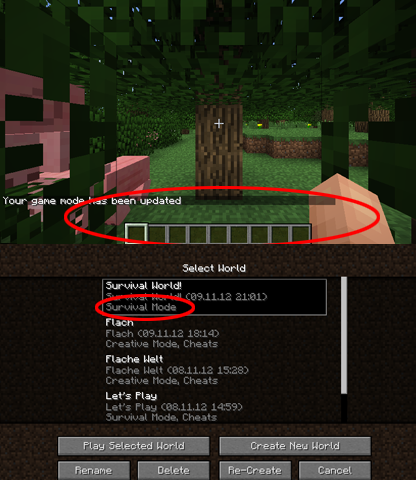
If I open a new World, for ex. in Survival, and change the gamemode ingame to Creative, and leave then the game, then in the world selection there is the default gamemode.
You get
yNullPointerException, if you press ctrl + q, but only, if you don't have anything in your hand..You get a NullPointerException, if you press ctrl + q, but only, if you don't have anything in your hand..
The letter ß in German does not match the size of other characters (and other letters)
You can't see the letter ß in German like the other letters..
EDIT: The symbols "ÀÁ È ÒÓ Ô Û ÙÚ ÌÍ Î ° € ´ ` " don't match the size of other characters
The letter ß in German does not match the size of other characters(and other letters)Some symbols don't match the size of other characters
You can't see the letter ß in German like the other letters..
EDIT: The symbols "ÀÁ È ÒÓ Ô Û ÙÚ ÌÍ Î ° € ´ ` ß " don't match the size of other characters
You can't see the letter ß in German like the other letters..
EDIT: The symbols "ÀÁ È ÒÓ Ô Û ÙÚ ÌÍ Î ° € ´ ` ß ² ³ " don't match the size of other characters
You can't see the letter ß in German like the other letters..
EDIT: The symbols "ÀÁ È ÒÓ Ô Û ÙÚ ÌÍ Î ° € ´ ` ß ² ³ µ " don't match the size of other characters
You can't see the letter ß in German like theotherletters..EDIT: The symbols "ÀÁ È ÒÓ Ô Û ÙÚ ÌÍ Î ° € ´ ` ß ² ³ µ " don't match the size of other characters
The symbols "ÀÁ È ÒÓ Ô Û ÙÚ ÌÍ Î ° € ´ ` ß ² ³ µ " don't match the size of other characters
The symbols "ÀÁ È ÒÓ Ô Û ÙÚ ÌÍ Î ° € ´ ` ß ² ³ µ " don't match the size of other characters
(NOTICE: If you copy the euro symbol and paste that in minecraft, then it will be displayed correctly! You have to create it yourself!!!)
2013-01-25_21.13.07.png
you can see the water lighter in a certain positionCan see the water lighter in a certain position
If you go to a certain position, you can see underwater brighter.
Look at the screenshots.Brighter:
http://i.imgur.com/b1CHq.png
Normal:
http://i.imgur.com/W5ihy.png
------------------
System Information
------------------
Time of this report: 4/14/2013, 11:20:51
Machine name: DANIEL-PC
Operating System: Windows 7 Professional 32-bit (6.1, Build 7601) Service Pack 1 (7601.win7sp1_gdr.130318-1533)
Language: German (Regional Setting: German)
System Manufacturer: System manufacturer
System Model: System Product Name
BIOS: BIOS Date: 02/25/09 16:53:56 Ver: 08.00.14
Processor: Intel(R) Core(TM)2 Quad CPU Q8200 @ 2.33GHz (4 CPUs), ~2.3GHz
Memory: 4096MB RAM
Available OS Memory: 3328MB RAM
Page File: 3155MB used, 3497MB available
Windows Dir: C:\Windows
DirectX Version: DirectX 11
DX Setup Parameters: Not found
User DPI Setting: Using System DPI
System DPI Setting: 96 DPI (100 percent)
DWM DPI Scaling: Disabled
DxDiag Version: 6.01.7601.17514 32bit UnicodeWhole DxDiag.txt: http://hastebin.com/posululija.tex
Whole DxDiag.txt: http://hastebin.com/posululija.tex
Attachment !
After some minutes playing Minecraft, I get huge fps drops and the log-file writes something like that: http://hastebin.com/dadiyosode.coffee
I use the unmodded clean vanilla Minecraft. No texturepacks.
I have already tested it with the lowest settings, with OptiFine and so on. Nothing helped..What can I do? It only affects in 1.5.1
I've forced a crash while these fps drops
you can find the crash report in the attachmentAfter some minutes playing Minecraft, I get huge fps drops and the log-file writes something like that: (click on "output-client.log" in the attachments
I use the unmodded clean vanilla Minecraft. No texturepacks.
I have already tested it with the lowest settings, with OptiFine and so on. Nothing helped..What can I do? It only affects in 1.5.1
I've forced a crash while these fps drops
you can find the crash report in the attachment
After some minutes playing Minecraft, I get huge fps drops and the log-file writes something like that: (click on "output-client.log" in the attachments)
I use the unmodded clean vanilla Minecraft. No texturepacks.
I have already tested it with the lowest settings, with OptiFine and so on. Nothing helped..What can I do? It only affects in 1.5.1
I've forced a crash while these fps drops
you can find the crash report in the attachment
After login at the new launcher and updating / downloading the new snapshot, the launcher closes. And restart and login doesn't help...
Maybe I took the server file into the false folder.
Where does that ha
veto be?After login at the new launcher and updating / downloading the new snapshot, the launcher closes. And restart and login doesn't help...
Maybe I took the server file into the false folder.
Where does that has to be?
Win 7 32 bit
I played around with the launcher or rather "Profile Editor" under "Edit Profile" and found an issue. I've noticed the overlapping JComboBox entries (one's font is grey, one's is black)
/Edit
I found out it was caused by using Steam. facepalm
I played around with the launcher or rather "Profile Editor" under "Edit Profile" and found an issue. I've noticed the overlapping JComboBox entries (one's font is grey, one's is black)
/Edit
I found out it was caused by using Steam. facepalm
I played around with the launcher or rather "Profile Editor" under "Edit Profile" and found an issue. I've noticed the overlapping JComboBox entries (one's font is grey, one's is black)
/Edit
I found out it was caused by using Steam.**
In relation to the other player sounds, the traveling minecart sound is too loud.
I've just experienced that @Ali Yes, I know, but that is not good, if you loose your items after teleport
I've just experienced that
nope, that's not https://mojang.atlassian.net/browse/MC-38
look at the screenshots
Yeah, but it's illogical, that you get damaged, if there is no oxygen to breath
Seed: -799531542038570814
No, it is an issue. I just tried it, and with /defaultgamemode 1, there is a "Survival Mode" in the world selection..
I think a crash report is not required, Dinnerbone has already confirmed that..
https://twitter.com/IceTrailer/status/279219893117808641
But here:
http://hastebin.com/nepaheyiba.tex
I can confirm that too, and I hat that issue, ò.ó
I have exactly the same issue! I play with 1.5.1 it's completely unmodded and I use the default launcher.
Here is the crash report which I forced with f3 + c
http://hastebin.com/wamediwilu.pl
Yes, I know, but I get exactly the same error with vanilla, clean Minecraft.
I'll recreate it a bit later with vanilla Minecraft
Edit: Added!
The error occurred again. Look at attachment
Confirmed: Win 7 32 bit
There isn't anything that helps...
Done
Uh okay, sorry.
I didn't see the tweet before I posted that.
Sorry - I searched for that report but didn't find.
awesome! thanks
Sorry, I updated my win7 32-bit to win8 64-bit and I have now java 64-bit version. It didn't appear so far at my new system.
It is a concern in the current Minecraft version 1.7.9, I don't know what about the other versions. But it's raining that often in 1.7.9 too.
Can Confirm! It's very annoying!
It's facing to west, everytime.
Update: I found out it was caused by using Steam.**
But in my opinion it's more a bug than a suggestion.
I said "In relation to the other player sounds, the traveling minecart sound is too loud.".
So I mean the relation to the other volume levels don't fit -> it's a bug
Can confirm in version 1.12. Occurrence most at leaves
OptiFine C3 fixed it. Changelog
Still these access denied errors.
It is a beauty mistake and well, it is fixable by e. g. setting a minimum window size.
Could not create the GLFW window. Could/Should be error GLFW_PLATFORM_ERROR (0x00010008). The GLFW docs say:
"A bug or configuration error in GLFW, the underlying operating system or its drivers, or a lack of required resources."
Your GPU driverd may be not okay. Try downgrading to the previous version or try to get a newer version (beta).
I have this bug with 1.14.4 vanilla.
I've attached a recording. The game won't exit from the world as described above.
No suspicious console output:
[16:37:34] [Render thread/INFO]: Loaded 1290 recipes
[16:37:34] [Render thread/INFO]: Loaded 1399 advancements
[16:37:34] [Server thread/INFO]: Starting integrated minecraft server version 1.21.1
[16:37:34] [Server thread/INFO]: Generating keypair
[16:37:35] [Server thread/INFO]: Preparing start region for dimension minecraft:overworld
[16:37:35] [Render thread/INFO]: Preparing spawn area: 0%
[16:37:35] [Render thread/INFO]: Time elapsed: 252 ms
[16:37:35] [Server thread/INFO]: Changing view distance to 12, from 10
[16:37:35] [Server thread/INFO]: Changing simulation distance to 12, from 0
[16:37:36] [Server thread/INFO]: testuser[local:E:b09970f6] logged in with entity id 99 at (5.87454050217034, 78.0, -1.1730405160678463)
[16:37:36] [Server thread/INFO]: testuser joined the game
[16:37:36] [Render thread/INFO]: Loaded 2 advancements
[16:37:46] [Server thread/INFO]: Saving and pausing game...
[16:37:46] [Server thread/INFO]: Saving chunks for level 'ServerLevel[New World]'/minecraft:overworld
[16:37:46] [Server thread/INFO]: Saving chunks for level 'ServerLevel[New World]'/minecraft:the_end
[16:37:46] [Server thread/INFO]: Saving chunks for level 'ServerLevel[New World]'/minecraft:the_nether
[16:37:49] [Server thread/INFO]: testuser lost connection: Disconnected
[16:37:49] [Server thread/INFO]: testuser left the game
@MrMuskle My account is older than 10 years and I'm logged in; please be careful with such accusations.
I tried to replicate the issue with 24w40a and it seems to be fixed with that version at least.
I also tried replicating the issue with 24w40a and it seems to be fixed with that version at least.
@[Helper] Jingy What I did was a sanitization - It's none of your business what my account is called like. As already said before, I'm using a valid, paid and neutral account for that.
And again: As already said before, I'm using an unmodded/"unmodified" Version (vanilla) of Minecraft. If you cannot reproduce the bug - okay - but think twice before accusing me about using an illegal version. One can be prosecuted for that, especially since it is known that there is NO illegal activity involved here.
–
And one big advice to all so called "helpers" volunteers in Mojang's Bugtrackers: Do NOT shoot the messenger.