Item drops sometimes appear at the wrong location
The bug
When an item lands on the edge of a block, the client sometimes makes it fall over the edge while the server leaves it on the edge. This happens because the client thinks the drop can fall based on a slightly different location and attempts to predict the future incorrectly.
How to reproduce
- Throw an item on the ground and wait until it stopped moving
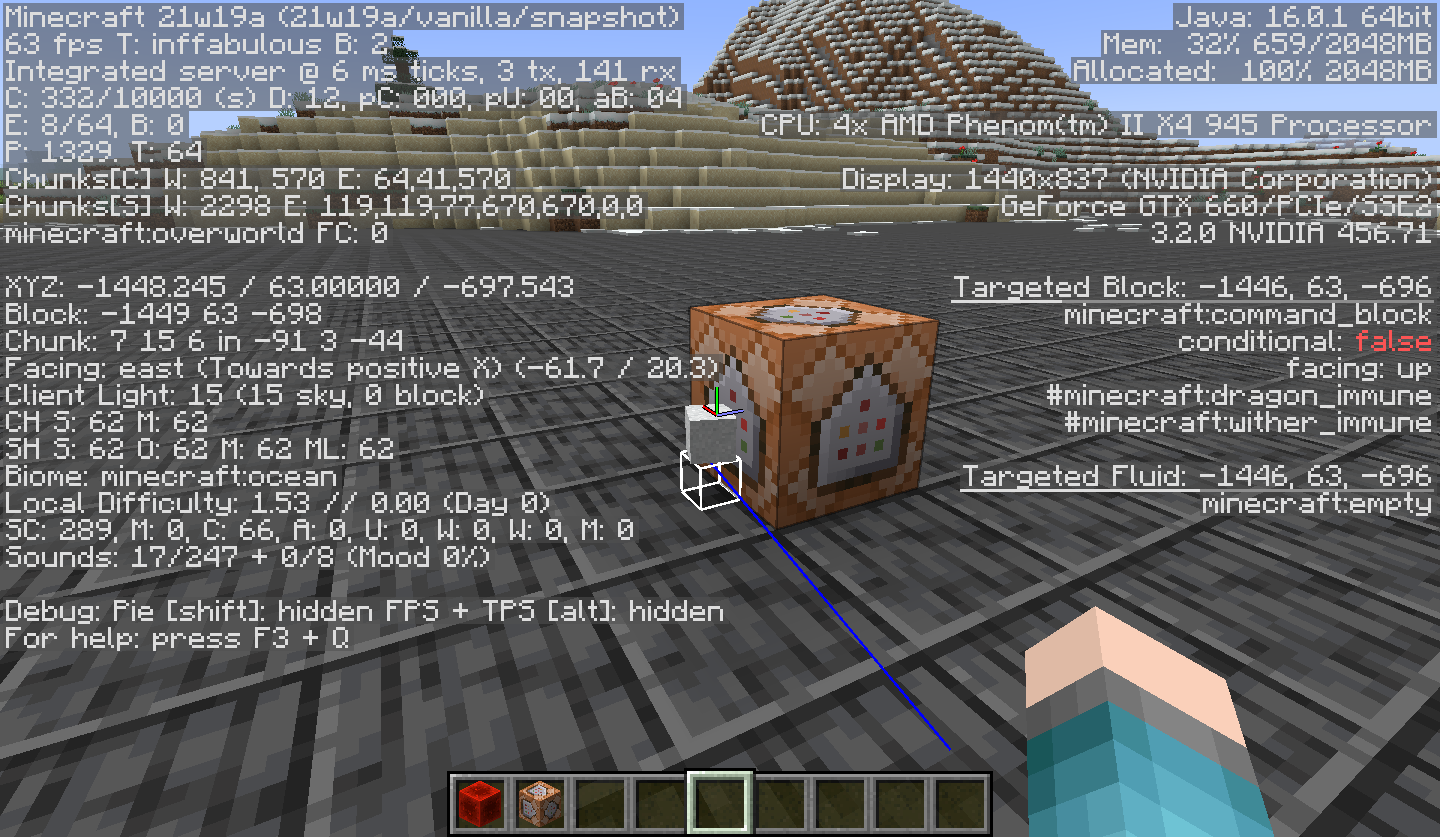
- Run in command block close to it:
teleport @e[type=item,distance=..6] ~ ~1 ~-0.6249
Code analysis
Code analysis by Marcono1234 can be found in this comment.
Fix
Fix by [Mojang] Panda can be found in this comment.
Linked Issues
is duplicated by43
 MC-7500Items can not be picked upDuplicateMC-9032Ghost itemsDuplicateMC-9109Spruce Sappling pick upDuplicateMC-9401Ghost saplingsDuplicateMC-10007Items Jumping While Mining Or Item Is Dropped.DuplicateMC-11791Coal dropping from ceiling repeatedly and disappears after a few secondsDuplicateMC-12752Dropped Items ShakingDuplicateMC-13010Item Drop GlitchDuplicateMC-14655Spirits (XP and items) twitch, move around like crazy, and sometimes spawn and fall off things constantlyDuplicateMC-15292items glitched when droppedDuplicateMC-15626itemsDuplicateMC-15987Dropped blocks fall upDuplicateMC-16960Mini block in big blockDuplicateMC-20354Looped sapplingsDuplicateMC-23220Dancing egg glitchDuplicateMC-23611A strange drop loopDuplicateMC-24273Item Falling LoopDuplicateMC-33990Block drops sometimes appear to fall infinitely.DuplicateMC-39706Cobblestone item block got stuck and keeps raining out of my house.DuplicateMC-69316I don't even know where to start with this.DuplicateMC-71907When blocks are breaken some blocks on flore are moving left and right(block is dancing)can you fix that bug please its boring.DuplicateMC-71908Blocks are dancingDuplicateMC-79486Item drops bugDuplicateMC-97408Items do not land properly when thrown on the ground, move away from original spot, and item-to-inventory visual bug.DuplicateMC-98208Torches end up far away from the place you actually broke themDuplicateMC-102470items appear to fly away when blocks are brokenDuplicateMC-119318Items can't be picked up in some casesDuplicateMC-134530Items infinitely teleport up when thrown into cobweb columnDuplicateMC-151891Dropped items moves around without stopDuplicateMC-153822Items dropped on top of a tree upon death can not be picked back up and keep moving up and down on their ownDuplicateMC-158673Falling saplings glitchDuplicateMC-195438sometimes item drops wrong directionDuplicateMC-222920items are behaving really weirdDuplicateMC-255892water can't push items at the edge of blockDuplicateMC-259534stack too many items in a small area to generate ghost item leak out from the bottom of blockDuplicateMC-266415Reminder: Item drops sometimes appear in the wrong location. DuplicateMC-1848Items from decaying leaves not able to be picked upDuplicateMC-2481items still get stuck in transparent blocks, cannot be picked up, and then disappear in less than a minuteDuplicateMC-3167Can not pick up some of witches dropsDuplicateMC-3408When you eject a record from a jukebox it renders the disk in the wrong place.DuplicateMC-3872Droped item glitch DuplicateMC-4944Of the record.DuplicateMC-5252Items fail to pick upDuplicate
relates to12
MC-249200Several entities constantly deviate visually from their actual positions on the client when teleported NormalMC-94168Items fall into opening shulkerConfirmedMC-106013Item falling through boatsConfirmedMC-118411Non cubic blocks do not properly push out itemsNormalMC-124375Teleportation of item entity all ticks visually brokenConfirmedMC-173571Regression with collision boxes of moved blocks sometimes prevent items/entities to fall throughConfirmedMC-258368When an item is thrown onto a big dripleaf, the leaf will behave strangelyNormalMC-6626Drops look buggy / move weirdlyIncompleteMC-73269Glitchy item drops in 1.8.1-pre2FixedMC-87565Conversion to integers in packets causes loss of information in entities and results in desychronisation of the server and clientFixedMC-460Experience orb position client-server desyncAwaiting ResponseMC-2688Thrown Items move after droppedAwaiting Response
Attachments10


![[Mod] Avoma](../../../data/avatars/users/86198.png)


- Unresolved
![[Mod] Ezekiel (ezfe)](../../../data/assets/gravatar/ezekielelin.jpeg) [Mod] Ezekiel (ezfe)
[Mod] Ezekiel (ezfe)- 821
- 180
- Confirmed
 Low
Low- Platform
- Entities Items Networking
- desync item-entity packet precision-loss server
1.4.1 - 25w04a
1.4.1 1.4.4 1.4.5 1.4.6 1.4.7 13w02a 13w02b 13w04a 13w10b 1.5 13w11a 1.5.1 1.5.2 13w19a 13w21a 13w21b 1.6.1 1.6.2 1.6.4 13w38a 13w38b 13w38c 13w39b 13w41a 13w41b 13w42a 13w42b 13w43a 1.7 1.7.1 1.7.2 13w48a 13w48b 13w49a 1.7.3 1.7.4 14w02b 14w02c 14w03a 14w03b 14w04a 14w04b 14w05a 14w05b 14w06a 14w06b 14w08a 1.7.5 14w10b 14w10c 14w11b 1.7.8 1.7.9 14w17a 14w18b 14w20b 14w21a 14w21b 1.7.10 14w30b 14w30c 14w32a 14w32b 14w32c 14w32d 14w33c 14w34a 14w34b 14w34c 14w34d 1.8-pre3 1.8 1.8.1-pre1 1.8.1-pre3 1.8.1 1.8.3 1.8.4 1.8.8 15w40b 15w43a 15w43c 15w44a 15w46a 15w47a 15w47b 15w47c 15w49a 1.8.9 15w51b 16w02a 16w03a 16w04a 16w05b 16w06a 1.9 1.9.1-pre1 1.9.1-pre2 1.9.1-pre3 1.9.1 1.9.2 16w14a 1.9.3-pre3 1.9.3 1.9.4 16w20a 16w21a 16w21b 1.10-pre1 1.10-pre2 1.10 1.10.1 1.10.2 16w32a 16w32b 16w33a 16w35a 16w36a 16w39a 16w39b 16w39c 16w40a 16w41a 16w42a 16w44a 1.11-pre1 1.11 1.11.2 17w06a 17w13b 17w17a 17w17b 1.12-pre5 1.12 1.12.1-pre1 1.12.1 1.12.2-pre1 1.12.2-pre2 1.12.2 17w43a 17w43b 18w03b 18w05a 18w11a 18w14a 18w14b 18w15a 18w16a 18w19a 18w19b 18w20a 18w20b 18w20c 18w21a 18w21b 18w22b 18w22c 1.13-pre1 1.13-pre2 1.13-pre3 1.13-pre4 1.13-pre5 1.13-pre6 1.13-pre7 1.13-pre8 1.13-pre10 1.13 18w30a 18w30b 18w31a 18w32a 18w33a 1.13.1 1.13.2-pre1 1.13.2-pre2 1.13.2 18w43b 18w43c 18w44a 18w45a 18w46a 18w47a 18w47b 18w48a 18w48b 18w49a 18w50a 19w02a 19w03a 19w05a 19w06a 19w07a 19w12b 19w13b 19w14a 19w14b 1.14-pre2 1.14-pre3 1.14-pre4 1.14-pre5 1.14 1.14.1-pre1 1.14.1 1.14.2-pre1 1.14.2-pre2 1.14.2-pre3 1.14.2-pre4 1.14.3 1.14.4 19w37a 19w38b 19w39a 19w40a 19w41a 19w42a 19w44a 19w46b 1.15-pre1 1.15-pre2 1.15-pre3 1.15-pre4 1.15-pre5 1.15-pre6 1.15-pre7 1.15 1.15.1 1.15.1-pre1 1.15.2-pre1 1.15.2-pre2 1.15.2 20w06a 20w07a 20w08a 20w14a 20w15a 20w16a 20w17a 20w18a 20w21a 20w22a 1.16-pre2 1.16-pre3 1.16-pre4 1.16-pre5 1.16-pre6 1.16-pre7 1.16-pre8 1.16-rc1 1.16 1.16.1 20w27a 20w28a 20w29a 20w30a 1.16.2-pre1 1.16.2-pre2 1.16.2-pre3 1.16.2-rc1 1.16.2-rc2 1.16.2 1.16.3 1.16.4-pre2 1.16.4-rc1 1.16.4 20w45a 20w46a 20w48a 20w49a 20w51a 21w03a 1.16.5 21w05a 21w05b 21w06a 21w07a 21w08b 21w10a 21w11a 21w13a 21w14a 21w15a 21w17a 21w18a 21w19a 21w20a 1.17-pre1 1.17-pre2 1.17 1.17.1-rc1 1.17.1 21w37a 21w38a 21w39a 21w40a 21w41a 21w42a 21w43a 21w44a 1.18-pre5 1.18-rc1 1.18-rc4 1.18 1.18.1-pre1 1.18.1-rc1 1.18.1 22w03a 1.18.2 22w11a 22w12a 22w14a 22w15a 1.19 1.19.1-rc2 1.19.1 1.19.2 22w42a 22w43a 1.19.3-rc3 1.19.3 23w03a 23w04a 23w07a 1.19.4-rc2 1.19.4 23w13a 23w17a 23w18a 1.20-pre6 1.20 1.20.1 23w31a 23w32a 1.20.2-pre2 1.20.2 23w41a 23w43a 23w44a 1.20.4 23w51b 24w03b 24w04a 24w06a 24w09a 24w13a 1.20.5-pre1 1.20.5 1.20.6 24w20a 1.21-rc1 1.21 24w33a 1.21.1 24w39a 1.21.3 24w45a 1.21.4-pre1 1.21.4 25w04a- 1.8.1-pre1
Created Issue:
Item Drops Sometimes Appear at the Wrong Location
When an item drop lands on the edge of a block, the client sometimes makes it fall over the edge, while the server leaves it on the edge. Therefor the block drop can appear up to ~250 blocks away (world height). This is caused because the client thinks the drop can fall, and attempts to predict the future incorrectly.
![[Mojang] Grum (Erik Broes)](../../../data/assets/gravatar/grum.png)
is duplicated by

falling item.png
This still affects 1.4.4
Can someone update the affected version ?
![[Mod] CubeTheThird](../../../data/assets/gravatar/cubethethird.jpeg)
is duplicated by
This still affects 1.4.4
Can someone update the affected version ?
Can you replicate this issue in latest version of the minecraft? If so, can you update the ticket?

is duplicated by
is duplicated by
is duplicated by

is duplicated by
is duplicated by
is duplicated by
is duplicated by
is duplicated by
is duplicated by
is duplicated by

is duplicated by

is duplicated by
is duplicated by
is duplicated by
is duplicated by
is duplicated by
is duplicated by
is duplicated by
is duplicated by
is duplicated by
is duplicated by
is duplicated by
relates to
is duplicated by
When an item drop lands on the edge of a block, the client sometimesmakes it fall over the edge, while the server leaves it on the edge. Therefor the block drop can appear up to ~250 blocks away (world height). This is caused because the client thinks the drop can fall, and attempts to predict the future incorrectly.When an item drop lands
on the edge of a block, the client sometimesmakes it fall over the edge, while the server leaves it on the edge. Therefor the block drop can appear up to ~250 blocks away (world height). This is caused because the client thinks the drop can fall, and attempts to predict the future incorrectly.
When an item drop lands
on the edge of a block, the client sometimesmakes it fall over the edge, while the server leaves it on the edge. Therefor the block drop can appear up to ~250 blocks away (world height). This is caused because the client thinks the drop can fall, and attempts to predict the future incorrectly.
When an item drop lands on the edge of a block, the client sometimes makes it fall over the edge, while the server leaves it on the edge. Therefor the block drop can appear up to ~250 blocks away (world height). This is caused because the client thinks the drop can fall, and attempts to predict the future incorrectly.

![[Mojang] Searge (Michael Stoyke)](../../../data/assets/gravatar/searge.png) [Mojang] Searge (Michael Stoyke)
[Mojang] Searge (Michael Stoyke)relates to

relates to
relates to
is duplicated by
is duplicated by
is duplicated by
is duplicated by

is duplicated by


When an item drop lands on the edge of a block, the client sometimes makes it fall over the edge, while the server leaves it on the edge. Therefor the block drop can appear up to ~250 blocks away (world height). This is caused because the client thinks the drop can fall, and attempts to predict the future incorrectly.
To reproduce:
Put this command in a command block in the air, and activate it. Notice that the item appears to fall down, then teleports on top of the command block.
/summon Item ~ ~0.54 ~-0.625 {PickupDelay:15,Motion:[0.0,0.0,0.1]}
![[Mojang] Jeb (Jens Bergensten)](../../../data/assets/gravatar/jeb.jpeg)
When an item drop lands on the edge of a block, the client sometimes makes it fall over the edge, while the server leaves it on the edge. Therefor the block drop can appear up to ~250 blocks away (world height). This is caused because the client thinks the drop can fall, and attempts to predict the future incorrectly.
To reproduce:
Put this command in a command block in the air, and activate it. Notice that the item appears to fall down, then teleports on top of the command block.
/summon Item ~ ~0.54 ~-0.625 {PickupDelay:15,Motion:[0.0,0.0,0.1]}When an item drop lands on the edge of a block, the client sometimes makes it fall over the edge, while the server leaves it on the edge. Therefor the block drop can appear up to ~250 blocks away (world height). This is caused because the client thinks the drop can fall, and attempts to predict the future incorrectly.
To reproduce:
Put this command in a command block in the air, and activate it. Notice that the item appears to fall down, then teleports on top of the command block.
/summon Item ~ ~1 ~-0.6249999999 {Item:{id:"stone",Count:1b}}
When an item drop lands on the edge of a block, the client sometimes makes it fall over the edge, while the server leaves it on the edge. Therefor the block drop can appear up to ~250 blocks away (world height). This is caused because the client thinks the drop can fall, and attempts to predict the future incorrectly.
To reproduce:
Put this command in a command block in the air, and activate it. Notice that the item appears to fall down, then teleports on top of the command block.
/summon Item ~ ~1 ~-0.6249999999 {Item:{id:"stone",Count:1b}}
Code analysis by Marcono1234 can be found in this comment.
Does fixing this bug means that lying items won't constantly shoot in the air and appear back anymore? Because I've seen this issue everytime on PvP servers.
i've added a link to the discussion in the related section.
When an item drop lands on the edge of a block, the client sometimes makes it fall over the edge, while the server leaves it on the edge. Therefor the block drop can appear up to ~250 blocks away (world height). This is caused because the client thinks the drop can fall, and attempts to predict the future incorrectly.
To reproduce:
Put this command in a command block in the air, and activate it. Notice that the item appears to fall down, then teleports on top of the command block.
/summon Item ~ ~1 ~-0.6249999999 {Item:{id:"stone",Count:1b}}
Code analysis by Marcono1234 can be found in this comment.
—
![[Mod] Neko](../../../data/avatars/users/92901.png)
When an item drop lands on the edge of a block, the client sometimes makes it fall over the edge, while the server leaves it on the edge. Therefor the block drop can appear up to ~250 blocks away (world height). This is caused because the client thinks the drop can fall, and attempts to predict the future incorrectly.
To reproduce:
Put this command in a command block in the air, and activate it. Notice that the item appears to fall down, then teleports on top of the command block.
/summon Item ~ ~1 ~-0.6249999999 {Item:{id:"stone",Count:1b}}
Code analysis by Marcono1234 can be found in this comment.
—
When an item drop lands on the edge of a block, the client sometimes makes it fall over the edge, while the server leaves it on the edge. Therefor the block drop can appear up to ~250 blocks away (world height). This is caused because the client thinks the drop can fall, and attempts to predict the future incorrectly.
To reproduce:
Put this command in a command block in the air, and activate it. Notice that the item appears to fall down, then teleports on top of the command block.
/summon Item ~ ~1 ~-0.6249999999 {Item:{id:"stone",Count:1b}}
Code analysis by Marcono1234 can be found in this comment.
When an item drop lands on the edge of a block, the client sometimes makes it fall over the edge, while the server leaves it on the edge. Therefor the block drop can appear up to ~250 blocks away (world height). This is caused because the client thinks the drop can fall, and attempts to predict the future incorrectly.
To reproduce:
Put this command in a command block in the air, and activate it. Notice that the item appears to fall down, then teleports on top of the command block.
/summon Item ~ ~1 ~-0.6249999999 {Item:{id:"stone",Count:1b}}/summon Item 9 5 -0.1249 {Item:{id:"stone",Count:1b}}
Code analysis by Marcono1234 can be found in this comment.
When an item drop lands on the edge of a block, the client sometimes makes it fall over the edge, while the server leaves it on the edge. Therefor the block drop can appear up to ~250 blocks away (world height). This is caused because the client thinks the drop can fall, and attempts to predict the future incorrectly.
To
reproduce:Put this command in a command block in the air, and activate it. Notice that the item appears to fall down, then teleports on top of the command block.
/summon Item ~ ~1 ~-0.6249999999 {Item:{id:"stone",Count:1b}}/summon Item 9 5 -0.1249 {Item:{id:"stone",Count:1b}}
Code analysis by Marcono1234 can be found in this comment.
When an item drop lands on the edge of a block, the client sometimes makes it fall over the edge, while the server leaves it on the edge. Therefor the block drop can appear up to ~250 blocks away (world height). This is caused because the client thinks the drop can fall, and attempts to predict the future incorrectly.
To Reproduce:
Run in command block...
summon Item ~ ~1 ~-0.6249 {Item:{id:"stone",Count:1b}}
Code analysis by Marcono1234 can be found in this comment.
When an item drop lands on the edge of a block, the client sometimes makes it fall over the edge, while the server leaves it on the edge. Therefor the block drop can appear up to ~250 blocks away (world height). This is caused because the client thinks the drop can fall, and attempts to predict the future incorrectly.
To Reproduce:
Run in command block...
summon Item ~ ~1 ~-0.6249 {Item:{id:"stone",Count:1b}}
Code analysis by Marcono1234 can be found in this comment.
relates to

When an item drop lands on the edge of a block, the client sometimes makes it fall over the edge, while the server leaves it on the edge. Therefor the block drop can appear up to ~250 blocks away (world height). This is caused because the client thinks the drop can fall, and attempts to predict the future incorrectly.
To Reproduce:
Run in command block...
summon Item ~ ~1 ~-0.6249 {Item:{id:"stone",Count:1b}}
Code analysis by Marcono1234 in this comment.
When an item drop lands on the edge of a block, the client sometimes makes it fall over the edge, while the server leaves it on the edge. Therefor the block drop can appear up to ~250 blocks away (world height). This is caused because the client thinks the drop can fall, and attempts to predict the future incorrectly.
To Reproduce:
Run in command block...
summon Item ~ ~1 ~-0.6249 {Item:{id:"stone",Count:1b}}
Code analysis by Marcono1234 in this comment.
Fix by [Mojang] Panda in this comment.
Confirmed for 16w42a

![[Mod] Michael Wobst](../../../data/avatars/users/37868.png)
ItemDropsSometimesAppear at theWrongLocationItem drops sometimes appear at the wrong location
When an item drop lands on the edge of a block, the client sometimes makes it fall over the edge, while the server leaves it on the edge. Therefor the block drop can appear up to ~250 blocks away (world height). This is caused because the client thinks the drop can fall, and attempts to predict the future incorrectly.
To Reproduce:
Run in command block
...summon Item ~ ~1 ~-0.6249 {Item:{id:"stone",Count:1b}}
Code analysis by Marcono1234 in this comment.
Fix by [Mojang] Panda in this comment.
The bug
When an item drop lands on the edge of a block, the client sometimes makes it fall over the edge, while the server leaves it on the edge. Therefor the block drop can appear up to ~250 blocks away (world height). This is caused because the client thinks the drop can fall, and attempts to predict the future incorrectly.
To reproduce
Run in command block:
summon Item ~ ~1 ~-0.6249 {Item:{id:"stone",Count:1b}}
Code analysis by Marcono1234 in this comment.
Fix by [Mojang] Panda in this comment.
![[Mod] Pokechu22](../../../data/avatars/users/92931.png)

is duplicated by
![[Mod] bemoty](../../../data/avatars/users/50554.png)
relates to
[Mojang] Searge (Michael Stoyke)The bug
When an item drop lands on the edge of a block, the client sometimes makes it fall over the edge, while the server leaves it on the edge. Therefor the block drop can appear up to ~250 blocks away (world height). This is caused because the client thinks the drop can fall, and attempts to predict the future incorrectly.
To reproduce
Run in command block:
summon Item ~ ~1 ~-0.6249 {Item:{id:"stone",Count:1b}}
Code analysis by Marcono1234 in this comment.
Fix by [Mojang] Panda in this comment.
The bug
When an item drop lands on the edge of a block, the client sometimes makes it fall over the edge, while the server leaves it on the edge. Therefor the block drop can appear up to ~250 blocks away (world height). This is caused because the client thinks the drop can fall, and attempts to predict the future incorrectly.
To reproduce
Run in command block:
summon item ~ ~1 ~-0.6249 {Item:{id:"stone",Count:1b}}
Code analysis by Marcono1234 in this comment.
Fix by [Mojang] Panda in this comment.
![[Mod] violine1101](../../../data/avatars/users/92858.png)
The bug
When an item drop lands on the edge of a block, the client sometimes makes it fall over the edge, while the server leaves it on the edge. Therefor the block drop can appear up to ~250 blocks away (world height). This is caused because the client thinks the drop can fall, and attempts to predict the future incorrectly.
To reproduce
Run in command block:
summon item ~ ~1 ~-0.6249 {Item:{id:"stone",Count:1b}}
Code analysis by Marcono1234 in this comment.
Fix by [Mojang] Panda in this comment.
The bug
When an item drop lands on the edge of a block, the client sometimes makes it fall over the edge, while the server leaves it on the edge. Therefor the block drop can appear up to ~250 blocks away (world height). This is caused because the client thinks the drop can fall, and attempts to predict the future incorrectly.
To reproduce
Run in command block:
summon item ~ ~1 ~-0.6249 {Item:{id:"stone",Count:1b}}
Code analysis by Marcono1234 in this comment.
Fix by [Mojang] Panda in this comment.
The bug
When an item
droplands on the edge of a block, the client sometimes makes it fall over the edge,while the server leaves it on the edge. Therefor the block drop can appear up to ~250 blocks away (world height). This is causedbecause the client thinks the drop can fall,and attempts to predict the future incorrectly.To reproduce
Run in command block:
summon item ~ ~1 ~-0.6249 {Item:{id:"stone",Count:1b}}
Code analysis by Marcono1234 in this comment.
Fix by [Mojang] Panda in this comment.
The bug
When an item lands on the edge of a block, the client sometimes makes it fall over the edge while the server leaves it on the edge. This happens because the client thinks the drop can fall based on a slightly different location and attempts to predict the future incorrectly.
To reproduce
Run in command block:
summon item ~ ~1 ~-0.6249 {Item:{id:"stone",Count:1b}}
Code analysis by Marcono1234 in this comment.
Fix by [Mojang] Panda in this comment.
![[Mod] Les3awe](../../../data/avatars/users/79847.png)
The bug
When an item lands on the edge of a block, the client sometimes makes it fall over the edge while the server leaves it on the edge. This happens because the client thinks the drop can fall based on a slightly different location and attempts to predict the future incorrectly.
To reproduceRun in command block:
summon item ~ ~1 ~-0.6249 {Item:{id:"stone",Count:1b}}
Code analysis by Marcono1234 in this comment.
Fix by [Mojang] Panda in this comment.
The bug
When an item lands on the edge of a block, the client sometimes makes it fall over the edge while the server leaves it on the edge. This happens because the client thinks the drop can fall based on a slightly different location and attempts to predict the future incorrectly.
How to reproduce
Run in command block:
summon item ~ ~1 ~-0.6249 {Item:{id:"stone",Count:1b}}Code analysis
Code analysis by Marcono1234 can be found in this comment.
Fix
Fix by [Mojang] Panda can be found in this comment.
![[Mod] NeunEinser](../../../data/avatars/users/39263.png)

is duplicated by
![[Helper] Lord_Quadrato](../../../data/avatars/users/26105.png)
I can confirm this. I believe MC-4 is the same issue (still not fixed)
Thanks a lot for the world. I edited it in MCEdit so we can easily reproduce and debug it. When loading
"Minecraft bug MC-4 testcase for debug.zip", we can see the sugar cane falling. We can't pick it up. If we exit and reopen, the sugar cane falls again. This is because the client is making it fall, when the server is making it stay on the block. I hope with this Mojang will be able to fix the problem.
related to MC-4 ?
Duplicate of MC-4.
Seems to be related to MC-4.
Duplicate of MC-4, please use the search function to see if your bug has already been submitted. Currently over 51% of tickets are being closed as duplicate.
Duplicate of MC-4. Please use the search function to check before posting in the future.
I don't think this is related to MC-4, but rather that it's a problem that only affect drops by Witches specifically.
On the server I play on, which is currently running 1.4.7, I can reproduce the bug in my Witch farm as well.
The method of killing the Witches doesn't matter, and what makes me think it's not related to MC-4 is the following:
Let's say a Witch drops, for example, 1 Stick, 1 Gunpowder and 1 Glowstone Dust. Sometimes, I can pick up only the Gunpowder and the Stick, but the Glowstone Dust turns out to be a ghost-item that I cannot pick up, eventhought it landed in the EXACT same spot as the Stick or the Gunpowder.
The Witch drops don't have to land on the edge of a block for this to happen. Therefore I think this is unrelated to MC-4.
edit: I can also fully duplicate what Olle Görling said.
I think it's a duplicate of MC-4, but because this is very much known Bug, it's definetly already reported.
Duplicate of MC-4. Please use the search function to check before posting in the future.
Duplicate of MC-4, please use the search function to see if your bug has already been submitted. Currently over 54% of tickets are being closed as duplicate.
This ticket is not a duplicate of MC-4.
I can also confirm this bug is present in 1.4.7.
Most of the time, only some of the drops from witch are able to be picked up. This isn't an issue between the client/server disagreeing where the item is, as it affects other players on the server the exact way, no one can pick up the items.
Duplicate of MC-4, please use the search function to see if your bug has already been submitted. Currently over 55% of tickets are being closed as duplicate.
That is true, but the ghost items visually go into the hopper without actually appearing in its inventory.
Can someone please open a new ticket for this bug? It's not related to MC-4 for sure, I just don't have enough information on what's causing this bug.
Duplicate of MC-4, please use the search function to see if your bug has already been submitted. Currently over 57% of tickets are being closed as duplicate.
Duplicate of MC-4, please use the search function to see if your bug has already been submitted. Currently over 55% of tickets are being closed as duplicate.
Duplicate of MC-4, please use the search function to see if your bug has already been submitted. Currently over 56% of tickets are being closed as duplicate.
Duplicate of MC-4, please use the search function to see if your bug has already been submitted. Currently over 58% of tickets are being closed as duplicate.
Duplicate of MC-4 - If you have not, please use the search function in the future, to see if your bug has already been submitted. If you could not find the original report, please comment with the keywords you searched for.
Sorry Jaden, the oldest open bug is MC-4. The dev team is overhauling lots of things, so be patient, as fixes will come.
I finally found the cause of this issue. When an item gets stuck in a block, Minecraft automatically pushes the item upwards to free it again. Your bases are underground, so whenever an item gets stuck in the ceiling, you can find it back at the surface, even if the surface is 200 blocks higher. As soon as you arrive at the surface, the item is already despawned. This means that the bug here is not the items despawning, but the items getting stuck in the ceiling. MC-4 is similiar to this.
This issue is a duplicate of MC-4. It has been linked to the original bugreport.
Please search before reporting any bugs, as it's likely that one exists already.
[~ericz1]: I tried your method, but could not reproduce the problem. (Tried around 50 times to be sure, then I tried some other parameters, but with no results.)
Could you help me a bit? Specifically, could you clear up the following:
- How far above the ground do you have the platform / block?
- How far exactly is "several blocks away"?
- What render distance do you use, and does the render distance affect this?
- Can you reproduce the same thing at another location away from spawn, but instead use a bed?
Also.. Just to make sure: Have you checked so that it is not MC-4 ?
That's MC-4
Dupe of MC-4

Many of the packets concerning the communication about entities between server and client store integers with a conversion factor instead of the exact real numbers.
This causes a variety of issues in (to my knowledge) all versions of Minecraft up to now.
Examples of the implications are:
1) It is impossible to specify the position of an entity using commands to any precision better than 1/32 of a block.
This can be seen for instance after:
/summon Giant 0 64.00 0 {NoAI:1}
/summon Giant 0 64.02 0 {NoAI:1}
Both Giants will appear to be in the same position. However, a third Giant summoned at:
/summon Giant 0 64.04 0 {NoAI:1}
will appear to hover 1/32 of a block higher than the other two giants.
2) This is probably also the most common cause for MC-4. This can easily be reproduced with the following commands:
/setblock 1 80 1 stone
/summon Item 0.9 81 0.9 {Item:{id:1,Count:1}}
For the client, the summoned item will visually appear to fall off the block. It then appears to teleport back to the top of the block every other second, only to start falling again.
The reason for this is that the sever knows that the item is at the given coordinates (0.9, 81, 0.9). The item cannot fall down from there as the item's hitbox touches the stone block. In mathematical terms this is: 0.9 + 0.125 > 1.0, where 0.125 is half the width of the item's hitbox.
Now the client only knows what the server tells it via packets. However, the packets are created in the following manner:
/* pseudo java code */
packetOut.posX = (int)MathHelper.floor_double(entity.posX * 32.0D);
packetOut.posY = (int)MathHelper.floor_double(entity.posY * 32.0D);
packetOut.posZ = (int)MathHelper.floor_double(entity.posZ * 32.0D);
The information is then recovered from the packet by the client with:
/* pseudo java code */
double posX = (double)packetIn.getPosX() / 32.0D;
double posY = (double)packetIn.getPosY() / 32.0D;
double posZ = (double)packetIn.getPosZ() / 32.0D;
Thus, the client can only know about the position of the item (and any other entity) to a precision of 1/32 of a block.
So the client thinks the item is at (floor(0.9 * 32), 81, floor(0.9 * 32)) = (0.875, 81, 0.875). At this position the item can fall down, as the item's hitbox does just about not touch the stone block. In mathematical terms, 0.875 + 0.125 ≯ 1.0. As a result, the item appears to fall down for the client while the server keeps it on top of the block (i.e. MC-4).
But it is not just the position of entities that is affected. Entity rotations are only stored to the nearest 1/256 of a full rotation (~1.41°). Also velocities are stored to the nearest 1/8000 block per tick. Furthermore, fixing this bug would allow map makers to use high precision entity manipulation to get rid of the Z-Fighting effect in their creations, by choosing small differences in positions.
Possible Fix
As a test I wrote a mod to mostly fix this issue by changing the variable types in the entity packets (see below for a list) from ints to doubles/floates and got rid of all occurences of multiplication/division factors involved. This means that rather than storing some discrete data, the packets contain the exact values used in the rest of the game code. As a result MC-4 seemed to be fixed as I could no longer reproduce it, and I was able to get rid of Z-fighting effects by teleporting/summoning entities to very slightly different coordinates.
I changed the following classes in my fix-mod (I only made it for 1.8.0 and single player, using MCP):
NetHandlerPlayClient.java
Entity.java
EntityTrackerEntry.java
S0EPacketSpawnObject.java
S2CPacketSpawnGlobalEntity.java
S0CPacketSpawnPlayer.java
S18PacketEntityTeleport.java
S0FPacketSpawnMob.java
S14PacketEntity.java
I noticed that in NetHandlerPlayClient.java the code that processes the S11PacketSpawnExperienceOrb packets (around line 456) does not have the '/ 32.0D' conversion (which I removed everywhere else by writing this mod). This is a bug that seems to be described by MC-11601.
Fixed by reverting the fix for MC-4 
Can still confirm for 16w06a
Very likely caused by MC-4
Possible duplicate of MC-4.
I searched for half an hour trying to find duplicates too... 
Still, that one deals with the item falling off of the edges of blocks, and this one occurs on the surface of them. This one also is more of a momentary bug it seems, as the block does realign itself in it. hmm... Maybe this is the cause of MC-4...
Please reopen
Very likely caused by MC-4
Well, Mojang, I guess it's time to fix MC-4.
@Protofall It's not that simple. First, there are two separate bugs :
-Pistons move entities too much
-Retracting pistons are block 36 and therefore behave like a pushed block.
The redstone dust on top of pistons disappears because dust would disappear if it was on top of a pushed block. Fixing the second problem would only be one half of the issue.
If you look at the source code, you will understand why it happens, and if you try to fix it, you will understand why it isn't fixed : that would require to rewrite a good chunk of the hitbox code (which was itself rewritten in 15w38 to fix a few bugs (wireless redstone, test137 elevators, pistons not pulling entities properly)). The devs don't like rewriting big parts of the code (that's why it took so long to fix the old hitbox bugs and why MC-4and MC-9553 are still open). This will be fixed when someone will decide to spend a week on it.
Ok, prepare for something... Could please a mod mark the versions for every bug I tell you here? That would be nice.
I have a world set up for fast bug testing. That means that going into each bug report and saying "Confirmed for 1.10.1" is way more work than actually testing it. So I want to confirm for 1.10.1 with this comment:
MC-4, MC-9, MC-14, MC-87, MC-112, MC-201, MC-212, MC-234, MC-258, MC-460, MC-577, MC-667, MC-679, MC-696, MC-697, MC-849, MC-868, MC-926, MC-957, MC-997, MC-1040, MC-1127, MC-1133, MC-1168, MC-1207, MC-1218, MC-1297, MC-1390, MC-1429, MC-1530, MC-1531, MC-1538, MC-1541, MC-1555, MC-1578, MC-1673, MC-1685, MC-1691, MC-1981 and MC-2023.
All of these are tested in 1.10.1. For some others I have additional information:
MC-711 not testable with my setup because of a crash that's new in 1.10.1.
MC-779: At least some appear outside, didn't test all. What's sure is that no general solution got introduced.
Confirmed MC-1511 for stone button, lever, torch, redstone dust, normal rail, end rod, tripwire hook, ladder and flower pot. Others are untested.
Confirmed MC-1874 for chest, brewing stand, enchanting table and flower pot. Others are untested. It's apparent that there isn't a general solution here either.
Dupe/Relates to MC-4 
![[Mojang] Panda](../../../data/avatars/users/41658.png)
I came across this issue when looking into MC-4 and found that it basically has the same cause.
When you place a block the packet CPacketPlayerTryUseItemOnBlock is sent to the server. It encodes the facing into bytes to transmit them which causes this inaccuracy.
The packet is just send when the player right clicks on a block holding an item, so it probably isn't an issue to just change the transmission of these values to floats.
It would probably be good to add this to the description 
MC-4 is block edges. This is about boat solidness.
So it's not a duplicate, but it's similar.

Wow, I have an unfixed bug in the 20,000 range but I'm impressed that MC-4 hasn't been fixed yet.
I get that this is a "bug," but I don't see what all the hubbub is about. So I have a few dumb questions about this bug:
- Does this cause any real breakages? This is a client-side glitch, but it doesn't cause any server-side corruption or anything. MC-4 is interesting because it's really really old, but there are sensible reasons why fixed-point numbers are sent from server to client.
- Since the server knows how it's rounding float to fixed, and it knows where everything else is, it should be able to predict when the client is going to manifest, right? Why can't it then just tweak the fixed point numbers just slightly so as to arrive at a desired client-side effect? Abstract example: Let's say an original value is equivalent to 0111.11111111, but we want to round it to 8 bits, which results in the value 1000.0000, and let's say that this makes a difference on the client side where it would appear in the wrong location. Why could the server not anticipate this and send 0111.1111 instead? There may be a heuristic that works in most cases, or worst-case, the server could try out a few different possible conversions to determine which one works best and send that.
That all being said, unless someone can explain why this is such a huge problem, I don't see why anyone should really bother investing time into fixing it. Ilmango recently griped that Mojang doesn't seem to fix bugs in the basis of severity. There are far more severe bugs than this (e.g. MC-22147, which wrecks all kinds of things). As far as I can tell, MC-4 is more of a source of amusement and entertainment than anything else, and it's nothing that any of the devs should feel bad about. On the other hand, fixing piston translocation (which people were making product use of) before fixing chunk unload duping bugs... that seems like a significant priority reversal.
Thank you for your report!
However, this issue is a Duplicate of MC-4.
It has been linked to this report. If you have additional information, please add it to that report.
Please search before reporting, as it's likely that one exists already.
Quick Links:
📓 Issue Guidelines – 💬 Community Support – 📧 Customer Support – 📖 Game Wiki
Probably a duplicate of MC-4?
This issue relates to MC-4.
Please disregard all of the following. I will post about a much simpler solution in my next comment, and that should be the end of it all.
I have implemented and tested a fix for this bug, which I describe in detail in the following reddit post. There, I explain and illustrate the cause(s), explain the solution, and describe testing.
https://www.reddit.com/r/Mojira/comments/8m1nta/proposed_fix_for_mc2025_on_chunk_reload_mobs_get/
My solution addresses the bug by fixing the underlying cause (floating point rounding artifacts that affect opposing AABB faces inconsistently). Additionally, it requires no NBT changes, interferes less with game updates that might modify entity sizes, and avoids long-term compounding drift of AABB faces (in contrast to saving the AABB in NBT).
The code for the MC-2025 fix is currently intermingled with a fix I developed for MC-4, so I'm planning to separate them before I upload code to mojira. Meanwhile, you can see the code here, along with a minimal testing world:
https://www.dropbox.com/sh/p8p4cdjmt2jrqm5/AAARSbXvkcgeBfrH8_ZIQSDRa?dl=0
When did bug MC-4 start appearing? Was it before MC 1.4, i.e. before Mojang started using JIRA as it's bug-tracker?
That's not what this report is about, you're talking about MC-4. And yes, that one still exists and is already confirmed for every version imaginable. And before you comment there: No, it will probably not be fixed soon, because the only good solutions found so far create more data to be sent and therefore make bad connections worse.
Duplicate of MC-4
Duplicate of MC-4

After some testing I've found a partial solution.
The current issue with the tracker is how it updates positions to the client. When an absolute position packet comes in (whether it be due to the spawn packet or teleport packet), the client will use the full precision to update the entity position. It will also update the fixed precision "server position" packets (serverPosX MCP 1.14 mappings) on the entity. This is good until a relative move packet comes along.
The handling for relative move is it will update the "server position" fields on the entity, and then re-set the position of the entity using those fields. This is where issues come in: The teleport packet data is rounded off within 3 seconds of it being sent!
I've updated clientside & server side trackers to handle this here:
https://gist.github.com/Spottedleaf/2b7fa048e5bfdf3b804a0864d7dca19d
I've lightly tested this to confirm it works - tested moving around, lots of entities, moving in and out of boats/horses, etc. The patch is for both server & clients, using oldish 1.14.3 MCP mappings. Ignore the // leaf comments - that's just a habit from working on paper.
This patch will ensure correct behavior if you use the following command in a command block:
summon item ~ ~1 ~-0.6249 {Item:{id:"stone",Count:1b}}
The item will fall on top of the command block and will stay there until removed.
My diff basically drops fixed precision positions on client/server - however it still sends relative move with fixed precision. It's just that now clients will store server positions as full precision double values. So when adding relative move, there's no casting away of precision - which was the original problem here.
The server has been modified accordingly to ensure that the positions do not get out of sync. The positions sent to the client are also now stored as full precision in the entity tracker, however I have ensured that we correctly update these positions when sending the fixed precision relative move packets so that they should be exactly what they are on the client.
Now this does NOT entirely solve the issue with MC-4, if an entity moves (on the x/z axis) to the edge of a block it's still possible for them to fall off clientside. However the server eventually sends a teleport packet (full precision) which would resolve it.
I think it is a good idea to also disable gravity client-side if the server has explicitly marked the entity as being on the ground - however that has its own mess to solve and inconsistencies elsewhere, but my patch is a good start to this issue.
EDIT:
I'd like to thank Billy from PaperMC for notifying me relative move packets were causing this issue.
![[Helper] Johnibur](../../../data/avatars/users/28381.png)
Would see MC-4, but the given video shows more than that and needs more investigating.
Thank you for your report!
We're actually already tracking this issue in MC-4, so I resolved and linked this ticket as a duplicate.
If you would like to add a vote and any extra information to the main ticket it would be appreciated.
If you haven't already, you might like to make use of the search feature in the future to see if the issue has already been reported.
MC-4 is the oldest still open ticket.
That being said, this comment section is not for off-topic discussion. If you want to discuss bugs or the bug tracker, you can do so either in our /r/Mojira subreddit or on our Discord server.
![[Mod] markderickson](../../../data/avatars/users/18946.svg)
Hi there!
If you look a bit closer into REALMS-401, you'll notice that it has been marked as an issue in 1.10, 1.15, and 1.16. It seems that it is just an issue with the software and hardware that Mojang uses to control Realms, and a few lines of code modified every so often can cause these issues. There have been multiple bug reports very similar to yours that have been created very recently (1.16, within the last week) that have been marked as duplicates of REALMS-401, so this is what has led me to believe that it is a duplicate.
Although this report may seem irrelevant due to its age, there are still many bugs this old that are still in the game today. Take MC-4, for example. It was created in October of 2012, and still exists in the game today.
Sorry for similar issue MC-4.

![[Mod] ampolive](../../../data/avatars/users/18949.svg)
That looks like good old MC-4, might be wrong though.
Does MC-4 describe your issue?
I don't think so. MC-4 is a desync between client and server, this bug is caused by floating point precision errors. These are completely different issues.
Can confirm. This does not relate to MC-4.

Please attach screenshots or video of the issue with the debug screen (F3) enabled.
Might duplicate/relate to MC-4

![[Bot] Arisa](../../../data/avatars/users/43007.png)
Duplicate of MC-4
Very closely relates to MC-118561, MC-249040 and MC-249042 due to these concerning translucency. Partially blocked by MC-156980 (and to a lesser extent by something I described in the comments of MC-4), necessitating some weirder reproduction steps than usual.
The bug
Experience orbs do not render inside of a boat.
How to reproduce
- Build a 3x3x3 glass cube with a repeating command block at the bottom and a top-half slab in the center
- Set the following command in the repeating command block: tp @e[type=minecraft:experience_orb] ~ ~0.5 ~
- Use a command to place a boat inside of the cube by standing on top of the center of it and running /summon boat ~ ~-2 ~
- Activate the repeating command block and throw bottles o' enchanting
- Use Spectator mode to try and look at the experience orbs
Expected results
The experience orbs would be visible inside the boat.
Actual results
From outside the boat, they are not. Only when the player is also inside of the boat are they visible.
Very closely related to MC-4. I initially misinterpreted the updated reproduction steps to think that MC-4 was describing this issue, but later realized that this issue is distinct.
The bug
When using a repeating command block to teleport certain entities to a certain location, their positions on the client side will almost never be correct. They will constantly snap back to the expected position every two seconds or so, but will not remain there.
From my testing, the following entities are affected:
- minecraft:item
- minecraft:experience_orb
- minecraft:egg
- minecraft:snowball
- minecraft:ender_pearl
- minecraft:potion
- minecraft:experience_bottle
- minecraft:small_fireball
- minecraft:fireball
- minecraft:dragon_fireball
- minecraft:eye_of_ender
How to reproduce
- Obtain a repeating command block
- Insert the following command into the repeating command block, substituting entityidgoeshere with one of the entities listed above: tp @e[type=minecraft:entityidgoeshere] ~ ~2 ~
- Activate the command block
- Bring some of that entity into existence via your preferred method
Expected results
The entities teleported by the command block would appear frozen above it for as long as the command block recieves power.
Actual results
The entities are instead periodically teleported above the command block before moving elsewhere, such as shooting off in their prior trajectory or falling onto the command block. This appears to be in rendering only.

Summary:
Items appear to desync while they sit on a block that is moving, (look at [the video showcasing it|https://www.youtube.com/watch?v=55zhEylDTS4&ab_channel] to be clear, THIS IS NOT THE SAME ISSUE AS MC-4 as in the video shows, its not that outside of the block to cause by it self, what mc-4 is. Also, (although the video doesnt show) if the machine were to stop, the desync stops
Reloadding may make the item jump and let it fall
Steps to reproduce:
1) build the atached clock with the trapdoor setup
2) run the following command: /execute positioned [position at trapdoor] align xyz run summon item ~-0.1 ~0.5 ~0.2 {Item:{id:"minecraft:diamond",count:1b}}
3) notice that the item ends up "falling" yet is not consistently doing it. After falling it ends up on the block up again
Would this ticket in fact be a duplicate of MC-4? If not a duplicate, then definitely related.
Related. An item entity's position (and motion?) is only updated to the client once every 5 ticks (at least not every tick, per the jitter); if that was changed to always update after a teleport, it'd fix this, but not MC-4; if the precision loss would be fixed, it'd fix MC-4, but not this. If it were to update the position every tick, it'd fix this, and parts of MC-123320, MC-113006 and MC-4, mainly the delay; the motion not being the same between client and server would be a different fix.

Sounds like a duplicate of MC-4

I threw a item onto a big dripleaf,it showed me a strange behavior.
See these video: (VERY relates to MC-4)
How to reproduce:
1.throw anything (items) on dripleaves
2.See the item,it jumps up and down
What?
The sculk sensor is detecting the change in the dripleaf's tilt, and outputting power, which the dripleaf reacts to, and un-tilts. That is by design. The only issue here is the item entity in the second video, which resembles MC-4.
So relates to MC-4?

The time the bug get fixed is depend on people in Mojang Studios, some bug don't fix for 10 years, just like MC-4.
Duplicate of MC-4.
Thank you for your report!
We're tracking this issue in MC-4, so this ticket is being resolved and linked as a duplicate.
If you would like to add a vote and any extra information to the main ticket it would be appreciated.
If you haven't already, you might like to make use of the search feature to see if the issue has already been mentioned.
Quick Links:
📓 Bug Tracker Guidelines – 💬 Community Support – 📧 Mojang Support
📓 Project Summary – ✍️ Feedback and Suggestions – 📖 Game Wiki
– I am a bot. This action was performed automatically! The ticket was resolved by one of our moderators, and I left this message to give more information to you.
![[Mod] Jiingy](../../../data/avatars/users/91802.png)
Does MC-4 describe your issue?
Reminder (MC-4): Item drops sometimes appear in the wrong location. It is still not fixed.
Thank you for your report!
We're tracking this issue in MC-4, so this ticket is being resolved and linked as a duplicate.
If you would like to add a vote and any extra information to the main ticket it would be appreciated.
If you haven't already, you might like to make use of the search feature to see if the issue has already been mentioned.
Quick Links:
📓 Bug Tracker Guidelines – 💬 Community Support – 📧 Mojang Support
📓 Project Summary – ✍️ Feedback and Suggestions – 📖 Game Wiki
– I am a bot. This action was performed automatically! The ticket was resolved by one of our moderators, and I left this message to give more information to you.
![[Mod] turbo](../../../data/avatars/users/92867.png)
Please be extra clear as to why your issue is different than MC-4. Also, a video may help to understand the problem, but it is never a replacement for proper reproduction steps.
*Note: please check the old version. Recommend to check 1.20.4
plz change to MC-7749 jk
Work with MC-4
https://drive.google.com/file/d/1449oqW9koBwmKu3jMsDVn5Q2N8q1opON/view?usp=sharing
Please use flat world to do this:
- build a soild glass cube
- use /gamemode spectator
- go into the soild wall and place the campfire
- teleport all slimes into the campfire
1. The Issue:
 when the slime die they will spawn the small slime and they spawn at the edge of the glass cube and stay in the corner of the block near the campfire
the slime that in the corner don't take damage by suffocating in the block near the campfire
2. Need to fix:
 the slime will push out when they're spawn in the block near the campfire
they need to take damage by suffocating when spawn in the block near the campfire
Video how to reproduce this bug: https://drive.google.com/file/d/1JgZXvbekUkHWAzTNdNqbVOv2mtwCrf7f/view?usp=sharing
Relates to MC-4 and MC-249200.
The bug
In the configuration provided in this ticket, an experience orb will periodically and sharply visually displace itself from its actual position for reasons unknown.
How to reproduce:
- Summon a chicken riding an experience orb:
/summon experience_orb ~ ~5 ~5 {Passengers:[{id:chicken}]}, being careful not to pick up the orb
- Ride the chicken using the /ride command:
/ride @s mount [UUID of chicken]
- Optionally switch into third person to make this easier to see
Expected results
The experience orb would move smoothly. As the player and orb are moving at the same trajectory, it would remain in the same position on-screen at all times.
Actual results
Every second or two, the orb disappears or veers off into some other direction.
I have a piston-powered automated sugarcane farm which reproduces this very reliably.
What if there is flowing water where the ghost item falls? Will this ghost item move?
Yes, water moves the ghost items on my sugarcane farm.
Click the button of the diamond sugarcane farm. Most of the time, there will be ghost items.
I have attached a world save with a sugarcane farm which reproduces this most of the time. Demo video: http://www.youtube.com/watch?v=S1IHkLQIqOs
Thanks a lot for the world. I edited it in MCEdit so we can easily reproduce and debug it. When loading
"Minecraft bug MC-4 testcase for debug.zip", we can see the sugar cane falling. We can't pick it up. If we exit and reopen, the sugar cane falls again. This is because the client is making it fall, when the server is making it stay on the block. I hope with this Mojang will be able to fix the problem.
Also attached a screenshot that shows how the item (green box) is positioned in relation to the blocks.
I'm not sure how anybody can fix this
With the save file provided they can easily reproduce, debug and fix that.
Lol, I designed the same sugarcane farm and recently started having this problem, It is very annoying; before I had a 95% collection rate, now its about 40%
Something like that occured to me now on 1.4.6: the sand blocks were dropped, but started "dancing" like they didn't knew where to fall.
Can someone confirm that this still occurs in the snapshots?
no, not item drops for me in this version. but xp is a disaster. xp appears at the wrong location
confirm this in snapshot 13w02b. delocation torches when placed on a block and block is destroyed. but it seemed to be much better than it used to be.
When an item drops, it's velocity is random. To prevent all drops from being the same. So what mojang has to do is send the velocity to the client instead of just the position.
(Not sure though)
still happening in snapshot 13w04a
Client predicting where the entity is VS server having it at another place. Not trivial to fix, will eventually be taken care of once the client stops having a mind of its own.
If the server and the client both have the same data about the entity, state of other things in the world, and "physics system", how can they get different results?
If they don't, isn't it just a case of altering whichever part is "wrong" in order that they do?
@Moo when an item drops, it's velocity is random. So the velocity is different for the client and the server.
(at least that's what I think, correct me if I'm wrong)
> Client predicting where the entity is VS server having it at another place. Not trivial to fix, will eventually be taken care of once the client stops having a mind of its own.
The funny thing about the attached save is that even after what are obviously client-server syncronization events, where the item jumps back up to where the server thinks it should be, the item still falls down again. So I would think that the problem is not the client thinking for itself about where the items land, but rather that the client's hitboxes differ subtly from the servers (or alternatively that the item position coordinates are not sent with enough precision).
@Jesper: The dropped-item being created at all is sent by the server, I think, so any velocity involved there should be sent by the server too. But as the items can be completely still, and still appear to fall when they shouldn't, I don't think it can just be related to spawn velocity.
@Thue: Yes, exactly what I was getting at. The server and client should both "think" the same way, and "talk" accurately enough that such problems are avoided.
yeah, I'm probably wrong then, because even if the velocity isn't sent the position of the drop should update after a while.
I've seen something like this while knocking paintings or item frames off the wall. Sometimes they land quite far away from where you would expect them to land
I've noticed that lately too, certain items travel with quite an unusually high velocity when broken. I've noticed Item frames and cobblestone fences personally. However, I don't think that it is part of this particular bug.
Can we get a confirmation of whether this happens in 13w10a and an update to the affected versions?
I often have the same problem with painting drops.
Still happening in 1.5.1.
Confirmed.
That's a way old bug that's not fixed yet.
This can also apear with right/left side of blocks. If you get a item to be moved by water and it hits the edge of a block a ghost item appears and constanty is moved back.
i always see this with paintings and, i don't know how i copied you this is a way different problem.
I've seen an oddity with spiders that I think may be the same thing. When they're bobbing up and down a vertical wall, sometimes they'll stop in one position and sit there, but when I try to hit them they aren't hit, and even though I'm in range for an attack, they don't hit me, but sit on the ground looking down as if I'm below them or something, and then after a few seconds they look at me and hit me simultaneously. If I keep swinging at them, they eventually get hit, but it seems like they're not in the spot where I'm seeing them for a while.
I'm a bit out on a limb here, because I don't know much about how the client/server relationship works, but that might not be the problem. I was having this issue occur when our internet was out for three days, so my desktop was the only machine involved. As I understand it, my desktop is the client and the server is whatever machine I connect to when I log in online, so perhaps this has a different cause than has been assumed.
@Jaqi Hegland
Singleplayer is nothing more than a small, personal server running inside the client. Singleplayer is just as much a server as Multiplayer is, making this quite possible even in a singleplayer environment.
Same with when im on a sky block server, if an item falls off the edge, when i go to the edge i grab it.
Confirmed.
This is only the 4th Minecraft bug reported, it was reported years ago, and it still says "unresolved"?
It's probably because it's either too hard to fix and not worth it because there are more important bugs out there
Confirmed for 1.7.4... Annoying teleporting cobblestone.
Confirmed for 14w05a, sapling decided to teleport.
Confirmed for 06b, due to sir quartz
This is a known issue, this issue is not going to get fixed soon.
This needs a major internal overhaul to get fixed (or some other cheating that causes problems elsewhere).
We know how it has to be fixed, but no all the places that are impacted are refactored enough so we can support such a change.
This issue seems to become more important in the last snapshot : i fond many coal/lapis/redstone or cobblestone at place where i didn't comme before whereas i dont have any matter in the 14w04b (the last version i played).
Sometimes, when i mine in a safe place, i can hear my item burn in lava (even if the neer block of lava is a t 5-6 from me with a space totaly full of stone (so no air block).
For more precision, i often use my fortune III pickaxe. (hope my english is good enought to be understandable)
@Alban Dalin: That's a different bug,
MC-47650.it occurs even when not on the edge of a block in 14w06b
also items now (server-side) pop farther and through leaves (may be more blocks)
tested on iron and wood
This issue also occurs in Console Title Updates 14 and above (Technically update 1.4.7) So try and get some data from consoles as well.
Still occurs in 14w34b.
Confirmed for 1.8
This issue is fixed for entities saved in 1.8.1 or newer. Loading older worlds can still have some entities with this issue in the world. Simply closing the world and loading it again should automatically solve the issue for those entities.
[Mojang] Searge (Michael Stoyke): Wow!
When bugs that have been around this long (and with over 200 votes) gets fixed it gives some new hope!
Good job! This is a big step in the right direction!
Sadly not fixed, affects 1.8.1-pre1: http://gfycat.com/WellgroomedNearAfricangoldencat
The world this happened in was created in 1.8.1-pre1.
Also confirmed here: https://www.youtube.com/watch?v=xCZAA7_0f-8
Reopened due too two confirmations.
The attached minecraft testcase world zip also still reproduces it. Might be the easiest way to consistently test.
Made worse in some situations.
Test case
1. create 1x 7 water stream
2. Toss some items in. Notice how they jitter and flail more than they did in 1.8 (about as badly or worse than 1.7)
3. Now replace floor of stream with ice or packed ice. Toss items again. They flail even worse.
Most prominently, when they reach the end of the water stream, they seem to teleport back one block and re-flow.
I just want unglitchy undesynced items like 1.2.5 ssp
Sadface

I hope you will be able to fix it and get it in to a pre-3 or somethging.
Good that you are working on it at least [Mojang] Searge (Michael Stoyke).
We love you for trying to fix a bug as old as this one.
The fix version indicates that a fix was attempted in 1.8.1-pre1, but it did not actually work.
The code provided in
MC-87565seems to be a fix.Still present in
14w40b15w40b.15w40b*
affects 15w43a
Confirmed for 15w43c.
Confirmed for 15w44a.
Affects 15w49a. This is now easy to reproduce by dropping items into a wall of cobwebs from the side.
Affects 15w51b.
Affects 16w02a.
If it happens with glitched blocks it does really funny stuff, it glitches all over the place and if you reload it fixes it.
Affects 16w03a.
Affects 16w04a.
Affects 16w05b.
The first attached file, the mp4, seems to be broken. I can't play it.
Appears to be fixed in 16w06a, or at least I can't reproduce by dropping items into a wall of cobwebs anymore. Can anyone confirm?
I was able to reproduce it in 16w06a, took a while though.
We changed some of the movement code reducing the frequency of the issue occuring.
There is no true fix for this until we get away from floats/doubles for entity positioning/movement or always send doubles over the wire (expensive).
[Mojang] Grum (Erik Broes), the only situation I commonly ran into the issue in practice was Apples and Saplings from tree. Will the changes in 06a alleviate these incidents?
Still (16w06a) able to get this bug by just throwing items, though it does seem less common than before. Able to reproduce it 100% of the time by teleporting an item to just over #.875, which is on the edge of a block.
When I saw this, I observed that the client will place the block back at the edge of the block and make it fall again, the cycle will repeat until the item despawns.
This bug seems to be more apparent on servers that are less supported or have slower runtimes and lag. Which would make sense as a lot of servers can have lag spikes due to not having their arguments and times perfectly aligned with their clients'
Confirmed for 1.9.1-pre3.
I seem to be unable to reproduce this in 16w14a, dropped an item, moved it by teleportation in portions of 0.00001 and it picks up at the spot where it is
Still able to reproduce in 16w14a, both by dropping and with commands. The command I'm using is:
Confirmed for 1.9.3-pre3.
Confirmed for 1.9.4.
Confirmed for 16w20a.
Confirmed for 16w21a.
Confirmed for 16w21b.
Confirmed for 1.10-pre1. Here's a command that will reproduce this bug:
/summon Item ~ ~0.54 ~-0.625 {PickupDelay:15,Motion:[0.0,0.0,1.0]}Confirmed for 1.10-pre2.
Confirmed for 1.10 with the command by ZhangYu. For some reason the drop first falls from the negative z side of the command block, but then suddenly appears 6 blocks farther in the positive z direction.
Ok, prepare for something... Could please a mod mark the versions for every bug I tell you here? That would be nice.
I have a world set up for fast bug testing. That means that going into each bug report and saying "Confirmed for 1.10.1" is way more work than actually testing it. So I want to confirm for 1.10.1 with this comment:
MC-4,
MC-9, MC-14,MC-87,MC-112, MC-201,MC-212,MC-234,MC-258,MC-460, MC-577,MC-667,MC-679,MC-696, MC-697,MC-849, MC-868,MC-926, MC-957,MC-997,MC-1040,MC-1127,MC-1133,MC-1168,MC-1207,MC-1218,MC-1297,MC-1390,MC-1429,MC-1530, MC-1531, MC-1538,MC-1541,MC-1555,MC-1578,MC-1673,MC-1685, MC-1691,MC-1981and MC-2023.All of these are tested in 1.10.1. For some others I have additional information:
MC-711 not testable with my setup because of a crash that's new in 1.10.1.
MC-779: At least some appear outside, didn't test all. What's sure is that no general solution got introduced.
Confirmed
MC-1511for stone button, lever, torch, redstone dust, normal rail, end rod, tripwire hook, ladder and flower pot. Others are untested.Confirmed MC-1874 for chest, brewing stand, enchanting table and flower pot. Others are untested. It's apparent that there isn't a general solution here either.
You've been following my user profile, haven't you?
null Nope, I just used a filter that gives me all open bugs in chronological order so that I can test them. I'm your new concurrency in confirming.
https://bugs.mojang.com/browse/MC-4?filter=-4&jql=project%20%3D%20MC%20AND%20status%20in%20(Open%2C%20%22In%20Progress%22%2C%20Reopened%2C%20Postponed)%20ORDER%20BY%20createdDate%20ASC
Well, if you report it in all the reports anyway, I could probably set a small bot up to do that.
@null: Wait until tomorrow, then you'll be able to update all the tickets.
@[~FaRoGaming]: Are any of the tickets you listed not updated yet? Regarding the ones you made separate notes for, please comment on those individually.
I set a little bot up to confirm it for those that aren't set to affecting 1.10.1 yet, so it might be that I confirmed something that someone else already confirmed. Additional notes are also in the according bug reports now.
To avoid off-topic discussions in the future: Is there a general place to discuss about JIRA while having mods read it?
http://reddit.com/r/Mojira
And please don't run bots here without clearing it with us before.
It's called "TinyTask", it just controls my mouse and keyboard.
It's fixed to the point that I can't reproduce it any more. Please update the bug report after the first 1.11 snapshot if you find a way to reproduce it. Obviously the items will jitter slightly depending on client-server lag issues, but items should no longer appear in the wrong locations.
Please link to this comment in the description
The following is based on a decompiled version of Minecraft 1.10 using MCP 9.30.
Please update the command to reproduce to
/summon Item ~ ~1 ~-0.6249999999 {Item:{id:"stone",Count:1b}}The currently provided command does not cause this in 1.10.2 anymore.
In 1.10 (decompiled using MCP 9.30) the packets SPacketEntityTeleport, SPacketSpawnMob and SPacketSpawnObject use double s for the coordinates. So it might be something different that causes this.
Edit: The packet net.minecraft.network.play.server.SPacketEntity causes this. This packet first of all sends the relative coordinate changes as short instead of double and additionally uses a variable of the type long to store the position provided by the server.
Motion (for fireballs power)
Variable type used: double
Yaw and pitch
Variable type used: float
[Mojang] Jeb (Jens Bergensten) Is fixing the oldest open bug a hint that 1.11 will be a bugfix update?

Marcono1234 For me the given command from the description reproduces the bug. I'll check again probably in 5 hours and then either change the description or correct you.
[~FaRoGaming] It's already been changed and the current one is the proper one.
[~FaRoGaming]: https://twitter.com/jeb_/status/761127040653389824
I updated my comment, can you please link from the description to it. In case the situation changes for 1.11 feel free to remove the link again
[~FaRoGaming], for me the item dropped only once with the previously provided command. The reason for that is very likely that the Motion is not send as double (see my previous comment). A little bit off-topic, but I think you create sometimes incorrect username links. You have to use the user name, not the full name (which is displayed). For example null's user name is __null. To see the username you can either click on the name of someone of hover over it. The link to the profile contains the username as well.
Does fixing this bug means that lying items won't constantly shoot in the air and appear back anymore? Because I've seen this issue every time on PvP servers.
Reddit comment of Jeb regarding the fix (please link in the description to this comment)
Still an issue in 16w32a
Cannot reproduce in 16w32a, what command are you using?
summon Item ~ ~1 ~-0.6249 {Item:{id:"stone",Count:1b}}Nevermind, still not fixed.
:sadface: At least that command gives an identifiable rounding error in the network code. Could do a hack to fix it for items, but not sure that's the correct approach
[Mojang] Jeb (Jens Bergensten) Personally I think "clean code" should be preferred over a "hack" (if you mean a temporary "ugly" fix with it).
Also to not make people unhappy if a "hack" gets fixed at some point with "clean code" (which then maybe would "break" that "hack/feature").
As you guys and gals want to have everything the same across all platforms, it'd be interesting to know about this behaviour on platforms other than Java-PC though.
I don't own any of the others, so I can't check on that myself.
If this bug does not occur on other platforms and you're sure it's fixable sometime on Java-PC via "clean code", I wouldn't use a temporary fix/"hack" but rather work towards clean code.
Even if that means that Java-PC will have that bug persisting until then.
Unless a "temporary hack" would not cause other bugs or interfere with you guys' and gals' code-cleaning and code-adding work in any way and make things harder or so.
Please link from the description to this comment again until MCP is released for the snapshots or 1.11
[Mojang] Jeb (Jens Bergensten), please have a look at that comment, I assume the packets I mentioned there are causing this
Yes, the entity move packet is indeed the problem. The relative movement is truncated into integers to save 12 bytes of data for each update, and in certain cases this is not granular enough to achieve correct movement physics.
The "hack" I had in mind was to simply let the server tell clients when an item has become stationary. When that happens the client should no longer predict the physics until the server says the item is moving again. Just feels like an awfully awkward workaround.
I don't see through it completely yet, but to me it looks like the problem mainly is how the data is handled on the client side.
When summoning an item with the command by [Mod] Ezekiel (ezfe)
there shouldn't be any reason for it be be affected by relative movements as it never moved.
From the looks of it the client keeps track of the position it believes the entity has on the server with 3 longs which store an encoded position.
Even when an absolute position update is send the accurate information gets thrown away when encoding it into the long-fields.
So as soon as the next relative position update is send the inaccurate values show again, even if the entity didn't move.
I think if the client would keep track of the accurate server position instead of the encoded ones and an absolute position update would be send each time an entity stops moving in x, y or z most cases would be solved.
An other thing I noticed is that on absolute position updates the client side entity position is only set to the values of the server if the change to the last client value is greater than 0.03125.
This doesn't make sense to me as the client just got to know the exact position of the entity on the server side and chooses to ignore it if he has it close to it already.
This kind of code would rather make sense for the inaccurate relative position updates where small changes might just be due to rounding errors.
As I said I don't see through 100% yet, so I'm ready to be corrected
(The comment is based on the code found in MCP 1.10, not the snapshots)
Jeb, I think that would generally be a good idea (if it doesn't have disadvantages, like too much traffic). But it wouldn't solve this bug. For example you could put an item on a ledge and then set up a repeating command block to give it momentum along this ledge. This way the item never stops, but keeps being in a state where it glitches up and down.
[Mojang] Jeb (Jens Bergensten) It indeed seems like the client preferred the rounded positions over the exact ones, even when it had access to it.
I made the following changes on the client side to better this: https://gist.github.com/Panda4994/741bde1d58054513e3d44c4ba7c7f660/revisions
This does fix the issue for the command:
summon Item ~ ~1 ~-0.6249 {Item:{id:"stone",Count:1b}}However it does not fix it in cases in which an entity was moved by a relative teleport after the last forced teleport since the client can't possible know the exact location in these cases.
So throwing an item down and triggering a command block with this command will still produce the issue (the item needs to be within 8 blocks):
To fix this as well the server would have to tell the client the exact position when ever the entity stopped moving in one axis. Even just sending an absolute teleport when the entity stopped moving at all would solve most cases (except this one).
Either way, even though it would not be sending a teleport on each position update, it certainly would need to send more and be a bit more expensive on the network.
While looking at the server side code I noticed that the relative movement packets are send every 3 seconds, even if the entity didn't move at all.
So each movable, but currently not moving entity sends a relative movement package containing three zeros each three seconds.
The client resets the entities position to the last one it got from the server when receiving these packages, but the only information these packages convey is that 60 ticks have passed on the server side.
So instead of sending these “empty” packages the client could just make an assumption about the server running at the same time and update the entity position if it didn't receive a position update for more than 60+n ticks.
Alternatively the client maybe could use the received keep alive packages to tell how many ticks passed for the server.
Since most entities are stationary a lot of the time, I think that this would greatly reduce the traffic and possibly outdo extra teleport packages that would be needed to fix this issue.
Also I think
MC-7809may be seen as related to this issue as it likely is caused by network rounding errors of the rotation pitch.Confirmed for 16w39a
Color Fusion: This ticket was already confirmed for 16w42a , no need to reconfirm.
Confirmed for 16w44a.
THIS IS MC-4. FIX THE BUG ALREADY.
This bug relies on the very basics of the code and to fix this it could cause a lot of other problems, I bet Mojang is doing the best that they can to try and find a lag free fix.
Video by Panda4994 that doesn't fix this, but makes it less common: https://www.youtube.com/watch?v=VKHBJxtSlc0
Might I make a suggestion? Would it be possible to exempt dropped items from client-side gravity? It might create some weird floating items but you already do a similar thing with players
Confirmed for 1.11.
Wow, I have an unfixed bug in the 20,000 range but I'm impressed that MC-4 hasn't been fixed yet.
Confirmed for 17w17a
Confirmed for 17w17b
Confirmed for 1.12 - Pre-release 5
Confirmed for 1.11.2
femou, 1.11.2 was already marked as affected
I get that this is a "bug," but I don't see what all the hubbub is about. So I have a few dumb questions about this bug:
That all being said, unless someone can explain why this is such a huge problem, I don't see why anyone should really bother investing time into fixing it. Ilmango recently griped that Mojang doesn't seem to fix bugs in the basis of severity. There are far more severe bugs than this (e.g.
MC-22147, which wrecks all kinds of things). As far as I can tell, MC-4 is more of a source of amusement and entertainment than anything else, and it's nothing that any of the devs should feel bad about. On the other hand, fixing piston translocation (which people were making product use of) before fixing chunk unload duping bugs... that seems like a significant priority reversal.Timothy Miller - Every bug is a bug and it should be fixed, (unless [Mojang] Jeb (Jens Bergensten) says its a won't fix), it doesn't matter how important or hard it is to fix.The more game-breaking ones are of course prioritised (like
MC-111645), but for most issues the votes count is the way to sort them.About the resolution of the bug itself - it's a little more complicated then that, go watch Panda's video if you haven't.
sorry for the unnecessary bug updates, the syntaxes never work the first time
Timothy Miller First of all, the mods seem to have to stop any sort of "discussion" on this platform, if it does not add to the bugfix, which also may sometimes result in setting a post to private (so only mods/devs can read them, but not we regular members), and also sometimes in issueing a warning towards the participants of such an unwanted discussion.
I'm going to take the risk, as I don't like the way you phrased your message in a way of "hijacking" this bugpost for a more or less hidden motive that one can read out of it.
I didn't know ilmango works now for Mojang, that he's got such an obvious insight on their bugfix priorities and overall workflow and agenda.
Instead of fanboy-parroting what some technical player Youtuber with business/money interest is complaining about, it'd be better for starters to understand the totality of the general topic of bugfixing. A bug is not only that which - obvious for anyone - is one, but also that which developers (or their superiors) don't want the game to function like. Whether we like it or not, it's their decision, not ours. You seem to be an intelligent person with programming knowledge, so you should understand that.
Sometimes bugfixes that we may consider "unimportant" may have to be prioritised to prepare the grounds for some more important bugfixes, or other reasons we outsiders cannot know. Sometimes bugfixes and also new additions aren't so easy, e.g. sometimes it may (or does) even break the code on other areas.
All we can do is to hope they would give us an alternative, "clean code" addition at some point for some "bug toys" we've "lost" due to bugfixes, and understand that in order to get new implementations, the code has to be cleaned up more, which may result in bugfixes we won't like, and we may very late or never get a "clean code equivalent addition" for some "bug toys".
I'm not saying that I agree to each addition or change or bugfix in Java MC (I've stepped on some Devs' toes a couple of times over the past years and intend to continue to do so, if I see the need for it), but at least I don't use some more or less known Youtuber as an "argument" to "validate" my message.
To take your example of piston warping: There's not always, but often two opposing sides in the community regarding the fix of some bugs, some like a bug, some are annoyed by it. But what really counts is whether or not the developers want pistons to work like that, and if not, they're going to fix it, regardless of what the community does with those bugs. It's not as if some other technical Youtubers you may also follow would have never warned the tech community about using this or other bugs publicly, as it was obvious that the Devs would consider it a bug, right? Just because some Youtubers popularize a bug and make it seem a feature, does not make it less of a bug, or overall less likely to get fixed.
Generally, the technical Survival community still doesn't seem to have figured where Java MC seems to be obviously headed, nor the apparent need of a complete or at least very fundamental rewrite of Redstone; that bugposts which are not related to Survival tech are being prioritised for fixing is thus not surprising to me.
I hope you didn't mind my open words, but I'm not known for tip-toeing around and hiding my true opinion behind linguistic manipulation.
Please take any further discussion to the Mojira reddit.
Can confirm in version 1.12. Occurrence most at leaves
The command provided does not work in 18w11a.
1.13-style command format is: /summon minecraft:item ~ ~1 ~-0.6249 {Item:
{id:"stone",Count:1b}}
Affects 18w14a
Affects 18w14b
Affects 18w15a
Affects 18w16a
Affects 18w19a
Affects 18w20a
Affects 18w20b
Affects 18w20c
Affects 18w21a
Affects 18w22b
Affects 18w22c.
Reproduced by creating a Superflat world and executing these commands:
Affects 1.13-pre1
Affects 1.13-pre2
Affects 1.13-pre2
Affects 1.13-pre4
Affects 1.13-pre5
Affects 1.13-pre6
Affects 1.13-pre7
Can confirm for 1.13-pre10.
Can confirm for 1.13
Confirmed for 18w30a.
Confirmed for 18w31a.
Confirmed for 18w32a. What an old bug!
When did bug MC-4 start appearing? Was it before MC 1.4, i.e. before Mojang started using JIRA as it's bug-tracker?
Pretty likely, as with most one to three digit bugs. But there's no way to track it here. If you can find the definite earliest version this occurs in, best an old snapshot, then leave a comment here and I'll write it into the description. But I guess it was even before Alpha, when client and server were separated.
Confirmed for 18w33a.
Confirmed for 1.13.1.
Confirmed for 1.13.2-pre1.
Confirmed for 1.13.2-pre2.
Confirmed for 18w45a.
Affects 18w46a
Affects 18w47a
Affects 18w47b
Affects 18w48a
Affects 18w48b. This is a bit of a long shot, but can I request ownership of the ticket?
Affects 18w49a
Affects 18w50a
Affects 19w07a
Affects 19w12b
Affects 19w13b
Affects 19w14a
Affects 19w14b
Affects 1.14pre2
Affects 1.14
Affects 1.14.2-pre2
Affects 1.14.2-pre3
Affects 1.14.2-pre4
This bug is also found in 1.14.3 (https://youtu.be/65HCLpkqLfs)
After some testing I've found a partial solution.
The current issue with the tracker is how it updates positions to the client. When an absolute position packet comes in (whether it be due to the spawn packet or teleport packet), the client will use the full precision to update the entity position. It will also update the fixed precision "server position" packets (serverPosX MCP 1.14 mappings) on the entity. This is good until a relative move packet comes along.
The handling for relative move is it will update the "server position" fields on the entity, and then re-set the position of the entity using those fields. This is where issues come in: The teleport packet data is rounded off within 3 seconds of it being sent!
I've updated clientside & server side trackers to handle this here:
https://gist.github.com/Spottedleaf/2b7fa048e5bfdf3b804a0864d7dca19d
I've lightly tested this to confirm it works - tested moving around, lots of entities, moving in and out of boats/horses, etc. The patch is for both server & clients, using oldish 1.14.3 MCP mappings. Ignore the // leaf comments - that's just a habit from working on paper.
This patch will ensure correct behavior if you use the following command in a command block:
summon item ~ ~1 ~-0.6249 {Item:{id:"stone",Count:1b}}The item will fall on top of the command block and will stay there until removed.
My diff basically drops fixed precision positions on client/server - however it still sends relative move with fixed precision. It's just that now clients will store server positions as full precision double values. So when adding relative move, there's no casting away of precision - which was the original problem here.
The server has been modified accordingly to ensure that the positions do not get out of sync. The positions sent to the client are also now stored as full precision in the entity tracker, however I have ensured that we correctly update these positions when sending the fixed precision relative move packets so that they should be exactly what they are on the client.
Now this does NOT entirely solve the issue with MC-4, if an entity moves (on the x/z axis) to the edge of a block it's still possible for them to fall off clientside. However the server eventually sends a teleport packet (full precision) which would resolve it.
I think it is a good idea to also disable gravity client-side if the server has explicitly marked the entity as being on the ground - however that has its own mess to solve and inconsistencies elsewhere, but my patch is a good start to this issue.
EDIT:
I'd like to thank Billy from PaperMC for notifying me relative move packets were causing this issue.
Hey there @spottedleaf
Thanks for having a go at solving the issue. I believe that Panda had a go at fixing this a while back:
https://bugs.mojang.com/browse/MC-4?focusedCommentId=325432&page=com.atlassian.jira.plugin.system.issuetabpanels:comment-tabpanel#comment-325432
Pretty sure his solution is pretty close to yours.
It's similar in that we both keep double precision on the client/server - but mine changes the entity tracker serverside & clientside so that when relative move packets come in they do not discard the full precision data the client already has (Panda's will do that if the rel movement for the axis is not 0).
I'm also not familiar with the entity tracker 2 years ago but I know that applying his changes on the server entity tracker for 1.14 has an issue with the fact that it will not correctly record what position the client has - making relative move a use the wrong positions for delta (however you wont tend to notice it given how small the error would be). In fairness to Panda this might not have even been an issue 2 years ago, as I'm not familiar with the tracker then. But that issue stands for 1.14's tracker.
Affects 19w38b
Affects 19w39a
Affects 19w40a
Affects 19w41a
Affects 19w42a
Affects 19w44a
Affects 19w46b, can I request ownership?
Affects 1.15 Pre-release 1
(it already shows that but its alright if you didnt see the Affects Version/s category.)
Affects 1.15pre2
Affects 1.15pre6
Confirmed for 20w08a
Affects 20w14a, can I request ownership?