 Joseph Fowler
- jifish
- jifish
- Europe/London
- Yes
- No
 MC-8180
![[Mojang] Grum (Erik Broes)](../../../data/assets/gravatar/grum.png)

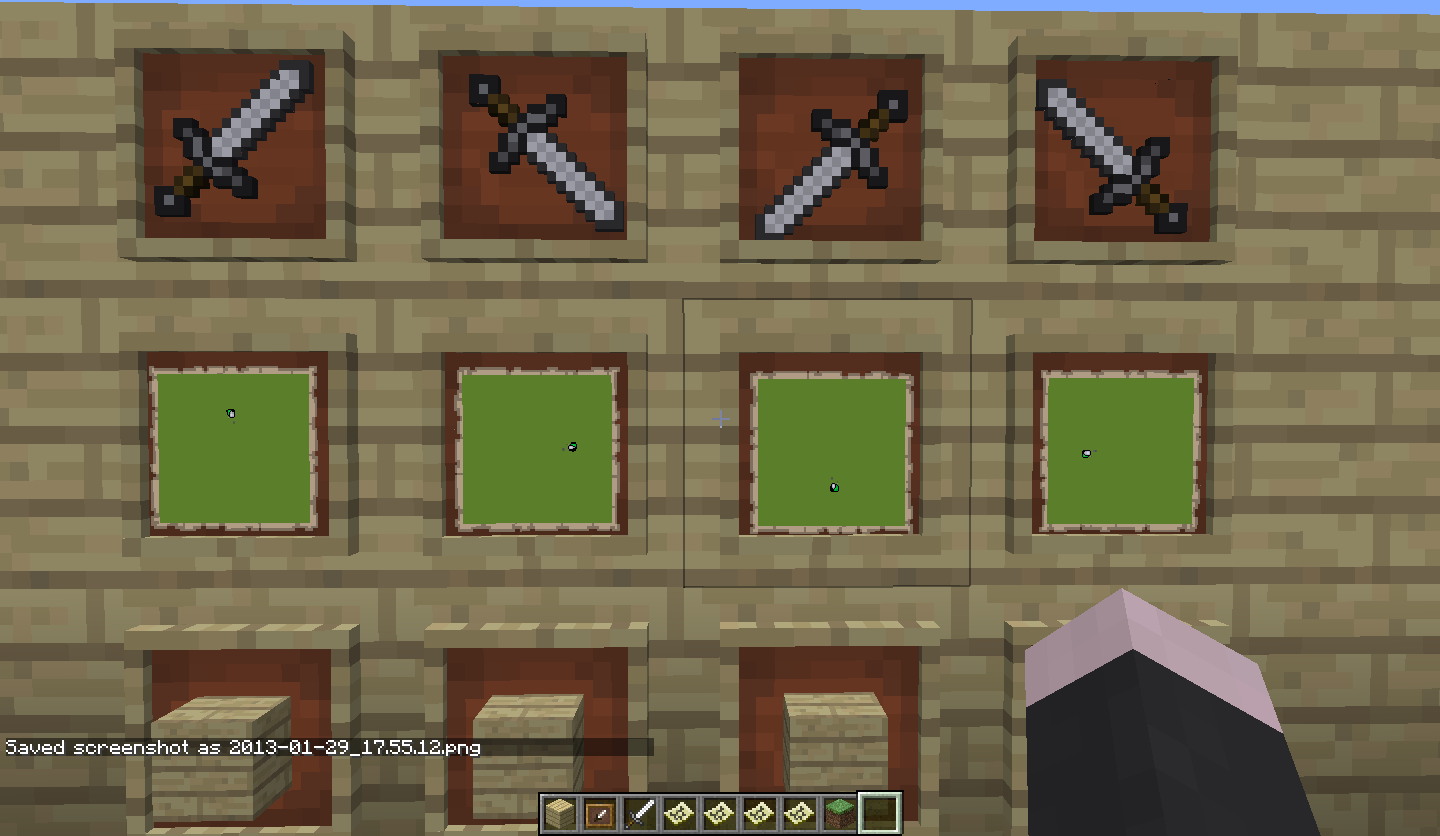
Items are not centred correctly within frames. Especially obvious when items are rotated. The item textures themselves were correctly centred.
Blocks are aligned correctly. Only items/maps areeffected.Items are not centred correctly within frames. Especially obvious when items are rotated. The item textures themselves were correctly centred.
In the image, look at the points of the sword to see the offset.
Blocks are aligned correctly. Only items/maps are effected.
Shulker boxes lose their "Lock" tag when mined.
To reproduce:
- {{/give @a minecraft:red_shulker_box 1 0 {BlockEntityTag:
Unknown macro: {Lock}}}}
- Place the block
- Right click and observe "Shulker Box is locked!" message
- Mine the block and place it again
- Right click and the Shulker opens.
This makes lockable, moveable inventories impossible in adventure maps.
Shulker boxes lose their "Lock" tag when mined.
To reproduce:
- {{/give @a minecraft:red_shulker_box 1 0 {BlockEntityTag:
Unknown macro: {Lock}}}}
- Place the block
- Right click and observe "Shulker Box is locked!" message
- Mine the block and place it again
- Right click and the Shulker opens.
This makes lockable, moveable inventories impossible in adventure maps.
Shulker boxes lose their "Lock" tag when mined.
To reproduce:
- Place the block
- Right click and observe "Shulker Box is locked!" message
- Mine the block and place it again
- Right click and the Shulker opens.
This makes lockable, moveable inventories impossible in adventure maps.
Shulker boxes lose their "Lock" tag when mined.
To reproduce:
{/give @a minecraft:red_shulker_box 1 0 {BlockEntityTag:{Lock:"Key"}}}- Place the block
- Right click and observe "Shulker Box is locked!" message
- Mine the block and place it again
- Right click and the Shulker opens.
This makes lockable, moveable inventories impossible in adventure maps.
Placeable items should not be re-nameable.
This is particularly noticeable when travelling on rails.
This has seriously been marked as "Works as Intended"?
Surely the solution is to prevent blocks being named using the anvil.
Those situations are not comparable. There is no expectation for an items's name to persist after it has been eaten. There is an expectation for a item to retain it's name after it has been placed.
People would have spend their hard earned experience on renaming it and they would have no reason to guess won't be maintained. IMO, Allowing placeable blocks to be named in the first place was a mistake.
I never said it should be disabled because it's useless. I said it should be disabled because the behaviour is non-obvious.
If you throw a pickaxe in to lava, you expect to lose it. You do not expect a named block to lose it's name when placed. (Unless, perhaps you are familiar with Minecraft's internal workings.)
As for why someone would want to place a named block: I am not sure. But I have seen the complaint that you can't a lot, so people are for some reason.
Did you test on Grass and Ice?
Could be my mistake, I will double check when I get home.
Fine, I'll take the screenshots again and resubmit without the mini-map, but it's going to be exactly the same you know.
My mistake, it is harder to see with the blocks.
This might be fixed in the most recent snapshot. Can anybody confirm?
Aha! To clarify for anyone else like me that go confused by this issue: The mob will start moving once it targets a player. So this bug really only has a big effect on creative mode.
This still occurs for me in minecraft 13w09a. 1.4.7 is fine. Checked my videocard settings as suggested.
I am becoming very concerned that this will not be fixed for 1.5. Like others here, I do not have this issue at all in 1.4.x.
The static images do not do justice to how bad/annoying this issue is. Am I going to have to buy a nVidia graphics card when 1.5 ships?
Dinnerbone,
The build provided almost entirely eliminates the white lines and dots for me. I occasionally still see an isolated dot or two, but this is very rare and on the whole it looks a TON better.
My specs are Intel i5-3330, Windows 7 (64) and ATI Radeon HD 5450.
Great stuff! Thank you for continuing to work on this issue and I really hope this fix makes it in to 1.5!
Confirmed.
Spawners that utilise ActiveEffects crash in the weeklies. The same spawners work fine in 1.5. ActiveEffect tags are valid.
Still occurs in 1.7.4
Confirmed. We are generating maps using pymclevel and are getting this. These maps worked fine in previous snapshots.
I strongly object to the idea that this should be removed because it's "always worked like this". That doesn't make it any less a bug.
Marked as resolved in duplicate bug
MC-84198Confirmed still present in 15w31c using LordPriford's steps to reproduce.
Confirmed.
This is going to break some custom maps.
Confirmed that lingering potions also do not work with this tag. That might not be a bug, however, just a missing feature. (One that I'd like to see!)
Confirmed.
Thanks for posting that PneuX, but to clarify for those interested: the 'fix' is basically a redstone contraption that emulates the functionality of splash potions. So it's not really a fix, more of a workaround.
This is a freaking awful solution to this bug. For a start, what about all the people who already have silk touch shears? Not well thought out at all.
I wish I had never posted this issue.
Oh, do they have spawn conditions then? My mistake, that behaviour is not yet documented on the wiki. http://minecraft.gamepedia.com/Spawn#Spawn_conditions
Confirmed fixed in 16w44a, Thank you.
Still present in 1.11
Can confirm this still happens in 1.13-pre6.
Please see the previous comments on this subject. If this is intended behaviour a Java Dev can come along and close this issue. Anything else is hearsay.