Chunks do not delete properly remaining in a newly created world if the same world name is reused
The bug
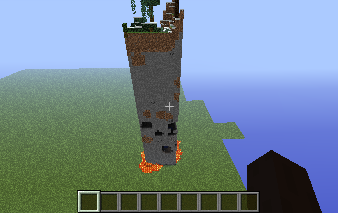
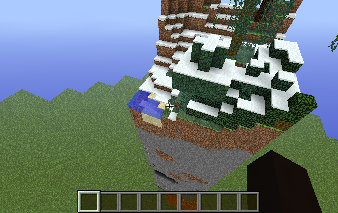
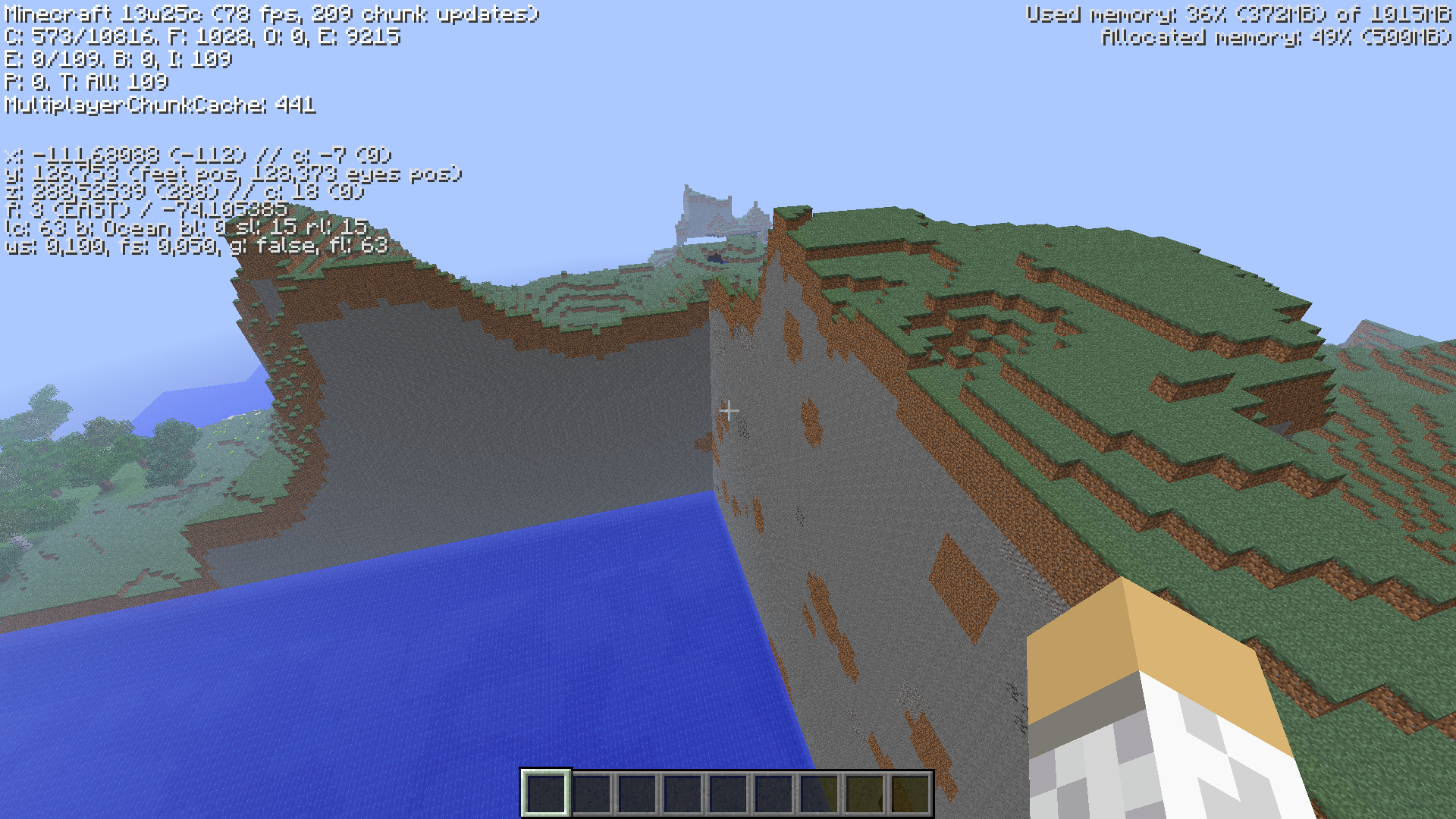
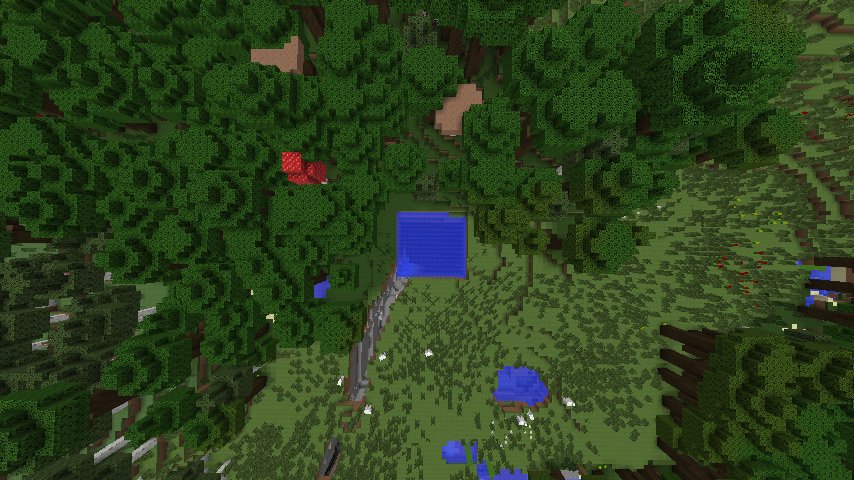
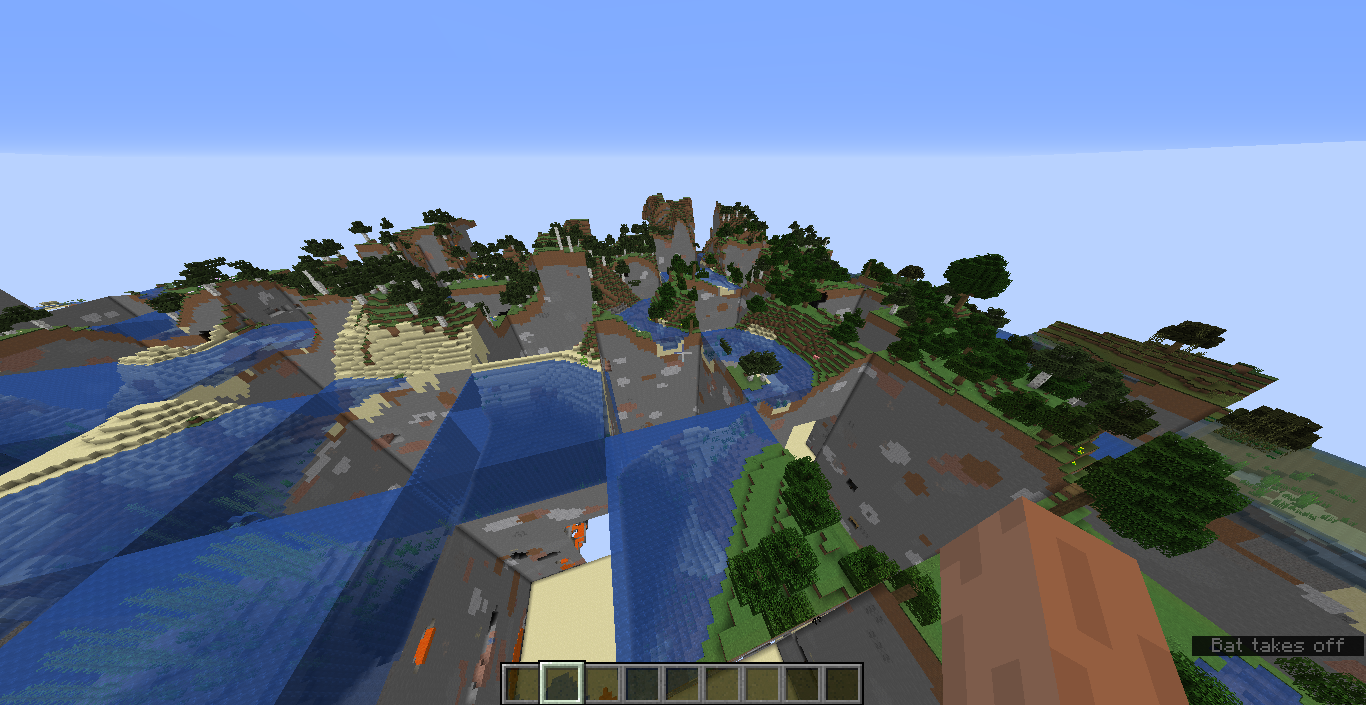
I made a superflat world when i noticed a huge structure in the fog. So i closed up on it and it was a chunk from the default world.
How to reproduce
It seems to be kinda random and very rare but I've been able to do it only 4 times
- Make a superflat world(default)
- Travel around a bit and if you're lucky you'll find one. (I once even spawned in one)
Linked Issues
is duplicated by287
 MC-6714random areas un flat areas in the setting flatlandDuplicateMC-7216'Cut-off'ed World GenerationDuplicateMC-7327Chunk error where ocean chunks spawn inside ice plains.DuplicateMC-8033Normal world chunks in SuperFlat worldsDuplicateMC-8935Creating a superflat world is glitchyDuplicateMC-9222World GenerationDuplicateMC-9270Minecraft world generating system brokenDuplicateMC-9398Minecraft:Got more lagger! and more bugger!DuplicateMC-9758Strange Extreme Hills Generation in 13w07aDuplicateMC-9893I thought this was superflat!DuplicateMC-10550FlatGrass loads both flat and normal DuplicateMC-10660Odd world generationDuplicateMC-10861This is not your average world generation glitch.DuplicateMC-10909half housesDuplicateMC-11074Superflat and Default world merging!DuplicateMC-11724Ice Plains biome spawned in my super flat desert world when i loaded it upDuplicateMC-12141Epic Land Corruption DuplicateMC-12302Random chunks in a particular area are 'empty' (survival)DuplicateMC-12605Superflat giant stone towerDuplicateMC-13160Superflat chunks appearing in Normal Single player Creative ModeDuplicateMC-13242Parts of Super-Flat World Not FlatDuplicateMC-13558Missing chunksDuplicateMC-14110random chunk generationDuplicateMC-14641Strange terrain generation in 13w17aDuplicateMC-14643Land generation errorsDuplicateMC-14651Strange terrain bug - Random desert chunks overlapping world terrain DuplicateMC-14723I have found generation bug in the latest snapshot [13w17a]DuplicateMC-15294Random Castle GenerationDuplicateMC-15905Biome IntergrationDuplicateMC-16536Flat World Chunk Loading BugDuplicateMC-16550Normal world parts in superflatDuplicateMC-16598Superflat terrain glitchDuplicateMC-16768Major Chunk ErrorsDuplicateMC-16936Chunks from default world loading in SuperflatDuplicateMC-17002Random chinks of differnt terrain are generated in normal terrainDuplicateMC-17218I found a random "block of land" in superflat modeDuplicateMC-17275Random chunk generated in middle of ocean biomeDuplicateMC-17331Chunk of world in superflatDuplicateMC-17404Minecraft world re-createDuplicateMC-17475World-Generator generate strange structuresDuplicateMC-17572antvenom seed generation errorDuplicateMC-17989Chunk generator generates random bioms =/DuplicateMC-19109Buggy Chunk Loading in 1.6 Pre-ReleaseDuplicateMC-19196Biomes are spawning in random chunks DuplicateMC-19686World generation bugDuplicateMC-21439Flatland GlitchDuplicateMC-21632Superflat error.DuplicateMC-21753World generation buggy!!DuplicateMC-22292Worl generation Error - Unmatching chunks look like cuttedDuplicateMC-22493Missing ChunksDuplicateMC-22718Weird World Generation BugDuplicateMC-22795Problems with terrain generator and mobs spawnDuplicateMC-24523Strange chunk rendering in 1.6.2 singleplayerDuplicateMC-24615World generation issueDuplicateMC-25946Terrain Drops with a straight border formingDuplicateMC-26832Complete world recreation in hardcoreDuplicateMC-26907Strange world bugDuplicateMC-274222 bugs spawn point and weird earth cutaway DuplicateMC-28265Chunk Error in SuperFlatDuplicateMC-28358Really Funny And Strange CHUCNK ERRORDuplicateMC-28934Odd generation errorDuplicateMC-29121um... WAT?!DuplicateMC-29470Chunk Loading ErrorsDuplicateMC-29524Lots of chunck errors up with the 1.7 snapshotDuplicateMC-30521Amplified world option stops... amplifyingDuplicateMC-30599Odd box like sections of map raised in air about 50 blocksDuplicateMC-30657World generation total failureDuplicateMC-30715World generation errorsDuplicateMC-30717Inappropriate biomes formation and adjoinmentDuplicateMC-30809Rerrain generationDuplicateMC-30970Large biomes, biomes not mixing.DuplicateMC-31052Multiple bonus chests appearDuplicateMC-31200The Generator For Superflat Didnt workDuplicateMC-31954Chunk Generating ErrorDuplicateMC-32066Chunk generation errorDuplicateMC-32340Default chunks loading in superflat world typeDuplicateMC-33042Chunk Errors generatingDuplicateMC-33076Generation of the world.DuplicateMC-33431World Generation GlitchDuplicateMC-33858world creation bugDuplicateMC-34303Square Oceans/Chunk Generation ErrorsDuplicateMC-36196Flat world and Normal World Generating togetherDuplicateMC-36409when I create a superflat world the spawn chunk is a regular chunkDuplicateMC-36585misplaced chunks while loading the worldDuplicateMC-36770Map displays normal world on superflat.DuplicateMC-37017World GenerateDuplicateMC-37535OpenDuplicateMC-37656Cut of landDuplicateMC-38060Random Raised ChunkDuplicateMC-38724Chunk errors in 1.7DuplicateMC-40170Superflat world is partially normal worldDuplicateMC-40304when i want villages and flat land it is not workingDuplicateMC-40776Some chunks end abruptly DuplicateMC-41311Huge Superflat World ErrorDuplicateMC-41558Biomes didn't blend - pure 1.7.2DuplicateMC-42058Weird new world after defeating the ender dragonDuplicateMC-42124Flat walls appear INSIDE NEWLY GENERATED AREAS.DuplicateMC-42139World generationDuplicateMC-42285World deletion failsDuplicateMC-42491random single chunks of extreme hills in desert hills biomeDuplicateMC-42666Biomes not generating correctly DuplicateMC-44150MAJOR chunk errorDuplicateMC-44184RANDOM GENERATION OF THE DEEP OCEAN BIOMEDuplicateMC-44221Superflat GenerationDuplicateMC-44275Chunk ErrorsDuplicateMC-45435Mundo mal generado - Bad generated worldDuplicateMC-45693What?DuplicateMC-46173Error generate chunks in superflat worldDuplicateMC-46189Bonus chest break superflatDuplicateMC-46483Major Chunk ErrorsDuplicateMC-46849world dissapiers make a new world with same name same generations as the worlds that disappearedDuplicateMC-47187Huge Chunk ErrorDuplicateMC-47309Bad world gen with a random seed (14w05b)DuplicateMC-47334Preset bugDuplicateMC-47384Flatland BugDuplicateMC-48473Bug generation chunkDuplicateMC-48803When I go and make new world delete bedrock and dirt but not the grass it comes up with a noemal world in a super flat DuplicateMC-48873Glitched SuperFlat World Generation DuplicateMC-48887BAD superflat biomes glitchDuplicateMC-49192Abnromal terrain generation after creating and deleting an amplified worldDuplicateMC-49887Deleting a world while it is still 'generating' then creating a new one with the same name causes chunks from the old world to appear (if you do it quickly!).DuplicateMC-50796world gen messed upDuplicateMC-51102Server Lagg on SingleplayerDuplicateMC-51287Custom Superflat World Generator ErrorDuplicateMC-51635I have encountered a chunk loading bug.DuplicateMC-51959Chunk Loading ErrorDuplicateMC-52275Incorrect ChunkDuplicateMC-52596classic superflat preset starts loading in the redstone ready presetDuplicateMC-52686seed bugDuplicateMC-52708Minecraft terrain makes superflat world unflat [no photos acorrding to last issue] DuplicateMC-52865Flatworld Generation BugDuplicateMC-53047New world generation bugDuplicateMC-53057Major world generation bug in super flat worldDuplicateMC-53137Odd world generationDuplicateMC-53531(Custom Worlds) Chunk GenerationDuplicateMC-5454014w18b customized world terrain errorsDuplicateMC-54816Chunck generating error Redstone Ready world, snapshot 14w19aDuplicateMC-54866Superflat worlds still generate a non-flat biome once entering.DuplicateMC-54876Superflat Worlds Are BrokenDuplicateMC-54976I came back to my normal superflat, and saw that walls of default randomely grew.It was not there before that day.DuplicateMC-55132Generation error with grass on Superflat Redstone World?DuplicateMC-55387Trees leaves not spawning on one side of treeDuplicateMC-55804Extreme Hills (Corruption?) ChunkDuplicateMC-56242World doesn't generate properly in some placesDuplicateMC-56774I was playing minecraft PC, and these chunks were not loading. This is happening with all new updates with meDuplicateMC-57349Chunck generating can fail if moving towards posetive XDuplicateMC-57722Same Name Old CopyDuplicateMC-57768World not generating correctlyDuplicateMC-59271Debug mode mis generationDuplicateMC-59297Biomes No Longer Blend Properly Into Each OtherDuplicateMC-59443Chunk Generation on a "Redstone Ready" superflat preset creates random areas of default superflat worlds.DuplicateMC-59739Superflat bug?DuplicateMC-59794huge bugDuplicateMC-59863Newly spawned worlds in 14w27a have some biome chunk errorsDuplicateMC-60630Weird custom Biome layoutsDuplicateMC-60805Chunk loading errorDuplicateMC-61102Chunk errors in new world (bad altitude)DuplicateMC-61514Lava ChunksDuplicateMC-61705Unnatural Chunk LoadingDuplicateMC-61874Superflat still generates regular chuncksDuplicateMC-61952Customized worlds sometimes generate wrongDuplicateMC-62544World Generation Issue 19w29b DuplicateMC-62627AMPLIFIED terrain generating in Default terrain worldDuplicateMC-62884Superflat Generation ErrorDuplicateMC-62959The World Regeneration Is glitchyDuplicateMC-63338Deep ocean Biome cut offDuplicateMC-63658Chunks loaded incorrectlyDuplicateMC-63839Terrain Generation bugsDuplicateMC-63863Terrain generation bug (forest + plains chunk dont merge naturally)DuplicateMC-63864Unlit blocks bugDuplicateMC-64092Bug creating the worldDuplicateMC-64104World terrain becomes weirdDuplicateMC-64112Failed terrain generationDuplicateMC-64228Deleting save impossibleDuplicateMC-64388Creating a world with the same name as a recently-deleted world causes terrain generation issuesDuplicateMC-64636Flatworld chunks generating normal world terrain (difficult to reproduce)DuplicateMC-64657Strange generation and transfer between biomes. The is an instant change as opposed to the usual between a forest and deep ocean biome.DuplicateMC-65758Worlds created with same name clash terrainsDuplicateMC-66266Water Skyscraper world chunks?DuplicateMC-66385Chunk of old world erredDuplicateMC-67366Generating FailDuplicateMC-67747New creative world replaced by survival?DuplicateMC-68224Giant holeDuplicateMC-69533Huge World Generation Gliches with seed -630666582824199719DuplicateMC-71302Chunks appear to be scrambledDuplicateMC-71322Bug in minecraftDuplicateMC-72261New map glitchDuplicateMC-72853Hole generated in a new worldDuplicateMC-73506Biome/chunk glitchDuplicateMC-73862There are sharp wall edges on a minecraft 1.8 multiplayer version on biome changesInvalidMC-74412World MixturesDuplicateMC-75047whole parts of worls have dissapeared in big rectangular chunks - sinkhole?DuplicateMC-75141Map Generating GlitchDuplicateMC-75509Swapping ChunksDuplicateMC-76052Chunks switching biome generation in previously loaded chunksDuplicateMC-76505Deep Ocean Customized World Generation BugDuplicateMC-772681.8.1 "Chunk Glitch" in a single-player survival worldDuplicateMC-78282World generation glitch? Normal world generated with debug worldDuplicateMC-79179Chunks raised from the groundDuplicateMC-80653Superflat world with a piece of normal world in it.DuplicateMC-80654normal chunks genning on super flatDuplicateMC-80849bad creation worldDuplicateMC-87332Flatland not generating corectlyDuplicateMC-89075The Void Make Some Lands Far AwayDuplicateMC-91356Village BugDuplicateMC-91839error in map's generationDuplicateMC-92876Normal world gen in a superflat worldDuplicateMC-94291Chunk GlitchDuplicateMC-94668Chunks Being Weird (Not The Normal Chunk Error)DuplicateMC-95062World was set to FLAT LAND and all of a sudden while building a huge wall of water and land is now on my world around the flat land that I was building on. DuplicateMC-96152I'm very concerned about what has happened to my game.There are strange walls surrounding my world with trees,oceans,plants,and animals behind these walls. DuplicateMC-97210World granting DuplicateMC-98215World Generator BugDuplicateMC-98277Worlds are sometimes created with displaced chunksDuplicateMC-99996Biome WallDuplicateMC-102089Bad GenerationDuplicateMC-102105Chunk bugDuplicateMC-104825Random Mountain Spawning DuplicateMC-105222Chunk Improperly Loaded, Filled with water and gravelDuplicateMC-105341I logged in to my new server and I started see some world generator bugs:DuplicateMC-106255bug chunkDuplicateMC-106606Giant Dirt Pillars in Superflat world?!DuplicateMC-107335wrong chunksDuplicateMC-107873Chunk errorDuplicateMC-109416World chunks are glitching...DuplicateMC-111457RANDOM OCEAN LIKE GLITCH WITHIN SNAPSHOT 16w50a 1.11DuplicateMC-113219Pls fix asapDuplicateMC-114788Incorrectly generated chunksDuplicateMC-118869Weird Terrain Bug When Doing ThisDuplicateMC-123245WORLD GENERATING BUG!DuplicateMC-124393Minecraft Glitch ----------------------------------DuplicateMC-124648PODX world glitchDuplicateMC-125602World generation problemDuplicateMC-126047Various glitches when creating a void super flat worldDuplicateMC-126826Really weird chunk errorsDuplicateMC-127497terrain generation errorDuplicateMC-127523Erronous ChunkDuplicateMC-128322Terrain generation issueDuplicateMC-128705Random chunks from a deleted world used in SuperflatDuplicateMC-129043weird block changesDuplicateMC-129102Harcore Mode Seems to be Broken in Snapshot 18w16aDuplicateMC-129530World Buffet bugDuplicateMC-129602Seemingly random world generation crashesDuplicateMC-129982Chunks being generated in the wrong placesDuplicateMC-132914Chunk Errors happen in worlds created in 1.13-pre6DuplicateMC-132964Weird world generationDuplicateMC-135891super flat worl link to unflatDuplicateMC-136203Terrain generation bug in flat worldDuplicateMC-136906Creating a world that isn't super flat and deleting it and naming it the same as you called the old worldDuplicateMC-137684Incorrect chunk generationDuplicateMC-137703generation chunk bugDuplicateMC-137735World generations Hard lines between Biomes DuplicateMC-137807Odd Terrain/Chunk GenerationDuplicateMC-137811Buffet worlds generate multiple biomesDuplicateMC-138076FarlandsDuplicateMC-138542Chunks bugsDuplicateMC-138826IN my super flat world there was chunks of a regular default world everywhereDuplicateMC-142542Superflat world generation gone weird....DuplicateMC-143253World Generating issuesDuplicateMC-143316"Default" world chunks generates in "The Void" superflat preset.DuplicateMC-143991Strange Chunk GenerationDuplicateMC-144431Hardcore death, created NEW WORLD and got the world that i previously died in...DuplicateMC-144742creating an amplified world corrupts future "default" terrain generationDuplicateMC-146772Flat world generation bugDuplicateMC-152189Worlds dissapearing but still in files and unpredictable behaviour when making world with same nameDuplicateMC-190338Chunk error while loading a Superflat worldDuplicateMC-204Error - SuperflatDuplicateMC-227Some random terrain was made on a new super flat world. I have a screen shot .png to show you.DuplicateMC-353failed chunckDuplicateMC-639World copy paste?DuplicateMC-699World generationDuplicateMC-762Hardcore World Not Completely DeletedDuplicateMC-1091World generatig bugDuplicateMC-1152Beta terrain generation in a superflat worldDuplicateMC-1154random elevated and depressed chunks in superflat. DuplicateMC-1234Chopped MountainsDuplicateMC-1376biome bugDuplicateMC-1395An Ocean biome chunk cutting into other biomes.DuplicateMC-2278Worlds are not fully removed when deleted from within MinecraftDuplicateMC-2721Just named worlds can be mixed into eachDuplicateMC-2735Chunk regenerationDuplicateMC-2822Map bugDuplicateMC-2856Hills/lakes/rivers are cutted off by chunksDuplicateMC-3218Strange Chunk PlacementDuplicateMC-4521Chunks of Redstone Ready is mixedDuplicateMC-50011.4.6 Prerelease World Gen ErrorDuplicateMC-5039Superflat Generating IssuesDuplicate
Attachments12






- Cannot Reproduce
 Greg Milson
- Nathan Welch
- 92
- 43
- Confirmed
 Normal
- Chunk loading
- chunk mojang_internal_1 rendering superflat-world world-generation world-name
1.4.1 - 20w10a
1.4.1 1.4.4 1.4.6 1.4.7 13w05b 13w07a 13w09a 13w09b 13w09c 13w10b 1.5 13w11a 1.5.1 13w16b 1.5.2 13w17a 13w22a 13w24a 13w24b 13w25a 13w25b 13w25c 1.6.1 1.6.2 13w36b 13w37a 13w39b 1.7.1 1.7.2 1.7.3 1.7.4 14w02c 14w03b 14w04a 14w04b 14w05a 14w05b 14w06b 14w07a 14w08a 1.7.5 14w11b 1.7.8 1.7.9 14w18b 14w19a 14w29b 14w30c 1.8 1.8.1-pre3 1.8.3 1.8.8 15w33a 15w33b 15w35b 1.8.9 1.9-pre4 1.9 1.10.2 16w38a 16w40a 1.11 16w50a 1.11.2 1.12.2 18w11a 18w16a 18w19b 18w20c 18w21b 18w22b 18w22c 1.13-pre1 1.13-pre2 1.13-pre3 1.13-pre4 1.13-pre5 1.13-pre6 1.13 18w30a 18w30b 1.13.1-pre1 1.13.1 1.13.2-pre1 1.13.2 18w43a 18w43b 18w43c 19w07a 19w08b 19w12b 19w13a 1.14-pre2 1.14-pre3 1.14-pre4 1.14-pre5 1.14.2 1.14.3-pre3 1.14.4 19w40a 1.15.2 20w08a 20w10a- 13w38a
Created Issue:
Real World Chunks in Superflat World
I made a superflat world when i noticed a huge structure in the fog. So i closed up on it and it was a chunk from the default world.
how to recreate it
it seems to be kinda random and very rare but i've been able to do it olny 4 times
1.make a superflat world(default)
2.travel around a bit and if your lucky youll find one.
(i once even spawned in one)Environment
windows vista
Linked Issues
is duplicated by1
Attachments5
is duplicated by
is duplicated by
is duplicated by
is duplicated by

relates to
is duplicated by
is duplicated by
relates to

is duplicated by
is duplicated by
relates to
is duplicated by
is duplicated by
is duplicated by
is duplicated by
relates to
is duplicated by
relates to
relates to
is duplicated by
is duplicated by
Real World Chunks in Superflat WorldChunks do not delete properly remaining in a newly created world if the same world name is reused
is duplicated by
is duplicated by
is duplicated by
is duplicated by
is duplicated by
relates to
relates to
relates to
![[Mod] CubeTheThird](../../../data/assets/gravatar/cubethethird.jpeg)
is duplicated by
is duplicated by
is duplicated by
is duplicated by
is duplicated by
is duplicated by
is duplicated by
is duplicated by
is duplicated by
is duplicated by
is duplicated by
is duplicated by
is duplicated by
is duplicated by
is duplicated by
is duplicated by
is duplicated by
is duplicated by
is duplicated by
is duplicated by
is duplicated by

is duplicated by
is duplicated by
is duplicated by
is duplicated by
is duplicated by
is duplicated by
is duplicated by

relates to
is duplicated by
relates to
is duplicated by
is duplicated by
is duplicated by
is duplicated by
is duplicated by
is duplicated by
is duplicated by
is duplicated by
is duplicated by
is duplicated by
is duplicated by
is duplicated by
is duplicated by
is duplicated by
is duplicated by
is duplicated by
is duplicated by
is duplicated by
is duplicated by
is duplicated by
is duplicated by
is duplicated by
is duplicated by
is duplicated by
is duplicated by
is duplicated by
is duplicated by
is duplicated by
is duplicated by
is duplicated by
is duplicated by
is duplicated by
is duplicated by
is duplicated by
is duplicated by
is duplicated by
is duplicated by
is duplicated by
is duplicated by
is duplicated by

is duplicated by
is duplicated by
is duplicated by
is duplicated by
is duplicated by
 EvilSeph (Warren Loo)
is duplicated by
is duplicated by
is duplicated by
MagicLauncher_1.1.7.exe
is duplicated by
is duplicated by
is duplicated by
is duplicated by
is duplicated by
![[Mojang] Grum (Erik Broes)](../../../data/assets/gravatar/grum.png) [Mojang] Grum (Erik Broes)
[Mojang] Grum (Erik Broes)is duplicated by
is duplicated by
is duplicated by
is duplicated by
is duplicated by
is duplicated by
is duplicated by
is duplicated by
is duplicated by
is duplicated by
is duplicated by
is duplicated by
is duplicated by
is duplicated by
is duplicated by
is duplicated by
is duplicated by

is duplicated by
is duplicated by
is duplicated by
is duplicated by
is duplicated by
is duplicated by
is duplicated by
is duplicated by
is duplicated by
is duplicated by
![[Mod] Ezekiel (ezfe)](../../../data/assets/gravatar/ezekielelin.jpeg)
is duplicated by
is duplicated by
is duplicated by
is duplicated by
is duplicated by
is duplicated by
is duplicated by
is duplicated by
is duplicated by
is duplicated by
is duplicated by
is duplicated by
is duplicated by
is duplicated by
is duplicated by
is duplicated by
is duplicated by
is duplicated by
is duplicated by
is duplicated by
MC-51328
is duplicated by
is duplicated by
is duplicated by
is duplicated by
is duplicated by
is duplicated by
is duplicated by
is duplicated by
is duplicated by
is duplicated by
is duplicated by
is duplicated by
is duplicated by
is duplicated by
is duplicated by

is duplicated by
is duplicated by
is duplicated by
is duplicated by
relates to
is duplicated by
is duplicated by
is duplicated by
is duplicated by
is duplicated by
is duplicated by
is duplicated by
is duplicated by
is duplicated by
is duplicated by
Duplicate of MC-315?
Similar to MC-315, cross-contamination of world saves related to this comment on that bug:
Commonly seem when the world name is reused. Old world didn't have time to delete and new one used the same folder name as the old which contained undeleted chunks. We're looking at user error.
Most likely duplicate of MC-315. If it can be proven not to be, it can be re-opened.
Duplicate of MC-315, please search before creating an issue report.
Possible duplicate of MC-315 ?
I'm seeing a world in the screenshot with the water containing generated chunks from two separate worlds similar to MC-315
Duplicate of MC-315. Please use the search function to check before posting in the future.
Duplicate of MC-315, please use the search function to see if your bug has already been submitted. Currently over 50% of tickets are being closed as duplicate.
28th Duplicate of MC-315, please use the search function to see if your bug has already been submitted. Currently over 51% of tickets are being closed as duplicate.
Duplicate of MC-315, please use the search function to see if your bug has already been submitted. Currently over 51% of tickets are being closed as duplicate.
Just to help with possible reproduction of the issue, it would be good to have F3 enabled, too, while taking the screenshot; gives the coordinates to the location etc.
EDIT: the location was apparently right near the spawn spot. On my 1.4.7 it generated without issues, the green area shouldn't be there. And the screenshot definitely at least looks like MC-315.
Sneak addition of a new super-blocky biome type!
Naaah, looks like MC-315.
Edit: btw, it helps a ton to include seed of the world so that others can try to reproduce the problem. However, in this case, the errors seem quite exactly chunk sized, and since reading between the lines, the default world name was used, the issue mentioned above is the likely reason.
32nd Duplicate of MC-315, please use the search function to see if your bug has already been submitted. Currently over 51% of tickets are being closed as duplicate.
Reproduction
In order to reproduce, no need to create two worlds. Simply starting the creation of a world and then as soon as possible, "save and quit" and go to delete that same world.
Depending on the exact timings, user can get (at least) two different types of console logs. (Or with superfast computer, third case: success).
One case is similar to what Kumasasa has shown: lots of "Failed to check session lock, aborting", apparently one message per chunk being saved (without success). In this case, the session.lock file has been successfully deleted. The end result is a lingering region/r.0.0.mca file (or perhaps another name depending on players initial location).
The other case is when the deletion process does not complete properly, again due to saving process on the background. In this case, there will be two lingering files, the session.lock, and the region/r.0.0.mca. I've attached a log snippet 'deleting-world-fail.txt' showing this case.
Root cause
The root cause is that the change to use "integrated server" is not completed fully; world creation and saving is done in the server (own thread), but deletion is still done in the client (another thread), asynchronously from the server and without knowing/checking hows it going with server. The server in turn can not know when the last/only user to quit the world simply wants to drop it all, and thus it has to always save the world. The saving takes a bit of time, enough for the user to reach deletion at the same time.
(Edit: seems the deletion process does some kind of try to enforce/check that saving is completed, but I guess it is not working as expected. Looks like it will only try to enforce closing any region files still open. That is not very graceful, as it does not check whether some other thread is still trying to write to them.)
Possible fix
A fix would likely include adding a check and set of session lock in the deletion routine. This would enforce waiting until the server has finished saving. A crude fix will try a number of times and fail silently (the world stays in the list). More polished fix would tell the user that the world is currently locked ("in use") and it is retrying for a short period, and if failing, tells the user to retry a bit later.
(Edit: if in single-player both the client and the server somehow would share the session lock, the above idea will not work, as both would already have the session lock and be happy. Maybe better idea would be to improve the method that tries to release all the region files so that it waits until it is actually ok to release them (no pending writes).)
Edit2: I managed to enforce the deletion to work properly by adding an enforced flush() before deletion (in GuiSelectWorld by MCP naming), but this in turn causes lots of ugly console stacktraces ("The save is being accessed from another location, aborting"). Nevertheless, it apparently manages to delay the deletion just enough that the saving processes have finished/cancelled themselves.
Well while the reason is now clear, the code and fix are not so much, so I'll leave the rest for Mojang.
Note
The related MC-315 still needs a check and proper cleanup of the save directory, so that already failed deletions and their left-overs can be handled properly. And there is no saying that there isn't or never will be any other deletion failures (say, a crash during deletion), so it would be some good added robustness.
33rd Duplicate of MC-315, please use the search function to see if your bug has already been submitted. Currently over 52% of tickets are being closed as duplicate.
34th duplicate of MC-315, please use the search function to see if your bug has already been submitted. Currently over 53% of tickets are being closed as duplicate.
Duplicate of MC-315. Please use the search function to check before posting in the future.
Or perhaps MC-5737, which is already fixed in recent snapshots.
EDIT: on a closer look, in MC-5737 the stripes are longer without switching the row; this one has obvious change, so could be two worlds made at same height, and that MC-315.
EDIT2: on even closer look, some of the screenshots on MC-5737 do show e.g. changes in the stripe direction. Hard to say which one is the reason for the shown issue.
37th Duplicate of MC-315, please use the search function to see if your bug has already been submitted. Currently over 53% of tickets are being closed as duplicate.
Duplicate of MC-315. Please use the search function to check before posting in the future.
Probably MC-315, which can be also found by search of "random chunks" and following through the first hit.
41st Duplicate of MC-315, please use the search function to see if your bug has already been submitted. Currently over 54% of tickets are being closed as duplicate.
42nd Duplicate of MC-315, please use the search function to see if your bug has already been submitted. Currently over 55% of tickets are being closed as duplicate.
43rd Duplicate of MC-315, please use the search function to see if your bug has already been submitted. Currently over 55% of tickets are being closed as duplicate.
44th Duplicate of MC-315, please use the search function to see if your bug has already been submitted. Currently over 54% of tickets are being closed as duplicate.
45th Duplicate of MC-315, please use the search function to see if your bug has already been submitted. Currently over 55% of tickets are being closed as duplicate.
46th Duplicate of MC-315, please use the search function to see if your bug has already been submitted. Currently over 55% of tickets are being closed as duplicate.
47th Duplicate of MC-315, please use the search function to see if your bug has already been submitted. Currently over 55% of tickets are being closed as duplicate.
![[Mod] Torabi](../../../data/assets/gravatar/torabi.png)
The bug which yarrmateys is referring to is MC-315.
You should produce a manual crash report by holding F3 and C for 10 seconds, and attach the file to this ticket.
49th Duplicate of MC-315, please use the search function to see if your bug has already been submitted. Currently over 56% of tickets are being closed as duplicate.
51st Duplicate of MC-315, please use the search function to see if your bug has already been submitted. Currently over 56% of tickets are being closed as duplicate.
52nd Duplicate of MC-315, please use the search function to see if your bug has already been submitted. Currently over 56% of tickets are being closed as duplicate.
Duplicate of MC-315, please use the search function to see if your bug has already been submitted. Currently over 57% of tickets are being closed as duplicate.
Duplicate of MC-315, please use the search function to see if your bug has already been submitted. Currently over 56% of tickets are being closed as duplicate.
56th Duplicate of MC-315, please use the search function to see if your bug has already been submitted. Currently over 57% of tickets are being closed as duplicate.
57th Duplicate of MC-315, please use the search function to see if your bug has already been submitted. Currently over 57% of tickets are being closed as duplicate.
Duplicate of MC-315
61st Duplicate of MC-315, please use the search function to see if your bug has already been submitted. Currently over 57% of tickets are being closed as duplicate.
63rd Duplicate of MC-315, please use the search function to see if your bug has already been submitted. Currently over 57% of tickets are being closed as duplicate.
64th Duplicate of MC-315, please use the search function to see if your bug has already been submitted. Currently over 57% of tickets are being closed as duplicate.
68th Duplicate of MC-315, please use the search function to see if your bug has already been submitted. Currently over 58% of tickets are being closed as duplicate.
70+ Duplicate of MC-315, please use the search function to see if your bug has already been submitted. Currently over 58% of tickets are being closed as duplicate.
Duplicate of MC-315, please use the search function to see if your bug has already been submitted. Currently over 58% of tickets are being closed as duplicate.
Duplicate of MC-315, please use the search function to see if your bug has already been submitted. Currently over 58% of tickets are being closed as duplicate.
76th Duplicate of MC-315, please use the search function to see if your bug has already been submitted. Currently over 58% of tickets are being resolved as duplicate.
Duplicate of MC-315, please use the search function to see if your bug has already been submitted. Currently over 57% of tickets are being resolved as duplicate.
If that happens on a new map, please provide seed and coordinates.
Probably you're seeing MC-315 you use the same name of the world.
Duplicate of MC-315, please use the search function to see if your bug has already been submitted. Currently over 57% of tickets are being resolved as duplicate.
I updated to ('java.version') == '1.7.0_40'
The problem is still reproducible on my system.
I am not sure that this problem is a duplicate of MC-315.
My report is about freezing at the first start-up of the world.
Please ignore my statement "The terrain is a bit strange, with straight edges, like if it was cut vertically at a transition between 2 areas."
Actually, it does justify reopening this issue, but not the related MC-526. This issue is now profiled more about deleting any garbage at the time of taking a possible old folder to be reused - whatever the reason for having that garbage there.
My crude fix shown in a previous comment does just that; even if some ancient stuff is around, they are cleared out first. That action is also necessary even if the deletion process is fixed, as there could still be events which interrupt deletion, like crash or power-down etc. and those can not be avoided or handled at deletion time. They must be handled later, at the time of creating a new world. (A fancy fix might occasionally try to check and cleanup folders that are obviously no longer in use but have some garbage...)
The MC-526 is purely about the deletion itself, when the action is started by the player, but fails to complete (for reasons that can be fixed and avoided). No need to even try to create another world by the same name. This MC-315 is just the most common consequence of the MC-526. But not the only consequence for it, and there are other reasons for MC-315 than having MC-526 first. (Thus, the need to have these separate issues for them.)
Ok, thanks.
Probably you had chunks on the harddisk from earlier version, see the last comments in MC-315
Cannot confirm.
Probably caused by MC-315
Recreate the world with a different name.
Cannot confirm, see screenshots.
Please recreate the world with a name different from "New world", MC-315 may be the cause.
On the other hand, your Java is outdated.
Duplicate of MC-315 - If you have not, please use the search function in the future, to see if your bug has already been submitted. If you could not find the original report, please comment with the keywords you searched for.
Duplicate of MC-315 - If you have not, please use the search function in the future, to see if your bug has already been submitted. If you could not find the original report, please comment with the keywords you searched for.
Cannot confirm, see screenshot.
In what version did you create the world ?
If current version, did you chose the name "New World" ? Maybe duplicate of MC-315
This is not a duplicate of MC-315, as this bears no resemblance whatsoever to that bug. This is not, and was never a superflat world, nor was there any existing world that was deleted then recreated. As I said in the original post, this is a NEW world created AFTER the 1.7 update, and it uses a NEW, never used, world name. I have attached another picture showing how the amplified chunks stop suddenly, then normal chunks pick up after that, just as suddenly with some water in between them.
Duplicate of Unresolved
MC-315
If you have not, please use the search function in the future, to see if your bug has already been submitted. If you could not find the original report, please comment with the keywords you searched for.
Cannot confirm the first issue.
At the given coordinate of the spawnpoint is no swampland, there is deep ocean.
Thus either your world was created in <= 1.6 or you are seeing the effects of MC-315
Cannot Reproduce, therefor...
Duplicate of Unresolved
MC-315
If you have not, please use the search function in the future, to see if your bug has already been submitted. If you could not find the original report, please comment with the keywords you searched for.
Considering MC-39021, is this maybe an example of that, rather than MC-315? Austin Shope, can you provide a world seed and coordinates where you're experiencing this issue?
This is the 129th duplicate of MC-315. Please use the search function to check before posting in the future.
Duplicate of MC-315 - If you have not, please use the search function in the future, to see if your bug has already been submitted. If you could not find the original report, please comment with the keywords you searched for.
Duplicate of MC-315
No response, assuming that this is a duplicate.
Duplicate of MC-315 - If you have not, please use the search function in the future, to see if your bug has already been submitted. If you could not find the original report, please comment with the keywords you searched for.
If you don't think this is a duplicate of MC-315, please leave a comment here.
Duplicate of MC-315 - If you have not, please use the search function in the future, to see if your bug has already been submitted. If you could not find the original report, please comment with the keywords you searched for.
I've been testing this out, and it seems that this bug is caused by MC-315. oh well.
141st Duplicate of MC-315 - If you have not, please use the search function in the future, to see if your bug has already been submitted. If you could not find the original report, please comment with the keywords you searched for.
Duplicate of MC-315. Please do not mark unreleased versions (anything starting with "Future Version") as affected. You don't have access to them yet.
Duplicate of MC-315 – If you have not, please use the search function in the future, to see if your bug has already been submitted.
Duplicate of MC-315
If you have not, please use the search function in the future, to see if your bug has already been submitted. If you could not find the original report, please comment with the keywords you searched for.
Duplicate of MC-315
Put the summary of the bug you're having here
i came out of my house on superflat, and saw the world was carved out of default.
What I expected to happen was...:
Describe what you thought should happen here
To have an actual superflat world and landscape.
What actually happened was...:
Describe what happened here
Like skyblock, looked like carved out of default.
Steps to Reproduce:
1.I have 0% idea.
2.AND IT IS NOT LIKE MC-315 CUZ IT WAS NOT THERE BEFORE!!!!!!
3. ...
Duplicate of MC-315
Duplicate of MC-315 - If you have not, please use the search function in the future, to see if your bug has already been submitted. If you could not find the original report, please comment with the keywords you searched for.
Duplicate of MC-315
If you have not, please use the search function in the future, to see if your bug has already been submitted. If you could not find the original report, please comment with the keywords you searched for.
Duplicate of MC-315
If you have not, please use the search function in the future, to see if your bug has already been submitted. If you could not find the original report, please comment with the keywords you searched for.
Most likely MC-315
Dupe of MC-315
Dupe of MC-315
Dupe of MC-315
Dupe of MC-315
Duplicate of MC-315

Did you maybe had a world with the same name before which you deleted then and created a new (this world) with the same name? I think this bug is already reported, that when the deleting progress is not completely finish, some chunks will be in the new world
Maybe this: MC-315
When MC-315 happens, then complete blocks / chunks are used from the old world, but in this case the height profile is matching the desert biome, only the biome code is set to plains or whatever.
Nevertheless, this cannot be reproduced.
You selected the wrong project as this is not a bug with the launcher, it is a bug with Minecraft itself (-> Minecraft is the correct project)
Also could relate to: MC-315
Do you think this describes your bug?
Appears to be a duplicate of MC-315.
Possible dupe of MC-315
Duplicate of MC-315
Probably duplicates MC-315
Dupe of MC-315
Dupe of MC-315
Dupe of MC-315
Duplicate of MC-315
@galaxy_2alex
Duplicate of
MC-315
That can't be the issue since I never used that world name before.
No, it's MC-315 

Duplicate of MC-315.
Possible dupe / Strongly related to MC-315
Duplicate of MC-315.
Duplicate of MC-315
Could maybe relate to: MC-315
Dupe of MC-315

This issue is a duplicate of MC-315. It has been linked to the original bugreport.
Please search before reporting any bugs, as it's likely that one exists already.
Dupe of MC-315
Dupe of MC-315
Dupe of MC-315
Are you able to consistently reproduce this? (seems to be a duplicate of MC-315)
Cannot reproduce. I highly suspect this is a duplicate of MC-315. Are you re-using world names when generating the world?
Resolved as a duplicate of MC-315. Feel free to read about that report for details. By using the same world names as previous worlds, incorrectly deleted chunks are making it appear corrupted.
Dupe of MC-315
Dupe of MC-315
Wrong link type, could you please update it to "Duplicates MC-315"
Dupe of MC-315.
This might be MC-315 / MC-526.
Chose a different name as "New World".
If the issue is persising:
Please attach the complete output of the "Game Output (Your Minecraft name) " which can be found on the fourth tab of the launcher to this ticket.
If the launcher closes after game start, please edit your profile and select "Launcher visibility" then, "Keep the launcher open".

Does MC-315 describe your issue?
![[Mod] Neko](../../../data/avatars/users/92901.png)
![[Mod] Les3awe](../../../data/avatars/users/79847.png)
This issue duplicates MC-315.
Thank you for using the bug tracker, however, this is a duplicate of MC-315. If you think I am mistaken, please leave a comment so we can do some further investigation if necessary.
![[Mod] violine1101](../../../data/avatars/users/92858.png)
Probably a duplicate of MC-315.

Sure this is the same issue as MC-315?
I don't think ive had any other worlds with the same name...
Thank you for your report!
However, this issue has been temporarily closed as Awaiting Response.
Did you previously delete a world with exactly the same name as the world you experienced this bug in? If yes, that's a already known bug: MC-315.
Once you reply, the report will be reopened automatically.
Quick Links:
📓 Issue Guidelines – 💬 Community Support – 📧 Customer Support – 📖 Game Wiki
Did you have a world with the same name before?
If yes, this very likely duplicates MC-315.
Strange, in a world with that seed and at those coordinates, everything is normal for me. MC-315 would explain why there are chunks of completely different terrain in the middle of nowhere.
Does MC-315 describe the same issue?
Thank you for your report!
However, this issue has been closed as a Duplicate of MC-315.
It has been linked to this report. If you have additional information, please add it to the duplicated report.
Please search before reporting, as it's likely that one exists already.
Quick Links:
📓 Issue Guidelines – 💬 Community Support – 📧 Customer Support – 📖 Game Wiki
Could that be caused by MC-315 ?
Did you create the world with a previously used world name ?
Does the land keep generating if you explore from there? I suspect this may be MC-315. Can you attach the affected world?
To: [Mod] redstonehelper
It's close to MC-315, but it is in a VOID world not the default superflat world..

Have you tried deleting these incorrectly generated chunks via some third-party program such as MCedit. From the results of this test you could determine whether this is a slight flaw with flatland generation or the game neglecting to read the NBT tags of the save before generating these chunks and therefore generating them as it would with a normal world. This also seams to be the same issue as
MC-204.Commonly seem when the world name is reused. Old world didn't have time to delete and new one used the same folder name as the old which contained undeleted chunks. We're looking at user error.
Ive Seen This Aswell Exept The Biome Was Desert And There Were Jungle Trees and It Was Snowing!!??
I had it on 1.2.5.
This issue is a follow up of
MC-526It is still in 13w04, I can comfirm it.
one way to fix it could be probably to force minecraft to check for any world files/region folder/DIM* folders present when creating a new world, before world generation and delete them before being allowed to generate new ones. in case any files are inaccessible/read only show an error and return to world creation menu.
unless that's already happening and didn't help.
Crude fix
MCP naming...
... ISaveHandler var4 = this.saveLoader.getSaveLoader(dirName, false); WorldInfo var5 = var4.loadWorldInfo(); if (var5 == null && par3WorldSettings != null) { // A new world, ensure deletion of possible old junk and reinitialize var4: this.saveLoader.deleteWorldDirectory(dirName); // ADDED var4 = this.saveLoader.getSaveLoader(dirName, false); // ADDED this.statFileWriter.readStat(StatList.createWorldStat, 1); var5 = new WorldInfo(par3WorldSettings, dirName); var4.saveWorldInfo(var5); } ...It is kinda bad coding, but I am trying to keep using existing methods. The ugliness comes from that method handling both new and existing worlds, and it needs to init and use both var4 and var5 in order to know if the world is new. But by that time those calls have already created the world directory and a file, which the deletion then immediately remove. Thus it needs to redo the var4 stuff.
The proper fix would be add a new method that specifically checks the existence of world save left-overs and then cleans them up, and use that method from those places which create new worlds (and only create, not open existing ones).
Tested on 1.4.7, works wonders. My messed up results from testing
MC-526and sheep color testing, and even manually "broken" world save directories were all handled correctly. That is, the world creation first wiped the remains of the old directory (confirmed by watching the console and checking that marker files disappeared) before generating the new world with the same directory name.Guys, My brother found it he has the one who said me to post it. Sorry!
I had this once but than th other way around with the superflat in the middle and default around it...
looked like 'the end of the flatlands'
I got this with an extreme hills (which for some reason had jungle trees on it...!?) in 1.5.2
Confirmed in 13w22a
it did it to me in 13w22a
Confirmed in 13w25c
Confirmed on 1.1 (superflat introduced) - prerelease 1.6.2
this bug ANNOYS ME!
@SteelCrow we are not looking for user error.
Steps to reproduce:
1. Make a world
2. Leave world
3. Delete world (singleplayer ==> select world ==> press delete world ==> Are you sure? YES)
4. Create new world with exactly same world and directory name.
5. Old chunks remains in new world.
This is not user error, this is error in the game code. I'm waiting that someone from mojang fixes this.
In mean time, let's just cuddle :3
@crazyman: those steps (as described) are not always enough, as timing is part of the problem. Better description for reproduction in the comments of the related
MC-526. (The crucial thing is to do the step from leave world -> delete world quickly; on my machine (SSD drive etc) I have to even exercise a bit (e.g. to know to move mouse cursor to proper spot even before I can see the button to be pressed) in order to be quick enough.)Apart from the user error part, Steelcrow's comment was otherwise correct, and was one of the comments that allowed me to find the problem code quicker.
As another note, there are more duplicates than votes for this issue. Sigh.
Please add that it affects Mac OSX.
Im having a similar problem with jungle biomes.
Potentially fixed this issue. I'm not able to reproduce it so I'm not 100% sure. Please test and let me know, thanks
Reopening due to
MC-34303MC-34303does not necessarily justify a reopening of this ticket, if there are still old region files laying around on the harddisk (by this bug in older versions), then creating the world with the old name in 13w39b will of course show this effect too.Actually, it does justify reopening this issue, but not the related
MC-526. This issue is now profiled more about deleting any garbage at the time of taking a possible old folder to be reused - whatever the reason for having that garbage there.My crude fix shown in a previous comment does just that; even if some ancient stuff is around, they are cleared out first. That action is also necessary even if the deletion process is fixed, as there could still be events which interrupt deletion, like crash or power-down etc. and those can not be avoided or handled at deletion time. They must be handled later, at the time of creating a new world. (A fancy fix might occasionally try to check and cleanup folders that are obviously no longer in use but have some garbage...)
The
MC-526is purely about the deletion itself, when the action is started by the player, but fails to complete (for reasons that can be fixed and avoided). No need to even try to create another world by the same name. ThisMC-315is just the most common consequence of theMC-526. But not the only consequence for it, and there are other reasons forMC-315than havingMC-526first. (Thus, the need to have these separate issues for them.)Markku, you are absolutely right.
This is still an issue in Minecraft version 14w03b.
Deleted account: Please attach the development console when having this issue.
Kumasasa: Can't get it to work right now, I'll try again tomorrow.
Logfile in https://bugs.mojang.com/browse/MC-526?focusedCommentId=134792&page=com.atlassian.jira.plugin.system.issuetabpanels:comment-tabpanel#comment-134792
Confirmed in 14w05b (OSX 10.8.5, log attached).
Just accidentally created a checkerboard of two different worlds due to the deletion of the previous world failing to complete before a new world (with the same name) was created.
I meant to create a new Creative world but created a Survival world by mistake (as "New World"). I quit out to the menu, deleted the Survival world and created a Creative one instead (also "New World"). Creative world has a mixture of chunks from the deleted world and the world that actually goes with the seed given by /seed.
Edit: Actually, this may be an instance of
MC-526instead.Note, the sequence used by Bruce also indicates that
MC-526affects 14w05b (couple more versions than the latest reported). The delete and recreate -sequence, when causing issues, automatically confirms both issues (as both the deletion fails at the time of deletion, and no attempt to clear the old dir is made at the time of creation).happened to me 2, but when i first spawned it was nt there.. 2 weeks later its like random walls grew. And now my dirt is retextured to look like its glowing.
Unfixable. Searge's comment from
MC-62627:So the problem is actually with the world/chunk generation and not old files not being deleted properly?
Andrew, look at the log on my comment. The error being reported is:
Basically, old chunks from one world can't be overwritten by worldgen in the next.
Blah, I'd accept "Don't do that then" as a bugfix...
@Andrew McCluskey: It's the server still saving the world files while the client tries to delete the files:
Blah, Andrew and Bruce, and Sonic:
Read my comments in both this issue and
MC-526.MC-62627in no way claims that these are not fixable, he merely states the reason for that issue to be this bug.)There are, in a way, two issues caused by one failure. However, both issues should be fixed as the
MC-526's "worlds will not delete" can not be 100% ensured in e.g. crash situations (power outages etc.). The world deletion can be made more robust (I've even provided some suggestions of tested fixes). The lingering worlds can be deleted (100%) properly before taking them into new use (I've even provided some tested, though ugly code fixes).These issues have now been, and has been for last 1.5 years, only waiting for Mojang dev's to adapt those fixes to their code (or make even better fixes if they want).
one way to circumvent it until fixed would be to rename the newly created world on creation if previous wasn't deleted completely and its folder/files still exist.
say, you make world called "new world", then delete it (but deletion fails) and make a new one called the same. instead of calling its folder "new world" too and causing the bug, just auto rename it to "new world_1" or involve a date+time, like "new world_20140723151905" to prevent multiple attempts to create the same name.
that way even if the world fails to delete, new one won't be able to overwrite its remains, taking some of its chunks in since it'll go to a different folder.
the remaining one could be scheduled to be deleted on next minecraft launch, and if it still fails then, reschedule for next and keep doing it until successful. one pc reset later the folder will be finally freed and will delete normally.
Confirmed 14w30c
I have one chunk in my main SSP world, next to my guardian farm in a deep oceanthat does not belong there. It seems that the biome info is overwritten because the chunk is clearly a forrest but every block on it is a deep ocean biome.
Confirmed in 1.8.1-pre3
I love how my report on
MC-204is older than this one but still got closed for the reason "duplicated". I'm actually quite surprised I accessed randomlyMC-204and saw I was the reporter, too.Gerottinho probably because this report here contained the cause for this bug. It happens sometimes that Mods close older reports because they contained less information
I can confirm it for 15w32c
Confirmed in 1.8.9. I generated a new superflat world with the dirt preset changed to 50, so it can be deeper. I teleported to 0 62 0, the center of the world, set my spawn, and started building. However, I soon saw a large structure in the distance, and I realized that it was a chunk. I saw a bunch of them, and it was really scary. I deleted that world. The thing is, I had created a world before this, but I forgot to set it to superflat and creative mode. It was normal and was in survival. I suppose that the chunks didn't unload, causing them to load into the superflat world with the exact same name. There was a lake in one of the chunks, and in the superflat world it didn't flow over the edge, so I suppose the chunks just didn't unload when deleting and recreating the world in superflat.
I got a screenshot of it.
Confirmed in 1.9. Either this or a related bug. Random chunks relocated upon reloading an existing world.
This is awkward... I thought this was removed...
I'm not sure this is fixable from a developers' standpoint.
The but occurs by deleting a world and making a new one that is named the same thing (as the desc says).
It has to do with the way computers delete things. When a file is deleted, it isn't actually deleted, it's just allowed to be overwritten. So if you create a new world right AFTER deleting one of this same name, it will create the world in the same place on the hard drive, and thus it will pull some chunks from the deleted world.
So that's why it isn't fixable- at least for the developers.
There are workarounds (like 'permanent' deletion), but they are complicated.
Michael Connel, this issue is quite easily fixable, just see my comment made 3 years ago. Granted it is quite awful piece of code, but it was just an example. (I do not expect mojang to solve the issue with that code, it just proves it can be fixed with code.)
The way how some operating systems/file systems delete files has nothing to do with this issue. It has more to do with how minecraft does the deletion, server vs. client architecture, and in some cases too quick exit. Note well the related issue
MC-526.@Deano: This bug is bad, but it's not awful and it doesn't plague us for 4 years or something like that. There is a very simple workaround: Just don't reuse world names, if you create a new world, use a name you didn't used before (append a digit or whatever). Then you should be fine.
I think I know the bug: When you create a world and delete it, Minecraft may not be able to delete some chunk files so when you create a new world with same world name and directory name (in saves folder), it will load the chunks in the folder of the world in the saves folder.
I suggest Minecraft developers that if you create a world, it will have different directory name in the saves folder (like in Pocket Edition).
Lawrence G. you could have read some comments before adding yours, it is quite often useful. E.g. the one just two comments before yours. Or the 8th from the start... Basically, the reasons have been known for years, we're just waiting for the fix.
Does anyone have tips how to reproduce this a bit reliably?
Fabian:
Since this issue is about deleting random left-overs before creating new world into existing directory, it is easy to simulate a situation where the previous world deletion has failed: simply backup random files from a test world before deleting it, delete it, create the directory again if necessary, then copy those backed up random files back into that directory. Create a new world with the same name and compare results, i.e. are the wrong files still in the save directory.
For continued testing, simply store the collection of random files and their world-directory into a zip-file and re-plant them over the deleted world and re-create...
(I didn't test the sequence above, making it up from my memory, but it should give the idea close enough.)
The related
MC-526is much more difficult to test, but luckily this is the more important issue to be fixed and can be tested easily. 3.5 years gone now, plenty of duplicates (more than votes in this issue), nearly trivial to fix and an (somewhat bad) example code given... sigh...If you put these files in the folder manually, why should they get deleted? I don't see why you should do that except if you want these files there.
Read both this and
MC-526through (comments, too), that should clarify things a little.You asked for a reliably reproducible test for this issue; putting the files there manually is an easy and reproducible test to check if this issue is fixed or not. (Manually putting the files is like simulating the effect of issue
MC-526, which is the typical, but not the only reason for hitting this issue later on.) NOTE: not all the files of an old world, just such a subset that makes the game think the world is not there, yet old wrong chunks gets rendered after new world gets created on top of the remains.When creating a new world, its files are supposed to go into a very specific (and a new) directory. The directory is not supposed to be there, and if it is, there is supposed to be no files in it. Otherwise the world creation should not be allowed to happen to the name used in the first place. (In fact, one could argue that allowing to name the world in a way that leads to issues is already a bug, but such claim is in the territory that can cause heated discussion among developers about bugs, priorities, right and wrong ways to solve things etc. Lets not continue to there.) But since the world creation is allowed to happen with that name, it is, imho, perfectly fine to assume that if there are any files in the way, they are leftovers of a failed removal, or that they are put there manually by a user, and if a user is putting files in such a place where user's manipulation is not welcome (taking backup needs only copying the whole directory, not individual files inside it), it can be assumed he knows what he is doing and is thus responsible for the fate of those files - the game does not need to account for that kind of messing with its operation.
A really fancy fix for this issue would actually check what kinds of files are there, and only remove the ones that are related to this game, and leave other files as is. I have no idea what other kinds of files users could possibly want to put in there, though... perhaps some sort of README-file or such (though such would likely be needed only when dropping in a full world for playing, and thus world creation is not needed or wanted). But in any case, that kind of fancy change would be way beyond just a bugfix, and belongs to wherever they want the feature requests to be put and forgotten.
I think this is similar to MC-63: The game has to do things after each other and the calculation speed is limited. So if it crashes halfway through saving or deleting, that can't be fixed in all instances. In this case it could delete the folder before creating something or forbid saving in an existing folder, but e.g. in MC-63 there has to be one thing before the other: If it saves the inventory first and then the entites, you can make it crash in between and duplicate items. If it does it the other way around, people who have a crash in between can lose items. One of those two will always happen.
In this case: If you don't allow the process javaw.exe to be killed while deleting a world, you could cause other problems if the world deletion goes into an infinite loop for some reason and the program doesn't want to get quit so that the whole computer lags or whatever.
In short: If a program gets closed from the outside (crash, task manager, ...), it's often impossible to prevent some errors.
(And yes, I've understood now how to reproduce.)
MC-63 is sort of similar to
MC-526, not to this. At least the way these two issues are split now (and should stay split).MC-526is about the failure of deleting after doing that delete-action; this is about failing to clean up the possible left-overs when doing create-action. Possible crashes during creating a new world are much easier to handle, even when there might be something to clean up first.This issue is more important to fix (and easier, too), because it is indeed pretty much impossible to ensure 100% certain deletion (crashes etc.) Put more simply; fix only this easy one and
MC-526(and other causes) will not matter as much (and won't be seen in the game, only in the filesystem), but if onlyMC-526is fixed, there will still be issues caused by other reasons (thus not as often).(There are still ways to handle the MC-63 sort of properly, i.e. either everything gets saved (pure success) or nothing gets saved-and-later-loaded (pure crash), but it gets quite deep in the coding (somewhat common exercise in business critical systems, though), more than suitable to paste here, should someone even get the motivation to try and do such fixes.)
You can delete the level.dat and level.dat_old of a world folder and recreate a new world under the same name, and then you will get this bug. It's kind of awesome, though, because you can use it to make survival island maps easily. Try making a world using the seed "Flame", with the name "Broken Chunks", exiting, deleting the level.dat and level.dat_old files, and then making the world Flame again, but on a Customized world type where the only biome is Ocean. It's pretty awesome.
1.10, creating a superflat world, then deleting and creating a non-superflat world can "force" villages into weird generations.
1.10,
1. create default world 00000
2. re-create it
3. delete level.dat and level.dat_old from files
4. create superflat world Copy of 00000
5. remakes the original, but only the loaded section. around it is superflat
NOTE: this breaks potions
Please avoid re-editing your comments. Every time you do, an email is sent to those watching this report, which now makes for many emails. I also recommend you set your name to something that isn't blank.
I was playing survival mode on singleplayer, and i went caving in extreme hills, then i got out and all the sudden i saw a huge tower of extreme hills generated in the plains that wasn't there before. there was no lag or relog, it just appeared.
Still present in 1.11
So I've seen this happen a decent number of times. I regularly play hardcore and just use New World to get a random seed. I always delete my old hardcore game when I die, but currently that means telling it once when I die, but that doesn't really delete it, so an additional time selecting it from my game list and then deleting it and confirming the deletion.
If the window between my deleting the old world and the new one is too small I'll often see this bug. Is there really a reason that the delete operation can't just block until it is truly deleted?
Affects 18w21b
Greg Milson, ticket is yours now
I do not play Java, but it sounds like the instructions are different.
Maybe they are:
Replace superflat with buffet and this happens as well
No, they are exactly the same.
Oh, you meant it the other way around. Yes, you're right.
I am unable to reproduce this in any way. Please add the console log, as well as concrete steps on how to reproduce this issue, as the current provided steps are not sufficient.
I'm unable to replicate this either with the steps that Nathan provided. Greg Milson are you sure this is still happening? If so please edit the description and specifically the steps to reproduce.
Do read the comments; the reproduction is not deterministic if using only Minecraft (one would need really tight timing and luck), and the reproduction steps in the description are woefully inadequate.
From my memory, from years back, so might not work as is, but... a better process could be:
MC-526).Note also the relate issues
MC-526and its comments.Unable to reproduce with the steps @Markku has provided, Minecraft always creates a (1) folder instead of using the older with the old files, tested on 1.16
I can confirm the fix. Game now detects existing folders (that do not have complete saved world), and add a counter ( (1), (2), ...) in the end of the directory name when creating a new world with the same old name.
Funny detail: if naming the new world like "name (1)" (i.e. includes the counter in the name) and there is already such directory, game will add another counter, saving to "name (1) (1)".
Even if the bug isn't fixed, per se, as the garbage save data is still left there, the solution fulfills the overall goal of not getting wrong chunks in a new world. I thus consider this issue as good as fixed.
Unable to reproduce in 1.16.1 and 20w27a
Video: https://youtu.be/LMtDccVBYfo
I would think the correct resolution is "fixed", since it was reproduced plenty of times before. "Cannot reproduce" resolution (at least in the meaning I've seen it used usually) basically would mean the issue could not be confirmed by testing at any point (thus not valid issue) , which obviously isn't the case here. Yeah, yeah, I'm nitpicking, while happy it has been fixed. Finally.
If you are able to provide the game version upon which this was fixed, I can try to update accordingly.
It has always been the normal thing to just pick any reasonable version then. "Cannot reproduce" is simply false. It also suggests that people are supposed to try to reproduce it, which would just waste time in this case.
Policies can change.
If we just pick any random version as fix version, it's a false statement as well. Nevertheless, this is not the place to discuss that.