 luoj
luoj
- luoj
- JIRAUSER789306
- Europe/Stockholm
- Yes
- No
 MCPE-187158
 MC-278519MCPE-183177







Summary:
I recently played the old versions of Pocket Edition and Bedrock Edition and found that the current mob generation is bad
Steps to Reproduce:{}
- Enter the world and wait for mobs to spawn
Observed Results:
Mobs are often spawned in front of the player, and multiple mobs are spawned in one place,
sothey are no longer scattered. The mobs in the picture are still stuck in the leavesExpected Results:
Mobs don't spawn in front of you out of thin air and huddle together, but instead spawn in an empty place waiting for you to see them
Summary:
I recently played the old versions of Pocket Edition and Bedrock Edition and found that the current mob generation is bad
Steps to Reproduce:{}
- Enter the world and wait for mobs to spawn
Observed Results:
Mobs are often spawned in front of the player, and multiple mobs are spawned in one place, they are no longer scattered. The mobs in the picture are still stuck in the leaves
Expected Results:
Mobs don't spawn in front of you out of thin air and huddle together, but instead spawn in an empty place waiting for you to see them
Summary:
I recently played the old versions of Pocket Edition and Bedrock Edition and found that the current mob generation is bad
Steps to Reproduce:{}
- Enter the world and wait for mobs to spawn
Observed Results:
Mobs are often spawned in front of the player, and multiple mobs are spawned in one place, they are no longer scattered. The mobs in the picture are still stuck in the leaves
Expected Results:
Mobs don't spawn in front of you out of thin air and huddle together, but instead spawn in an empty place waiting for you to see them
屏幕截图 2024-08-09 150404.png
Summary:
I recently played the old versions of Pocket Edition and Bedrock Edition and found that the
currentmob generation is badSteps to Reproduce:
- Enter the world and wait for mobs to spawn
Observed Results:
Mobs are often spawned in front of the player, and multiple mobs are spawned in one place, they are no longer scattered. The mobs in the picture are still stuck in the leaves
Expected Results:
Mobs don't spawn in front of you out of thin air and huddle together, but instead spawn in an empty place waiting for you to see them
Summary:
I recently played the old versions of Pocket Edition and Bedrock Edition and found that the mob generation is bad now
Steps to Reproduce:
- Enter the world and wait for mobs to spawn
Observed Results:
Mobs are often spawned in front of the player, and multiple mobs are spawned in one place, they are no longer scattered. The mobs in the picture are still stuck in the leaves
Expected Results:
Mobs don't spawn in front of you out of thin air and huddle together, but instead spawn in an empty place waiting for you to see them
The 1.9.0 version has a small chance of having this problem, but it still scatters mobs, so why is the current version completely ineffective? Well, because "can't be repaired" then I can't say anything anymore
The Bedrock Edition skybox isin thewrong position (too high) and the color transitions are ugly
The Bedrock Edition skybox is wrong position (too high) and the sky color transitions are ugly
The Bedrock Edition skybox is wrong position (too high) and the sky color transitionsareuglyThe Bedrock Edition skybox is wrong position (too high) and the sky color transitions is ugly
The Bedrock Edition skybox is wrong position (too high) and the sky color transitionsisugly
The Bedrock Editionskybox is wrong position (too high) and the sky color transitions ugly
Steps to Reproduce:
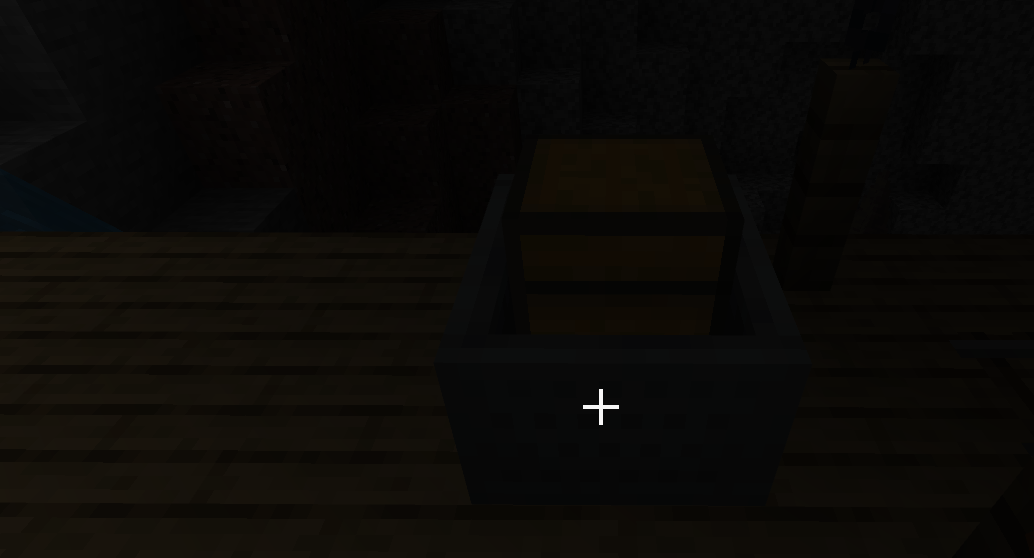
- Place a minecart with chest in a dark place
- You'll notice that the farther away you are, the brighter the box will look
Observed Results:
Look at the picture, As far as I've observed, only Minecarts with Chests have this vulnerability, others such as Minecarts with hoppers don't
Expected Results:
The chest inside the minecart will appear as
bright as the minecart no matter how far away the player is from itSteps to Reproduce:
- Place a minecart with chest in a dark place
- You'll notice that the farther away you are, the brighter the box will look
Observed Results:
Look at the picture, As far as I've observed, only Minecarts with Chests have this vulnerability, others such as Minecarts with hoppers don't
Expected Results:
The chest inside the minecart will appear as light as the minecart no matter how far away the player is from it
Steps to Reproduce:
- Place a minecart with chest in a dark place
- You'll notice that the farther away you are, the brighter the box will look
Observed Results:
Look at the picture, As far as I've observed, only Minecarts with Chests have this vulnerability, others such as Minecarts with hoppers don't
Expected Results:
The chest inside the minecart will appear as light as the minecart no matter how far away the player is from it
重现步骤:
- 将带箱子的矿车放在黑暗的地方
- 你会注意到,你离得越远,盒子看起来就越亮
观察到的结果:
看看图片,据我观察,只有带箱子的矿车有这个漏洞,其他的,比如带料斗的矿车没有
预期结果:
无论玩家离矿车有多远,矿车内的箱子都会显得和矿车一样轻
重现步骤:
- 将带箱子的矿车放在黑暗的地方
- 你会注意到,你离得越远,盒子看起来就越亮
观察到的结果:
看看图片,据我观察,只有带箱子的矿车有这个漏洞,其他的,比如带料斗的矿车没有
预期结果:
无论玩家离矿车有多远,矿车内的箱子都会显得和矿车一样轻
Summary:{}
As far as I can see, only minecarts with chests have this vulnerability, others such as minecarts with loopholes do not{}
Steps to reproduce:
- Place the minecart with the chest in a dark place
- You'll notice that the farther away you are, the brighter the box looks
Observed Results:
look at the picture
Expected Results:
No matter how far the player is away from the minecart, the chest inside the minecart will always have the same brightness as the minecart
Summary:{}
As far as I can see, only minecarts with chests have this vulnerability, others such as minecarts with loopholes do not{}
Steps to reproduce:
- Place the minecart with the chest in a dark place
- You'll notice that the farther away you are, the brighter the box looks
Observed Results:
look at the picture
Expected Results:
No matter how far the player is away from the minecart, the chest inside the minecart will always have the same brightness as the minecart
Summary:
As far as I can see, only minecarts with chests have this vulnerability, others such as minecarts with loopholes do not
Steps to reproduce:
- Place the minecart with the chest in a dark place
- You'll notice that the farther away you are, the brighter the box looks
Observed Results:
look at the picture
Expected Results:
No matter how far the player is away from the minecart, the chest inside the minecart will always have the same brightness as the minecart
Summary:
A
s far as I can see, only minecarts with chests have this vulnerability, others such asminecarts withloopholes do notSteps to reproduce:
- Place the minecart with the chest in a dark place
- You'll notice that the farther away you are, the brighter the box looks
Observed Results:
look at the picture
Expected Results:
No matter how far the player is away from the minecart, the chest inside the minecart will always have the same brightness as the minecart
Summary:
According to my tests, only minecarts with chests have this vulnerability, and other minecarts with vulnerabilities do not
Steps to reproduce:
- Place the minecart with the chest in a dark place
- You'll notice that the farther away you are, the brighter the box looks
Observed Results:
look at the picture
Expected Results:
No matter how far the player is away from the minecart, the chest inside the minecart will always have the same brightness as the minecart
Summary:
A
ccording to mytests, only minecarts with chests have this vulnerability,andother minecarts withvulnerabilities donotSteps to reproduce:
- Place the minecart with the chest in a dark place
- You'll notice that the farther away you are, the brighter the box looks
Observed Results:
look at the picture
Expected Results:
No matter how far the player is away from the minecart, the chest inside the minecart will always have the same brightness as the minecart
Summary:
As far as I've tested, only minecarts with chests have this vulnerability, others such as minecarts with hoppers don't
Steps to reproduce:
- Place the minecart with the chest in a dark place
- You'll notice that the farther away you are, the brighter the box looks
Observed Results:
look at the picture
Expected Results:
No matter how far the player is away from the minecart, the chest inside the minecart will always have the same brightness as the minecart
I know my first account was banned, sorry I deleted that bad comment
You don't fix a problem that can be fixed, and you threaten me with a banned account. I'll tell you, I've got a bunch of emails, a bunch of devices, you can't ban me, I can comment whenever I want, but I didn't. Also, you can't disable your phone number to ban me from commenting
This bug exists in 0.14.3!
All leaves blocks have this problem
Steps to reproduce:
- Create worlds in Java and Bedrock Edition
Once you're in the world,walk around and observe your surroundingsObserved results:
As shown in the picture "bedrock"
Expected results:
As shown in the picture "java"
Fixed a lot of plant generation bugs in 1.20.60.23, good work mojang, but also caused more mipmap errors to appear
Turn off the mipmap of the block with the bug!
在游戏文件中有存在这个红色的纹理
虽然这是对树叶的性能优化,但是用这种方式渲染被覆盖的树叶时,看起来会很糟糕。
The player's screen in lava is brokenPerception in lava is broken
Perception in lava is brokenscreen perception in lava is broken
screen perceptionin lava is brokenPicture effects in lava is broken
Picture effectsin lava is brokenThe player's visual feedback in lava is broken
Steps to reproduce:
- Play in survival mode and start breaking blocks
- Aim at one surface of the block you want to break, and in the process of breaking the block, move the crosshair to a different side of the block
- Continue the destruction and observe where the particles are generated
{}{}Observed result:
When breaking blocks, the block will produce particles not on the side where the crosshair is located, but on the side of the block where the crosshair was located when the player started breaking the block.Expected result:
Particles produced while breaking the block are always produced on the surface where the crosshair is located.
Steps to reproduce:
- Play in survival mode and start breaking blocks
- Aim at one surface of the block you want to break, and in the process of breaking the block, move the crosshair to a different side of the block
- Continue the destruction and observe where the particles are generated
{}Observed result:
When breaking blocks, the block will produce particles not on the side where the crosshair is located, but on the side of the block where the crosshair was located when the player started breaking the block.Expected result:
Particles produced while breaking the block are always produced on the surface where the crosshair is located.Steps to reproduce:
- Play in survival mode and start breaking blocks
- Aim at one surface of the block you want to break, and in the process of breaking the block, move the crosshair to a different side of the block
- Continue the destruction and observe where the particles are generated{}
Observed result:
When breaking blocks, the block will produce particles not on the side where the crosshair is located, but on the side of the block where the crosshair was located when the player started breaking the block.
Expected result:
Particles produced while breaking the block are always produced on the surface where the crosshair is located.
Steps to reproduce:
- Play in survival mode and start breaking blocks
- Aim at one surface of the block you want to break, and in the process of breaking the block, move the crosshair to a different side of the block
- Continue the destruction and observe where the particles are generated{}
Observed result:
When breaking blocks, the block will produce particles not on the side where the crosshair is located, but on the side of the block where the crosshair was located when the player started breaking the block.
Expected result:
Particles produced while breaking the block are always produced on the surface where the crosshair is located.Steps to reproduce:
- Play in survival mode and start breaking blocks
- Aim at one surface of the block you want to break, and in the process of breaking the block, move the crosshair to a different side of the block
- Continue the destruction and observe where the particles are generated
Observed result:
When breaking blocks, the block will produce particles not on the side where the crosshair is located, but on the side of the block where the crosshair was located when the player started breaking the block.
Expected result:
Particles produced while breaking the block are always produced on the surface where the crosshair is located.
It is only right that the moogcity2 clip in music alpha is in the credits just after the end of the clip
The moogcity2 melody clip in Music Alpha is correct when the credits text comes to the screen just after the playback
Jumping from a distance of1.5blocks from the ground will result in fall damageJumping from a distance of 2 blocks from the ground will result in fall damage
Jumping from a distance of 2blocksfrom the ground willresultin fall damageIf you fall more than 1 block from the ground, you will gain fall damage
If you fall more than 1 block from the ground, you will gainfall damageFall height greater than 1 block grants fall damage
Affect/s 1.21.60.23
![[Mod] turbo](../../../data/avatars/users/92867.png)
luoj: I told you not to leave a comment on this ticket, and yet you do. Given that your first account has already been banned and you are ban evading on this account, this is your first and only warning.

luoj You have a reporter on your bug report, no need to add comments.
As you can mark this Affect/s version list here.
Confirm
This issue may also cause the pop-up "Texture Pack/Behavior Pack Activated" that appears at the top of the screen to disappear
And the Credits/End Poem text scrolls too fast, and the melody of c418's music "Alpha" will correspond to the mood of each text
Here are some examples
When the line "and the universe said I love you" appears, the music will make you hear the melody of "moog city2".
When Credits appear, the music reaches its climax
I don't know exactly when I encountered it. In short, the Pocket Edition does not have this problem
Version 1.14.60 exists
Version 1.9 the bug not exist
Any surface of a leaves block will have this problem if it is facing air
As long as it is a leaf block, it has this bug
Your report is a copy
But the latest version still has this problem, I mean this vulnerability appeared after version 1.9.0
Please do not report this bug as parity
MCPE-19232 and MCPE-138963
Thanks bot
The bug I'm reporting is not a copy of
MCPE-66319, it's a new issue. I'd like to tell you that the horses, pigs, cows, and sheep are no longer scattered when they spawn, and to be clear, you won't find any naturally spawned mobs scattered apart. They are all stacked on a block when they spawn and then forced to squeeze apartThis red texture is present in the game files
I've also observed that the side texture color of the grass block is incorrect
Java Edition 1.7.10 grass looks like in different mipmap settings
0: Normal color
1~4: The larger the mipmap, the darker the grass will be
Java Edition 1.12 grass looks like in different mipmap settings
0~4: The color of the grass looks normal at different distances, because the grass does not use mipmap
Typing something on the keyboard is gameplay or not
Minecraft is not a free game
When rendering does not use mipmaps, the problem disappears
While it was an intentional performance optimization, it broke the graphics. And there are obviously better and faster ways
This report was submitted by me. But now that I'm on a new account, could Mojang please transfer the report to me to maintain and track it?
Many blocks that don't emit light in the backpack have gone wrong with its ambient occlusion
1.21.30 exists
1.21.40.22 exists
JervieA20,I'm the reporter of MCPE-183177, and that account is no longer in use,
1.21.50.22 exists
C418 designed the music for the end poem. When the text of the credits appeared on the screen, he wanted the "moogcity2" melody in the music alpha to end just right
1.21.50.24 exists
1.21.44 exists
The villagers in my world stop any activity for days
1.21.60.21 exists
What did Mojang change to cause this bug?