 MacchuPicchu96
- MacchuPicchu96
- macchupicchu96
- America/Chicago
- Yes
- No
 MCPE-13966
 MC-133192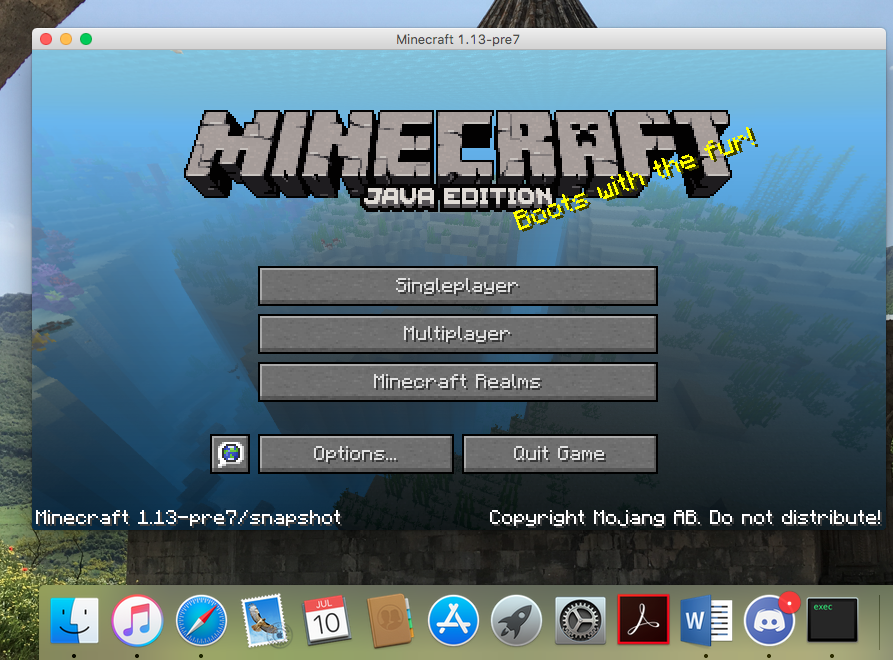
In all of the 1.13 pre-releases that I have tried out, including the most recent one, I have noticed that the application icon is no longer a crafting table as it used to be; rather, it is now showing my OS's generic .exec file icon. I am using a 2011 MacBook Pro running macOS High Sierra (Version 10.13.5). A picture is included.
My apologies if this is a duplicate issue; I sincerely do not intend to clutter this site more than is needed. If this is the case, then that fact that I've found this website hard to use is probably why I missed it.
In all of the 1.13 pre-releases that I have tried out, including the most recent one, I have noticed that the application icon is no longer a crafting table as it used to be; rather, it is now showing my OS's generic .exec file icon. I am using a 2011 MacBook Pro running macOS High Sierra (Version 10.13.5). A picture is included below.
My apologies if this is a duplicate issue; I sincerely do not intend to clutter this site more than is needed. If this is the case, then that fact that I've found this website hard to use is probably why I missed it.
In all of the 1.13 pre-releases that I have tried out, including the most recent one, I have noticed that the application icon is no longer a crafting table as it used to be; rather, it is now showing my OS's generic .exec file icon. I am using a 2011 MacBook Pro running macOS High Sierra (Version 10.13.5). A picture is included below; look in the bottom-right corner to see the issue.
My apologies if this is a duplicate issue; I sincerely do not intend to clutter this site more than is needed. If this is the case, then that fact that I've found this website hard to use is probably why I missed it.
In anticipation of starting up a new survival world for 1.13, I decided to test out the new Backup feature, which looked very promising. My plan was to create an alias for the backups folder, then move the original into my Dropbox folder, leaving the alias within the minecraft folder. The goal here is to have a Dropbox automatically back up my Minecraft backups, for an extra level of security as well as flexibility. I have done this with other apps before, such as iTunes. But Minecraft will not cooperate:
- If I try to create a backup with an alias folder named "backups", the game crashes.
- If I try to create a backup with an alias folder named anything else, the game creates a new folder named "backups" and stores the backup there, thus effectively nullifying my attempts to have Dropbox automatically back up my worlds.
I am using a 2011 MacBook Pro with macOS High Sierra 10.13.6.
In anticipation of starting up a new survival world for 1.13, I decided to t
estout the new Backup feature, which looked very promising. My plan was to create an alias for the backups folder, then move the original into my Dropbox folder, leaving the alias within the minecraft folder. The goal here is to have a Dropbox automatically back up my Minecraft backups, for an extra level of security as well as flexibility. I have done this with other apps before, such as iTunes. But Minecraft will not cooperate:
- If I try to create a backup with an alias folder named "backups", the game crashes.
- If I try to create a backup with an alias folder named anything else, the game creates a new folder named "backups" and stores the backup there, thus effectively nullifying my attempts to have Dropbox automatically back up my worlds.
I am using a 2011 MacBook Pro with macOS High Sierra 10.13.6.
In anticipation of starting up a new survival world for 1.13, I decided to try out the new Backup feature, which looked very promising. My plan was to create an alias for the backups folder, then move the original into my Dropbox folder, leaving the alias within the minecraft folder. The goal here is to have a Dropbox automatically back up my Minecraft backups, for an extra level of security as well as flexibility. I have done this with other apps before, such as iTunes. But Minecraft will not cooperate:
- If I try to create a backup with an alias folder named "backups", the game crashes.
- If I try to create a backup with an alias folder named anything else, the game creates a new folder named "backups" and stores the backup there, thus effectively nullifying my attempts to have Dropbox automatically back up my worlds.
I am using a 2011 MacBook Pro with macOS High Sierra 10.13.6.
In anticipation of starting up a new survival world for 1.13, I decided to try out the new Backup feature, which looked very promising. My plan was to create an alias for the backups folder, then move the original into my Dropbox folder, leaving the alias within the minecraft folder. The goal here is to have a Dropbox automatically back up my Minecraft backups, for an extra level of security as well as flexibility. I have done this with other apps before, such as iTunes. But Minecraft will not cooperate:
- If I try to create a backup with an alias folder named "backups", the game crashes.
- If I try to create a backup with an alias folder named anything else, the game creates a new folder named "backups" and stores the backup there, thus effectively nullifying my attempts to have Dropbox automatically back up my worlds.
I am using a 2011 MacBook Pro with macOS High Sierra 10.13.6.
In anticipation of starting up a new survival world for 1.13, I decided to try out the new Backup feature, which looked very promising. My plan was to create an alias for the backups folder, then move the original into my Dropbox folder, leaving the alias within the minecraft folder. The goal here is to have a Dropbox automatically back up my Minecraft backups, for an extra level of security as well as flexibility. I have done this with other apps before, such as iTunes. But Minecraft will not cooperate:
- If I try to create a backup with an alias folder named "backups", the game crashes. Attached is a crash report generated after one such attempt.
- If I try to create a backup with an alias folder named anything else, the game creates a new folder named "backups" and stores the backup there, thus effectively nullifying my attempts to have Dropbox automatically back up my worlds.
In anticipation of starting up a new survival world for 1.13, I decided to try out the new Backup feature, which looked very promising. My plan was to create an alias for the backups folder, then move the original into my Dropbox folder, leaving the alias within the minecraft folder. The goal here is to have
aDropbox automatically back up my Minecraft backups, for an extra level of security as well as flexibility. I have done this with other apps before, such as iTunes. But Minecraft will not cooperate:
- If I try to create a backup with an alias folder named "backups", the game crashes. Attached is a crash report generated after one such attempt.
- If I try to create a backup with an alias folder named anything else, the game creates a new folder named "backups" and stores the backup there, thus effectively nullifying my attempts to have Dropbox automatically back up my worlds.
In anticipation of starting up a new survival world for 1.13, I decided to try out the new Backup World feature, which looked very promising. My plan was to create an alias for the backups folder, then move the original into my Dropbox folder, leaving the alias within the minecraft folder. The goal here is to have Dropbox automatically back up my Minecraft backups, for an extra level of security as well as flexibility. I have done this with other apps before, such as iTunes, but Minecraft will not cooperate:
- If I try to create a backup with an alias folder named "backups", the game crashes. Attached is a crash report generated after one such attempt.
- If I try to create a backup with an alias folder named anything else, the game creates a new folder named "backups" and stores the backup there, thus effectively nullifying my attempts to have Dropbox automatically back up my worlds.
crash-2018-07-17_16.45.42-client.txt

@MacchuPicchu96, the crash report you attached contains your OS username in the folder paths (I removed it from the stacktrace included in the description). Did you intend that? If not please remove the crash report.
Maximum difficulty, as always! My mobs will graciously give me way too much armor (
MCPE-9846) but they are very stingy in the weapons department.Present on my iPhone 6S, running MCPE 0.14.3. I'd like to add two points to the discussion:
1) The importance of fixing this bug to Survival gameplay cannot be understated. A skilled Minecraft player with a set of stone tools can, after just the first night of a Survival world, easily acquire a half dozen full sets of gold and leather armor, much of it pretty well enchanted. There's no challenge in that. I want an armor drop from a mob to be an event, something exciting, something I'm proud to have, especially after just a few in-game days. But because armor drops are so common, almost none of it is valuable in any way. It's quite sad.
2) MCPE currently treats equipped armor on mobs as player-created armor that spawned with full durability. This means that if you kill an armored mob with potions, for example, the dropped armor will be at full durability. If you kill that same mob with a sword instead, their armor will take damage, resulting in a bunch of barely-damaged armor as seen in the picture posted above. But according to the Wiki, armor drops should have random durability, not full. I hope that this issue will be fixed alongside the major bug discussed here.
This is affecting me, too, on version 1.13 Prerelease 7.
Affects 1.13 pre7.
C'est normal que ça fasse ça; l'eau ne peut pas entrer dans des demi-blocs comme les vitraux. Ce serait extrêmement compliquée d'introduire ça dans le jeu.
(This is normal behavior; water can't flow into half-blocks like glass panes. It would be extremely complicated to add this to the game.)
This bug is the only thing keeping me on 1.8.9 when playing on servers. Mojang should take note - I might not be the only one.
No, that was an oversight on my part. Thank you very much for your help!
Hi Grum! I'm on a 2011 MacBook Pro, using macOS High Sierra (Version 10.13.6). I simply right clicked on the backups folder and selected "Make Alias".
I think I could circumvent this issue by just placing my entire game directory (the Library/Application Support/minecraft folder, as I understand) straight into Dropbox, but now I'm not so sure that that wouldn't cause problems either.
I have figured out how to use secondary game directories, which can be placed in DropBox with no apparent problems. This will be my workaround until a fix is made available.
@Helen Right, but that's because I was testing the backups folder/feature that was added to Minecraft in 1.13, not the saves folder. Is there an issue with the saves folder in 1.13, too?