 Bitslayn
- MinerMan1963
- minerman1963
- America/Denver
- Yes
- No
 MC-79647
 MCL-4480
 MCPE-15893
![[Mojang] Grum (Erik Broes)](../../../data/assets/gravatar/grum.png)
![[Mojang] Bartosz Bok](../../../data/avatars/users/10122.svg)




I don't know what is happening.
What I did to get to this bug:
1. Open minecraft launcher.
2. Edit profile.
3. Save.
I don't know what is happening.
What I did to get to this bug:
1. Open minecraft launcher.
2. Edit profile.
3. Save profile.
Minecraft Launcher Layout Glitch (Duplicate)
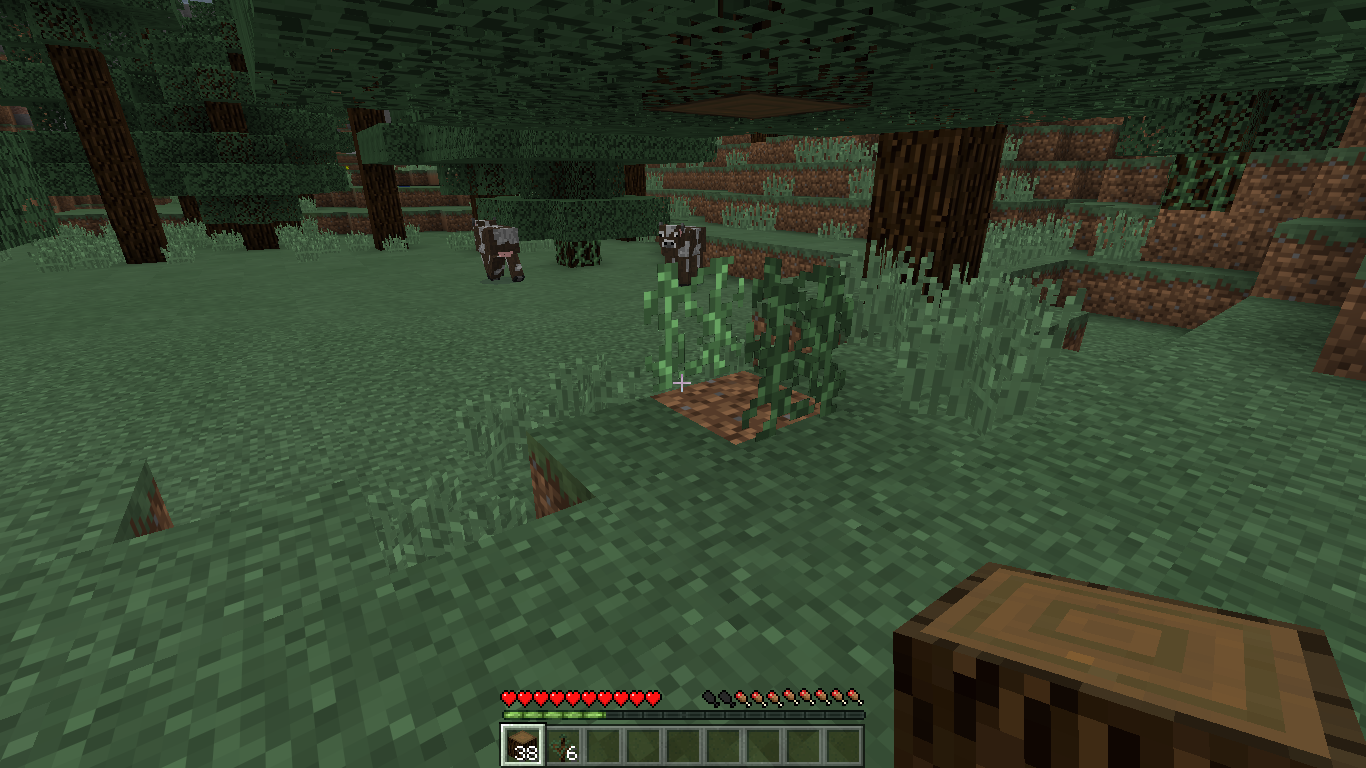
I mined a spruce tree with vines on it and there was a vine facing up that wasn't next to any block and was only touching the grass block under it.
Old: I mined a spruce tree with vines on it and there was a vine facing up that wasn't next to any block and was only touching the grass block under it. I placed a block next to the vine and it disappeared.
I wasn't able to replicate this issue and take a screenshot of it. If I do recreate this glitch, I will attach a screenshot.
New: I was able to recreate the issue. Whenever a spruce tree has 2 layers of vine at the bottom and the wood blocks they are attached to are broken, the bottom layer of vines don't break with the top layer.
Old: I mined a spruce tree with vines on it and there was a vine facing up that wasn't next to any block and was only touching the grass block under it. I placed a block next to the vine and it disappeared.
I was
n'table to replicate thisissueand take a screenshot of it. If I do recreate this glitch, I will attach a screenshot.New: I was able to recreate the issue. Whenever a spruce tree has 2 layers of vine at the bottom and the wood blocks they are attached to are broken, the bottom layer of vines don't break with the top layer.
Old: I mined a spruce tree with vines on it and there was a vine facing up that wasn't next to any block and was only touching the grass block under it. I placed a block next to the vine and it disappeared.
New: I was able to recreate the issue. Whenever a spruce tree has 2 layers of vine at the bottom and the wood blocks they are attached to are broken, the bottom layer of vines don't break with the top layer.
Old: I mineda spruce treewith vines on it and there was a vine facing up that wasn't next to any block and was only touching the grass block under it. I placed a block next to the vine and it disappeared.New: I was able to recreate the issue. Whenever a spruce tree has 2 layers of vine at the bottom and the wood blocks they are attached to are broken, the bottom layer of vines don't break with the top layer.
Whenever a spruce tree has 2 layers of vine at the bottom and the wood blocks they are attached to are broken, the bottom layer of vines don't break with the top layer. When it is updated by breaking the block under it, the vine will break.
Vine Update GlitchSpruce Tree Vines
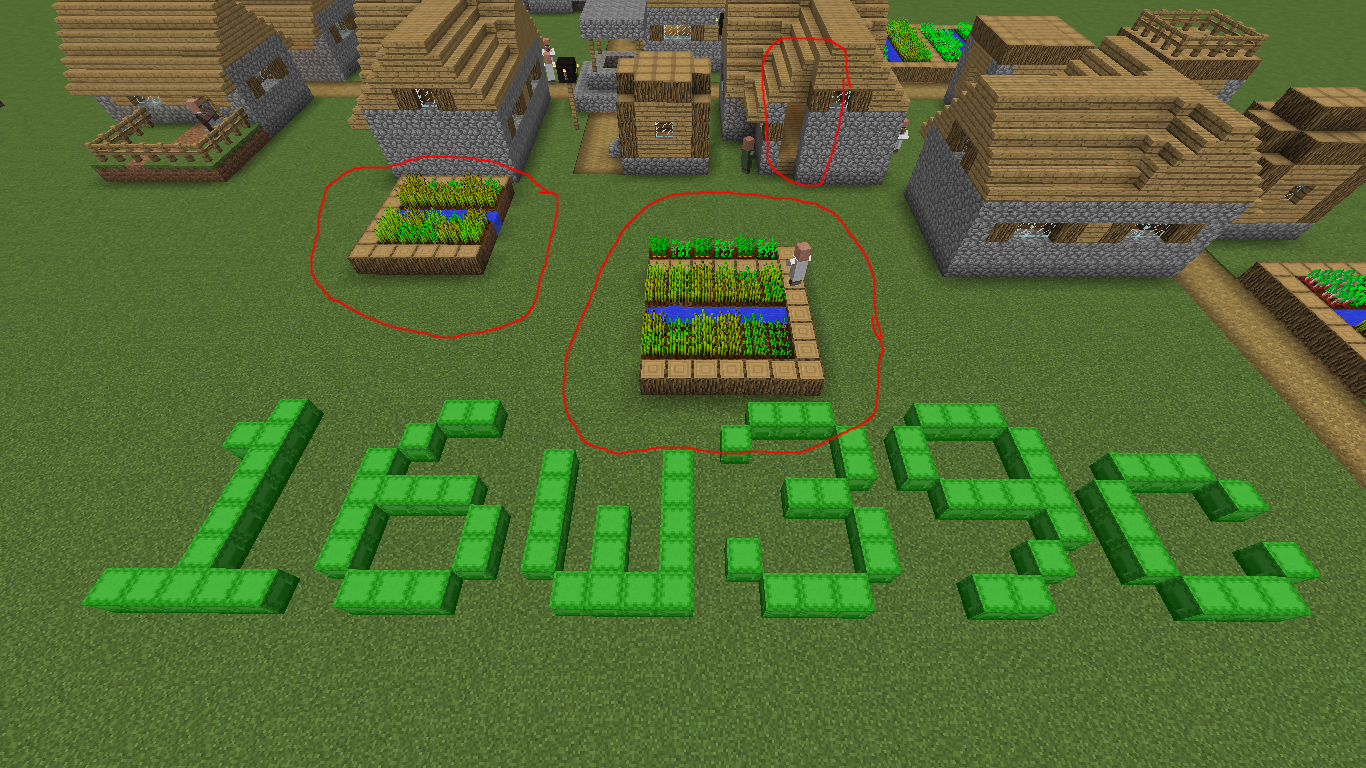
I was just playing around with the latest snapshot and then I found this bug.
Here is how I found it.
I was flying my elytra and came across a village.
I was looking around seeing what has changed about the villages and then I found it.
I took a screenshot and edited it so it would be easier to find the bug.
After searching if anyone else had this same issue, I found nothing so I decided to make one.
I searched village, and village cut off.
I viewed some issues that had a title that probably was my issue but found nothing.My client was not modded and my world was not modded either. I came across this village in an area that I haven't been to before. (I don't really go anywhere anyway.)
I hope it ma
kessense... :\I was just playing around with the latest snapshot and then I found this bug.
Here is how I found it.
I was flying my elytra and came across a village.
I was looking around seeing what has changed about the villages and then I found it.
I took a screenshot and edited it so it would be easier to find the bug.
After searching if anyone else had this same issue, I found nothing so I decided to make one.
I searched village, and village cut off.
I viewed some issues that had a title that probably was my issue but found nothing.My client was not modded and my world was not modded either. I came across this village in an area that I haven't been to before. (I don't really go anywhere anyway.)
I hope it made sense... :\
So I had this old resource pack that was in a zip that I tried to delete and the client would not let me. I decided to delete all the contents of the folder including the mcmeta file. I reloaded the resource pack selection screen and noticing the resource pack was there, out of curiosity, I loaded the re
cource pack then it crashed.Crash Log:
---- Minecraft Crash Report ----
// Would you like a cupcake?Time: 4/8/17 5:31 PM
Description: Updating screen eventsjava.util.zip.ZipError: jzentry == 0,
jzfile = 389356688,
total = 3897,
name = C:\Users\Emanuel\AppData\Roaming\.minecraft\resourcepacks\§lDefault 3D§r High §l16w49b.zip,
i = 1,
message = ZIP_Read: error reading zip file
at java.util.zip.ZipFile$ZipEntryIterator.next(ZipFile.java:520)
at java.util.zip.ZipFile$ZipEntryIterator.nextElement(ZipFile.java:500)
at java.util.zip.ZipFile$ZipEntryIterator.nextElement(ZipFile.java:481)
at ccv.c(SourceFile:70)
at cdh.a(SourceFile:35)
at cdh.a(SourceFile:90)
at bgr.f(SourceFile:712)
at bmk.a(SourceFile:133)
at bju.a(SourceFile:324)
at bmk.a(SourceFile:141)
at bju.k(SourceFile:387)
at bmk.k(SourceFile:77)
at bju.p(SourceFile:364)
at bgr.t(SourceFile:1570)
at bgr.av(SourceFile:956)
at bgr.a(SourceFile:396)
at net.minecraft.client.main.Main.main(SourceFile:123)A detailed walkthrough of the error, its code path and all known details is as follows:
---------------------------------------------------------------------------------------– Head –
Thread: Client thread
Stacktrace:
at java.util.zip.ZipFile$ZipEntryIterator.next(ZipFile.java:520)
at java.util.zip.ZipFile$ZipEntryIterator.nextElement(ZipFile.java:500)
at java.util.zip.ZipFile$ZipEntryIterator.nextElement(ZipFile.java:481)
at ccv.c(SourceFile:70)
at cdh.a(SourceFile:35)
at cdh.a(SourceFile:90)
at bgr.f(SourceFile:712)
at bmk.a(SourceFile:133)
at bju.a(SourceFile:324)
at bmk.a(SourceFile:141)
at bju.k(SourceFile:387)
at bmk.k(SourceFile:77)
at bju.p(SourceFile:364)– Affected screen –
Details:
Screen name: bmk
Stacktrace:
at bgr.t(SourceFile:1570)
at bgr.av(SourceFile:956)
at bgr.a(SourceFile:396)
at net.minecraft.client.main.Main.main(SourceFile:123)– System Details –
Details:
Minecraft Version: 17w14a
Operating System: Windows 10 (amd64) version 10.0
Java Version: 1.8.0_25, Oracle Corporation
Java VM Version: Java HotSpot(TM) 64-Bit Server VM (mixed mode), Oracle Corporation
Memory: 229445392 bytes (218 MB) / 617566208 bytes (588 MB) up to 1060372480 bytes (1011 MB)
JVM Flags: 6 total; -XX:HeapDumpPath=MojangTricksIntelDriversForPerformance_javaw.exe_minecraft.exe.heapdump -Xmx1G -XX:+UseConcMarkSweepGC -XX:+CMSIncrementalMode -XX:-UseAdaptiveSizePolicy -Xmn128M
IntCache: cache: 0, tcache: 0, allocated: 0, tallocated: 0
Launched Version: 17w14a
LWJGL: 2.9.4
OpenGL: AMD Radeon HD 8330 GL version 4.5.13397 Compatibility Profile Context 15.200.1055.0, ATI Technologies Inc.
GL Caps: Using GL 1.3 multitexturing.
Using GL 1.3 texture combiners.
Using framebuffer objects because OpenGL 3.0 is supported and separate blending is supported.
Shaders are available because OpenGL 2.1 is supported.
VBOs are available because OpenGL 1.5 is supported.Using VBOs: Yes
Is Modded: Probably not. Jar signature remains and client brand is untouched.
Type: Client (map_client.txt)
Resource Packs: §lDefault 3D§r Snapshot §l17w13b.zip, §lDefault 3D§r High §l16w49b.zip
Current Language: English (US)
Profiler Position: N/A (disabled)
CPU: 4x AMD A4-5000 APU with Radeon(TM) HD GraphicsSo I had this old resource pack that was in a zip that I tried to delete and the client would not let me. I decided to delete all the contents of the folder including the .mcmeta file. I reloaded the resource pack selection screen and noticing the resource pack was there, out of curiosity, I loaded the resource pack then it crashed.
Crash Log:
---- Minecraft Crash Report ----
// Would you like a cupcake?Time: 4/8/17 5:31 PM
Description: Updating screen eventsjava.util.zip.ZipError: jzentry == 0,
jzfile = 389356688,
total = 3897,
name = C:\Users\Emanuel\AppData\Roaming\.minecraft\resourcepacks\AResourcePack.zip,
i = 1,
message = ZIP_Read: error reading zip file
at java.util.zip.ZipFile$ZipEntryIterator.next(ZipFile.java:520)
at java.util.zip.ZipFile$ZipEntryIterator.nextElement(ZipFile.java:500)
at java.util.zip.ZipFile$ZipEntryIterator.nextElement(ZipFile.java:481)
at ccv.c(SourceFile:70)
at cdh.a(SourceFile:35)
at cdh.a(SourceFile:90)
at bgr.f(SourceFile:712)
at bmk.a(SourceFile:133)
at bju.a(SourceFile:324)
at bmk.a(SourceFile:141)
at bju.k(SourceFile:387)
at bmk.k(SourceFile:77)
at bju.p(SourceFile:364)
at bgr.t(SourceFile:1570)
at bgr.av(SourceFile:956)
at bgr.a(SourceFile:396)
at net.minecraft.client.main.Main.main(SourceFile:123)A detailed walkthrough of the error, its code path and all known details is as follows:
---------------------------------------------------------------------------------------– Head –
Thread: Client thread
Stacktrace:
at java.util.zip.ZipFile$ZipEntryIterator.next(ZipFile.java:520)
at java.util.zip.ZipFile$ZipEntryIterator.nextElement(ZipFile.java:500)
at java.util.zip.ZipFile$ZipEntryIterator.nextElement(ZipFile.java:481)
at ccv.c(SourceFile:70)
at cdh.a(SourceFile:35)
at cdh.a(SourceFile:90)
at bgr.f(SourceFile:712)
at bmk.a(SourceFile:133)
at bju.a(SourceFile:324)
at bmk.a(SourceFile:141)
at bju.k(SourceFile:387)
at bmk.k(SourceFile:77)
at bju.p(SourceFile:364)– Affected screen –
Details:
Screen name: bmk
Stacktrace:
at bgr.t(SourceFile:1570)
at bgr.av(SourceFile:956)
at bgr.a(SourceFile:396)
at net.minecraft.client.main.Main.main(SourceFile:123)– System Details –
Details:
Minecraft Version: 17w14a
Operating System: Windows 10 (amd64) version 10.0
Java Version: 1.8.0_25, Oracle Corporation
Java VM Version: Java HotSpot(TM) 64-Bit Server VM (mixed mode), Oracle Corporation
Memory: 229445392 bytes (218 MB) / 617566208 bytes (588 MB) up to 1060372480 bytes (1011 MB)
JVM Flags: 6 total; -XX:HeapDumpPath=MojangTricksIntelDriversForPerformance_javaw.exe_minecraft.exe.heapdump -Xmx1G -XX:+UseConcMarkSweepGC -XX:+CMSIncrementalMode -XX:-UseAdaptiveSizePolicy -Xmn128M
IntCache: cache: 0, tcache: 0, allocated: 0, tallocated: 0
Launched Version: 17w14a
LWJGL: 2.9.4
OpenGL: AMD Radeon HD 8330 GL version 4.5.13397 Compatibility Profile Context 15.200.1055.0, ATI Technologies Inc.
GL Caps: Using GL 1.3 multitexturing.
Using GL 1.3 texture combiners.
Using framebuffer objects because OpenGL 3.0 is supported and separate blending is supported.
Shaders are available because OpenGL 2.1 is supported.
VBOs are available because OpenGL 1.5 is supported.Using VBOs: Yes
Is Modded: Probably not. Jar signature remains and client brand is untouched.
Type: Client (map_client.txt)
Resource Packs: AResourcePack.zip
Current Language: English (US)
Profiler Position: N/A (disabled)
CPU: 4x AMD A4-5000 APU with Radeon(TM) HD Graphics
Windows 10
(Latest Public Java Version)Windows 10
Windows 10
Windows 10
Java 1.8.0_151
The shield animation when blocking breaks when changing to another item. Also happens when spamming the 'F' key.
As the title implies
Also to note thatI went 'afk' about one block away from the beacon and the game crashed.
Beacon sound is the same as Conduit soundCrash when standing near a beacon
Hard to replicate
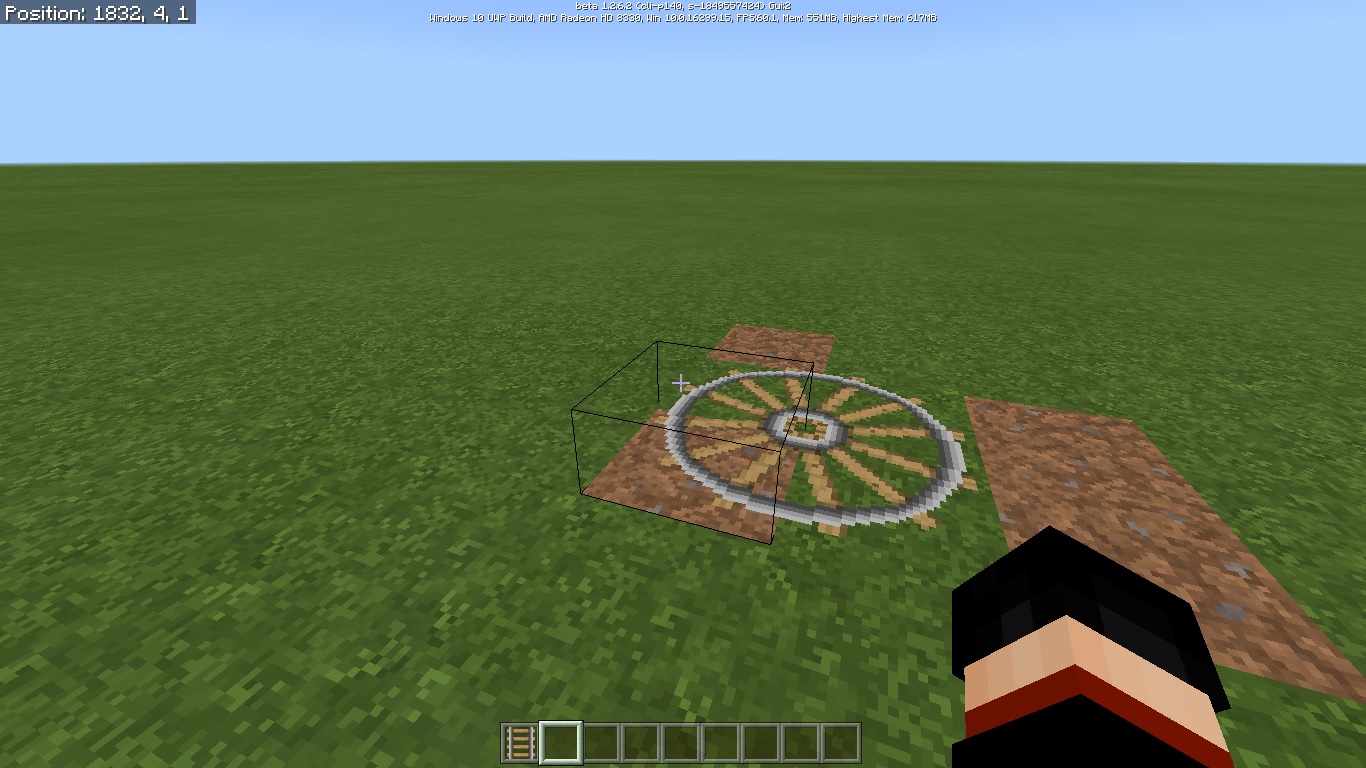
When switching to third person and looking slightly up to push the camera near carpet you can "x-ray" through the floor.
When a zombie
is killed the same tickas it transitions into azombie, it dropsit's items but doesn't die. Video attached shows normal zombie getting killed without a weapon.ConditionsOld world size (Seed: 1273159352)
64x Resources (Chroma Hills HD 1.0.18)
Resources loaded on world load
Online without Multiplayer enabled
Easy difficulty
Survival world
Simulation Distance: 4
Render Distance: 14
Particle Render Distance: 100
Textel AA enabled
[All graphical settings enabled]
Screen animations disabledWhen a zombie dies as it transitions into a Drowned, it drops death loot. The Drowned mob doesn't die in transition.
ConditionsOld world size (Seed: 1273159352)
64x Resources (Chroma Hills HD 1.0.18)
Resources loaded on world load
Online without Multiplayer enabled
Easy difficulty
Survival world
Simulation Distance: 4
Render Distance: 14
Particle Render Distance: 100
Textel AA enabled
[All graphical settings enabled]
Screen animations disabled
Transitioned Drowns drop itemsZombies drop their death drops when turning into Drowned mob
Is the version wrong because I tried to do what you did and nothing happened.
Your command was wrong and I approved it. The command is "/summon EntityHorse ~0 ~1 ~0 {Tame:1,SaddleItem:
{id:329},ChestedHorse:1}"
Red numbers are clicks.
Yellow number is the outcome.
Blue is just some text I wanted to add.
(Go in numerical order.)
Screenshot_1
Add effected versions for 1.9 and 1.9.1
If you would like to add Windows 10 in environment to match "screenshot_1" then you can.
This issue doesn't happen to me anymore. It's probably a glitch in the old Windows 10 Updates.
It's still annoying how it makes it un-deleteable even when the Resource Pack is unselected.
Duplicate of
MC-114950. Please use the search function next time.This is a duplicate of
MC-114950. Please use the search before submitting a bug report.Bug still found in the latest snapshot. (17w15a) I opened statistics and clicked on items when the game crashed. Environment found on latest crash log.
Hitboxes are at a tick delay on blocks and items which have hitboxes larger than 1^3.
Alrighty and done. Thanks for the clear up and btw. I've tried the search feature and it didn't show the original report so... Idk
Confirmed for 17w47a Debug file given.
I don't know if the information provided is necessary but I decided to add it anyway.
They drop rotten flesh when their zombie form dies. I don't remember seeing this happen anywhere but this instance; Java or Bedrock
If you notice in the video, the zombie shouldn't have dropped rotten flesh.
Yes
The Nintendo Switch updated from 8.0.1 to 8.1.0
It's not consistent. The mob has to die the same time it transitions into a Drowned for it to work. Maybe lag could be another factor since my game tends to have a lot of lag spikes.
Yes it does happen on newly created worlds. I have not experienced this in any cheat enabled worlds. Also happens mostly every instance you save and quit.
I do not know if my new experiences lead to a change in the topic or a new bug report (this one closed)
Happens for me too. I'm trying to join my Java server through Geyser and I have a shader setup. Every time I load the server or download the shader the game instantly crashes. I'm using the ESTN Shaders Github Edition pack on 1.16.201 (Note that the file shows 0.00MB under cached data.
This issue can be created in a vanilla environment as you can connect to anyone's realm/server on the Nintendo Switch, Xbox One, and PlayStation 4.
Sorry if I sounded rude but it's frustrating how the issue gets resolved as invalid without any attempts to recreate this issue.
I'm unsure as I'm unable to download the pack data from the server.