 TechionPrime34
- Mr_Tech41
- JIRAUSER641325
- Europe/Stockholm
- Yes
- No
 MC-225056
 Low
Low![[Mojang] Gnembon](../../../data/avatars/users/93709.png)












Its been a few years since the issue started. I was playing Minecraft just fine, until one day, it stopped responding before the title screen could ever show up. I waited over 30 minutes, and still no change. I tried a few more times, with the same result. Since the issue, it had affected all versions before it as well. I even tried uninstalling and reinstalling Minecraft a good number of times, just to try to get it to work. Sadly, it was to no avail. Recently, though, I tried playing it on a new computer with the old data backed up. Still same result. Stopped responding. However, the older versions began to work just fine again, and I've narrowed it down to the version range provided in the Environment section. I've also included pictures of the error code that also pops up upon me closing the Non-responsive Versions of Minecraft. It's always Error Code 0. I hope to fix this issue soon.
Edit: On the older versions, it seems to crash on world generation.
Recipe Command Glitches
I have a good number of tamed cats, but they just won't breed. I've tried both cod and salmon, and one the first cat, the love hearts show up, but then when I try the next one, the love hears just stop, and the cats don't even act like they are in love mode. Plus, the cool-down seems to end quite earlier than normal. Could someone please explain what is happening?
(Note: I have noticed similar issues to this problem in searching for this issue beforehand, but the problem is slightly different to mine.)Edit: I figured out the problem: the cats weren't sitting down. Whoops!
Door glitches.
Sound GlitchI noticed that whenever I am
standinginside a door and open or close it,the noise seems to be louder than if I werestanding outside and facing it. So long as I am standing directly inside the door, it happens, and no, it's not the volume. If the volume was the case, then I would probably turn it up to the maximum level, but it's already set to that. Unfortunately, I can't show you a video of it, but I did notice it that it's happening,and this is the most detail that I can give right now.Forced Crouching/Standing
Also when positioned the same as the Door Sound Bug mentioned above. I can't crouch whilst I'm standing, or can't stop crouching whilst in the door. Once again, it's not something that I did with the ingame settings; leaving the door lets me crouch or stop crouching as normal.
Note: I did have pictures with the right position for it to work, but they may not be perfectly clear. It works so long as your player is standing inside the door, either from opening or closing it.Forced Crouching/Standing
I noticed that whenever I am inside a door and open or close it, I can't crouch whilst I'm standing, or can't stop crouching whilst in the door. It's not something that I did with the ingame settings; leaving the door lets me crouch or stop crouching as normal.
Note: I did have pictures with the right position for it to work, but they may not be perfectly clear. It works so long as your player is standing inside the door, either from opening or closing it.
Edit: Originally I had thought there was a sound glitch as well, but it turned out, it was just my speakers. Whoops!
I noticed that when trying to toggle a comparator's modes(from subtract mode to compare mode and vise versa), that comparator may briefly turn off if powered and has a repeater facing towards it from the sides, even if the repeater isn't connected to anything. From what I can tell, the time that the comparator is spent off in this glitch isn't enough to break contraptions, but CAN be visible from the f3 debug screen, as it stops saying "true" in the "powered" info for the comparator. It was difficult to get the screenshots of this happening, due to the glitched state's window of time being really small.
Edit: After I closed the world and reopened it again, the glitch could still be done for about a minute or so before it stopped happening. It may be caused by some sort of lag, so it might be a good place to keep looking for some investigation.
I noticed that when trying to toggle a comparator's modes(from subtract mode to compare mode and vise versa), that comparator may briefly turn off if powered and has a repeater facing towards it from the sides, even if the repeater isn't connected to anything. From what I can tell, the time that the comparator is spent off in this glitch isn't enough to break contraptions, but CAN be visible from the f3 debug screen, as it stops saying "true" in the "powered" info for the comparator. It was difficult to get the screenshots of this happening, due to the glitched state's window of time being really small.
Edit: After I closed the world and reopened it again, the glitch could still be done for about a minute or so before it stopped happening. It may be caused by some sort of lag, so it might be a good place to keep looking for some investigation.
Second edit: Upon further Investigation I can deduce that for a short period of time after the world loads, more specifically the loading and unloading of chunks, might be the cause of this. This is because it seems to be consistently happening when I enter a world, though when I first noticed it, the world had been open for a good while, and I must of unloaded and reloaded some chunks without noticing around that time.
Starting info
I noticed that when trying to toggle a comparator's modes(from subtract mode to compare mode and vise versa), that comparator may briefly turn off if powered and has a repeater facing towards it from the sides, even if the repeater isn't connected to anything. From what I can tell, the time that the comparator is spent off in this glitch isn't enough to break contraptions, but CAN be visible from the f3 debug screen, as it stops saying "true" in the "powered" info for the comparator. It was difficult to get the screenshots of this happening, due to the glitched state's window of time being really small.
Edit: After I closed the world and reopened it again, the glitch could still be done for about a minute or so before it stopped happening. It may be caused by some sort of lag, so it might be a good place to keep looking for some investigation.
Second edit: Upon further Investigation I can deduce that for a short period of time after the world loads, more specifically the loading and unloading of chunks, might be the cause of this. This is because it seems to be consistently happening when I enter a world, though when I first noticed it, the world had been open for a good while, and I must of unloaded and reloaded some chunks without noticing around that time.
Third edit: Any observations, including ones mentioned above, that I find I will add to the Observations section below.
Observations
- It seems to be happening whenever the world has just been loaded, as well as possibly the loading of chunks.
- The video in
Starting info
I noticed that when trying to toggle a comparator's modes(from subtract mode to compare mode and vise versa), that comparator may briefly turn off if powered and has a repeater facing towards it from the sides, even if the repeater isn't connected to anything. From what I can tell, the time that the comparator is spent off in this glitch isn't enough to break contraptions, but CAN be visible from the f3 debug screen, as it stops saying "true" in the "powered" info for the comparator. It was difficult to get the screenshots of this happening, due to the glitched state's window of time being really small.
Edit: After I closed the world and reopened it again, the glitch could still be done for about a minute or so before it stopped happening. It may be caused by some sort of lag, so it might be a good place to keep looking for some investigation.
Second edit: Upon further Investigation I can deduce that for a short period of time after the world loads, more specifically the loading and unloading of chunks, might be the cause of this. This is because it seems to be consistently happening when I enter a world, though when I first noticed it, the world had been open for a good while, and I must of unloaded and reloaded some chunks without noticing around that time.
Third edit: Any observations, including ones mentioned above, that I find I will add to the Observations section below.
Observations
- It seems to be happening whenever the world has just been loaded, as well as possibly the loading of chunks.
- The video in
Starting info
I noticed that when trying to toggle a comparator's modes(from subtract mode to compare mode and vise versa), that comparator may briefly turn off if powered and has a repeater facing towards it from the sides, even if the repeater isn't connected to anything. From what I can tell, the time that the comparator is spent off in this glitch isn't enough to break contraptions, but CAN be visible from the f3 debug screen, as it stops saying "true" in the "powered" info for the comparator. It was difficult to get the screenshots of this happening, due to the glitched state's window of time being really small.
Edit: After I closed the world and reopened it again, the glitch could still be done for about a minute or so before it stopped happening. It may be caused by some sort of lag, so it might be a good place to keep looking for some investigation.
Second edit: Upon further Investigation I can deduce that for a short period of time after the world loads, more specifically the loading and unloading of chunks, might be the cause of this. This is because it seems to be consistently happening when I enter a world, though when I first noticed it, the world had been open for a good while, and I must of unloaded and reloaded some chunks without noticing around that time.
Third edit: Any observations, including ones mentioned above, that I find I will add to the Observations section below.
Observations
- It seems to be happening whenever the world has just been loaded, as well as possibly the loading of chunks.
- The comparator in glitches out in a similar manner.
Starting info
I noticed that when trying to toggle a comparator's modes(from subtract mode to compare mode and vise versa), that comparator may briefly turn off if powered and has a repeater facing towards it from the sides, even if the repeater isn't connected to anything. From what I can tell, the time that the comparator is spent off in this glitch isn't enough to break contraptions, but CAN be visible from the f3 debug screen, as it stops saying "true" in the "powered" info for the comparator. It was difficult to get the screenshots of this happening, due to the glitched state's window of time being really small.
Edit: After I closed the world and reopened it again, the glitch could still be done for about a minute or so before it stopped happening. It may be caused by some sort of lag, so it might be a good place to keep looking for some investigation.
Second edit: Upon further Investigation I can deduce that for a short period of time after the world loads, more specifically the loading and unloading of chunks, might be the cause of this. This is because it seems to be consistently happening when I enter a world, though when I first noticed it, the world had been open for a good while, and I must of unloaded and reloaded some chunks without noticing around that time.
Third edit: Any observations, including ones mentioned above, that I find I will add to the Observations section below.
Observations
- It seems to be happening whenever the world has just been loaded, as well as possibly the loading of chunks.
- The comparator in glitches out in a similar manner.
Starting info
I noticed that when trying to toggle a comparator's modes(from subtract mode to compare mode and vise versa), that comparator may briefly turn off if powered and has a repeater facing towards it from the sides, even if the repeater isn't connected to anything. From what I can tell, the time that the comparator is spent off in this glitch isn't enough to break contraptions, but CAN be visible from the f3 debug screen, as it stops saying "true" in the "powered" info for the comparator. It was difficult to get the screenshots of this happening, due to the glitched state's window of time being really small.
Edit: After I closed the world and reopened it again, the glitch could still be done for about a minute or so before it stopped happening. It may be caused by some sort of lag, so it might be a good place to keep looking for some investigation.
Second edit: Upon further Investigation I can deduce that for a short period of time after the world loads, more specifically the loading and unloading of chunks, might be the cause of this. This is because it seems to be consistently happening when I enter a world, though when I first noticed it, the world had been open for a good while, and I must of unloaded and reloaded some chunks without noticing around that time.
Third edit: Any observations, including ones mentioned above, that I find I will add to the Observations section below.
Observations
- It seems to be happening whenever the world has just been loaded, as well as possibly the loading of chunks.
- The comparator in https://bugs.mojang.com/browse/MC-10653 glitches out in a similar manner.
Starting info
I noticed that when trying to toggle a comparator's modes(from subtract mode to compare mode and vise versa), that comparator may briefly turn off if powered and has a repeater facing towards it from the sides, even if the repeater isn't connected to anything. From what I can tell, the time that the comparator is spent off in this glitch isn't enough to break contraptions, but CAN be visible from the f3 debug screen, as it stops saying "true" in the "powered" info for the comparator. It was difficult to get the screenshots of this happening, due to the glitched state's window of time being really small.
Edit: After I closed the world and reopened it again, the glitch could still be done for about a minute or so before it stopped happening. It may be caused by some sort of lag, so it might be a good place to keep looking for some investigation.
Second edit: Upon further Investigation I can deduce that for a short period of time after the world loads, more specifically the loading and unloading of chunks, might be the cause of this. This is because it seems to be consistently happening when I enter a world, though when I first noticed it, the world had been open for a good while, and I must of unloaded and reloaded some chunks without noticing around that time.
Third edit: Any observations, including ones mentioned above, that I find I will add to the Observations section below.
Observations
- It seems to be happening whenever the world has just been loaded, as well as possibly the loading of chunks.
- The comparator in
https://bugs.mojang.com/browse/MC-10653 glitches out in a similar manner.Starting info
I noticed that when trying to toggle a comparator's modes(from subtract mode to compare mode and vise versa), that comparator may briefly turn off if powered and has a repeater facing towards it from the sides, even if the repeater isn't connected to anything. From what I can tell, the time that the comparator is spent off in this glitch isn't enough to break contraptions, but CAN be visible from the f3 debug screen, as it stops saying "true" in the "powered" info for the comparator. It was difficult to get the screenshots of this happening, due to the glitched state's window of time being really small.
Edit: After I closed the world and reopened it again, the glitch could still be done for about a minute or so before it stopped happening. It may be caused by some sort of lag, so it might be a good place to keep looking for some investigation.
Second edit: Upon further Investigation I can deduce that for a short period of time after the world loads, more specifically the loading and unloading of chunks, might be the cause of this. This is because it seems to be consistently happening when I enter a world, though when I first noticed it, the world had been open for a good while, and I must of unloaded and reloaded some chunks without noticing around that time.
Third edit: Any observations, including ones mentioned above, that I find I will add to the Observations section below.
Observations
- It seems to be happening whenever the world has just been loaded, as well as possibly the loading of chunks.
- The comparator in the video for MC-10653 glitches out in a similar manner.
- It most likely happens whenever a comparator is powered in any manner.
- The comparator closest to the redstone block in the images below doesn't glitch out, but the other one does.
Starting info
I noticed that when trying to toggle a comparator's modes(from subtract mode to compare mode and vise versa), that comparator may briefly turn off if powered and has a repeater facing towards it from the sides, even if the repeater isn't connected to anything. From what I can tell, the time that the comparator is spent off in this glitch isn't enough to break contraptions, but CAN be visible from the f3 debug screen, as it stops saying "true" in the "powered" info for the comparator. It was difficult to get the screenshots of this happening, due to the glitched state's window of time being really small.
Edit: After I closed the world and reopened it again, the glitch could still be done for about a minute or so before it stopped happening. It may be caused by some sort of lag, so it might be a good place to keep looking for some investigation.
Second edit: Upon further Investigation I can deduce that for a short period of time after the world loads, more specifically the loading and unloading of chunks, might be the cause of this. This is because it seems to be consistently happening when I enter a world, though when I first noticed it, the world had been open for a good while, and I must of unloaded and reloaded some chunks without noticing around that time.
Third edit: Any observations, including ones mentioned above, that I find I will add to the Observations section below.
Observations
- It seems to be happening whenever the world has just been loaded, as well as possibly the loading of chunks.
- The comparator in the video for MC-10653 glitches out in a similar manner.
- It most likely happens whenever a comparator is powered in any manner.
- The comparator closest to the redstone block in the images below doesn't glitch out, but the other one does.
Starting info
I noticed that when trying to toggle a comparator's modes(from subtract mode to compare mode and vise versa), that comparator may briefly turn off if powered and has a repeater facing towards it from the sides, even if the repeater isn't connected to anything. From what I can tell, the time that the comparator is spent off in this glitch isn't enough to break contraptions, but CAN be visible from the f3 debug screen, as it stops saying "true" in the "powered" info for the comparator. It was difficult to get the screenshots of this happening, due to the glitched state's window of time being really small.
Edit: After I closed the world and reopened it again, the glitch could still be done for about a minute or so before it stopped happening. It may be caused by some sort of lag, so it might be a good place to keep looking for some investigation.
Second edit: Upon further Investigation I can deduce that for a short period of time after the world loads, more specifically the loading and unloading of chunks, might be the cause of this. This is because it seems to be consistently happening when I enter a world, though when I first noticed it, the world had been open for a good while, and I must of unloaded and reloaded some chunks without noticing around that time.
Third edit: Any observations, including ones mentioned above, that I find I will add to the Observations section below.
Observations
- It seems to be happening whenever the world has just been loaded, as well as possibly the loading of chunks.
- The comparator in the video for MC-10653 glitches out in a similar manner.
- It most likely happens whenever a comparator is powered in any manner.
- The comparator closest to the redstone block in the images below doesn't glitch out, but the other one does.
Starting info
I noticed that when trying to toggle a comparator's modes(from subtract mode to compare mode and vise versa), that comparator may briefly turn off if powered and has a repeater facing towards it from the sides, even if the repeater isn't connected to anything. From what I can tell, the time that the comparator is spent off in this glitch isn't enough to break contraptions, but CAN be visible from the f3 debug screen, as it stops saying "true" in the "powered" info for the comparator. It was difficult to get the screenshots of this happening, due to the glitched state's window of time being really small.
Edit:After I closed the world and reopened it again, the glitch could still be done for about a minute or so before it stopped happening. It may be caused by some sort of lag, so it might be a good place to keep looking for some investigation.Second edit: Upon further Investigation I can deduce that for a short period of time after the world loads, more specifically the loading and unloading of chunks, might be the cause of this. This is because it seems to be consistently happening when I enter a world, though when I first noticed it, the world had been open for a good while, and I must of unloaded and reloaded some chunks without noticing around that time.
Third edit: Any observations, including ones mentioned above, that I find I will add to the Observations section below.
Observations
- It seems to be happening whenever the world has just been loaded, as well as possibly the loading of chunks.
- The comparator in the video for MC-10653 glitches out in a similar manner.
- It most likely happens whenever a comparator is powered in any manner.
- The comparator closest to the redstone block in the images below doesn't glitch out, but the other one does.
Starting info
I noticed that when trying to toggle a comparator's modes(from subtract mode to compare mode and vise versa), that comparator may briefly turn off if powered and has a repeater facing towards it from the sides, even if the repeater isn't connected to anything. From what I can tell, the time that the comparator is spent off in this glitch isn't enough to break contraptions, but CAN be visible from the f3 debug screen, as it stops saying "true" in the "powered" info for the comparator. It was difficult to get the screenshots of this happening, due to the glitched state's window of time being really small.
Edit1
After I closed the world and reopened it again, the glitch could still be done for about a minute or so before it stopped happening. It may be caused by some sort of lag, so it might be a good place to keep looking for some investigation.
Second edit: Upon further Investigation I can deduce that for a short period of time after the world loads, more specifically the loading and unloading of chunks, might be the cause of this. This is because it seems to be consistently happening when I enter a world, though when I first noticed it, the world had been open for a good while, and I must of unloaded and reloaded some chunks without noticing around that time.
Third edit: Any observations, including ones mentioned above, that I find I will add to the Observations section below.
Observations
- It seems to be happening whenever the world has just been loaded, as well as possibly the loading of chunks.
- The comparator in the video for MC-10653 glitches out in a similar manner.
- It most likely happens whenever a comparator is powered in any manner.
- The comparator closest to the redstone block in the images below doesn't glitch out, but the other one does.
Starting info
I noticed that when trying to toggle a comparator's modes(from subtract mode to compare mode and vise versa), that comparator may briefly turn off if powered and has a repeater facing towards it from the sides, even if the repeater isn't connected to anything. From what I can tell, the time that the comparator is spent off in this glitch isn't enough to break contraptions, but CAN be visible from the f3 debug screen, as it stops saying "true" in the "powered" info for the comparator. It was difficult to get the screenshots of this happening, due to the glitched state's window of time being really small.
Edit1
After I closed the world and reopened it again, the glitch could still be done for about a minute or so before it stopped happening. It may be caused by some sort of lag, so it might be a good place to keep looking for some investigation.
Second edit:Upon further Investigation I can deduce that for a short period of time after the world loads, more specifically the loading and unloading of chunks, might be the cause of this. This is because it seems to be consistently happening when I enter a world, though when I first noticed it, the world had been open for a good while, and I must of unloaded and reloaded some chunks without noticing around that time.
Third edit:Any observations, including ones mentioned above, that I find I will add to the Observations section below.Observations
- It seems to be happening whenever the world has just been loaded, as well as possibly the loading of chunks.
- The comparator in the video for MC-10653 glitches out in a similar manner.
- It most likely happens whenever a comparator is powered in any manner.
- The comparator closest to the redstone block in the images below doesn't glitch out, but the other one does.
Starting info
I noticed that when trying to toggle a comparator's modes(from subtract mode to compare mode and vise versa), that comparator may briefly turn off if powered and has a repeater facing towards it from the sides, even if the repeater isn't connected to anything. From what I can tell, the time that the comparator is spent off in this glitch isn't enough to break contraptions, but CAN be visible from the f3 debug screen, as it stops saying "true" in the "powered" info for the comparator. It was difficult to get the screenshots of this happening, due to the glitched state's window of time being really small.
Edit 1:
After I closed the world and reopened it again, the glitch could still be done for about a minute or so before it stopped happening. It may be caused by some sort of lag, so it might be a good place to keep looking for some investigation.
Edit 2:
Upon further Investigation I can deduce that for a short period of time after the world loads, more specifically the loading and unloading of chunks, might be the cause of this. This is because it seems to be consistently happening when I enter a world, though when I first noticed it, the world had been open for a good while, and I must of unloaded and reloaded some chunks without noticing around that time.
Edit 3:
Any observations, including ones mentioned above, that I find I will add to the Observations section below.
Observations
It seems to be happening whenever the world has just been loaded, as well as possibly the loading of chunks.
- Updated info: Through more testing, the glitch is NOT determined by loaded chunks.
It most likely happens whenever a comparator is powered in any manner.
- Updated info: Only certain power sources cause the comparators to glitch out directly.
The comparator closest to the redstone block in the images below doesn't glitch out, but the other one does.
- Updated info: Certain power sources cause the comparator to glitch out in odd manners.
The comparator in the video for MC-10653 glitches out in a similar manner.Conclusion
Redstone comparators seem to glitch out when next to certain blocks that cause it to become powered,
Starting info
I noticed that when trying to toggle a comparator's modes(from subtract mode to compare mode and vise versa), that comparator may briefly turn off if powered and has a repeater facing towards it from the sides, even if the repeater isn't connected to anything. From what I can tell, the time that the comparator is spent off in this glitch isn't enough to break contraptions, but CAN be visible from the f3 debug screen, as it stops saying "true" in the "powered" info for the comparator. It was difficult to get the screenshots of this happening, due to the glitched state's window of time being really small.
Edit 1:After I closed the world and reopened it again, the glitch could still be done for about a minute or so before it stopped happening. It may be caused by some sort of lag, so it might be a good place to keep looking for some investigation.
Edit 2:Upon further Investigation I can deduce that for a short period of time after the world loads, more specifically the loading and unloading of chunks, might be the cause of this. This is because it seems to be consistently happening when I enter a world, though when I first noticed it, the world had been open for a good while, and I must of unloaded and reloaded some chunks without noticing around that time.
Edit 3:Any observations, including ones mentioned above, that I find I will add to the Observations section below.
Observations
It seems to be happening whenever the world has just been loaded, as well as possibly the loading of chunks.
- Updated info: Through more testing, the glitch is NOT determined by loaded chunks.
It most likely happens whenever a comparator is powered in any manner.
- Updated info: Only certain power sources cause the comparators to glitch out directly.
The comparator closest to the redstone block in the images below doesn't glitch out, but the other one does.
- Updated info: Certain power sources cause the comparator to glitch out in odd manners.
The comparator in the video for MC-10653 glitches out in a similar manner.Conclusion
Redstone comparators seem to glitch out when next to certain blocks that cause it to become powered,
Starting info:
I noticed that when trying to toggle a comparator's modes(from subtract mode to compare mode and vise versa), that comparator may briefly turn off if powered and has a repeater facing towards it from the sides, even if the repeater isn't connected to anything. From what I can tell, the time that the comparator is spent off in this glitch isn't enough to break contraptions, but CAN be visible from the f3 debug screen, as it stops saying "true" in the "powered" info for the comparator. It was difficult to get the screenshots of this happening, due to the glitched state's window of time being really small.
Test 1:
After I closed the world and reopened it again, the glitch could still be done for about a minute or so before it stopped happening. It may be caused by some sort of lag, so it might be a good place to keep looking for some investigation.
Test 2:
Upon further Investigation I can deduce that for a short period of time after the world loads, more specifically the loading and unloading of chunks, might be the cause of this. This is because it seems to be consistently happening when I enter a world, though when I first noticed it, the world had been open for a good while, and I must of unloaded and reloaded some chunks without noticing around that time.
Observations(Tests 3+):
It seems to be happening whenever the world has just been loaded, as well as possibly the loading of chunks.
- Updated info: Through more testing, the glitch is NOT determined by loaded chunks.
It most likely happens whenever a comparator is powered in any manner.
- Updated info: Only certain power sources cause the comparators to glitch out directly.
The comparator closest to the redstone block in the images below doesn't glitch out, but the other one does.
- Updated info: Certain power sources cause the comparator to glitch out in odd manners.
The comparator in the video for MC-10653 glitches out in a similar manner.Conclusion:
Redstone comparators seem to glitch out when next to certain blocks that cause it to become powered,
Starting info:
I noticed that when trying to toggle a comparator's modes(from subtract mode to compare mode and vise versa), that comparator may briefly turn off if powered and has a repeater facing towards it from the sides, even if the repeater isn't connected to anything. From what I can tell, the time that the comparator is spent off in this glitch isn't enough to break contraptions, but CAN be visible from the f3 debug screen, as it stops saying "true" in the "powered" info for the comparator. It was difficult to get the screenshots of this happening, due to the glitched state's window of time being really small.
Test 1:
After I closed the world and reopened it again, the glitch could still be done for about a minute or so before it stopped happening. It may be caused by some sort of lag, so it might be a good place to keep looking for some investigation.
Test 2:
Upon further Investigation I can deduce that for a short period of time after the world loads, more specifically the loading and unloading of chunks, might be the cause of this. This is because it seems to be consistently happening when I enter a world, though when I first noticed it, the world had been open for a good while, and I must of unloaded and reloaded some chunks without noticing around that time.
Observations(Tests 3+):
It seems to be happening whenever the world has just been loaded, as well as possibly the loading of chunks.
- Updated info: Through more testing, the glitch is NOT determined by loaded chunks.
It most likely happens whenever a comparator is powered in any manner.
- Updated info: Only certain power sources cause the comparators to glitch out directly.
The comparator closest to the redstone block in the images below doesn't glitch out, but the other one does.
- Updated info: Certain power sources cause the comparator to glitch out
in odd manners.The comparator in the video for MC-10653 glitches out in a similar manner.Conclusion:
Redstone comparators seem to glitch out when next to certain blocks that cause it to become powered,
Starting info:
I noticed that when trying to toggle a comparator's modes(from subtract mode to compare mode and vise versa), that comparator may briefly turn off if powered and has a repeater facing towards it from the sides, even if the repeater isn't connected to anything. From what I can tell, the time that the comparator is spent off in this glitch isn't enough to break contraptions, but CAN be visible from the f3 debug screen, as it stops saying "true" in the "powered" info for the comparator. It was difficult to get the screenshots of this happening, due to the glitched state's window of time being really small.
Test 1:
After I closed the world and reopened it again, the glitch could still be done for about a minute or so before it stopped happening. It may be caused by some sort of lag, so it might be a good place to keep looking for some investigation.
Test 2:
Upon further Investigation I can deduce that for a short period of time after the world loads, more specifically the loading and unloading of chunks, might be the cause of this. This is because it seems to be consistently happening when I enter a world, though when I first noticed it, the world had been open for a good while, and I must of unloaded and reloaded some chunks without noticing around that time.
Observations(Tests 3+):
It seems to be happening whenever the world has just been loaded, as well as possibly the loading of chunks.
- Updated info: Through more testing, the glitch is NOT determined by loaded chunks.
It most likely happens whenever a comparator is powered in any manner.
- Updated info: Only certain power sources cause the comparators to glitch out directly.
The comparator closest to the redstone block in the images below doesn't glitch out, but the other one does.
- Updated info: Certain power sources cause the comparator to glitch out more easily than others.
The comparator in the video for MC-10653 glitches out in a similar manner.Final test(Briefly mentioned in Observations):
After doing loads more testing, I realized that certain blocks cause the comparator to glitch out directly, whereas others only cause the comparator to glitch out if it is directly behind another comparator. (See)
Conclusion:
Redstone comparators seem to glitch out when next to certain blocks that cause it to become powered,
Starting info:
I noticed that when trying to toggle a comparator's modes(from subtract mode to compare mode and vise versa), that comparator may briefly turn off if powered and has a repeater facing towards it from the sides, even if the repeater isn't connected to anything. From what I can tell, the time that the comparator is spent off in this glitch isn't enough to break contraptions, but CAN be visible from the f3 debug screen, as it stops saying "true" in the "powered" info for the comparator. It was difficult to get the screenshots of this happening, due to the glitched state's window of time being really small.
Test 1:
After I closed the world and reopened it again, the glitch could still be done for about a minute or so before it stopped happening. It may be caused by some sort of lag, so it might be a good place to keep looking for some investigation.
Test 2:
Upon further Investigation I can deduce that for a short period of time after the world loads, more specifically the loading and unloading of chunks, might be the cause of this. This is because it seems to be consistently happening when I enter a world, though when I first noticed it, the world had been open for a good while, and I must of unloaded and reloaded some chunks without noticing around that time.
Observations(Tests 3+):
It seems to be happening whenever the world has just been loaded, as well as possibly the loading of chunks.
- Updated info: Through more testing, the glitch is NOT determined by loaded chunks.
It most likely happens whenever a comparator is powered in any manner.
- Updated info: Only certain power sources cause the comparators to glitch out directly.
The comparator closest to the redstone block in the images below doesn't glitch out, but the other one does.
- Updated info: Certain power sources cause the comparator to glitch out more easily than others.
The comparator in the video for MC-10653 glitches out in a similar manner.Final test(Briefly mentioned in Observations):
After doing loads more testing, I realized that certain blocks cause the comparator to glitch out directly, whereas others only cause the comparator to glitch out if it is directly behind another comparator.
(See)Conclusion:
Redstone comparators seem to glitch out when next to certain blocks that cause it to become powered,
Starting info:
I noticed that when trying to toggle a comparator's modes(from subtract mode to compare mode and vise versa), that comparator may briefly turn off if powered and has a repeater facing towards it from the sides, even if the repeater isn't connected to anything. From what I can tell, the time that the comparator is spent off in this glitch isn't enough to break contraptions, but CAN be visible from the f3 debug screen, as it stops saying "true" in the "powered" info for the comparator. It was difficult to get the screenshots of this happening, due to the glitched state's window of time being really small.
Test 1:
After I closed the world and reopened it again, the glitch could still be done for about a minute or so before it stopped happening. It may be caused by some sort of lag, so it might be a good place to keep looking for some investigation.
Test 2:
Upon further Investigation I can deduce that for a short period of time after the world loads, more specifically the loading and unloading of chunks, might be the cause of this. This is because it seems to be consistently happening when I enter a world, though when I first noticed it, the world had been open for a good while, and I must of unloaded and reloaded some chunks without noticing around that time.
Observations(Tests 3+):
It seems to be happening whenever the world has just been loaded, as well as possibly the loading of chunks.
- Updated info: Through more testing, the glitch is NOT determined by loaded chunks.
It most likely happens whenever a comparator is powered in any manner.
- Updated info: Only certain power sources cause the comparators to glitch out directly.
The comparator closest to the redstone block in the images below doesn't glitch out, but the other one does.
- Updated info: Certain power sources cause the comparator to glitch out more easily than others.
The comparator in the video for MC-10653 glitches out in a similar manner.Final test(Briefly mentioned in Observations):
After doing loads more testing, I realized that certain blocks cause the comparator to glitch out directly, whereas others only cause the comparator to glitch out if it is directly behind another comparator.
Conclusion:
Redstone comparators seem to glitch out when next to certain blocks that cause it to become powered,
Starting info:
I noticed that when trying to toggle a comparator's modes(from subtract mode to compare mode and vise versa), that comparator may briefly turn off if powered and has a repeater facing towards it from the sides, even if the repeater isn't connected to anything. From what I can tell, the time that the comparator is spent off in this glitch isn't enough to break contraptions, but CAN be visible from the f3 debug screen, as it stops saying "true" in the "powered" info for the comparator. It was difficult to get the screenshots of this happening, due to the glitched state's window of time being really small.
Test 1:
After I closed the world and reopened it again, the glitch could still be done for about a minute or so before it stopped happening. It may be caused by some sort of lag, so it might be a good place to keep looking for some investigation.
Test 2:
Upon further Investigation I can deduce that for a short period of time after the world loads, more specifically the loading and unloading of chunks, might be the cause of this. This is because it seems to be consistently happening when I enter a world, though when I first noticed it, the world had been open for a good while, and I must of unloaded and reloaded some chunks without noticing around that time.
Observations(Tests 3+):
It seems to be happening whenever the world has just been loaded, as well as possibly the loading of chunks.
- Updated info: Through more testing, the glitch is NOT determined by loaded chunks.
It most likely happens whenever a comparator is powered in any manner.
- Updated info: Only certain power sources cause the comparators to glitch out directly.
The comparator closest to the redstone block in the images below doesn't glitch out, but the other one does.
- Updated info: Certain power sources cause the comparator to glitch out more easily than others.
The comparator in the video for MC-10653 glitches out in a similar manner.Final test(Briefly mentioned in Observations):
After doing loads more testing, I realized that certain blocks cause the comparator to glitch out directly, whereas others only cause the comparator to glitch out if it is directly behind another comparator.
Conclusion:
Redstone comparators seem to glitch out when next to certain blocks that cause it to become powered,
Starting info:
I noticed that when trying to toggle a comparator's modes(from subtract mode to compare mode and vise versa), that comparator may briefly turn off if powered and has a repeater facing towards it from the sides, even if the repeater isn't connected to anything. From what I can tell, the time that the comparator is spent off in this glitch isn't enough to break contraptions, but CAN be visible from the f3 debug screen, as it stops saying "true" in the "powered" info for the comparator. It was difficult to get the screenshots of this happening, due to the glitched state's window of time being really small.
Test 1:
After I closed the world and reopened it again, the glitch could still be done for about a minute or so before it stopped happening. It may be caused by some sort of lag, so it might be a good place to keep looking for some investigation.
Test 2:
Upon further Investigation I can deduce that for a short period of time after the world loads, more specifically the loading and unloading of chunks, might be the cause of this. This is because it seems to be consistently happening when I enter a world, though when I first noticed it, the world had been open for a good while, and I must of unloaded and reloaded some chunks without noticing around that time.
Observations(Tests 3+):
It seems to be happening whenever the world has just been loaded, as well as possibly the loading of chunks.
- Updated info: Through more testing, the glitch is NOT determined by loaded chunks.
It most likely happens whenever a comparator is powered in any manner.
- Updated info: Only certain power sources cause the comparators to glitch out directly.
The comparator closest to the redstone block in the images below doesn't glitch out, but the other one does.
- Updated info: Certain power sources cause the comparator to glitch out more easily than others.
The comparator in the video for MC-10653 glitches out in a similar manner.Final test(Briefly mentioned in Observations):
After doing loads more testing, I realized that certain blocks cause the comparator to glitch out directly, whereas others only cause the comparator to glitch out if it is directly behind another comparator. The instances that the comparator doesn't glitch out are seen on the red wool on the left. The instances where the comparator does glitch out, but need another comparator behind it to cause it are shown on the orange wool in the middle(Note that any instances of the orange wool do not glitch out when the closest comparator is the only comparator that is being powered by the specific block.). The instances where the comparator glitches out without the need for an additional comparator are shown on green wool on the right.
Conclusion:
Redstone comparators seem to glitch out when next to certain blocks that cause it to become powered,
Although there is a slight difference in the glitch compared to theirs, I would say that is quite similar, and may be caused by something similar, so I would consider this a potential duplicate.
Basically, the water has a visual glitch where, for some reason, I can x-ray very lightly when in water along the edges. Why is this happening? I have no idea, but it seems to be happening when a door is surrounded by water. It might work with other non-full blocks, but this is what I've got so far.
Edit: It appears to work when inside ANY block that is not waterlogged whilst surrounded by water, even barrier blocks, which are full blocks.
Basically, the water has a visual glitch where, for some reason, I can x-ray very lightly when in water along the edges. Why is this happening? I have no idea, but it seems to be happening when a door is surrounded by water. It might work with other non-full blocks, but this is what I've got so far.
Edit: It appears to work when inside ANY block that is not waterlogged whilst surrounded by water, even barrier blocks, which are full blocks.
For some reason, this vine spawned connecting to nothing, with no other vines above it. Why is this vine Not connected to the ground nor connected to a vine above it? This makes no sense! If it were connected to the mangrove tree next to it, the back of the vine SHOULD be attached to the wooden log, but it's not, nor is it connected to anything else.
World's seed: 822688500
Coordinates where you can see this glitched vine: X=601, Y=68, Z=692
For some reason, this vine spawned connecting to nothing, with no other vines above it. Why is this vine Not connected to the ground nor connected to a vine above it? This makes no sense! If it were connected to the mangrove tree next to it, the back of the vine SHOULD be attached to the wooden log, but it's not, nor is it connected to anything else.
World's seed: 822688500
Coordinates where you can see this glitched vine: X=601, Y=68, Z=692Edit: It appears to not have generated like this initially, but it might have been caused by the new leaves deteriorating in some odd way.
For some reason, this vine spawned connecting to nothing, with no other vines above it. Why is this vine Not connected to the ground nor connected to a vine above it? This makes no sense! If it were connected to the mangrove tree next to it, the back of the vine SHOULD be attached to the wooden log, but it's not, nor is it connected to anything else.
World's seed: 822688500
Coordinates where you can see this glitched vine: X=601, Y=68, Z=692Edit:
It appears to not have generated like this initially, but it might have been caused by the new leaves deteriorating in some odd way.For some reason, this vine spawned connecting to nothing, with no other vines above it. Why is this vine Not connected to the ground nor connected to a vine above it? This makes no sense! If it were connected to the mangrove tree next to it, the back of the vine SHOULD be attached to the wooden log, but it's not, nor is it connected to anything else.
World's seed: 822688500
Coordinates where you can see this glitched vine: X=601, Y=68, Z=692Edit: After making a creative mode copy of the world, the glitched vines were gone from that spot, but showed up elsewhere, so it might be a minor glitch in world generation or something.
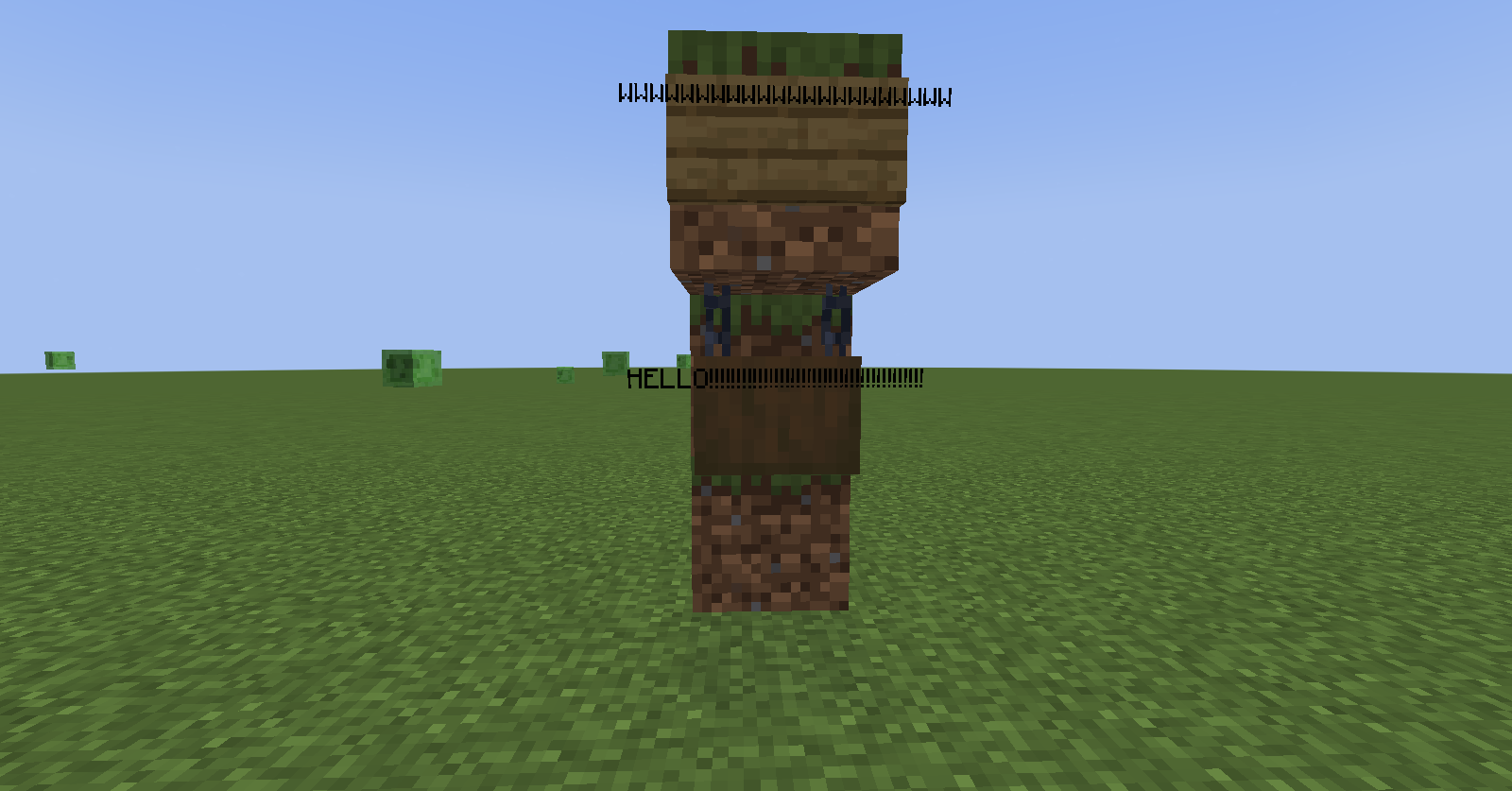
I'm pretty sure that someone has noticed this, but when I switched from forced unicode enabled to disabled after typing text on a sign, the text just bled, or overflowed, in technical terms, off of the sign. The image below shows a sign with text that I had typed out
I'm pretty sure that someone has noticed this, but when I switched from forced unicode enabled to disabled after typing text on a sign, the text just bled, or overflowed, in technical terms, off of the sign. The image below shows a sign with text that I had typed out in with force unicode enabled, showing what it looks like after I had disabled said option.
I'm pretty sure that someone has noticed this, but when I switched from forced unicode enabled to disabled after typing text on a sign, the text just bled, or overflowed, in technical terms, off of the sign. The image below shows a sign with text that I had typed out in with force unicode enabled, showing what it looks like after I had disabled said option.
Edit: I then tried doing it with written books as well, but I haven't included a screenshot of it, due to the fact that they just cut off at the end.
I'm pretty sure that someone has noticed this, but when I switched from forced unicode enabled to disabled after typing text on a sign, the text just bled, or overflowed, in technical terms, off of the sign. The image below shows a sign with text that I had typed out in with force unicode enabled, showing what it looks like after I had disabled said option.
Edit: I then tried doing it with written books as well, but I haven't included a screenshot of it, due to the fact that they just cut off at the end. I also added an image of the same sign with unicode turned on.
I'm pretty sure that someone has noticed this, but when I switched from forced unicode enabled to disabled after typing text on a sign, the text just bled, or overflowed, in technical terms, off of the sign. The image below shows a sign with text that I had typed out in with force unicode enabled, showing what it looks like after I had disabled said option.
Edit: I then tried doing it with written books as well, but I haven't included a screenshot of it, due to the fact that they just cut off at the end. I also added an image of the same sign with unicode turned on.
Edit #2: I forgot to mention this, but it appears to be any game mode, or at least affects both survival mode and creative mode.
I'm pretty sure that someone has noticed this, but when I switched from forced unicode enabled to disabled after typing text on a sign, the text just bled, or overflowed, in technical terms, off of the sign. The image below shows a sign with text that I had typed out in with force unicode enabled, showing what it looks like after I had disabled said option.
Edit: I then tried doing it with written books as well, but
I haven't included a screenshot of it, due to the fact that they just cut off at the end. I also added an image of the same sign with unicode turned on.Edit #2: I forgot to mention this, but it appears to be any game mode, or at least affects both survival mode and creative mode.
I'm pretty sure that someone has noticed this, but when I switched from forced unicode enabled to disabled after typing text on a sign, the text just bled, or overflowed, in technical terms, off of the sign. The image below shows a sign with text that I had typed out in with force unicode enabled, showing what it looks like after I had disabled said option.
Edit: I then tried doing it with written books as well, but I haven't included a screenshot of it, due to the fact that they just cut off at the end. I also added an image of the same sign with unicode turned on.
Edit #2: I forgot to mention this, but it appears to be any game mode, or at least affects both survival mode and creative mode.
Edit #3: Also affects hanging signs.
I'm pretty sure that someone has noticed this, but when I switched from forced unicode enabled to disabled after typing text on a sign, the text just bled, or overflowed, in technical terms, off of the sign. The image below shows a sign with text that I had typed out in with force unicode enabled, showing what it looks like after I had disabled said option.
Edit: I then tried doing it with written books as well, but I haven't included a screenshot of it, due to the fact that they just cut off at the end. I also added an image of the same sign with unicode turned on.
Edit #2: I forgot to mention this, but it appears to be any game mode, or at least affects both survival mode and creative mode.
Edit #3: Also affects hanging signs.
Side Glitch 1: Overflowing text is only visible from the side that contains said text. (See video below)
Side Glitch 1.mp4
Bug: expected Relic to output a unique (AND output the highest) redstone signal strength when in a jukebox.
Result: Relic shares a redstone signal strength with Otherside (both have 14, which is neither unique nor the highest).
Possible Solutions:
- Increase max redstone signal strength, and be able to give many more music discs individual and unique redstone signal strengths
- Change Relic's redstone signal strength output to 15, matching the signal strength of Music Disc 5, as well as being
Bug: expected Relic to output a unique (AND output the highest) redstone signal strength when in a jukebox.
Result: Relic shares a redstone signal strength with Otherside (both have 14, which is neither unique nor the highest).
Possible Solutions:
- Increase max redstone signal strength, and be able to give many more music discs individual and unique redstone signal strengths
- Change Relic's redstone signal strength output to 15, matching the signal strength of Music Disc 5, as well as
beingBug: expected Relic to output a unique (AND output the highest) redstone signal strength when in a jukebox.
Result: Relic shares a redstone signal strength with Otherside (both have 14, which is neither unique nor the highest).
Possible Solutions:
- Increase max redstone signal strength, and be able to give many more music discs individual and unique redstone signal strengths
- Change Relic's redstone signal strength output to 15, matching the signal strength of Music Disc 5, as well as matching that of Bedrock Edition
- Changing Relic's redstone signal strength to 1, matching that of Music Disc 13, effectively "overflowing" back to the lowest possible value
The only real thing I did here was leash boats to a fence, left the world, and then the leads disappeared(although they seem to still behave as if the lead was still there.)
Also tried to reproduce the glitch, and itworkedthat time as well.The only real thing I did here was leash boats to a fence, left the world, and then the leads disappeared(although they seem to still behave as if the lead was still there.)
Doesn't always seem to work, though...
The only real thing I did here was leash boats to a fence, left the world, and then the leads disappeared(although they seem to still behave as if the lead was still there.)
Quick update: Doesn't always seem to work, though...
Player Placed Creaking Hearts On their Own don't work
So I tried the new snapshot, and made a new creative world in order to see what the creaking is like.
Placed down a creaking heart, nothing happened. It didn't even glow. I then set it to night. The block was still inert. Went into survival mode. Nothing happened.
I even set the nearby area to the pale garden biome to see if that it'd fix it. It did not, even when trying the above things again with this condition in place.
Either I'm using it wrong, or it's broken. (I'm also certain it's not because of the mob cap, because /kill-ing the nearby hostile mobs did nothing to help this work either.)
So I tried the new snapshot, and made a new creative world in order to see what the creaking is like.
Placed down a creaking heart, nothing happened. It didn't even glow. I then set it to night. The block was still inert. Went into survival mode. Nothing happened.
I even set the nearby area to the pale garden biome to see if that it'd fix it. It did not, even when trying the above things again with this condition in place.
Edit: turns out I was using it wrong; I thought creaking hearts worked on their own. No, apparently they needed to be placed in a certain way in order to work.... they don't work just by themselves...
Either I'm using it wrong, or it's broken. (I'm also certain it's not because of the mob cap, because /kill-ing the nearby hostile mobs did nothing to help this work either.)
I noticed that if, for some reason, the /kill command is set to kill the player from a repeated command block, it may cause the player to be unable to pause due to being killed too fast to register inputs if the command came from an active repeating command block.
The more command blocks that cause this to occur, the more likely it'll be that you won't be able to pause(or the pause screen gets exited due to respawning). Lower framerates seem to help circumvent this to some extent, though.
Clarification: this only happens of doImmediateRespawn is set to true.
![[Mod] Asteraoth](../../../data/avatars/users/92886.png)
TechionPrime34, look at the history of this issue. It was not in English until the reporter translated it.
![[Mod] Avoma](../../../data/avatars/users/86198.png)
I came to the conclusion that this ticket is a duplicate of MC-250951 based on the following statements made in the description and comments:
- doesn't disengage the animation whilst the use key is being held
- it slows me down, and doesn't disengage
I think the reporter is stating the issue is that the animation/item usage doesn't stop (disengage) when holding down the "use item" key, not actually not the fact that the goat horn slows you down in the first place. With this being said, could you please clarify what you believe the issue is here TechionPrime34? Also, would MC-250951 happen to describe the behavior you're experiencing? Thanks in advance. 
Whoops! I forgot to take a screenshot beforehand. Sorry about that. I put one up now.
Noticed it too.
Basically, when an entity is traveling through the space where I'm trying to place a block, I often place it, but no sound plays when the block shows up. This sometimes includes myself. It works with most mobs, but only mobs that normally prevent me from placing a block where I'm looking at.
After some more testing, I can safely say that the glitch that I have reported is a duplicate of MC-10653. I had initially found information that was irrelevant to the actual cause of the issue, causing a discrepancy of the true cause of the glitch. Thanks for helping me identify the full cause of the issue, Avoma!
I was playing on 1.17, and I got a villager with two Bane of Arthropods books. Both books were of same level, and the only difference was that one costed more than the other. Especially irritating, as that particular enchantment is one of, if not my least favorite enchantment in the game. I even prefer curse of binding on a pumpkin to that! Curse of binding! On a pumpkin!
Affects 1.19 as well!
I don't think that's a glitch... Remember, in minecraft, the baby form of the animal can be fed the adult form's favored food to make he baby form grow up into the adult form sooner as well, so that might be what's going on here.
When I made a duplicate of the world in creative mode, the glitchy vines I found here were not present in the spot they were before, and I found more of them completely floating, so this probably is the same issue, but it always appears to be just two connected vines(and by connected, I mean one vine is above another, and nothing above nor below those two vines) glitching out. That said, this should be looked into.
Excuse me, but that looks like English to me. I don't know WHAT part appears to be making an AI to think that it isn't in English, but something's awry here. Google Translate isn't asking me to translate this page...
Okay, Sorry, Asteraoth. Didn't realize that! Whoops!
Why is this issue getting so many comments?! Also, fair points, Dhranios and Steve Jacobson. Though again, Mojang probably did this to make things a bit simpler for players, so I too believe this is Working as Intended.
I again apologize for wasting a bug report. I thought it might have been a bug, but no, it was just my own thoughts about the situation. Sorry for the trouble I may have caused.
And I keep making things worse when I'm trying to fix them. Sorry about that one as well.
What's the seed and cords?
Oof.
Although I'm not a developer, I did get this to work with ender pearls on 1.19.2 quite frequently. Might want to have a look at that, devs.
Probably, but the fact that for as long as I keep holding down the use key, it slows me down, and doesn't disengage. I'm guessing they reused some of the code for the shield item here.
That pretty much sums things up, Avoma. Although in Mc-250951it doesn't state the slowing down part necessarily, beyond that, the glitch is pretty much the same; it doesn't disengage the animation whilst the use key is held, AND slows me down while the horn's animation is still engaged and the use key is still held down. Although they didn't clarify it either, I do have to admit, you are right here, Avoma. It's still works as intended, but again, it's probably another duplicate.
Also, I'm sorry that I keep having duplicates of other's glitches! I've been trying to search for any possible ones lately, and I always end up using the wrong wording, so I don't realize it until after you, or another moderator or developer ends up letting me know.
Happened to me on my friend's server also. Both of us realized that when this happens, BOTH OF US can hear the disc, even after the glitch is performed. My guess for the cause being due to something similar to how ghost blocks were made...? (IE: Client vs. Server thing) This is mainly due to me having issues replicating it in single player worlds specifically.
I noticed that rapidly switching between the narrator options also generates lag spikes. For example, holding down the key sequence that narrator is bound to, which for me (if it can be rebounded) is Ctrl + B. In doing so causes lag. Does that help either of you with explaining the bug?
I see. That said, I hope this bug gets fixed soon, though not just because I hate having a lag spike pop up every time I switch the narrator options. What I'm saying is, i wish you good luck with the mod.
Just checked it; you do seem to be correct about this bug being related to the one you noted(which I've now pinned), Connor Steppie.
A little over 3 years late, but I think I know where Nick was going with this. They assumed that because chorus fruit has a chance at being dropped, that it would be affected by fortune, like with many items. I say this because I thought this was the case as well.
With this in mind, if this is still a feature and not a bug, it should be marked as "Works as Intended."
Confirmed to still be in the game in Pre-Release 2(tested it and it's still there)
Ohhhh whoops!
(Mods, I'm updating the title and description for clarity, but because of their comments, this is to be resolved as Works as Intended)
It is killing the player, yes, but it shouldn't also prevent the player from pausing the game if they immediately respawn.