Flowing liquid model is slightly wrong at the edges
The bug
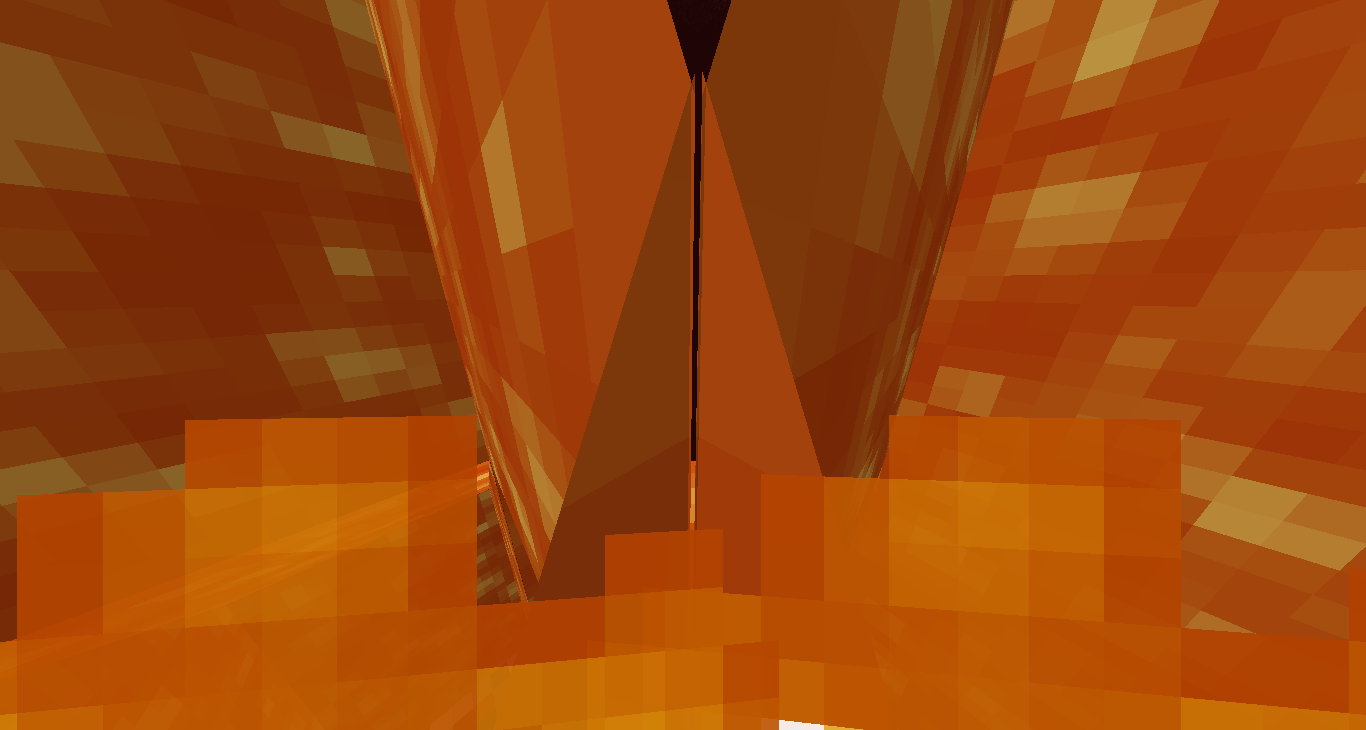
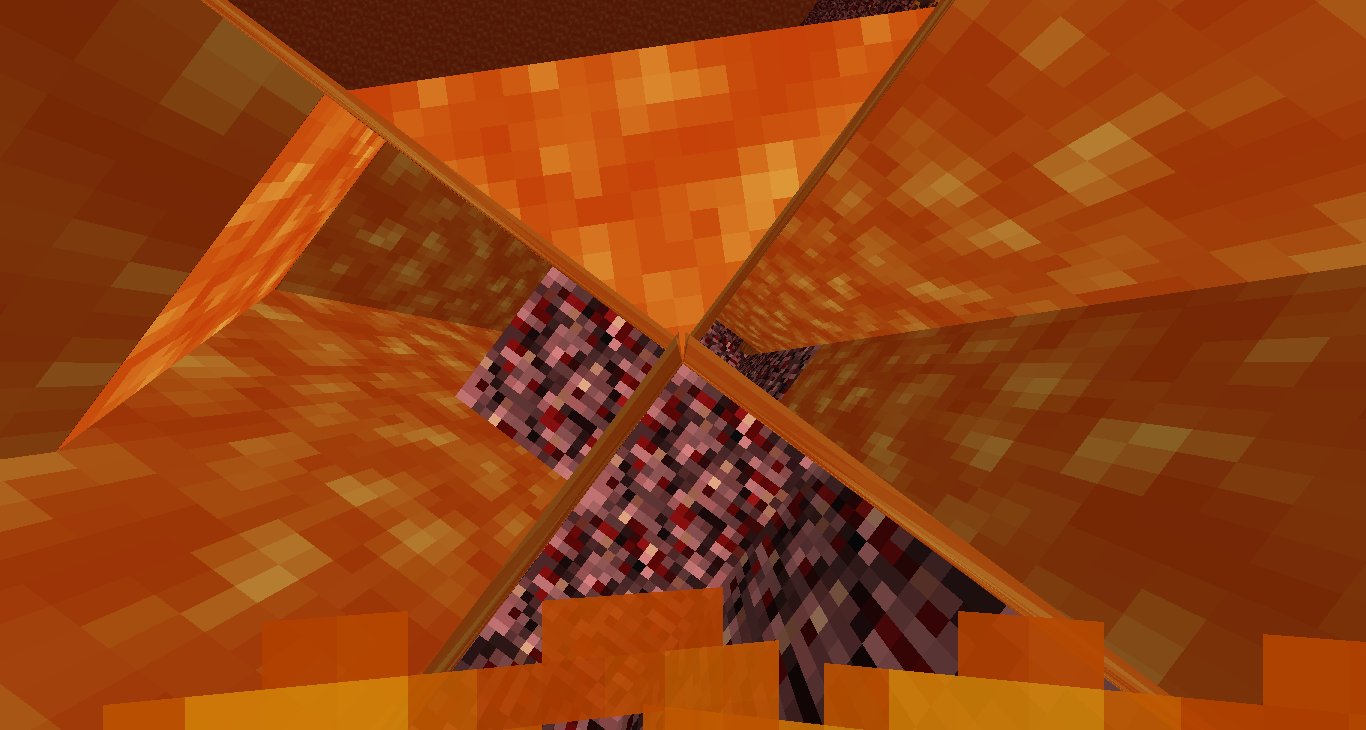
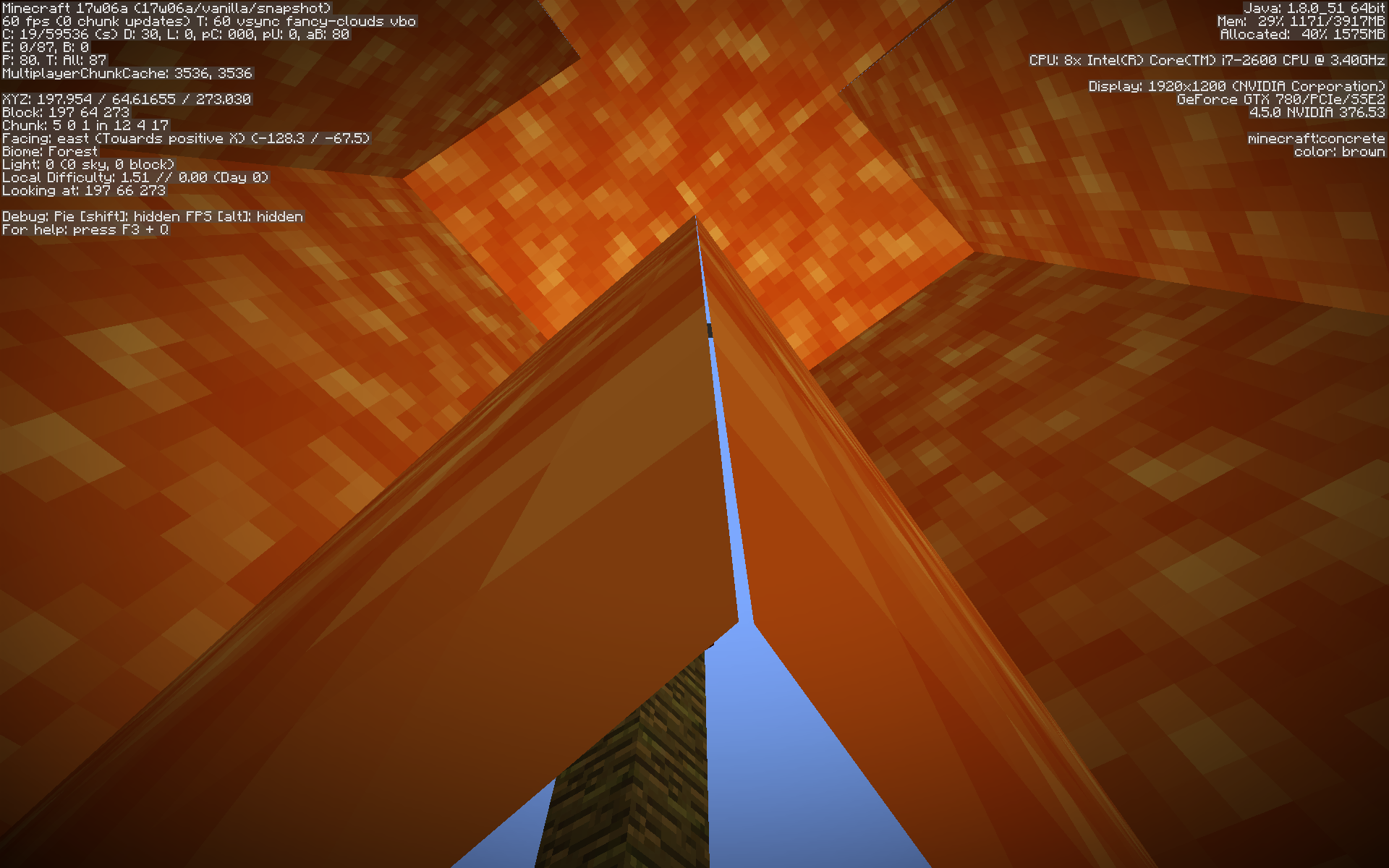
The sides of flowing water/lava are moved a bit inwards (a bit like a cactus), making the edges overlap and not connect with other flowing liquid.
Note
This is not MC-1794, but instead a block model issue.
Linked Issues
is duplicated by14
 MC-32629Lava texture transparent in cornersDuplicateMC-105688Lava texture has hair texture holesDuplicateMC-128843Water at edges doesn't connectDuplicateMC-134418Underwater door visual glitchDuplicateMC-168862Edge of some items, water ,lava and are not rendered correctly.DuplicateMC-194873Lava textures don't line upDuplicateMC-213892Lava stitching errorDuplicateMC-238429Lava edges not lining upDuplicateMC-252528Thin X-ray in water with doorsDuplicateMC-266382FluidsDuplicateMC-273072Water model have tiny gaps at the edgesDuplicateMC-274016A gap between the magma and the cubeDuplicateMC-274943Since at least 1.0 till 1.21, zigzag pattern water creates visible untextured seamsDuplicateMC-275454Doors underwater have gaps at their edgesDuplicate
relates to4
MC-1794White stitching on polygon edges / White lines or black dots between blocks LowMC-7882Cloud corners not connectedCannot ReproduceMC-128676Certain self-intersecting block models show parts of pixels where they shouldn'tWon't FixMC-129207Pixel borders on liquids do not line up correctlyWon't Fix
Attachments10
![[Mod] Michael Wobst](../../../data/avatars/users/37868.png)


![[Mod] ampolive](../../../data/avatars/users/18949.svg)


![[Mod] Avoma](../../../data/avatars/users/86198.png)
- Unresolved
 Fabian Röling
- 34
- 14
- Confirmed
- Low
- Platform
- Rendering Textures and models
1.10.2 - 1.21.1
1.10.2 16w32a 16w42a 1.11.2 17w06a 17w14a 17w15a 1.12.2 18w10c 18w10d 18w20b 1.13 1.13.1 1.14-pre1 1.14 1.14.2-pre1 1.14.3-pre2 1.14.3-pre3 1.14.4 19w39a 1.15-pre1 1.16.1 1.16.4 20w48a 21w03a 21w05a 21w05b 21w06a 21w17a 1.17.1 21w39a 21w40a 21w43a 21w44a 1.18-pre5 1.18 1.18.1-rc2 1.18.1 22w05a 22w07a 1.18.2 22w12a 22w16b 22w19a 1.19-pre1 1.19-pre3 1.19 1.19.1-pre4 1.19.2 1.19.4-pre3 1.20.1 1.20.2 1.20.6 1.21-pre4 1.21 24w33a 1.21.1
Created Issue:
Downwards flowing lava model is slightly wrong at the corners
The block model for downwards flowing lava ("lava fall") is a bit cactus-like, with the exception that the cactus just has the spikes overlapping, while for the lava it's a whole row.
To be exact: The side textures of downwards flowing lava are a bit moved inside the block, so that they intersect each other at the corners, but they still don't connect to each other, leaving a gap in between.
Attachments2

relates to

is duplicated by
blackdots.png

relates to
relates to
![[Mod] Pokechu22](../../../data/avatars/users/92931.png)
relates to
The block model for downwards flowing lava ("lava fall") is a bit cactus-like, with the exception that the cactus just has the spikes overlapping, while for the lava it's a whole row.
To be exact: The side textures of downwards flowing lava are a bit moved inside the block, so that they intersect each other at the corners, but they still don't connect to each other, leaving a gap in between.The sides of downwards flowing water/lava are moved a bit inwards (a bit like a cactus), making the edges overlap and not connect with other downwards flowing liquid.
This is NOT MC-1794 , but instead a block model issue.
Downwards flowing lavamodel is slightly wrong at the cornersDownwards flowing liquid model is slightly wrong at the corners
The sides of downwards flowing water/lava are moved a bit inwards (a bit like a cactus), making the edges overlap and not connect with other downwards flowing liquid.
This is
NOTMC-1794, but instead a block model issue.The bug
The sides of downwards flowing water/lava are moved a bit inwards (a bit like a cactus), making the edges overlap and not connect with other downwards flowing liquid.
Note
This is not MC-1794, but instead a block model issue.
is duplicated by
![[Mojang] Nathan Adams](../../../data/assets/gravatar/dinnerbone.png)
![[Mod] Urielsalis](../../../data/assets/gravatar/urielsalis.jpeg)
![[Mod] tryashtar](../../../data/avatars/users/41963.png)
is duplicated by
![[Mod] Les3awe](../../../data/avatars/users/79847.png)
is duplicated by
![[Bot] Arisa](../../../data/avatars/users/43007.png)
![[Mod] OcelotOnesie](../../../data/avatars/users/43220.png)
is duplicated by
![[Mod] violine1101](../../../data/avatars/users/92858.png)
relates to
relates to
![[Mod] markderickson](../../../data/avatars/users/18946.svg)
![[Mojang] Adrian Östergård](../../../data/assets/gravatar/nighter.jpeg) Low
Low![[Mod] Neko](../../../data/avatars/users/92901.png)
is duplicated by
Can confirm in 1.18 pre-8.
is duplicated by
![[Mojang] slicedlime](../../../data/assets/gravatar/slicedlime.jpeg)
![[Mod] j_p_smith](../../../data/avatars/users/92851.png)
Downwards flowing liquid model is slightly wrong at thecornersDownwards flowing liquid model is slightly wrong at the edges
Downwards flowing liquid model is slightly wrong at the edgesFlowing liquid model is slightly wrong at the edges
The bug
The sides of
downwardsflowing water/lava are moved a bit inwards (a bit like a cactus), making the edges overlap and not connect with otherdownwardsflowing liquid.Note
This is not MC-1794, but instead a block model issue.
is duplicated by
![[Mod] Greymagic27](../../../data/avatars/users/92875.png)
is duplicated by
is cloned by
![[Mod] Jarl-Penguin](../../../data/avatars/users/92849.png)
is duplicated by
is cloned by
![[Mod] turbo](../../../data/avatars/users/92867.png)
is duplicated by
is duplicated by
is duplicated by
Well, it affects 16w42a, but I think your pictures are just a problem of the block model of lava: MC-105732
And could you please attach your pictures to the report instead of putting them into your comment? They are huge.
That does look like MC-105732.
I'd like it if people still experiencing this bug would step up. Provide some screenshots of recent versions in F3 mode. (F3 so it's easy to spot the version and GPU.) Maybe high-quality videos. State video settings, mipmap levels in particular. I 'own' this report yet I have no idea what it is exactly that people are still experiencing, beyond my stated observations. Did I personally see everything? Are people forcing multisampling or anisotropic filtering and blaming the result on Minecraft? For a while now this report has regularly been bumped to the current version, without affirming with screenshots or precise statements what exactly it is that's still present. For a bug report to go anywhere, it must be clear what it's about.
Thank you for your report!
However, this issue is Invalid.
Your Minecraft version is outdated. We currently take issues for version 1.12.2.
Please update to the latest version as it includes the newest fixes (including several security fixes).
Your game, launcher or server is modified.
- Any non-standard client/server/launcher build needs to be taken up with the appropriate team, not Mojang.
- Any plugin issues need to be addressed to the creator of the plugin or resource pack.
- If you have problems on large servers, such as The Hive and Hypixel, please contact them first as they run modified server software.
The actual answer is: no. See MC-105732.
Quick Links:
📓 Issue Guidelines – 💬 Community Support – 📧 Customer Support – 📖 Game Wiki
No, then you would get overlaps. This is about single pixels, no matter the view distance or in-world size. This is not a simple case like MC-105732.
This actually appears to be a duplicate of MC-105732, which hasn't yet been resolved. If you have any additional information to provide regarding this issue, feel free to comment on the parent ticket. If you feel that this issue is affecting you, feel free to vote for the duplicated ticket, to give Mojang a basic idea of how many people are impacted by the problem. Just to further inform you, this will not determine how quickly the bug gets handled or fixed.
Thank you for your report!
We're tracking this issue in MC-105732, so this ticket is being resolved and linked as a duplicate.
If you would like to add a vote and any extra information to the main ticket it would be appreciated.
If you haven't already, you might like to make use of the search feature to see if the issue has already been mentioned.
Quick Links:
📓 Bug Tracker Guidelines – 💬 Community Support – 📧 Mojang Support
📓 Project Summary – ✍️ Feedback and Suggestions – 📖 Game Wiki
– I am a bot. This action was performed automatically! The ticket was resolved by one of our moderators, and I left this message to give more information to you.
Duplicate of MC-105732
Thank you for your report!
We're tracking this issue in MC-105732, so this ticket is being resolved and linked as a duplicate.
If you would like to add a vote and any extra information to the main ticket it would be appreciated.
If you haven't already, you might like to make use of the search feature to see if the issue has already been mentioned.
Quick Links:
📓 Bug Tracker Guidelines – 💬 Community Support – 📧 Mojang Support
📓 Project Summary – ✍️ Feedback and Suggestions – 📖 Game Wiki
– I am a bot. This action was performed automatically! The ticket was resolved by one of our moderators, and I left this message to give more information to you.
This is essentially MC-105732, but horizontal, rather than vertical.
Thank you for your report!
We're actually already tracking this issue in MC-105732, so this ticket is being resolved and linked as a duplicate.
If you would like to add a vote or any additional information to the main ticket it would be appreciated.
Please be sure to use the search feature before creating a ticket to see if the issue has already been reported.
Quick Links:
📗 Tracker Guidelines – 🛠 Community Support – 📧 Mojang Support – 🔑 Account Support – ✍️ Feedback Discord – 💬 Mojira Discord
![[Mod] Jiingy](../../../data/avatars/users/91802.png)

MC-105732 described that the fluid model have gaps on edges, probably a duplicate.
Thank you for your report!
We're tracking this issue in MC-105732, so this ticket is being resolved and linked as a duplicate.
If you would like to add a vote and any extra information to the main ticket it would be appreciated.
If you haven't already, you might like to make use of the search feature to see if the issue has already been mentioned.
Quick Links:
📓 Bug Tracker Guidelines – 💬 Community Support – 📧 Mojang Support (Technical Issues) – 📧 Microsoft Support (Account Issues)
📓 Project Summary – ✍️ Feedback and Suggestions – 📖 Game Wiki
Thank you for your report!
We're tracking this issue in MC-105732, so this ticket is being resolved and linked as a duplicate.
If you would like to add a vote and any extra information to the main ticket it would be appreciated.
If you haven't already, you might like to make use of the search feature to see if the issue has already been mentioned.
Quick Links:
📓 Bug Tracker Guidelines – 💬 Community Support – 📧 Mojang Support (Technical Issues) – 📧 Microsoft Support (Account Issues)
📓 Project Summary – ✍️ Feedback and Suggestions – 📖 Game Wiki
This is related to
MC-7882.I think this is a duplicate of MC-1794
No, that one is dependent on view position, just one pixel and either white or black. This one is an error with the block model.
Affects 17w14a & 17w15a
Relates to MC-1794.
No, that's a different cause. This is about the block model. If you go near enough to this, you see a multi-pixel gap and an overlap. If you go near something that's affected by MC-1794, you will never see a gap of multiple pixels.
Well, maybe it could be an extremely small gap (seems strange now that I think about it).
However,
MC-7882, which is also about the model but for clouds, has a related link to MC-1794. Since a faulty cloud model and that black dots on corners of blocks have a related link between each other but are far more unrelated compared to each other than this bug andMC-7882, this bug report should have a related link to MC-1794 at least.By the way you forgot to add affects versions 17w14a & 17w15a
Possibly affects 18w20b
Relates to
MC-128676Affects 1.14.1
Confirmed for 1.14.2 release.
Confirmed for 1.16.1.
Can confirm in 20w48a.
Can confirm in 21w03a.
Can confirm in 21w05b.
Can confirm in 21w06a.
Video attached.
Can confirm in 21w17a.
Can confirm in 1.17.1.
Can confirm in 21w39a.
Can confirm in 21w40a.
Can confirm in 21w43a.
Can confirm in 21w44a.
Can confirm in 22w05a.
Can confirm in 22w16b
Can confiirm in 1.18.2 and 22w19a.
Affects 1.19-pre3:

Affects 1.19 as well!
Can confirm in 1.19.2.