 mrjasonn
- mrjasonn
- JIRAUSER746607
- Asia/Hong_Kong
- Yes
- No
 WEB-6493
 MCL-23454
 MCPE-172703
 MC-269876MC-271290








The Minecraft Launcher does not show macOS Rapid Security Response version if you have installed one. For context they exist on macOS 13 or above as of writing.
Steps to reproduce:
- Have a macOS Rapid Security Response installed (see image macOS with Rapid Security Response installed)
- Open the Minecraft Launcher
- Click on settings in the Launcher
- Click on about in the Launcher
- You will not be able to see the letter for the security response in the launcher (see image Launcher does not display the Rapid Security Response)
The Minecraft Launcher does not show macOS Rapid Security Response version if you have installed one. For context they exist on macOS 13 or above as of writing.
Steps to reproduce:
- Have a macOS Rapid Security Response installed (see image macOS with Rapid Security Response installed)
- Open the Minecraft Launcher
- Click on settings in the Launcher
- Click on about in the Launcher
- You will not be able to see the letter for the security response in the launcher (see image Launcher does not display the Rapid Security Response)
The Minecraft Launcher does not show macOS Rapid Security Response version if you have installed one. For context they exist on macOS 13 or above as of writing.
Steps to reproduce:
- Have a macOS Rapid Security Response installed (see image macOS with Rapid Security Response installed)
- Open the Minecraft Launcher
- Click on settings in the Launcher
- Click on about in the Launcher
- You will not be able to see the letter for the security response in the launcher (see image Launcher does not display the Rapid Security Response)
Observed Result:
It does not display the rapid security response letter
Expected Result:
It does display the rapid security response letter
The Minecraft Launcher does not show macOS Rapid Security Response version if you have installed one. For context they exist on macOS 13 or above as of writing.
Steps to
reproduce:
- Have a macOS Rapid Security Response installed (see image macOS with Rapid Security Response installed)
- Open the Minecraft Launcher
- Click on settings in the Launcher
- Click on about in the Launcher
- You will not be able to see the letter for the security response in the launcher (see image Launcher does not display the Rapid Security Response)
Observed Result:
It does not display the rapid security response letter
Expected Result:
It does display the rapid security response letter
The Minecraft Launcher does not show macOS Rapid Security Response version if you have installed one. For context they exist on macOS 13 or above as of writing.
Steps to Reproduce:
- Have a macOS Rapid Security Response installed (see image macOS with Rapid Security Response installed)
- Open the Minecraft Launcher
- Click on settings in the Launcher
- Click on about in the Launcher
- You will not be able to see the letter for the security response in the launcher (see image Launcher does not display the Rapid Security Response)
Observed Result:
It does not display the rapid security response letter
Expected Result:
It does display the rapid security response letter
The Minecraft Launcher does not show macOS Rapid Security Response version if you have installed one. For context they exist on macOS 13 or above as of writing.
Steps to Reproduce:
- Have a macOS Rapid Security Response installed (see image macOS with Rapid Security Response installed)
- Open the Minecraft Launcher
- Click on settings in the Launcher
- Click on about in the Launcher
- You will not be able to see the letter for the security response in the launcher (see image Launcher does not display the Rapid Security Response)
Observed Result:
It does not display the
rapidsecurityresponse letterExpected Result:
It does display the
rapidsecurityresponse letterThe Minecraft Launcher does not show macOS Rapid Security Response version if you have installed one. For context they exist on macOS 13 or above as of writing. The images attached will also give context.
Steps to Reproduce:
- Have a macOS Rapid Security Response installed (see image macOS with Rapid Security Response installed)
- Open the Minecraft Launcher
- Click on settings in the Launcher
- Click on about in the Launcher
- You will not be able to see the letter for the security response in the launcher (see image Launcher does not display the Rapid Security Response)
Observed Result:
It does not display the Rapid Security Response letter
Expected Result:
It does display the Rapid Security Response letter
The Minecraft Launcher does not show macOS Rapid Security Response version letter if you have installed one. For context they exist on macOS 13 or above as of writing. The images attached will also give context.
Steps to Reproduce:
- Have a macOS Rapid Security Response installed (see image macOS with Rapid Security Response installed)
- Open the Minecraft Launcher
- Click on settings in the Launcher
- Click on about in the Launcher
- You will not be able to see the letter for the security response in the launcher (see image Launcher does not display the Rapid Security Response)
Observed Result:
It does not display the Rapid Security Response letter
Expected Result:
It does display the Rapid Security Response letter
The Minecraft Launcher does not show macOS Rapid Security Response version letter if you have installed one. For context they exist on macOS 13 or above as of writing. The images attached will also give context. If there is no Rapid Security Response installed, there will be no Rapid Security Response version letter.
Steps to Reproduce:
- Have a macOS Rapid Security Response installed (see image macOS with Rapid Security Response installed)
- Open the Minecraft Launcher
- Click on settings in the Launcher
- Click on about in the Launcher
- You will not be able to see the letter for the security response in the launcher (see image Launcher does not display the Rapid Security Response)
Observed Result:
It does not display the Rapid Security Response version letter
Expected Result:
It does display the Rapid Security Response version letter
Please help confirm 2.5.9
Not confirmed on 2.4.104, but probably still affected as bug fix is not mentioned in patch notes and this ticket hasn't been set to Resolved.
Not confirmed on 2.4.79, but probably still affected as bug fix is not mentioned in patch notes and this ticket hasn't been set to Resolved.
The Minecraft Launcher's patch notes spell macOS as MacOS when it should be spelled as macOS as the m should not be capitalised. Patch notes can be accessed by pressing the What's New button in the Launcher if you don't know.
If you are on another platform and see this issue, can you please make a comment here about it? As this issue seems like on multi-platform and I can add the other platforms if so.
Minecraft for Windows in the launcher not titled as Minecraft Bedrock Edition can be misleading that Minecraft Bedrock Edition can only be played on Windows and Minecraft Bedrock Edition is not just called "Minecraft" and not specifically mentioning for Windows or Windows edition etc. Another case of misleading is that people could think it is an edition specific to Windows.
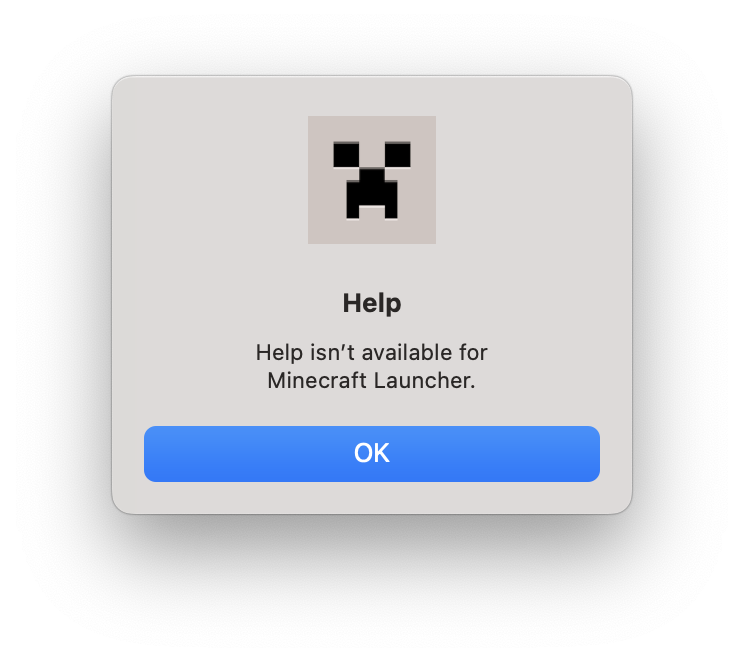
On macOS, in the menu bar, the Minecraft Launcher Help button in the Help section of the menu bar does not work. The expected results are that it will open the Minecraft Launcher help page (currently accessible in the profile dropdown). It can be a problem that some people don't know how to get help with the launcher as some people do not know where the help page is located.
You can find the menu bar on the top of your screen. There is a screenshot of this problem.
Screenshot 2023-06-04 at 5.56.05 PM.png
I have attached a cleaner and with the updated launcher icon as of writing image of this. The situation still hasn't changed if you are wondering why the image changed.
It is broken. Shows nothing.
I am using Launcher version 2.4.104. But it only lets me select up to 2.4.79. If anyone can confirm this on other platforms, please help confirm.
In some places, the Minecraft Launcher is simply called Minecraft on Mac when it should be called the Minecraft Launcher in all places.
Here is an example of this issue in the Finder:

In some places, the Minecraft Launcher is simply called Minecraft on Mac when it should be called the Minecraft Launcher in all places.
Here is an example of this issue in the Finder (as of latest macOS):
macOS 13.4.1
In some places, the Minecraft Launcher is simply called Minecraft on Mac when it should be called the Minecraft Launcher in all places.
Here is an example of this issue in the Finder (as of latest macOS):
Here's also a list of common places that you will see this issue:
• Finder
• Launchpad
• Dock
In some places, the Minecraft Launcher is simply called Minecraft on Mac when it should be called the Minecraft Launcher in all places.
Here is an example of this issue in the Finder (as of latest macOS):
Here's also a list of some if not all common places that you will see this issue:
• Finder
• Launchpad
• Dock
macOS 13.
4.1macOS 13.5.1
macOS 13.5.
1macOS 13.5.2
macOS 1
3.5.2macOS 14
macOS 14.0
macOS 14.
0macOS 14.1.1
macOS 14.1.
1macOS 14.1.2
macOS 14.
1.2macOS 14.2.1
In some places, the Minecraft Launcher is simply called Minecraft on Mac when it should be called the Minecraft Launcher in all places. It is also indeed correctly called Minecraft Launcher everywhere visible to the average user on Windows.
Here is an example of this issue in the Finder (as of latest macOS):
Here's also a list of some if not all common places that you will see this issue:
• Finder
• Launchpad
• Dock
macOS 14.
2.1macOS 14.3
macOS 14.3.1
macOS 14.
3.1macOS 14.4
macOS 14.4.1
macOS 1
4.4.1macOS 15.0
macOS 15.0.1
macOS 15.
1macOS 15.2
The bug
One of the four corners of a pillager outpost roof is missing two blocks making it asymmetrical, as can be seen in the screenshot.
How to reproduce
- Use the /locate command to find a pillager outpost
- Teleport to the location given by the /locate command
- Observe the asymmetrical roof of the outpost at that location
Yes, this is an issue on both Java and Bedrock edition.Java bug report: MC-154097
The bug
One of the four corners of a pillager outpost roof is missing two blocks making it asymmetrical, as can be seen in the screenshot.
How to reproduce
- Use the /locate command to find a pillager outpost
- Teleport to the location given by the /locate command
- Observe the asymmetrical roof of the outpost at that location
This is an issue on both Java and Bedrock edition.
Java bug report: MC-154097
The bug
One of the four corners of a
pillageroutpost roof is missing two blocks making it asymmetrical, as can be seen in the screenshot.How to reproduce
- Use the /locate
command to find apillageroutpost- Teleport to the location given by the /locate command
- Observe the asymmetrical roof of the outpost at that location
This is an issue on both Java and Bedrock edition.
Java bug report: MC-154097
The bug
One of the four corners of a Pillager Outpost roof is missing two blocks making it asymmetrical, as can be seen in the screenshot.
How to reproduce
- Use the /locate command to find a Pillager Outpost
- Teleport to the location given by the /locate command
- Observe the asymmetrical roof of the outpost at that location
This is also the case for the overgrown version of the Pillager Outpost.
This is an issue on both Java and Bedrock edition.
Java bug report: MC-154097
The bug
One of the four corners of a Pillager Outpost roof is missing two blocks making it asymmetrical, as can be seen in the screenshot.
How to reproduce
- Use the /locate command to find a Pillager Outpost
- Teleport to the location given by the /locate command
- Observe the asymmetrical roof of the outpost at that location
This is also the case for the overgrown version of the Pillager Outpost.
This is an issue on both Java and Bedrock edition.
Java Edition bug report: MC-154097
Please add the link for the Bedrock edition version of the bug in the description of this bug report because this issue is in Bedrock edition too and there is a bug report for it on the Bedrock edition bug tracker.
Please also note in the bug report description that this is also the case for the overgrown version.
@Dhranios I will now add a screenshot. Also how do I become the reporter?
The launcher version number in the bottom left should display like v2.5.9-1.2.30 instead of v.2.5.9-1.2.30. This is also the case for launcher betas, it should display like b2.5.9-1.2.30 instead of b.2.5.9-1.2.30 as it makes more sense and most applications don't have the dot next to the
in their version numbers.
The version numbers described
The launcher version number in the bottom left should display like v2.5.9-1.2.30 instead of v.2.5.9-1.2.30. This is also the case for launcher betas, it should display like b2.5.9-1.2.30 instead of b.2.5.9-1.2.30 as it makes more sense and most applications don't have the dot next to the v in their version numbers.
The version numbers described are just examples.
The icon is oversized on Mac. These guidelines
willhelp fix: https://developer.apple.com/design/human-interface-guidelines/app-icons#:~:text=iPad%2C%20iPad%20mini-,macOS%20app%20icon%20sizes,32x32,-tvOS%20app%20iconThe image attached is just to show that it's oversized. It's not to scale.
The icon is oversized on Mac. These guidelines might be able to help fix: https://developer.apple.com/design/human-interface-guidelines/app-icons#:~:text=iPad%2C%20iPad%20mini-,macOS%20app%20icon%20sizes,32x32,-tvOS%20app%20icon
The image attached is just to show that it's oversized. It's not to scale.
I cannot guarantee that those guidelines can help fix, but it's worth trying.
The icon is oversized on Mac. These guidelines might be able to help fix: https://developer.apple.com/design/human-interface-guidelines/app-icons#:~:text=iPad%2C%20iPad%20mini-,macOS%20app%20icon%20sizes,32x32,-tvOS%20app%20icon
The image attached is just to show that it's oversized. It's not to scale.
I cannot guarantee that those guidelines can help fix, but it's worth trying.
The icon is oversized on Mac. These guidelines might be able to help fix: https://developer.apple.com/design/human-interface-guidelines/app-icons#:~:text=iPad%2C%20iPad%20mini-,macOS%20app%20icon%20sizes,32x32,-tvOS%20app%20icon
This is the result of fixing the bug
MCL-23471incorrectly which it should be fixed properly so there are no issues.The image attached is just to show that it's oversized. It's not to scale.
I cannot guarantee that those guidelines can help fix, but it's worth trying.
The icon is oversized on Mac. These guidelines might be able to help fix: https://developer.apple.com/design/human-interface-guidelines/app-icons#:~:text=iPad%2C%20iPad%20mini-,macOS%20app%20icon%20sizes,32x32,-tvOS%20app%20icon
This is the result of fixing the bug
MCL-23471incorrectly which it should be fixed properly so there are no issues.The image attached is just to show that it's oversized. It's not to scale.
I cannot guarantee that those guidelines can help fix, but it's worth trying.
The icon is oversized on Mac. These guidelines might be able to help fix: https://developer.apple.com/design/human-interface-guidelines/app-icons#:~:text=iPad%2C%20iPad%20mini-,macOS%20app%20icon%20sizes,32x32,-tvOS%20app%20icon
This is the result of fixing the bug
MCL-23471incorrectly which it should be fixed properly so there are no issues.The image attached is just to show that it's oversized. It's not to scale.
I have also attached an example from
MCL-23471of how to fix it but it still is the white version when it should be the green version but it should still be useful.I cannot guarantee that those guidelines can help fix, but it's worth trying.
The icon is oversized on Mac. These guidelines might be able to help fix: https://developer.apple.com/design/human-interface-guidelines/app-icons#:~:text=iPad%2C%20iPad%20mini-,macOS%20app%20icon%20sizes,32x32,-tvOS%20app%20icon
This is the result of fixing the bug
MCL-23471incorrectly which it should be fixed properly so there are no issues.The image attached is just to show that it's oversized. It's not to scale.
I have also attached an example from
MCL-23471of how to fix itbut it still is the white version when it should bethegreen version but it should still be useful.I cannot guarantee that those guidelines can help fix, but it's worth trying.
The icon is oversized on Mac. These guidelines might be able to help fix: https://developer.apple.com/design/human-interface-guidelines/app-icons#:~:text=iPad%2C%20iPad%20mini-,macOS%20app%20icon%20sizes,32x32,-tvOS%20app%20icon
This is the result of fixing the bug
MCL-23471incorrectly which it should be fixed properly so there are no issues.The image attached is just to show that it's oversized. It's not to scale.
I have also attached an example from
MCL-23471of how to fix it (according to the reporter ofMCL-23471) but it still is the white version when it should be the green version but it should still be useful.I cannot guarantee that those guidelines can help fix, but it's worth trying.
The icon is oversized on Mac. These guidelines might be able to help fix: https://developer.apple.com/design/human-interface-guidelines/app-icons#:~:text=iPad%2C%20iPad%20mini-,macOS%20app%20icon%20sizes,32x32,-tvOS%20app%20icon
This is the result of fixing the bug
MCL-23471incorrectly which it should be fixed properly so there are no issues.The image attached is just to show that it's oversized. It's not to scale.
I have also attached an example from
MCL-23471of how to fix it (according to the reporter ofMCL-23471) but it still is the white version when it should be the green version but it should still be useful.I cannot guarantee that those guidelines can help fix, but it's worth trying.
The icon is oversized on Mac. These guidelines might be able to help fix: https://developer.apple.com/design/human-interface-guidelines/app-icons#:~:text=iPad%2C%20iPad%20mini-,macOS%20app%20icon%20sizes,32x32,-tvOS%20app%20icon
This is the result of fixing the bug
MCL-23471incorrectly which it should be fixed properly so there are no issues.The image attached is just to show that it's oversized. It's not to scale.
I have also attached an example from
MCL-23471of how to fix it (according to the reporter of) but it still is the white version when it should be the green version but it should still be useful.I cannot guarantee that those guidelines can help fix, but it's worth trying.
The icon is oversized on Mac. These guidelines might be able to help fix: https://developer.apple.com/design/human-interface-guidelines/app-icons#:~:text=iPad%2C%20iPad%20mini-,macOS%20app%20icon%20sizes,32x32,-tvOS%20app%20icon
This is the result of fixing the bug
MCL-23471incorrectly which it should be fixed properly so there are no issues.The image attached is just to show that it's oversized. It's not to scale.
I have also attached an example from
MCL-23471of how to fix it (according to the reporter of) but it still is the white version when it should be the green version but it should still be useful.I cannot guarantee that those guidelines can help fix, but it's worth trying.
The icon is oversized on Mac. These guidelines might be able to help fix: https://developer.apple.com/design/human-interface-guidelines/app-icons#:~:text=iPad%2C%20iPad%20mini-,macOS%20app%20icon%20sizes,32x32,-tvOS%20app%20icon
This is the result of fixing the bug
MCL-23471incorrectly which it should be fixed properly so there are no issues.The image attached is just to show that it's oversized. It's not to scale.
I have also attached an example from
MCL-23471of how to fix it (according to the reporter ofMCL-23471as of writing) but it still is the white version when it should be the green version but it should still be useful.I cannot guarantee that those guidelines can help fix, but it's worth trying.
The icon is oversized on Mac. These guidelines might be able to help fix: https://developer.apple.com/design/human-interface-guidelines/app-icons#:~:text=iPad%2C%20iPad%20mini-,macOS%20app%20icon%20sizes,32x32,-tvOS%20app%20icon
This is the result of fixing the bug
MCL-23471incorrectly which it should be fixed properly so there are no issues.The image attached is just to show that it's oversized. It's not to scale.
I have also attached an example from
MCL-23471of how to fix it (according to the reporter ofMCL-23471as of writing this) but it still is the white version when it should be the green version but it should still be useful.I cannot guarantee that those guidelines can help fix, but it's worth trying.
Mojang devs should decide then I'd suggest
The heavy core does not have a wall variant, which means it will look weird on walls.
Here is an examplecomparingaskeleton skullto the heavy core when placed on walls:
The heavy core does not have a wall variant, which means it will look weird on walls.
Example has been attached comparing to skeleton skull.
The heavy core does not have a wall variant, which means it will look weird on walls.
Here is an example comparing a skeleton skull to the heavy core when placed on walls:
The heavy core does not have a wall variant, which means it will look weird on walls.
Here is an example comparing a skeleton skull to the heavy core when placed on walls:

The heavy core does not have a wall variant, which means it will look weird on walls.
Here is an example comparing a skeleton skull to the heavy core when placed on walls:
The heavy core does not have a wall variant, which means it will look weird on walls.
Here is an example comparing a skeleton skull to the heavy core when placed on walls:
The heavy core does not have a wall variant, which means it will look weird on walls.
Here is an examplecomparingaskeleton skullto the heavy core when placed on walls:
The heavy core does not have a wall variant, which means it will look weird on walls.
Example has been attached comparing to skeleton skull.
Frosted ice (ice from frost walker) doesn't melt in the end even when spawned in using normal condition of using frost walker enchantment. Frosted ice (the ice from frost walker), is supposed to be temporary and not related to light levels.
An example has been attached showing this issue.

I reinstalled the launcher as turbo said and it said it needed to update. So I restarted the launcher and it just gets this bugged update. And now its broken again.
AI_Burtle go to https://www.minecraft.net/en-us/download and download it there. However, do not let it update the second time or else it will be bugged again.
How do I make the launcher not update on startup? Please help. It will be bugged again if it does. Is this update 2.4.4 stopped server side yet?
@[Helper] turbo can you please mark it as confirmed? I really need this problem fixed because reinstalling the launcher isn't a permanent fix as when I open it the second time it is updating to the bugged version again. Also this problem happens on apple silicon.
Reminder: use the vote button if you experienced this issue, not just writing comment. I have been told it is easier for the bug tracker moderators like that means you can get your Minecraft Java back faster.
The Minecraft Launcher itself currently only runs on Intel macs natively. Minecraft Java itself from 1.19 onwards can run natively with official support. I believe older Minecraft Java versions currently can't run natively. As of writing this.
Also @[Helper] Avoma this should be considered an actual issue because it's an issue that the game is not well optimised.
Please contact Minecraft Support, this is not an issue for the bug tracker. They should be able to help.
New information: Minecraft API is gone now so no need to concern that and Minecraft Pocket Edition and Windows 10 Edition (now called Minecraft (Bedrock codebase)) is now fixed. Others remain unfixed and need to still be fixed if specified in the image.
This issue should be in Minecraft (Bedrock Codebase) section with id being MCPE.
Still exists on 2.4.57 (Mac)
Did you try reinstalling the launcher? When doing so, please also delete the .minecraft folder after backing up data from it (e.g. worlds). If you don't back the worlds up, your worlds will be lost. Also I suggest using the Windows 10/11 one if using Windows 10/11.
Is this something to do with resource pack? Also modded games are not supported here. You will need to be able to reproduce in vanilla.
Can confirm in 2.4.69
Can confirm in 2.4.69
This could be intentional as its branding.
Can confirm in 2.4.79 (Mac)
I think MC-69865 describes their issue best.
I would personally like them to fix parity by removing this from Bedrock Edition.
I would suggest fully resetting the computer with a cloud download and try again. Remember to backup your files!
Please add 2.5.9 as well
Please add 2.5.9 (Mac) since in this version the Launcher still requires Rosetta 2 to launch.
Janmm14 It would not be a good idea as its a system information thing and not specific to macOS.
I have attached a data pack that fixes this issue both for the overgrown and not overgrown for Java Edition: data pack which fixes pillager_outposts asymmetry.zip
This data pack is made by Phoenix SC.
Please add pillager_outpost label as it's relevant and will be easier for the devs so they can know to fix this faster.
Apparently it seems like this is still in 1.20.1 (please confirm?) and it seems like the cause of this issue is the biome temperature difference between the editions (please confirm if temperature affect grass colour?).
I also have the Bedrock Edition bug report (please mark as related): https://bugs.mojang.com/browse/MCPE-139666
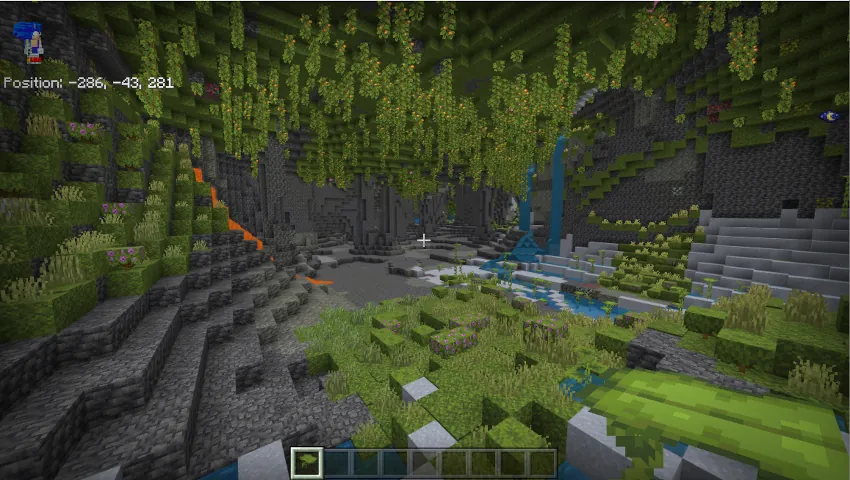
Here is the difference between Java and Bedrock Edition Lush Cave temperature as of writing (I pasted the downfall as well because I don't know if it's part of the temperature thing):
Temperature
0.5 (Java Edition)
0.9 (Bedrock Edition)
Downfall
0.5 (Java Edition)
0.0 (Bedrock Edition)
It seems like this affects 1.20.12 as well as this issue has not been marked as resolved or the Java Edition one has been marked as resolved as fixed. Please confirm that if you can. The Java Edition version of the bug report is:
MC-233528Please mark the Java Edition bug report as related.
I have now attached the screenshots. The Bedrock Edition one is probably not up to date and from another source, but the Minecraft wiki still shows that there is a difference between the Java and Bedrock Edition temperature and downfall which affects the grass colour as confirmed by @Dhranios.
I am also willing to update this and become the reporter if possible.
Mods, @ampolive please update this as soon as possible. Thanks!
@Dhranios there is grass on the bedrock one if you look carefully. But just no grass blocks.
This issue still affects version 1.20.12. Here's a video showcasing it on iOS/iPadOS 16.5.1 with Security Response C: 1_20_12 iPadOS 16.5.1 (c).mp4
The video has been downscaled to 720p because of the size limit as of uploading. Also the mouse cursor might just look like I have moved the cursor and not used the mouse to break blocks etc, but I have. And this issue needs more attention!
@ampolive
MC-236990can possibly describe the issue.Because @turbo said this has been fixed, please mark as resolved appropriately if it's fixed properly.
@Mr MC 392 disabling AssistiveTouch has fixed it, but this is still a bug. This bug report should be updated accordingly with the latest information.
If this is a problem Mojang can't fix or fixing things will break things even with complicated hacks (e.g. breaking the AssistiveTouch), then it probably is an issue with Apple.
Some of the videos attached also makes the cursor look broken, I don't understand those videos but after disabling the AssistiveTouch I have not seen the other cases of the broken issues.
Affects 1.20.12
This wouldn't really need repro steps, as only examples are actually needed for this one. And if there are any macOS application developers that actually know how to fix this, please add a comment with some documentation for Mojang if possible. One of the examples is in Finder you will see that it only says Minecraft instead of Minecraft Launcher.
This seems like an issue with support
Launcher version 2.6.16 is still affected. Bootstrap version: 1.2.30
Hello, no one has responded to my issue for a while now. Could someone please check on this? Update: someone checked
Probably still exists on 2.7.12 (Mac)
Hello, your Mac launcher icon is still square version because your icon cache is not up to date. To see the new icon, I personally had to clear the icon cache because it was not up to date. Please make sure you have launcher version 2.8.2 and bootstrap version 1.3.2. To fix your icon cache, please find a tutorial on how to fix it. This is definitely the vanilla launcher and I am on macOS 13.5.1.
Still like this in latest preview 1.20.40.21 attached screenshot
Also on macOS 13.5.2 and launcher version 2.10.22
@Mr MC 392 in iOS 17 on devices with no silent switch, the silent mode is in the settings, it does not say that game sounds would be muted.
@Reyaansh_Mishra I believe there should be a mode in the coding where they can fix this. (related to the one with Roblox mentioned)
This is not an issue that should be reported here unless (I believe?) if you know that this only affects certain platforms.
@[Mod] Ezekiel (ezfe) yes, it is called Minecraft Launcher on Windows last time I checked (quite recently) and still should be that way.
Update: this is just a problem with a specific setting (on by default?) in AssistiveTouch
Still true for latest launcher version 2.13.7 with bootstrap 1.6.2
This is still a problem on 1.20.50 and prevents things like 120fps on iPads with 120hz displays
I can confirm it does affect 1.20.4 so please add
Still true for launcher version 2.15.23 with bootstrap version 1.7.2
Contact support, the bug tracker is not for support requests. This would be a support request.
Hello, assuming there is probably an icon cache on Linux, did you try to clear it? (I have experienced on Mac that clearing icon cache was needed to see the new icon)
This should not be invalid
From what I heard, Minecraft Bedrock probably still has VSync on by default (as of 1.20.51) and you have to go into config file to toggle it, it might be a problem with the VSync. If it's not, then there is probably a hard cap. Don't know if that is any use but hopefully yes
Still like this on 1.20.4
I think this should not be community consensus, on the java version of this issue it is already confirmed and it has 8 votes there and 2 votes here last checked as well that means a total of 10 votes.
how come this is working as intended when the
java version of this issueis marked as confirmed? @[MCQA] Bartłomiej SłodkowskiIt does not make sense that it doesn't melt when there is not enough light for the frost walker ice to melt even when it have been made by frost walker (not setblocked or anything like that), as it's supposed to be temporary and not related to light levels.