 MCL-22108
Rosetta 2 required to launch Minecraft (MCL) despite Apple Silicon support
Minecraft stated "The M1 ARM64 architecture is now supported.".
Yet, it isn't possible to launch Minecraft (MCL) on M-series Macs without the need of installing Rosetta 2.
Environment
Chip: Apple M1 Pro
OS Version: macOs Monterey 12.5 (21g72)
Linked Issues


Created Issue:
Rosetta 2 required to launch Minecraft despite apple silicon support.
Minecraft stated "The M1 ARM64 architecture is now supported.".
Yet, it isn't possible to launch Minecraft (MCL) on M-series Macs without the need of installing Rosetta 2.
Environment
Chip: Apple M1 Pro
OS Version: macOs Monterey 12.5 (21g72)
Added Attachments:
![[Bot] Arisa](../../../data/avatars/users/43007.png)
Changed Summary:
Rosetta 2 required to launch Minecraft (MCL) despite apple silicon support.
Added ADO: 858074
![[Mod] markderickson](../../../data/avatars/users/18946.svg)
Changed Summary:
Rosetta 2 required to launch Minecraft (MCL) despiteapplesilicon support.Rosetta 2 required to launch Minecraft (MCL) despite Apple Silicon support
![[Mod] turbo](../../../data/avatars/users/92867.png)
Added Affects Versions: 2.3.645 (Mac)
Added Affects Versions: 2.4.30 (Mac)
Added Affects Versions: 2.5.9 (Mac)
Added Affects Versions: 2.6.16 (Mac)
Added Affects Versions: 2.8.2 (Mac)
![[Mod] Ezekiel (ezfe)](../../../data/assets/gravatar/ezekielelin.jpeg)
Added Affects Versions: 2.10.25 (Mac) 2.10.24 (Mac)
Added Affects Versions: 2.13.7 (Mac)
Added Affects Versions: 2.15.19 (Mac)
Added Affects Versions: 2.15.23 (Mac)
Added Linked Issues:
is duplicated by
Does MCL-22108 describe your issue?
Hi there!
Have you ticked 'Use Arm64 Java runtime for Minecraft: Java edition' option in 'Settings'?
This ticket will automatically reopen when you reply.
Hi and thank you for the comment.
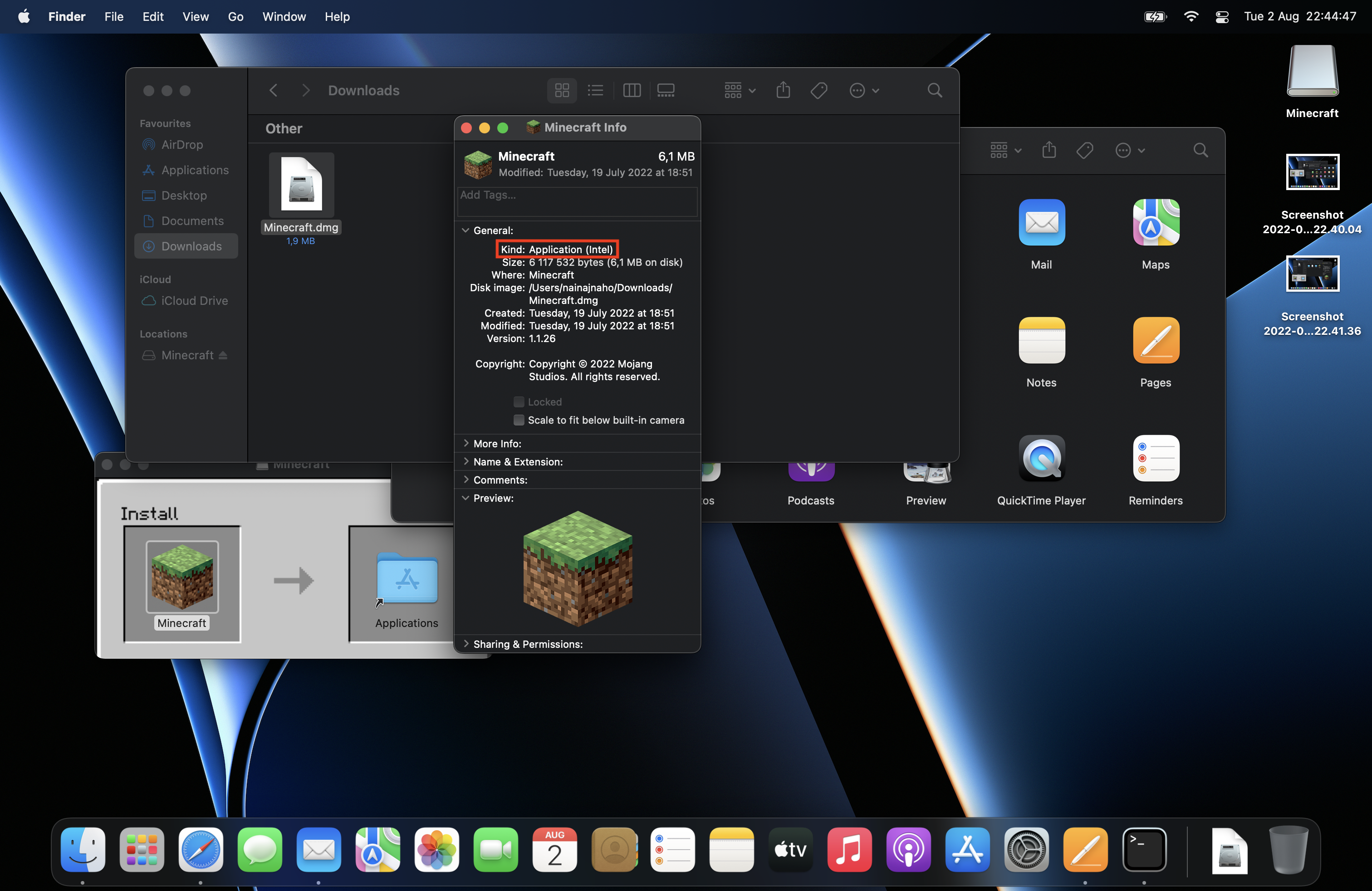
I can't navigate to "Settings" because I'm unable to launch the Minecraft launcher. Rosetta 2 is needed.
It seems by your comment that the gameplay (Minecraft) is run natively but not the launcher (Minecraft Launcher)!!! How come? How is one expected to play the game without getting the access to it?
I have attached som screenshots.
Best Regards ,
,
Hey nainajnahO.
Isn't Rosetta 2 needed necessary to run some applications on certain Mac's (not only Minecraft).
Hi Zgajak,
So Rosetta is essentially a translator for programs that haven't transitioned to ARM yet.
I have for example Discord, Slack and JetBrains downloaded (ARM versions) on my Mac, that work perfectly fine without the assistance of Rosetta.
I suppose now that Mac users have to wait for a future update that supports Minecraft Launcher for ARM/Apple silicon?
I can confirm, I tried running the launcher after installing on my new MacBook Pro and it is requiring me to install Rosetta in order to open the Minecraft Launcher.
Can confirm for 2.4.4 (Mac)
I'm on macOS Ventura 13.2.1 with the M1 Pro chip.
The Minecraft Launcher itself currently only runs on Intel macs natively. Minecraft Java itself from 1.19 onwards can run natively with official support. I believe older Minecraft Java versions currently can't run natively. As of writing this.
Please add 2.5.9 (Mac) since in this version the Launcher still requires Rosetta 2 to launch.
Launcher version 2.6.16 is still affected. Bootstrap version: 1.2.30
Launcher version 2.8.2 is still affected. Bootstrap version: 1.3.2
Still true for latest launcher version 2.13.7 with bootstrap 1.6.2
Still true for launcher version 2.15.23 with bootstrap version 1.7.2
Sadly still valid in 2024, see https://bugs.mojang.com/projects/MC/issues/MC-267783