 MetoolDaddy
- MTD
- mtd
- Asia/Dhaka
- Yes
- No
 MC-101490


2018-01-31_23.21.48.png
Severe input lag when typing in chat, with latency increasing as performance decreases. Game controls are unaffected, but "bleed" into the chat if it's opened right after moving, resulting in a "ddddddwwww " style burst in chat.
The
issue was never encoutered on any previous versionsSevere input lag when typing in chat, with latency increasing as performance decreases. Game controls are unaffected, but "bleed" into the chat if it's opened right after moving, resulting in a "ddddddwwww " style burst in chat. The key used to open chat is also typed out more often than not.
The lag becomes more apparent as game FPS drops / destabilizes.
The issue was never encoutered on any previous versions
Debian 9 with MATE
Linux, tested with various distributions and java versions
Severe input lag when typing in chat, with latency increasing as performance decreases. Game controls are unaffected, but "bleed" into the chat if it's opened right after moving, resulting in a "ddddddwwww " style burst in chat. The key used to open chat is also
typed out more often than not.The lag becomes more apparent as game FPS drops / destabilizes.
The issue was never encoutered on any previous versions
Severe input lag when typing in chat, with latency increasing as performance decreases. Game controls are unaffected, but "bleed" into the chat if it's opened right after moving, resulting in a "ddddddwwww " style burst in chat. The key used to open chat is also often typed into chat.
The lag becomes more apparent as game FPS drops / destabilizes.
The issue was never encoutered on any previous versions
Severe input lag when typing in chat, with latency increasing as performance decreases. Game controls are unaffected, but "bleed" into the chat if it's opened right after moving, resulting in a "tddddddwwww " style burst in chat. The key used to open chat is also often typed into chat.
The lag becomes more apparent as game FPS drops / destabilizes.
The issue was never encoutered on any previous versions
Severe input lag when typing in chat, with latency increasing as performance decreases. Game controls are unaffected, but "bleed" into the chat if it's opened right after moving, resulting in a "
tddddddwwww" style burst in chat. The key used to open chat is also often typed into chat.The lag becomes more apparent as game FPS drops / destabilizes.
The issue was never encoutered on any previous versions
Severe input lag when typing in chat, with latency increasing as performance decreases. Game controls are unaffected, but "bleed" into the chat if it's opened right after moving, resulting in a "ddddddwwww t" style burst in chat. The key used to open chat is also often typed into chat.
The lag becomes more apparent as game FPS drops / destabilizes.
The issue was never encoutered on any previous versions
Severe input lag when typing in chat, with latency increasing as performance decreases. Game controls are unaffected, but "bleed" into the chat if it's opened right after moving, resulting in a "ddddddwwww
t" style burst in chat. The key used to open chat is also often typed into chat.The lag becomes more apparent as game FPS drops / destabilizes.
The issue was never encoutered on any previous versions
Severe input lag when typing in chat, with latency increasing as performance decreases. Game controls are unaffected, but "bleed" into the chat if it's opened right after moving, resulting in a "ddddddwwww " style burst in chat. The key used to open chat is also often typed into chat.
The input lag becomes more apparent as game FPS drops / destabilizes.
The issue was never encoutered on any previous versions
Somesounds don't drop in volume over distance, instead aren't played when the player is too farBell sounds don't drop in volume over distance, instead aren't played when the player is too far
Some sounds, specifically those that can be described as "loud and important", such as bell rings and explosions, are played at a fixed full volume a in 32 block radius.After leaving the radius, already playing sounds will complete, while new sounds won't start playing.
Other sounds work as intended.
Steps to reproduce:
1.Build a contraption that would repeatedly make a problematic sound, for instance have a dispenser fire arrows at a bell.
2. Start walking away.You will notice that the sound is heard as if it's right next to you, before the sounds will stop as if the contraption was turned off
Bell rings and explosions, are played at a fixed full volume a in 32 block radius.
After leaving the radius, already playing sounds will complete, while new sounds won't start playing.
Other sounds work as intended.
Steps to reproduce:
1. Have a dispenser fire arrows at a bell.
2. Start walking away.You will notice that the sound is heard as if it's right next to you, before the sounds will stop as if the contraption was turned off
Bell rings
and explosions, are played at a fixed full volume a in 32 block radius.After leaving the radius, already playing sounds will complete, while new sounds won't start playing.
Other sounds work as intended.
Steps to reproduce:
1. Have a dispenser fire arrows at a bell.
2. Start walking away.You will notice that the sound is heard as if it's right next to you, before the sounds will stop as if the contraption was turned off
Bell rings and explosions, are played at a fixed full volume a in 32 block radius.
After leaving the radius, already playing bell sounds will complete, while new sounds won't start playing.
For explosions - they do have a falloff, although only for a few blocks outside the 32 block radius.
Other sounds work as intended.
Steps to reproduce:
1. Have a dispenser fire arrows at a bell.
2. Start walking away.You will notice that the sound is heard as if it's right next to you, before the sounds will stop as if the contraption was turned off
Bell rings and explosions
,are played at a fixed full volume a in 32 block radius.After leaving the radius, already playing bell sounds will complete, while new sounds won't start playing.
For explosions - they do have a falloff, although only for a few blocks outside the 32 block radius.
Other sounds work as intended.
Steps to reproduce:
1. Have a dispenser fire arrows at a bell.
2. Start walking away.You will notice that the sound is heard as if it's right next to you, before the sounds will stop as if the contraption was turned off
Not an issue, village mechanics changed
Are you sure you should be starting progress on so many issues at once?
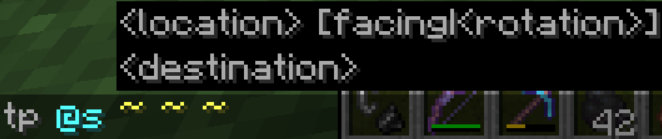
As we know, in command line arguments braces mean <required argument> and [optional argument], and additionally | in [1|2|3] and <1|2|3> means a selection of mutually exclusive arguments, which true for most of Minecraft's commands. Now, look at the situation bellow:
As seen on the screenshot, the teleport command syntax suggestion makes no sense. It means, literally:
Optional argument: either Facing or required Rotation
Basically, there a pair of optional arguments, one of which is mandatory to be chosen, which wrong both because the second option doesn't even exist and the suggestion of a "mandatory option" makes no logical sense.Judging by the actual command syntax, the correct suggestion should be{{ }}
[facing <entity|x y z>] and typing entity should lead to a suggestion of entities or selectors like with the target argument (which, by the way, doesn't happen here unlike all other entity arguments in the game)When the facing argument is entered, the command syntax continues to defy logic:
It then gives an optional mandatory argument, which appears to be true for most of the game's commands. Optional arguments appear to either not have any braces, or wrapped in both [optional] and <required>As we know, in command line arguments braces mean <required argument> and [optional argument], and additionally | in [1|2|3] and <1|2|3> means a selection of mutually exclusive arguments, which true for most of Minecraft's commands. Now, look at the situation bellow:
As seen on the screenshot, the teleport command syntax suggestion makes no sense. It means, literally:
Optional argument: either Facing or required Rotation
Basically, there a pair of optional arguments, one of which is mandatory to be chosen, which wrong both because the second option doesn't even exist and the suggestion of a "mandatory option" makes no logical sense.Judging by the actual command syntax, the correct suggestion should be{{ }}
[facing <entity|x y z>] and typing entity should lead to a suggestion of entities or selectors like with the target argument (which, by the way, doesn't happen here unlike all other entity arguments in the game)When the facing argument is entered, the command syntax continues to defy logic:
It then gives an optional mandatory argument, which appears to be true for most of the game's commands. Optional arguments appear to either not have any braces, or wrapped in both [optional] and <required>

As we know, in command line arguments braces mean <required argument> and [optional argument], and additionally | in [1|2|3] and <1|2|3> means a selection of mutually exclusive arguments, which true for most of Minecraft's commands. Now, look at the situation bellow:
As seen on the screenshot, the teleport command syntax suggestion makes no sense. It means, literally:
Optional argument: either Facing or required Rotation
Basically, there a pair of optional arguments, one of which is mandatory to be chosen, which wrong both because the second option doesn't even exist and the suggestion of a "mandatory option" makes no logical sense.Judging by the actual command syntax, the correct suggestion should be
{{ }}
[facing <entity|x y z>] and typing entity should lead to a suggestion of entities or selectors like with the target argument (which, by the way, doesn't happen here unlike all other entity arguments in the game)When the facing argument is entered, the command syntax continues to defy logic:
It then gives an optional mandatory argument, which appears to be true for most of the game's commands. Optional arguments appear to either not have any braces, or wrapped in both [optional] and <required>
As we know, in command line arguments braces mean <required argument> and [optional argument], and additionally | in [1|2|3] and <1|2|3> means a selection of mutually exclusive arguments, which true for most of Minecraft's commands. Now, look at the situation bellow:
As seen on the screenshot, the teleport command syntax suggestion makes no sense. It means, literally:
Optional argument: either Facing or required Rotation
Basically, there a pair of optional arguments, one of which is mandatory to be chosen, which wrong both because the second option doesn't even exist and the suggestion of a "mandatory option" makes no logical sense.Judging by the actual command syntax, the correct suggestion should be
[facing <entity|x y z>] and typing entity should lead to a suggestion of entities or selectors like with the target argument (which, by the way, doesn't happen here unlike all other entity arguments in the game)When the facing argument is entered, the command syntax continues to defy logic:
It then gives an optional mandatory argument, which appears tobe truefor most of the game's commands. Optional arguments appear to either not have any braces, or wrapped in both [optional] and <required>As we know, in command line arguments braces mean <required argument> and [optional argument], and additionally | in [1|2|3] and <1|2|3> means a selection of mutually exclusive arguments, which true for most of Minecraft's commands. Now, look at the situation bellow:
As seen on the screenshot, the teleport command syntax suggestion makes no sense. It means, literally:
Optional argument: either Facing or required Rotation
Basically, there a pair of optional arguments, one of which is mandatory to be chosen, which wrong both because the second option doesn't even exist and the suggestion of a "mandatory option" makes no logical sense.Judging by the actual command syntax, the correct suggestion should be
[facing <entity|x y z>] and typing entity should lead to a suggestion of entities or selectors like with the target argument (which, by the way, doesn't happen here unlike all other entity arguments in the game)When the facing argument is entered, the command syntax continues to defy logic:
It then gives an optional mandatory argument, which is actually not optional. The same appears to show up for most of the game's commands - optional arguments appear to either not have any braces, or wrapped in both [optional] and <required>
![[Mod] NeunEinser](../../../data/avatars/users/39263.png)
MetoolDaddy Since you are the reporter of this issue, you can update the affected versions yourself 

 Restricted to
 MetoolDaddy
Issues like these are not always the easiest to fix. You're more than welcome to take a look at the code analysis and suggest a fix of your own, as has been done in the past.
Comments like these that do not contribute to an issue are not helpful in any way. There are over 60 people on the watcher list who are getting their emails flooded by our comments.
Can confirm for 1.11 release
Luis, if that was the case, clientside mods like Optifine wouldnt have fixed it. But they do.
I was able to reproduce it in 18w05a
Attached files to the issue: issue in action
Command run:
/execute at MetoolDaddy anchored eyes facing 1026 71.5 1062 run particle minecraft:flame ^ ^ ^3 0 0 0 0 1 force
Using particle end_rod for command block, flame for manually ran command
peregrine fuller, iOS has an entirely different codebase, and runs on different kind of hardware, so this can't be the same issue
i advise you to look in the Minecraft (Bedrock Codebase) section
This issue appears again in 1.13pre-5 (and 4)
Still an issue, even after changing desktop environment.
The issue appears during performance (FPS) drops, and gets worse the lower and less stable the FPS is. It also occurs for every linux user I know.
The issue didn't go anywhere, still around on pre 8

I think people have given up making any input on this issue any more.
Even more, this has to be a high priority issue (i mean how are you even selling a game in such a state), and no offense, but the assignee who has been on it for a long time makes no indication any work is being done.
"Mojang doesn't care" has become a regularly recited quote among my friends, and I wish you could prove them wrong. But no arguments for that so far.
Tons of issues have emerged that indicate how well the Java team tests the game themselves. I mean, they never go on a server, so they don't know the server icons are currently broken, and this very issue was stated to not occur if you have "absurdly high fps" of which Mojang employees once boasted to have thousands.
To Mojang: get your act together will ya?
To Jira mods: please no ban (i understand if you do)
I'm sorry, but this in-your-face issue persisted through more releases than acceptable. Email notifications would bring attention back to it.
Count it as a "bump". I've also confirmed it for pre8 just before.
I'd like to point out that this issue creates a gateway for custom active items to be implemented in maps. Carrot on a stick can be used as a "unversral right click detector", and paired with a resource pack durability predecate for textures, to generate up to 26 custom items - or even more if negative durability values are used.
The rare case of having to detect a pig speed boosted with a carrot on a stick over unmodded custom items, this is a tough choice indeed
Updated: Elaborated on explosion sounds. They do have a small falloff distance outside of the 32 block radius, but are also full volume inside of it.
@RM that might be a problem with your GPU instead
This bug tracker is not for the modded game, though
That's not a real workaround. The real cause of this problem is input lag, so typing would still be hard at low FPS.
Just discovered something: Disabling mob spawning removed all signs of the lag. At 40 players it performed exactly as it should on a $120/month machine.
What I mean is that entities should not have affected performance as much as they have, that is remove the problem completely. It's likely the performance leak is somewhere in there.
The performance drop did begin before 1.14 though. Maybe we're dealing with an entirely different issue by now?
This bug report might just be too broad.
Are you sure this isn't just an extreme problem with your GPU or video drivers?
Definitely intentional
All explosions are extensions of the same exact behavior. If they were all meant to have 100% drop chances, it would have just been hard-coded into the base behavior and wouldn't have been affected by it's source - a bug like this wouldn't even be possible.