Chunks don't load correctly/not rendering
The bug
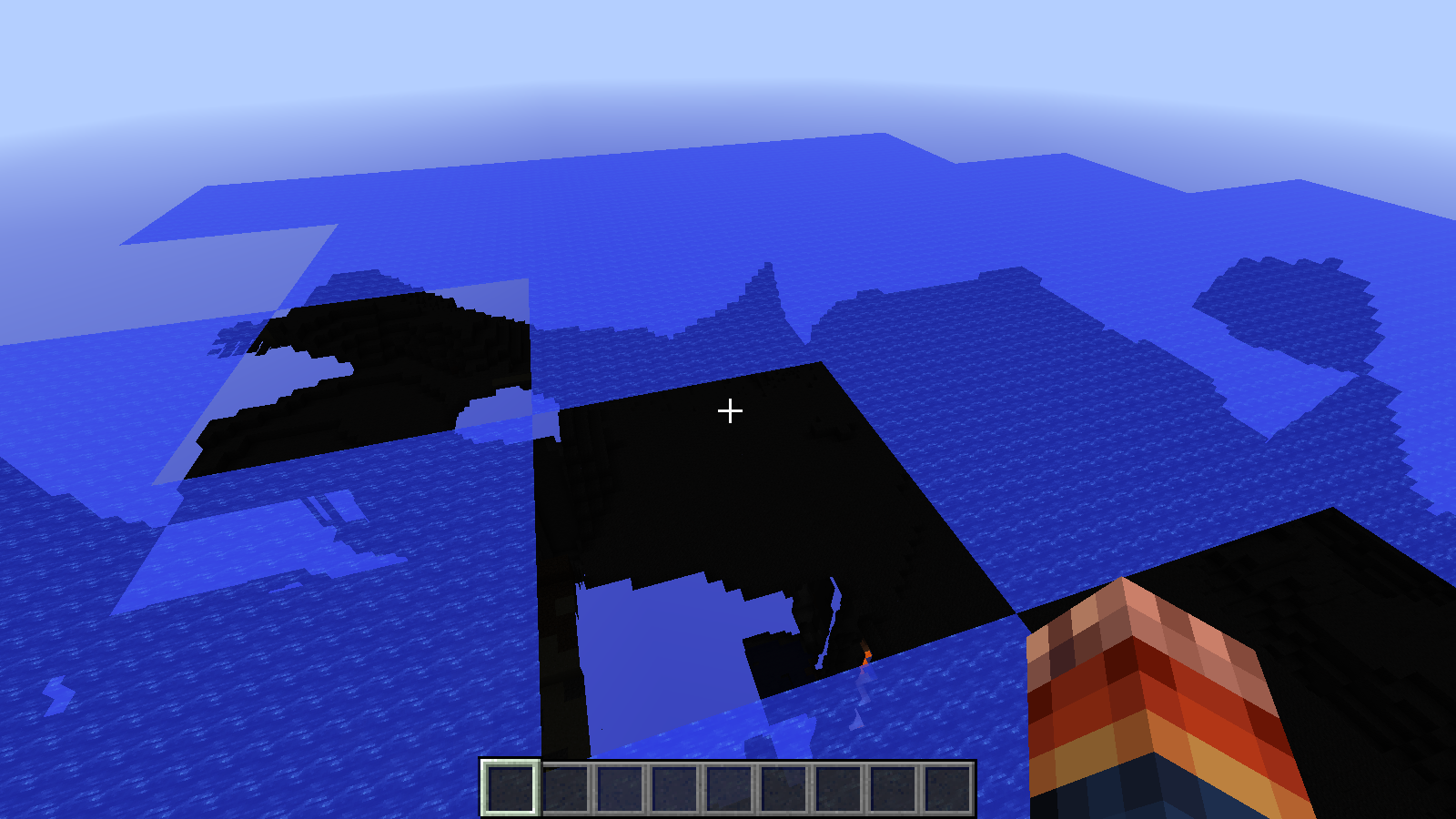
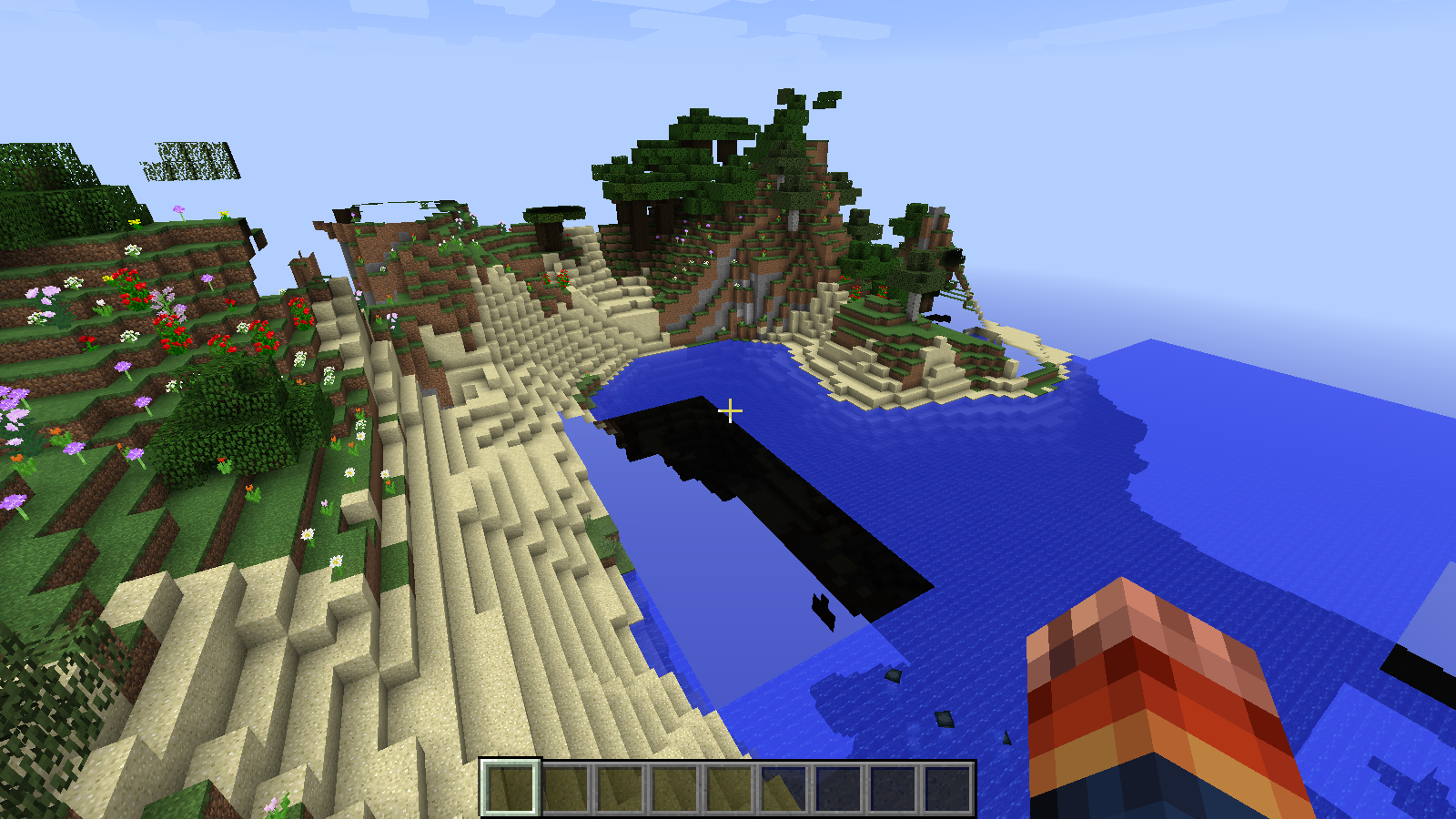
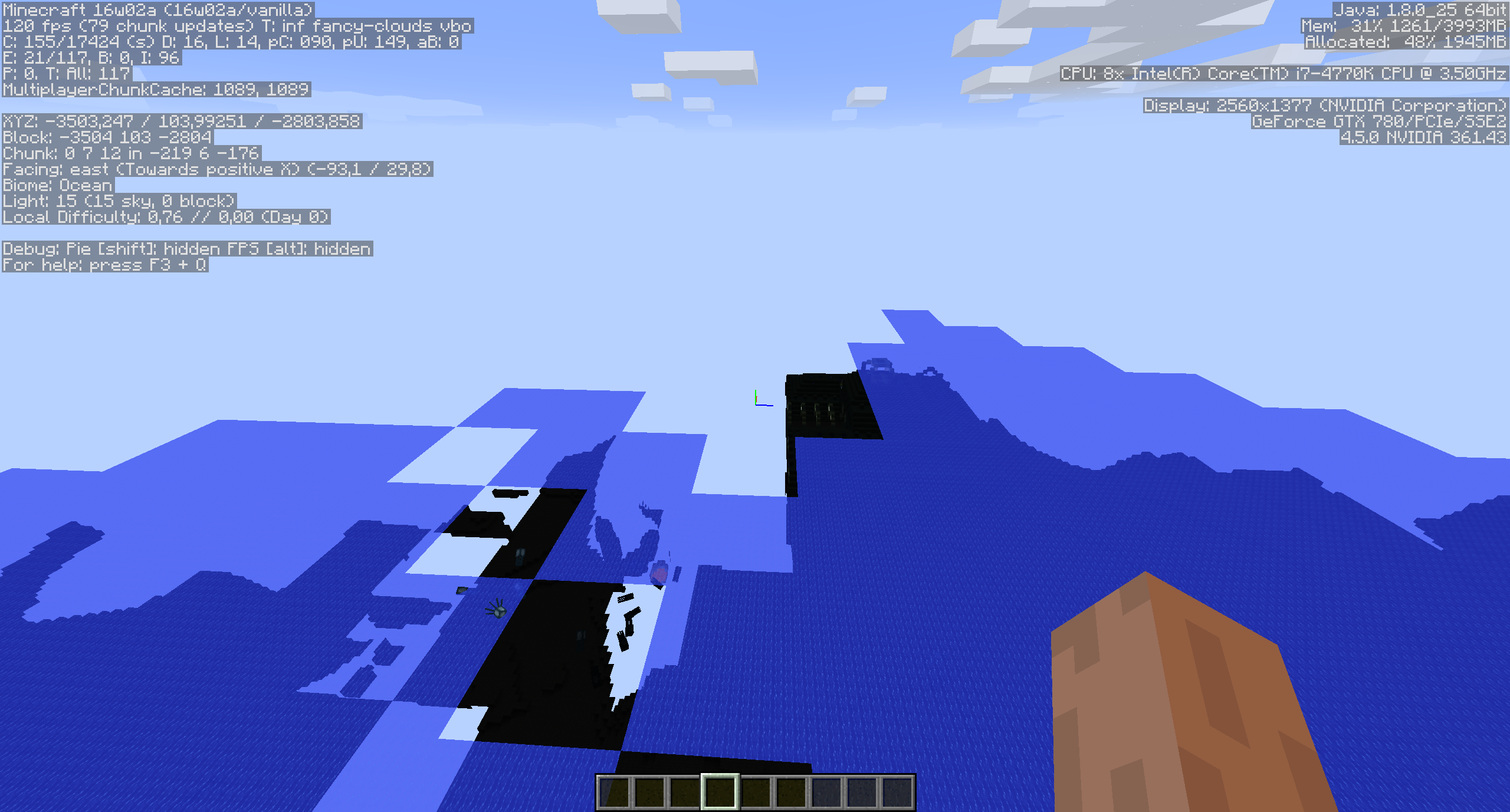
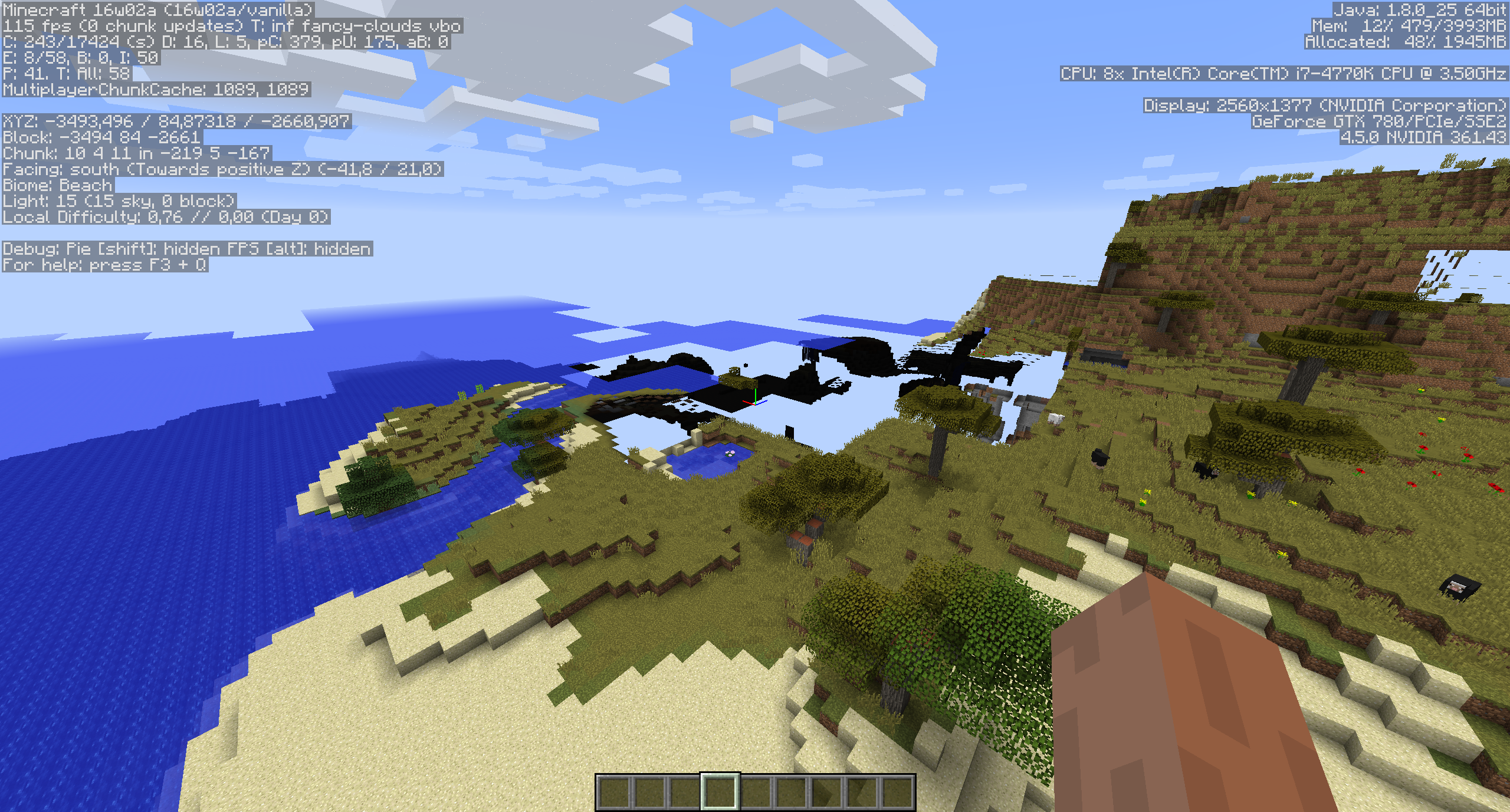
When flying around in creative in the latest 15w42a snapshot, chunks load incorrectly (further chunks seem to load before nearer ones). This doesn't happen in previous snapshots (like 15w41b).
Code analysis
See this comment by Bartosz Skrzypczak
Linked Issues
is duplicated by54
 MC-90634chunk issueDuplicateMC-90677rendering chunkDuplicateMC-91101Chunks disapear when you fly above themDuplicateMC-91244Chunks unloading when getting close (for 15w43c and older)DuplicateMC-92667World not fully generatingDuplicateMC-95083Blocks update excessively slowly/irregularly. (Blocks pushed/pulled by pistons render weird, random chunks render/update very slowly, and chunks nearby sometimes un-render)DuplicateMC-97617Chunk rendering error in server spawn pointDuplicateMC-97745Seeing Through Block ChunksDuplicateMC-98124Rendering cannot decide what chunks I see in front of meDuplicateMC-987331.9 Chunks LoadingDuplicateMC-99174Chunks not rendering properlyDuplicateMC-99187Invisible blocks bug when attempting to expand the map and restartingDuplicateMC-99333Chunk Loading IssueDuplicateMC-99481Generating wordldDuplicateMC-99898Takes 30 seconds for game to load some chunksDuplicateMC-100331Chunks get left behind -stay invisible untill block update.DuplicateMC-100548Sometimes I can't see some chunks\blocksDuplicateMC-100956Parts of the map invisible until they recive a block update.DuplicateMC-101168slow chunks generationDuplicateMC-101180Chunks don't load correctly/not renderingDuplicateMC-101650Random chunks don't get rendered correctly sometimesDuplicateMC-101920Chunks not loadingDuplicateMC-103295Chunks do not load in order when flying DuplicateMC-103392Chunks aren't loadingDuplicateMC-103413Patchwork chunk loadingDuplicateMC-106041Render glitch-duplicateDuplicateMC-106859Bad chunks loadDuplicateMC-107372Chunks Not Loading Properly when player is inside that specific chunkDuplicateMC-110096Chunks not loadingDuplicateMC-111102Chunk loadingDuplicateMC-112084Chunks becoming invisible and not loading properly/fast enoughDuplicateMC-112385Rendering issues with upgrade to 1.11.2DuplicateMC-112604Chunks Not Rendering ProperlyDuplicateMC-114466Chunks not renderingDuplicateMC-114533Unloaded blocks and chunksDuplicateMC-114905Chunk unloaded while walking towards itDuplicateMC-117485Chunks don't update right!DuplicateMC-117683Chunks don't update right!DuplicateMC-117890Crashes or freezes few seconds after loading a world or server. Also chunk glitches and a blinking that may be a lighting error.DuplicateMC-121108Disappearing ChunksDuplicateMC-121707World Chunks Don't Seem To Buffer and holes are backDuplicateMC-121769World Chunks don't buffer/load if ahead of expected posDuplicateMC-128595The world starts to get glitches when I start to fly very fastDuplicateMC-128901World Terrain Rendering Oddly when Generating and LoadingDuplicateMC-129831Render chunks consistently not updating DuplicateMC-131445Rendering BugDuplicateMC-131954Chunks can not be loaded sometimes, and others will be loadedDuplicateMC-133012chunk cannot be loadedDuplicateMC-133024Chunks flickeringDuplicateMC-134544Area Not displaying properlyDuplicateMC-134598Chunks not responding and updatingDuplicateMC-139089see through blocksDuplicateMC-143751Increasing view distance causes chunks near spawn not to loadDuplicateMC-145415Area in world where parts of world disappearDuplicate
relates to4
MC-63020Some chunks are not rendered in first person from some angles in certain situations (incorrect frustum culling)FixedMC-98994Chunk Generation Performance Regressed by 20-30%FixedMC-120079Chunks not rendering at certain positions when joining server where the chunks have been already loadedAwaiting ResponseMC-136561Corrupted areasAwaiting ResponseAttachments23









![[Helper] clam lol](../../../data/avatars/users/92852.png)


- Fixed
 Ivan
Ivan![[Mojang] slicedlime](../../../data/assets/gravatar/slicedlime.jpeg) [Mojang] slicedlime
[Mojang] slicedlime- 124
- 66
- Confirmed
 Important
- Chunk loading
- chunk load rendering
15w42a - 19w46b
15w42a 15w45a 15w46a 16w03a 16w07a 1.9-pre2 1.9-pre4 1.9 1.9.1 1.9.2 16w15b 1.9.4 16w20a 1.10 1.10.2 16w32a 16w39a 16w39c 1.11-pre1 1.11 1.11.2 17w06a 1.12.1 1.12.2-pre1 1.12.2-pre2 1.12.2 17w43a 17w43b 17w45a 17w50a 18w10b 18w10c 18w14b 18w15a 18w16a 18w20a 18w20c 1.13-pre1 1.13-pre2 1.13-pre4 1.13-pre6 1.13 1.13.1 19w46b- 15w51a 1.15-pre1
Created Issue:
Chunks don't load correctly
When flying around in creative in the latest 15w42a snapshot, chunks load incorrectly (further chunks seem to load before nearer ones). This doesn't happen in previous snapshots (like 15w41b).
Environment
Windows 7, Java 8.
Linked Issues
is duplicated by1
Attachments3

is duplicated by
![[Bot] Arisa](../../../data/assets/gravatar/mustek2.png)
is duplicated by
is duplicated by
is duplicated by
is duplicated by
is duplicated by

is duplicated by
Chunks don't load correctly/not rendering
is duplicated by
is duplicated by
is duplicated by
![[Mod] CubeTheThird](../../../data/assets/gravatar/cubethethird.jpeg)
relates to
is duplicated by
is duplicated by
is duplicated by
is duplicated by
is duplicated by
is duplicated by
is duplicated by
is duplicated by
is duplicated by
is duplicated by
is duplicated by
is duplicated by
is duplicated by
![[Mod] Neko](../../../data/avatars/users/92901.png)
is duplicated by

is duplicated by
is duplicated by
is duplicated by
is duplicated by
is duplicated by
is duplicated by
![[Mod] Michael Wobst](../../../data/avatars/users/37868.png)
is duplicated by

The bug
When flying around in creative in the latest 15w42a snapshot, chunks load incorrectly (further chunks seem to load before nearer ones). This doesn't happen in previous snapshots (like 15w41b).
Code analysis
See this comment by Bartosz Skrzypczak
Windows 7, Java 8.
is duplicated by
is duplicated by
is duplicated by
is duplicated by
is duplicated by
is duplicated by
MC-118517
is duplicated by
is duplicated by
is duplicated by
![[Mod] Les3awe](../../../data/avatars/users/79847.png)
is duplicated by
is duplicated by
is duplicated by

 ProfMobius (Thomas Guimbretiere)
15288453039691068758242028680906.jpg
Affects iOS as well.
is duplicated by
is duplicated by
is duplicated by
is duplicated by
is duplicated by
is duplicated by
is duplicated by
![[Mod] Pokechu22](../../../data/avatars/users/92931.png)
relates to
![[Mod] Urielsalis](../../../data/assets/gravatar/urielsalis.jpeg)
is duplicated by
is duplicated by
is duplicated by
is duplicated by
is duplicated by
![[Mojang] Nathan Adams](../../../data/assets/gravatar/dinnerbone.png)

![[Bot] Piston](../../../data/avatars/users/31202.png)
Sounds like MC-90602 to me.
Looks like MC-90602.
Sounds like MC-90602.
Possible duplicate of MC-90602. This seems like it's due to some cumulative pollution of a data structure. The effect increases over the duration of gameplay, and is fixed only by reloading the game (not just the world).
A duplicate of what might I ask? The bug MC-90602 has described this as a chunk loading issue where this one is clearly not. The chunks are loaded for me just not being rendered... You shouldn't have resolved the issue if you do not understand the difference between loading and rendering.
MC-90602 is still open. There is no need to keep 2 tickets for the same issue.
I'd rather say MC-90602 tho.
Bada McBumi that's MC-90602.
1. This project is for the web service only. Please report issues to the correct project.
2. Duplicate of MC-90602
Dupe of MC-90602
First I want to explain why it shouldn't be marked as duplicate of MC-90602:
MC-90602 is an issue so generic and vague that it captures a lot of completely different unrelated issues. People keep reporting them over and over again, with many variants that for people who don't know the internals are indistinguishable. In the current state that issue can't really be reasonably "fixed" because it's many different vague issues, and only fixing all of them would be enough to close it. This one can be reliably reproduced, and I know exactly what is needed to fix it.
The issue:
When joining a server where the area around the player has already been loaded at the moment the player joined, and it's not too close to chunk (0, 0), some spot won't render until a block update happens there or render distance is changed. It's consistently the same spot but it's location is affected by render distance. This issue doesn't affect singleplayer.
Steps to reproduce:
- Start a dedicated server with default settings
- Join the server and op yourself
- `/tp 536 120 280`
- `/setworldspawn`
- set your render distance to 8
- rejoin the server
At this point you could see some invisible chunks right below you, even when everything around is visible.
What causes is?
Note: this explanation references decompiled Minecraft code, all names are using MCP mappings
I encountered this issue when working on my mod several times, and early testers complained about it, turns out it was vanilla issue.
When player joins the server, one of the first thing it does is call addPlayer on PlayerChunkMap. This creates all the necessary PlayerChunkMapEntry instances, attempts to load their chunks, and send then to the player.
When client receives the chunk, it schedules render update, which is done by eventually reaching ViewFrustum#markBlocksForUpdate, which marks RenderChunk instances for update. Then on the next frame the last loop in RenderGlobal#setupTerrain will walk over all the chunks that need update and if it's close to player - update immediately, otherwise - schedule an update.
The problem is that the server is sending those chunks before sending player position, which means that until then client will assume it's 8, 64, 8. This means that markBlocksForUpdate will mark the right RenderChunk instances, but they have the wrong position set. And then the loop in setupTerrain will go over those chunks, taking the still wrong position from RenderChunk. And if the chunk is close to the currently assumed player position, 8, 64, 8 it will update it immediately and mark it as updated. But it ends up doing it for the wrong position, which means nothing will render there until new block updates are scheduled there.
Note that this means that if all chunk packets and the player position update are all processed in the same frame, the issue won't happen. If server doesn't send the chunks so early - the issue won't happen. So this is a timing related issue. Use breakpoints when debugging it and it will go away. There is a potential for it to disappear on different hardware.
This also clearly shows a few possible fixes:
- Clientside fix: make the loop in setupterrain use the coordinates it expects instead of taking them from RenderChunk
- Serverside fix 1: don't send any chunks in PlayerChunkMap#addPlayer
- Send player position to the client before adding the player to chunk map.
Each of those should fix the issue. Forge also allows to woraround the issue by fircing threaded chunk updates, which skips the immediate update in RenderGlobal#setupTerrain and always queues an update.
This is MC-90602.

This bug is similar to MC-90602
Set the world into peaceful and see if it still happens. Seems that mob spawning is out of control and if allowed to spawn they'll cause insane amounts of tick lag.
I tried a new world on peaceful and same problem.
While having this issue:
Please force a crash by pressing F3 + C for 10 seconds while in-game and attach the crash report (minecraft/crash-reports/crash-<DATE>-client.txt) to this ticket.
Please attach the complete output of the "Game Output (Your Minecraft name) " which can be found on the fourth tab of the launcher to this ticket.
If the launcher closes after game start, please edit your profile and select "Launcher visibility" then, "Keep the launcher open".
I found a drop in general performance in 15w42a compared to 15w41b, but it's more of a feeling than exact measurements. Maybe this is linked to this report ?
I've been having the same problem, it's more serious with customized worlds and the chunk rendering is just horrible.
Just trying the last snapshop (15w45a) and the problem still exists.
I have this problem too (In a 1.8 generated super flat water world) that started in 15w45a. I also noticed the problem when flying around Ragecraft II in creative/spectator.
Since 15w51a fixed
MC-89915this is also somewhat observable in survival, when riding on a fast horse (in 15w51b).As of 16w02a, this problem still exists. As I said, the latest snapshot without this bug was 15w41b. Maybe they could check the 15w41b code to find out what's causing this issue.
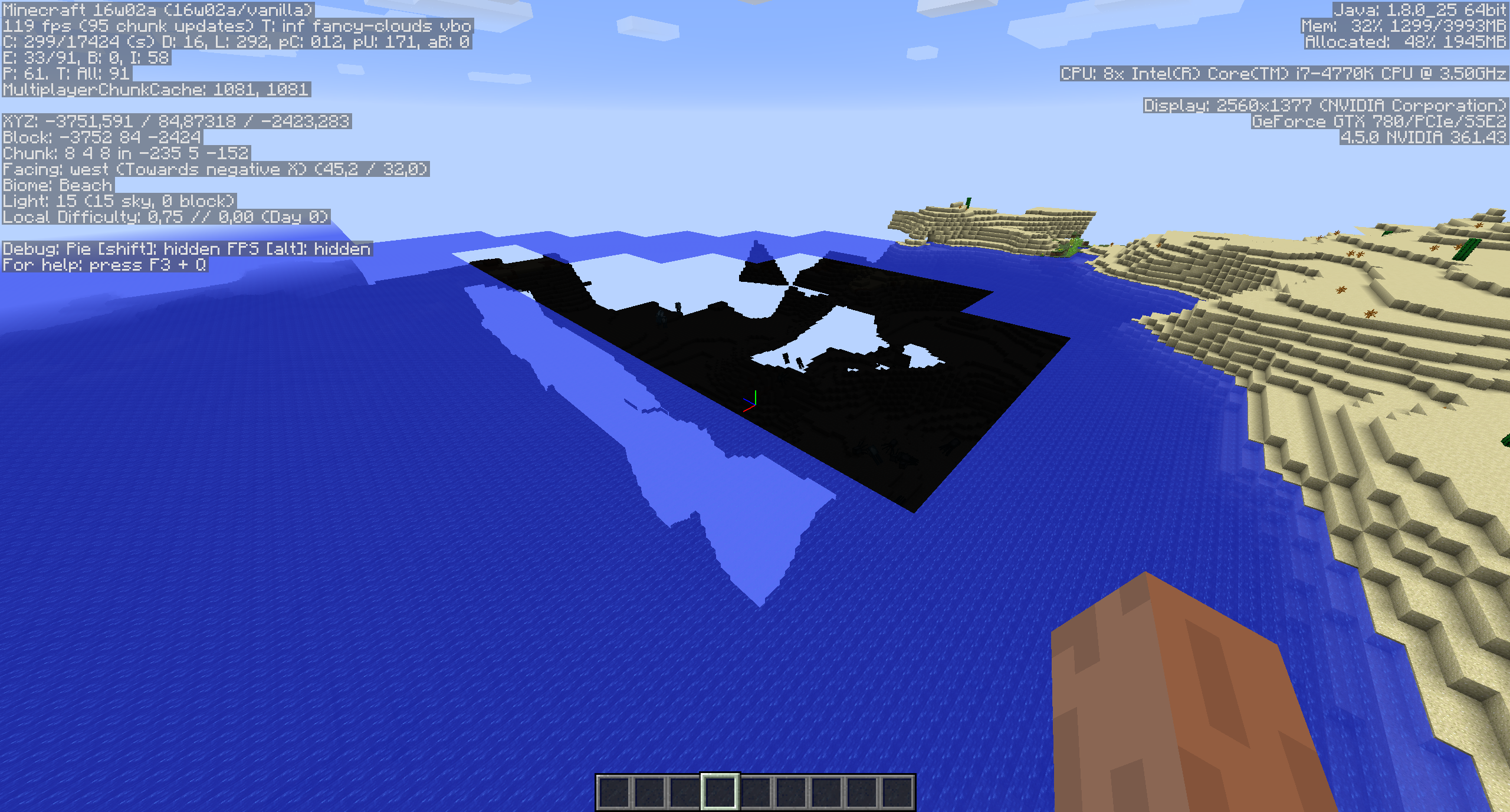
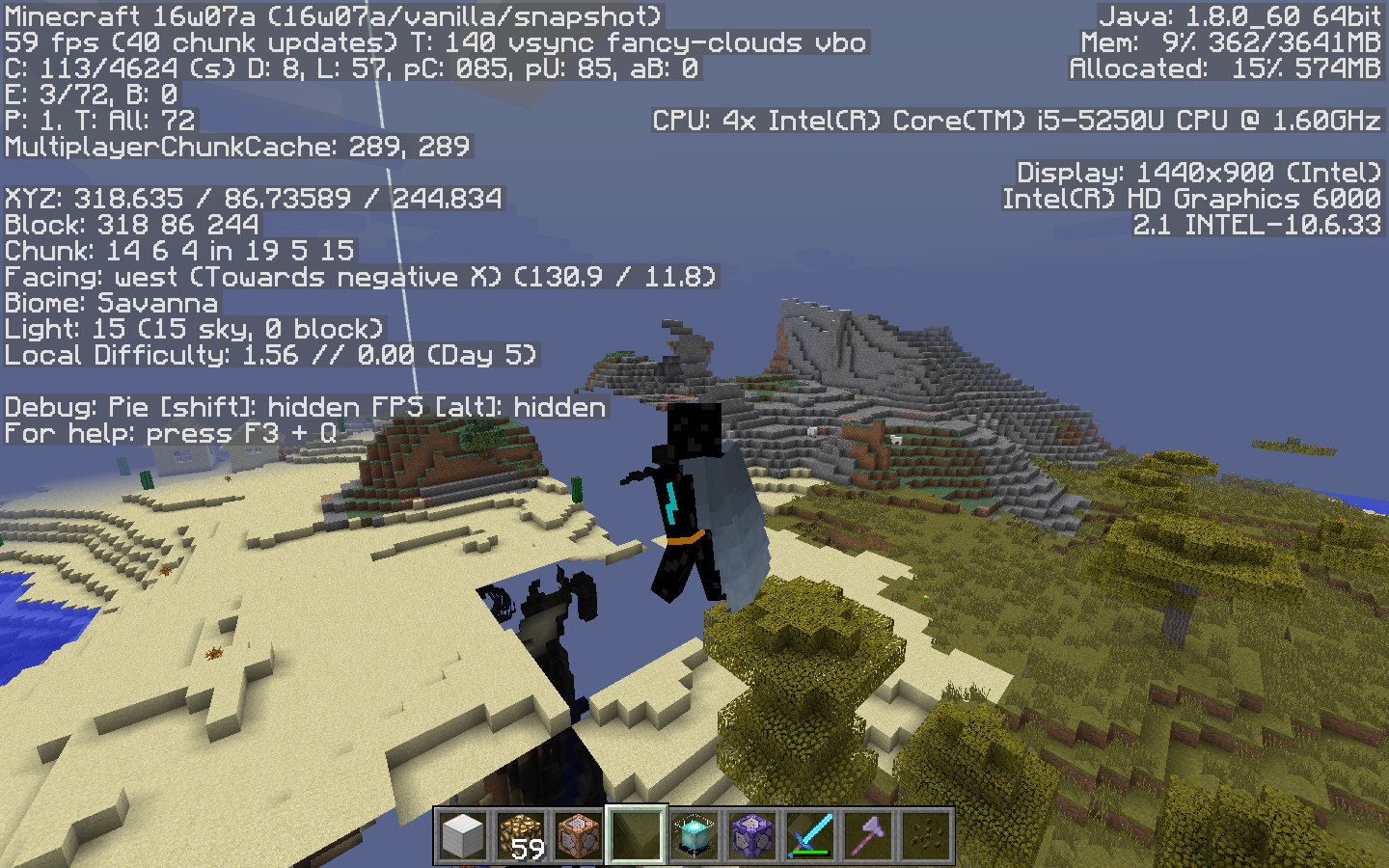
Ivan: Please attach a screenshot with debug screen on.
I think you misread my previous comment Kumasasa, I was trying to say that fixing the broken chunk loading with horses made this also noticeable in survival.
Having said that, chunk loading is much better for me in 16w02a. I managed to capture a few instances of this bug happening though. The screenshot on the horse was in survival, the rest in creative.
Sorry, but the bug is not resolved. As of 16w03a, the bug is still present.
When you say load, do you mean render, generate, or load-load?
Confirmed.
@Sam Bone: Please include the version when confirming tickets.
Checking 16w07a right now and the problem still unresolved.
still in 1.9 pre4
This appears to be rendering issue not a chunk loading issue.
Having same issue in 1.9. You can find my full report here: https://bugs.mojang.com/browse/MC-99333
While in survival and walking the chunk loading issue seems to happen less often, however while in creative mode the chunk loading is loading and unloading chunks I am both flying above and next to. You can consider it a sorta flashing style loading of chunks.
As the OP mentioned the farther away chunks seem to be loading in faster then the chunks you are standing in/are next to.
I have been getting a LOT of this issue as well in my single player game... it is usually the worst when I am traveling quickly, such as by boat, and thereby forcing a lot of chunks to load in a short time. As I'm moving, many of the faces of blocks simply fail to appear at all, exactly as shown in the screenshots above. Halting my movement and staying stationary for 15-30 seconds usually allows the rest of the blocks in my field of view to appear, but this makes exploration VERY difficult if I have to keep stopping every few chunks to let more of the world load. My computer is fast enough that this has never been an issue before now, so I suspect something in the game code is slowing down the rendering process quite a bit.
This happens to me even when I am exploring on foot in survival, single player. I am not traveling fast or anything, or flying. 12Gb of ram, quad core on Win 10. Never had this issue with 1.8.8/9.
I'm on Arch Linux 64 bits with an Intel HD 4400 GPU + 4 GB of RAM.
This bug is happening since the upgrade to 1.9 and this is utterly a disaster for the game experience.
Please fix it as soon as possible because I'm going to revert to 1.8.9 that worked flawlessly on the rendering.
Screenshot : http://pasteboard.co/2viTk2F3.png
For information, this issue is resolved using OptiFine 1.9.
Same here. Optifine 1.9 fixes the issue. Only happens on 1.9.
I know what is causing this and how to fix it. It is caused by something they did with clouds. If you turn clouds off it fixes the problem. Or if you play in a 1.9.3 snapshot you can turn clouds to fast and that also fixes the problem.
still in 16w15b (also: turning clouds to fast or off doesn't fix it for me)
When I have this problem, the block STAY invisible until a nearby block gets an update. Same problem anyone? Here's a crash report. (Crash report is from Spigot but it also happens when running CraftBukkit and Vanilla)
Benjamin: Your graphics driver might be outdated. update from http://www.geforce.com/drivers/results/99994
Kumasasa: Thankyou for letting me know <3, updating fixed an error I was having with another game, sadly the Minecraft error is still happening
I should also add that different render distances cause different chunks to have this problem. Here is the error when I play on render distance 12:
http://i.imgur.com/5eFQK6Q.png
And when I play on 13 render distance, the area shown above is fine but another area in my spawn looks like this:
http://i.imgur.com/stxZ1d8.png
I'm pretty sure it isn't a problem with the map (corrupted chunks or something similar) as all of the blocks are actually there, they can be walked on and blockpicked, they just require a block update to actually become visible.
To anybody that is having the exact same problem (Specific chunks needing a block update to become visible example: server spawn)
Try hiding one of these within the offending chunk:
http://i.imgur.com/oe2MFFm.png
The glitch will still happen but it will cause block updates when a player gets close to it.
Benjamin: Your symptoms are those of
MC-62958, but that's about AMD graphics whereas you have NVIDIA. But follow the advice there and turn VBOs ON.@Kumasasa (Teach me to tag people please XD)
I've tried turning VBOs and VSync on and off, the error still happens.
Edit: I've tried everything to do with graphics settings, the only thing that works is changing to a different render distance until the bug happens again, then change render distances again (but im running out of non-bugged render distances)
What do you think is causing it to happens in different places with different render distances? It's actually that that baffles me more than anything.
Looking forward to your reply, thankyou
When you comment thee is a button with a question mark, click it, it'll help you with how to format in jira
Tagging: Ex Ee
Try updating you graphics card drivers.
user-f2760 (Thanks )
)
They're all up to date, still no luck
Benjamin: Out of ideas.
This is a technical support issue; this site is for bug reports only. For technical support please use the Mojang Support Center.
Kumasasa But it would seem to be a bug, since many players (although apparently not that many) had no problem in 1.8.9, but do in 1.9+. So many of us are having pretty much the exact same issue, at the exact same interval in the version history.
Unless some of the additions from 1.8.9 to 1.9.4 have put something of a strain on the rendering? Because some of my friends with beefed up computers seem to have no problem.
All I know is this 'issue' is beyond irritating, makes exploring or really anything requiring movement of more than 5 chunks near impossible, even when just walking in a straight line as I have tried doing with my distance on 2 chunks... I always run into the invisible chunks.
I'm just hoping to get a solid answer, even if it means getting a better computer etc. I've been searching for something that works and so far, nothing.
**EDIT: What's funny, actually, is I don't seem to get this glitch in the Nether, nor the End.
I dont know if this can be added to this bug, or if a new one needs to be created, but this is not just present in Windows 7. It is also present on CentOS 7 with openJDK and Fedora 23 Server Edition with openJDK and Ubuntu 14.04 with openJDK and Oracle Java. Clients are Ubuntu 14.04, Fedora 21, Windows 7, 8 and 10. They all experience this issue. I have not had a chance to create a server on a Windows machine. Clients have been both Intel and AMD processors as well as AMD and nvidia graphics. The CentOS server is Intel and the others have been AMD. This rendering error happens on new worlds and old ones. Hope this helps! I am willing to test anything needed. Thanks
Seeing this issue in snapshot 16w20a
Comparison between 1.8.9 and 16w20a (1.9.4 is essentially the same as the snapshot).
This seems to happen in worlds where the player has traveled to a different dimension
I've found the best solution (for me anyways) so far. I was reading a bit about 1.9 on the minecraft website and it says they're aware of massive graphical glitches such as this one and the AMD one. It suggested to turn VBO's on, Vsync on, Mipmap levels to off and turn the render distance to something under 16. This has worked for me, I only see the unloaded chunks rarely, usually when travelling somewhere I haven't been before. I also find the unloaded chunks are just a straight line of them, instead of the usual where some chunks are and some aren't loaded.
Not only that, but it's decreased my memory usage a ton and increased my average fps from 15ish (slow computer ) to 25ish.
I have this issue on 1.9.4 and it is beyond irritating. Exploring is basically ruined as it appears I am traveling over a dark empty region of nothing. I turned off clouds and I noticed my FPS doubled and so far, I have not seen the issue but will edit this if it comes back.
It is a major bug. I have a 15 in MacBook Pro with a 2 GB graphics card. This game should be able to load chunks fine.
It seems that this problem is a lot worse on areas with massive amounts of water like oceans. Also my performance decreases horrendously on those areas as well
I installed Optifine and it almost completely stopped this! If you are having the same problem, I recommend you to do the same.
here's more proof <3
i put a photo of a chunk glitch aswell, your welcome
The bug in snapshot 16w39a with lowest possible settings.
In snapshot 16w39c I still had the issue, but then I enabled vsync which I don't ever play with and I could not reproduce this rendering bug with vsync on!
This comment is ridiculous and incorrect. The Vsync has to do with your screen only. The issue is with the chunks rendering. Two different things at different levels.
Will the developers finally acknowledge that bug ? Now I'm really disapointed to have spent $20 on a long-standing broken game...
You want me to record it in a video as evidence or something? I'm just reporting my findings, but I'm not saying it's fixed as I never play with vsync on. I agree with you, they need to fix this but you don't have to be so ignorant because vsync has to do with controlling the FPS and the FPS and chunk rendering are very much entwined. On the other hand, it may just be that pushing out fewer frames per second has allowed my GPU to help more with chunk rendering via VBO's because I can see what might be the same issue happening but only very far away from me and they disappear very quickly a few milliseconds after I see them.
Is this still an issue in the latest snapshot 16w44a? If so please update the affected versions.
This is an automated comment on any open or reopened issue with out-of-date affected versions.
This issue affected me and was especially bad with my mod in it's current state, so I and other developer debugged it and found the real cause and possible fix. It is a real issue and it's not very hard to fix.
TL;DR if you just want a workaround: set FPS limit to something above 20 but less than unlimited to find something that works for you. It's different on each computer so there is no value that works for everyone. 30 will most likely more or less work for everyone. You may need to disable vsync. Values 20 and below most likely won't work if you are affected by it.
The real issue:
The issue is that Minecraft attempts to reach the FPS not just by limiting the amounf of frames drawn but also by limiting what it does when updating for that frame to avoid lower FPS. Obviously with high FPS limit it's usually not achievable. One thing that is limited is the amount of cubic chunks updated for rendering (I will later just call them chunks).
A detailed explanation involves knowing some details about how chunks are updated for rendering. There are a few parts to it. First a chunk is marked for updating. Then these chunks that need update are added to a queue in the order they need updating. The queue also seems to be rebuilt every frame.
Then each frame minecraft schedules some of these queued entries for updating. The updating is done by separate thread. After it's done, these chunks ade queued for uploading to the GPU which is done in main thread. Again, each frame some of them are uploaded to the GPU.
The problem: Minecraft first does world tick and some of the rendering, the it runs uploading to the GPU and then it schedules more chunk for updates. Uploading chunks to the GPU and scheduling more updates are limited by time until next frame. So if whatever was already done exceeds the time, only one chunk is uploaded and one chunk is scheduled. This makes things extremely slow if you don't have absurdally high FPS. Which does happen even of way more than capable hardware if the GPU driver force-enables vsync but minecraft thinks it's disabled.
There is also the issue of different GPU drivers being faster/slower at processing opengl functions - which means that for some people it will work much better (they don't need so low fps limit) while for others it's not very good even at low fps limit (but that's actually a minor effect and it can't be fixed anyway).
But then why chunks are updated out of order? Actually, they are updated in order, but at the wrong time. Chunk that is scheduled for updating and updated can end up uploaded to the GPU many seconds later. And uploading to the GPU is done in the same order these updates come in - which can be arbitrary order.
There is also another effect here - frequently chunk render updates seem to come in batches. This is because sometimes uploading chunks to the GPU will time out without processing everything. This will take quite a few frames, while scheduling only 1 next chunk for update each time. Then when the queue finally is almost empty, many new chunks are scheduled at once. They they finish being updated and end up in the queue again.
Another weird thing that it explains: lower FPS limit seems to make it better, until you get close to 20FPS. This is because client world tick is done 20 times per second. When the update is done each frame, there is little time left for uploading and scheduling chunks. This is further made worse by using value 60 for allowed time calculation if the limit is lower than that.
Given what causes it, the comment aboue vsync fixing the issue isn't that unreasonable - vsync limits FPS to 60, so it may give enough time to upload chunks to the GPU compared to unlimited FPS.
The real fix? There are many ways, one would be to start measuring the time from the moment uploading to GPU starts and schedule the same amount of chunks that have been uploaded. Another would be to put a higher lower limit on the amount chunks being uploaded and scheduled.
Can confirm for 1.11 release
I think this ticket is looking at this issue the wrong way, I have been experiencing this issue since I updated my server from 1.8 to 1.9, Im running 1.11.2 now and yet having this issue, it wont affect everyone, some will have this issue more often than others, but the twist is that I allow players from 1.8 to 1.11 to play and even 1.8 players started having this issue after the update, which means that this is more related on how the server (or client-side server) send the chunks to the client than rendering itself, relog wont solve the issue, but if you join in a random world and teleport back to where the glitch was happening will solve the issue (like sending fake dimension packets to flush the chunk cache), this issue also wont happen on nether or the end. I made a few test changes on the chunk sending code and I realised that if I send chunks slower, like one per tick, the world will take forever to load of course but no render issues will apear. This issue should be investigated on how the server is sending chunks and not how the client is rendering them.
Luis, if that was the case, clientside mods like Optifine wouldnt have fixed it. But they do.
Yes they could, because the issue seems to be the server sending too many chunk packets in a short period of time, the client could be fixed to handle that amount or the server could send chunks a little slower, in my case i reduce the intensity of chunks sent to the client and nobody is having the issue anymore. And since even 1.8 players are having the issue when only the server is running on 1.11 means the issue should have started on the server-side. On 1.8 chunks used to be sent in bulk, now it is sent individually, the client may not be able to handle the high intensity of chunk packets and forget to render some of them.
Sending chunks slower makes the issue go away because, based on what I explained in my previous comment (https://bugs.mojang.com/browse/MC-90602?focusedCommentId=342300&page=com.atlassian.jira.plugin.system.issuetabpanels:comment-tabpanel#comment-342300 in case it gets hidden), the client will have enough time between receiving chunks to actually do the rendering updates before next chunks are received. The problem happens mainly when moving (and maybe when looking around in newly loaded areas because of frustum culling). This is when new chunks are sent while previous chunks haven't been processed yet. And it is fixable entirely clientside, with minimal performance impact (and what's the point of high performance if you can't see anything?).
Client doesn't "forget" to render chunks, it's just busy updating other chunks. And when you have no FPS limit it will only ever update at most one 16x16x16 cube per frame.
Well, I've seen it forget to render chunk completely a few times but never in vanilla.
This bug needs to be fixed because it is exploitable. When the chunks don't render, it can reveal underground structures including caves and strongholds. All someone has to do to exploit this bug is to turn down their frame rate to a low level and underground structures in visible chunks can be seen through the invisible chunks.
This happens occasionally. Just press F3 and A to reload/load all the chunks!
Yeah still shouldn't be doing that it should never happen just open 1.8 also that doesn't work half the time @diego
This happened to me in 1.13 snapshots. A new world in 18w09a to 18w10b!
This appears to be gone in snapshot 18w14b, but happens to me in 18w11a. Anyone else done some testing to confirm?
EDIT: I can actually see it happening in the distance but they are being corrected extremely quickly for me now whereas in previous snapshots nothing but reloading all the chunks would fix them. No change to the configuration as it still happens when I load up 18w11a.
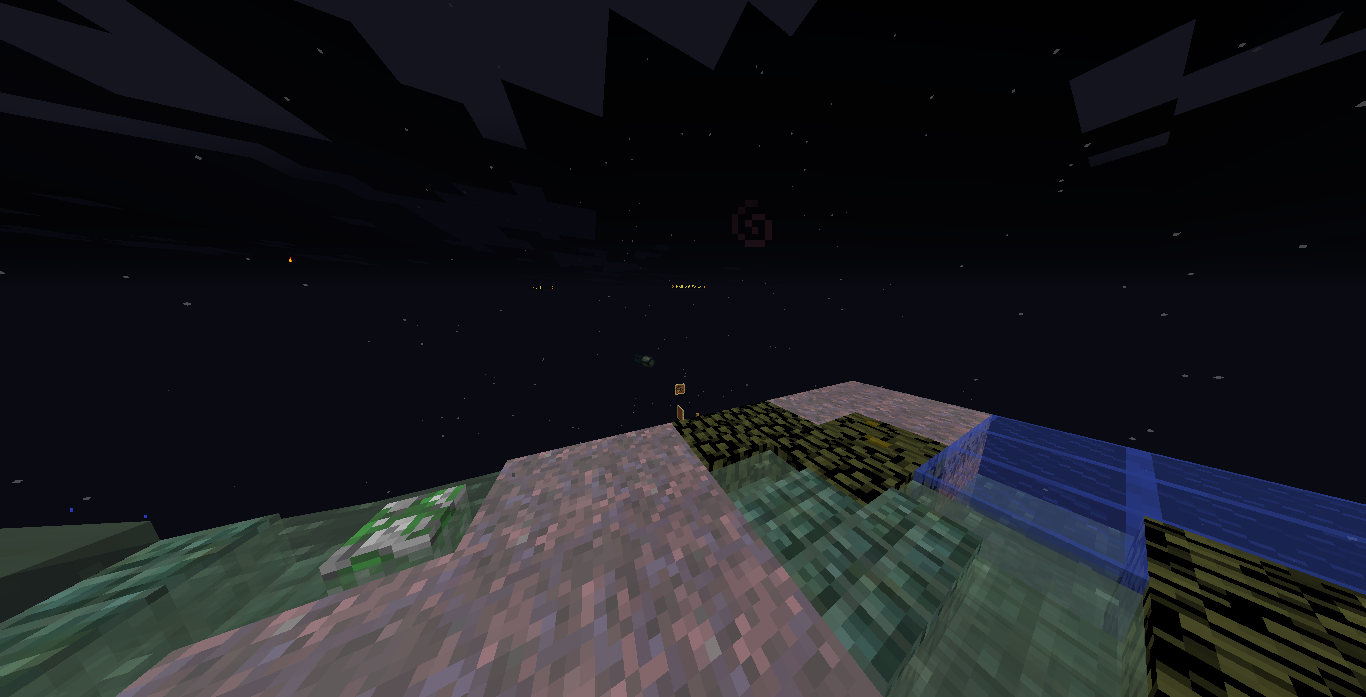
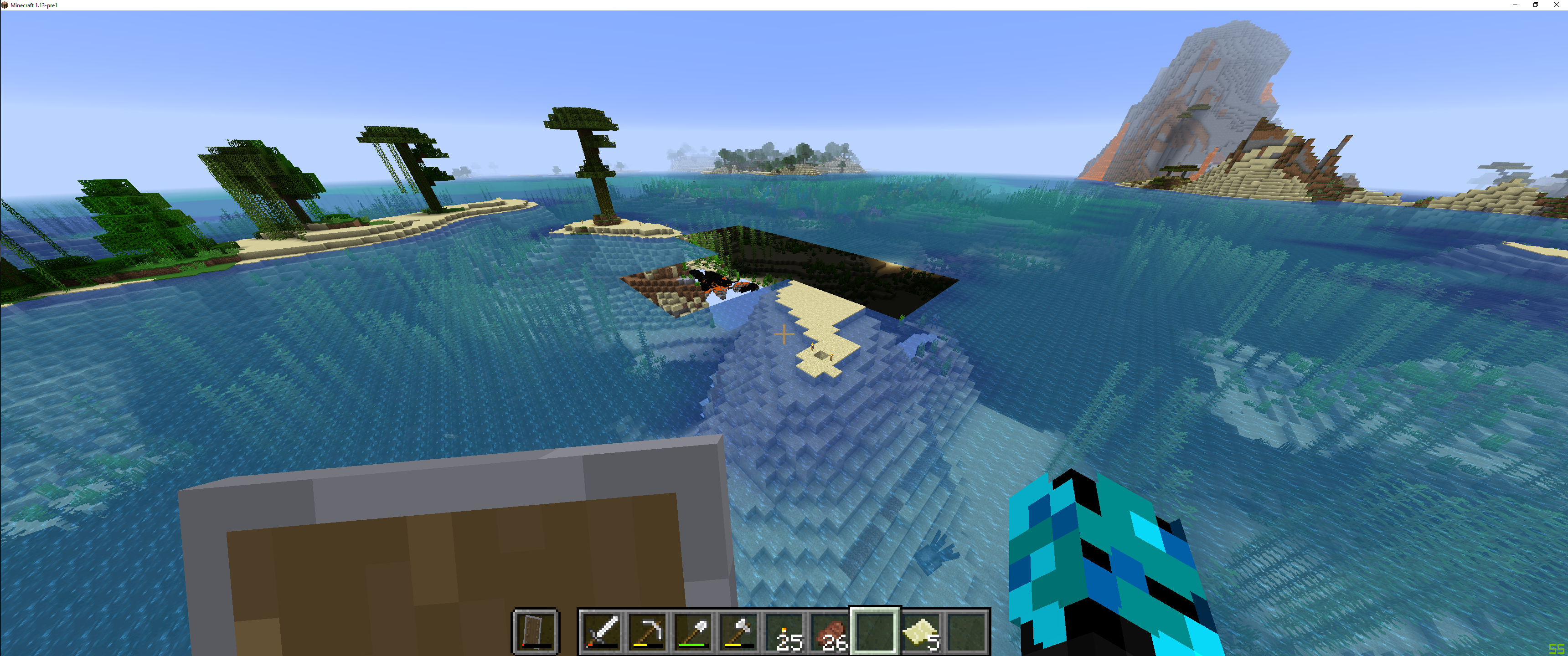
Found an instance of this with water in 18w14b. (see pic)
Gonna fly around check and see I find any true chunk holes.
Yup found one in 18w14b. (pic above)
windows 10, PC
-8300275442758179407
xyz 1189 76 -1438
Have seen some in 18w20a. Same seed -8300275442758179407.
I believe this is what's happening in my world for at least the last few versions, and it's still happening with 1.13-pre1. If I fly over to the affected area, things get real interesting and it's always this same area that's affected. I'll add a screenshot and video.
YouTube video link
Seed: -395163991
Location: X= -650 Z= 0
Version: MC 1.13-pre1 Windows Java, running on Windows 10.
I put these comments in bug
MC-129831but it's marked as a dupe of this one. I'm not sure if this is the same exact issue (this one is so old) but I'll let you guys sort it out. Also, this bug description says it happens in creative but it's both modes for me.peregrine fuller, iOS has an entirely different codebase, and runs on different kind of hardware, so this can't be the same issue
i advise you to look in the Minecraft (Bedrock Codebase) section
I am running on MacOS sorry for the confusion!
This is the bug that stopped me from playing. It's pretty reproducible and makes your world swiss cheese.
The issue didn't go anywhere, still around on pre 8

I think people have given up making any input on this issue any more.
Even more, this has to be a high priority issue (i mean how are you even selling a game in such a state), and no offense, but the assignee who has been on it for a long time makes no indication any work is being done.
"Mojang doesn't care" has become a regularly recited quote among my friends, and I wish you could prove them wrong. But no arguments for that so far.
Tons of issues have emerged that indicate how well the Java team tests the game themselves. I mean, they never go on a server, so they don't know the server icons are currently broken, and this very issue was stated to not occur if you have "absurdly high fps" of which Mojang employees once boasted to have thousands.
To Mojang: get your act together will ya?
To Jira mods: please no ban (i understand if you do)
MetoolDaddy
Issues like these are not always the easiest to fix. You're more than welcome to take a look at the code analysis and suggest a fix of your own, as has been done in the past.
Comments like these that do not contribute to an issue are not helpful in any way. There are over 60 people on the watcher list who are getting their emails flooded by our comments.
I'm sorry, but this in-your-face issue persisted through more releases than acceptable. Email notifications would bring attention back to it.
Count it as a "bump". I've also confirmed it for pre8 just before.
Confirmed for 1.13.1. No issues at all with fps cap set to unlimited, but fps cap of 20 makes the game unplayable (with chunks flickering in and out of existence, world blinking in and out, groups of chunks disappearing while others appear, etc).
Reappeared in 19w08b, When connecting from localhost its fine but from any other computer not on network it happens almost always..
I can confirm this in 19w13a.
I also can confirm in 19w13a running on a server with 16gb ram dedicated and pc with same amount of ram - but it is also when player is in survival and sprints
Yes, this is happening to me as well. Not sure why, but whenever I log into my world, chunks won't load. In addition, Mobs in the unloaded terrain will start to spin in circles.
I'm also having this issue with 19w13a me or my wife cannot play or hardly leave our house because of chunk loading errors its actually unplayable we wished we could go back but it won't convert it just corrupts our save good thing we backed up the snapshot version progress beforehand.
In my case, specifically after teleporting, chunks right in front of the player sometimes don't load while chunks farther away do. Reloading chunks (F3 + A) doesn't fix the issue, as well as changing your FOV, rotating your head, walking/flying around. I've noticed sometimes breaking a block in the "missing" chunks will make them appear again. Relogging is the only 100% effective way of making chunks appear.
in my case, some blocks randomly render as grey/black horizontally striped.
@RM that might be a problem with your GPU instead
I just experienced this on 19w46b using a seed from the comments (8300275442758179407) in an amplified world.
I flew up on a high mountain near me and slowly turned around to look at the landscape.
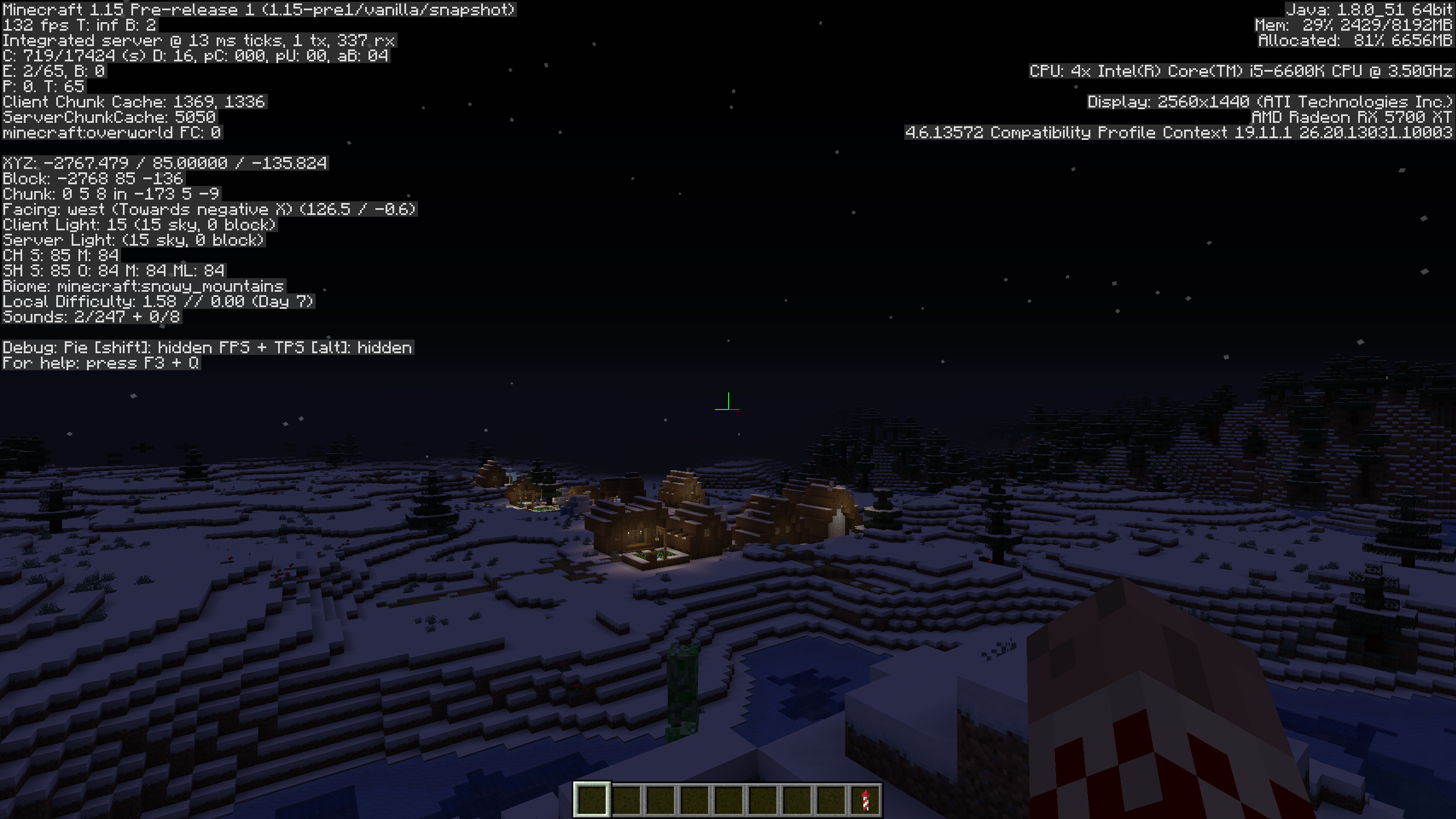
The render speed is much improved in 1.15 pre-release 1 however I've been able to replicate the issue in 1.15 Pre-Release 1 in attachment "2019-11-21_17.52.32.png". I am not sure if related or if there is a separate issue where I can report my missing frames because in 1.14.4 even with +2 chunk render distance set my FPS was 190 rendering the exact same scene/chunks as 1.15 pre-release got me 130 frames in (32% performance loss in the "optimization update") I'm just wondering if this is just a bug / poor support for my hardware?
@John Macknight, can you make sure that the underlying problem isn't that the internal server can't keep up?
The lower FPS is "expected", due to this bug previously less chunks were rendered and therefore there was less work to do and you got higher FPS. Since this bug is fixed, there are now more chunks to render which is more work.