 TARDIO Gaël
- Piccomaster
- piccomaster
- Europe/Stockholm
- Yes
- No
 MC-62338
![[Mojang] Searge (Michael Stoyke)](../../../data/assets/gravatar/searge.png)
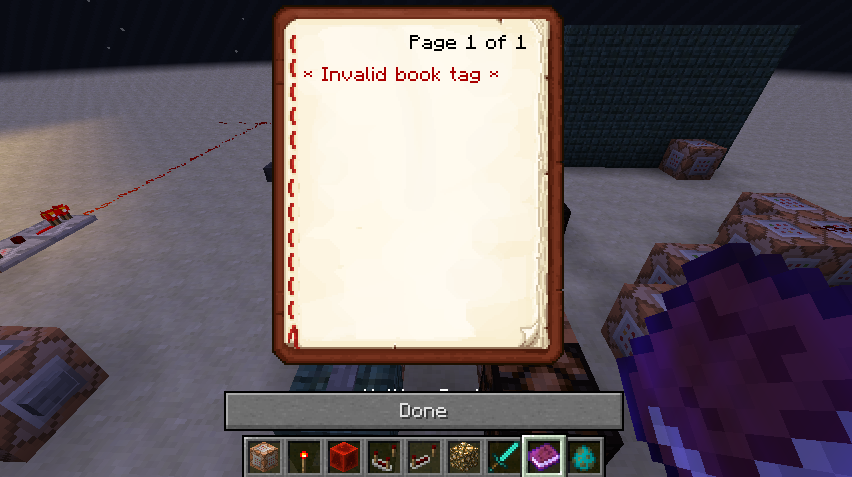


Books creat in command block with "click event" don't work!
I wrote a book in a command block incorporating "click event".
{action:run_command,value:\"/setblock -322 56 516 redstone_block\" }"]}
Exemple :
/give @a minecraft:written_book 1 0 {pages:["
{
text:\"LaucheFireball\",clickEvent:It worked in the 14w27a snapshot, but since the 14w28a snapshot 14w29b in the book I get an error message: " Invalid tag book "
Step by step :
- I take and put a command block.
- I write the command :
/give @a minecraft:written_book 1 0 {pages:["
{
text:\"Lauche Fireball\",clickEvent: {action:run_command,value:\"/setblock -322 56 516 redstone_block\" }"]}- I active with the redstone command block, then the book appears in the inventory.
- But when I open the book in my hands, I see the message in the book "invalid tag book." So I can not validate a command from the book, which worked wellyet in the 14w27a snapshot.
Books creat in command block with "click event" don't work!
I wrote a book in a command block incorporating "click event".
{action:run_command,value:\"/setblock -322 56 516 redstone_block\" }"]}
Exemple :
/give @a minecraft:written_book 1 0 {pages:["
{
text:\"Launch Fireball\",clickEvent:It worked in the 14w27a snapshot, but since the 14w28a snapshot 14w29b in the book I get an error message: " Invalid tag book "
Step by step :
- I take and put a command block.
- I write the command :
/give @a minecraft:written_book 1 0 {pages:["
{
text:\"Lauche Fireball\",clickEvent: {action:run_command,value:\"/setblock -322 56 516 redstone_block\" }"]}- I active with the redstone command block, then the book appears in the inventory.
- But when I open the book in my hands, I see the message in the book "invalid tag book." So I can not validate a command from the book, which worked wellyet in the 14w27a snapshot.
Books creat in command block with "click event" don't work!
I wrote a book in a command block incorporating "click event".
{action:run_command,value:\"/setblock -322 56 516 redstone_block\" }" ]}
Exemple :
/give @a minecraft:written_book 1 0 {pages:["
{
text:\"Launch Fireball\",clickEvent:It worked in the 14w27a snapshot, but since the 14w28a snapshot 14w29b in the book I get an error message: " Invalid tag book "
Step by step :
- I take and put a command block.
- I write the command :
/give @a minecraft:written_book 1 0 {pages:["
{
text:\"Lauche Fireball\",clickEvent: {action:run_command,value:\"/setblock -322 56 516 redstone_block\" }"]}- I active with the redstone command block, then the book appears in the inventory.
- But when I open the book in my hands, I see the message in the book "invalid tag book." So I can not validate a command from the book, which worked wellyet in the 14w27a snapshot.
Books creat in command block with "click event" don't work!
I wrote a book in a command block incorporating "click event".
Exemple :
/give @a minecraft:written_book 1 0 {pages:["
{
text:\"Launch Fireball\",clickEvent:
{action:run_command,value:\"/setblock -322 56 516 redstone_block\" }" ]}It worked in the 14w27a snapshot, but since the 14w28a snapshot 14w29b in the book I get an error message: " Invalid tag book "
Step by step :
- I take and put a command block.
- I write the command :
/give @a minecraft:written_book 1 0 {pages:["
{
text:\"Lauche Fireball\",clickEvent: {action:run_command,value:\"/setblock -322 56 516 redstone_block\" }"]}- I active with the redstone command block, then the book appears in the inventory.
- But when I open the book in my hands, I see the message in the book "invalid tag book." So I can not validate a command from the book, which worked wellyet in the 14w27a snapshot.
Books creat in command block with "click event" don't work!
I wrote a book in a command block incorporating "click event".
It worked in the 14w27a snapshot, but since the 14w28a snapshot 14w29b in the book I get an error message: " Invalid tag book "
Step by step :
- I take and put a command block.
- I write the command :
/give @a minecraft:written_book 1 0 {pages:["Unknown macro: {text}- I active with the redstone command block, then the book appears in the inventory.
- But when I open the book in my hands, I see the message in the book "invalid tag book." So I can not validate a command from the book, which worked wellyet in the 14w27a snapshot.
Books creat in command block with "click event" don't work!
I wrote a book in a command block incorporating "click event".
It worked in the 14w27a snapshot, but since the 14w28a snapshot 14w29b in the book I get an error message: " Invalid tag book "
Step by step :
- I take and put a command block.
- I write the command :
. /give @a minecraft:written_book 1 0 {pages:["Unknown macro: {text}- I active with the redstone command block, then the book appears in the inventory.
- But when I open the book in my hands, I see the message in the book "invalid tag book." So I can not validate a command from the book, which worked wellyet in the 14w27a snapshot.
Books creat in command block with "click event" don't work!
I wrote a book in a command block incorporating "click event".
It worked in the 14w27a snapshot, but since the 14w28a snapshot 14w29b in the book I get an error message: " Invalid tag book "
Step by step :
- I take and put a command block.
- I write the command :
. /give @a minecraft:written_book 1 0 {pages:["Unknown macro: {text}- I active with the redstone command block, then the book appears in the inventory.
- But when I open the book in my hands, I see the message in the book "invalid tag book." So I can not validate a command from the book, which worked wellyet in the 14w27a snapshot.
Books creat in command block with "click event" don't work!
I wrote a book in a command block incorporating "click event".
It worked in the 14w27a snapshot, but since the 14w28a snapshot 14w29b in the book I get an error message: " Invalid tag book "
Step by step :
- I take and put a command block.
- I write the command :
/give @a minecraft:written_book 1 0 {
{action:run_command,value:\"/setblock -322 56 516 redstone_block\"}
pages:["
{text:\"Lauche Fireball\",clickEvent:"]}
- I active with the redstone command block, then the book appears in the inventory.
- But when I open the book in my hands, I see the message in the book "invalid tag book." So I can not validate a command from the book, which worked wellyet in the 14w27a snapshot.
Books creat in command block with "click event" don't work!
I wrote a book in a command block incorporating "click event".
It worked in the 14w27a snapshot, but since the 14w28a snapshot 14w29b in the book I get an error message: " Invalid tag book "
Step by step :
- I take and put a command block.
- I write the command :
/give @a minecraft:written_book 1 0
{action:run_command,value:\"/setblock -322 56 516 redstone_block\"}{
pages:["
{text:\"Lauche Fireball\",clickEvent:"]}
- I active with the redstone command block, then the book appears in the inventory.
- But when I open the book in my hands, I see the message in the book "invalid tag book." So I can not validate a command from the book, which worked wellyet in the 14w27a snapshot.
Books creat in command block with "click event" don't work!
I wrote a book in a command block incorporating "click event".
It worked in the 14w27a snapshot, but since the 14w28a snapshot 14w29b in the book I get an error message: " Invalid tag book "
Step by step :
- I take and put a command block.
- I write the command :
/give @a minecraft:written_book 1 0
{action:run_command,value:\"/setblock -322 56 516 redstone_block\"}
{pages:["
{text:\"Lauche Fireball\",clickEvent:"]}
- I active with the redstone command block, then the book appears in the inventory.
- But when I open the book in my hands, I see the message in the book "invalid tag book." So I can not validate a command from the book, which worked wellyet in the 14w27a snapshot.
Books creat in command block with "click event" don't work!
I wrote a book in a command block incorporating "click event".
It worked in the 14w27a snapshot, but since the 14w28a snapshot 14w29b in the book I get an error message: " Invalid tag book "
Step by step :
- I take and put a command block.
- I write the command :
/give @a minecraft:written_book 1 0
{action:run_command,value:\"/setblock -322 56 516 redstone_block\"}
{pages:["
{text:\"Lauche Fireball\",clickEvent:"]}
- I active
withtheredstonecommandblock, then the book appears in the inventory.- But when I open the book in my hands, I see the message in the book "invalid tag book." So I can not validate a command from the book, which worked wellyet in the 14w27a snapshot.
Books creat in command block with "click event" don't work!
I wrote a book in a command block incorporating "click event".
It worked in the 14w27a snapshot, but since the 14w28a snapshot 14w29b in the book I get an error message: " Invalid tag book "
Step by step :
- I take and put a command block.
- I write the command :
/give @a minecraft:written_book 1 0
{action:run_command,value:\"/setblock -322 56 516 redstone_block\"}
{pages:["
{text:\"Lauche Fireball\",clickEvent:"]}
- I active the command block with redstone block, then the book appears in the inventory.
- But when I open the book in my hands, I see the message in the book "invalid tag book." So I can not validate a command from the book, which worked wellyet in the 14w27a snapshot.
Books creat in command block with "click event" don't work!
I wrote a book in a command block incorporating "click event".
It worked in the 14w27a snapshot, but since the 14w28a snapshot 14w29b in the book I get an error message: " Invalid tag book "
Step by step :
- I take and put a command block.
- I write the command :
/give @a minecraft:written_book 1 0
{action:run_command,value:\"/setblock -322 56 516 redstone_block\"}
{pages:["
{text:\"Lauche Fireball\",clickEvent:"]}
- I active the command block with redstone block, then the book appears in the inventory.
- But when I open the book in my hands, I see the message in the book "invalid tag book." So I can
not validate a command from the book, which worked wellyet in the 14w27a snapshot.Books creat in command block with "click event" don't work!
I wrote a book in a command block incorporating "click event".
It worked in the 14w27a snapshot, but since the 14w28a snapshot 14w29b in the book I get an error message:
" Invalid tag book "Step by step :
- I take and put a command block.
- I write the command :
/give @a minecraft:written_book 1 0
{action:run_command,value:\"/setblock -322 56 516 redstone_block\"}
{pages:["
{text:\"Lauche Fireball\",clickEvent:"]}
- I active the command block with redstone block, then the book appears in the inventory.
- But when I open the book in my hands, I see the message in the book "invalid tag book." So I can't validate a command from the book, which worked wellyet in the 14w27a snapshot.
Books creat in command block with "click event" don't work!
I wrote a book in a command block incorporating "click event".
It worked in the 14w27a snapshot, but since the 14w28a snapshot 14w29b in the book I get an error message:
" Invalid tag book "Step by step :
- I take and put a command block.
- I write the command :
/give @a minecraft:written_book 1 0
{action:run_command,value:\"/setblock -322 56 516 redstone_block\"}
{pages:["
{text:\"Lauche Fireball\",clickEvent:"]}
- I active the command block with redstone block, then the book appears in the inventory.
- But when I open the book in my hands, I see the message in the book "invalid tag book." So I can't validate a command from the book, which worked wellyet in the 14w27a snapshot.
Books creat in command block with "click event" don't work!
I wrote a book in a command block incorporating "click event".
It worked in the 14w27a snapshot, but since the 14w28a snapshot 14w29b in the book I get an error message:
" Invalid tag book "Step by step :
- I take and put a command block.
- I write the command :
/give @a minecraft:written_book 1 0
{action:run_command,value:\"/setblock -322 56 516 redstone_block\"}
{pages:["
{text:\"Click here to launch\",clickEvent:"]}
- I active the command block with redstone block, then the book appears in the inventory.
- But when I open the book in my hands, I see the message in the book "invalid tag book." So I can't validate a command from the book, which worked wellyet in the 14w27a snapshot.
Crash :fire andCommand "Summon SmallFireball"Crash : Command "Summon SmallFireball" on Mobs!
-I Write this command in command block :
{direction:[0.0,-1.0,0.0],Motion:[0.0,-1.0,0.0]}
"/summon SmallFireball ~ ~10 ~5.
- I activate with redstone!
- The
Fireball summoned,andhit a Creeper!
- Then minecraft crash with a big freeze.
- It's impossible to go back in my game part.
My crash report :
---- Minecraft Crash Report ----
// My bad.Time: 22/08/14 12:51
Description: Ticking entityjava.lang.NullPointerException: Ticking entity
at apf.b(SourceFile:222)
at wv.a(SourceFile:1975)
at ahn.a(SourceFile:35)
at ahj.s_(SourceFile:148)
at aqs.a(SourceFile:1406)
at qt.a(SourceFile:601)
at aqs.g(SourceFile:1384)
at aqs.i(SourceFile:1277)
at qt.i(SourceFile:479)
at net.minecraft.server.MinecraftServer.z(SourceFile:607)
at net.minecraft.server.MinecraftServer.y(SourceFile:531)
at cyf.y(SourceFile:155)
at net.minecraft.server.MinecraftServer.run(SourceFile:447)
at java.lang.Thread.run(Thread.java:745)A detailed walkthrough of the error, its code path and all known details is as follows:
---------------------------------------------------------------------------------------– Head –
Stacktrace:
at apf.b(SourceFile:222)
at wv.a(SourceFile:1975)
at ahn.a(SourceFile:35)
at ahj.s_(SourceFile:148)
at aqs.a(SourceFile:1406)
at qt.a(SourceFile:601)
at aqs.g(SourceFile:1384)– Entity being ticked –
Details:
Entity Type: SmallFireball (ahn)
Entity ID: 22387
Entity Name: Small Fireball
Entity's Exact location: -286,50, 56,25, 527,50
Entity's Block location: -287,00,56,00,527,00 - World: (-287,56,527), Chunk: (at 1,3,15 in -18,32; contains blocks -288,0,512 to -273,255,527), Region: (-1,1; contains chunks -32,32 to -1,63, blocks -512,0,512 to -1,255,1023)
Entity's Momentum: 0,00, -0,49, 0,00
Entity's Rider: ~ERROR~ NullPointerException: null
Entity's Vehicle: ~ERROR~ NullPointerException: null
Stacktrace:
at aqs.i(SourceFile:1277)
at qt.i(SourceFile:479)– Affected level –
Details:
Level name: Snapshot 1.8
All players: 1 total; [qw['Piccomaster'/25, l='Snapshot 1.8', x=-294,21, y=57,71, z=529,34]]
Chunk stats: ServerChunkCache: 1092 Drop: 0
Level seed: -6751089128293254833
Level generator: ID 01 - flat, ver 0. Features enabled: true
Level generator options: 3;minecraft:bedrock,3*minecraft:stone,52*minecraft:sandstone;2;stronghold,biome_1,village,decoration,dungeon,mineshaft
Level spawn location: -340,00,4,00,465,00 - World: (-340,4,465), Chunk: (at 12,0,1 in -22,29; contains blocks -352,0,464 to -337,255,479), Region: (-1,0; contains chunks -32,0 to -1,31, blocks -512,0,0 to -1,255,511)
Level time: 1824058 game time, 174138 day time
Level dimension: 0
Level storage version: 0x04ABD - Anvil
Level weather: Rain time: 52868 (now: false), thunder time: 69218 (now: false)
Level game mode: Game mode: creative (ID 1). Hardcore: false. Cheats: true
Stacktrace:
at net.minecraft.server.MinecraftServer.z(SourceFile:607)
at net.minecraft.server.MinecraftServer.y(SourceFile:531)
at cyf.y(SourceFile:155)
at net.minecraft.server.MinecraftServer.run(SourceFile:447)
at java.lang.Thread.run(Thread.java:745)– System Details –
Details:
Minecraft Version: 1.8-pre1
Operating System: Mac OS X (x86_64) version 10.9.4
Java Version: 1.7.0_67, Oracle Corporation
Java VM Version: Java HotSpot(TM) 64-Bit Server VM (mixed mode), Oracle Corporation
Memory: 284849264 bytes (271 MB) / 1060372480 bytes (1011 MB) up to 1060372480 bytes (1011 MB)
JVM Flags: 5 total; -Xmx1G -XX:+UseConcMarkSweepGC -XX:+CMSIncrementalMode -XX:-UseAdaptiveSizePolicy -Xmn128M
IntCache: cache: 0, tcache: 0, allocated: 0, tallocated: 0
Profiler Position: N/A (disabled)
Player Count: 1 / 8; [qw['Piccomaster'/25, l='Snapshot 1.8', x=-294,21, y=57,71, z=529,34]]
Type: Integrated Server (map_client.txt)
Is Modded: Probably not. Jar signature remains and both client + server brands are untouched.-I Write this command in command block :
{direction:[0.0,-1.0,0.0],Motion:[0.0,-1.0,0.0]}
"/summon SmallFireball ~ ~10 ~5.
- I activate with redstone!
- The Smallfireball summoned, hit a Creeper or Skeleton (or anyone of mobs)!
- Then minecraft crash with a big freeze.
- It's impossible to go back in my game part.
My crash report :
---- Minecraft Crash Report ----
// My bad.Time: 22/08/14 12:51
Description: Ticking entityjava.lang.NullPointerException: Ticking entity
at apf.b(SourceFile:222)
at wv.a(SourceFile:1975)
at ahn.a(SourceFile:35)
at ahj.s_(SourceFile:148)
at aqs.a(SourceFile:1406)
at qt.a(SourceFile:601)
at aqs.g(SourceFile:1384)
at aqs.i(SourceFile:1277)
at qt.i(SourceFile:479)
at net.minecraft.server.MinecraftServer.z(SourceFile:607)
at net.minecraft.server.MinecraftServer.y(SourceFile:531)
at cyf.y(SourceFile:155)
at net.minecraft.server.MinecraftServer.run(SourceFile:447)
at java.lang.Thread.run(Thread.java:745)A detailed walkthrough of the error, its code path and all known details is as follows:
---------------------------------------------------------------------------------------– Head –
Stacktrace:
at apf.b(SourceFile:222)
at wv.a(SourceFile:1975)
at ahn.a(SourceFile:35)
at ahj.s_(SourceFile:148)
at aqs.a(SourceFile:1406)
at qt.a(SourceFile:601)
at aqs.g(SourceFile:1384)– Entity being ticked –
Details:
Entity Type: SmallFireball (ahn)
Entity ID: 22387
Entity Name: Small Fireball
Entity's Exact location: -286,50, 56,25, 527,50
Entity's Block location: -287,00,56,00,527,00 - World: (-287,56,527), Chunk: (at 1,3,15 in -18,32; contains blocks -288,0,512 to -273,255,527), Region: (-1,1; contains chunks -32,32 to -1,63, blocks -512,0,512 to -1,255,1023)
Entity's Momentum: 0,00, -0,49, 0,00
Entity's Rider: ~ERROR~ NullPointerException: null
Entity's Vehicle: ~ERROR~ NullPointerException: null
Stacktrace:
at aqs.i(SourceFile:1277)
at qt.i(SourceFile:479)– Affected level –
Details:
Level name: Snapshot 1.8
All players: 1 total; [qw['Piccomaster'/25, l='Snapshot 1.8', x=-294,21, y=57,71, z=529,34]]
Chunk stats: ServerChunkCache: 1092 Drop: 0
Level seed: -6751089128293254833
Level generator: ID 01 - flat, ver 0. Features enabled: true
Level generator options: 3;minecraft:bedrock,3*minecraft:stone,52*minecraft:sandstone;2;stronghold,biome_1,village,decoration,dungeon,mineshaft
Level spawn location: -340,00,4,00,465,00 - World: (-340,4,465), Chunk: (at 12,0,1 in -22,29; contains blocks -352,0,464 to -337,255,479), Region: (-1,0; contains chunks -32,0 to -1,31, blocks -512,0,0 to -1,255,511)
Level time: 1824058 game time, 174138 day time
Level dimension: 0
Level storage version: 0x04ABD - Anvil
Level weather: Rain time: 52868 (now: false), thunder time: 69218 (now: false)
Level game mode: Game mode: creative (ID 1). Hardcore: false. Cheats: true
Stacktrace:
at net.minecraft.server.MinecraftServer.z(SourceFile:607)
at net.minecraft.server.MinecraftServer.y(SourceFile:531)
at cyf.y(SourceFile:155)
at net.minecraft.server.MinecraftServer.run(SourceFile:447)
at java.lang.Thread.run(Thread.java:745)– System Details –
Details:
Minecraft Version: 1.8-pre1
Operating System: Mac OS X (x86_64) version 10.9.4
Java Version: 1.7.0_67, Oracle Corporation
Java VM Version: Java HotSpot(TM) 64-Bit Server VM (mixed mode), Oracle Corporation
Memory: 284849264 bytes (271 MB) / 1060372480 bytes (1011 MB) up to 1060372480 bytes (1011 MB)
JVM Flags: 5 total; -Xmx1G -XX:+UseConcMarkSweepGC -XX:+CMSIncrementalMode -XX:-UseAdaptiveSizePolicy -Xmn128M
IntCache: cache: 0, tcache: 0, allocated: 0, tallocated: 0
Profiler Position: N/A (disabled)
Player Count: 1 / 8; [qw['Piccomaster'/25, l='Snapshot 1.8', x=-294,21, y=57,71, z=529,34]]
Type: Integrated Server (map_client.txt)
Is Modded: Probably not. Jar signature remains and both client + server brands are untouched.
Mac OS X 10.9.4.
Mac OSX 10.9.4
JAVA 7 : build 1.7.0_67-b01
It seems that you can set the level of an enchantment both with an integer, and a string :
First, I added an enchantment to my bow :
/enchant @s minecraft:power 4Then, I tried to detect the bow as it is in my hand :
/say @s[nbt={Inventory:[{id:"minecraft:bow",tag:{Enchantments:[{id:"minecraft:power",lvl:4s}]}}]}] got the bow power 4!It returned (chat display) : [Piccomaster] Piccomaster got the bow power 4!
But, as I tried to generate a more customised bow, I omitted specifying the type of the level :
/give @s minecraft:bow{Damage:383,Enchantments:[{id:"minecraft:power",lvl:4}],Unbreakable:1,display:{Name:""Custom bow""}} 1(you can see that the "s" after the level number in {id:"minecraft:power",lvl:4} is missing) So as I did my test again :
/say @s[nbt={Inventory:[{id:"minecraft:bow",tag:{Enchantments:[{id:"minecraft:power",lvl:4s}]}}]}] got the bow power 4!It returned (chat display) : [Piccomaster] got the bow power 4!
Strangely, if I use :
/say @s[nbt={Inventory:[{id:"minecraft:bow",tag:{Enchantments:[{id:"minecraft:power",lvl:4}]}}]}] got the bow power 4!(omitting the "s" again)
It will return : [Piccomaster] Piccomaster got the bow power 4!
So the level can be both registered with or without the "s", but the detection will work differently in those two cases. I thought it was a bug, so I tried this :
/give @s minecraft:bow{Enchantments:[{id:"minecraft:power",lvl:4s},{id:"minecraft:power",lvl:4}],display:{Name:""Custom bow""}} 1And guess what : (see the photo)
I've noticed this bug while I was trying to detect the level of enchantment of a bow.
It seems that you can set the level of an enchantment both with an integer, and a string :First, I added an enchantment to my bow :
/enchant @s minecraft:power 4Then, I tried to detect the bow as it is in my hand :
/say @s[nbt={Inventory:[{id:"minecraft:bow",tag:{Enchantments:[{id:"minecraft:power",lvl:4s}]}}]}] got the bow power 4!It returned (chat display) : [Piccomaster] Piccomaster got the bow power 4!
But, as I tried to generate a more customised bow, I omitted specifying the type of the level :
/give @s minecraft:bow{Damage:383,Enchantments:[{id:"minecraft:power",lvl:4}],Unbreakable:1,display:{Name:""Custom bow""}} 1(you can see that the "s" after the level number in {id:"minecraft:power",lvl:4} is missing) So as I did my test again :
/say @s[nbt={Inventory:[{id:"minecraft:bow",tag:{Enchantments:[{id:"minecraft:power",lvl:4s}]}}]}] got the bow power 4!It returned (chat display) : [Piccomaster] got the bow power 4!
Strangely, if I use :
/say @s[nbt={Inventory:[{id:"minecraft:bow",tag:{Enchantments:[{id:"minecraft:power",lvl:4}]}}]}] got the bow power 4!(omitting the "s" again)
It will return : [Piccomaster] Piccomaster got the bow power 4!
So the level can be both registered with or without the "s", but the detection will work differently in those two cases. I thought it was a bug, so I tried this :
/give @s minecraft:bow{Enchantments:[{id:"minecraft:power",lvl:4s},{id:"minecraft:power",lvl:4}],display:{Name:""Custom bow""}} 1And guess what : (see the photo)
I've noticed this bug while I was trying to detect the level of enchantment of a bow.
Windows 10
Windows 10
Windows 10
1.8.0_51 64bit
When I use this command to summon a Shulker, the game crashed instantly :
{Id:14,Amplifier:1,Duration:2147483647,Ambient:1,ShowParticles:0}
summon minecraft:shulker 1970 117 2059 {Tags: ["Objective"] ,NoAI:1,Silent:1,Glowing:1,PersistenceRequired:1,Invulnerable:1,ActiveEffects:[],DeathLootTable:"att2:empty"}
When I use this command to summon a Shulker, the game crashed instantly :
summon minecraft:shulker 1970 117 2059 {Tags:["Objective"],NoAI:1,Silent:1,Glowing:1,PersistenceRequired:1,Invulnerable:1,ActiveEffects:[{Id:14,Amplifier:1,Duration:2147483647,Ambient:1,ShowParticles:0}],DeathLootTable:"att2:empty"}
When I use this command to summon a Shulker, the game crashed instantly :
summon minecraft:shulker 1970 117 2059 {Tags:["Objective"],NoAI:1,Silent:1,Glowing:1,PersistenceRequired:1,Invulnerable:1,ActiveEffects:[{Id:14,Amplifier:1,Duration:2147483647,Ambient:1,ShowParticles:0}],DeathLootTable:"att2:empty"}
When I use this command to summon a Shulker (I'm in front of the shulker position of course), the game crashed instantly :
summon minecraft:shulker 1970 117 2059 {Tags:["Objective"],NoAI:1,Silent:1,Glowing:1,PersistenceRequired:1,Invulnerable:1,ActiveEffects:[{Id:14,Amplifier:1,Duration:2147483647,Ambient:1,ShowParticles:0}],DeathLootTable:"att2:empty"}
When I use this command to summon a Shulker (I'm in front of the shulker position of course) in a block (it's worked perfectly in versions 1.13.2/1.16.5), the game crashed instantly :
summon minecraft:shulker 1970 117 2059 {Tags:["Objective"],NoAI:1,Silent:1,Glowing:1,PersistenceRequired:1,Invulnerable:1,ActiveEffects:[{Id:14,Amplifier:1,Duration:2147483647,Ambient:1,ShowParticles:0}],DeathLootTable:"att2:empty"}
Summon ashulkerwill crash the game.Summon an invisible shulker with Glowing will crash the game.
When I use
thiscommand to summon aShulker (I'm in front of theshulkerposition of course) in a block(it's worked perfectly in versions 1.13.2/1.16.5), the game crashed instantly :summon minecraft:shulker1970 117 2059{Tags:["Objective"],NoAI:1,Silent:1,Glowing:1,PersistenceRequired:1,Invulnerable:1,ActiveEffects:[{Id:14,Amplifier:1,Duration:2147483647,Ambient:1,ShowParticles:0}],DeathLootTable:"att2:empty"}
When I use a command to summon an Invisible Shulker with Glowing (it's worked perfectly in versions 1.13.2/1.16.5), the game crashed instantly :
summon minecraft:shulker ~ ~1 ~ {Tags:["Objective"],NoAI:1,Silent:1,Glowing:1,PersistenceRequired:1,Invulnerable:1,ActiveEffects:[{Id:14,Amplifier:1,Duration:2147483647,Ambient:1,ShowParticles:0}],DeathLootTable:"att2:empty"}
Summon an invisibleshulkerwith Glowing will crash the game.Summon an invisible mobs with Glowing will crash the game when I use a resource pack.
When I use a command to summon an Invisible
Shulkerwith Glowing (it's worked perfectly in versions 1.13.2/1.16.5), the game crashed instantly :summon minecraft:shulker ~ ~1 ~ {Tags:["Objective"],NoAI:1,Silent:1,Glowing:1,PersistenceRequired:1,Invulnerable:1,ActiveEffects:[{Id:14,Amplifier:1,Duration:2147483647,Ambient:1,ShowParticles:0}],DeathLootTable:"att2:empty"}
With my resource pack when I use a command to summon an Invisible mob with Glowing (it's worked perfectly in versions 1.13.2/1.16.5), the game crashed instantly :
summon minecraft:shulker ~ ~1 ~ {Glowing:1,ActiveEffects:[{Id:14,Amplifier:1,Duration:2147483647,Ambient:1,ShowParticles:0}]}or
summon minecraft:zombie ~ ~1 ~ {Glowing:1,ActiveEffects:[{Id:14,Amplifier:1,Duration:2147483647,Ambient:1,ShowParticles:0}]}
Minecraft Version: 21w20a
Operating System: Mac OS X (x86_64) version 10.14.6
Java Version:16.0.1, Microsoft
Java VM Version: OpenJDK 64-Bit Server VM (mixed mode), Microsoft
Memory: 1945293720 bytes (1855 MB) / 4294967296 bytes (4096 MB) up to 4294967296 bytes (4096 MB)
CPUs: 4
JVM Flags: 8 total; -Xss1M -Xmx4G -XX:+UnlockExperimentalVMOptions -XX:+UseG1GC -XX:G1NewSizePercent=20 -XX:G1ReservePercent=20 -XX:MaxGCPauseMillis=50 -XX:G1HeapRegionSize=32M
Launched Version: 21w20a
Backend library: LWJGL version 3.2.1 build 12
Backend API: AMD Radeon R9 M380 OpenGL Engine GL version 4.1 ATI-2.11.23, ATI Technologies Inc.
Current Language: English (US)
CPU: 4x Intel(R) Core(TM) i5-6500 CPU @ 3.20GHzOperating System: Mac OS X (x86_64) version 10.14.6
Java Version: 16.0.1, Microsoft
Java VM Version: OpenJDK 64-Bit Server VM (mixed mode), Microsoft
Memory: 1945293720 bytes (1855 MB) / 4294967296 bytes (4096 MB) up to 4294967296 bytes (4096 MB)
CPUs: 4
JVM Flags: 8 total; -Xss1M -Xmx4G -XX:+UnlockExperimentalVMOptions -XX:+UseG1GC -XX:G1NewSizePercent=20 -XX:G1ReservePercent=20 -XX:MaxGCPauseMillis=50 -XX:G1HeapRegionSize=32M
Backend library: LWJGL version 3.2.1 build 12
Backend API: AMD Radeon R9 M380 OpenGL Engine GL version 4.1 ATI-2.11.23, ATI Technologies Inc.
Current Language: English (US)
CPU: 4x Intel(R) Core(TM) i5-6500 CPU @ 3.20GHz
Operating System: Mac OS X (x86_64) version 10.14.6
Java Version: 16.0.1, Microsoft
Java VM Version: OpenJDK 64-Bit Server VM (mixed mode), Microsoft
Memory: 1945293720 bytes (1855 MB) / 4294967296 bytes (4096 MB) up to 4294967296 bytes (4096 MB)
CPUs: 4
JVM Flags: 8 total; -Xss1M -Xmx4G -XX:+UnlockExperimentalVMOptions -XX:+UseG1GC -XX:G1NewSizePercent=20 -XX:G1ReservePercent=20 -XX:MaxGCPauseMillis=50 -XX:G1HeapRegionSize=32M
Backend library: LWJGL version 3.2.1 build 12
Backend API: AMD Radeon R9 M380 OpenGL Engine GL version 4.1 ATI-2.11.23, ATI Technologies Inc.
Current Language: English (US)
CPU: 4x Intel(R) Core(TM) i5-6500 CPU @ 3.20GHz
- Operating System: Mac OS X (x86_64) version 10.14.6
- Java Version: 16.0.1, Microsoft
- Java VM Version: OpenJDK 64-Bit Server VM (mixed mode), Microsoft
- Memory: 1945293720 bytes (1855 MB) / 4294967296 bytes (4096 MB) up to 4294967296 bytes (4096 MB)
- CPUs: 4
- JVM Flags: 8 total; -Xss1M -Xmx4G -XX:+UnlockExperimentalVMOptions -XX:+UseG1GC -XX:G1NewSizePercent=20 -XX:G1ReservePercent=20 -XX:MaxGCPauseMillis=50 -XX:G1HeapRegionSize=32M
- Backend library: LWJGL version 3.2.1 build 12
- Backend API: AMD Radeon R9 M380 OpenGL Engine GL version 4.1 ATI-2.11.23, ATI Technologies Inc.
- Current Language: English (US)
- CPU: 4x Intel(R) Core(TM) i5-6500 CPU @ 3.20GHz
![[Mod] Skylinerw](../../../data/assets/gravatar/skylinerw.png)
@TARDIO Gaël This was created and fixed a year ago. Potions work fine.
@TARDIO Gaël You'll notice that your CustomPotionEffects does work to some extent. This report was about it not working whatsoever. If you have a new issue, create a new report.
And please use the "preview" button before submitting comment. Every single edit you perform is sent to everybody who followed this report.
Ok thx
I hope this bug will be fixed soon!
Hey Mojang, 1 year later with Version 1.9.4, it's still bugged!!!
Ok go in minecraft 1.9.4 and try to make a splash potion with the color of healing_potion like this:
/summon Item ~ ~1 ~ {Item:{id:splash_potion,Count:1,tag:{CustomPotionEffects:[{Id:23,Amplifier:1,Duration:3600},{Id:22,Amplifier:1,Duration:1200},{Id:6,Amplifier:1,Duration:0}],display:{Name:"Potion Splash de Défense",Lore:["Splash Defensive Potion"]}}}}Saturation effect d'ont work... And you can't choose the color of your splash potion.
Same problem!
{Command:/say ok}/give @a minecraft:command_block 1 0
With loot "table json" command too :
{
{ "function": "set_count", "count": 1 }"pools": [
{
"rolls": 5,
"entries": [
{
"type": "item",
"name": "minecraft:command_block",
"weight": 10,
"functions": [
,
{Command:/say ok}{
"function": "set_nbt",
"tag": "
"
}
]
}
]
}
]
}
I support this post because even with the latest update, the game is still unstable due to many lags spikes.
I am mapmaker and since our passage in 1.13.2, Elytra passages of our map have become unplayable.
Please try at least to have a performance level a minimum equal to the previous version 1.12.2! What is the usefulness of an update if the evolution of the game is a regression...
Ok indeed that was my fault, I deleted now the "shaders" file from my resource pack and it's work.
Bug confirmed on my map.
Thank you for making such a well-written bug report. I have indeed noticed the same problem and it is very annoying to the mapper like me who do gigantic adventure maps and have to update with the recent Minecraft version.