 Aifer Gettisnem
- psomguy
- psomguy
- Europe/Stockholm
- Yes
- No
 MC-39263

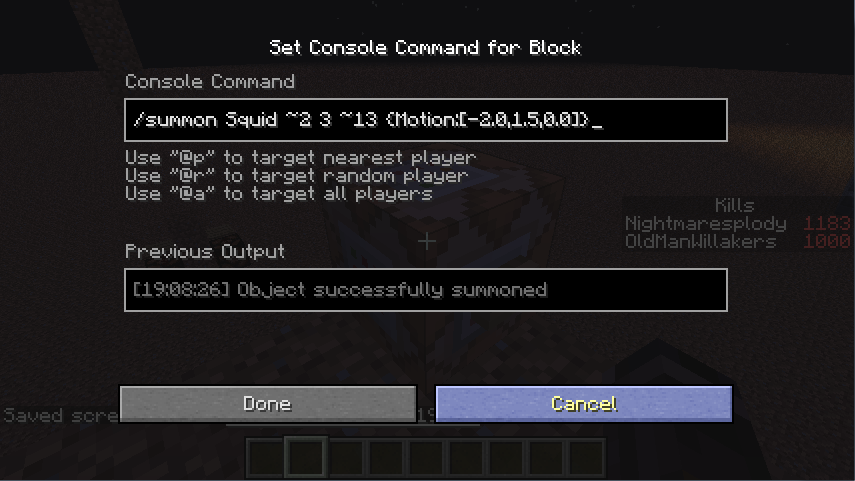


Giving the Motion tag variable in a /summon command to summon a squid does not affect their velocity on the X and Z-Axis. Instead a squid will remain positioned at the coordinates of its summon with only it's vertical velocity being in effect (sometimes I've seen it attempt to move in the supposed direction of its velocity only to have it snap back to where it was spawned).
This can be tested by using the command: "/summon Squid
{Motion:[2.0,1.5,0.0]}x y z"
This should summon a squid being hurled east. This works for other mobs that do not have any special movement patterns such as bat and ghasts which can fly, but not squids.Furthermore, the squid is not rendering in the correct location. Although the squid does not move horizontally, the particle effect created from landing in 1.7 appears 2 blocks away along the direction it was meant to go. Entity detecting blocks such as pressure plates and trip wires can also be triggered where these particles appear and not where the squid renders.
Giving the Motion tag variable in a /summon command to summon a squid does not affect their velocity on the X and Z-Axis. Instead a squid will remain positioned at the coordinates of its summon with only it's vertical velocity being in effect (sometimes I've seen it attempt to move in the supposed direction of its velocity only to have it snap back to where it was spawned).
This can be tested by using the command: "/summon Squid ~ ~ ~
{Motion:[2.0,1.5,0.0]}"
This should summon a squid being hurled east. This works for other mobs that do not have any special movement patterns such as bat and ghasts which can fly, but not squids.Furthermore, the squid is not rendering in the correct location. Although the squid does not move horizontally, the particle effect created from landing in 1.7 appears 2 blocks away along the direction it was meant to go. Entity detecting blocks such as pressure plates and trip wires can also be triggered where these particles appear and not where the squid renders.
Giving the Motion tag variable in a /summon command to summon a squid does not affect their velocity on the X and Z-Axis. Instead a squid will remain positioned at the coordinates of its summon with only it's vertical velocity being in effect (sometimes I've seen it attempt to move in the supposed direction of its velocity only to have it snap back to where it was spawned).
This can be tested by using the command: "/summon Squid ~ ~ ~
{Motion:[2.0,1.5,0.0]}"
This should summon a squid being hurled east. This works for other mobs that do not have any special movement patterns such as bat and ghasts which can fly, but not squids.Furthermore, the squid is not rendering in the correct location. Although the squid does not move horizontally, the particle effect created from landing in 1.7 appears 2 blocks away along the direction it was meant to go. Entity detecting blocks such as pressure plates and trip wires can also be triggered where these particles appear and not where the squid renders.
Giving the Motion tag variable in a /summon command to summon a squid does not affect their velocity on the X and Z-Axis. Instead a squid will remain positioned at the coordinates of its summon with only it's vertical velocity being in effect (sometimes I've seen it attempt to move in the supposed direction of its velocity only to have it snap back to where it was spawned).
This can be tested by using the command: "/summon Squid ~ ~ ~
{Motion:[2.0,1.5,0.0]}"
What this should do is summon a squid being hurled east. This works for other mobs that do not have any special movement patterns such as bat and ghasts which can fly, but not squids.Furthermore, the squid is not rendering in the correct location. Although the squid does not move horizontally, the particle effect created from landing in 1.7 appears 2 blocks away along the direction it was meant to go. Entity detecting blocks such as pressure plates and trip wires can also be triggered where these particles appear and not where the squid renders.
Using /summon command in a creative world to summon a villager with a minecart on top of it. In my first attempt, the game crashed immediately with no crash report provided. The second attempt after restarting worked but the mob behaved strangely.
While idle, the villager slowly moved in one direction; it looked similar to the behavior of a minecart while riding another minecart and colliding with an entity to cause the minecarts to bump into each other creating perpetual motion.
about a minute later of observing its behavior, the game crashed and I was presented with the provided crash report.My player name has been omitted as i don't feel it is of any importance to the issue. I'd like to keep that private if that's alright.
Using /summon command in a creative world to summon a villager with a minecart on top of it. In my first attempt, the game crashed immediately with no crash report provided. The second attempt after restarting worked but the mob behaved strangely.
While idle, the villager slowly moved in one direction; it looked similar to the behavior of a minecart while riding another minecart and colliding with an entity to cause the minecarts to bump into each other creating perpetual motion.
The command used was /summon MinecartRideable ~ ~ ~ {Riding:
{id:Villager},}
about a minute later of observing its behavior, the game crashed and I was presented with the provided crash report.
My player name has been omitted as i don't feel it is of any importance to the issue. I'd like to keep that private if that's alright.
Using /summon command in a creative world to summon a villager with a minecart on top of it. In my first attempt, the game crashed immediately with no crash report provided. The second attempt after restarting worked but the mob behaved strangely.
While idle, the villager slowly moved in one direction; it looked similar to the behavior of a minecart while riding another minecart and colliding with an entity to cause the minecarts to bump into each other creating perpetual motion.
The command used was "/summon MinecartRideable ~ ~ ~ {Riding:
{id:Villager},}"
about a minute later of observing its behavior, the game crashed and I was presented with the provided crash report.
My player name has been omitted as i don't feel it is of any importance to the issue. I'd like to keep that private if that's alright.
Using /summon command in a creative world to summon a villager with a minecart on top of it. In my first attempt, the game crashed immediately with no crash report provided. The second attempt after restarting worked but the mob behaved strangely.
While idle, the villager slowly moved in one direction; it looked similar to the behavior of a minecart while riding another minecart and colliding with an entity to cause the minecarts to bump into each other creating perpetual motion.
The command used was
"/summon MinecartRideable ~ ~ ~ {Riding:
{id:Villager},}"
about a minute later of observing its behavior, the game crashed and I was presented with the provided crash report.
My player name has been omitted as i don't feel it is of any importance to the issue. I'd like to keep that private if that's alright.
Using /summon command in a creative world to summon a villager with a minecart on top of it. In my first attempt, the game crashed immediately with no crash report provided. The second attempt after restarting worked but the mob behaved strangely.
While idle, the villager slowly moved in one direction; it looked similar to the behavior of a minecart while riding another minecart and colliding with an entity to cause the minecarts to bump into each other creating perpetual motion.
The command used was:
"/summon MinecartRideable ~ ~ ~ {Riding:
{id:Villager},}"
about a minute later of observing its behavior, the game crashed and I was presented with the provided crash report.
My player name has been omitted as i don't feel it is of any importance to the issue. I'd like to keep that private if that's alright.
Using /summon command in a creative world to summon a villager with a minecart on top of it. In my first attempt, the game crashed immediately with no crash report provided. The second attempt after restarting worked but the mob behaved strangely.
While idle, the villager slowly moved in one direction; it looked similar to the behavior of a minecart while riding another minecart and colliding with an entity to cause the minecarts to bump into each other creating perpetual motion.
The command used was:
"/summon MinecartRideable ~ ~ ~ {Riding:{id:Villager},}"
about a minute later of observing its behavior, the game crashed and I was presented with the provided crash report.
My player name has been omitted as i don't feel it is of any importance to the issue. I'd like to keep that private if that's alright.
Using /summon command in a creative world to summon a villager with a minecart on top of it. In my first attempt, the game crashed immediately with no crash report provided. The second attempt after restarting worked but the mob behaved strangely.
While idle, the villager slowly moved in one direction; it looked similar to the behavior of a minecart while riding another minecart and colliding with an entity to cause the minecarts to bump into each other creating perpetual motion.
The command used was: "/summon MinecartRideable ~ ~ ~ {Riding:
{id:Villager},}"
about a minute later of observing its behavior, the game crashed and I was presented with the provided crash report.
My player name has been omitted as i don't feel it is of any importance to the issue. I'd like to keep that private if that's alright.
Using /summon command in a creative world to summon a villager with a minecart on top of it. In my first attempt, the game crashed immediately with no crash report provided. The second attempt after restarting worked but the mob behaved strangely.
While idle, the villager slowly moved in one direction; it looked similar to the behavior of a minecart while riding another minecart and colliding with an entity to cause the minecarts to bump into each other creating perpetual motion.
The command used was:
{id:Villager}"/summon MinecartRideable ~ ~ ~ {Riding:,}"
about a minute later of observing its behavior, the game crashed and I was presented with the provided crash report.
My player name has been omitted as i don't feel it is of any importance to the issue. I'd like to keep that private if that's alright.
Using /summon command in a creative world to summon a villager with a minecart on top of it. In my first attempt, the game crashed immediately with no crash report provided. The second attempt after restarting worked but the mob behaved strangely.
While idle, the villager slowly moved in one direction; it looked similar to the behavior of a minecart while riding another minecart and colliding with an entity to cause the minecarts to bump into each other creating perpetual motion.
The command used was:
"/summon MinecartRideable ~ ~ ~ {Riding:{id:Villager}}"
about a minute later of observing its behavior, the game crashed and I was presented with the provided crash report.
My player name has been omitted as i don't feel it is of any importance to the issue. I'd like to keep that private if that's alright.
Massive Lag Spikes in 14w03bMassive Lag Spikes in 14w04a
Windows 7 Home Premium, Model p6633w, AMD Athlon II X2 255 Processor 3.10 GHz, 5GB RAM, 64-bit Operating System
Java Version 7
Windows 7 Home Premium, Model p6633w,
AMD Athlon II X2 255 Processor
ATI Radeon HD 4200 Renderer
256 MB Adapter RAM
HP 2310 Series Wide LCD Monitor w/ 1920x1080x32bpp(59 Hz) DisplayOpen GL Ver. 3.3
Driver Version Catalyst 8.862.3.03.10 GHz, 5GB RAM, 64-bit Operating System
Java Version 7
Creating a super flat world to test snapshot features greeted me with unusual lag spikes where the screen would freeze and split. Lag spikes happen very frequently around 5 seconds in between on average with up to 30 seconds of the game screen freezing in place and the client becoming unresponsive.My PC has blue screened at least once, but I was installing new graphics software while testing the game hoping it would resolve the issue and may have put to much strain on my build.
Game physics and events would then need to "catch up" after the delay. For example minecarts would travel in a straight line to rails they would then be on had the game progressed at regular speed jumping off and over other rails in the process.
Zombies groups when attacking a player in survival during a freeze would have the damage and knockback stack up and then be applied all at once afterwards. They once threw me up about 4 block into the air.
Riding a minecart helped reduce the chance of the game freezing, and oddly enough recording my gameplay with a recording software such as Fraps removes freezing occurrences entirely.
I suspect it to be related to a problem with my GPU but it doesn't explain why it only affects this version. I have yet to test the previous snapshots
VSync seems to be the problem. Turning it off fixes the problems I've described below. If you want to help confirm this issue, try turning off VSync if you've been getting this same issue. If you have not been getting this issue, try turning VSync ON and see if it messes up your game.
=========================================================
Creating a super flat world to test snapshot features greeted me with unusual lag spikes where the screen would freeze and tear when trying to move. Lag spikes happen very frequently around 5 seconds in between on average with up to 30 seconds of the game screen freezing in place and the client becoming unresponsive.
My PC has blue screened at least once, but I was installing new graphics software while testing the game hoping it would resolve the issue and may have put to much strain on my build.(I have confirmed that it was the graphics card update that was crashing my system, not touching Catalyst ever again)
Game physics and events would then need to "catch up" after the delay. For example minecarts would travel in a straight line to rails they would then be on had the game progressed at regular speed jumping off and over other rails in the process.
Zombies groups when attacking a player in survival during a freeze would have the damage and knockback stack up and then be applied all at once afterwards. They once threw me up about 4 block into the air.
Riding a minecart helped reduce the chance of the game freezing, and oddly enough recording my gameplay with a recording software such as Fraps removes freezing occurrences entirely.
I suspect it to be related to a problem with my GPU but it doesn't explain why it only affects this version. I have yet to test the previous snapshots
Massive Lag Spikes in 14w04a (VSync Issue)
Enabling Vsync still crashes the game for me as of 14w30c. Adding crash report.
![[Mod] Sonicwave](../../../data/avatars/users/94627.png)
Is this really intended? Shouldn't Night Vision and Blindness reduce the player's vision to a few blocks, but still give them Night Vision (as in the videos linked by Aifer Gettisnem)? After all, that is how blindness behaves around other light sources (sunlight, block light etc).
This has happened to me a couple of times, but sometimes it loads the correct directory. I think it's a 50-50 ratio of occurrence.
I'm running the 1.3.3 launcher currently.
-edit
Something just occurred to me. This only happens with the directory folder that I also named ".minecraft" and no other directories. I will try renaming this folder and see if the issue turns up again. It may be possible naming your directory folder after the one in the appdata confuses the launcher.
The issue is stacking Night Vision and Blindness creates a super blindness that makes it impossible to see anything. Not even the floor! Just pure darkness! Whereas before, it would give you the visual limitations of blindness but change the appearance of the block light level for what you could still see(i.e. the floor) to 15.
Now I don't see anything wrong with this, as much as I like how the two effects stacked previously I can certainly use this new behavior for other things as well, but I want you to understand what the community here is pointing out.
In short...this is what we've come to expect:
http://www.youtube.com/watch?v=FlKK9k5g7zw&t=1m56s
This is what we're getting now:
http://www.youtube.com/watch?v=6ANrnQlcPc8&t=3m20s
Is this really working "as intended"?
Updated affected versions list. Behavior is still present in 1.7.2 and 14w03b.
A crash report has been added.
Attached a crash report from version 14w04a as well.
I'll keep adding a crash report for every version still effected by this. It's bizarre how only some computers are effected by this.
Java Realtime Environment has been updated to 7u51 x64. Ram Allocation was set to 256m-512m by default when I created a new profile; changed it back to 1g. Screen freezing has been noticeably reduced but is still present especially while in F3 mode, and client often becomes unresponsive on world selection menu. I'll try upload another crash report.
As of the latest snapshot I've also noticed that my shift key and scroll wheel stop working at points. May have something to do with the new gamemode.
Another crash report for the latest snapshot. Still getting the weird framerate lag. Windows says my Graphics card is up to date. Is there something I'm missing? I would think it would be poor implementation that the developers would make the game unplayable on a system it once could play on.
Updated my Environment with my Renderer and some other stuff. It should all be up to date unless windows is lying to me.
Try recording your gameplay with Fraps or whatever you have if possible. For some reason running Fraps for me clears up any of the lag I'm getting and I want to know if it's the same with others.
I think I've found the problem. Messing around with my video settings to see if I could get a better frame rate and after turning off VSync it actually makes it pretty stable. No sudden drops in frame rate every second and no screen tearing which is stupid since VSync's job is to prevent screen tearing not cause it...
I'll upload a crash report and a copy of my development console just for the heck of it, but if anyone else is having this problem try turning your VSync off and see if that makes a difference.
I'm not calling this Issue resolved just yet since I don't know if the problem with VSync is bad on my end or if it's the jar handling it wrong. I will update the Issue with this information.
Enabling Vsync still crashes the game for me as of 14w30c.
When you die, any thrown enderpearls that have your player name in the ownerName tag of the enderpearl are deleted. That's my assumption based on what I saw when I tested this fix.
Knockback has always been on these forms of damage. Fall damage, fire, poison, wither, etc. This bug merely intensified the problem. These should really be removed. Actually, they should have been removed back when knockback from drowning became a problem as this method of applying knockback to any kind of damage was always bound to cause problems for future applications in the game. Knockback. Player on Player/Monster/Projectile contact only. External forces only. No status effects. No internal elements should have a say in how my external physical form behaves other than how fast I lose hearts/hunger/other stats.