 quartz
- quartz
- quartz
- America/New_York
- Yes
- No
 MC-46338
![[Mojang] Grum (Erik Broes)](../../../data/assets/gravatar/grum.png)


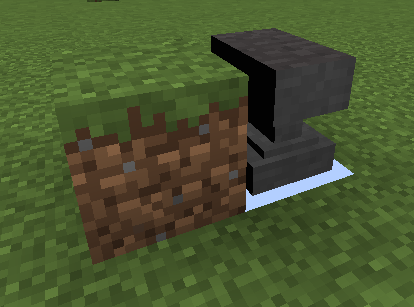


I'm trying to make a '3D ore' resource pack, but I'm getting a lot of weird rendering and culling errors.
If I make a new block model, all sides of all boxes that face another block are rendered solid black, regardless of any declarations in the json files. Additionally, the face of any other block touching this one is culled when it shouldn't be. I've tried basically every combination of texture and uv parameters, all options with 'cullface', and declaring the 'to' and 'from' of boxes to be reversed (inside out), but absolutely nothing works.
In the example pictures I changed the sea lantern blockstate to point to the vanilla anvil_undamaged model and I get the same thing, so it's not a case of me writing a malformed json file.
I'm trying to make a '3D ore' resource pack, but I'm getting a lot of weird rendering and culling errors.
If I make a new block model, all sides of all boxes that face another block are rendered solid black, regardless of any declarations in the json files. Additionally, the face of any other block touching this one is culled when it shouldn't be. I've tried basically every combination of texture and uv parameters, all options with 'cullface', and declaring the 'to' and 'from' of boxes to be reversed (inside out), but absolutely nothing works.
In the example pictures I changed the sea lantern blockstate to point to the vanilla anvil_undamaged model and I get the same thing, so it's not a case of me writing a malformed json file.
Bar.java// Some comments here public String getFoo() { return foo; }
I'm trying to make a '3D ore' resource pack, but I'm getting a lot of weird rendering and culling errors.
If I make a new block model, all sides of all boxes that face another block are rendered solid black, regardless of any declarations in the json files. Additionally, the face of any other block touching this one is culled when it shouldn't be. I've tried basically every combination of texture and uv parameters, all options with 'cullface', and declaring the 'to' and 'from' of boxes to be reversed (inside out), but absolutely nothing works.
In the example pictures I changed the sea lantern blockstate to point to the vanilla anvil_undamaged model and I get the same thing, so it's not a case of me writing a malformed json file.
Bar.java// Some comments herepublicStringgetFoo() {returnfoo;}I'm trying to make a '3D ore' resource pack, but I'm getting a lot of weird rendering and culling errors.
If I make a new block model, all sides of all boxes that face another block are rendered solid black, regardless of any declarations in the json files. Additionally, the face of any other block touching this one is culled when it shouldn't be. I've tried basically every combination of texture and uv parameters, all options with 'cullface', and declaring the 'to' and 'from' of boxes to be reversed (inside out), but absolutely nothing works.
In the example pictures I changed the sea lantern blockstate to point to the vanilla anvil_undamaged model and I get the same thing, so it's not a case of me writing a malformed json file.
sea_lantern.json{ "variants": { "normal": { "model": "anvil_undamaged" } } }
I'm trying to make a '3D ore' resource pack, but I'm getting a lot of weird rendering and culling errors.
If I make a new block model, all sides of all boxes that face another block are rendered solid black, regardless of any declarations in the json files. Additionally, the face of any other block touching this one is culled when it shouldn't be. I've tried basically every combination of texture and uv parameters, all options with 'cullface', and declaring the 'to' and 'from' of boxes to be reversed (inside out), but absolutely nothing works.
In the example pictures I changed the sea lantern blockstate to point to the vanilla anvil_undamaged model and I get the same thing, so it's not a case of me writing a malformed json file.
blockstates/sea_lantern.json{ "variants": { "normal": { "model": "anvil_undamaged" } } }
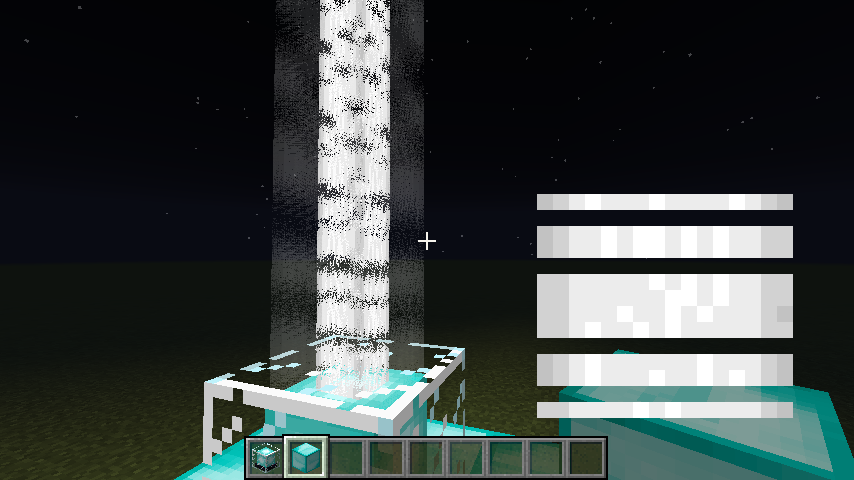
Beacon beams render as garbled flickering static, distorted, or totally missing to varying degrees, depending on the world. Some worlds the beams render fine, some are a total mess, and some are in between. There appears to be no rhyme or reason as to which worlds have problems and to what degree they have them. However, the issue is totally reproducible per-world; any world that shows a problem maintains it to the same degree always, regardless of the number of times I quit and relaunch. Destroying and re-placing the beacons or any surrounding blocks has no effect.
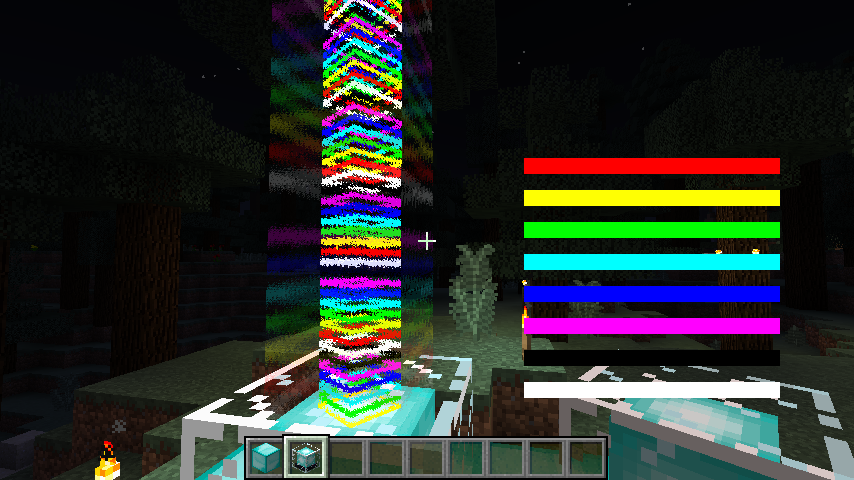
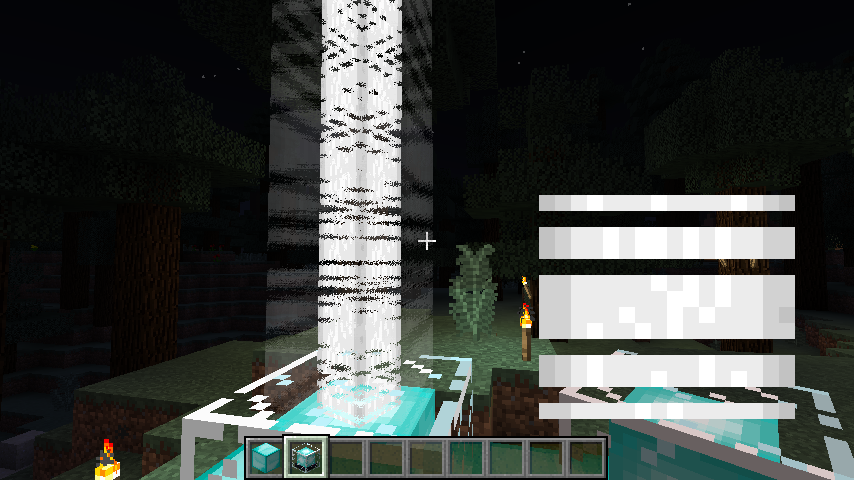
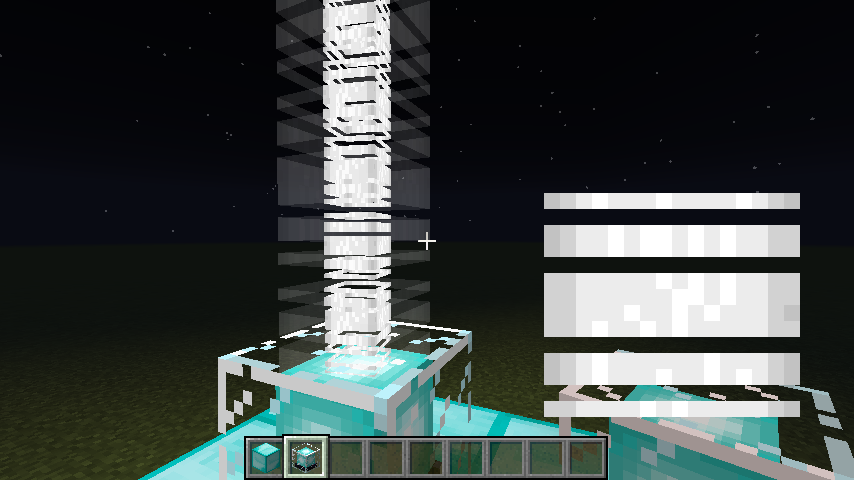
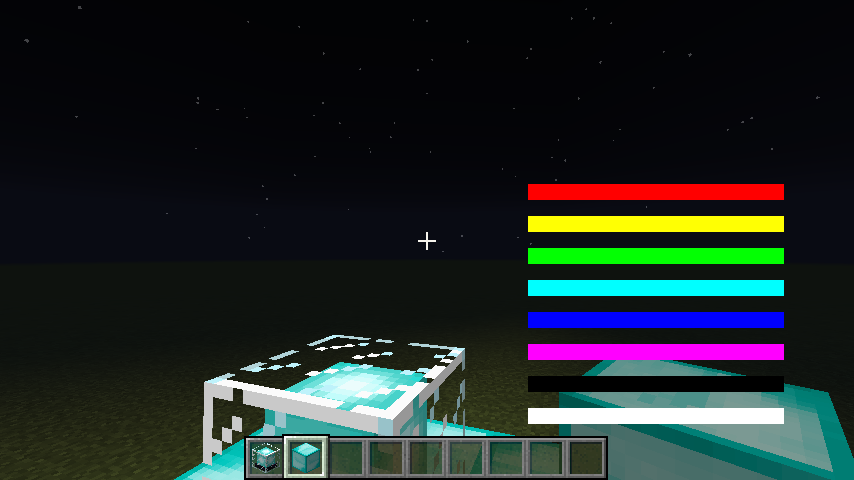
The problem is hard to notice with the vanilla textures, so I've attached six examples: two pictures each of a custom texture on three different worlds. World "B" appears fine, world "A" has medium distortion, and world "F" has very bad distortion as well as the rainbow variant not showing up at all. In each case, I've superimposed the custom texture in use over the right hand side of the image so things are easier to understand.
NOTE: This is NOT a dupe of
MC-68247, as this bug has nothing to do with viewing angle. In the case of "F-rainbow", all beams of all beacons in the world are missing all the time, no matter where you are or where you're looking.
The resource pack
Beacon beams render as garbled flickering static, distorted, or totally missing to varying degrees, depending on the world. Some worlds the beams render fine, some are a total mess, and some are in between. There appears to be no rhyme or reason as to which worlds have problems and to what degree they have them. However, the issue is totally reproducible per-world; any world that shows a problem maintains it to the same degree always, regardless of the number of times I quit and relaunch. Destroying and re-placing the beacons or any surrounding blocks has no effect.
The problem is hard to notice with the vanilla textures, so I've attached six examples: two pictures each of a custom texture on three different worlds. World "B" appears fine, world "A" has medium distortion, and world "F" has very bad distortion as well as the rainbow variant not showing up at all. In each case, I've superimposed the custom texture in use over the right hand side of the image so things are easier to understand.
NOTE: This is NOT a dupe of
MC-68247, as this bug has nothing to do with viewing angle. In the case of "F-rainbow", all beams of all beacons in the world are missing all the time, no matter where you are or where you're looking.Beacon beams render as garbled flickering static, distorted, or totally missing to varying degrees, depending on the world. Some worlds the beams render fine, some are a total mess, and some are in between.
There appears to be no rhyme or reason as to which worlds have problems and to what degree they have them. However, the issue is totally reproducible per-world; any world that shows a problem maintains it to the same degree always, regardless of the number of times I quit and relaunch. Destroying and re-placing the beacons or any surrounding blocks has no effect.The problem is hard to notice with the vanilla textures, so I've attached six examples: two pictures each of a custom texture on three different worlds. World "B" appears fine, world "A" has medium distortion, and world "F" has very bad distortion as well as the rainbow variant not showing up at all. In each case, I've superimposed the custom texture in use over the right hand side of the image so things are easier to understand.
NOTE: This is NOT a dupe of
MC-68247, as this bug has nothing to do with viewing angle. In the case of "F-rainbow", all beams of all beacons in the world are missing all the time, no matter where you are or where you're looking.EDIT
It turns out there is a direct correlation between the age of the world (NBT 'time' parameter') and how bad the texture looks. I can make the problem happen or disappear by manually editing that with a program like NBTExplorer. I'm not sure if this qualifies as being a dupe ofMC-1279though, as that bug is mainly about the beam animation being slow and choppy, but I've never seen that.
Beacon beams render as garbled flickering static, distorted, or totally missing to varying degrees, depending on the world. Some worlds the beams render fine, some are a total mess, and some are in between.
There appears to be no rhyme or reason as to which worlds have problems and to what degree they have them. However, the issue is totally reproducible per-world; any world that shows a problem maintains it to the same degree always, regardless of the number of times I quit and relaunch. Destroying and re-placing the beacons or any surrounding blocks has no effect.The problem is hard to notice with the vanilla textures, so I've attached six examples: two pictures each of a custom texture on three different worlds. World "B" appears fine, world "A" has medium distortion, and world "F" has very bad distortion as well as the rainbow variant not showing up at all. In each case, I've superimposed the custom texture in use over the right hand side of the image so things are easier to understand.
NOTE: This is NOT a dupe of
MC-68247, as this bug has nothing to do with viewing angle. In the case of "F-rainbow", all beams of all beacons in the world are missing all the time, no matter where you are or where you're looking.EDIT
It turns out there is a direct correlation between the age of the world (NBT 'time' parameter') and how bad the texture looks. I can make the problem happen or disappear by manually editing that with a program like NBTExplorer. I'm not sure if this qualifies as being a dupe ofMC-1279though, as that bug is mainly about thebeam animationbeingslow andchoppy, but I've never seen that.Beacon beams render as garbled flickering static, distorted, or totally missing to varying degrees, depending on the world. Some worlds the beams render fine, some are a total mess, and some are in between.
There appears to be no rhyme or reason as to which worlds have problems and to what degree they have them. However, the issue is totally reproducible per-world; any world that shows a problem maintains it to the same degree always, regardless of the number of times I quit and relaunch. Destroying and re-placing the beacons or any surrounding blocks has no effect.The problem is hard to notice with the vanilla textures, so I've attached six examples: two pictures each of a custom texture on three different worlds. World "B" appears fine, world "A" has medium distortion, and world "F" has very bad distortion as well as the rainbow variant not showing up at all. In each case, I've superimposed the custom texture in use over the right hand side of the image so things are easier to understand.
NOTE: This is NOT a dupe of
MC-68247, as this bug has nothing to do with viewing angle. In the case of "F-rainbow", all beams of all beacons in the world are missing all the time, no matter where you are or where you're looking.EDIT
It turns out there is a direct correlation between the age of the world (NBT 'time' parameter') and how bad the texture looks. I can make the problem happen or disappear by manually editing that with a program like NBTExplorer.I'm not sure if this qualifies as being a dupe of.MC-1279though, as that bug is mainly about the beam animation being slow and choppy, but I've never seen thatEDIT2:
I can get slow and choppy beam rotation if I edit the 'time' parameter to a very high value, and then look directly at the beam and stay completely stationary for several seconds (the animation seems ok when I move around). It looks like on my system that the texture gets garbled long before the animation gets choppy, and none of my natural worlds were quite old enough to exhibit that. This bug andMC-1279are a lot more closely related than I initially thought. I'm not sure what the deal is with Mc-1279 being closed though (was is actually initially fixed for pre1 or
Beacon beams render as garbled flickering static, distorted, or totally missing to varying degrees, depending on the world. Some worlds the beams render fine, some are a total mess, and some are in between.
There appears to be no rhyme or reason as to which worlds have problems and to what degree they have them. However, the issue is totally reproducible per-world; any world that shows a problem maintains it to the same degree always, regardless of the number of times I quit and relaunch. Destroying and re-placing the beacons or any surrounding blocks has no effect.The problem is hard to notice with the vanilla textures, so I've attached six examples: two pictures each of a custom texture on three different worlds. World "B" appears fine, world "A" has medium distortion, and world "F" has very bad distortion as well as the rainbow variant not showing up at all. In each case, I've superimposed the custom texture in use over the right hand side of the image so things are easier to understand.
NOTE: This is NOT a dupe of
MC-68247, as this bug has nothing to do with viewing angle. In the case of "F-rainbow", all beams of all beacons in the world are missing all the time, no matter where you are or where you're looking.EDIT
It turns out there is a direct correlation between the age of the world (NBT 'time' parameter') and how bad the texture looks. I can make the problem happen or disappear by manually editing that with a program like NBTExplorer.I'm not sure if this qualifies as being a dupe of.MC-1279though, as that bug is mainly about the beam animation being slow and choppy, but I've never seen thatEDIT2:
I can get slow and choppy beam rotation if I edit the 'time' parameter to a very high value, and then look directly at the beam and stay completely stationary for several seconds (the animation seems ok when I move around). It looks like on my system that the texture gets garbled long before the animation gets choppy, and none of my natural worlds were quite old enough to exhibit that. This bug andMC-1279are a lot more closely related than I initially thought. I'm not sure what the deal is withMc-1279 being closed though (was is actually initially fixed for pre1 orBeacon beams render as garbled flickering static, distorted, or totally missing to varying degrees, depending on the world. Some worlds the beams render fine, some are a total mess, and some are in between.
There appears to be no rhyme or reason as to which worlds have problems and to what degree they have them. However, the issue is totally reproducible per-world; any world that shows a problem maintains it to the same degree always, regardless of the number of times I quit and relaunch. Destroying and re-placing the beacons or any surrounding blocks has no effect.The problem is hard to notice with the vanilla textures, so I've attached six examples: two pictures each of a custom texture on three different worlds. World "B" appears fine, world "A" has medium distortion, and world "F" has very bad distortion as well as the rainbow variant not showing up at all. In each case, I've superimposed the custom texture in use over the right hand side of the image so things are easier to understand.
NOTE: This is NOT a dupe of
MC-68247, as this bug has nothing to do with viewing angle. In the case of "F-rainbow", all beams of all beacons in the world are missing all the time, no matter where you are or where you're looking.EDIT
It turns out there is a direct correlation between the age of the world (NBT 'time' parameter') and how bad the texture looks. I can make the problem happen or disappear by manually editing that with a program like NBTExplorer.I'm not sure if this qualifies as being a dupe of.MC-1279though, as that bug is mainly about the beam animation being slow and choppy, but I've never seen thatEDIT2:
I can get slow and choppy beam rotation if I edit the 'time' parameter to a very high value, and then look directly at the beam and stay completely stationary for several seconds (the animation seems ok when I move around). It looks like on my system that the texture gets garbled long before the animation gets choppy, and none of my natural worlds were quite old enough to exhibit that. This bug andMC-1279are a lot more closely related than I initially thought. I'm not sure what the deal is withMC-1279being closed though (was is actually initially fixed for pre1 or did someone put that in by mistake and it's not fixed until 18.
Beacon beams render as garbled flickering static, distorted, or totally missing to varying degrees, depending on the world. Some worlds the beams render fine, some are a total mess, and some are in between.
There appears to be no rhyme or reason as to which worlds have problems and to what degree they have them. However, the issue is totally reproducible per-world; any world that shows a problem maintains it to the same degree always, regardless of the number of times I quit and relaunch. Destroying and re-placing the beacons or any surrounding blocks has no effect.The problem is hard to notice with the vanilla textures, so I've attached six examples: two pictures each of a custom texture on three different worlds. World "B" appears fine, world "A" has medium distortion, and world "F" has very bad distortion as well as the rainbow variant not showing up at all. In each case, I've superimposed the custom texture in use over the right hand side of the image so things are easier to understand.
NOTE: This is NOT a dupe of
MC-68247, as this bug has nothing to do with viewing angle. In the case of "F-rainbow", all beams of all beacons in the world are missing all the time, no matter where you are or where you're looking.EDIT
It turns out there is a direct correlation between the age of the world (NBT 'time' parameter') and how bad the texture looks. I can make the problem happen or disappear by manually editing that with a program like NBTExplorer.I'm not sure if this qualifies as being a dupe of.MC-1279though, as that bug is mainly about the beam animation being slow and choppy, but I've never seen thatEDIT2:
I can get slow and choppy beam rotation if I edit the 'time' parameter to a very high value, and then look directly at the beam and stay completely stationary for several seconds (the animation seems ok when I move around). It looks like on my system that the texture gets garbled long before the animation gets choppy, and none of my natural worlds were quite old enough to exhibit that. This bug andMC-1279are a lot more closely related than I initially thought. I'm not sure what the deal is withMC-1279being closed though (was is actually initially fixed for pre1 or did someone put that in by mistake and it's not fixed until 18.Beacon beams render as garbled flickering static, distorted, or totally missing to varying degrees, depending on the world. Some worlds the beams render fine, some are a total mess, and some are in between.
There appears to be no rhyme or reason as to which worlds have problems and to what degree they have them. However, the issue is totally reproducible per-world; any world that shows a problem maintains it to the same degree always, regardless of the number of times I quit and relaunch. Destroying and re-placing the beacons or any surrounding blocks has no effect.The problem is hard to notice with the vanilla textures, so I've attached six examples: two pictures each of a custom texture on three different worlds. World "B" appears fine, world "A" has medium distortion, and world "F" has very bad distortion as well as the rainbow variant not showing up at all. In each case, I've superimposed the custom texture in use over the right hand side of the image so things are easier to understand.
NOTE: This is NOT a dupe of
MC-68247, as this bug has nothing to do with viewing angle. In the case of "F-rainbow", all beams of all beacons in the world are missing all the time, no matter where you are or where you're looking.EDIT
It turns out there is a direct correlation between the age of the world (NBT 'time' parameter') and how bad the texture looks. I can make the problem happen or disappear by manually editing that with a program like NBTExplorer.I'm not sure if this qualifies as being a dupe of.MC-1279though, as that bug is mainly about the beam animation being slow and choppy, but I've never seen thatEDIT2:
I can get slow and choppy beam rotation if I edit the 'time' parameter to a very high value, and then look directly at the beam and stay completely stationary for several seconds (the animation seems ok when I move around). It looks like on my system that the texture gets garbled long before the animation gets choppy, and none of my natural worlds were quite old enough to exhibit that. This bug andMC-1279are a lot more closely related than I initially thought. I'm not sure what the deal is withMC-1279being closed though (was it really initially fixed for pre1 or did someone put that in by mistake and it's not actually fixed until 1.8.2?). I honestly don't know if this should be left open, orMC-1279should be reopened, or what.
Beacon beams render as garbled flickering static, distorted, or totally missing to varying degrees, depending on the world. Some worlds the beams render fine, some are a total mess, and some are in between.
There appears to be no rhyme or reason as to which worlds have problems and to what degree they have them. However, the issue is totally reproducible per-world; any world that shows a problem maintains it to the same degree always, regardless of the number of times I quit and relaunch. Destroying and re-placing the beacons or any surrounding blocks has no effect.The problem is hard to notice with the vanilla textures, so I've attached six examples: two pictures each of a custom texture on three different worlds. World "B" appears fine, world "A" has medium distortion, and world "F" has very bad distortion as well as the rainbow variant not showing up at all. In each case, I've superimposed the custom texture in use over the right hand side of the image so things are easier to understand.
NOTE: This is NOT a dupe of
MC-68247, as this bug has nothing to do with viewing angle. In the case of "F-rainbow", all beams of all beacons in the world are missing all the time, no matter where you are or where you're looking.EDIT
It turns out there is a direct correlation between the age of the world (NBT 'time' parameter') and how bad the texture looks. I can make the problem happen or disappear by manually editing that with a program like NBTExplorer.I'm not sure if this qualifies as being a dupe of.MC-1279though, as that bug is mainly about the beam animation being slow and choppy, but I've never seen thatEDIT2:
I can get slow and choppy beam rotation if I edit the 'time' parameter to a very high value, and then look directly at the beam and stay completely stationary for several seconds (the animation seems ok when I move around). It looks like on my system that the texture gets garbled long before the animation gets choppy, and none of my natural worlds were quite old enough to exhibit that. This bug andMC-1279are a lot more closely related than I initially thought. I'm not sure what the deal is withMC-1279being closed though (was it really initially fixed for pre1 or did someone put that in by mistake and it's not actually fixed until 1.8.2?). I honestly don't know if this should be left open, orMC-1279should be reopened, or what.Beacon beams render as garbled flickering static, distorted, or totally missing to varying degrees, depending on the world. Some worlds the beams render fine, some are a total mess, and some are in between.
There appears to be no rhyme or reason as to which worlds have problems and to what degree they have them. However, the issue is totally reproducible per-world; any world that shows a problem maintains it to the same degree always, regardless of the number of times I quit and relaunch. Destroying and re-placing the beacons or any surrounding blocks has no effect.The problem is hard to notice with the vanilla textures, so I've attached six examples: two pictures each of a custom texture on three different worlds. World "B" appears fine, world "A" has medium distortion, and world "F" has very bad distortion as well as the rainbow variant not showing up at all. In each case, I've superimposed the custom texture in use over the right hand side of the image so things are easier to understand.
NOTE: This is NOT a dupe of
MC-68247, as this bug has nothing to do with viewing angle. In the case of "F-rainbow", all beams of all beacons in the world are missing all the time, no matter where you are or where you're looking.EDIT
It turns out there is a direct correlation between the age of the world (NBT 'time' parameter') and how bad the texture looks. I can make the problem happen or disappear by manually editing that with a program like NBTExplorer. I'm not sure if this qualifies as being a dupe ofMC-1279though, as that bug is mainly about the beam animation being slow and choppy,but I've never seen that.EDIT2:
I can get slow and choppy beam rotation if I edit the 'time' parameter to a very high value, and then look directly at the beam and stay completely stationary for several seconds (the animation seems ok when I move around). It looks like on my system that the texture gets garbled long before the animation gets choppy, and none of my natural worlds were quite old enough to exhibit that. This bug andMC-1279are a lot more closely related than I initially thought. I'm not sure what the deal is withMC-1279being closed though (was it really initially fixed for pre1 or did someone put that in by mistake and it's not actually fixed until 1.8.2?). I honestly don't know if this should be left open, orMC-1279should be reopened, or what.
Beacon beams render as garbled flickering static, distorted, or totally missing to varying degrees, depending on the world. Some worlds the beams render fine, some are a total mess, and some are in between.
There appears to be no rhyme or reason as to which worlds have problems and to what degree they have them. However, the issue is totally reproducible per-world; any world that shows a problem maintains it to the same degree always, regardless of the number of times I quit and relaunch. Destroying and re-placing the beacons or any surrounding blocks has no effect.The problem is hard to notice with the vanilla textures, so I've attached six examples: two pictures each of a custom texture on three different worlds. World "B" appears fine, world "A" has medium distortion, and world "F" has very bad distortion as well as the rainbow variant not showing up at all. In each case, I've superimposed the custom texture in use over the right hand side of the image so things are easier to understand.
NOTE: This is NOT a dupe of
MC-68247, as this bug has nothing to do with viewing angle. In the case of "F-rainbow", all beams of all beacons in the world are missing all the time, no matter where you are or where you're looking.EDIT
It turns out there is a direct correlation between the age of the world (NBT 'time' parameter') and how bad the texture looks. I can make the problem happen or disappear by manually editing that with a program like NBTExplorer. I'm not sure if this qualifies as being a dupe ofMC-1279though, as that bug is mainly about the beam animation being slow and choppy,but I've never seen that.EDIT2:
I can get slow and choppy beam rotation if I edit the 'time' parameter to a very high value, and then look directly at the beam and stay completely stationary for several seconds (the animation seems ok when I move around). It looks like on my system that the texture gets garbled long before the animation gets choppy, and none of my natural worlds were quite old enough to exhibit that. This bug andMC-1279are a lot more closely related than I initially thought. I'm not sure what the deal is withMC-1279being closed though (was it really initially fixed for pre1 or did someone put that in by mistake and it's not actually fixed until 1.8.2?). Sonic partially confirmed seeing it too, but I'm not sure what that means for this bug. I honestly don't know if this should be left open, orMC-1279should be reopened, or what.
Beacon beams render as garbled flickering static, distorted, or totally missing to varying degrees, depending on the world. Some worlds the beams render fine, some are a total mess, and some are in between.
There appears to be no rhyme or reason as to which worlds have problems and to what degree they have them. However, the issue is totally reproducible per-world; any world that shows a problem maintains it to the same degree always, regardless of the number of times I quit and relaunch. Destroying and re-placing the beacons or any surrounding blocks has no effect.The problem is hard to notice with the vanilla textures, so I've attached six examples: two pictures each of a custom texture on three different worlds. World "B" appears fine, world "A" has medium distortion, and world "F" has very bad distortion as well as the rainbow variant not showing up at all. In each case, I've superimposed the custom texture in use over the right hand side of the image so things are easier to understand.
NOTE: This is NOT a dupe of
MC-68247, as this bug has nothing to do with viewing angle. In the case of "F-rainbow", all beams of all beacons in the world are missing all the time, no matter where you are or where you're looking.EDIT
It turns out there is a direct correlation between the age of the world (NBT 'time' parameter') and how bad the texture looks. I can make the problem happen or disappear by manually editing that with a program like NBTExplorer. I'm not sure if this qualifies as being a dupe ofMC-1279though, as that bug is mainly about the beam animation being slow and choppy,but I've never seen that.EDIT2:
I can get slow and choppy beam rotation if I edit the 'time' parameter to a very high value, and then look directly at the beam and stay completely stationary for several seconds (the animation seems ok when I move around). It looks like on my system that the texture gets garbled long before the animation gets choppy, and none of my natural worlds were quite old enough to exhibit that. This bug andMC-1279are a lot more closely related than I initially thought. I'm not sure what the deal is withMC-1279being closed though (was it really initially fixed for pre1 or did someone put that in by mistake and it's not actually fixed until 1.8.2?). Sonic partially confirmed seeing it too (only only one of the textures), but I'm not sure what that means for this bug. I honestly don't know if this should be left open, orMC-1279should be reopened, or what.
Beacon beams render as garbled flickering static, distorted, or totally missing to varying degrees, depending on the world. Some worlds the beams render fine, some are a total mess, and some are in between.
There appears to be no rhyme or reason as to which worlds have problems and to what degree they have them. However, the issue is totally reproducible per-world; any world that shows a problem maintains it to the same degree always, regardless of the number of times I quit and relaunch. Destroying and re-placing the beacons or any surrounding blocks has no effect.The problem is hard to notice with the vanilla textures, so I've attached six examples: two pictures each of a custom texture on three different worlds. World "B" appears fine, world "A" has medium distortion, and world "F" has very bad distortion as well as the rainbow variant not showing up at all. In each case, I've superimposed the custom texture in use over the right hand side of the image so things are easier to understand.
NOTE: This is NOT a dupe of
MC-68247, as this bug has nothing to do with viewing angle. In the case of "F-rainbow", all beams of all beacons in the world are missing all the time, no matter where you are or where you're looking.EDIT
It turns out there is a direct correlation between the age of the world (NBT 'time' parameter') and how bad the texture looks. I can make the problem happen or disappear by manually editing that with a program like NBTExplorer. I'm not sure if this qualifies as being a dupe ofMC-1279though, as that bug is mainly about the beam animation being slow and choppy,but I've never seen that.EDIT2:
I can get slow and choppy beam rotation if I edit the 'time' parameter to a very high value, and then look directly at the beam and stay completely stationary for several seconds (the animation seems ok when I move around). It looks like on my system that the texture gets garbled long before the animation gets choppy, and none of my natural worlds were quite old enough to exhibit that. This bug andMC-1279are a lot more closely related than I initially thought. I'm not sure what the deal is withMC-1279being closed though (was it really initially fixed for pre1 or did someone put that in by mistake and it's not actually fixed until 1.8.2?). Sonic partially confirmed seeing it too (onlyonly one of the textures), but I'm not sure what that means for this bug. I honestly don't know if this should be left open, orMC-1279should be reopened, or what.
Beacon beam texture garbled depending on world time
This should not be closed as 'invalid'. Although the page you linked to talks about what is probably a related issue, I don't believe it's the same as what I'm seeing. For one, that bug was resolved five years ago in Java 1.5 (whereas OSX 10.6 comes with Java 1.6). Secondly, the page you linked to implies that this was a pseudo randomized error that would pop up in multiple places. What I'm seeing is this EXACT same error, same text, character for character, every single time, and it's always and only after a chunk save operation.
Please reopen this bug (I apparently do not have permission to do so). This is NOT the same 'bug in Java' as what you linked to, as that was fixed by Sun back in 2007. What I'm seeing is obviously something else.
We don't KNOW if it's causing problems or not. There's always a possibility of silent corruption or some other issue. And seriously, where do you get off saying "you're not supposed to see it"?? How do you know this isn't a compound problem that's preventing the error from showing up there when it should? Problems aren't going to get fixed if you just plug your ears and scream "LA LA LA I CAN'T HEAR YOU"
Please reopen this bug so someone at Mojang can ACTUALLY investigate the issue and see what's happening. Don't just up and decide that something's not a problem on a whim.
It's a known quirk in Minecraft that fire and lava will burn any flammable block up to two blocks away and five blocks above, regardless of how many solid blocks are in-between. Is this the issue you're seeing, or something new?
Unless you can point to a post by someone who works at Mojang explaining that they specifically designed the squids to not look like squids on purpose, I'm sticking with this being a mistake.
Also: asking for new things that don't exist are "feature requests". Asking to fix problems or mistakes with things that already exist are legitimate bug reports.
Wha? How are typos intentional? That doesn't even make sense.
Fixing something with the wrong name is not a "feature request".
Just because a bug has been around for a while doesn't mean it stops being a bug.
For what it's worth, I personally am not advocating for any particular style, just that the style is consistent. There isn't really a clear rule in English for capitalization in cases like these, so confusion is understandable. It's just one of those silly things that, as a graphic designer, really gets under my skin.
Also, I didn't want to make the picture a mile tall so I only showed a few examples that I remembered offhand- there are probably other cases scattered around (I think there's a block or item name with this problem somewhere).
I understand and accept that this is technically a duplicate since the older bug takes priority, but should that bug really be marked as invalid? Do we have any indication at all that this is actually intended and not just an honest oversight? Mojang is not god and humans make mistakes, brushing off issues like these by calming everything is "as intended" with no evidence of such is awfully close to blind hero worship.
Thank you!
If Grum or someone else clearly says that they did it this way for a reason, then that's fine. I just want to make sure they actually SEE that these are being reported. I get the feeling that there are a lot of communication gaps between the users and Mojang and that a lot of issues get automatically brushed aside without the devs even realizing people have a problem.
Copying in part of the conversation that happened in the comments of my bug:
I understand there's a possibility someone at Mojang intentionally named cobblestone stairs as just "stone stairs" to deflect the frequent requests for actual "smooth" stone stairs. However, I don't believe anyone has confirmed this, and I feel it's far more likely this is just an honest oversight (probably a holdover from way back before there were multiple wood and stone types). If Grum or Dinnerbone or someone else drop in here and state that "Stone Stairs" is intentional, then that's fine. I just want to make sure this isn't swept under a rug where they never even see it.
Also: this bug description is currently listed as affecting 1.4, it should be updated to reflect that it's still relevant up through 1.7 (I'm afraid this will be accidentally closed for appearing outdated).
Hey Kumasasa (or any other mod):
If you're going to roll up these issues into one entry, it would be beneficial to merge the description as well as the title so whoever tries to fix this doesn't have to read
fivesix+ other bugs to see everything that's broken.I also think the title should be changed to something cleaner, like "Modifier keys on Mac glitchy or swapped", since it looks like it's an issue with the bucky keys in general and not copy/paste/pickblock specifically.
So, after reading some of the stuff referenced in the other bugs, it looks like it's actually COMMAND+pickblock on my machine, not control+pickblock
FWIW, after reading the other bugs referenced here I got and idea and tested; I discovered that command and control are swapped on my Mac. Control+pickblock does nothing, but command+pickblock gives me the NBT data. There's a discussion worth having about if this is the correct behavior or not, which I wrote up in
MC-72697@Ely
This bug wasn't technically a duplicate when you reported it, the mods just decided to roll up all of the different Mac keyboard bugs into one place so it's easier to deal with. Jira doesn't have a way to mark bugs as being merged together, so they had to pick one bug as the parent and mark all the others as duplicates.
When you say "beta", do you mean BETA beta from like three or four years ago, or one of the 1.8 pre-release snapshots from a month ago?
If you mean the former, 1.8 has a completely different method for handling world data (specifically tile entities). Worlds saved in 1.8 aren't even backwards compatible with 1.7.X. It's quite possible that the new code doesn't even understand a world save from that far back and may have corrupted something. If you have backups of the worlds frome before you opened them in 1.8, try instead opening them in several older versions in order up through 1.7.x before finally trying 1.8 again.
If you're instead referring to a pre-release snapshot, one or two of those had a major bug that corrupted tile entities. Again, restoring a 1.7.x world from backups and opening it in 1.8-release should be fine.
Do you still have a backup of that one? Can you copy it and open it in 1.8 again and see if the problem is reproducible? You're probably going to have include a link to download the world save before anyone will be able to figure out what went wrong. It's probably also worth generating a forced crash report and attaching it here too.
If you have a backup of the world you can open in 1.7.x, you could try adding and removing an item in each chest to see if it 'rewrites' their NBT data into something 1.8 can deal with.
I'm well aware of Reddit thanks. A warning that you're going to lose information isn't exactly a "feature request".
Well, because I have no idea what the intended behavior is here. In
MC-69399, Ely Golden states that command+pickblock doesn't do anything on his machine. I'd rather someone from Mojang make a statement either directly or implied based on how they fix things. People have a responsibility to only add things to a wiki they believe to be correct, so I'm not going to write up something based on a half-assed guess.Ok, so if things are messed up when opening in 1.7.x as well then we can say this is a bug that's been around for a while and not new to 1.8 at least.
If you have the time, make a bunch of copies of the pre-converted world (from backups) and try opening them with progressively older major versions (1.6.x, 1.5.x, 1.4.x, etc) and see how far back you have to go before it loads up correctly. That will probably help them narrow down what code changes were going on that started the problem. (It's probably worth trying 1.0 or 1.1 first though just to make sure it isn't a beta vs official thing).
It's definitely related, but not sure about a dupe. 65040 says that that bug requires 'constantly loaded chunks', except I'm not sure that's been the case for me. I'm pretty sure I got this to happen a couple times on superflat worlds where I had teleported away from the initial spawn point to [0,100,0] on a fresh world with nothing else in it besides a few inert blocks with a map on it. I'm not sure what would be keeping those chunks loaded in such a situation.
This bug should be updated to reflect that it still applies to 1.8
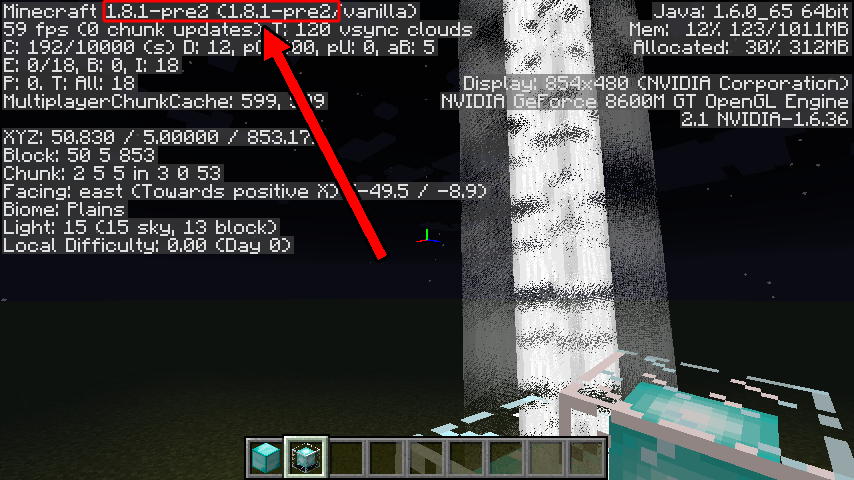
This is NOT fixed in pre1 or pre2, nor is it a dupe of 1279, please reopen.
OK, I've uploaded a pic showing that this still affects pre2, and attached a world. Please reopen.
Note: All of my worlds that feature this are far too large to upload here, so I had to do some more digging. After reading
MC-1279in more detail, it mentions that the beacon slow rotate issue is due to the world's time. I realized that in my worlds there was a correlation between world age and how garbled the texture got. After some more investigation and testing with NBTExplorer, I confirmed that high values on the 'time' parameter caused the problem. For the purposes of this bug, I created a superflat world and manually set 'time' to 19999999 (and took a screenshot).As far as dupes go,
MC-1279is about how beacon beams' rotation animation gets progressively slower and more choppy with world age. I have never seen slow or choppy beams in any of my worlds, instead the beam texture gets progressively more distorted. Whatever fix was put in forMC-1279didn't resolve my issue. While these two bugs are definitely closely related, they're not exactly the same thing, however if you want to reopenMC-1279and then roll this bug into it, I'd be fine with that.Still present in 1.8.0
OK, well, at the time Kumasasa responded with "Fixed in 1.8.1-pre1"
MC-1279was listed as being fixed in pre1, not future-1.8.2, so I'm not sure what's going on there.As far as confirmation goes, I forgot to attach a resource pack with the cut up texture I was using (the problem is still there with the vanilla texture, but hard to see). I'll attach that now and maybe it'll be more obvious (it's worth mentioning that the flickering garbled-ness is much more apparent when actually playing the game, you can't really capture how bad it looks in a screenshot).
Also, being a texture/rendering issue, there's a good chance it might be hardware specific.
The attached resource pack has two textures in it. "beacon_beam.png" is the rainbow one that doesn't show up at all, whereas "beacon_beam_slices.png" is the white one.
More playing around and testing stuff. I've updated the description with a second edit. I don't know what the right procedure is in this case.
Sonic: what version were you using when you [partially] confirmed?