 Quijx
Quijx
- quijx
- quijx
- Europe/Stockholm
- Yes
- No
 MC-1893
![[Mojang] Nathan Adams](../../../data/assets/gravatar/dinnerbone.png)
![[Mojang] slicedlime](../../../data/assets/gravatar/slicedlime.jpeg)
![[Mojang] Searge (Michael Stoyke)](../../../data/assets/gravatar/searge.png)
 Low
Low

Hostile Mobs will not spawn at certain heights if the darkness they would spawn in is caused by the night. So if the skylight is 0 mobs WILL spawn at these heights.
The heights are:
16, 32, 48, 64, 80, 96, 112, 128, 144, 160, 176, 192, 208, 224, 240
(basicly every 16*n)I guess this is due to the fact that Chunks are split up vertically in parts with the height of 16. So the problem occurs if a mob spawns inside one part, but the block it spawns on is inside the part below.
How to reproduce1. Singleplayer
2. Create new World
3. Gamemode: Creative
4. More World Options...
5. World Type: Superflat
6. Customize
7. Presets
8. paste the following preset into the box at the top: 3;64*minecraft:stone;1;
9. Use Preset
10. Done
11. Create new World
12. set the time to night (/time set 18000)No mobs will spawn!
You can use the preset 3;63*minecraft:stone;1; or 3;65*minecraft:stone;1; instead and they will spawn.Hostile Mobs will not spawn at certain heights if the darkness they would spawn in is caused by the night. So if the skylight is 0 mobs WILL spawn at these heights.
The heights are:
16, 32, 48, 64, 80, 96, 112, 128, 144, 160, 176, 192, 208, 224, 240
(basicly every 16*n)I guess this is due to the fact that Chunks are split up vertically in parts with the height of 16. So the problem occurs if a mob spawns inside one part, but the block it spawns on is inside the part below.
How to reproduce:
1. Singleplayer
2. Create new World
3. Gamemode: Creative
4. More World Options...
5. World Type: Superflat
6. Customize
7. Presets
8. paste the following preset into the box at the top: 3;64*minecraft:stone;1;
9. Use Preset
10. Done
11. Create new World
12. set the time to night (/time set 18000)No mobs will spawn!
You can use the preset 3;63*minecraft:stone;1; or 3;65*minecraft:stone;1; instead and they will spawn.
Hostile Mobs will not spawn at certain heights if the darkness they would spawn in is caused by the night. So if the skylight is 0 mobs WILL spawn at these heights.
The heights are:
16, 32, 48, 64, 80, 96, 112, 128, 144, 160, 176, 192, 208, 224, 240
(basicly every 16*n)I guess this is due to the fact that Chunks are split up vertically in parts with the height of 16. So the problem occurs if a mob spawns inside one part, but the block it spawns on is inside the part below.
How to reproduce:
1. Singleplayer
2. Create new World
3. Gamemode: Creative
4. More World Options...
5. World Type: Superflat
6. Customize
7. Presets
8. paste the following preset into the box at the top: 3;64*minecraft:stone;1;
9. Use Preset
10. Done
11. Create new World
12. set the time to night (/time set 18000)No mobs will spawn!
You can use the preset 3;63*minecraft:stone;1; or 3;65*minecraft:stone;1; instead and they will spawn.
Arrows loose their punchenchantment when unloadedArrows loose their punch-enchantment property when unloaded
Arrows loose their punch-enchantment property when unloaded
Arrows that were shot by a bow that is enchanted with a punch enchantment do not remember their punch property when being unloaded (for example by logging out).
How to reproduce:
1. Get yourself a Power II Bow and some arrows
{id:49s,lvl:2s}
/give @p minecraft:bow 1 0 {ench:[]}
/give @p minecraft:arrow 64
2. Go into survival mode if you aren't already
3. Shoot straight up so you hit yourself
4. You will be thrown away quite a bit
5. Now shoot up again but this time log out before the arrow hits you
6. Log back in
7. When the arrow hits you, you will be knocked back only a little (as much as a normal Arrow does)This behavior is obvious since there is no NBT-Tag implemented in which the punch property is saved in.
Arrows that were shot by a bow that is enchanted with a punch enchantment do not remember their punch property when being unloaded (for example by logging out).
How to reproduce:
1. Get yourself a P
{id:49s,lvl:2s}owerII Bow and some arrows
/give @p minecraft:bow 1 0 {ench:[]}
/give @p minecraft:arrow 64
2. Go into survival mode if you aren't already
3. Shoot straight up so you hit yourself
4. You will be thrown away quite a bit
5. Now shoot up again but this time log out before the arrow hits you
6. Log back in
7. When the arrow hits you, you will be knocked back only a little (as much as a normal Arrow does)This behavior is obvious since there is no NBT-Tag implemented in which the punch property is saved in.
Arrows that were shot by a bow that is enchanted with a punch enchantment do not remember their punch property when being unloaded (for example by logging out).
How to reproduce:
1. Get yourself a Punch II Bow and some arrows
{id:49s,lvl:2s}
/give @p minecraft:bow 1 0 {ench:[]}
/give @p minecraft:arrow 64
2. Go into survival mode if you aren't already
3. Shoot straight up so you hit yourself
4. You will be thrown away quite a bit
5. Now shoot up again but this time log out before the arrow hits you
6. Log back in
7. When the arrow hits you, you will be knocked back only a little (as much as a normal Arrow does)This behavior is obvious since there is no NBT-Tag implemented in which the punch property is saved in.
Arrows that were shot by a bow that is enchanted with a punch enchantment do not remember their punch property when being unloaded (for example by logging out).
How to reproduce:
1. Get yourself a Punch II Bow and some arrows
{id:49s,lvl:2s}
/give @p minecraft:bow 1 0 {ench:[]}
/give @p minecraft:arrow 64
2. Go into survival mode if you aren't already
3. Shoot straight up so you hit yourself
4. You will be thrown away quite a bit
5. Now shoot up again but this time log out before the arrow hits you
6. Log back in
7. When the arrow hits you, you will be knocked back only a little (as much as a normal Arrow does)This behavior is
obvioussince there is no NBT-Tag implemented in which the punch property is saved in.Arrows that were shot by a bow that is enchanted with a punch enchantment do not remember their punch property when being unloaded (for example by logging out).
How to reproduce:
1. Get yourself a Punch II Bow and some arrows
{id:49s,lvl:2s}
/give @p minecraft:bow 1 0 {ench:[]}
/give @p minecraft:arrow 64
2. Go into survival mode if you aren't already
3. Shoot straight up so you hit yourself
4. You will be thrown away quite a bit
5. Now shoot up again but this time log out before the arrow hits you
6. Log back in
7. When the arrow hits you, you will be knocked back only a little (as much as a normal Arrow does)This behavior is expected since there is no NBT-Tag implemented in which the punch property is saved in.
Arrows that were shot by a bow that is enchanted with a punch enchantment do not remember their punch property when being unloaded (for example by logging out).
How to reproduce:
1. Get yourself a Punch II Bow and some arrows
/give @p minecraft:bow 1 0 {ench:[{id:49s,lvl:2s}]}
/give @p minecraft:arrow 64
2. Go into survival mode if you aren't already
3. Shootstraight up so you hit yourself
4.You will be thrown away quite a bit
5.Now shoot up again but this time log out before the arrow hits you
6. Logback in
7. When the arrow hits you, you will be knocked back only a little (as much as a normal Arrow does)This behavior is expected since there is no NBT-Tag implemented in which the punch property is saved in.
Arrows that were shot by a bow that is enchanted with a punch enchantment do not remember their punch property when being unloaded (for example by logging out).
How to reproduce:
1. Get yourself a Punch II Bow and some arrows
/give @s minecraft:bow{Enchantments:[{id:"minecraft:punch",lvl:2s}]} /give @s minecraft:arrow 642. Place two dirt blocks beside each other in the air so that there are four blocks space between the floor and the blocks.
3. Go into survival mode if you aren't already
4. Shoot an arrow with the Punch II into the underside of each block.
5. Stand below the first block and mine it so that the arrow falls and hits you.
6. You will be thrown away quite a bit.
7. Log out.
8. Log back in and wait a few seconds because the player is invulnerable for a few seconds after login.
9. Stand below the second block and mine it so that the arrow falls and hits you.
10. When the arrow hits you, you will be knocked back only a little (as much as a normal Arrow does).This behavior is expected since there is no NBT-Tag implemented in which the punch property is saved in.
A player selector (so @a, @p and @r) with cubic detection area (so for example @a[x=0,y=0,z=0,dx=2,dx=2,dx=2]) will only detect players correctly if there are less than 32 Entitys loaded. Otherwise it will allways find a player regardless of whether he is inside the detection box or not.
Also if you use @e as a selector it will work just fine, so if you are experiencing that problem yourself you can fix it by using @e[x=0,y=0,z=0,dx=2,dx=2,dx=2,type=Player]
(This issue exists as of 14w29a)
Steps to reproduce:
1.
Create a new creative superflat world with the preset "Redstone Ready" (The only reason why you should take that preset is because no mobs spawn on it)
2.
Enter "/testfor @a[x=0,y=0,z=0,dx=2,dy=2,dz=2]" into the chat.
Nothing should happen because it sould only detect you if you are inside a 3x3x3 area of which the north west bottom corner is located at 0 0 0.
3.
Now start spawning pigs or whatever with spawneggs until your total entity count (which you can observe in the F3-Debug menu in the third line (E:<rendered entities>:<total entities>)) rises up to 31.
4.
Now run the command from Step 2 again. Still nothing should happen, but if you add one entity (for example another pig) and run the command again the chat should say "Found <Player name>" even though it shouldn't because the player is not in the detection box.
Cubic player selector allways finds player if there are more than 31 Entitys around
A player selector (so @a, @p and @r) with cubic detection area (so for example @a[x=0,y=0,z=0,dx=2,dx=2,dx=2]) will only detect players correctly if there are less than 32 Entitys loaded. Otherwise it will al
lways find a player regardless of whether he is inside the detection box or not.Also if you use @e as a selector it will work just fine, so if you are experiencing that problem yourself you can fix it by using @e[x=0,y=0,z=0,dx=2,dx=2,dx=2,type=Player]
(This issue exists as of 14w29a)
Steps to reproduce:
1.
Create a new creative superflat world with the preset "Redstone Ready" (The only reason why you should take that preset is because no mobs spawn on it)
2.
Enter "/testfor @a[x=0,y=0,z=0,dx=2,dy=2,dz=2]" into the chat.
Nothing should happen because it sould only detect you if you are inside a 3x3x3 area of which the north west bottom corner is located at 0 0 0.
3.
Now start spawning pigs or whatever with spawneggs until your total entity count (which you can observe in the F3-Debug menu in the third line (E:<rendered entities>:<total entities>)) rises up to 31.
4.
Now run the command from Step 2 again. Still nothing should happen, but if you add one entity (for example another pig) and run the command again the chat should say "Found <Player name>" even though it shouldn't because the player is not in the detection box.
Cubic player selector always finds player if there are more than 31 Entitys aroundCubic player selector always finds player if there are more than 31 Entities around
A player selector (so @a, @p and @r) with cubic detection area (so for example @a[x=0,y=0,z=0,dx=2,dx=2,dx=2]) will only detect players correctly if there are less than 32 Entit
ys loaded. Otherwise it will always find a player regardless of whether he is inside the detection box or not.Also if you use @e as a selector it will work just fine, so if you are experiencing that problem yourself you can fix it by using @e[x=0,y=0,z=0,dx=2,dx=2,dx=2,type=Player]
(This issue exists as of 14w29a)
Steps to reproduce:
1.
Create a new creative superflat world with the preset "Redstone Ready" (The only reason why you should take that preset is because no mobs spawn on it)
2.
Enter "/testfor @a[x=0,y=0,z=0,dx=2,dy=2,dz=2]" into the chat.
Nothing should happen because it sould only detect you if you are inside a 3x3x3 area of which the north west bottom corner is located at 0 0 0.
3.
Now start spawning pigs or whatever with spawneggs until your total entity count (which you can observe in the F3-Debug menu in the third line (E:<rendered entities>:<total entities>)) rises up to 31.
4.
Now run the command from Step 2 again. Still nothing should happen, but if you add one entity (for example another pig) and run the command again the chat should say "Found <Player name>" even though it shouldn't because the player is not in the detection box.A player selector (so @a, @p and @r) with cubic detection area (so for example @a[x=0,y=0,z=0,dx=2,dx=2,dx=2]) will only detect players correctly if there are less than 32 Entities loaded. Otherwise it will always find a player regardless of whether he is inside the detection box or not.
Also if you use @e as a selector it will work just fine, so if you are experiencing that problem yourself you can fix it by using @e[x=0,y=0,z=0,dx=2,dx=2,dx=2,type=Player]
(This issue exists as of 14w29a)
Steps to reproduce:
1.
Create a new creative superflat world with the preset "Redstone Ready" (The only reason why you should take that preset is because no mobs spawn on it)
2.
Enter "/testfor @a[x=0,y=0,z=0,dx=2,dy=2,dz=2]" into the chat.
Nothing should happen because it sould only detect you if you are inside a 3x3x3 area of which the north west bottom corner is located at 0 0 0.
3.
Now start spawning pigs or whatever with spawneggs until your total entity count (which you can observe in the F3-Debug menu in the third line (E:<rendered entities>:<total entities>)) rises up to 31.
4.
Now run the command from Step 2 again. Still nothing should happen, but if you add one entity (for example another pig) and run the command again the chat should say "Found <Player name>" even though it shouldn't because the player is not in the detection box.
All Structure Blocks in a world use same random value for whether the block at (0, 0, 0) in the structure should be placed for a given structure integrity when powered in same tick.
Of course this is only relevant when using a random seed (0).The code for weather a block in a structure should be placed for a given structure_integrity probably goes something like this:
r = random value from 0.0 to 1.0 if (r < structure_integrity) place blockNow this value r appears to be the same for all blocks located at (x=0,y=0,z=0) in a structure when the structures are placed in the same tick.
How to replicate:
1. Save a single Redstone Block into a structure.
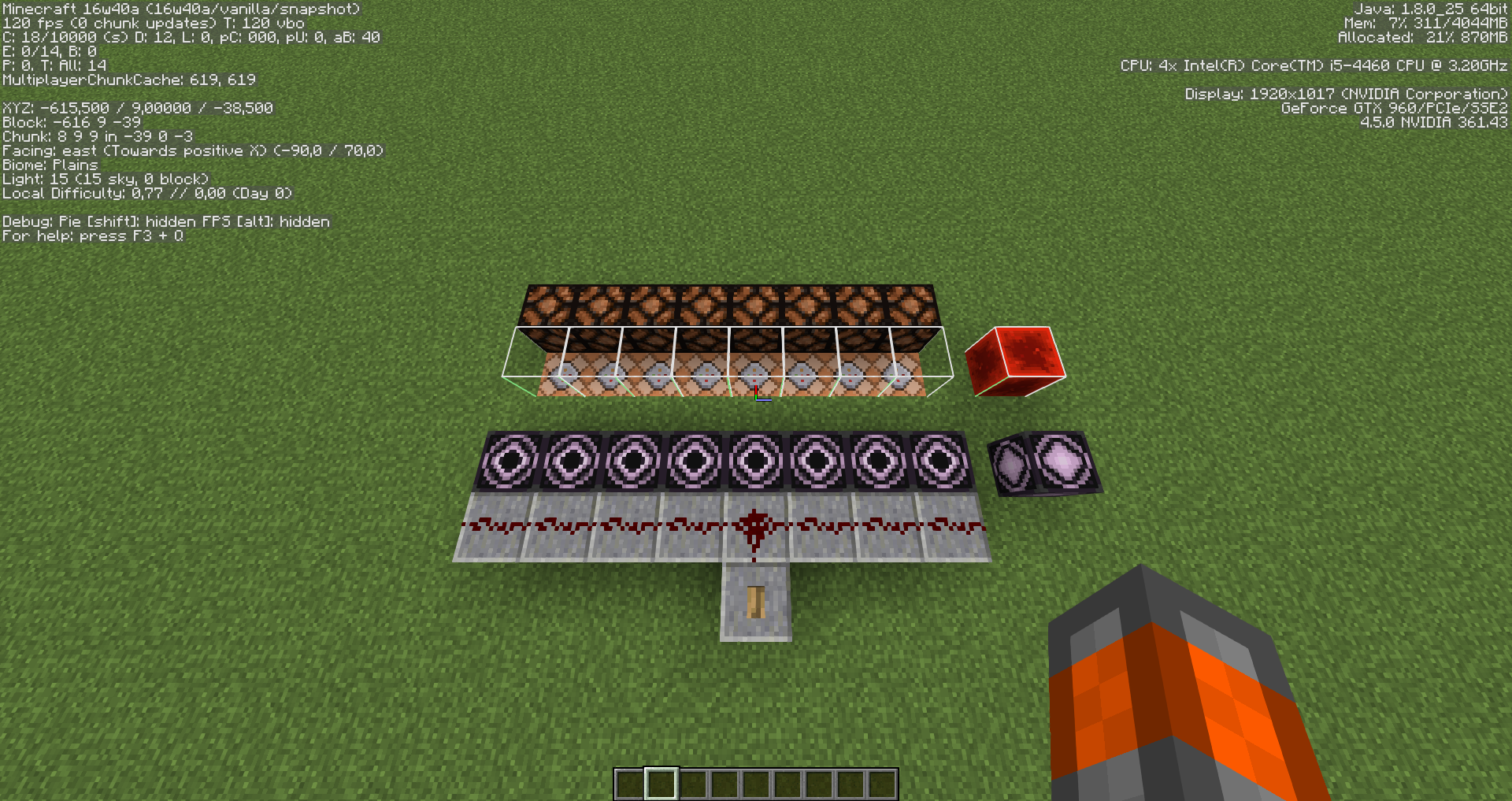
2. Place 8 Structure Blocks side by side that load the Redstone Block infront of them. (Leave one block gap so that the Redstone Block doesn't activate the Structure Block)
3. Set the structure integrities to the values 0.125, 0.25, 0.375, 0.5, 0.625, 0.75, 0.875, 1.0 in order.
4. Place Impulse Command Blocks with the command /setblock ~ ~1 ~ minecraft:air underneath the block where the Redstone Block would be placed by the Structure Block.
5. Place Redstone Lamps next to the blocks where the Redstone Block would be placed
6. Activate all Structure Blocks with a line of redstone.Expected Result:
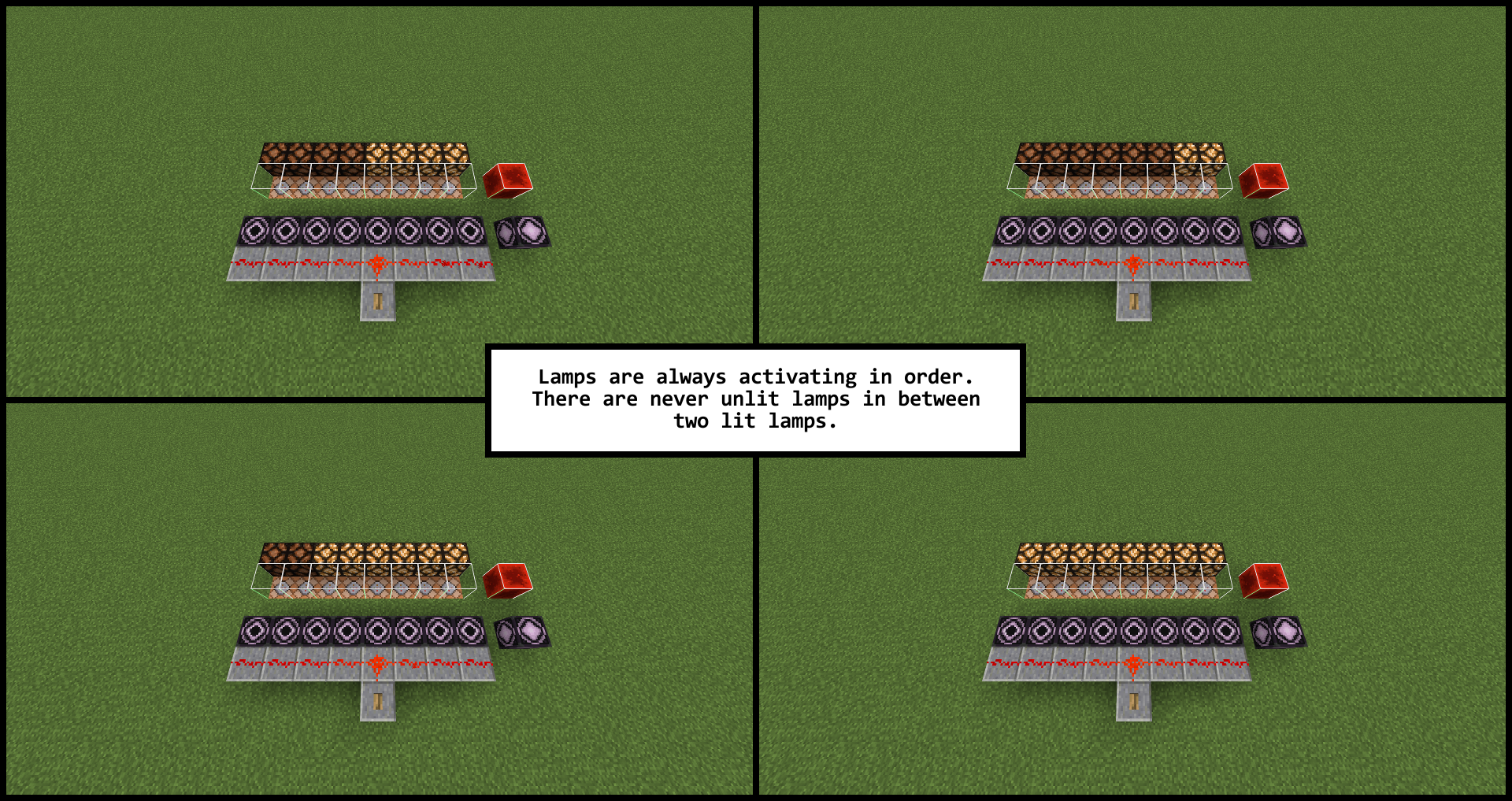
When activating the redstone the lamps light up with the probability set in the structure integrity independent from each other. There might be gaps between two lit lamps.
Actual Result:
A random amount from 1 to 8 of lamps light up when the redstone is activated, but the activated lamps are all in one line. There is never a gap between two lit Redstone Lamps.
If all Structure Blocks had the same structure integrity, all lamps would either be lit or unlit, but never different.I guess this bug is caused by bad pseudo random number generation. Blocks not located at (0, 0, 0) show similar patterns since the generated r value is prob
oably close to the one on the same block on other structures.This Bug is relevant because it can lead to strange behaviors when using Structure Blocks for randomizers in map making.
Code analysis
Based on 1.11 decompiled using MCP 9.35 rc1
This happens because the method net.minecraft.world.gen.structure.template.PlacementSettings.getRandom(BlockPos) uses the current time in milliseconds if the seed is 0 or the provided block position is null (which is never the case). It would return a block position based value if the seed, which is stored as a Long, would be null, but that is never the case either.
However, creating a Random object without a given seed would probably return the best result.
Confirmed with Windows 7 64bit (Laptop) German keyboard layout
(in case anyone with a non German keyboard does not know where the "<" key is located):
http://i.imgur.com/U5uECug.png
You have to enable a trigger objective before it can be set by /trigger.
Do do that you must type /scoreboard players enable @p someObjective.
Now /trigger will work even if you haven't set the objective with "/scoreboard players set @p someObjective 0".
A trigger objective will be disabled for the specific player once you called /trigger, so you have to enable it every time if you want to give someone the permission to change the trigger value.
What I think this bug really is, is that if you call /trigger while neither the objective has an assigned value nor it has been enabled, the error message will be "Invalid trigger name someObjective" instead of "Trigger someObjective is not enabled".
The second bug is that if you set the value of a trigger objective with "/scoreboard players set @p someObjective 0" the trigger gets somehow enabled. Though this only works the first time.
Thanks, I fixed it
I have noticed the more solid blocks are inside the bottom most chunk-sections of the loaded region, the less is the lag. So if the bottom 16 layers are filled with solid blocks the lag almost gone, if not completely. If they are empty the lag is the strongest. And if the bottom 6 layers are filled, the lag is somewhere between both.
Like "ShadowofElements" I also noticed that the lag is gone if the gamerule doMobSpawning is set to "false".
Also the lag does not only involve the laggyness of mobs but also the flowing speed of fluids and lots of other things. This is caused by the slow tick rate of the internal server. So I think the bug title is kind of inappropriate.
Tutorial to test the tick rate of your internal server:
You can test the tick rate by typing "/debug start", waiting a couple of seconds and then type "/debug stop". Now divide the displayed number of ticks by the number of seconds. If there is there is no lag, the value should be somewhere around 20 ticks/second. The lower the number is, the more lag you have.
For me the bug is also fixed, even in old worlds.
Still in 16w40a
@Frank I am also using the 1.15 versions, Arch Linux with KDE. For me, the glitches only appear in fullscreen if the Setting "Allow applications to block compositing" (under Settings -> Hardware -> Display and Monitor -> Compositor) is disabeled. However, they are still much less frequent than when not in fullscreen. With the option enabled, the glitches are completely gone in fullscreen for me. However that introduces some other annoyances such as the clock on the second monitor not updating or not being able to click on the Minecraft icon in the bottom bar after switching out without going out of fullscreen first.