 Adam DeWitt
- Rubix_One
- JIRAUSER504191
- America/Indiana/Indianapolis
- Yes
- No
 MC-188738
 Normal
 MCD-4986MCD-5018
 Low
Low![[Mod] Jiingy](../../../data/avatars/users/91802.png)

Armor stand pose is inconsistent when placed or summoned, even when using the Pose NBT Tag
Armor stands in 1.16 Pre-release 4 have inconsistent poses when placed or summoned using the /summon command, even when using the Pose NBT Tag to set the armor stand's pose. The Pose tag can sort of control the pose of the armor stand, but not reliably.
Replication:
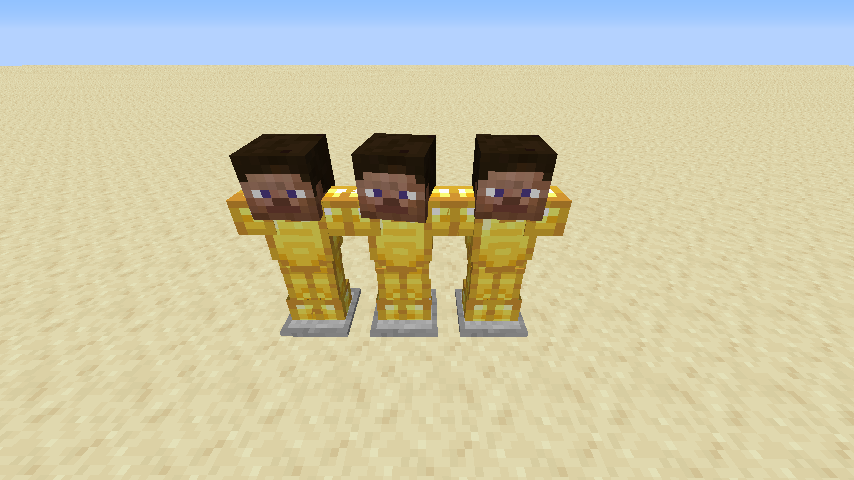
Summon a few armor stands with a specific pose. (i.e. {Pose:{Body:[0f,0f,0f],LeftArm:[0f,0f,0f],RightArm:[0f,0f,0f],LeftLeg:[0f,0f,0f],RightLeg:[0f,0f,0f],Head:[0f,0f,0f]}}). If you look closely, the armor stands will have different poses, and none of them will have the pose specified by the Pose tag. This is especially visible when the the armor stand has items on it. For example, the armor stands in the picture below were placed using the following command:
/give @p minecraft:armor_stand{EntityTag:{Pose:
{Body:[0f,0f,0f],LeftArm:[0f,0f,0f],RightArm:[0f,0f,0f],LeftLeg:[0f,0f,0f],RightLeg:[0f,0f,0f],Head:[0f,0f,0f]},ArmorItems:[\{id:"minecraft:golden_boots",Count:1b},\{id:"minecraft:golden_leggings",Count:1b},\{id:"minecraft:golden_chestplate",Count:1b},\{id:"minecraft:player_head",Count:1b}]
}} 1However, when I placed them, their poses were different from what the Pose NBT tag specified.
Armor stands in 1.16 Pre-release 4 have inconsistent poses when placed or summoned using the /summon command, even when using the Pose NBT Tag to set the armor stand's pose. The Pose tag can sort of control the pose of the armor stand, but not reliably.
Replication:
Summon a few armor stands with a specific pose. (i.e. {Pose:{Body:[0f,0f,0f],LeftArm:[0f,0f,0f],RightArm:[0f,0f,0f],LeftLeg:[0f,0f,0f],RightLeg:[0f,0f,0f],Head:[0f,0f,0f]}}). If you look closely, the armor stands will have different poses, and none of them will have the pose specified by the Pose tag. This is especially visible when the the armor stand has items on it. For example, the armor stands in the picture below were placed using the following command:
/give @p minecraft:armor_stand{EntityTag:{Pose:
{Body:[0f,0f,0f],LeftArm:[0f,0f,0f],RightArm:[0f,0f,0f],LeftLeg:[0f,0f,0f],RightLeg:[0f,0f,0f],Head:[0f,0f,0f]},ArmorItems:[
{id:"minecraft:golden_boots",Count:1b},
{id:"minecraft:golden_leggings",Count:1b},
{id:"minecraft:golden_chestplate",Count:1b},
{id:"minecraft:player_head",Count:1b}]}} 1
However, when I placed them, their poses were different from what the Pose NBT tag specified.
A strange thing about this bug is that when the Rotation NBT tag is used with the Pose Tag, the pose appears to be consistent.
Armor stands in 1.16 Pre-release 4 have inconsistent poses when placed or summoned using the /summon command, even when using the Pose NBT Tag to set the armor stand's pose. The Pose tag can sort of control the pose of the armor stand, but not reliably.
Replication:
Summon a few armor stands with a specific pose. (i.e. {Pose:{Body:[0f,0f,0f],LeftArm:[0f,0f,0f],RightArm:[0f,0f,0f],LeftLeg:[0f,0f,0f],RightLeg:[0f,0f,0f],Head:[0f,0f,0f]}}). If you look closely, the armor stands will have different poses, and none of them will have the pose specified by the Pose tag. This is especially visible when the the armor stand has items on it. For example, the armor stands in the picture below were placed using the following command:
/give @p minecraft:armor_stand{EntityTag:{Pose:
{Body:[0f,0f,0f],LeftArm:[0f,0f,0f],RightArm:[0f,0f,0f],LeftLeg:[0f,0f,0f],RightLeg:[0f,0f,0f],Head:[0f,0f,0f]},ArmorItems:[
{id:"minecraft:golden_boots",Count:1b}{id:"minecraft:golden_leggings",Count:1b}
,,
{id:"minecraft:golden_chestplate",Count:1b},
{id:"minecraft:player_head",Count:1b}]}} 1
However, when I placed them, their poses were different from what the Pose NBT tag specified.
A strange thing about this bug is that when the Rotation NBT tag is used with the Pose Tag, the pose appears to be consistent.
Armor stands in 1.16 Pre-release 4 have inconsistent poses when placed or summoned using the /summon command, even when using the Pose NBT Tag to set the armor stand's pose. The Pose tag can sort of control the pose of the armor stand, but not reliably.
Replication:
Summon a few armor stands with a specific pose. (i.e. {Pose:{Body:[0f,0f,0f],LeftArm:[0f,0f,0f],RightArm:[0f,0f,0f],LeftLeg:[0f,0f,0f],RightLeg:[0f,0f,0f],Head:[0f,0f,0f]}}). If you look closely, the armor stands will have different poses, and none of them will have the pose specified by the Pose tag. This is especially visible when the the armor stand has items on it. For example, the armor stands in the picture below were placed using the following command:
/give @p minecraft:armor_stand{EntityTag:{Pose:
{Body:[0f,0f,0f],LeftArm:[0f,0f,0f],RightArm:[0f,0f,0f],LeftLeg:[0f,0f,0f],RightLeg:[0f,0f,0f],Head:[0f,0f,0f]},ArmorItems:[\{id:"minecraft:golden_boots",Count:1b},\{id:"minecraft:golden_leggings",Count:1b},\{id:"minecraft:golden_chestplate",Count:1b},\{id:"minecraft:player_head",Count:1b}]}} 1
However, when I placed them, their poses were different from what the Pose NBT tag specified.
A strange thing about this bug is that when the Rotation NBT tag is used with the Pose Tag, the pose appears to be consistent.
Armor stands in 1.16 Pre-release 4 have inconsistent poses when placed or summoned using the /summon command, even when using the Pose NBT Tag to set the armor stand's pose. The Pose tag can sort of control the pose of the armor stand, but not reliably.
Replication:
Summon a few armor stands with a specific pose. (i.e. {Pose:{Body:[0f,0f,0f],LeftArm:[0f,0f,0f],RightArm:[0f,0f,0f],LeftLeg:[0f,0f,0f],RightLeg:[0f,0f,0f],Head:[0f,0f,0f]}}). If you look closely, the armor stands will have different poses, and none of them will have the pose specified by the Pose tag. This is especially visible when the the armor stand has items on it. For example, the armor stands in the picture below were placed using the following command:
/give @p minecraft:armor_stand{EntityTag:{Pose:
{Body:[0f,0f,0f],LeftArm:[0f,0f,0f],RightArm:[0f,0f,0f],LeftLeg:[0f,0f,0f],RightLeg:[0f,0f,0f],Head:[0f,0f,0f]},ArmorItems:[\{id:"minecraft:golden_boots",Count:1b},\{id:"minecraft:golden_leggings",Count:1b},\{id:"minecraft:golden_chestplate",Count:1b},\{id:"minecraft:player_head",Count:1b}]
}} 1However, when I placed them, their poses were different from what the Pose NBT tag specified.
A strange thing about this bug is that when the Rotation NBT tag is used with the Pose Tag, the pose appears to be consistent.
Armor stands in 1.16 Pre-release 4 have inconsistent poses when placed or summoned using the /summon command, even when using the Pose NBT Tag to set the armor stand's pose. The Pose tag can sort of control the pose of the armor stand, but not reliably.
Replication:
Summon a few armor stands with a specific pose. (i.e. {Pose:{Body:[0f,0f,0f],LeftArm:[0f,0f,0f],RightArm:[0f,0f,0f],LeftLeg:[0f,0f,0f],RightLeg:[0f,0f,0f],Head:[0f,0f,0f]}}). Or you can just use regular old armor stands. If you look closely, the armor stands will have slightly different poses, and none of them will have the pose specified by the Pose tag. This is especially visible when the the armor stand has items on it. For example, the armor stands in the picture below were placed using the following command:
/give @p minecraft:armor_stand{EntityTag:{Pose:
{Body:[0f,0f,0f],LeftArm:[0f,0f,0f],RightArm:[0f,0f,0f],LeftLeg:[0f,0f,0f],RightLeg:[0f,0f,0f],Head:[0f,0f,0f]},ArmorItems:[
{id:"minecraft:golden_boots",Count:1b},
{id:"minecraft:golden_leggings",Count:1b},
{id:"minecraft:golden_chestplate",Count:1b},
{id:"minecraft:player_head",Count:1b}]}} 1
However, when I placed them, their poses were different from what the Pose NBT tag specified.
A strange thing about this bug is that when the Rotation NBT tag is used with the Pose Tag, the pose appears to be consistent.
Armor stands in 1.16 Pre-release 4 have inconsistent poses when placed or summoned using the /summon command, even when using the Pose NBT Tag to set the armor stand's pose. The Pose tag can sort of control the pose of the armor stand, but not reliably.
Replication:
Summon a few armor stands with a specific pose. (i.e. {Pose:{Body:[0f,0f,0f],LeftArm:[0f,0f,0f],RightArm:[0f,0f,0f],LeftLeg:[0f,0f,0f],RightLeg:[0f,0f,0f],Head:[0f,0f,0f]}}). Or you can just use regular old armor stands. If you look closely, the armor stands will have slightly different poses, and none of them will have the pose specified
by the Pose tag. This is especially visible when the the armor stand has items on it. For example, the armor stands in the picture below were placed using the following command:/give @p minecraft:armor_stand{EntityTag:{Pose:
{Body:[0f,0f,0f],LeftArm:[0f,0f,0f],RightArm:[0f,0f,0f],LeftLeg:[0f,0f,0f],RightLeg:[0f,0f,0f],Head:[0f,0f,0f]},ArmorItems:[
{id:"minecraft:golden_boots",Count:1b},
{id:"minecraft:golden_leggings",Count:1b},
{id:"minecraft:golden_chestplate",Count:1b},
{id:"minecraft:player_head",Count:1b}]}} 1
However, when I placed them, their poses were different from what the Pose NBT tag specified.
A strange thing about this bug is that when the Rotation NBT tag is used with the Pose Tag, the pose appears to be consistent.
Armor stands in 1.16 Pre-release 4 have inconsistent poses when placed or summoned using the /summon command, even when using the Pose NBT Tag to set the armor stand's pose. The Pose tag can sort of control the pose of the armor stand, but not reliably.
Replication:
Summon a few armor stands with a specific pose. (i.e. {Pose:{Body:[0f,0f,0f],LeftArm:[0f,0f,0f],RightArm:[0f,0f,0f],LeftLeg:[0f,0f,0f],RightLeg:[0f,0f,0f],Head:[0f,0f,0f]}}). Or you can just use regular old armor stands. If you look closely, the armor stands will have slightly different poses, and if you used the Pose tag, none of them will have the exact pose you specified. This is especially visible when the the armor stand has items on it. For example, the armor stands in the picture below were placed using the following command:
/give @p minecraft:armor_stand{EntityTag:{Pose:
{Body:[0f,0f,0f],LeftArm:[0f,0f,0f],RightArm:[0f,0f,0f],LeftLeg:[0f,0f,0f],RightLeg:[0f,0f,0f],Head:[0f,0f,0f]},ArmorItems:[
{id:"minecraft:golden_boots",Count:1b},
{id:"minecraft:golden_leggings",Count:1b},
{id:"minecraft:golden_chestplate",Count:1b},
{id:"minecraft:player_head",Count:1b}]}} 1
However, when I placed them, their poses were different from what the Pose NBT tag specified.
A strange thing about this bug is that when the Rotation NBT tag is used with the Pose Tag, the pose appears to be consistent.
Armor stands in 1.16 Pre-release 4 have inconsistent poses when placed or summoned using the /summon command, even when using the Pose NBT Tag to set the armor stand's pose. The Pose tag can sort of control the pose of the armor stand, but not reliably.
Replication:
Summon a few armor stands with a specific pose. (i.e. {Pose:{Body:[0f,0f,0f],LeftArm:[0f,0f,0f],RightArm:[0f,0f,0f],LeftLeg:[0f,0f,0f],RightLeg:[0f,0f,0f],Head:[0f,0f,0f]}}). Or you can just use regular old armor stands. If you look closely, the armor stands will have slightly different poses, and if you used the Pose tag, none of them will have the exact pose you specified. This is especially visible when the the armor stand has items on it. For example, the armor stands in the picture below were placed using the following command:
/give @p minecraft:armor_stand{EntityTag:{Pose:
{Body:[0f,0f,0f],LeftArm:[0f,0f,0f],RightArm:[0f,0f,0f],LeftLeg:[0f,0f,0f],RightLeg:[0f,0f,0f],Head:[0f,0f,0f]},ArmorItems:[
{id:"minecraft:golden_boots",Count:1b},
{id:"minecraft:golden_leggings",Count:1b},
{id:"minecraft:golden_chestplate",Count:1b},
{id:"minecraft:player_head",Count:1b}]}} 1
However, when I placed them, their poses were different from what the Pose NBT tag specified.
A strange thing about this bug is that when the Rotation NBT tag is used with the Pose Tag, the pose appears to be consistent.
Armor stand pose and rotation is inconsistent when placed or summoned, even when using the Pose and Rotation NBT Tags
Armor stands in 1.16 Pre-release 4 have inconsistent poses when placed or summoned using the /summon command, even when using the Pose NBT Tag to set the armor stand's pose. The Pose tag can sort of control the pose of the armor stand, but not reliably.
Replication:
Summon a few armor stands with a specific pose. (i.e. {Pose:{Body:[0f,0f,0f],LeftArm:[0f,0f,0f],RightArm:[0f,0f,0f],LeftLeg:[0f,0f,0f],RightLeg:[0f,0f,0f],Head:[0f,0f,0f]}}). Or you can just use regular old armor stands. If you look closely, the armor stands will have slightly different poses, and if you used the Pose tag, none of them will have the exact pose you specified. This is especially visible when the the armor stand has items on it. For example, the armor stands in the picture below were placed using the following command:
/give @p minecraft:armor_stand{EntityTag:{Pose:
{Body:[0f,0f,0f],LeftArm:[0f,0f,0f],RightArm:[0f,0f,0f],LeftLeg:[0f,0f,0f],RightLeg:[0f,0f,0f],Head:[0f,0f,0f]},ArmorItems:[
{id:"minecraft:golden_boots",Count:1b},
{id:"minecraft:golden_leggings",Count:1b},
{id:"minecraft:golden_chestplate",Count:1b},
{id:"minecraft:player_head",Count:1b}]}} 1
However, when I placed them, their poses were different from what the Pose NBT tag specified.
Armor stands in 1.16 Pre-release 4 have inconsistent poses when placed or summoned using the /summon command, even when using the Pose NBT Tag to set the armor stand's pose. The Pose tag can sort of control the pose of the armor stand, but not reliably.
Replication:
Summon a few armor stands with a specific pose. (i.e. {Pose:{Body:[0f,0f,0f],LeftArm:[0f,0f,0f],RightArm:[0f,0f,0f],LeftLeg:[0f,0f,0f],RightLeg:[0f,0f,0f],Head:[0f,0f,0f]}}). Or you can just use regular old armor stands. If you look closely, the armor stands will have slightly different poses, and if you used the Pose tag, none of them will have the exact pose you specified. This is especially visible when the the armor stand has items on it. For example, the armor stands in the picture below were placed using the following command:
/give @p minecraft:armor_stand{EntityTag:{Pose:
{Body:[0f,0f,0f],LeftArm:[0f,0f,0f],RightArm:[0f,0f,0f],LeftLeg:[0f,0f,0f],RightLeg:[0f,0f,0f],Head:[0f,0f,0f]},ArmorItems:[
{id:"minecraft:golden_boots",Count:1b},
{id:"minecraft:golden_leggings",Count:1b},
{id:"minecraft:golden_chestplate",Count:1b},
{id:"minecraft:player_head",Count:1b}]}} 1
Update: The rotation tag is affected by this bug as well. The armor stand will turn to face the player who placed it even when the Rotation Tag is set (i.e. {Rotation:[0.0F,0.0F]}).
Armor stand pose and rotationisinconsistent when placed or summoned, even when using the Pose and Rotation NBT TagsArmor stand pose and rotation are inconsistent when placed or summoned, even when using the Pose and Rotation NBT Tags
Armor stands in 1.16 Pre-release 4 have inconsistent poses when placed or summoned using the /summon command, even when using the Pose NBT Tag to set the armor stand's pose. The Pose tag can sort of control the pose of the armor stand, but not reliably.
Replication:
Summon a few armor stands with a specific pose. (i.e. {Pose:{Body:[0f,0f,0f],LeftArm:[0f,0f,0f],RightArm:[0f,0f,0f],LeftLeg:[0f,0f,0f],RightLeg:[0f,0f,0f],Head:[0f,0f,0f]}}). Or you can just use regular old armor stands. If you look closely, the armor stands will have slightly different poses, and if you used the Pose tag, none of them will have the exact pose you specified. This is especially visible when the the armor stand has items on it. For example, the armor stands in the picture below were placed using the following command:
/give @p minecraft:armor_stand{EntityTag:{Pose:
{Body:[0f,0f,0f],LeftArm:[0f,0f,0f],RightArm:[0f,0f,0f],LeftLeg:[0f,0f,0f],RightLeg:[0f,0f,0f],Head:[0f,0f,0f]},ArmorItems:[
{id:"minecraft:golden_boots",Count:1b},
{id:"minecraft:golden_leggings",Count:1b},
{id:"minecraft:golden_chestplate",Count:1b},
{id:"minecraft:player_head",Count:1b}]}} 1
Update: The rotation tag is affected by this bug as well. The armor stand will turn to face the player who placed it even when the Rotation Tag is set (i.e. {Rotation:[0.0F,0.0F]}).
Armor stand poseand rotationare inconsistent when placed or summoned, even when using the Pose and Rotation NBT Tags
Armor stands in 1.16 Pre-release 4 have inconsistent poses when placed or summoned using the /summon command, even when using the Pose NBT Tag to set the armor stand's pose. The Pose tag can sort of control the pose of the armor stand, but not reliably.
Replication:
Summon a few armor stands with a specific pose. (i.e. {Pose:{Body:[0f,0f,0f],LeftArm:[0f,0f,0f],RightArm:[0f,0f,0f],LeftLeg:[0f,0f,0f],RightLeg:[0f,0f,0f],Head:[0f,0f,0f]}}). Or you can just use regular old armor stands. If you look closely, the armor stands will have slightly different poses, and if you used the Pose tag, none of them will have the exact pose you specified. This is especially visible when the the armor stand has items on it. For example, the armor stands in the picture below were placed using the following command:
/give @p minecraft:armor_stand{EntityTag:{Pose:
{Body:[0f,0f,0f],LeftArm:[0f,0f,0f],RightArm:[0f,0f,0f],LeftLeg:[0f,0f,0f],RightLeg:[0f,0f,0f],Head:[0f,0f,0f]},ArmorItems:[
{id:"minecraft:golden_boots",Count:1b},
{id:"minecraft:golden_leggings",Count:1b},
{id:"minecraft:golden_chestplate",Count:1b},
{id:"minecraft:player_head",Count:1b}]}} 1
Despite this, the /data command can set the pose of an armor stand reliably.
Armor stand pose are inconsistent when placed or summoned, even when using the Poseand RotationNBT Tags
In 1.16 Pre-release 5, the Rotation NBT tag does not seem to affect the rotation of an armor stand when placing it. It will face the player that placed it until it is teleported.
Replication:
Give yourself an armor stand with a specific rotation (This bug does not work when using the /summon command), like so:
/give @p minecraft:armor_stand{EntityTag:{Rotation:[0.0F,0.0F]}} 1
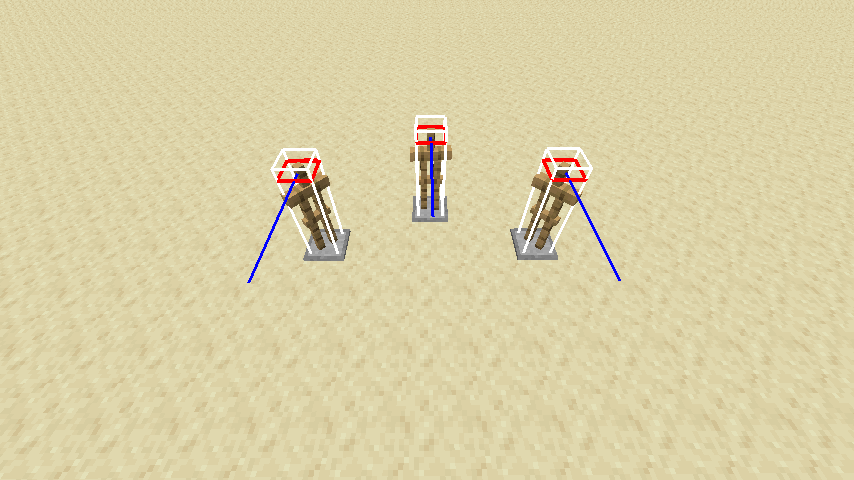
Then place the armor stand. The model will be looking towards you rather than the direction set by the Rotation tag. However, if you show hitboxes with F3+B, the blue line that shows where the armor stand is looking points in the direction set by the Rotation tag. Despite this, if you execute the following command, the armor stand will teleport in the direction the model is facing, and the blue line will point in that direction as well
/execute as @e[type=minecraft:armor_stand] at @s run tp @s ^ ^ ^1
Its also worth noting that not even using the /data command can avert this problem.
In 1.16 Pre-release 5, the Rotation NBT tag does not seem to affect the rotation of an armor stand when placing it. It will face the player that placed it until it is teleported.
Replication:
Give yourself an armor stand with a specific rotation (This bug does not work when using the /summon command), like so:
/give @p minecraft:armor_stand{EntityTag:{Rotation:[0.0F,0.0F]}} 1
Then place the armor stand. The model will be looking towards you rather than the direction set by the Rotation tag. However, if you show hitboxes with F3+B, the blue line that shows where the armor stand is looking points in the direction set by the Rotation tag. Despite this, if you execute the following command, the armor stand will teleport in the direction the model is facing, and the blue line will point in that direction as well.
/execute as @e[type=minecraft:armor_stand] at @s run tp @s ^ ^ ^1
In 1.16 Pre-release 5, the Rotation NBT tag does not seem to affect the rotation of an armor stand when placing it. It will face the player that placed it until it is teleported.
Replication:
Give yourself an armor stand with a specific rotation (This bug does not work when using the /summon command or a spawn egg that spawns an armor stand), like so:
/give @p minecraft:armor_stand{EntityTag:{Rotation:[0.0F,0.0F]}} 1
Then place the armor stand. The model will be looking towards you rather than the direction set by the Rotation tag. However, if you show hitboxes with F3+B, the blue line that shows where the armor stand is looking points in the direction set by the Rotation tag. Despite this, if you execute the following command, the armor stand will teleport in the direction the model is facing, and the blue line will point in that direction as well.
/execute as @e[type=minecraft:armor_stand] at @s run tp @s ^ ^ ^1
Rotation NBT tag does not affect armor stand's rotation when placed using an armor stand
Armor stand placesone block too low when placed on the side of a block unless there is a block immediately blow that spot.Armor stand is placed one block too low when placed on the side of a block unless there is a block immediately blow it
As of 1.7.3.0, if you have the Final Shout enchantment on your armor, whenever you drop below 25% health, the artifacts you use will only be triggered once instead of every 12/10/8 seconds. Specifically, when you drop below 25% health , the enchantment will consistently trigger artifacts the first time, but it will not trigger them again until you heal and your health drops below 25% again.
How to Replicate
Required Materials
- Any piece of armor w/ Final Shout
- 2, 5, or 9 enchantment points
- At least 1 artifact
Note: DO NOT use a healing artifact such as a Totem of Regeneration or a Soul Healer. Otherwise, the bug will not be noticeable.
Equip the armor w/ final shout. Enter a level and let your health drop below 25%. Or you can use the "death by door" glitch (enter the house at camp while rolling to take a massive amount of fall damage). If done correctly, the Final Shout effect will trigger the artifact(s) once, but it won't trigger them again.
My Current Build
Fighter's Bindings (Resolute Tempest Knife) w/ Swirling, Radiance, Critical Hit, Stalwart Armor w/ Final Shout, Snowball, Chilling, Feral Soul Crossbow w/ Anima Conduit, Infinity, Accelerate, Death Cap Mushroom, Iron Hide Amulet, Soul Healer.
Additional Gear: Scatter Crossbow w/ Infinity, Dynamo, Multishot, Torment Quiver
Note: when testing this build, DO NOT use the Soul Healer (or any other healing artifact). Otherwise the bug will be unnoticeable.
Platforms Affected
Since I do not know if other platforms are affected by this bug, I put Multiple in the Dungeons Platform field. Here is what I know so far:
- Confirmed for Windows 10 (played via Microsoft Store)
- Other Windows platforms are likely affected
- Unconfirmed for other platforms
My theory on what is happening
Final Shout triggers every 12/10/8 seconds. This is likely handled by a do-while loop in the code. My theory is that the condition in the loop was accidentally altered while developing the 1.7.3.0 hotfix, so when the loop reached the while segment, the condition evaluated to false, so the loop exited instead of running again like it should if the player's health is still below 25%. This is the most probable theory I can think of. However, I do not know how the game is coded, so take this theory with a grain of salt.
As of 1.7.3.0, if you have the Final Shout enchantment on your armor, whenever you drop below 25% health, the artifacts you use will only be triggered once instead of every 12/10/8 seconds. Specifically, when you drop below 25% health , the enchantment will consistently trigger artifacts the first time, but it will not trigger them again until you heal and your health drops below 25% again.
How to Replicate
Required Materials
- Any piece of armor w/ Final Shout
- 2, 5, or 9 enchantment points
- At least 1 artifact
Note: DO NOT use a healing artifact such as a Totem of Regeneration or a Soul Healer. Otherwise, the bug will not be noticeable.
Equip the armor w/ final shout. Enter a level and let your health drop below 25%. Or you can use the "death by door" glitch (enter the house at camp while rolling to take a massive amount of fall damage). If done correctly, the Final Shout effect will trigger the artifact(s) once, but it won't trigger them again.
My Current Build
Fighter's Bindings (Resolute Tempest Knife) w/ Swirling, Radiance, Critical Hit, Stalwart Armor w/ Final Shout, Snowball, Chilling, Feral Soul Crossbow w/ Anima Conduit, Infinity, Accelerate, Death Cap Mushroom, Iron Hide Amulet, Soul Healer.
Additional Gear: Scatter Crossbow w/ Infinity, Dynamo, Multishot, Torment Quiver
Note:
when testing this build, DO NOT use the Soul Healer (or any other healing artifact). Otherwise the bug will be unnoticeable.Platforms Affected
Since I do not know if other platforms are affected by this bug, I put Multiple in the Dungeons Platform field. Here is what I know so far:
- Confirmed for Windows 10 (played via Microsoft Store)
- Other Windows platforms are likely affected
- Unconfirmed for other platforms
My theory on what is happening
Final Shout triggers every 12/10/8 seconds. This is likely handled by a do-while loop in the code. My theory is that the condition in the loop was accidentally altered while developing the 1.7.3.0 hotfix, so when the loop reached the while segment, the condition evaluated to false, so the loop exited instead of running again like it should if the player's health is still below 25%. This is the most probable theory I can think of. However, I do not know how the game is coded, so take this theory with a grain of salt.
As of 1.7.3.0, if you have the Final Shout enchantment on your armor, whenever you drop below 25% health, the artifacts you use will only be triggered once instead of every 12/10/8 seconds. Specifically, when you drop below 25% health , the enchantment will consistently trigger artifacts the first time, but it will not trigger them again until you heal and your health drops below 25% again.
How to Replicate
Required Materials
- Any piece of armor w/ Final Shout
- 2, 5, or 9 enchantment points
- At least 1 artifact
Note: DO NOT use a healing artifact such as a Totem of Regeneration or a Soul Healer. Otherwise, the bug will not be noticeable.
Equip the armor w/ final shout. Enter a level and let your health drop below 25%. Or you can use the "death by door" glitch (enter the house at camp while rolling to take a massive amount of fall damage). If done correctly, the Final Shout effect will trigger the artifact(s) once, but it won't trigger them again.
My Current Build
Fighter's Bindings (Resolute Tempest Knife) w/ Swirling, Radiance, Critical Hit, Stalwart Armor w/ Final Shout, Snowball, Chilling, Feral Soul Crossbow w/ Anima Conduit, Infinity, Accelerate, Death Cap Mushroom, Iron Hide Amulet, Soul Healer.
Additional Gear: Scatter Crossbow w/ Infinity, Dynamo, Multishot, Torment Quiver
Note: When testing this build, DO NOT use the Soul Healer (or any other healing artifact). Otherwise the bug will be unnoticeable. Use the Torment Quiver or another non-healing artifact instead.
Platforms Affected
Since I do not know if other platforms are affected by this bug, I put Multiple in the Dungeons Platform field. Here is what I know so far:
- Confirmed for Windows 10 (played via Microsoft Store)
- Other Windows platforms are likely affected
- Unconfirmed for other platforms
My theory on what is happening
Final Shout triggers every 12/10/8 seconds. This is likely handled by a do-while loop in the code. My theory is that the condition in the loop was accidentally altered while developing the 1.7.3.0 hotfix, so when the loop reached the while segment, the condition evaluated to false, so the loop exited instead of running again like it should if the player's health is still below 25%. This is the most probable theory I can think of. However, I do not know how the game is coded, so take this theory with a grain of salt.
Notice for Minecraft Dungeons Developers
READ THIS BBUG REPORT IN ITS ENTIRETY BEFORE TAKING ACTION. OTHERWISE, YOU MAY MISS A CRUCIAL PIECE OF INFORMATION.
Introduction
As of 1.7.3.0, if you have the Final Shout enchantment on your armor, whenever you drop below 25% health, the artifacts you use will only be triggered once instead of every 12/10/8 seconds. Specifically, when you drop below 25% health , the enchantment will consistently trigger artifacts the first time, but it will not trigger them again until you heal and your health drops below 25% again.
How to Replicate
Required Materials
- Any piece of armor w/ Final Shout
- 2, 5, or 9 enchantment points
- At least 1 artifact
Note: DO NOT use a healing artifact such as a Totem of Regeneration or a Soul Healer. Otherwise, the bug will not be noticeable.
Equip the armor w/ final shout. Enter a level and let your health drop below 25%. Or you can use the "death by door" glitch (enter the house at camp while rolling to take a massive amount of fall damage). If done correctly, the Final Shout effect will trigger the artifact(s) once, but it won't trigger them again.
My Current Build
Fighter's Bindings (Resolute Tempest Knife) w/ Swirling, Radiance, Critical Hit, Stalwart Armor w/ Final Shout, Snowball, Chilling, Feral Soul Crossbow w/ Anima Conduit, Infinity, Accelerate, Death Cap Mushroom, Iron Hide Amulet, Soul Healer.
Additional Gear: Scatter Crossbow w/ Infinity, Dynamo, Multishot, Torment Quiver
Note: When testing this build, DO NOT use the Soul Healer (or any other healing artifact). Otherwise the bug will be unnoticeable. Use the Torment Quiver or another non-healing artifact instead.
Platforms Affected
Since I do not know if other platforms are affected by this bug, I put Multiple in the Dungeons Platform field. Here is what I know so far:
- Confirmed for Windows 10 (played via Microsoft Store)
- Other Windows platforms are likely affected
- Unconfirmed for other platforms
My theory on what is happening
Final Shout triggers every 12/10/8 seconds. This is likely handled by a do-while loop in the code. My theory is that the condition in the loop was accidentally altered while developing the 1.7.3.0 hotfix, so when the loop reached the while segment, the condition evaluated to false, so the loop exited instead of running again like it should if the player's health is still below 25%. This is the most probable theory I can think of. However, I do not know how the game is coded, so take this theory with a grain of salt.
Notice for Minecraft Dungeons Developers
READ THIS
BBUG REPORT IN ITS ENTIRETY BEFORE TAKING ACTION. OTHERWISE, YOU MAY MISS A CRUCIAL PIECE OF INFORMATION.Introduction
As of 1.7.3.0, if you have the Final Shout enchantment on your armor, whenever you drop below 25% health, the artifacts you use will only be triggered once instead of every 12/10/8 seconds. Specifically, when you drop below 25% health , the enchantment will consistently trigger artifacts the first time, but it will not trigger them again until you heal and your health drops below 25% again.
How to Replicate
Required Materials
- Any piece of armor w/ Final Shout
- 2, 5, or 9 enchantment points
- At least 1 artifact
Note: DO NOT use a healing artifact such as a Totem of Regeneration or a Soul Healer. Otherwise, the bug will not be noticeable.
Equip the armor w/ final shout. Enter a level and let your health drop below 25%. Or you can use the "death by door" glitch (enter the house at camp while rolling to take a massive amount of fall damage). If done correctly, the Final Shout effect will trigger the artifact(s) once, but it won't trigger them again.
My Current Build
Fighter's Bindings (Resolute Tempest Knife) w/ Swirling, Radiance, Critical Hit, Stalwart Armor w/ Final Shout, Snowball, Chilling, Feral Soul Crossbow w/ Anima Conduit, Infinity, Accelerate, Death Cap Mushroom, Iron Hide Amulet, Soul Healer.
Additional Gear: Scatter Crossbow w/ Infinity, Dynamo, Multishot, Torment Quiver
Note: When testing this build, DO NOT use the Soul Healer (or any other healing artifact). Otherwise the bug will be unnoticeable. Use the Torment Quiver or another non-healing artifact instead.
Platforms Affected
Since I do not know if other platforms are affected by this bug, I put Multiple in the Dungeons Platform field. Here is what I know so far:
- Confirmed for Windows 10 (played via Microsoft Store)
- Other Windows platforms are likely affected
- Unconfirmed for other platforms
My theory on what is happening
Final Shout triggers every 12/10/8 seconds. This is likely handled by a do-while loop in the code. My theory is that the condition in the loop was accidentally altered while developing the 1.7.3.0 hotfix, so when the loop reached the while segment, the condition evaluated to false, so the loop exited instead of running again like it should if the player's health is still below 25%. This is the most probable theory I can think of. However, I do not know how the game is coded, so take this theory with a grain of salt.
Burning aura on an Enchanted Slime burns the player even after the Slime has been killed.
Notice for Minecraft Dungeons Developers
READ THIS BUG REPORT IN ITS ENTIRETY BEFORE TAKING ACTION. OTHERWISE, YOU MAY MISS A CRUCIAL PIECE OF INFORMATION.
Introduction
As of 1.7.3.0, if you kill a Slime with the Burning enchantment and then stand in its Burning aura, the aura will continue to burn until it disappears. From my testing, this is the case specifically for the smallest size of Slime. For the larger sizes, the Burning aura disappears immediately and two smaller Slimes with the same enchantments appear as normal.
Note: I did some further testing, and it seems that this bug is inconsistent. From what I have seen, the burning aura on the smallest Slimes will sometimes disappear immediately, and at other times the burning aura stays for a while.
How to Replicate
Required Materials
- Any mission containing Slimes (i.e. Soggy Cave) (required)
- A good high level Apoc+ build (recommended)
- Running the mission on a low Apoc+ difficulty (recommended)
Go to a level that has Slimes in it (i.e. Soggy Cave). Find an Enchanted Slime w/ Burning, then kill it and all the smaller ones. Once all of the smallest slimes have been killed, stand in one of their Burning auras before they disappear. If done correctly, you should be harmed by the Burning aura even though its owner was killed. You will be able to tell by listening for the burning sound while standing in the aura.
Note: Because of the random nature of Minecraft Dungeons, you may need to run the mission more than once in order to find an Enchanted Slime w/ Burning. Furthermore, since the bug seems to be inconsistent, you may need to do this with multiple Burning Slimes in order to replicate the bug.
My Current Build (for testing purposes)
Fighter's Bindings w/ Swirling, Radiance, Critical Hit, Stalwart Armor w/ Final Shout, Snowball, Chilling, Feral Soul Crossbow w/ Anima Conduit, Infinity, Accelerate, Death Cap Mushroom, Iron Hide Amulet, Soul Healer.
Additional Gear: Scatter Crossbow w/ Infinity, Dynamo, Multishot, Torment Quiver
Platforms Affected
Since I do not know if other platforms are affected by this bug, I put Multiple in the Dungeons Platform field. Here is what I know so far:
- Confirmed for Windows 10 (played via Microsoft Store)
- Other Windows platforms are likely affected
- Unconfirmed for other platforms
My theory on what is happening
The Slime is the only mob in Minecraft dungeons that splits into smaller pieces when defeated. Because of this, the Burning aura is probably handled differently for Slimes in comparison to normal mobs. Larger Slimes and their Burning aura disappear immediately due to the mob splitting in two. For the smallest Slimes, the Slime disappears immediately when defeated, but its Burning aura does not. Since the Burning aura on the larger Slimes disappears immediately, its effect is likely not disabled beforehand to conserve processing power. My theory is that leaving this effect enabled for the larger Slimes crossed over to the smallest Slimes, which makes the Burning aura harm players even after the Slime dies. This is the most probable theory I can think of. However, I do not know how the game is coded, so take this theory with a grain of salt.
Notice for Minecraft Dungeons Developers
READ THIS BUG REPORT IN ITS ENTIRETY BEFORE TAKING ACTION. OTHERWISE, YOU MAY MISS A CRUCIAL PIECE OF INFORMATION.
Introduction
As of 1.7.3.0, if you kill a Slime with the Burning enchantment and then stand in its Burning aura, the aura will continue to burn until it disappears. From my testing, this is the case specifically for the smallest size of Slime. For the larger sizes, the Burning aura disappears immediately and two smaller Slimes with the same enchantments appear as normal.
Note: I did some further testing, and it seems that this bug is inconsistent. From what I have seen, the burning aura on the smallest Slimes will sometimes disappear immediately, and at other times the burning aura stays for a while.
How to Replicate
Required Materials
- Any mission containing Slimes (i.e. Soggy Cave) (required)
- A good high level Apoc+ build (recommended)
- Running the mission on a low Apoc+ difficulty (recommended)
Go to a level that has Slimes in it (i.e. Soggy Cave). Find an Enchanted Slime w/ Burning, then kill it and all the smaller ones. Once all of the smallest slimes have been killed, stand in one of their Burning auras before they disappear. If done correctly, you should be harmed by the Burning aura even though its owner was killed. You will be able to tell by listening for the burning sound while standing in the aura.
Note: Because of the random nature of Minecraft Dungeons, you may need to run the mission more than once in order to find an Enchanted Slime w/ Burning. Furthermore, since the bug seems to be inconsistent, you may need to do this with multiple Burning Slimes in order to replicate the bug.
My Current Build (for testing purposes)
Fighter's Bindings w/ Swirling, Radiance, Critical Hit, Stalwart Armor w/ Final Shout, Snowball, Chilling, Feral Soul Crossbow w/ Anima Conduit, Infinity, Accelerate, Death Cap Mushroom, Iron Hide Amulet, Soul Healer.
Additional Gear: Scatter Crossbow w/ Infinity, Dynamo, Multishot, Torment Quiver
Platforms Affected
Since I do not know if other platforms are affected by this bug, I put Multiple in the Dungeons Platform field. Here is what I know so far:
- Confirmed for Windows 10 (played via Microsoft Store)
- Other Windows platforms are likely affected
- Unconfirmed for other platforms
My theory on what is happening
The Slime is the only mob in Minecraft dungeons that splits into smaller pieces when defeated. Because of this, the Burning aura is probably handled differently for Slimes in comparison to normal mobs. Larger Slimes and their Burning aura disappear immediately due to the mob splitting in two. For the smallest Slimes, the Slime disappears immediately when defeated, but its Burning aura does
not. Since the Burning aura on the larger Slimes disappears immediately, its effect is likely not disabled beforehand to conserve processing power. My theory is that leaving this effect enabled for the larger Slimes crossed over to the smallest Slimes, which makes the Burning aura harm players even after the Slime dies. This is the most probable theory I can think of. However, I do not know how the game is coded, so take this theory with a grain of salt.Notice for Minecraft Dungeons Developers
READ THIS BUG REPORT IN ITS ENTIRETY BEFORE TAKING ACTION. OTHERWISE, YOU MAY MISS A CRUCIAL PIECE OF INFORMATION.
Introduction
As of 1.7.3.0, if you kill a Slime with the Burning enchantment and then stand in its Burning aura, the aura will continue to burn until it disappears. From my testing, this is the case specifically for the smallest size of Slime. For the larger sizes, the Burning aura disappears immediately and two smaller Slimes with the same enchantments appear as normal.
Note: I did some further testing, and it seems that this bug is inconsistent. From what I have seen, the burning aura on the smallest Slimes will sometimes disappear immediately, and at other times the burning aura stays for a while.
How to Replicate
Required Materials
- Any mission containing Slimes (i.e. Soggy Cave) (required)
- A good high level Apoc+ build (recommended)
- Running the mission on a low Apoc+ difficulty (recommended)
Go to a level that has Slimes in it (i.e. Soggy Cave). Find an Enchanted Slime w/ Burning, then kill it and all the smaller ones. Once all of the smallest slimes have been killed, stand in one of their Burning auras before they disappear. If done correctly, you should be harmed by the Burning aura even though its owner was killed. You will be able to tell by listening for the burning sound while standing in the aura.
Note: Because of the random nature of Minecraft Dungeons, you may need to run the mission more than once in order to find an Enchanted Slime w/ Burning. Furthermore, since the bug seems to be inconsistent, you may need to do this with multiple Burning Slimes in order to replicate the bug.
My Current Build (for testing purposes)
Fighter's Bindings w/ Swirling, Radiance, Critical Hit, Stalwart Armor w/ Final Shout, Snowball, Chilling, Feral Soul Crossbow w/ Anima Conduit, Infinity, Accelerate, Death Cap Mushroom, Iron Hide Amulet, Soul Healer.
Additional Gear: Scatter Crossbow w/ Infinity, Dynamo, Multishot, Torment Quiver
Platforms Affected
Since I do not know if other platforms are affected by this bug, I put Multiple in the Dungeons Platform field. Here is what I know so far:
- Confirmed for Windows 10 (played via Microsoft Store)
- Other Windows platforms are likely affected
- Unconfirmed for other platforms
My theory on what is happening
The Slime is the only mob in Minecraft dungeons that splits into smaller pieces when defeated. Because of this, the Burning aura is probably handled differently for Slimes in comparison to normal mobs. Larger Slimes and their Burning aura disappear immediately due to the mob splitting in two. For the smallest Slimes, the Slime disappears immediately when defeated, but its Burning aura doesn't always disappear immediately. Since the Burning aura on the larger Slimes disappears immediately, its effect is likely not disabled beforehand to conserve processing power. My theory is that leaving this effect enabled for the larger Slimes crossed over to the smallest Slimes, which makes the Burning aura harm players even after the Slime dies. This is the most probable theory I can think of. However, I do not know how the game is coded, so take this theory with a grain of salt.
Notice for Minecraft Dungeons Developers
READ THIS BUG REPORT IN ITS ENTIRETY BEFORE TAKING ACTION. OTHERWISE, YOU MAY MISS A CRUCIAL PIECE OF INFORMATION.
Introduction
As of 1.7.3.0, if you kill a Slime with the Burning enchantment
and then stand in its Burning aura, the aura will continue to burnuntil it disappears. From my testing, thisis the case specifically for the smallestsize ofSlime. For the larger sizes, the Burning aura disappears immediately and two smaller Slimeswith the same enchantments appear as normal.Note: I did some further testing, and it seems that this bug is inconsistent. From what I have seen, the burning aura on the smallest Slimes will sometimes disappear immediately, and at other times the burning aura stays for a while.
How to Replicate
Required Materials
- Any mission containing Slimes (i.e. Soggy Cave) (required)
- A
good high level Apoc+ build (recommended)Running the mission on a low Apoc+ difficulty (recommended)Go to a level that has Slimes in it (i.e. Soggy Cave). Find an Enchanted Slime w/ Burning, then kill it and all the smaller ones. Once all of the smallest slimes have been killed, stand in one of their Burning auras before they disappear. If done correctly, you should be harmed by the Burning aura even though its owner was killed. You will be able to tell by listening for the burning sound while standing in the aura.
Note: Because of the random nature of Minecraft Dungeons, you may need to run the mission more than once in order to find an Enchanted Slime w/ Burning. Furthermore, since the bug seems to be inconsistent, you may need to do this with multiple Burning Slimes in order to replicate the bug.
My Current Build (for testing purposes)
Fighter's Bindings w/ Swirling, Radiance, Critical Hit, Stalwart Armor w/ Final Shout, Snowball, Chilling, Feral Soul Crossbow w/ Anima Conduit, Infinity, Accelerate, Death Cap Mushroom, Iron Hide Amulet, Soul Healer.
Additional Gear: Scatter Crossbow w/ Infinity, Dynamo, Multishot, Torment Quiver
Platforms Affected
Since I do not know if other platforms are affected by this bug, I put Multiple in the Dungeons Platform field. Here is what I know so far:
- Confirmed for Windows 10 (played via Microsoft Store)
- Other Windows platforms are likely affected
- Unconfirmed for other platforms
My theory on what is happening
The Slime is the only mob in Minecraft dungeons that splits into smaller pieces when defeated. Because of this, the Burning aura is probably handled differently for Slimes in comparison to normal mobs.
Larger Slimes and their Burning aura disappear immediately due to the mob splitting in two. For the smallest Slimes, the Slime disappears immediately when defeated, butits Burning aura doesn't always disappear immediately. Since theBurning aura on the larger Slimes disappears immediately, its effect is likely not disabled beforehand to conserve processing power. My theory is that leaving this effect enabled for the larger Slimes crossed over to the smallest Slimes, which makes the Burning aura harm players even after the Slime dies. This is the most probable theory I can think of. However, I do not know how the game is coded, so take this theory with a grain of salt.Notice for Minecraft Dungeons Developers
READ THIS BUG REPORT IN ITS ENTIRETY BEFORE TAKING ACTION. OTHERWISE, YOU MAY MISS A CRUCIAL PIECE OF INFORMATION.
Introduction
As of 1.7.3.0, if you kill a Slime with the Burning enchantment, if the Burning aura does not disappear immediately, it will continue to burn players standing in it until it disappears. From my testing, this happens with any size of slime, but only happens if the slime was killed by a Torment Arrow.
Note: I did some further testing, and it seems that this bug is inconsistent. From what I have seen, the burning aura on the smallest Slimes will sometimes disappear immediately, and at other times the burning aura stays for a while.
How to Replicate
Required Materials
- Any mission containing Slimes (i.e. Soggy Cave) (required)
- A Torment Quiver (required)
- A Scatter Crossbow w/ Dynamo and Infinity (highly recommended)
- A good high level Apoc+ build (recommended)
- Running the mission on a low Apoc+ difficulty (recommended)
Go to a level that has Slimes in it (i.e. Soggy Cave). Find an Enchanted Slime w/ Burning, then kill it and all the smaller ones. Once all of the smallest slimes have been killed, stand in one of their Burning auras before they disappear. If done correctly, you should be harmed by the Burning aura even though its owner was killed. You will be able to tell by listening for the burning sound while standing in the aura.
Note: Because of the random nature of Minecraft Dungeons, you may need to run the mission more than once in order to find an Enchanted Slime w/ Burning. Furthermore, since the bug seems to be inconsistent, you may need to do this with multiple Burning Slimes in order to replicate the bug.
Platforms Affected
Since I do not know if other platforms are affected by this bug, I put Multiple in the Dungeons Platform field. Here is what I know so far:
- Confirmed for Windows 10 (played via Microsoft Store)
- Other Windows platforms are likely affected
- Unconfirmed for other platforms
My theory on what is happening
The Slime is the only mob in Minecraft dungeons that splits into smaller pieces when defeated. Because of this, the Burning aura is probably handled differently for Slimes in comparison to normal mobs. When a Slime is killed with a Torment Quiver, its Burning aura doesn't always disappear immediately, which is likely a consequence of the Torment Arrow's unique behavior when hitting mobs. Because all but the smallest Slimes split upon dying, the aura's effect is likely not disabled beforehand to conserve processing power, which makes the Burning aura harm players even after the Slime dies. This is the most probable theory I can think of. However, I do not know how the game is coded, so take this theory with a grain of salt.
Notice for Minecraft Dungeons Developers
READ THIS BUG REPORT IN ITS ENTIRETY BEFORE TAKING ACTION. OTHERWISE, YOU MAY MISS A CRUCIAL PIECE OF INFORMATION.
Introduction
As of 1.7.3.0, if you kill a Slime with the Burning enchantment, if the Burning aura does not disappear immediately, it will continue to burn players standing in it until it disappears. From my testing, this happens with any size of slime, but only happens if the slime was killed by a Torment Arrow.
Note: I did some further testing, and it seems that this bug is inconsistent. From what I have seen, the burning aura on the smallest Slimes will sometimes disappear immediately, and at other times the burning aura stays for a while.
How to Replicate
Required Materials
- Any mission containing Slimes (i.e. Soggy Cave) (required)
- A Torment Quiver (required)
- A Scatter Crossbow w/ Dynamo and Infinity (highly recommended)
- A good high level Apoc+ build (recommended)
- Running the mission on a low Apoc+ difficulty (recommended)
Go to a level that has Slimes in it (i.e. Soggy Cave). Find an Enchanted Slime w/ Burning, then kill it and all the smaller ones. Once all of the smallest slimes have been killed, stand in one of their Burning auras before they disappear. If done correctly, you should be harmed by the Burning aura even though its owner was killed. You will be able to tell by listening for the burning sound while standing in the aura.
Note: Because of the random nature of Minecraft Dungeons, you may need to run the mission more than once in order to find an Enchanted Slime w/ Burning. Furthermore, since the bug seems to be inconsistent, you may need to do this with multiple Burning Slimes in order to replicate the bug.
Platforms Affected
Since I do not know if other platforms are affected by this bug, I put Multiple in the Dungeons Platform field. Here is what I know so far:
- Confirmed for Windows 10 (played via Microsoft Store)
- Other Windows platforms are likely affected
- Unconfirmed for other platforms
My theory on what is happening
The Slime is the only mob in Minecraft dungeons that splits into smaller pieces when defeated. Because of this, the Burning aura is probably handled differently for Slimes in comparison to normal mobs. When a Slime is killed with a Torment Quiver, its Burning aura doesn't always disappear immediately, which is likely a consequence of the Torment Arrow's unique behavior when hitting mobs. Because all but the smallest Slimes split upon dying, the aura's effect is likely not disabled beforehand to conserve processing power, which makes the Burning aura harm players even after the Slime dies. This is the most probable theory I can think of. However, I do not know how the game is coded, so take this theory with a grain of salt.
Notice for Minecraft Dungeons Developers
READ THIS BUG REPORT IN ITS ENTIRETY BEFORE TAKING ACTION. OTHERWISE, YOU MAY MISS A CRUCIAL PIECE OF INFORMATION.
Video Showcasing Bug Coming Soon
In response to a request by one of the Minecraft Dungeons Developers, I will eventually upload a video showcasing the bug once I find a Slime with Burning. My first test video wasn't exactly at the best quality, but that was because my recorder was having problems, not because my game was lagging.
Introduction
As of 1.7.3.0, if you kill a Slime with the Burning enchantment, if the Burning aura does not disappear immediately, it will continue to burn players standing in it until it disappears. From my testing, this happens with any size of slime, but only happens if the slime was killed by a Torment Arrow.
Note: I did some further testing, and it seems that this bug is inconsistent. From what I have seen, the burning aura on the smallest Slimes will sometimes disappear immediately, and at other times the burning aura stays for a while.
How to Replicate
Required Materials
- Any mission containing Slimes (i.e. Soggy Cave) (required)
- A Torment Quiver (required)
- A Scatter Crossbow w/ Dynamo and Infinity (highly recommended)
- A good high level Apoc+ build (recommended)
- Running the mission on a low Apoc+ difficulty (recommended)
Go to a level that has Slimes in it (i.e. Soggy Cave). Find an Enchanted Slime w/ Burning, then kill it and all the smaller ones. Once all of the smallest slimes have been killed, stand in one of their Burning auras before they disappear. If done correctly, you should be harmed by the Burning aura even though its owner was killed. You will be able to tell by listening for the burning sound while standing in the aura.
Note: Because of the random nature of Minecraft Dungeons, you may need to run the mission more than once in order to find an Enchanted Slime w/ Burning. Furthermore, since the bug seems to be inconsistent, you may need to do this with multiple Burning Slimes in order to replicate the bug.
Platforms Affected
Since I do not know if other platforms are affected by this bug, I put Multiple in the Dungeons Platform field. Here is what I know so far:
- Confirmed for Windows 10 (played via Microsoft Store)
- Other Windows platforms are likely affected
- Unconfirmed for other platforms
My theory on what is happening
The Slime is the only mob in Minecraft dungeons that splits into smaller pieces when defeated. Because of this, the Burning aura is probably handled differently for Slimes in comparison to normal mobs. When a Slime is killed with a Torment Quiver, its Burning aura doesn't always disappear immediately, which is likely a consequence of the Torment Arrow's unique behavior when hitting mobs. Because all but the smallest Slimes split upon dying, the aura's effect is likely not disabled beforehand to conserve processing power, which makes the Burning aura harm players even after the Slime dies. This is the most probable theory I can think of. However, I do not know how the game is coded, so take this theory with a grain of salt.
Notice for Minecraft Dungeons Developers
READ THIS BUG REPORT IN ITS ENTIRETY BEFORE TAKING ACTION. OTHERWISE, YOU MAY MISS A CRUCIAL PIECE OF INFORMATION.
Video Showcasing Bug Coming Soon
In response to a request by one of the Minecraft Dungeons Developers, I will eventually upload a video showcasing the bug once I find a Slime with Burning. My first test video wasn't exactly at the best quality, but that was because my recorder was having problems, not because my game was lagging. I'll make sure to review the final video before I upload it so you can clearly see the bug in action.
Introduction
As of 1.7.3.0, if you kill a Slime with the Burning enchantment, if the Burning aura does not disappear immediately, it will continue to burn players standing in it until it disappears. From my testing, this happens with any size of slime, but only happens if the slime was killed by a Torment Arrow.
Note: I did some further testing, and it seems that this bug is inconsistent. From what I have seen, the burning aura on the smallest Slimes will sometimes disappear immediately, and at other times the burning aura stays for a while.
How to Replicate
Required Materials
- Any mission containing Slimes (i.e. Soggy Cave) (required)
- A Torment Quiver (required)
- A Scatter Crossbow w/ Dynamo and Infinity (highly recommended)
- A good high level Apoc+ build (recommended)
- Running the mission on a low Apoc+ difficulty (recommended)
Go to a level that has Slimes in it (i.e. Soggy Cave). Find an Enchanted Slime w/ Burning, then kill it and all the smaller ones. Once all of the smallest slimes have been killed, stand in one of their Burning auras before they disappear. If done correctly, you should be harmed by the Burning aura even though its owner was killed. You will be able to tell by listening for the burning sound while standing in the aura.
Note: Because of the random nature of Minecraft Dungeons, you may need to run the mission more than once in order to find an Enchanted Slime w/ Burning. Furthermore, since the bug seems to be inconsistent, you may need to do this with multiple Burning Slimes in order to replicate the bug.
Platforms Affected
Since I do not know if other platforms are affected by this bug, I put Multiple in the Dungeons Platform field. Here is what I know so far:
- Confirmed for Windows 10 (played via Microsoft Store)
- Other Windows platforms are likely affected
- Unconfirmed for other platforms
My theory on what is happening
The Slime is the only mob in Minecraft dungeons that splits into smaller pieces when defeated. Because of this, the Burning aura is probably handled differently for Slimes in comparison to normal mobs. When a Slime is killed with a Torment Quiver, its Burning aura doesn't always disappear immediately, which is likely a consequence of the Torment Arrow's unique behavior when hitting mobs. Because all but the smallest Slimes split upon dying, the aura's effect is likely not disabled beforehand to conserve processing power, which makes the Burning aura harm players even after the Slime dies. This is the most probable theory I can think of. However, I do not know how the game is coded, so take this theory with a grain of salt.
Notice for Minecraft Dungeons Developers
READ THIS BUG REPORT IN ITS ENTIRETY BEFORE TAKING ACTION. OTHERWISE, YOU MAY MISS A CRUCIAL PIECE OF INFORMATION.
Video Showcasing Bug Coming Soon
In response to a request
by one of the Minecraft Dungeons Developers, I will eventually upload a video showcasing the bug once I find a Slime with Burning. My first test video wasn't exactly at the best quality, but that was because my recorder was having problems, not because my game was lagging. I'll make sure to review the final video before I upload it so you can clearly see the bug in action.Introduction
As of 1.7.3.0, if you kill a Slime with the Burning enchantment, if the Burning aura does not disappear immediately, it will continue to burn players standing in it until it disappears. From my testing, this happens with any size of slime, but only happens if the slime was killed by a Torment Arrow.
Note: I did some further testing, and it seems that this bug is inconsistent. From what I have seen, the burning aura on the smallest Slimes will sometimes disappear immediately, and at other times the burning aura stays for a while.
How to Replicate
Required Materials
- Any mission containing Slimes (i.e. Soggy Cave) (required)
- A Torment Quiver (required)
- A Scatter Crossbow w/ Dynamo and Infinity (highly recommended)
- A good high level Apoc+ build (recommended)
- Running the mission on a low Apoc+ difficulty (recommended)
Go to a level that has Slimes in it (i.e. Soggy Cave). Find an Enchanted Slime w/ Burning, then kill it and all the smaller ones. Once all of the smallest slimes have been killed, stand in one of their Burning auras before they disappear. If done correctly, you should be harmed by the Burning aura even though its owner was killed. You will be able to tell by listening for the burning sound while standing in the aura.
Note: Because of the random nature of Minecraft Dungeons, you may need to run the mission more than once in order to find an Enchanted Slime w/ Burning. Furthermore, since the bug seems to be inconsistent, you may need to do this with multiple Burning Slimes in order to replicate the bug.
Platforms Affected
Since I do not know if other platforms are affected by this bug, I put Multiple in the Dungeons Platform field. Here is what I know so far:
- Confirmed for Windows 10 (played via Microsoft Store)
- Other Windows platforms are likely affected
- Unconfirmed for other platforms
My theory on what is happening
The Slime is the only mob in Minecraft dungeons that splits into smaller pieces when defeated. Because of this, the Burning aura is probably handled differently for Slimes in comparison to normal mobs. When a Slime is killed with a Torment Quiver, its Burning aura doesn't always disappear immediately, which is likely a consequence of the Torment Arrow's unique behavior when hitting mobs. Because all but the smallest Slimes split upon dying, the aura's effect is likely not disabled beforehand to conserve processing power, which makes the Burning aura harm players even after the Slime dies. This is the most probable theory I can think of. However, I do not know how the game is coded, so take this theory with a grain of salt.
Notice for Minecraft Dungeons Developers
READ THIS BUG REPORT IN ITS ENTIRETY BEFORE TAKING ACTION. OTHERWISE, YOU MAY MISS A CRUCIAL PIECE OF INFORMATION.
Video Showcasing Bug Coming Soon
In response to a request from a fellow bug reporter, I will eventually upload a video showcasing the bug once I find a Slime with Burning. My first test video wasn't exactly at the best quality, but that was because my recorder was having problems, not because my game was lagging. I'll make sure to review the final video before I upload it so you can clearly see the bug in action.
Introduction
As of 1.7.3.0, if you kill a Slime with the Burning enchantment, if the Burning aura does not disappear immediately, it will continue to burn players standing in it until it disappears. From my testing, this happens with any size of slime, but only happens if the slime was killed by a Torment Arrow.
Note: I did some further testing, and it seems that this bug is inconsistent. From what I have seen, the burning aura on the smallest Slimes will sometimes disappear immediately, and at other times the burning aura stays for a while.
How to Replicate
Required Materials
- Any mission containing Slimes (i.e. Soggy Cave) (required)
- A Torment Quiver (required)
- A Scatter Crossbow w/ Dynamo and Infinity (highly recommended)
- A good high level Apoc+ build (recommended)
- Running the mission on a low Apoc+ difficulty (recommended)
Go to a level that has Slimes in it (i.e. Soggy Cave). Find an Enchanted Slime w/ Burning, then kill it and all the smaller ones. Once all of the smallest slimes have been killed, stand in one of their Burning auras before they disappear. If done correctly, you should be harmed by the Burning aura even though its owner was killed. You will be able to tell by listening for the burning sound while standing in the aura.
Note: Because of the random nature of Minecraft Dungeons, you may need to run the mission more than once in order to find an Enchanted Slime w/ Burning. Furthermore, since the bug seems to be inconsistent, you may need to do this with multiple Burning Slimes in order to replicate the bug.
Platforms Affected
Since I do not know if other platforms are affected by this bug, I put Multiple in the Dungeons Platform field. Here is what I know so far:
- Confirmed for Windows 10 (played via Microsoft Store)
- Other Windows platforms are likely affected
- Unconfirmed for other platforms
My theory on what is happening
The Slime is the only mob in Minecraft dungeons that splits into smaller pieces when defeated. Because of this, the Burning aura is probably handled differently for Slimes in comparison to normal mobs. When a Slime is killed with a Torment Quiver, its Burning aura doesn't always disappear immediately, which is likely a consequence of the Torment Arrow's unique behavior when hitting mobs. Because all but the smallest Slimes split upon dying, the aura's effect is likely not disabled beforehand to conserve processing power, which makes the Burning aura harm players even after the Slime dies. This is the most probable theory I can think of. However, I do not know how the game is coded, so take this theory with a grain of salt.
Notice for Minecraft Dungeons Developers
READ THIS BUG REPORT IN ITS ENTIRETY BEFORE TAKING ACTION. OTHERWISE, YOU MAY MISS A CRUCIAL PIECE OF INFORMATION.
Video Showcasing Bug Coming Soon
In response to a request from a
fellow bug reporter, I will eventually upload a video showcasing the bug once I find a Slime with Burning. My first test video wasn't exactly at the best quality, but that was because my recorder was having problems, not because my game was lagging. I'll make sure to review the final video before I upload it so you can clearly see the bug in action.Introduction
As of 1.7.3.0, if you kill a Slime with the Burning enchantment, if the Burning aura does not disappear immediately, it will continue to burn players standing in it until it disappears. From my testing, this happens with any size of slime, but only happens if the slime was killed by a Torment Arrow.
Note: I did some further testing, and it seems that this bug is inconsistent. From what I have seen, the burning aura on the smallest Slimes will sometimes disappear immediately, and at other times the burning aura stays for a while.
How to Replicate
Required Materials
- Any mission containing Slimes (i.e. Soggy Cave) (required)
- A Torment Quiver (required)
- A Scatter Crossbow w/ Dynamo and Infinity (highly recommended)
- A good high level Apoc+ build (recommended)
- Running the mission on a low Apoc+ difficulty (recommended)
Go to a level that has Slimes in it (i.e. Soggy Cave). Find an Enchanted Slime w/ Burning, then kill it and all the smaller ones. Once all of the smallest slimes have been killed, stand in one of their Burning auras before they disappear. If done correctly, you should be harmed by the Burning aura even though its owner was killed. You will be able to tell by listening for the burning sound while standing in the aura.
Note: Because of the random nature of Minecraft Dungeons, you may need to run the mission more than once in order to find an Enchanted Slime w/ Burning. Furthermore, since the bug seems to be inconsistent, you may need to do this with multiple Burning Slimes in order to replicate the bug.
Platforms Affected
Since I do not know if other platforms are affected by this bug, I put Multiple in the Dungeons Platform field. Here is what I know so far:
- Confirmed for Windows 10 (played via Microsoft Store)
- Other Windows platforms are likely affected
- Unconfirmed for other platforms
My theory on what is happening
The Slime is the only mob in Minecraft dungeons that splits into smaller pieces when defeated. Because of this, the Burning aura is probably handled differently for Slimes in comparison to normal mobs. When a Slime is killed with a Torment Quiver, its Burning aura doesn't always disappear immediately, which is likely a consequence of the Torment Arrow's unique behavior when hitting mobs. Because all but the smallest Slimes split upon dying, the aura's effect is likely not disabled beforehand to conserve processing power, which makes the Burning aura harm players even after the Slime dies. This is the most probable theory I can think of. However, I do not know how the game is coded, so take this theory with a grain of salt.
Notice for Minecraft Dungeons Developers
READ THIS BUG REPORT IN ITS ENTIRETY BEFORE TAKING ACTION. OTHERWISE, YOU MAY MISS A CRUCIAL PIECE OF INFORMATION.
Video Showcasing Bug Coming Soon
In response to a request from a Minecraft Dungeons Developer, I will eventually upload a video showcasing the bug once I find a Slime with Burning. My first test video wasn't exactly at the best quality, but that was because my recorder was having problems, not because my game was lagging. I'll make sure to review the final video before I upload it so you can clearly see the bug in action.
Introduction
As of 1.7.3.0, if you kill a Slime with the Burning enchantment, if the Burning aura does not disappear immediately, it will continue to burn players standing in it until it disappears. From my testing, this happens with any size of slime, but only happens if the slime was killed by a Torment Arrow.
Note: I did some further testing, and it seems that this bug is inconsistent. From what I have seen, the burning aura on the smallest Slimes will sometimes disappear immediately, and at other times the burning aura stays for a while.
How to Replicate
Required Materials
- Any mission containing Slimes (i.e. Soggy Cave) (required)
- A Torment Quiver (required)
- A Scatter Crossbow w/ Dynamo and Infinity (highly recommended)
- A good high level Apoc+ build (recommended)
- Running the mission on a low Apoc+ difficulty (recommended)
Go to a level that has Slimes in it (i.e. Soggy Cave). Find an Enchanted Slime w/ Burning, then kill it and all the smaller ones. Once all of the smallest slimes have been killed, stand in one of their Burning auras before they disappear. If done correctly, you should be harmed by the Burning aura even though its owner was killed. You will be able to tell by listening for the burning sound while standing in the aura.
Note: Because of the random nature of Minecraft Dungeons, you may need to run the mission more than once in order to find an Enchanted Slime w/ Burning. Furthermore, since the bug seems to be inconsistent, you may need to do this with multiple Burning Slimes in order to replicate the bug.
Platforms Affected
Since I do not know if other platforms are affected by this bug, I put Multiple in the Dungeons Platform field. Here is what I know so far:
- Confirmed for Windows 10 (played via Microsoft Store)
- Other Windows platforms are likely affected
- Unconfirmed for other platforms
My theory on what is happening
The Slime is the only mob in Minecraft dungeons that splits into smaller pieces when defeated. Because of this, the Burning aura is probably handled differently for Slimes in comparison to normal mobs. When a Slime is killed with a Torment Quiver, its Burning aura doesn't always disappear immediately, which is likely a consequence of the Torment Arrow's unique behavior when hitting mobs. Because all but the smallest Slimes split upon dying, the aura's effect is likely not disabled beforehand to conserve processing power, which makes the Burning aura harm players even after the Slime dies. This is the most probable theory I can think of. However, I do not know how the game is coded, so take this theory with a grain of salt.
Notice for Minecraft Dungeons Developers
READ THIS BUG REPORT IN ITS ENTIRETY BEFORE TAKING ACTION. OTHERWISE, YOU MAY MISS A CRUCIAL PIECE OF INFORMATION.
Video
Showcasing Bug Coming SoonIn response to a request from a Minecraft Dungeons Developer, I
will eventuallyupload a video showcasing thebugonce I find a Slime with Burning. My first test video wasn't exactly at the best quality, but that was because my recorder was having problems, not because my game was lagging. I'll make sure to review the final video before I upload it so you can clearly see the bug in action.Introduction
As of 1.7.3.0, if you kill a Slime with the Burning enchantment, if the Burning aura does not disappear immediately, it will continue to burn players standing in it until it disappears. From my testing, this happens with any size of slime, but only happens if the slime was killed by a Torment Arrow.
Note: I did some further testing, and it seems that this bug is inconsistent. From what I have seen, the burning aura on the smallest Slimes will sometimes disappear immediately, and at other times the burning aura stays for a while.
How to Replicate
Required Materials
- Any mission containing Slimes (i.e. Soggy Cave) (required)
- A Torment Quiver (required)
- A Scatter Crossbow w/ Dynamo and Infinity (highly recommended)
- A good high level Apoc+ build (recommended)
- Running the mission on a low Apoc+ difficulty (recommended)
Go to a level that has Slimes in it (i.e. Soggy Cave). Find an Enchanted Slime w/ Burning, then kill it and all the smaller ones. Once all of the smallest slimes have been killed, stand in one of their Burning auras before they disappear. If done correctly, you should be harmed by the Burning aura even though its owner was killed. You will be able to tell by listening for the burning sound while standing in the aura.
Note: Because of the random nature of Minecraft Dungeons, you may need to run the mission more than once in order to find an Enchanted Slime w/ Burning. Furthermore, since the bug seems to be inconsistent, you may need to do this with multiple Burning Slimes in order to replicate the bug.
Platforms Affected
Since I do not know if other platforms are affected by this bug, I put Multiple in the Dungeons Platform field. Here is what I know so far:
- Confirmed for Windows 10 (played via Microsoft Store)
- Other Windows platforms are likely affected
- Unconfirmed for other platforms
My theory on what is happening
The Slime is the only mob in Minecraft dungeons that splits into smaller pieces when defeated. Because of this, the Burning aura is probably handled differently for Slimes in comparison to normal mobs. When a Slime is killed with a Torment Quiver, its Burning aura doesn't always disappear immediately, which is likely a consequence of the Torment Arrow's unique behavior when hitting mobs. Because all but the smallest Slimes split upon dying, the aura's effect is likely not disabled beforehand to conserve processing power, which makes the Burning aura harm players even after the Slime dies. This is the most probable theory I can think of. However, I do not know how the game is coded, so take this theory with a grain of salt.
Notice for Minecraft Dungeons Developers
READ THIS BUG REPORT IN ITS ENTIRETY BEFORE TAKING ACTION. OTHERWISE, YOU MAY MISS A CRUCIAL PIECE OF INFORMATION.
Video Demonstration
In response to a request from a Minecraft Dungeons Developer, I have upload a video showcasing this bug. It may not be of the best quality, but it does what it needs to. The bug is demonstrated twice in the video. The first occurrence happens at 7:42, and the second happens.
Introduction
As of 1.7.3.0, if you kill a Slime with the Burning enchantment, if the Burning aura does not disappear immediately, it will continue to burn players standing in it until it disappears. From my testing, this happens with any size of slime, but only happens if the slime was killed by a Torment Arrow.
Note: I did some further testing, and it seems that this bug is inconsistent. From what I have seen, the burning aura on the smallest Slimes will sometimes disappear immediately, and at other times the burning aura stays for a while.
How to Replicate
Required Materials
- Any mission containing Slimes (i.e. Soggy Cave) (required)
- A Torment Quiver (required)
- A Scatter Crossbow w/ Dynamo and Infinity (highly recommended)
- A good high level Apoc+ build (recommended)
- Running the mission on a low Apoc+ difficulty (recommended)
Go to a level that has Slimes in it (i.e. Soggy Cave). Find an Enchanted Slime w/ Burning, then kill it and all the smaller ones. Once all of the smallest slimes have been killed, stand in one of their Burning auras before they disappear. If done correctly, you should be harmed by the Burning aura even though its owner was killed. You will be able to tell by listening for the burning sound while standing in the aura.
Note: Because of the random nature of Minecraft Dungeons, you may need to run the mission more than once in order to find an Enchanted Slime w/ Burning. Furthermore, since the bug seems to be inconsistent, you may need to do this with multiple Burning Slimes in order to replicate the bug.
Platforms Affected
Since I do not know if other platforms are affected by this bug, I put Multiple in the Dungeons Platform field. Here is what I know so far:
- Confirmed for Windows 10 (played via Microsoft Store)
- Other Windows platforms are likely affected
- Unconfirmed for other platforms
My theory on what is happening
The Slime is the only mob in Minecraft dungeons that splits into smaller pieces when defeated. Because of this, the Burning aura is probably handled differently for Slimes in comparison to normal mobs. When a Slime is killed with a Torment Quiver, its Burning aura doesn't always disappear immediately, which is likely a consequence of the Torment Arrow's unique behavior when hitting mobs. Because all but the smallest Slimes split upon dying, the aura's effect is likely not disabled beforehand to conserve processing power, which makes the Burning aura harm players even after the Slime dies. This is the most probable theory I can think of. However, I do not know how the game is coded, so take this theory with a grain of salt.
Notice for Minecraft Dungeons Developers
READ THIS BUG REPORT IN ITS ENTIRETY BEFORE TAKING ACTION. OTHERWISE, YOU MAY MISS A CRUCIAL PIECE OF INFORMATION.
Video Demonstration
In response to a request from a Minecraft Dungeons Developer, I have upload a video showcasing this bug. It may not be of the best quality, but it does what it needs to. The bug is demonstrated twice in the video. The first occurrence happens at 7:42, and the second happens at.
Introduction
As of 1.7.3.0, if you kill a Slime with the Burning enchantment, if the Burning aura does not disappear immediately, it will continue to burn players standing in it until it disappears. From my testing, this happens with any size of slime, but only happens if the slime was killed by a Torment Arrow.
Note: I did some further testing, and it seems that this bug is inconsistent. From what I have seen, the burning aura on the smallest Slimes will sometimes disappear immediately, and at other times the burning aura stays for a while.
How to Replicate
Required Materials
- Any mission containing Slimes (i.e. Soggy Cave) (required)
- A Torment Quiver (required)
- A Scatter Crossbow w/ Dynamo and Infinity (highly recommended)
- A good high level Apoc+ build (recommended)
- Running the mission on a low Apoc+ difficulty (recommended)
Go to a level that has Slimes in it (i.e. Soggy Cave). Find an Enchanted Slime w/ Burning, then kill it and all the smaller ones. Once all of the smallest slimes have been killed, stand in one of their Burning auras before they disappear. If done correctly, you should be harmed by the Burning aura even though its owner was killed. You will be able to tell by listening for the burning sound while standing in the aura.
Note: Because of the random nature of Minecraft Dungeons, you may need to run the mission more than once in order to find an Enchanted Slime w/ Burning. Furthermore, since the bug seems to be inconsistent, you may need to do this with multiple Burning Slimes in order to replicate the bug.
Platforms Affected
Since I do not know if other platforms are affected by this bug, I put Multiple in the Dungeons Platform field. Here is what I know so far:
- Confirmed for Windows 10 (played via Microsoft Store)
- Other Windows platforms are likely affected
- Unconfirmed for other platforms
My theory on what is happening
The Slime is the only mob in Minecraft dungeons that splits into smaller pieces when defeated. Because of this, the Burning aura is probably handled differently for Slimes in comparison to normal mobs. When a Slime is killed with a Torment Quiver, its Burning aura doesn't always disappear immediately, which is likely a consequence of the Torment Arrow's unique behavior when hitting mobs. Because all but the smallest Slimes split upon dying, the aura's effect is likely not disabled beforehand to conserve processing power, which makes the Burning aura harm players even after the Slime dies. This is the most probable theory I can think of. However, I do not know how the game is coded, so take this theory with a grain of salt.
Notice for Minecraft Dungeons Developers
READ THIS BUG REPORT IN ITS ENTIRETY BEFORE TAKING ACTION. OTHERWISE, YOU MAY MISS A CRUCIAL PIECE OF INFORMATION.
Video Demonstration
In response to a request from a Minecraft Dungeons Developer, I have upload a video showcasing this bug. It may not be of the best quality, but it does what it needs to. The bug is demonstrated
twice in the video. The first occurrence happens at 7:42, and the second happens at.Introduction
As of 1.7.3.0, if you kill a Slime with the Burning enchantment, if the Burning aura does not disappear immediately, it will continue to burn players standing in it until it disappears. From my testing, this happens with any size of slime, but only happens if the slime was killed by a Torment Arrow.
Note: I did some further testing, and it seems that this bug is inconsistent. From what I have seen, the burning aura on the smallest Slimes will sometimes disappear immediately, and at other times the burning aura stays for a while.
How to Replicate
Required Materials
- Any mission containing Slimes (i.e. Soggy Cave) (required)
- A Torment Quiver (required)
- A Scatter Crossbow w/ Dynamo and Infinity (highly recommended)
- A good high level Apoc+ build (recommended)
- Running the mission on a low Apoc+ difficulty (recommended)
Go to a level that has Slimes in it (i.e. Soggy Cave). Find an Enchanted Slime w/ Burning, then kill it and all the smaller ones. Once all of the smallest slimes have been killed, stand in one of their Burning auras before they disappear. If done correctly, you should be harmed by the Burning aura even though its owner was killed. You will be able to tell by listening for the burning sound while standing in the aura.
Note: Because of the random nature of Minecraft Dungeons, you may need to run the mission more than once in order to find an Enchanted Slime w/ Burning. Furthermore, since the bug seems to be inconsistent, you may need to do this with multiple Burning Slimes in order to replicate the bug.
Platforms Affected
Since I do not know if other platforms are affected by this bug, I put Multiple in the Dungeons Platform field. Here is what I know so far:
- Confirmed for Windows 10 (played via Microsoft Store)
- Other Windows platforms are likely affected
- Unconfirmed for other platforms
My theory on what is happening
The Slime is the only mob in Minecraft dungeons that splits into smaller pieces when defeated. Because of this, the Burning aura is probably handled differently for Slimes in comparison to normal mobs. When a Slime is killed with a Torment Quiver, its Burning aura doesn't always disappear immediately, which is likely a consequence of the Torment Arrow's unique behavior when hitting mobs. Because all but the smallest Slimes split upon dying, the aura's effect is likely not disabled beforehand to conserve processing power, which makes the Burning aura harm players even after the Slime dies. This is the most probable theory I can think of. However, I do not know how the game is coded, so take this theory with a grain of salt.
Notice for Minecraft Dungeons Developers
READ THIS BUG REPORT IN ITS ENTIRETY BEFORE TAKING ACTION. OTHERWISE, YOU MAY MISS A CRUCIAL PIECE OF INFORMATION.
Video Demonstration
In response to a request from a Minecraft Dungeons Developer, I have upload a video showcasing this bug. It may not be of the best quality, but it does what it needs to. The bug is demonstrated at 7:42.
Introduction
As of 1.7.3.0, if you kill a Slime with the Burning enchantment, if the Burning aura does not disappear immediately, it will continue to burn players standing in it until it disappears. From my testing, this happens with any size of slime, but only happens if the slime was killed by a Torment Arrow.
Note: I did some further testing, and it seems that this bug is inconsistent. From what I have seen, the burning aura on the smallest Slimes will sometimes disappear immediately, and at other times the burning aura stays for a while.
How to Replicate
Required Materials
- Any mission containing Slimes (i.e. Soggy Cave) (required)
- A Torment Quiver (required)
- A Scatter Crossbow w/ Dynamo and Infinity (highly recommended)
- A good high level Apoc+ build (recommended)
- Running the mission on a low Apoc+ difficulty (recommended)
Go to a level that has Slimes in it (i.e. Soggy Cave). Find an Enchanted Slime w/ Burning, then kill it and all the smaller ones. Once all of the smallest slimes have been killed, stand in one of their Burning auras before they disappear. If done correctly, you should be harmed by the Burning aura even though its owner was killed. You will be able to tell by listening for the burning sound while standing in the aura.
Note: Because of the random nature of Minecraft Dungeons, you may need to run the mission more than once in order to find an Enchanted Slime w/ Burning. Furthermore, since the bug seems to be inconsistent, you may need to do this with multiple Burning Slimes in order to replicate the bug.
Platforms Affected
Since I do not know if other platforms are affected by this bug, I put Multiple in the Dungeons Platform field. Here is what I know so far:
- Confirmed for Windows 10 (played via Microsoft Store)
- Other Windows platforms are likely affected
- Unconfirmed for other platforms
My theory on what is happening
The Slime is the only mob in Minecraft dungeons that splits into smaller pieces when defeated. Because of this, the Burning aura is probably handled differently for Slimes in comparison to normal mobs. When a Slime is killed with a Torment Quiver, its Burning aura doesn't always disappear immediately, which is likely a consequence of the Torment Arrow's unique behavior when hitting mobs. Because all but the smallest Slimes split upon dying, the aura's effect is likely not disabled beforehand to conserve processing power, which makes the Burning aura harm players even after the Slime dies. This is the most probable theory I can think of. However, I do not know how the game is coded, so take this theory with a grain of salt.
Notice for Minecraft Dungeons Developers
READ THIS BUG REPORT IN ITS ENTIRETY BEFORE TAKING ACTION. OTHERWISE, YOU MAY MISS A CRUCIAL PIECE OF INFORMATION.
Video Demonstration
In response to a request from a Minecraft Dungeons Developer, I have upload a video showcasing this bug in the form of a successful (and rather sloppy) run of Soggy Cave. It may not be of the best quality, but it does what it needs to. The bug is demonstrated at 7:42.
I decided to upload the full run because I had no way of knowing if or when I would encounter a Burning Slime, and I wanted to leave the footage unedited.
Introduction
As of 1.7.3.0, if you kill a Slime with the Burning enchantment, if the Burning aura does not disappear immediately, it will continue to burn players standing in it until it disappears. From my testing, this happens with any size of slime, but only happens if the slime was killed by a Torment Arrow.
Note: I did some further testing, and it seems that this bug is inconsistent. From what I have seen, the burning aura on the smallest Slimes will sometimes disappear immediately, and at other times the burning aura stays for a while.
How to Replicate
Required Materials
- Any mission containing Slimes (i.e. Soggy Cave) (required)
- A Torment Quiver (required)
- A Scatter Crossbow w/ Dynamo and Infinity (highly recommended)
- A good high level Apoc+ build (recommended)
- Running the mission on a low Apoc+ difficulty (recommended)
Go to a level that has Slimes in it (i.e. Soggy Cave). Find an Enchanted Slime w/ Burning, then kill it and all the smaller ones. Once all of the smallest slimes have been killed, stand in one of their Burning auras before they disappear. If done correctly, you should be harmed by the Burning aura even though its owner was killed. You will be able to tell by listening for the burning sound while standing in the aura.
Note: Because of the random nature of Minecraft Dungeons, you may need to run the mission more than once in order to find an Enchanted Slime w/ Burning. Furthermore, since the bug seems to be inconsistent, you may need to do this with multiple Burning Slimes in order to replicate the bug.
Platforms Affected
Since I do not know if other platforms are affected by this bug, I put Multiple in the Dungeons Platform field. Here is what I know so far:
- Confirmed for Windows 10 (played via Microsoft Store)
- Other Windows platforms are likely affected
- Unconfirmed for other platforms
My theory on what is happening
The Slime is the only mob in Minecraft dungeons that splits into smaller pieces when defeated. Because of this, the Burning aura is probably handled differently for Slimes in comparison to normal mobs. When a Slime is killed with a Torment Quiver, its Burning aura doesn't always disappear immediately, which is likely a consequence of the Torment Arrow's unique behavior when hitting mobs. Because all but the smallest Slimes split upon dying, the aura's effect is likely not disabled beforehand to conserve processing power, which makes the Burning aura harm players even after the Slime dies. This is the most probable theory I can think of. However, I do not know how the game is coded, so take this theory with a grain of salt.
Notice for Minecraft Dungeons Developers
READ THIS BUG REPORT IN ITS ENTIRETY BEFORE TAKING ACTION. OTHERWISE, YOU MAY MISS A CRUCIAL PIECE OF INFORMATION.
Video Demonstration
In response to a request from a Minecraft Dungeons Developer, I have upload a video showcasing this bug
in the form of a successful (and rather sloppy) run of Soggy Cave. Itmay not be of the best quality, but it does what it needs to.The bug is demonstrated at 7:42.I decided to upload the full run because I had no way of knowing if or when I would encounter a Burning Slime, and I wanted to leave the footage unedited.
Introduction
As of 1.7.3.0, if you kill a Slime with the Burning enchantment, if the Burning aura does not disappear immediately, it will continue to burn players standing in it until it disappears. From my testing, this happens with any size of slime, but only happens if the slime was killed by a Torment Arrow.
Note: I did some further testing, and it seems that this bug is inconsistent. From what I have seen, the burning aura on the smallest Slimes will sometimes disappear immediately, and at other times the burning aura stays for a while.
How to Replicate
Required Materials
- Any mission containing Slimes (i.e. Soggy Cave) (required)
- A Torment Quiver (required)
- A Scatter Crossbow w/ Dynamo and Infinity (highly recommended)
- A good high level Apoc+ build (recommended)
- Running the mission on a low Apoc+ difficulty (recommended)
Go to a level that has Slimes in it (i.e. Soggy Cave). Find an Enchanted Slime w/ Burning, then kill it and all the smaller ones. Once all of the smallest slimes have been killed, stand in one of their Burning auras before they disappear. If done correctly, you should be harmed by the Burning aura even though its owner was killed. You will be able to tell by listening for the burning sound while standing in the aura.
Note: Because of the random nature of Minecraft Dungeons, you may need to run the mission more than once in order to find an Enchanted Slime w/ Burning. Furthermore, since the bug seems to be inconsistent, you may need to do this with multiple Burning Slimes in order to replicate the bug.
Platforms Affected
Since I do not know if other platforms are affected by this bug, I put Multiple in the Dungeons Platform field. Here is what I know so far:
- Confirmed for Windows 10 (played via Microsoft Store)
- Other Windows platforms are likely affected
- Unconfirmed for other platforms
My theory on what is happening
The Slime is the only mob in Minecraft dungeons that splits into smaller pieces when defeated. Because of this, the Burning aura is probably handled differently for Slimes in comparison to normal mobs. When a Slime is killed with a Torment Quiver, its Burning aura doesn't always disappear immediately, which is likely a consequence of the Torment Arrow's unique behavior when hitting mobs. Because all but the smallest Slimes split upon dying, the aura's effect is likely not disabled beforehand to conserve processing power, which makes the Burning aura harm players even after the Slime dies. This is the most probable theory I can think of. However, I do not know how the game is coded, so take this theory with a grain of salt.
Notice for Minecraft Dungeons Developers
READ THIS BUG REPORT IN ITS ENTIRETY BEFORE TAKING ACTION. OTHERWISE, YOU MAY MISS A CRUCIAL PIECE OF INFORMATION.
Video Demonstration
In response to a request from a Minecraft Dungeons Developer, I have uploaded a video showcasing this bug. The video may not be of the best quality, but it does what it needs to.
Introduction
As of 1.7.3.0, if you kill a Slime with the Burning enchantment, if the Burning aura does not disappear immediately, it will continue to burn players standing in it until it disappears. From my testing, this happens with any size of slime, but only happens if the slime was killed by a Torment Arrow.
Note: I did some further testing, and it seems that this bug is inconsistent. From what I have seen, the burning aura on the smallest Slimes will sometimes disappear immediately, and at other times the burning aura stays for a while.
How to Replicate
Required Materials
- Any mission containing Slimes (i.e. Soggy Cave) (required)
- A Torment Quiver (required)
- A Scatter Crossbow w/ Dynamo and Infinity (highly recommended)
- A good high level Apoc+ build (recommended)
- Running the mission on a low Apoc+ difficulty (recommended)
Go to a level that has Slimes in it (i.e. Soggy Cave). Find an Enchanted Slime w/ Burning, then kill it and all the smaller ones. Once all of the smallest slimes have been killed, stand in one of their Burning auras before they disappear. If done correctly, you should be harmed by the Burning aura even though its owner was killed. You will be able to tell by listening for the burning sound while standing in the aura.
Note: Because of the random nature of Minecraft Dungeons, you may need to run the mission more than once in order to find an Enchanted Slime w/ Burning. Furthermore, since the bug seems to be inconsistent, you may need to do this with multiple Burning Slimes in order to replicate the bug.
Platforms Affected
Since I do not know if other platforms are affected by this bug, I put Multiple in the Dungeons Platform field. Here is what I know so far:
- Confirmed for Windows 10 (played via Microsoft Store)
- Other Windows platforms are likely affected
- Unconfirmed for other platforms
My theory on what is happening
The Slime is the only mob in Minecraft dungeons that splits into smaller pieces when defeated. Because of this, the Burning aura is probably handled differently for Slimes in comparison to normal mobs. When a Slime is killed with a Torment Quiver, its Burning aura doesn't always disappear immediately, which is likely a consequence of the Torment Arrow's unique behavior when hitting mobs. Because all but the smallest Slimes split upon dying, the aura's effect is likely not disabled beforehand to conserve processing power, which makes the Burning aura harm players even after the Slime dies. This is the most probable theory I can think of. However, I do not know how the game is coded, so take this theory with a grain of salt.
Notice for Minecraft Dungeons Developers
READ THIS BUG REPORT IN ITS ENTIRETY BEFORE TAKING ACTION. OTHERWISE, YOU MAY MISS A CRUCIAL PIECE OF INFORMATION.
Video Demonstration
In response to a request from a Minecraft Dungeons Developer, I have uploaded a video showcasing this bug. The video may not be of the best quality, but it does what it needs to.
Introduction
As of 1.7.3.0, if you kill a Slime with the Burning enchantment, if the Burning aura does not disappear immediately, it will continue to burn players standing in it until it disappears. From my testing, this happens with any size of slime, but only happens if the slime was killed by a Torment Arrow.
Note: I did some further testing, and it seems that this bug is inconsistent. From what I have seen, the burning aura on the smallest Slimes will sometimes disappear immediately, and at other times the burning aura stays for a while.
How to Replicate
Required Materials
- Any mission containing Slimes (i.e. Soggy Cave) (required)
- A Torment Quiver (required)
- A Scatter Crossbow w/ Dynamo and Infinity (highly recommended)
- A good high level Apoc+ build (recommended)
- Running the mission on a low Apoc+ difficulty (recommended)
Go to a level that has Slimes in it (i.e. Soggy Cave). Find an Enchanted Slime w/ Burning, then kill it and all the smaller ones. Once all of the smallest slimes have been killed, stand in one of their Burning auras before they disappear. If done correctly, you should be harmed by the Burning aura even though its owner was killed. You will be able to tell by listening for the burning sound while standing in the aura.
Note: Because of the random nature of Minecraft Dungeons, you may need to run the mission more than once in order to find an Enchanted Slime w/ Burning. Furthermore, since the bug seems to be inconsistent, you may need to do this with multiple Burning Slimes in order to replicate the bug.
Platforms Affected
Since I do not know if other platforms are affected by this bug, I put Multiple in the Dungeons Platform field. Here is what I know so far:
- Confirmed for Windows 10 (played via Microsoft Store)
- Other Windows platforms are likely affected
- Unconfirmed for other platforms
My theory on what is happening
The Slime is the only mob in Minecraft dungeons that splits into smaller pieces when defeated. Because of this, the Burning aura is probably handled differently for Slimes in comparison to normal mobs. When a Slime is killed with a Torment Quiver, its Burning aura doesn't always disappear immediately, which is likely a consequence of the Torment Arrow's unique behavior when hitting mobs. Because all but the smallest Slimes split upon dying, the aura's effect is likely not disabled beforehand to conserve processing power, which makes the Burning aura harm players even after the Slime dies. This is the most probable theory I can think of. However, I do not know how the game is coded, so take this theory with a grain of salt.
Notice for Minecraft Dungeons Developers
READ THIS BUG REPORT IN ITS ENTIRETY BEFORE TAKING ACTION. OTHERWISE, YOU MAY MISS A CRUCIAL PIECE OF INFORMATION.
Video Demonstration
In response to a request from a Minecraft Dungeons Developer, I have uploaded a video showcasing this bug. The video may not be of the best quality, but it does what it needs to. You can find the video demonstration of this bug here.
Introduction
As of 1.7.3.0, if you kill a Slime with the Burning enchantment, if the Burning aura does not disappear immediately, it will continue to burn players standing in it until it disappears. From my testing, this happens with any size of slime, but only happens if the slime was killed by a Torment Arrow.
Note: I did some further testing, and it seems that this bug is inconsistent. From what I have seen, the burning aura on the smallest Slimes will sometimes disappear immediately, and at other times the burning aura stays for a while.
How to Replicate
Required Materials
- Any mission containing Slimes (i.e. Soggy Cave) (required)
- A Torment Quiver (required)
- A Scatter Crossbow w/ Dynamo and Infinity (highly recommended)
- A good high level Apoc+ build (recommended)
- Running the mission on a low Apoc+ difficulty (recommended)
Go to a level that has Slimes in it (i.e. Soggy Cave). Find an Enchanted Slime w/ Burning, then kill it and all the smaller ones. Once all of the smallest slimes have been killed, stand in one of their Burning auras before they disappear. If done correctly, you should be harmed by the Burning aura even though its owner was killed. You will be able to tell by listening for the burning sound while standing in the aura.
Note: Because of the random nature of Minecraft Dungeons, you may need to run the mission more than once in order to find an Enchanted Slime w/ Burning. Furthermore, since the bug seems to be inconsistent, you may need to do this with multiple Burning Slimes in order to replicate the bug.
Platforms Affected
Since I do not know if other platforms are affected by this bug, I put Multiple in the Dungeons Platform field. Here is what I know so far:
- Confirmed for Windows 10 (played via Microsoft Store)
- Other Windows platforms are likely affected
- Unconfirmed for other platforms
My theory on what is happening
The Slime is the only mob in Minecraft dungeons that splits into smaller pieces when defeated. Because of this, the Burning aura is probably handled differently for Slimes in comparison to normal mobs. When a Slime is killed with a Torment Quiver, its Burning aura doesn't always disappear immediately, which is likely a consequence of the Torment Arrow's unique behavior when hitting mobs. Because all but the smallest Slimes split upon dying, the aura's effect is likely not disabled beforehand to conserve processing power, which makes the Burning aura harm players even after the Slime dies. This is the most probable theory I can think of. However, I do not know how the game is coded, so take this theory with a grain of salt.
Notice for Minecraft Dungeons Developers
READ THIS BUG REPORT IN ITS ENTIRETY BEFORE TAKING ACTION. OTHERWISE, YOU MAY MISS A CRUCIAL PIECE OF INFORMATION.
Video Demonstration
In response to a request from a Minecraft Dungeons Developer, I have uploaded a video showcasing this bug. The video may not be of the best quality, but it does what it needs to. You can find the video demonstration of this bug h
ere.Introduction
As of 1.7.3.0, if you kill a Slime with the Burning enchantment, if the Burning aura does not disappear immediately, it will continue to burn players standing in it until it disappears. From my testing, this happens with any size of slime, but only happens if the slime was killed by a Torment Arrow.
Note: I did some further testing, and it seems that this bug is inconsistent. From what I have seen, the burning aura on the smallest Slimes will sometimes disappear immediately, and at other times the burning aura stays for a while.
How to Replicate
Required Materials
- Any mission containing Slimes (i.e. Soggy Cave) (required)
- A Torment Quiver (required)
- A Scatter Crossbow w/ Dynamo and Infinity (highly recommended)
- A good high level Apoc+ build (recommended)
- Running the mission on a low Apoc+ difficulty (recommended)
Go to a level that has Slimes in it (i.e. Soggy Cave). Find an Enchanted Slime w/ Burning, then kill it and all the smaller ones. Once all of the smallest slimes have been killed, stand in one of their Burning auras before they disappear. If done correctly, you should be harmed by the Burning aura even though its owner was killed. You will be able to tell by listening for the burning sound while standing in the aura.
Note: Because of the random nature of Minecraft Dungeons, you may need to run the mission more than once in order to find an Enchanted Slime w/ Burning. Furthermore, since the bug seems to be inconsistent, you may need to do this with multiple Burning Slimes in order to replicate the bug.
Platforms Affected
Since I do not know if other platforms are affected by this bug, I put Multiple in the Dungeons Platform field. Here is what I know so far:
- Confirmed for Windows 10 (played via Microsoft Store)
- Other Windows platforms are likely affected
- Unconfirmed for other platforms
My theory on what is happening
The Slime is the only mob in Minecraft dungeons that splits into smaller pieces when defeated. Because of this, the Burning aura is probably handled differently for Slimes in comparison to normal mobs. When a Slime is killed with a Torment Quiver, its Burning aura doesn't always disappear immediately, which is likely a consequence of the Torment Arrow's unique behavior when hitting mobs. Because all but the smallest Slimes split upon dying, the aura's effect is likely not disabled beforehand to conserve processing power, which makes the Burning aura harm players even after the Slime dies. This is the most probable theory I can think of. However, I do not know how the game is coded, so take this theory with a grain of salt.
Notice for Minecraft Dungeons Developers
READ THIS BUG REPORT IN ITS ENTIRETY BEFORE TAKING ACTION. OTHERWISE, YOU MAY MISS A CRUCIAL PIECE OF INFORMATION.
Video Demonstration
In response to a request from a Minecraft Dungeons Developer, I have uploaded a video showcasing this bug. The video may not be of the best quality, but it does what it needs to. You can find the video demonstration of this bug at https://www.youtube.com/watch?v=YAzRJdCcZAw.
Introduction
As of 1.7.3.0, if you kill a Slime with the Burning enchantment, if the Burning aura does not disappear immediately, it will continue to burn players standing in it until it disappears. From my testing, this happens with any size of slime, but only happens if the slime was killed by a Torment Arrow.
Note: I did some further testing, and it seems that this bug is inconsistent. From what I have seen, the burning aura on the smallest Slimes will sometimes disappear immediately, and at other times the burning aura stays for a while.
How to Replicate
Required Materials
- Any mission containing Slimes (i.e. Soggy Cave) (required)
- A Torment Quiver (required)
- A Scatter Crossbow w/ Dynamo and Infinity (highly recommended)
- A good high level Apoc+ build (recommended)
- Running the mission on a low Apoc+ difficulty (recommended)
Go to a level that has Slimes in it (i.e. Soggy Cave). Find an Enchanted Slime w/ Burning, then kill it and all the smaller ones. Once all of the smallest slimes have been killed, stand in one of their Burning auras before they disappear. If done correctly, you should be harmed by the Burning aura even though its owner was killed. You will be able to tell by listening for the burning sound while standing in the aura.
Note: Because of the random nature of Minecraft Dungeons, you may need to run the mission more than once in order to find an Enchanted Slime w/ Burning. Furthermore, since the bug seems to be inconsistent, you may need to do this with multiple Burning Slimes in order to replicate the bug.
Platforms Affected
Since I do not know if other platforms are affected by this bug, I put Multiple in the Dungeons Platform field. Here is what I know so far:
- Confirmed for Windows 10 (played via Microsoft Store)
- Other Windows platforms are likely affected
- Unconfirmed for other platforms
My theory on what is happening
The Slime is the only mob in Minecraft dungeons that splits into smaller pieces when defeated. Because of this, the Burning aura is probably handled differently for Slimes in comparison to normal mobs. When a Slime is killed with a Torment Quiver, its Burning aura doesn't always disappear immediately, which is likely a consequence of the Torment Arrow's unique behavior when hitting mobs. Because all but the smallest Slimes split upon dying, the aura's effect is likely not disabled beforehand to conserve processing power, which makes the Burning aura harm players even after the Slime dies. This is the most probable theory I can think of. However, I do not know how the game is coded, so take this theory with a grain of salt.
Notice for Minecraft Dungeons Developers
READ THIS BUG REPORT IN ITS ENTIRETY BEFORE TAKING ACTION. OTHERWISE, YOU MAY MISS A CRUCIAL PIECE OF INFORMATION.
Video Demonstration
In response to a request from a Minecraft Dungeons Developer, I have uploaded a video showcasing this bug. The video may not be of the best quality, but it does what it needs to. You can find the video demonstration of this bug at https://www.youtube.com/watch?v=
YAzRJdCcZAw.Introduction
As of 1.7.3.0, if you kill a Slime with the Burning enchantment, if the Burning aura does not disappear immediately, it will continue to burn players standing in it until it disappears. From my testing, this happens with any size of slime, but only happens if the slime was killed by a Torment Arrow.
Note: I did some further testing, and it seems that this bug is inconsistent. From what I have seen, the burning aura on the smallest Slimes will sometimes disappear immediately, and at other times the burning aura stays for a while.
How to Replicate
Required Materials
- Any mission containing Slimes (i.e. Soggy Cave) (required)
- A Torment Quiver (required)
- A Scatter Crossbow w/ Dynamo and Infinity (highly recommended)
- A good high level Apoc+ build (recommended)
- Running the mission on a low Apoc+ difficulty (recommended)
Go to a level that has Slimes in it (i.e. Soggy Cave). Find an Enchanted Slime w/ Burning, then kill it and all the smaller ones. Once all of the smallest slimes have been killed, stand in one of their Burning auras before they disappear. If done correctly, you should be harmed by the Burning aura even though its owner was killed. You will be able to tell by listening for the burning sound while standing in the aura.
Note: Because of the random nature of Minecraft Dungeons, you may need to run the mission more than once in order to find an Enchanted Slime w/ Burning. Furthermore, since the bug seems to be inconsistent, you may need to do this with multiple Burning Slimes in order to replicate the bug.
Platforms Affected
Since I do not know if other platforms are affected by this bug, I put Multiple in the Dungeons Platform field. Here is what I know so far:
- Confirmed for Windows 10 (played via Microsoft Store)
- Other Windows platforms are likely affected
- Unconfirmed for other platforms
My theory on what is happening
The Slime is the only mob in Minecraft dungeons that splits into smaller pieces when defeated. Because of this, the Burning aura is probably handled differently for Slimes in comparison to normal mobs. When a Slime is killed with a Torment Quiver, its Burning aura doesn't always disappear immediately, which is likely a consequence of the Torment Arrow's unique behavior when hitting mobs. Because all but the smallest Slimes split upon dying, the aura's effect is likely not disabled beforehand to conserve processing power, which makes the Burning aura harm players even after the Slime dies. This is the most probable theory I can think of. However, I do not know how the game is coded, so take this theory with a grain of salt.
Notice for Minecraft Dungeons Developers
READ THIS BUG REPORT IN ITS ENTIRETY BEFORE TAKING ACTION. OTHERWISE, YOU MAY MISS A CRUCIAL PIECE OF INFORMATION.
Video Demonstration
In response to a request from a Minecraft Dungeons Developer, I have uploaded a video showcasing this bug. The video may not be of the best quality, but it does what it needs to.
You can find the video demonstration of this bug at https://www.youtube.com/watch?v=YAzRJdCcZAw.
You can find the full run of Soggy Cave that the video demonstration excerpts at https://www.youtube.com/watch?v=x__m9CH4vNw.
Introduction
As of 1.7.3.0, if you kill a Slime with the Burning enchantment, if the Burning aura does not disappear immediately, it will continue to burn players standing in it until it disappears. From my testing, this happens with any size of slime, but only happens if the slime was killed by a Torment Arrow.
Note: I did some further testing, and it seems that this bug is inconsistent. From what I have seen, the burning aura on the smallest Slimes will sometimes disappear immediately, and at other times the burning aura stays for a while.
How to Replicate
Required Materials
- Any mission containing Slimes (i.e. Soggy Cave) (required)
- A Torment Quiver (required)
- A Scatter Crossbow w/ Dynamo and Infinity (highly recommended)
- A good high level Apoc+ build (recommended)
- Running the mission on a low Apoc+ difficulty (recommended)
Go to a level that has Slimes in it (i.e. Soggy Cave). Find an Enchanted Slime w/ Burning, then kill it and all the smaller ones. Once all of the smallest slimes have been killed, stand in one of their Burning auras before they disappear. If done correctly, you should be harmed by the Burning aura even though its owner was killed. You will be able to tell by listening for the burning sound while standing in the aura.
Note: Because of the random nature of Minecraft Dungeons, you may need to run the mission more than once in order to find an Enchanted Slime w/ Burning. Furthermore, since the bug seems to be inconsistent, you may need to do this with multiple Burning Slimes in order to replicate the bug.
Platforms Affected
Since I do not know if other platforms are affected by this bug, I put Multiple in the Dungeons Platform field. Here is what I know so far:
- Confirmed for Windows 10 (played via Microsoft Store)
- Other Windows platforms are likely affected
- Unconfirmed for other platforms
My theory on what is happening
The Slime is the only mob in Minecraft dungeons that splits into smaller pieces when defeated. Because of this, the Burning aura is probably handled differently for Slimes in comparison to normal mobs. When a Slime is killed with a Torment Quiver, its Burning aura doesn't always disappear immediately, which is likely a consequence of the Torment Arrow's unique behavior when hitting mobs. Because all but the smallest Slimes split upon dying, the aura's effect is likely not disabled beforehand to conserve processing power, which makes the Burning aura harm players even after the Slime dies. This is the most probable theory I can think of. However, I do not know how the game is coded, so take this theory with a grain of salt.
Notice for Minecraft Dungeons Developers
READ THIS BUG REPORT IN ITS ENTIRETY BEFORE TAKING ACTION. OTHERWISE, YOU MAY MISS A CRUCIAL PIECE OF INFORMATION.
Video Demonstration
In response to a request from a Minecraft Dungeons Developer, I have uploaded a video showcasing this bug. The video may not be of the best quality, but it does what it needs to.
You can find the video demonstration of this bug at https://www.youtube.com/watch?v=YAzRJdCcZAw.
You can find the full run of Soggy Cave that the video demonstration excerpts at https://www.youtube.com/watch?v=x__m9CH4vNw.
In response to the developer thinking the bug was a result of the chance for mobs to revive in Apocalypse Plus, I also tested the bug on Apocalypse +4 (the highest difficulty w/o a chance to revive) in a run of Soggy Swamp. The bug persisted.
You can find the Apocalypse +4 video demonstration of this bug at <link coming soon>.
You can find the full Apocalypse +4 run of Soggy Swamp that the Apocalypse +4 video demonstration excerpts at <link coming soon>.
Introduction
As of 1.7.3.0, if you kill a Slime with the Burning enchantment, if the Burning aura does not disappear immediately, it will continue to burn players standing in it until it disappears. From my testing, this happens with any size of slime, but only happens if the slime was killed by a Torment Arrow.
Note: I did some further testing, and it seems that this bug is inconsistent. From what I have seen, the burning aura on the smallest Slimes will sometimes disappear immediately, and at other times the burning aura stays for a while.
How to Replicate
Required Materials
- Any mission containing Slimes (i.e. Soggy Cave) (required)
- A Torment Quiver (required)
- A Scatter Crossbow w/ Dynamo and Infinity (highly recommended)
- A good high level Apoc+ build (recommended)
- Running the mission on a low Apoc+ difficulty (recommended)
Go to a level that has Slimes in it (i.e. Soggy Cave). Find an Enchanted Slime w/ Burning, then kill it and all the smaller ones. Once all of the smallest slimes have been killed, stand in one of their Burning auras before they disappear. If done correctly, you should be harmed by the Burning aura even though its owner was killed. You will be able to tell by listening for the burning sound while standing in the aura.
Note: Because of the random nature of Minecraft Dungeons, you may need to run the mission more than once in order to find an Enchanted Slime w/ Burning. Furthermore, since the bug seems to be inconsistent, you may need to do this with multiple Burning Slimes in order to replicate the bug.
Platforms Affected
Since I do not know if other platforms are affected by this bug, I put Multiple in the Dungeons Platform field. Here is what I know so far:
- Confirmed for Windows 10 (played via Microsoft Store)
- Other Windows platforms are likely affected
- Unconfirmed for other platforms
My theory on what is happening
The Slime is the only mob in Minecraft dungeons that splits into smaller pieces when defeated. Because of this, the Burning aura is probably handled differently for Slimes in comparison to normal mobs. When a Slime is killed with a Torment Quiver, its Burning aura doesn't always disappear immediately, which is likely a consequence of the Torment Arrow's unique behavior when hitting mobs. Because all but the smallest Slimes split upon dying, the aura's effect is likely not disabled beforehand to conserve processing power, which makes the Burning aura harm players even after the Slime dies. This is the most probable theory I can think of. However, I do not know how the game is coded, so take this theory with a grain of salt.
Notice for Minecraft Dungeons Developers
READ THIS BUG REPORT IN ITS ENTIRETY BEFORE TAKING ACTION. OTHERWISE, YOU MAY MISS A CRUCIAL PIECE OF INFORMATION.
Video Demonstration
In response to a request from a Minecraft Dungeons Developer, I have uploaded a video showcasing this bug. The video may not be of the best quality, but it does what it needs to.
You can find the video demonstration of this bug at https://www.youtube.com/watch?v=YAzRJdCcZAw.
You can find the full run of Soggy Cave that the video demonstration excerpts at https://www.youtube.com/watch?v=x__m9CH4vNw.
In response to the developer thinking the bug was a result of the chance for mobs to revive in Apocalypse Plus, I also tested the bug on Apocalypse +4 (the highest difficulty w/o a chance to revive) in a run of Soggy Swamp. The bug persisted.
You can find the Apocalypse +4 video demonstration of this bug at <link coming soon>.
You can find the full Apocalypse +4 run of Soggy Swamp that the Apocalypse +4 video demonstration excerpts at <link coming soon>.
Introduction
As of 1.7.3.0, if you kill a Slime with the Burning enchantment, if the Burning aura does not disappear immediately, it will continue to burn players standing in it until it disappears. From my testing, this happens with any size of slime, but only happens if the slime was killed by a Torment Arrow.
Note: I did some further testing, and it seems that this bug is inconsistent. From what I have seen, the burning aura on the smallest Slimes will sometimes disappear immediately, and at other times the burning aura stays for a while.
How to Replicate
Required Materials
- Any mission containing Slimes (i.e. Soggy Cave) (required)
- A Torment Quiver (required)
- A Scatter Crossbow w/ Dynamo and Infinity (highly recommended)
- A good high level Apoc+ build (recommended)
- Running the mission on a low Apoc+ difficulty (recommended)
Go to a level that has Slimes in it (i.e. Soggy Cave). Find an Enchanted Slime w/ Burning, then kill it and all the smaller ones. Once all of the smallest slimes have been killed, stand in one of their Burning auras before they disappear. If done correctly, you should be harmed by the Burning aura even though its owner was killed. You will be able to tell by listening for the burning sound while standing in the aura.
Note: Because of the random nature of Minecraft Dungeons, you may need to run the mission more than once in order to find an Enchanted Slime w/ Burning. Furthermore, since the bug seems to be inconsistent, you may need to do this with multiple Burning Slimes in order to replicate the bug.
Platforms Affected
Since I do not know if other platforms are affected by this bug, I put Multiple in the Dungeons Platform field. Here is what I know so far:
- Confirmed for Windows 10 (played via Microsoft Store)
- Other Windows platforms are likely affected
- Unconfirmed for other platforms
My theory on what is happening
The Slime is the only mob in Minecraft dungeons that splits into smaller pieces when defeated. Because of this, the Burning aura is probably handled differently for Slimes in comparison to normal mobs. When a Slime is killed with a Torment Quiver, its Burning aura doesn't always disappear immediately, which is likely a consequence of the Torment Arrow's unique behavior when hitting mobs. Because all but the smallest Slimes split upon dying, the aura's effect is likely not disabled beforehand to conserve processing power, which makes the Burning aura harm players even after the Slime dies. This is the most probable theory I can think of. However, I do not know how the game is coded, so take this theory with a grain of salt.
Notice for Minecraft Dungeons Developers
READ THIS BUG REPORT IN ITS ENTIRETY BEFORE TAKING ACTION. OTHERWISE, YOU MAY MISS A CRUCIAL PIECE OF INFORMATION.
Video Demonstration
In response to a request from a Minecraft Dungeons Developer, I have uploaded a video showcasing this bug. The video may not be of the best quality, but it does what it needs to.
You can find the video demonstration of this bug at https://www.youtube.com/watch?v=YAzRJdCcZAw.
You can find the full run of Soggy Cave that the video demonstration excerpts at https://www.youtube.com/watch?v=x__m9CH4vNw.
In response to the developer thinking the bug was a result of the chance for mobs to revive in Apocalypse Plus, I also tested the bug on Apocalypse +4 (the highest difficulty w/o a chance to revive) in a run of Soggy Swamp. The bug persisted.
You can find the Apocalypse +4 video demonstration of this bug at https://www.youtube.com/watch?v=udG_Dmw_bOg.
You can find the full Apocalypse +4 run of Soggy Swamp that the Apocalypse +4 video demonstration excerpts at https://www.youtube.com/watch?v=wR_L0pa7W9A.
Introduction
As of 1.7.3.0, if you kill a Slime with the Burning enchantment, if the Burning aura does not disappear immediately, it will continue to burn players standing in it until it disappears. From my testing, this happens with any size of slime, but only happens if the slime was killed by a Torment Arrow.
Note: I did some further testing, and it seems that this bug is inconsistent. From what I have seen, the burning aura on the smallest Slimes will sometimes disappear immediately, and at other times the burning aura stays for a while.
How to Replicate
Required Materials
- Any mission containing Slimes (i.e. Soggy Cave) (required)
- A Torment Quiver (required)
- A Scatter Crossbow w/ Dynamo and Infinity (highly recommended)
- A good high level Apoc+ build (recommended)
- Running the mission on a low Apoc+ difficulty (recommended)
Go to a level that has Slimes in it (i.e. Soggy Cave). Find an Enchanted Slime w/ Burning, then kill it and all the smaller ones. Once all of the smallest slimes have been killed, stand in one of their Burning auras before they disappear. If done correctly, you should be harmed by the Burning aura even though its owner was killed. You will be able to tell by listening for the burning sound while standing in the aura.
Note: Because of the random nature of Minecraft Dungeons, you may need to run the mission more than once in order to find an Enchanted Slime w/ Burning. Furthermore, since the bug seems to be inconsistent, you may need to do this with multiple Burning Slimes in order to replicate the bug.
Platforms Affected
Since I do not know if other platforms are affected by this bug, I put Multiple in the Dungeons Platform field. Here is what I know so far:
- Confirmed for Windows 10 (played via Microsoft Store)
- Other Windows platforms are likely affected
- Unconfirmed for other platforms
My theory on what is happening
The Slime is the only mob in Minecraft dungeons that splits into smaller pieces when defeated. Because of this, the Burning aura is probably handled differently for Slimes in comparison to normal mobs. When a Slime is killed with a Torment Quiver, its Burning aura doesn't always disappear immediately, which is likely a consequence of the Torment Arrow's unique behavior when hitting mobs. Because all but the smallest Slimes split upon dying, the aura's effect is likely not disabled beforehand to conserve processing power, which makes the Burning aura harm players even after the Slime dies. This is the most probable theory I can think of. However, I do not know how the game is coded, so take this theory with a grain of salt.
Notice for Minecraft Dungeons Developers
READ THIS BUG REPORT IN ITS ENTIRETY BEFORE TAKING ACTION. OTHERWISE, YOU MAY MISS A CRUCIAL PIECE OF INFORMATION.
Video Demonstration
In response to a request from a Minecraft Dungeons Developer, I have uploaded a video showcasing this bug. The video may not be of the best quality, but it does what it needs to.
You can find the video demonstration of this bug at https://www.youtube.com/watch?v=YAzRJdCcZAw.
You can find the full run of Soggy Cave that the video demonstration excerpts at https://www.youtube.com/watch?v=x__m9CH4vNw.
In response to the developer thinking the bug was a result of the chance for mobs to revive in Apocalypse Plus, I also tested the bug on Apocalypse +4 (the highest difficulty w/o a chance to revive) in a run of Soggy Swamp. The bug persisted, even without the chance to revive.
You can find the Apocalypse +4 video demonstration of this bug at https://www.youtube.com/watch?v=udG_Dmw_bOg.
You can find the full Apocalypse +4 run of Soggy Swamp that the Apocalypse +4 video demonstration excerpts at https://www.youtube.com/watch?v=wR_L0pa7W9A.
Introduction
As of 1.7.3.0, if you kill a Slime with the Burning enchantment, if the Burning aura does not disappear immediately, it will continue to burn players standing in it until it disappears. From my testing, this happens with any size of slime, but only happens if the slime was killed by a Torment Arrow.
Note: I did some further testing, and it seems that this bug is inconsistent. From what I have seen, the burning aura on the smallest Slimes will sometimes disappear immediately, and at other times the burning aura stays for a while.
How to Replicate
Required Materials
- Any mission containing Slimes (i.e. Soggy Cave) (required)
- A Torment Quiver (required)
- A Scatter Crossbow w/ Dynamo and Infinity (highly recommended)
- A good high level Apoc+ build (recommended)
- Running the mission on a low Apoc+ difficulty (recommended)
Go to a level that has Slimes in it (i.e. Soggy Cave). Find an Enchanted Slime w/ Burning, then kill it and all the smaller ones. Once all of the smallest slimes have been killed, stand in one of their Burning auras before they disappear. If done correctly, you should be harmed by the Burning aura even though its owner was killed. You will be able to tell by listening for the burning sound while standing in the aura.
Note: Because of the random nature of Minecraft Dungeons, you may need to run the mission more than once in order to find an Enchanted Slime w/ Burning. Furthermore, since the bug seems to be inconsistent, you may need to do this with multiple Burning Slimes in order to replicate the bug.
Platforms Affected
Since I do not know if other platforms are affected by this bug, I put Multiple in the Dungeons Platform field. Here is what I know so far:
- Confirmed for Windows 10 (played via Microsoft Store)
- Other Windows platforms are likely affected
- Unconfirmed for other platforms
My theory on what is happening
The Slime is the only mob in Minecraft dungeons that splits into smaller pieces when defeated. Because of this, the Burning aura is probably handled differently for Slimes in comparison to normal mobs. When a Slime is killed with a Torment Quiver, its Burning aura doesn't always disappear immediately, which is likely a consequence of the Torment Arrow's unique behavior when hitting mobs. Because all but the smallest Slimes split upon dying, the aura's effect is likely not disabled beforehand to conserve processing power, which makes the Burning aura harm players even after the Slime dies. This is the most probable theory I can think of. However, I do not know how the game is coded, so take this theory with a grain of salt.
Notice for Minecraft Dungeons Developers
READ THIS BUG REPORT IN ITS ENTIRETY BEFORE TAKING ACTION. OTHERWISE, YOU MAY MISS A CRUCIAL PIECE OF INFORMATION.
Video Demonstration
In response to a request from a Minecraft Dungeons Developer, I have uploaded a video showcasing this bug. The video may not be of the best quality, but it does what it needs to.
You can find the video demonstration of this bug at https://www.youtube.com/watch?v=YAzRJdCcZAw.
You can find the full run of Soggy Cave that the video demonstration excerpts at https://www.youtube.com/watch?v=x__m9CH4vNw.
In response to the developer thinking the bug was a result of the chance for mobs to revive in Apocalypse Plus, I also tested the bug on Apocalypse +4 (the highest difficulty w/o a chance to revive) in a run of Soggy Swamp. The bug persisted, even without the chance to revive.
You can find the Apocalypse +4 video demonstration of this bug at https://www.youtube.com/watch?v=udG_Dmw_bOg.
You can find the full Apocalypse +4 run of Soggy Swamp that the Apocalypse +4 video demonstration excerpts at https://www.youtube.com/watch?v=wR_L0pa7W9A.
Introduction
As of 1.7.3.0, if you kill a Slime with the Burning enchantment, if the Burning aura does not disappear immediately, it will continue to burn players standing in it until it disappears. From my testing, this happens with any size of slime, but only happens if the slime was killed by a Torment Arrow.
Note: I did some further testing, and it seems that this bug is inconsistent. From what I have seen, the burning aura on the smallest Slimes will sometimes disappear immediately, and at other times the burning aura stays for a while.
How to Replicate
Required Materials
- Any mission containing Slimes (i.e. Soggy Cave) (required)
- A Torment Quiver (required)
- A Scatter Crossbow w/ Dynamo and Infinity (highly recommended)
- A good high level Apoc+ build (recommended)
- Running the mission on a low Apoc+ difficulty (recommended)
Go to a level that has Slimes in it (i.e. Soggy Cave). Find an Enchanted Slime w/ Burning, then kill it and all the smaller ones. Once all of the smallest slimes have been killed, stand in one of their Burning auras before they disappear. If done correctly, you should be harmed by the Burning aura even though its owner was killed. You will be able to tell by listening for the burning sound while standing in the aura.
Note: Because of the random nature of Minecraft Dungeons, you may need to run the mission more than once in order to find an Enchanted Slime w/ Burning.
Furthermore, since the bug seems to be inconsistent, you may need to do this with multiple Burning Slimes in order to replicate the bug.Platforms Affected
Since I do not know if other platforms are affected by this bug, I put Multiple in the Dungeons Platform field. Here is what I know so far:
- Confirmed for Windows 10 (played via Microsoft Store)
- Other Windows platforms are likely affected
- Unconfirmed for other platforms
My theory on what is happening
The Slime is the only mob in Minecraft dungeons that splits into smaller pieces when defeated. Because of this, the Burning aura is probably handled differently for Slimes in comparison to normal mobs. When a Slime is killed with a Torment Quiver, its Burning aura doesn't always disappear immediately, which is likely a consequence of the Torment Arrow's unique behavior when hitting mobs. Because all but the smallest Slimes split upon dying, the aura's effect is likely not disabled beforehand to conserve processing power, which makes the Burning aura harm players even after the Slime dies. This is the most probable theory I can think of. However, I do not know how the game is coded, so take this theory with a grain of salt.
While completing a Seasonal Trial where the player only had Torment Arrows, I noticed that my Ranged Dynamo stacks weren't resetting on every attack. After some more testing, it seems that the stacks
onlyresetwhen shooting a regular arrow, meaningyou don't have to roll every time you want to one shot enchanted mobs as long as you keep shooting Torment Arrows, and possibly anything but regular arrows. This is a critical, game-breaking bug, as it allows the player to plow through everything in their path, without even breaking a sweat. As long as this bug is in the game, not even the difficulty increase from Raid Captains would be able to present a challenge.This bug might affect other platforms as well. Whatever the case, please fix ASAP, preferably in a hotfix.
While completing a Seasonal Trial where the player only had Torment Arrows, I noticed that my Ranged Dynamo stacks weren't resetting on every attack. After some more testing, it seems that the stacks do not reset at all if a Firework Arrow or Torment Arrow is shot. This means you don't have to roll every time you want to one shot enchanted mobs as long as you keep shooting Torment Arrows, and possibly anything but regular arrows. This is a critical, game-breaking bug, as it allows the player to plow through everything in their path, without even breaking a sweat. As long as this bug is in the game, not even the difficulty increase from Raid Captains would be able to present a challenge.
This bug might affect other platforms as well. Whatever the case, please fix ASAP, preferably in a hotfix.
Update: After some more testing, I found that the bug does not work with Thundering Arrows. Burning Arrows and the new Harpoon Arrows still need tested.
CRITICAL BUG - Ranged Dynamo stacks do not resetunless a normal arrow is shotCRITICAL BUG - Ranged Dynamo stacks do not reset if a Firework Arrow or Torment Arrow is shot
While completing a Seasonal Trial where the player only had Torment Arrows, I noticed that my Ranged Dynamo stacks weren't resetting on every attack. After some more testing, it seems that the stacks do not reset at all if a Firework Arrow or Torment Arrow is shot. This means you don't have to roll every time you want to one shot enchanted mobs as long as you keep shooting Torment Arrows, and possibly anything but regular arrows. This is a critical, game-breaking bug, as it allows the player to plow through everything in their path, without even breaking a sweat. As long as this bug is in the game, not even the difficulty increase from Raid Captains would be able to present a challenge.
This bug might affect other platforms as well. Whatever the case, please fix ASAP, preferably in a hotfix.
Update: After some more testing, I found that the bug does not work with Thundering Arrows. Burning Arrows and the new Harpoon Arrows still need tested.
Introduction
While completing a Seasonal Trial where the player only had Torment Arrows, I noticed that my Ranged Dynamo stacks weren't resetting on every attack. After some more testing, it seems that the stacks do not reset at all if a Firework Arrow or Torment Arrow is shot. This means you don't have to roll every time you want to one shot enchanted mobs as long as you keep shooting Torment Arrows, and possibly anything but regular arrows. This is a critical, game-breaking bug, as it allows the player to plow through everything in their path, without even breaking a sweat. As long as this bug is in the game, not even the difficulty increase from Raid Captains would be able to present a challenge.
This bug might affect other platforms as well. Whatever the case, please fix ASAP, preferably in a hotfix.
Replication Steps
Required Materials: Any Ranged Weapon with Dynamo, Firework Arrow or Torment Quiver, 1, 3, or 6 enchantment points (2, 5 or 9 enchantment points if Gilded).
Recommended Materials: Armor with Acrobat
Process: Equip a Ranged Weapon with Dynamo as an enchantment option and enchant it with Dynamo (max level for best results). Then equip your Firework Arrow or Torment Quiver and use it to equip the arrows. Roll at least once, then find the Target Dummy or an enemy and shoot it. After this you will see that the Dynamo effect worked but the stacks did not reset. The stacks continue to remain active until you use up all Firework Arrows and Torment Arrows.
Update: After some more testing, I found that the bug does not work with Thundering Arrows. Burning Arrows and the new Harpoon Arrows still need tested.
Introduction
While completing a Seasonal Trial where the player only had Torment Arrows, I noticed that my Ranged Dynamo stacks weren't resetting on every attack. After some more testing, it seems that the stacks do not reset at all if a Firework Arrow or Torment Arrow is shot. This means you don't have to roll every time you want to one shot enchanted mobs as long as you keep shooting Torment Arrows, and possibly anything but regular arrows. This is a critical, game-breaking bug, as it allows the player to plow through everything in their path, without even breaking a sweat. As long as this bug is in the game, not even the difficulty increase from Raid Captains would be able to present a challenge.
This bug might affect other platforms as well. Whatever the case, please fix ASAP, preferably in a hotfix.
Replication Steps
Required Materials: Any Ranged Weapon with Dynamo, Firework Arrow or Torment Quiver, 1, 3, or 6 enchantment points (2, 5 or 9 enchantment points if Gilded).
Recommended Materials: Armor with Acrobat
Process: Equip a Ranged Weapon with Dynamo as an enchantment option and enchant it with Dynamo (max level for best results). Then equip your Firework Arrow or Torment Quiver and use it to equip the arrows. Roll at least once, then find the Target Dummy or an enemy and shoot it. After this you will see that the Dynamo effect worked but the stacks did not reset. The stacks continue to remain active until you
use up all Firework Arrows and Torment Arrows.Update: After some more testing, I found that the bug does not work with Thundering Arrows. Burning Arrows and the new Harpoon Arrows still need tested.
Introduction
While completing a Seasonal Trial where the player only had Torment Arrows, I noticed that my Ranged Dynamo stacks weren't resetting on every attack. After some more testing, it seems that the stacks do not reset at all if a Firework Arrow or Torment Arrow is shot. This means you don't have to roll every time you want to one shot enchanted mobs as long as you keep shooting Torment Arrows, and possibly anything but regular arrows. This is a critical, game-breaking bug, as it allows the player to plow through everything in their path, without even breaking a sweat. As long as this bug is in the game, not even the difficulty increase from Raid Captains would be able to present a challenge.
This bug might affect other platforms as well. Whatever the case, please fix ASAP, preferably in a hotfix.
Replication Steps
Required Materials: Any Ranged Weapon with Dynamo, Firework Arrow or Torment Quiver, 1, 3, or 6 enchantment points (2, 5 or 9 enchantment points if Gilded).
Recommended Materials: Armor with Acrobat
Process: Equip a Ranged Weapon with Dynamo as an enchantment option and enchant it with Dynamo (max level for best results). Then equip your Firework Arrow or Torment Quiver and use it to equip the arrows. Roll at least once, then find the Target Dummy or an enemy and shoot it. After this you will see that the Dynamo effect worked but the stacks did not reset. The stacks continue to remain active until you shoot a normal Arrow or a Thundering Arrow (Burning Arrows and Harpoons untested).
Update: After some more testing, I found that the bug does not work with Thundering Arrows. Burning Arrows and the new Harpoon Arrows still need tested.
Introduction
While completing a Seasonal Trial where the player only had Torment Arrows, I noticed that my Ranged Dynamo stacks weren't resetting on every attack. After some more testing, it seems that the stacks do not reset at all if a Firework Arrow or Torment Arrow is shot. This means you don't have to roll every time you want to one shot enchanted mobs as long as you keep shooting Torment Arrows, and possibly anything but regular arrows. This is a critical, game-breaking bug, as it allows the player to plow through everything in their path, without even breaking a sweat. As long as this bug is in the game, not even the difficulty increase from Raid Captains would be able to present a challenge.
This bug might affect other platforms as well. Whatever the case, please fix ASAP, preferably in a hotfix.
Replication Steps
Required Materials: Any Ranged Weapon with Dynamo, Firework Arrow or Torment Quiver, 1, 3, or 6 enchantment points (2, 5 or 9 enchantment points if Gilded).
Recommended Materials: Armor with Acrobat
Process: Equip a Ranged Weapon with Dynamo as an enchantment option and enchant it with Dynamo (max level for best results). Then equip your Firework Arrow or Torment Quiver and use it to equip the arrows. Roll at least once, then find the Target Dummy or an enemy and shoot it. After this you will see that the Dynamo effect worked but the stacks did not reset. The stacks continue to remain active until you shoot a normal Arrow
or a Thundering Arrow (Burning Arrows andHarpoons untested).Update: After some more testing, I found that the bug does not work with Thundering Arrows
.Burning Arrowsand the newHarpoon Arrows still need tested.Introduction
While completing a Seasonal Trial where the player only had Torment Arrows, I noticed that my Ranged Dynamo stacks weren't resetting on every attack. After some more testing, it seems that the stacks do not reset at all if a Firework Arrow or Torment Arrow is shot. This means you don't have to roll every time you want to one shot enchanted mobs as long as you keep shooting Torment Arrows, and possibly anything but regular arrows. This is a critical, game-breaking bug, as it allows the player to plow through everything in their path, without even breaking a sweat. As long as this bug is in the game, not even the difficulty increase from Raid Captains would be able to present a challenge.
This bug might affect other platforms as well. Whatever the case, please fix ASAP, preferably in a hotfix.
Replication Steps
Required Materials: Any Ranged Weapon with Dynamo, Firework Arrow or Torment Quiver, 1, 3, or 6 enchantment points (2, 5 or 9 enchantment points if Gilded).
Recommended Materials: Armor with Acrobat
Process: Equip a Ranged Weapon with Dynamo as an enchantment option and enchant it with Dynamo (max level for best results). Then equip your Firework Arrow or Torment Quiver and use it to equip the arrows. Roll at least once, then find the Target Dummy or an enemy and shoot it. After this you will see that the Dynamo effect worked but the stacks did not reset. The stacks continue to remain active until you shoot a normal Arrow, Burning Arrow or Thundering Arrow (Harpoons untested).
Update: After some more testing, I found that the bug does not work with Thundering Arrows or Burning Arrows. Harpoon Arrows still need tested.
Introduction
While completing a Seasonal Trial where the player only had Torment Arrows, I noticed that my Ranged Dynamo stacks weren't resetting on every attack. After some more testing, it seems that the stacks do not reset at all if a Firework Arrow or Torment Arrow is shot. This means you don't have to roll every time you want to one shot enchanted mobs as long as you keep shooting Torment Arrows, and possibly anything but regular arrows. This is a critical, game-breaking bug, as it allows the player to plow through everything in their path, without even breaking a sweat. As long as this bug is in the game, not even the difficulty increase from Raid Captains would be able to present a challenge.
This bug might affect other platforms as well. Whatever the case, please fix ASAP, preferably in a hotfix.
Replication Steps
Required Materials: Any Ranged Weapon with Dynamo, Firework Arrow or Torment Quiver, 1, 3, or 6 enchantment points (2, 5 or 9 enchantment points if Gilded).
Recommended Materials: Armor with Acrobat
Process: Equip a Ranged Weapon with Dynamo as an enchantment option and enchant it with Dynamo (max level for best results). Then equip your Firework Arrow or Torment Quiver and use it to equip the arrows. Roll at least once, then find the Target Dummy or an enemy and shoot it. After this you will see that the Dynamo effect worked but the stacks did not reset. The stacks continue to remain active until you shoot a normal Arrow, Burning Arrow
orThundering Arrow(Harpoons untested).Update: After some more testing, I found that the bug does not work with Thundering Arrows or Burning Arrows. Harpoon Arrows still need tested.
Introduction
While completing a Seasonal Trial where the player only had Torment Arrows, I noticed that my Ranged Dynamo stacks weren't resetting on every attack. After some more testing, it seems that the stacks do not reset at all if a Firework Arrow or Torment Arrow is shot. This means you don't have to roll every time you want to one shot enchanted mobs as long as you keep shooting Torment Arrows, and possibly anything but regular arrows. This is a critical, game-breaking bug, as it allows the player to plow through everything in their path, without even breaking a sweat. As long as this bug is in the game, not even the difficulty increase from Raid Captains would be able to present a challenge.
This bug might affect other platforms as well. Whatever the case, please fix ASAP, preferably in a hotfix.
Replication Steps
Required Materials: Any Ranged Weapon with Dynamo, Firework Arrow or Torment Quiver, 1, 3, or 6 enchantment points (2, 5 or 9 enchantment points if Gilded).
Recommended Materials: Armor with Acrobat
Process: Equip a Ranged Weapon with Dynamo as an enchantment option and enchant it with Dynamo (max level for best results). Then equip your Firework Arrow or Torment Quiver and use it to equip the arrows. Roll at least once, then find the Target Dummy or an enemy and shoot it. After this you will see that the Dynamo effect worked but the stacks did not reset. The stacks continue to remain active until you shoot a normal Arrow, Burning Arrow, Thundering Arrow. or Harpoon Arrow.
Introduction
While completing a Seasonal Trial where the player only had Torment Arrows, I noticed that my Ranged Dynamo stacks weren't resetting on every attack. After some more testing, it seems that the stacks do not reset at all if a Firework Arrow or Torment Arrow is shot. This means you don't have to roll every time you want to one shot enchanted mobs as long as you keep shooting Torment Arrows, and possibly anything but regular arrows. This is a critical, game-breaking bug, as it allows the player to plow through everything in their path, without even breaking a sweat. As long as this bug is in the game, not even the difficulty increase from Raid Captains would be able to present a challenge.
This bug might affect other platforms as well. Whatever the case, please fix ASAP, preferably in a hotfix.
Replication Steps
Required Materials: Any Ranged Weapon with Dynamo, Firework Arrow or Torment Quiver, 1, 3, or 6 enchantment points (2, 5 or 9 enchantment points if Gilded).
Recommended Materials: Armor with Acrobat
Process: Equip a Ranged Weapon with Dynamo as an enchantment option and enchant it with Dynamo (max level for best results). Then equip your Firework Arrow or Torment Quiver and use it to equip the arrows. Roll at least once, then find the Target Dummy or an enemy and shoot it. After this you will see that the Dynamo effect worked but the stacks did not reset. The stacks continue to remain active until you shoot a normal Arrow, Burning Arrow, Thundering Arrow. or Harpoon Arrow.
My Hypothesis
This bug might have something to do with the fact that Firework Arrows and Torment Arrows behave differently from the other arrow types when shot. The majority arrow types granted by artifacts add an effect on top of the basic arrow type (Fire Damage, Lightning Damage, or increased speed). However, the Firework Arrow and the Torment Arrow do something completely different (exploding on impact or moving really slow while moving through walls while dealing AOE damage and knockback). This may have caused the code for the Ranged Dynamo enchantment to overlook these arrows when they hit something. This is only a hypothesis though, so take it with a grain of salt.
P.S. Its also worth noting that the Firework and Torment Arrows use different arrow models.
Introduction
While completing a Seasonal Trial where the player only had Torment Arrows, I noticed that my Ranged Dynamo stacks weren't resetting on every attack. After some more testing, it seems that the stacks do not reset at all if a Firework Arrow or Torment Arrow is shot. This means you don't have to roll every time you want to one shot enchanted mobs as long as you keep shooting Torment Arrows, and possibly anything but regular arrows. This is a critical, game-breaking bug, as it allows the player to plow through everything in their path, without even breaking a sweat. As long as this bug is in the game, not even the difficulty increase from Raid Captains would be able to present a challenge.
This bug might affect other platforms as well. Whatever the case, please fix ASAP, preferably in a hotfix.
Replication Steps
Required Materials: Any Ranged Weapon with Dynamo, Firework Arrow or Torment Quiver, 1, 3, or 6 enchantment points (2, 5 or 9 enchantment points if Gilded).
Recommended Materials: Armor with Acrobat
Process: Equip a Ranged Weapon with Dynamo as an enchantment option and enchant it with Dynamo (max level for best results). Then equip your Firework Arrow or Torment Quiver and use it to equip the arrows. Roll at least once, then find the Target Dummy or an enemy and shoot it. After this you will see that the Dynamo effect worked but the stacks did not reset. The stacks continue to remain active until you shoot a normal Arrow, Burning Arrow, Thundering Arrow. or Harpoon Arrow.
My Hypothesis
This bug might have something to do with the fact that Firework Arrows and Torment Arrows behave differently from the other arrow types when shot. The majority arrow types granted by artifacts add an effect on top of the basic arrow type (Fire Damage, Lightning Damage, or increased speed). However, the Firework Arrow and the Torment Arrow do something completely different (exploding on impact or moving really slow while moving through walls while dealing AOE damage and knockback). This may have caused the code for the Ranged Dynamo enchantment to overlook these arrows when they hit something. This is only a hypothesis though, so take it with a grain of salt.
P.S. Its also worth noting that the Firework and Torment Arrows use different arrow models.
Introduction
While completing a Seasonal Trial where the player only had Torment Arrows, I noticed that my Ranged Dynamo stacks weren't resetting on every attack. After some more testing, it seems that the stacks do not reset at all if a Firework Arrow or Torment Arrow is shot. This means you don't have to roll every time you want to one shot enchanted mobs as long as you keep shooting Torment Arrows, and possibly anything but regular arrows. This is a critical, game-breaking bug, as it allows the player to plow through everything in their path, without even breaking a sweat. As long as this bug is in the game, not even the difficulty increase from Raid Captains would be able to present a challenge.
This bug might affect other platforms as well. Whatever the case, please fix ASAP, preferably in a hotfix.
Replication Steps
Required Materials: Any Ranged Weapon with Dynamo, Firework Arrow or Torment Quiver, 1, 3, or 6 enchantment points (2, 5 or 9 enchantment points if Gilded).
Recommended Materials: Armor with Acrobat
Process: Equip a Ranged Weapon with Dynamo as an enchantment option and enchant it with Dynamo (max level for best results). Then equip your Firework Arrow or Torment Quiver and use it to equip the arrows. Roll at least once, then find the Target Dummy or an enemy and shoot it. After this you will see that the Dynamo effect worked but the stacks did not reset. The stacks continue to remain active until you shoot a normal Arrow, Burning Arrow, Thundering Arrow. or Harpoon Arrow.
My Hypothesis
This bug might have something to do with the fact that Firework Arrows and Torment Arrows behave differently from the other arrow types when shot. The majority arrow types granted by artifacts add an effect on top of the basic arrow type (Fire Damage, Lightning Damage, or increased speed). However, the Firework Arrow and the Torment Arrow do something completely different (exploding on impact or moving really slow while moving through walls while dealing AOE damage and knockback). This may have caused the code for the Ranged Dynamo enchantment to overlook these arrows when they hit something. This is only a hypothesis though, so take it with a grain of salt.
Notes on Exploding Crossbows - MCD 5939-1**
This bug also works with the Exploding Arrows fired from the Exploding Crossbow family. This is likely because these arrows, for all intents and purposes, behave like Firework Arrows.
Introduction
While completing a Seasonal Trial where the player only had Torment Arrows, I noticed that my Ranged Dynamo stacks weren't resetting on every attack. After some more testing, it seems that the stacks do not reset at all if a Firework Arrow or Torment Arrow is shot. This means you don't have to roll every time you want to one shot enchanted mobs as long as you keep shooting Torment Arrows, and possibly anything but regular arrows. This is a critical, game-breaking bug, as it allows the player to plow through everything in their path, without even breaking a sweat. As long as this bug is in the game, not even the difficulty increase from Raid Captains would be able to present a challenge.
This bug might affect other platforms as well. Whatever the case, please fix ASAP, preferably in a hotfix.
Replication Steps
Required Materials: Any Ranged Weapon with Dynamo, Firework Arrow or Torment Quiver, 1, 3, or 6 enchantment points (2, 5 or 9 enchantment points if Gilded).
Recommended Materials: Armor with Acrobat
Process: Equip a Ranged Weapon with Dynamo as an enchantment option and enchant it with Dynamo (max level for best results). Then equip your Firework Arrow or Torment Quiver and use it to equip the arrows. Roll at least once, then find the Target Dummy or an enemy and shoot it. After this you will see that the Dynamo effect worked but the stacks did not reset. The stacks continue to remain active until you shoot a normal Arrow, Burning Arrow, Thundering Arrow. or Harpoon. Arrow.
5939-1 Replication
Required Materials: Exploding Crossbow (or any unique variant) with Dynamo, Firework Arrow or Torment Quiver, 1, 3, or 6 enchantment points (2, 5 or 9 enchantment points if Gilded).
Recommended Materials: Armor with Acrobat
Process: Equip a Ranged Weapon with Dynamo as an enchantment option and enchant it with Dynamo (max level for best results). Then equip your Firework Arrow or Torment Quiver and use it to equip the arrows. Roll at least once, then find the Target Dummy or an enemy and shoot it. After this you will see that the Dynamo effect worked but the stacks did not reset. The stacks continue to remain active until you shoot a normal Arrow, Burning Arrow, Thundering Arrow. or Harpoon.
My Hypothesis
This bug might have something to do with the fact that Firework Arrows and Torment Arrows behave differently from the other arrow types when shot. The majority arrow types granted by artifacts add an effect on top of the basic arrow type (Fire Damage, Lightning Damage, or increased speed). However, the Firework Arrow and the Torment Arrow do something completely different (exploding on impact or moving really slow while moving through walls while dealing AOE damage and knockback). This may have caused the code for the Ranged Dynamo enchantment to overlook these arrows when they hit something. This is only a hypothesis though, so take it with a grain of salt.
Notes on Exploding Crossbows - MCD 5939-1**
This bug also works with the Exploding Arrows fired from the Exploding Crossbow family. This is likely because these arrows, for all intents and purposes, behave like Firework Arrows.
Introduction
While completing a Seasonal Trial where the player only had Torment Arrows, I noticed that my Ranged Dynamo stacks weren't resetting on every attack. After some more testing, it seems that the stacks do not reset at all if a Firework Arrow or Torment Arrow is shot. This means you don't have to roll every time you want to one shot enchanted mobs as long as you keep shooting Torment Arrows, and possibly anything but regular arrows. This is a critical, game-breaking bug, as it allows the player to plow through everything in their path, without even breaking a sweat. As long as this bug is in the game, not even the difficulty increase from Raid Captains would be able to present a challenge.
This bug
might affect other platforms as well. Whatever the case, please fix ASAP, preferably in a hotfix.Replication Steps
Required Materials: Any Ranged Weapon with Dynamo, Firework Arrow or Torment Quiver, 1, 3, or 6 enchantment points (2, 5 or 9 enchantment points if Gilded).
Recommended Materials: Armor with Acrobat
Process: Equip a Ranged Weapon with Dynamo as an enchantment option and enchant it with Dynamo (max level for best results). Then equip your Firework Arrow or Torment Quiver and use it to equip the arrows. Roll at least once, then find the Target Dummy or an enemy and shoot it. After this you will see that the Dynamo effect worked but the stacks did not reset. The stacks continue to remain active until you shoot a normal Arrow, Burning Arrow, Thundering Arrow
.or Harpoon. Arrow.5939-1 Replication
Required Materials: Exploding Crossbow (or any unique variant) with Dynamo, Firework Arrow or Torment Quiver, 1, 3, or 6 enchantment points (2, 5 or 9 enchantment points if Gilded).
Recommended Materials: Armor with Acrobat
Process: Equip a
Ranged Weaponwith Dynamo as an enchantment option and enchant it with Dynamo (max level for best results).Then equip your Firework Arrow or Torment Quiver and use it to equip the arrows.Roll at least once, then find the Target Dummy or an enemy and shoot it. After this you will see that the Dynamo effect worked but the stacks did not reset. The stacks continue to remain active until you shoot anormal Arrow,Burning Arrow, Thundering Arrow.or Harpoon.My Hypothesis
This bug might have something to do with the fact that Firework Arrows and Torment Arrows behave differently from the other arrow types when shot. The majority arrow types granted by artifacts add an effect on top of the basic arrow type (Fire Damage, Lightning Damage, or increased speed). However, the Firework Arrow and the Torment Arrow do something completely different (exploding on impact or moving really slow while moving through walls while dealing AOE damage and knockback). This may have caused the code for the Ranged Dynamo enchantment to overlook these arrows when they hit something. This is only a hypothesis though, so take it with a grain of salt.
Notes on Exploding Crossbows - MCD 5939-1**
This bug also works with the Exploding Arrows fired from the Exploding Crossbow family. This is likelybecause these arrows, for all intents and purposes, behave like Firework Arrows.Introduction
While completing a Seasonal Trial where the player only had Torment Arrows, I noticed that my Ranged Dynamo stacks weren't resetting on every attack. After some more testing, it seems that the stacks do not reset at all if a Firework Arrow or Torment Arrow is shot. This means you don't have to roll every time you want to one shot enchanted mobs as long as you keep shooting Torment Arrows, and possibly anything but regular arrows. This is a critical, game-breaking bug, as it allows the player to plow through everything in their path, without even breaking a sweat. As long as this bug is in the game, not even the difficulty increase from Raid Captains would be able to present a challenge.
This bug affects at least the Windows and Nintendo Switch versions. Please fix ASAP, preferably in a hotfix.
Exploding Crossbows and Exploding Arrows - MCD 5939-1
This bug also works with the Exploding Arrows fired from the Exploding Crossbow family.
Replication Steps
Required Materials: Any Ranged Weapon with Dynamo, Firework Arrow or Torment Quiver, 1, 3, or 6 enchantment points (2, 5 or 9 enchantment points if Gilded).
Recommended Materials: Armor with Acrobat
Process: Equip a Ranged Weapon with Dynamo as an enchantment option and enchant it with Dynamo (max level for best results). Then equip your Firework Arrow or Torment Quiver and use it to equip the arrows. Roll at least once, then find the Target Dummy or an enemy and shoot it. After this you will see that the Dynamo effect worked but the stacks did not reset. The stacks continue to remain active until you shoot a normal Arrow, Burning Arrow, Thundering Arrow, or Harpoon. Arrow.
MCD-5939-1 ReplicationRequired Materials: Exploding Crossbow (or any unique variant) with Dynamo, 1, 3, or 6 enchantment points (2, 5 or 9 enchantment points if Gilded).
Recommended Materials: Armor with Acrobat
Process: Equip an Exploding Crossbow (or any unique variant) with Dynamo as an enchantment option and enchant it with Dynamo (max level for best results). Roll at least once, then find the Target Dummy or an enemy and shoot it. After this you will see that the Dynamo effect worked but the stacks did not reset. The stacks continue to remain active until you shoot a Burning Arrow, Thundering Arrow, or Harpoon.
My Hypothesis
This bug might have something to do with the fact that Firework Arrows and Torment Arrows behave differently from the other arrow types when shot. The majority arrow types granted by artifacts add an effect on top of the basic arrow type (Fire Damage, Lightning Damage, or increased speed). However, the Firework Arrow and the Torment Arrow do something completely different (exploding on impact or moving really slow while moving through walls while dealing AOE damage and knockback). This may have caused the code for the Ranged Dynamo enchantment to overlook these arrows when they hit something. This is only a hypothesis though, so take it with a grain of salt.
Exploding Arrows are likely affected because these arrows, for all intents and purposes, behave like Firework Arrows.
Introduction
While completing a Seasonal Trial where the player only had Torment Arrows, I noticed that my Ranged Dynamo stacks weren't resetting on every attack. After some more testing, it seems that the stacks do not reset at all if a Firework Arrow or Torment Arrow is shot. This means you don't have to roll every time you want to one shot enchanted mobs as long as you keep shooting Torment Arrows, and possibly anything but regular arrows. This is a critical, game-breaking bug, as it allows the player to plow through everything in their path, without even breaking a sweat. As long as this bug is in the game, not even the difficulty increase from Raid Captains would be able to present a challenge.
This bug affects at least the Windows and Nintendo Switch versions. Please fix ASAP, preferably in a hotfix.
Exploding Crossbows and Exploding Arrows - MCD 5939-1
This bug also works with the Exploding Arrows fired from the Exploding Crossbow family.
Replication Steps
Required Materials: Any Ranged Weapon with Dynamo, Firework Arrow or Torment Quiver, 1, 3, or 6 enchantment points (2, 5 or 9 enchantment points if Gilded).
Recommended Materials: Armor with Acrobat
Process: Equip a Ranged Weapon with Dynamo as an enchantment option and enchant it with Dynamo (max level for best results). Then equip your Firework Arrow or Torment Quiver and use it to equip the arrows. Roll at least once, then find the Target Dummy or an enemy and shoot it. After this you will see that the Dynamo effect worked but the stacks did not reset. The stacks continue to remain active until you shoot a normal Arrow, Burning Arrow, Thundering Arrow, or Harpoon. Arrow.
MCD-5939-1 ReplicationRequired Materials: Exploding Crossbow (or any unique variant) with Dynamo, 1, 3, or 6 enchantment points (2, 5 or 9 enchantment points if Gilded).
Recommended Materials: Armor with Acrobat
Process: Equip an Exploding Crossbow (or any unique variant) with Dynamo as an enchantment option and enchant it with Dynamo (max level for best results). Roll at least once, then find the Target Dummy or an enemy and shoot it. After this you will see that the Dynamo effect worked but the stacks did not reset. The stacks continue to remain active until you shoot a Burning Arrow, Thundering Arrow, or Harpoon.
My Hypothesis
This bug might have something to do with the fact that Firework Arrows and Torment Arrows behave differently from the other arrow types when shot. The majority arrow types granted by artifacts add an effect on top of the basic arrow type (Fire Damage, Lightning Damage, or increased speed). However, the Firework Arrow and the Torment Arrow do something completely different (exploding on impact or moving really slow while moving through walls while dealing AOE damage and knockback). This may have caused the code for the Ranged Dynamo enchantment to overlook these arrows when they hit something. This is only a hypothesis though, so take it with a grain of salt.
Exploding Arrows are likely affected because these arrows, for all intents and purposes, behave like Firework Arrows.
Introduction
While completing a Seasonal Trial where the player only had Torment Arrows, I noticed that my Ranged Dynamo stacks weren't resetting on every attack. After some more testing, it seems that the stacks do not reset at all if a Firework Arrow or Torment Arrow is shot. This means you don't have to roll every time you want to one shot enchanted mobs as long as you keep shooting Torment Arrows, and possibly anything but regular arrows. This is a critical, game-breaking bug, as it allows the player to plow through everything in their path, without even breaking a sweat. As long as this bug is in the game, not even the difficulty increase from Raid Captains would be able to present a challenge.
This bug affects at least the Windows and Nintendo Switch versions. Please fix ASAP, preferably in a hotfix.
Exploding Crossbows and Exploding Arrows - MCD 5939-1
This bug also works with the Exploding Arrows fired from the Exploding Crossbow family.
Replication Steps
Required Materials: Any Ranged Weapon with Dynamo, Firework Arrow or Torment Quiver, 1, 3, or 6 enchantment points (2, 5 or 9 enchantment points if Gilded).
Recommended Materials: Armor with Acrobat
Process: Equip a Ranged Weapon with Dynamo as an enchantment option and enchant it with Dynamo (max level for best results). Then equip your Firework Arrow or Torment Quiver and use it to equip the arrows. Roll at least once, then find the Target Dummy or an enemy and shoot it. After this you will see that the Dynamo effect worked but the stacks did not reset. The stacks continue to remain active until you shoot a normal Arrow, Burning Arrow, Thundering Arrow, or Harpoon. Arrow.
MCD 5939-1 Replication
Required Materials: Exploding Crossbow (or any unique variant) with Dynamo, 1, 3, or 6 enchantment points (2, 5 or 9 enchantment points if Gilded).
Recommended Materials: Armor with Acrobat
Process: Equip an Exploding Crossbow (or any unique variant) with Dynamo as an enchantment option and enchant it with Dynamo (max level for best results). Roll at least once, then find the Target Dummy or an enemy and shoot it. After this you will see that the Dynamo effect worked but the stacks did not reset. The stacks continue to remain active until you shoot a Burning Arrow, Thundering Arrow, or Harpoon.
My Hypothesis
This bug might have something to do with the fact that Firework Arrows and Torment Arrows behave differently from the other arrow types when shot. The majority arrow types granted by artifacts add an effect on top of the basic arrow type (Fire Damage, Lightning Damage, or increased speed). However, the Firework Arrow and the Torment Arrow do something completely different (exploding on impact or moving really slow while moving through walls while dealing AOE damage and knockback). This may have caused the code for the Ranged Dynamo enchantment to overlook these arrows when they hit something. This is only a hypothesis though, so take it with a grain of salt.
Exploding Arrows are likely affected because these arrows, for all intents and purposes, behave like Firework Arrows.
Introduction
While completing a Seasonal Trial where the player only had Torment Arrows, I noticed that my Ranged Dynamo stacks weren't resetting on every attack. After some more testing, it seems that the stacks do not reset at all if a Firework Arrow or Torment Arrow is shot. This means you don't have to roll every time you want to one shot enchanted mobs as long as you keep shooting Torment Arrows, and possibly anything but regular arrows. This is a critical, game-breaking bug, as it allows the player to plow through everything in their path, without even breaking a sweat. As long as this bug is in the game, not even the difficulty increase from Raid Captains would be able to present a challenge.
This bug affects at least the Windows and Nintendo Switch versions. Please fix ASAP, preferably in a hotfix.
Exploding Crossbows and Exploding Arrows - MCD 5939-1
This bug also works with the Exploding Arrows fired from the Exploding Crossbow family.
Exploding Crossbows and Exploding Arrows - MCD 5939-1
Replication Steps
Required Materials: Any Ranged Weapon with Dynamo, Firework Arrow or Torment Quiver, 1, 3, or 6 enchantment points (2, 5 or 9 enchantment points if Gilded).
Recommended Materials: Armor with Acrobat
Process: Equip a Ranged Weapon with Dynamo as an enchantment option and enchant it with Dynamo (max level for best results). Then equip your Firework Arrow or Torment Quiver and use it to equip the arrows. Roll at least once, then find the Target Dummy or an enemy and shoot it. After this you will see that the Dynamo effect worked but the stacks did not reset. The stacks continue to remain active until you shoot a normal Arrow, Burning Arrow, Thundering Arrow, or Harpoon. Arrow.
MCD 5939-1 Replication
Required Materials: Exploding Crossbow (or any unique variant) with Dynamo, 1, 3, or 6 enchantment points (2, 5 or 9 enchantment points if Gilded).
Recommended Materials: Armor with Acrobat
Process: Equip an Exploding Crossbow (or any unique variant) with Dynamo as an enchantment option and enchant it with Dynamo (max level for best results). Roll at least once, then find the Target Dummy or an enemy and shoot it. After this you will see that the Dynamo effect worked but the stacks did not reset. The stacks continue to remain active until you shoot a Burning Arrow, Thundering Arrow, or Harpoon.
My Hypothesis
This bug might have something to do with the fact that Firework Arrows and Torment Arrows behave differently from the other arrow types when shot. The majority arrow types granted by artifacts add an effect on top of the basic arrow type (Fire Damage, Lightning Damage, or increased speed). However, the Firework Arrow and the Torment Arrow do something completely different (exploding on impact or moving really slow while moving through walls while dealing AOE damage and knockback). This may have caused the code for the Ranged Dynamo enchantment to overlook these arrows when they hit something. This is only a hypothesis though, so take it with a grain of salt.
Exploding Arrows are likely affected because these arrows, for all intents and purposes, behave like Firework Arrows.
Introduction
While completing a Seasonal Trial where the player only had Torment Arrows, I noticed that my Ranged Dynamo stacks weren't resetting on every attack. After some more testing, it seems that the stacks do not reset at all if a Firework Arrow or Torment Arrow is shot. This means you don't have to roll every time you want to one shot enchanted mobs as long as you keep shooting Torment Arrows, and possibly anything but regular arrows. This is a critical, game-breaking bug, as it allows the player to plow through everything in their path, without even breaking a sweat. As long as this bug is in the game, not even the difficulty increase from Raid Captains would be able to present a challenge.
This bug affects at least the Windows and Nintendo Switch versions. Please fix ASAP, preferably in a hotfix.
Exploding Crossbows and Exploding Arrows - MCD 5939-1
This bug also works with the Exploding Arrows fired from the Exploding Crossbow family.
Exploding Crossbows and Exploding Arrows- MCD 5939-1Replication Steps
Required Materials: Any Ranged Weapon with Dynamo, Firework Arrow or Torment Quiver, 1, 3, or 6 enchantment points (2, 5 or 9 enchantment points if Gilded).
Recommended Materials: Armor with Acrobat
Process: Equip a Ranged Weapon with Dynamo as an enchantment option and enchant it with Dynamo (max level for best results). Then equip your Firework Arrow or Torment Quiver and use it to equip the arrows. Roll at least once, then find the Target Dummy or an enemy and shoot it. After this you will see that the Dynamo effect worked but the stacks did not reset. The stacks continue to remain active until you shoot a normal Arrow, Burning Arrow, Thundering Arrow, or Harpoon. Arrow.
MCD 5939-1 Replication
Required Materials: Exploding Crossbow (or any unique variant) with Dynamo, 1, 3, or 6 enchantment points (2, 5 or 9 enchantment points if Gilded).
Recommended Materials: Armor with Acrobat
Process: Equip an Exploding Crossbow (or any unique variant) with Dynamo as an enchantment option and enchant it with Dynamo (max level for best results). Roll at least once, then find the Target Dummy or an enemy and shoot it. After this you will see that the Dynamo effect worked but the stacks did not reset. The stacks continue to remain active until you shoot a Burning Arrow, Thundering Arrow, or Harpoon.
My Hypothesis
This bug might have something to do with the fact that Firework Arrows and Torment Arrows behave differently from the other arrow types when shot. The majority arrow types granted by artifacts add an effect on top of the basic arrow type (Fire Damage, Lightning Damage, or increased speed). However, the Firework Arrow and the Torment Arrow do something completely different (exploding on impact or moving really slow while moving through walls while dealing AOE damage and knockback). This may have caused the code for the Ranged Dynamo enchantment to overlook these arrows when they hit something. This is only a hypothesis though, so take it with a grain of salt.
Exploding Arrows are likely affected because these arrows, for all intents and purposes, behave like Firework Arrows.
Introduction
While completing a Seasonal Trial where the player only had Torment Arrows, I noticed that my Ranged Dynamo stacks weren't resetting on every attack. After some more testing, it seems that the stacks do not reset at all if a Firework Arrow or Torment Arrow is shot. This means you don't have to roll every time you want to one shot enchanted mobs as long as you keep shooting Torment Arrows, and possibly anything but regular arrows. This is a critical, game-breaking bug, as it allows the player to plow through everything in their path, without even breaking a sweat. As long as this bug is in the game, not even the difficulty increase from Raid Captains would be able to present a challenge.
This bug affects at least the Windows and Nintendo Switch versions. Please fix ASAP, preferably in a hotfix.
Exploding Crossbows and Exploding Arrows - MCD 5939-1
This bug also works with the Exploding Arrows fired from the Exploding Crossbow family.
Regular Arrows on Nintendo Switch - MCD 5939-NS
One Nintendo Switch user reported that the bug works with regular arrows too. Not really sure why that is. Sometimes things just go wrong and there's no explanation.
Replication Steps
Required Materials: Any Ranged Weapon with Dynamo, Firework Arrow or Torment Quiver, 1, 3, or 6 enchantment points (2, 5 or 9 enchantment points if Gilded).
Recommended Materials: Armor with Acrobat
Process: Equip a Ranged Weapon with Dynamo as an enchantment option and enchant it with Dynamo (max level for best results). Then equip your Firework Arrow or Torment Quiver and use it to equip the arrows. Roll at least once, then find the Target Dummy or an enemy and shoot it. After this you will see that the Dynamo effect worked but the stacks did not reset. The stacks continue to remain active until you shoot a normal Arrow, Burning Arrow, Thundering Arrow, or Harpoon. Arrow.
MCD 5939-1 Replication
Required Materials: Exploding Crossbow (or any unique variant) with Dynamo, 1, 3, or 6 enchantment points (2, 5 or 9 enchantment points if Gilded).
Recommended Materials: Armor with Acrobat
Process: Equip an Exploding Crossbow (or any unique variant) with Dynamo as an enchantment option and enchant it with Dynamo (max level for best results). Roll at least once, then find the Target Dummy or an enemy and shoot it. After this you will see that the Dynamo effect worked but the stacks did not reset. The stacks continue to remain active until you shoot a Burning Arrow, Thundering Arrow, or Harpoon.
My Hypothesis
This bug might have something to do with the fact that Firework Arrows and Torment Arrows behave differently from the other arrow types when shot. The majority arrow types granted by artifacts add an effect on top of the basic arrow type (Fire Damage, Lightning Damage, or increased speed). However, the Firework Arrow and the Torment Arrow do something completely different (exploding on impact or moving really slow while moving through walls while dealing AOE damage and knockback). This may have caused the code for the Ranged Dynamo enchantment to overlook these arrows when they hit something. This is only a hypothesis though, so take it with a grain of salt.
Exploding Arrows are likely affected because these arrows, for all intents and purposes, behave like Firework Arrows.
I was delayed by a couple hours and I did not have time to edit this page accordingly. I have now put a link to the video on YouTube. I could not upload it directly due to the size limit. I will also upload the full run to YouTube in case you need more information than what is presented in the excerpt.
To answer your earlier question, this bug does not seem to be an effect of the chance to revive in Apoc+. When I stood in the burning aura of the large Slime, two small slimes revived. The Burning aura did become slightly smaller when the slime got killed, but the aura would have been made by a Slime larger than the ones that revived.
Indeed it is difficult to tell what exactly is going on, since the Torment Arrows and my Fighter's Bindings are killing everything so quickly. The burning aura I stood in would have come from a medium-sized Slime since it is slightly smaller than the aura the large Slime had, but when I killed the Slimes that revived, they did not split into smaller Slimes. This means that they were probably of the smallest size. Burning auras on the smallest size of Slime are much smaller than those from the other two sizes (You can look at the full run for a rough comparison, at about 6:00), and since the aura I stood in only became slightly smaller, it could not have come from a Slime of the smallest size. I am not necessarily saying that this bug and the chance to revive aren't connected, but looking at the footage, it just doesn't seem likely to me. However, I have not tested this on a difficulty where mobs do not revive, so I will eventually upload another video of me playing on a difficulty without a chance to revive (i.e. Apocalypse +1).
I finally managed to find some Burning Slimes while doing a run of Soggy Swamp on Apocalypse +4 (the highest difficulty without a chance for mobs to revive). I killed them in the same way that I did in the Apocalypse +17 run, and the bug was still present, even without the chance to revive. This means that the bug could not have been related to the chance to revive. It is more likely due to the Torment Arrow's unique interaction with mobs when hitting them.
The Apocalypse +4 demonstration and the full run which it excerpts have been uploaded to YouTube and the links have been added to the bug report.
Personally, I believe the best move to make with this bug would be to fix it at the same time Apocalypse Plus is fixed. I get that the difficulty is supposed to provide a challenge even for the best players, but as it is now, it is pretty broken and not very fun to play. This bug makes all facets of Apocalypse Plus a lot more bearable, especially speedrunning. Since speedrunning builds often give almost no additional survivability aside from enchantments like Potion Barrier or Chilling, speedrunning on Apocalypse Plus can become a nightmare even for the best players if they don't have the best gear available to them.
I am not saying this bug should not be fixed. It is quite game-breaking, actually. I am saying that the timing of the fix matters. Since Apocalypse Plus is pretty broken right now, fixing this bug and Apocalypse Plus simultaneously would likely be considered a fair trade-off to the community. But if this bug is fixed before Apocalypse Plus is fixed, the community will likely be more frustrated with Apocalypse Plus, as they will have lost their best survivability tool for Apocalypse Plus without gaining anything to make this difficulty more fun to play.
The Torment Quiver does work in a similar way on other platforms, since it can hit enemies multiple times, but for bosses I need 6 Dynamo stacks on a Scatter Crossbow combined with a Torment Quiver to instant-kill any of them (aside from the Tempest Golem when not stunned). A single stack should be enough to kill any enchanted mobs you find, though.
Also, what ranged weapon are you using when experiencing this? Are you sure this isn't the result of other items working together with your ranged weapon and torment quiver?
I finally managed to find more burning slimes. The burning aura did not continue burning after the slime was killed.
@Jingy Go ahead. I'm don't really play Minecraft anymore, so you would know better than I.