 dangered wolf
- ryandolan123
- ryandolan123
- America/New_York
- Yes
- No
 MC-5362
![[Mojang] Nathan Adams](../../../data/assets/gravatar/dinnerbone.png)
 MCPE-4191
 MCL-1492



1. Please spell right
2. I think I know what you mean. You're in creative mode with a full inventory and you try and pick something up. It picks up the item but it doesn't pop into your inventory. This is intended if thats what you mean,
Game Crash on WorldLoadedGame Crash on World Generatted
Game Crash on World Generatted
I was working on my texture pack (It is unpacked). I pressed F3+T to reload the textures (As I was getting them to support 13w01a/b) and it went to a dirt screen and crashed. My Minecraft is not modded (as it is a snapshot and it is hard to find snapshot mods).
I am unsure if it affects 13w01a/b alone, but in 1.4.6 it did not crash upon pressing F3+T. Could it be because it's an HD (64x) texture pack?
I attached a crash report.
Edit: I should also mention that it is a folder one, not a zip.
I was working on my texture pack (It is unpacked). I pressed F3+T to reload the textures (As I was getting them to support 13w01a/b) and it went to a dirt screen and crashed. My Minecraft is not modded (as it is a snapshot and it is hard to find snapshot mods).
I am unsure if it affects 13w01a/b alone, but in 1.4.6 it did not crash upon pressing F3+T. Could it be because it's an HD (64x) texture pack?
I attached a crash report.
Edit: I should also mention that it is a folder one, not a zip.
I was working on my texture pack (It is unpacked). I pressed F3+T to reload the textures (As I was getting them to support 13w01a/b) and it went to a dirt screen and crashed. My Minecraft is not modded (as it is a snapshot and it is hard to find snapshot mods).
I am unsure if it affects 13w01a/b alone, but in 1.4.6 it did not crash upon pressing F3+T. Could it be because it's an HD (64x) texture pack?
I attached a crash report.
Edit: I should also mention that it is a folder one, not a zip.
Edit 2: THIS HAS BEEN FIXED!
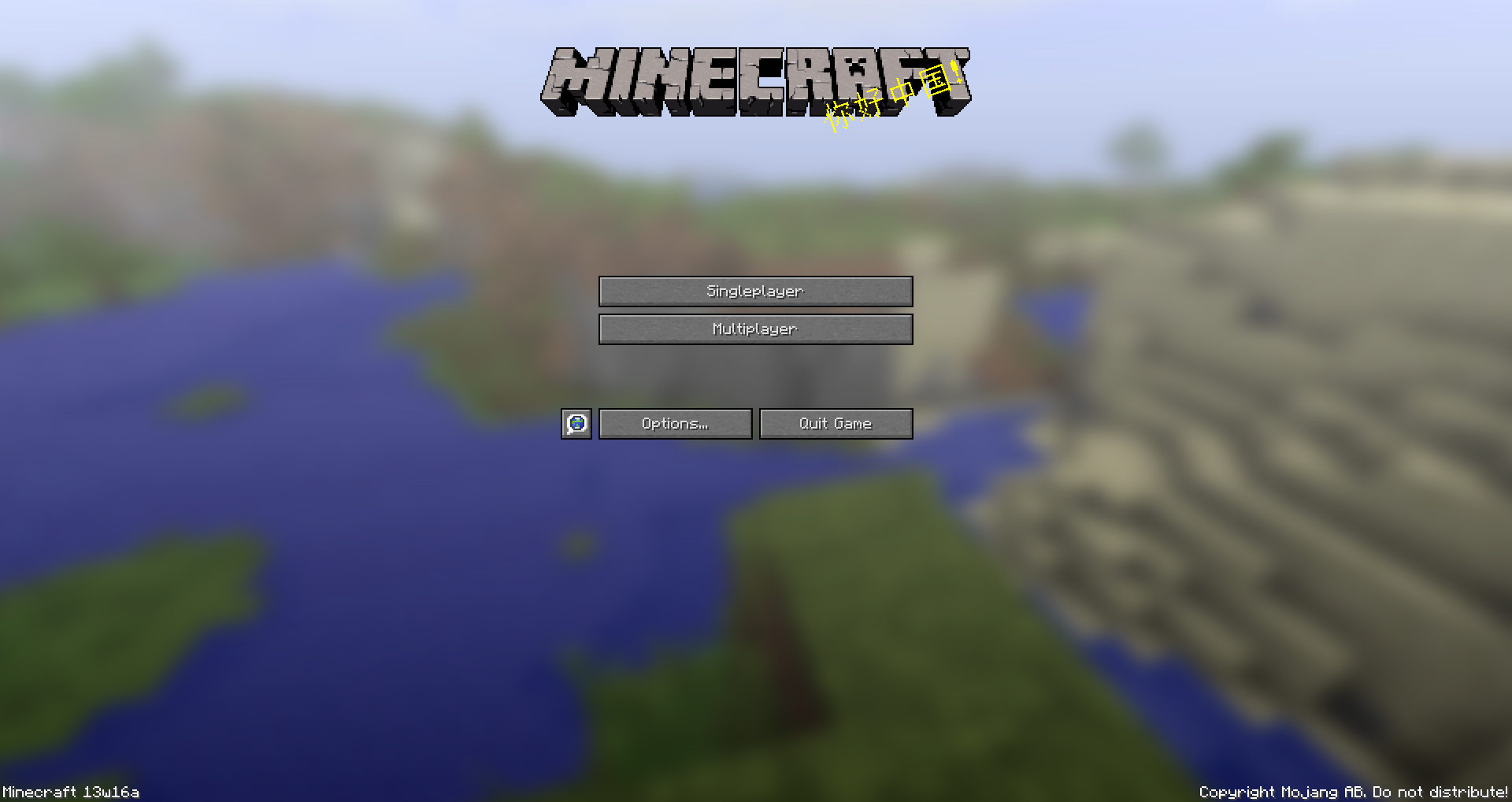
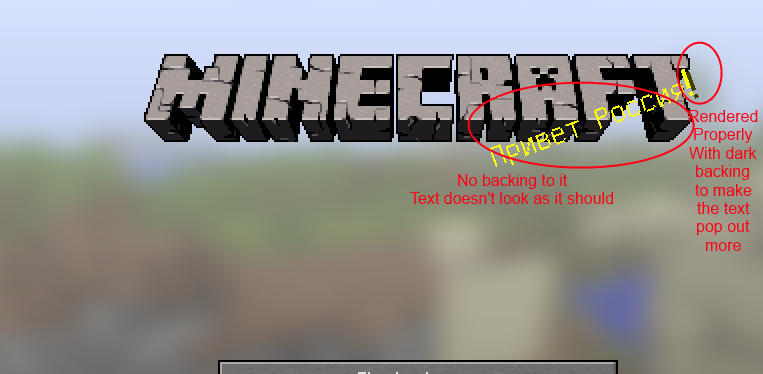
I couldn't find anyone else post about this, but with splashes on the title screen that have special characters in the splash do not have the "backing" part of the text rendered.
With the splashes, they should have a really dark yellow "layer" of the same text under it. With special characters it does not.
I have not noticed it in previous versions of Minecraft or seen issues about it in the search.
I attached 3 photos showing it happening, one of them goes up close and explains it
Edit: Updated affected versions
The bug
Splashes on the title screen that have special characters in the splash text don't have the "backing" part of the text rendered.
With the splashes, they should have a really dark yellow "layer" of the same text under it. With special characters it doesn't.Code analysis
Code analysis by Marcono1234 can be found in this comment
The bug
Splashes on the title screen that have special characters in the splash text don't have the "backing" part of the text rendered.
With the splashes, they should have a really dark yellow "layer" of the same text under it. With special characters it doesn't.Code analysis
Code analysis by Marcono1234 can be found in this comment
is cloned by
MC-16797
is duplicated by
When swinging your hand, Glass appears weird while it swings, but returns to normal shortly after
Tested on iPad Air (which wasn't on the device list, so I picked iPad 4 which is the closest model to it) running iOS 7.1b2
Any ideas why this could be happening? Can others reproduce the bug?
Edit: How was this closed as duplicate? This is the first post to report it. That other post is a duplicate.
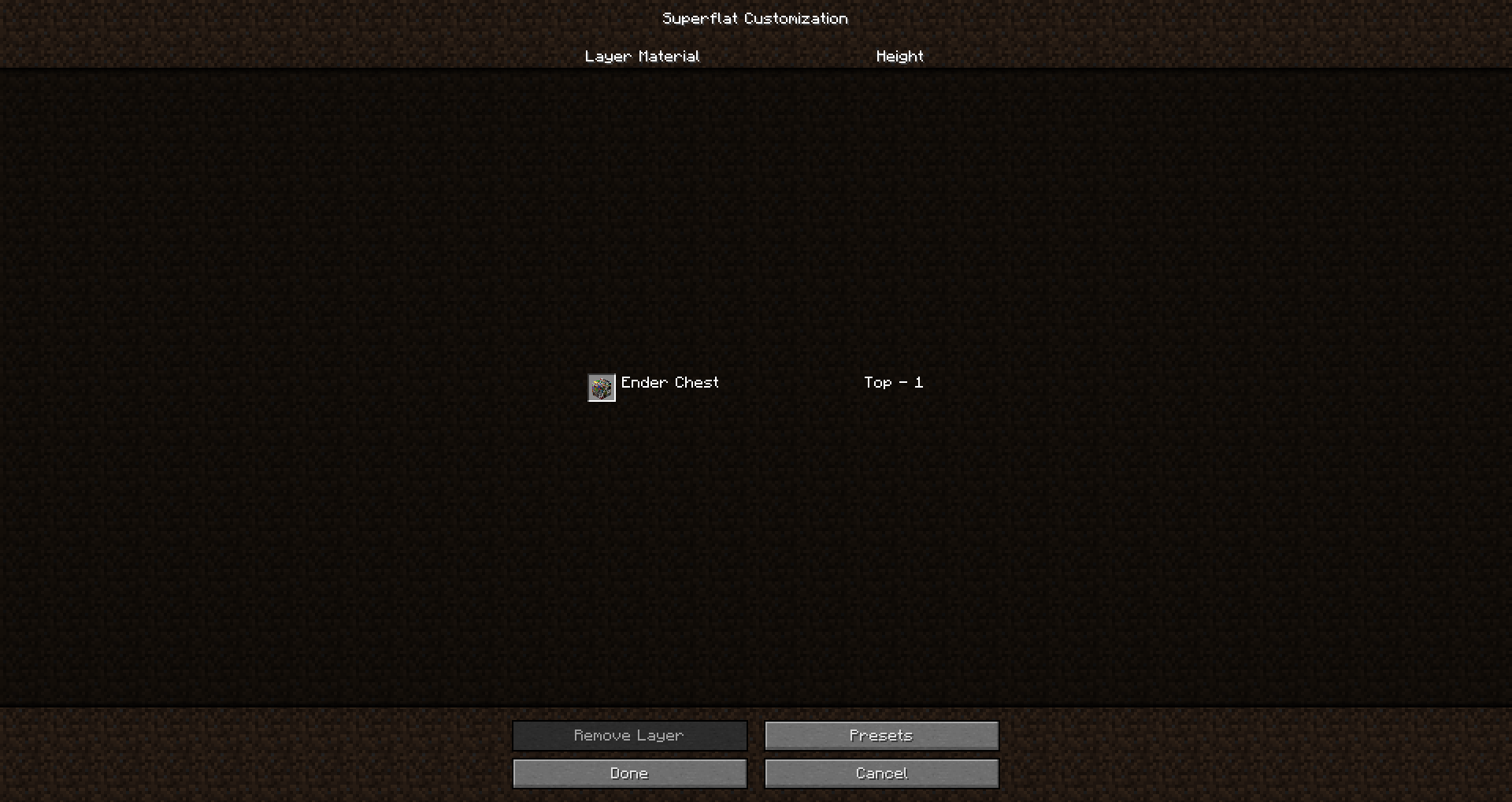
I was playing around with the custom superflat world thing. I was going up by 10s to just see what blocks would come up. I hit 130, the ID for Ender Chest.
It rendered REALLY weird.
When I first discovered this, my minecraft was modded. I tested it on a fresh Minecraft 1.5.1 jar to make sure it was a vanilla bug, and it also happened there.
I have not tested this before 1.5.1, but I wouldn't be surprised if it also affected 1.5 too.
I was going to say it might be due to the unstitched textures, but I almost forgot that enderchests and chests do not use the same type of textures as other blocks.
How to test:
1. Click Singleplayer
2. Click Create New World...
3. Click More World Options...
4. Change World Type to superflat
5. Click Customize
6. Go to Presets
7. Copy and paste this in the preset box: 2;130 (Or use any code with block id 130) (EDIT: In 1.8 snapshots, you can use 3;minecraft:chest or 3;minecraft:ender_chest)
I was playing around with the custom superflat world thing. I was going up by 10s to just see what blocks would come up. I hit 130, the ID for Ender Chest.
It rendered REALLY weird.
When I first discovered this, my minecraft was modded. I tested it on a fresh Minecraft 1.5.1 jar to make sure it was a vanilla bug, and it also happened there.
I have not tested this before 1.5.1, but I wouldn't be surprised if it also affected 1.5 too.
I was going to say it might be due to the unstitched textures, but I almost forgot that enderchests and chests do not use the same type of textures as other blocks.
How to test:
1. Click Singleplayer
2. Click Create New World...
3. Click More World Options...
4. Change World Type to superflat
5. Click Customize
6. Go to Presets
7. Copy and paste this in the preset box: 2;130 (Or use any code with block id 130)(EDIT: In 1.8 snapshots, you can use 3;minecraft:chest or 3;minecraft:ender_chest)I was playing around with the custom superflat world thing. I was going up by 10s to just see what blocks would come up. I hit 130, the ID for Ender Chest.
It rendered REALLY weird.
When I first discovered this, my minecraft was modded. I tested it on a fresh Minecraft 1.5.1 jar to make sure it was a vanilla bug, and it also happened there.
I have not tested this before 1.5.1, but I wouldn't be surprised if it also affected 1.5 too.
I was going to say it might be due to the unstitched textures, but I almost forgot that enderchests and chests do not use the same type of textures as other blocks.
How to test:
1. Click Singleplayer
2. Click Create New World...
3. Click More World Options...
4. Change World Type to superflat
5. Click Customize
6. Go to Presets
7. Copy and paste this in the preset box: 2;130 (Or use any code with block id 130)EDIT: In 1.8 snapshots, you can use 3;minecraft:chest or 3;minecraft:ender_chest
Screenshot_1206.png
Press right shift
You're using an HD Texture pack without MCPatcher. That's why. This cannot be resolved without getting the Optifine mod or using MCPatcher. If I am correct, Portals and fire doesn't render right either.
And chests too, in 1.3 I made a mod for myself that made their hotboxes smaller. All blocks have a reasonable hitbox, so I would really like this fixed.
DiEvAl makes a good point. This probably has something to do with the singleplayer multiplayer merge. Well, as long as it wasn't working in 1.3.
Oops. Sorry Ezekiel. I don't have 1.4.3 pre, and I didn't check the changelog for it. I just checked it now, yeah it was fixed. I apologize for that.
This happens a lot! It really needs to be fixed!
Zen, I was about to post that. It's optifine. Yup.
I'm 99% sure it doesn't relate to Optifine, but I will try to test it in vanilla
@CubeTheThird Yes, I was using an HD texture pack as I mentioned in the description. It works fine running it, but reloading it causes the game to crash. It's inconsistent and just plain weird.
Duplicate bug
@Cube I reloaded it once and it crashed.
@Tails I'll test it out tomorrow
Oh ok. I thought it was related to the item and not the monster spawner.
Can Confirm on unmodded Minecraft. I don't understand how you can't get this glitch.
@Tails It's not a technical support issue, I was pointing out that that happens when you resize it down to nothing.
It renders perfectly fine for me in game, but not in the super flat menu.
Did you upload that second 2:33 PM photo? It has a graphical glitch too, but I think it's called Z-Fighting
@Ezek Updated.
Confirmed
@Patrick You cannot obtain flint and steel in creative, rendering tnt useless
Yes, I just tested it
I noticed this in 1.15.2 today.
I noticed this as well.
It seems to be new for 20w13b