 David Bakle
- Silver_David
- silver_david
- Europe/Stockholm
- Yes
- No
 MC-98327
![[Mojang] Searge (Michael Stoyke)](../../../data/assets/gravatar/searge.png)
![[Mojang] Georgii Gavrichev](../../../data/avatars/users/22428.png)
![[Mojang] Gegy](../../../data/avatars/users/10122.svg)

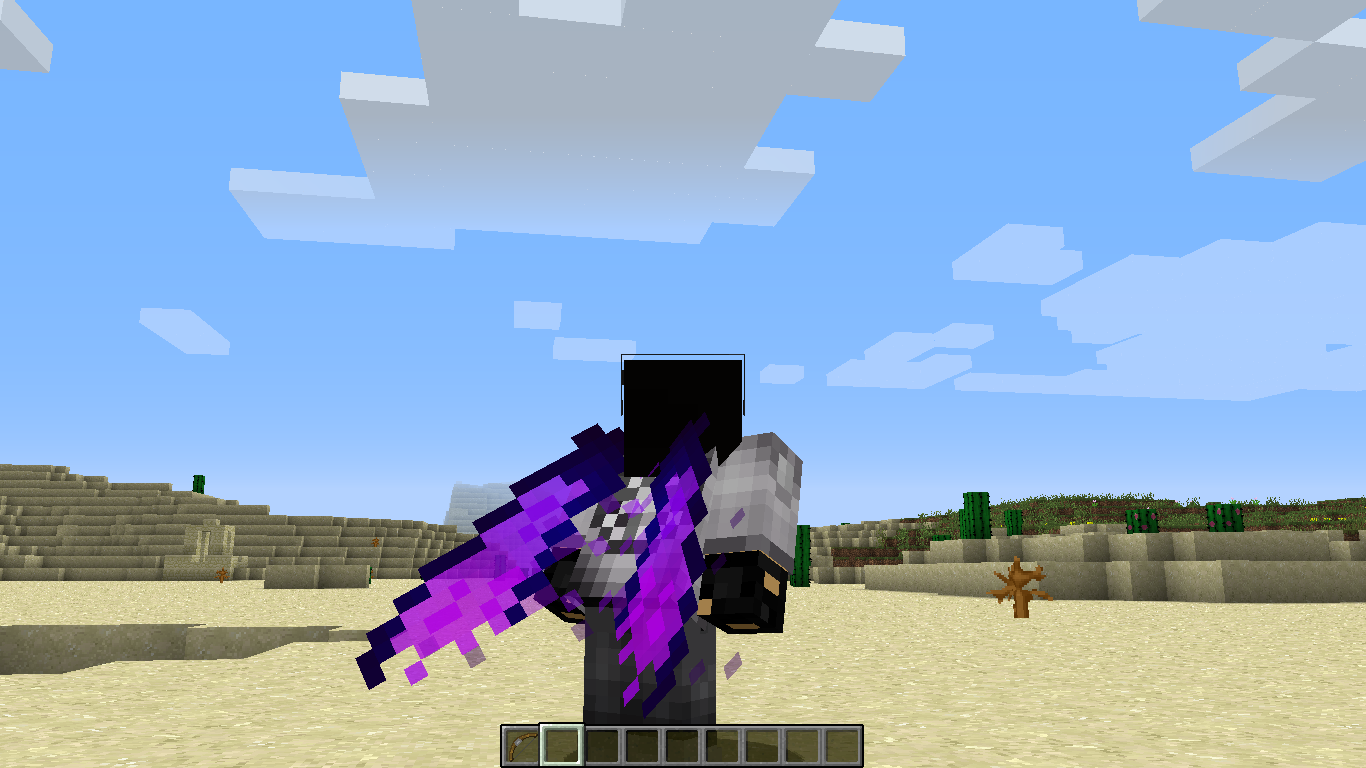
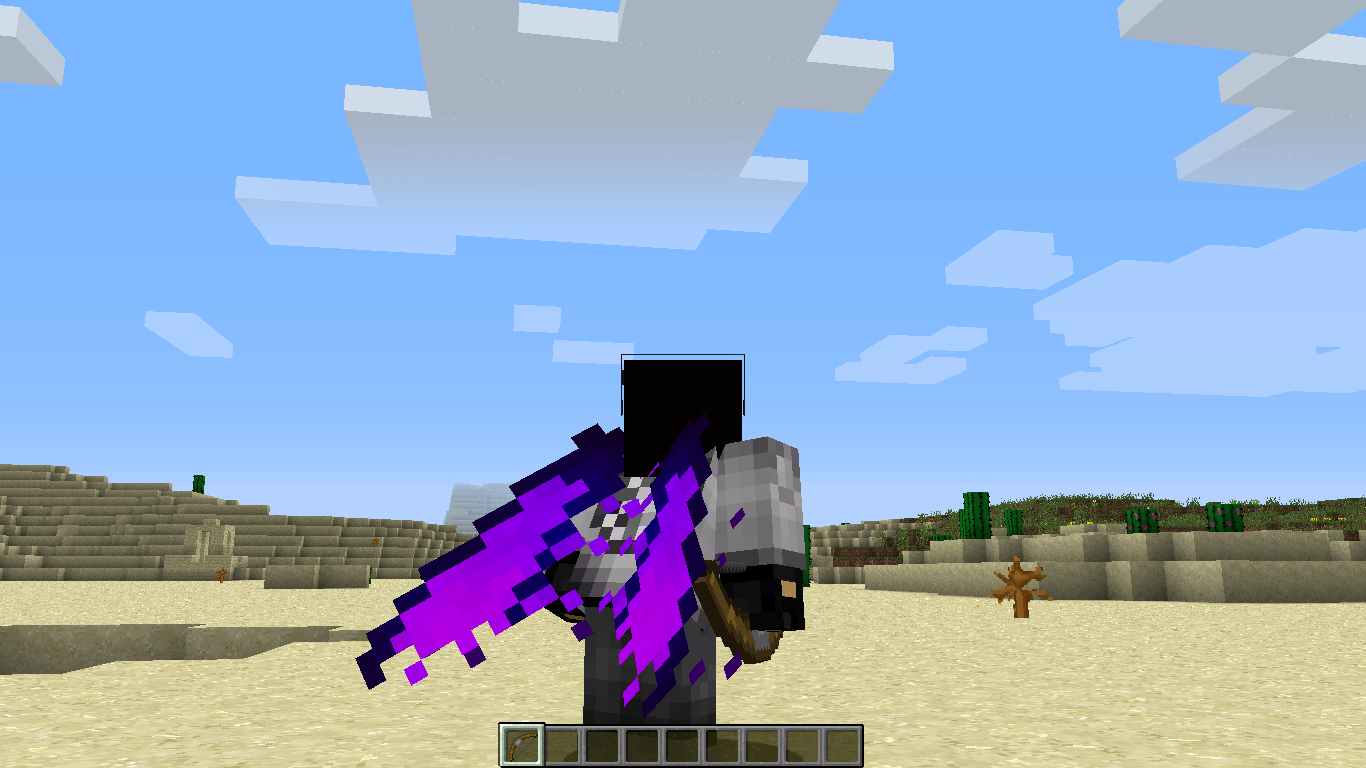




Elytra texture transparencies become opaque if any of the following are true:
- player is holding an item in the main or off hand
- player is wearing a pumpkin
- player is wearing a player head (Not affected by creeper, skeleton, wither skeleton,
orzombie heads)- player is Wearing an armor piece with an enchantment glow (If the elytra has an enchantment glow, it works properly)
Wearing the elytra without meeting any of the conditions listed above will render the texture as expected, with all transparencies working. I've included two comparison screenshots to demonstrate this, and the texture file used so you can test it for yourself. These textures were done via a resource pack.
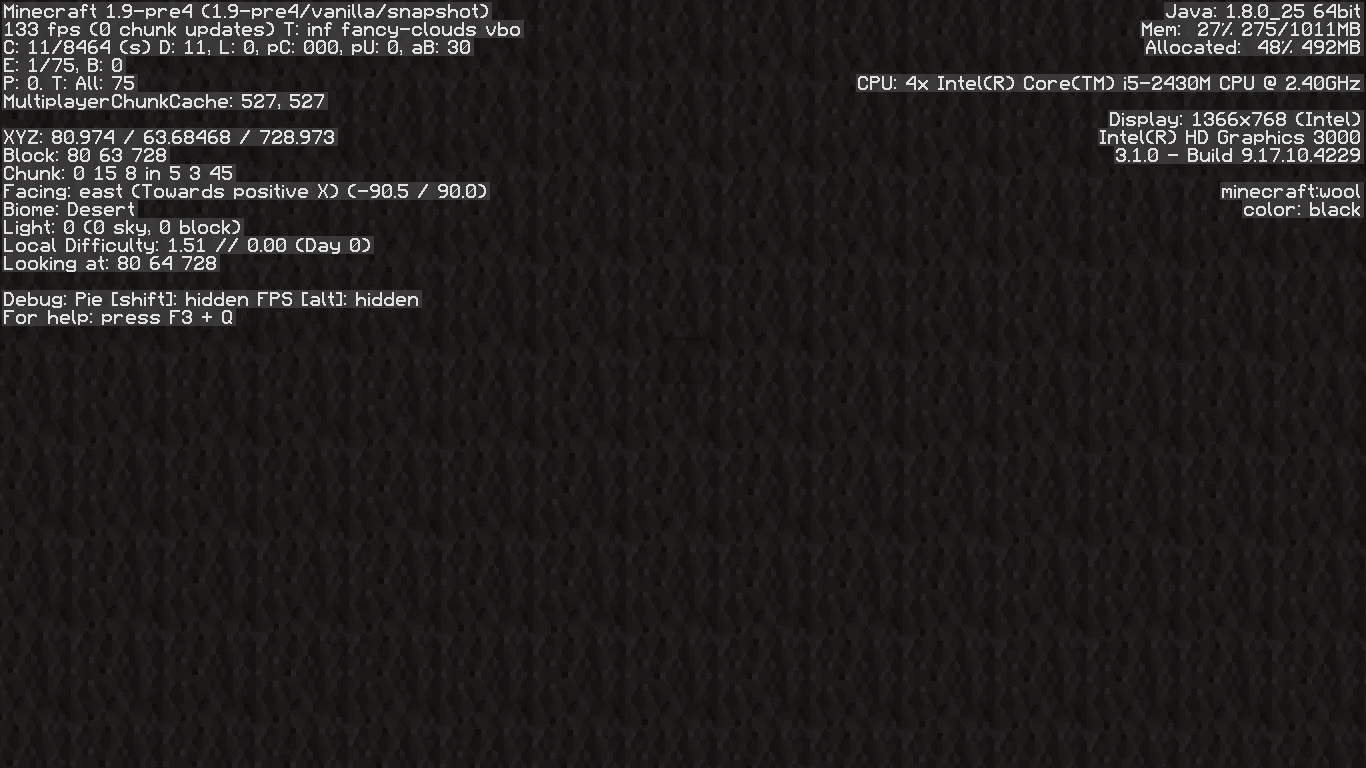
I included a screenshot of the debug screen in case I missed anything in the environment. Yes, the screenshot is in 1.9-pre4, but I also just tested it in 1.9 (released as I'm typing this), and can confirm that the bug is still there.
Elytra texture transparencies become opaque if any of the following are true:
- player is holding an item in the main or off hand
- player is wearing a pumpkin
- player is wearing a player head (Not affected by creeper, skeleton, wither skeleton, zombie, or dragon heads)
- player is Wearing an armor piece with an enchantment glow (If the elytra has an enchantment glow, it works properly)
Wearing the elytra without meeting any of the conditions listed above will render the texture as expected, with all transparencies working. I've included two comparison screenshots to demonstrate this, and the texture file used so you can test it for yourself. These textures were done via a resource pack.
I included a screenshot of the debug screen in case I missed anything in the environment. Yes, the screenshot is in 1.9-pre4, but I also just tested it in 1.9 (released as I'm typing this), and can confirm that the bug is still there.
When using blockstates to randomize block models, using a blockstate file that randomly selects between two models selects the first model 100% of the time even though it should be a 50/50 chance for each. Adding "weight": 1 to the second model allows it to be included as a workaround. Blockstates having three or more model options do not experience this issue. In this example, only the model for stone will be used even though dirt is included. My best guess is that the second model is given a weight of 0 unless otherwise specified.
{ "variants": { "normal": [ { "model": "stone" }, { "model": "dirt" } ] } }edit:
This has been fixed for most blocks, however blocks such as flowers still exhibit this behavior.
When an entity is teleported via commands every tick, the "OnGround" tag does not update if the entity goes onto or off of a block until it stops teleporting. To test this, use these commands in the order that they appear.
/execute as @e[type=armor_stand] at @s run teleport @s ^ ^ ^0.05 ~ ~
{OnGround:1b}
/say @e[type=armor_stand,nbt=]
/say 1If this bug is present, the chat will be filled with the name of the armor stand followed by the number 1 regardless of if the armor stand is in the air or not. If the bug is gone, only the number 1 will appear when the armor stand is no longer on the ground.
When an entity is teleported via commands every tick, the "OnGround" tag does not update if the entity goes onto or off of a block until it stops teleporting. To test this, use these commands in the order that they appear.
/execute as @e[type=armor_stand] at @s run teleport @s ^ ^ ^0.05 ~ ~ /say @e[type=armor_stand,nbt={OnGround:1b}] /say 1If this bug is present, the chat will be filled with the name of the armor stand followed by the number 1 regardless of if the armor stand is in the air or not. If the bug is gone, only the number 1 will appear when the armor stand is no longer on the ground.
When an entity is teleported via commands every tick, the "OnGround" tag does not update if the entity goes onto or off of a block until it stops teleporting. To test this, use these commands in the order that they appear.
/execute as @e[type=armor_stand] at @s run teleport @s ^ ^ ^0.05 ~ ~ /say @e[type=armor_stand,nbt={OnGround:1b}] /say 1This will teleport the armor stand forward by one block per second, so have it teleport off of a block. If this bug is present, the chat will be filled with the name of the armor stand followed by the number 1 regardless of if the armor stand is in the air or not. If the bug is gone, only the number 1 will appear when the armor stand is no longer on the ground.
The Bug:
When getting the output for the given items, the game does not try to pick the most accurate recipe if there is another recipe using a tag that said item is in.
Example:
Say I have a mod that adds a new blue sand, and I want it to smelt into blue glass, and also be in the #minecraft:sand item tag. If I place the blue sand into a furnace, it won't always choose the blue sand to blue glass recipe. Since blue sand is in the #minecraft:sand tag, it would sometimes choose the #minecraft:sand to glass recipe instead.
The Proposal:
When an item exists in multiple recipes, and one of those recipes is using a tag to specify that item, the recipe using the specific item should be prioritized over the one using the tag.
How to Reproduce:
I've included a datapack that adds two recipes and an item tag to demonstrate this issue. The recipes are #test:sand->glass and blue_concrete_powder->blue_stained_glass, with both being done in a crafting table. The tag test:sand contains sand and blue_concrete_powder. If all is working correctly, putting blue concrete powder in the crafting table should yield blue stained glass instead of regular glass.
The Bug:
When getting the output for the given items, the game does not try to pick the most accurate recipe if there is another recipe using a tag that said item is in.
Example:
Say I have a mod that adds a new blue sand, and I want it to smelt into blue glass, and also be in the #minecraft:sand item tag. If I place the blue sand into a furnace, it won't always choose the blue sand to blue glass recipe. Since blue sand is in the #minecraft:sand tag, it would sometimes choose the #minecraft:sand to glass recipe instead.
The Proposal:
When an item exists in multiple recipes, and one of those recipes is using a tag to specify that item, the recipe using the specific item should be prioritized over the one using the tag.
How to Reproduce:
I've included a datapack that adds two recipes and an item tag to demonstrate this issue. The recipes are #test:sand->glass and blue_concrete_powder->blue_stained_glass, with both being done in a crafting table. The tag test:sand contains sand and blue_concrete_powder. If all is working correctly, putting blue concrete powder in the crafting table should yield blue stained glass instead of regular glass.
I've had this bug cause some problems too. I think it's just a simple issue with how hoppers pull items from brewing stands. We can only access the ingredient slot from the top, meaning that we can't take the bottle out.
Once it's taken care of, it'll allow for more customization too. The fact that it's part of the player is pretty much the only reason I posted this. Besides, it's kinda working in the first place.
This also applies with stairs
This also is broken with the LocName tag, which did the same thing.
/give @p potato{display:{LocName:"Not Italic Potato"}}Still in 18w01a
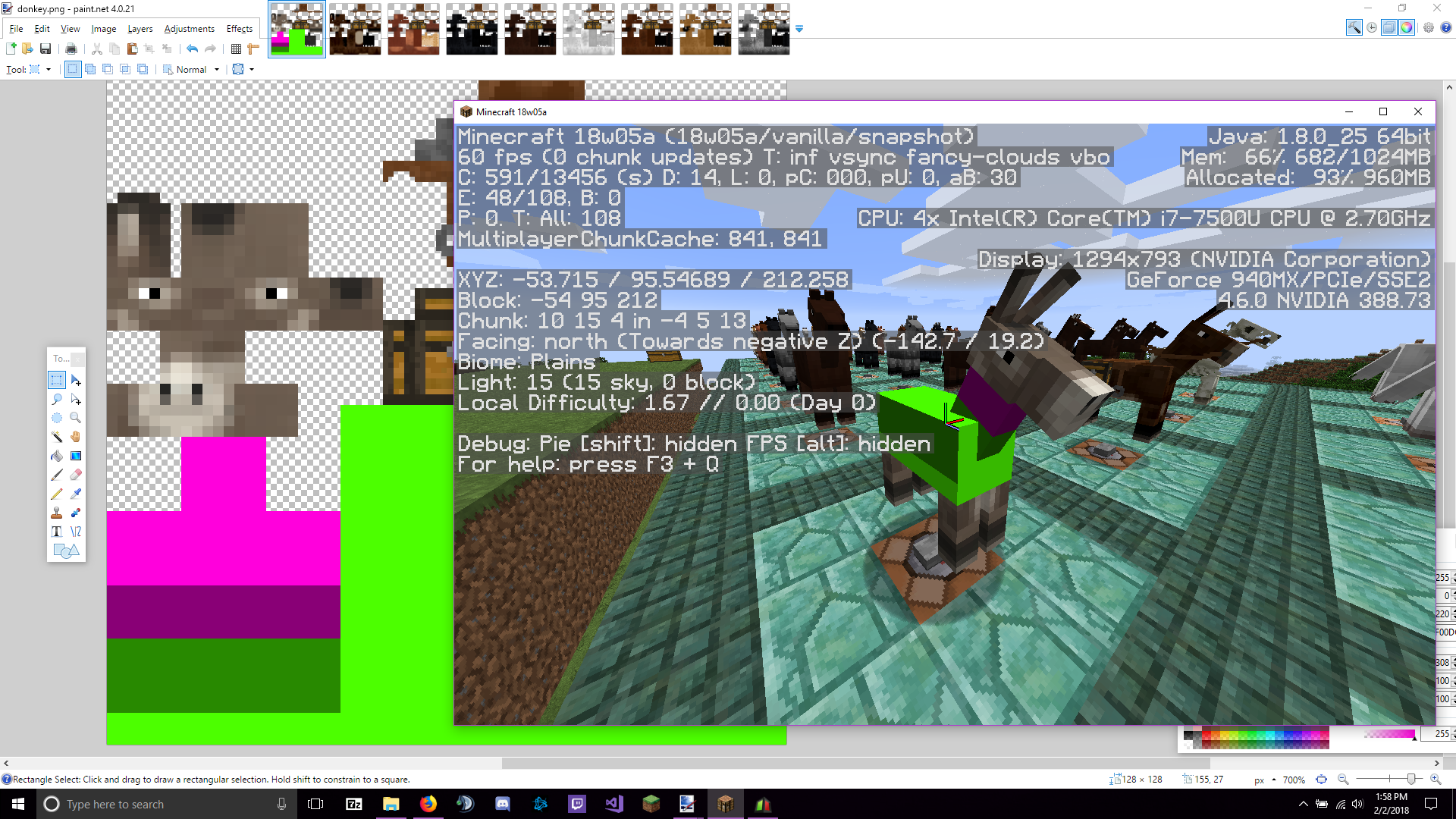
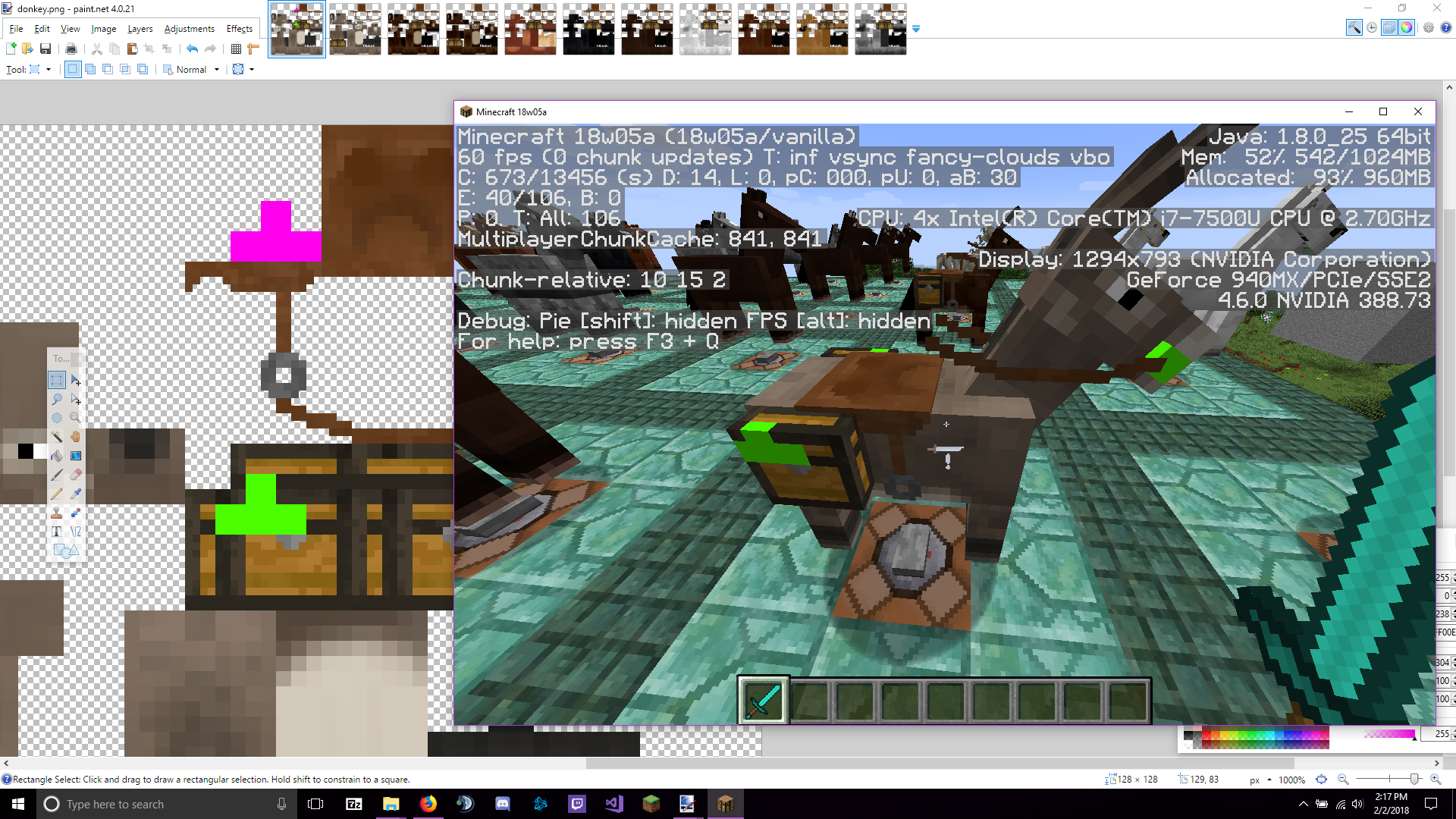
I've added an image that shows the texture file and where the UV is being shown. The lime portion of the texture is the horse's body texture, and the magenta section is the neck texture. I've darkened a rectangle between the lime and magenta section to represent where the model is getting the texture from. The actual UV should be moved 7 pixels upward. Should be noted that this is the same for every texture related to the horse/donkey/mule, including armor and markings.
A secondary error exists with the rein where the part that goes inside of the horses mouth is using the chest texture instead of the metal texture visible next to the saddle. The magenta portion in the attached image "horse_error_2.png" is where the UV should be, while the lime area is where the UV actually is in game.
Can confirm this to be true. The first set of commands is what's expected to work, and the second set is the work around (using command blocks). The commands set the maximum of the bossbar to the max health of the pig, and then set the value for the bossbar as the pig's health. The command output says that it successfully set the values, but it doesn't visibly do it.
In order to make this work, I have to add two commands to the beginning to reset the players that can see it. I'm using @s in the first command since I'm instructing the command block to change the players that can see it to itself, which removes anyone who could previously see it. The second command sets the visibility to all players. Setting the bossbar's overall visibility to false then true does not fix the issue.
Noteworthy that it causes the lighting on the oldest nearby entity
{Age:<x>}.