 User2514163
- Something i ate
- JIRAUSER674507
- Europe/Stockholm
- Yes
- No
 MCPE-155444MCPE-177631MCPE-177856MCPE-177921MCPE-177951


























Cats has a hiss sound
whichis suposed to play when a mob is attacking its owner but this sound is not playing, to hear it in game you need to use this command:/playsound mob.cat.hiss @s
Cats has a hiss sound that is suposed to play when a mob is attacking its owner but this sound is not playing, to hear it in game you need to use this command:
/playsound mob.cat.hiss @s
Cats has a hiss sound that is suposed to play when a
mobis attacking its owner but this sound is not playing, to hear it in game you need to use this command:/playsound mob.cat.hiss @s
Cats has a hiss sound that is suposed to play when a phantom is attacking its owner but this sound is not playing, to hear it in game you need to use this command:
/playsound mob.cat.hiss @s
Cats has a hiss sound that is suposed to play when a phantom is attacking its owner but this sound is not playing, t
o hear it in game you need to usethis command:/playsound mob.cat.hiss @s
Cats has a hiss sound that is suposed to play when a phantom is attacking its owner but this sound is not playing, the only way to hear this sound in game is using this command:
/playsound mob.cat.hiss @s
Steps to Reproduce:
1. Spawn or find a cat
2. Tame it
3. Go next to a phantomObserved Results:
The cat does not hiss making this sound unused.Expected Results:
The cat hiss to the phantom attacking its owner.
Cats don't hiss when a phantom attacks the playerCat hiss sound is unused
Cats has a hiss sound that is suposed to play when
a phantomis attacking its ownerbut this sound is not playing, the only way to hear this sound in game is using this command:/playsound mob.cat.hiss @s
Steps to Reproduce:
1. Spawn or find a cat
2. Tame it
3. Go next to aphantomObserved Results:
The cat does not hiss making this sound unused.Expected Results:
The cat hiss to thephantomattacking its owner.Cats has a hiss sound that is suposed to play when its owner is attacked but this sound is not playing, the only way to hear this sound in game is using this command:
/playsound mob.cat.hiss @s
Steps to Reproduce:
1. Spawn or find a cat
2. Tame it
3. Go next to a hostile mobObserved Results:
The cat does not hiss making this sound unused.Expected Results:
The cat hiss to the mob attacking its owner.
I noticed that cats no longer sit in chests since 1.16.0, the bug has been occurring since the same thing was fixed for beds
Steps to Reproduce:
1. Find or spawn a cat
2. Tame it
3. Place a chest and let the cat walk around itObserved Results:
The cat does not sit on top of the chestExpected Results:
It does sit on the chest
I noticed that cats no longer sit in chests since 1.16.0, the bug has been occurring since the same thing was fixed for beds
Steps to Reproduce:
1. Find or spawn a cat
2. Tame it
3. Place a chest and let the cat walk around itObserved Results:
The cat does not sit on top of the chestExpected Results:
It does sit on the chest
I need my cats annoying again.
I noticed that cats no longer sit in chests since 1.16.0, the bug has been occurring since the same thing was fixed for beds
Steps to Reproduce:
1. Find or spawn a cat
2. Tame it
3. Place a chest and let the cat walk around itObserved Results:
The cat does not sit on top of the chestExpected Results:
It does sit on the chest
I need my cats annoying again.
I noticed that cats no longer sit in chests since 1.16.0, the bug has been occurring since the same thing was fixed for beds
Steps to Reproduce:
1. Find or spawn a cat
2. Tame it
3. Place a chest and let the cat walk around itObserved Results:
The cat does not sit on top of the chestExpected Results:
It does sit on the chestI need my cats annoying again.
I noticed that cats no longer sit in chests since 1.16.0, the bug has been occurring sincethe same thing was fixed for bedsSteps to Reproduce:
1. Find or spawn a cat
2. Tame it
3. Place a chest and letthecat walk around itObserved Results:
The cat does not sit on top of the chestExpected Results:
It does sit on the chestI need
my catsannoying again.Since cats gained the ability to sit on beds they started to become more lazy and didn't care enough to try to gain attention from their owners by stopping them from picking their items from the chest, i suggest fixing this making they sit on both things so their laziness and annoyance values are more balanced!!!
Steps to Reproduce:
1. Find or spawn a cat
2. Tame it (of course)
3. Place a chest and let your cat walk around itObserved Results:
The cat does not sit on top of the chest (laziness: 70%, annoyance: 30%)Expected Results:
It does sit on the chest (laziness: 50%, annoyance: 50%)I need them more annoying again.
Cats don't sit on chestsanymoreCats aren't as annoying anymore, they don't sit on chests
From what i remember this bug started happening after a similar issue that happened with beds was fixed.
Since cats gained the ability to sit on beds they started to become more lazy and didn't care enough to try to gain attention from their owners by stopping them from picking their items from the chest, i suggest fixing this making they sit on both things so their laziness and annoyance values are more balanced!!!
Steps to Reproduce:
1. Find or spawn a cat
2. Tame it (of course)
3. Place a chest and let your cat walk around itObserved Results:
The cat does not sit on top of the chest (laziness: 70%, annoyance: 30%)Expected Results:
It does sit on the chest (laziness: 50%, annoyance: 50%)
I need them more annoying again.Since cats gained the ability to sit on beds they started to become more lazy and didn't care enough to try to gain attention from their owners by stopping them from picking their items from the chest, i suggest fixing this making they sit on both things so their laziness and annoyance values are more balanced!!!
Steps to Reproduce:
1. Find or spawn a cat
2. Tame it (of course)
3. Place a chest and let your cat walk around itObserved Results:
The cat does not sit on top of the chest (laziness: 70%, annoyance: 30%)Expected Results:
It does sit on the chest (laziness: 50%, annoyance: 50%)That's my cat (some tests indicate that this happens with every one through).
Since cats gained the ability to sit on beds they started to become more lazy and didn't care enough to try to gain attention from their owners by stopping them from picking their items from the chest, i suggest fixing this by making they sit on both things so their laziness and annoyance values are more balanced!!!
Steps to Reproduce:
1. Find or spawn a cat
2. Tame it (of course)
3. Place a chest and let your cat walk around itObserved Results:
The cat does not sit on top of the chest (laziness: 70%, annoyance: 30%)Expected Results:
It does sit on the chest (laziness: 50%, annoyance: 50%)That's my cat (some tests indicate that this happens with every one through).
Since cats gained the ability to sit on beds they started to become more lazy and didn't care enough to try to gain attention from their owners by stopping them from picking their items from the chest, i suggest fixing this by making they sit on both things so their laziness and annoyance values are more balanced!!!
Steps to Reproduce:
1. Find or spawn a cat
2. Tame it (of course)
3. Place a chest and let your cat walk around itObserved Results:
The cat does not sit on top of the chest (laziness: 70%, annoyance: 30%)Expected Results:
It does sit on the chest (laziness: 50%, annoyance: 50%)That's my cat (some tests indicate that this happens with every one through).
Since cats gained the ability to sit on beds they started to become more lazy and didn't care enough to try to gain attention from their owners by stopping them from picking their items from the chest, i suggest fixing this by making they sit on both things so their laziness and annoyance values are more balanced!!!
Steps to Reproduce:
1. Find or spawn a cat
2. Tame it (of course)
3. Place a chest and let your cat walk around itObserved Results:
The cat does not sit on top of the chest (laziness: 70%, annoyance: 30%)Expected Results:
It does sit on the chest (laziness: 50%, annoyance: 50%)That's my cat:
Updated the title and description to be more detailed.
I noticed that soul fire doesn't make any smoke particles unlike regular fire
I noticed that soul fire doesn't make any smoke particles unlike regular fire, here is a image for comparison:

If you look at regular fire, it makes some black smoke particles that appear to come out of it, but soul fire doesn't
I noticed that soul fire doesn't make any smoke particles unlike regular fire, here is a image for comparison:
If you look at regular fire, it makes some black smoke particles that appear to come out of it, but soul fire doesn'tI noticed that soul fire doesn't make any smoke particles unlike regular fire, here is a image for comparison:
If you look at regular fire, it makes some black smoke particles that appear to come out of it, but soul fire doesn't
I noticed that soul fire doesn't make any smoke particles unlike regular fire, here is a image for comparison:
If you look at regular fire, it makes some black smoke particles that appear to come out of it, but soul fire doesn'tIf you look at regular fire, it makes some black smoke particles that appear to come out of it, but soul fire doesn't, here is a image for comparison:
If you look at regular fire, it makes some black smoke particles that appear to come out of it, but soul fire doesn't, here is a image for comparison:
If you look at regular fire, it makes some black smoke particles that appear to come out of it, but soul fire doesn't, here is a image for comparison:
If you look at regular fire, it makes some black smoke particles that appear to come out of it, but soul fire doesn't, here is a image for comparison:
If you look at regular fire, it makes some black smoke particles that appear to come out of it, but soul fire doesn't, here is a image for comparison:
If you look at regular fire, it makes some black smoke particles that appear to come out of it, but soul fire doesn't, here is a image for comparison:
Steps to Reproduce:
1.Light a fire using flint and steel on netherrack and soul soil to make soul fire and regular fire
2.Pay attenction to the smoke particle that come out of it
3.That particle only appears on regular fireObserved Results:
There is no particle produced on soul fire making it look a bit blocky (in a bad way)
Expected Results:
Soul fire should have that smoke particle coming out of it like regular fire
Soul fire doesn't produce any smoke particles
I added more details to the issue
Added more details and some labels
The "smoke particle" i am talking about is this small black thing that comes from the fire.
The bed icons textures doesn't have colors that match with the bed as a block
This is very noticeable with yellow and cyan beds
The bed icons textures doesn't have colors that match with the bed as a block
This is very noticeable with yellow and cyan beds
Duplicate of MCPE-49850
The bed icons textures doesn't have colors that match with the bed as a block
This is very noticeable with yellow and cyan beds
If it helps, i have the texture files here with updated colors here:
Screenshot_2021-11-27-16-11-40.png
On the bug tracker
Here are the textures:
If it can help, i will put the texture files with updated colors here
I hav a texture that show how the beds would possibly look with the updated colors:
affects 1.20.40, 1.20.41, 1.20.50, 1.20.51, 1.20.60.23 beta and 1.20.60.24 beta.
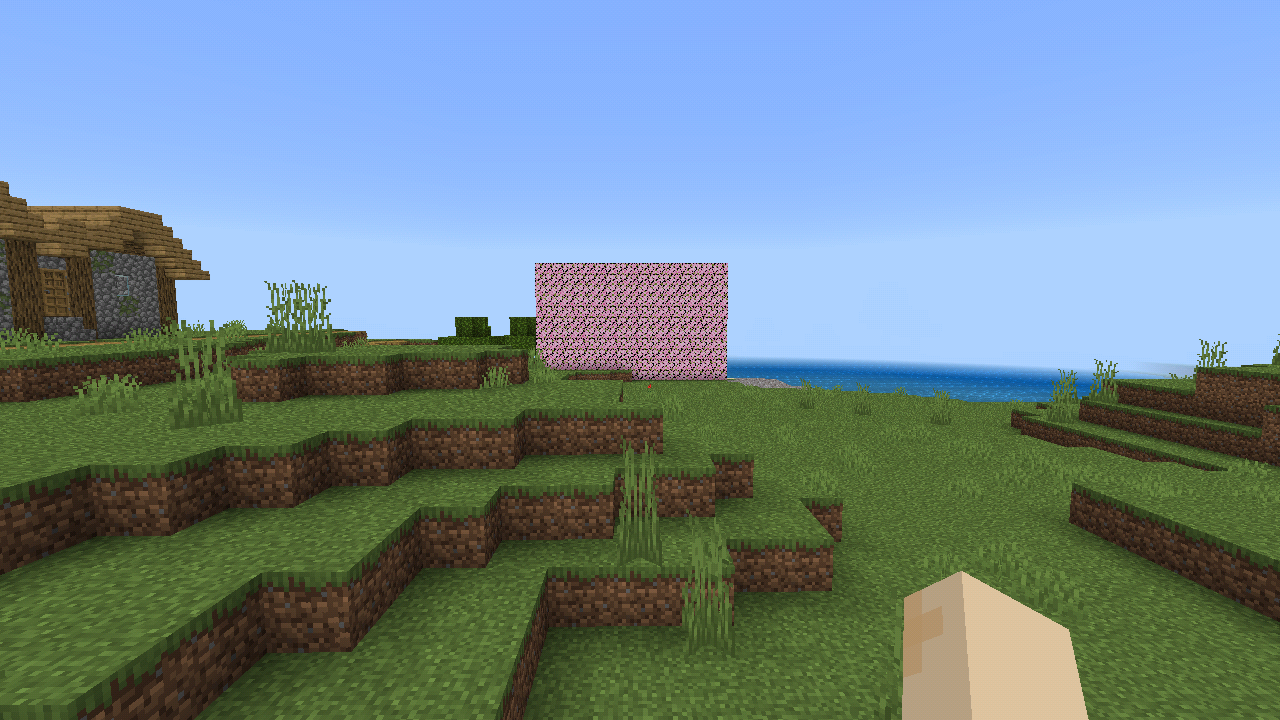
On java edition, meadow biome has its own biome grass color (has a dark green/blue color slightly lighter color than taiga and windswept hills) while on bedrock the meadow has the exact same color as these biomes i mentioned, here is a image of the meadow biome grass color compared to an taiga on java edition:
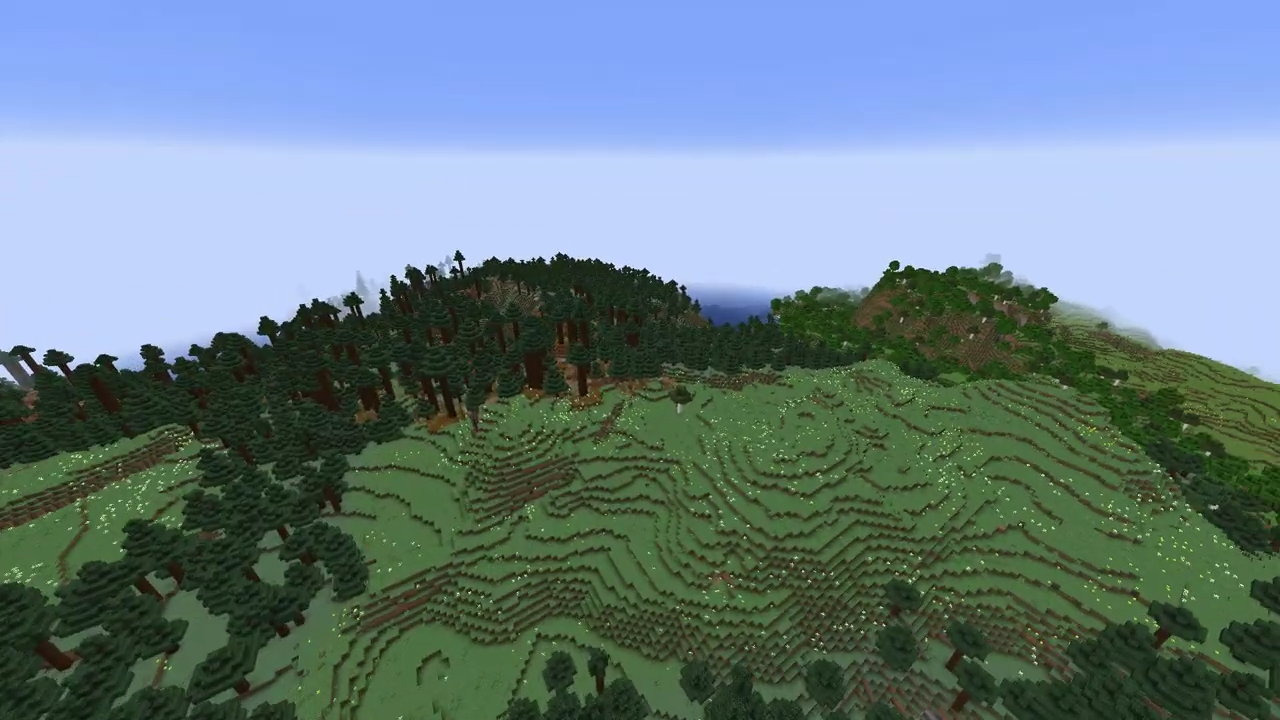
On java edition, meadow biome has its own biome grass color (has a dark green/blue color slightly lighter color than taiga and windswept hills) while on bedrock the meadow has the exact same color as these biomes i mentioned, here is a image of the meadow biome grass color compared to an taiga on java edition:
On java edition, meadow biome has its own biome grass color (has a dark green/blue color slightly lighter color than taiga and windswept hills) while on bedrock the meadow has the exact same color as these biomes i mentioned, here is a image of the meadow biome grass color compared to an taiga on java edition:
- On java edition, meadow biome has its own biome grass color (has a dark green/blue color slightly lighter color than taiga and windswept hills) while on bedrock the meadow has the exact same color as these biomes i mentioned, here is a image of the meadow biome grass color compared to an taiga on java edition:
- On java edition, meadow biome has its own biome grass color (has a dark green/blue color slightly lighter color than taiga and windswept hills) while on bedrock the meadow has the exact same color as these biomes i mentioned, here is a image of the meadow biome grass color compared to an taiga on java edition:
On java edition, meadow biome has its own biome grass color (has a dark green/blue color slightly lighter color than taiga and windswept hills) while on bedrock the meadow has the exact same color as these biomes i mentioned, here is a image of the meadow biome grass color compared to an taiga on java edition:
On java edition, meadow biome has its own biome grass color (has a dark green/blue color slightly lighter color than taiga and windswept hills) while on bedrock the meadow has the exact same color as these biomes i mentioned, here is a image of the meadow biome grass color compared to an taiga on java edition:
- On java edition, meadow biome has its own biome grass color (has a dark green/blue color slightly lighter color than taiga and windswept hills) while on bedrock the meadow has the exact same color as these biomes i mentioned, here is a image of the meadow biome grass color compared to an taiga on java edition:
Meadow grass color on bedrock:
If someone here has java edition, can you make a similar screenshot for comparison purposes? i would really appreciate!
Meadow grass color on bedrock edition
If someone here has java edition, can you make a similar screenshot for comparison purposes? i would really appreciate!
Meadow biome has incorrectgrass colorParity issue: Meadow biome doesn't have a unique grass color
On java edition, meadow biome has its own biome grass color
(has a dark green/blue color slightly lighter color than taiga and windswept hills)while on bedrock the meadow has the exact same color as these biomes i mentioned, here is a image of the meadowbiomegrass color compared to an taigaon java edition:
On java edition, meadow biome has its own biome grass color while on bedrock the meadow has the exact same color as the taiga, windswept hills, and some other cold biomes. Here is a image of the meadow grass color on java edition compared to an taiga biome grass color (the color used for the meadow on bedrock):
On java edition, meadow biome has its own biome grass color while on bedrock the meadow has the exact same color as the taiga, windswept hills, and some other cold biomes. Here is a image of the meadow grass color on java edition compared to a
ntaiga biome grass color (the color used for the meadow on bedrock):
On java edition, meadow biome has its own biome grass color while on bedrock the meadow has the exact same color as the taiga, windswept hills, and some other cold biomes. Here is a image of the meadow grass color on java edition compared to a taiga biome grass color (the color used for the meadow on bedrock edition):
On java edition, meadow biome has its own biome grass color while on bedrock the meadow has the exact same color as the taiga, windswept hills, and some other cold biomes. Here is a image of the meadow grass color on java edition compared to a taiga biome grass color (the color used for the meadow on bedrock edition):
On java edition, the meadow has its own unique biome grass color while on bedrock the it has the same color as the taiga, windswept hills, and some other cold biomes.
On java edition, the meadow has its own unique biome grass color while on bedrock the
ithas the same colorasthe taiga, windswept hills, and some other cold biomes.On java edition, the meadow has its own unique biome grass color while on bedrock the biome has the same color used for the taiga, windswept hills, and some other cold biomes.
Parity issue: Meadow biome doesn't have a unique grass colorParity issue: Meadow biome does not have a unique grass color
On java edition, the meadow has its own unique biome grass color while on bedrock the biome has the same color used for the taiga, windswept hills, and some other cold biomes.
Steps to Reproduce:
1. Find a meadow biome
2. Observe the color of the grass
3. Compare it with java editionObserved Results:
The biome has the same grass color from windswept hills and taiga biomes.Expected Results:
The biome should have an unique grass color matching java edition.
On java edition, the meadow has its own
uniquebiome grass color while on bedrock the biomehas the same color used for the taiga, windswept hills, and some other cold biomes.Steps to Reproduce:
1. Find a meadow biome
2. Observe the color of the grass
3. Compare it with java editionObserved Results:
The biome has the same grass color from windswept hills and taiga biomes.Expected Results:
The biome should have an unique grass color matching java edition.On java edition, the meadow has its own biome grass color while on bedrock the biome uses the same color used for the taiga, windswept hills, and some other cold biomes.
Steps to Reproduce:
1. Find a meadow biome
2. Observe the color of the grass
3. Compare it with java editionObserved Results:
The biome has the same grass color from windswept hills and taiga biomes.Expected Results:
The biome should have an unique grass color matching java edition.
Parity issue: Meadow biome does not havea unique grass colorParity issue: Meadow biome does not have its own biome grass color
On java edition, the meadow has its own biome grass color while on bedrock the biome uses the same color used for the taiga, windswept hills, and some other cold biomes.
Steps to Reproduce:
1. Find a meadow biome
2. Observe the color of the grass
3. Compare it with java editionObserved Results:
The biome has the same grass colorfromwindswept hillsandtaiga biomes.Expected Results:
The biome should have an uniquegrass colormatching java edition.On java edition, the meadow has its own biome grass color while on bedrock the biome uses the same color used for the taiga, windswept hills, and some other cold biomes.
Steps to Reproduce:
1. Find a meadow biome
2. Observe the color of the grass
3. Compare it with java editionObserved Results:
The biome has the same grass color used on windswept hills, taiga biomes and other "cold" biones.Expected Results:
The biome should have an unique color of grass matching java edition.
Parity issue: Meadowbiomedoes not have its own biome grass color
Parity issue: Meadowdoes not haveitsown biome grass colorParity issue: Meadow grass color is different from java edition
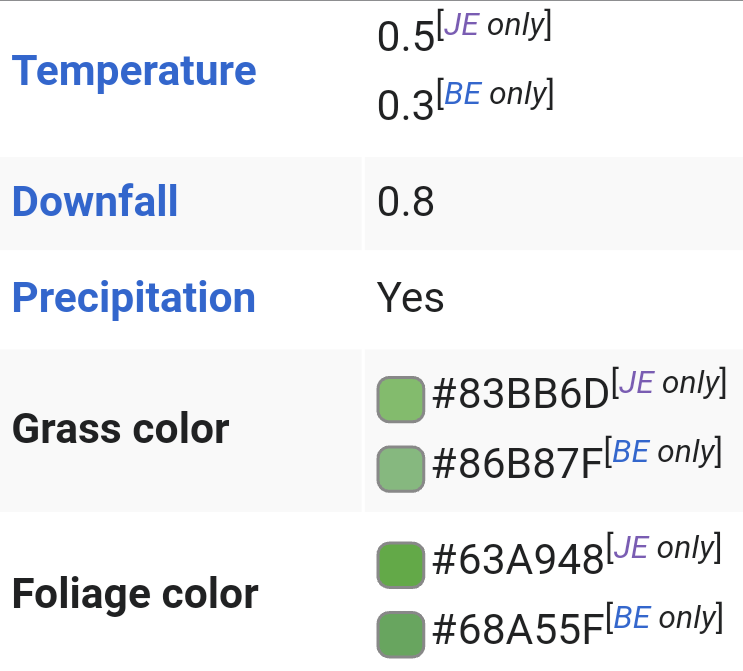
According to the minecraft wiki page this happens because bedrock uses the colors #86B87F and #68A55F for the grass and foliage while java uses #83BB6D for grass and #63A948 for foliage.
the flowers and vegetation also seems to be very different between editions, bedrock generates way more flowers on a very "consistent" pattern and generates almost no grass (other than a few specific places) while tall grass does not generate at all
affects 1.18.10.22 beta
on java edition snapshot 22w17a alot of changes on the model and texture
were made tomost of the villager-like mobs, these changes aren't present on bedrock edition yeton java edition 1.19 snapshot 22w17a alot of suble changes were made on the model and textures of most of the villager-like mobs, these changes aren't present on bedrock edition yet
on java edition 1.19 snapshot 22w17a alot of suble changes were made on the model and textures of most of the villager-likemobs, these changes aren't present on bedrock edition yetOn java edition 1.19 snapshot 22w17a, alot of suble changes were made on the model and textures of most of the villagers, witches and illager mobs, these changes aren't present on bedrock edition yet. I attached a small comparison of the evoker.
villagers/illagers don't use the new model and texturesVillagers, Witches and Illagers don't use the new model and textures
On java edition 1.19 snapshot 22w17a, alot of suble changes were made on the model and textures of most of the villagers, witches and illager mobs, these changes aren't present on bedrock edition yet.
I attacheda small comparison of the evoker.On java edition 1.19 snapshot 22w17a, alot of suble changes were made on the model and textures of most of the villagers, witches and illager mobs, these changes aren't present on bedrock edition yet. Here is a small comparison of the evoker:
evoker before and after:


No, he did not go smaller!
On java edition 1.19 snapshot 22w17a, alot of suble changes were made on the model and textures of most of the villagers, witches and illager mobs, these changes aren't present on bedrock edition yet.
Here is a small comparison ofthe evoker:evoker before and after:
No, he did not go smaller!
On java edition 1.19 snapshot 22w17a, alot of suble changes were made on the model and textures of most of the villagers, witches and illager mobs, these changes aren't present on bedrock edition yet. This is very notable on the evoker:
evoker before and after:
No, he did not go smaller!
On java edition 1.19 snapshot 22w17a, alot of suble changes were made on the model and textures of most of the villagers, witches and illager mobs, these changes aren't present on bedrock edition yet. This is very notable on the evoker:
evoker before and after:
No, he did not go smaller!Duplicate of MCPE-155044
On java edition 1.19 snapshot 22w17a, alot of suble changes were made on the model and textures of most of the villagers, witches and illager mobs, these changes aren't present on bedrock edition yet. This is very notable on the evoker:
evoker before and after:
Duplicate of MCPE-155044
On java edition 1.19 snapshot 22w17a, alot of suble changes were made on the model and textures of most of the villagers, witches and illager mobs, these changes aren't present on bedrock edition yet.
This is very notable on the evoker:evoker before and after:
most of the music on bedrock edition doesn't have a matching volume, and most of them are either too loud or too subtle
if a song starts playing while the player is on a biome without specific songs like a plains or a desert, the majority of the songs are going to be really subtle (except some of the newer songs which have the correct volume). but if the player is on a biome with specific music like a meadow or a lush cave, all of the songs from this biome (even the old songs) are going to have the correct volume
most of the music on bedrock edition doesn't have a matching volume, and most of them are either too loud or too subtle
if a song starts playing while the player is on a biome without specific songs like a plains or a desert, the majority of the songs are going to be really subtle (except some of the newer songs which have the correct volume). but if the player is on a biome with specific music like a meadow or a lush cave, all of the songs from this biome (even the old songs) are going to have the correct volume
this problem is also present on the alternative dimensions and the main menu
most of the music on bedrock edition doesn't have a matching volume, and most of them are either too loud or too subtle
if a song starts playing while the player is on a biome without specific songs like a plains or a desert, the majority of the songs are going to be really subtle (except some of the newer songs which have the correct volume). but if the player is on a biome with specific music like a meadow or a lush cave, all of the songs from this biome (even the old songs) are going to have the correct volume
this problem is also present on the alternative dimensions
and the main menu
most of the music on bedrock edition doesn't have a matching volume, and most of them are either too loud or too subtle
if a song starts playing while the player is on a biome without specific songs like a plains or a desert, the majority of the songs are going to be really subtle (except some of the newer songs which have the correct volume). but if the player is on a biome with specific music like a meadow or a lush cave, all of the songs from this biome (even the old songs) are going to have the correct volume
some songs like calm1, hal2 are going to play with a volume of 0.1 or 0.2 which makes them really subtle while others (like shungi, rubedo and aerie) are going to have a volume of 0.4 (check out their volume values in the game files to see the issue),
that difference on their volumes makes those songs clashes next to each other and its really noticeable in game
this problem is also present on the alternative dimensions
i would like to inform that this issue is of a very broader range, some classic tracks play on some places (like plains, forests or deserts) with a very low volume of 0.1 while these same tracks play louder on newer mountain biomes with specific music events
Steps to reproduce (from
MCPE-158157)
- Locate
abiomethat contains both new and old tracks (a swamp biome is where the issue occurs most frequently during my gameplay).- Let music cycle between
Wild Update tracks and older songs without adjusting volume.Expected behavior
All music tracks are similarly mixed for volume, barring the normal dynamic range of the track.Observed behavior
Different music tracks play at very different volumes.Alternate steps (implied original description below)
- Open
C:\Program Files\WindowsApps\Microsoft.MinecraftUWP_1.19.202.0_x64__8wekyb3d8bbwe\data\resource_packs\vanilla_1.19.0\sounds\sound_definitions.json- Search the file for "music" to find the music.game... sections.
- Observe
dthe "volume" settings for the music tracks.Expected result
Game music all usesthe samevolume.Observed result
Tracks are set to volumes of 0.1, 0.2, 0.3, or 0.4, and in particular, the three new Wild Update tracks are set to 0.4.
most of the music on bedrock edition doesn't have a matching volume
, and most of them are either too loud or too subtleif a song starts playing while the player is on a biome without specific songs like a plains or a desert, the majority of the songs are going to be really subtle (except some of the newer songs which have the correct volume). but if the player is on a biome with specific music like a meadow or a lush cave, all of the songs from this biome (even the old songs) are going to have the correct volume
some songs like calm1, hal2 are going to play with a volume of 0.1 or 0.2 which makes them really subtle while others (like shungi, rubedo and aerie) are going to have a volume of 0.4 (check out their volume values in the game files to see the issue),
that difference on their volumes makes those songs clashes next to each other and its really noticeable in game
this problem is also present on the alternative dimensions
Steps to reproduce (from
MCPE-158157, edited to be of a broader range)
- Locate biomes with different music events like plains, desert, swamp and mountain.
- Let music cycle between different tracks without adjusting volume.
Expected behavior
All music tracks are similarly mixed for volume, barring the normal dynamic range of the track.Observed behavior
Different music tracks play at very different volumes.Alternate steps (implied original description below)
- Open
C:\Program Files\WindowsApps\Microsoft.MinecraftUWP_1.19.202.0_x64__8wekyb3d8bbwe\data\resource_packs\vanilla_1.19.0\sounds\sound_definitions.json- Search the file for "music" to find the music.game... sections.
- Observe the "volume" settings for the music tracks.
Expected result
Game music all uses similar volume.Observed result
Tracks are set to volumes of 0.1, 0.2, 0.3, or 0.4
most of the music on bedrock edition doesn't have a matching volume (in some cases, even the same tracks play with different volume based on the biome) which makes the player have to inconveniently change the volume in the settings for each situation.
Music tracks have inconsistent volume with each other (Wild music is much too loud)Music tracks have inconsistent volume with each other (it plays at different volumes on different biomes and dimensions)
Steps to reproduce (from
MCPE-158157, edited to be of a broader range)
- Locate biomes with different music events like plains, desert, swamp and mountain.
- Let music cycle between different tracks without adjusting volume.
Expected behavior
All music tracks are similarly mixed for volume, barring the normal dynamic range of the track.Observed behavior
Different music tracks play at very different volumes.Alternate steps (implied original description below)
- Open
C:\Program Files\WindowsApps\Microsoft.MinecraftUWP_1.19.202.0_x64__8wekyb3d8bbwe\data\resource_packs\vanilla_1.19.0\sounds\sound_definitions.json- Search the file for "music" to find the music.game... sections.
- Observe the "volume" settings for the music tracks.
Expected result
Game music all uses similar volume.Observed result
Tracks are set to volumes of 0.1, 0.2, 0.3, or 0.4
most of the music on bedrock edition doesn't have a matching volume (in some cases, even the same tracks play with different volume based on the biome) which makes the player have to inconveniently change the volume in the settings for each situation.
This also affects the other dimensions
Steps to reproduce (from
MCPE-158157, edited to be of a broader range)
- Locate biomes with different music events like plains, desert, swamp and mountain.
- Let music cycle between different tracks without adjusting volume.
Expected behavior
All music tracks are similarly mixed for volume, barring the normal dynamic range of the track.Observed behavior
Different music tracks play at very different volumes.Alternate steps (implied original description below)
- Open
C:\Program Files\WindowsApps\Microsoft.MinecraftUWP_1.19.202.0_x64__8wekyb3d8bbwe\data\resource_packs\vanilla_1.19.0\sounds\sound_definitions.json- Search the file for "music" to find the music.game... sections.
- Observe the "volume" settings for the music tracks.
Expected result
Game music all uses similar volume.Observed result
Tracks are set to volumes of 0.1, 0.2, 0.3, or 0.4
most of the music on bedrock edition doesn't have a matching volume (in some cases, even the same tracks play with different volume based on the biome) which makes the player have to inconveniently change the volume in the settings for each situation.
This also affects the other dimensions
Steps to reproduce (edited from
MCPE-158157)
- Locate biomes with different music events like plains, desert, swamp and mountain.
- Let music cycle between different tracks without adjusting volume.
Expected behavior
All music tracks are similarly mixed for volume, barring the normal dynamic range of the track.Observed behavior
Different music tracks play at very different volumes.Alternate steps (implied original description below)
- Open
C:\Program Files\WindowsApps\Microsoft.MinecraftUWP_1.19.202.0_x64__8wekyb3d8bbwe\data\resource_packs\vanilla_1.19.0\sounds\sound_definitions.json- Search the file for "music" to find the music.game... sections.
- Observe the "volume" settings for the music tracks.
Expected result
Game music all uses similar volume.Observed result
Tracks are set to volumes of 0.1, 0.2, 0.3, or 0.4
most of the music on bedrock edition doesn't have a matching volume (in some cases, even the same tracks play with different volume based on the biome) which makes the player have to inconveniently change the volume in the settings for each situation.
This also affects the other dimensions
Steps to reproduce (edited from
MCPE-158157)
- Locate biomes with different music events like plains, desert, swamp and mountain.
- Let music cycle between different tracks without adjusting volume.
Expected behavior
All music tracks are similarly mixed for volume, barring the normal dynamic range of the track.Observed behavior
Different music tracks play at very different volumes.Alternate steps (implied original description below)
- Open
C:\Program Files\WindowsApps\Microsoft.MinecraftUWP_1.19.202.0_x64__8wekyb3d8bbwe\data\resource_packs\vanilla_1.19.0\sounds\sound_definitions.json- Search the file for "music" to find the music.game... sections.
- Observe the "volume" settings for the music tracks.
Expected result
Game music all uses similar volume.Observed result
Tracks are set to volumes of 0.1, 0.2, 0.3, or 0.4
most of the music on bedrock edition doesn't have a matching volume (in some cases, even the same tracks play with different volume based on the biome) which makes the player have to inconveniently change the volume in the settings for each situation.
This also affects
theother dimensions
Steps to reproduce (edited from
MCPE-158157)
- Locate biomes with different music events like plains, desert, swamp and mountain.
- Let music cycle between different tracks without adjusting volume.
Expected behavior
All music tracks are similarly mixed for volume, barring the normal dynamic range of the track.Observed behavior
Different music tracks play at very different volumes.Alternate steps (implied original description below)
- Open
C:\Program Files\WindowsApps\Microsoft.MinecraftUWP_1.19.202.0_x64__8wekyb3d8bbwe\data\resource_packs\vanilla_1.19.0\sounds\sound_definitions.json- Search the file for "music" to find the music.game... sections.
- Observe the "volume" settings for the music tracks.
Expected result
Game music all uses similar volume.Observed result
Tracks are set to volumes of 0.1, 0.2, 0.3, or 0.4
most of the music on bedrock edition doesn't have a matching volume (in some cases, even the same tracks play with different volume based on the biome) which makes the player have to inconveniently change the volume in the settings for each situation.
This also affects other dimensions
A way to fix this is changing every volume setting on the json file to better match java edition, from what i know, the majority of tracks on java edition "skips" selecting the volume and only a few specific cases the volume is set, making all tracks sound relatively the same in game.
Steps to reproduce (edited from
MCPE-158157)
- Locate biomes with different music events like plains, desert, swamp and mountain.
- Let music cycle between different tracks without adjusting volume.
Expected behavior
All music tracks are similarly mixed for volume, barring the normal dynamic range of the track.Observed behavior
Different music tracks play at very different volumes.Alternate steps (implied original description below)
- Open
C:\Program Files\WindowsApps\Microsoft.MinecraftUWP_1.19.202.0_x64__8wekyb3d8bbwe\data\resource_packs\vanilla_1.19.0\sounds\sound_definitions.json- Search the file for "music" to find the music.game... sections.
- Observe the "volume" settings for the music tracks.
Expected result
Game music all uses similar volume.Observed result
Tracks are set to volumesof0.1, 0.2, 0.3,or0.4
most of the music on bedrock edition doesn't have a matching volume (in some cases, even the same tracks play with different volume based on the biome) which makes the player have to inconveniently change the volume in the settings for each situation.
This also affects other dimensions
A way to fix this is changing every volume setting on the json file to better match java edition, from what i know, the majority of tracks on java edition "skips" selecting the volume and only a few specific cases the volume is set, making all tracks sound relatively the same in game.
Steps to reproduce (edited from
MCPE-158157)
- Locate biomes with different music events like plains, desert, swamp and mountain.
- Let music cycle between different tracks without adjusting volume.
Expected behavior
All music tracks are similarly mixed for volume, barring the normal dynamic range of the track.Observed behavior
Different music tracks play at very different volumes.Alternate steps (implied original description below)
- Open
C:\Program Files\WindowsApps\Microsoft.MinecraftUWP_1.19.202.0_x64__8wekyb3d8bbwe\data\resource_packs\vanilla_1.19.0\sounds\sound_definitions.json- Search the file for "music" to find the music.game... sections.
- Observe the "volume" settings for the music tracks.
Expected result
Game music all uses mostly the same volume (most of the tracks skips selecting the volume and only a few specific ones should play at a selected volume making them sound the same in game) which makes it closer to java edition.Observed result
Tracks are set to different volumes (mostly 0.1, 0.2, 0.3, and 0.4)
most of the music on bedrock edition doesn't have a matching volume (in some cases, even the same tracks play with different volume based on the biome) which makes the player have to inconveniently change the volume in the settings for each situation.
This also affects other dimensions
A way to fix this is changing every volume setting on the json file to better match java edition, from what i know, the majority of tracks on java edition "skips" selecting the volume and only a few specific cases the volume is set, making all tracks sound relatively the same in game.
Steps to reproduce (edited from
MCPE-158157)
- Locate biomes with different music events like plains, desert, swamp and mountain.
- Let music cycle between different tracks without adjusting volume.
Expected behavior
All music tracks are similarly mixed for volume, barring the normal dynamic range of the track.Observed behavior
Different music tracks play at very different volumes.Alternate steps (implied original description below)
- Open
C:\Program Files\WindowsApps\Microsoft.MinecraftUWP_1.19.202.0_x64__8wekyb3d8bbwe\data\resource_packs\vanilla_1.19.0\sounds\sound_definitions.json- Search the file for "music" to find the music.game... sections.
- Observe the "volume" settings for the music tracks.
Expected result
Game music all uses mostly the same volume (most of the tracks skips selecting the volume and only a few specific ones should play at a selected volume making them sound the same in game) which makes it closer to java edition.Observed result
Tracks are set to different volumes (mostly 0.1, 0.2, 0.3, and 0.4)
most of the music on bedrock edition doesn't have a matching volume (in some cases, even the same tracks play with different volume based on the biome) which makes the player have to inconveniently change the volume in the settings for each situation.
This also affects other dimensions
A way to fix this is changing every volume setting on the json file to better match java edition, from what i know, the majority of tracks on java edition "skips" selecting the volume and only a few specific cases the volume is set, making all tracks sound relatively the same in game.
Steps to reproduce (edited from
MCPE-158157)
- Locate biomes with different music events like plains, desert, swamp and mountain.
- Let music cycle between different tracks without adjusting volume.
Expected behavior
All music tracks are similarly mixed for volume, barring the normal dynamic range of the track.Observed behavior
Different music tracks play at very different volumes.Alternate steps (implied original description below)
- Open
C:\Program Files\WindowsApps\Microsoft.MinecraftUWP_1.19.202.0_x64__8wekyb3d8bbwe\data\resource_packs\vanilla_1.19.0\sounds\sound_definitions.json- Search the file for "music" to find the music.game... sections.
- Observe the "volume" settings for the music tracks.
Expected result
Game music all uses mostly the same volume (most of the tracks skips selecting the volume and only a few specific ones should play at a selected volume making them sound the same in game) which makes it closer to java edition.Observed result
Tracks are set to different volumes (mostly 0.1, 0.2, 0.3, and 0.4)
most of the music on bedrock edition doesn't have a matching volume (in some cases, even the same tracks play with different volume based on the biome) which makes the player have to inconveniently change the volume in the settings for each situation.
This also affects other dimensions
A way to fix this is changing every volume setting on the json file to better match java edition, from what i know, the majority of tracks on java edition "skips" selecting the volume and only a few specific cases the volume is set, making all tracks sound relatively the same in game.
Steps to reproduce (edited from
MCPE-158157)
- Locate biomes with different music events like plains, desert, swamp and mountain.
- Let music cycle between different tracks without adjusting volume.
Expected behavior
All music tracks are similarly mixed for volume, barring the normal dynamic range of the track.Observed behavior
Different music tracks play at very different volumes.Alternate steps (implied original description below)
- Open
C:\Program Files\WindowsApps\Microsoft.MinecraftUWP_1.19.202.0_x64__8wekyb3d8bbwe\data\resource_packs\vanilla_1.19.0\sounds\sound_definitions.json- Search the file for "music" to find the music.game... sections.
- Observe the "volume" settings for the music tracks.
Expected result
Game music all uses mostly the same volume (most of the tracks skips selecting the volume and only a few specific ones should play at a selected volume making them sound the same in game) which makes it closer to java edition.Observed result
Tracks are set to different volumes (mostly 0.1, 0.2, 0.3, and 0.4)
most of the music on bedrock edition doesn't have a matching volume (in some cases, even the same tracks play with different volume based on the biome) which makes the player have to inconveniently change the volume in the settings for each situation, this also affects other dimensions too.
A way to fix this is changing every volume setting on the json file to better match java edition, from what i know, the majority of tracks on java edition "skips" selecting the volume and only a few specific cases the volume is set, making all tracks sound relatively the same in game.
Steps to reproduce (edited from
MCPE-158157)
- Locate biomes with different music events like plains, desert, swamp and mountain.
- Let music cycle between different tracks without adjusting volume.
Expected behavior
All music tracks are similarly mixed for volume, barring the normal dynamic range of the track.Observed behavior
Different music tracks play at very different volumes.Alternate steps (implied original description below)
- Open
C:\Program Files\WindowsApps\Microsoft.MinecraftUWP_1.19.202.0_x64__8wekyb3d8bbwe\data\resource_packs\vanilla_1.19.0\sounds\sound_definitions.json- Search the file for "music" to find the music.game... sections.
- Observe the "volume" settings for the music tracks.
Expected result
Game music all uses mostly the same volume (most of the tracks skips selecting the volume and only a few specific ones should play at a selected volume making them sound the same in game) which makes it closer to java edition.Observed result
Tracks are set to different volumes (mostly 0.1, 0.2, 0.3, and 0.4)
most of the music on bedrock edition doesn't have a matching volume (in some cases, even the same tracks play with different volume based on the biome) which makes the player have to inconveniently change the volume in the settings for each situation, this also affects other dimensions too.
A way to fix this is changing every volume setting on the json file to better match java edition, from what i know, the majority of tracks on java edition "skips" selecting the volume or plays at "1" and only a few specific cases the volume is set, making all tracks sound relatively the same in game.
Steps to reproduce (edited from
MCPE-158157)
- Locate biomes with different music events like plains, desert, swamp and mountain.
- Let music cycle between different tracks without adjusting volume.
Expected behavior
All music tracks are similarly mixed for volume, barring the normal dynamic range of the track.Observed behavior
Different music tracks play at very different volumes.Alternate steps (implied original description below)
- Open
C:\Program Files\WindowsApps\Microsoft.MinecraftUWP_1.19.202.0_x64__8wekyb3d8bbwe\data\resource_packs\vanilla_1.19.0\sounds\sound_definitions.json- Search the file for "music" to find the music.game... sections.
- Observe the "volume" settings for the music tracks.
Expected result
Game music all uses mostly the same volume (most of the tracks skips selecting the volume and only a few specific ones should play at a selected volume making them sound the same in game) which makes it closer to java edition.Observed result
Tracks are set to different volumes (mostly 0.1, 0.2, 0.3, and 0.4)
most of the music on bedrock edition doesn't have a matching volume (in some cases, even the same tracks play with different volume based on the biome) which makes the player have to inconveniently change the volume in the settings for each situation, this also affects other dimensions too.
A way to fix this is changing every volume setting on the json file to better match java edition, from what i know, the majority of tracks on java edition "skips" selecting the volume
or plays at "1"and only a few specific cases the volume is set, making all tracks sound relatively the same in game.
Steps to reproduce (edited from
MCPE-158157)
- Locate biomes with different music events like plains, desert, swamp and mountain.
- Let music cycle between different tracks without adjusting volume.
Expected behavior
All music tracks are similarly mixed for volume, barring the normal dynamic range of the track.Observed behavior
Different music tracks play at very different volumes.Alternate steps (implied original description below)
- Open
C:\Program Files\WindowsApps\Microsoft.MinecraftUWP_1.19.202.0_x64__8wekyb3d8bbwe\data\resource_packs\vanilla_1.19.0\sounds\sound_definitions.json- Search the file for "music" to find the music.game... sections.
- Observe the "volume" settings for the music tracks.
Expected result
Game music all uses mostly the same volume (most of the tracks skips selecting the volume and only a few specific ones should play at a selected volume making them sound the same in game) which makes it closer to java edition.Observed result
Tracks are set to different volumes (mostly 0.1, 0.2, 0.3, and 0.4)
most of the music on bedrock edition doesn't have a matching volume (in some cases, even the same tracks play with different volume based on the biome) which makes the player have to inconveniently change the volume in the settings for each situation, this also affects other dimensions too.
A way to fix this is changing every volume setting on the json file to better match java edition, from what i know (correct me if i am wrong), the majority of tracks on java edition "skips" selecting the volume and only in a few specific cases the volume is set, making all tracks sound relatively the same in game.
Steps to reproduce (edited from
MCPE-158157)
- Locate biomes with different music events like plains, desert, swamp and mountain.
- Let music cycle between different tracks without adjusting volume.
Expected behavior
All music tracks are similarly mixed for volume, barring the normal dynamic range of the track.Observed behavior
Different music tracks play at very different volumes.Alternate steps (implied original description below)
- Open
C:\Program Files\WindowsApps\Microsoft.MinecraftUWP_1.19.202.0_x64__8wekyb3d8bbwe\data\resource_packs\vanilla_1.19.0\sounds\sound_definitions.json- Search the file for "music" to find the music.game... sections.
- Observe the "volume" settings for the music tracks.
Expected result
Game music all uses mostly the same volume (most of the tracks skips selecting the volume and only a few specific ones should play at a selected volume making them sound the same in game) which makes it closer to java edition.Observed result
Tracks are set to different volumes (mostly 0.1, 0.2, 0.3, and 0.4)
most of the music on bedrock edition doesn't have a matching volume (in some cases, even the same tracks play with different volume based on the biome) which makes the player have to inconveniently change the volume in the settings for each situation, this also affects other dimensions too.
A way to fix this is changing every volume setting on the json file to better match java edition, from what i know (correct me if i am wrong), the majority of tracks on java edition "skips" selecting the volume and only in a few specific cases the volume is set, making all tracks sound relatively the same in game.
The difference between java and bedrock values can be seen here on this minecraft wiki page: https://minecraft.wiki/w/Sounds.json
just an observation, the problem doesn't happen because of the newer tracks being "too loud" (at least most of it) it happens because of the more classic tracks having a low volume on the sound json file
Musictracks haveinconsistentvolumewith each other (it plays at different volumes on different biomes and dimensions)Music volume is inconsistent with each other (it plays at different volumes on different biomes and dimensions)
Steps to reproduce (edited from
MCPE-158157)
- Locate biomes with different music events like plains, desert, swamp and mountain.
- Let music cycle between different tracks without adjusting volume.
Expected behavior
All music tracks are similarly mixed for volume, barring the normal dynamic range of the track.Observed behavior
Different music tracks play at very different volumes.Alternate steps (implied original description below)
- Open
C:\Program Files\WindowsApps\Microsoft.MinecraftUWP_1.19.202.0_x64__8wekyb3d8bbwe\data\resource_packs\vanilla_1.19.0\sounds\sound_definitions.json- Search the file for "music" to find the music.game... sections.
- Observe the "volume" settings for the music tracks.
Expected result
Game music all uses mostly the same volume (most of the tracks skips selecting the volume and only a few specific ones should play at a selected volume making them sound the same in game) which makes it closer to java edition.Observed result
Tracks are set to different volumes (mostly 0.1, 0.2, 0.3, and 0.4)
most of the music on bedrock edition doesn't have a matching volume (in some cases, even the same tracks play with different volume based on the biome) which makes the player have to inconveniently change the volume in the settings for each situation, this also affects other dimensions too.
A way to fix this is changing every volume setting on the json file to better match java edition, from what i know (correct me if i am wrong), the majority of tracks on java edition "skips" selecting the volume and only in a few specific cases the volume is set, making all tracks sound relatively the same in game.
The difference between java and bedrock values can be seen here on this minecraft wiki page: https://minecraft.wiki/w/Sounds.json
Steps to reproduce (edited from
MCPE-158157)
- Locate biomes with different music events like plains, desert, swamp and mountain.
- Let music cycle between different tracks without adjusting volume.
Expected behavior
All music tracks are similarly mixed for volume, barring the normal dynamic range of the track.Observed behavior
Different music tracks play at very different volumes.Alternate steps (implied original description below)
- Open
C:\Program Files\WindowsApps\Microsoft.MinecraftUWP_1.19.202.0_x64__8wekyb3d8bbwe\data\resource_packs\vanilla_1.20.0\sounds\sound_definitions.json- Search the file for "music" to find the music.game... sections.
- Observe the "volume" settings for the music tracks.
Expected result
Game music all uses mostly the same volume (most of the tracks skips selecting the volume and only a few specific ones should play at a selected volume making them sound the same in game) which makes it closer to java edition.Observed result
Tracks are set to different volumes (mostly 0.1, 0.2, 0.3, and 0.4)
most of the music on bedrock edition doesn't have a matching volume (in some cases, even the same tracks play with different volume based on the biome) which makes the player have to inconveniently change the volume in the settings for each situation, this also affects other dimensions too.
A way to fix this is changing every volume setting on the json file to better match java edition, from what i know (correct me if i am wrong), the majority of tracks on java edition "skips" selecting the volume and only in a few specific cases the volume is set, making all tracks sound relatively the same in game.
The difference between java and bedrock values on the sound.definitions.json can be seen here on this minecraft wiki page: https://minecraft.wiki/w/Sounds.json
Music volume is inconsistentwith each other (itplaysat different volumes on different biomes and dimensions)Music volume is inconsistent (tracks play at different volumes on different biomes and dimensions)
Steps to reproduce (edited from
MCPE-158157)
- Locate biomes with different music
eventslike plains, desert, swamp and mountain.- Let music cycle between different tracks without adjusting volume.
Expected behavior
All music tracks are similarly mixed for volume, barring the normal dynamic range of the track.Observed behavior
Differentmusictracks play at very different volumes.Alternate steps (implied original description below)
- Open
C:\Program Files\WindowsApps\Microsoft.MinecraftUWP_1.19.202.0_x64__8wekyb3d8bbwe\data\resource_packs\vanilla_1.20.0\sounds\sound_definitions.json- Search the file for "music" to find the music.game... sections.
- Observe the "volume" settings for the music tracks.
Expected result
Game music all uses mostly the same volume (most ofthetracksskips selecting the volume and only a few specific ones should play at a selected volume making them sound the same in game) which makes it closertojava edition.Observed result
Tracks are set to different volumes (mostly 0.1, 0.2, 0.3, and 0.4)
most of the music on bedrock edition doesn't have a matching volume (in some cases, even the same tracks play with different volume based on the biome) which makes the player have to inconveniently change the volume in the settings for each situation, this also affects other dimensions too.
A way to fix this is changing
everyvolumesettingon the json file to better match java edition, from what i know (correct me if i am wrong),the majority of tracks on java edition "skips" selecting the volume andonly in a few specific cases the volume is set, making all tracks sound relatively the same in game.The difference between java and bedrock values on the sound.definitions.json can be seen
hereon this minecraft wiki page: https://minecraft.wiki/w/Sounds.json
Most of the music does not play at a matching volume in game, even the same tracks play with different volume based on the biome. Due to this, players need to adjust the volume inconveniently for each situation, this issue affects other dimensions too.
Steps to reproduce: (edited from
MCPE-158157)
- Locate biomes with different music like a plains, desert, swamp and mountain.
- Let music cycle between different tracks without adjusting volume.
Expected behavior:
All music tracks are similarly mixed for volume, barring the normal dynamic range of the track.Observed behavior:
Different tracks play at very different volumes.Alternate steps:
- Open
C:\Program Files\WindowsApps\Microsoft.MinecraftUWP_1.19.202.0_x64__8wekyb3d8bbwe\data\resource_packs\vanilla_1.20.0\sounds\sound_definitions.json- Search the file for "music" to find the "music.game..." sections.
- Observe the "volume" settings for the music tracks.
Observed result:
Alot of tracks are set to different volumes, the majority of the tracks with "wrong" volume are set to 0.1, 0.2, 0.3{}{}Observed result:
The majority of the tracks should have their volume set to "1.0", with a few exceptions (based on java edition).
**
A simple way to fix this is by changing the volume of every music sound event on the json file (music.game...) to better match java edition, from what i know (correct me if i am wrong), only in a few specific cases the volume is set in java edition, making all tracks sound relatively the same in game.
The difference between java and bedrock values on the sound.definitions.json can be seen on this minecraft wiki page: https://minecraft.wiki/w/Sounds.json
Music volume is inconsistent (tracksplay at different volumes on different biomes and dimensions)Music volume is inconsistent (music play at different volumes on different biomes and dimensions)
Most of the music does not play at a matching volume in game, even the same tracks play with different volume based on the biome. Due to this, players need to adjust the volume inconveniently for each situation, this issue affects other dimensions too.
Steps to reproduce: (edited from
MCPE-158157)
- Locate biomes with different music like a plains, desert, swamp and mountain.
- Let music cycle between different tracks without adjusting volume.
Expected behavior:
All music tracks are similarly mixed for volume, barring the normal dynamic range of the track.Observed behavior:
Different tracks play at very different volumes.Alternate steps:
- Open
C:\Program Files\WindowsApps\Microsoft.MinecraftUWP_1.19.202.0_x64__8wekyb3d8bbwe\data\resource_packs\vanilla_1.20.0\sounds\sound_definitions.json- Search the file for "music" to find the "music.game..." sections.
- Observe the "volume" settings for the music tracks.
Observed result:
Alot of tracks are set to different volumes, the majority of the tracks with "wrong" volume are set to 0.1, 0.2, 0.3{}{}
Observed result:
The majority of the tracks should have their volume set to "1.0", with a few exceptions (based on java edition).
**
A simple way to fix this is by changing the volume of every music sound event on the json file (music.game...) to better match java edition, from what i know (correct me if i am wrong), only in a few specific cases the volume is set in java edition, making all tracks sound relatively the same in game.
The difference between java and bedrock values on the sound.definitions.json can be seen on this minecraft wiki page: https://minecraft.wiki/w/Sounds.json
Most of the music does not play at a matching volume in game, even the same tracks play with different volume based on the biome. Due to this, players need to adjust the volume inconveniently for each situation, this issue affects other dimensions too.
Steps to reproduce: (edited from
MCPE-158157)
- Locate biomes with different music like a plains, desert, swamp and mountain.
- Let music cycle between different tracks without adjusting volume.
Expected behavior:
All music tracks are similarly mixed for volume, barring the normal dynamic range of the track.Observed behavior:
Different tracks play at very different volumes.Alternate steps:
- Open
C:\Program Files\WindowsApps\Microsoft.MinecraftUWP_1.19.202.0_x64__8wekyb3d8bbwe\data\resource_packs\vanilla_1.20.0\sounds\sound_definitions.json- Search the file for "music" to find the "music.game..." sections.
- Observe the "volume" settings for the music tracks.
Observed result:
Alot of tracks are set to different volumes, the majority of the tracks with "wrong" volume are set to 0.1, 0.2, 0.3Expected result:
The majority of the tracks should have their volume set to "1.0", with a few exceptions (based on java edition).
A simple way to fix this is by changing the volume of every music sound event on the json file (music.game...) to better match java edition, from what i know (correct me if i am wrong), only in a few specific cases the volume is set in java edition, making all tracks sound relatively the same in game.
The difference between java and bedrock values on the sound.definitions.json can be seen on this minecraft wiki page: https://minecraft.wiki/w/Sounds.json
i attached a resource pack that fixes this issue of inconsistency by changing the volume of each track that is inconsistent with java edition to be all the same volume from java edition.
Most of the music does not play at a matching volume in game, even the same tracks play with different volume based on the biome. Due to this, players need to adjust the volume inconveniently for each situation, this issue affects other dimensions too.
Steps to reproduce: (edited from
MCPE-158157)
- Locate biomes with different music like a plains, desert, swamp and mountain.
- Let music cycle between different tracks without adjusting volume.
Expected behavior:
All music tracks are similarly mixed for volume, barring the normal dynamic range of the track.Observed behavior:
Different tracks play at very different volumes.Alternate steps:
- Open
C:\Program Files\WindowsApps\Microsoft.MinecraftUWP_1.19.202.0_x64__8wekyb3d8bbwe\data\resource_packs\vanilla_1.20.0\sounds\sound_definitions.json- Search the file for "music" to find the "music.game..." sections.
- Observe the "volume" settings for the music tracks.
Observed result:
Alot of tracks are set to different volumes, the majority of the tracks with "wrong" volume are set to 0.1, 0.2,0.3Expected result:
The majority of the tracks should have their volume set to "1.0", with a few exceptions (based on java edition).
A simple way to fix this is by changing the volume of every music sound event on the json file (music.game...) to better match java edition, from what i know (correct me if i am wrong), only in a few specific cases the volume is set in java edition, making all tracks sound relatively the same in game.
The difference between java and bedrock values on the sound.definitions.json can be seen on this minecraft wiki page: https://minecraft.wiki/w/Sounds.json
Most of the music does not play at a matching volume in game, even the same tracks play with different volume based on the biome. Due to this, players need to adjust the volume inconveniently for each situation, this issue affects other dimensions too.
Steps to reproduce: (edited from
MCPE-158157)
- Locate biomes with different music like a plains, desert, swamp and mountain.
- Let music cycle between different tracks without adjusting volume.
Expected behavior:
All music tracks are similarly mixed for volume, barring the normal dynamic range of the track.Observed behavior:
Different tracks play at very different volumes.Alternate steps:
- Open
C:\Program Files\WindowsApps\Microsoft.MinecraftUWP_1.19.202.0_x64_8wekyb3d8bbwe\data\resource_packs\vanilla(1.18.0, 1.19.0, 1.20.0, 1.20.30, 1.21.0)\sounds\sound_definitions.json- Search the file for "music" to find the "music.game..." sections.
- Observe the "volume" settings for the music tracks.
Observed result:
Alot of tracks are set to different volumes, the majority of the tracks with "wrong" volume are set to 0.1, 0.2 and 0.3.Expected result:
The majority of the tracks should have their volume set to "1.0", with a few exceptions (based on java edition).
A simple way to fix this is by changing the volume of every music sound event on the json file (music.game...) to better match java edition, from what i know (correct me if i am wrong), only in a few specific cases the volume is set in java edition, making all tracks sound relatively the same in game.
The difference between java and bedrock values on the sound.definitions.json can be seen on this minecraft wiki page: https://minecraft.wiki/w/Sounds.json
Relates to MCPE-38535
Most of the music does not play at a matching volume in game, even the same tracks play with different volume based on the biome. Due to this, players need to adjust the volume inconveniently for each situation, this issue affects other dimensions too.
Steps to reproduce: (edited from
MCPE-158157)
- Locate biomes with different music like a plains, desert, swamp and mountain.
- Let music cycle between different tracks without adjusting volume.
Expected behavior:
All music tracks are similarly mixed for volume, barring the normal dynamic range of the track.Observed behavior:
Different tracks play at very different volumes.Alternate steps:
- Open
C:\Program Files\WindowsApps\Microsoft.MinecraftUWP_1.19.202.0_x64_8wekyb3d8bbwe\data\resource_packs\vanilla(1.18.0, 1.19.0, 1.20.0, 1.20.30, 1.21.0)\sounds\sound_definitions.json- Search the file for "music" to find the "music.game..." sections.
- Observe the "volume" settings for the music tracks.
Observed result:
Alot of tracks are set to different volumes, the majority of the tracks with "wrong" volume are set to 0.1, 0.2 and 0.3.Expected result:
The majority of the tracks should have their volume set to "1.0", with a few exceptions (based on java edition).
A simple way to fix this is by changing the volume of every music sound event on the json file (music.game...) to better match java edition, from what i know (correct me if i am wrong), only in a few specific cases the volume is set in java edition, making all tracks sound relatively the same in game.
The difference between java and bedrock values on the sound.definitions.json can be seen on this minecraft wiki page: https://minecraft.wiki/w/Sounds.json
Relates to MCPE-38535
Most of the music does not play at a matching volume in game, even the same tracks play with different volume based on the biome. Due to this, players need to adjust the volume inconveniently for each situation, this issue affects other dimensions too.
Steps to reproduce: (edited from
MCPE-158157)
- Locate biomes with different music like a plains, desert, swamp and mountain.
- Let music cycle between different tracks without adjusting volume.
Expected behavior:
All music tracks are similarly mixed for volume, barring the normal dynamic range of the track.Observed behavior:
Different tracks play at very different volumes.Alternate steps:
- Open
C:\Program Files\WindowsApps\Microsoft.MinecraftUWP_1.19.202.0_x64_8wekyb3d8bbwe\data\resource_packs\vanilla(1.18.0, 1.19.0, 1.20.0, 1.20.30, 1.21.0)\sounds\sound_definitions.json- Search the file for "music" to find the "music.game..." sections.
- Observe the "volume" settings for the music tracks.
Observed result:
Alot of tracks are set to different volumes, the majority of the tracks with "wrong" volume are set to 0.1, 0.2 and 0.3.Expected result:
The majority of the tracks should have their volume set to "1.0", with a few exceptions (based on java edition).
A simple way to fix this is by changing the volume of every music sound event on the json file (music.game...) to better match java edition, from what i know (correct me if i am wrong), only in a few specific cases the volume is set in java edition, making all tracks sound relatively the same in game.
The difference between java and bedrock values on the sound.definitions.json can be seen on this minecraft wiki page: https://minecraft.wiki/w/Sounds.json
Relates to MCPE-38535
- Projects
- Issues
- Create
- Help
Terms of Use | Privacy Statement | Consumer Health Privacy
Unable to render embedded object: File (svg xml;base64,PHN2ZyB2ZXJzaW9uPSIxIiB4bWxucz0iaHR0cDovL3d3dy53My5vcmcvMjAwMC9zdmciIHZpZXdCb3g9IjAgMCA3MSA3MSI PGNpcmNsZSBjeD0iMzUuNSIgY3k9IjM1LjUiIHI9IjM1LjUiIGZpbGw9IiMwMDY1ZmYiLz48cGF0aCBkPSJNMTguNyAzNy41aDMzLjVjMS42IDAgMyAxLjMgMyAzcy0xLjMgMy0zIDNIMTguN2MtMS42IDAtMy0xLjMtMy0zczEuNC0zIDMtM3ptMC05LjloMzMuNWMxLjYgMCAzIDEuMyAzIDMgMCAxLjYtMS4zIDMtMyAzSDE4LjdjLTEuNiAwLTMtMS4zLTMtMyAuMS0xLjcgMS40LTMgMy0zem0wLTkuOGgzMy41YzEuNiAwIDMgMS4zIDMgM3MtMS4zIDMtMyAzSDE4LjdjLTEuNiAwLTMtMS4zLTMtM3MxLjQtMyAzLTN6bS4xIDI5LjVoMTcuN2MxLjcgMCAzIDEuMyAzIDNzLTEuMyAzLTMgM0gxOC44Yy0xLjcgMC0zLTEuMy0zLTMgMC0xLjYgMS4zLTMgMy0zeiIgZmlsbD0iI2ZmZiIvPjwvc3ZnPg==) not found.
- Summary
- Issues
- Reports
- Minecraft (Bedrock codebase)
- MCPE-155444
Music volume is inconsistent (music play at different volumes on different biomes and dimensions)
Edit
Add comment
Attach filesMore
Reopened
ExportDetails
Type:
Bug
Resolution:Unresolved
Fix Version/s:None
Affects Version/s:1.21.0.22 Preview, 1.21.0.21 Preview, 1.21.0.20 Preview, 1.20.80.24 Preview, 1.20.80.23 Preview, 1.20.70.24 Preview, 1.20.70.22 Preview, 1.19.0.31 Preview, 1.18.30, 1.18.31, 1.19.2 Hotfix, 1.19.20, 1.19.30, 1.19.51, 1.19.63, 1.19.83 Hotfix, 1.20.0, 1.20.12 Hotfix, 1.20.32 Hotfix, 1.20.60.20 Preview, 1.20.50.24 Preview, 1.20.41 Hotfix, 1.20.50, 1.20.60.23 Preview, 1.20.60.26 Preview, 1.20.60.25 Preview, 1.20.60.24 Preview, 1.20.70.20 Preview, 1.20.70.21 Preview, 1.20.51 Hotfix, 1.20.61 Switch, 1.20.60, 1.20.62 Hotfix, 1.20.80.20 Preview, 1.20.80.21 Preview, 1.20.70, 1.20.71 Hotfix, 1.20.80.22 Preview, 1.20.72 Hotfix, 1.20.73 Hotfix, 1.21.0.23 Preview, 1.20.80, 1.21.0.25 Preview, 1.21.0.24 Preview, 1.21.0.26 Preview, 1.20.81 Hotfix
Labels:
- inconsistency
- music
- resource-pack
- sounds.json
- vanilla-parity
- volume
- world
Confirmation Status:
ConfirmedPlatform:
MultipleADO:
817866Description
Most of the music does not play at a matching volume in game, even the same tracks play with different volume based on the biome. Due to this, players need to adjust the volume inconveniently for each situation, this issue affects other dimensions too.
Steps to reproduce: (edited from
MCPE-158157)
- Locate biomes with different music like a plains, desert, swamp and mountain.
- Let music cycle between different tracks without adjusting volume.
Expected behavior:
All music tracks are similarly mixed for volume, barring the normal dynamic range of the track.Observed behavior:
Different tracks play at very different volumes.Alternate steps:
- Open
C:\Program Files\WindowsApps\Microsoft.MinecraftUWP_1.19.202.0_x64_8wekyb3d8bbwe\data\resource_packs\vanilla(1.18.0, 1.19.0, 1.20.0, 1.20.30, 1.21.0)\sounds\sound_definitions.json- Search the file for "music" to find the "music.game..." sections.
- Observe the "volume" settings for the music tracks.
Observed result:
Alot of tracks are set to different volumes, the majority of the tracks with "wrong" volume are set to 0.1, 0.2 and 0.3.Expected result:
The majority of the tracks should have their volume set to "1.0", with a few exceptions (based on java edition).
A simple way to fix this is by changing the volume of every music sound event on the json file (music.game...) to better match java edition, from what i know (correct me if i am wrong), only in a few specific cases the volume is set in java edition, making all tracks sound relatively the same in game.
The difference between java and bedrock values on the sound.definitions.json can be seen on this minecraft wiki page: https://minecraft.wiki/w/Sounds.json
Relates to MCPE-38535
Edit: based on the json files, this is the difference of the volume on java and bedrock, i assume that what do not include a number is set at it loudest, for some of the tracks this is probably intended.
Name Bedrock Vol Java Vol calm1 0.2 calm2 0.2 calm3 0.2 hal1 0.1 hal2 0.2 hal3 0.1 hal4 0.2 nuance1 0.3 nuance2 0.3 piano1 0.2 piano2 0.2 piano3 0.2 menu1 0.3 menu2 0.3 menu3 0.3 menu4 0.3 aerie 0.4 firebugs 0.4 labyrinthine 0.4 creative1 0.1 creative2 0.1 creative3 0.1 creative4 0.1 creative5 0.1 creative6 0.1 nether1 0.15 nether2 0.15 nether3 0.15 nether4 0.15 end 0.2 boss 0.3 credits 0.1 axolotl 0.2 0.4 dragon_fish 0.2 0.4 shunji 0.2 0.4 The sound events on the sound_definitions.json affected by this are:
music.menu
music.game
music.game.creative
music.game.water
music.game.nether
music.game.end
music.game.endboss
music.game.credits
music.game_and_wild_equal_chance
music.game_and_wild_favor_game
music.game.swamp_music
In other sound events not mentioned above, these same tracks all have the same volume as java edition.


Most of the music does not play at a matching volume in game, even the same tracks play with different volume based on the biome. Due to this, players need to adjust the volume inconveniently for each situation, this issue affects other dimensions too.
Steps to reproduce: (edited from
MCPE-158157)
- Locate biomes with different music like a plains, desert, swamp and mountain.
- Let music cycle between different tracks without adjusting volume.
Expected behavior:
All music tracks are similarly mixed for volume, barring the normal dynamic range of the track.Observed behavior:
Different tracks play at very different volumes.Alternate steps:
- Open
C:\Program Files\WindowsApps\Microsoft.MinecraftUWP_1.19.202.0_x64_8wekyb3d8bbwe\data\resource_packs\vanilla(1.18.0, 1.19.0, 1.20.0, 1.20.30, 1.21.0)\sounds\sound_definitions.json- Search the file for "music" to find the "music.game..." sections.
- Observe the "volume" settings for the music tracks.
Observed result:
Alot of tracks are set to different volumes, the majority of the tracks with "wrong" volume are set to 0.1, 0.2 and 0.3.Expected result:
The majority of the tracks should have their volume set to "1.0", with a few exceptions (based on java edition).
A simple way to fix this is by changing the volume of every music sound event on the json file (music.game...) to better match java edition, from what i know (correct me if i am wrong), only in a few specific cases the volume is set in java edition, making all tracks sound relatively the same in game.
The difference between java and bedrock values on the sound.definitions.json can be seen on this minecraft wiki page: https://minecraft.wiki/w/Sounds.json
Relates to MCPE-38535
- Projects
- Issues
- Create
- Help
Terms of Use | Privacy Statement | Consumer Health Privacy
- Summary
- Issues
- Reports
- Minecraft (Bedrock codebase)
- MCPE-155444
Music volume is inconsistent (music play at different volumes on different biomes and dimensions)
Edit
Add comment
Attach filesMore
Reopened
ExportDetails
Type:
Resolution:Unresolved
Fix Version/s:None
Affects Version/s:1.21.0.22 Preview, 1.21.0.21 Preview, 1.21.0.20 Preview, 1.20.80.24 Preview, 1.20.80.23 Preview, 1.20.70.24 Preview, 1.20.70.22 Preview, 1.19.0.31 Preview, 1.18.30, 1.18.31, 1.19.2 Hotfix, 1.19.20, 1.19.30, 1.19.51, 1.19.63, 1.19.83 Hotfix, 1.20.0, 1.20.12 Hotfix, 1.20.32 Hotfix, 1.20.60.20 Preview, 1.20.50.24 Preview, 1.20.41 Hotfix, 1.20.50, 1.20.60.23 Preview, 1.20.60.26 Preview, 1.20.60.25 Preview, 1.20.60.24 Preview, 1.20.70.20 Preview, 1.20.70.21 Preview, 1.20.51 Hotfix, 1.20.61 Switch, 1.20.60, 1.20.62 Hotfix, 1.20.80.20 Preview, 1.20.80.21 Preview, 1.20.70, 1.20.71 Hotfix, 1.20.80.22 Preview, 1.20.72 Hotfix, 1.20.73 Hotfix, 1.21.0.23 Preview, 1.20.80, 1.21.0.25 Preview, 1.21.0.24 Preview, 1.21.0.26 Preview, 1.20.81 Hotfix
Labels:
- inconsistency
- music
- resource-pack
- sounds.json
- vanilla-parity
- volume
- world
Confirmation Status:
ConfirmedPlatform:
MultipleADO:
817866Description
Most of the music does not play at a matching volume in game, even the same tracks play with different volume based on the biome. Due to this, players need to adjust the volume inconveniently for each situation, this issue affects other dimensions too.
Steps to reproduce: (edited from
MCPE-158157)
- Locate biomes with different music like a plains, desert, swamp and mountain.
- Let music cycle between different tracks without adjusting volume.
Expected behavior:
All music tracks are similarly mixed for volume, barring the normal dynamic range of the track.Observed behavior:
Different tracks play at very different volumes.Alternate steps:
- Open
C:\Program Files\WindowsApps\Microsoft.MinecraftUWP_1.19.202.0_x64_8wekyb3d8bbwe\data\resource_packs\vanilla(1.18.0, 1.19.0, 1.20.0, 1.20.30, 1.21.0)\sounds\sound_definitions.json- Search the file for "music" to find the "music.game..." sections.
- Observe the "volume" settings for the music tracks.
Observed result:
Alot of tracks are set to different volumes, the majority of the tracks with "wrong" volume are set to 0.1, 0.2 and 0.3.Expected result:
The majority of the tracks should have their volume set to "1.0", with a few exceptions (based on java edition).
A simple way to fix this is by changing the volume of every music sound event on the json file (music.game...) to better match java edition, from what i know (correct me if i am wrong), only in a few specific cases the volume is set in java edition, making all tracks sound relatively the same in game.
The difference between java and bedrock values on the sound.definitions.json can be seen on this minecraft wiki page: https://minecraft.wiki/w/Sounds.json
Relates to MCPE-38535
Edit: based on the json files, this is the difference of the volume on java and bedrock, i assume that what do not include a number is set at it loudest, for some of the tracks this is probably intended.
Name Bedrock Vol Java Vol calm1 0.2 calm2 0.2 calm3 0.2 hal1 0.1 hal2 0.2 hal3 0.1 hal4 0.2 nuance1 0.3 nuance2 0.3 piano1 0.2 piano2 0.2 piano3 0.2 menu1 0.3 menu2 0.3 menu3 0.3 menu4 0.3 aerie 0.4 firebugs 0.4 labyrinthine 0.4 creative1 0.1 creative2 0.1 creative3 0.1 creative4 0.1 creative5 0.1 creative6 0.1 nether1 0.15 nether2 0.15 nether3 0.15 nether4 0.15 end 0.2 boss 0.3 credits 0.1 axolotl 0.2 0.4 dragon_fish 0.2 0.4 shunji 0.2 0.4 The sound events on the sound_definitions.json affected by this are:
music.menu
music.game
music.game.creative
music.game.water
music.game.nether
music.game.end
music.game.endboss
music.game.credits
music.game_and_wild_equal_chance
music.game_and_wild_favor_game
music.game.swamp_music
In other sound events not mentioned above, these same tracks all have the same volume as java edition.
Most of the music does not play at a matching volume in game, even the same tracks play with different volume based on the biome. Due to this, players need to adjust the volume inconveniently for each situation, this issue affects other dimensions too.
Steps to reproduce: (edited from
MCPE-158157)
- Locate biomes with different music like a plains, desert, swamp and mountain.
- Let music cycle between different tracks without adjusting volume.
Expected behavior:
All music tracks are similarly mixed for volume, barring the normal dynamic range of the track.Observed behavior:
Different tracks play at very different volumes.Alternate steps:
- Open
C:\Program Files\WindowsApps\Microsoft.MinecraftUWP_1.19.202.0_x64_8wekyb3d8bbwe\data\resource_packs\vanilla(1.18.0, 1.19.0, 1.20.0, 1.20.30, 1.21.0)\sounds\sound_definitions.json- Search the file for "music" to find the "music.game..." sections.
- Observe the "volume" settings for the music tracks.
Observed result:
Alot of tracks are set to different volumes, the majority of the tracks with "wrong" volume are set to 0.1, 0.2 and 0.3.Expected result:
The majority of the tracks should have their volume set to "1.0", with a few exceptions (based on java edition).
A simple way to fix this is by changing the volume of every music sound event on the json file (music.game...) to better match java edition, from what i know (correct me if i am wrong), only in a few specific cases the volume is set in java edition, making all tracks sound relatively the same in game.
The difference between java and bedrock values on the sound.definitions.json can be seen on this minecraft wiki page: https://minecraft.wiki/w/Sounds.json
Most of the music does not play at a matching volume in game, even the same tracks play with different volume based on the biome. Due to this, players need to adjust the volume inconveniently for each situation, this issue affects other dimensions too.
Steps to reproduce: (edited from
MCPE-158157)
- Locate biomes with different music like a plains, desert, swamp and mountain.
- Let music cycle between different tracks without adjusting volume.
Expected behavior:
All music tracks are similarly mixed for volume, barring the normal dynamic range of the track.Observed behavior:
Different tracks play at very different volumes.Alternate steps:
- Open
C:\Program Files\WindowsApps\Microsoft.MinecraftUWP_1.19.202.0_x64_8wekyb3d8bbwe\data\resource_packs\vanilla(1.18.0, 1.19.0, 1.20.0, 1.20.30, 1.21.0)\sounds\sound_definitions.json- Search the file for "music" to find the "music.game..." sections.
- Observe the "volume" settings for the music tracks.
Observed result:
Alot of tracks are set to different volumes, the majority of the tracks with "wrong" volume are set to 0.1, 0.2 and 0.3.Expected result:
The majority of the tracks should have their volume set to "1.0", with a few exceptions (based on java edition).
A simple way to fix this is by changing the volume of every music sound event on the json file (music.game...) to better match java edition, from what i know (correct me if i am wrong), only in a few specific cases the volume is set in java edition, making all tracks sound relatively the same in game.
The difference between java and bedrock values on the sound.definitions.json can be seen on this minecraft wiki page: https://minecraft.wiki/w/Sounds.json
Most of the music does not play at a matching volume in game, even the same tracks play with different volume based on the biome. Due to this, players need to adjust the volume inconveniently for each situation, this issue affects other dimensions too.
Steps to reproduce: (edited from
MCPE-158157)
- Locate biomes with different music like a plains, desert, swamp and mountain.
- Let music cycle between different tracks without adjusting volume.
Expected behavior:
All music tracks are similarly mixed for volume, barring the normal dynamic range of the track.Observed behavior:
Different tracks play at very different volumes.Alternate steps:
- Open
C:\Program Files\WindowsApps\Microsoft.MinecraftUWP_1.19.202.0_x64_8wekyb3d8bbwe\data\resource_packs\vanilla(1.18.0, 1.19.0, 1.20.0, 1.20.30, 1.21.0)\sounds\sound_definitions.json- Search the file for "music" to find the "music.game..." sections.
- Observe the "volume" settings for the music tracks.
Observed result:
Alot of tracks are set to different volumes, the majority of the tracks with "wrong" volume are set to 0.1, 0.2 and 0.3.Expected result:
The majority of the tracks should have their volume set to "1.0", with a few exceptions (based on java edition).
A simple way to fix this is by changing the volume of every music sound event on the json file (music.game...) to better match java edition, from what i know (correct me if i am wrong), only in a few specific cases the volume is set in java edition, making all tracks sound relatively the same in game.
The difference between java and bedrock values on the sound.definitions.json can be seen on this minecraft wiki page: https://minecraft.wiki/w/Sounds.json
Most of the music does not play at a matching volume in game, even the same tracks play with different volume based on the biome. Due to this, players need to adjust the volume inconveniently for each situation, this issue affects other dimensions too.
Steps to reproduce: (edited from
MCPE-158157)
- Locate biomes with different music like a plains, desert, swamp and mountain.
- Let music cycle between different tracks without adjusting volume.
Expected behavior:
All music tracks are similarly mixed for volume, barring the normal dynamic range of the track.Observed behavior:
Different tracks play at very different volumes.Alternate steps:
- Open
C:\Program Files\WindowsApps\Microsoft.MinecraftUWP_1.19.202.0_x64_8wekyb3d8bbwe\data\resource_packs\vanilla(1.18.0, 1.19.0, 1.20.0, 1.20.30, 1.21.0)\sounds\sound_definitions.json- Search the file for "music" to find the "music.game..." sections.
- Observe the "volume" settings for the music tracks.
Observed result:
Alot of tracks are set to different volumes, the majority of the tracks with "wrong" volume are set to 0.1, 0.2 and 0.3.Expected result:
The majority of the tracks should have their volume set to "1.0", with a few exceptions (based on java edition).
A simple way to fix this is by changing the volume of every music sound event on the json file (music.game...) to better match java edition, from what i know (correct me if i am wrong), only in a few specific cases the volume is set in java edition, making all tracks sound relatively the same in game.
Based on the json files, this is the difference of the volume on java and bedrock, i assume that what do not include a number is set at it loudest, for some of the tracks this is probably intended.
Name Bedrock Vol Java Vol calm1 0.2 calm2 0.2 calm3 0.2 hal1 0.1 hal2 0.2 hal3 0.1 hal4 0.2 nuance1 0.3 nuance2 0.3 piano1 0.2 piano2 0.2 piano3 0.2 menu1 0.3 menu2 0.3 menu3 0.3 menu4 0.3 aerie 0.4 firebugs 0.4 labyrinthine 0.4 creative1 0.1 creative2 0.1 creative3 0.1 creative4 0.1 creative5 0.1 creative6 0.1 nether1 0.15 nether2 0.15 nether3 0.15 nether4 0.15 end 0.2 boss 0.3 credits 0.1 axolotl 0.2 0.4 dragon_fish 0.2 0.4 shunji 0.2 0.4 The sound events on the sound_definitions.json affected by this are:
music.menu
music.game
music.game.creative
music.game.water
music.game.nether
music.game.end
music.game.endboss
music.game.credits
music.game_and_wild_equal_chance
music.game_and_wild_favor_game
music.game.swamp_music
In other sound events not mentioned above, these same tracks all have the same volume as java edition.
The difference between java and bedrock values on the sound.definitions.json can be seen on this minecraft wiki page: https://minecraft.wiki/w/Sounds.json
Most of the music does not play at a matching volume in game, even the same tracks play with different volume based on the biome. Due to this, players need to adjust the volume inconveniently for each situation, this issue affects other dimensions too.
Steps to reproduce: (edited from
MCPE-158157)
- Locate biomes with different music like a plains, desert, swamp and mountain.
- Let music cycle between different tracks without adjusting volume.
Expected behavior:
All music tracks are similarly mixed for volume, barring the normal dynamic range of the track.Observed behavior:
Different tracks play at very different volumes.Alternate steps:
- Open
C:\Program Files\WindowsApps\Microsoft.MinecraftUWP_1.19.202.0_x64_8wekyb3d8bbwe\data\resource_packs\vanilla(1.18.0, 1.19.0, 1.20.0, 1.20.30, 1.21.0)\sounds\sound_definitions.json- Search the file for "music" to find the "music.game..." sections.
- Observe the "volume" settings for the music tracks.
Observed result:
Alot of tracks are set to different volumes, the majority of the tracks with "wrong" volume are set to 0.1, 0.2 and 0.3.Expected result:
The majority of the tracks should have their volume set to "1.0", with a few exceptions (based on java edition).
A simple way to fix this is by changing the volume of every music sound event on the json file (music.game...) to better match java edition, from what i know (correct me if i am wrong), only in a few specific cases the volume is set in java edition, making all tracks sound relatively the same in game.
Based on the json files, this is the difference of the volume on java and bedrock, i assume that what do not include a number is set at it loudest, for some of the tracks this is probably intended.
Name Bedrock Vol Java Vol calm1 0.2 calm2 0.2 calm3 0.2 hal1 0.1 hal2 0.2 hal3 0.1 hal4 0.2 nuance1 0.3 nuance2 0.3 piano1 0.2 piano2 0.2 piano3 0.2 menu1 0.3 menu2 0.3 menu3 0.3 menu4 0.3 aerie 0.4 firebugs 0.4 labyrinthine 0.4 creative1 0.1 creative2 0.1 creative3 0.1 creative4 0.1 creative5 0.1 creative6 0.1 nether1 0.15 nether2 0.15 nether3 0.15 nether4 0.15 end 0.2 boss 0.3 credits 0.1 axolotl 0.2 0.4 dragon_fish 0.2 0.4 shunji 0.2 0.4 The sound events on the sound_definitions.json affected by this are:
music.menu
music.game
music.game.creative
music.game.water
music.game.nether
music.game.end
music.game.endboss
music.game.credits
music.game_and_wild_equal_chance
music.game_and_wild_favor_game
music.game.swamp_music
In other sound events not mentioned above, these same tracks all have the same volume as java edition.
The difference between java and bedrock values on the sound.definitions.json can be seen on this minecraft wiki page: https://minecraft.wiki/w/Sounds.json
Most of the music does not play at a matching volume in game, even the same tracks play with different volume based on the biome. Due to this, players need to adjust the volume inconveniently for each situation, this issue affects other dimensions too.
Steps to reproduce: (edited from
MCPE-158157)
- Locate biomes with different music like a plains, desert, swamp and mountain.
- Let music cycle between different tracks without adjusting volume.
Expected behavior:
All music tracks are similarly mixed for volume, barring the normal dynamic range of the track.Observed behavior:
Different tracks play at very different volumes.Alternate steps:
- Open
C:\Program Files\WindowsApps\Microsoft.MinecraftUWP_1.19.202.0_x64_8wekyb3d8bbwe\data\resource_packs\vanilla(1.18.0, 1.19.0, 1.20.0, 1.20.30, 1.21.0)\sounds\sound_definitions.json- Search the file for "music" to find the "music.game..." sections.
- Observe the "volume" settings for the music tracks.
A simple way to fix this is by changing the volume of every music sound event on the json file (music.game...) to better match java edition, from what i know (correct me if i am wrong), only in a few specific cases the volume is set in java edition, making all tracks sound relatively the same in game.
Based on the json files, this is the difference of the volume on java and bedrock, i assume that what do not include a number is set at it loudest, for some of the tracks this is probably intended.
Name Bedrock Vol Java Vol calm1 0.2 calm2 0.2 calm3 0.2 hal1 0.1 hal2 0.2 hal3 0.1 hal4 0.2 nuance1 0.3 nuance2 0.3 piano1 0.2 piano2 0.2 piano3 0.2 menu1 0.3 menu2 0.3 menu3 0.3 menu4 0.3 aerie 0.4 firebugs 0.4 labyrinthine 0.4 creative1 0.1 creative2 0.1 creative3 0.1 creative4 0.1 creative5 0.1 creative6 0.1 nether1 0.15 nether2 0.15 nether3 0.15 nether4 0.15 end 0.2 boss 0.3 credits 0.1 axolotl 0.2 0.4 dragon_fish 0.2 0.4 shunji 0.2 0.4 The sound events on the sound_definitions.json affected by this are:
music.menu
music.game
music.game.creative
music.game.water
music.game.nether
music.game.end
music.game.endboss
music.game.credits
music.game_and_wild_equal_chance
music.game_and_wild_favor_game
music.game.swamp_music
In other sound events not mentioned above, these same tracks all have the same volume as java edition.
The difference between java and bedrock values on the sound.definitions.json can be seen on this minecraft wiki page: https://minecraft.wiki/w/Sounds.json
Most of the music does not play at a matching volume in game, even the same tracks play with different volume based on the biome. Due to this, players need to adjust the volume inconveniently for each situation, this issue affects other dimensions too.
Steps to reproduce: (edited from
MCPE-158157)
- Locate biomes with different music like a plains, desert, swamp and mountain.
- Let music cycle between different tracks without adjusting volume.
Expected behavior:
All music tracks are similarly mixed for volume, barring the normal dynamic range of the track.Observed behavior:
Different tracks play at very different volumes.Alternate steps:
- Open
C:\Program Files\WindowsApps\Microsoft.MinecraftUWP_1.19.202.0_x64_8wekyb3d8bbwe\data\resource_packs\vanilla(1.18.0, 1.19.0, 1.20.0, 1.20.30, 1.21.0)\sounds\sound_definitions.json- Search the file for "music" to find the "music.game..." sections.
- Observe the "volume" settings for the music tracks.
A simple way to fix this is by changing the volume of every music sound event on the json file (music.game...) to better match java edition, from what i know (correct me if i am wrong), only in a few specific cases the volume is set in java edition, making all tracks sound relatively the same in game.
Based on the json files, this is the difference of the volume on java and bedrock, i assume that what do not include a number is set at it loudest, for some of the tracks this is probably intended, the names are from bedrock edition, java changed all of the names recently.
Name Bedrock Vol Java Vol calm1 0.2 calm2 0.2 calm3 0.2 hal1 0.1 hal2 0.2 hal3 0.1 hal4 0.2 nuance1 0.3 nuance2 0.3 piano1 0.2 piano2 0.2 piano3 0.2 menu1 0.3 menu2 0.3 menu3 0.3 menu4 0.3 aerie 0.4 firebugs 0.4 labyrinthine 0.4 creative1 0.1 creative2 0.1 creative3 0.1 creative4 0.1 creative5 0.1 creative6 0.1 nether1 0.15 nether2 0.15 nether3 0.15 nether4 0.15 end 0.2 boss 0.3 credits 0.1 axolotl 0.2 0.4 dragon_fish 0.2 0.4 shunji 0.2 0.4 The sound events on the sound_definitions.json affected by this are:
music.menu
music.game
music.game.creative
music.game.water
music.game.nether
music.game.end
music.game.endboss
music.game.credits
music.game_and_wild_equal_chance
music.game_and_wild_favor_game
music.game.swamp_music
In other sound events not mentioned above, these same tracks all have the same volume as java edition.
The difference between java and bedrock values on the sound.definitions.json can be seen on this minecraft wiki page: https://minecraft.wiki/w/Sounds.json
despite the fact that the stony shore can now generate next to every biome, it still has a "cold" grass color and can generate snow at some higher altitudes, that makes its color clashes next to more dry biomes, here is some footage of how stony shore looks next to a jungle:
additionally, the water color also look cold on bedrock edition:
despite the fact that the stony shore can now generate next to every biome, it still has a "cold" grass color and can generate snow at some higher altitudes, that makes its color clashes next to more dry biomes, here is some footage of how stony shore looks next to a jungle:
additionally, the water color also look cold on bedrock edition:
despite the fact that the stony shore can now generate next to every biome, it still has a "cold" grass color and can generate snow at some higher altitudes, that makes its color clashes next to more dry biomes, here is some footage of how stony shore looks next to a jungle:
additionally, the water color also look cold on bedrock edition:
This problem also occurs on java edition
MC-240699
despite the fact that the stony shore can now generate next to every biome, it still has a "cold" grass color and can generate snow at some higher altitudes, that makes its color clashes next to more dry biomes, here is some footage of how stony shore looks next to a jungle:
additionally, the water color also look cold on bedrock edition:
despite the fact that the stony shore can now generate next to every biome, it still has a "cold" grass color and can generate snow at some higher altitudes, that makes its color clashes next to more dry biomes, here is some footage of how stony shore looks next to a jungle:
additionally, the water color also look cold on bedrock edition:
this also occurs on java edition, see MC-240697
despite the fact that the stony shorecan now generate next to every biome, it still has a "cold"grass color andcan generate snow atsomehigher altitudes, that makes its colorclashes next to more dry biomes, here is some footage of how stony shore looks next to a jungle:
additionally, the water color also look cold on bedrock edition:
this also occurs on java edition, see MC-240697
the stony shore (previously called stone beach) can now generate next to every biome, since it still has a "cold" temperature it can generate snow at higher altitudes, that makes it clashes next to more dry biomes.
Stony shore (stone beach) isstillconsidered a cold biomeStony shore (stone beach) is considered a cold biome and can generate snow
the stony shore (previously called stone beach) can now generate next to every biome, since it still has a "cold" temperature it can generate snow at higher altitudes, that makes it clashes next to more dry biomes
.the stony shore (previously called stone beach) can now generate next to every biome, since it still has a "cold" temperature it can generate snow at higher altitudes, that makes it clashes next to more dry biomes and makes unusual things like snow on top of jungle trees happens
Stony shore (stone beach)is considered a cold biome and can generate snowSnow can generate on stony shore (stone beach)
being consistent between both versions does not mean it is intended, alot of fixes that are only reported in one edition end up being fixed for both (if it happens on both editions), this message feels like it is a bot that closed the report because i mentioned it also happens on java
yes, this occurs on both bedrock and java
sorry, i don't want to be disrespectful to anyone here but i think this report was closed erroneously and considered feature request because i mentioned the java edition version of the bug report. I am pretty sure this is a bug, snow on top of jungle trees is not a intentional feature.
the stony shore (previously called stone beach) can now generate next to every biome, since it still has a "cold" temperature it can generate snow at higher altitudes, that makes it clashes next to more dry biomes and makes unusual things like snow on top of jungle trees happens.
Java Edition Report: MC-240697
world icons now look broken on my android, i don't know exactly why this is happening, but i
am pretty sureit has something to do with the render dragon as it didn't happen before it came to android
world icons now look broken on my android, i don't know exactly why this is happening, but i think it has something to do with the render dragon as it didn't happen before it came to android

Despite the mangrove biome having just as much foliage as the jungle biome, its leaves dont look opaque with fancy grafics like the jungle leaves,
sometimes the games rendering get completely broken next to the biome and the hud completely disappear
Despite the mangrove biome having just as much foliage as the jungle biome, its leaves dont look opaque with fancy grafics like the jungle leaves, this makes the games rendering get completely broken next to the biome and the hud completely disappear
i am not sure if it still happens or not through
Despite the mangrove biome having just as much foliage as the jungle biome, its leaves dont look opaque with fancy grafics like the jungle leaves, this makes the games rendering get completely broken next to the biome and the hud completely disappear
Despite the mangrove biome having just as much foliage as the jungle biome, its leaves dont look opaque with fancy grafics like the jungle leaves, this causes alot of performance issues when walking on the biome!Screenshot_2022-05-15-11-20-00.png|thumbnail!
mangrove leaves aren't opaque on android like the jungle leavesperformance issues when walking on a mangrove swamp on android
Despite the mangrove biome having just as much foliage as the jungle biome, its leaves dont look opaque with fancy grafics like the jungle leaves, this causes alot of performance issues when walking on the biome!Screenshot_2022-05-15-11-20-00.png|thumbnail!
Despite the mangrove biome having just as much foliage as the jungle biome, its leaves dont look opaque with fancy grafics like the jungle leaves, this causes alot of performance issues when walking on the biome
Despite the mangrove biome having just as much foliage as the jungle biome, its leaves dont look opaque with fancy grafics like the jungle leaves, this causes alot of performance issues when walking on the biome
Despite the mangrove biome having just as much foliage as the jungle biome, its leaves dont look opaque with fancy grafics like the jungle leaves, this causes alot of performance issues when walking on the biome
When the cave ambience starts playing, it fades out very fast after just walking a few blocks, a similar issue was fixed for the goat horn recently, see: (
MCPE-153254)Steps to Reproduce:
1. Go to a cave (aparently simply going to a dark spot can work too...)
2. Put the ambience volume on 100%
3. Keep exploring until it playsObserved Results:
The cave ambience plays on a very low range, which means the volume will drop down very fast if you are walking (it's very noticeable and the only way to hear it properly is if you are on the exact spot it started playing, which is very, very rare)Expected Results:
The cave ambience can be heard from a bigger distance
![[Mod] GoldenHelmet](../../../data/avatars/users/18951.svg)
The resource pack attached by User2514163 fixes this issue issue by inserting
"scale": "0.9375",
within the "scripts" component in \entity\pillager.entity.json
This scale factor is present in the vanilla villager, wander trader, vindicator, and evoker client entity files, but is missing from the pillager and zombie villager (MCPE-178133).

User2514163 probably yes, but this is more like feature request rather than a bug
User2514163, you can see my attached screenshot in MC-270536.
Experimental gameplay off:
Experimental gameplay on:
This is apparently not a bug, in the latest beta version the grass and water lost the tone variation on non-experimental worlds and this is also in the changelog in the parity list
All, whenever I find a fallen tree, it never comes with mushrooms
This can also be considered a parity issue, since this bug do not affect java edition
Fixed in new beta!
zombie villagers have the same issue
vindicator textute has been updated in 1.18.10.22
This issue happened to me on 1.19.0.26 beta (i didn't use a texture pack to remove the beta text, the issue caused it to disappear), i tried to reproduce it on the most recent one and it doesn't seens to crash all of the rendering of the game but walking on the biome still causes alot of performance issues
so, sorry for the badly given information
i updated the issue to talk about performance issues
yes, still an issue today
sorry, i just discovered that this was already reported
i don't know how to close or delete the issue
Here are some screenshots from
MCPE-168598showing the bug on various interfaces:Based on the lhama interface this is the correct look:
Good to know, i tried searching for this issue and i did mot find anything
This issue used to happen to me on every world i created when renderdragon was added to mobile devices, but it does not happen anymore
Affects 1.20.40, 1.20.41, 1.20.50 and 1.20.51
I provided a comparison of the evoker (the one that mostly notably changed) before and after java edition 1.19
sorry for duplicating the report, once again...
That's the seed 12023120 (coordinates: X: 250 Z: 350), i used an abandoned village due to this being more noticeable here due to the increased chance of cobblestone turning into its mossy variant, this happens on regular villages too however.
what? why is this a duplicate? that issue doesn't even mention floating snow layers like my report does.
the only similarities is that both talk about the same structure.
so certain things can never be considered bugs if they happen on both editions? this feels like a bug to me.
this was closed incorrectly, my issue is not duplicating this one, it is reporting another issue for the same structure.
i agree with @GoldenHelmet the bedrock implementation should receive the WAI resolution.
his model is supposed to look "inflated" https://twitter.com/argo_major/status/1127406854701633538
i think most of these are intended, not just the head, they all fit in the context of him being inflated for staying in water the whole time.
https://twitter.com/argo_major/status/1127406854701633538
why is this invalid? given the way they attack, they are certainly expected to keep distance from other enemies like they do with players.
I am pretty sure this is intended.
a similar issue happens with foxes MCPE-127356.
Another comparison:
what's supposed to be saved:
what's actually saved:
ok i will search for one.
The new edit screen and the updated world list section also doesn't support these features.
i think this is a parity issue with java edition.
i can confirm, i think it is a bit annoying to move now.
yes, you're right, i find it weird that the game has a opaque colored texture for cherry leaves but does not use it on this situation.
affects 1.20.70.20 preview and beta
a similar issue happens with other mobs, see MCPE-178507
can confirm.
the duplicate
MC-268163report needs to be reopened, it is a parity issue.i think this is working as intended, this is a change from the update aquatic that didn't carry over to java edition, before the update aquatic they used to behave just like java. the 1.5.0 beta on the changelog site mentions this change.
their rate of fire is based on the distance the player is being attacked by the skeleton, the stray and now the bogged, if you are closer to him, he will fire the arrow faster.
I just noticed that the new create world screen do not has this problem, you can use these letters without changing the font and alot more.
Can confirm too
Can confirm, happens on other devices too.
relates to MCPE-108957.
he probably thought it was a bug due to it having an animation on first person view.
I really like the bedrock map texture.
Fixed in 1.21.0.21
Based on the json files, this is the difference of the volume on java and bedrock, i assume that what do not include a number is set at it loudest, for some of the tracks this is probably intended.
The sound events on the sound_definitions.json affected by this are:
music.menu
music.game
music.game.creative
music.game.water
music.game.nether
music.game.end
music.game.endboss
music.game.credits
music.game_and_wild_equal_chance
music.game_and_wild_favor_game
music.game.swamp_music
In other sound events not mentioned above, these same tracks all have the same volume as java edition.
I adjusted the whole report to be more clear, can it be reviewed?
1.16 has music.game.soulsand_valley while 1.18 has music.game.soul_sand_valley, the actual problem is that music.definitions.json was not changed to use the new name, which makes the new sound event unused.
Fixed in 1.21.0.21
Fixed in 1.21.0 release.
A resource pack like this one is necessary if the button does not appear, mojang added the import and export function to android on 1.19.30, like it is mentioned on the changelog but seems to have forgotten to add the buttons to use it.