 Sparks
![[Mojang] Searge (Michael Stoyke)](../../../data/assets/gravatar/searge.png)
 MC-36602
![[Mojang] Grum (Erik Broes)](../../../data/assets/gravatar/grum.png)
 Normal
 MCPE-24287

Windows 7 64-bit Intel(R) Core(TM) i5-3570K CPU @ 3.4GHz
GTX 670 PCI graphics card.
16GB installed RAM - default RAM allocated to Java.Windows 7 64-bit Intel(R) Core(TM) i5-3570K CPU @ 3.4GHz
GTX 670 PCI graphics card.
16GB installed RAM - default RAM allocated to Java version 7 update 15
Using the /summon or /setblock command to spawn a dropper or a dispenser works but data tags cannot be used to specify the orientation.
To replicate:
Create a command block containing any of the following commands:setblock ~1~ ~ minecraft:dropper 1 replacesummon FallingSand ~1~ ~ {Time:1,TileID:158,Data:1}Both will spawn a dropper facing in the default direction of
East, regardless of the value of Data. Applying the data for repeaters, hoppers and comparators work fine.Using the /summon or /setblock command to spawn a dropper or a dispenser works but data tags cannot be used to specify the orientation.
To replicate:
Create a command block containing any of the following commands:setblock ~2 ~ ~ minecraft:dropper 1 replacesummon FallingSand ~2 ~ ~ {Time:1,TileID:158,Data:1}Both will spawn a dropper facing in the default direction of South, regardless of the value of Data (if placed against a wall the dropper will adjust to face away from the wall). Applying the data for repeaters, hoppers and comparators work fine.
This bug is marked as resolved on the bug tracker but IT IS NOT. The offset is now 1 rather than 2.
To replicate:
Place a command block and type
[
CODE]setblock -5 80 -5 minecraft:stone[/CODE]Power the command block and you should see a stone block appear at -4 80 -4
This bug hasn't been fixed, the offset is just slightly less.
This bug is marked as resolved on the bug tracker but IT IS NOT. The offset is now 1 rather than 2.
To replicate:
Place a command block and type
[code]setblock -5 80 -5 minecraft:stone[/code]
Power the command block and you should see a stone block appear at -4 80 -4
This bug hasn't been fixed, the offset is just slightly less.
This bug is marked as resolved on the bug tracker but IT IS NOT. The offset is now 1 rather than 2.
To replicate:
Place a command block and type
[code]setblock -5 80 -5 minecraft:stone[/code]
Power the command block and you should see a stone block appear at -4 80 -4
This bug hasn't been fixed, the offset is just slightly less.
This bug is marked as resolved on the bug tracker but IT IS NOT. The offset is now 1 rather than 2.
To replicate:
Place a command block and type
setblock -5 80 -5 minecraft:stonePower the command block and you should see a stone block appear at -4 80 -4
This bug hasn't been fixed, the offset is just slightly less.
Many tests for attributes listed on the chunk-format and player.dat pages of the Minecraft wiki aren't detected by command blocks testing for them.
Here's a list of tags I've found that don't appear to ever return true, along with example commands I've tested.
Health: testfor @e
{Health:20}HealF: testfor @e
{HealF:20.0}Fire: testfor @e
{Fire:-1}Air: testfor @e
{Air:300}AttackTime: testfor @e
{AttackTime:0}HurtTime: testfor @e
{HurtTime:0}DeathTime: testfor @e
{DeathTime:0}ActiveEffects: testfor @e{ActiveEffects:[
{Id:10}]}
If this is a syntax error on my part I apologize, but with such commands as "testfor @e
{Riding:"Pig"}" working fine, I don't see how it could be the case.
Many tests for attributes listed on the chunk-format and player.dat pages of the Minecraft wiki aren't detected by command blocks testing for them.
Here's a list of tags I've found that don't appear to ever return true, along with example commands I've tested.
[CODE]Health: testfor @e
{Health:20}[/CODE]
{HealF:20.0}
HealF: testfor @eFire: testfor @e
{Fire:-1}Air: testfor @e
{Air:300}AttackTime: testfor @e
{AttackTime:0}HurtTime: testfor @e
{HurtTime:0}DeathTime: testfor @e
{DeathTime:0}ActiveEffects: testfor @e{ActiveEffects:[
{Id:10}]}
If this is a syntax error on my part I apologize, but with such commands as "testfor @e
{Riding:"Pig"}" working fine, I don't see how it could be the case.
Many tests for attributes listed on the chunk-format and player.dat pages of the Minecraft wiki aren't detected by command blocks testing for them.
Here's a list of tags I've found that don't appear to ever return true, along with example commands I've tested.
[CODE]Health: testfor @e
{Health:20}[/CODE]
{HealF:20.0}
HealF: testfor @eFire: testfor @e
{Fire:-1}Air: testfor @e
{Air:300}AttackTime: testfor @e
{AttackTime:0}HurtTime: testfor @e
{HurtTime:0}DeathTime: testfor @e
{DeathTime:0}ActiveEffects: testfor @e{ActiveEffects:[
{Id:10}]}
If this is a syntax error on my part I apologize, but with such commands as "testfor @e
{Riding:"Pig"}" working fine, I don't see how it could be the case.
Many tests for attributes listed on the chunk-format and player.dat pages of the Minecraft wiki aren't detected by command blocks testing for them.
Here's a list of tags I've found that don't appear to ever return true, along with example commands I've tested.
Health: testfor @e {Health:20}[/CODE] HealF: testfor @e {HealF:20.0} Fire: testfor @e {Fire:-1} Air: testfor @e {Air:300} AttackTime: testfor @e {AttackTime:0} HurtTime: testfor @e {HurtTime:0} DeathTime: testfor @e {DeathTime:0} ActiveEffects: testfor @e{ActiveEffects:[{Id:10}]}If this is a syntax error on my part I apologize, but with such commands as "testfor @e
{Riding:"Pig"}" working fine, I don't see how it could be the case.
Many tests for attributes listed on the chunk-format and player.dat pages of the Minecraft wiki aren't detected by command blocks testing for them.
Here's a list of tags I've found that don't appear to ever return true, along with example commands I've tested.
Health: testfor @e {Health:20}[/CODE]HealF: testfor @e {HealF:20.0} Fire: testfor @e {Fire:-1} Air: testfor @e {Air:300} AttackTime: testfor @e {AttackTime:0} HurtTime: testfor @e {HurtTime:0} DeathTime: testfor @e {DeathTime:0} ActiveEffects: testfor @e{ActiveEffects:[{Id:10}]}If this is a syntax error on my part I apologize, but with such commands as "testfor @e
{Riding:"Pig"}" working fine, I don't see how it could be the case.
Many tests for attributes listed on the chunk-format and player.dat pages of the Minecraft wiki aren't detected by command blocks testing for them.
Here's a list of tags I've found that don't appear to ever return true, along with example commands I've tested.
Health: testfor @e {Health:20} HealF: testfor @e {HealF:20.0} Fire: testfor @e {Fire:-1} Air: testfor @e {Air:300} AttackTime: testfor @e {AttackTime:0} HurtTime: testfor @e {HurtTime:0} DeathTime: testfor @e {DeathTime:0} ActiveEffects: testfor @e{ActiveEffects:[{Id:10}]} inData: testfor @e {inData:1}If this is a syntax error on my part I apologize, but with such commands as "testfor @e
{Riding:"Pig"}" working fine, I don't see how it could be the case.
Confirmed. View from inside leaf is obstructed. In other ways a leaf block is treated as transparent (can't propagate redstone signal, can't have torches placed on top)
When a Shulker has an orientation set by the AttachFace nbt tag, setting the Shulker's NoAI to 1, the tag is ignored and the shulker snaps to the bottom block by default.
Steps to reproduce:
- Place a shulker down using a spawn egg on top of a solid block
- Place a dirt block on the north face of the shulker
- Run the command
"entitydata @e[type=Shulker,c=1] {AttachFace:2b}
"
this causes the shulker to grip onto the dirt block- Run the command
"entitydata @e[type=Shulker,c=1] {NoAI:1b}
"
this causes the Shulker to orient to the floor block, ignoring the AttachFace tag.When a Shulker has an orientation set by the AttachFace nbt tag, setting the Shulker's NoAI to 1, the tag is ignored and the shulker snaps to the bottom block by default.
Steps to reproduce:
- Place a shulker down using a spawn egg on top of a solid block
- Place a dirt block on the north face of the shulker
- Run the command {{entitydata @e[type=Shulker,c=1] {AttachFace:2b}
}}
this causes the shulker to grip onto the dirt block- Run the command {{entitydata @e[type=Shulker,c=1] {NoAI:1b}
}}
this causes the Shulker to orient to the floor block, ignoring the AttachFace tag.
When a Shulker has an orientation set by the AttachFace nbt tag, setting the Shulker's NoAI to 1, the tag is ignored and the shulker snaps to the bottom block by default.
Steps to reproduce:
- Place a shulker down using a spawn egg on top of a solid block
- Place a dirt block on the north face of the shulker
- Run the command
{{entitydata @e[type=Shulker,c=1] {AttachFace:2b}}}
this causes the shulker to grip onto the dirt block- Run the command
{{entitydata @e[type=Shulker,c=1] {NoAI:1b}}}
this causes the Shulker to orient to the floor block, ignoring the AttachFace tag.When a Shulker has an orientation set by the AttachFace nbt tag, setting the Shulker's NoAI to 1, the tag is ignored and the shulker snaps to the bottom block by default.
Steps to reproduce:
- Place a shulker down using a spawn egg on top of a solid block
- Place a dirt block on the north face of the shulker
- Run the command
entitydata @e[type=Shulker,c=1] {AttachFace:2b}this causes the shulker to grip onto the dirt block
- Run the command
entitydata @e[type=Shulker,c=1] {NoAI:1b}this causes the Shulker to orient to the floor block, ignoring the AttachFace tag.
This is a very odd, reproducable bug that seems to have something to do with redstone power updates. I have seen other bug reports that crash with the same error but none show reproduction steps so I will post this one.
Steps to reproduce.
{Block:minecraft:activator_rail,DropItem:0,Time:1}
Create a new superflat 15w46a world
place an impulse command block down with space above it and enter the following command: summon FallingSand ~ ~.5 ~Power the command block directly by placing a stone button on its side and clicking it.
Result:The game will crash and give the attached crash report. On re-opening the world the activator rail will be placed on top of the command block and appear to be powered.Things I've tried:
The game does NOT crash if a lever or redstone block is used in place of a button
The game sometimes crashes if a stone block is placed next to the command block and a button powers the command block indirectly through the stone. I haven't worked out ways to reproduce the crash with this setup but it happened the first time I tried it.
On a side note, the activator rail appears to remain on once the power has been removed until it receives a block update.
This is a very odd, reproducable bug that seems to have something to do with redstone power updates. I have seen other bug reports that crash with the same error but none show reproduction steps so I will post this one.
Steps to reproduce.
- Create a new superflat 15w46a world
- Place an impulse command block down with space above it and enter the following command: summon FallingSand ~ ~.5 ~ {Block:minecraft:activator_rail,DropItem:0,Time:1}
- Power the command block directly by placing a stone button on its side and clicking it.
Result
The game will crash and give the attached crash report. On re-opening the world the activator rail will be placed on top of the command block and appear to be powered.
Things I've tried
- The game does NOT crash if a lever or redstone block is used in place of a button
- The game sometimes crashes if a stone block is placed next to the command block and a button powers the command block indirectly through the stone. I haven't worked out ways to reproduce the crash with this setup but it happened the first time I tried it.
On a side note, the activator rail appears to remain on once the power has been removed until it receives a block update.
This is a very odd, reproducable bug that seems to have something to do with redstone power updates. I have seen other bug reports that crash with the same error but none show reproduction steps so I will post this one.
Steps to reproduce.
- Create a new superflat 15w46a world
- Place an impulse command block down with space above it and enter the following command: summon FallingSand ~ ~.5 ~ {Block:minecraft:activator_rail,DropItem:0,Time:1}
- Power the command block directly by placing a stone button on its side and clicking it.
Result
The game will crash and give the attached crash report. On re-opening the world the activator rail will be placed on top of the command block and appear to be powered.
Things I've tried
- The game does NOT crash if a lever or redstone block is used in place of a button
- The game
sometimescrashesif astone block is placed next to the command block and a button powers the command block indirectly through the stone. I haven't worked out ways to reproduce the crash with this setup but it happened the first time I tried it.On a side note, the activator rail appears to remain on once the power has been removed until it receives a block update.
This is a very odd, reproducable bug that seems to have something to do with redstone power updates. I have seen other bug reports that crash with the same error but none show reproduction steps so I will post this one.
Steps to reproduce.
- Create a new superflat 15w46a world
- Place an impulse command block down with space above it and enter the following command:
summon FallingSand ~ ~.5 ~ {Block:minecraft:activator_rail,DropItem:0,Time:1}- Power the command block directly by placing a stone button on its side and clicking it.
Result
The game will crash and give the attached crash report. On re-opening the world the activator rail will be placed on top of the command block and appear to be powered.
Things I've tried
- The game does NOT crash if a lever or redstone block is used in place of a button
- The game sometimes crashes if a stone block is placed next to the command block and a button powers the command block indirectly through the stone. I haven't worked out ways to reproduce the crash with this setup but it happened the first time I tried it.
- The game does NOT crash if a fallingsand entity with a Block value of stone is summoned instead of an activator rail.
On a side note, the activator rail appears to remain on once the power has been removed until it receives a block update.
This is a very odd, reproducable bug that seems to have something to do with redstone power updates. I have seen other bug reports that crash with the same error but none show reproduction steps so I will post this one.
Steps to reproduce.
- Create a new superflat 15w46a world
- Place an impulse command block down with space above it and enter the following command:
summon FallingSand ~ ~.5 ~ {Block:minecraft:activator_rail,DropItem:0,Time:1}- Power the command block directly by placing a stone button on its side and clicking it.
Result
The game will crash and give the attached crash report. On re-opening the world the activator rail will be placed on top of the command block and appear to be powered.
Things I've tried
- The game does NOT crash if a lever or redstone block is used in place of a button
- The game sometimes crashes if a stone block is placed next to the command block and a button powers the command block indirectly through the stone. I haven't worked out ways to reproduce the crash with this setup but it happened the first time I tried it.
- The game does NOT crash if a fallingsand entity with a Block value of stone is summoned instead of an activator rail.
- Summoning the fallingsand so it lands on top of a stone block elsewhere in the world that is being powered by a stone button at the moment the sand lands also crashes the game
On a side note, the activator rail appears to remain on once the power has been removed until it receives a block update.
Game Crash with Falling Sand andcommand blocksGame Crash with Falling Sand and Stone Buttons
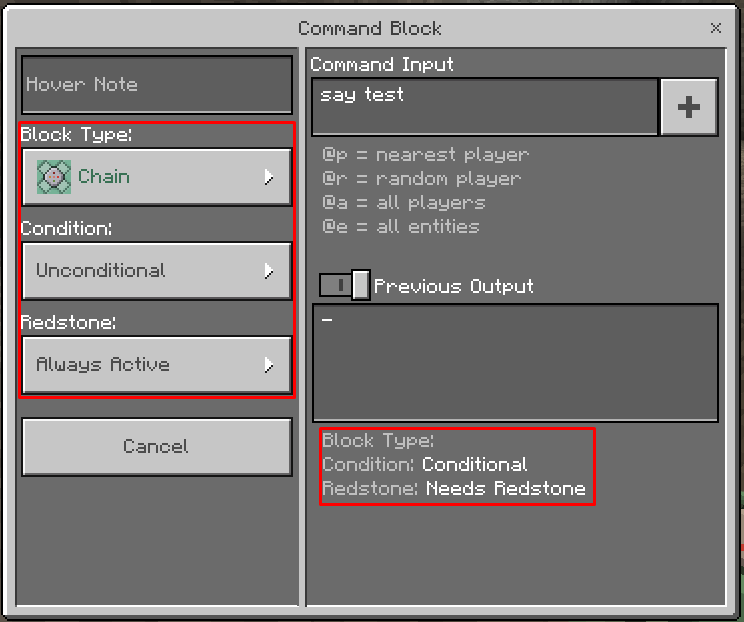
Command blocks appear to have serious issues with their settings both in SSP and SMP in Bedrock. I haven't been able to find this report yet so hopefully not a duplicate.
As you can see in the attached image, the command block thinks it has no type and that its settings are different to what the dropdowns say. The hover text and command text areas appear to update when you exit the command block, as does the visual type of the block, but even a new command block when placed has issues.
To reproduce:
Create a new world, creative, infinite with cheats.
/give @p command_block
place command block
See that "Redstone" setting differs between dropdown and bottom-right info.This
appears to actually cause the command blocks to stop running their commands if they lose their type.Command blocks appear to have serious issues with their settings both in SSP and SMP in Bedrock. I haven't been able to find this report yet so hopefully not a duplicate.
As you can see in the attached image, the command block thinks it has no type and that its settings are different to what the dropdowns say. The hover text and command text areas appear to update when you exit the command block, as does the visual type of the block, but even a new command block when placed has issues.
To reproduce:
Create a new world, creative, infinite with cheats.
/give @p command_block
place command block
See that "Redstone" setting differs between dropdown and bottom-right info.This may only be a display issue but it is very confusing.
Killing ender crystals with a command causes them to explode instead of just vanishing.
To reproduce.
```summon ender_crystal
kill ender_crystal```Killing ender crystals with a command causes them to explode instead of just vanishing.
To reproduce.
summon ender_crystal
kill ender_crystal
Killing ender crystals with a command causes them to explode instead of just vanishing.
To reproduce.
summon ender_crystal
kill ender_crystalKilling ender crystals with a command causes them to explode instead of just vanishing.
To reproduce.
summon ender_crystal kill ender_crystal
Fire blocks are not extinguished if firetick is off when the block the fire is attached to is destroyed. Instead the fire becomes invisible but still emits light and sets entities on fire that touch it.
Reproduction steps:
- Create a new Minecraft creative world and turn off fire tick in the settings.
- In creative mode, place down a flammable block.
- Ignite the top of the block.
- Break the block.
- Step into the space where the block was and note the fire UI.
Observed results: The fire is still there, it was not extinguished.
Expected results: The fire block is replaced with air when the block it is attached to is destroyed.
Repeating these steps with fire tick turned on will cause the fire to disappear as expected.
Note: I saw this has been reported in
MCPE-131704but it was closed as the report didn't explain the steps. I decided to create a new report with a more detailed description of the problem as the original post made it sound like it might be a world generation glitch.
Bug still persists in 13w43a
Confirmed for 13w43a
This has not been fixed! The offset has simply changed to being an offset of 1:
MC-36602Confirmed in 1.8, looks like it might be testing for the block at your position in the overworld or something.
@Brad Larson, thing is, if you're executing as a player in the nether, I should expect the detection should be done from the dimension the player is in, regardless where the command block that ran the execute is located.
@Conor Mcs. This won't work because the tag, as I said above, is stored as a number string. Please test before you suggest
I run into this issue a lot, confirmed for 1.8.7 I use very long command string very often. Pasting the command disconnects me but the command is pasted successfully upon logging back in. Some users of my commands (though I can't confirm this) say that it kicks them AND doesn't save the command contents so they are unable to paste the command at all.
I've not tried that particular command, but I have Windows 7 home premium and experience this error.
Confirmed for 15w32c
Confirmed
Duplicate of
MC-85835The time value is the duration for which the effect is given at full contact, much like a splash potion. Splash potions will only give the full effect when applied to the head. Try standing in the cloud's center with the center at head level.
We'll have to see. The potions are very expensive as they require dragon's breath to craft ~Sparks
This didn't happen in earlier snapshots. I don't think it should, you can't push gas or clouds with things! Also a pain from a map making perspective. Confirmed for 15w40b
Confirmed. I don't know whether this report should be generalized some more but since I wasn't sure I'm commenting here instead of creating a new report.
In previous versions Item Frames (and leashknots) would center themselves to a block when summoned using the /summon command. in 15w41b the Item Frames are VISUALLY aligned with the block, but executing off of them (e.g. a particle command or summon command) will show the entity is ACTUALLY centered where the player stood when running the execute comment.
Stand on the corner of a block and type /summon ItemFrame
The item frame will appear in the block you are standing.
type /execute @e[type=ItemFrame] ~ ~ ~ particle flame ~ ~ ~ 0 0 0 0 10
This will play the flame particle effect at the poisiton you were standing when you summoned the frame, not the center of the block.
The centering mechanic is very useful for map makers as it allows them to center entities summoned relative to a player or other entity to a block.
Confirmed for 15w43a
Confirmed for 1.9.2
@greggo Are you certain that the zombie was given the strength effect? As I described, the weakness effect will be removed but the strength affect was not applied. It is recognised as a bug by
MCM-147.I would also like to mention that spell_effect is able to remove effects from other entities I tested it on, not just zombie villagers which suggests that the component supports other entities but the add-effect parameter is broken.
Confirmed as an issue for MCPE 1.6.0
Confirmed still an issue in 1.13.2
Confirmed for 1.14.4