 stargazer
- stargazer
- JIRAUSER744539
- Europe/Stockholm
- Yes
- No
 MC-259468
![[Mojang] elvendorke](../../../data/avatars/users/81677.png)
![[Mojang] eowyn36](../../../data/avatars/users/18935.svg)


 MCL-23252






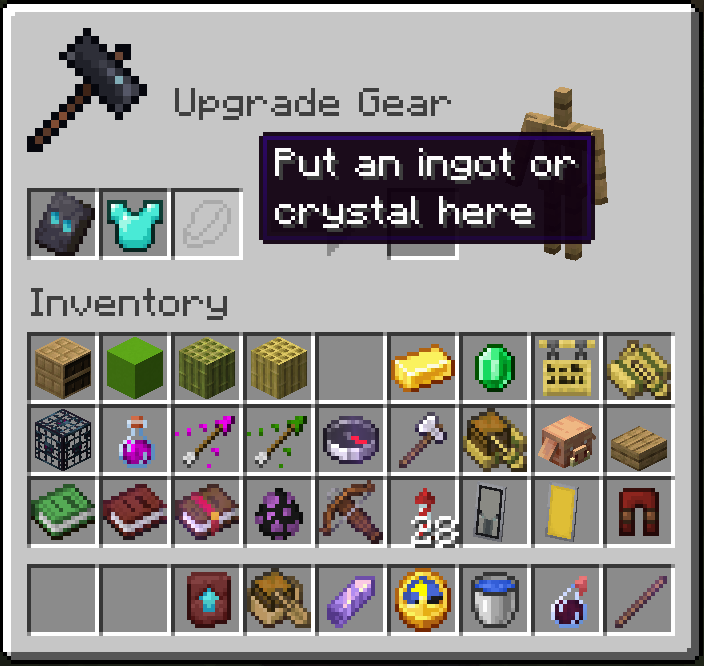
empty_slot_amethyst_shard does not showsin Smithing Table slot
When you put a Smithing Template in the first slot of the Smithing Table and a piece of armor in the second, you see the silhouette of an ingot, dust, lapis, quartz, diamond, emerald, and then the loop restarts: ingot, dust, ...
The amethyst shard never appears, but the file exists: textures\item\empty_slot_amethyst_shard.png
When you put a Smithing Template in the first slot of the Smithing Table and a piece of armor in the second, you see in the third slot the silhouette of an ingot, dust, lapis, quartz, diamond, emerald, and then the loop restarts: ingot, dust, ...
The amethyst shard never appears, but the file exists: textures\item\empty_slot_amethyst_shard.png
launcher_log-2.txt
Steps to reproduce:
1. Create a new world with the experimental feature Bundles in Creative Mode.
2. Open the inventory and get one bundle.
3. Insert some items in the bundle and watch the tooltip.
It does not show the inserted items, but shows its number. This worked correctly in 23w14a.
The bug
When you try to add more than 6 patterns to a banner in a loom you don't get any error or message.
However, the Minecraft code can show an icon in the loom GUI when you add a banner with 6 or more patterns (for example, the Ominous banner).
The problem is that the gui/container/loom.png file does not have the appropiate sprite to show this error.
This error exists also in the new 1.20.2 snapshots, because there is not an error sprite in gui/sprites/container/loom directory.
How to reproduce
Open the Loom GUI and put the Ominous banner in the first slot (or any banner with 6 patterns).
Expected behavior
You should see something like a red X because you cannot add more patterns to than banner. See "3 with pack error visible (red X).png" picture.
Actual behavior
The GUI does not show any error, but you cannot add more patterns to that banner. See "1 without pack error not visible.png" picture.
Corrected file
I have attached a very simple resource pack with only a modified gui/container/loom.png file with an added sprite (Loom Error Demo.zip). I have also attached the file here directly.
When you use this resource pack and repeat the steps, then you get a red X in the final slot if the banner already has 6 or more patterns.
Regretly, this correction does not work in the 1.20.2 snapshots
Disclaimer
I think this is a bug and not a change request because the code for using this sprite is already in Minecraft 1.20.1 (and earlier). It is just that the sprite is missing in the texture file.
I don't know if the code has changed for 1.20.2.
Sorry, I am not an English speaker. So please rewrite this description if you think it is necesary for better understanding.
The bug
When you try to add more than 6 patterns to a banner in a loom you don't get any error or message.
However, the Minecraft code can show an icon in the loom GUI when you add a banner with 6 or more patterns (for example, the Ominous banner).
The problem is that the gui/container/loom.png file does not have the appropiate sprite to show this error.
This
errorexists also in the new 1.20.2 snapshots, because there is not an error sprite in gui/sprites/container/loom directory.How to reproduce
Open the Loom GUI and put the Ominous banner in the first slot (or any banner with 6 patterns).
Expectedbehavior
You should see something like a red X becauseyou cannot add more patterns to thanbanner. See"3with pack errorvisible(red X).png" picture.
Actualbehavior
The GUI does not show any error, butyou cannot add more patterns to thatbanner. See"1withoutpack errornotvisible.png" picture.Corrected file
I have attached a very simple resource pack with only a modified gui/container/loom.png file with an added sprite (Loom Error Demo.zip). I have also attached the file here directly.
When you use this resource pack and repeat the steps, then you get a red X in the final slot if the banner already has 6 or more patterns.
Regretly, this correction does not work in the 1.20.2 snapshots
Disclaimer
I think this is a bug and not a change request because the code for using this sprite is already in Minecraft 1.20.1 (and earlier). It is just that the sprite is missing in the texture file.
I don't know if the code has changed for 1.20.2.
Sorry, I am not an English speaker. So please rewrite this description if you think it is necesary for better understanding.
The bug
When you try to add more than 6 patterns to a banner in a loom you don't get any error or message.
However, the Minecraft code can show an icon in the loom GUI when you add a banner with 6 or more patterns (for example, the Ominous banner).
The problem is that the gui/container/loom.png file does not have the appropiate sprite to show this error.
This bug exists also in the new 1.20.2 snapshots, because there is not an error sprite in gui/sprites/container/loom directory.
How to reproduce
Open the Loom GUI and put the Ominous banner in the first slot (or any banner with 6 patterns).
Actual behavior
The GUI does not show any error, but you cannot add more patterns to that banner. See picture "1 without pack error not visible.png"
Expected behavior
You should see something like a red X because you cannot add more patterns to than banner. See picture "3 with pack error visible (red X).png"
Corrected file
I have attached a very simple resource pack with only a modified gui/container/loom.png file with an added sprite (Loom Error Demo.zip). I have also attached the file here directly.
When you use this resource pack and repeat the steps, then you get a red X in the final slot if the banner already has 6 or more patterns.
Regretly, this correction does not work in the 1.20.2 snapshots.
Disclaimer
I think this is a bug and not a change request because the code for using this sprite is already in Minecraft 1.20.1 (and earlier). It is just that the sprite is missing in the texture file.
I don't know if the code has changed for 1.20.2.
Sorry, I am not an English speaker. So, please rewrite this description if you think it is necessary for better understanding.
Description
When riding a skeleton horse against a block underwater, the skeleton horse doesn't climb up the block unless it's completely on the ground. Although this is intended for land, it may be a bug underwater because it slows you down unnecessarily.
To reproduce, summon a skeleton horse using the following command:/summon minecraft:skeleton_horse ~ ~ ~ {NoAI:1b,Tame:1b,SaddleItem:{id:"minecraft:saddle",Count:1b}}
Description
Z-fighting can be seen in the head of skeleton horses when they wear a saddle.To reproduce, summon a skeleton horse using the following command:
/summon minecraft:skeleton_horse ~ ~ ~ {NoAI:1b,Tame:1b,SaddleItem:{id:"minecraft:saddle",Count:1b}}See attached images.
The Bug
Z-fighting can be seen in the head of skeleton horses when they wear a saddle.
Steps to Reproduce:
Summon a skeleton horse using the following command:
/summon minecraft:skeleton_horse ~ ~ ~ {NoAI:1b,Tame:1b,SaddleItem:{id:"minecraft:saddle",Count:1b}}Observed Behavior:
Z-fighting is present. See attached images.
Expected Behavior:
No z-fighting would occur.
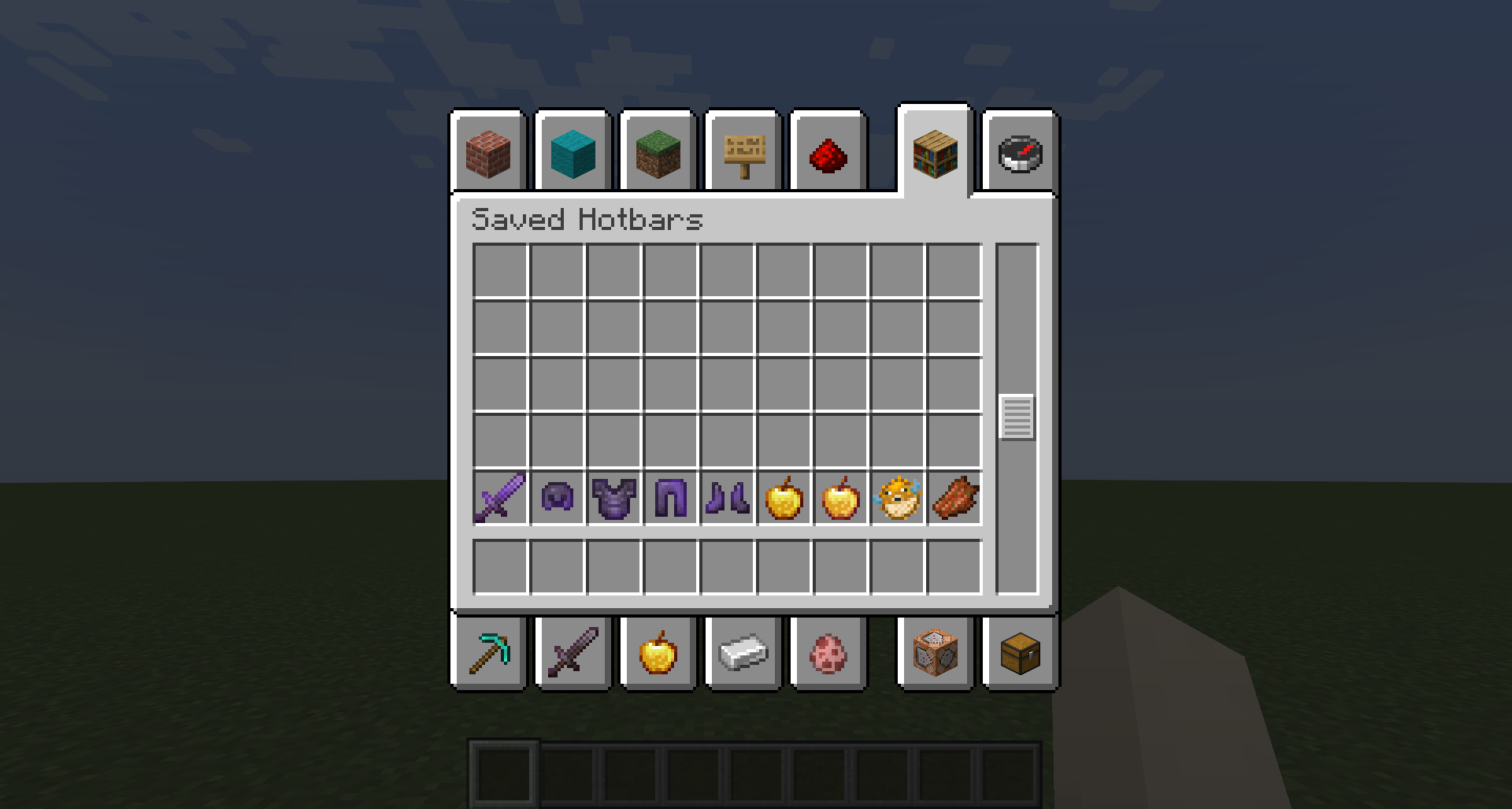
The tooltip in the Saved Hotbars dissapearsThe tooltip in the Saved Hotbars disappears in 24w06a
When you open your saved hotbars in 24w06a (saved in a previous version, v.g. 1.20.4), the tooltip in every empty row of the Saved Hotbars has disappeared.
Steps to reproduce:
- Run version 1.20.4. In Creative Mode save some hotbars with C+n.
- Run snapshot 24w06a. In Creative Mode open the Saved Toolbars.
Observed result:
You cannot see the tooltip in every empty row.
Expected result:
You should see the tooltip in every empty row, as it was in 1.20.4
Please note that when you run 24w06a without previously saved hotbars then you can see the tooltips.
Tooltips appear in 1.19.2, but NOT in 1.19.3 and 23w06a.
I am having the same issues but in a PC with Windows 8.1. Vanilla Minecraft, without mods.
Action https://redstone-launcher.mojang.com/release/v2/objects/5cc0c762f4d271154ec17d8a3cd60f481e215ec5/libcef.dll failed in response handler. response code: 200 - error string: 'transfer closed with 137371192 bytes remaining to read
[Error: 2023-03-25 16:37:50.1572686: Updating.cpp(354)] Download of https://redstone-launcher.mojang.com/release/v2/objects/5cc0c762f4d271154ec17d8a3cd60f481e215ec5/libcef.dll failed.
[Error: 2023-03-25 16:37:50.1573479: Updating.cpp(354)] Download of https://redstone-launcher.mojang.com/release/v2/objects/2b8ccc04c8f204af7a12a59f663abf005c72346d/allaytwirl.zip failed.
[Error: 2023-03-25 16:37:50.1575114: Updating.cpp(365)] Some downloads failed, update will not proceed.
Unstalling MinecraftLauncher and deleting .minecraft folder works, but only once. The second time Launcher tries to update and fails again.
The workaround is editing the game/.version file and writing 2.4.4, so the launcher do not try to update anymore.
Hello, I am using an Intel i5-4440 with 8 GB of RAM and Windows 8.1. Vanilla Minecraft without mods and Legacy Launcher. No VPN or anything uncommon.
When i run MinecraftLauncher it begins updating and then it gives the error "Error al actualizar el lanzador nativo de Minecraft", that I think is the same as "Unable to update the Minecraft Launcher".
I ran it twice an got the same error. Here are the logs:
[^launcher_log_03292023.txt]
I can not find the nativeUpdaterLog.txt
If I change the game/,version to 2.4.4 then it does not try to update and I can play without problems.
Same issue here.
I have a PC Intel Core i5-4400 with 8 GB of RAM and with Windows 8.1
Vanilla Minecraft without mods.
I have attached launcher_log.txt
------
I followed your instructions and I uninstalled MinecraftLauncher and got a new MinecraftInstaller.msi from https://www.minecraft.net/es-es/download
Then I deleted .minecraft folder (I did a backup), executed MinecraftInstaler.msi, and the first time I launched MinecraftLauncher.exe it worked correctly and opened the Launcher window.
The second time I launched MinecraftLauncher.exe I got the same error as before:
It does not update and does not launch the Launcher window, so playing is impossible.
I have found a workaround to overcome this issue.
You can delete the .minecraft folder a second time but this time do no reinstall the MinecraftLaucher. If you launch it again without the .minecraft folder, then the MinecraftLauncher updates without problem and you get the 2.4.22 version.
This version does not try to update so when you launch it a third or fourth time then it launchs the Launcher window and you can play. Then recover your .minecraft backup.
(Please, sorry my grammar, I am not an English speaker)
Perhaps related to
MC-262022Perhaps related to
MC-262012Confirmed in 1.20-pre1.
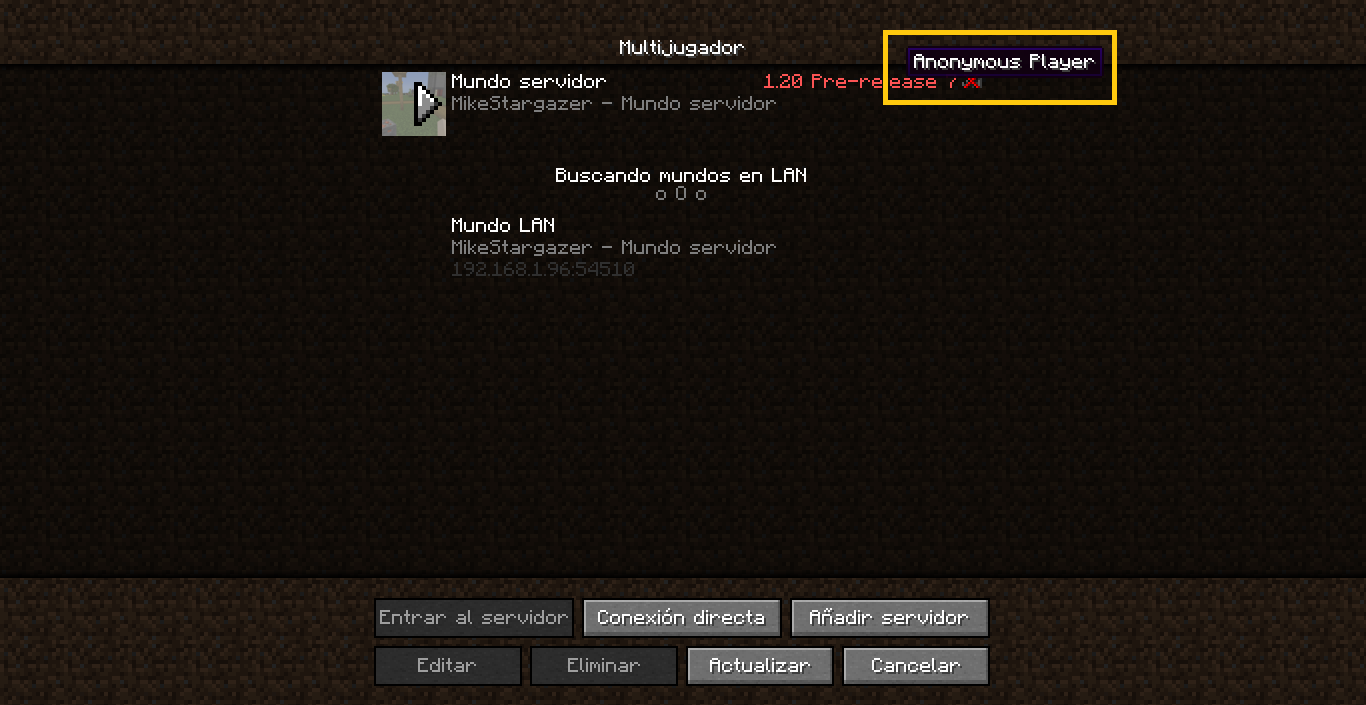
I have found one string in Multiplayer that is not translatable.
The tooltip says "Anonymous Player" when you cannot connect with the server because it has other version.
Found trying to connect a 1.19.4 client to a 1.20-pre7 server.
See attached screenshot.
Raw copper is a mineral, not a metal. To get the metal you must smelt it.
So it is reasonable to sound like stone and not like copper.
Raw iron is a mineral, not a metal. To get the metal you must smelt it.
So it is reasonable to sound like stone and not like iron.
It is not resolved in 1.20. We do not have a "Back" button.
Also, bottom of the title is cut.
Raw "metals" are minerals, no metals. To get the metal you must smelt the items in a (blast) furnace.
So I think is correct that the sound is like a mineral (stone), not a metal.
https://en.wikipedia.org/wiki/Iron_ore
If you use this fix the fog effect inside the powder snow blocks is applied to the incorrect faces.
Edit: Oh, well, the problem is MC-266463. With the culling problem corrected the fog effect works correctly with your fix.
Can confirm in 1.20.4.
Grass and mycelium are living things that die when you cover them.
Podzol is a type a soil, not a living thing. In fact it does not spread to other blocks, unlike grass or mycelium.
So I think the current behaviour is correct.
This seems to have resolved bug MC-206167 for Magma Cubes, but apparently not for Slimes.
See attached image 2024-01-23_16.34.34.png
I can confirm. The sound is not played and the subtitle not displayed.
This worked well in Java 1.20.4
The glint is gone in first person and in the GUI, but not on the floor or in an item frame, or in third person: