 Thomas Hall
- Tallone55
- tallone55
- America/Los_Angeles
- Yes
- No
 MC-66298
![[Mojang] Nathan Adams](../../../data/assets/gravatar/dinnerbone.png)
![[Mojang] Grum (Erik Broes)](../../../data/assets/gravatar/grum.png)







 MCL-13830

This bug has been incorrectly marked as resolved, I can confirm that the bug still exists as late as 14w32a. While the command /setblock ~ ~ ~ double_stone_slab 8 works fine, attempting the command /give Tallone55 double_stone_slab 8
does not work at all, and returns the error message "There is no such item with name double_stone_slab."
When holding the sprint key and attempting to jump, minecraft instead unlocks the cursor (no longer bound to center of screen) and opens the menu as if I had pressed esc. I can sprint and jump normally if I let go of the sprint key immediately, but holding the sprint key causes jumping to open the menu
What I expected to happen was:
holding L-ctrl and space while attempting to walk would allow me to jump and sprint at the same time.
What actually happened was:
Minecraft opened the esc menu.
Steps to reproduce:
1: log into a minecraft client version 14w34d
2: log into any world
3: attempt to hold left control (sprint) "w" (walk forward) and space (jump)
What I expected to happen was:
holding L-ctrl and space while attempting to walk would allow me to jump and sprint at the same time.
What actually happened was:
Minecraft opened the esc menu.
Steps to reproduce:
1: log into a minecraft client version 14w34d
2: log into any world
3: attempt to hold left control (sprint) "w" (walk forward) and space (jump)
Notes:
This error disappears if the sprint key is bound to another key. For example, I use a 6 button mouse, to get around the bug I bound "sprint" to button 4. The bug is strictly confined to using left control for sprint.
What I expected to happen was:
holding L-ctrl and space while attempting to walk would allow me to jump and sprint at the same time.
What actually happened was:
Minecraft opened the esc menu.
Steps to reproduce:
1: log into a minecraft client version 14w34d
2: log into any world
3: attempt to hold left control (sprint) "w" (walk forward) and space (jump)
Notes:
This
error disappears if the sprint key is bound to another key. For example, I use a 6 button mouse, to get aroundthebug Ibound"sprint" to button 4. The bug is strictly confined to using left control for sprint.This is not a bug, this is an issue with how my keyboard is configured. If a moderator would please delete this bug I would be grateful
While working on an adventure map I encountered an issue with mob spawners in 14w32(a,b and d). Using /setblock (or /blockdata) I cannot set EntityId to Item without causing a client crash.
I can confirm that this feature works without causing a crash as late as 1.7.9 for certain (probably 1.7.10 as well)The error reports state that this bug is related to the rendering of the item. It is possible that the issue stems from the re-write of Minecraft's rendering engine for 1.8
What I expected to happen was:
using /blockdata or /setblock I tried to create a spawner which spawned "Item"
What actually happened was:
Minecraft crashed with a complaint about r
What I expected to happen was:
using /blockdata or /setblock I tried to create a spawner which spawned "Item"
What actually happened was:
Minecraft crashed with a complaint about rendering entities in the world.
Steps to reproduce:
1: log into 14w32d or later
2: start a new world
3: using /blockdata or /setblock, attempt to set the EntityId tag of a mob spawner to "Item"
4:
What I expected to happen was:
using /blockdata or /setblock I tried to create a spawner which spawned "Item"
What actually happened was:
Minecraft crashed with a complaint about rendering entities in the world.
Steps to reproduce:
1: log into 14w32d or later
2: start a new world
3: using /blockdata or /setblock, attempt to set the EntityId tag of a mob spawner to "Item"
4:
What I expected to happen was:
using /blockdata or /setblock I tried to create a spawner which spawned "Item"
What actually happened was:
Minecraft crashed with a complaint about rendering entities in the world.
Steps to reproduce:
1: log into 14w32d or later
2: start a new world
3: using /blockdata or /setblock, attempt to set the EntityId tag of a mob spawner to "Item"
4: enjoy as minecraft repeatedly crashes upon loading the world.
notes: I originally attempted to create a mob spawner for an adventure map on a world I'd done a lot of work on. When I created this mob spawner, minecraft crashed and continued to do so upon loading the world. I was lucky and was able to destroy the mob spawner after logging in, just before crashing.
What I expected to happen was:
using /blockdata or /setblock I tried to create a spawner which spawned "Item"
What actually happened was:
Minecraft crashed with a complaint about rendering entities in the world.
Steps to reproduce:
1: log into 14w32d or later
2: start a new world
3: using /blockdata or /setblock, attempt to set the EntityId tag of a mob spawner to "Item"
4: enjoy as minecraft repeatedly crashes upon loading the world.
notes: I originally attempted to create a mob spawner for an adventure map on a world I'd done a lot of work on. When I created this mob spawner, minecraft crashed and continued to do so upon loading the world. I was lucky and was able to destroy the mob spawner after logging in, just before crashing.
What I expected to happen was:
using /blockdata or /setblock I tried to create a spawner which spawned "Item"
What actually happened was:
Minecraft crashed with a complaint about rendering entities in the world.
Steps to reproduce:
1: log into 14w32d or later
2: start a new world
3: using /blockdata or /setblock, attempt to set the EntityId tag of a mob spawner to "Item"
4: enjoy as minecraft repeatedly crashes upon loading the world.
Notes:
I originally attempted to create a mob spawner for an adventure map on a world I'd done a lot of work on. When I created this mob spawner, minecraft crashed and continued to do so upon loading the world. I was lucky and was able to destroy the mob spawner after logging in, just before crashing.
What I expected to happen was:
using /blockdata or /setblock I tried to create a spawner which spawned "Item"
What actually happened was:
Minecraft crashed with a complaint about rendering entities in the world.
Steps to reproduce:
1: log into 14w32d or later
2: start a new world
3: using /blockdata or /setblock, attempt to set the EntityId tag of a mob spawner to "Item"
4: enjoy as minecraft repeatedly crashes upon loading the world.
Notes:
I originally attempted to create a mob spawner for an adventure map on a world I'd done a lot of work on. When I created this mob spawner, minecraft crashed and continued to do so upon loading the world. I was lucky and was able to destroy the mob spawner after logging in, just before crashing.Command used:
{EntityId:Item}
/blockdata ~ ~-1 ~
What I expected to happen was:
I would summon a villager with custom trades.What actually happened was:
The trades work normally, however the moment you trade with the villager minecraft crashes.Steps to reproduce:
1. Log into any 1.8 world
2. using the /summon or /entitydata command, get a villager with custom trades
3. trade with the villager
4. Your game will crash after a couple seconds with a complaint about a ticking entity.Notes:
This error has persisted throughout the 1.8 snapshots and DOES NOT OCCUR
in 1.7This error occurs in both singleplayer and multiplayer
Only the player who traded is affected in multiplayer
This bug also causes my desktop environment to freeze after the crash occurs because the mouse fails to unlock from the minecraft window. Upon killing the process through the command line my desktop "splinters." I know no other way to describe this. *This is likely just a bug with java that is not something you can fix.
What I expected to happen was:
I would summon a villager with custom trades.What actually happened was:
The trades work normally, however the moment you trade with the villager minecraft crashes.Steps to reproduce:
1. Log into any 1.8 world
2. using the /summon or /entitydata command, get a villager with custom trades
3. trade with the villager
4. Your game will crash after a couple seconds with a complaint about a ticking entity.Notes:
This error has persisted throughout the 1.8 snapshots and DOES NOT OCCUR
in 1.7This error occurs in both singleplayer and multiplayer
Only the player who traded is affected in multiplayer
This bug also causes my desktop environment to freeze after the crash occurs because the mouse fails to unlock from the minecraft window. Upon killing the process through the command line my desktop "splinters." I know no other way to describe this. *This is likely just a bug with java that is not something you can fix.
The command used is:
/summon Villager ~ ~1 ~
{Attributes:[
{Name:generic.followRange,Base:1.0},
{Name:generic.movementSpeed,Base:0.001}],CustomName:"Ol' Harv",Invulnerable:1,CareerLevel:100,Career:2,PersistenceRequired:1,CustomNameVisible:1,Profession:1, Offers:{Recipes:[
{buy:
{id:371,Count:5},sell:{id:373,Count:1,Damage:8259,tag:{HideFlags:63,
CustomPotionEffects:[
{ Id:15, Amplifier:0, Duration:1200, }
,
{ Id:15, Amplifier:0, Duration:1200, }
,
{ Id:15, Amplifier:0, Duration:1200, },
{ Id:15, Amplifier:0, Duration:1200, },
{ Name:"Strong booze", Lore:[ "Drink your sorrows out,", " take a hearty swig! " ]}
],
display:}},maxUses:1,uses:0},
{buy:
{id:371,Count:5},sell:{id:373,Count:1,Damage:8259,tag:{HideFlags:63,
CustomPotionEffects:[
{ Id:15, Amplifier:0, Duration:1200, }
,
{ Id:15, Amplifier:0, Duration:1200, }
,
{ Id:15, Amplifier:0, Duration:1200, },
{ Id:15, Amplifier:0, Duration:1200, },
{ Name:"Strong booze", Lore:[ "Drink your sorrows out,", " take a hearty swig! " ]}
],
display:}},maxUses:1,uses:0},
{buy:
{id:371,Count:5},sell:{id:373,Count:1,Damage:8259,tag:{HideFlags:63,
CustomPotionEffects:[
{ Id:15, Amplifier:0, Duration:1200, }
,
{ Id:15, Amplifier:0, Duration:1200, }
,
{ Id:15, Amplifier:0, Duration:1200, },
{ Id:15, Amplifier:0, Duration:1200, },
{ Name:"Strong booze", Lore:[ "Drink your sorrows out,", " take a hearty swig! " ]}
],
display:}},maxUses:1,uses:0},
{buy:
{id:371,Count:5},sell:{id:373,Count:1,Damage:8259,tag:{HideFlags:63,
CustomPotionEffects:[
{ Id:15, Amplifier:0, Duration:1200, }
,
{ Id:15, Amplifier:0, Duration:1200, }
,
{ Id:15, Amplifier:0, Duration:1200, },
{ Id:15, Amplifier:0, Duration:1200, },
{ Name:"Strong booze", Lore:[ "Drink your sorrows out,", " take a hearty swig! " ]}
],
display:}},maxUses:1,uses:0},
{buy:
{id:371,Count:5},sell:{id:373,Count:1,Damage:8259,tag:{HideFlags:63,
CustomPotionEffects:[
{ Id:15, Amplifier:0, Duration:1200, }
,
{ Id:15, Amplifier:0, Duration:1200, }
,
{ Id:15, Amplifier:0, Duration:1200, },
{ Id:15, Amplifier:0, Duration:1200, },
{ Name:"Strong booze", Lore:[ "Drink your sorrows out,", " take a hearty swig! " ]}
],
display:}},maxUses:1,uses:0},
{buy:
{id:371,Count:5},sell:{id:373,Count:1,Damage:8259,tag:{HideFlags:63,
CustomPotionEffects:[
{ Id:15, Amplifier:0, Duration:1200, }
,
{ Id:15, Amplifier:0, Duration:1200, }
,
{ Id:15, Amplifier:0, Duration:1200, },
{ Id:15, Amplifier:0, Duration:1200, },
{ Name:"Strong booze", Lore:[ "Drink your sorrows out,", " take a hearty swig! " ]}
],
display:}},maxUses:1,uses:0},
{buy:
{id:371,Count:5},sell:{id:373,Count:1,Damage:8259,tag:{HideFlags:63,
CustomPotionEffects:[
{ Id:15, Amplifier:0, Duration:1200, }
,
{ Id:15, Amplifier:0, Duration:1200, }
,
{ Id:15, Amplifier:0, Duration:1200, },
{ Id:15, Amplifier:0, Duration:1200, },
{ Name:"Strong booze", Lore:[ "Drink your sorrows out,", " take a hearty swig! " ]}
],
display:}},maxUses:1,uses:0},
{buy:
{id:371,Count:5},sell:{id:373,Count:1,Damage:8259,tag:{HideFlags:63,
CustomPotionEffects:[
{ Id:15, Amplifier:0, Duration:1200, }
,
{ Id:15, Amplifier:0, Duration:1200, }
,
{ Id:15, Amplifier:0, Duration:1200, },
{ Id:15, Amplifier:0, Duration:1200, },
{ Name:"Strong booze", Lore:[ "Drink your sorrows out,", " take a hearty swig! " ]}
],
display:}},maxUses:1,uses:0} ]
}
}
What Should have happened:
Using/give @p splash_potion 1 0 {CustomPotionEffects:[
{Id:15,Amplifier:0,Duration:200}],display:{Name:"Blindness potion"}}
should give you a potion that applies blindness effect
What happened instead:
The potion, which looks like it should be a potion of blindness and claims to be a potion of blindness in the lore tag instead looks like a water bottle when thrown and applies no effect.
Steps to reproduce:
open a new world
get a command block
enter the command:
"/give @p splash_potion 1 0 {CustomPotionEffects:[
{Id:15,Amplifier:0,Duration:200}],display:{Name:"Blindness potion"}}"
try throwing that new splash potion at yourself.
DUPLICATE
I've done a NPC that supposed to heal me when I stand near him, with a command block with this command:
{CustomName:"Medic"}
/execute @e[type=Villager,name=Medic] ~ ~ ~ /effect @e[type=Player,r=5] 10 1 0 true
And spawned a NPC called Medic with:
/summon Villager ~ ~ ~
It's works, theeffect'llbegive totheplayer, but that effect won't heal him.
He'll see the effect, without getting healed.
The problem is not in the duration of that effect, you can type also:/effect @e[type=Player,r=5] 10 1000 0 true , it won't works too.This bug occured only with the regeneration effect. An instant healing or a slowness effect 'll works.
How to reproduce:
-Make a redstone loop with a command block with that command:
/execute @e[type=Villager] ~ ~ ~ /effect @e[type=Player,r=5] 10 1 0 true
- Stay near the Npc
Edit: This bug occur also if it's a player that supposed to heal other players by standing near them. To reproduce, replace the command by that:
- /execute @a ~ ~ ~ /effect @e[type=Player,r=4] 10 1 0 true
Placed repeat command blocks with the commands
/effect @p regeneration 30 <0-4>This causes the regeneration effect to be visually applied with particles and a flickering health bar, however it does not heal the player.
How to reproduce:
-In a minecraft 1.9 world, place a repeat command block and enter the above command, replacing "<0-4>" with a number from 0 to 4.-type "/gamerule naturalRegeneration false"
-Apply damage to yourself in survival mode
- Notice the particles and movement on the health bar, but lack of health regen.
Bug with regenerationeffectRegeneration status effect misbehaves with faster clocks
Placed repeat command blocks with the commands
/effect @p regeneration 30 <0-4>This causes the regeneration effect to be visually applied with particles and a flickering health bar, however it does not heal the player.
How to reproduce:
-In a minecraft 1.9 world, place a repeat command block and enter the above command, replacing "<0-4>" with a number from 0 to 4.-type "/gamerule naturalRegeneration false"
-Apply damage to yourself in survival mode
- Notice the particles and movement on the health bar, but lack of health regen.
-Effects that fail to work include: Wither, Nausea, Regeneration, Health Boost, etc...
Regeneration status effect misbehaveswith faster clocksStatus effects misbehave with faster clocks
Placed repeat command blocks with the commands
/effect @p regeneration30<0-4>This causes the regeneration effect to be visually applied with particles and a flickering health bar, however it does not heal the player.
How to reproduce:
-In a minecraft 1.9 world, place a repeat command block and enter the above command, replacing "<0-4>" with a number from 0 to 4.-type "/gamerule naturalRegeneration false"
-Apply damage to yourself in survival mode
- Notice the particles and movement on the health bar, but lack of health regen.
-Effects that fail to work include: Wither, Nausea, Regeneration, Health Boost, etc...
Placed repeat command blocks with the commands
/effect @p regeneration 1 <0-4>This causes the regeneration effect to be visually applied with particles and a flickering health bar, however it does not heal the player.
How to reproduce:
-In a minecraft 1.9 world, place a repeat command block and enter the above command, replacing "<0-4>" with a number from 0 to 4.-type "/gamerule naturalRegeneration false"
-Apply damage to yourself in survival mode
- Notice the particles and movement on the health bar, but lack of health regen.
-Effects that fail to work include: Wither, Nausea, Regeneration, Health Boost, etc...
In the latest snapshot the mercy period was removed, meaning that damage is done as fast as people can click at another person rather than limited to a certain speed.
This makes no sense given the developer's stated aims to remove spam clicking.
I recorded a clip of the bizarrely fast attack speed
https://youtu.be/ONj_aFU8_Lg
In the latest snapshot the mercy period was removed, meaning that damage is done as fast as people can click at another person rather than limited to a certain speed.
This makes no sense given the developer's stated aims to remove spam clicking.
I recorded a clip of the bizarrely fast attack speed
https://youtu.be/ONj_aFU8_LgEdit: I've learned that this applies to other forms of damage as well.
Steps to reproduce:
1: log into a multiplayer server in 16w04a
2: go into survival mode and find some lava
3: jump in.
Or
1: log into a multiplayer server and spam click at another player.
2: observe nearly every hit land, faster than possible in 1.8
Mercyperiod missingin pvpPlayer grace period missing for damage
If a command block
or functionattempts to run a particle command that would not be seen by a player (e.g. there is nobody online and the particle is in spawn chunks) this message is printed in the server console regardless of gamerules:com.mojang.brigadier.exceptions.CommandSyntaxException: The particle was not visible for anybody.This can lag server control panels which attempt to parse the log output and overall leads to an unreadable server console.
To reproduce:
start a server instance
generate a flatland world with the spawnpoint at (0,0)
place a repeating command block
insert this command:particle enchant -35.0 65 0 0 1 6 0 20Look at the server console.
If a command block attempts to run a particle command that would not be seen by a player (e.g. there is nobody online and the particle is in spawn chunks) this message is printed in the server console regardless of gamerules:
com.mojang.brigadier.exceptions.CommandSyntaxException: The particle was not visible for anybody.This can lag server control panels which attempt to parse the log output and overall leads to an unreadable server console.
To reproduce:
start a server instance
generate a flatland world with the spawnpoint at (0,0)
place a repeating command block
insert this command:particle enchant -35.0 65 0 0 1 6 0 20Look at the server console.
Note: This does not appear to be true for functions.
When an objective is set to display in a colored sidebar such as sidebar.team.gray or sidebar.team.red it is not visible from a team with that color. The primary sidebar slot behaves as normal.
Steps to reproduce:
1: /team add red
2: /team option red color red
3: /team join red
4: /scoreboard objectives add foobar dummy
5: /scoreboard players set @s foobar 100
6: /scoreboard objectives setdisplay sidebar.team.red foobar
Observe that your score of 100 does not show up on a sidebar to the right side of the screen.The command does complete successfully, however, and returns "Nothing changed, that display slot is already showing that objective" if the objective was already in the slot when you ran the above command.
7: /scoreboard objectives setdisplay sidebar foobar
Observe that your score of 100 does show up on a sidebar to the right side of the screen.
When an objective is set to display in a colored sidebar such as sidebar.team.gray or sidebar.team.red it is not visible from a team with that color. The primary sidebar slot behaves as normal.
Steps to reproduce:
1: /team add red
2: /team option red color red
3: /team join red
4: /scoreboard objectives add foobar dummy
5: /scoreboard players set @s foobar 100
6: /scoreboard objectives setdisplay sidebar.team.red foobar
Observe that your score of 100 does not show up on a sidebar to the right side of the screen.The command does complete successfully, however, and returns "Nothing changed, that display slot is already showing that objective" if the objective was already in the slot when you ran the above command.
7: /scoreboard objectives setdisplay sidebar foobar
Observe that your score of 100 does show up on a sidebar to the right side of the screen.When an objective is set to display in a colored sidebar such as sidebar.team.gray or sidebar.team.red it is not visible from a team with that color. The primary sidebar slot behaves as normal.
Steps to reproduce:
/team add red /team option red color red /team join red /scoreboard objectives add foobar dummy /scoreboard players set @s foobar 100 /scoreboard objectives setdisplay sidebar.team.red foobarObserve that your score of 100 does not show up on a sidebar to the right side of the screen.
The command does complete successfully, however, and returns "Nothing changed, that display slot is already showing that objective" if the objective was already in the slot when you ran the above command.
/scoreboard objectives setdisplay sidebar foobarObserve that your score of 100 does show up on a sidebar to the right side of the screen.
When an objective is set to display in a colored sidebar such as sidebar.team.gray or sidebar.team.red it is not visible from a team with that color. The primary sidebar slot behaves as normal.
Steps to reproduce:
/team add red /team option red color red /team join red /scoreboard objectives add foobar dummy /scoreboard players set @s foobar 100 /scoreboard objectives setdisplay sidebar.team.red foobarObserve that your score of 100 does not show up on a sidebar to the right side of the screen.
The command does complete successfully, however, and returns "Nothing changed, that display slot is already showing that objective" if the objective was already in the slot when you ran the above command.
/scoreboard objectives setdisplay sidebar foobarObserve that your score of 100 does show up on a sidebar to the right side of the screen.
(Note, this happens in a fresh world and does not appear to be related to https://bugs.mojang.com/browse/MC-123104)
The bug
When an objective is set to display in a colored sidebar such as sidebar.team.gray or sidebar.team.red it is not visible from a team with that color. The primary sidebar slot behaves as normal.
How to reproduce
/team add red /team option red color red /team join red /scoreboard objectives add foobar dummy /scoreboard players set @s foobar 100 /scoreboard objectives setdisplay sidebar.team.red foobarObserve that your score of 100 does not show up on a sidebar to the right side of the screen.
The command does complete successfully, however, and returns "Nothing changed, that display slot is already showing that objective" if the objective was already in the slot when you ran the above command.
/scoreboard objectives setdisplay sidebar foobarObserve that your score of 100 does show up on a sidebar to the right side of the screen.
Note:
This happens in a fresh world and does not appear to be related to
MC-123104.
Simultaneously pressing space or w,a,s,d results in inconsistent movement when compared to 1.12.2.
To repoduce: Be Using Linux I have confirmed this with other Linux users. This bug is not reproducible on Windows or Mac OS. It is not a hardware issue as behavior changed between the very first 1.13 snapshot and 1.12.2, and returning to the older version has reliable movement.
Press space and w simultaneously. You will either fail to jump or fail to walk forwards. This makes movement unreliable and aggravating at times, as even holding down a key sometimes won't register.
image-2019-11-25-15-18-56-200.png
Reopened and given the ticket to Thomas Hall.
@Thomas Hall: You can edit the description yourself now, please update it for 15w46a 
It "seems silly," but it could easily have affected far more than 1 line of code.
I think it probably has to do with the implementation of block models, though I may be wrong. In addition, there is the bug page RIGHT HERE, so it is considered a bug and they probably they intend to fix it.
Confirmed bug's existence in 14w19a
After some experimentation I learned that this is unrelated to Minecraft, the bug occurs in versions that I have had no problems with previously.
Here are the crash reports for both client and server
I have encountered a similar issue (not sure if it's the same or even related) with villagers edited with minecraft's built-in NBT editor using /summon. I have crashed both my server and client after trading with these custom villagers and I get an error message about a ticking entity
I am attaching the crash reports for both.
The issue is not the potions, I've run similar commands where the traded items are basic things such as bread and the like with no special tags and they too cause crashes. In addition, I get the potion normally after reloading the world. The trade works normally, but shortly after I have traded I crash.
This turned out to be the proper resolution, thank you. The Career tag must match the possible careers for the Profession tag, otherwise there will be a crash
/blockdata ~ ~-1 ~
{EntityId:Item}I'm having an issue where I use a command block to spawn a custom mob (a villager,) then I do something else where the chunk gets unloaded, and come back and the mob has vanished and the command block that I broke has returned. This happens on the same chunk every time.
I can confirm that this is a serious problem, and that it exists with /testforblocks as well. On both my realm and a server I rented from a different host I have TERRIBLE lag problems when I activate a fill clock with /testforblock and /testfor commands on it.
This is NOT fixed in 1.9, Using the most recent snapshot I have found that naming villagers still does nothing.
Just started up a new world on my 15w32b server, no noticeable lag at first, but getting the message spammed in my console.
The two that show up are FallingSand and MinecartChest entities
[11:33:52 WARN]: Tried to add entity FallingSand with duplicate UUID 58e6ada9-d8a9-4daa-bed3-32ce3a7d3355
[11:33:52 WARN]: Tried to add entity FallingSand with duplicate UUID 63ffed57-5e26-4382-bb9a-3ac47b68d301
[11:33:52 WARN]: Tried to add entity FallingSand with duplicate UUID 6ba27c29-13c9-4067-8e15-5e2f99f8a128
[11:33:52 WARN]: Tried to add entity FallingSand with duplicate UUID d04f593d-8e47-4c4d-8fb8-1a54aa35ce49
[11:33:52 WARN]: Tried to add entity FallingSand with duplicate UUID 7938ce7f-e092-4e39-aa61-2f5362dbcf12
[11:33:52 WARN]: Tried to add entity FallingSand with duplicate UUID 16df3116-3a2a-4825-bdd1-bc7fbfae2982
[11:33:52 WARN]: Tried to add entity FallingSand with duplicate UUID bb5008c3-b273-4cf6-be43-3c51bde93699
[11:33:52 WARN]: Tried to add entity FallingSand with duplicate UUID 6d37871f-0633-4cf2-9d69-9bf0a385f1bf
[11:33:52 WARN]: Tried to add entity FallingSand with duplicate UUID 73beb5b9-50dd-445d-aafc-a47d5f238d81
[11:33:52 WARN]: Tried to add entity FallingSand with duplicate UUID f7505a4f-de8e-43da-8304-6661127c06e4
[11:33:52 WARN]: Tried to add entity FallingSand with duplicate UUID 81800bfe-8884-4db9-850d-7ecd34b2d10f
[11:33:52 WARN]: Tried to add entity FallingSand with duplicate UUID ea839064-1e5a-438b-8f60-ad53cd30db17
[11:33:52 WARN]: Tried to add entity FallingSand with duplicate UUID dd83a441-4ac0-4741-982a-d7eccc620b1a
[11:33:52 WARN]: Tried to add entity FallingSand with duplicate UUID 7194809a-9cf4-41dc-b2e5-0d1f5c5e8234
[11:33:52 WARN]: Tried to add entity FallingSand with duplicate UUID ec6dd510-9f0d-46d2-9005-f351d78c1a1d
This is a missing feature, not a bug. Mojang has yet to introduce a craftable ender crystal that respawns the dragon in the snapshots. When they make a permanent and finished way to respawn the dragon, you can bet that the ender crystals will respawn.
I apologise for posting a duplicate, I looked for about 15 minutes and couldn't find anyone who had the same issue.
Related to
MC-83471The problem with this (as recently as the 1.9 snapshots)
is that it checks the block interaction with the sign ONLY on spawn chunks. What this means is that I can't place command signs around my server spawn chunks to allow non-ops to teleport to areas set aside for them. Buttons too are disabled for non-ops on spawn chunks. My argument isn't that signs should check-op everywhere, it's that they shouldn't check op ANYWHERE, so as to allow you to let non-ops interact with the signs in spawn.
Edit: The above players wish for check-op everywhere, but that is a problem. Instead, I propose an exception for interaction with blocks for signs
I left the server and did something else, and upon coming back I cannot reproduce the bug. Would it still be helpful to attach a crash report?
can confirm as well for 15w35e, oddly enough, I'm also running a server on a Linux Mint machine.
Alright, I agree, it appears to be related to guardian rendering issues (their laser beams) I can recreate it now, will be attaching crash report soon.
This appears to be fixed in 15w38a, everyone should check to see if this is fixed in their own servers
Confirmed. Experienced this bug in multiplayer, also confirmed that the items are not only invisible, but gone entirely.
Bug disappeared after a few minutes in the world: has yet to reappear.
Confirmed as late as the 1.9 snapshots.
For future reference, problems like this are best answered on the minecraft forums rather than the bug tracker. Skylinerw especially helps most people who post in the command block section.
How long has it been non-functional? Is this the first time you've tried to use it in the 1.9 snapshots?
While the OP's workaround is functional, I would like to point out that this is a bug. As late as 15w46a this bug continues to prevent fast clocks (repeat command blocks) from applying regeneration or health boost without resetting 20 times per second. For example, health boost empties the hearts when it's applied and regeneration, even for long durations, doesn't add additional regeneration speed. Please re-open this.
Applying regeneration 0-4 via a repeat command block with
"/effect @p regeneration 30 <0-4>"
does not do more than visually apply the effect.
okay
The mercy period that prevents players from taking damage too quickly which has been around for a VERY long time is missing. I'm not talking about a problem with the windup mechanic added in the 1.9 snapshots.
Evidence: https://youtu.be/ONj_aFU8_Lg
yes
=
This also causes lava to apply huge amounts of damage nearly instantly along with other forms of damage. Fire works more quickly as well.
Bug still extant, improperly marked as fixed. (As of 16w05b)
Bug extant in 1.9.2
Bug persists in 1.9.2, also applies when spawning mobs with skulls on their heads or in hands.
Confirmed in the 1.11 snapshots as late as 16w36a
confirmed for 16w36a
This bug has not been patched. Tests in 16w41a continue to have desync on shield use.
I don't know how this got marked 'resolved' without my noticing, but this bug is still extant in 1.12.
Supposedly this launcher is no longer updated... so why is there suddenly an update which breaks everything? -an affected user
Problem is gone for me as well. I didn't have to do anything but wait.
Affects 18w02a
duplicate of
MC-121799This appears to be WAI, they do run away if you are in survival or adventure mode.
Bug extant in 18w05a. Crash report attached:
crash-2018-02-01_09.48.53-client.txt
Also important to note that structure blocks can trigger this issue like the fill command.
Affects 18w05a.
I've been looking through my old reports and I realized that I'd neglected this bug. I can confirm that it still exists up to 18w05a. I'd learned to live with it, but I don't think it's intended behavior and it limits options.
Bug extant in 18w05a
Affects 18w07c
Affects 18w07c
Affects 18w07c
Affects 18w07c
confirmed for 18w07c
Can confirm. Affects spectator mode as well, and creates client-side particles at feet location in spectator mode.
Sprinting does cancel if you stop flying.
Can confirm in 18w07c
Cannot reproduce on Linux Mint 18.3
This issue is not resolved. testing in 18w19b shows that water continues to remain stationary on top of fillable blocks like signs, bars and slabs.
EDIT: placed in 18w19b.
Bug appears to be fixed for Tallgrass and Doors as of 18w20a. Can anyone confirm? Beds load, but immediately break.
No need for sarcasm. The bed breaks even with blocks below, or I wouldn't have mentioned it.
Affects 18w21a on a world last opened in snapshots.
EDIT: Swimming in singleplayer first does not fix the problem as the reporter above claims.
This bug is not fixed. Affects 18w21a as shown in attached screenshots.
Bug extant in 1.13 pre-1. It functionally means you can't disable the vanilla datapack.
Alright, I finally got around to testing in the latest snapshot. As of 1.13 pre-release 1 The problem persists only as long as the vanilla datapack isn't loaded. Loading it and then relogging fixes the issue.
That matches the symptoms of
MC-129838Confirmed for 1.13 pre-release 1.
Supposedly Mojang was going to recalculate all light levels in existing worlds when 1.13 came out to fix the change to how light passes through water. There's a reason that Mojang strongly recommends not playing full-time on the snapshots.
cannot reproduce in 1.13 pre-3
Jumping on this bug before it gets marked as duplicate, there is currently no valid root bug for this particular issue.
MC-123498, which currently has a large number of bugs marked as duplicates, is marked as invalid because "this is not a technical support forum".The 'bug' appears to have shown up in 1.12 as well as the snapshots as a recent change, and all of the bug reports which include an environment list Windows 10. I can confirm that this bug appears in Windows 10 but not Linux Mint 18.3 while fullscreened in both 1.12.2 and the snapshots.
It seems likely that a change in Windows 10 has caused a problem with how Minecraft draws its window.
EDIT:
To clarify, the bug appears in fullscreened but not windowed mode.
Can confirm, it should be noted that this bug is most obvious while immersed in water and it can be hard to tell what is going on if your character is outside of it
Unable to replicate by breaking only one banner at a time. Using a fill command on a large cube of banners I was able to reliably crash the client. Looks like
MC-123363.Affects 1.13 pre-6
I'll elaborate, since I'm working on this project with the reporter. We used to regularly experience
MC-123363, but when it was marked resolved we could no longer trigger that one specifically.This crash showed up after
MC-123363was resolved and the reporter has been unable to reliably replicate it.In order to replicate the crash, we run a function which procedurally runs fill commands and loads a selection of structures. During the generation process players who are have the affected chunks loaded will sometimes have their games crash in a manner similar to
MC-123363.Confirmed for 1.13.2
WORKAROUND:
There's a fix coming down the pipeline for glfw potentially; in the corresponding issue in their tracker is this link https://github.com/glfw/glfw/pull/1472/files#diff-0f3106b1408d89cbecbe2f57a783331bR1265
it leads to a fix which describes what lines to change and how in order to resolve this bug as well as the issue that caused it in the first place. If you feel like compiling your own libraries to restore your ability to enjoy parkour and pvp, then that's the solution.
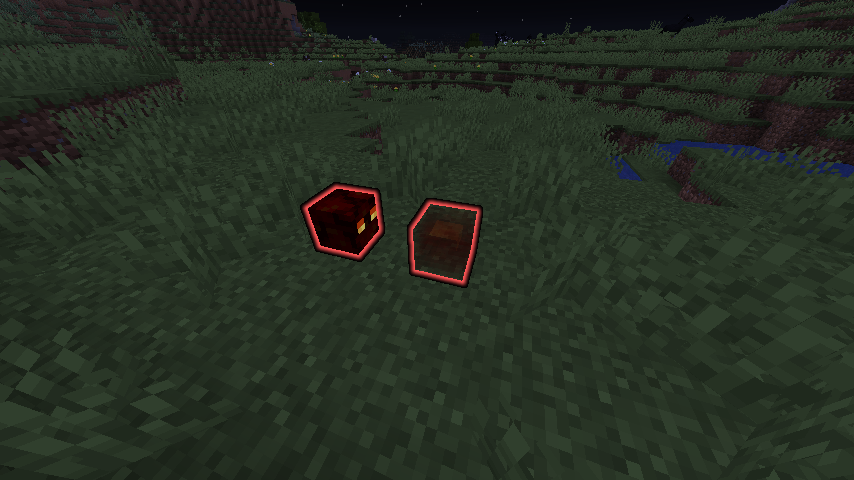
Confirmed for me on 1.15 pre-6. The entity appears pure white from some angles, and glows with a white outline from others. Entities which are visible work as normal, and those on the same team as the player with seeFriendlyInvisibles set to true work properly as well, as depicted in the second screenshot.
The issue is occurring on Linux Mint 20 (based on Ubuntu Linux 20.04). The only packages that were updated today were Brave browser and Discord, which may have dragged in an incompatible version of chromium as described by MCL-11167. I initially ran into seg faults when creating new launcher profiles, and after a reboot the launcher would segfault every time it was run.
As part of my troubleshooting, I created a fresh .minecraft directory. This is what prevents the launcher from running, and when I restore my original directory it merely segfaults on new profile creation.
I can confirm this issue up to 1.16.5 (Linux Mint 20.1 Cinnamon), and while it's relatively unproblematic as the game resumes upon closing the external application, all buttons that open external applications including the "Open Pack Folder" buttons for resource and data packs cause the program interruption. In the 1.17 snapshots (21w03a) Minecraft cannot resume after closing the external program, and instead crashes.
I've observed the same issue: Despite confirming that the internal server is running at 20 TPS, liquids will cease propagating for no evident reason. Applying block updates doesn't resolve the issue
 .
. 