 Zephira
- Zephira
- zephira
- America/Chicago
- Yes
- No
16 issues
Key
Summary
Status
Reporter
Assignee
Created
 MCPE-42340
 REALMS-10678



Added Attachments:
Added Attachments:
Added Attachments:
Added Attachments:
Added Attachments:
Changed Description:
game crashes during load of world.
World download too large to upload here.Please PM me for a link
Game crashes during load of world. Problem started in 1.13.0.16
I was able to prune and attach a world file.
Added Attachments:
bug report.zip
Removed Attachments:
Added Attachments:
Added Attachments:
Added Affects Versions: 1.15.0.53 Beta
Added Affects Versions: 1.15.0.54 Beta
Added Affects Versions: 1.15.0.55 Beta
Added Attachments:
Added Affects Versions: 1.16.0.51 Beta
Added Affects Versions: 1.16.0.53 Beta
Added Affects Versions: 1.16.0.55 Beta
Added Affects Versions: 1.16.0.57 Beta
Added Affects Versions: 1.16.0.58 Beta
Added Affects Versions: 1.16.0.59 Beta
Added Attachments:
Removed Attachments:
Added Affects Versions: 1.16.0.61 Beta 1.16.0.63 Beta
Added Affects Versions: 1.16.0.67 Beta 1.16.0.68 Beta
Added Affects Versions: 1.16.20.50 Beta
Added Affects Versions: 1.16.20.52 Beta
Added Affects Versions: 1.16.20.53 Beta
Added Affects Versions: 1.16.10 1.16.20.54 Beta
Added Affects Versions: 1.16.100.50 Beta
Added Affects Versions: 1.16.20 1.16.100.52 Beta
Added Affects Versions: 1.16.21 1.16.100.53 Beta
Added Affects Versions: 1.16.100.54 Beta
Added Attachments:
Removed Attachments:
Added Affects Versions: 1.16.40 Hotfix 1.16.100.56 Beta 1.16.30.53 RTX Beta
Added Affects Versions: 1.16.100.57 Beta
Added Affects Versions: 1.16.100.58 Beta
Removed Attachments:
Added Affects Versions: 1.16.100.59 Beta
Added Affects Versions: 1.16.100.60 Beta
Added Affects Versions: 1.16.200.51 Beta
Added Affects Versions: 1.16.200.52 Beta
Added Affects Versions: 1.16.200.53 Beta
Added Affects Versions: 1.16.200.55 Beta
Added Affects Versions: 1.16.100 1.16.200.56 Beta
Added Affects Versions: 1.16.200.57 Beta
Added Affects Versions: 1.16.210.50 Beta
Added Affects Versions: 1.16.210.51 Beta
Added Affects Versions: 1.16.210.53 Beta
Added Affects Versions: 1.15.0.54 Beta 1.15.0.53 Beta
Added Affects Versions: 1.15.0.55 Beta
Added Affects Versions: 1.15.0.56 Beta
Added Affects Versions: 1.16.0.51 Beta
Added Affects Versions: 1.16.0.53 Beta
Added Affects Versions: 1.16.0.55 Beta
Added Affects Versions: 1.16.0.57 Beta
Added Affects Versions: 1.16.0.58 Beta
Added Affects Versions: 1.16.0.59 Beta
Added Affects Versions: 1.16.0.63 Beta
Added Affects Versions: 1.16.0.67 Beta
Added Affects Versions: 1.16.0.68 Beta
Added Affects Versions: 1.16.0 1.16.20.50 Beta
Added Affects Versions: 1.16.20.52 Beta
Added Affects Versions: 1.16.20.53 Beta
Added Affects Versions: 1.16.10 1.16.1 1.16.20.54 Beta
Added Affects Versions: 1.16.100.50 Beta
Added Affects Versions: 1.16.20 1.16.100.52 Beta
Added Affects Versions: 1.16.21 1.16.100.53 Beta
Added Affects Versions: 1.16.100.54 Beta
Added Affects Versions: 1.16.40 Hotfix 1.16.100.55 Beta 1.16.30.53 RTX Beta
Added Affects Versions: 1.16.100.56 Beta
Added Affects Versions: 1.16.100.57 Beta
Added Affects Versions: 1.16.100.58 Beta
Added Affects Versions: 1.16.100.59 Beta 1.16.50 Hotfix (iOS)
Added Affects Versions: 1.16.100.60 Beta
Added Affects Versions: 1.16.200.51 Beta
Added Affects Versions: 1.16.200.52 Beta
Added Affects Versions: 1.16.200.53 Beta
Added Affects Versions: 1.16.200.55 Beta
Added Attachments:
Added Affects Versions: 1.16.100 1.16.200.56 Beta
Removed Attachments:
Added Affects Versions: 1.16.200.57 Beta
Added Affects Versions: 1.16.210.50 Beta
Added Affects Versions: 1.16.210.51 Beta
Added Affects Versions: 1.16.210.53 Beta
Added Affects Versions: 1.15.0.56 Beta
Added Attachments:
Added Affects Versions: 1.16.0.51 Beta
Added Affects Versions: 1.16.0.53 Beta
Added Affects Versions: 1.16.0.55 Beta
Added Attachments:
Added Affects Versions: 1.16.0.57 Beta
Added Affects Versions: 1.16.0.58 Beta
Added Affects Versions: 1.16.0.59 Beta
Added Affects Versions: 1.14.60 Hotfix 1.16.0.61 Beta
Added Attachments:
Removed Attachments:
Added Affects Versions: 1.16.0.63 Beta
Added Affects Versions: 1.16.0.67 Beta
Added Affects Versions: 1.16.0.68 Beta
Added Affects Versions: 1.16.0 1.16.20.50 Beta
Added Affects Versions: 1.16.20.52 Beta
Added Affects Versions: 1.16.20.53 Beta
Added Affects Versions: 1.16.10 1.16.1 1.16.20.54 Beta
Added Affects Versions: 1.16.100.50 Beta
Added Affects Versions: 1.16.20 1.16.100.52 Beta
Added Affects Versions: 1.16.21 1.16.100.53 Beta
Added Affects Versions: 1.16.100.54 Beta
Added Affects Versions: 1.16.40 Hotfix 1.16.100.55 Beta 1.16.30.53 RTX Beta
Added Attachments:
Removed Attachments:
Added Affects Versions: 1.16.100.56 Beta
Added Affects Versions: 1.16.100.57 Beta
Added Affects Versions: 1.16.100.58 Beta
Added Affects Versions: 1.16.100.59 Beta
Added Affects Versions: 1.16.100.60 Beta
Added Affects Versions: 1.16.200.51 Beta
Added Attachments:
Removed Attachments:
This also appears to be a windows 10 exclusive problem.
My Xbox One works fine with beta 1.11.0.1 but all my Windows 10 devices (Desktop & laptops) crash as described.
I have reverted to 1.9 successfully as well. On the machine that successfully reverted to 1.9 I joined the beta program again and downloaded the beta. It began to crash again. hope this helps.
I have also checked the windows event logs and found no trace of anything.
Although this is a duplicate issue it is always good to know how to back up your worlds. They are located here
C:\Users{color:#de350b}*
{yourusernamegoeshere}*\AppData\Local\Packages\Microsoft.MinecraftUWP_8wekyb3d8bbwe\LocalState\games\com.mojang\minecraftWorlds
you will have one folder with a funky name for each of your worlds. Just copy them to a USB drive or somewhere else on your machine for safe keeping and copy them back to that spot to restore them.
now that I was able to access the new build i was re-testing this in 1.11.0.1 to provide more information.
I am not able to reproduce on 1.11.0.1 this issue was either a fluke in my world or was resolved in the new version.
This can be closed.
This bug still exists in 1.11.0.10 added video which I hope is more helpful.
this bug makes pretty much any attempt at villager breeding on Bedrock impossible. (well not impossible but extremely painful)
V 1.12.13 Boss bar also shows unknown as well as items mentioned above (container inventory and killed by message). only the /kill command shows the proper name.
The in-game spawn rules for the mobs mentioned are in line with how they are actually spawning. I have attached the spawn rules for the llama as an example and It states that in plains biome they will only spawn on grass but in the savanna biome there is no block filter, so they can spawn anywhere. The other mobs mentioned are also spawning as declared in their specific spawn rules.
There is an actual bug with the spawn on block filter that I reported in
MCPE-46126which could be part of the underlying problem but doesn't affect blocks like grass or sand.Totally my bad there. I was looking at the horse file while typing about the llama. what I said actually applies to the horse not the llama.
if you look at the llama file i attached it actually says (yes this time I'm looking at the right file)
extreme_hills => spawn on grass
savanna => (no filter) spawn on anything.
From all the things I've been playing with the spawn rules work great (except for
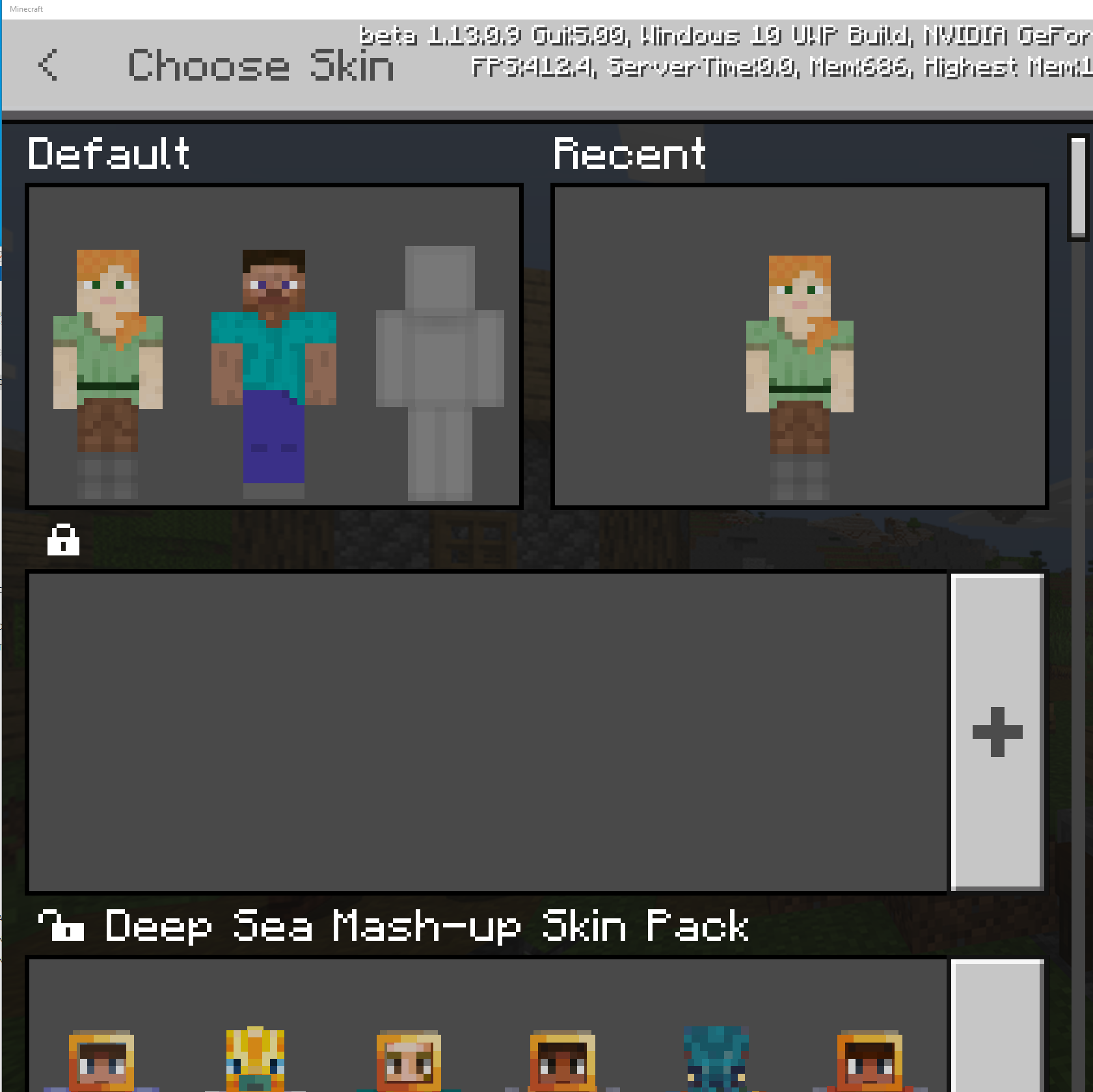
MCPE-46126). Now, whether they be right or wrong is another issue and it's just json file updates to change it. (over simplifying of course)Custom Skin packs are invisible with v 1.13.9 on Windows 10. As you can see in the attached the pack is there but no name or images are visible. (it is a custom pack I built that was working fine with multiple previous versions)
I remove the pack and re-installed it with no errors "Successfully installed..." but still invisible..
Yes it is still an issue and it has actually become worse.
there are still the block check problems and since 1.13.0.9 a biome check bug has been introduced
MCPE-51193fixed in 1.13.0.2
this appears to be a mob cap issue, killed off chicken farm and mobs started spawning again. it appears that my base which has farms & trading hall takes up the entire mob cap. (it did not prior to this release).
Note: I do not consider this base to be huge and it is not laggy at all even on kids ipads with 5 players in world)
so when anyone is at the base we can go anywhere in the world, nether and the with no spawns appearing.
yes this is still an issue
1.13.0.15 has resolved the crashing problem but the errors still remain.
The blocks still show errors on remote computers and xbox however, the blocks seem to work fine regardless of the errors displayed.
I see this happening using the marketplace sky block maps as well
duplicate of MCPE-38136 - Custom Entities marked or labeled as 'Unknown' in world.
duplicate of
MCPE-52840- Game Crashes during load of world.Most behavior packs work fine, it seems to be those that contain custom blocks that cause the world to crash when loading.
Resolved in 1.13.0.16
Death messages are now correct for regular custom mobs.
for Boss Bars, minecraft:boss component now contains a "name" parameter and it appears correctly on boss bar when set
Resolved in 1.13.0.16
Death messages are now correct for regular custom mobs.
for Boss Bars, minecraft:boss component now contains a "name" parameter and it appears correctly on boss bar when set
Resolved in 1.13.0.18
Resolved in 1.13.0.18
Still broken in 1.13.0.18
Still Broken in 1.13.0.18
Still Broken in 1.13.0.18
Still a problem in 1.14.0.1. this affects most mobs.
Does not affect Mules & Foxes.
Still broken in 1.14.0.1
Still Broken in 1.14.0.1
Still Broken in 1.14.0.1
Still Broken in 1.14.0.1
Biome filters seem to be resolved in 1.14.0.2
Thanks, per the wiki I assumed they should disappear or not spawn at all.
"In Peaceful difficulty, spawners still appear and work, but any spawned hostile mobs disappear immediately after spawning. Zombie pigmen, magma cubes, and ghasts do not spawn at all."
I thought I had the same problem but it ended up that they are spawning underground.
it is very annoying and they are hard to find. I typically try to find them a little but when i get fed up a do a /kill
that's the only way to get them unless you want to dig out the whole area.
yep, this is the bug it is referring to on that site.
Correction,
The blocks can not be crafted (recipes do not work) if the property is not set.
still a problem in 1.15.0.53
this is still an issue that crashes beta 1.15.0.53. I do have some additional information to provide based upon testing.
I was successful in loading these structures in some worlds without crashing right away. ultimately the game would crash while flying around though.
I was also able to create a void world by overriding the standard biomes and structures with entities load perfectly without crashing...
based upon the tests above and others conducted with different game modes to eliminate entities and such i concluded that it is not the structure file that makes it crash.
It would seem the game crashes when a structure (having entities) is loaded in a chunk that already contains entities. If the chunk does not have entities the structure loads just fine.
hope it helps
Partially resolved in 1.15.0.56
but
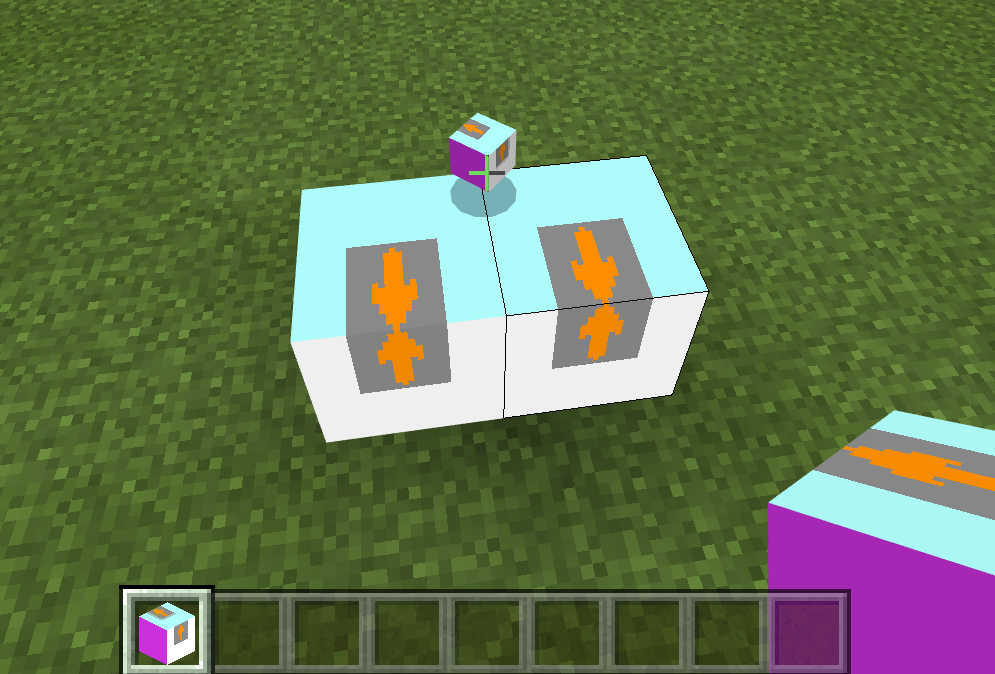
I have built and attached a block add-on that demonstrates bugs MCPE 63121 and
MCPE-63134I have built and attached a block add-on that demonstrates bugs
MCPE-63121andMCPE-63134Can not do any structure loading until this is fixed.
bug has gotten worse. The blocks no longer load and the following errors appear in log. (use same uploaded bugtest block that is attached to verify)
[Blocks][error]-block_definitions | ##PATH##7AQA=/behavior_packs/BugTest_B | blocks/bugtest.json | components | minecraft:block_light_absorption | minecraft:block_light_absorption | unknown child schema option type. Allowed types: 'int'
[Blocks][error]-block_definitions | ##PATH##7AQA=/behavior_packs/BugTest_B | blocks/bugtest.json | components | minecraft:block_light_emission | minecraft:block_light_emission | unknown child schema option type. Allowed types: 'float'
[Blocks][error]-block_definitions | ##PATH##7AQA=/behavior_packs/BugTest_B | blocks/bugtest.json | components | minecraft:destroy_time | minecraft:destroy_time | unknown child schema option type. Allowed types: 'float'
[Blocks][error]-block_definitions | ##PATH##7AQA=/behavior_packs/BugTest_B | blocks/bugtest.json | components | minecraft:explosion_resistance | minecraft:explosion_resistance | unknown child schema option type. Allowed types: 'float'
[Blocks][error]-block_definitions | ##PATH##7AQA=/behavior_packs/BugTest_B | blocks/bugtest.json | components | minecraft:friction | minecraft:friction | unknown child schema option type. Allowed types: 'float'
[Blocks][error]-block_definitions | ##PATH##7AQA=/behavior_packs/BugTest_B | blocks/bugtest.json | components | minecraft:loot | minecraft:loot | unknown child schema option type. Allowed types: 'string'
[Blocks][error]-block_definitions | ##PATH##7AQA=/behavior_packs/BugTest_B | blocks/bugtest.json | components | minecraft:map_color | minecraft:map_color | unknown child schema option type. Allowed types: 'string'
[Blocks][error]-block_definitions | ##PATH##7AQA=/behavior_packs/BugTest_B | blocks/bugtest.json | Failed to verify block
Added 1.16.0.57 to affected versions. but, I'm not sure if this is the case since custom blocks no longer load in this version
Looks like new structures were added to game using the old nbt method. where does fixing the mcstructures fit in roadmap ?
@Ignacio Rossi what app ?
@[MCPE Mod] Auldrick Thanks, I'll try that but was hoping for a legit way to fix this problem that keeps coming back.
Updated attached bug test add-on to work with block changes documented in 1.16.0.61
This is still a problem.
Using documentation provided in 1.16.0.61 i was able to update the json to reflect the new format. the blocks can now be summoned in the game with the /give command
However, they still do not appear in the creative menu.
(updated bugtest addon attached)
Blocks still do not appear in the creative menu
still broken
Im still having the problem on Beta 1.16.0.67. Occasionally i will find a seed that doesnt crash right away but loading up some new chunks will make it crash eventually. just try the attached mcpack files. the placement frequency on that structure is set high on purpose to make it crash almost every time.
This has been happening since 1.15.x betas.
This happens when a structure load overlaps onto chucks that are not yet loaded. Rather than loading those chunks (which should technically not be loaded) it ignores that part of the structure.
All structures larger than 1 chunk have a chance of this happening.
still broken.....
Just tested the attached mcpack on Beta 1.16.0.67 (Android phone) and it loads properly.. it is still crashing Windows 10 (and I test Windows the most as I have 3 diff windows 10 boxes here)
So, using the same mcpack file I have crashes on windows 10 but successful loads on my android..
Blocks still do not appear in the creative menu
I have not played the release version for a while as i have been stuck on the Beta for months.
The only problem on the current beta (16.20.50), with Custom blocks, is that they do not show up in the creative menu / recipe options, etc..
Everything else functions properly and you can obtain them by /give commands.
They did change the json schema format a few beta versions ago so that may be why you are experiencing these problems.
I have attached a sample block above (bugtest.mcaddon) have a look at the json as an example.
Still an issue in 1.16.20.53
Still an issue in 1.16.20.54
Still an issue in 1.16.100.52
Still an issue in 1.16.100.53
Beta 1.16.100.53 Using test_house_entities.mcpack attached..
Documentation has been updated and Blocks now require the following elements to be removed from the Block description section in order for the blocks to load properly.
"register_to_creative_menu" & "is_experimental"
after this update
I have updated the Bugtest Addon that is attached to demonstrate this issue and other bugs I have reported.
I have updated the attached bugtest addon that demonstrates this problem
Beta 1.16.100.59 Using test_house_entities.mcpack attached..
Beta 1.16.100.60 Using test_house_entities.mcpack attached..
This issue is confirmed resolved in 1.16.200.52 Beta
Thank you
Beta 1.16.200.52 Using test_house_entities.mcpack attached..
Beta 1.16.200.55 Using test_house_entities.mcpack attached..
Beta 1.16.200.56 Using test_house_entities.mcpack attached..
Wow just realized its been 9 months.
Beta 1.16.200.57 Using test_house_entities.mcpack attached..
Beta 1.16.210.50 Using test_house_entities.mcpack attached..
This will be my last test and entry. After 10 months, with not the slightest progress, I am giving up on reporting and following these bugs.. good luck.
Beta 1.16.210.53 Using test_house_entities.mcpack attached..
Exports are too big to attach here. if you have an email I can send you a link to a test world (all blocks are lined up and easy to see)
Below are step by step instructions on how to reproduce bug starting off with the test world.
1/ Load world in minecraft you will see all blocks in test world lined up.
2/ Upload the world to a Realm.
3/ Last test I did is to download the world that was uploaded to realms back onto local minecraft
Based upon tests above it appears that it is the copy to and from the realm that is causing the addons to stop working, become corrupt or something.
That being said my original report was because when 1.19.20 was applied to the realm server I lost the blocks. (similar to what happens when uploading to the realm in step 2)