How are so many different error types all duplicates of this same bug? For instance, all the different bugs regarding hit boxes being visible? That doesn't sound like a rendering thing. Although I'm not a programmer, so I could easily be wrong.
Are there any solutions for those using Radeon hardware? For that matter, the fact that this bug showed up (for me, anyway) upon upgrading to 1.6 and was not present in earlier versions sounds more like a minecraft issue than a graphics driver one.
And affects the new 1.7.4 version of the windows .exe as well. The .jar version continues to work fine, though. (running fully updated windows 7 with 64 bit java 7.
Looking over the history I see plenty of instances of it being marked "Resolved" and then promptly reopened as people find that the next version still has it. So is this a harder problem to fix than one would think? Or is it just being shunted to the side as something that they are working on is going to render it irrelevant any day now... For whatever reason, running it via the .jar doesn't seem to work quite as effeciently as the .exe.
ERROR Error processing element Queue: CLASS_NOT_FOUND
ERROR Unable to locate appender ServerGuiConsole for logger
Launched using a bat file, command "java -Xms1024 -Xmx 2048 - jar -minecraftserver175.exe -o true"
Launched in this way, it leaves the command line open, which is convenient, as it is actually showing the log. I can enter commands on the gui (such as /say, /help, etc.) and they all show up as normal, except in the command line window.
As to the earlier comment, I don't know if it is relevant to this particular bug or not, just my subjective experience (running a 2 person server on a LAN) that running it as an exe seems a bit more efficient - meaning less lag - than running a .jar.
Also, the info up top says that it is supposed to be fixed as of 13w42, which it obviously hasn't been. Any chance of seeing that updated? Or even better, a fix issued?
bug with bug tracker: Says fix version is 13w42a. Not sure if that version worked, but that definitely isn't the upcoming version that will have this fixed.
Side note: Could the default RAM useage for the exe be bumped up a bit so regular users don't have to mess with .bat files to handle a decent sized world with multiple players?
I've got this problem as well, and the server status indicators at https://help.mojang.com/ show that the servers are up. So unless they are down while still reporting "healthy" to the indicators, there is a problem.
I tried running this on a previously fully functional setup (as in it worked in 1.7.5 without problems as of a few weeks ago) and got this problem in 1.7.5, 1.7.9, and 1.7.10 many times today. I am running a pure vanilla setup. No mods, no optimization, etc. (just one small texture pack that changes nothing except the paintings.)
This sounds like my problem. First occurred when I boosted the render distance form 10 up to 16. I had it on 10 to speed generation of a brand new world then changed to 16 once we'd explored a bit. It seems to create this glitchy pattern whenever I have the chunk render distance above 10. That being said, it varies. 16 and above everything glitches out. 13+ everything more than 2 chunks away to one direction (eg. West) of my current position glitches out. 11-12, just a few chunks in the distance glitch out.
edit: running an HD 7770. VBO is off. 16Gb RAM (minecraft set to use min 2Gb max 4Gb.
Given that your Mojang.com post about 1.8.2 comments about how not very many bug reports have been filed, maybe this would be a good time to fix this one?
Even playing on a local server (gigabit LAN. Can't get a better connection than that, really) horses lag a lot. Enough that we've relegated horses to decorations in the paddock, and use spectator mode and/or teleportation to cover moderate to long distances.
If this is a technical support issue, does that mean that there is, in fact, a way for Realms servers to adjust the idle time-out? I would also like to have a somewhat longer time-out. Say, 15mins, or there abouts?
LIke Gianna, I notice a lot of different threads, many of which match my bug more closely than this one, but they all redirect here.
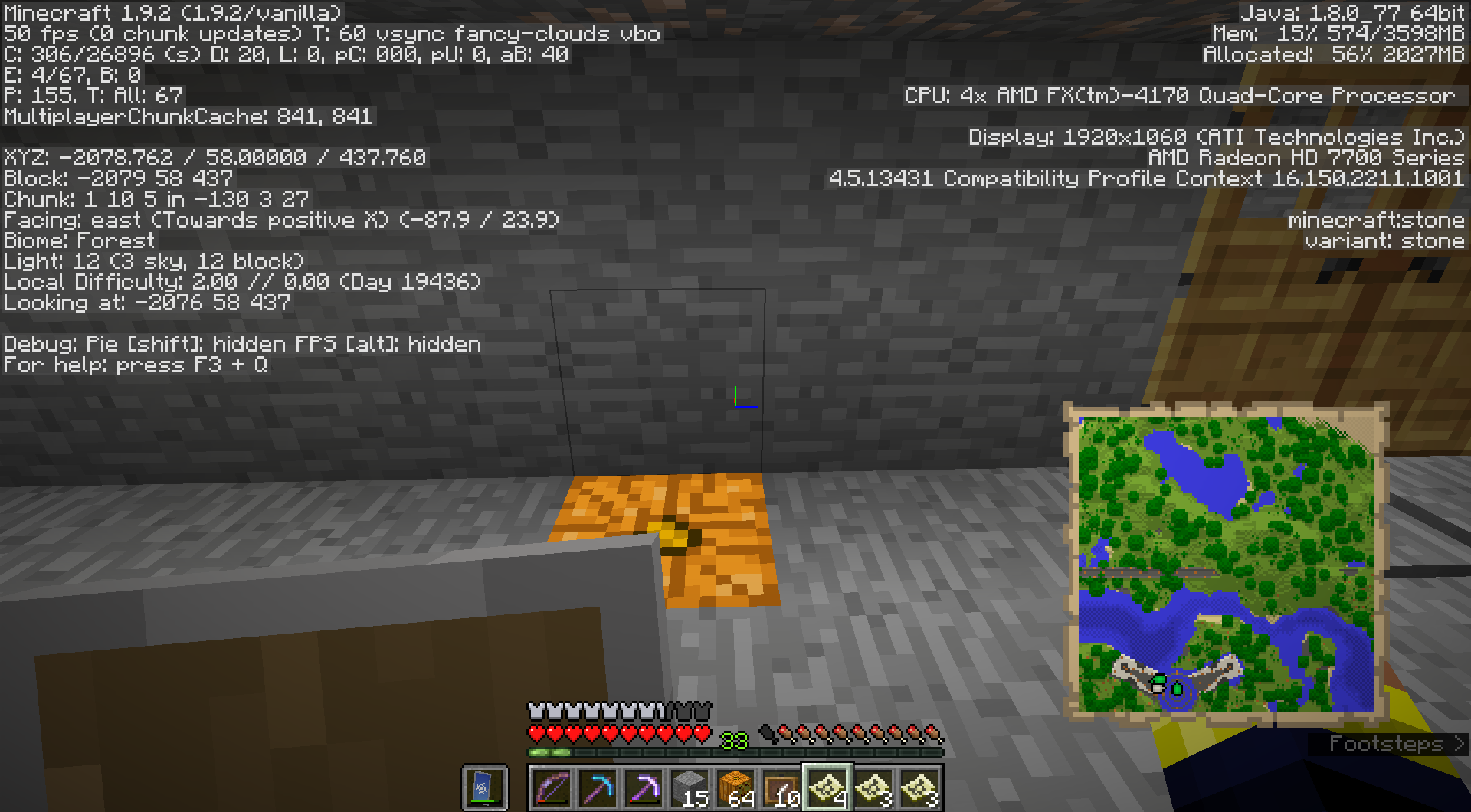
Anyway, I have a map which I put on the wall in an item frame. Then I took it off the wall, and it still shows the green arrow marking where it is on the wall. I did this with two different locations on the same map, and the green arrows for both are still there.
The bug is still present in 1.9.2. I have a map that I put in two different item frames simultaneously, then I rearranged my base and took them both down. Now I still have both the green arrows on the map, despite it not being mounted anywhere.
Screenshot showing my map with all the green arrows on it. Note there are currently NO maps in item frames anywhere in this chunk. The map should be showing just the white arrow, no green ones.
Possibly related: In the same multiplayer environment, when moving in spectator mode, if one starts moving too quickly it generates the same sort of thing: Assuming the forward movement key is held down, one zips along, then velocity keeps getting frequently - but irregularly - reset to 0, resulting in a very jerky movement pattern. This behavior usually occurs only when covering large enough distances to cause significant chunk loading. This is also accompanied by similar serving warnings along the lines of "WARN: player moved too quickly"
(I haven't made a bug report for this spectator behaviour because it may be related to this Elytra flight related issue)
I almost never ran into this until 1.9.4, and I used spectator mode at high speeds a lot. But now I run into it a lot, particularly with Elytra.
(my own duplicate of this report: MC-102971, just for the record)
For those just coming across this bug due to its effects on Elytra, the following server command solves the problem for me:
/gamerule disableElytraMovementCheck true
Thank you Skylinerw for finding and pointing this out.
My minecraft just crashed and directed me to this JIRA issue. I think this must be the first time I've had a crash direct me like this. I had an identical crash earlier, except that time it didn't give me an error message directing me to this JIRA isue.
Anyway, running a vanilla client connecting to a locally hosted vanilla server (both 1.10.1).
I'd like to note that this issue does not seem to be consistent. I've been building in an area away from my main base, and the game works just fine out there for hours on end. I come back to my main base to drop off mined material and pick up other stuff, then head back out. So I've been back to my main base 5 or 6 times in the past few hours, and I've only crashed twice. Both times it said it was due to a piston. While I have quite a few pistons around my base, I have two that are part of a pumpkin timer. My suspicion is that it is when the pumpkin timer ticks over that the crash happens, as that is fairly random. All the other pistons aren't moving. Nope, not them. I checked the co-ordinates of the piston that gave the error, and it is instead one of the pistons in the pumpkin farm, which are powered by the pumpkin switch.
My minecraft just crashed and directed me to this JIRA issue. I think this must be the first time I've had a crash direct me like this. I had an identical crash earlier, except that time it didn't give me an error message directing me to this JIRA isue.
Anyway, running a vanilla client connecting to a locally hosted vanilla server (both 1.10.1).
I'd like to note that this issue does not seem to be consistent. I've been building in an area away from my main base, and the game works just fine out there for hours on end. I come back to my main base to drop off mined material and pick up other stuff, then head back out. So I've been back to my main base 5 or 6 times in the past few hours, and I've only crashed twice. Both times it said it was due to a piston. While I have quite a few pistons around my base, only a single set activates in an automatic mechanism, and tracing the co-ordinates of the piston listed in the crash report goes to one of these pistons (used in a pumpkin auto-harvesting machine).
Thanks for the explanation. If I might make a suggestion, this bug report doesn't mention anywhere that it is invalid due to being used on modded minecraft servers. The text directing to the other bug report specifies "singleplayer AND does not involve pistons". My crash is on multiplayer and involves pistons, which suggest that it is this bug, not the other one.
Given that the server is directly under my control, I can confirm that it is using the jar file downloaded directly from Mojang, and has not been modified. But it is getting this bug with pistons.
I was just about to start a major survival build using snow blocks as the white element (didn't want to use wool due to high exposure to the sky and quartz is far too rare), and I'm reluctant to start until there is some confirmation as to which direction this is going.
It makes sense that snow blocks should melt (ice blocks do, after all), but I'd much rather they didn't, since there are far to few non-flamable pure white blocks.
hmmm... Is there any particular point that it is suppose to trigger at? I'll go try a new starting a new world.
While I didn't explicitly mention it, and I probably should have, this occurred while playing on a server. The server itself is vanilla, freshly downloaded from the minecraft site. I'm running it locally on Java 1.8v131. The world itself, however, is one we've been working on for several years now. We did reset the end, however, back around the time the End Cities were introduced.
Update: I still can't trigger that specific advancement on the server, but I can trigger it in singleplayer.
I just created a new world in sp, and with judicious use of creative mode reached the end, killed the dragon, and found a pair of cities. The advancement triggered immediately when I approached the door. (I don't think I'd actually entered, but was in the block adjacent to the entrance)
This bug just broke a bunch of redstone machines on my server. (I use jack o lanterns liberally in my redstone as a convenient way of keeping things lit - and a good way to keep track of which blocks shouldn't be broken.
By the way, thank you for deciding to allow jack o lanterns to have stuff attached to them. I wish we could attach things to sea-lanterns and glowstone too, but having at least one block that emits light that can be used as a redstone supporting block is much appreciated. In the meantime, the sudden change from 1.11 to 1.12 has broken many of my redstone contraptions.
On our LAN server we used to be able to play with the server and all clients set to view distance of 20 and things worked quite nicely. Now the server and higher-end PC have had to drop that to 18, and older PCs have to drop to 16 to get anything close to the same level of performance they had with 1.13. Disappointing.
 Zitchas
 MC-27016





How are so many different error types all duplicates of this same bug? For instance, all the different bugs regarding hit boxes being visible? That doesn't sound like a rendering thing. Although I'm not a programmer, so I could easily be wrong.
Are there any solutions for those using Radeon hardware? For that matter, the fact that this bug showed up (for me, anyway) upon upgrading to 1.6 and was not present in earlier versions sounds more like a minecraft issue than a graphics driver one.
And affects the new 1.7.4 version of the windows .exe as well. The .jar version continues to work fine, though. (running fully updated windows 7 with 64 bit java 7.
Looking over the history I see plenty of instances of it being marked "Resolved" and then promptly reopened as people find that the next version still has it. So is this a harder problem to fix than one would think? Or is it just being shunted to the side as something that they are working on is going to render it irrelevant any day now... For whatever reason, running it via the .jar doesn't seem to work quite as effeciently as the .exe.
ERROR Error processing element Queue: CLASS_NOT_FOUND
ERROR Unable to locate appender ServerGuiConsole for logger
Launched using a bat file, command "java -Xms1024 -Xmx 2048 - jar -minecraftserver175.exe -o true"
Launched in this way, it leaves the command line open, which is convenient, as it is actually showing the log. I can enter commands on the gui (such as /say, /help, etc.) and they all show up as normal, except in the command line window.
As to the earlier comment, I don't know if it is relevant to this particular bug or not, just my subjective experience (running a 2 person server on a LAN) that running it as an exe seems a bit more efficient - meaning less lag - than running a .jar.
Also, the info up top says that it is supposed to be fixed as of 13w42, which it obviously hasn't been. Any chance of seeing that updated? Or even better, a fix issued?
Bug is still present in 1.7.9
bug with bug tracker: Says fix version is 13w42a. Not sure if that version worked, but that definitely isn't the upcoming version that will have this fixed.
Side note: Could the default RAM useage for the exe be bumped up a bit so regular users don't have to mess with .bat files to handle a decent sized world with multiple players?
I've got this problem as well, and the server status indicators at https://help.mojang.com/ show that the servers are up. So unless they are down while still reporting "healthy" to the indicators, there is a problem.
I tried running this on a previously fully functional setup (as in it worked in 1.7.5 without problems as of a few weeks ago) and got this problem in 1.7.5, 1.7.9, and 1.7.10 many times today. I am running a pure vanilla setup. No mods, no optimization, etc. (just one small texture pack that changes nothing except the paintings.)
I have also fully updated java to 7v60.
On my game VBO seems to change the pattern chunks load around me, but doesn't have any effect on fps or playability.
Win 7 (64bit) with java 7u60 (64bit)
Similar to my issue, although in my case, VBO doesn't seem to have any effect at all.
FX 4170 with 16Gb RAM, Radeon HD 7770, Win 7, Java 7u60 (both 64 bit)
This sounds like my problem. First occurred when I boosted the render distance form 10 up to 16. I had it on 10 to speed generation of a brand new world then changed to 16 once we'd explored a bit. It seems to create this glitchy pattern whenever I have the chunk render distance above 10. That being said, it varies. 16 and above everything glitches out. 13+ everything more than 2 chunks away to one direction (eg. West) of my current position glitches out. 11-12, just a few chunks in the distance glitch out.
edit: running an HD 7770. VBO is off. 16Gb RAM (minecraft set to use min 2Gb max 4Gb.
Still present in 1.8.1 with java 8v31.
Given that your Mojang.com post about 1.8.2 comments about how not very many bug reports have been filed, maybe this would be a good time to fix this one?
Even playing on a local server (gigabit LAN. Can't get a better connection than that, really) horses lag a lot. Enough that we've relegated horses to decorations in the paddock, and use spectator mode and/or teleportation to cover moderate to long distances.
Also affects 1.8.4, 1.8.5, and 1.8.6.
If this is a technical support issue, does that mean that there is, in fact, a way for Realms servers to adjust the idle time-out? I would also like to have a somewhat longer time-out. Say, 15mins, or there abouts?
LIke Gianna, I notice a lot of different threads, many of which match my bug more closely than this one, but they all redirect here.
Anyway, I have a map which I put on the wall in an item frame. Then I took it off the wall, and it still shows the green arrow marking where it is on the wall. I did this with two different locations on the same map, and the green arrows for both are still there.
note: I am running 1.9.2 vanilla, so the bug is present there.
The bug is still present in 1.9.2. I have a map that I put in two different item frames simultaneously, then I rearranged my base and took them both down. Now I still have both the green arrows on the map, despite it not being mounted anywhere.
Running 1.9.2 vanilla
Screenshot showing my map with all the green arrows on it. Note there are currently NO maps in item frames anywhere in this chunk. The map should be showing just the white arrow, no green ones.
Possibly related: In the same multiplayer environment, when moving in spectator mode, if one starts moving too quickly it generates the same sort of thing: Assuming the forward movement key is held down, one zips along, then velocity keeps getting frequently - but irregularly - reset to 0, resulting in a very jerky movement pattern. This behavior usually occurs only when covering large enough distances to cause significant chunk loading. This is also accompanied by similar serving warnings along the lines of "WARN: player moved too quickly"
(I haven't made a bug report for this spectator behaviour because it may be related to this Elytra flight related issue)
I almost never ran into this until 1.9.4, and I used spectator mode at high speeds a lot. But now I run into it a lot, particularly with Elytra.
(my own duplicate of this report:
MC-102971, just for the record)For those just coming across this bug due to its effects on Elytra, the following server command solves the problem for me:
/gamerule disableElytraMovementCheck trueThank you Skylinerw for finding and pointing this out.
Thanks for pointing that out. I searched, but didn't see it.
Just for the record, and anyone else getting this bug, it can be fixed by having whoever runs the server input the following command:
/gamerule disableElytraMovementCheck trueRunning this on my own server solved the problem for me.
My minecraft just crashed and directed me to this JIRA issue. I think this must be the first time I've had a crash direct me like this. I had an identical crash earlier, except that time it didn't give me an error message directing me to this JIRA isue.
Anyway, running a vanilla client connecting to a locally hosted vanilla server (both 1.10.1).
I'd like to note that this issue does not seem to be consistent. I've been building in an area away from my main base, and the game works just fine out there for hours on end. I come back to my main base to drop off mined material and pick up other stuff, then head back out. So I've been back to my main base 5 or 6 times in the past few hours, and I've only crashed twice. Both times it said it was due to a piston. While I have quite a few pistons around my base, I have two that are part of a pumpkin timer. My suspicion is that it is when the pumpkin timer ticks over that the crash happens, as that is fairly random. All the other pistons aren't moving. Nope, not them. I checked the co-ordinates of the piston that gave the error, and it is instead one of the pistons in the pumpkin farm, which are powered by the pumpkin switch.
By the way, what does "Resolved - Invalid" mean?
My minecraft just crashed and directed me to this JIRA issue. I think this must be the first time I've had a crash direct me like this. I had an identical crash earlier, except that time it didn't give me an error message directing me to this JIRA isue.
Anyway, running a vanilla client connecting to a locally hosted vanilla server (both 1.10.1).
I'd like to note that this issue does not seem to be consistent. I've been building in an area away from my main base, and the game works just fine out there for hours on end. I come back to my main base to drop off mined material and pick up other stuff, then head back out. So I've been back to my main base 5 or 6 times in the past few hours, and I've only crashed twice. Both times it said it was due to a piston. While I have quite a few pistons around my base, only a single set activates in an automatic mechanism, and tracing the co-ordinates of the piston listed in the crash report goes to one of these pistons (used in a pumpkin auto-harvesting machine).
Thanks for the explanation. If I might make a suggestion, this bug report doesn't mention anywhere that it is invalid due to being used on modded minecraft servers. The text directing to the other bug report specifies "singleplayer AND does not involve pistons". My crash is on multiplayer and involves pistons, which suggest that it is this bug, not the other one.
Given that the server is directly under my control, I can confirm that it is using the jar file downloaded directly from Mojang, and has not been modified. But it is getting this bug with pistons.
I was just about to start a major survival build using snow blocks as the white element (didn't want to use wool due to high exposure to the sky and quartz is far too rare), and I'm reluctant to start until there is some confirmation as to which direction this is going.
It makes sense that snow blocks should melt (ice blocks do, after all), but I'd much rather they didn't, since there are far to few non-flamable pure white blocks.
hmmm... Is there any particular point that it is suppose to trigger at? I'll go try a new starting a new world.
While I didn't explicitly mention it, and I probably should have, this occurred while playing on a server. The server itself is vanilla, freshly downloaded from the minecraft site. I'm running it locally on Java 1.8v131. The world itself, however, is one we've been working on for several years now. We did reset the end, however, back around the time the End Cities were introduced.
Update: I still can't trigger that specific advancement on the server, but I can trigger it in singleplayer.
I just created a new world in sp, and with judicious use of creative mode reached the end, killed the dragon, and found a pair of cities. The advancement triggered immediately when I approached the door. (I don't think I'd actually entered, but was in the block adjacent to the entrance)
Confirmed also affects version 1.12.2
This bug just broke a bunch of redstone machines on my server. (I use jack o lanterns liberally in my redstone as a convenient way of keeping things lit - and a good way to keep track of which blocks shouldn't be broken.
This bug still exists in 1.12.2.
By the way, thank you for deciding to allow jack o lanterns to have stuff attached to them. I wish we could attach things to sea-lanterns and glowstone too, but having at least one block that emits light that can be used as a redstone supporting block is much appreciated. In the meantime, the sudden change from 1.11 to 1.12 has broken many of my redstone contraptions.
Sure, I would be happy to. How do I attach a crash report? Or more specifically, where do I find the crash report in order to attach it?
There's nothing in the launcher log or in the regular game logs about a crash. The game log just ends.
Well, hopefully they get it worked out soon.
On our LAN server we used to be able to play with the server and all clients set to view distance of 20 and things worked quite nicely. Now the server and higher-end PC have had to drop that to 18, and older PCs have to drop to 16 to get anything close to the same level of performance they had with 1.13. Disappointing.