 MC-197483
Encoding issue with cyrillic characters in server logs on Windows
The bug
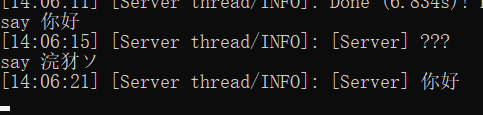
Using cyrillic characters and potentially more (Example: тест) on a Minecraft dedicated server running on Windows will:
- Not display the characters but instead just ???? in cmd
 Save only question marks (????) to the latest.log file
Server log demonstration (should be тест): latest.log
Screenshot: comparison.png
Reproduction steps
- Start a Minecraft server
- Use /say тест anywhere you want (ingame, cmd console, GUI console)
- Look into the latest.log file and in the cmd output
 Result: Only questionmarks
Tests
"Typed in" is always where the /say command was used. The other columns detail the outputs that I get in the different areas.
No changes, Windows 10 1909 install with German locale:
| Typed in | CMD/Powershell | Server GUI | latest.log |
|---|---|---|---|
| cmd | ???? | ???? | ???? |
| Server GUI | ???? | тест | ???? |
| MC Client | ???? | тест | ???? |
-
Using either one of the following approaches results in the text being written fine to the .log files, but still displayed incorrect in cmd.
Fixing the saving to file should be prioritized
- Using Launch parameters: -Dfile.encoding=UTF-8
- Using a custom log4j2.xml with what is described here.
| Typed in | CMD/Powershell | Server GUI | latest.log |
|---|---|---|---|
| cmd | ???? | ???? | ???? |
| Server GUI | ÐéðÁÐüÐé | тест | тест |
| MC Client | ÐéðÁÐüÐé | тест | тест |
Environment
Windows 10 1909
Locale: de_de
![[Helper] Lord_Quadrato](../../../data/avatars/users/26105.png)


 Normal
Created Issue:
Encoding issue with cyrillic characters in server logs on Windows
The bug
Using cyrillic characters and potentially more (Example: тест) on a Minecraft dedicated server running on Windows will:
- Not display the characters but instead just ???? in cmd
Server log demonstration (should be тест): latest.log
Screenshot: comparison.pngReproduction steps
- Start a Minecraft server
- Use /say тест anywhere you want (ingame, cmd console, GUI console)
- Look into the latest.log file and in the cmd output
Tests
"Typed in" is always where the /say command was used. The other columns detail the outputs that I get in the different areas.
No changes, Windows 10 1909 install with German locale:
Typed in CMD/Powershell Server GUI latest.log cmd ???? ???? ???? Server GUI ???? тест ???? MC Client ???? тест ???? -
Using either one of the following approaches results in the text being written fine to the .log files, but still displayed incorrect in cmd.
Fixing the saving to file should be prioritized
- Using Launch parameters: -Dfile.encoding=UTF-8
- Using a custom log4j2.xml with what is described here.
Typed in CMD/Powershell Server GUI latest.log cmd ???? ???? ???? Server GUI ÐéðÁÐüÐé тест тест MC Client ÐéðÁÐüÐé тест тест Environment
Windows 10 1909
Locale: de_de
Attachments2
![[Mod] Michael Wobst](../../../data/avatars/users/37868.png)
![[Mojang] slicedlime](../../../data/assets/gravatar/slicedlime.jpeg)
![[Mod] ampolive](../../../data/avatars/users/18949.svg)

This issue is about CJK Input Method Editor (IME) not functioning; your problem is about console output, and probably is not limited to CJK texts (since yours is an encoding problem.) Please do not confuse two different problem that happens to both affect CJK texts.
Apparently you did find the appropriate bug to your problem (MC-157942 and MC-197483), and also this issue is closed, so I'll just leave this message to inform you about this.
My Windows system use GB18030, so I have to use a "GB18030 to UTF-8" program and paste it to cmd.
Maybe it's the same problem.
Still Confirmed for 1.19.2
Reproduction steps:
1. Run the server and wait for it to load
2. run this command in the console window: "/say 这种情况是油泵故障灯,检查一下油泵插头是否接虚,然后查一下油泵内管道压力是否符合正常值。"
3. Observe that the console window displays correctly, while latest.log is incorrect. Piping stdout from the server into another application also shows ?????
Also affects some system messages in e.g. Japanese. Minecraft's confusion in "FaRo3???????????" may look funny a few times, but in the long term, it's annoying.