 MC-218101
Locking lodestone compasses to lodestones they're already locked to while in creative mode plays the item pickup animation
The Bug:
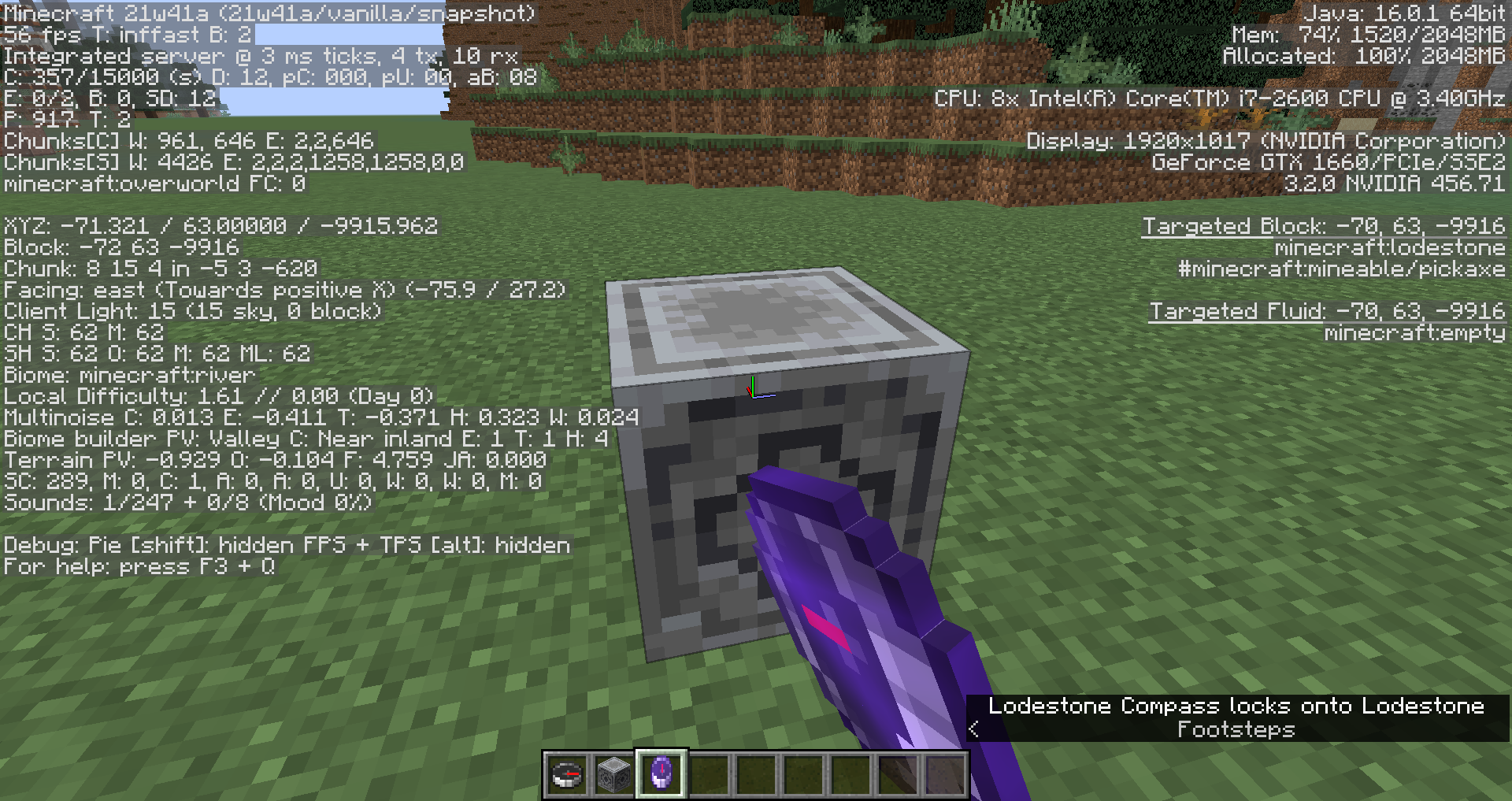
Locking lodestone compasses to lodestones they're already locked to while in creative mode plays the item pickup animation.
Steps to Reproduce:
- Switch into creative mode and obtain a compass and a lodestone.
- Place down the lodestone and lock the compass to it.
- Whilst holding the lodestone compass you now have, attempt to lock it multiple times to the same lodestone you previously placed.
- Pay close attention to the lodestone compass in your hotbar as you do this,
- Take note as to whether or not locking lodestone compasses to lodestones they're already locked to while in creative mode plays the item pickup animation.
Observed Behavior:
The item pickup animation is played.
Expected Behavior:
The item pickup animation would not be played.
Linked Issues

![[Mod] Avoma](../../../data/avatars/users/86198.png)

Created Issue:
Right clicking a lodestone with the compass that it is linked to in creative mode plays the "pop item animation"
The bug
When you right click a lodestone while holding a lodestone compass that is linked to that lodestone in creative mode, you will not lose any items or get any items, but for some reason that plays the "pot item animation" in the hotbar which plays when picking up an item. This only happens in creative mode, but not in survival. Relates to MC-195510 and
MC-176033.How to reproduce:
- Place a lodestone
- Right click it with a compass
- Right click the lodestone with that lodestone compass
The item in the hotbar plays the "pot item animation" which plays when picking up items.
- Go into survival mode
- Right click the lodestone again
The "pop item animation" doesn’t play.
![[Mod] markderickson](../../../data/avatars/users/18946.svg)
![[Mod] LateLag](../../../data/avatars/users/92884.png)
![[Helper] Johnibur](../../../data/avatars/users/28381.png)
![[Mod] Michael Wobst](../../../data/avatars/users/37868.png)
The bug
When you right click a lodestone while holding a lodestone compass that is linked to that lodestone in creative mode, you will not lose any items or get any items, but for some reason that plays the "pot item animation" in the hotbar which plays when picking up an item. This only happens in creative mode, but not in survival. Relates to MC-195510 and
MC-176033.How to reproduce:
- Place a lodestone
- Right click it with a compass
- Right click the lodestone with that lodestone compass
- Go into survival mode
- Right click the lodestone again
The Bug:
Locking lodestone compasses to lodestones they're already locked to whilst in creative mode plays the item pickup animation.
Steps to Reproduce:
- Switch into creative mode and obtain a compass and a lodestone.
- Place down the lodestone and lock the compass to it.
- Whilst holding the lodestone compass you now have, attempt to lock it multiple times to the same lodestone you previously placed.
- Pay close attention to the lodestone compass in your hotbar as you do this, and take note as to whether or not it plays the item pickup animation.
Observed Behavior:
Locking lodestone compasses to lodestones they're already locked to whilst in creative mode plays the item pickup animation.
Expected Behavior:
Locking lodestone compasses to lodestones they're already locked to whilst in creative mode would not play the item pickup animation.
Right clickingalodestonewith the compass that it is linked toin creative mode plays the"pop itemanimation"Locking lodestone compasses to lodestones they're already locked to whilst in creative mode plays the item pickup animation
The Bug:
Locking lodestone compasses to lodestones they're already locked to whilst in creative mode plays the item pickup animation.
Steps to Reproduce:
- Switch into creative mode and obtain a compass and a lodestone.
- Place down the lodestone and lock the compass to it.
- Whilst holding the lodestone compass you now have, attempt to lock it multiple times to the same lodestone you previously placed.
- Pay close attention to the lodestone compass in your hotbar as you do this,
and take note as to whether or not it plays the item pickup animation.Observed Behavior:
Locking lodestone compasses to lodestones they're already locked to whilst in creative mode plays the item pickup animation.
Expected Behavior:
Locking lodestone compasses to lodestones they're already locked to whilst in creative mode would not play the item pickup animation.
The Bug:
Locking lodestone compasses to lodestones they're already locked to whilst in creative mode plays the item pickup animation.
Steps to Reproduce:
- Switch into creative mode and obtain a compass and a lodestone.
- Place down the lodestone and lock the compass to it.
- Whilst holding the lodestone compass you now have, attempt to lock it multiple times to the same lodestone you previously placed.
- Pay close attention to the lodestone compass in your hotbar as you do this,
- Take note as to whether or not locking lodestone compasses to lodestones they're already locked to whilst in creative mode plays the item pickup animation.
Observed Behavior:
Locking lodestone compasses to lodestones they're already locked to whilst in creative mode plays the item pickup animation.
Expected Behavior:
Locking lodestone compasses to lodestones they're already locked to whilst in creative mode would not play the item pickup animation.
The Bug:
Locking lodestone compasses to lodestones they're already locked to whil
stin creative mode plays the item pickup animation.Steps to Reproduce:
- Switch into creative mode and obtain a compass and a lodestone.
- Place down the lodestone and lock the compass to it.
- Whilst holding the lodestone compass you now have, attempt to lock it multiple times to the same lodestone you previously placed.
- Pay close attention to the lodestone compass in your hotbar as you do this,
- Take note as to whether or not locking lodestone compasses to lodestones they're already locked to whil
stin creative mode plays the item pickup animation.Observed Behavior:
Locking lodestone compasses to lodestones they're already locked to whilst in creative mode plays the item pickup animation.
Expected Behavior:
Locking lodestone compasses to lodestones they're already locked to whilst in creative modewould not playthe item pickup animation.The Bug:
Locking lodestone compasses to lodestones they're already locked to while in creative mode plays the item pickup animation.
Steps to Reproduce:
- Switch into creative mode and obtain a compass and a lodestone.
- Place down the lodestone and lock the compass to it.
- Whilst holding the lodestone compass you now have, attempt to lock it multiple times to the same lodestone you previously placed.
- Pay close attention to the lodestone compass in your hotbar as you do this,
- Take note as to whether or not locking lodestone compasses to lodestones they're already locked to while in creative mode plays the item pickup animation.
Observed Behavior:
The item pickup animation is played.
Expected Behavior:
The item pickup animation would not be played.
Locking lodestone compasses to lodestones they're already locked to whilstin creative mode plays the item pickup animationLocking lodestone compasses to lodestones they're already locked to while in creative mode plays the item pickup animation
![[Mod] ampolive](../../../data/avatars/users/18949.svg)
Can confirm.
Can confirm in 1.17.
Can confirm this in 21w40a. The expected behavior would be that the "item pickup animation" would not be displayed when right-clicking on a lodestone with a lodestone compass that's already linked to it.