![[Helper] Johnibur](../../../data/avatars/users/28381.png) [Helper] Johnibur
[Helper] Johnibur
- Johnibur
- johnibur
- Europe/Brussels
- Yes
- No
![[Mojang] Bartosz Bok](../../../data/avatars/users/10122.svg)
 MC-142051
![[Mojang] Cory Scheviak](../../../data/avatars/users/92893.png)
![[Mojang] Georgii Gavrichev](../../../data/avatars/users/22428.png)

![[Mojang] Matthew Gatland](../../../data/avatars/users/43046.png)











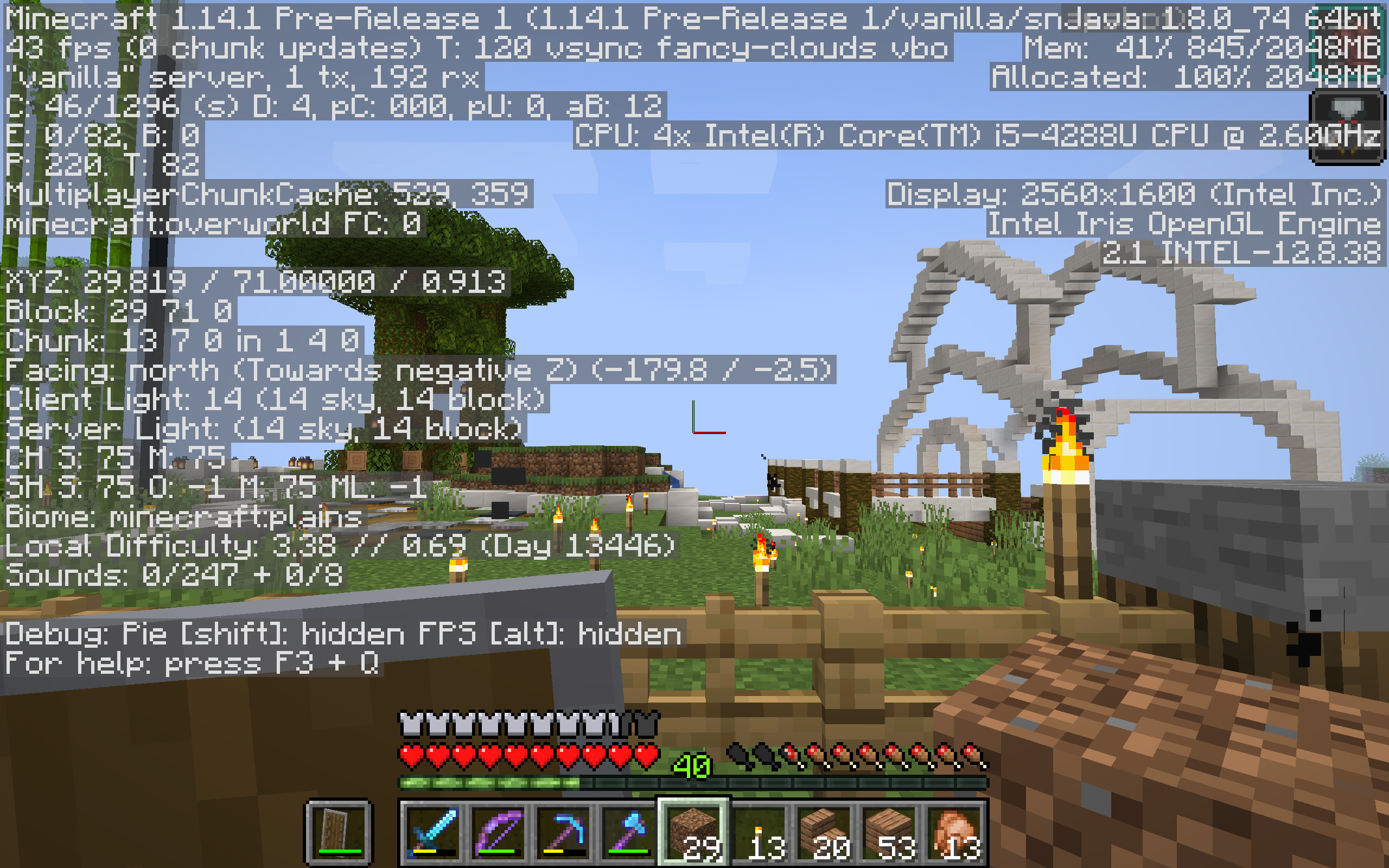

Integrated / "Vanilla" Snapshot Server's CPU usage is 10 times higher then in 1.13.2Integrated / "Vanilla" Snapshot Server's CPU usage is 10 times higher than in 1.13.2
Pillagers
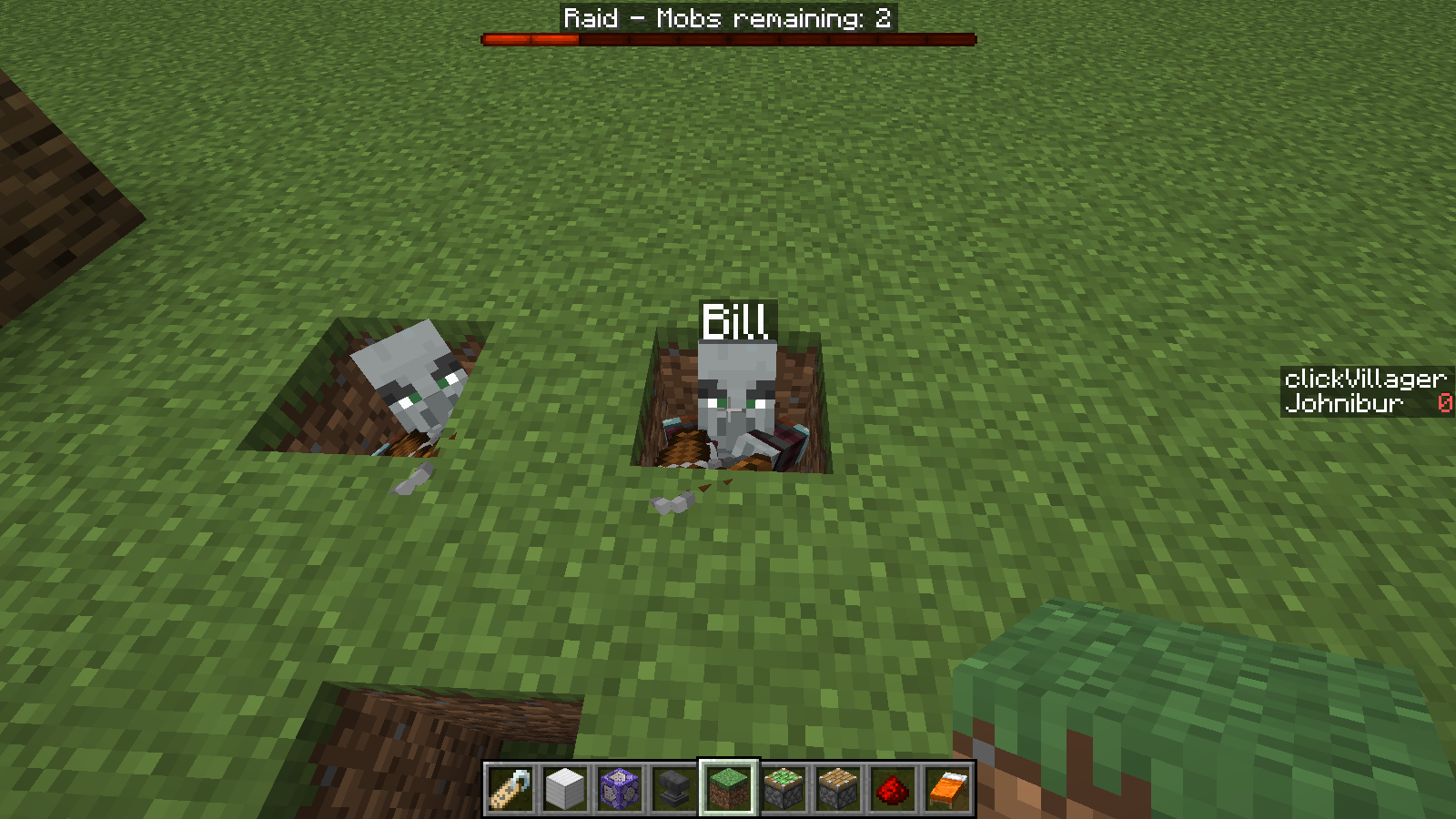
canspawn on kelp blocks at the surface of the waterandcan't swim away, just get stuck there and start dancing around.
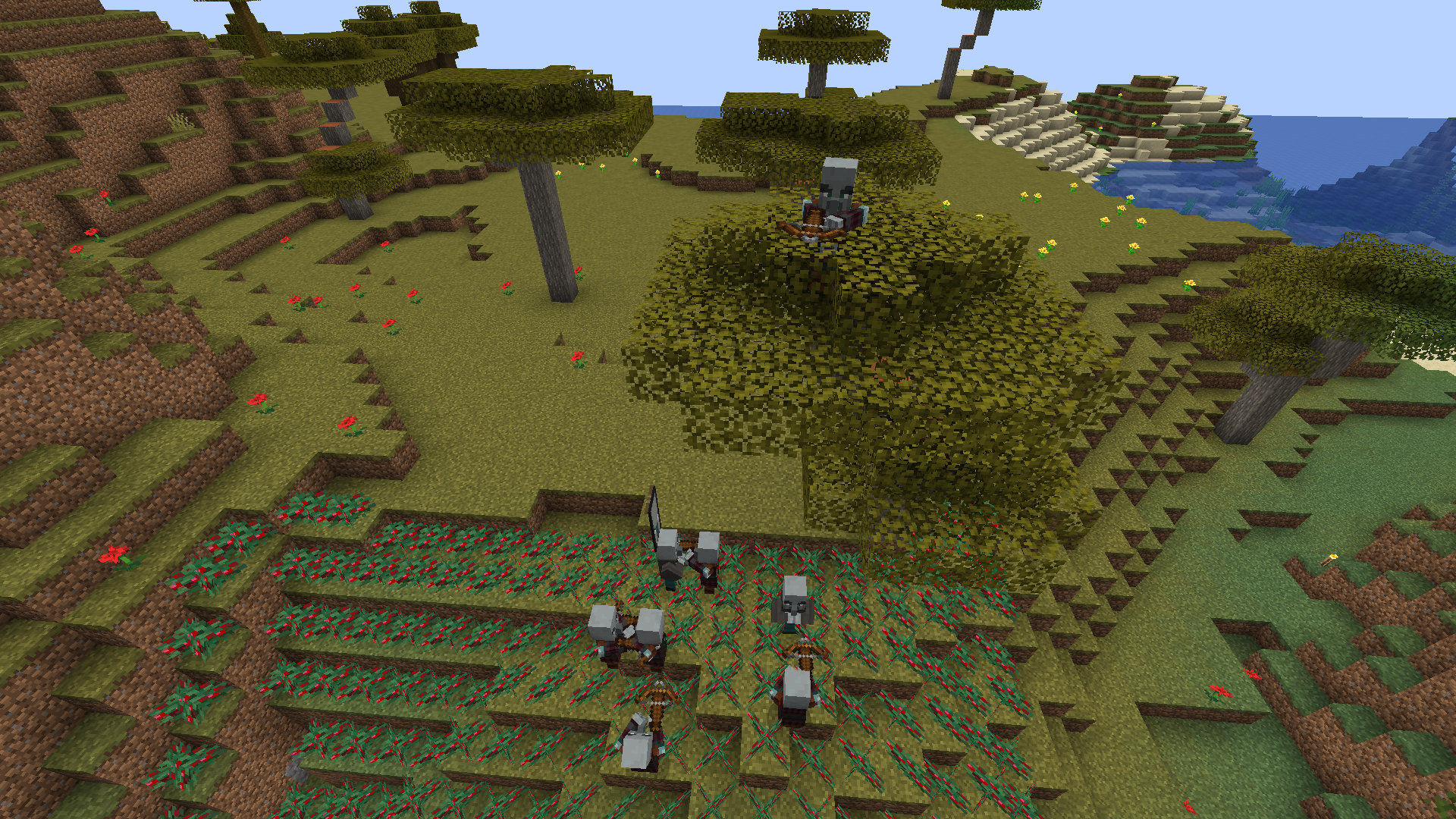
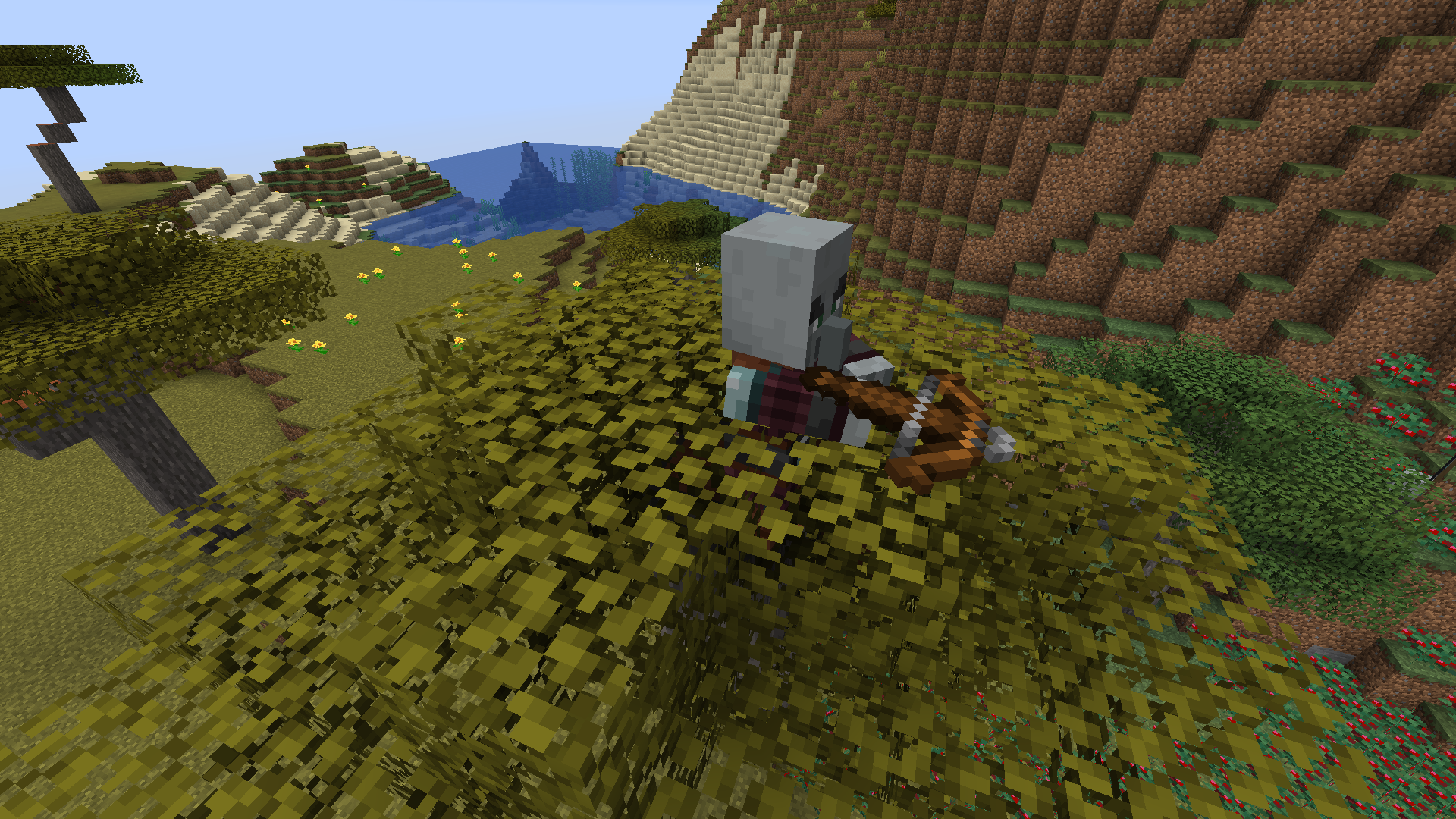
Pillagers and vindicator walking on the top of kelp blocks or sea grass at the surface of the water can't swim away nor find their way out, just get stuck there and start dancing around.


Multiplayer
Pillagerscan spawn on kelp blocksPillagers and vindicator can't find their way out of top of kelp blocks or surface sea grass
Pillagers and vindicators can't find their way out of top of kelp blocks or surface sea grass
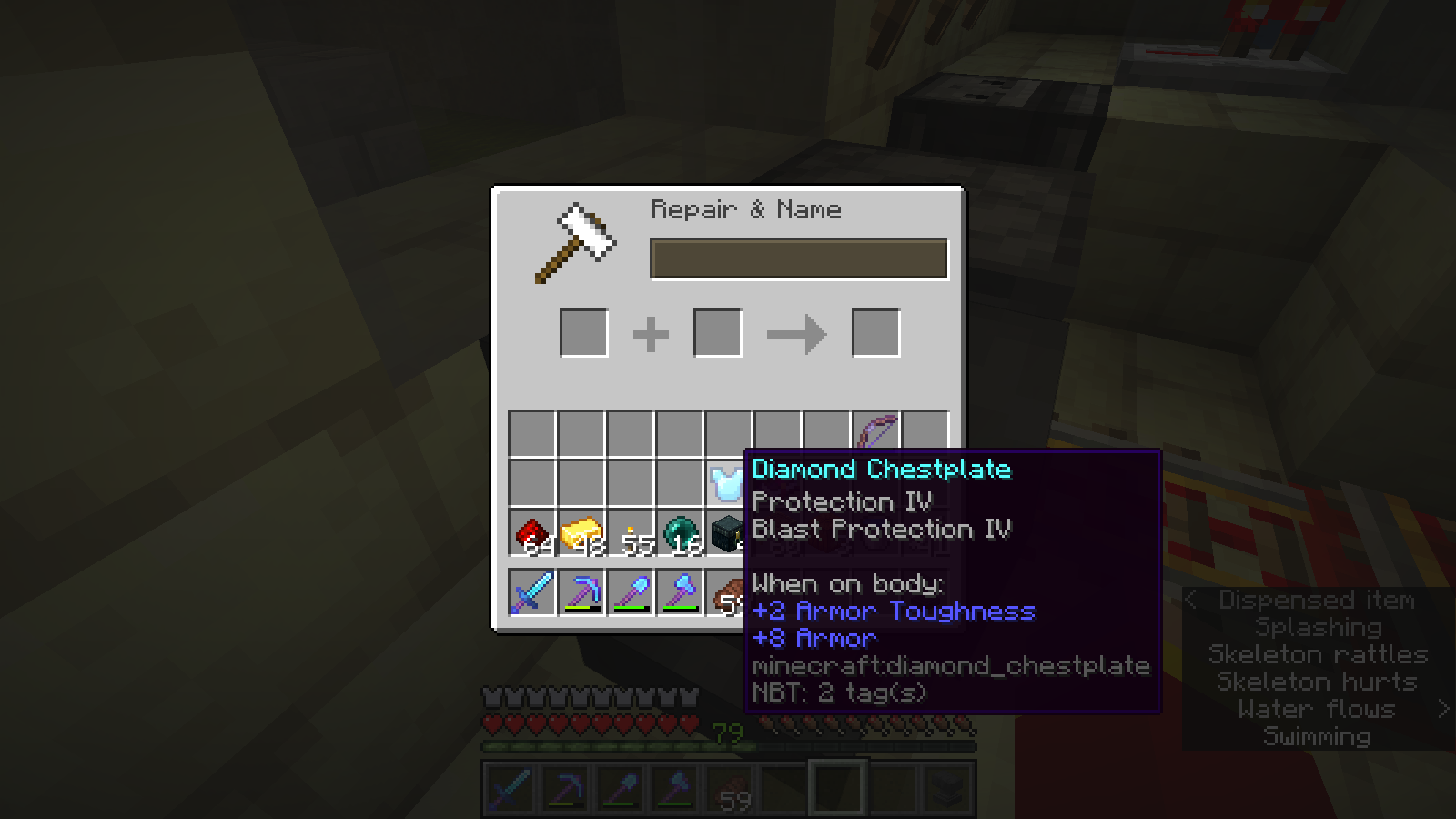
Using an anvil, you can combine and apply to a same item enchantments that are supposed to be mutually exclusive, like blast protection and protection on a chestplate.
This works in survival, while it is supposed to only be allowed in creative.
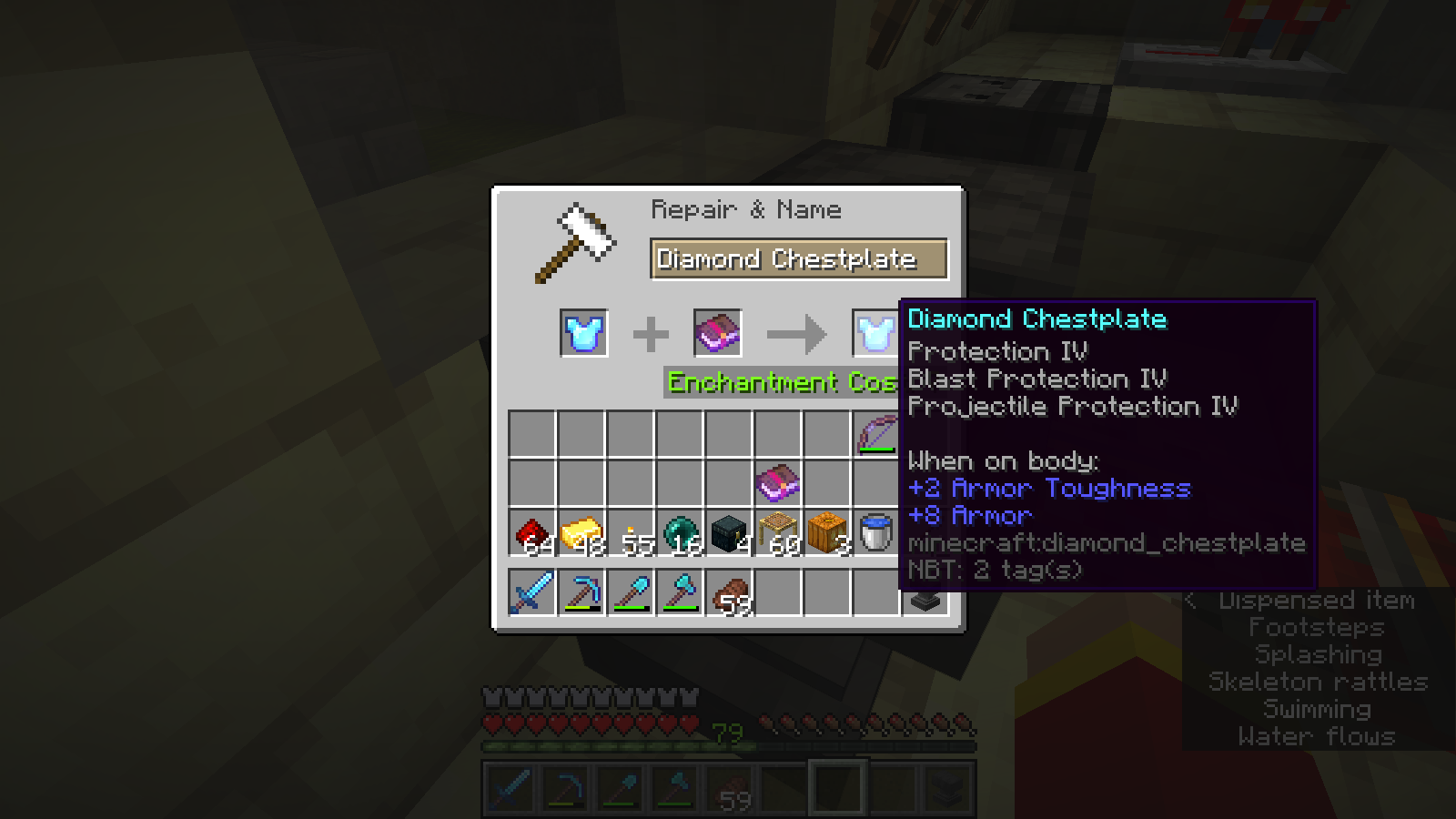
Using an anvil, you can combine and apply to a same item several types of protection enchantments that are supposed to be mutually exclusive, like blast protection and projectile protection on a chestplate.
This works in survival, while it is supposed to only be allowed in creative.
Anvils can applymutually exclusive enchantmentsin survivalAnvils can apply several protection enchantments on same armor item in survival
Raids summoning witches makesall the witches around become hostile to players.
Server can fall behind just because of pillagers processing. Once you have a consistent lag over time, killing all the pillagers solve the issue. This happens on multiplayer, with a dozen of villages loaded (breeder, iron farms). Pillagers can never reach the villages, and start running around, dancing, looking in all directions. And consistent lag starts to build up until you kill the pillagers. Lag can start with only 10 pillagers, and is worsened with chunks not loading once you reach 100 pillagers. Killing all the pillagers immediately solves any issue.
Server can fall behind just because of pillagers processing. Once you have a consistent lag over time, killing all the pillagers solve the issue. This happens on multiplayer, with a dozen of villages loaded (breeder, iron farms). Pillagers can never reach the villages, and start running around, dancing, looking in all directions. And consistent lag starts to build up until you kill the pillagers. Lag can start with only 10 pillagers, and is worsened with chunks not loading once you reach 100 pillagers. Killing all the pillagers immediately solves any issue.
Processing pillagers can make servers falling behind*.newAi.goalSelector.goalTick.pathfind took too long
Server can fall behind just because of pillagers processing. Once you have a consistent lag over time, killing all the pillagers solve the issue. This happens on multiplayer, with a dozen of villages loaded (breeder, iron farms). Pillagers can never reach the villages, and start running around, dancing, looking in all directions. And consistent lag starts to build up until you kill the pillagers. Lag can start with only 10 pillagers, and is worsened with chunks not loading once you reach 100 pillagers. Killing all the pillagers immediately solves any issue.Entities pathfind processing can make servers falling behind under some circumstances. This has especially observed with pillagers, but also with zombies. Every time, killing the said entities solves issue.
Server can fall behind just because of pillagers processing. Once you have a consistent lag over time, killing all the pillagers solve the issue. This happens on multiplayer, with a dozen of villages loaded (breeder, iron farms). Pillagers can never reach the villages, and start running around, dancing, looking in all directions. And consistent lag starts to build up until you kill the pillagers. Lag can start with only 10 pillagers, and is worsened with chunks not loading once you reach 100 pillagers. Killing all the pillagers immediately solves any issue.
*.newAi.goalSelector.goalTick.pathfind took too long and can make servers falling behind
Entities pathfind processing can make servers falling behind under some circumstances. This has especially observed with pillagers, but also with zombies. Every time, killing the said entities solves issue.
Server can fall behind just because of pillagers processing. Once you have a consistent lag over time, killing allthepillagerssolve the issue. This happens on multiplayer,with a dozen of villages loaded (breeder, iron farms). Pillagers can never reach the villages, and start running around, dancing, looking in all directions. And consistent lag starts to build up until you kill the pillagers. Lag can start with only 10 pillagers, and is worsenedwithchunks not loading once you reach 100 pillagers. Killing all the pillagers immediately solvesanyissue.Entities pathfind processing can make servers falling behind under some circumstances. This has especially observed with pillagers, but also with zombies. Every time, killing the said entities solves issue.
First time this has been observed with pillagers: with a dozen of villages loaded (breeder, iron farms). Pillagers can never reach the villages, and start running around, dancing, looking in all directions. And consistent lag starts to build up until you kill the pillagers. Lag can start with only 10 pillagers, and is worsened resulting in chunks not loading once you reach 100 pillagers. Killing all the pillagers immediately solves this issue and server is running smoothly again.
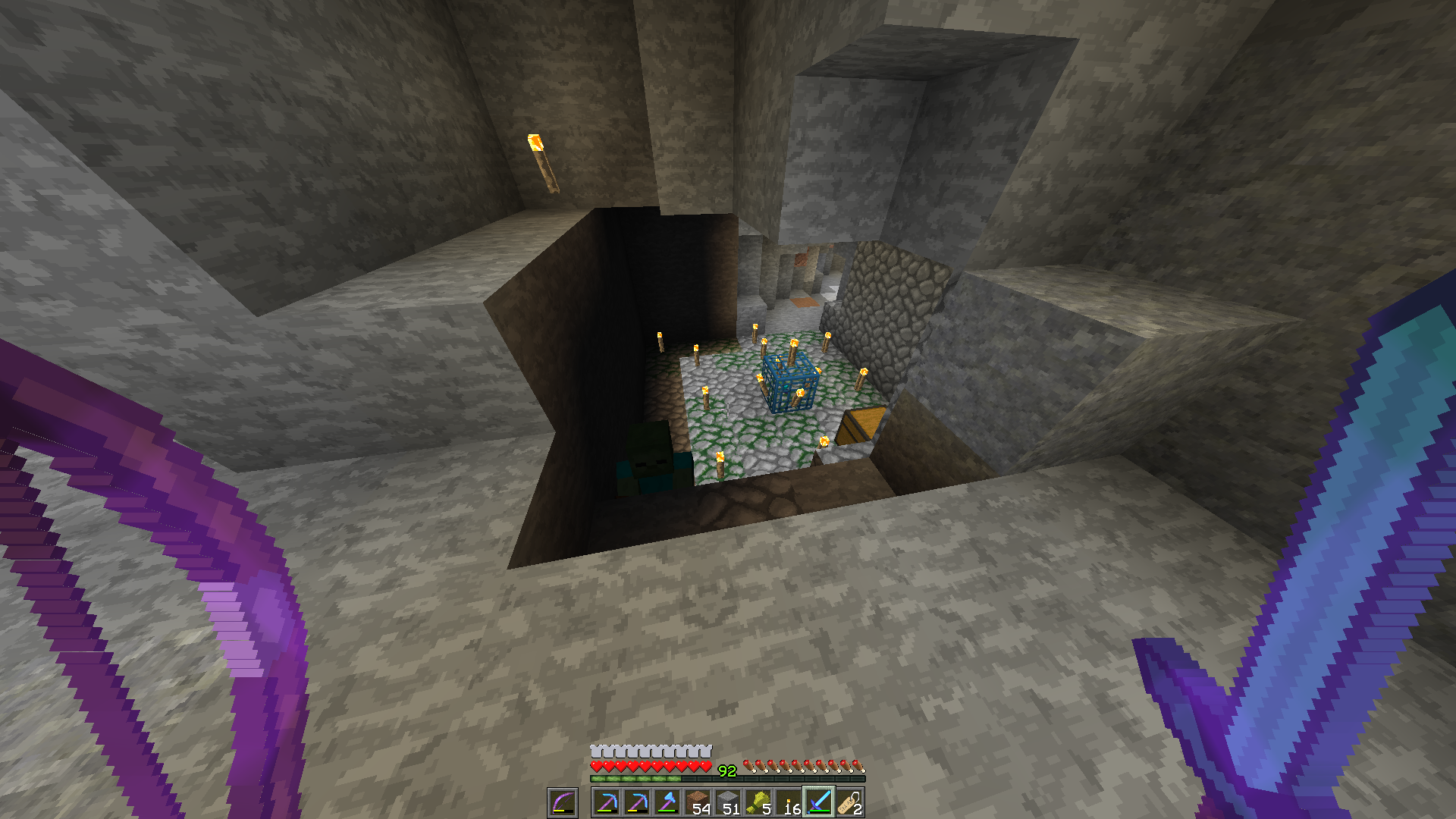
Second time this has been observed with zombies under a strange configuration with lightning not updating near torches (screenshots). This repetitively caused server crashing upon exceeding maximum tick delay. Once again, killing the zombies solved the issue.
Entities pathfind processing can make servers falling behind under some circumstances. This has especially observed with pillagers, but also with zombies. Every time, killing the said entities solves issue.
First time this has been observed with pillagers: with a dozen of villages loaded (breeder, iron farms). Pillagers can never reach the villages, and start running around, dancing, looking in all directions. And consistent lag starts to build up until you kill the pillagers. Lag can start with only 10 pillagers, and is worsened resulting in chunks not loading once you reach 100 pillagers. Killing all the pillagers immediately solves this issue and server is running smoothly again.
Second time this has been observed with zombies under a strange configuration with lightning not updating near torches (screenshots). This repetitively caused server crashing upon exceeding maximum tick delay. Once again, killing the zombies solved the issue.
Having a profiling running, it appears that
Entities pathfind processing can make servers falling behind under some circumstances. This has especially observed with pillagers, but also with zombies. Every time, killing the said entities solves issue.
First time this has been observed with pillagers: with a dozen of villages loaded (breeder, iron farms). Pillagers can never reach the villages, and start running around, dancing, looking in all directions. And consistent lag starts to build up until you kill the pillagers. Lag can start with only 10 pillagers, and is worsened resulting in chunks not loading once you reach 100 pillagers. Killing all the pillagers immediately solves this issue and server is running smoothly again.
Second time this has been observed with zombies under a strange configuration with lightning not updating near torches (screenshots). This repetitively caused server crashing upon exceeding maximum tick delay. Once again, killing the zombies solved the issue.
Having a profiling running, it appears that
Entities pathfind processing can make servers falling behind under some circumstances. This has especially observed with pillagers, but also with zombies. Every time, killing the said entities solves issue.
First time this has been observed with pillagers: with a dozen of villages loaded (breeder, iron farms). Pillagers can never reach the villages, and start running around, dancing, looking in all directions. And consistent lag starts to build up until you kill the pillagers. Lag can start with only 10 pillagers, and is worsened resulting in chunks not loading once you reach 100 pillagers. Killing all the pillagers immediately solves this issue and server is running smoothly again.
Second time this has been observed with zombies under a strange configuration with lightning not updating near torches (screenshots). This repetitively caused server crashing upon exceeding maximum tick delay. Once again, killing the zombies solved the issue.
Having a profiling running, it appears that
*.newAi.goalSelector.goalTick.pathfindis taking too long to proceed and makes the server falling behind or crashing. In both situations, the mobs were trying to reach an unreachable goal (either vilages or player).
Happening again while I had a profiler running for some time. It appears that
root.tick.levels.world minecraft:overworld.tick.entities.regular.tick.minecraft:pillager.ai.newAi.goalSelector.goalTick.pathfindtook too long, and is the cause of the issue.
*.newAi.goalSelector.goalTick.pathfind took too longand can make servers falling behind
Connection'sstatus is displayed as "old" when server is starting
Known issue since the first 1.14 snapshots.
Issuing a /tp to some entity teleport you to this entity's coordinates, but in the same dimension you are actually in. For instance, teleporting from the Overworld to a player in the Nether will teleport you to this player's coordinates, but in the Overworld. Prior 1.14, it was teleporting you relative to the dimension the target is.
In order to bypass this limitation, you now have to run /execute in
{target_dimension}run tp… instead of /tp.
Known issue since the first 1.14 snapshots.
Issuing a /tp to some entity teleport you to this entity's coordinates, but in the same dimension you are actually in. For instance, teleporting from the Overworld to a player in the Nether will teleport you to this player's coordinates, but in the Overworld. Prior 1.14, it was teleporting you relative to the dimension the target is.
In order to bypass this limitation, you now have to run /execute in {target_dimension} run tp… instead of /tp.
Known issue since the first 1.14 snapshots.
Issuing a /tp to some entity teleport you to this entity's coordinates, but in the same dimension you are actually in. For instance, teleporting from the Overworld to a player in the Nether will teleport you to this player's coordinates, but in the Overworld. Prior to 1.14, it was teleporting you relatively to the dimension the target is.
In order to bypass this limitation, you now have to run /execute in {target_dimension} run tp… instead of /tp.
Missing some minecraft:textures
profile-results-2019-03-03_16.28.02.txt
I edited my previous comment, as it appeared that my issue was caused not by my horse, but by holding a map while riding a horse. Also this issue happened without riding a horse. So I opened another issue for this.
Reduced speed while auto-crouching affects players in spectator mode
The speed limiting applied to the fix of
MC-147270affect players in spectator mode.Steps to reproduce
- Change to spectator mode.
- Go under a 1.5 or less blocks height sp
ot.- Press crouch, which is the key to decrease fly height.
- You will be affected by the speed limiter while clipping through blocks. Speed will be back to normal
whenyou're back in open space.The speed limiting applied to the fix of
MC-147270affects players in spectator mode.Steps to reproduce
- Change to spectator mode.
- Go under a 1.5 or less blocks height space.
- Press crouch, which is the key to decrease fly height.
- You will be affected by the speed limiter while clipping through blocks. Speed will be back to normal once you're back in open space.
This was the case before, but it's indeed fixed in 1.14-pre2.
Found on Reddit by CollidedMoon.
How to reproduce
- Create a team.
/team add 56533
- Summon a named cow, and add it to the team.
/summon cow ~ ~1 ~ {CustomName:'"MC-56533"'} /team join 56533 @e[type=cow,nbt={CustomName:'{"text":"MC-56533"}'}]
- Press F1 and aim at the cow.
→Nametag still renders with F1 toggled
Windows 10
Tested 1.14.1 VanillaExperimented with on 1.14.1 Fabric
Please update this ticket. The bug is not related to upgrading. The bug is: Pillagers have no crossbow when summoned with custom NBT tag.
Affects version: 1.14, 1.14.1-pre1 and 1.14.1-pre2.
Step to reproduce:
- Summon a pillager with any custom NBT tag, for instance:
/summon pillager ~ ~ ~ {PersistenceRequired:1}-> The pillager will spawn with his HandItems tag empty.
NoticeThis issue is fixed starting the release of 1.14.3. But if you had this issue on a existing world, you will need to purge the light data in order to fix your map.
- On singleplayer: from the worlds menu, select your world, click Edit, Optimize World; then be sure to check the box Erase Cache Data before proceeding.
- On server: run your map (only) once by appending these arguments at the end of your java startup command: --forceUpdate --eraseCache. If you don't have shell access to the host system, either contact your host provider, or download your world, paste it inside your singleplayer save folder, proceed with the singleplayer steps, and finally re-upload your map.
Do not confirm this issue for new version nor open any new ticket until you have tried those steps.
Original Description
Came across a random patch of daylight at the bottom of a ravine, with no source above. Checking light levels, it shows 15 from the sky when standing in it, and 14 when completely enclosed in dirt. Light colour seems to match daylight cycle.
NoticeThis issue is fixed starting the release of 1.14.3. But if you had this issue on a existing world, you will need to purge the light data in order to fix your map.
- On singleplayer: from the worlds menu, select your world, click Edit, Optimize World; then be sure to check the box Erase Cache Data before proceeding.
- On server: run your map (only) once by appending these arguments at the end of your java startup command: --forceUp
date --eraseCache. If you don't have shell access to the host system, either contact your host provider, or download your world, paste it inside your singleplayer save folder, proceed with the singleplayer steps, and finally re-upload your map.Do not confirm this issue for new version nor open any new ticket until you have tried those steps.
Original Description
Came across a random patch of daylight at the bottom of a ravine, with no source above. Checking light levels, it shows 15 from the sky when standing in it, and 14 when completely enclosed in dirt. Light colour seems to match daylight cycle.
NoticeThis issue is fixed starting the release of 1.14.3. But if you had this issue on a existing world, you will need to purge the light data in order to fix your map.
- On singleplayer: from the worlds menu, select your world, click Edit, Optimize World; then be sure to check the box Erase Cache Data before proceeding.
- On server: run your map (only) once by appending these arguments at the end of your java startup command: --forceUpgrade --eraseCache. If you don't have shell access to the host system, either contact your host provider, or download your world, paste it inside your singleplayer save folder, proceed with the singleplayer steps, and finally re-upload your map.
Do not confirm this issue for new version nor open any new ticket until you have tried those steps.
Original Description
Came across a random patch of daylight at the bottom of a ravine, with no source above. Checking light levels, it shows 15 from the sky when standing in it, and 14 when completely enclosed in dirt. Light colour seems to match daylight cycle.
Villager AI (POI detection) pegs CPU at 100%, causes lag in 19w13a
When I log into a world and go into the nether and hit a pigman, they all come and attack me. but then, when I die and go back into the nether, the attacking pigmen keep attacking me along with newly-generated ones. This is a huge problem because in survival I cannot go into the nether without being abushed by pigmen.
I have not tested this out in other versions.
To re-create:Create a new world in creative, superflat
Create a Nether portal and light it with flint and steelDo /gamemode survival
Go into the nether and attack a pigman and die.Go back into the nether and see that the pigmen keep attacking.The bug
When I log into a world and go into the nether and hit a pigman, they all come and attack me. but then, when I die and go back into the nether, the attacking pigmen keep attacking me along with newly-generated ones. This is a huge problem because in survival I cannot go into the nether without being ambushed by pigmen.
Explanation
On video 2019-06-01 19-35-06.mp4
, We are tracking the pigmen Anger data value. Value is initially 0 until you attack a pigman, then the value is set at 800 and decrease at tick speed. The issue happens because the anger value for each pigman is continuously built up by other pigmen spreading their anger, which leads to eventually never reach 0. This issue only persists if if the pigmen continue to naturally spawn and despawn, as with normal survival gameplay. The new ones seem to spread this value to other ones until they despawn and so on, making this a entire way to maintain this process forever.
Zombie pigmen will stay angry forever if doMobsSpawning is true
Zombie pigmen will stayangryforever ifdoMobsSpawning is trueZombie pigmen will spread their anger forever if they can continously respawn
The bug
When I log into a world and go into the nether and hit a pigman, they all come and attack me. but then, when I die and go back into the nether, the attacking pigmen keep attacking me along with newly-generated ones. This is a huge problem because in survival I cannot go into the nether without being ambushed by pigmen.
Explanation
On video 2019-06-01 19-35-06.mp4
ifthe pigmen continue to naturally spawn and despawn, as with normal survival gameplay. Thenewones seem to spread this value tootherones until they despawn and so on, making this a entire way to maintain this process forever.The bug
When I log into a world and go into the nether and hit a pigman, they all come and attack me. but then, when I die and go back into the nether, the attacking pigmen keep attacking me along with newly-generated ones. This is a huge problem because in survival I cannot go into the nether without being ambushed by pigmen.
Explanation
On video 2019-06-01 19-35-06.mp4
Upgrading Worldsto1.14.1causes Villagersfrom previous versionsto lose their Brain MemoriesUpgrading Worlds from 1.14 causes Villagers to lose their Brain Memories
The bug
When I try to break a tree and when a log is connected to leaves I get massive lag spikes.
How to reproduce
- Run:
/fill ~-7 ~-1 ~7 ~7 ~-6 ~-7 minecraft:oak_leaves→
Note
This issue is somehow tied to the Biome Blend settings. Turning it off makes the leaves decay with no lag.
WorkaroundIn Video settings game menu, turn Biome Blend to off.
The bug
When I try to break a tree and when a log is connected to leaves I get massive lag spikes.
How to reproduce
- Run:
/fill ~-7 ~-1 ~7 ~7 ~-6 ~-7 minecraft:oak_leaves→
Pillager patrolleaderspawnedon carpet, fenceortrapdoorPillager patrols can spawn on path, carpet, fence, trapdoor or bottom slabs
High ms ticks in 1.14–player cannot interact with world normallyHigh ms ticks in 1.14+, player cannot interact with world normally
Mod NoticeThis bug can have multiple symptoms, including, but not limited to:
- Blocks reappear after being mined
- Entities don't move
- Chunks don't load and when entering them, the player falls out of the world
- Cannot open chests and other containers
- Cannot interact with entities
Also, when this issue occurs, the a line like this:
Can't keep up! Is the server overloaded? Running 5000ms or 100 ticks behindwill be printed occasionally in the game console.
Sometimes this issue will become so bad that it will crash the server. In that case the crash report usually has a line like Description: Watching Server.
If you experience this issue, please run a
debug profilingby following these steps:
- Run /debug start
- Wait for a few minutes
- Run /debug stop
- A file will be generated in debug
Please attach this file here in order to help us with finding the cause of this issue.The bug
When my "ms ticks" is higher than normal, i can't place/remove blocks, drop/pick up items, use items like a carrot on a stick. Delay between my action and world's reaction are extremely high.
Upd: in snapshot 18w45a ms ticks is still really high in normal world when mobs are spawning. Chunks stops rendering sometimes, items cannot be picked up etc.
Mod NoticeThis bug can have multiple symptoms, including, but not limited to:
- Blocks reappear after being mined
- Entities don't move
- Chunks don't load and when entering them, the player falls out of the world
- Cannot open chests and other containers
- Cannot interact with entities
Also, when this issue occurs, the a line like this:
Can't keep up! Is the server overloaded? Running 5000ms or 100 ticks behindwill be printed occasionally in the game console.
Sometimes this issue will become so bad that it will crash the server. In that case the crash report usually has a line like Description: Watching Server.
If you experience this issue, please run a complete debug dump by following these steps:
- Generate a debug profiling (.txt file):
- Run /debug start
- Wait for a few minutes
- Run /debug stop
- Generate a debug report (.zip file):
- Run /debug report
Those files will be generated in the debug folder of your Minecraft instance. If you are on singleplayer, access your game directory. If you are on server, report to your system administrator. If you don't have op permission, either ask your server admin to perform the dump, or if you are on singleplayer, open your world to LAN with cheats on.
Please attach this text and the zip files here and link them to your comment using the attachment (paperclip icon in the text editor). Do not comment if you don't have both of these files.The bug
When my "ms ticks" is higher than normal, i can't place/remove blocks, drop/pick up items, use items like a carrot on a stick. Delay between my action and world's reaction are extremely high.
Upd: in snapshot 18w45a ms ticks is still really high in normal world when mobs are spawning. Chunks stops rendering sometimes, items cannot be picked up etc.
Minecraft 1.14 Pre-Release well trying to move forward in a mine cart with W on an unpowered track segment.
In version 14w18b and older mobs (both friendly and hostile) ignores fact that they are being hit again and again cactus!
For example, I was a.f.k. in my survival world for 15 minutes and that was enough to make entire village suicide using my cactus wall!
I guess that is because cactus' damage is neutral, like fire / poison / suffocating damage.
Damage dealing blocks include: cactus, magma blocks, lava, fire, wither rose, berry bushes, campfires
This issue covers random walking AI and fleeing AI only, pathfinding, like a zombie trying to follow a villager, will not run into cactus (if correct, need to test later) or magma blocks.
Update version 1.14.3: villagers do not seem affected by this issue anymore as they are run away from danger.
I was doing a little bit of End exploring, collecting Shulker Shells, Elytras, and other End City loot on my server. Then I encountered a particular oddity, in which an End Ship was cut at the front portion where the Elytra would generate at, robbing me of precious loot. I suspected that I was standing at the edge of a chunk, and sure enough, I was. I don't know how, but something about End Ships get messed up at the chunk border.
I tried regenerating the world in single player and teleported to the exact same location where I encountered this error, and sure enough, I received the same results. Below are the coords, version, and confirmation that it was indeed a chunk border. The world was generated in 1.14, but the End was not generated until 1.14.1.
Reproduction steps
Provided by Charles
Seed:
I was doing a little bit of End exploring, collecting Shulker Shells, Elytras, and other End City loot on my server. Then I encountered a particular oddity, in which an End Ship was cut at the front portion where the Elytra would generate at, robbing me of precious loot. I suspected that I was standing at the edge of a chunk, and sure enough, I was. I don't know how, but something about End Ships get messed up at the chunk border.
I tried regenerating the world in single player and teleported to the exact same location where I encountered this error, and sure enough, I received the same results. Below are the coords, version, and confirmation that it was indeed a chunk border. The world was generated in 1.14, but the End was not generated until 1.14.1.
Reproduction steps
Provided by Charles
Seed:
I was doing a little bit of End exploring, collecting Shulker Shells, Elytras, and other End City loot on my server. Then I encountered a particular oddity, in which an End Ship was cut at the front portion where the Elytra would generate at, robbing me of precious loot. I suspected that I was standing at the edge of a chunk, and sure enough, I was. I don't know how, but something about End Ships get messed up at the chunk border.
I tried regenerating the world in single player and teleported to the exact same location where I encountered this error, and sure enough, I received the same results. Below are the coords, version, and confirmation that it was indeed a chunk border. The world was generated in 1.14, but the End was not generated until 1.14.1.
Reproduction steps
Provided by Charles in this comment
Seed: -1512708869162518012
City 1 Coords: 1000 65 130
City 2 Coords: -530 90 -880
The bug
I encountered a particular oddity, in which an end ship was cut at the front portion where the Elytra would generate at. I suspected that I was standing at the edge of a chunk, and sure enough, I was. I don't know how, but something about end ships get messed up at the chunk border.
I tried regenerating the world in single player and teleported to the exact same location where I encountered this error, and sure enough, I received the same results. Below are the coordinates, version, and confirmation that it was indeed a chunk border. The world was generated in 1.14, but the end was not generated until 1.14.1.
How to reproduce
Seed: -1512708869162518012 Coordinates (city 1): /execute in the_end run tp 1000 65 130 Coordinates (city 2): /execute in the_end run tp -530 90 -880
The bug
I encountered a particular oddity, in which an end ship was cut at the front portion where the Elytra would generate at. I suspected that I was standing at the edge of a chunk, and sure enough, I was. I don't know how, but something about end ships get messed up at the chunk border.
I tried regenerating the world in single player and teleported to the exact same location where I encountered this error, and sure enough, I received the same results. Below are the coordinates, version, and confirmation that it was indeed a chunk border. The world was generated in 1.14, but the end was not generated until 1.14.1.
How to reproduce
Seed:-1512708869162518012 Coordinates (city 1): /execute in the_end run tp 1000 65 130 Coordinates (city 2): /execute inthe_end run tp-530 90 -880The bug
I encountered a particular oddity, in which an end ship was cut at the front portion where the Elytra would generate at. I suspected that I was standing at the edge of a chunk, and sure enough, I was. I don't know how, but something about end ships get messed up at the chunk border.
How to reproduce
Seed: 8267213705029167797 TP command: /execute in minecraft:the_end run tp 3072 135 -6024
Title screen panorama turns white after dying in Hardcore mode andclicking "Delete World"Title screen panorama turns white and world still running in the background after clicking "Delete World" in hardcore mode
Title screen panorama turns whiteand world still running in the backgroundafter clicking "Delete World" in hardcore mode
Afterapparent successful second deletion, hardcore world still runs in backgroundand is not deletedAfter clicking "Delete World", hardcore world still runs in background
The bug
While testing
MC-30646"Hardcore game is not deleted" I found what may beanother manifestation of the same bug, or maybe a new bug (perhaps related toMC-526"Worlds will not delete").Not only does a hardcore world not delete with the hardcore death screen deletion button (
MC-30646), but additionally the world continues to run behind the UI. You get dropped to the title screen, but can hear the game sounds and music. You can also see the world still running on a second deletion confirmation screen. And even after the apparently successful second deletion action, the world is still not deleted.How to reproduce
- Create singleplayer hardcore world
- Die in your hardcore world
- Choose "Delete world" on the death screen (not "Spectate world")
- Get dropped back to title screen
→ Notice the game sounds continue, as if your world is still running- Choose singleplayer and view list of worlds
→ Observe that the hardcore world is not deleted, as perMC-30646- Highlight hardcore world and choose delete
- On confirmation screen ("forever is a long time!"), confirm deletion
→ Notice that you can see your world still running in the background here, as well as hear it. Instead of the expected dirt texture background- Get dropped back to singleplayer world list
→ Observe that hardcore world is not on the list, indicating (apparently) that it was deleted successfully.- Hit escape (don't click the cancel button with mouse cursor)
Expected result
Go to title screen. Hardcore world remains deleted.
Actual result
Get kicked back into your hardcore world, facing once again the choice to delete or spectate. The first time I arrived here, I chose to spectate and my world was full of chunks that wouldn't load, and the game crashed with a memory overflow shortly, indicating maybe some part of the deletion was successful. On subsequent attempts, spectator mode worked fine, with no crashes, in the supposedly deleted world. Hitting delete at this screen will repeat the loop without deleting the world.
Note that hitting the escape key on the world select screen should probably behave the same as clicking the cancel button. That they behave differently may be another bug.
The bug
While testing
MC-30646"Hardcore game is not deleted" I found what may be another manifestation of the same bug, or maybe a new bug (perhaps related toMC-526"Worlds will not delete").Not only does a hardcore world not delete with the hardcore death screen deletion button (
MC-30646), but additionally the world continues to run behind the UI. You get dropped to the title screen, but can hear the game sounds and music. You can also see the world still running on a second deletion confirmation screen. And even after the apparently successful second deletion action, the world is still not deleted.How to reproduce
- Create singleplayer hardcore world
- Die in your hardcore world
- Choose "Delete world" on the death screen (not "Spectate world")
- Get dropped back to title screen
→ Notice the game sounds continue, as if your world is still running- Choose singleplayer and view list of worlds
→ Observe that the hardcore world is not deleted, as perMC-30646- Highlight hardcore world and choose delete
- On confirmation screen ("forever is a long time!"), confirm deletion
→ Notice that you can see your world still running in the background here, as well as hear it. Instead of the expected dirt texture background- Get dropped back to singleplayer world list
→ Observe that hardcore world is not on the list, indicating (apparently) that it was deleted successfully.- Hit escape (don't click the cancel button with mouse cursor)
Expected result
Go to title screen. Hardcore world remains deleted.
Actual result
Get kicked back into your hardcore world, facing once again the choice to delete or spectate. The first time I arrived here, I chose to spectate and my world was full of chunks that wouldn't load, and the game crashed with a memory overflow shortly, indicating maybe some part of the deletion was successful. On subsequent attempts, spectator mode worked fine, with no crashes, in the supposedly deleted world. Hitting delete at this screen will repeat the loop without deleting the world.
Note that hitting the escape key on the world select screen should probably behave the same as clicking the cancel button. That they behave differently may be another bug.Note
Code analysis can be found in this comment
Hardcore mode runs on background and theplayer didn't disconnectwhen diedClicking "Leave server" after dying on hardcore multiplayer does not disconnect you from the server
When you are on a server with hardcore=true, there is a bug with the "Leave server button".
How to reproduce:
- Die on hardcore mode enabled server.
- Click "Leave Sever"
- Go to singleplayer, multiplayer or realms menu.
- Hit Esc.
Expected result
You will be disconnected from the server and couldn't go back in the server without navigating the multiplayer menu.
Actual result
Get kicked into the death screen and facing once again the choice to spectate or disconnect.
When you are on a server with hardcore=true, there is a bug with the "Leave server button".
How to reproduce:
- Die on hardcore mode enabled server.
- Click "Leave Sever"
- Go to singleplayer, multiplayer or realms menu.
- Hit Esc.
Expected result
You will be disconnected from the server and couldn't go back in the server without navigating the multiplayer menu.
Actual result
You will reappear on the Server death screen with the choice of leaving or spectating the world again.
Video demonstrating this issue by [Helper] Johnibur 2019-05-30 01-23-26.mp4
Baby Zombie PigmanChicken Jockey don't respond to others Zombie Pigmans alarm calls.
So they don't aggro the Player util the Chicken is killed.Baby zombie pigman chicken Jockey has a lower player detection range than the regular pigman when being provoked, making them not actively chasing the player if they stand at a fair safe distance, contrary to the regular pigmen for the same distance.
In order to reproduce this issue, a testing track has been set up as show in video 2019-05-30 20-32-40.mp4
We can see that all three pigmen are being provoked as expected. But when we open the fences, only the non jockey pigmen are actively chasing the player. The chicken jockey only detects you after moving closer.
This issue does not occur in 1.13.2.
Baby ZombiePigman Chicken Jockey don't aggro the PlayerPigman Chicken Jockey detection range is lower than regular pigman
This may actually be intended, but I found a village located right next to a woodland mansion.
Aslight part of the villageis underneath the mansion! I figured this shouldnt be intended as the illagers in their home could easily wipe out the village.
Seed: 2256813096429968793
1.14 pre-4
Coords: -5550 83 1016
This may actually be intended, but I found a village located right next to a woodland mansion. In version 1.14, a slight part of the village was underneath the mansion! I figured this shouldn't be intended as the illagers in their home could easily wipe out the village.
Steps to reproduce
- Create a creative world with seed: 2256813096429968793
- Teleport to coordinates -5539 84 -1085
This may actually be intended, but I found a village located right next to a woodland mansion. In version 1.14, a slight part of the village was underneath the mansion! I figured this shouldn't be intended as the illagers in their home could easily wipe out the village.
Steps to reproduce
- Create a creative world with seed: 2256813096429968793
- Teleport to coordinates -5539 84 -1085
This may actually be intended, but I found a village located right next to a woodland mansion. In version 1.14, a slight part of the village was underneath the mansion! I figured this shouldn't be intended as the illagers in their home could easily wipe out the village.
Steps to reproduce
- Create a creative world with seed: 2256813096429968793
- /tp -5539 84 -1085
The bug
When reaching y > 30,000,000, the player gets removed from the server with the reason being "Connection lost: invalid move player packet received"
, and then game crashes.How to reproduce
- /tp ~ 30000004 ~
Crash report
Description: Unexpected error java.lang.StackOverflowError: Unexpected error at bnv.e(SourceFile:649) at bnv.d(SourceFile:606) at bnv.d(SourceFile:617) at bnv.d(SourceFile:617) at bnv.d(SourceFile:617) ...The bug
When reaching y > 30,000,000, the player gets removed from the server with the reason being "Connection lost: invalid move player packet received".
Before 1.13, the game was crashing with StackOverFlowError. Now the game is no longer crashing but once you reach this y-value, you will be constantly kicked from your world upon return unless you edit your player data position with an external tool.
How to reproduce
- /tp ~ 30000004 ~
Game crasheswhen reaching y > 30,000,000Kicked from the game when reaching y > 30,000,000
The bug
When reaching y > 30,000,000, the player gets removed from the server with the reason being "Connection lost: invalid move player packet received".
Before 1.13, the game was crashing with StackOverFlowError. Now the game is no longer crashing but once you reach this y-value, you will be constantly kicked from your world upon return unless you edit your player data position with an external tool.
How to reproduce
- /tp ~ 30000004 ~
The bug
When reaching y > 30,000,000, the player gets removed from the server with the reason being "Connection lost: invalid move player packet received".
Before 1.13, the game was crashing with StackOverFlowError. Now the game is no longer crashing but once you reach this y-value, you will be constantly kicked from your world upon return unless you edit your player data position with an external tool.
How to reproduce
- In 1.15.2, teleport to height 29,999,999
- Update to latest version and move upward
The bug
When reaching y > 30,000,000, the player gets removed from the server with the reason being "Connection lost: invalid move player packet received".
Before 1.13, the game was crashing with StackOverFlowError. Now the game is no longer crashing but once you reach this y-value, you will be constantly kicked from your world upon return unless you edit your player data position with an external tool.
How to reproduce
- In 1.15.2, teleport to height 29,999,999
- Update to latest version and move upward
The bug
When reaching y > 30,000,000, the player gets removed from the server with the reason being "Connection lost: invalid move player packet received".
Before 1.13, the game was crashing with StackOverFlowError. Now the game is no longer crashing but once you reach this y-value, you will be constantly kicked from your world upon return unless you edit your player data position with an external tool.
How to reproduce
- tp 0 30000000 0
- Move upward

The bug
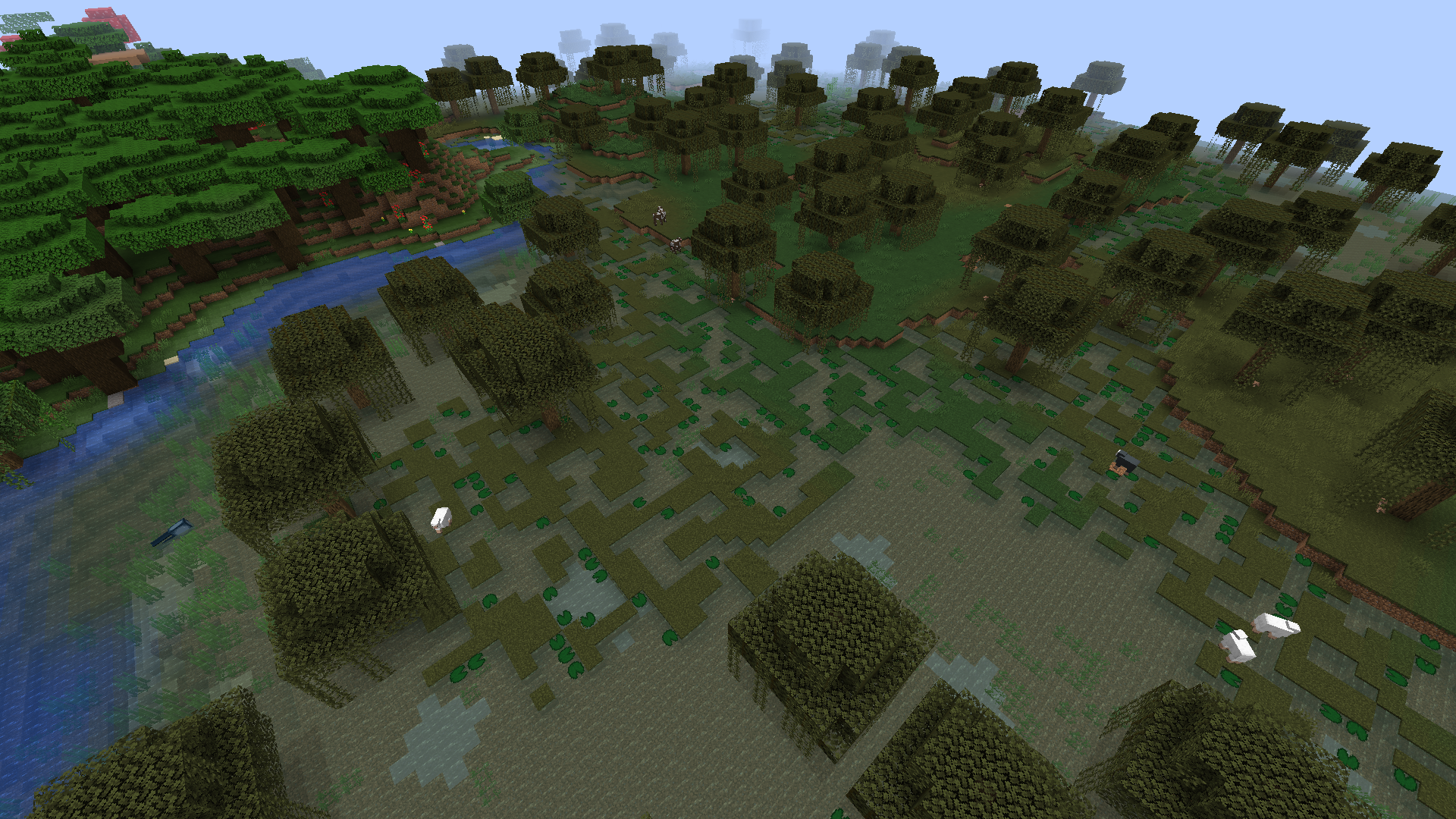
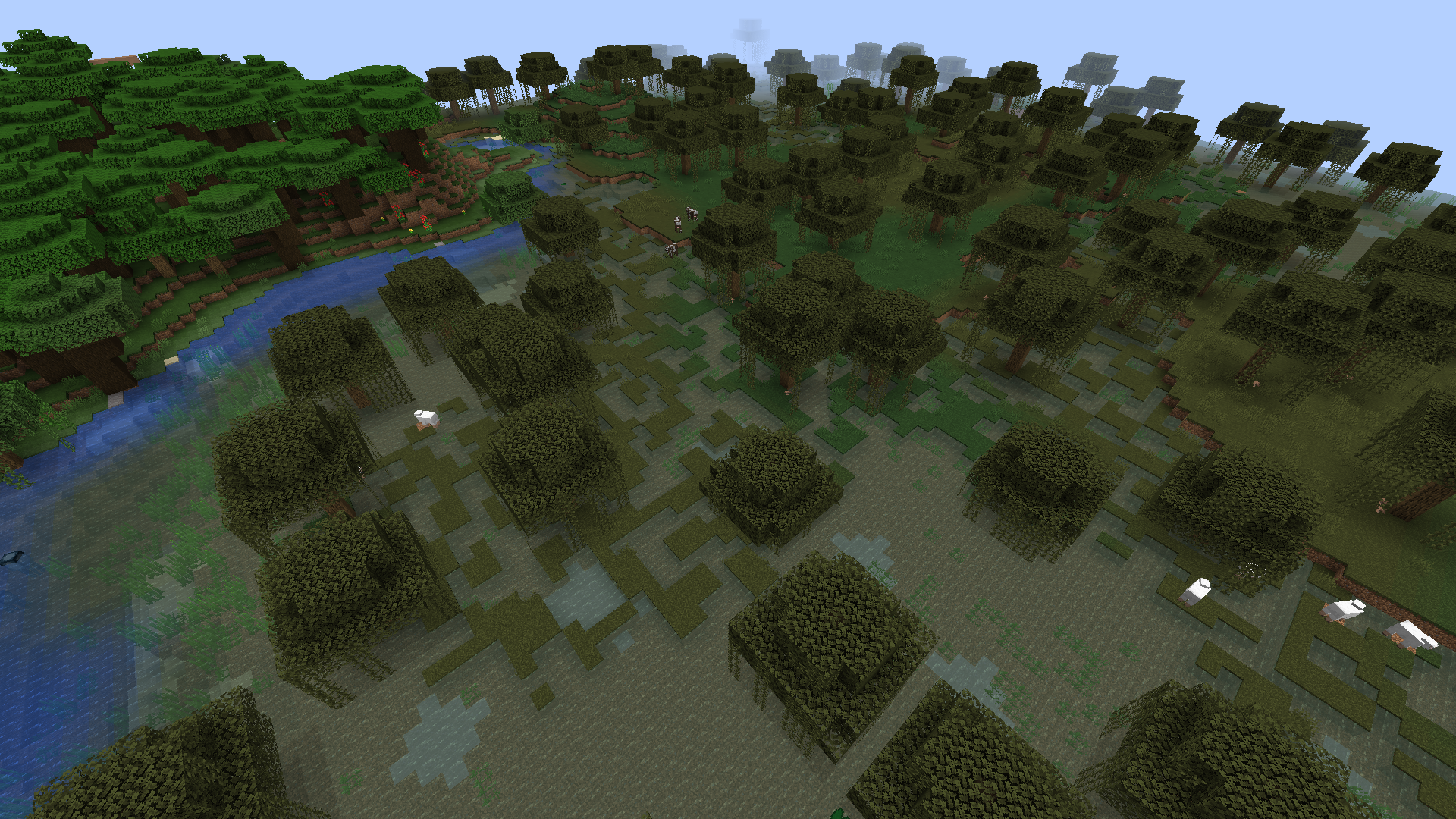
In 1.13 and 1.14, lily pads appear much less frequently in swamp biomes at locations where there is no land compared to 1.12. In 1.14 Pre-Release 2 this has gotten even worse: now no lily pads generate in swamp areas that are a mix of water and grass, while lily pads did generate in these areas in 1.13.2 and prior versions.
I've deleted the old screenshots and attached new ones showing the same swamp location in 1.12.2, 1.13.2, and 1.14 Pre-release 2. The seed is
-7016193228615810917. To get to the location shown in the screenshots use the following command: /tp @s 1235 100 -950 0 90
At this rate in 1.15 lily pads will only be obtainable through fishing. #SaveTheLilyPads
Change in generation in 1.14 development
Comparison by [Helper] Johnibur, seed taken from duplicate MC-153717
There is a noticeable difference in lilypad generation between snapshot 19w13b and 19w14a as you can see below. From 19w14a, lilypads seems to be only generated in large ponds only.
Seed: 1956111413
Coordinates: -590 91 935

When you are on a server with hardcore=true, there is a bug with the "Leave server button".
How to reproduce:
- Die on hardcore mode enabled server.
- Click "Leave Sever"
- Go to singleplayer, multiplayer or realms menu.
- Hit Esc.
Expected result
You will be disconnected from the server and couldn't go back in the server without navigating the multiplayer menu.
Actual result
You will reappear on the Server death screen with the choice of leaving or spectating the world again.
Video demonstrating this issue by [Helper] Johnibur 2019-05-30 01-23-26.mp4
![[Mojang] Panda](../../../data/avatars/users/41658.png)
[Helper] Johnibur Thank your for confirming 
So yeah MC-141484 is related, MC-142022 as well.
They all describe situations where entities are only on the global list and issues that likely result from this.

@[Helper] Johnibur Attached.
And the 1st server log, which already contains some keeping entity error after the teleport!
This "clickable" teleport coordinate function also needs some improvement, because I fell out of the world till I found the appropriate Y coordinate above the ground...
@[Helper] Johnibur you're fantastic!
I hope they fix this bug soon. According to your measure this event occurs even with render distance=6.
We're used to play on usual business laptops. These are not gamer machines, but MC worked fine till this time. But now even on a dedicated (business laptop) server the new version is very slow.
I don't understand why the duplication is related to speed of server. I think duplication is not acceptable at all. Neither on a slow server, nor on a fast one.
Again thank you for your measurement, I hope developers can use these results to fix it.
Cheers,
Peter
![[Mod] Jiingy](../../../data/avatars/users/91802.png)
If you summon a group of some mobs and attack them under certain circumstances, they will continue to attack the player even when they change gamemodes which entities should not be hostile to.
Steps to Reproduce:
(Start test in creative mode)
- Apply invisibility effect:
/effect give @p minecraft:invisibility infinite 255 true - Summon 10 or more of the affected mobs (noted in 'notes' section)
- Attack one of the affected mobs (drowned must have tridents)
- Enter survival mode, and quickly move onto the next within a second
- Change gamemode to creative/spectator
Observed Behavior:
One or possibly more of the pillagers will continue to attack the player, even if you switch to spectator, and then creative again. It will stop attacking after you switch back to survival, and then creative again.
Expected Behavior:
The entities would not attack the player in creative or spectator at all, and would lose aggression as soon as the player enters those gamemodes.
Videos & Screenshots
2019-06-29 15-53-30.mp4 made by [Helper] Johnibur
Notes:
The following mobs are known to be affected:
- 'Illager' mobs (evokers, pillagers, vindicators, and illusioners)
- Ravagers
- Witches
- Wolves
- Bees when harvesting from their nest / hive
- Zombie mobs (zombies, drowned, husks, zombie Villagers
- Hoglins & Zoglins
- Creaking
I recently learned that chunk loading/unloading is done in the idle time of the tick. As this issue probably happens on loading or unloading, it is likely that server lag has an influence on it.
Also Peter Lusztig writes about server lag and in their latest.log there are quite a few "Can't keep up! Is the server overloaded?" messages.
[Helper] Johnibur If you got time for it, you could try to recreate it on your system by artificially causing server lag. A good way to do this is to set the random tick speed really high (e.g. /gamerule randomTickSpeed 10000000; good value needs to be found by experiment) and place at least one block that receives random ticks around the player (I usually use vines).
If it was possible to recreate it with this method, that would indicate that it's not so much the system that's important, but rather how much load is on it.
Hope this helps
I just noticed MC-108469 is not in the related issues, while it's an understood issue about disappearing entities. I'm not sure how closely the relation is, but it should definetly be in there.
Hi @[Mojang] Searge (Michael Stoyke),
It's a fresh new world, so it's not big (18MB), but max. 10MB is attachable here.
So here you can download:
https://www.dropbox.com/s/thpbgc6dcts5gc6/Test_Experimental.zip?dl=0
I hope it works, because I already deleted it before. Just I restored from Recycle bin.
@[Helper] Johnibur: I have a simple business laptop
Dell Latitude E5470
Processor: Intel(R) Core(TM) i5-6300U CPU @ 2.40GHz (4 CPUs), ~2.5GHz
Memory: 8192MB RAM
Video: Intel(R) HD Graphics 520
It's not a gamer machine, I know.
![[Mod] Neko](../../../data/avatars/users/92901.png)
[Helper] Johnibur: I updated the ticket with your steps. Thanks!
Can confirm. [Helper] Johnibur, can you create a new ticket?
The bug
On servers, all players (on LAN servers, all players except the host) get displayed an incorrect price for discounted trades. Instead of the original price being displayed crossed out and the discounted price standing next to it, the discounted price is crossed out and an incorrect price stands next to it (that price being the original price discounted twice).
This is how it looks to the host of a LAN world / to the server:

This is how it looks to all the other players:

To reproduce
- Create a new singleplayer world (superflat for convenience, creative).
- Summon on a safe spot a villager, assign him the mason profession by placing down a stonecutter.
- Open the world to you LAN and let a second account join.
- Give the hero of the village status effect to both players:
/effect give @a hero_of_the_village 999 1 true
- Try to trade with the mason one account, then the other.
- The guest account is displaying the incorrect price
Video
Original report
Server side inventories do not apply the advertised price, instead applying the original full price. This is applicable to both buy and sell trades. If the world is copied to saves folder and played as a single player world, the proper price will be applied to the trade.
How to produce:
1. Download server jar file from most recent patch notes page.
2. Create server.
3. Trade with villagers on server.
Side Note: This bug also affects Realms servers.
The bug
When I log into a world and go into the nether and hit a pigman, they all come and attack me. but then, when I die and go back into the nether, the attacking pigmen keep attacking me along with newly-generated ones. This is a huge problem because in survival I cannot go into the nether without being ambushed by pigmen.
Explanation
On video 2019-06-01 19-35-06.mp4, We are tracking the pigmen Anger data value. Value is initially 0 until you attack a pigman, then the value is set at 800 and decrease at tick speed. The issue happens because the anger value for each pigman is continuously built up by other pigmen spreading their anger, which leads to eventually never reach 0. This issue only persists if the pigmen continue to naturally spawn and despawn, as with normal survival gameplay. The old ones seem to spread this value to the new ones until they despawn and so on, making this a entire way to maintain this process forever.
![[Helper] ZeNico13](../../../data/avatars/users/31913.png)
@[Helper] Johnibur Sorry I did not know.
Nevertheless, there are other problems with the loading and the generation of the chunks and yet, they have closed my report about that...
I was repatriated here...
![[Mod] violine1101](../../../data/avatars/users/92858.png)
What [Helper] Johnibur said. Please only post a comment when you have something of value to add to the report. (Also please don't add any more screenshots to this ticket, there already are enough.)
Yes, we know you have the issue as well. Yes, we know it's frustrating. And yes, this issue is known to Mojang employees. In fact, we have made a developer aware of this issue as soon as possible, and it is assigned to the responsible developer.
Mojang is currently working on releasing a new version 1.14.1 very soon. How soon that will be: We don't know yet. It'll most probably include a whole bunch of other critical fixes as well.
We will likely release a 1.14.1 very shortly with a few performance improvements and major bug fixes.
Baby zombie pigman chicken Jockey has a lower player detection range than the regular pigman when being provoked, making them not actively chasing the player if they stand at a fair safe distance, contrary to the regular pigmen for the same distance.
In order to reproduce this issue, a testing track has been set up as show in video 2019-05-30 20-32-40.mp4. The testing bench summon the 3 types of zombies pigman that you can naturally find: the adult version, the baby version and the chicken jockey. A way to detect Anger:1 has been set so that angered pigmen will receive the glowing effect. Provoking the pigmen is done by throwing snowballs from a fair distance.
We can see that all three pigmen are being provoked as expected. But when we open the fences, only the non jockey pigmen are actively chasing the player. The chicken jockey only detects you after moving closer.
This issue does not occur in 1.13.2.
@[Helper] Johnibur I could hardly believe you were unable to reproduce my issue. Then, I copied the java runtime from the desktop client and used that on the server start and guess what: now it works. There seems to be a java runtime issue I'm facing.
So, my (somehow faulty) java runtime:
java version "1.8.0_25"
Java(TM) SE Runtime Environment (build 1.8.0_25-b18)
Java HotSpot(TM) 64-Bit Server VM (build 25.25-b02, mixed mode)
vs. the working desktop java runtime:
java version "1.8.0_51"
Java(TM) SE Runtime Environment (build 1.8.0_51-b16)
Java HotSpot(TM) 64-Bit Server VM (build 25.51-b03, mixed mode)
I hope this info may help with some other issue you may have to resolve.
Thank you @[Helper] Johnibur, it actually helped (as of openjdk8-jre 1.8.0_202-b08).
I think that some announcement that older java versions are not usable any more would not hurt.
The bug
Villagers do not properly keep track of the last time they restocked, neither the number of times they have restocked in the day. This causes villagers indefinitely restocking each time they visit their POI during their work hours. This happens with each villager once the world has passed a a half-day of gametime.
How to reproduce
- Let the world gametime reach at least 12,000 ticks (/time query gametime to check).
- Spawn a villager in an empty superflat world with access to a POI
- Trade with this villager during work hours
The villager will restock every time he works at his workstation, leading to the possibility of abusing his trades (Laura's 2nd screenshot shows 4 stacks of emeralds obtainable in one day), even while the GUI is still open ([Helper] Johnibur's video: 2019-07-23 12-11-49.mp4).
 As a result of the restocks not being tracked, the demand being reduced at every restock will absurdly go down, in the wrong direction (Laura's 1st screenshot, making the prices not affected by an excessive use of the same trades.
 The nbt values LastRestock and RestocksToday always stay at 0.
Code analysis by [Helper] Johnibur:
This method (own mappings) from the Entity Villager class performs the restocking (set trades use values to 0) and set tracking values which are used for the hasNotAlreadyRestocked() condition further below:
public void restock() { this.goSetDemand(); Iterator iterator = this.getOffers().iterator(); // Do the restock while (iterator.hasNext()) { MerchantRecipe merchantrecipe = (MerchantRecipe) iterator.next(); merchantrecipe.resetUses(); } // (…) if (this.getVillagerData().getProfession() == VillagerProfession.FARMER) { this.eE(); } // Set the tracking values this.lastRestock = this.world.getTime(); ++this.restocksToday; }
It is called each time the villager works at his workstation, provided the following requirement is met:
public boolean isRestockNeeded() { // This is for wether or not calling for demand long i = this.lastRestock + 12000L; boolean flag = this.world.getTime() > i; long j = this.world.getDayTime(); if (this.bP > 0L) { long k = this.bP / 24000L; long l = j / 24000L; flag |= l > k; } this.bP = j; if (flag) { // method preparing to set the demand } // Real conditions return this.hasNotAlreadyRestocked() && this.IsOutOfStock(); }
The method isOutOfStock() checks whether any stock has been depleted:
private boolean isOutOfSTock() { Iterator iterator = this.getOffers().iterator(); MerchantRecipe merchantrecipe; do { if (!iterator.hasNext()) { return false; // Can't find any fully used offer } merchantrecipe = (MerchantRecipe) iterator.next(); } while (!merchantrecipe.isFullyUsed()); return true; }
Yet, the restock can already be potentially done inside the method called for demand:
private void prepareforSettingDemand() { int i = 2 - this.restocksToday; // This creates the issue: restock is prematurely been made here. if (i > 0) { Iterator iterator = this.getOffers().iterator(); while (iterator.hasNext()) { MerchantRecipe merchantrecipe = (MerchantRecipe) iterator.next(); merchantrecipe.resetUses(); } } for (int j = 0; j < i; ++j) { this.setDemand(); } }
This leads to isRestockNeeded() always be false once a certain amount of gametime has passed, because the restock is already done in the call for demand methods, but not tracked at all. Thus properly restocking is not possible.
![[Mod] EVGENSYPERPRO](../../../data/avatars/users/92853.png)
@[Helper] Johnibur it is also a parity issue. Since in the Java version the shulker box opens when it is blocked by Big Dripleaf, but in the bedrock it does not open! For the rest of the blocks that do not block the shulker box, a report was created MCPE-122588 (bedrock minecraft).
I can confirm too: present in Minecraft Server 18w44a.
Let several players logging to the Server, if everyone is standing on the same chunks or close to each others, everything is fine. Once they start spreading out around the world, plants stop growing, leaves stop decaying for everyone. Once they match their position on the world again, the random tick resume working. Then once they spread out again, it stop working. Same issue with mobs: they are spawning only if everyone is loading the same chunks. They stop spawning once everyone is spread out.
Random tick and mob spawning both stops working. I thought it was related to player's dimension, but actually I couldn't reproduce what my friends told me.
But the breaking of the random tick and the hostile mob spawning except those from spawners has been consistently observed after playing for hours on my snapshot server.
Can confirm for 18w44a with even more severe lag than for stable versions.
One of my players on my snapshot server had a similar situation after transporting a villager though the Nether, once the villager goes through the portal, items in chests within the same chunk as the portal disappeared, also the book on the enchanting table was not rendering anymore for all of us (see the screenshot).
From the player who experienced this issue:
"Transporting the villager into the nether was no problem, it did bug out a lot with getting into a minecart, getting out wasnt hard. As i reached my base portal i moved the villager in the portal with him then we arrived and i started to experience some lag. From this point the freaky stuff happened, i walked out and saw that all my chests were invisible and the signs and the bed, everything else was visible. I relogged and saw that when i logged back in i had rubberbanded back to the portal, and that the villager reloaded into the nether again, i moved him back to the overworld, to find that there were 2 villagers (the same , basically copied) then after capturing both, they seemed to move with different AI but one turned out to be a fake, he disappeared, well after capturing the main villager again. chests and sign stills invisible, i tried removing them (but before i destroyed the blocks) they became visible, when i checked the chests inventory, it was empty, this was for all the chests that reappeared after being "harmed" without being destroyed. it only happened in the same chunk where the portal was, so i assume it is related to the portal. After relogging a few times trying to fix the problem, we restarted the server, this also did not solve the problem, so we gave back my items in creative and moved the portal out of the chunk hoping for the best. "
Since this issue, server's console now spawns a "Keeping entities which already exists with UUID…" warning every time this chunk is loaded.
Can confirm the constant 100% CPU core usage for 18w45a.
This might be related to a "mob duplication" bug happening when crossing though a Nether portal from the Nether to the Overworld. Server caught an "entity already tracked" exception once when loading the chunks with the same villager as explained above:
Might be related to: https://bugs.mojang.com/browse/MC-138919
Might be related to: https://bugs.mojang.com/browse/MC-138911
Can confirm for 18w45a too. The server can take several seconds before finding a linked portal, although not sure if it is the cause of global lag or if the lag is caused by the constant busy-waiting CPU load as described in https://bugs.mojang.com/browse/MC-138071.
Same bug happened with 18w44a after transporting a villager through the Nether and going to the portal, all chests empty on the chunk where the said portal was standing in the Overworld.
Duplicates https://bugs.mojang.com/browse/MC-138938
Can confirm with 18w46a + more info on how to reproduce it with detail:
Make any mob going to the Nether by using a Nether portal, go to the Nether, you'll see one single mob on the other side, go back from the Nether, then go the the Nether again. This time, there will be 2 versions of the same mob, which are perfectly usable (horses can be mounted, villagers can be traded with).
I tried with a chicken, a horse and a villager and it duplicates the mob using the same method every time. In the logs, I have the following warning, one for every type of duplicated mob every time I load the concerned chunk:
[Server thread/WARN]: Keeping entity minecraft:villager that already exists with UUID […]
Can also be extended to items on the ground, the item will duplicate the same way, but the duped one cannot be picked up.
Now if I relog, the duplicated mobs will not be rendered anymore, but I still get the same warnings about entities with same UUID on the console.
I can confirm world is now ticking properly with 18w46a. But unsure concerning mob spawning (they seem very low even with only one player on, and cleaning with /kill command).
Can confirm compared to previous snapshot, server is now constantly overloaded too, and keep being overloaded even after restart when no player is on.
Might be related to https://bugs.mojang.com/browse/MC-138919 (and if so, applies for 18w46a).
Entities going through any Nether portal are duplicated, sometimes rendered or invisible, but are noticeable on the console with "keeping entities with same uuid" spam. Those entities are either not responding to /kill command, or when they are, once they die, if you reload the chunks by going back and worth from the Nether for example, they will simply reappear. You can again try to kill them, but they will reappear once the chunks are loaded again, and so on.
Similar issue happening with 18w46a: server is now frequently overloaded even if no-one is on, and can be easily crashed upon exceeded max tick delay. Same map since 18w44a.
Can confirm for 18w46a on dedicated Server. World is not loading when you respawn, or you have to wait for 1 minute for the world to load, and sometimes players joining game simply causes the server to crash upon exceeding max tick delay, especially happening the more the player is away from 0 ~ 0 (set as the spawnpoint), even if the chunks are already generated.
This is also especially the case when going to the Nether, game is first stuck on "loading terrain", then you spawn on an empty world and have to wait untill the world finally loads for you, or the server crashes upon exceeded tick delay.
Also since 18w46a, there is a new loading issue I didn't encounter before: sometimes when moving, either the chunks aren't loading or only some chunks fail to load while the others around succeeds at loading (see the screenshot I added). Restarting the server solves this issue. When happening, client logs spamming "Ignoring chunk since it's not in the view range", and the second value of the MultiplayerChunkCache is dropping (also the second value is never equal to the first one).
CPU wasting time is still an issue with 18w46a:
Performances are worsened since this snapshot version, with players being kicked or server crashing upon exceeding max tick delay or being frequently overloaded even when no-one is online.
Confirmed for 18w45a and 18w46a. For these latest snapshots, this is related to mob duplication glitch:
https://bugs.mojang.com/browse/MC-138919
Still an issue for 18w46a and for 1.14 snapshot this might be related to https://bugs.mojang.com/browse/MC-138114.
Also when mobs are going through any Nether portal it causes https://bugs.mojang.com/browse/MC-138919.
Can confirm for a previous existing world, updating to 18w47a made solid blocks in some chunks decaying like if they were leaves, being replaced by vines at some places.
Same issue: when typing stop, the console was stuck on "all chunks are saved" and I had to manually kill it.
Issues regarding performance with the 1.14 snapshots:
https://bugs.mojang.com/browse/MC-138114
https://bugs.mojang.com/browse/MC-138071
https://bugs.mojang.com/browse/MC-138676
Is also an issue with 18w46a. Might be related to:
MC-138114These warnings spam the logs when some chunks are not loading.
Duplicate of https://bugs.mojang.com/browse/MC-139693
Duplicates
MC-139693Duplicates
MC-139693.The decay issue is a duplicate of
MC-139693. For performances related, seeMC-132135,MC-138071, andMC-138676.Random tick issue is related to
MC-139693. The UUID spam is mentioned inMC-138676and for these snapshot, it's related to mobs being duplicated, seeMC-138919.Is it all you have as logs? Nothing more after the server stopped? Usually with these snapshot, the server can stop because it reaches the maximum tick delay, considerate it to be frozen.
It was not marked by a bot, you can check your ticket history tab. And actually in
MC-139852, you said you found some dirt or farmland isolated pattern looking like villager farms? But it sounds like the blocks just spawned there like this current issue describes it. Now try to generate the same world with 18w47b and see if the issue is still there.Last time it happened to me, it was after a pigman goes through a Nether portal and "duplicated himself". Reloading the area caused the chest to not render and to lose their inventory data.
The entity duplication glitch is commented and issued in
MC-138919.Uploaded a screenshot where you can guess chests and signs contents are missing.
Also happening with the gui.
Also to mention: the server stops, but the (g)ui continues to display and freeze untill you kill it.
Can confirm.
Can confirm for 18w48a.
This is not an issue anymore with 18w48b. Exists fine on a Linux system.
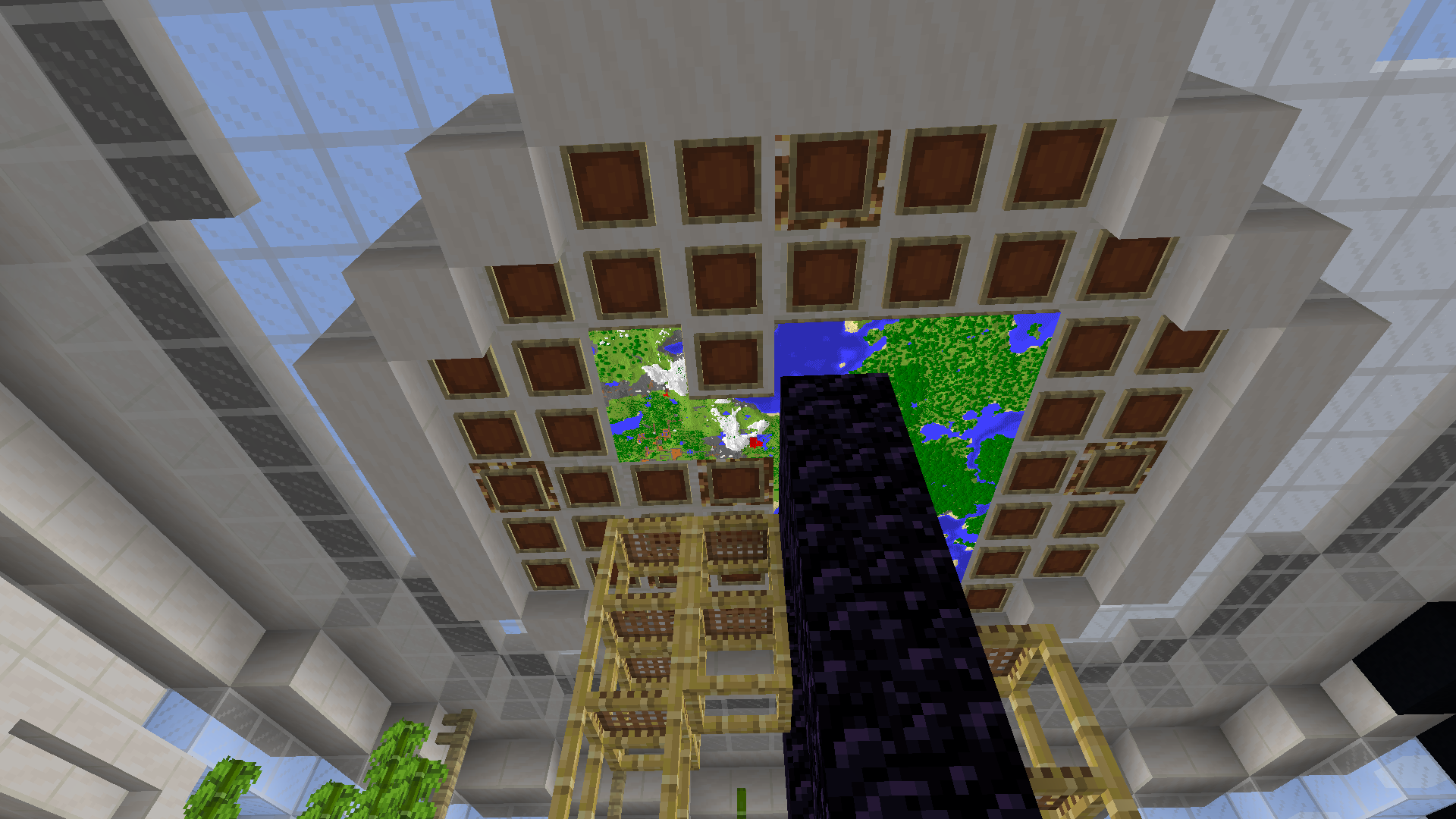
This is still an issue with 1.14 snapshots (currently with 18w49a). Removing the maps on item frames placed on the ceiling makes the map clipping through the roof. Attached screenshot: https://bugs.mojang.com/secure/thumbnail/192723/_thumb_192723.png
With 18w50a, babies villagers have no profession (minecraft:none) as their profession after they grew up.
Can confirm. I let a breeder run and all of the babies became without any profession after they grew up (or with profession named minecraft:none).
I had such issue on a dedicated server with 18w50a, but no crash report neither logs. Server just froze at the end of a raid and no more logs; watchdog didn't stop the server upon exceeding the maximum tick delay. It was more than 5 minutes (maximum tick delay was set to 90 seconds). Console was not responding. I had to kill the process manually.
This is still an issue with 18w50a.
Here are the logs of a newly created world after creating a portal to the Nether and pushing a villager through it, then coming to the Nether, coming back, coming to the Nether again (items on the ground duped), and finally coming back to the overworld (pigs, and chest minecart duped).
End gateways seem to be deactivated for some reason. End cities are generating but are rarer than expected. Found 2 End cities in a total area of 20,000² blocks. /locate commands teleport you most of the time in the void where no End city is found. Still those are End city areas where you can get the entering cities advancement.
Update Notice This is actually not related to Nether travelling. This duplication can be reproduced by randomly tping to an area where the chunks are not currently loaded. Also this duping never occurs when the chunks are constantly loaded. Thus using /forceload temporary solves this issue, although forceloading brings other issues by itself like mobs spawning being rarer and mobs actually still loaded on these areas but not despawing even if no players is nearby.
So the issue appears to be related to chunks loading. Might be linked to
MC-138114.This duping entities issue is related to chunks loading. Marking the chunks on forceloading makes the entities not duping anymore (but brings other issues by itself).
Chunks loading is responsible for mobs duplicating reported in
MC-138919andMC-138871. Setting the chunks on forceloading makes the mobs not duping anymore.Does not occur on chunks marked for force loading.
After more playtime, I think this is not related to where they spawn, but more to their path finding.
This issue does not occur when the chunk on the other side of the portal is marked for force loading (and after having actually loaded the force loaded chunk once). Although forceloading is not a solution, but it helps to understand what is going on.
This is
MC-138071.Same happened to me a second time when being in spectator mode in another area.
[Mojang] Panda Clone entities are tracked on the global entity list, but not the local one.
Having two versions of a villager with a custom name, where one is a clone of the other (same UUID), when unloading the chunks where they are, one version of them is still tracked on the global entity list. If I come back and load the chunks again, the two of them are tracked on the global list, but only one of them is tracked on the local list.
Also note that clone entities can be tracked on the global entity list, but not on the local one (accessing when using a distance argument with the entity selector). See comments in
MC-138871.Is related to
MC-141484This seems to be only affecting the protection enchantments.
I've seen this as a bug since this giving unbreaking level I for a 30 levels enchantment never happened prior to 19w02a. This change in enchanting, coming the same time as a similar issue
MC-141961, it sounds obvious this behavior was not intended to be that way.All players are invisible between each others, you are also invisible in third person and your view's physics is strange when hitting walls.
Babies have no clothes relate to any profession, yet once they grow up, they normally have a profession. But they still have a chance to be of profession "minecraft:none" as it seems to still be a possible selection from the pool of possible professions.
Present in 19w03c.
Yet, a profile dump is given, but:
Time span: 3646 ms Tick span: 65 ticks // This is approximately 0.02 ticks per second. It should be 20 ticks per secondThis result is not right. The result should be 17.83 ticks per second.
It always says 0.02 ticks.
The count in the profile dump report is miscalculated in the report, but is correctly displayed as a command output.
In order to reproduce it, you have to relog outside of any permanently loaded chunks (outside of spawn chunks for instance), in any dimension. Only if, it will duplicate the mobs around you upon reloading. They can sometimes be invisible, or be inside each others, but the logs will complain about entities with same uuid.
This issue relates to how entities are being tracked upon loading chunks, especially duped entities only appear on the global entity list
MC-141484.This issue is the same as
MC-138871,MC-138919, and causes the spawning "keeping entities with same uuid." in the logsMC-95649.A workaround for this issue is to /forceload the chunks where you reload or go to/from the Nether or the End.
With 1.14 snapshot, it is caused by entities duplicating upon loading chunks, which is related in current open issues
MC-138871,MC-138919andMC-141918.This is issue
MC-140961.Nick Killeen Exactly. Every time you reload any chunk you might dupe entities again. It's actually an existing game breaking bug since the first 1.14 snapshot that has been ignored so far for some reason, or because it's not clearly stated on the tracker and somehow confused and spread between several issues.
This error is not produced when no player is on, or when all the players are in spectator mode (but the count in the report is still miscalculated). Once you switch from spectator to another game mode while the profiler is running, the error messages appear and start spamming the console until you switch back to spectator mode again.
Twilight S. That's probably because your villager is a mason. They have no trade yet.
Frank Boisvert What you may want to do as a workaround until it's fixed is removing some entities including the duped ones manually. For instance, if you have "keeping entity item" spam, make sure no-one on the server is in searching for a specific item on the ground and then wipe all the registered items on the ground:
Note that duped entities are still registered on the global tracked entities list even if the chunks are unloaded. So you may want to frequently hit restart to clean those registers.
From your logs:
This is duping bug, present since the 18w43- snapshots.
Already issued in
MC-138871,MC-138919andMC-141918.And is causing
MC-95649.I think so.
Note that the zombies spawning in these conditions caused the server falling behind, and crash upon exceeding maximum tick, like described in
MC-142782, but I don't know if it's related, although fixing the light like described above and killing those zombie fixed the server lag.Looking at these screenshots, it seems that everything was updated correctly, but space that was part of the dungeon's walls.
You see in this screenshot there is a lightning glitch with torches, which seems to be another issue that I have described in
MC-143654This exception is also happening with sheeps, but is not related to entering/leaving nether, as described in duplicated
MC-143656.Could you identify what's ticking too long? Reproduce the lag situation, then start a debug profiling with the command:
Let the profiler run while the server is being overloaded. Then stop with "stop" argument. Watch and report any console output (what's taking too long?). Then you go to the debug folder in your server's folder and read or join the debug profiling.
Both crashes, with trader llamas and my sheep, have implied using a leash on mobs.
You mean they can disappear before you? That's because they have a natural despawn countdown.
It's a duplicate of
MC-143404.MC-143797duplicates this with a horse.Unfortunately, you're trying to run 1.13 Minecraft on a 32 bits system where support for lwjgl has been dropped. This is an upstream issue, not a Minecraft one.
Still taking you to a tiny island with latest 19w06a snapshot, but this one was close to a larger island (screenshot).
Confirmed for 19w06a: found chests with multiple protection enchantments on items in new generated End cities.
As an easy fix, just pre-generate the End island by entering it at coordinates 0 ~ 0. For instance, run
then wait for the chunks to load, then get back to the Overworld (execute in overworld), then you can finally enter the End in survival and the dragon will be waiting for you.
Alternatively, if you have already generated the End wrongly, just delete the region files in your folder DIM1 and start the pre-generated workaround process as described above.
(You need to have op commands, but for testing snapshots, at least one player per world should always have op, as it helps you troubleshooting and fixing stuff).
That's not actually an old farmer, but a new villager with old skin and with profession of type "none". No idea if this unemployed villager will actually be used or if it's a debugging villager.
This happened because similarly, you just had the unemployed version of the zombie villagers.
Other entity's vehicle NPE crashes in
MC-143404Noelle Leslie Look into your crash report to see which entity is causing the issues and what are their coordinates.
CJ Burkey I use NBTExplorer for region files editing. You can also hard remove any entity by editing them directly in region files if you can't kill them in-game.
The bug is not explicitly setting all the 4 Text tags raises a NPE.
I can't reproduce this issue. I'm on Java 1.8.0_202 64 bits, OpenJDK.
Present in 19w08a.
Present in 19w08a, new world, after making chunks load (tping back and forth).
Present in 19w08a.
Present in 19w08a with either spawn eggs or commands.
Can still randomly spawn a villager with profession minecraft:none from the profession pool in 19w08a.
No worries, this will for sure never reach stable release with this issue. But what has been said above, it's not as easy as changing one line. It impacts game's performance.
You can test the snapshots fine on the cloud,… but for it to run as expected, ideally you'll need a multi-core dedicated server for… a minecraft server.
Duplicates
MC-144605Not only in water, also in mid air. I also noticed the flying animation (with legs closed and wings spread back) is very rare with this version, even when you throw a rocket, you still have the animation of walking in mid air.
Chad Schies If you don't know what to do, I strongly recommend to backup you world before doing any change an NBT editor. Looking at your crash report, it says is in chunk 57,38, which means you have to edit region number 1,1 (a region is a 32x32 chunks area and we start counting at 0). Open it in NBTEditor, search for chunk number 57,38, expand the view then search for entities tag, and when you have found the entity with id "trader_llama", remove all of its entries.
Spawning rate is working fine. I'm using the scoreboard to count the number of hostile mobs currently loaded and at anytime it's close to the actual mob cap (which is 70 per 289 unique chunks loaded). Still sometimes I can see barely no mobs around. So what's happening? I investigated and by teleportation to random mobs I found out they are standing far away where no player is, not even the chunks are loaded. Still they register against the mob cap. I think it's related to the snapshot entities tracking capabilities which are very problematic at the moment, causing mobs duplication, or entities still tracked even after the chunks have been unloaded.
MC-141484I can confirm entities outside of spawn chunks are generally "invisible" in multiplayer. Only restarting the Server seems to locally fix this issue, which was introduced with 19w08x. However, people noticed a similar issue is happening in singleplayer. This might be related to
MC-144784.That's
MC-137467.It might be related to
MC-144647.What I tried to explain above has been reported in
MC-144877.Can confirm: the textures names have been updated. Please close this as fixed with 19w08b as fixed version.
Duplicates
MC-144605.Amanda Louise Acosta Morais This might be a different issue.
MC-138871Have you tried to hit the invisible villagers?It's not the same issue as related here where we reported either all entities invisible in a same chunk or everywhere outside of spawn chunk. This one you describe is happening since the first 1.14 snapshots. Mobs sometimes dupe and are invisible upon loading chunks. It's more
MC-138871or other reports I have seen.They already know.
MC-144605This issue is already mentioned in
MC-139338This is still an issue, described in
MC-138919. Actually I think it's not related to traveling between dimensions, but more to chunks loading, as it can happen everywhere outside of spawn chunks upon reloading.MC-138871When happening, this produces a "keeping entity with same uuid" warning in the logs
MC-95649. It's a major issue with how the entities are tracked. The duped entities can be tracked on the global entity list, but they don't register against the local one. The difference between global and local is that in order to access the local one, you need to specify a distance parameter in your selector.MC-141484Since 19w09a (or possibly 08), it is inconsistent to reproduce but it was still possible. I tried many times with a new map, and it only happened once, although it produced more warnings (see below). , one was the exact clone of the other.
Some versions ago, I had a trading hall outside of spawn chunk, with one villager per "box". Once I relogged in that area, and upon relogging, I had now 2 villagers on almost every box, in a sitation similar to this:
It seems that the entity tracking is getting better the more versions are released. This is how you can try to reproduce it:
Go outside of spawn chunks, build a Nether Portal. Enter the Nether, exit the Nether, enter the Nether. Repeat and watch the game logs. The cause of the bug is still in this version, because sometimes, you will see warnings saying "keeping entity with same uuid." In previous snapshot, when I tped to these entity, it was a clone of another one. Now if I try to tp, I got an error saying entity not found.
Still, I was able with this version and a new map by entering/leaving the Nether several times, and outside of the spawn chunks (this never happens if the chunks are loaded), to dupe a chest minecart. I got this warning:
Then I tped to this entity by uuid. And I found two minecarts stuck inside each others. There is a screenshot, although I moved one minecart away from the second one when I tped to them.
Then I hit the /kill by uuid command to kill the minecart, but only one of them was killed (one left). Then I relogged with second one still intact. And upon relogging, the second one vanished.
Another note that this issue has evolved between versions. With late 2018 snapshots, I could kill the duped entity many times in game, every time I relog, it would reappear. By reading the region file, there was still mention of the duping entity and the only way of removing it was to hard edit the region file.
Now with this minecart issue, I read the chunks data inside the region file, and after killing the minecart, there was no more mention of the second one.
I can confirm changes have been made recently on this. I now tested it on a server. Usually, entities were duping upon either relogging, tping or dimension traveling in/to/between unloaded chunk(s). This doesn't seem to be the case anymore.
Confirmed for 19w09a.
MC-144784was possibly a sideway of recent changes on entity tracking and its fix might have "almost" fixed this issue?But @pluztig: did you test it with latest snapshot, in a non previously affected area?
Even if this bug is fixed, it does not mean your part of the world already affected will be. This won't happen on new area, but you'll have to remove the "old" duplicates yourself, and the game will still complain about "keeping entity with same uuid" that was caused by earlier versions.
@plusztig You really have a lot of warnings in your logs, that's something I cannot get myself while testing with this version. So it must be related to something else than just the version. What is your view distance? Can you post your server.properties file? I would like to try it myself by reproducing the same steps (same seed, same server config).
Confirmed for 19w09a: the grindstone does not reset the RepairCost tag.
This bug is affected by game's performances and being outside of any loaded chunk. The more lag you have, the more entities will dupe.
I exactly reproduced your steps, generating this world with your view distance (16), then I tped to the village with all these different entities around, spawned cows on a fence, and relogged from different parts of the village.
With render distance of 16 as yours, I got a certain amount of entities duping, inside the village and outside, and the cows duped. But the number of duped I could see and the warnings I got are less than you could get. Also my world generated twice faster and it didn't crash. Those are the logs: test_view16.log.gz
Then I deleted the world and I redid exactly the same process, but with the normal render distance of 10. This time, no cows duped, and no entity duped inside the village. Only a few warnings about hostile mobs in caves, despite having a lot of entities around. Logs: test_view10.log.gz
Finally, I did it again with render distance of 6. And at first I got no duped entities at all, then only a few again in caves. Then I tped to one of them to see. And upon relogging from higher ground, only one cat duped in the village. Logs: test_view6.log.gz
So in conclusion, we can see that performances affect this issue. And it was tested on localhost. On a dedi server, I could barely find any duped. I think with further upcoming performances fixes, the issue could be fixed by itself. To be tested again with future versions.
I think you should close this issue as duplicating
MC-138871, because there is no way of getting this dupe exclusively only with Nether portals, especially if the chunks are already loaded on both sides.@Jack_McKalling It is intended, as villagers need a working stations for them to receive a profession.
This issue should be resolved as WAI.
They need a working station in order to receive a profession, and it is now working as intended.
Can confirm, with this crash happening every few seconds or so on a map loading 80 villagers, and involving ticking hoppers.
Can confirm for 19w11b. Video: MC-145698.mp4
By running the internal debug profiler, you can see that minecraft:villager.ai.newAI.mob tick.brain is now generally leading the tick time.
I redid the same steps as above. It's now rarer than it has even been before to reproduce. Mostly you get warnings about "keeping entity with same uuid", but couldn't observe dupes. But I was still able to observe one dupe but only under special conditions (high view distance, and relogging several times).
Can confirm in 19w11b.
This bug can be extended to every mobs which are parts of raids and has more important consequences. If long ago I had captured a vindicator and named it in order for it to stay persistent and serve as a killer for other mobs. Then whenever a raid happens, he will be counted as a raider until he dies. This will of course be a problem during normal gameplay when we want to "own" some mobs this way.
How to reproduce is much straightforward. Summon a pillager for instance. You can name it or not, it won't change the way it is treated. Let's say name it Bill, like I did in screenshot , with a second pillager. Then let you be in condition to have a raid (villager, bed, working station, and bad omen worked for me). Then kill the raiders. You will then see a message saying the number of mobs remaining. In order to resume the raid, you have to kill the pillagers that yet were there before the raid started.
Happened while filling a composter with a hopper.
Another use of the method sun.misc.Unsafe.park() causing a crash by taking too long is mentioned in issue
MC-139717.Another use of the method sun.misc.Unsafe.park() causing a crash by taking too long is mentioned in issue
MC-139717.Another issue with method sun.misc.Unsafe.park() happening when kicking / banning any player from the server (outside the console).
MC-145994Cannot reproduce in 19w11b (and possibly in 19w11a). Please resolved as fixed.
Something that I have noticed in 19w11b. Mobs were not spawning. /kill in game didn't change anything. I went to backup. I removed all the entities by editing the region files directly. Then hostile mobs starts spawning normally again. But it was in Spawn chunks. I left the Spawn Chunks. No mobs spawning again. I use the /kill command to get rid of about 60 hostile mobs still loaded in spawn chunks. Yet no mobs spawning for me at this stage. I reloaded and run a test again (I'm outside Spawn chunk and this is this screenshot:
Then I closed the world and edited the region files again. It appeared that the 60 mobs that I killed earlier were still in the spawn chunks data. Yet not loaded in game, but still counting towards the cap? I reloaded and mobs started spawning normally again. Then once I reach the Spawn chunk, the process repeat again: no mobs spawning if you travel outside of Spawn Chunks.
Also I notice: if you run the /kill command, it will kill the mobs in Spawn Chunks (but it won't make the mob spawning and they are still in region files). If you come back to Spawn Chunk by tp, you will see the mobs that you killed being displayed and immediately having their death animation. Eventually, if you sweep the whole area, you will see mobs appear with immediate death animation, and it will finally allow more mobs to spawn elsewhere. So all of this might be a whole issue with mobs registering.
Confirmed for 19w11b.
Is this still an issue now we know that unemployed villagers will be turned into profession villagers when they detect a working station?
You should update your title, including all mobs that are included in raids.
@boq This ticket shows that entities can now be accessed under certain distance conditions, even if they are located in a chunk which is currently unloaded. For instance, you can access the entity, but not the block it is standing in, because the chunk is not loaded. Is that intended?
Yes, that's what I did last time, trying on a new map. It is now rarer to reproduce, but it was still possible. Basically, depending on your configuration, with normal view distance you can have from no problem at all, to warnings saying "keeping entity with same uuid". In earlier snapshots, we observed this warning was meant to entities being duplicated and it happened all the time with every entity outside of Spawn chunks. Now the warnings can appear on a new map (outside of spawn chunks) when you relog, or go to the nether, but generally under more "extreme" conditions (view distance larger, more pressure on the server). We also correlated that people having a weaker configuration can have this issue more often than others (but this correlation was made in 90a).
Personally, with a decent configuration (8 x 3.5GHz, 4GB allocated), that's what I did to reproduce in 11b:
Creating a new map, with view distance of 16 (with less it was difficult to reproduce, and correlatively saying less message "can't keep up, is the server overloaded?"), locating a village outside of spawn chunks, going there, and relogging there several times (making the chunks unload / reload). Got a few "keeping entities with same uuid" warnings. Then after going to the Nether back and worth several times, finally seen a duplicated sheep (One were inside of the other) and having warning about "keeping entity sheep with same uuid". Then I killed the sheep by imputing the incriminating uuid, which occurs to have one of these sheeps being killed, but the other was still there. Then I relogged. And upon relogging, the other sheep was gone too.
I'm sure they are aware of this, but this is not something of high priority, because it's probably not a simple fix, and also because it's not even an issue when starting a fresh new world before going further in the game.
Also, continually posting useless comment won't help them to solve it faster. Please only post relevant information. Do not "flood". There are relevant information above that becomes now harder to be seen and is masked by useless comments. This is not a support platform btw and Mojang owes you nothing, this is a development version, so use it at your own responsibility only.
If you had duplicates on the same world before I doubt any fix will clean your entity list. You'll have to clean it by yourself or start a new world.
Glass treated as solid block is actually an intended fix. See recent Jeb's tweet: https://twitter.com/jeb_/status/1108312583596068864
Note this exploit occurs no matter if the villager has been freshly newly spawned or not.
Can confirm for 19w12a.
Can confirm for 19w12b.
As we have discussed here since 09a, we have noticed the bug depends on your specification. Under the same circumstances and same server properties, reproducing the same steps, one can produce more duplicate on their world than another if not at all.
On this version, I have followed the same steps as Peter again, and I'm unable to reproduce too (same world, same properties file). I'm on 8x3.5GHz with 2GB allocated.
[~ plusztig] What's your specifications?
I was unable to reproduce by creating artificial lag like [Mojang] Panda suggested. What happens if I set the random tick speed to 10,000 is the lag is such that the chunks are not loading (or being sent) but notice the entities are present (in the "void"):
If I increase the speed, eventually the server will crash upon exceeding maximum tick speed.
I didn't test lower values, it was just mainly rhetoric. If someone wants to tackle it, go ahead.
With the new raid system, this issue is now fixed in 19w13b.
This issue related to mobs naturally spawning being added to the raid party is now fixed in 19w13b.
Can confirm for 19w13b.
Confirmed for 19w13b.
Steps to reproduce
You will notice no more hostile mob, nor animal is spawning the more you travel. That's because they are still loaded in spawn chunks despise no player is nearby.
Can confirm for 19w13b. Sometimes, the eating sound is missing when you eat while it's raining. Opening doors, chests, is sometimes missing while the bubble sound is playing. Other sounds missing as well when many are playing the same time, which ruins the gaming experience. And when you throw an enderpearl, generally you can't hear yourself taking damages at the point of impact.
Can confirm.
Duplicate of
MC-139338.Duplicate of
MC-139338.Duplicate of
MC-145698.Can confirm.
Duplicate of
MC-139338.Just had the same situation with pillagers pathfinding during a raid. The party spawned on the top of a mountain and were stuck in a waterfall. This blocking was enough to lag the game.
Duplicate of
MC-147013.Can confirm for the latest: 19w14a.
The issue
MC-144904mentioned as duplicated is actually not fixed. See video I have uploaded: https://bugs.mojang.com/secure/attachment/206204/2019-04-04%2015-18-12.mp4Can confirm for 19w14a. Also it's not a duplicate of , and see the bug in action with an enderfarm: 2019-04-04 15-22-28.mp4
 .
.
MC-145262, as I have tested several render distances and the result is still the same.See video 2019-04-04 15-18-12.mp4
Can confirm for 19w14a.
It is possible to reproduce, but not for the same reasons. Now I can observe there is no mob switch effect at spawn chunks anymore: the mobs effectively despawn when the player leaves the area due to the fix of
MC-144610.But what's new is it is now affected by the view distance. I can only reproduce with view distance of 10 or less. From view distance of 12, the mob spawning works as intended.
Now I tested this in singleplayer, but I wonder if the issue
MC-2536which is concerning multiplayer is not actually now occurring here as well. The reason for this is if you notice the value of MultiplayerChunkCache, since 1.14 snapshots, the first value can be different from the second one even with integrated server (singleplayer).I have created
MC-147560Can confirm for 19w14b.
This issue occurs only if there is "already" registered POI data upon restart. It means this issue never occurs if I remove the POI data (deleting the files from the poi world folder). But even with new computed data from this version pre-1, this issue will be happening again after restarting the server if there is any existing POI data, old one or not.
Fixed in 1.14 pre-1.
It is probably a duplicate of
MC-142134.See
MC-147776for 1.14-pre1.This ticket has described several issues over time. At the beginning, it was the issue that the clients chunks don't load if they ignore some server chunks (if local render distance is less than server view distance), but it is fixed.
Now we have another issue, but which can be perceived differently depending on your environment. I could test these snapshots on two different hardwares. The first one was a 2x1.9GHz with 2 GB allocated. On this configuration, the game was indeed sometimes "barely playable". The second configuration is a 8x3.5GHz with 16GB allocated. On this one, the game is running as expected most of the time, tested with up to 4 players logged in the same time and view distance of 8. The only situation related to this bug report is with Nether Portal: the game will hang out when someone is using a Nether Portal. But I found over time that if I force load the chunks where the portals are standing, it will entirely solve this issue except upon loading the first time after restarting.
Running a debug profiling during those times (when the bug occurs), and it says that
is taking too long (every time you cross any portal in unloaded chunks). I'm not sure if it's relevant, but I noticed the contribution of any
is totally negligible during this process, looks like if the chunks were waiting any free tick time in order to poll. If it is the case, then the problem is completely something else; and seeing the "chunks not loading" is just a consequence of this.
I also noticed in correlation of what was said above that the contribution of
is far from negligible, and causes a warning every time the world is saved. And indeed, disabling auto saving seems to solve this issue. But manually saving causes a (controlled) lag spike in return.
It is actually a duplicate of
MC-147754. If you look up your logs, you will see errors saying that some chunks couldn't be loaded because POI was already registered at location…No MuMe, points of interest are the blocks villagers can interact with: beds, bells, and all the working stations: cauldron, brewing stands, lectern, stonecutter, loom, grindstone, composter, cartography table, smithing table, barrel, smoker, blast furnace and fletching table.
The bug can occur with poi created either with this pre1, or with versions prior to 19w11a (the village overhaul).
But even if it seems to not trigger the problem at first, like boq said, do not delete the poi data, and be sure to have a world backup.
This is actually caused by
MC-147754. The POI already registered error does not crash the game everytime, but displays an error in the logs, such as:[19:48:29] [Server thread/ERROR]: Couldn't load chunk java.lang.IllegalStateException: POI data mismatch: already registered at ev{x=15, y=79, z=-1}If you go the aforesaid location, you will see that the chunk containing the POI data mismatched has been regenerated.
This is explained in
MC-147770.I can see the lags spikes in your F3 graphs, that's why you opened a ticket? If it is consistently happening every 10 minutes, it is probably caused by auto-saving. In every debug profiler I have run, root.save is usually the only part periodically taking too long. Has been mentioned in
MC-138114.This crash report only talks about the cause of the crash, but doesn't show any relevant information about the lag.
If you can reproduce, try to make a debug profiling (/debug start - /debug stop), and join the report you'll find in the world debug folder.
While riding a horse up some stairs blocks, the console always spams "horse moved wrongly" lines.
@boq Will the fix of this bring in the end any data loss to existing worlds prior to the villages overhaul?
"Future Version - xx" is a common name for the strict next upcoming version not labeled on Mojira yet. Will be 1.14-pre2 in this case.
Unfortunately the issue is not fixed in pre2.
[14:37:27] [Server thread/INFO]: Starting minecraft server version 1.14 Pre-Release 2 […] [14:37:36] [Server thread/ERROR]: Failed to load POI chunk java.lang.IllegalStateException: POI data mismatch: already registered at ev{x=15, y=79, z=-1} at aqc.a(SourceFile:81) ~[server.jar:?] at aqc.a(SourceFile:44) ~[server.jar:?] …Edit: although, the aforesaid chunks are not being overwritten this time.
Edit: error message only appeared on first startup. Second try, no error.
Can confirm for 1.14-pre2. Actually since pre1, the lightning bug has a totally different effect than on snapshots: now it's noticeable by large 1 wide dark stripes affecting blocks that are supposed to have a sky access (the sky light value is falsely equal to 0).
Can Confirm for 1.14-pre2.
The new erase cache data from the optimize world menu is useful as it forces the light to be recomputed, so it permits to solve any existing lightning issue. But still with pre2, dark patches seem to randomly reappear over time, at least from what I have seen, outside of Spawn chunks. Maybe picture (Neko's world attached) suggests that this glitch has something to do with chunks loading?
I can give another example that seems to confirm that this issue is related to chunks loading. First these dark patches never appear at the same location again after cleaning the cache. Second, I had these patches appear at my logging location (outside of spawn chunks). Yet, the last time I was on, those patches weren't there.
You need to identify the cause of the lag. Try to run a debug profiling when this happens (/debug start, /debug stop) and join the report located in the debug folder of your world folder. And after doing a profiling, read your logs (logs/latest.txt) to see if there is any line reporting that something took too long.
Can no longer reproduce in 1.14-pre2.
Can confirm for 1.14-pre2.
Can confirm for 1.14-pre2.
Here are simple steps on how to reproduce:
You will notice the tremendous amount of lag, which is only caused by the portal. If I tp to the Nether using /execute in the_nether command, I don't have this issue.
I followed those steps on a 8x3.5Ghz with 16Gb allocated and made a debug profiling to track the cause of the lag: I joined the whole report but here are the highlights:
// This is approximately 9.43 ticks per second. It should be 20 ticks per second [00] tick - 58.99%/58.99% [01] | connection - 91.24%/53.85% [02] | | entityBaseTick - 99.59%/53.63% [03] | | | portal - 99.97%/53.62% [04] | | | | placing - 99.91%/53.57% […] [00] nextTickWait - 41.01%/41.01%So this means I took some idling time to start/stop the profiler (nextTickWait), and the rest of the time I was stuck in the loading terrain screen. The main consequence of this issue is one player stuck a portal transition will make the server stops ticking for any other player who is playing on the same world at the same time.
This may be related to
MC-147772.Cannot reproduce in 1.14-pre2.
Can confirm for 1.14-pre2.
Can no longer reproduce in 1.14-pre2.
Can confirm for 1.14-pre2.
Was able to reproduce this by accident but not with the border coordinates. This actually only happens if you try to teleport more further away than the default world border (30M).
Steps to reproduce
You will not end up at 300M, but at 30M instead (the world border), and the game will be stuck. If you try to quit, the client will be stuck in the saving world splash screen, and you'll need to kill the java process manually. If you try to crash the game (holding F3+C), the game will freeze after the countdown instead of crashing.
However, this issue does not happen on dedicated servers.
Have you tried to load the world without any custom data pack? Do you have any block or any entity affected by these custom data packs in the area where it crashes?
Can confirm for 1.14-pre2. With the change in sneaking, this now implies the player will be in auto-sneaking pose until the sneaking button is pressed again.
Steps to reproduce
Can confirm with a video 2019-04-15 16-07-59.mp4 .
.
(Note that I have applied a resistance effect to the player for the test.)
The issue is twofold:
If you start walking, the enderman will hit you more frequently as expected.