 MC-233020
Custom player heads sometimes flash when moving them around in the inventory
The Bug:
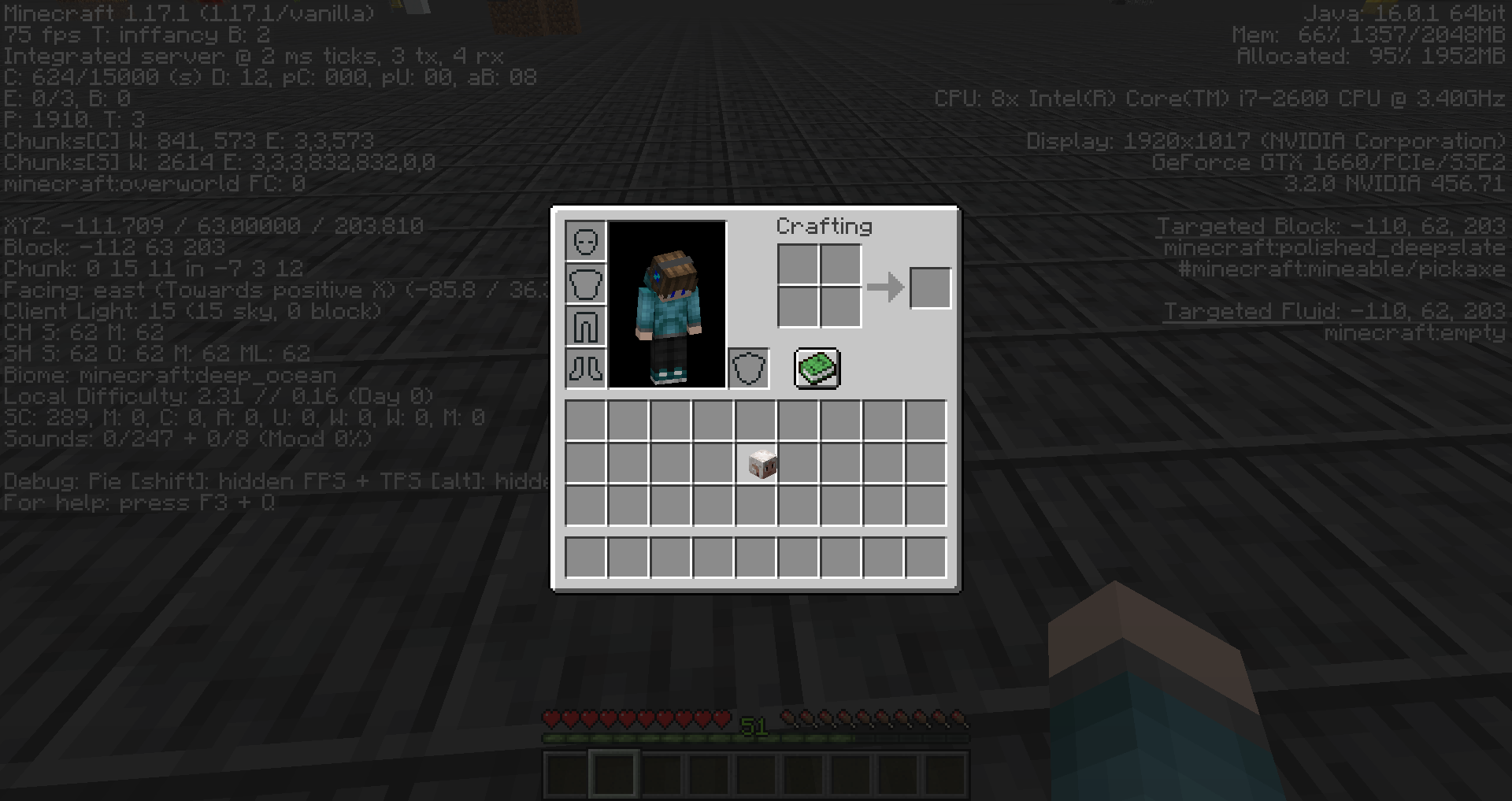
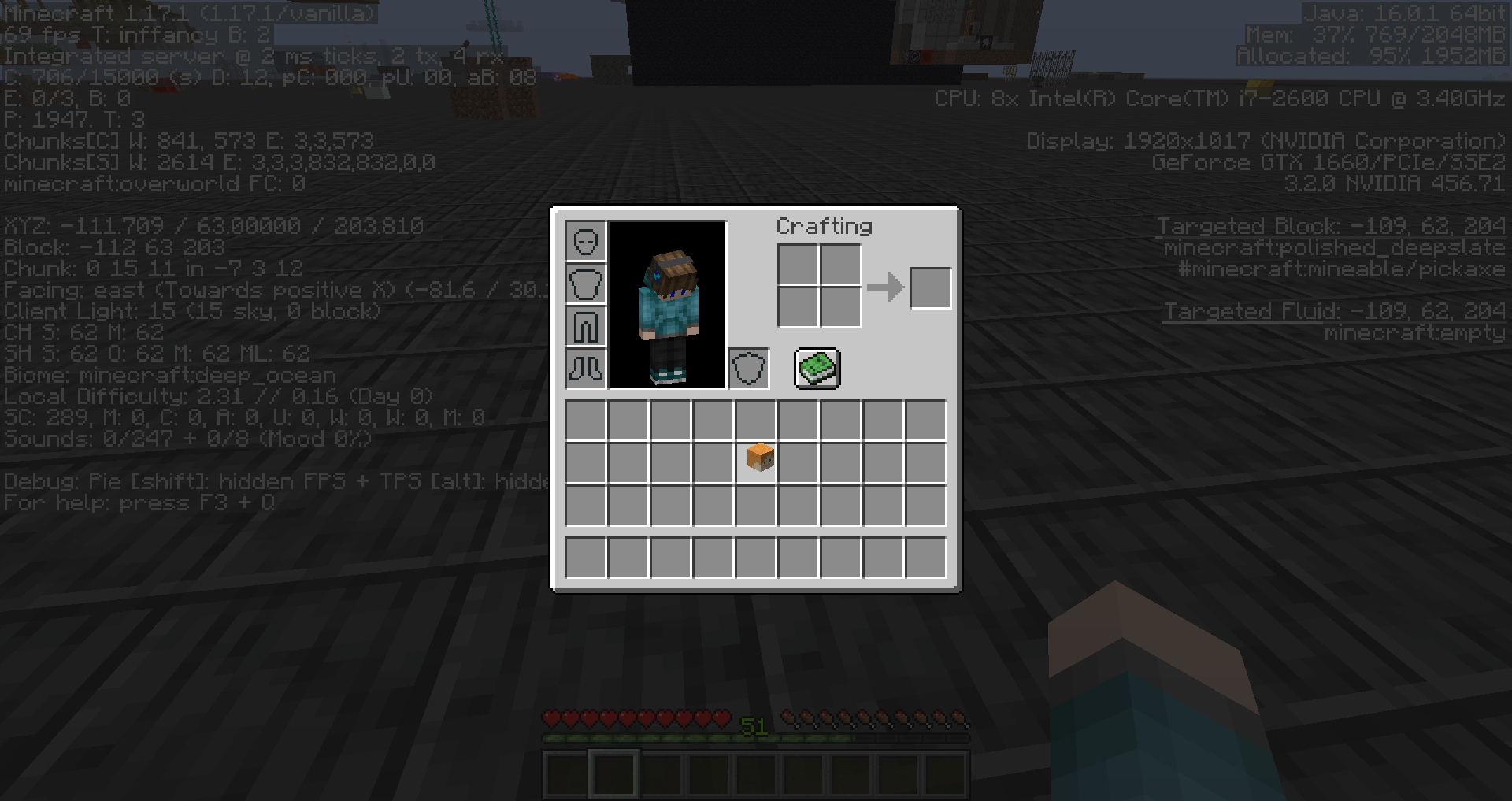
Custom player heads sometimes flash when moving them around in the inventory.
It seems that every time you click whilst a custom player head is held with your mouse cursor, it will flash and appear as the Steve or Alex head for a split second. Please also take into consideration that this doesn't happen all the time and might be quite difficult to reproduce.
Steps to Reproduce:
- Enter survival mode and make sure that your inventory is empty.
- Give yourself a custom player head by using the command provided below.
/give @s minecraft:player_head{SkullOwner:"slicedlime"} - Move the head around in your inventory by dragging and dropping it through the use of the mouse cursor, and watch it closely.
- Take note as to whether or not custom player heads sometimes flash when moving them around in the inventory.
Observed Behavior:
Custom player heads sometimes flash.
Expected Behavior:
Custom player heads would not sometimes flash.
Linked Issues
 Low
Low![[Mod] Avoma](../../../data/avatars/users/86198.png)
Created Issue:
Custom player heads will sometimes flash when moving them around in the inventory
The Bug:
Custom player heads will sometimes flash when moving them around in the inventory.
Steps to Reproduce:
- Enter survival mode and make sure that your inventory is empty.
- Give yourself a custom player head.
/give @s minecraft:player_head{SkullOwner:"slicedlime"}
- Move it around in your inventory by dragging and dropping it through the use of the mouse cursor.
- →
Notice how custom player heads will sometimes flash when moving them around in the inventory.
Information:
It appears that every time you click whilst the custom player head is held by your mouse cursor, it will flash and appear as the steve or alex head for a split second. Please also take into consideration that this doesn't happen all the time and might be quite difficult to reproduce.
2021-07-24_17.34.21.png
![[Mod] Anthony Cicinelli](../../../data/avatars/users/10122.svg)
![[Mod] markderickson](../../../data/avatars/users/18946.svg)
The Bug:
Custom player heads will sometimes flash when moving them around in the inventory.
Steps to Reproduce:
- Enter survival mode and make sure that your inventory is empty.
- Give yourself a custom player head.
/give @s minecraft:player_head{SkullOwner:"slicedlime"}
- Move it around in your inventory by dragging and dropping it through the use of the mouse cursor.
- →
Information:
It appears that every time you click whilst the custom player head is held by your mouse cursor, it will flash and appear as the steve or alex head for a split second. Please also take into consideration that this doesn't happen all the time and might be quite difficult to reproduce.
The Bug:
Custom player heads will sometimes flash when moving them around in the inventory.
Steps to Reproduce:
- Enter survival mode and make sure that your inventory is empty.
- Give yourself a custom player head.
- Move it around in your inventory by dragging and dropping it through the use of the mouse cursor.
- →
Information:
It appears that every time you click whilst the custom player head is held by your mouse cursor, it will flash and appear as the steve or alex head for a split second. Please also take into consideration that this doesn't happen all the time and might be quite difficult to reproduce.
The Bug:
Custom player heads will sometimes flash when moving them around in the inventory.
Steps to Reproduce:
- Enter survival mode and make sure that your inventory is empty.
- Give yourself a custom player head.
- Move it around in your inventory by dragging and dropping it through the use of the mouse cursor.
- →
Information:
It appears that every time you click whilstthecustom player headis held by your mouse cursor, it will flash and appear as the steve or alex head for a split second. Please also take into consideration that this doesn't happen all the time and might be quite difficult to reproduce.The Bug:
Custom player heads will sometimes flash when moving them around in the inventory.
It appears that every time you click whilst the custom player head is held by your mouse cursor, it will flash and appear as the steve or alex head for a split second. Please also take into consideration that this doesn't happen all the time and might be quite difficult to reproduce.
Steps to Reproduce:
- Enter survival mode and make sure that your inventory is empty.
- Give yourself a custom player head.
- Move it around in your inventory by dragging and dropping it through the use of the mouse cursor.
- →
Expected Behavior:
The expected behavior would be that custom player heads would not flash when moving them around in the inventory.
![[Mod] Michael Wobst](../../../data/avatars/users/37868.png)
relates to
The Bug:
Custom player heads will sometimes flash when moving them around in the inventory.
It appears that every time you click whilst the custom player head is held by your mouse cursor, it will flash and appear as the steve or alex head for a split second. Please also take into consideration that this doesn't happen all the time and might be quite difficult to reproduce.
Steps to Reproduce:
- Enter survival mode and make sure that your inventory is empty.
- Give yourself a custom player head.
- Move it around in your inventory by dragging and dropping it through the use of the mouse cursor.
- →
Expected Behavior:
The expected behavior would be that custom player heads would not flash when moving them around in the inventory.The Bug:
Custom player heads will sometimes flash when moving them around in the inventory.
It appears that every time you click whilst the custom player head is held by your mouse cursor, it will flash and appear as the steve or alex head for a split second. Please also take into consideration that this doesn't happen all the time and might be quite difficult to reproduce.
Steps to Reproduce:
- Enter survival mode and make sure that your inventory is empty.
- Give yourself a custom player head.
- Move it around in your inventory by dragging and dropping it through the use of the mouse cursor, and watch it closely.
Observed Behavior:
Custom player heads will sometimes flash when moving them around in the inventory.
Expected Behavior:
Custom player heads would not sometimes flash when moving them around in the inventory.
The Bug:
Custom player heads will sometimes flash when moving them around in the inventory.
It appears that every time you click whilst the custom player head is held by your mouse cursor, it will flash and appear as the steve or alex head for a split second. Please also take into consideration that this doesn't happen all the time and might be quite difficult to reproduce.
Steps to Reproduce:
- Enter survival mode and make sure that your inventory is empty.
- Give yourself a custom player head.
- Move it around in your inventory by dragging and dropping it through the use of the mouse cursor, and watch it closely.
Observed Behavior:
Custom player heads will sometimes flash when moving them around in the inventory.
Expected Behavior:
Custom player heads would not sometimes flash when moving them around in the inventory.
The Bug:
Custom player heads will sometimes flash when moving them around in the inventory.
It appears that every time you click whilst the custom player head is held by your mouse cursor, it will flash and appear as the steve or alex head for a split second. Please also take into consideration that this doesn't happen all the time and might be quite difficult to reproduce.
Steps to Reproduce:
- Enter survival mode and make sure that your inventory is empty.
- Give yourself a custom player head.
- Move it around in your inventory by dragging and dropping it through the use of the mouse cursor, and watch it closely.
- Take note as to whether or not custom player heads will sometimes flash when moving them around in the inventory.
Observed Behavior:
Custom player heads will sometimes flash when moving them around in the inventory.
Expected Behavior:
Custom player heads would not sometimes flash when moving them around in the inventory.
The Bug:
Custom player heads
willsometimes flash when moving them around in the inventory.It appears that every time you click whilst
thecustom player head is heldbyyour mouse cursor, it will flash and appear as the steve or alex head for a split second. Please also take into consideration that this doesn't happen all the time and might be quite difficult to reproduce.Steps to Reproduce:
- Enter survival mode and make sure that your inventory is empty.
- Give yourself a custom player head.
- Move
it around in your inventory by dragging and dropping it through the use of the mouse cursor, and watch it closely.- Take note as to whether or not custom player heads will sometimes flash when moving them around in the inventory.
Observed Behavior:
Custom player heads will sometimes flash
when moving them around in the inventory.Expected Behavior:
Custom player heads would not sometimes flash
when moving them around in the inventory.The Bug:
Custom player heads sometimes flash when moving them around in the inventory.
It appears that every time you click whilst a custom player head is held with your mouse cursor, it will flash and appear as the steve or alex head for a split second. Please also take into consideration that this doesn't happen all the time and might be quite difficult to reproduce.
Steps to Reproduce:
- Enter survival mode and make sure that your inventory is empty.
- Give yourself a custom player head.
- Move the head around in your inventory by dragging and dropping it through the use of the mouse cursor, and watch it closely.
- Take note as to whether or not custom player heads will sometimes flash when moving them around in the inventory.
Observed Behavior:
Custom player heads will sometimes flash.
Expected Behavior:
Custom player heads would not sometimes flash.
The Bug:
Custom player heads sometimes flash when moving them around in the inventory.
It appears that every time you click whilst a custom player head is held with your mouse cursor, it will flash and appear as the steve or alex head for a split second. Please also take into consideration that this doesn't happen all the time and might be quite difficult to reproduce.
Steps to Reproduce:
- Enter survival mode and make sure that your inventory is empty.
- Give yourself a custom player head.
- Move the head around in your inventory by dragging and dropping it through the use of the mouse cursor, and watch it closely.
- Take note as to whether or not custom player heads
willsometimes flash when moving them around in the inventory.Observed Behavior:
Custom player heads will sometimes flash.
Expected Behavior:
Custom player heads would not sometimes flash.
Custom player headswillsometimes flash when moving them around in the inventory
The Bug:
Custom player heads sometimes flash when moving them around in the inventory.
It
appears that every time you click whilst a custom player head is held with your mouse cursor, it will flash and appear as thesteve oralex head for a split second. Please also take into consideration that this doesn't happen all the time and might be quite difficult to reproduce.Steps to Reproduce:
- Enter survival mode and make sure that your inventory is empty.
- Give yourself a custom player head.
- Move the head around in your inventory by dragging and dropping it through the use of the mouse cursor, and watch it closely.
- Take note as to whether or not custom player heads sometimes flash when moving them around in the inventory.
Observed Behavior:
Custom player heads
willsometimes flash.Expected Behavior:
Custom player heads would not sometimes flash.
The Bug:
Custom player heads sometimes flash when moving them around in the inventory.
It seems that every time you click whilst a custom player head is held with your mouse cursor, it will flash and appear as the Steve or Alex head for a split second. Please also take into consideration that this doesn't happen all the time and might be quite difficult to reproduce.
Steps to Reproduce:
- Enter survival mode and make sure that your inventory is empty.
- Give yourself a custom player head.
- Move the head around in your inventory by dragging and dropping it through the use of the mouse cursor, and watch it closely.
- Take note as to whether or not custom player heads sometimes flash when moving them around in the inventory.
Observed Behavior:
Custom player heads sometimes flash.
Expected Behavior:
Custom player heads would not sometimes flash.
The Bug:
Custom player heads sometimes flash when moving them around in the inventory.
It seems that every time you click whilst a custom player head is held with your mouse cursor, it will flash and appear as the Steve or Alex head for a split second. Please also take into consideration that this doesn't happen all the time and might be quite difficult to reproduce.
Steps to Reproduce:
- Enter survival mode and make sure that your inventory is empty.
- Give yourself a custom player head.
- Move the head around in your inventory by dragging and dropping it through the use of the mouse cursor, and watch it closely.
- Take note as to whether or not custom player heads sometimes flash when moving them around in the inventory.
Observed Behavior:
Custom player heads sometimes flash.
Expected Behavior:
Custom player heads would not sometimes flash.
The Bug:
Custom player heads sometimes flash when moving them around in the inventory.
It seems that every time you click whilst a custom player head is held with your mouse cursor, it will flash and appear as the Steve or Alex head for a split second. Please also take into consideration that this doesn't happen all the time and might be quite difficult to reproduce.
Steps to Reproduce:
- Enter survival mode and make sure that your inventory is empty.
- Give yourself a custom player head by using the command provided below.
/give @s minecraft:player_head{SkullOwner:"slicedlime"}- Move the head around in your inventory by dragging and dropping it through the use of the mouse cursor, and watch it closely.
- Take note as to whether or not custom player heads sometimes flash when moving them around in the inventory.
Observed Behavior:
Custom player heads sometimes flash.
Expected Behavior:
Custom player heads would not sometimes flash.
![[Mod] ampolive](../../../data/avatars/users/18949.svg)
relates to
Can confirm.
Relates to
MC-227323and MC-234930.