 MC-2373
Black blocks and texture issues.
Um, hello.
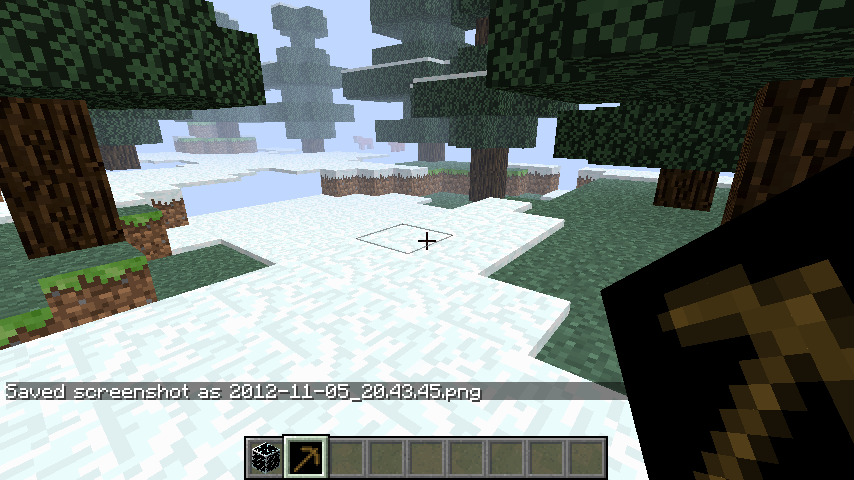
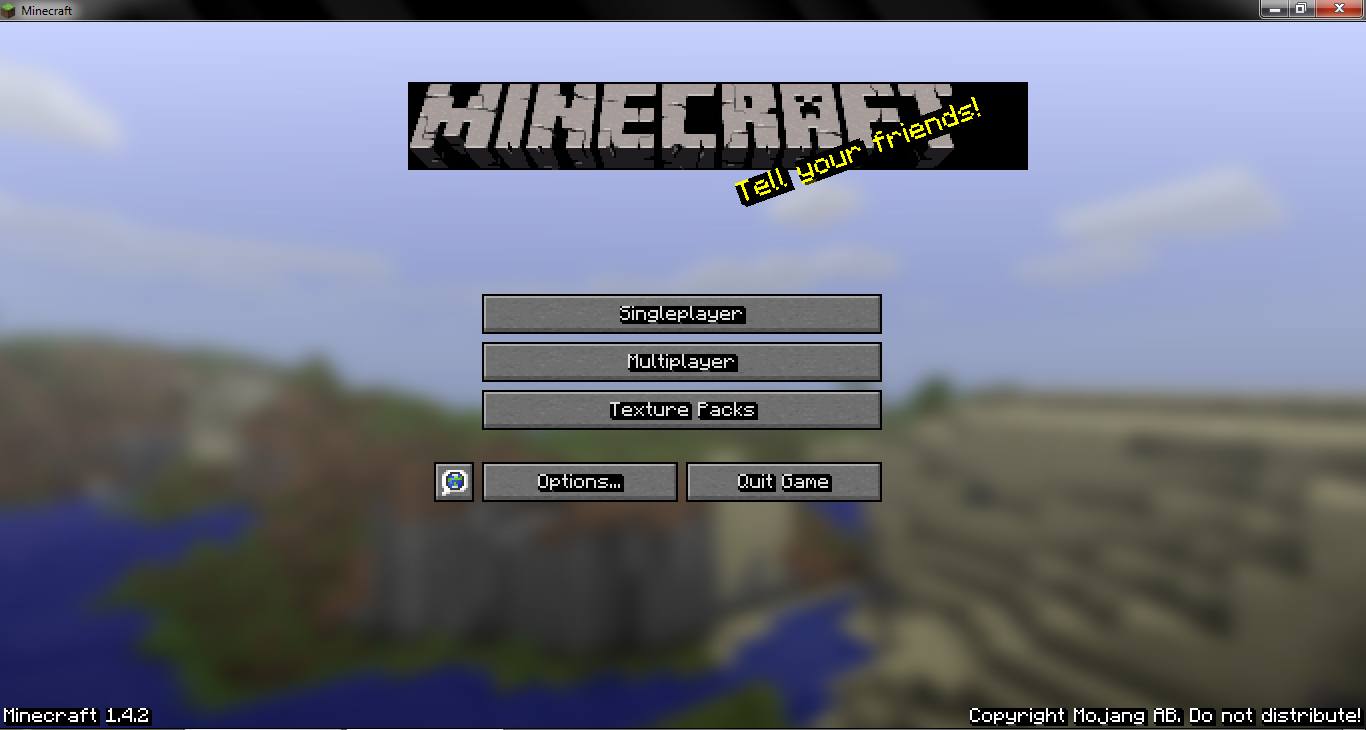
I recently have changed laptops due to my previous one being damaged. I transfered my files via CD. When i load up my minecraft there are black bars behind the text on the option bars(single player, multiplayer, ect), when i am in game each item is surrounded by a black square, even text on signs, player skins also don't load. Now, it was fine on my old laptop. This current one is the same model and manufacture(intended for work and such, but still personal). I have tried clearing my .minecraft and it did not work, i also re-installed minecraft completely. Updating to the recent version did not help either. From what i can guess (with my limited intelligence) there is no transparency, but i have not messed with my minecrafts textures.
Any help would greatly be appreciated.
Pictures below.
Linked Issues

Created Issue:
Black blocks and texture issues.
Um, hello.
I recently have changed laptops due to my previous one being damaged. I transfered my files via CD. When i load up my minecraft there are black bars behind the text on the option bars(single player, multiplayer, ect), when i am in game each item is surrounded by a black square, even text on signs, player skins also don't load. Now, it was fine on my old laptop. This current one is the same model and manufacture(intended for work and such, but still personal). I have tried clearing my .minecraft and it did not work, i also re-installed minecraft completely. Updating to the recent version did'nt help either. From what i can guess (with my limited intelligence) there is no transparency, but i have not messed with my minecrafts textures.
Any help would greatly be appreciated.
Pictures below.
Attachments2
Um, hello.
I recently have changed laptops due to my previous one being damaged. I transfered my files via CD. When i load up my minecraft there are black bars behind the text on the option bars(single player, multiplayer, ect), when i am in game each item is surrounded by a black square, even text on signs, player skins also don't load. Now, it was fine on my old laptop. This current one is the same model and manufacture(intended for work and such, but still personal). I have tried clearing my .minecraft and it did not work, i also re-installed minecraft completely. Updating to the recent version did
'nt help either. From what i can guess (with my limited intelligence) there is no transparency, but i have not messed with my minecrafts textures.Any help would greatly be appreciated.
Pictures below.
Um, hello.
I recently have changed laptops due to my previous one being damaged. I transfered my files via CD. When i load up my minecraft there are black bars behind the text on the option bars(single player, multiplayer, ect), when i am in game each item is surrounded by a black square, even text on signs, player skins also don't load. Now, it was fine on my old laptop. This current one is the same model and manufacture(intended for work and such, but still personal). I have tried clearing my .minecraft and it did not work, i also re-installed minecraft completely. Updating to the recent version did not help either. From what i can guess (with my limited intelligence) there is no transparency, but i have not messed with my minecrafts textures.
Any help would greatly be appreciated.
Pictures below.

![[Mojang] Grum (Erik Broes)](../../../data/assets/gravatar/grum.png)

relates to
is duplicated by
relates to

is duplicated by
![[Mod] Ezekiel (ezfe)](../../../data/assets/gravatar/ezekielelin.jpeg)
Duplicate of MC-2373 , please use the search function to see if your bug has already been submitted. Currently over 30% of tickets are being closed as duplicate.
Sorry if I ask too generic and obvious questions, but what version of java do you have installed? Have you updated LWJGL? Do you have a graphics card on your system, and if so is the driver up to date? Do you have any mods installed?
While in game press F3+C for 10 seconds, that will create a crash report, please attach it to this ticket.
For Kumasasa:
Like this?
Thanks for the report.
Your Java is way outdated, you have running Java 6 Update 22, current version is Java 7 Update 9, get a newer at http://www.java.com/.
Then you have a integrated Intel graphics card, those are very error prone. You might try to update the driver.
Please report if the above measures change anything.
The real problem is:
OpenGL: Intel(R) Graphics Media Accelerator HD GL version 2.1.0 - Build 8.15.10.2021, Intel
I'm pretty sure you need to install a handcrank to get some performance out of that.
Yes, this is obviously an issue with the graphics card or driver not properly supporting alpha transparency. I'm pretty sure this is not a Minecraft issue. There is nothing the developers can do to prevent this. You will probably see the same error in other OpenGL based games. This should be closed.
This is something we cannot fix, if your hardware doesn't understand OpenGL there is nothing we can do.
Try drivers? .. or maybe the handcrank! ;D
Thank you all for the help, but i do have two more questions. (if thats alright)
What is a handcrank and where would i be able to get the proper one needed? (if there are more then one version and what not)
Grum is just joking that your graphics card and its driver are so old that you need to crank it with your hand.
Oh, ok.
Ehe.