 MC-261119
Accessibility button in the Welcome screen needs its own string
The Bug:
The Accessibility settings button on the new Welcome screen is reusing the string of the Accessibility settings menu screen title (options.accessibility.title), causing issues in some languages where the text doesn't fit due to the icon.
Observed Behavior:
The current string used for the Accessibility settings button in the new Welcome screen is the same as the string used for the Accessibility settings menu screen title. This results in the text not fitting in some languages, making it difficult for users to read and access the button.
Expected Behavior:
To ensure the Accessibility settings button on the new Welcome screen fits properly in all languages, a separate string is needed. This would align with the approach taken for other settings, where separate strings are used for the button and its associated menu screen title (for example options.sounds and options.sounds.title respectively).
Note:
The attached examples illustrate this need for a separate string. The current behavior can make it difficult for users with accessibility needs to read and access the button. Therefore, creating a separate string is important to ensure that the feature is accessibility-friendly.
Linked Issues



 Normal
Created Issue:
Accessibility button in the Welcome screen needs its own string
The Accessibility settings button in the new Welcome screen is reusing the string of the Accessibility settings menu screen title (options.accessibility.title) which doesn't fit in some languages due to the icon. Many settings have one separate string for the settings button and another one for its associated menu screen title, which is needed in this scenario as well.
See the attachment for some examples.
Environment
Windows 10 version 22H2
Attachments1
The Accessibility settings button in the new Welcome screen is reusing the string of the Accessibility settings menu screen title (options.accessibility.title) which doesn't fit in some languages due to the icon.
Many settings have one separate string for the settings button and another one for its associated menu screen title, which is needed in this scenario as well.See the attachment for some examples.
The Accessibility settings button in the new Welcome screen is reusing the string of the Accessibility settings menu screen title (options.accessibility.title) which doesn't fit in some languages due to the icon. A separate string is needed for this button.
See the attachment for some examples.
The Accessibility settings button in the new Welcome screen is reusing the string of the Accessibility settings menu screen title (options.accessibility.title) which doesn't fit in some languages due to the icon.
A separate string is needed for this button.See the attachment for some examples.
The Accessibility settings button in the new Welcome screen is reusing the string of the Accessibility settings menu screen title (options.accessibility.title) which doesn't fit in some languages due to the icon. Some settings have one separate string for the settings button and another one for its associated menu screen title (for example options.sounds and options.sounds.title respectively), which is needed in this scenario as well.
See the attachment for some examples.
The Accessibility settings button in the new Welcome screen is reusing the string of the Accessibility settings menu screen title (options.accessibility.title
) which doesn't fit in some languages due to the icon.Some settings have one separate string for the settings button and another one for its associated menu screen title (for example options.sounds and options.sounds.title respectively), which is needed in this scenario as well.See the attachment for some examples.
The Accessibility settings button in the new Welcome screen is reusing the string of the Accessibility settings menu screen title (options.accessibility.title) which doesn't fit in some languages due to the icon.
Some settings have one separate string for the settings button and another one for its associated menu screen title (for example options.sounds and options.sounds.title respectively), which is needed in this scenario as well.
See the attachment for some examples.
![[Mod] turbo](../../../data/avatars/users/92867.png)
![[Mod] Michael Wobst](../../../data/avatars/users/37868.png)
Windows 10 version 22H2
The Accessibility settings button
in the new Welcome screen is reusing the string of the Accessibility settings menu screen title (options.accessibility.title)which doesn't fit in some languagesdue to the icon.Some settings have one separate string for the settings button and another one for its associated menu screen title (for example options.sounds and options.sounds.title respectively), which is needed in this scenario as well.
See the attachment for some examples.
The Bug:
The Accessibility settings button on the new Welcome screen is reusing the string of the Accessibility settings menu screen title (options.accessibility.title), causing issues in some languages where the text doesn't fit due to the icon.
Observed Behavior:
The current string used for the Accessibility settings button in the new Welcome screen is the same as the string used for the Accessibility settings menu screen title. This results in the text not fitting in some languages, making it difficult for users to read and access the button.
Expected Behavior:
To ensure the Accessibility settings button on the new Welcome screen fits properly in all languages, a separate string is needed. This would align with the approach taken for other settings, where separate strings are used for the button and its associated menu screen title (for example options.sounds and options.sounds.title respectively).
Note:
The attached examples illustrate this need for a separate string. The current behavior can make it difficult for users with accessibility needs to read and access the button. Therefore, creating a separate string is important to ensure that the feature is accessibility-friendly.
Confirmed for 1.20.2 Pre-release 1
![[Mojang] Nathan Adams](../../../data/assets/gravatar/dinnerbone.png) [Mojang] Nathan Adams
[Mojang] Nathan Adams![[Bot] Piston](../../../data/avatars/users/31202.png)
is cloned by
The Bug:
This is a clone of MC-261119.
The Accessibility settings button on the Welcome screen uses the same string as the Accessibility settings button in the Options menu (options.accessibility), which causes issues in some languages where the text doesn't fit due to the icon.
To make it extra clear (considering the misunderstanding in MC-261119):
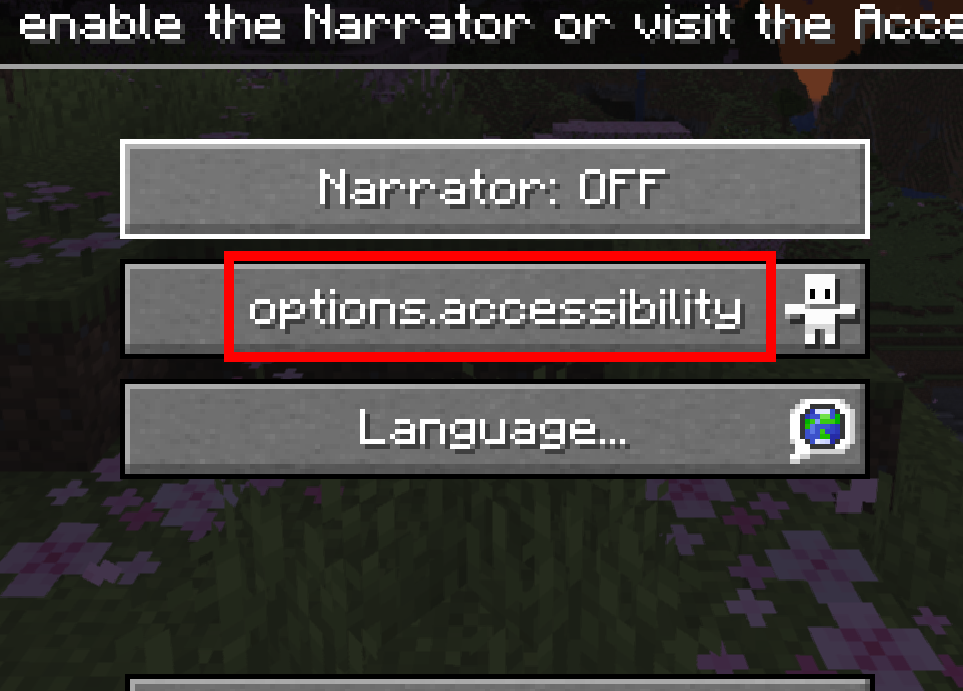
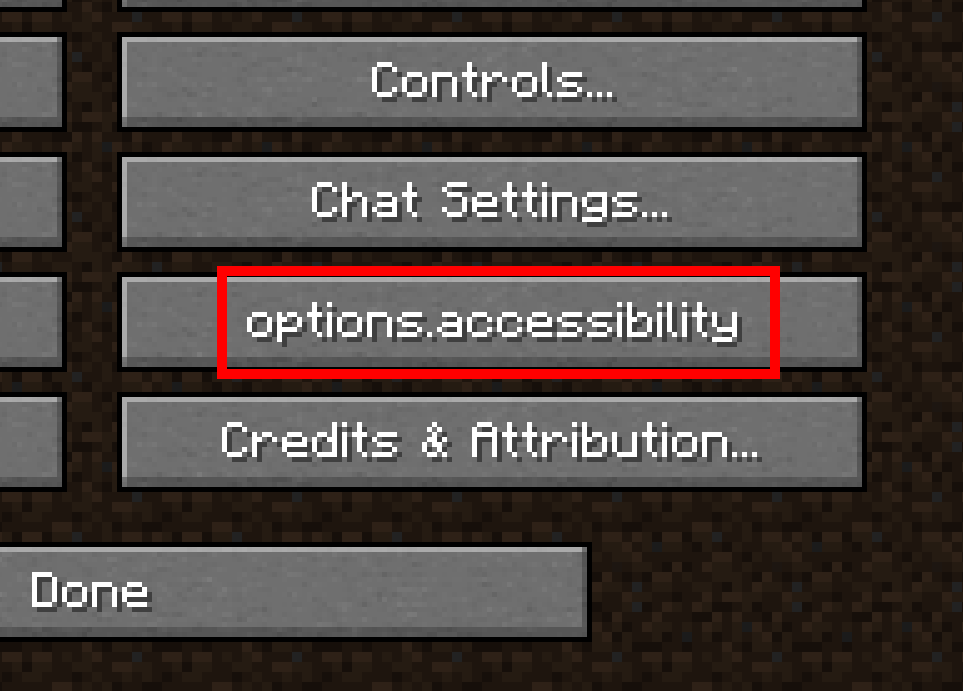
The button shown in Welcome screen.png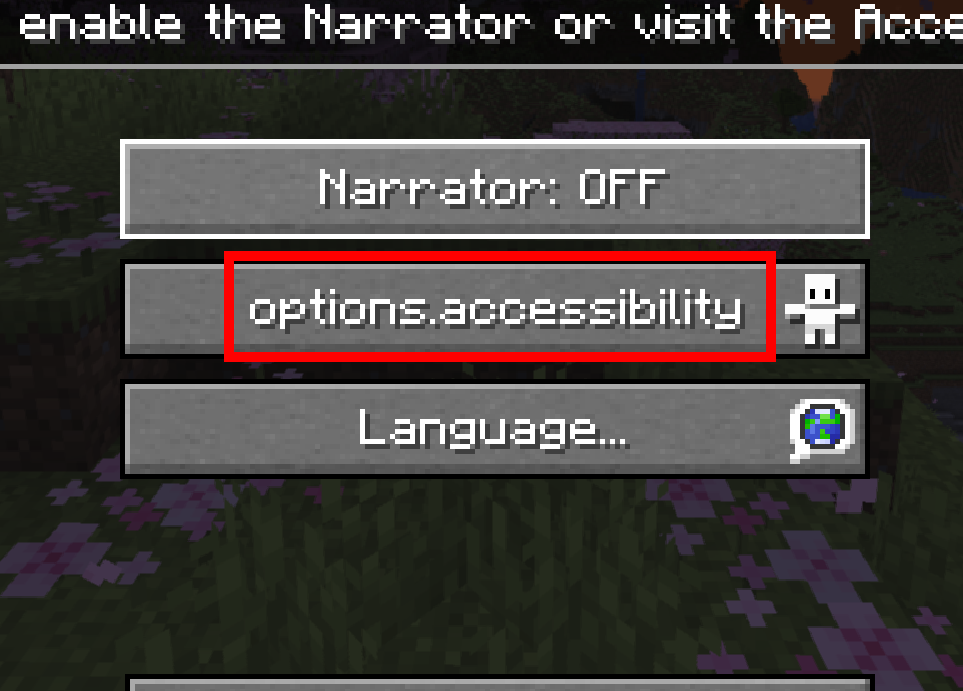 and the button shown in Options menu.png
 both use the string options.accessibility. The request is to make these two buttons have separate strings, for example one strings options.accessibility and the another onboarding.accessibility.
Observed Behavior:
The current string used for the Accessibility settings button on the Welcome screen is the same as for the Accessibility settings button in the Options menu.
Expected Behavior:
To ensure the Accessibility settings button on the new Welcome screen fits properly in all languages, a separate string should be added. This would align with the approach taken for other settings, where separate strings are used for different elements (for example options.sounds and options.sounds.title).
Note:
The attached examples illustrate this need for a separate string. The current behavior can make it difficult for users with accessibility needs to read and access the button. Therefore, creating a separate string is important to ensure that the feature is accessibility-friendly.
Prior to the latest pre-release (1.20.2 Pre-2), this issue was marked as fixed, however, no new string was added for the accessiblity onboarding screen as requested.
options.accessibility is still used for both the options menu and the onboarding screen, meaning the translatability is still limited. See MC-261119 - options menu.png and MC-261119 - onboarding screen.png
 .
.
Please consider reopening this ticket.
The issue was "fixed" as suggested in the Expected Behavior section, now there are two separate strings for the button and the screen title. While appreciated for consistency with other screens, this is not the most ideal fix. The accessibility settings button in the welcome screen and the accessibility settings button in the options screen need two separate strings