 MC-263767
Quick Play is not working
So how to use quick Play it seems useful but i cant use it!
Steps to Reproduce:
1. Add --quickPlaySingleplayer "<world name>" to the jar arguments
Observed Results:
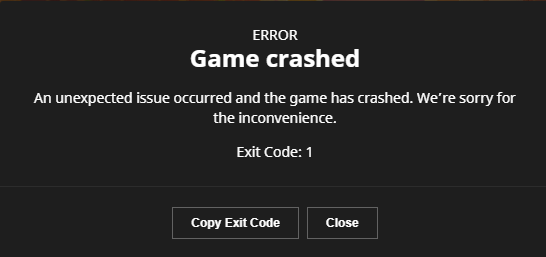
Error Code 1
Trying in another launcher with better debug info will show:
__
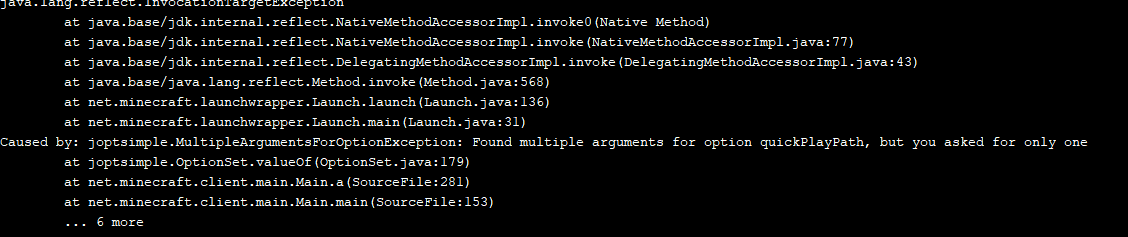
[21:05:12] [main/ERROR]: Unable to launch
java.lang.reflect.InvocationTargetException
    at java.base/jdk.internal.reflect.NativeMethodAccessorImpl.invoke0(Native Method)
    at java.base/jdk.internal.reflect.NativeMethodAccessorImpl.invoke(NativeMethodAccessorImpl.java:77)
    at java.base/jdk.internal.reflect.DelegatingMethodAccessorImpl.invoke(DelegatingMethodAccessorImpl.java:43)
    at java.base/java.lang.reflect.Method.invoke(Method.java:568)
    at net.minecraft.launchwrapper.Launch.launch(Launch.java:136)
    at net.minecraft.launchwrapper.Launch.main(Launch.java:31)
Caused by: joptsimple.MultipleArgumentsForOptionException: Found multiple arguments for option quickPlayPath, but you asked for only one
    at joptsimple.OptionSet.valueOf(OptionSet.java:179)
    at net.minecraft.client.main.Main.a(SourceFile:281)
    at net.minecraft.client.main.Main.main(SourceFile:153)
Expected Results:
It starts up world "k"
Environment
Windows 10
Linked Issues
is duplicated by1




Created Issue:
Quick Play is not working!!!
So how to use quick Play it seems useful but i cant use it!
Steps to Reproduce:
1. Add --quickPlaySingleplayer "<world name>" to the jar argumentsObserved Results:
Error Code 1Trying in another launcher with better debug info will show:
__[21:05:12] [main/ERROR]: Unable to launch java.lang.reflect.InvocationTargetException at java.base/jdk.internal.reflect.NativeMethodAccessorImpl.invoke0(Native Method) at java.base/jdk.internal.reflect.NativeMethodAccessorImpl.invoke(NativeMethodAccessorImpl.java:77) at java.base/jdk.internal.reflect.DelegatingMethodAccessorImpl.invoke(DelegatingMethodAccessorImpl.java:43) at java.base/java.lang.reflect.Method.invoke(Method.java:568) at net.minecraft.launchwrapper.Launch.launch(Launch.java:136) at net.minecraft.launchwrapper.Launch.main(Launch.java:31) Caused by: joptsimple.MultipleArgumentsForOptionException: Found multiple arguments for option quickPlayPath, but you asked for only one at joptsimple.OptionSet.valueOf(OptionSet.java:179) at net.minecraft.client.main.Main.a(SourceFile:281) at net.minecraft.client.main.Main.main(SourceFile:153)
Expected Results:
It starts up world <world name>Environment
Windows 10
Attachments2
So how to use quick Play it seems useful but i cant use it!
Steps to Reproduce:
1. Add --quickPlaySingleplayer "<world name>" to the jar argumentsObserved Results:
Error Code 1Trying in another launcher with better debug info will show:
__[21:05:12] [main/ERROR]: Unable to launch java.lang.reflect.InvocationTargetException at java.base/jdk.internal.reflect.NativeMethodAccessorImpl.invoke0(Native Method) at java.base/jdk.internal.reflect.NativeMethodAccessorImpl.invoke(NativeMethodAccessorImpl.java:77) at java.base/jdk.internal.reflect.DelegatingMethodAccessorImpl.invoke(DelegatingMethodAccessorImpl.java:43) at java.base/java.lang.reflect.Method.invoke(Method.java:568) at net.minecraft.launchwrapper.Launch.launch(Launch.java:136) at net.minecraft.launchwrapper.Launch.main(Launch.java:31) Caused by: joptsimple.MultipleArgumentsForOptionException: Found multiple arguments for option quickPlayPath, but you asked for only one at joptsimple.OptionSet.valueOf(OptionSet.java:179) at net.minecraft.client.main.Main.a(SourceFile:281) at net.minecraft.client.main.Main.main(SourceFile:153)
Expected Results:
It starts up world<world name>So how to use quick Play it seems useful but i cant use it!
Steps to Reproduce:
1. Add --quickPlaySingleplayer "<world name>" to the jar argumentsObserved Results:
Error Code 1Trying in another launcher with better debug info will show:
__[21:05:12] [main/ERROR]: Unable to launch java.lang.reflect.InvocationTargetException at java.base/jdk.internal.reflect.NativeMethodAccessorImpl.invoke0(Native Method) at java.base/jdk.internal.reflect.NativeMethodAccessorImpl.invoke(NativeMethodAccessorImpl.java:77) at java.base/jdk.internal.reflect.DelegatingMethodAccessorImpl.invoke(DelegatingMethodAccessorImpl.java:43) at java.base/java.lang.reflect.Method.invoke(Method.java:568) at net.minecraft.launchwrapper.Launch.launch(Launch.java:136) at net.minecraft.launchwrapper.Launch.main(Launch.java:31) Caused by: joptsimple.MultipleArgumentsForOptionException: Found multiple arguments for option quickPlayPath, but you asked for only one at joptsimple.OptionSet.valueOf(OptionSet.java:179) at net.minecraft.client.main.Main.a(SourceFile:281) at net.minecraft.client.main.Main.main(SourceFile:153)
[https://www.minecraft.net/en-us/article/minecraft-snapshot-23w14a|here]
Expected Results:
It starts up world "k"
So how to use quick Play it seems useful but i cant use it!
Steps to Reproduce:
1. Add --quickPlaySingleplayer "<world name>" to the jar argumentsObserved Results:
Error Code 1Trying in another launcher with better debug info will show:
__[21:05:12] [main/ERROR]: Unable to launch java.lang.reflect.InvocationTargetException at java.base/jdk.internal.reflect.NativeMethodAccessorImpl.invoke0(Native Method) at java.base/jdk.internal.reflect.NativeMethodAccessorImpl.invoke(NativeMethodAccessorImpl.java:77) at java.base/jdk.internal.reflect.DelegatingMethodAccessorImpl.invoke(DelegatingMethodAccessorImpl.java:43) at java.base/java.lang.reflect.Method.invoke(Method.java:568) at net.minecraft.launchwrapper.Launch.launch(Launch.java:136) at net.minecraft.launchwrapper.Launch.main(Launch.java:31) Caused by: joptsimple.MultipleArgumentsForOptionException: Found multiple arguments for option quickPlayPath, but you asked for only one at joptsimple.OptionSet.valueOf(OptionSet.java:179) at net.minecraft.client.main.Main.a(SourceFile:281) at net.minecraft.client.main.Main.main(SourceFile:153)
[https://www.minecraft.net/en-us/article/minecraft-snapshot-23w14a|here]
Expected Results:
It starts up world "k"So how to use quick Play it seems useful but i cant use it!
Steps to Reproduce:
1. Add --quickPlaySingleplayer "<world name>" to the jar argumentsObserved Results:
Error Code 1Trying in another launcher with better debug info will show:
__[21:05:12] [main/ERROR]: Unable to launch java.lang.reflect.InvocationTargetException at java.base/jdk.internal.reflect.NativeMethodAccessorImpl.invoke0(Native Method) at java.base/jdk.internal.reflect.NativeMethodAccessorImpl.invoke(NativeMethodAccessorImpl.java:77) at java.base/jdk.internal.reflect.DelegatingMethodAccessorImpl.invoke(DelegatingMethodAccessorImpl.java:43) at java.base/java.lang.reflect.Method.invoke(Method.java:568) at net.minecraft.launchwrapper.Launch.launch(Launch.java:136) at net.minecraft.launchwrapper.Launch.main(Launch.java:31) Caused by: joptsimple.MultipleArgumentsForOptionException: Found multiple arguments for option quickPlayPath, but you asked for only one at joptsimple.OptionSet.valueOf(OptionSet.java:179) at net.minecraft.client.main.Main.a(SourceFile:281) at net.minecraft.client.main.Main.main(SourceFile:153)Expected Results:
It starts up world "k"
![[Mod] ampolive](../../../data/avatars/users/18949.svg)
Quick Play is not working!!!
is duplicated by
![[Bot] Arisa](../../../data/avatars/users/43007.png)
![[Mojang] slicedlime](../../../data/assets/gravatar/slicedlime.jpeg)
![[Mod] Greymagic27](../../../data/avatars/users/92875.png)
 launcher_log-1.log
[Mod] turbo ⇨ see MC-263767
![[Mod] turbo](../../../data/avatars/users/92867.png)
Thank you for your report!
We're resolving and linking this ticket forward as a duplicate of MC-263767, as that ticket contains more detailed information. In the future, please don't duplicate your own reports.
If you would like to add a vote and any extra information to the main ticket it would be appreciated.
Quick Links:
📓 Bug Tracker Guidelines – 💬 Community Support – 📧 Mojang Support
📓 Project Summary – ✍️ Feedback and Suggestions – 📖 Game Wiki
Duplicate of
MC-263761Since this has an actual error log, I forward-resolved
MC-263761as a duplicate of this instead.Does this occur in 1.20.1?
[Mod] ampolive ⇨ Yes
I used:
-quickPlaySingleplayer "Nakime"
and
--quickPlaySingleplayer "Nakime"
What launcher was used to start the game with this result?
Yes it is
Minecraft Launcher
For the error logs i used TLauncher
Don't use TLauncher: only Minecraft Launcher !
i used official one and it gave me an error. I used tlauncher to get detailed errors
Please attach the full launcher log found in minecraft/launcher_log.txt.
i dont think i got any logs...
Here launcher_log.log
Quickplay is not currently supported by the launcher. You cannot add game argument in the JVM argument box.