 MC-3084
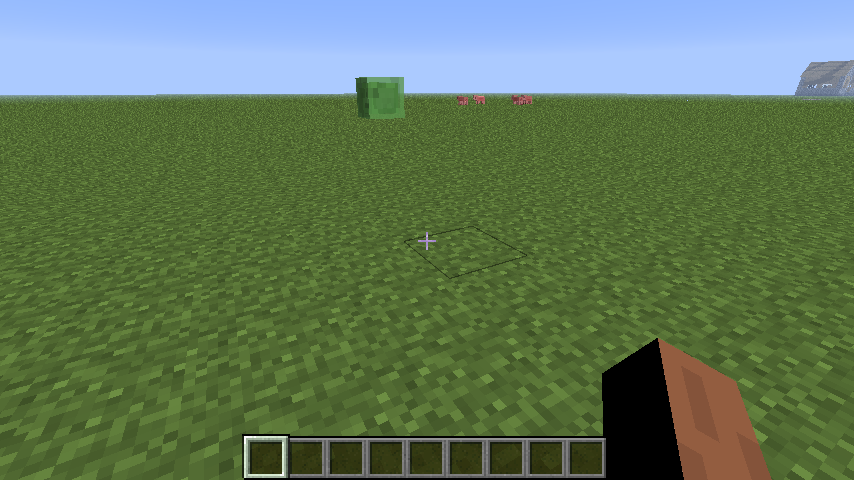
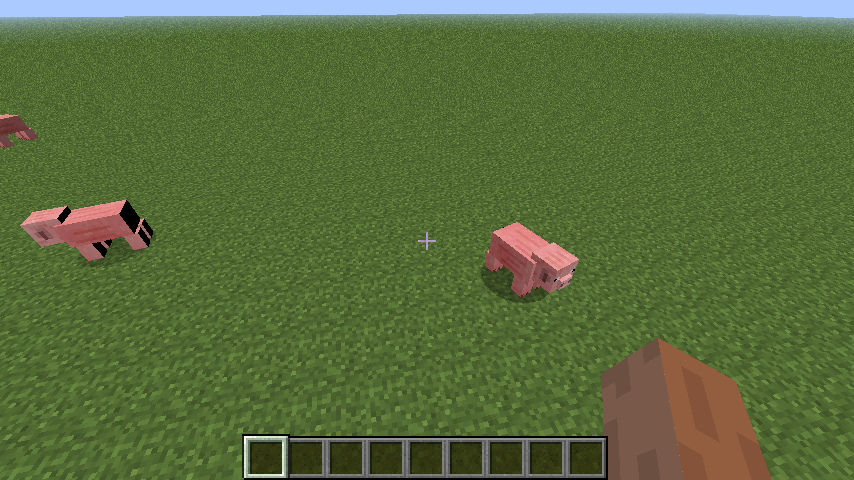
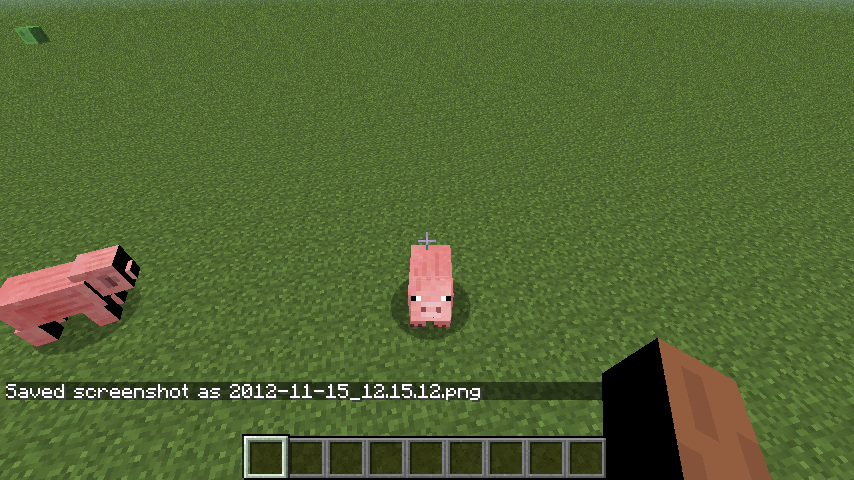
Models improperly shaded at certain angles.
At certain angles (about 45 degrees in each axis) models are improperly shaded. The bug applies to all Mobs.
Environment
Mac Mini 2012 with Intel Core i7 @ 2.6GHz, Graphics card: Intel HD Graphics 4000 512MB, OS: Mac OS X 10.8.2, Java(TM) SE Runtime Environment (build 1.6.0_37-b06-434-11M3909)
Java HotSpot(TM) 64-Bit Server VM (build 20.12-b01-434, mixed mode)
Linked Issues
is duplicated by6


Created Issue:
Models improperly shaded at certain angles.
At certain angles (about 45 degrees in each axis) models are improperly shaded. The bug applies to all Mobs.
Environment
Mac Mini 2012 with Intel Core i7 @ 2.6GHz, Graphics card: Intel HD Graphics 4000 512MB, OS: Mac OS X 10.8.2, Java(TM) SE Runtime Environment (build 1.6.0_37-b06-434-11M3909)
Java HotSpot(TM) 64-Bit Server VM (build 20.12-b01-434, mixed mode)
Attachments3
- Unresolved
- Open
- Unconfirmed
- 4000 Hd Inte Mac black bug issue, rendering,
- 1.4.4

is duplicated by
relates to
is duplicated by
2013-01-29_10.44.02.png
is duplicated by
![[Mod] CubeTheThird](../../../data/assets/gravatar/cubethethird.jpeg)
is duplicated by
is duplicated by
is duplicated by

![[Mod] Ezekiel (ezfe)](../../../data/assets/gravatar/ezekielelin.jpeg)
Confirmed.
This may be an issue related to the Intel HD graphics. Is the driver up to date?
I think it may be a compatibility issue between the Minecraft applet and Apple's Java 6. I can confirm this too. This also doesn't happen on any of the Windows computers I have tested. It seems to be an Apple only bug.
Added some more screenshots with the debug screen open to show F:.
You have a modded minecraft. Can anyone else with this issue please force a crash by pressing F3 + C for 10 seconds while ingame and attach the crash report here.
Attached manual crash report, requested by Anon Ymus
I have this same lighting error. It didn't happen before 1.4.6/1.4.7, could it have anything to do with any of the bug fixes?
According to the crash report, you are using an old version of openGL. Are you able to update your graphics drivers?
You haven't ever worked on a Mac, have you? Graphics drivers come only with System Update, which I have most recent. Besides, Apple has their own modified version of OGL. From what I remember (not sure though); 2.1 APPLE-8.6.22 is a mix of OGL 3 and OGL 2, with some custom Apple modifications.
Force Updated minecraft, used an un-modded version of Minecraft 1.4.7, force crashed and added a crash report.
Something you can try, though I am not expecting much difference, is updating your LWJGL version (instructions here).
Updated LWJGL to the current version. Big performance increases, up to +20FPS than before, but the bug is still there.
Well at least it did something.
Is this still a concern in the current Minecraft version 1.6.4 / Launcher version 1.2.5 ? If so, please update the affected versions in order to best aid Mojang ensuring bugs are still valid in the latest releases/pre-releases.
This bug still exists in Minecraft 1.6.4/13w38c.
I don't know if this could help, but I found a mod that solves this problem specifically, including all of the problems detailed here. (Chest, hand and mobs lighting glitches). http://www.minecraftforum.net/topic/1547522-162-164-minecraftlfm-fixes-colored-signs-entity-rendering-and-much-more-4000-downloads/
Is this still a concern in the current Minecraft version 1.7.4 / Launcher version 1.3.8 or later? If so, please update the affected versions in order to best aid Mojang ensuring bugs are still valid in the latest releases/pre-releases.
Could not reproduce in 14w10c
I also cannot reproduce in 14w10c.