 MC-54738
Biome Depth Weight setting creates massive spikes in oceans
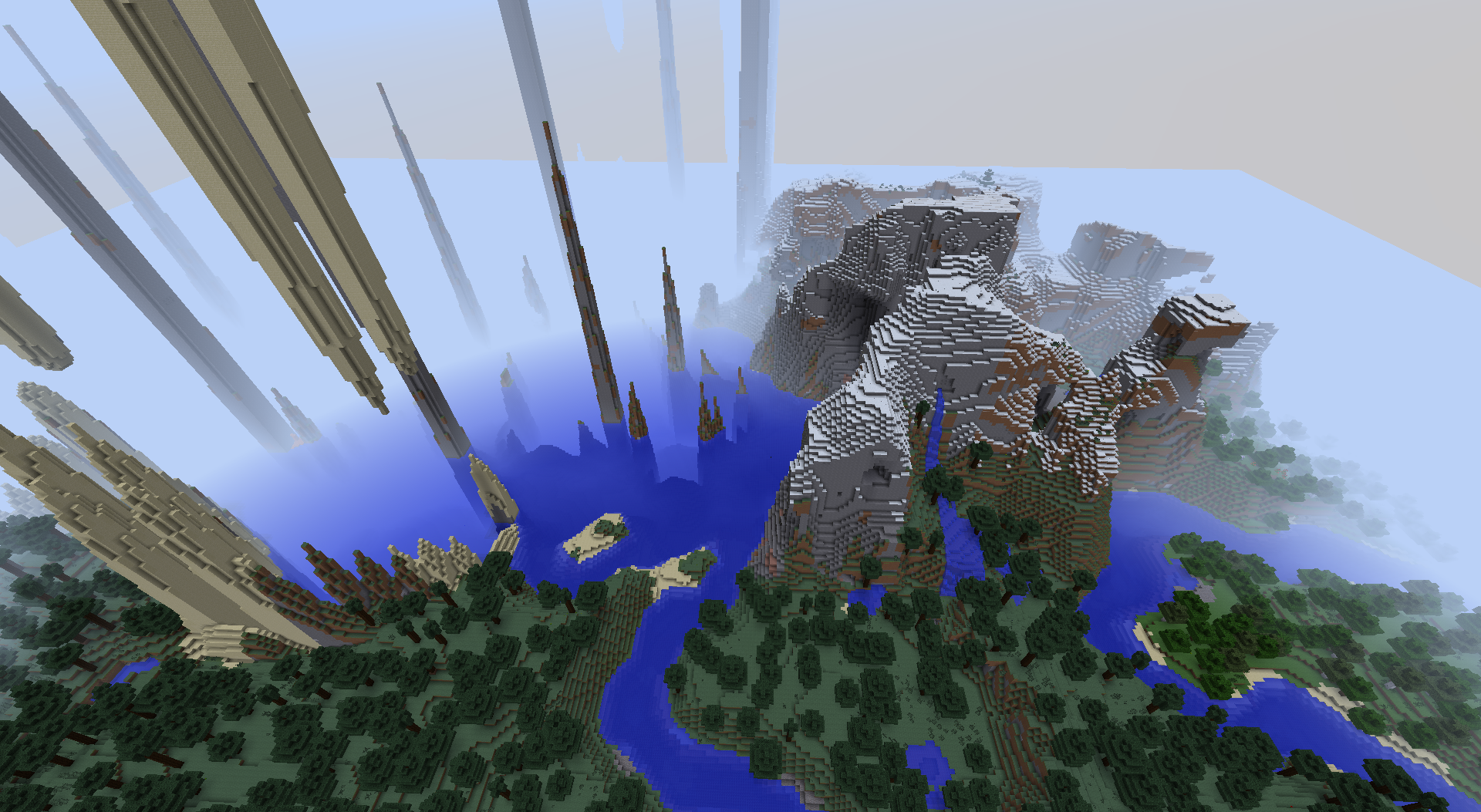
The Biome Depth Weight has a valid range of 1.000 to 20.000, with a default value of 1.000. When gradually adjusting this setting, most biomes swell and gradually change. (Rivers become wider and deeper, etc.) However, on Ocean--Deep Ocean boundaries, massive spikes that tower to the top of the map (y = 256) appear. This occurs even when slightly adjusting the Biome Depth Weight value.
How to reproduce:
- Create a new world.
- Change world type to Customized.
- Change Biome Depth Weight to 1.250.
- Create world.
- Locate an Ocean--Deep Ocean biome boundary.
You can also reproduce this bug by using the attached world customization preset with one of the following seeds, which have a spawn point near an ocean:
| Seed 1 | 746720048 |
| Seed 2 | 8123728 |
The GIF image below animates how the Ocean--Deep Ocean boundary changes as the Biome Depth Weight (BDW) is increased. Created using the following:
| Seed | 8123728 |
| Location | /tp 40 40 40 270 0 |
| Gamemode | Spectator (for seeing through blocks) |
| Effect | Night Vision (for seeing through water) |
Caves, ravines, mineshafts, lava lakes, etc. were turned off using world customization.

Environment
Windows 7, Java Version 1.7.0_51-b13
Linked Issues


Created Issue:
"Biome Depth Weight" Setting Creates Massive Spikes
"Biome Depth Weight" Setting Creates Massive Spikes
The Biome Depth Weight has a valid range of 1.000 to 20.000, with a default value of 1.000. When gradually adjusting this setting, most biomes swell and gradually adjust. (Rivers become wider and deeper, etc.) However, on Ocean/Deep Ocean boundaries and Ocean/Beach boundaries, massive spikes that tower to the top of the map (y = 256) appear. This occurs even when slightly adjusting the Biome Depth Weight value.
How to reproduce:
1. Create a new world.
2. Change world type to Customized.
3. Change Biome Depth Weight to 1.25, or a similar low value just above 1.000.
4. Locate Ocean/Deep Ocean or Ocean/Beach biome boundaries.Environment
Windows 7, Java Version 1.7.0_51-b13
Attachments1
"Biome Depth Weight" Setting Creates Massive Spikes
The Biome Depth Weight has a valid range of 1.000 to 20.000, with a default value of 1.000. When gradually adjusting this setting, most biomes swell and gradually adjust. (Rivers become wider and deeper, etc.) However, on Ocean/Deep Ocean boundaries and Ocean/Beach boundaries, massive spikes that tower to the top of the map (y = 256) appear. This occurs even when slightly adjusting the Biome Depth Weight value.
How to reproduce:
1. Create a new world.
2. Change world type to Customized.
3. Change Biome Depth Weight to 1.25, or a similar low value just above 1.000.
4. Locate Ocean/Deep Ocean or Ocean/Beach biome boundaries.Alternatively, use the world customization preset attached below. You can also use this preset with the following seeds that have a spawn point near an ocean:
Seed 1: 746720048
Seed 2: 8123728
Biome Depth Weight = 1.250

"Biome Depth Weight" Setting Creates Massive Spikes
The Biome Depth Weight has a valid range of 1.000 to 20.000, with a default value of 1.000. When gradually adjusting this setting, most biomes swell and gradually adjust. (Rivers become wider and deeper, etc.) However, on Ocean/Deep Ocean boundaries and Ocean/Beach boundaries, massive spikes that tower to the top of the map (y = 256) appear. This occurs even when slightly adjusting the Biome Depth Weight value.
How to reproduce:
1. Create a new world.
2. Change world type to Customized.
3. Change Biome Depth Weight to 1.25, or a similar low value just above 1.000.
4. Locate Ocean/Deep Ocean or Ocean/Beach biome boundaries.Alternatively, use the world customization preset attached below. You can also use this preset with the following seeds that have a spawn point near an ocean:
Seed 1: 746720048
Seed 2: 8123728GIF
"Biome Depth Weight" Setting Creates Massive Spikes
The Biome Depth Weight has a valid range of 1.000 to 20.000, with a default value of 1.000. When gradually adjusting this setting, most biomes swell and gradually adjust. (Rivers become wider and deeper, etc.) However, on Ocean/Deep Ocean boundaries and Ocean/Beach boundaries, massive spikes that tower to the top of the map (y = 256) appear. This occurs even when slightly adjusting the Biome Depth Weight value.
How to reproduce:
1. Create a new world.
2. Change world type to Customized.
3. Change Biome Depth Weight to 1.25, or a similar low value just above 1.000.
4. Locate Ocean/Deep Ocean or Ocean/Beach biome boundaries.Alternatively, use the world customization preset attached below. You can also use this preset with the following seeds that have a spawn point near an ocean:
Seed 1: 746720048
Seed 2: 8123728GIF
"Biome Depth Weight" Setting Creates Massive Spikes
The Biome Depth Weight has a valid range of 1.000 to 20.000, with a default value of 1.000. When gradually adjusting this setting, most biomes swell and gradually adjust. (Rivers become wider and deeper, etc.) However, on Ocean/Deep Ocean boundaries and Ocean/Beach boundaries, massive spikes that tower to the top of the map (y = 256) appear. This occurs even when slightly adjusting the Biome Depth Weight value.
How to reproduce:
1. Create a new world.
2. Change world type to Customized.
3. Change Biome Depth Weight to 1.25, or a similar low value just above 1.000.
4. Locate Ocean/Deep Ocean or Ocean/Beach biome boundaries.Alternatively, use the world customization preset attached below. You can also use this preset with the following seeds that have a spawn point near an ocean:
Seed 1: 746720048
Seed 2: 8123728The attached GIF animates how the Ocean/Deep Ocean boundaries change as the Biome Depth Weight (BDW) is increased. Created using the following:
Seed: 8123728
Gamemode: Spectator (for seeing through blocks)
Effect: Night Vision
Position: /tp @p 40 40 40 270 0
Caves, ravines, mineshafts, lava lakes, etc. were turned off using world customization.
"Biome Depth Weight" Setting Creates Massive Spikes
The Biome Depth Weight has a valid range of 1.000 to 20.000, with a default value of 1.000. When gradually adjusting this setting, most biomes swell and gradually adjust. (Rivers become wider and deeper, etc.) However, on Ocean/Deep Ocean boundaries and Ocean/Beach boundaries, massive spikes that tower to the top of the map (y = 256) appear. This occurs even when slightly adjusting the Biome Depth Weight value.
How to reproduce:
1. Create a new world.
2. Change world type to Customized.
3. Change Biome Depth Weight to 1.25, or a similar low value just above 1.000.
4. Locate Ocean/Deep Ocean or Ocean/Beach biome boundaries.Alternatively, use the world customization preset attached below. You can also use this preset with the following seeds that have a spawn point near an ocean:
Seed 1: 746720048
Seed 2: 8123728The attached GIF animates how the Ocean/Deep Ocean boundaries change as the Biome Depth Weight (BDW) is increased. Created using the following:
Seed: 8123728
Gamemode: Spectator (for seeing through blocks)
Effect: Night Vision
Position: /tp @p 40 40 40 270 0
Caves, ravines, mineshafts, lava lakes, etc. were turned off using world customization.

"Biome Depth Weight" Setting Creates Massive Spikes
The Biome Depth Weight has a valid range of 1.000 to 20.000, with a default value of 1.000. When gradually adjusting this setting, most biomes swell and gradually adjust. (Rivers become wider and deeper, etc.) However, on Ocean/Deep Ocean boundaries and Ocean/Beach boundaries, massive spikes that tower to the top of the map (y = 256) appear. This occurs even when slightly adjusting the Biome Depth Weight value.
How to reproduce:
1. Create a new world.
2. Change world type to Customized.
3. Change Biome Depth Weight to 1.25, or a similar low value just above 1.000.
4. Locate Ocean/Deep Ocean or Ocean/Beach biome boundaries.Alternatively, use the world customization preset attached below. You can also use this preset with the following seeds that have a spawn point near an ocean:
Seed 1: 746720048
Seed 2: 8123728The attached GIF animates how the Ocean/Deep Ocean boundaries change as the Biome Depth Weight (BDW) is increased. Created using the following:
Seed: 8123728
Gamemode: Spectator (for seeing through blocks)
Effect: Night Vision
Position: /tp @p 40 40 40 270 0
Caves, ravines, mineshafts, lava lakes, etc. were turned off using world customization.
"Biome Depth Weight" Setting Creates Massive Spikes
The Biome Depth Weight has a valid range of 1.000 to 20.000, with a default value of 1.000. When gradually adjusting this setting, most biomes swell and gradually adjust. (Rivers become wider and deeper, etc.) However, on Ocean/Deep Ocean boundaries and Ocean/Beach boundaries, massive spikes that tower to the top of the map (y = 256) appear. This occurs even when slightly adjusting the Biome Depth Weight value.
How to reproduce:
1. Create a new world.
2. Change world type to Customized.
3. Change Biome Depth Weight to 1.25, or a similar low value just above 1.000.
4. Locate Ocean/Deep Ocean or Ocean/Beach biome boundaries.Alternatively, use the world customization preset attached below. You can also use this preset with the following seeds that have a spawn point near an ocean:
Seed 1: 746720048
Seed 2: 8123728The attached GIF animates how the Ocean/Deep Ocean boundaries change as the Biome Depth Weight (BDW) is increased. Created using the following:
Seed: 8123728
Gamemode: Spectator (for seeing through blocks)
Effect: Night Vision
Position: /tp @p 40 40 40 270 0
Caves, ravines, mineshafts, lava lakes, etc. were turned off using world customization.
"Biome Depth Weight" Setting Creates Massive Spikes
The Biome Depth Weight has a valid range of 1.000 to 20.000, with a default value of 1.000. When gradually adjusting this setting, most biomes swell and gradually
adjust. (Rivers become wider and deeper, etc.) However, on Ocean/Deep Oceanboundaries and Ocean/Beachboundaries, massive spikes that tower to the top of the map (y = 256) appear. This occurs even when slightly adjusting the Biome Depth Weight value.How to reproduce:
1. Create a new world.
2. Change world type to Customized.
3. Change Biome Depth Weight to 1.25, or a similar low value just above 1.000.4. Locate Ocean/Deep Oceanor Ocean/Beachbiome boundaries.
Alternatively, use the world customization preset attached below. You can also use this presetwith the following seedsthathave a spawn point near an ocean:Seed 1: 746720048
Seed 2: 8123728The attached GIF animates how the Ocean
/Deep Ocean boundaries change as the Biome Depth Weight (BDW) is increased. Created using the following:Seed: 8123728
Gamemode: Spectator (for seeing through blocks)
Effect: Night Vision
Position: /tp @p 40 40 40 270 0
Caves, ravines, mineshafts, lava lakes, etc. were turned off using world customization.
Biome Depth Weight Creates Massive Spikes in Oceans
The Biome Depth Weight has a valid range of 1.000 to 20.000, with a default value of 1.000. When gradually adjusting this setting, most biomes swell and gradually change. (Rivers become wider and deeper, etc.) However, on Ocean--Deep Ocean boundaries, massive spikes that tower to the top of the map (y = 256) appear. This occurs even when slightly adjusting the Biome Depth Weight value.
How to reproduce:
1. Create a new world.
2. Change world type to Customized.
3. Change Biome Depth Weight to 1.250.
4. Create world.
5. Locate an Ocean--Deep Ocean biome boundary.You can also reproduce this bug by using the attached world customization with the following seeds, which have a spawn point near an ocean:
Seed 1: 746720048
Seed 2: 8123728The attached GIF animates how the Ocean--Deep Ocean boundaries change as the Biome Depth Weight (BDW) is increased. Created using the following:
Seed: 8123728
Gamemode: Spectator (for seeing through blocks)
Effect: Night Vision
Position: /tp @p 40 40 40 270 0
Caves, ravines, mineshafts, lava lakes, etc. were turned off using world customization.
"Biome Depth Weight" SettingCreates Massive SpikesBiome Depth Weight Creates Massive Spikes in Oceans
Biome Depth Weight Creates Massive Spikes in Oceans
The Biome Depth Weight has a valid range of 1.000 to 20.000, with a default value of 1.000. When gradually adjusting this setting, most biomes swell and gradually change. (Rivers become wider and deeper, etc.) However, on Ocean--Deep Ocean boundaries, massive spikes that tower to the top of the map (y = 256) appear. This occurs even when slightly adjusting the Biome Depth Weight value.
How to reproduce:
1. Create a new world.
2. Change world type to Customized.
3. Change Biome Depth Weight to 1.250.
4. Create world.
5. Locate an Ocean--Deep Ocean biome boundary.You can also reproduce this bug by using the attached world customization preset with the following seeds, which have a spawn point near an ocean:
Seed 1: 746720048
Seed 2: 8123728The attached GIF animates how the Ocean--Deep Ocean boundaries change as the Biome Depth Weight (BDW) is increased. Created using the following:
Seed: 8123728
Gamemode: Spectator (for seeing through blocks)
Effect: Night Vision
Position: /tp @p 40 40 40 270 0
Caves, ravines, mineshafts, lava lakes, etc. were turned off using world customization.

Biome Depth Weight Creates Massive Spikes in Oceans
The Biome Depth Weight has a valid range of 1.000 to 20.000, with a default value of 1.000. When gradually adjusting this setting, most biomes swell and gradually change. (Rivers become wider and deeper, etc.) However, on Ocean--Deep Ocean boundaries, massive spikes that tower to the top of the map (y = 256) appear. This occurs even when slightly adjusting the Biome Depth Weight value.
How to reproduce:
1. Create a new world.
2. Change world type to Customized.
3. Change Biome Depth Weight to 1.250.
4. Create world.
5. Locate an Ocean--Deep Ocean biome boundary.You can also reproduce this bug by using the attached world customization preset with the following seeds, which have a spawn point near an ocean:
Seed 1: 746720048
Seed 2: 8123728The attached GIF animates how the Ocean--Deep Ocean boundaries change as the Biome Depth Weight (BDW) is increased. Created using the following:
Seed: 8123728
Gamemode: Spectator (for seeing through blocks)
Effect: Night Vision
Position: /tp @p 40 40 40 270 0
Caves, ravines, mineshafts, lava lakes, etc. were turned off using world customization.
is duplicated by
is duplicated by
The Biome Depth Weight has a valid range of 1.000 to 20.000, with a default value of 1.000. When gradually adjusting this setting, most biomes swell and gradually change. (Rivers become wider and deeper, etc.) However, on Ocean--Deep Ocean boundaries, massive spikes that tower to the top of the map (y = 256) appear. This occurs even when slightly adjusting the Biome Depth Weight value.
How to reproduce:
1. Create a new world.
2. Change world type to Customized.
3. Change Biome Depth Weight to 1.250.
4. Create world.
5. Locate an Ocean--Deep Ocean biome boundary.You can also reproduce this bug by using the attached world customization preset with the following seeds, which have a spawn point near an ocean:
Seed 1: 746720048
Seed 2: 8123728
The attached GIF animates how the Ocean--Deep Ocean boundaries change as the Biome Depth Weight (BDW) is increased. Created using the following:Seed: 8123728
Gamemode: Spectator (for seeing through blocks)
Effect: Night Vision
Position: /tp @p 40 40 40 270 0
Caves, ravines, mineshafts, lava lakes, etc. were turned off using world customization.
The Biome Depth Weight has a valid range of 1.000 to 20.000, with a default value of 1.000. When gradually adjusting this setting, most biomes swell and gradually change. (Rivers become wider and deeper, etc.) However, on Ocean--Deep Ocean boundaries, massive spikes that tower to the top of the map (y = 256) appear. This occurs even when slightly adjusting the Biome Depth Weight value.
How to reproduce:
- Create a new world.
- Change world type to Customized.
- Change Biome Depth Weight to 1.250.
- Create world.
- Locate an Ocean--Deep Ocean biome boundary.
You can also reproduce this bug by using the attached world customization preset with one of the following seeds, which have a spawn point near an ocean:
Seed 1 746720048 Seed 2 8123728 The GIF image below animates how the Ocean--Deep Ocean boundary changes as the Biome Depth Weight (BDW) is increased. Created using the following:
Seed 8123728 Location /tp 40 40 40 270 0 Gamemode Spectator (for seeing through blocks) Effect Night Vision (for seeing through water) Caves, ravines, mineshafts, lava lakes, etc. were turned off using world customization.
Biome Depth WeightCreatesMassiveSpikes inOceansBiome Depth Weight setting creates massive spikes in oceans
is duplicated by
is duplicated by

![[Mojang] Grum (Erik Broes)](../../../data/assets/gravatar/grum.png) [Mojang] Grum (Erik Broes)
[Mojang] Grum (Erik Broes)
Please don't put down the affected version as a future version. You DON'T have access to it yet!
Ok sorry I will update. First time reporting a bug.
Please attach the complete customization preset.
Preset attached.
Confirmed with the preset and seed mentioned in the description.
Just uploaded a GIF to animate what's going on. Looks like something starts diverging when the Biome Depth Weight gets close to 1.1150. GIF info in description.
Good analysis. Linked the animated gif to the description.
Weird. I can confirm but it is sudden. When I set to 1.134 everything is normal. But at 1.136 the spike already reach y=255. (May vary with seed)
theo, correct me if I'm wrong but you are only confirming when the spikes appear above sea level. But below sea level the boundary between Ocean and Deep Ocean also stretches down towards bedrock (inverse spikes going in the negative-y direction). This starts somewhere between a BDW value of 1.110 to 1.115. As the value increases it violently swings in the other direction toward the build limit. (See the GIF)
I just tried 1.134 and I observed the spikes just starting to swing in the positive-y direction, but they had net yet reached above sea level. (With the exception of a few that were already huge and reaching up to the build limit.)
Still a problem in 1.8.3
Still in 1.9
I am a bit disappointed to see this marked as "Works As Intended." I would understand if the problem is too deep within the world generation code and therefore cannot be fixed right now. In that scenario I would prefer to see the bug remain open, so that it would have visibility if the world generation algorithm was ever revisited in a future version. Or at the very least, be honest and mark the resolution as "Won't Fix."
This is a literal one line fix. Detailed description can be found at http://www.minecraftforum.net/forums/minecraft-discussion/discussion/2393260-customized-settings-for-amplified
The problem is in ChunkProviderGenerate.java
Your code should look similar to this:
Is there a way to do this, but without the Giant spikes? I was messing around with a world and did this once, but I have no clue what I did with the advanced settings, and I no longer have the world. If anyone could help me, I would be very grateful!