 MC-77652
Falling Block does not have uniform transparency/non-transparency in the End
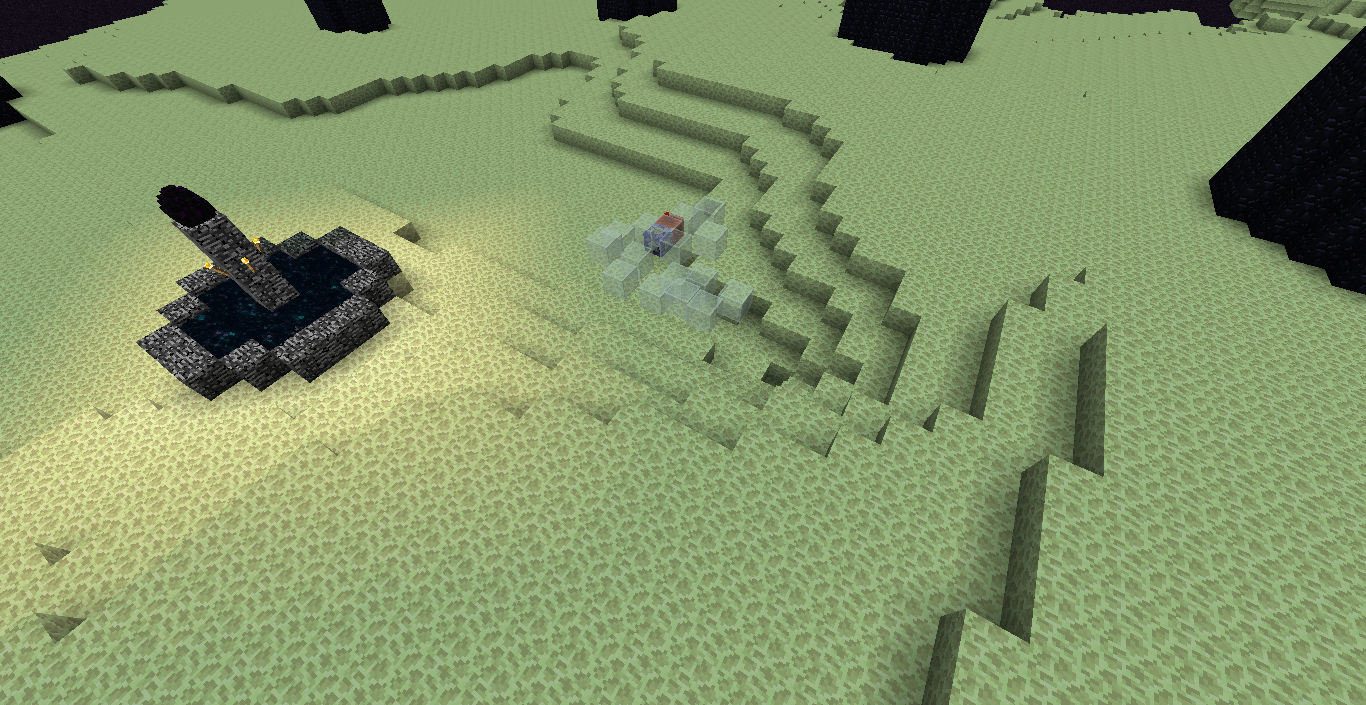
(Note: occurs in the End dimension) Falling_block, when several of them exist at once and are either slime blocks or stained glass/panes, display all as non transparent, except for one of them, which does display as transparent. I expected all of them to be uniform in state of transparency.
Steps to reproduce:
- Remove all other falling sand entities that may be in the world.
- Summon several:
/summon armor_stand ~ ~1 ~ {NoGravity:1b,Tags:["test"],Passengers:[{id:"falling_block",Block:"minecraft:stained_glass",Time:1s}]}and place them in an array along same y coordinate. (Also try slime blocks)
→ Notice that one of the falling sand is a transparent stained glass/slime block, while the other are not.
→ Notice that if you move further away from the falling sand, they appear like actual stained glass, but when you move closer to it, it appears like solid colors.
- It appears that raising a non transparent falling_block riding armor stand 2 blocks above the y coordinate of the other transparent falling_block causes it to become transparent and the original to become non transparent.
 Note: According to Mog (Ryan Holtz) in
 MC-34696, "Regular glass works fine because it is alpha tested, not alpha blended. These are two different things. Alpha testing is supported on entities, alpha blending is not." However even though it is not supported, somehow one falling sand entity stays transparent as shown here.
Picture attachment notes:
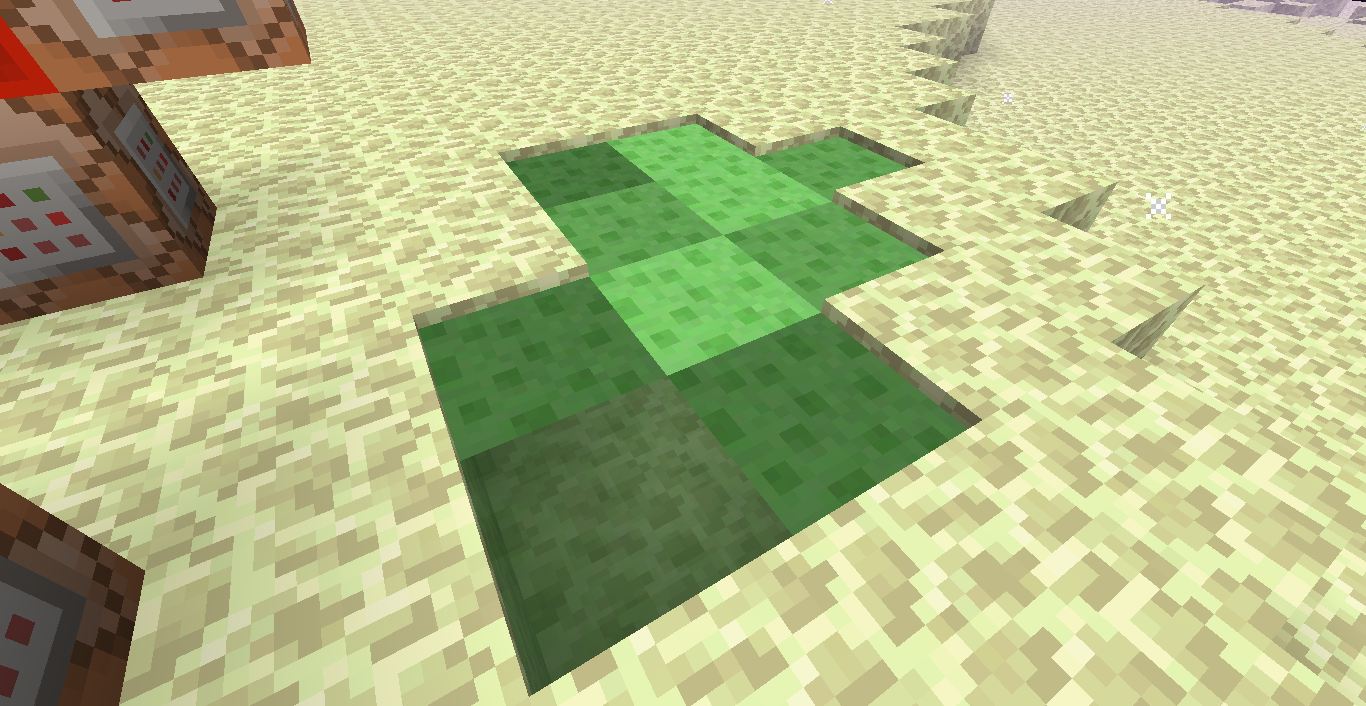
2015-02-15_21.38.05.png - Slime block, lower left corner is transparent, while others are not.
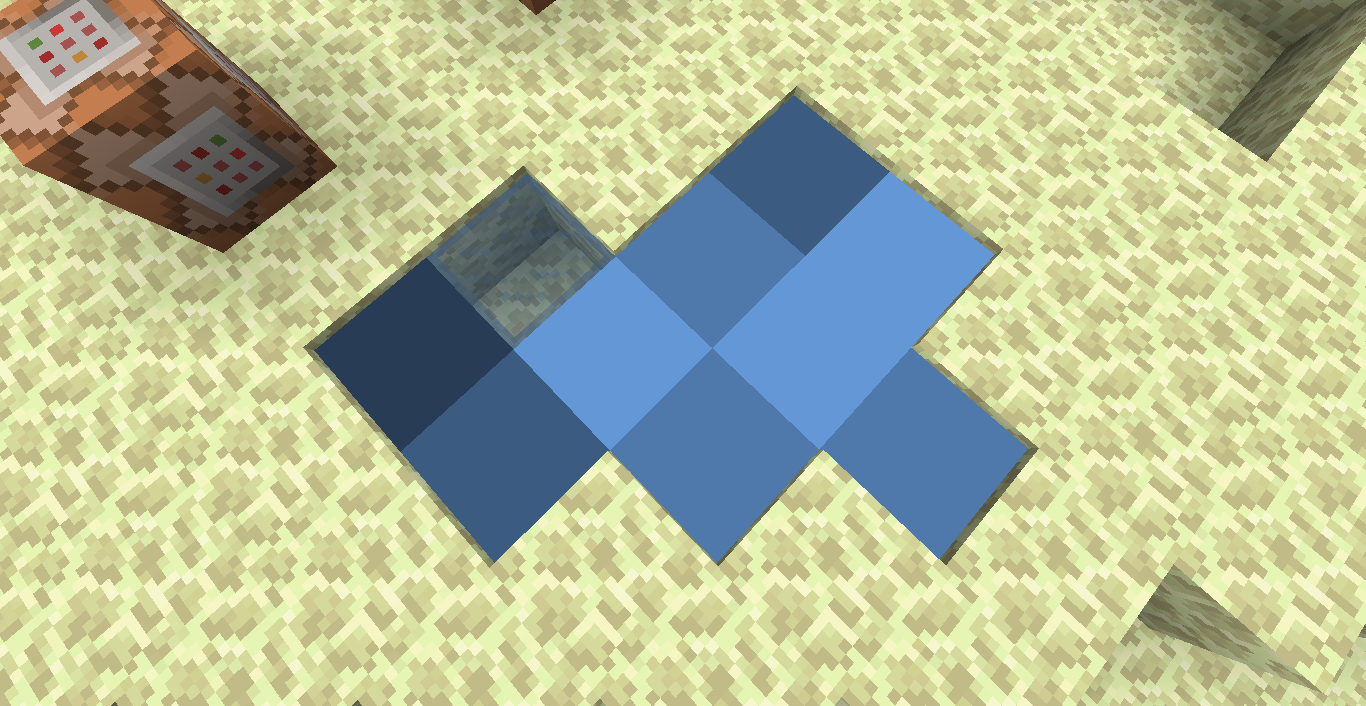
2015-02-16_02.09.17.png - Stained glass, middle top is transparent
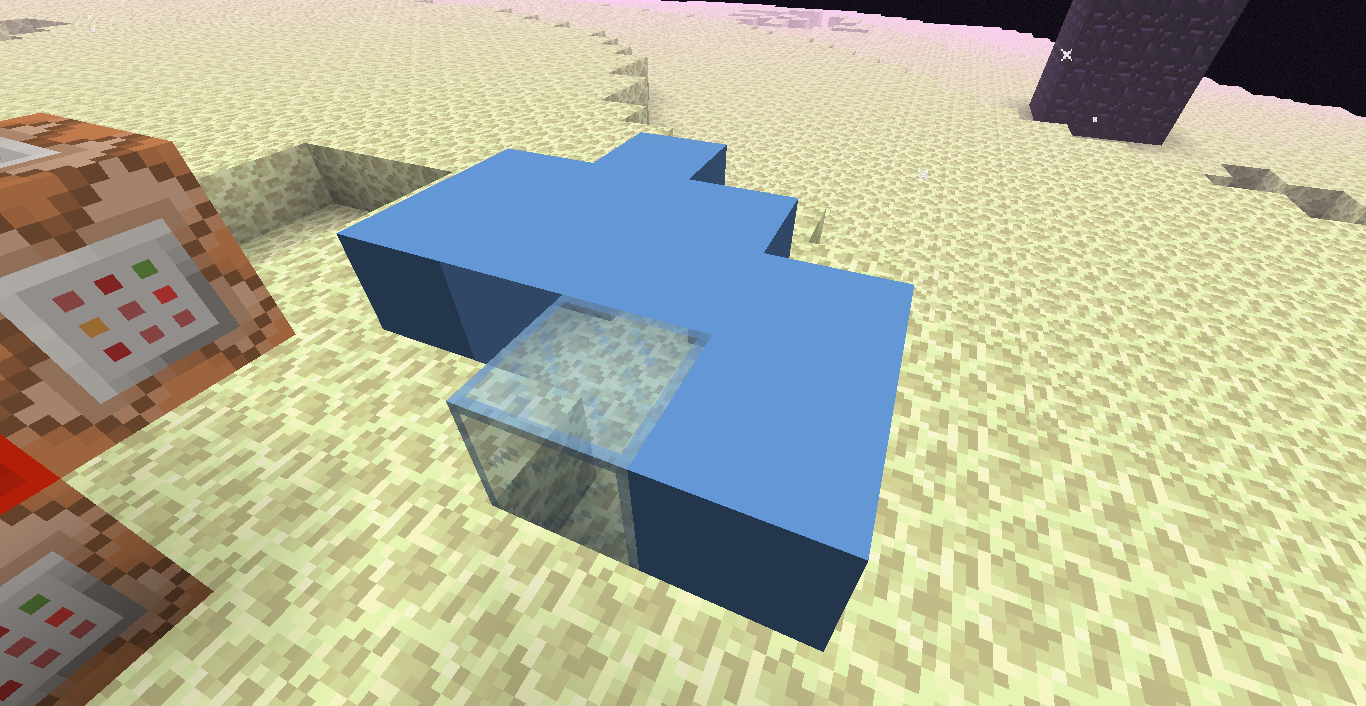
2015-02-16_02.09.47.png - Raised all of them up one block, can clearly see the single transparent glass at the bottom center
2015-02-16_02.10.13.png - Raised the c=-1 armor stand & falling sand 2 blocks up. It became transparent while the original became non transparent.
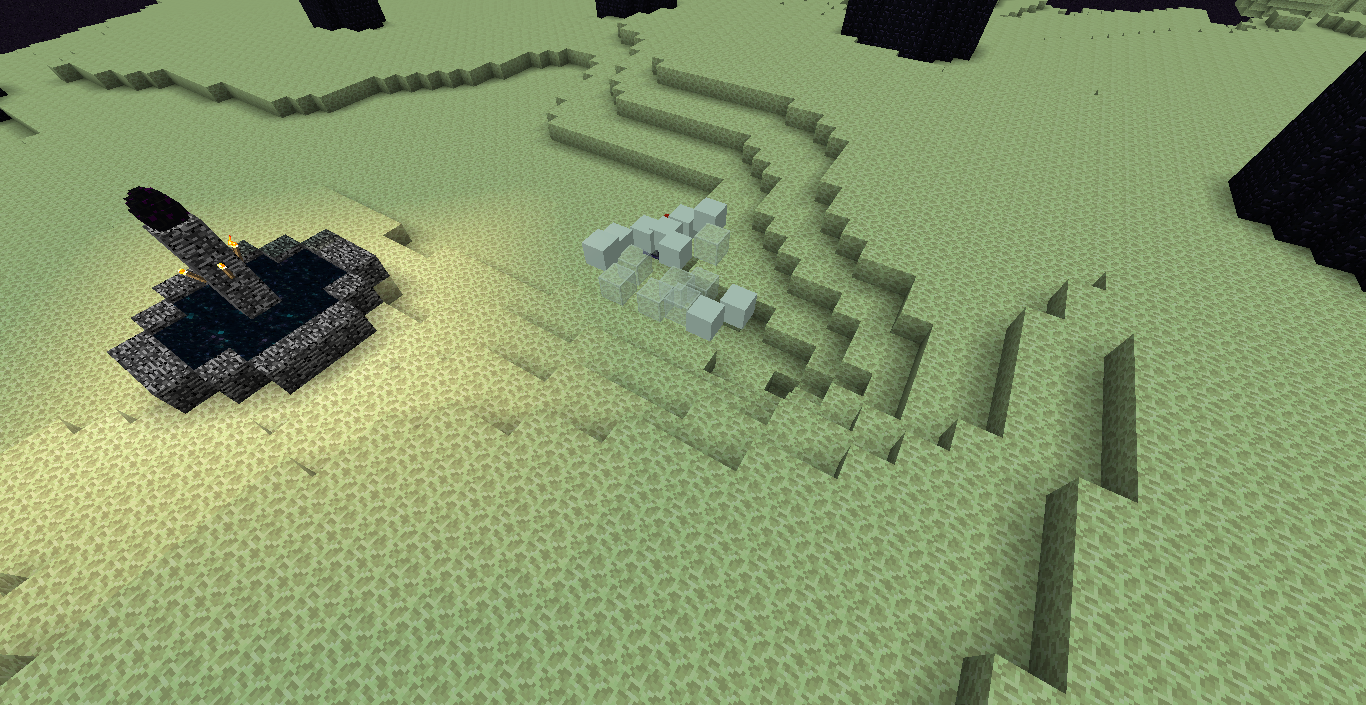
2015-02-16_15.32.25.png - Test 1 using piston extensions to maintain falling state: Top left slime block falling sand is transparent while others are opaque.



Created Issue:
Falling Sand Transparancy Issue
Falling sand, when several of them exist at once and are either slime blocks or stained glass/panes, display all as non transparent, except for one of them, which does display as transparent. I expected all of them to be transparent.
To reproduce:
1. Create a clock that runs /entitydata @e[type=FallingSand]
{Time:1}2. Summon several: /summon FallingSand ~ ~1 ~ {Block:stained_glass,Time:1,Riding:{id:ArmorStand,NoGravity:1b,Marker:1b,CustomName:test1}}
and place them in an array along same y coordinate. (Also try slime blocks)
3. Notice that one of the falling sand is a transparent stained glass/slime block, while the other are not.
4. It appears that raising a non transparent fallingsand riding armor stand 2 blocks above the y coordinate of the other transparent falling sand causes it to become transparent and the original to become non transparent.Picture attachment notes:
2015-02-15_21.38.05.png - Slime block, lower left corner is transparent, while others are not.2015-02-16_02.09.17.png - Stained glass, middle top is transparent
2015-02-16_02.09.47.png - Raised all of them up one block, can clearly see the single transparent glass at the bottom center
2015-02-16_02.10.13.png - Raised the c=-1 armor stand & falling sand 2 blocks up. It became transparent while the original became non transparent.
Attachments4
- Unresolved
- Open
- Minecraft - Public
- Unconfirmed
- 1.8.1 1.8.2-pre4 1.8.2-pre6

Falling sand, when several of them exist at once and are either slime blocks or stained glass/panes, display all as non transparent, except for one of them, which does display as transparent. I expected all of them to be transparent.
To reproduce:
1. Create a clock that runs /entitydata @e[type=FallingSand]
{Time:1}2. Summon several: /summon FallingSand ~ ~1 ~ {Block:stained_glass,Time:1,Riding:{id:ArmorStand,NoGravity:1b,Marker:1b,CustomName:test1}}
and place them in an array along same y coordinate. (Also try slime blocks)
3. Notice that one of the falling sand is a transparent stained glass/slime block, while the other are not.
4. It appears that raising a non transparent fallingsand riding armor stand 2 blocks above the y coordinate of the other transparent falling sand causes it to become transparent and the original to become non transparent.Picture attachment notes:
2015-02-15_21.38.05.png - Slime block, lower left corner is transparent, while others are not.2015-02-16_02.09.17.png - Stained glass, middle top is transparent
2015-02-16_02.09.47.png - Raised all of them up one block, can clearly see the single transparent glass at the bottom center
2015-02-16_02.10.13.png - Raised the c=-1 armor stand & falling sand 2 blocks up. It became transparent while the original became non transparent.
Falling sand, when several of them exist at once and are either slime blocks or stained glass/panes, display all as non transparent, except for one of them, which does display as transparent. I expected all of them to be transparent.
To reproduce:
1. Create a clock that runs
/entitydata @e[type=FallingSand] {Time:1}2. Summon several:
/summon FallingSand ~ ~1 ~ {Block:stained_glass,Time:1,Riding:{id:ArmorStand,NoGravity:1b,Marker:1b,CustomName:test1}}and place them in an array along same y coordinate. (Also try slime blocks)
3. Notice that one of the falling sand is a transparent stained glass/slime block, while the other are not.
4. It appears that raising a non transparent fallingsand riding armor stand 2 blocks above the y coordinate of the other transparent falling sand causes it to become transparent and the original to become non transparent.Picture attachment notes:
2015-02-15_21.38.05.png - Slime block, lower left corner is transparent, while others are not.2015-02-16_02.09.17.png - Stained glass, middle top is transparent
2015-02-16_02.09.47.png - Raised all of them up one block, can clearly see the single transparent glass at the bottom center
2015-02-16_02.10.13.png - Raised the c=-1 armor stand & falling sand 2 blocks up. It became transparent while the original became non transparent.
Falling sand, when several of them exist at once and are either slime blocks or stained glass/panes, display all as non transparent, except for one of them, which does display as transparent. I expected all of them to be transparent or all to be non transparent.
To reproduce:
1. Create a clock that runs
/entitydata @e[type=FallingSand] {Time:1}2. Summon several:
/summon FallingSand ~ ~1 ~ {Block:stained_glass,Time:1,Riding:{id:ArmorStand,NoGravity:1b,Marker:1b,CustomName:test1}}and place them in an array along same y coordinate. (Also try slime blocks)
3. Notice that one of the falling sand is a transparent stained glass/slime block, while the other are not.
4. It appears that raising a non transparent fallingsand riding armor stand 2 blocks above the y coordinate of the other transparent falling sand causes it to become transparent and the original to become non transparent.Picture attachment notes:
2015-02-15_21.38.05.png - Slime block, lower left corner is transparent, while others are not.2015-02-16_02.09.17.png - Stained glass, middle top is transparent
2015-02-16_02.09.47.png - Raised all of them up one block, can clearly see the single transparent glass at the bottom center
2015-02-16_02.10.13.png - Raised the c=-1 armor stand & falling sand 2 blocks up. It became transparent while the original became non transparent.
Falling SandTransparancyIssueFalling Sand does not have uniform transparency/non-transparency
Falling sand, when several of them exist at once and are either slime blocks or stained glass/panes, display all as non transparent, except for one of them, which does display as transparent. I expected all of them to be transparent or all to be non transparent.
To reproduce:
1. Create a clock that runs
/entitydata @e[type=FallingSand] {Time:1}2. Summon several:
/summon FallingSand ~ ~1 ~ {Block:stained_glass,Time:1,Riding:{id:ArmorStand,NoGravity:1b,Marker:1b,CustomName:test1}}and place them in an array along same y coordinate. (Also try slime blocks)
3. Notice that one of the falling sand is a transparent stained glass/slime block, while the other are not.
4. It appears that raising a non transparent fallingsand riding armor stand 2 blocks above the y coordinate of the other transparent falling sand causes it to become transparent and the original to become non transparent.Picture attachment notes:
2015-02-15_21.38.05.png - Slime block, lower left corner is transparent, while others are not.2015-02-16_02.09.17.png - Stained glass, middle top is transparent
2015-02-16_02.09.47.png - Raised all of them up one block, can clearly see the single transparent glass at the bottom center
2015-02-16_02.10.13.png - Raised the c=-1 armor stand & falling sand 2 blocks up. It became transparent while the original became non transparent.
Falling sand, when several of them exist at once and are either slime blocks or stained glass/panes, display all as non transparent, except for one of them, which does display as transparent. I expected all of them to be transparent or all to be non transparent.
To reproduce:
TEST 1 USING PISTON EXTENSIONS TO MAINTAIN FALLING SAND STATE:
0. Remove all other falling sand entities that may be in the world.
1. Fill an area with piston extensions:/fill ~ ~ ~ ~3 ~ ~3 piston_extension2. Summon FallingSand within the area with time 1 as stained glass or slime blocks:
/summon FallingSand ~ ~ ~ {Block:slime,Time:1}3. Notice one stays transparent while others become opaque.
4. Killing the transparent falling sand will cause another one of the slime/stained glass falling sand entities to become transparent.TEST 2 USING FALLING SAND RIDING ARMOR STANDS:
0. Remove all other falling sand entities that may be in the world.
1. Create a clock that runs/entitydata @e[type=FallingSand] {Time:1}2. Summon several:
/summon FallingSand ~ ~1 ~ {Block:stained_glass,Time:1,Riding:{id:ArmorStand,NoGravity:1b,Marker:1b,CustomName:test1}}and place them in an array along same y coordinate. (Also try slime blocks)
3. Notice that one of the falling sand is a transparent stained glass/slime block, while the other are not.
4. It appears that raising a non transparent fallingsand riding armor stand 2 blocks above the y coordinate of the other transparent falling sand causes it to become transparent and the original to become non transparent.Picture attachment notes:
2015-02-15_21.38.05.png - Slime block, lower left corner is transparent, while others are not.2015-02-16_02.09.17.png - Stained glass, middle top is transparent
2015-02-16_02.09.47.png - Raised all of them up one block, can clearly see the single transparent glass at the bottom center
2015-02-16_02.10.13.png - Raised the c=-1 armor stand & falling sand 2 blocks up. It became transparent while the original became non transparent.
Falling sand, when several of them exist at once and are either slime blocks or stained glass/panes, display all as non transparent, except for one of them, which does display as transparent. I expected all of them to be
transparent or all to be non transparent.To reproduce:
TEST 1 USING PISTON EXTENSIONS TO MAINTAIN FALLING SAND STATE:
0. Remove all other falling sand entities that may be in the world.
1. Fill an area with piston extensions:/fill ~ ~ ~ ~3 ~ ~3 piston_extension2. Summon FallingSand within the area with time 1 as stained glass or slime blocks:
/summon FallingSand ~ ~ ~ {Block:slime,Time:1}3. Notice one stays transparent while others become opaque.
4. Killing the transparent falling sand will cause another one of the slime/stained glass falling sand entities to become transparent.TEST 2 USING FALLING SAND RIDING ARMOR STANDS:
0. Remove all other falling sand entities that may be in the world.
1. Create a clock that runs/entitydata @e[type=FallingSand] {Time:1}2. Summon several:
/summon FallingSand ~ ~1 ~ {Block:stained_glass,Time:1,Riding:{id:ArmorStand,NoGravity:1b,Marker:1b,CustomName:test1}}and place them in an array along same y coordinate. (Also try slime blocks)
3. Notice that one of the falling sand is a transparent stained glass/slime block, while the other are not.
4. It appears that raising a non transparent fallingsand riding armor stand 2 blocks above the y coordinate of the other transparent falling sand causes it to become transparent and the original to become non transparent.Picture attachment notes:
2015-02-15_21.38.05.png - Slime block, lower left corner is transparent, while others are not.2015-02-16_02.09.17.png - Stained glass, middle top is transparent
2015-02-16_02.09.47.png - Raised all of them up one block, can clearly see the single transparent glass at the bottom center
2015-02-16_02.10.13.png - Raised the c=-1 armor stand & falling sand 2 blocks up. It became transparent while the original became non transparent.
Falling sand, when several of them exist at once and are either slime blocks or stained glass/panes, display all as non transparent, except for one of them, which does display as transparent. I expected all of them to be uniform in transparency.
To reproduce:
TEST 1 USING PISTON EXTENSIONS TO MAINTAIN FALLING SAND STATE:
0. Remove all other falling sand entities that may be in the world.
1. Fill an area with piston extensions:/fill ~ ~ ~ ~3 ~ ~3 piston_extension2. Summon FallingSand within the area with time 1 as stained glass or slime blocks:
/summon FallingSand ~ ~ ~ {Block:slime,Time:1}3. Notice one stays transparent while others become opaque.
4. Killing the transparent falling sand will cause another one of the slime/stained glass falling sand entities to become transparent.TEST 2 USING FALLING SAND RIDING ARMOR STANDS:
0. Remove all other falling sand entities that may be in the world.
1. Create a clock that runs/entitydata @e[type=FallingSand] {Time:1}2. Summon several:
/summon FallingSand ~ ~1 ~ {Block:stained_glass,Time:1,Riding:{id:ArmorStand,NoGravity:1b,Marker:1b,CustomName:test1}}and place them in an array along same y coordinate. (Also try slime blocks)
3. Notice that one of the falling sand is a transparent stained glass/slime block, while the other are not.
4. It appears that raising a non transparent fallingsand riding armor stand 2 blocks above the y coordinate of the other transparent falling sand causes it to become transparent and the original to become non transparent.Picture attachment notes:
2015-02-15_21.38.05.png - Slime block, lower left corner is transparent, while others are not.2015-02-16_02.09.17.png - Stained glass, middle top is transparent
2015-02-16_02.09.47.png - Raised all of them up one block, can clearly see the single transparent glass at the bottom center
2015-02-16_02.10.13.png - Raised the c=-1 armor stand & falling sand 2 blocks up. It became transparent while the original became non transparent.
Falling sand, when several of them exist at once and are either slime blocks or stained glass/panes, display all as non transparent, except for one of them, which does display as transparent. I expected all of them to be uniform in transparency.
To reproduce:
TEST 1 USING PISTON EXTENSIONS TO MAINTAIN FALLING SAND STATE:
0. Remove all other falling sand entities that may be in the world.
1. Fill an area with piston extensions:/fill ~ ~ ~ ~3 ~ ~3 piston_extension2. Summon FallingSand within the area with time 1 as stained glass or slime blocks:
/summon FallingSand ~ ~ ~ {Block:slime,Time:1}3. Notice one stays transparent while others become opaque.
4. Killing the transparent falling sand will cause another one of the slime/stained glass falling sand entities to become transparent.TEST 2 USING FALLING SAND RIDING ARMOR STANDS:
0. Remove all other falling sand entities that may be in the world.
1. Create a clock that runs/entitydata @e[type=FallingSand] {Time:1}2. Summon several:
/summon FallingSand ~ ~1 ~ {Block:stained_glass,Time:1,Riding:{id:ArmorStand,NoGravity:1b,Marker:1b,CustomName:test1}}and place them in an array along same y coordinate. (Also try slime blocks)
3. Notice that one of the falling sand is a transparent stained glass/slime block, while the other are not.
4. It appears that raising a non transparent fallingsand riding armor stand 2 blocks above the y coordinate of the other transparent falling sand causes it to become transparent and the original to become non transparent.Picture attachment notes:
2015-02-15_21.38.05.png - Slime block, lower left corner is transparent, while others are not.2015-02-16_02.09.17.png - Stained glass, middle top is transparent
2015-02-16_02.09.47.png - Raised all of them up one block, can clearly see the single transparent glass at the bottom center
2015-02-16_02.10.13.png - Raised the c=-1 armor stand & falling sand 2 blocks up. It became transparent while the original became non transparent.
Falling sand, when several of them exist at once and are either slime blocks or stained glass/panes, display all as non transparent, except for one of them, which does display as transparent. I expected all of them to be uniform in state of transparency.
MC-34696, "Regular glass works fine because it is alpha tested, not alpha blended. These are two different things. Alpha testing is supported on entities, alpha blending is not." However even though it isn't supported, somehow one falling sand entity stays transparent.To reproduce:
TEST 1 Using Piston Extensions to maintain Falling Sand state:
0. Remove all other falling sand entities that may be in the world.
1. Fill an area with piston extensions:/fill ~ ~ ~ ~3 ~ ~3 piston_extension2. Summon FallingSand within the area with time 1 as stained glass or slime blocks:
/summon FallingSand ~ ~ ~ {Block:slime,Time:1}3. Notice one stays transparent while others become opaque.
4. Killing the transparent falling sand will cause another one of the slime/stained glass falling sand entities to become transparent.TEST 2 Using Falling Sand riding Armor Stands:
0. Remove all other falling sand entities that may be in the world.
1. Create a clock that runs/entitydata @e[type=FallingSand] {Time:1}2. Summon several:
/summon FallingSand ~ ~1 ~ {Block:stained_glass,Time:1,Riding:{id:ArmorStand,NoGravity:1b,Marker:1b,CustomName:test1}}and place them in an array along same y coordinate. (Also try slime blocks)
3. Notice that one of the falling sand is a transparent stained glass/slime block, while the other are not.
4. It appears that raising a non transparent fallingsand riding armor stand 2 blocks above the y coordinate of the other transparent falling sand causes it to become transparent and the original to become non transparent.Picture attachment notes:
2015-02-15_21.38.05.png - Slime block, lower left corner is transparent, while others are not.2015-02-16_02.09.17.png - Stained glass, middle top is transparent
2015-02-16_02.09.47.png - Raised all of them up one block, can clearly see the single transparent glass at the bottom center
2015-02-16_02.10.13.png - Raised the c=-1 armor stand & falling sand 2 blocks up. It became transparent while the original became non transparent.
Falling sand, when several of them exist at once and are either slime blocks or stained glass/panes, display all as non transparent, except for one of them, which does display as transparent. I expected all of them to be uniform in state of transparency.
MC-34696, "Regular glass works fine because it is alpha tested, not alpha blended. These are two different things. Alpha testing is supported on entities, alpha blending is not." However even though it isn't supported, somehow one falling sand entity stays transparent.To reproduce:
TEST 1 Using Piston Extensions to maintain Falling Sand state:
0. Remove all other falling sand entities that may be in the world.
1. Fill an area with piston extensions:/fill ~ ~ ~ ~3 ~ ~3 piston_extension2. Summon FallingSand within the area with time 1 as stained glass or slime blocks:
/summon FallingSand ~ ~ ~ {Block:slime,Time:1}3. Notice one stays transparent while others become opaque.
4. Killing the transparent falling sand will cause another one of the slime/stained glass falling sand entities to become transparent.TEST 2 Using Falling Sand riding Armor Stands:
0. Remove all other falling sand entities that may be in the world.
1. Create a clock that runs/entitydata @e[type=FallingSand] {Time:1}2. Summon several:
/summon FallingSand ~ ~1 ~ {Block:stained_glass,Time:1,Riding:{id:ArmorStand,NoGravity:1b,Marker:1b,CustomName:test1}}and place them in an array along same y coordinate. (Also try slime blocks)
3. Notice that one of the falling sand is a transparent stained glass/slime block, while the other are not.
4. It appears that raising a non transparentfallingsand riding armor stand 2 blocks above the y coordinate of the other transparent falling sand causes it to become transparent and the original to become non transparent.Picture attachment notes:
2015-02-15_21.38.05.png - Slime block, lower left corner is transparent, while others are not.2015-02-16_02.09.17.png - Stained glass, middle top is transparent
2015-02-16_02.09.47.png - Raised all of them up one block, can clearly see the single transparent glass at the bottom center
2015-02-16_02.10.13.png - Raised the c=-1 armor stand & falling sand 2 blocks up. It became transparent while the original became non transparent.
Falling sand, when several of them exist at once and are either slime blocks or stained glass/panes, display all as non transparent, except for one of them, which does display as transparent. I expected all of them to be uniform in state of transparency.
To reproduce:
TEST 1 Using Piston Extensions to maintain Falling Sand state:
0. Remove all other falling sand entities that may be in the world.
1. Fill an area with piston extensions:/fill ~ ~ ~ ~3 ~ ~3 piston_extension2. Summon FallingSand within the area with time 1 as stained glass or slime blocks:
/summon FallingSand ~ ~ ~ {Block:slime,Time:1}3. Notice one stays transparent while others become opaque.
4. Killing the transparent falling sand will cause another one of the slime/stained glass falling sand entities to become transparent.TEST 2 Using Falling Sand riding Armor Stands:
0. Remove all other falling sand entities that may be in the world.
1. Create a clock that runs/entitydata @e[type=FallingSand] {Time:1}2. Summon several:
/summon FallingSand ~ ~1 ~ {Block:stained_glass,Time:1,Riding:{id:ArmorStand,NoGravity:1b,Marker:1b,CustomName:test1}}and place them in an array along same y coordinate. (Also try slime blocks)
3. Notice that one of the falling sand is a transparent stained glass/slime block, while the other are not.
4. It appears that raising a non transparent fallingsand riding armor stand 2 blocks above the y coordinate of the other transparent falling sand causes it to become transparent and the original to become non transparent.
MC-34696, "Regular glass works fine because it is alpha tested, not alpha blended. These are two different things. Alpha testing is supported on entities, alpha blending is not." However even though it is not supported, somehow one falling sand entity stays transparent as shown here.Picture attachment notes:
2015-02-15_21.38.05.png - Slime block, lower left corner is transparent, while others are not.2015-02-16_02.09.17.png - Stained glass, middle top is transparent
2015-02-16_02.09.47.png - Raised all of them up one block, can clearly see the single transparent glass at the bottom center
2015-02-16_02.10.13.png - Raised the c=-1 armor stand & falling sand 2 blocks up. It became transparent while the original became non transparent.
Test 1 using piston extensions to maintain falling state: Top left slime block falling sand is transparent while others are opaque.
Falling sand, when several of them exist at once and are either slime blocks or stained glass/panes, display all as non transparent, except for one of them, which does display as transparent. I expected all of them to be uniform in state of transparency.
To reproduce:
TEST 1 Using Piston Extensions to maintain Falling Sand state:
0. Remove all other falling sand entities that may be in the world.
1. Fill an area with piston extensions:/fill ~ ~ ~ ~3 ~ ~3 piston_extension2. Summon FallingSand within the area with time 1 as stained glass or slime blocks:
/summon FallingSand ~ ~ ~ {Block:slime,Time:1}3. Notice one stays transparent while others become opaque.
4. Killing the transparent falling sand will cause another one of the slime/stained glass falling sand entities to become transparent.TEST 2 Using Falling Sand riding Armor Stands:
0. Remove all other falling sand entities that may be in the world.
1. Create a clock that runs/entitydata @e[type=FallingSand] {Time:1}2. Summon several:
/summon FallingSand ~ ~1 ~ {Block:stained_glass,Time:1,Riding:{id:ArmorStand,NoGravity:1b,Marker:1b,CustomName:test1}}and place them in an array along same y coordinate. (Also try slime blocks)
3. Notice that one of the falling sand is a transparent stained glass/slime block, while the other are not.
4. It appears that raising a non transparent fallingsand riding armor stand 2 blocks above the y coordinate of the other transparent falling sand causes it to become transparent and the original to become non transparent.
MC-34696, "Regular glass works fine because it is alpha tested, not alpha blended. These are two different things. Alpha testing is supported on entities, alpha blending is not." However even though it is not supported, somehow one falling sand entity stays transparent as shown here.Picture attachment notes:
2015-02-15_21.38.05.png - Slime block, lower left corner is transparent, while others are not.2015-02-16_02.09.17.png - Stained glass, middle top is transparent
2015-02-16_02.09.47.png - Raised all of them up one block, can clearly see the single transparent glass at the bottom center
2015-02-16_02.10.13.png - Raised the c=-1 armor stand & falling sand 2 blocks up. It became transparent while the original became non transparent.
- Test 1 using piston extensions to maintain falling state: Top left slime block falling sand is transparent while others are opaque.
Falling sand, when several of them exist at once and are either slime blocks or stained glass/panes, display all as non transparent, except for one of them, which does display as transparent. I expected all of them to be uniform in state of transparency.
To reproduce:
TEST 1 Using Piston Extensions to maintain Falling Sand state:
0. Remove all other falling sand entities that may be in the world.
1. Fill an area with piston extensions:/fill ~ ~ ~ ~3 ~ ~3 piston_extension2. Summon FallingSand within the area with time 1 as stained glass or slime blocks:
/summon FallingSand ~ ~ ~ {Block:slime,Time:1}3. Notice one stays transparent while others become opaque.
4. Killing the transparent falling sand will cause another one of the slime/stained glass falling sand entities to become transparent.TEST 2 Using Falling Sand riding Armor Stands:
0. Remove all other falling sand entities that may be in the world.
1. Create a clock that runs/entitydata @e[type=FallingSand] {Time:1}2. Summon several:
/summon FallingSand ~ ~1 ~ {Block:stained_glass,Time:1,Riding:{id:ArmorStand,NoGravity:1b,Marker:1b,CustomName:test1}}and place them in an array along same y coordinate. (Also try slime blocks)
3. Notice that one of the falling sand is a transparent stained glass/slime block, while the other are not.
4. It appears that raising a non transparent fallingsand riding armor stand 2 blocks above the y coordinate of the other transparent falling sand causes it to become transparent and the original to become non transparent.
MC-34696, "Regular glass works fine because it is alpha tested, not alpha blended. These are two different things. Alpha testing is supported on entities, alpha blending is not." However even though it is not supported, somehow one falling sand entity stays transparent as shown here.Picture attachment notes:
2015-02-15_21.38.05.png - Slime block, lower left corner is transparent, while others are not.2015-02-16_02.09.17.png - Stained glass, middle top is transparent
2015-02-16_02.09.47.png - Raised all of them up one block, can clearly see the single transparent glass at the bottom center
2015-02-16_02.10.13.png - Raised the c=-1 armor stand & falling sand 2 blocks up. It became transparent while the original became non transparent.
- Test 1 using piston extensions to maintain falling state: Top left slime block falling sand is transparent while others are opaque.
Falling sand, when several of them exist at once and are either slime blocks or stained glass/panes, display all as non transparent, except for one of them, which does display as transparent. I expected all of them to be uniform in state of transparency.
To reproduce:
TEST 1 Using Piston Extensions to maintain Falling Sand state:
0. Remove all other falling sand entities that may be in the world.
1. Fill an area with piston extensions:/fill ~ ~ ~ ~3 ~ ~3 piston_extension2. Summon FallingSand within the area with time 1 as stained glass or slime blocks:
/summon FallingSand ~ ~ ~ {Block:slime,Time:1}3. Notice one stays transparent while others become opaque.
4. Killing the transparent falling sand will cause another one of the slime/stained glass falling sand entities to become transparent.TEST 2 Using Falling Sand riding Armor Stands:
0. Remove all other falling sand entities that may be in the world.
1. Create a clock that runs/entitydata @e[type=FallingSand] {Time:1}2. Summon several:
/summon FallingSand ~ ~1 ~ {Block:stained_glass,Time:1,Riding:{id:ArmorStand,NoGravity:1b,Marker:1b,CustomName:test1}}and place them in an array along same y coordinate. (Also try slime blocks)
3. Notice that one of the falling sand is a transparent stained glass/slime block, while the other are not.
4. It appears that raising a non transparent fallingsand riding armor stand 2 blocks above the y coordinate of the other transparent falling sand causes it to become transparent and the original to become non transparent.
MC-34696, "Regular glass works fine because it is alpha tested, not alpha blended. These are two different things. Alpha testing is supported on entities, alpha blending is not." However even though it is not supported, somehow one falling sand entity stays transparent as shown here.Picture attachment notes:
2015-02-15_21.38.05.png - Slime block, lower left corner is transparent, while others are not.2015-02-16_02.09.17.png - Stained glass, middle top is transparent
2015-02-16_02.09.47.png - Raised all of them up one block, can clearly see the single transparent glass at the bottom center
2015-02-16_02.10.13.png - Raised the c=-1 armor stand & falling sand 2 blocks up. It became transparent while the original became non transparent.
2015-02-16_15.32.25.png - Test 1 using piston extensions to maintain falling state: Top left slime block falling sand is transparent while others are opaque.
Falling Sand does not have uniform transparency/non-transparency in the End
(Note: occurs in the End dimension) Falling sand, when several of them exist at once and are either slime blocks or stained glass/panes, display all as non transparent, except for one of them, which does display as transparent. I expected all of them to be uniform in state of transparency.
To reproduce:
TEST 1 Using Piston Extensions to maintain Falling Sand state:
0. Remove all other falling sand entities that may be in the world.
1. Fill an area with piston extensions:/fill ~ ~ ~ ~3 ~ ~3 piston_extension2. Summon FallingSand within the area with time 1 as stained glass or slime blocks:
/summon FallingSand ~ ~ ~ {Block:slime,Time:1}3. Notice one stays transparent while others become opaque.
4. Killing the transparent falling sand will cause another one of the slime/stained glass falling sand entities to become transparent.TEST 2 Using Falling Sand riding Armor Stands:
0. Remove all other falling sand entities that may be in the world.
1. Create a clock that runs/entitydata @e[type=FallingSand] {Time:1}2. Summon several:
/summon FallingSand ~ ~1 ~ {Block:stained_glass,Time:1,Riding:{id:ArmorStand,NoGravity:1b,Marker:1b,CustomName:test1}}and place them in an array along same y coordinate. (Also try slime blocks)
3. Notice that one of the falling sand is a transparent stained glass/slime block, while the other are not.
4. It appears that raising a non transparent fallingsand riding armor stand 2 blocks above the y coordinate of the other transparent falling sand causes it to become transparent and the original to become non transparent.
MC-34696, "Regular glass works fine because it is alpha tested, not alpha blended. These are two different things. Alpha testing is supported on entities, alpha blending is not." However even though it is not supported, somehow one falling sand entity stays transparent as shown here.Picture attachment notes:
2015-02-15_21.38.05.png - Slime block, lower left corner is transparent, while others are not.2015-02-16_02.09.17.png - Stained glass, middle top is transparent
2015-02-16_02.09.47.png - Raised all of them up one block, can clearly see the single transparent glass at the bottom center
2015-02-16_02.10.13.png - Raised the c=-1 armor stand & falling sand 2 blocks up. It became transparent while the original became non transparent.
2015-02-16_15.32.25.png - Test 1 using piston extensions to maintain falling state: Top left slime block falling sand is transparent while others are opaque.


FallingSanddoes not have uniform transparency/non-transparency in the EndFalling Block does not have uniform transparency/non-transparency in the End
(Note: occurs in the End dimension) Falling sand, when several of them exist at once and are either slime blocks or stained glass/panes, display all as non transparent, except for one of them, which does display as transparent. I expected all of them to be uniform in state of transparency.
To reproduce:
TEST 1 Using Piston Extensions to maintain Falling Sand state:
0. Remove all other falling sand entities that may be in the world.
1. Fill an area with piston extensions:/fill ~ ~ ~ ~3 ~ ~3 piston_extension2. Summon FallingSand within the area with time 1 as stained glass or slime blocks:
/summon FallingSand ~ ~ ~ {Block:slime,Time:1}3. Notice one stays transparent while others become opaque.
4. Killing the transparent falling sand will cause another one of the slime/stained glass falling sand entities to become transparent.TEST 2 Using Falling Sand riding Armor Stands:
0. Remove all other falling sand entities that may be in the world.
1. Create a clock that runs/entitydata @e[type=FallingSand] {Time:1}2. Summon several:
/summon FallingSand ~ ~1 ~ {Block:stained_glass,Time:1,Riding:{id:ArmorStand,NoGravity:1b,Marker:1b,CustomName:test1}}and place them in an array along same y coordinate. (Also try slime blocks)
3. Notice that one of the falling sand is a transparent stained glass/slime block, while the other are not.
4. It appears that raising a non transparent fallingsand riding armor stand 2 blocks above the y coordinate of the other transparent falling sand causes it to become transparent and the original to become non transparent.
MC-34696, "Regular glass works fine because it is alpha tested, not alpha blended. These are two different things. Alpha testing is supported on entities, alpha blending is not." However even though it is not supported, somehow one falling sand entity stays transparent as shown here.Picture attachment notes:
2015-02-15_21.38.05.png - Slime block, lower left corner is transparent, while others are not.2015-02-16_02.09.17.png - Stained glass, middle top is transparent
2015-02-16_02.09.47.png - Raised all of them up one block, can clearly see the single transparent glass at the bottom center
2015-02-16_02.10.13.png - Raised the c=-1 armor stand & falling sand 2 blocks up. It became transparent while the original became non transparent.
2015-02-16_15.32.25.png - Test 1 using piston extensions to maintain falling state: Top left slime block falling sand is transparent while others are opaque.
(Note: occurs in the End dimension) Falling_block, when several of them exist at once and are either slime blocks or stained glass/panes, display all as non transparent, except for one of them, which does display as transparent. I expected all of them to be uniform in state of transparency.
Steps to reproduce:
- Remove all other falling sand entities that may be in the world.
- Summon several:
/summon armor_stand ~ ~1 ~ {NoGravity:1b,Tags:["test"],Passengers:[{id:"falling_block",Block:"minecraft:stained_glass",Time:1s}]}and place them in an array along same y coordinate. (Also try slime blocks)
→ Notice that one of the falling sand is a transparent stained glass/slime block, while the other are not.
- It appears that raising a non transparent falling_block riding armor stand 2 blocks above the y coordinate of the other transparent falling_block causes it to become transparent and the original to become non transparent.
MC-34696, "Regular glass works fine because it is alpha tested, not alpha blended. These are two different things. Alpha testing is supported on entities, alpha blending is not." However even though it is not supported, somehow one falling sand entity stays transparent as shown here.Picture attachment notes:
2015-02-15_21.38.05.png - Slime block, lower left corner is transparent, while others are not.2015-02-16_02.09.17.png - Stained glass, middle top is transparent
2015-02-16_02.09.47.png - Raised all of them up one block, can clearly see the single transparent glass at the bottom center
2015-02-16_02.10.13.png - Raised the c=-1 armor stand & falling sand 2 blocks up. It became transparent while the original became non transparent.
2015-02-16_15.32.25.png - Test 1 using piston extensions to maintain falling state: Top left slime block falling sand is transparent while others are opaque.
(Note: occurs in the End dimension) Falling_block, when several of them exist at once and are either slime blocks or stained glass/panes, display all as non transparent, except for one of them, which does display as transparent. I expected all of them to be uniform in state of transparency.
Steps to reproduce:
- Remove all other falling sand entities that may be in the world.
- Summon several:
/summon armor_stand ~ ~1 ~ {NoGravity:1b,Tags:["test"],Passengers:[{id:"falling_block",Block:"minecraft:stained_glass",Time:1s}]}and place them in an array along same y coordinate. (Also try slime blocks)
→ Notice that one of the falling sand is a transparent stained glass/slime block, while the other are not.
→ Notice that if you move further away from the falling sand, they appear like actual stained glass, but when you move closer to it, it appears like solid colors.
- It appears that raising a non transparent falling_block riding armor stand 2 blocks above the y coordinate of the other transparent falling_block causes it to become transparent and the original to become non transparent.
MC-34696, "Regular glass works fine because it is alpha tested, not alpha blended. These are two different things. Alpha testing is supported on entities, alpha blending is not." However even though it is not supported, somehow one falling sand entity stays transparent as shown here.Picture attachment notes:
2015-02-15_21.38.05.png - Slime block, lower left corner is transparent, while others are not.2015-02-16_02.09.17.png - Stained glass, middle top is transparent
2015-02-16_02.09.47.png - Raised all of them up one block, can clearly see the single transparent glass at the bottom center
2015-02-16_02.10.13.png - Raised the c=-1 armor stand & falling sand 2 blocks up. It became transparent while the original became non transparent.
2015-02-16_15.32.25.png - Test 1 using piston extensions to maintain falling state: Top left slime block falling sand is transparent while others are opaque.
![[Mojang] Nathan Adams](../../../data/assets/gravatar/dinnerbone.png)
![[Mod] CubeTheThird](../../../data/assets/gravatar/cubethethird.jpeg)
![[Mod] Michael Wobst](../../../data/avatars/users/37868.png)
WAI.
MC-34696So...why is one of them transparent? The issue I'm trying to address is how they differ, not how they are supposed to be transparent/not transparent. I'll change up the descriptions to better note this.
Is this still an issue in the current Minecraft Snapshot 15w47c or later? If so, please update the affected versions in order to best aid Mojang ensuring bugs are still valid in the latest releases/pre-releases.
Ticket resolved as incomplete, because no answer in a reasonable amount of time (1+ year), if it still happens, please update the ticket.
Still an issue, updated
This has been fixed in one of the 1.15 snapshots that introduced Blaze3d and/or fixed transparency for falling blocks.
Bump: This is fixed but I don't know which snapshot.